Unlock productivity: Microsoft remote work solutions let your team collaborate from anywhere on any device.
Business owners face mounting pressure to enable flexible work while maintaining productivity and security. Microsoft technology delivers seamless remote access across devices, transforming how your team operates from virtually any location. This post outlines actionable steps, answers key questions, and shows how Farmhouse Networking can streamline your implementation.
Core Microsoft Tools for Remote Work
Microsoft 365, Teams, Intune, and Azure Virtual Desktop form the backbone of device-agnostic remote work. These tools support real-time collaboration, secure file access, and centralized management without on-premises hardware dependency. For instance, Teams integrates chat, video, VoIP, and file sharing into one hub, boosting efficiency for distributed teams.
Intune enables IT to enforce policies on employee devices remotely, while Azure ensures scalable cloud infrastructure. This setup minimizes downtime and scales with business growth.
Practical Action Steps
Follow these steps with your IT department to deploy Microsoft remote work capabilities.
Assess Current Infrastructure: Inventory devices, apps, and workflows. Identify gaps in security (e.g., MFA) and collaboration tools. Use Microsoft’s free assessment tools in the 365 admin center.
Subscribe to Microsoft 365: Choose Business Premium or E3/E5 plans for Intune, Teams, and Entra ID. Enable SSO and MFA via Entra ID for secure access.
Configure Device Management: Deploy Intune for endpoint management. Enroll devices (Windows, macOS, iOS, Android) and set compliance policies like encryption and app restrictions.
Set Up Teams and Communication: Migrate PBX to Teams Phone System for enterprise voice. Integrate OneDrive for secure file sync and SharePoint for team sites.
Test and Train: Run pilot with 10-20 users. Provide training via Microsoft Viva or custom sessions. Monitor adoption with Teams analytics.
Scale and Secure: Implement Zero Trust with Azure AD Conditional Access. Regularly audit via Microsoft Defender for endpoints.
These steps typically take 4-8 weeks, reducing setup costs by leveraging cloud-native features.
FAQ: Client Inquiries Answered
Q: What devices are supported? A: Microsoft tools work on Windows, macOS, iOS, Android, and even Linux via web apps. Intune manages all, ensuring consistent policies.
Q: How secure is remote access? A: Zero Trust model verifies every access with MFA, device health checks, and AI-driven threat detection in Defender. Data stays encrypted end-to-end.
Q: Will it integrate with our existing PBX? A: Yes, Teams Calling extends or replaces PBX systems, supporting auto-attendants and call analytics without hardware changes.
Q: What’s the cost for a 50-person team? A: Microsoft 365 Business Premium starts at $22/user/month, including all tools. Add-ons like Teams Phone run $8-15/user/month. ROI comes from 20-30% productivity gains.
Q: How do we handle user adoption? A: Use built-in training modules, Teams champions, and help desk integration. Adoption rates hit 90% with structured onboarding.
How Farmhouse Networking Accelerates Your Setup
Farmhouse Networking specializes in Microsoft deployments for accounting, healthcare, and charity sectors. We handle custom assessments, Intune configurations, Teams migrations, and ongoing help desk support—shortening timelines from months to weeks. Our experts ensure HIPAA/GDPR compliance for healthcare and secure donor data for charities, while optimizing for accounting firms’ audit trails. We’ve boosted remote productivity 40% for similar clients via tailored QuickStarts.
Call to Action
Ready to enable seamless remote work? Email support@farmhousenetworking.com for a free Microsoft readiness audit and custom strategy.
Registry key excluding sync folders resolves Windows roaming profile errors
Had a client receive the message “There was a problem with your roaming profile…” after logging into another computer on the domain. Research and found that a simple registry fix was available, but most fixes wanted admins to export a key from another working profile then import it into the broken one. Here is the actual registry key that was used to fix the profile:
Registry Fix for roaming profile was not completely synchronized
Open Registry Editor as the broken user and NOT administrator
Navigate to HKCU > SOFTWARE > Microsoft > Windows NT > CurrentVersion > Winlogon
Right click and choose New > String Value and give it the name ExcludeProfileDirs
Enter the following – AppData\Local;AppData\LocalLow;$Recycle.Bin;OneDrive;Work Folders
Key digital skills for remote workers: AI-assisted productivity, cybersecurity basics, and data analytics to future-proof your mid-sized team.
Mid-sized business owners face a pivotal choice: adapt to remote work demands or risk losing top talent to competitors. With hybrid models now standard and AI reshaping workflows, equipping your team with essential digital skills isn’t optional—it’s a competitive edge that drives productivity and retention.
Why Digital Skills Matter Now
Remote work has evolved beyond basic video calls. 92% of job postings demand digital proficiency, with mid-sized firms seeing 2.5x revenue growth from tech-savvy teams. Leaders must prioritize skills like AI-assisted productivity and cybersecurity to support distributed operations, reducing downtime and boosting outcomes over hours logged.
Key Digital Skills for Remote Success
Focus on these seven high-impact skills to future-proof your workforce:
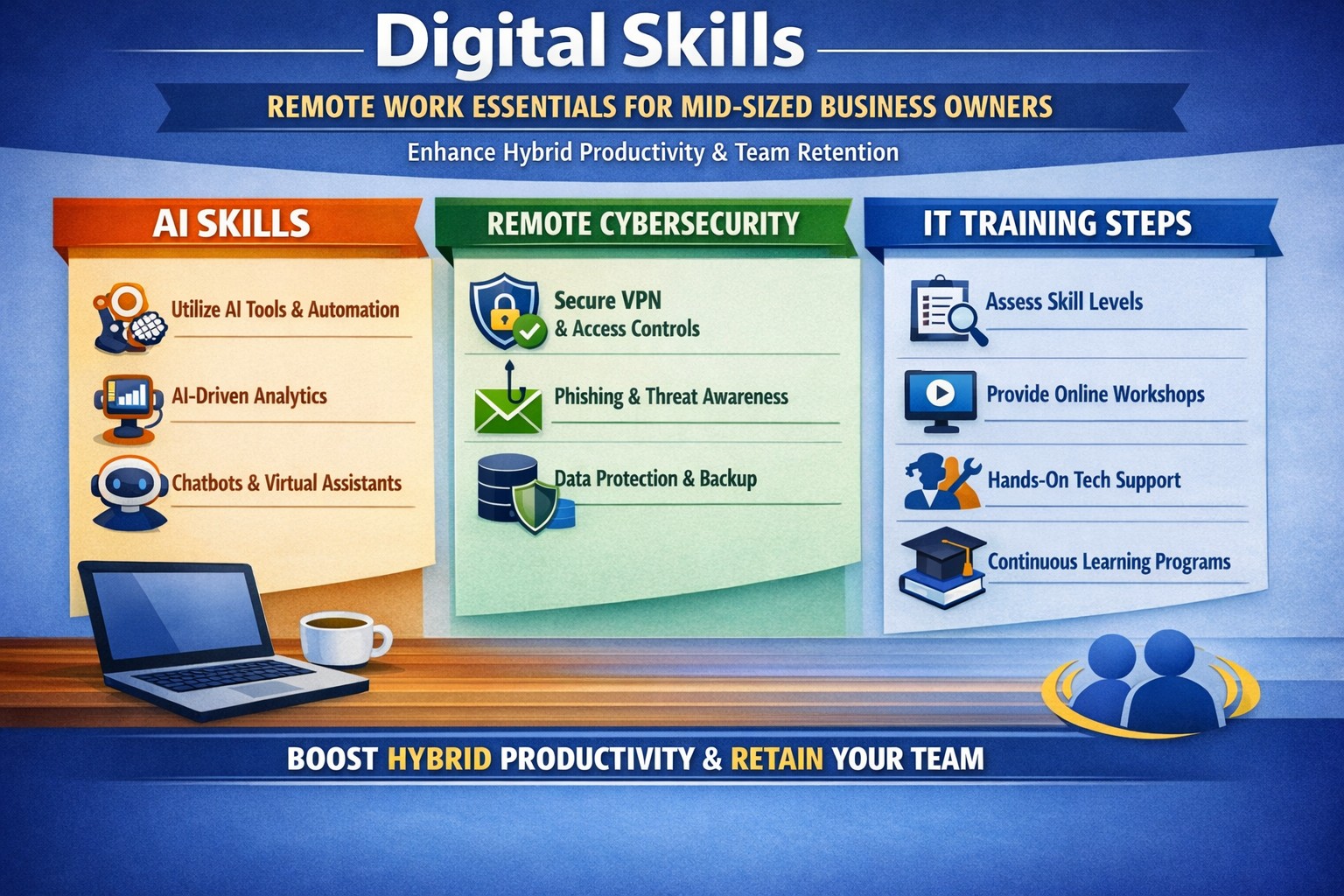
AI-Assisted Productivity: Leverage tools for task automation and analysis—daily AI use hit 26% last year, doubling output for proficient users.
Cognitive Flexibility and Adaptability: Shift seamlessly between tools and priorities in dynamic remote setups.
Strong Digital Communication: Master Slack, Microsoft Teams, and asynchronous updates to bridge time zones.
Tech Literacy and Troubleshooting: Handle basic IT fixes independently to minimize disruptions.
Cybersecurity Basics: Implement MFA and zero-trust models to protect distributed data.
Data Analytics: Use tools like Google Analytics or Power BI for real-time insights.
Digital Project Management: Coordinate via Asana or Monday.com for virtual team alignment.
These skills address remote challenges like collaboration gaps and productivity tracking.
Practical Action Steps
Business owners and IT departments should execute these steps systematically.
Assess Current Gaps: Survey your team on proficiency in the seven skills above; use free tools like LinkedIn Learning audits (1-2 weeks).
Build a Training Roadmap: Enroll in microlearning platforms (e.g., 15-min daily sessions on Coursera or freeCodeCamp) and allocate 4-6 hours weekly per employee.
Deploy Secure Infrastructure: IT to roll out VPNs, endpoint protection, and cloud access (e.g., Splashtop for remote desktops); test with a pilot group in 30 days.
Integrate AI Tools: Pilot enterprise AI like Microsoft Copilot or Zapier for automation; track ROI via output metrics quarterly.
Foster Continuous Upskilling: Launch internal “skill shares” via Zoom and tie bonuses to certifications (e.g., Google Data Analytics).
Monitor and Iterate: Use dashboards for skill adoption KPIs; adjust based on quarterly reviews.
These steps minimize risks like breaches (up 30% in hybrid setups) while accelerating hybrid efficiency.
Q&A: Client Inquiries Addressed
Q: How long until we see ROI from upskilling? A: Firms report 3x profitability within 6-12 months via reduced IT tickets and higher output.
Q: What if our team resists new tools? A: Start with voluntary pilots and gamified training; data shows 2.3x retention in adaptive programs.
Q: How do we secure remote access without slowing workflows? A: Adopt zero-trust with MFA—cutting threats while maintaining speed.
Q: Which skills yield the highest salaries for remote hires? A: AI/ML and cybersecurity top lists, with 20-50% premiums for mid-sized firms.
Q: Can we train in-house or need external help? A: In-house works for basics, but experts accelerate deployment for complex setups.
How Farmhouse Networking Accelerates Your Remote Transition
Farmhouse Networking specializes in mid-sized businesses across accounting, healthcare, and nonprofits, delivering tailored IT strategies for seamless remote adoption. We handle infrastructure audits, deploy secure cloud ecosystems, and integrate AI tools—slashing setup time by 50% versus DIY efforts. Our upskilling workshops certify teams in cybersecurity and project management, ensuring compliance (e.g., HIPAA for healthcare) and 99.9% uptime.
Call to Action
Ready to equip your team with digital skills? Email support@farmhousenetworking.com today for a free remote readiness assessment and custom roadmap.
Many of our customers have been experiencing some of their users having Outlook crashing immediately after opening. We even had other tech companies call to find out how we were fixing it, so we investigated and found the following known issue from Microsoft:
Users experiencing Outlook connection issues and crashes EX218604, Exchange Online, Last updated: July 15, 2020 10:12 AM Start time: July 15, 2020 9:18 AM User impact: Users may experience crashes or may be unable to access Exchange Online via Outlook. Current status: Our initial review of the available data indicates that recently deployed updates are the likely source of the problem. We’re performing an analysis of all recent service updates to isolate the underlying cause of the problem and to determine the most expedient means to restore service.
We will be keeping our monthly clients up to date on this issue.
Implement these hybrid meeting best practices to reclaim hours weekly.
Tired of meetings that drain time and productivity? As a business owner, mastering meetings can reclaim hours weekly, sharpen decisions, and drive growth. This guide delivers actionable steps tailored for you and your IT team.
Why Meetings Matter
Effective meetings align teams, solve problems, and spark innovation—yet poor ones waste 20-30% of work hours. Business owners who optimize them see faster execution and higher morale. Focus on purpose-driven gatherings to transform your operations.
Practical Action Steps
Follow these steps with your team and IT department for immediate impact.
Assess Meeting Necessity: Before scheduling, ask: “Does email or async update suffice?” Cancel 30% of meetings by testing this weekly.
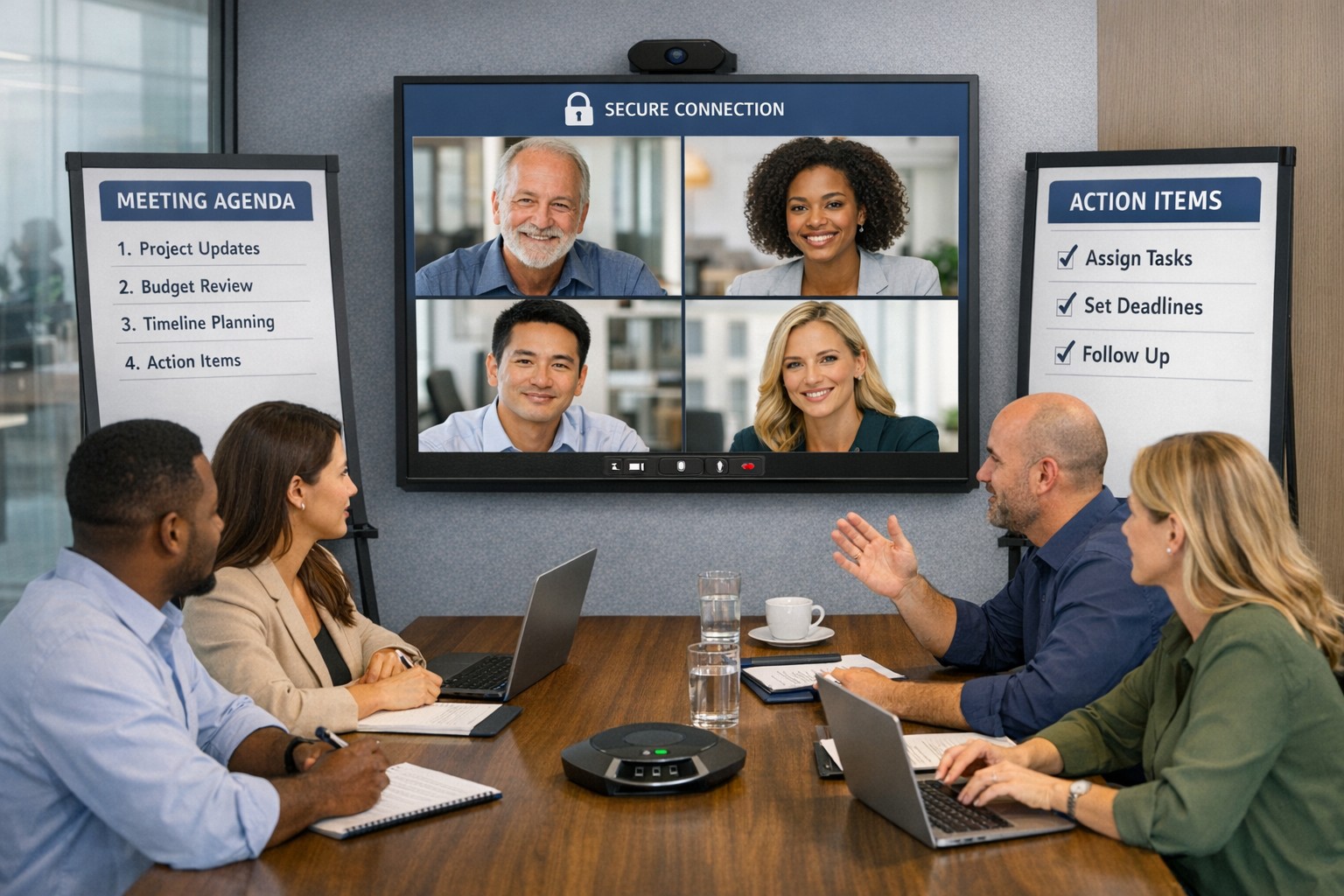
Craft Clear Agendas: Draft agendas 48 hours ahead with goals, topics as questions, time allocations (e.g., 10 mins per item), and attendees. Share via shared doc.
Set Tech Foundations: IT audits tools—ensure Zoom/Teams licenses, stable Wi-Fi (100Mbps+), backups like Google Meet. Test hybrid setups: cameras, microphones, screen sharing.
Run Structured Sessions: Start on time with purpose recap. Use timer for topics. Assign action items with owners/deadlines. End early if done.
Follow Up: IT logs recordings securely; send minutes within 24 hours with tasks tracked in tools like Asana or Trello.
Review and Iterate: Post-meeting, survey: “What worked? Improve?” Trim recurring meetings under 15 mins for huddles.
These cut meeting time by half while boosting outcomes.
FAQ: Client Inquiries Answered
Address common questions from accounting, healthcare, or charity clients.
How do we handle hybrid meetings? Prioritize equal participation: IT enables “raise hand” features, shared notes. Use noise-canceling mics and 4K cameras for remote clarity.
What if meetings overrun? Enforce time boxes; have a timekeeper. Shift overflow to async channels like Slack threads.
How to engage quiet team members? Start with round-robin input. Pose questions early. For virtual, use polls/reactions.
Best tools for secure meetings? Enterprise-grade like Microsoft Teams (HIPAA-compliant for healthcare) with end-to-end encryption. IT verifies compliance yearly.
How often for different meetings? Daily huddles (15 mins), weekly managers (30 mins), quarterly strategy (2 hours).
How Farmhouse Networking Helps
Farmhouse Networking specializes in IT solutions for accounting, healthcare, and charity sectors. We audit your meeting tech stack, deploy secure video platforms, optimize networks for lag-free hybrid calls, and train teams on best practices. Our SEO-driven blogs and custom strategies have helped clients cut meeting waste by 40%, freeing time for client wins. From branding your site to lead-gen automation, we handle it all.
Call to Action
Ready to make every meeting count? Email support@farmhousenetworking.com for a free meeting efficiency audit tailored to your business.
Leverage Microsoft collaboration tools like Teams to help customers work together efficiently and boost your business workflows.
You know collaboration drives growth—but scattered tools and poor communication waste time and opportunities. Microsoft technology, like Teams and Microsoft 365, enables your customers to work together effortlessly, boosting satisfaction and loyalty. This post outlines how to implement it effectively for your business.
Key Microsoft Collaboration Tools
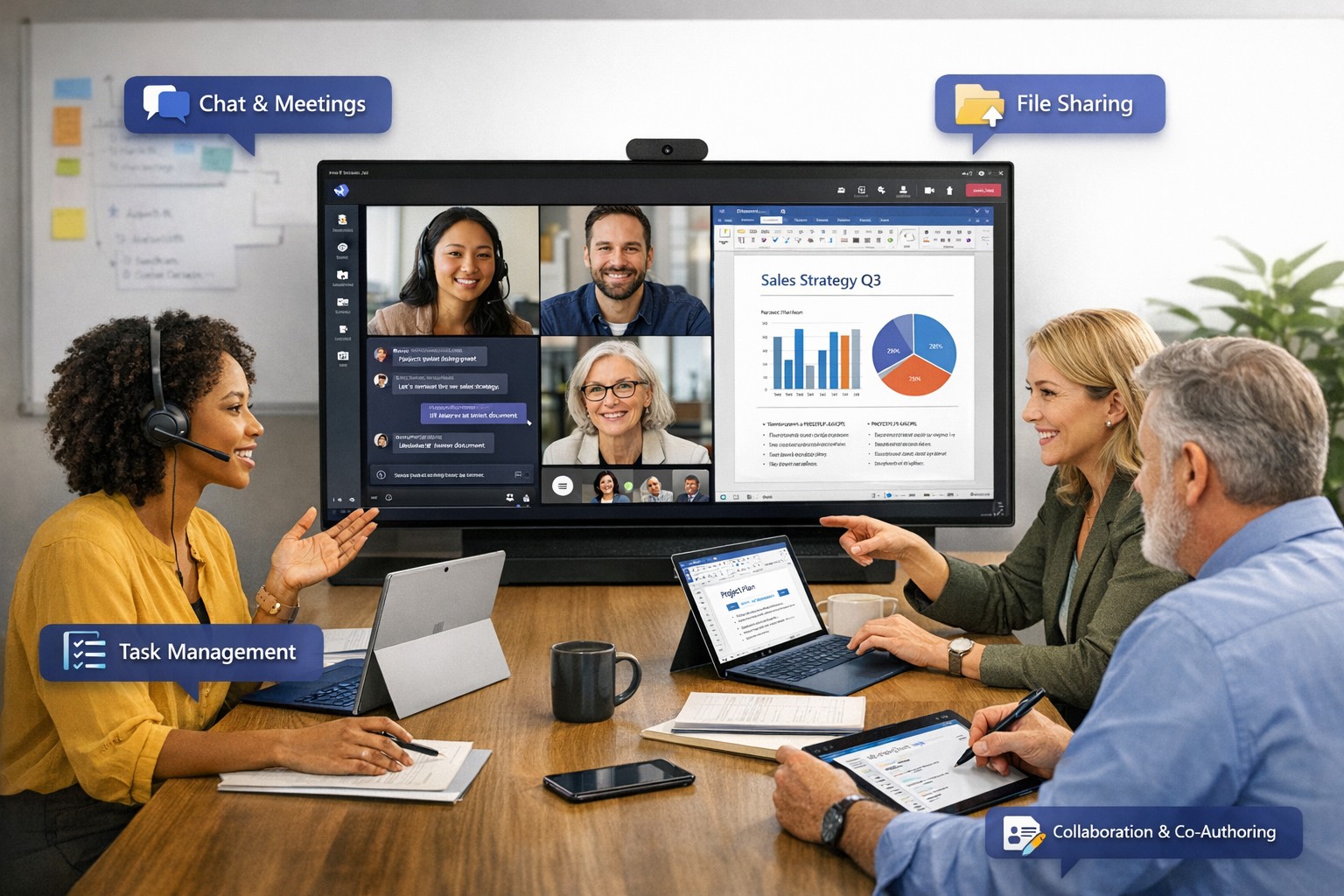
Microsoft Teams serves as the central hub for meetings, chats, calls, and file sharing, integrating with Outlook and OneNote for streamlined workflows. Tools like Microsoft Loop offer flexible workspaces for co-creation, while Whiteboard supports real-time brainstorming across locations. These features allow customers to join as guests, co-author documents, and track projects without switching apps, enhancing productivity by up to 30% in team settings.
Practical Action Steps
Follow these steps with your IT department to deploy Microsoft collaboration tools targeting customer interactions.
Assess Needs: Audit current customer touchpoints—review emails, support tickets, and feedback to identify collaboration gaps, such as delayed responses or siloed data.
Select Licensing: Choose Microsoft 365 Business Premium for Teams, SharePoint, and Copilot AI features; start with a 1-month trial to test scalability.
Set Up Teams Channels: Create dedicated customer channels for projects, enabling guest access; configure permissions to limit sensitive data exposure.
Integrate Tools: Link Teams with OneDrive for secure file sharing and Power Automate for automated workflows, like instant notifications on customer updates.
Train Staff: Run 2-hour sessions on co-authoring in Word/Excel and meeting recaps; use Microsoft’s free resources for onboarding.
Test and Monitor: Pilot with 5 key customers, tracking metrics like response time (aim for <2 hours) via Teams analytics; adjust based on feedback.
These steps typically take 2-4 weeks, yielding faster customer resolutions and stronger relationships.
FAQ: Customer Inquiries Answered
How secure is customer data in Teams? Microsoft Teams uses end-to-end encryption and compliance with GDPR/HIPAA, with guest access controls to prevent unauthorized sharing.
Can customers join without a Microsoft account? Yes, external guests join via browser or app invite—no account needed—ideal for quick collaborations.
What if our team is remote or hybrid? Teams supports anywhere-access with AI recaps, transcripts, and intelligent speakers for up to 1,000 attendees.
How does this integrate with existing CRM? Seamless with Dynamics 365 or third-party apps via APIs, syncing customer data for unified views.
What’s the ROI for small businesses? Businesses report 20-50% productivity gains through reduced email overload and real-time co-editing.
How Farmhouse Networking Helps
Farmhouse Networking specializes in Microsoft 365 deployments for accounting, healthcare, and charity sectors, ensuring SEO-optimized client portals and lead-gen strategies. We handle audits, custom setups, training, and ongoing optimization—delivering 99.9% uptime and measurable traffic growth to your collaboration hubs. Our experts integrate Copilot for AI-driven insights, turning customer interactions into B2B opportunities.
Ready to unlock Microsoft-powered collaboration? Email support@farmhousenetworking.com for a free consultation on improving your business today.
Consumer routers = compliance nightmares for business networks
Even though we recently sent out another email newsletter about this topic, we have to keep raising this issue as the work from home remains a regular occurrence. A German think tank analyzed 127 popular home routers with the majority having at least one flaw (D-Link, Netgear, ASUS, Linksys, TP-Link and Zyxel were affected by 53 critical-rated vulnerabilities each). The biggest problem is that most (91%) are built on top of an old version of Linux operating system and their makers rarely publish updates.
There are several solutions that we can discuss to secure your work from home networks, so contact us for assistance.
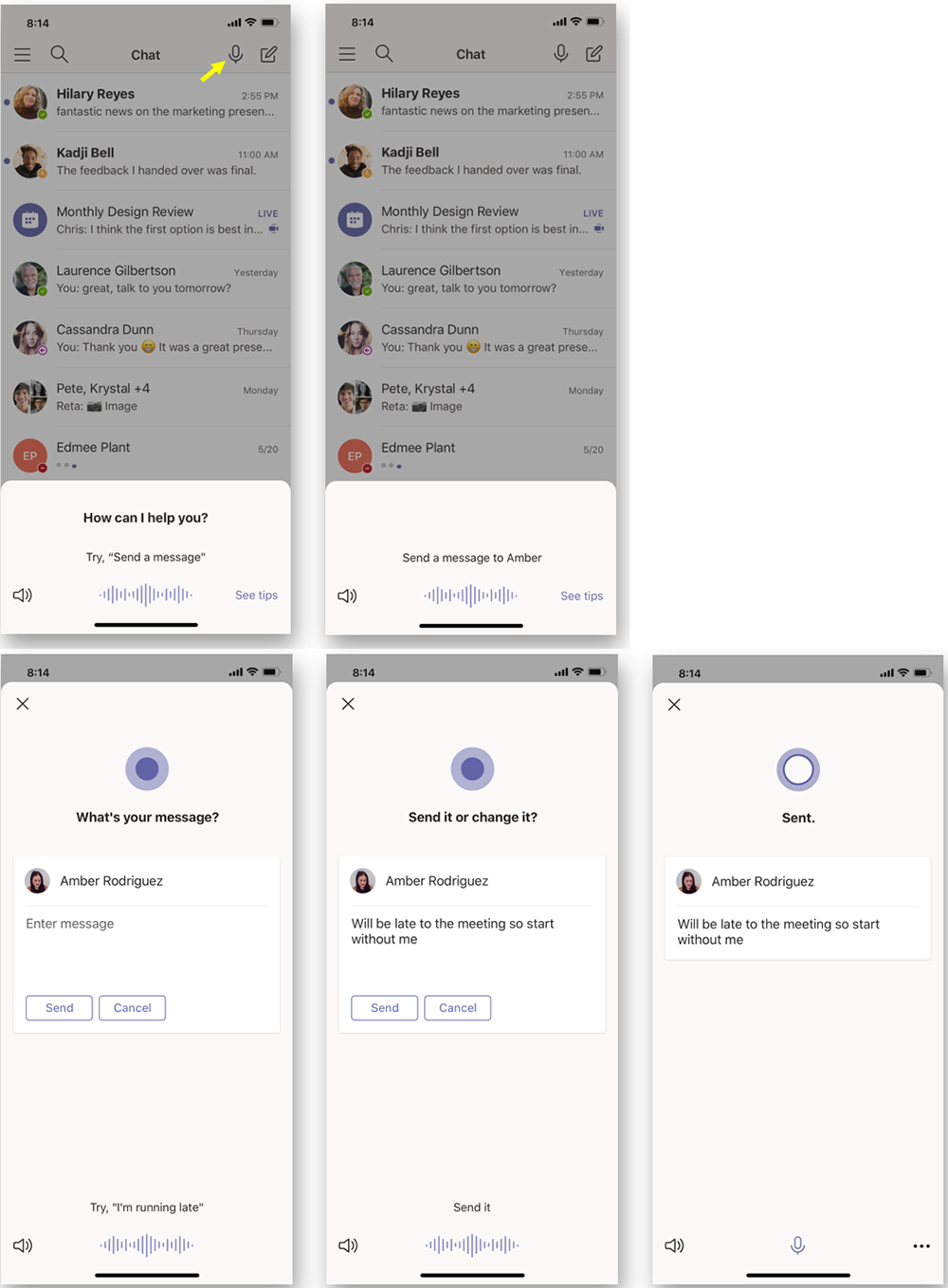
According to the Microsoft Office 365 development roadmap, an exciting new feature is coming to Microsoft Teams:
“Cortana is coming to the Teams mobile app, using AI and the Microsoft Graph to provide voice assistance in Teams. To stay connected to your team even when you have your hands full, click the microphone button on the top right and ask Cortana to make a call, join a meeting, send chat messages, share files, and more. These voice assistance experiences are delivered using Cortana enterprise-grade services that meet Microsoft 365 privacy, security and compliance commitments. Cortana will be available in the Teams mobile app on iOS and Android in the coming weeks for Microsoft 365 Enterprise users in the U.S. in English.”
Voice profiles transform generic transcripts into actionable intelligence
If your company is looking to collaborate with your office effectively, then contact us for assistance.
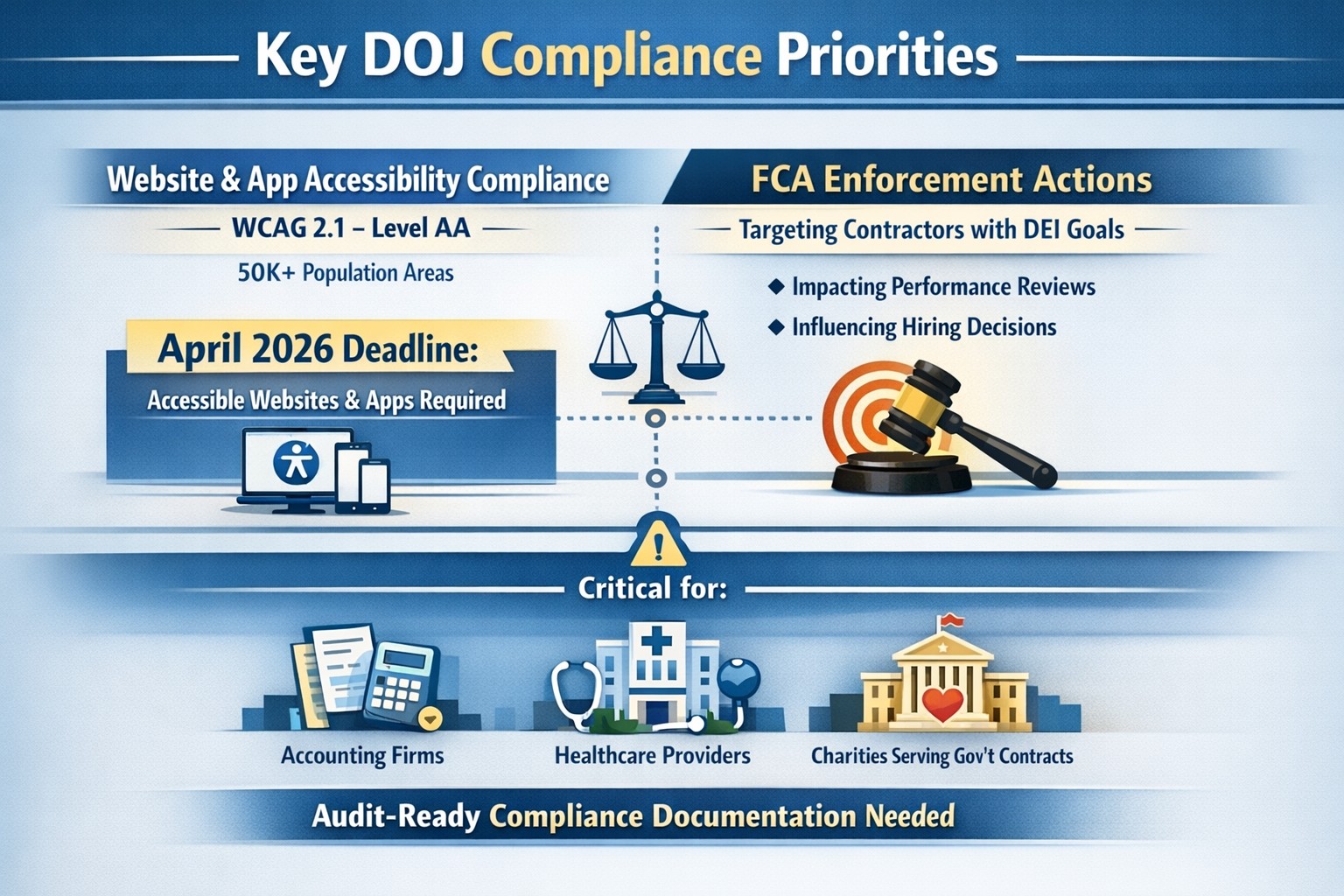
On June 1st, the Department of Justice (DoJ) release further guidance about compliance programs which could effect the way PCI and HIPAA compliance breaches are handled in court.
They state that compliance programs aren’t merely one-and-done snapshots in time, but are instead dynamic programs that get updated regularly to fit changing circumstances.
An article about it states, “the latest guidance issued by DOJ is premised almost entirely on the adequacy of the organization’s risk assessment efforts, an approach well-known and particularly applicable to cybersecurity professionals. Prosecutors are urged to evaluate the quality and effectiveness of an organization’s risk assessment program by examining:
The risk management process, particularly the methodology used to identify, analyze and address the risks an organization faces
Risk-tailored resource allocation, namely whether the organization devotes enough resources to managing risks
Updates and revisions, specifically whether the risk assessment is subject to periodic dynamic reviews
Lessons learned, determining whether the company has a process for tracking and coordinating changes in its risk management program based on its experience
The DOJ also stressed the importance of risk-based training and communications about misconduct as essential parts of how it determines whether the organization’s compliance programs are up to snuff. Finally, the guidance highlights the importance of management support of the organization’s compliance initiatives and the value of extending compliance due diligence to third-party providers.”
If your company is unsure about their compliance program or risk assessment process, then contact us for assistance.
How technology has transformed workplaces: a diverse team using cloud‑based tools and secure connections to collaborate more efficiently
The promise (and the reality) of workplace tech
When most business leaders adopted cloud tools, collaboration platforms, and automation over the last decade, the pitch was simple: technology will make work faster, smoother, and more productive. In many ways, that promise has delivered. Cloud‑based platforms now underpin hybrid work, AI‑driven analytics help you spot bottlenecks, and digital workflows have cut hours of manual effort.
Yet for many mid‑sized business owners, the reality feels messier. Tools are scattered. Systems don’t talk to each other. Employees juggle logins, notifications, and legacy apps that slow them down instead of speeding them up. The real question isn’t whether tech should make work better—it’s how to align your technology stack with your business model, your people, and your growth ambitions.
How technology has already transformed workplaces
Modern workplaces are no longer defined by cubicles and paper; they’re defined by data, connectivity, and automation.
Hybrid and remote work became mainstream, supported by cloud applications, collaboration suites, and secure remote‑access infrastructure.
Cloud adoption now stands at or near saturation for most organizations, enabling scalability, resilience, and faster deployment of new capabilities.
AI and automation are moving from pilot projects to core operations, with 24% of organizations reporting enterprise‑wide AI adoption in 2026—up from 12% in 2025.
Digital‑first workflows have replaced many manual processes, with nearly 90% of companies already relying on cloud technology as a baseline.
For mid‑sized business owners, that means the bar for “modern workplace” is no longer about buying a single tool; it’s about orchestrating a coherent, secure, and scalable technology ecosystem. Failing to manage that ecosystem properly can quietly erode productivity, raise security risks, and slow growth.
Practical steps for you and your IT team
If you’re a mid‑sized business owner, treat your technology stack as a growth‑enabling asset, not just a cost center. Here’s how you and your IT department can turn that promise into results:
1. Audit your current tech stack
Inventory all tools (CRM, accounting, HR, communications, file‑sharing, monitoring, etc.) and map how they connect.
Identify redundancies, unsanctioned tools (“shadow IT”), and gaps in security or integration.
2. Define one source of truth for data
Pick a primary system (e.g., a cloud ERP or CRM) and align reporting, workflows, and user‑experience around it.
Ensure that key systems can sync customer, employee, and financial data so decisions are based on one consistent dataset.
3. Standardize secure access and collaboration
Implement single sign‑on (SSO), multi‑factor authentication (MFA), and role‑based access controls for all cloud and on‑prem systems.
Standardize collaboration tools (e.g., one primary messaging platform and one video‑conferencing suite) to reduce training overhead and context switching.
4. Automate low‑value, repeatable tasks
Identify repetitive workflows (invoices, approvals, ticket handling, onboarding, reports) and automate them using workflow automation or RPA where appropriate.
Measure before and after: time saved per task, error reduction, and impact on customer‑facing SLAs.
5. Invest in continuous training and change management
Treat technology adoption as a change‑management project, not a “one‑and‑done” rollout.
Provide regular training sessions, quick reference guides, and “power‑user” champions in each department to drive adoption.
6. Revisit your security and compliance posture
Ensure cloud‑workload security, data‑retention policies, and endpoint protection keep pace with your growth and regulatory obligations.
Conduct periodic risk assessments and penetration testing, especially as AI‑driven tools and more data‑centric workflows come online.
For mid‑sized owners, these steps should be treated as ongoing disciplines, not one‑time projects. The goal is to build a workplace where technology recedes into the background and employees simply get more done.
Clients’ likely questions—answered
Q: “We already have a lot of tools—why can’t we just keep adding whatever we need?” A: More tools mean more complexity, more security gaps, and more training overhead. Modern mid‑sized businesses get better outcomes by streamlining around fewer, integrated platforms than by stringing together dozens of siloed apps.
Q: “How do we know if our tech is actually improving productivity?” A: Tie technology to measurable KPIs: cycle times, error rates, support‑ticket resolution time, and employee‑time‑spent‑on‑manual‑work. If you can’t quantify the benefit, you’re likely drifting into “tech for tech’s sake.”
Q: “Isn’t AI just hype for bigger companies?” A: AI is now a practical tool for any business that deals with data, workflows, or customer interactions. For mid‑sized firms, it often means automating routine tasks, surfacing insights from operational data, and improving customer service, not building bespoke AI models.
Q: “How do we protect ourselves from ransomware and data breaches while modernizing?” A: Modernization must include proactive security: cloud‑workload protection, endpoint detection and response, secure access controls, and regular backups. A well‑architected environment is actually more secure than a fragmented, legacy‑heavy one.
How Farmhouse Networking can help
Farmhouse Networking partners with mid‑sized business owners to turn technology from a cost center into a competitive advantage. For companies already operating in hybrid or distributed environments, we help:
Map and rationalize your technology stack so tools actually work together instead of against each other.
Design and implement secure, scalable cloud‑enabled workspaces, including secure remote access, SSO, and unified collaboration tooling.
Identify and automate repetitive workflows so your employees spend less time on manual tasks and more time on value‑add work.
Strengthen your security and compliance posture as you adopt AI‑driven tools, cloud services, and new data sources.
We don’t just sell equipment or licenses; we work with your leadership and IT team to align your technology with your business model, culture, and growth plans.
Ready to make technology work for you?
If you’re a mid‑sized business owner and you’ve ever thought, “We all knew tech would make work better—but it still feels like it’s making everything more complicated,” you’re not alone—and you’re in the right place.
And God will generously provide all you need. Then you will always have everything you need and plenty left over to share with others. As the Scriptures say, “They share freely and give generously to the poor. Their good deeds will be remembered forever.” For God is the one who provides seed for the farmer and then bread to eat. In the same way, he will provide and increase your resources and then produce a great harvest of generosity in you. - 2 Corinthians 9:8-10
We use cookies to ensure that we give you the best experience on our website. If you continue to use this site we will assume that you are happy with it.