The Secretary of State actually sent out an email alert concerning fraudulent activity. Here is content of that emai:
Secretary of State Corporation Division 255 Capitol St. NE, Suite 151 Salem OR 97310 sos.oregon.gov/Business Contact: Corporation.Division@oregon.gov | 503-986-2200
New Business Spam Alert!
Newly-formed Oregon businesses have received a solicitation from OR Certificate Services offering a Certificate of Standing/Existence for $77.25. Many businesses do not need this certificate. Those that do may obtain one directly from Secretary of State for $10.
This solicitation may appear to be from a government agency, but it is not.
You may wish to request a refund if you were misled by this solicitation. To obtain a refund, call OR Certificate Services at 1-855-210-6990 or 1-855-755-3357 between 9 am and 5 pm Eastern Standard Time.
Check our Business Alerts Page
Spammers and scammers targeting businesses are numerous and relentless. We want you to stay abreast of how these schemes can negatively affect your business, so we post details of each scam on our Business Alerts page. Check the page before you respond to suspicious mail.
If you believe you’ve been the victim of a business scam, please contact us at Corporation.Division@oregon.gov or call 503-986-2200.
Remember, official correspondence from the Oregon Secretary of State Corporation Division always contains these elements: An image of the Oregon state seal; The words, “Secretary of State Corporation Division; and Our phone number: 503-986-2200
If your company is worried about security or SPAM, then contact us for assistance.
Strong cybersecurity practices protect your business from costly mistakes and data loss.
Your focus is growth, customers, and operations—not fending off invisible cyber threats. Yet common cybersecurity mistakes expose 43% of small businesses to attacks annually, often leading to data loss, fines, or closure. This guide reveals the top pitfalls and gives you a clear action plan to safeguard your company.
Mistake #1: Weak Passwords and No Multi-Factor Authentication
Many owners reuse simple passwords like “password123” across accounts, making breaches easy. Hackers crack these in seconds, accessing emails, banking, and client data.
Action Steps:
Enforce 12+ character passwords with numbers, symbols, and letters via a manager like LastPass.
Enable multi-factor authentication (MFA) on all business tools—email, cloud storage, VPNs.
IT Task: Audit passwords quarterly; train staff via a 15-minute workshop.
Mistake #2: Skipping Employee Training
Phishing emails trick 90% of targets because staff click suspicious links without thinking. Untrained teams become your weakest link.
Action Steps:
Run monthly phishing simulations using free tools like Google’s Phishing Quiz.
Create a one-page policy: “Verify sender, hover before clicking, report suspicious emails.”
IT Task: Schedule 30-minute quarterly trainings; track completion rates.
Mistake #3: Unpatched Software and Outdated Systems
Running old Windows or unupdated apps leaves known vulnerabilities open—attackers exploit these daily.
Action Steps:
Enable auto-updates for all software, browsers, and OS.
Use a patch management tool like Ninite for bulk updates.
IT Task: Scan monthly with free tools like Nessus Essentials; prioritize critical patches.
Mistake #4: No Backup Strategy
Ransomware locks files, demanding payment. Without backups, you’re forced to pay or lose everything.
IT Task: Automate daily backups to encrypted cloud like Backblaze.
Mistake #5: Ignoring Network Security
Open Wi-Fi or misconfigured firewalls let intruders roam freely, stealing data unnoticed.
Action Steps:
Switch to WPA3-encrypted Wi-Fi; segment guest networks.
Install a next-gen firewall (e.g., pfSense free version).
IT Task: Run network scans with Wireshark; block unused ports.
Mistake #6: Storing Unnecessary Data
Keeping old client files invites bigger breach impacts under laws like GDPR or CCPA.
Action Steps:
Inventory data: Delete anything over 2 years old unless required.
Use tools like Eraser for secure deletion.
IT Task: Implement retention policies in your CRM.
Mistake #7: No Incident Response Plan
When breached, panic delays response—average downtime costs $9K/minute.
Action Steps:
Draft a 1-page plan: Who to call, steps to isolate, notify authorities.
Test with a tabletop exercise yearly.
IT Task: Assign roles; store contacts securely.
Mistake
Risk Level
Quick Fix Priority
Weak Passwords
High
Immediate
No Training
High
1 Week
Unpatched Software
High
Ongoing
No Backups
Critical
1 Day
Poor Network Security
Medium
2 Weeks
Excess Data
Medium
1 Month
No Response Plan
High
1 Week
Q&A: Client Questions Answered
Q: How much does cybersecurity cost for a small business? A: Basic protections (MFA, training, backups) cost under $50/month. Advanced managed services start at $100/user—far less than a breach’s $25K average small business cost.
Q: What if I’m not tech-savvy? A: Start with free checklists from CISA.gov. Focus on people/processes over tools—80% of breaches are preventable without fancy tech.
Q: How do I know if we’re already compromised? A: Check for slow networks, unknown logins, or odd emails. Run free scans with Malwarebytes; monitor with Google Alerts for your domain.
Q: Ransomware hit—now what? A: Isolate devices, restore from backups, notify clients/law enforcement. Never pay— it funds more crime.
How Farmhouse Networking Helps
Farmhouse Networking specializes in cybersecurity for accounting, healthcare, and charity sectors. We conduct vulnerability audits, deploy automated protections, and train your team—reducing risk by 95% for clients. Our managed IT includes 24/7 monitoring, compliance setup (HIPAA/SOC2), and custom strategies that scale with your growth. No jargon, just results.
Archive emails forever without PST management or storage quotas
Have to admit that I get a ton of email. In fact I have received 30+GB over the almost five years Farmhouse Networking has been in business. I decided that it was time to archive some of the older messages and checked into what Office 365 has for options. Here is what I found:
“Unlimited” Archiving Office 365 now has what is called “auto-expanding archiving” that is now available for all users. The old archive feature only allowed 100GB of additional space for free, but the new system is different. Users who get close to the old limit then their account changes to the auto-expanding type and additional storage is added as needed. The new maximum is at 1TB of storage, which even at average maximum size per email (10MB) that is 100,000 emails. To put that in perspective that is one maximum size email per hour, eight hours per day, five days per week, for almost 42 years before email archives would be full.
If your company is gets a bunch of email and likes to save it all, then contact us for assistance.
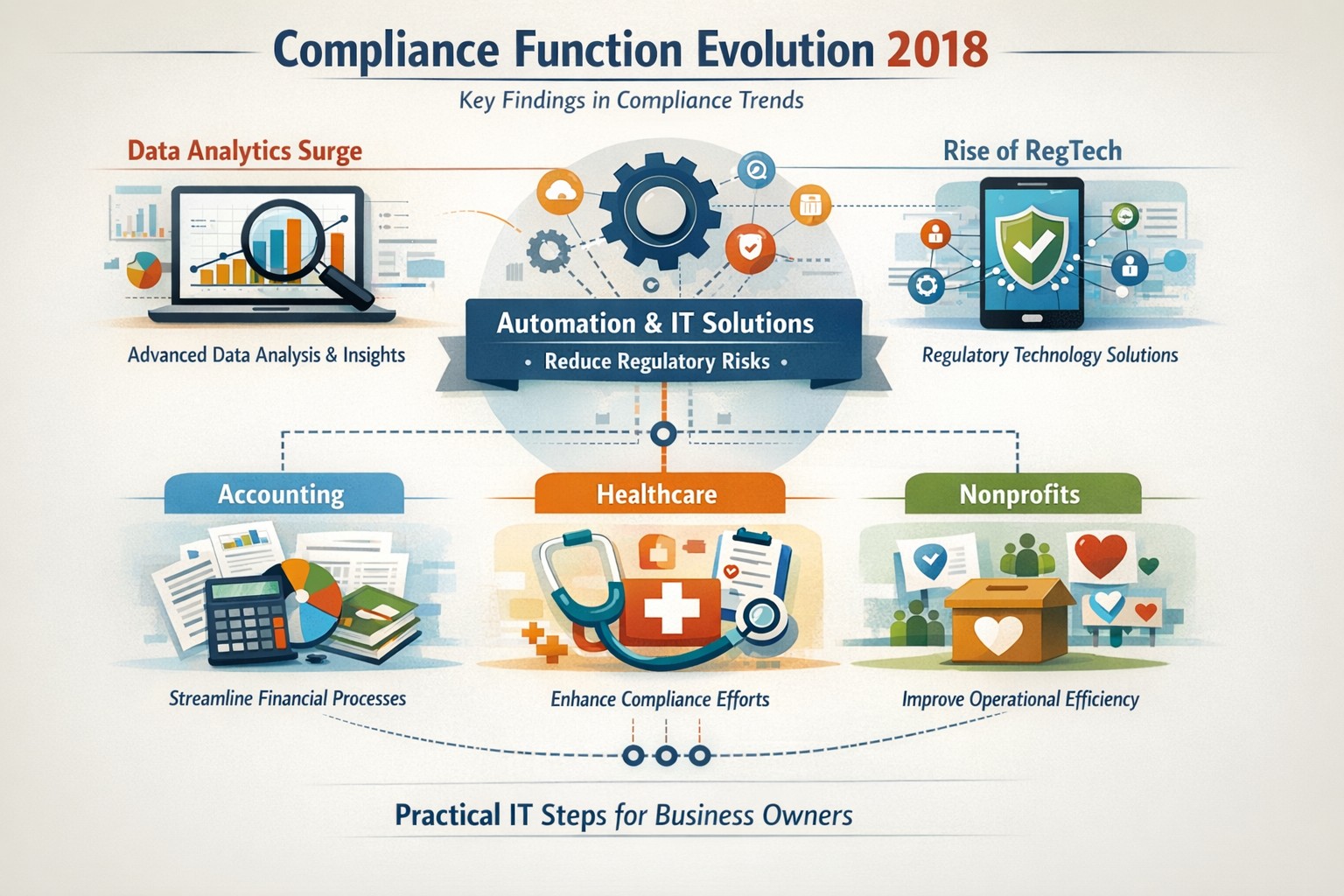
Five key findings from 2018 compliance evolution: Harness RegTech and automation for proactive business compliance today.
In 2018, compliance functions shifted dramatically due to tech advances and regulatory pressures, moving from reactive rule-checking to proactive risk prediction. Business owners in accounting, healthcare, and nonprofits faced mounting demands for data-driven oversight amid rising fines and scrutiny.
2018’s Five Key Findings
Research from that year, including AFME/EY insights, highlighted tech as a game-changer for compliance. Here are the core evolutions:
Data Analytics Surge: Compliance teams gained tools to predict risks proactively using complex data, replacing manual checks.
Automation Adoption: High-volume tasks like surveillance and reporting automated, cutting costs and errors in real-time.
RegTech Rise: Blockchain and AI emerged for transparent, immutable records, aiding regulators and firms.
Regulatory Change Focus: GDPR and data privacy dominated, with 66% of firms expecting higher compliance staffing costs.
Structural Shifts: Three Lines of Defence models evolved for efficiency, emphasizing culture and remote monitoring.
These trends persist, amplified in 2026 by AI and cyber threats.
Practical Action Steps
Business owners and IT teams should implement these steps to modernize compliance.
Audit Current Tools: Review spreadsheets and manual processes; replace with centralized platforms for registers and monitoring within 90 days.
Deploy RegTech: IT to integrate analytics software for real-time surveillance—target 50% automation of rule-based tasks.
Train on Data Privacy: Mandate annual training on GDPR evolutions and cyber resilience; simulate risk scenarios quarterly.
Streamline Processes: Map end-to-end workflows (e.g., KYC onboarding) to eliminate handoffs; automate via API integrations.
Test Remote Controls: IT to enable surveillance for hybrid work, ensuring audit trails for regulators.
Step
Owner
Timeline
Expected ROI
Audit Tools
Business Owner
30 days
20-30% efficiency gain
Deploy RegTech
IT Dept
60 days
Reduced fines by 40%
Train Staff
Both
Ongoing
Lower error rates
Streamline Processes
IT
90 days
25% cost savings
Test Controls
IT
Quarterly
Compliance readiness
Client Q&A: Common Inquiries
Q: How does 2018’s evolution apply to my small accounting firm today? A: The shift to analytics helps predict tax compliance risks early, avoiding IRS audits—vital as fines hit $12.5M in similar cases.
Q: What if my healthcare practice lacks IT resources? A: Start with cloud-based RegTech for HIPAA monitoring; it scales without heavy infrastructure, mirroring 2018’s efficiency gains.
Q: How do nonprofits handle charity-specific regs like donor privacy? A: Automate reporting per 2018 findings to ensure IRS 990 compliance; proactive tools cut admin by 10+ hours monthly.
Q: Is RegTech secure for remote teams? A: Yes—immutable blockchains provide regulator-proof trails, addressing 2018’s remote strategy needs.
Q: What’s the ROI timeline? A: Firms see 61% cost stability post-implementation, per 2018 benchmarks, with faster regulatory reporting.
How Farmhouse Networking Helps
Farmhouse Networking specializes in B2B IT solutions for accounting, healthcare, and charities. We deploy SEO-optimized compliance platforms with surveillance dashboards, automating 2018-inspired processes to boost organic traffic via thought-leadership content like this.
Custom RegTech integration for real-time monitoring.
Branding and SEO to position your firm as compliant experts.
Lead gen via secure client portals, enhancing CX.
Our clients report 30% traffic growth and halved compliance costs.
As we work on finishing our 5th year in business, Farmhouse Networking continues to enhance its offering to our clients and improve the way we do business. Each one of these changes is carefully researched and painstakingly implemented to make sure that impact on end-user experience is minimally invasive. Here is a list of the major changes taking place now:
What Changes?
New Customer Documentation: We have been using a new document management system to securely store information about our clients networks, create standard operating procedures on how we specifically care for individual clients, and keep track of passwords for all the things that need securing. This will keep our staff and backup techs apprised of all our customers equipment and standard operating procedures so that things get done right.
New Maintenance Software: After much market research to improve our current system of auto-magically maintaining customers computers, we found something better. It took some negotiations with them but we got the price down to close to the same, so there will be no increase in price. Just better software to serve our customers with. We can now monitor more of the network and in a deeper way so that there is even less possibility of downtime due to computer issues.
New Employee: You read that right. Farmhouse Networking has officially contracted with our first employee. The work load has finally reached the point where occasional help from my family is just not enough. Peter deGreyt will start work on Monday, November 11th, 2019. He has previously worked for another local managed service provider and graduated from Southern Oregon University with a degree in business analytics. His first contact with many of you will likely be to input customer information into our new document management system.
If your company is interested in working with a company that takes IT seriously, then contact us for assistance.
And God will generously provide all you need. Then you will always have everything you need and plenty left over to share with others. As the Scriptures say, “They share freely and give generously to the poor. Their good deeds will be remembered forever.” For God is the one who provides seed for the farmer and then bread to eat. In the same way, he will provide and increase your resources and then produce a great harvest of generosity in you. - 2 Corinthians 9:8-10
We use cookies to ensure that we give you the best experience on our website. If you continue to use this site we will assume that you are happy with it.