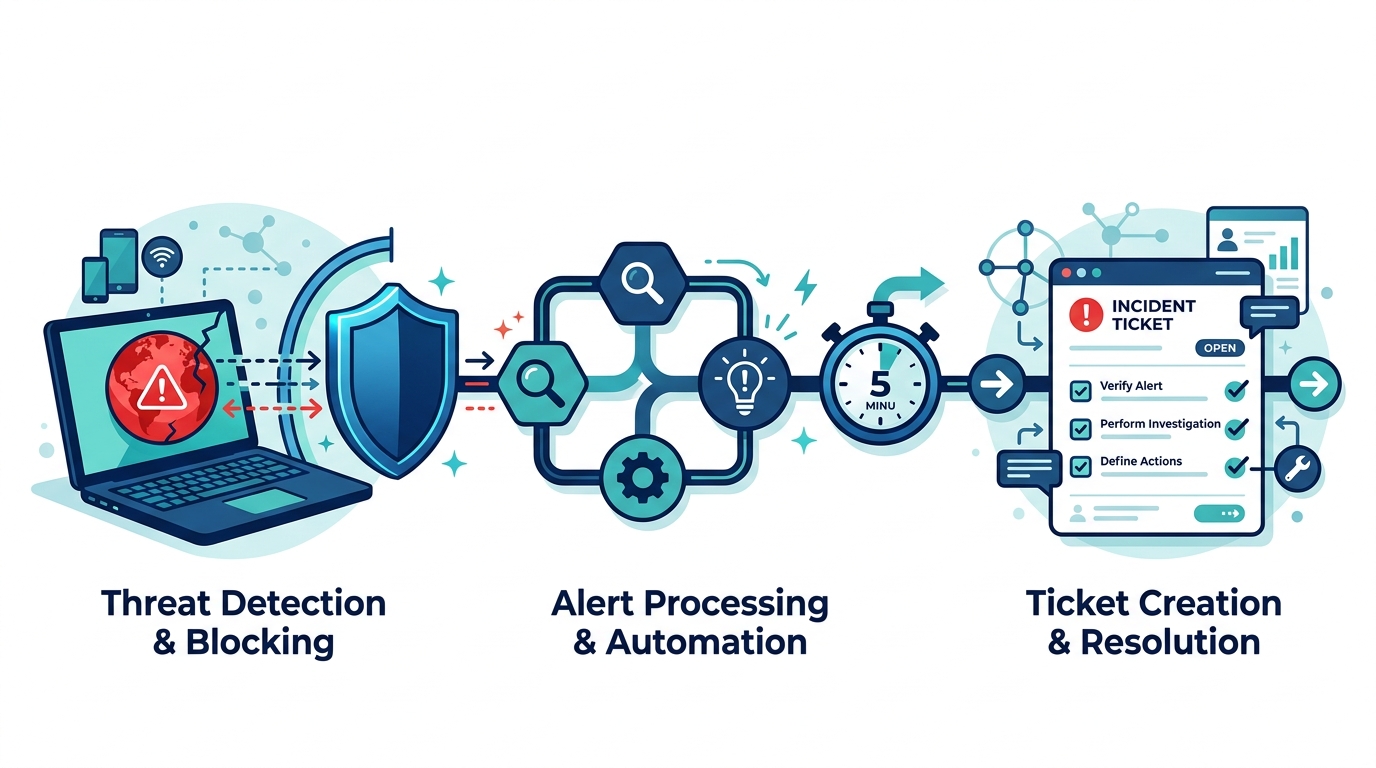
A blocked malware site in DefensX becomes a SuperOps ticket within five minutes, with no technician watching a dashboard.
As our business continues to grow our focus is on providing white labeled Tier 3 IT support services, RMM as a service, and co-managed IT services. This blog will be highlighting tips for using an n8n workflow to watch a DefensX global URL group and open a SuperOps ticket whenever a client machine tries to reach a site on it. We keep a global malware list in DefensX that applies to every customer. A block on that list is not routine web filtering. It means something on that machine tried to reach a known bad destination, and we want a technician looking at it in minutes, not at the next report review.
Research
DefensX has a Partner API with log endpoints for every customer, and SuperOps has a GraphQL API that can create tickets. The plan was simple: poll DefensX, find blocks from our list, create a ticket for the right client. Getting there took more discovery than expected. Here is what we ran into:
There is no webhook, and the logs don’t say which group caused the block. The URL log gives you the URL, the action and a category, but not the URL group that matched. The workflow has to pull the group’s entries itself and do the matching. That means handling all three entry styles DefensX allows: exact hostnames, *.domain.com wildcards, and full URLs with a path.
Browser logs are only half the picture. Our first test was a curl from a command prompt, and it never appeared in the URL logs. The browser extension only sees browser traffic. Anything else, including scripts and processes running as SYSTEM, is caught by the agent and written to the DNS logs. Since malware rarely uses the browser, the workflow checks both endpoints for every customer.
DNS logs are large. One customer returned more than 5,700 DNS rows in a 20-minute window, which is over the 5,000-row page limit. Pagination is not optional.
SuperOps required a field the schema calls optional. Our first ticket failed with mandatory_validation_failed on requestType, even though introspection shows it as a plain optional string. The tenant enforces it.
The next error named a field we never sent. After adding requestType: "Incident", SuperOps answered with referred_value_does_not_exist on ticketType. The field was renamed at some point and the error still uses the old name. The real problem was the value: ticket types are customizable per tenant, and ours has no type called “Incident”. It has “Incident – Security”.
Our API token could not look up the answer. We tried reading the type from existing tickets. The list query returned a total count of 429 and zero rows, and single-ticket lookups returned forbidden. The token could create tickets but not read them. What finally explained everything was asking the schema for field descriptions, not just field types. The description for requestType states that it replaced ticketType and tells you which query lists the valid options.
Repeat hits would flood the board. A machine retrying a blocked connection every few seconds would create a ticket on every run. The workflow remembers each user and site pair for 24 hours and tickets it once. It also keeps a separate time cursor per customer, so a failed API call for one customer is retried from where it left off without holding up the others.
Variables
Everything you need to change lives in one Set node at the top of the workflow:
urlGroupName – the exact name of the DefensX URL group to watch, for example Global Malware List
groupOwnerCustomerId – leave blank if the group lives on your partner account; otherwise the ID of the customer that owns it
suppressHours – how long to stay quiet about the same user and site after a ticket is created (default 24)
overlapMinutes – how far each run reaches back past the last one, to catch logs that arrive late (default 5)
includeConsented – whether to report blocks the user clicked through (default true)
defangUrls – writes sites as example[.]com in the ticket so nobody clicks one by accident (default true)
superopsSubdomain – your SuperOps subdomain, sent as the CustomerSubDomain header
ticketRequestType – one of your own ticket type names, spelled exactly as it appears in SuperOps
fallbackSuperOpsAccountId – the client that receives the ticket when a DefensX customer name has no match in SuperOps
customerNameMap – optional JSON for customers whose names differ between the two systems
API keys go in n8n credentials, never in the workflow itself.
Script Snippet
The matching logic runs in a Code node. Wildcard entries match the domain and every subdomain, and path entries are only checked against URL logs because a DNS lookup has no path:
function findEntry(target, hasPath) {
  for (const e of ctx.entries) {
    const hostOk = e.wildcard
      ? (target.host === e.host || target.host.endsWith('.' + e.host))
      : target.host === e.host;
    if (!hostOk) continue;
    if (!e.path) return e;
    if (hasPath && (target.path === e.path || target.path.startsWith(e.path + '/'))) return e;
  }
  return null;
}
Both log endpoints use the same pagination settings on the HTTP Request node:
Each ticket lands on the matching SuperOps client with a table showing the time, user, device, site, number of blocks and whether it came from the browser or the agent. Query strings are stripped from URLs before they are written, so session tokens never end up in a ticket.
The complete workflow, with the customer loop, DNS and URL log handling, SuperOps client matching and duplicate suppression, is free on our GitHub: [GITHUB LINK]
If your company is a MSP or wants to become one and automation just seems out of reach, then contact us to run your RMM for you.
Duo authentication and admin activity logs flowing into a self-hosted Wazuh SIEM, ready for MFA monitoring and CMMC audit evidence.
As our business continues to grow our focus is on providing white labeled Tier 3 IT support services, RMM as a service, and co-managed IT services. This blog will be highlighting tips for using a Bash script to forward Cisco Duo MFA logs into a self-hosted Wazuh SIEM.
We recently connected Duo to the onsite Wazuh server of a client working toward CMMC Level 2. Logging every MFA event and every admin change is part of the evidence an assessor wants to see (NIST 800-171 controls 3.3.1 and 3.5.3). Duo ships an official tool for exactly this. Getting it to produce real Wazuh alerts took some work, so we turned everything we learned into one script that you can run by hand or from SuperOps RMM.
Research
Duo publishes DuoLogSync (github.com/duosecurity/duo_log_sync), a small Python service that pulls logs from the Duo Admin API and sends them as JSON over TCP. The plan was simple: run DuoLogSync on the Wazuh manager, send its output to a syslog listener that only accepts local connections, and let Wazuh’s built-in JSON decoder do the rest. No agent, no public port, no custom decoder.
In practice, five things got in the way. They aren’t obvious from the documentation:
Stock Wazuh rule 86600 (Suricata) matches any JSON event that has both “timestamp” and “event_type” fields. Duo auth logs have both, so every event was captured by a level 0 rule and silently thrown away. Our rules now hang under 86600 as child rules.
Wazuh loads every rule file, stock and custom together, in alphabetical order. Naming the file 9999_duo_rules.xml makes sure it loads after the stock rules it depends on.
“action” is a reserved Wazuh field name, so a field match on it stops the whole ruleset from loading. Use the <action> tag or a dotted field like action.name instead.
DuoLogSync 2.4 retired the “adminaction” endpoint. Admin events now come from the “activity” log, which has a completely different JSON layout.
DuoLogSync opens one TCP connection and never reconnects. Every Wazuh manager restart quietly lost the next batch of logs. The fix is a systemd unit tied to the manager with PartOf=wazuh-manager.service.
The payoff showed up right away. The 180-day history pull surfaced twelve failed Active Directory syncs, all caused by a Duo Authentication Proxy outage. If an AD sync fails, a user you just disabled in AD can still pass Duo, so that’s a finding worth knowing about.
Variables
DuoIntegrationKey = The integration key of a Duo Admin API application with only “Grant read log” permission – i.e. DIXXXXXXXXXXXXXXXXXX DuoSecretKey = The secret key for that application (mark this as a secure variable in SuperOps) DuoApiHost = The API hostname from the same application – i.e. api-xxxxxxxx.duosecurity.com DuoEndpoints = Optional. Which Duo logs to pull – default auth,telephony,activity DuoOffsetDays = Optional. How many days of history to pull on the first run, maximum 180 DuoAction = Optional. install, status, resend or uninstall
Script Snippet
The full script handles prerequisite checks, backups, validation, automatic rollback, and a final check with wazuh-logtest. These are the core pieces:
# DuoLogSync config - single quotes are required by DLS
cat > /opt/duologsync/config.yml <<EOF
version: '1.0.0'
dls_settings:
  log_format: 'JSON'
  api:
    offset: $DLS_OFFSET_DAYS
  checkpointing:
    enabled: True
    directory: '/opt/duologsync/checkpoints'
servers:
  - id: 'wazuh'
    hostname: '127.0.0.1'
    port: 5140
    protocol: 'TCP'
account:
  ikey: '$DUO_IKEY'
  skey: '$DUO_SKEY'
  hostname: '$DUO_API_HOST'
  endpoint_server_mappings:
    - endpoints: ['auth', 'telephony', 'activity']
      server: 'wazuh'
EOF

# Local-only listener added to ossec.conf
<remote>
  <connection>syslog</connection>
  <port>5140</port>
  <protocol>tcp</protocol>
  <local_ip>127.0.0.1</local_ip>
  <allowed-ips>127.0.0.1</allowed-ips>
</remote>

# Duo auth events are claimed by Suricata rule 86600 - attach under it
<rule id="120000" level="0">
  <if_sid>86600</if_sid>
  <field name="txid">\.+</field>
  <field name="factor">\.+</field>
  <description>Duo: authentication event</description>
</rule>

# systemd: restart with the manager, wait for the listener first
[Unit]
After=wazuh-manager.service
PartOf=wazuh-manager.service
[Service]
ExecStartPre=/bin/bash -c 'until ss -ltn | grep -q "127.0.0.1:5140 "; do sleep 2; done'
ExecStart=/opt/duologsync/venv/bin/duologsync /opt/duologsync/config.yml
Restart=always
The complete script, the SuperOps edition, and the full ruleset (with alerts for MFA fraud reports, MFA fatigue, admin panel brute force, Duo configuration changes and AD sync failures, all tagged for NIST 800-171) are free on our GitHub: https://github.com/FarmhouseNetworking/Duo-Wazuh-LogSync
If your company is a MSP or wants to become one and automation just seems out of reach, then contact us to run your RMM for you.
Key network monitoring tools every small business needs for optimal performance
As a business owner, you know reputation and customer trust are everything. But cybercriminals don’t discriminate by size—small and midsize businesses (SMBs) are increasingly the targets of ransomware and data theft. CIS Critical Security Control 13 gives you a practical way to stay ahead of attackers and protect your company’s future.
Practical Action Steps for SMBs:
Enable real-time network monitoring: Know immediately if your systems are under attack.
Centralize your logs: Aggregate data to detect issues before they escalate.
Set threshold-based alerts: Don’t wait until damage is visible to respond.
Review reports regularly: Make monitoring part of monthly executive/IT reviews.
Q&A for SMBs:
“Aren’t we too small for hackers to notice?” No—SMBs are now among the most targeted because criminals assume defenses are weak.
“Do I need an in-house IT team for this?” Not necessarily—outsourced experts can cost-effectively handle monitoring for you.
How Farmhouse Networking Helps: Farmhouse Networking provides SMBs with managed network monitoring, advanced alerts, and proactive defense strategies. We scale solutions to fit your size, budget, and growth goals.
Don’t leave your business exposed. Email Farmhouse Networking today and start building stronger defenses for lasting success.
Relieve IT staff burnout with co-managed services, ensuring vacations don’t disrupt business operations
Imagine this: Your trusted IT staff member, the backbone of your business’s technology, needs a well-deserved vacation or calls in sick. Suddenly, your entire operation is at risk—projects stall, security gaps widen, and stress levels spike. For many business owners, this scenario is all too familiar. Relying on a single person for all IT needs can lead to burnout, costly downtime, and vulnerabilities that threaten your success.
Why Co-Managed IT Is the Smart Solution
Co-managed IT is a partnership that blends your in-house IT expertise with the resources and experience of a dedicated IT provider. This approach ensures there’s always IT support, so your business never misses a beat. Here’s why it matters:
Avoid the costs and risks of being understaffed or overburdened.
Gain a trusted team monitoring and managing your systems.
Your IT staff focuses on day-to-day operations and business-specific needs.
The co-managed provider handles monitoring, backups, cybersecurity, and complex projects.
Both teams communicate and collaborate, ensuring seamless coverage and peace of mind.
Practical Steps to Get Started with Co-Managed IT
If you’re ready to future-proof your business, here’s how you and your IT department can take action:
Assess Your Current IT Workload: Identify areas where your IT staff feels stretched thin or lacks specialized expertise.
Pinpoint Critical Systems: List essential operations and data that must remain secure and accessible at all times.
Open the Conversation: Discuss with your IT staff how external support could relieve pressure and enhance performance.
Research Co-Managed IT Providers: Look for partners with a proven track record, strong communication, and a collaborative approach.
Develop a Transition Plan: Work with your chosen provider to outline roles, responsibilities, and communication channels.
How Farmhouse Networking Can Help
Farmhouse Networking specializes in co-managed IT solutions tailored for businesses like yours. We work alongside, not replace, your internal IT team by offering:
24/7 monitoring and rapid response to keep your systems running smoothly.
Advanced cybersecurity to protect your data from evolving threats.
Expert support for complex projects and technology upgrades.
Seamless collaboration that empowers your staff and maximizes efficiency.
Our approach ensures your business is never vulnerable—whether your IT staff is on vacation, out sick, or simply needs an extra set of hands.
Ready to Safeguard Your Business?
Don’t let a single absence put your business at risk. Email us today to discover how Farmhouse Networking can help you achieve uninterrupted operations, reduce IT stress, and drive your business forward with confidence.
Why Every Minute Matters and How Farmhouse Networking Delivers
Every minute of system downtime costs your small business money—proactive monitoring and managed IT services dramatically reduce outages and protect your revenue.
Imagine your business suddenly grinds to a halt—orders can’t be processed, patient records are inaccessible, and your team is scrambling to keep up. Technical issues or downtime can stop operations in their tracks, leading to lost revenue, frustrated customers, and even dissatisfied patients in healthcare settings. Today every second of downtime can cost thousands of dollars and erode the trust your clients and patients place in your organization.
Why Farmhouse Networking Stands Out Among MSPs
Farmhouse Networking isn’t just another managed service provider (MSP)—we’re your proactive partner in preventing costly system interruptions. While many MSPs offer basic monitoring and support, Farmhouse Networking delivers a competitive advantage through a blend of advanced technology, rapid response protocols, and a deep understanding of the unique challenges faced by healthcare, manufacturing, and charity sectors.
Our approach is built on proactive monitoring, which means we detect potential issues—such as failing hardware, network bottlenecks, or cyber threats—before they impact your operations. With 24/7 monitoring and clearly defined Service Level Agreements (SLAs), we guarantee swift issue resolution, minimizing downtime and keeping your business running smoothly. Unlike in-house IT teams limited to business hours, our team is always on standby, ready to tackle urgent problems the moment they arise.
Key Features and Benefits: What Farmhouse Networking Offers
Proactive Network Monitoring: Continuous oversight of your IT infrastructure to catch and resolve issues before they escalate.
Rapid Issue Resolution: Fast response times with clear SLAs, ensuring minimal disruption to your business operations.
Disaster Recovery Planning: Comprehensive plans tailored to your organization, including risk assessment, backup strategies, and clear communication protocols to restore services quickly in case of a disaster.
Customized Support: Solutions designed specifically for healthcare, manufacturing, and nonprofit sectors, addressing industry-specific compliance and security needs.
Employee and Patient Satisfaction: By keeping systems online and data secure, we help you maintain trust with both your team and your clients or patients.
A Real-World Example: The Value of Proactive MSP Support
Consider a healthcare provider facing a network outage. Without proactive monitoring and rapid response, clinicians may be unable to access electronic health records, leading to delayed diagnoses, treatment errors, and frustrated patients. Farmhouse Networking’s proactive approach ensures these scenarios are prevented or swiftly resolved, safeguarding both patient safety and your organization’s reputation.
Secure Your Business Continuity
Don’t let system downtime disrupt your business or compromise your clients’ trust. Farmhouse Networking is ready to help you minimize downtime, maximize productivity, and keep your operations running smoothly—no matter what challenges arise.
Email us today to learn more about how Farmhouse Networking can improve your business continuity and end system downtime for good. Let’s build a more resilient future together.
How MSP Automation Transforms Manual Workflows for Business Owners
MSP automation eliminates manual tasks and boosts operational efficiency
Are you still relying on manual processes and inefficient workflows to run your business? If so, you’re not alone—but you may be leaving significant productivity and profitability on the table. Modern Managed Service Providers (MSPs) are helping business owners like you automate routine tasks, integrate essential applications, and streamline operations like never before. Here’s how MSP-driven automation can revolutionize your daily operations and set your business up for scalable success.
The Problem: Manual Workflows Are Costing You Time and Money
Manual data entry, repetitive administrative tasks, and disconnected systems can bog down even the most dedicated teams. These inefficiencies lead to:
Wasted time: Employees spend hours on tasks that could be automated.
Increased errors: Manual processes are prone to mistakes, leading to costly corrections.
Slower growth: When staff are overwhelmed with routine tasks, there’s little bandwidth left for innovation and strategic initiatives.
Seamless Integration of Essential Business Applications
Many businesses use a patchwork of tools for CRM, accounting, project management, and more. When these systems don’t communicate, data silos form, leading to confusion and inefficiency.
MSPs help you:
Integrate your tech stack: Connect CRM, email, project management, and other tools so data flows smoothly between them.
Eliminate manual data entry: Employees no longer need to copy information from one system to another, reducing errors and saving time.
Gain unified visibility: Centralized dashboards provide real-time insights into performance, helping you make informed decisions quickly.
Streamlined Workflows for Maximum Productivity
With automation and integration in place, MSPs help you:
Simplify complex processes: Workflows are automated and streamlined, reducing manual intervention and freeing up your team.
Reduce errors and delays: Automation minimizes human error and ensures tasks are completed on time.
Improve employee satisfaction: Staff can focus on meaningful work, leading to higher morale and better retention.
The Results: More Time, Fewer Errors, and a Stronger Bottom Line
Businesses that embrace MSP-driven automation see:
40%+ improvement in process efficiency
75% reduction in manual errors
ROI within six months
These gains translate into faster growth, happier clients, and a more resilient business.
Ready to Transform Your Business?
Don’t let manual processes hold your business back. Farmhouse Networking specializes in helping business owners automate routine tasks, integrate essential applications, and streamline workflows—so you can focus on what you do best.
Contact Farmhouse Networking today to discover how MSP automation can boost your productivity and accuracy—and set your business on the path to lasting success.
Enhanced DNS filtering protects networks from phishing, malware, and non-compliant content.
This is a quick note to all current and future customers, we have made a business decision to move from our old DNS filter / web filter software (called DNSFilter) to a new provider called DefensX.
Why Does This Even Matter?
We recently performed network inventory for all our Monthly Managed IT Services clients and found that many of them had an issue where the filtering software was in an error state and needed to be re-installed. This started our search for a more reliable partner. We found that DefensX provided all the needed functionality and gave our clients the added benefit of reports to see who is looking at what on the internet – something we think that business owners will find extremely valuable.
What Happens Now?
We are automatically removing the old software and deploying the new software to those who have already signed up for service. If you are Monthly Managed IT Services client and do not currently use our DNS filtering service, then reach out to get started at No Additional Cost!
This new service has many new categories to choose from as well, so if there are any sites being blocked or not blocked that you see in your new reports, then just let us know and we can quickly make those changes.
Don’t wait for a cyber attack to compromise your business. Take proactive steps to safeguard your network today! Contact Farmhouse Networking now to implement our advanced DNS filtering solution. Our experts will tailor a protection plan that fits your unique business needs.
As our business continues to grow our focus is on providing white labeled Tier 3 IT support services, RMM as a service, and co-managed IT services. This blog will be highlighting tips for using PowerShell to deploy Synology Active Backup for Business.
Research
Found a support page from Synology that details how to edit the MSI file and deploy it via a Group Policy Object. We are using a similar method to edit the MSI package and deploy it from a local share to all computers via the RMM. You will need to configure a Synology Active Backup for Business template for PCs and download the MSI installer. We use a software called InstEd to edit the MSI installer as follows:
Click Property in the Tables list on the left. Enter the values for the following properties3:
USERNAME: Enter the username for accessing the Synology NAS.
NO_SHORTCUT: Enter “1” if you want to hide the Active Backup for Business Agent’s icon from the main menu of the end user’s device.
ADDRESS: Enter the IP address of the Synology NAS.
PASSWORD: Enter the password for accessing the Synology NAS.
ALLOW_UNTRUST: Enter “1” if you want to connect to the Synology NAS using an IP address instead of a domain or DDNS.
PROXY_ADDR, PROXY_PORT, PROXY_USERNAME, PROXY_PASSWORD: Enter these values only when users have to access your Synology NAS via proxy.
Click File > Save
Once done, upload to the local network share and take note of the share path – i.e. \\192.168.20.10\Support
Variables
$MSIArguments = This will include full file name of the Synology Active Backup for Business MSI installer – i.e. ‘Synology Active Backup for Business Agent-2.7.0-3221-x64.msi’
Script Snippet
Push-Location -Path '\\192.168.20.10\Support' -StackName 'Backup'
Set-Location -StackName 'Backup'

$MSIArguments = "/i Synology Active Backup for Business Agent-2.7.0-3221-x64.msi"

Start-Process "msiexec.exe" -ArgumentList $MSIArguments -Wait -NoNewWindow
The script will take several seconds to minutes to run based on the speed of the computer. The computers will start populating on their own into the Synology Active Backup for Business app.
If your company is a MSP or wants to become one and automation just seems out of reach, then contact usto run your RMM for you.
Stepping over dollars to pick up pennies with backup can cost your business more than it saves—invest in reliable online backup instead.
It’s story time again!
This time we are talking about Dave a former client of ours. He decided several years ago to change his accounting practice’s IT support to a national company that produced one of the software packages he used. Dave listened to their sales pitch about a better understanding and support of their software for less money per month. Dave still called us once and awhile to help do things in person because this national company did not have any local presence. It had been almost a year since we had heard from Dave last when we got a phone call from another local computer repair shop asking us for any information we could provide to help them – Dave’s server had crashed and was not booting after a power outage.
It turns out that Dave’s national IT support company did not have any backups of the server. They had no idea how the server was configured and this forced Dave to reach out to the local computer repair shop. We gave them credentials that we had for the backup system we had put in place previously and talked them through reconnecting a network storage device to the server to get the server back to complete functionality. This process took them about a week to complete.
During the time that we did support Dave there was a similar incident with one of his computers. We used the backup system we had recommended to get him back to fully functional in a matter of hours – in the middle of tax season no less.
The moral of the story is that Dave should have stayed with Farmhouse Networking or moved to a managed IT support company that understands both the software and the things that can go wrong in a company like Dave’s account practice so that he could be properly protected.
Streamline client maintenance via RMM automation and AI at Farmhouse Networking
Farmhouse Networking (FHN) is constantly looking for ways to enhance the services that we offer to our clients. Automation and artificial intelligence (AI) are two technologies that have emerged to streamline this process.
FHN uses automation to manage tasks that are typically performed manually, such as system configuration, software installation, and server maintenance. By automating these tasks, FHN can prevent human error and ensure that their clients’ systems remain up to date and secure.
In addition, FHN uses AI to monitor clients’ systems for potential issues, such as hardware failure, security breaches, or performance issues. AI-powered systems can analyze data to detect patterns or anomalies that may indicate a problem, allowing FHN to act quickly based on this laser focused data to prevent downtime or data loss.
Contact us today to learn how Farmhouse Networking can future-proof your network with our innovative maintenance solutions.
And God will generously provide all you need. Then you will always have everything you need and plenty left over to share with others. As the Scriptures say, “They share freely and give generously to the poor. Their good deeds will be remembered forever.” For God is the one who provides seed for the farmer and then bread to eat. In the same way, he will provide and increase your resources and then produce a great harvest of generosity in you. - 2 Corinthians 9:8-10
We use cookies to ensure that we give you the best experience on our website. If you continue to use this site we will assume that you are happy with it.