Stabilize SMB IT costs and eliminate downtime risks with proactive management
Surprise technology bills, emergency repairs, and the high expense of an in-house IT team create a constant strain on business budgets. For owners aiming to grow while staying in control of expenses, these unpredictable costs aren’t just an annoyance—they can derail plans, erode trust, and limit your business’s ability to invest in what really matters.
Why In-House IT Costs So Much
Maintaining your own IT staff is far more expensive than it first appears:
Salaries and Benefits: A modest in-house IT team for a 40-employee business can run upwards of $192,600 per year—about $402 per user per month. This includes wages for technicians, managers, and benefits that typically add 31% or more to the base salary.
Recruitment and Training: The average cost-per-hire for IT roles is about $4,700, not counting the 8 to 26 weeks of ramp-up time. Added to this are regular education costs needed to keep skills up to date in a rapidly changing tech landscape.
Overhead: Beyond staff, you’re paying for hardware, software licenses (ranging from $500–$18,000 monthly), space, insurance, PTO, and infrastructure.
Turnover: IT has one of the highest turnover rates in any industry. Every time someone leaves, you lose critical knowledge and must bear the cost of recruitment, onboarding, and lost productivity—sometimes as much as 200% of annual salary for that position.
Why Unpredictable IT Costs Threaten Your Business
Budget Surprises: Emergency fixes, one-time service charges, and unclear contracts can cause your monthly expenses to swing wildly, making it impossible to forecast cash flow or plan for the year ahead.
Productivity Losses: Downtime due to system failures not only costs thousands in lost business per hour but also damages your reputation and relationships.
Reactive Spending: Fixing problems as they arise is always more expensive than proactively maintaining equipment or systems. Without a predictable monthly IT plan, you’re forced to “rob Peter to pay Paul” when something inevitably breaks.
Take Action: Steps to Regain Control
Conduct an IT Audit: Know exactly what you’re spending, where, and why.
Distinguish Must-Haves: Separate essential services from legacy software or non-critical expenses.
Move to a Managed IT Model: Managed IT services typically cost just $125–$220 per user per month, offering budgeting clarity and reducing surprises.
Schedule Reviews: Revisit IT budgets quarterly and adjust for business changes early.
Consolidate Vendors: Limit the number of external suppliers so that responsibility is clear, and costs are contained.
How Farmhouse Networking Can Help
Farmhouse Networking partners with you to:
Uncover Hidden Savings: Our audits often find areas to cut unnecessary costs.
Flat-Rate Managed IT: We offer comprehensive support—including monitoring, proactive maintenance, cybersecurity, and strategy sessions—for one predictable monthly fee.
Quarterly Reviews and Strategic Planning: Stay ahead of risks and keep your IT spend aligned with your business goals.
Hands-Off Vendor Management: Eliminate redundant contracts and ensure every dollar spent delivers real value.
Ready to End Unpredictable IT Spending?
Take charge of your IT budget and redirect savings to initiatives that drive your business forward. Contact Farmhouse Networking to schedule your complimentary IT cost assessment.
Relieve IT staff burnout with co-managed services, ensuring vacations don’t disrupt business operations
Imagine this: Your trusted IT staff member, the backbone of your business’s technology, needs a well-deserved vacation or calls in sick. Suddenly, your entire operation is at risk—projects stall, security gaps widen, and stress levels spike. For many business owners, this scenario is all too familiar. Relying on a single person for all IT needs can lead to burnout, costly downtime, and vulnerabilities that threaten your success.
Why Co-Managed IT Is the Smart Solution
Co-managed IT is a partnership that blends your in-house IT expertise with the resources and experience of a dedicated IT provider. This approach ensures there’s always IT support, so your business never misses a beat. Here’s why it matters:
Avoid the costs and risks of being understaffed or overburdened.
Gain a trusted team monitoring and managing your systems.
Your IT staff focuses on day-to-day operations and business-specific needs.
The co-managed provider handles monitoring, backups, cybersecurity, and complex projects.
Both teams communicate and collaborate, ensuring seamless coverage and peace of mind.
Practical Steps to Get Started with Co-Managed IT
If you’re ready to future-proof your business, here’s how you and your IT department can take action:
Assess Your Current IT Workload: Identify areas where your IT staff feels stretched thin or lacks specialized expertise.
Pinpoint Critical Systems: List essential operations and data that must remain secure and accessible at all times.
Open the Conversation: Discuss with your IT staff how external support could relieve pressure and enhance performance.
Research Co-Managed IT Providers: Look for partners with a proven track record, strong communication, and a collaborative approach.
Develop a Transition Plan: Work with your chosen provider to outline roles, responsibilities, and communication channels.
How Farmhouse Networking Can Help
Farmhouse Networking specializes in co-managed IT solutions tailored for businesses like yours. We work alongside, not replace, your internal IT team by offering:
24/7 monitoring and rapid response to keep your systems running smoothly.
Advanced cybersecurity to protect your data from evolving threats.
Expert support for complex projects and technology upgrades.
Seamless collaboration that empowers your staff and maximizes efficiency.
Our approach ensures your business is never vulnerable—whether your IT staff is on vacation, out sick, or simply needs an extra set of hands.
Ready to Safeguard Your Business?
Don’t let a single absence put your business at risk. Email us today to discover how Farmhouse Networking can help you achieve uninterrupted operations, reduce IT stress, and drive your business forward with confidence.
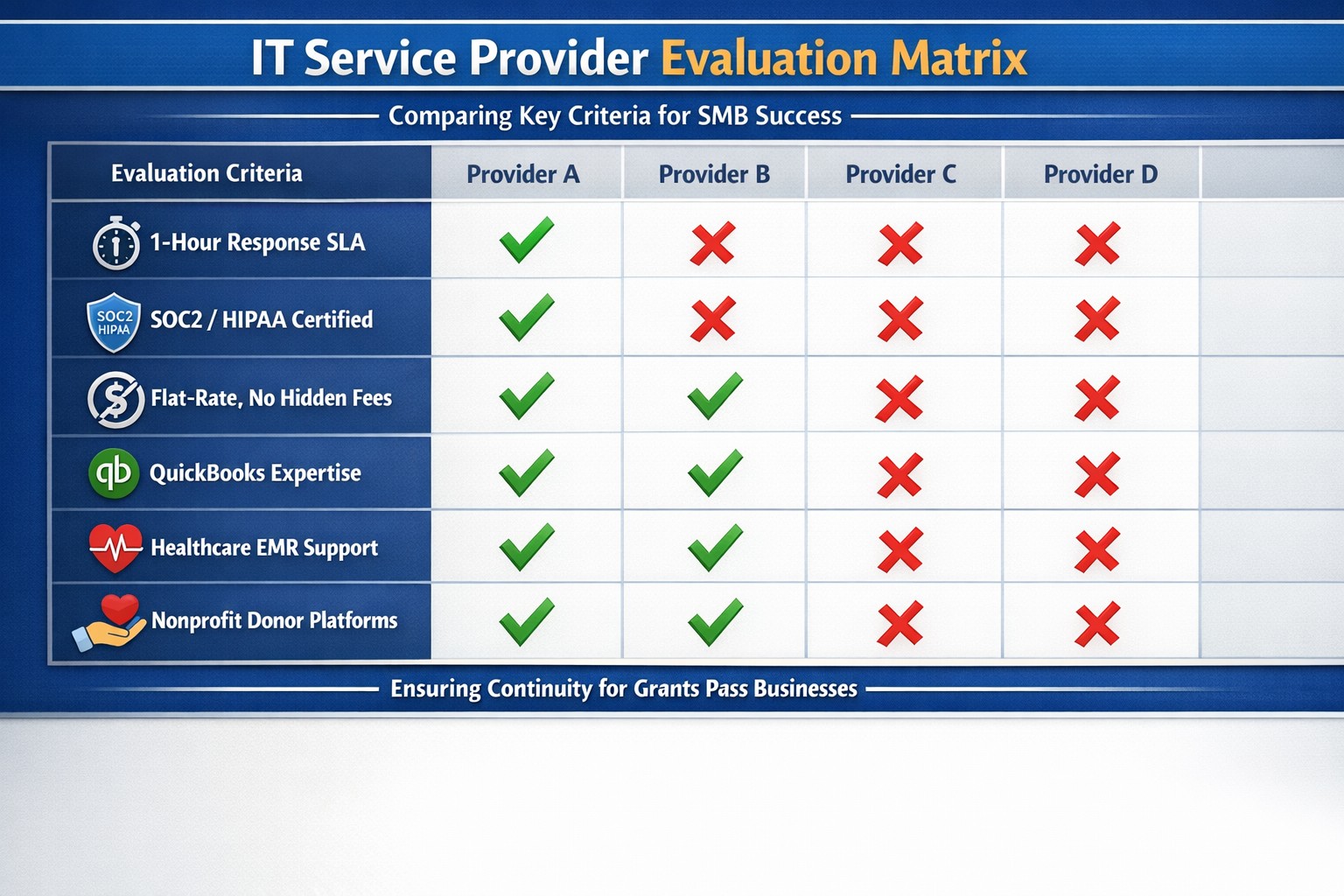
Use clear metrics like response time, uptime, and customer satisfaction to see if your IT provider is truly doing their job.
Businesses heavily rely on their IT providers to ensure smooth operations, enhance productivity, and safeguard data. However, determining whether your IT provider is doing their job effectively can be challenging. Here are some key indicators and evaluation criteria to help you assess their performance.
Quality of Service
1. Response Time and Resolution: A reliable IT provider should have short response times and lasting resolutions. Track how quickly they respond to issues and how often they resolve problems on the first attempt. Consistent delays or repeat issues may indicate they aren’t able to take care of your business properly.
2. Service Quality and Expertise: Evaluate the technical expertise of your IT provider. They should have a proven track record and relevant industry experience. Their ability to manage complex IT environments and provide innovative solutions is crucial.
Cost and Value
1. Cost Structure: Analyze the cost of your IT services, focus on the overall value of what they provide. A transparent pricing model with no hidden fees is also preferable.
2. Budget Management: Your IT provider should help you maintain a predictable IT budget. Proactive management of IT infrastructure should prevent unexpected costs and downtime.
Reliability and Security
1. Uptime and Availability: Assess the reliability of your IT provider in terms of network uptime and system availability. Downtime can lead to significant business losses, so aim for a provider with strong customer centric service level agreements (SLAs) that guarantee high uptime.
2. Security Measures: Inquire about the provider’s security protocols and compliance with regulations like PCI, CMMC, or HIPAA. A comprehensive security framework is essential to protect sensitive data from cyber threats .
Communication and Support
1. Communication Channels: Evaluate the effectiveness of the provider’s communication. They should offer multiple channels for support and maintain open, proactive communication about system updates or maintenance. You should not have to call them for issue status.
2. Customer Support: A dedicated support team can significantly enhance the user experience. Ensure that your provider offers readily available customer support and is responsive to inquiries .
Strategic Alignment
1. Business Understanding: Your IT provider should demonstrate an interest in your business strategy and goals. They should be involved in strategic discussions and provide technology solutions that align with your long-term objectives.
2. Flexibility and Scalability: The ability to customize services to meet your unique needs and scale them as your business grows is a valuable trait in an IT provider. This flexibility can enhance the overall value of their services. Your company should not have to bend to their technology stack.
Regular assessments and open communication with your provider can help ensure that they continue to meet your evolving needs. If you have doubts about your current IT provider, contact Farmhouse Networking to provide a free network evaluation.
Not every business fits our co-managed IT model—this image shows when the partnership puzzle pieces dont align between your team and ours.
Wanted to take a look at why prospective customers would not want Farmhouse Networking to be their Managed IT Service Provider. This article will be a little tongue-in-cheek, but will hopefully give you a fresh perspective on what to look for in a Managed IT Service Provider.
Why You Don’t Want to Work with Us
We are IT Experts: They will point fingers and blame others instead of taking ownership of your IT problems. Who needs real solutions to problem or to do things the right way the first time – Band-Aid the issues until they go away themselves.
We know your software and hardware: There are lots of other Managed IT Service Providers who are IT generalists who have no experience in your industry who will charge you for their time while they stumble through fixing things.
We live answer our phones: Why would you want to talk to a human who cares when you can simply leave voicemails and hope for a callback? Better yet you can spend your day in the maze of an automated phone menu trying to get to the department that is in charge of your problem.
We communicate: Who really needs to know what is going on with the tickets that are submitted? Isn’t it easier to just make a ticket and have faith in your Managed IT Service Provider to finish the task. It’s even better when they take over your computer and reboot the server before you can save anything.
We only hire the best: There are so many Managed IT Service Providers who are willing to hire just anyone and let them pretend to know how to fix your problems.
We’re local: Who wants to have their computer issues handled by someone in their own country let alone within range to be able to show up quickly when things are really broken? Outsource everything important to your business to the lowest bidder from whatever country and make sure that they are unable to communicate effectively in English.
We’re established and growing: Fly-by-night companies are the way to go. Call up the company that advertises on obscure streaming videos to handle precious customer data.
In all seriousness, take time to think about who is your company’s Managed IT Service Provider and how they are treating you. Consider Farmhouse Networking to take better care of your IT needs.
Streamline client maintenance via RMM automation and AI at Farmhouse Networking
Farmhouse Networking (FHN) is constantly looking for ways to enhance the services that we offer to our clients. Automation and artificial intelligence (AI) are two technologies that have emerged to streamline this process.
FHN uses automation to manage tasks that are typically performed manually, such as system configuration, software installation, and server maintenance. By automating these tasks, FHN can prevent human error and ensure that their clients’ systems remain up to date and secure.
In addition, FHN uses AI to monitor clients’ systems for potential issues, such as hardware failure, security breaches, or performance issues. AI-powered systems can analyze data to detect patterns or anomalies that may indicate a problem, allowing FHN to act quickly based on this laser focused data to prevent downtime or data loss.
Contact us today to learn how Farmhouse Networking can future-proof your network with our innovative maintenance solutions.
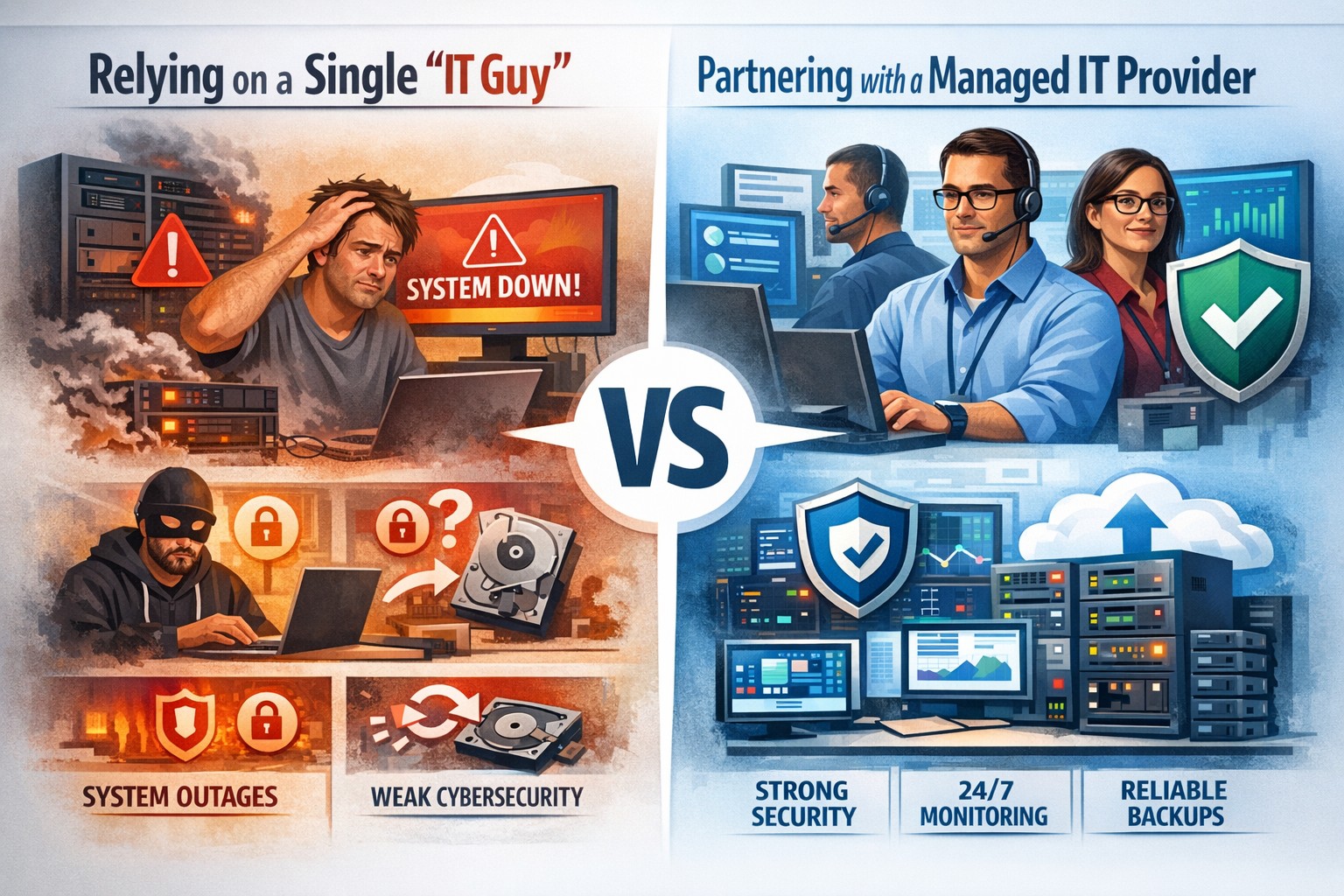
Relying on one IT guy can expose your small business to downtime, data loss, and security vulnerabilities—managed IT services offer stronger protection.
The role of Information Technology (IT) in business success cannot be overstated. IT systems and infrastructure form the backbone of modern businesses, facilitating communication, data management, and efficient workflow. From managing customer databases to ensuring network security, IT plays a crucial role in driving productivity and competitiveness. However, many businesses make the mistake of relying on a single IT guy to handle all their technological needs. In this article, I will discuss the risks associated with this approach and the importance of adopting a team-based approach to IT support.
The risks of relying on a single IT guy
Lack of expertise and knowledge
When you rely on a single IT guy, you are limited to their individual skills and expertise. While they may be knowledgeable in certain areas, they may not possess the breadth of knowledge required to handle all aspects of your business’s IT infrastructure. IT is a vast field that encompasses various domains such as network administration, cybersecurity, software development, and hardware maintenance. By relying on a single guy, you risk missing out on specialized expertise that could greatly benefit your business.
Limited availability and support
Another significant risk of relying on a single IT guy is limited availability and support. IT issues can arise at any time, and if your IT guy is unavailable or overwhelmed with other responsibilities, it can lead to significant downtime and disruptions in your business operations. With a single point of contact, you may have to wait for extended periods before your IT issues are resolved, resulting in decreased productivity and potential financial losses.
Single point of failure
Relying on a single IT guy also means that your business is vulnerable to a single point of failure. If your IT guy falls ill, takes a vacation, or leaves the company, you may be left without any IT support. Singular IT techs often don’t have the time or resources to properly document procedures and critical passwords, so when they go this information is lost. This can be particularly problematic during critical times when you need immediate assistance. Having a backup plan or a team of IT professionals ensures that your business operations can continue uninterrupted, even if one person is unavailable.
The impact of downtime on business operations
Downtime can have severe consequences on your business operations. Every minute your systems are down translates to lost revenue, missed opportunities, and frustrated customers. According to a study conducted by Gartner, the average cost of IT downtime is $5,600 per minute. Imagine the financial implications if your IT guy is unavailable for an extended period. With a team-based approach to IT support, you can minimize downtime and ensure swift resolution of any issues, thereby safeguarding your business’s success.
The importance of a team approach to IT support
Adopting a team approach to IT support offers numerous benefits for your business. Firstly, it provides a diverse set of skills and expertise that can be leveraged to address various IT challenges effectively. Each team member brings their unique knowledge and experience, allowing for comprehensive and well-rounded support. Additionally, with a team, you have the advantage of increased availability and faster response times. By distributing responsibilities among team members, you can ensure that someone is always available to address your IT needs promptly.
The benefits of outsourcing IT support
Outsourcing IT support is a viable solution for businesses looking to avoid the risks associated with relying on a single IT guy. Outsourcing allows you to tap into a pool of talented professionals with specialized expertise in different IT domains. Moreover, outsourcing IT support can often be more cost-effective than hiring a full-time IT staff, especially for small and medium-sized businesses. By partnering with an external IT support provider, like Farmhouse Networking, you can access a wide range of services, including network monitoring, cybersecurity, data backup, and software maintenance, all while enjoying the benefits of a dedicated team.
Finding the right IT support provider
Finding the right IT support provider is crucial to ensuring a successful and secure IT infrastructure. When evaluating potential providers, consider their experience, track record, and the range of services they offer. Look for certifications and qualifications that demonstrate their expertise and commitment to quality. It is also essential to assess their responsiveness and availability to ensure that they can meet your business’s IT needs promptly. Ask them about their record keeping habits, make sure they document everything and keep your information secure with industry standard protocols. By conducting thorough research and seeking recommendations, you can find an IT support provider that aligns with your business goals and requirements.
By adopting a team-based approach to IT support or outsourcing your IT needs, you can mitigate these risks and ensure a successful and secure IT infrastructure. Don’t get stuck when your IT guy no longer responds; contact us to experience the comfort of having a team look after your business IT. With the right IT support provider, you can focus on growing your business while leaving your technological needs in capable hands.
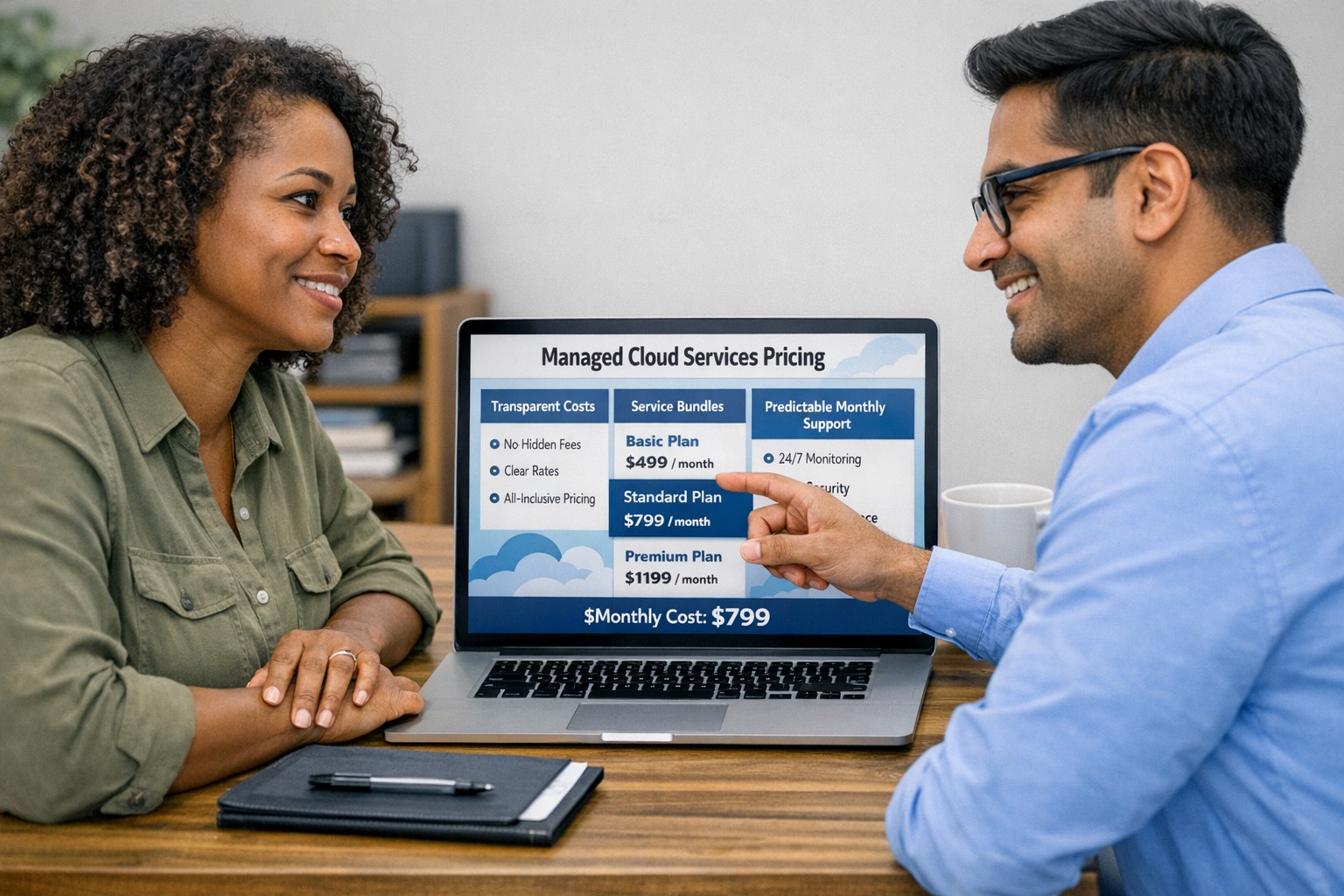
Managed cloud services pricing helps small businesses control IT costs with transparent, predictable monthly cloud support.
We have received numerous inquiries from potential customers regarding our pricing structure. Specifically, they want to know if we offer monthly contracts or if we charge an hourly rate. The answer is Yes.
Hourly Rate
For customers who require a one-time fix or need a project completed, we offer a service based on an hourly rate. Our rate for remote or on-site work that is not covered under a contract is $150 per hour. We bill in 15-minute increments and take pride in our efficiency. For clients with more than 2 service requests per month, we highly recommend signing up for a contract to save money and benefit from our expert oversight.
Monthly Contracts
There are three types of monthly contracts:
Remote Maintenance Contract
This is the package that most of our clients choose. It includes automated maintenance, cyber security protections, and unlimited remote support. Since most problems and questions can be handled remotely, this package offers real value.
Full Service Maintenance Contract
This package is for clients who want complete peace of mind. It includes all services, whether remote or at their offices. Additionally, it provides some additional benefits, such as top priority in our support queue.
Co-Managed IT Contract
This special package is designed for companies that already have a full-time IT employee or IT service companies in need of extra help. It provides them with the necessary automations and tools to make their jobs easier, allowing them to focus on what matters. This package also includes a discount on our remote and on-site services.
All contracts are based on a per-device model, taking into account the number of workstations, printers, servers, switches, etc. on the client’s network. We use this model because the other popular model, per user, is too vague and can easily hide excessive profit margins. Contracts can be month-to-month or a yearly commitment. The difference is that with a yearly commitment, you are protected from price increases for the entire year. We also offer many optional add-ons for our clients, such as Office 365, Employee Security Training, Penetration/Vulnerability Scanning, Mobile Device Management, Compliance, Secure Remote Access, and Security Operations Center.
Are you looking for reliable IT support that suits your business’s unique requirements? Look no further! Our flexible pricing options cater to businesses of all sizes. Whether you require one-time assistance or ongoing support, we have the right plan for you. Ready to take your business IT support to the next level? Contact us today to discuss your needs and find the perfect plan for your business.
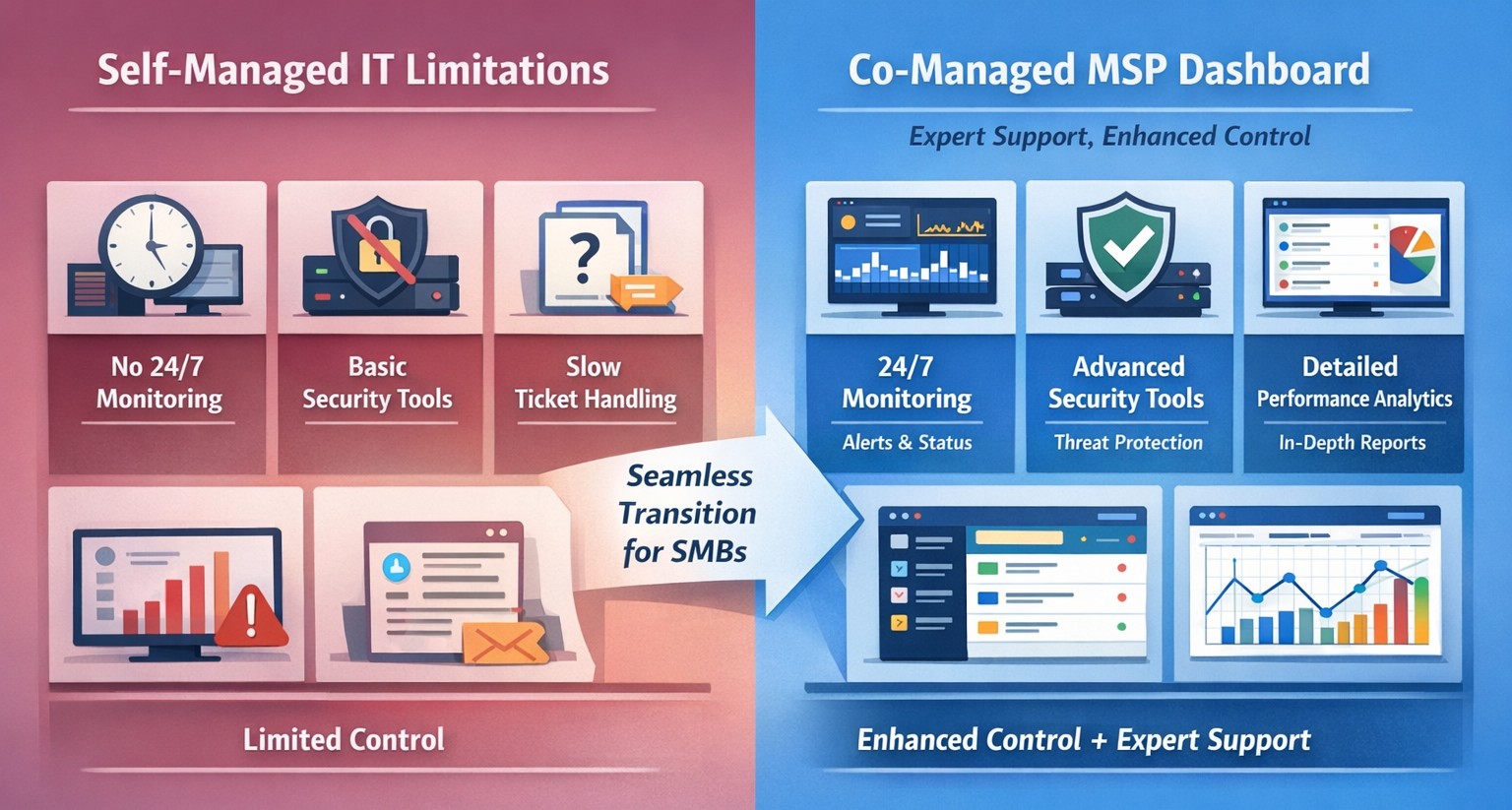
Co-managed IT dashboard with MSP monitoring supplementing internal team.
Managing IT can be a daunting task, especially for businesses that lack dedicated IT personnel or the expertise to handle today’s complex technology. In recent years, more and more organizations have recognized the benefits of outsourcing their IT management to Managed Service Providers (MSPs).
What is an MSP?
A Managed Service Provider, or MSP, is a company that offers a range of IT services to businesses. These services can include network monitoring, infrastructure management, data backup, cybersecurity, and more. By partnering with an MSP, businesses can offload their IT responsibilities to professionals with deep expertise and industry-best practices.
The Challenges of Self-Managed IT
Self-managing your IT can be a significant challenge. Here are some of the common pain points that organizations face:
Lack of Expertise: IT is a complex and ever-evolving field. Keeping up with the latest technologies, security threats, and best practices can be overwhelming, especially for businesses without dedicated IT staff.
Resource Constraints: Managing IT requires time, manpower, and financial resources. Small and medium-sized businesses often struggle to allocate these resources effectively, leading to inefficiencies, downtime, and security vulnerabilities.
Limited Scalability: Growing businesses often find it difficult to scale their IT infrastructure to meet increased demand. Self-managing your IT environment may require significant investments in hardware, software, and additional staff, which can strain budgets and hinder growth.
Cybersecurity Risks: Data breaches and cyber-attacks are on the rise. Without proper security measures in place, businesses face significant financial and reputational risks. Implementing and maintaining robust cybersecurity protocols can be challenging for organizations without the necessary expertise.
The Benefits of MSP-Managed IT
Switching to an MSP-managed IT environment offers several benefits:
Expertise and Support: MSPs have a team of experienced professionals who specialize in different aspects of IT management. They stay up-to-date with the latest industry trends and best practices, providing businesses with access to a breadth of knowledge and expertise.
Proactive Monitoring and Maintenance: MSPs utilize advanced tools and technologies to monitor your IT infrastructure 24/7. They identify potential issues before they become critical, minimizing downtime and ensuring smooth operations.
Scalability and Flexibility: MSPs provide scalable solutions tailored to your business needs. Whether you’re experiencing rapid growth or need to downsize, an MSP can quickly adapt your IT infrastructure to meet changing requirements without additional investments or resources.
Enhanced Security: MSPs employ robust security measures to protect your systems, networks, and data from cyber threats. They implement industry-standard security practices, conduct regular security audits, and ensure compliance with data protection regulations.
Cost Savings: By outsourcing IT management to an MSP, businesses can reduce the overhead costs associated with maintaining an in-house IT department. MSPs work on a subscription-based model, allowing organizations to pay for the services they need, when they need them.
Strategic Planning: MSPs can act as your virtual chief information officer providing project planning services that keep IT spend spread across the years to make the IT budget easier to manage.
Consider making the switch to an MSP today and unlock the benefits of professional IT management, contact us to get started.
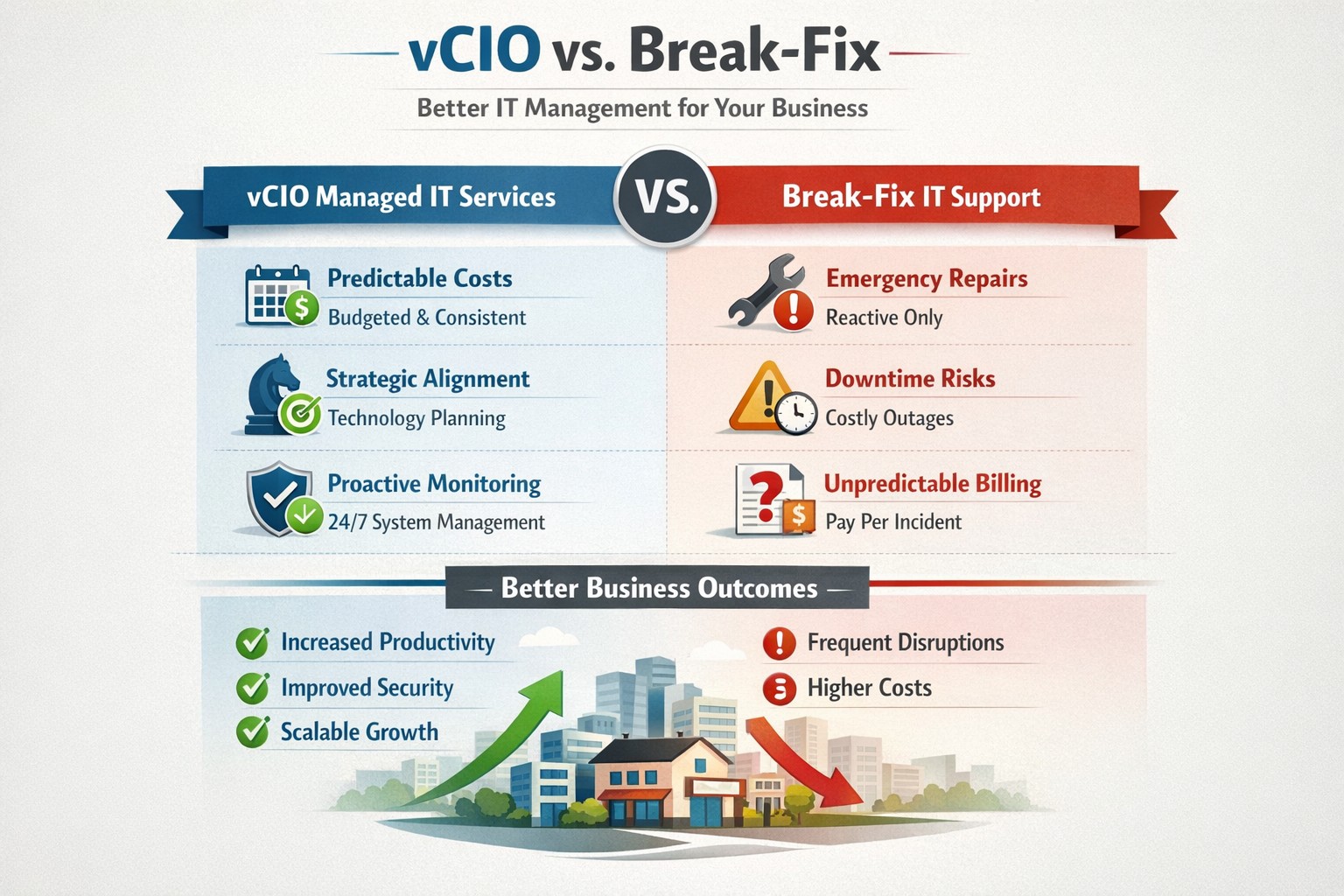
vCIO strategic services vs break-fix reactive IT model performance comparison.
In the ever-evolving world of IT support, two strategic approaches have emerged to address the needs of businesses – vCIO (Virtual CIO) services and break-fix services. Each of these approaches has its own merits and drawbacks, making it crucial for businesses to carefully consider which option best aligns with their goals and IT requirements. So, let’s dive into the comparison between vCIO services and break-fix services and find out which one takes the crown!
vCIO Services: Unleashing the Power of Proactive IT Management
The vCIO model offers businesses a cost-effective and strategic solution to IT management, delivering benefits far beyond simple problem-solving. Here’s a breakdown of what vCIO services bring to the table:
Strategic Technology Planning: A vCIO provides a long-term roadmap for your IT infrastructure, aligning it with your business objectives. They assess your current technology landscape, analyze potential risks, and develop a comprehensive IT strategy to ensure your technology infrastructure drives success.
Proactive IT Monitoring and Management: By constantly monitoring your systems, a vCIO can detect and address issues before they turn into full-blown disasters. They implement proactive measures, such as 24/7 system monitoring, patch management, and security audits to keep your IT environment optimized and secure.
IT Budgeting and Procurement: A vCIO helps you streamline your IT budget by aligning your investment with your business goals. They provide insights into cost-effective technology solutions, negotiate contracts with vendors, and manage IT procurement to help you make informed decisions while optimizing your spending.
Technology Vendor Management: Collaborating with multiple technology vendors can be time-consuming and complex. A vCIO acts as a single point of contact for all your technology vendors, managing relationships and ensuring smooth coordination between various stakeholders.
Break-Fix Services: The Traditional Firefighter Approach
Break-fix services have long been the go-to approach for businesses seeking IT support on an as-needed basis. Here’s a closer look at what break-fix services bring to the table:
Issue-Specific Support: Break-fix services are designed to address specific IT issues as and when they arise. This approach involves fixing problems after they occur, reacting to incidents rather than proactively managing your systems.
Limited Scope of Support: Break-fix services typically focus solely on resolving immediate technical issues. While they can provide quick fixes, they do not offer strategic planning or ongoing support to help prevent future issues or optimize your IT infrastructure.
Variable Costs: Break-fix service costs can be unpredictable, as you are billed per incident or hourly basis. This makes budgeting and financial planning more challenging, especially if you encounter frequent or recurring IT issues.
Less Focus on Prevention: With break-fix services, the emphasis is on remedying existing problems, leaving behind the potential for other underlying issues to remain undetected, ultimately leading to more costly and time-consuming problems down the line.
The Verdict: vCIO Takes the Throne!
While break-fix services may have their place in certain scenarios, vCIO services offer a more comprehensive approach to IT management, aligning your technology with your business goals and providing ongoing support. The proactive nature, strategic planning, and cost optimization provided by vCIO services make it the winning solution for businesses looking to stay ahead of the ever-changing technology landscape. So, without a doubt, the crown firmly sits on the head of vCIO services!
If your company is tired of just calling your IT service company when things are broken, then contact us for vCIO services.
PwC study: MSP strategic users gain 43-point performance premium over cost-focused peers.
A report from PricewaterhouseCoopers based on a survey of over 2,000 business leaders and took it as confirmation of our recent blog post about Why SMBs Need Managed Service Providers (MSPs). Here are some takeaways from the article:
Takeaways:
“Companies that use MSPs for strategic advantage are 1.6 times and 2.4 times more likely to be faster to market as well as more innovative than those focused solely on cost savings, according to the report.”
“Organizations utilizing managed services at a mature level use them to respond more adroitly to changing conditions and potential threats.”
“Most business and IT leaders recognize the pace of innovation is occurring faster than their internal IT teams can absorb. There is always going to be some type of skills shortage. Those skill shortages are ones that MSPs are in the best position to fill.”
If your company is looking to outperform in the marketplace, then contact us to start a partnership.
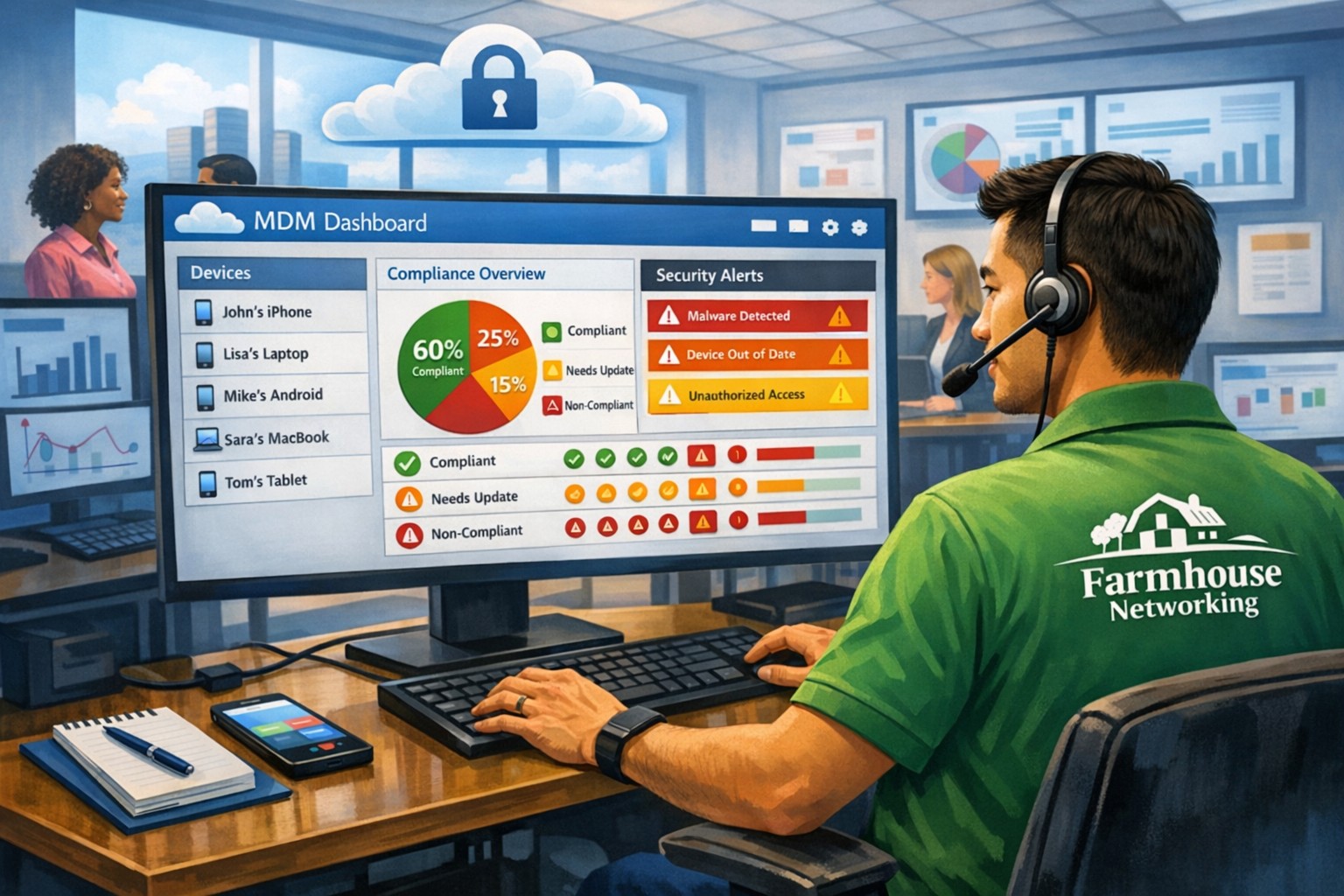
MSP console managing SMB BYOD smartphones and laptops with centralized MDM and security policies.
Small and medium-sized businesses (SMBs) face numerous challenges when it comes to managing their IT. Limited resources (both human and money), lack of expertise, and the need to focus on core business operations often make it difficult for SMBs to understand and manage technology needs. This is where Managed Service Providers (MSPs) come in. In this blog article, we will explore the reasons why SMBs should consider partnering with MSPs to enhance their IT capabilities and drive business growth.
Cost-Effective IT Solutions:
One of the primary reasons why SMBs need MSPs is the cost-effectiveness they offer. By outsourcing their IT needs to MSPs, SMBs can avoid the high costs associated with hiring and training an in-house IT team. MSPs provide a range of services, including network monitoring, data backup and recovery, cybersecurity, and software updates, all at a predictable monthly cost. This allows SMBs to allocate their resources more efficiently and focus on their core business.
Access to Expertise and Advanced Technology:
MSPs are experts in providing IT services and have a team of highly skilled professionals with expertise in variety of technology. By partnering with MSPs, SMBs gain access to the depth of knowledge and experience from IT experts who can handle complex tasks and provide strategic guidance. Additionally, MSPs stay up-to-date with the latest technology trends and can recommend and implement solutions that can help SMBs stay competitive in the market and safe from hackers.
Proactive IT Support and Maintenance:
MSPs offer proactive IT support and maintenance, which is crucial for SMBs. They monitor networks, identify potential issues, and take preventive measures to avoid downtime and disruptions. MSPs also provide regular software updates, security patches, and system maintenance, ensuring that SMBs’ IT remains secure and up-to-date. This proactive approach helps SMBs minimize the risk of costly IT failures and ensures smooth business operations.
Enhanced Data Security:
Data breaches and cyberattacks pose a significant threat to SMBs. MSPs play a vital role in safeguarding SMBs’ sensitive data and protecting them from potential security breaches. They implement robust cybersecurity measures, such as firewalls, antivirus software, and encryption, to ensure data confidentiality and integrity. MSPs can also conduct regular security audits and vulnerability assessments to identify and address any potential weaknesses in the IT infrastructure.
Scalability and Flexibility:
As SMBs grow, their IT needs evolve. MSPs offer scalable solutions that can adapt to changing business requirements. Whether it’s adding new users, expanding storage capacity, or integrating new software, MSPs can quickly and efficiently accommodate these changes. This scalability and flexibility allow SMBs to focus on their growth without worrying about the limitations of their IT infrastructure.
If your company could use the cost-effective solutions, access to expertise, proactive support, enhanced data security, and scalability that come from using a MSP, then contact us for assistance.
Registry key excluding sync folders resolves Windows roaming profile errors
Had a client receive the message “There was a problem with your roaming profile…” after logging into another computer on the domain. Research and found that a simple registry fix was available, but most fixes wanted admins to export a key from another working profile then import it into the broken one. Here is the actual registry key that was used to fix the profile:
Registry Fix for roaming profile was not completely synchronized
Open Registry Editor as the broken user and NOT administrator
Navigate to HKCU > SOFTWARE > Microsoft > Windows NT > CurrentVersion > Winlogon
Right click and choose New > String Value and give it the name ExcludeProfileDirs
Enter the following – AppData\Local;AppData\LocalLow;$Recycle.Bin;OneDrive;Work Folders
As we work on finishing our 5th year in business, Farmhouse Networking continues to enhance its offering to our clients and improve the way we do business. Each one of these changes is carefully researched and painstakingly implemented to make sure that impact on end-user experience is minimally invasive. Here is a list of the major changes taking place now:
What Changes?
New Customer Documentation: We have been using a new document management system to securely store information about our clients networks, create standard operating procedures on how we specifically care for individual clients, and keep track of passwords for all the things that need securing. This will keep our staff and backup techs apprised of all our customers equipment and standard operating procedures so that things get done right.
New Maintenance Software: After much market research to improve our current system of auto-magically maintaining customers computers, we found something better. It took some negotiations with them but we got the price down to close to the same, so there will be no increase in price. Just better software to serve our customers with. We can now monitor more of the network and in a deeper way so that there is even less possibility of downtime due to computer issues.
New Employee: You read that right. Farmhouse Networking has officially contracted with our first employee. The work load has finally reached the point where occasional help from my family is just not enough. Peter deGreyt will start work on Monday, November 11th, 2019. He has previously worked for another local managed service provider and graduated from Southern Oregon University with a degree in business analytics. His first contact with many of you will likely be to input customer information into our new document management system.
If your company is interested in working with a company that takes IT seriously, then contact us for assistance.
Local expertise + rapid response = minimal business disruption
I was chatting with my son who works for a large local company who
contracts with a local Managed Service Provider to help with their IT
needs. Due to a clause in their contract they are now locked into paying
over $15,000 per month for IT services for the next three years. This
includes $300 per server (they have 5 of them) and $70 per workstation
(they have over 100 of them) plus some other mysterious charges for the
network. Personally I think that this is outrageous.
Here at Farmhouse Networking we do not believing in locking our clients
into a contract. Our IT services are always month to month so that if
either of us are dissatisfied with the relationship then we can easily
end things with no obligations. Our services are also reasonably priced
due to keeping our overhead low – we charge $65 per server and $25 per
workstation plus a small per device charge for other network devices.
That is a mind boggling 280-460% savings over the local competition. For
that large company that would be a realized savings of somewhere
between $9,600 and $11,700 per month – enough to hire several new
employees or purchase new equipment to increase production.
If your company is looking to keep the costs of IT services down and keep more working capital for true business needs, then contact us for assistance.
With the recent addition of VoIP phone service and internet phone service for current phone system owners, we here at Farmhouse Networking have decided to “eat our own dog food” as the saying goes by changing our phone number over to use the new VoIP phone system ourselves. So here is what to expect:
Phone System Features:
Texting: Those of you who are used to texting in for quick responses will no longer be able to do so. I will still have a cellphone and be able to answer calls from the field via the phone systems Ring Group feature, but I will changing the phone number for my cell phone.
Desk Phone: When in the office, we will be answering our Polycom VVX310 desk phone which has HD Voice for clearer call quality.
Messages: Any time a message is left on our new system, the phone system Voice to Text feature will transcribe the message automatically then send an email into our ticketing system with a copy of the audio also attached. This then becomes a ticket – this feature will increase responsiveness and accuracy in handling your requests.
Holidays, Nights, & Weekends: The phone system has been setup to recognize specified national holidays, birthdays, and special occasions. It also has Time Frame setup with business hours between 9am and 5pm on all weekdays. When outside these business hours or on holidays the phone system will be answered by our Auto Attendant system. This will give the option to leave a voicemail to create a ticket or agree to after hours rates to start an emergency call. Please see our Terms & Conditions for more information.
Thanks for always looking to Farmhouse Networking to serve your company’s IT needs.
If your company is looking to upgrade your current phone system feature set or reduce overall costs of phone service, then contact us for assistance.
It is official – the month of September marks three years in business for Farmhouse Networking. We have been truly blessed by God to have been able to serve the Grants Pass and surrounding business communities by providing exceptional IT managed services. We look forward to many more years of giving you the highest level of support possible so that you can focus on getting business done. With this anniversary we plan on rolling out some enhancements to our monthly service offerings:
Enhanced Monthly Maintenance
Standard Maintenance: For those who are not current managed clients, these basics have always been a part of our service offering:
5-year Technology Plan & Budget
Full Network Inventory
Hard Disk Checkups (Bi-Monthly)
Hard Disk Defragmentation (Monthly)
Temporary File Cleaning (Weekly)
Anti-Virus Software (Constant Monitoring)
Operating System Updates (Weekly)
Error Log Monitoring (Constant Monitoring)
Power Settings Management (Constant Monitoring)
Windows Services (Constant Monitoring)
Continued Improvements: Over the past 3 years we have also added the following features to our service at no additional costs:
Ticketing System Portal
Email Support to Create Tickets
Security Incident Response Plan
Vendor Information Tracking
Third-Party Software Updates (Monthly on Firefox, Chrome, Acrobat Reader, ….)
Email Blacklist Checking (Daily)
Warranty Checking (Monthly on All Major Brands)
Operating System Intrusion Detection (Constant Monitoring)
Support for MacOS & Linux (Constant Monitoring)
Server Applications (Constant Monitoring)
Hardware Events (Constant Monitoring)
Enhancements to Come: In September, we will be adding these new exciting features to our service:
DNS filtering – this will further protect your network from external threats by stopping accidental surfing to malicious sites. It also can increase productivity and network speeds by limiting wasteful frivolous surfing during company time.
Dark Web Scan – Each monthly client will have the “Dark Web” scanned to see if any email addresses connected to the company have been involved in a previous password breach.
Weekly Security Newsletter – Farmhouse Networking is partnering with a national security non-profit to deliver up-to-date news and information about how to stay safe online. These weekly newsletters will be packed with valuable information and delivered to everyone in your organization.
As our service offering has expanded, we have deepened our ability to monitor our customers networks to proactively respond to alerts before they become problems. We have continued to add levels of protection to make sure that our clients systems are safe from the ever-expanding list of threats. All this has been done at no additional cost, despite inflation, up to this point. To continue offering this high level of service, Farmhouse Networking is making a couple small changes to its prices that will be effective September 1st, 2018.
Monthly Maintenance Clients – our services are based on a per device basis and the cost per workstation will be $25 per month for remote maintenance and $50 per month for full service maintenance. All other prices will remain the same for every other device on the network. This will only effect clients whose contracts are renewing after September 1st, 2018 – any renewed before that will keep their prices the same for the next 12-month term.
Small Business Clients – those who do not have a server and have less than 5 workstations, our hourly rate will be $80 per hour for on-site service and $40 per hour for remote service (billed in 15-minute increments). That is only $10 more for on-site support and $5 more for remote support.
Standard to Medium Clients – those with a server or more than 5 workstations, our hourly rate will be $120 per hour for on-site service and $60 per hour for remote service (billed in 15-minute increments). That is only $10 more for on-site support and $5 more for remote support.
Tier-3 Clients – those technology companies that utilize our advanced expertise to better serve their clients, our hourly rate will be $40 per hour for remote service (billed in 15-minute increments). That is only $5 more for remote support.
Charity Clients – those non-profits that pay for support, our hourly rate will remain at $70 per hour for on-site service and $35 per hour for remote service (billed in 15-minute increments).
For all our monthly maintenance clients, we will be calling to schedule our semi-annual meeting to check-in with you during the month of September. At that time we will be performing another network inventory to insure that all network assets are covered properly under your current contract. We cannot thank all our clients enough for your continued use of our IT services. We look forward to continuing to serve you.
Know the state of your flocks, and put your heart into caring for your herds, for riches don’t last forever, and the crown might not be passed to the next generation. After the hay is harvested and the new crop appears and the mountain grasses are gathered in, your sheep will provide wool for clothing, and your goats will provide the price of a field. And you will have enough goats’ milk for yourself, your family, and your servant girls. Proverbs 27:23-27
Professional help desk support resolves IT issues before they impact productivity
We have a bench of Tier 3 engineers ready that have been trained in industry best practices, compliance and are comfortable supporting your network and computers.
Put an End to Stressful Computer Support
By utilizing one of our industry trained Helpdesk Specialists, you can free your employees from wasting time on computer support tasks.
Our Helpdesk Specialists are capable – but not limited to – the following tasks:
Desktop operating system maintenance, troubleshooting, and diagnosis
Desktop connectivity troubleshooting
Network systems maintenance, troubleshooting, and diagnosis
Network connectivity troubleshooting
Server operating system maintenance, troubleshooting, and diagnosis
Server connectivity troubleshooting
Application installation and support
Client VPN installation and support
Microsoft Office Suite & Google G-Suite support
Security & access management
Anti-malware administration and resolution
Learn more about the benefits of our Dedicated Remote Support Solutions here.
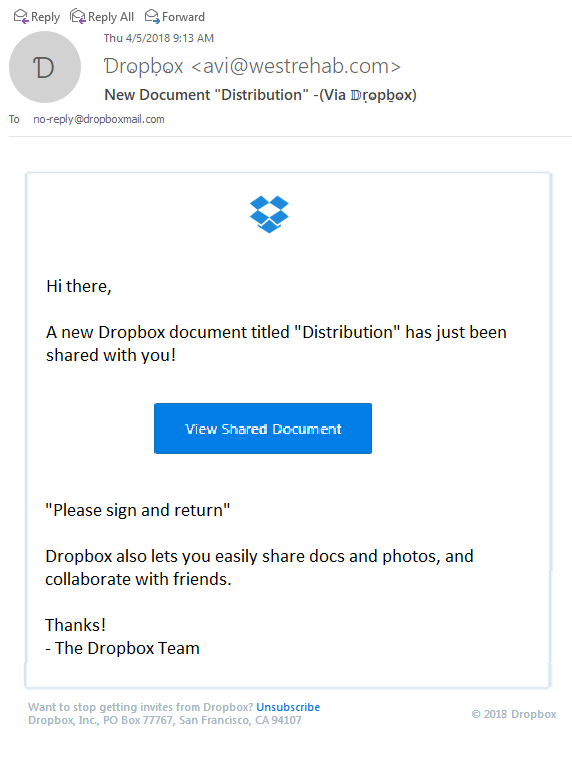
Thought that I would share a recently received new phishing email variant that could easily be overlooked and possibly cause damage to your network. The email appears to have come from Dropbox as a user sharing a folder with me, but a closer look shows many obvious signs that the email is a fake.
Starting from the Top
Look closely at the From portion of the email:
The lettering is actually another language where the font makes it look like English lettering. There is also the fact that the email is form someone that I don’t do business with. Always fight the urge to look at things that are not yours.
Stick to the Subject
Now to take a look at the Subject line of the email:
This has different lettering but it is again a different language used to look like English lettering.
And now the rest…
The final thing that caught my eye was the “button” in the middle of the email:
It actually looked fuzzy. It turns out the entire body of the email is a single image that is a link to their malicious site. Clicking anywhere in the body of the email would send you on your way to infection or account compromise. Hope this little tutorial helps you detect other phishing attempts in the future.
If your company is having trouble with SPAM or phishing, then contact us for assistance.
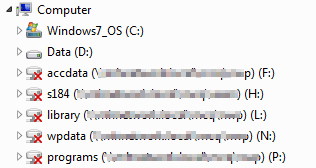
Had a client that repeatedly had troubles with network drives disconnect happening randomly. I did explain that this would happen normally if they kept their workstations logged into the server, but they did not want to change their habits. I performed the usual registry fixes on the workstations and the server, but these did not seem to work. Finally I got to look at the error and figured out the Group Policy Object that was causing the problem.
Usual Registry Fix:
The default method for this is to edit the registry as follows on both and run a command on the server to lengthen the disconnect time on the workstations and disable disconnect on the server.
Workstations:
Click Start, click Run, type regedit, and then click OK.
Locate and then click the following key in the registry:
In the right pane, click the autodisconnect value, and then on the Edit menu, click Modify. If the autodisconnect value does not exist, follow these steps:
On the Edit menu, point to New, and then click REG_DWORD.
Type autodisconnect, and then press ENTER.
On the Edit menu, click Modify.
Click Decimal.
In the Value data box, type 0, and then click OK.
Finally the following command should also be run:
net config server /autodisconnect:-1
Group Policy Object Fix:
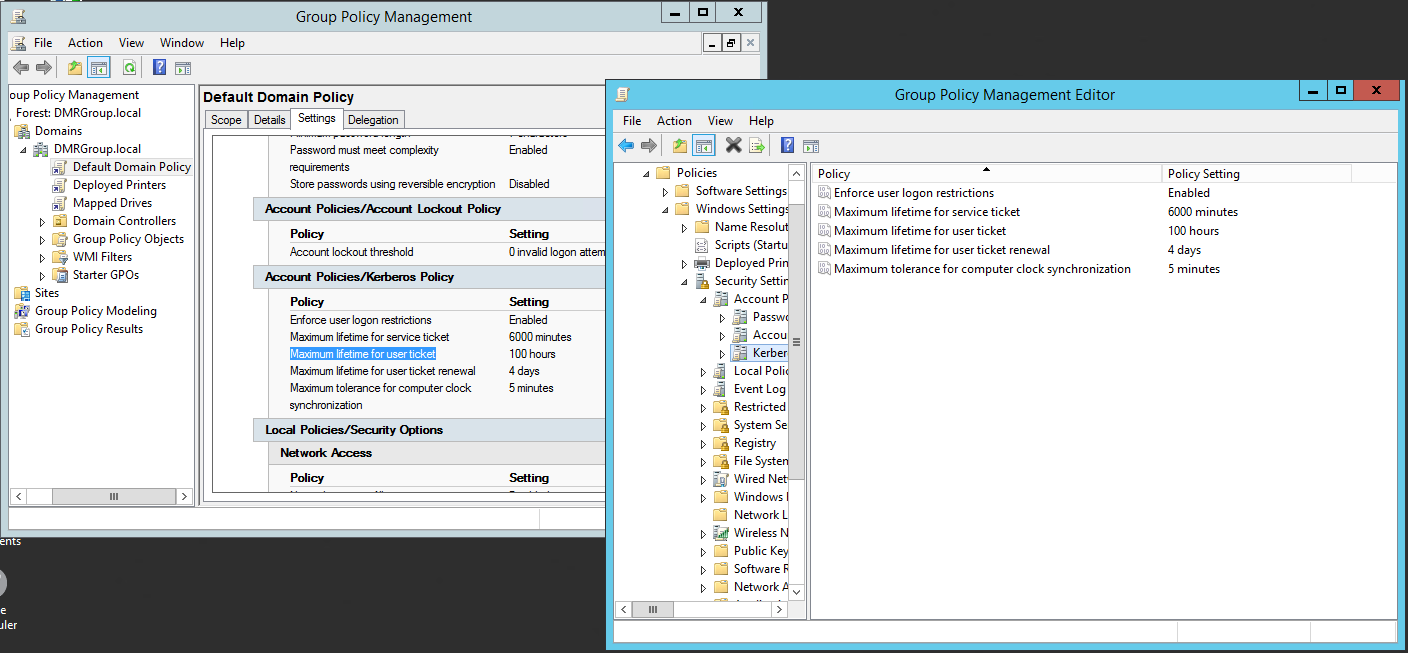
Even though I changed the systems as above, it still disconnected regularly. The clients were getting this message when disconnected -“The system has detected a possible attempt to compromise security. Please ensure that you can contact the server that authenticated you.” Some research found that Windows Small Business Server created a Group Policy Object that by default times out authentication to the server after 10 hours. Here is how I changed it:
Open Group Policy Management
Look for Default Domain Policy
Click on the Settings tab and then Show All
Under Account Policies/Kerberos Policy look for Maximum lifetime for user ticket which by default was 10 hours.
Right click on the policy and choose Edit
Dig down to Computer Configuration > Windows Settings > Security Settings > Account Policies > Kerberos Policy
Change the Maximum lifetime for user ticket to 100 hours (>4 days)
Change the Maximum lifetime for user ticket renewal to 4 days
This combination will keep the ticket lifetime timeout longer than the time for renewal which will cause the renewal to happen before the timeout. Problem solved.
If your company is having issues with Network Drive Disconnect, then contact us for assistance.
I have had the privilege of using a new remote support tool called ScreenConnect which was recently acquired. This tool has all the major features of other remote support tools including a built in screen annotation feature and OCR capability that feeds into the built in research tool. Looking forward to training and trying all the features of this wonderful new software.
And God will generously provide all you need. Then you will always have everything you need and plenty left over to share with others. As the Scriptures say, “They share freely and give generously to the poor. Their good deeds will be remembered forever.” For God is the one who provides seed for the farmer and then bread to eat. In the same way, he will provide and increase your resources and then produce a great harvest of generosity in you. - 2 Corinthians 9:8-10
We use cookies to ensure that we give you the best experience on our website. If you continue to use this site we will assume that you are happy with it.