Why waiting for an audit notice is the most expensive compliance strategy there is
Proactive compliance planning costs far less than scrambling to fix gaps after an audit notice arrives.
Most business owners don’t think about compliance until someone forces the issue – a new client contract requiring proof of security controls, an insurance renewal asking for documentation, or worse, an audit letter. By then, the real cost isn’t the audit itself. It’s everything you didn’t do in the months or years leading up to it: the gaps that piled up, the records that don’t exist, and the scramble to fix it all under a deadline. Research consistently shows that organizations that wait until they’re forced to comply end up paying roughly two-and-a-half to three times more than those who treat compliance as an ongoing practice. That gap isn’t fines alone – it’s lost productivity, disrupted operations, and the cost of fixing things the hard way instead of the easy way.
What “Waiting” Actually Costs
Lost productivity during the scramble. When an audit notice arrives, someone has to drop everything to assemble records, policies, and proof of controls that should have already existed. That’s time not spent serving customers.
Higher remediation costs. Fixing a security gap proactively might mean a software update or a policy change. Fixing it during an active audit often means emergency vendor calls, rushed system changes, and premium pricing.
Weaker negotiating position. Auditors and regulators view a track record of good-faith effort favorably. A business with no documentation looks like it never tried – and that perception drives harsher outcomes.
Business disruption. Operations can grind to a halt while staff redirect their attention to corrective action plans, investigations, or reporting requirements.
Reputational fallout. Clients, vendors, and partners notice when a business fails an audit or discloses a breach. Rebuilding trust takes far longer than building it the first time.
Action Steps to Take Now
Inventory what you actually have. List every system, vendor, and data type your business touches. You can’t protect, or document, what you haven’t identified.
Run a basic risk assessment. Identify where sensitive data lives, who has access to it, and what would happen if it were exposed or lost.
Document your policies in writing. Verbal habits don’t count as a compliance program. Write down password requirements, data handling rules, and incident response steps.
Check your vendor agreements. Make sure any vendor handling sensitive data on your behalf has appropriate contractual protections in place.
Train your staff and keep records of it. A single untrained employee can undo your entire compliance posture. Training without documentation is nearly as risky as no training at all.
Test your backups and recovery plan. A backup you’ve never tested is a backup you don’t actually have.
Set a recurring review cadence. Quarterly or biannual reviews catch small gaps before they become big ones.
Questions Business Owners Are Likely Asking
“We’ve never had a problem. Why worry about this now?” Most compliance failures aren’t discovered until something else goes wrong – a breach, a complaint, or a routine review triggered by a client or insurer. The absence of a problem so far isn’t the same as the absence of risk.
“Isn’t this what our IT vendor is already handling?” Possibly, but it’s worth confirming directly. Compliance documentation, policy writing, and risk assessments are distinct from day-to-day IT support, and gaps often hide in that space between the two.
“How much time does this realistically take?” A basic risk assessment and documentation cleanup can often be completed in a few weeks. Waiting until an audit forces the same work into days, with far less room for error.
“What’s the actual return on doing this now instead of later?” Beyond avoiding fines, proactive compliance tends to reduce insurance premiums, speed up vendor and client onboarding, and protect the business from disruption that has nothing to do with regulators – like a ransomware attack or a lost laptop.
How Farmhouse Networking Can Help
Farmhouse Networking works with business owners to close compliance gaps before they become expensive problems – not after. That means risk assessments that actually identify where your exposure lives, documentation that holds up under scrutiny, employee training programs with the paper trail to prove it, and ongoing monitoring so nothing slips through the cracks between reviews. Instead of a one-time scramble, you get a system that keeps working in the background, year-round.
The Bottom Line
Compliance isn’t a deadline – it’s a discipline. The businesses that treat it that way spend less, sleep better, and never have to explain to a client, an insurer, or a regulator why the paperwork doesn’t exist. If you’re not sure where your gaps are, that’s the best possible reason to find out now, while you still have the luxury of time.
Don’t wait for an audit notice to find out where you stand. Email support@farmhousenetworking.com and let’s talk about what a proactive compliance check would look like for your business.
Upgrading your device is exciting. Losing access to every business account is not. Here’s what every business owner needs to know before they make the switch.
Switching to a new phone without preparing your MFA can lock you out of every business account. A little preparation before the switch prevents hours of downtime.
email. The system asks for an authentication code. You open the authenticator app. The accounts are gone. Now you’re locked out.
This happens to business owners every day. Multi-factor authentication (MFA) is one of the most effective security tools available – but it’s bound to the device it was set up on. When that device changes, access can disappear instantly unless you prepare in advance.
Here’s exactly what happens, why it matters, and what to do about it.
Why MFA Breaks When You Switch Phones
Authenticator apps like Microsoft Authenticator, Google Authenticator, and Duo Mobile generate time-sensitive codes that are tied to your specific device. The codes work because the app and the service share a secret key established during setup. When you swap phones without transferring that key, the connection breaks.
The result: you cannot complete login, even with the correct password. If your old phone is already wiped or gone, and you have no backup method configured, recovery can take hours, or longer, and usually requires IT intervention.
For a business, that’s more than an inconvenience. It’s a potential compliance issue, a productivity disruption, and in some cases, a security risk if employees start using workarounds.
Action Steps Before You Switch Phones
These steps apply to you, your staff, and anyone who uses MFA to access business systems.
Inventory every account protected by MFA. Email, cloud storage, accounting software, practice management platforms, banking portals – list them all. You cannot protect what you haven’t identified.
Check your authenticator app’s backup settings. Microsoft Authenticator supports cloud backup. Google Authenticator added backup functionality in 2023. Enable it before you wipe or trade in your old device.
Register a backup MFA method. Most platforms allow you to add a secondary method – a different phone number, a hardware key, or an email-based code. Do this now, not after a problem occurs.
Save recovery codes. During initial MFA setup, most services generate one-time recovery codes. Store these in a password manager or a secure, offline location. These are your safety net if everything else fails.
Do not wipe your old phone until the new one is fully verified. Set up the authenticator app on the new device, confirm every account logs in successfully, then decommission the old device.
Notify your IT provider before the switch. If you use a managed IT service, your provider can verify admin-level access to reset MFA on critical accounts if something goes wrong during the transition.
Remove your old device from your account settings. After the switch is complete, log into your security settings for each platform and delete the old device. Leaving it registered is an unnecessary security exposure.
Q&A: What Your Employees (and Clients) Might Ask
Q: Can I just reinstall the authenticator app on my new phone? A: Installing the app is only the first step. You still need to re-link each account, either by restoring from a cloud backup or by re-scanning QR codes through each platform’s security settings. Without prior backup configuration, you’ll need your IT administrator to reset access.
Q: What if I already switched phones and I’m locked out? A: Contact your IT administrator immediately. They can reset your MFA registration at the admin level, which clears the old device and allows you to set up a new one. Do not attempt to bypass MFA – doing so may violate your organization’s security policies.
Q: Is it safe to use text message codes instead of an authenticator app? A: SMS-based codes are better than no MFA, but they’re the weakest option. They’re vulnerable to SIM-swapping attacks, where a criminal hijacks your phone number. An authenticator app is more secure and worth the minor setup effort.
Q: Do I need to do anything with my business accounts specifically? A: Yes. Business accounts managed through Microsoft 365, Google Workspace, or other platforms often have centralized MFA settings controlled by your IT administrator. Those accounts may require admin-assisted recovery if the authenticator app is lost. This is another reason to have a managed IT partner involved before the phone switch.
How Farmhouse Networking Can Help
MFA transitions are a routine part of what we manage for our clients. When one of your employees gets a new phone, we can audit their MFA registrations, verify backup methods are in place, guide them through the device transfer, and reset access at the admin level if something goes wrong.
We also help businesses build a documented MFA policy – so every employee follows a consistent, tested process when devices change, instead of figuring it out under pressure when they’re locked out.
If you don’t currently have backup MFA methods configured across your team, that’s a gap worth closing now.
Ready to Stop Worrying About MFA Lockouts?
Email us at support@farmhousenetworking.com and let’s make sure your team is set up to handle device changes without the drama. One conversation now can prevent hours of lost access later.o handle device changes without the drama. One conversation now can prevent hours of lost access later.
A new attack method bypasses MFA and uses Microsoft’s own login system against you. Every business owner using Microsoft 365 needs to read this.
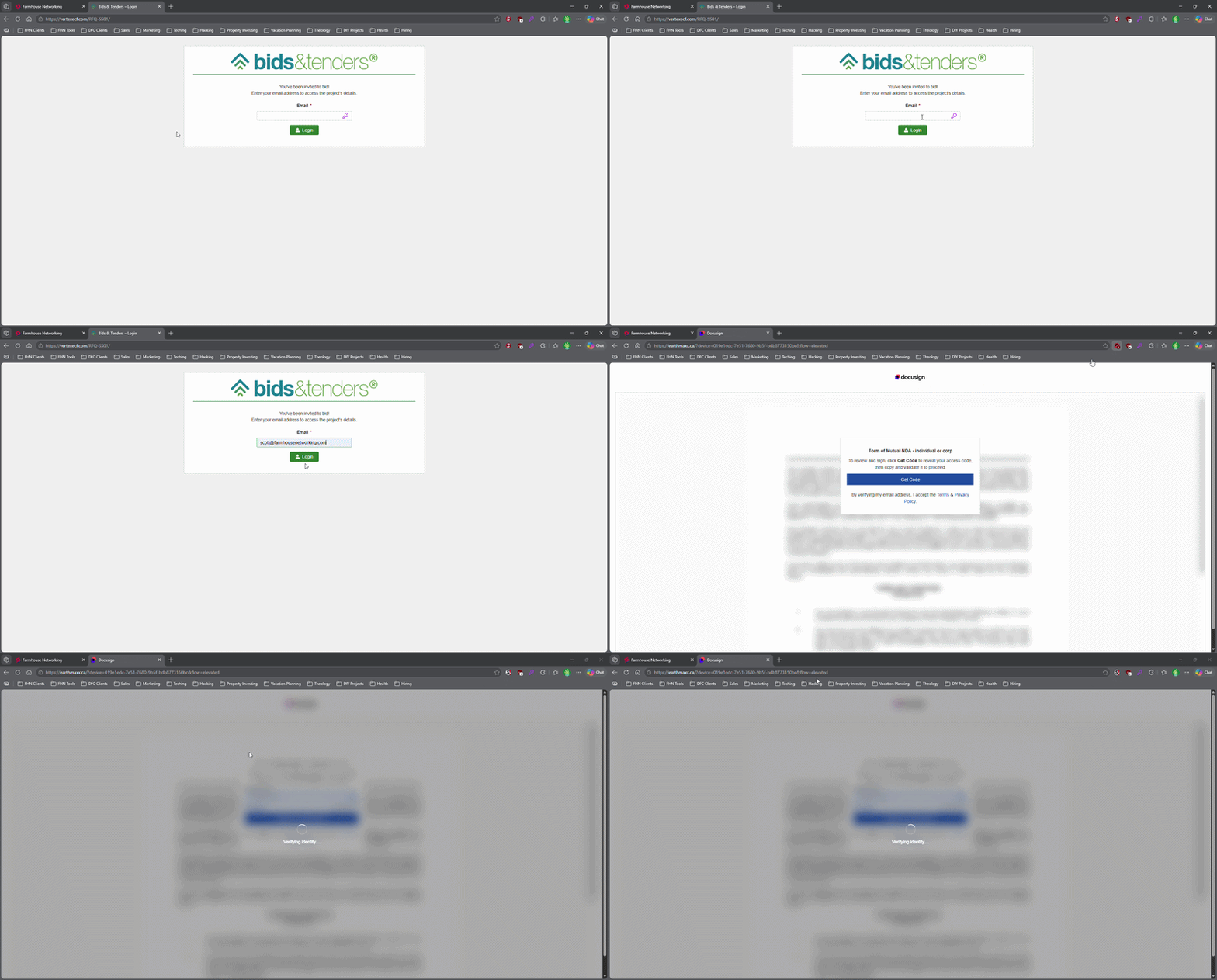
This login screen asks for an email address only, illustrating how attackers can use familiar Microsoft 365-style sign-in pages to bypass passwords.
Most small business owners believe that a strong password and multi-factor authentication make their Microsoft 365 accounts secure. That assumption is now being exploited at scale. Attackers are targeting Microsoft 365 users with device code authorization phishing – a technique that fools users into approving access tokens, bypassing multi-factor authentication protection entirely.
Campaigns using this method have surged since September 2025, representing a significant shift from limited, targeted attacks to widespread exploitation. Both organized criminal groups and nation-state actors are now using it. If your business runs on Microsoft 365, and most do, you need to act.
How the Attack Works
Microsoft has a login feature designed for devices like smart TVs and printers that can’t display a normal login screen. Instead of typing credentials on the device, a user visits a Microsoft page on their phone or computer and enters a short code. It’s a legitimate, trusted system.
Attackers exploit that trust. They initiate the device login flow themselves, then send your employee an email designed to get them to visit Microsoft’s real login page and enter the code – completing the attacker’s authentication instead of their own.
Your employee does everything right. They visit a real Microsoft website. They complete their MFA. They never hand over their password. And the attacker now has full access to your Microsoft 365 environment.
Action Steps for Your Business
Take these steps now with your IT team or provider:
Block device code flow in Microsoft Entra Conditional Access. This is the strongest mitigation available and can be deployed in report-only mode first to assess impact before full rollout. Most small businesses don’t use this feature and have no reason to leave it enabled.
Audit your Microsoft 365 OAuth app permissions. Review which third-party applications have access to your tenant and remove anything unauthorized.
Train your team on this specific attack. Standard phishing training won’t cover it. The key message is simple: if you receive a request to enter a code on a Microsoft login page that you didn’t initiate, stop and report it.
Review sign-in logs for your Microsoft 365 accounts. Unusual locations, unfamiliar devices, and off-hours logins are indicators of compromise.
Check for email forwarding rules set up without your knowledge. This is a common post-compromise action attackers use to quietly collect your outgoing email.
Review your cyber liability coverage. Confirm that account takeover scenarios are covered and understand what your response obligations are.
Q&A: What Your Clients or Partners May Ask
“How did this happen if you had MFA turned on?” This attack bypasses both traditional credential theft defenses and multi-factor authentication controls. MFA was never designed to protect against this type of authentication abuse.
“Could my information have been accessed?” If a business email account is compromised, any data in that account – client correspondence, contracts, financial information – is potentially accessible to the attacker.
“Is this being fixed by Microsoft?” Microsoft has released tools to block it, but those tools require configuration. Microsoft has been rolling out a managed Conditional Access policy aimed at blocking device code flow authentication, but it requires an administrator to enable and configure it. It doesn’t happen automatically.
“Should I be worried about my own accounts?” If you share Microsoft 365 services with a vendor or partner whose account is compromised, there’s risk of lateral movement. Security is a supply chain concern, not just an internal one.
How Farmhouse Networking Can Help
Farmhouse Networking reviews and configures Microsoft Entra Conditional Access policies to block device code phishing, audits your Microsoft 365 environment for existing unauthorized access, trains your staff on this and other current attack types, and monitors your accounts ongoing. We work with small and mid-sized businesses across Oregon, Northern California, and New Mexico – and we explain everything in plain language without the IT jargon.
Take the Next Step
Email support@farmhousenetworking.com today and ask for a Microsoft 365 security review. We’ll tell you whether this attack vector is currently open in your environment and what it takes to close it.
Continuing education isn’t just for licensed professionals — it’s the most underused competitive advantage in small business
Business owners who invest in ongoing learning stay ahead of industry changes and better serve their clients.
Ask most small business owners how they stay current in their industry, and you’ll get a variation of the same answer: they read the occasional article, attend a conference when they can, and otherwise learn by doing.
That approach works — until it doesn’t.
Industries change. Regulations shift. Client expectations evolve. New competitors arrive with tools and knowledge that didn’t exist three years ago. The small business owners who fall behind are rarely the ones who made a bad decision. They’re the ones who stopped making decisions at all, because they stopped learning what their options were.
Continuing education for business owners is not about going back to school. It’s about staying deliberately current in your industry, your craft, your compliance obligations, and the technology your business depends on. It’s about being the person in the room who actually knows what’s happening in their field — not the one nodding along.
Action Steps for Business Owners and Their IT Teams
Identify the professional associations and certifying bodies that govern your industry and confirm what continuing education or recertification requirements apply to you or your licensed staff.
Build a structured learning calendar — one that includes time for courses, industry publications, relevant conferences, and peer networking. Treat it as a business expense, because it is one.
Look for CPE, CEU, or certification programs that align directly with where your industry is heading. AI, automation, regulatory changes, and client technology expectations are reshaping most sectors right now.
When professional development introduces new tools or workflows to your business, involve your IT provider early. Technology changes made without IT planning create security gaps, compatibility problems, and support headaches.
Encourage key staff to pursue continuing education in their functional areas — operations, finance, customer service, or technical disciplines. Your team’s knowledge is a direct asset to your clients.
Document what you and your staff have learned. In industries with licensing requirements, this protects you during audits. In industries without them, it differentiates you from competitors who cannot demonstrate the same commitment.
Review your technology stack alongside your continuing education cycle. New industry knowledge often reveals where your current tools are falling short.
Connect with local business resources — chambers of commerce, SCORE, Small Business Development Centers — for low-cost or no-cost professional development that is often highly practical and locally relevant.
Questions Your Clients or Prospects Might Ask
“What makes you different from your competitors?” Demonstrated commitment to staying current — through credentials, certifications, and relevant training — is a concrete and credible differentiator in almost every market.
“Are you keeping up with changes in the industry?” Clients in regulated or fast-moving sectors ask this more than most business owners expect. The answer should be specific, not generic.
“Do you work with businesses like mine?” Industry-specific continuing education lets you answer yes with evidence. It signals that your advice is informed by real sector knowledge, not general business intuition.
“How do you stay ahead of the technology changes in your field?” This question is becoming more common as clients see technology reshaping what good service looks like. A learning culture within your business is a strong and honest answer.
How Farmhouse Networking Can Help
Professional development drives change — new tools, new workflows, new approaches to serving clients. Farmhouse Networking helps small and mid-sized businesses make sure their IT infrastructure keeps pace with what their owners and teams are learning. When a course introduces a new cloud platform, when a certification requires new software, or when industry changes shift how your business operates, we make sure the technology side is ready to support it. We handle IT so you can focus on growing.
The best investment in your business is the knowledge behind it. Email support@farmhousenetworking.com and let’s make sure your technology is as current as you are.
And God will generously provide all you need. Then you will always have everything you need and plenty left over to share with others. As the Scriptures say,
“They share freely and give generously to the poor. Their good deeds will be remembered forever.”
For God is the one who provides seed for the farmer and then bread to eat. In the same way, he will provide and increase your resources and then produce a great harvest of generosity in you. - 2 Corinthians 9:8-10
We use cookies to ensure that we give you the best experience on our website. If you continue to use this site we will assume that you are happy with it.