A practical guide to cutting costs by moving your business off traditional fax
Modern businesses are replacing the fax machine with secure, cloud-based digital fax.
Most businesses that still fax do it because a client, vendor, or government agency expects it, not because anyone actually prefers the machine. But keeping that machine running means paying for a dedicated phone line, equipment, toner, and paper, plus the staff time spent checking on it. A digital fax service lets you keep sending and receiving faxes exactly as your partners expect, without any of the overhead.
What Changes When You Switch
You keep your existing fax number, but instead of documents printing out of a machine, they arrive as PDFs in a secure email or online inbox. Sending works the same way, in reverse: attach a file and send it like an email.
Action Steps for Your Business and IT Team
Calculate your current fax costs. Add up the phone line, any equipment lease, paper, and toner. Compare that total to a monthly digital fax subscription.
Port your existing number. This keeps continuity for clients, vendors, and any government or financial contacts who already have your fax number.
Route incoming faxes to a group inbox. Setting delivery to a Google Group or Microsoft 365 Group means multiple team members see new documents right away instead of one person checking a machine.
Automate document storage. Configure faxes to save directly into a Google Drive or OneDrive folder, cutting down on manual scanning and lost paperwork.
Pilot before a full cutover. Run the new system alongside your current setup for a short period to confirm delivery and receipts are working as expected.
Check vendor security practices. If your business handles sensitive client or financial information, confirm encryption and access control standards before switching.
Questions Your Team or Clients Might Ask
“Will our fax number change?” No, it transfers to the new service and works exactly as before.
“Is this actually cheaper?“ In most cases, yes. You eliminate the dedicated phone line and hardware costs and pay only for the service.
“What if we’re not very technical?” Sending and receiving through email or a simple app is generally easier to learn than operating a physical machine, and most staff pick it up quickly.
“Do we still need to fax at all in [current year]?” Many industries still rely on fax for certain transactions, so keeping a working number matters even as the technology behind it modernizes.
How Farmhouse Networking Can Help
Farmhouse Networking manages RingCentral fax deployments for businesses across our service area, handling the number port, setting up group-based inbox routing so the right people see documents the moment they arrive, and configuring automatic filing into your Google Drive or OneDrive. We work with other fax platforms if you already have a preference, but RingCentral is the service we support directly and recommend for its reliability and flexible notification options.
Ready to Stop Paying for a Machine You Barely Use?
If your business is ready to cut an unnecessary cost and simplify how documents move through your office, email support@farmhousenetworking.com and we’ll help you figure out what the switch looks like for you.
What this summer’s federal security campaign means for any business holding sensitive data
Taking a few hours this summer to review your security practices can prevent a costly data breach later.
What this summer’s federal security campaign means for any business holding sensitive data
This July, the IRS and its Security Summit partners launched Protect Your Clients; Protect Yourself, a five-week campaign built for tax preparers. It walks through the phishing schemes, impersonation scams, and stolen-credential attacks criminals are using against professionals who hold sensitive client data, along with the basic safeguards, written security plans, and verification tools meant to stop them.
Your business may have nothing to do with taxes. But the tactics described in this campaign — fake “new client” emails carrying malware, spoofed calls, and urgent requests designed to pressure someone into clicking or sharing information — are used against every kind of small business, not just tax firms. If your company stores customer records, payment details, or employee data, you’re a target using the same playbook. Summer is a good time to check whether your own safeguards would hold up.
Action Steps for You and Your IT Team
Write down your security practices. A simple, documented policy covering data handling, access, and response is far better than relying on informal habits.
Enable multi-factor authentication on email, financial systems, and any remote access used by your team.
Review employee access regularly, and immediately revoke access for anyone who leaves the company.
Train your team to spot phishing and impersonation attempts, especially fake vendor invoices, urgent executive requests, and unexpected attachments.
Test your backups, not just assume they’re running, to confirm you could actually recover if something went wrong.
Document an incident response plan so your team knows exactly who to call and what to do the moment something looks wrong.
Questions Your Customers or Employees Might Ask
“How do you protect the information you have on file for us?” We maintain a documented security policy, require multi-factor authentication across our systems, and regularly review who has access to sensitive data.
“What would happen if your systems were breached?” We have a tested response plan and know exactly how we’d respond and notify anyone affected.
“Why do you keep asking us to verify things that used to be simple?” Because verification steps protect both of us from scams that specifically exploit shortcuts and urgency.
How Farmhouse Networking Can Help
Farmhouse Networking helps small and mid-sized businesses turn good intentions into an actual, documented security program: written policies, MFA across your critical systems, cleaned-up user access, tested backups, and a clear incident response plan. We handle the technical details so you can run your business with confidence instead of guesswork.
Find Out Where Your Business Actually Stands
Email support@farmhousenetworking.com for a free security assessment, and close the gaps the IRS is warning everyone else about — before they cost you something worse.
Why waiting on that hardware upgrade could cost you more the longer you put it off
As computer prices continue to climb, planning your hardware refresh now can help your business avoid paying more later.
If you’ve been telling yourself “next quarter” every time a laptop upgrade comes up, it’s time to rethink that plan. Industry analysts are now projecting one of the steepest computer price increases in years, driven by a global memory chip shortage that shows no sign of easing. For business owners who’ve been putting off replacing aging machines, the math has changed. The equipment you delay buying today will likely cost meaningfully more tomorrow.
Why prices are rising now
The root cause is a supply crunch in memory chips — the RAM and storage components inside every computer. Analysts at Gartner project soaring memory costs will cut global PC shipments by over 10% in 2026, while pushing PC prices up 17% compared to 2025 levels. Combined DRAM and solid-state drive prices are expected to surge roughly 130% by the end of the year. The driver is straightforward: massive AI data center buildouts are consuming memory chip production, leaving less supply for everyday computers and laptops.
This isn’t a short-term blip. Analysts don’t expect prices to stabilize until sometime after 2027. Some manufacturers have already begun raising prices on popular devices and reducing memory in standard configurations to manage costs. Beyond pricing, availability is tightening too — component shortages are extending lead times on replacement parts and new equipment for many buyers.
For a business owner sitting on a five- or six-year-old fleet of machines, this creates a narrow window. Replacing aging hardware now, while at least some current-generation pricing is still available, is very likely cheaper than waiting another year.
Action steps to take now
Inventory your current hardware. List every workstation and laptop with its age and current performance issues.
Identify machines nearing end of useful life — slow boot times, frequent crashes, or inability to run current software are red flags.
Get a written quote for replacement now, even if you’re not ready to buy immediately, so you have a pricing baseline.
Prioritize replacements by business risk. Machines running critical software or storing sensitive data should move to the front of the line.
Build a rolling replacement budget instead of one large annual purchase, so future price swings hit smaller batches of equipment.
Ask your IT provider about bulk purchasing or reserving inventory ahead of need, which can help lock in current pricing.
Questions business owners are asking
Should we wait to see if prices come back down? Based on current forecasts, prices are expected to stay elevated well into 2027. Waiting is more likely to cost you more than save you.
Do we need to replace everything at once? No. A phased approach — prioritizing your oldest or most critical machines first — spreads out the cost while addressing the biggest risks.
Will refurbished or off-lease equipment help? It can be a reasonable option for lower-priority machines, but it should be evaluated case by case for reliability and support.
How do we know if a machine still has useful life left? Age, performance under current workloads, and whether it can run supported software are the key indicators. An IT assessment can quantify this clearly.
How Farmhouse Networking can help
Farmhouse Networking works with business owners across Oregon, Northern California, and New Mexico to plan hardware refreshes that make financial sense. We start with a straightforward assessment of your current equipment, flag machines that are approaching risk, and help you build a realistic replacement timeline and budget — not just a shopping list. We also help source and configure new equipment so you’re not left navigating a volatile market on your own.
The bottom line
The cost of waiting is no longer hypothetical. Every quarter you delay is a quarter closer to higher prices and tighter availability. If you’ve been meaning to upgrade, now is the time to plan it — not next year.
Email us at support@farmhousenetworking.com for a free hardware and lifecycle assessment. We’ll help you understand exactly where you stand and what a smart, budget-conscious upgrade plan looks like for your business.
What Every Small Business Owner Should Know About Accounting Software and GAAP
Choosing the right accounting method and software is one of the most important decisions a small business owner can make — especially when loans, audits, or growth are on the horizon.
The software you chose when you started may not be the right fit for where your business is going – and your IT setup is part of the equation.
Most small business owners choose QuickBooks because someone recommended it, or because it was the obvious option. It’s reliable, widely used, and gets the job done for basic bookkeeping. But as your business grows, the question isn’t whether QuickBooks works – it’s whether it’s working well enough for your specific situation.
The answer depends largely on one thing: how your business handles revenue recognition, and whether your financials need to meet GAAP standards.
QuickBooks and GAAP: Understanding the Difference
QuickBooks defaults to cash-basis accounting, which records income when you receive payment and expenses when you pay them. This works well for simple operations and gives you a clear view of your cash position. It’s also how most small businesses file taxes.
Generally Accepted Accounting Principles (GAAP) typically requires accrual-basis accounting, where revenue is recorded when it’s earned and expenses when they’re incurred, regardless of when money changes hands. This produces a more accurate long-term picture of your business’s financial health.
For most small businesses under $25 million in annual revenue, cash-basis accounting is perfectly legal and practical. But if you plan to seek a business loan, bring on investors, take on a business partner, prepare for a sale, or operate in a regulated industry, GAAP-compliant accrual-basis financials will likely be required. QuickBooks can produce accrual-basis reports, but it requires proper configuration and disciplined bookkeeping to do so accurately.
QuickBooks is a general-purpose tool. Depending on your industry, a purpose-built alternative may serve you better: The right choice depends on your size, complexity, industry compliance requirements, and how your financial data needs to flow between systems.
Practical Action Steps for You and Your IT Team
Identify your accounting method. Confirm whether your books are cash or accrual basis and whether that matches what your CPA recommends for your situation.
Review your reporting needs. Ask yourself: could you produce a GAAP-compliant set of financials today if a bank or investor asked for one? If not, that’s worth addressing.
Audit your software integrations. List every system that connects to your accounting software — payroll, CRM, e-commerce, inventory — and verify those connections are working accurately and securely.
Secure your financial data. Confirm that your accounting platform uses encrypted connections, requires strong passwords, and supports multi-factor authentication for all users.
Set up and test your backups. Automated, offsite backups of your financial data should be tested periodically. A backup you’ve never restored is a backup you can’t trust.
Limit access to financial systems. Only the people who need access to your accounting data should have it. Set role-based permissions and review them regularly.
Plan before you migrate. If you decide to switch platforms, involve your CPA and your IT provider from the beginning. Migrations done without a clear plan often result in data gaps, reporting errors, or security exposures.
Keep your software updated. Accounting software vulnerabilities are real attack vectors. Make sure updates and patches are applied promptly.
Questions Your Clients, Lenders, or Partners May Ask — and How to Answer Them
Are your financials GAAP-compliant? Our books are maintained on an accrual basis in coordination with our CPA. We can produce GAAP-compliant financial statements when needed.
How secure is your financial data? We use encrypted accounting software with multi-factor authentication, limited user access, and automated offsite backups.
What happens if your accounting system goes down? We have business continuity measures in place, including current backups and IT support to restore access quickly. We don’t rely on a single point of failure.
Are you considering switching accounting platforms? Any platform change we make would be planned carefully with input from our CPA and IT provider to avoid disruption to our reporting or data integrity.
How Farmhouse Networking Supports Your Business
Your accounting software is only as reliable as the IT environment it runs in. A slow network, an unpatched system, weak access controls, or a missed backup can turn a small accounting problem into a big one — fast.
Farmhouse Networking helps small and mid-sized businesses build and maintain the IT infrastructure that supports their financial systems. That includes network security and reliability, multi-factor authentication setup, automated backup and disaster recovery, user access management, and coordination with software vendors when issues arise. We’re not accountants — but we make sure the technology your accountant depends on is solid.
Take the Next Step
If you’re not confident your accounting setup and the IT behind it are in good shape, we’re here to help.
Email us at support@farmhousenetworking.com to schedule a free IT assessment. We’ll review your current environment and tell you exactly what’s working, what’s at risk, and what to do about it — in plain English, no jargon.
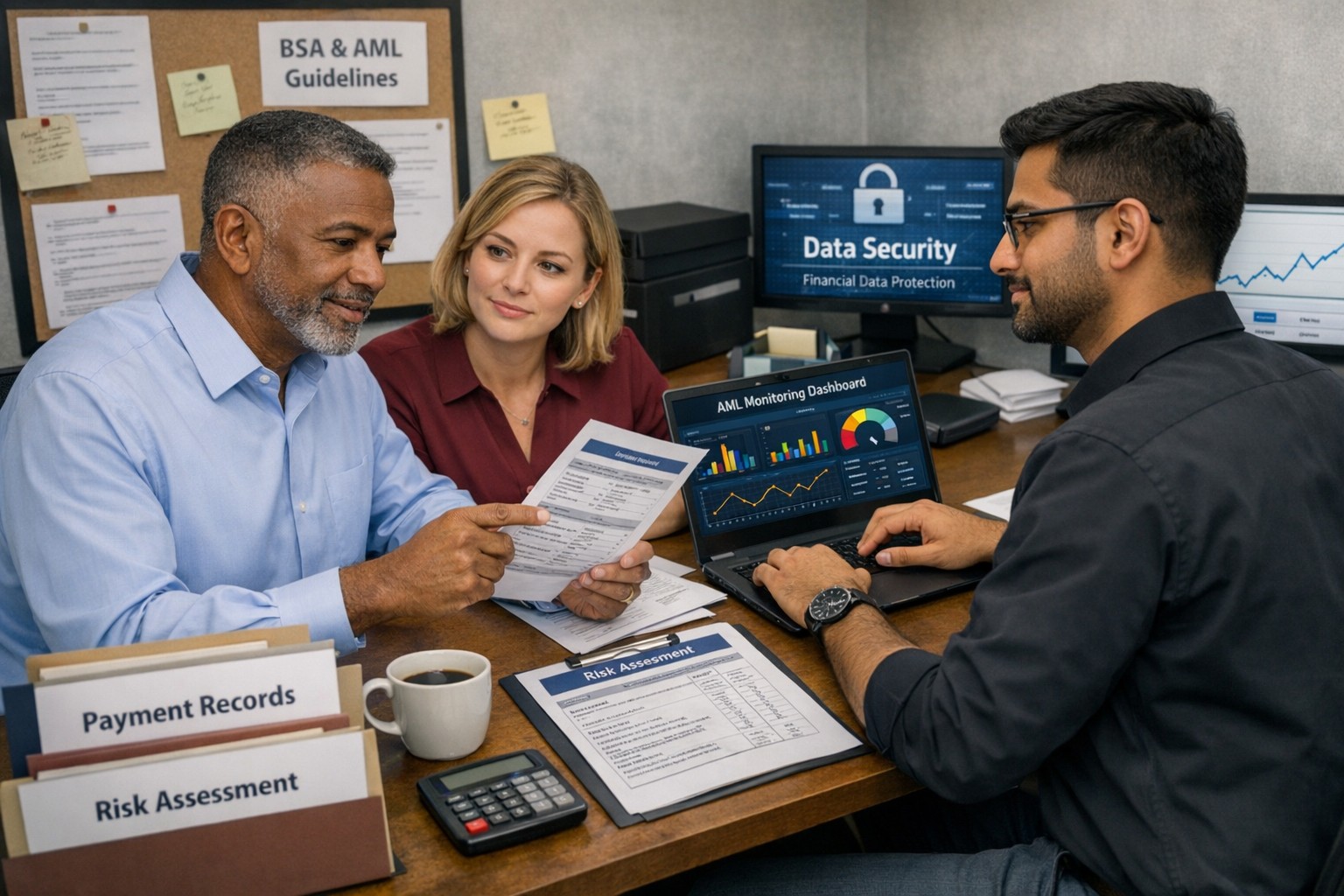
Business owner and IT team working together to strengthen BSA AML compliance, improve financial recordkeeping, and reduce banking risk
Even if you are not a bank, your business can be pulled into Bank Secrecy Act (BSA) and Anti‑Money Laundering (AML) expectations through how you move money, handle client funds, or work with financial institutions. Regulators expect banks to understand their customers’ risk profile, which means your business practices, recordkeeping, and security controls matter more than ever.
What BSA/AML Means for Your Business
BSA requires financial institutions to keep records and file reports on certain currency and suspicious transactions to help detect and prevent money laundering.
Banks use a risk‑based approach and look closely at higher‑risk customers such as cash‑intensive businesses or those sending frequent international payments.
Poor documentation, weak controls, or opaque ownership structures at your company can prompt more questions, delays, or even de‑risking by your bank.
Practical Steps for Owners and IT
Business owner actions:
Map money flows: Document where funds come from, where they go, and who approves each step; share this with your bank when asked.
Clarify ownership: Maintain updated records of beneficial owners and key executives so you can respond quickly to due‑diligence requests.
Define policies: Create written policies on accepting payments, refunds, wires, and handling unusual or large cash transactions.
IT actions:
Centralize records: Implement systems that retain transaction logs, invoices, and client identity data securely and for required retention periods.
Monitor anomalies: Use monitoring tools to flag unusual payment patterns (new countries, unusual amounts, odd timing) for review by management.
Secure access: Enforce least‑privilege access, MFA, and audit trails on finance, billing, and banking systems to support internal controls.
Common Client Questions (with Answers)
“Why are you asking for my ID or entity details?”
Banks and their business customers must perform customer due diligence and verify ownership for certain transactions.
“Why did my payment get delayed or flagged?”
Transactions that deviate from expected patterns may trigger additional review under BSA/AML monitoring rules.
“Are my data and documents safe with you?”
Strong access controls, encryption, and logging protect client information used to meet financial and compliance obligations.
How Farmhouse Networking Helps
Farmhouse Networking can design and implement the technical side of your BSA‑friendly environment so your bank sees you as a well‑controlled, lower‑risk customer. Services include:
Mapping and hardening financial data flows across accounting, CRM, and banking systems.
Implementing logging, alerting, and secure storage to support transaction monitoring and documentation.
Preparing your IT environment for bank questionnaires, vendor risk reviews, and audits.
Call to action: Email support@farmhousenetworking.com for more information about how Farmhouse Networking can help improve your business.
Small business owners can use clear reporting and documentation systems to navigate 2026 charitable giving rules and maximize tax‑deductible donations.
If your business donates to local nonprofits, schools, or community projects, the 2026 charitable giving rules change how much of that generosity you can deduct. The mechanics are more complex, but with the right systems you can still give strategically and get the full benefit available.
What Changed for Small Businesses in 2026
Your corporation can now deduct charitable contributions only to the extent they exceed 1% of taxable income, and total deductible contributions are still capped at 10% of taxable income, with excess potentially carried forward up to five years.
As an individual owner, your personal deductions are subject to a 0.5% AGI floor, though cash gifts to qualifying public charities remain deductible up to 60% of AGI.
A new, permanent charitable deduction for non‑itemizers lets individuals deduct up to $1,000 (single) or $2,000 (joint) for qualifying gifts starting in 2026.
All of this sits on top of existing substantiation rules: written acknowledgments for gifts of $250 or more and additional requirements for non‑cash contributions.
Action Steps for Owners and IT Teams
For the business owner:
Revisit your giving strategy:
Identify how much you typically give each year and whether it clears the new 1% floor and stays within the 10% cap for corporate deductions.
Coordinate with your tax advisor:
Decide whether to increase or bunch certain donations into specific years so you actually realize the deductions you expect.
Clarify business vs. personal giving:
Separate corporate contributions from personal donations so both you and your company can plan around the new floors and limits.
For your IT or technical team:
Build a clear digital trail:
Implement structured storage for donation receipts and acknowledgments, linked to accounting entries and accessible for your CPA during tax season.
Standardize data and approvals:
Use simple forms or workflows where staff record donation details—amount, date, charity, purpose, and whether any benefits were received—before payments go out.
Security and retention:
Protect donor‑related and financial data with proper access controls and keep records long enough to support the five‑year carryforward window for excess contributions.
Questions Your Customers or Community Partners May Ask
“Is my company’s sponsorship of your event still tax‑deductible?”
It may be treated as a charitable contribution or as advertising/marketing depending on the benefits received; in either case, new floors and caps can affect the deduction.
“Does it still help me tax‑wise if I give small amounts?”
Smaller gifts may not exceed the new floors by themselves, which is why many taxpayers will see more benefit from fewer, larger, or more concentrated gifts.
“Why do you need to send such detailed receipts?”
The IRS requires specific elements in acknowledgments for gifts of $250 or more and for non‑cash donations, so detailed receipts protect both you and your donors.
How Farmhouse Networking Supports SMBs
Farmhouse Networking helps small and mid‑sized businesses turn charitable giving from an ad‑hoc expense into a well‑tracked, well‑documented, and strategically planned process. We integrate your accounting tools with secure document management, create simple digital forms for recording donations, and set up dashboards so you can see where you stand relative to the 1% floor and 10% cap.
We also support customer‑facing communication—website content, FAQs, and email updates—so your community partners understand that you are still committed to giving, and how the 2026 rules affect them.
Email support@farmhousenetworking.com to find out how Farmhouse Networking can help your business modernize its systems and make smarter, more strategic charitable giving decisions under the new 2026 regulations.
Stabilize SMB IT costs and eliminate downtime risks with proactive management
Surprise technology bills, emergency repairs, and the high expense of an in-house IT team create a constant strain on business budgets. For owners aiming to grow while staying in control of expenses, these unpredictable costs aren’t just an annoyance—they can derail plans, erode trust, and limit your business’s ability to invest in what really matters.
Why In-House IT Costs So Much
Maintaining your own IT staff is far more expensive than it first appears:
Salaries and Benefits: A modest in-house IT team for a 40-employee business can run upwards of $192,600 per year—about $402 per user per month. This includes wages for technicians, managers, and benefits that typically add 31% or more to the base salary.
Recruitment and Training: The average cost-per-hire for IT roles is about $4,700, not counting the 8 to 26 weeks of ramp-up time. Added to this are regular education costs needed to keep skills up to date in a rapidly changing tech landscape.
Overhead: Beyond staff, you’re paying for hardware, software licenses (ranging from $500–$18,000 monthly), space, insurance, PTO, and infrastructure.
Turnover: IT has one of the highest turnover rates in any industry. Every time someone leaves, you lose critical knowledge and must bear the cost of recruitment, onboarding, and lost productivity—sometimes as much as 200% of annual salary for that position.
Why Unpredictable IT Costs Threaten Your Business
Budget Surprises: Emergency fixes, one-time service charges, and unclear contracts can cause your monthly expenses to swing wildly, making it impossible to forecast cash flow or plan for the year ahead.
Productivity Losses: Downtime due to system failures not only costs thousands in lost business per hour but also damages your reputation and relationships.
Reactive Spending: Fixing problems as they arise is always more expensive than proactively maintaining equipment or systems. Without a predictable monthly IT plan, you’re forced to “rob Peter to pay Paul” when something inevitably breaks.
Take Action: Steps to Regain Control
Conduct an IT Audit: Know exactly what you’re spending, where, and why.
Distinguish Must-Haves: Separate essential services from legacy software or non-critical expenses.
Move to a Managed IT Model: Managed IT services typically cost just $125–$220 per user per month, offering budgeting clarity and reducing surprises.
Schedule Reviews: Revisit IT budgets quarterly and adjust for business changes early.
Consolidate Vendors: Limit the number of external suppliers so that responsibility is clear, and costs are contained.
How Farmhouse Networking Can Help
Farmhouse Networking partners with you to:
Uncover Hidden Savings: Our audits often find areas to cut unnecessary costs.
Flat-Rate Managed IT: We offer comprehensive support—including monitoring, proactive maintenance, cybersecurity, and strategy sessions—for one predictable monthly fee.
Quarterly Reviews and Strategic Planning: Stay ahead of risks and keep your IT spend aligned with your business goals.
Hands-Off Vendor Management: Eliminate redundant contracts and ensure every dollar spent delivers real value.
Ready to End Unpredictable IT Spending?
Take charge of your IT budget and redirect savings to initiatives that drive your business forward. Contact Farmhouse Networking to schedule your complimentary IT cost assessment.
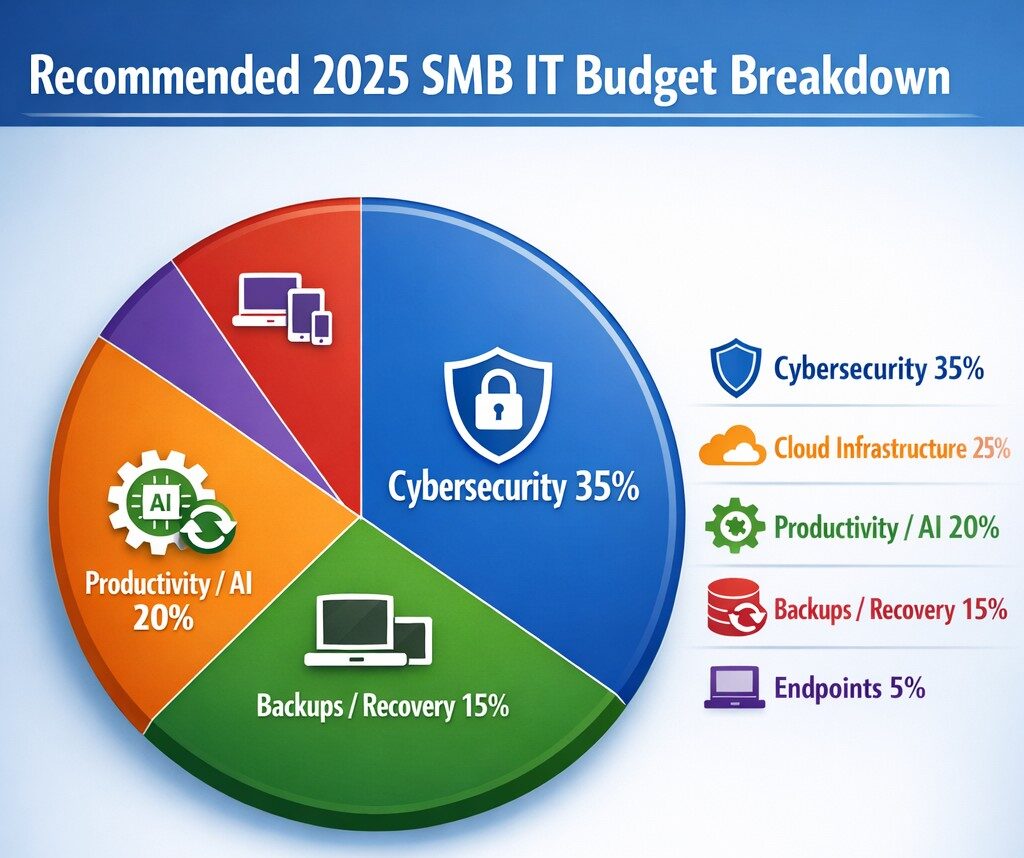
Allocate 30%+ of 2025 IT budget to cybersecurity per industry benchmarks.
Small and medium-sized businesses (SMBs) must strategically plan their IT budgets to stay competitive and efficient. It’s crucial to allocate resources wisely to support both day-to-day operations and long-term growth. Let’s explore the key areas SMBs should focus on when budgeting for tech in 2025.
Cybersecurity Investments
With no end to cyber threats in site, cybersecurity should be a top priority in your 2025 IT budget. Consider allocating funds for:
– Advanced firewalls and intrusion detection systems – Multi-factor authentication (MFA) implementation – Regular security audits and penetration testing
Remember, the cost of preventing a cyber attack is far less than the potential losses from a successful breach.
Artificial Intelligence and Automation
AI is no longer a luxury reserved for large enterprises. In 2025, SMBs should budget for AI-powered tools to enhance efficiency and decision-making. Consider investments in:
– Chatbots for customer support – AI-driven analytics for business insights – Automated workflow tools to streamline operations
These technologies can help SMBs do more with less, improving productivity and customer satisfaction.
Hardware and Device Upgrades
SMBs still need to budget for essential hardware. This includes:
– Laptops and desktops for employees – Mobile devices for remote work – Networking equipment for reliable connectivity
Plan for a hardware refresh cycle to ensure your team has up-to-date tools to work efficiently. (Remember we meet with our clients twice a year in the Spring and Fall to discuss budget and replacement scheduling.)
Software Licenses and Subscriptions
Software is the backbone of modern business operations. Your 2025 IT budget should account for:
– Operating system licenses (Windows 10 is no longer supported as of October 2025) – Productivity suite subscriptions (e.g., Microsoft 365, Google Workspace) – Industry-specific software licenses – Collaboration and communication tools
Regularly review your software subscriptions to ensure you’re only paying for what you need and use.
IT Support and Managed Services
Consider outsourcing some or all of your IT support to a managed service provider (MSP) like Farmhouse Networking to reduce in-house IT costs and gain access to specialized expertise. Budget for:
– Help desk support – Compliance assistance – Network monitoring and management – Backup and disaster recovery services
Employee Cybersecurity Training
Hackers keep getting better at their crimes, so should it is mandatory to invest in your team’s cybersecurity skills. Allocate budget for:
– Yearly assessments of baseline knowledge – Weekly trainings with quizzes to make sure they are paying attention – Interactive or gamified content to keep people interested
Investing in your team’s skills can lead to better technology adoption and improved productivity.
Ready to optimize your IT budget for 2025? Don’t navigate this complex landscape alone. Contact Farmhouse Networking today to help you create a tailored IT budget that aligns with your business goals and maximizes your technology investments. Our experts can guide you through the process, ensuring you’re prepared for the technological challenges and opportunities that lie ahead. Let’s work together to future-proof your business and drive success.
Regular IT budget discussions prevent cost overruns and align spending with business goals
Technology plays a crucial role in the success of businesses across all industries. From small startups to large corporations, having a well-planned and properly allocated IT budget is essential. In this article, we will explore the significance of IT budgeting and how it can drive success in your business.
Why IT Budgeting Matters
IT budgeting is more than just crunching numbers and allocating funds. It is a strategic process that helps you align your IT goals with your overall business objectives. By creating a well-defined IT budget, you can effectively plan and allocate resources to support your business operations and drive growth. Here are some key reasons why IT budgeting matters:Financial Planning and Control: Creating an IT budget allows you to have a clear understanding of your financial resources and how they will be utilized. It helps you identify the costs associated with your IT infrastructure, software licenses, hardware upgrades, and maintenance. With a well-planned budget, you can effectively manage your IT expenses, monitor costs, and make informed financial decisions.
Goal Setting and Performance Evaluation: An IT budget provides a roadmap for your business by setting realistic goals and targets. It allows you to define measurable objectives and track your progress towards achieving them. By regularly evaluating your actual expenses against the budgeted amounts, you can identify areas for improvement, make necessary adjustments, and ensure that your IT initiatives align with your business goals.
Resource Allocation and Prioritization: With a well-defined IT budget, you can allocate resources effectively and prioritize projects based on their strategic importance. It helps you identify areas where you need to invest more resources and areas where you can optimize costs. By aligning your IT budget with your business priorities, you can ensure that your resources are utilized efficiently and that your IT initiatives deliver maximum value.
Risk Management and Contingency Planning: IT budgeting allows you to anticipate potential risks and plan for contingencies. By conducting thorough risk assessments and scenario planning, you can identify potential threats to your IT infrastructure and develop strategies to mitigate them. This proactive approach helps you minimize downtime, ensure business continuity, and safeguard your critical data and systems.
Key Elements of an Effective IT Budget
Creating an effective IT budget requires careful consideration of various factors. Here are some key elements to consider when developing your IT budget:Understand Your Business Objectives: Before diving into the budgeting process, it is essential to have a clear understanding of your business objectives. Identify the key IT initiatives that will support your business goals and prioritize them accordingly. This will help you allocate resources effectively and ensure that your IT budget is aligned with your overall business strategy.
Assess Your Current IT Infrastructure: Conduct a comprehensive assessment of your existing IT infrastructure, including hardware, software, and network infrastructure. Identify any outdated or underutilized assets that may need to be replaced or retired. This will help you optimize your IT spending and ensure that your budget reflects the actual needs of your business.
Consider Future Growth and Scalability: When creating an IT budget, it is important to consider future growth and scalability. Anticipate the technology needs of your business in the coming years and allocate resources accordingly. This will help you avoid costly upgrades or replacements down the line and ensure that your IT infrastructure can support your business expansion.
Factor in Maintenance and Support Costs: In addition to the initial investment in hardware and software, it is crucial to factor in ongoing maintenance and support costs. Consider the costs associated with software licenses, equipment maintenance, and technical support. By including these expenses in your budget, you can ensure that you have the necessary resources to keep your IT infrastructure running smoothly.
Stay Up-to-Date with Industry Trends: The technology landscape is constantly evolving, and it is important to stay up-to-date with the latest industry trends. Consider emerging technologies that may impact your business operations and evaluate their potential benefits and costs. By incorporating innovative solutions into your IT budget, you can future-proof your business and stay ahead of the competition.
Involve Key Stakeholders: When developing your IT budget, it is crucial to involve key stakeholders from across your organization. Engage with department heads, IT managers, and finance professionals to gather insights and perspectives. This collaborative approach will help you gain buy-in for your budget, ensure that it meets the needs of different departments, and foster a sense of ownership and accountability.
The Impact of IT Budgeting on Business Operations
A well-planned and properly executed IT budget can have a significant impact on your business operations. Let’s explore some key areas where IT budgeting can drive success:Improved Cost Management: By creating an IT budget, you can effectively manage your IT expenses and optimize costs. It helps you identify areas where you can reduce spending, negotiate better contracts with vendors, and eliminate unnecessary expenses. This improved cost management allows you to free up resources for strategic investments and drive business growth.
Enhanced Decision-Making: An IT budget provides you with the necessary data and insights to make informed decisions. By tracking your actual expenses against the budgeted amounts, you can identify areas of overspending or underutilization. This information enables you to make timely adjustments, reallocate resources, and prioritize projects based on their impact on your business objectives.
Increased Operational Efficiency: By aligning your IT budget with your business objectives, you can streamline your operations and improve efficiency. It enables you to identify areas where you can automate processes, implement new technologies, and eliminate bottlenecks. This increased operational efficiency not only reduces costs but also enhances productivity and customer satisfaction.
Mitigated Risks and Improved Security: IT budgeting plays a crucial role in mitigating risks and ensuring the security of your IT infrastructure. By allocating resources for cybersecurity measures, backup and recovery systems, and disaster preparedness, you can minimize the impact of potential threats. This proactive approach helps you safeguard your critical data, protect your systems from cyber-attacks, and ensure business continuity.
Enhanced Employee Productivity: A well-planned IT budget can also enhance employee productivity and satisfaction. By investing in modern tools and technologies, you can provide your employees with the necessary resources to perform their jobs efficiently. This improved productivity not only drives business results but also fosters a positive work environment and helps attract and retain top talent.
Contact Farmhouse Networking to develop a complimentary, comprehensive IT budget and reap the benefits it can bring to your business.
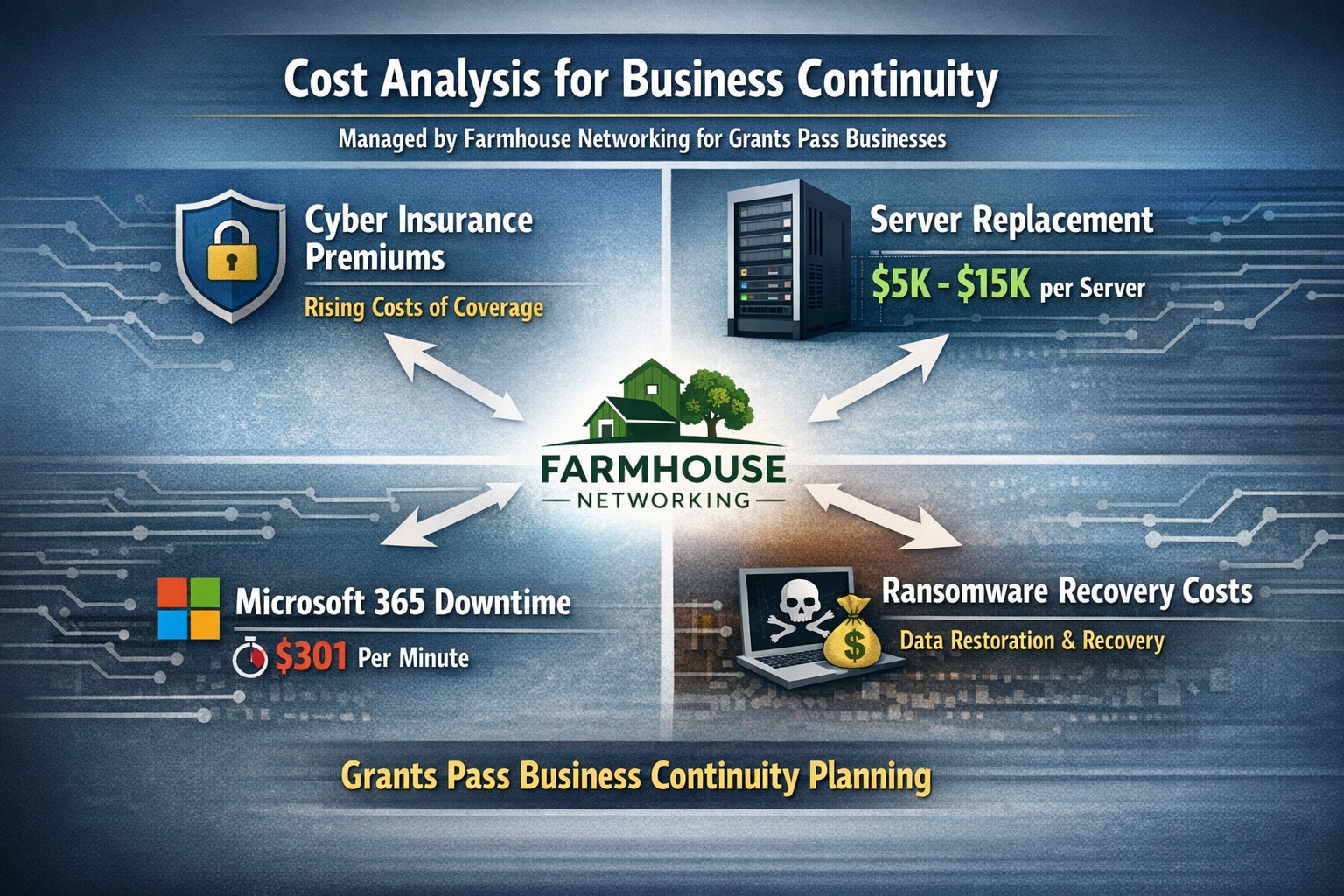
Farmhouse Networking calculates ransomware, server failure, and cyber insurance costs protecting Oregon SMB digital employees from downtime.
We were discussing the price customers paid for their monthly maintenance of computers and the comparison was brought up about insurance costs. As a business owner with employees, it is necessary these days to offer health insurance as part of their compensation package. If the company has vehicles that are used for business, then the government mandates that they be covered by minimum amounts of insurance. These costs are then built into the price the business owner then charges their clients for products or services.
Insurance Statistics:
According to Business.com, the average cost of health insurance for a single employee was $645 per month and $1,850 per month for a family.
According to NerdWallet.com, the average cost of car insurance was $179 per vehicle per month.
Questions:
So what about the “digital” employees of the company, aka the computers and network equipment that make business possible. How much are business owners paying to “insure” these assets? What are businesses willing to pay to make sure that their computers and network don’t have a sick day? Does the cost of insuring them include preventative care? Who does the business call in case of an accident or breakdown in the middle of the day? Does the cost of insuring include on-site service or transport to a service center?
If your company wants to keep their digital employees healthy and insure them from accidents, then contact us for assistance.
And God will generously provide all you need. Then you will always have everything you need and plenty left over to share with others. As the Scriptures say, “They share freely and give generously to the poor. Their good deeds will be remembered forever.” For God is the one who provides seed for the farmer and then bread to eat. In the same way, he will provide and increase your resources and then produce a great harvest of generosity in you. - 2 Corinthians 9:8-10
We use cookies to ensure that we give you the best experience on our website. If you continue to use this site we will assume that you are happy with it.