Voice phishing scams are getting harder to spot, and they’re not just an enterprise problem anymore. Here’s what business owners need to do now.
One convincing phone call is often all it takes. Verification before action is the strongest defense against vishing.
A hedge fund employee gets a phone call. The voice sounds exactly like a colleague, tone and pacing included. Within minutes, the caller has talked their way into a password reset. That scenario played out at several major investment firms in August 2026, when AI-generated voice cloning was used to target Point72, Citadel, and Millennium Management. Two Sigma caught the attempt before any damage was done, according to Bloomberg’s reporting.
Most small and mid-sized businesses don’t have that level of security scrutiny watching over them. This is vishing: voice phishing, where a scammer uses a phone call instead of an email to trick someone into handing over credentials, approving a wire transfer, or granting system access. It’s not a future threat. It’s active right now, and AI voice tools are making it more convincing every month.
Why Vishing Works So Well
People trust a human voice more than a written message, and criminals know it. According to Verizon’s 2026 Data Breach Investigations Report, phone-based social engineering succeeds roughly 40% more often per attempt than email phishing. Gartner research found that 35% of organizations have already experienced at least one deepfake-related incident, yet only 10% of security leaders prioritize training staff to recognize a cloned voice, compared to 73% who focus on email phishing alone.
The financial risk is real. In 2023, a vishing call to an IT help desk was the entry point for a breach that cost MGM Resorts an estimated $100 million.
Action Steps for Owners and IT
For the business owner:
Set a rule that no wire transfer, password reset, or system access is approved based on a phone call alone. Require a callback to a known, independently verified number first.
Build a culture where staff can pause and question an “urgent” request without fear of looking difficult.
Schedule recurring, not one-time, staff training on phone-based scams.
For your IT team or provider:
Enforce multi-factor authentication on every account that supports it, and never let it be disabled based on a phone request.
Require independent identity verification before any help desk password reset.
Document and block known scam and spoofed numbers where possible.
Run periodic simulated vishing tests to find gaps before criminals do.
Questions Clients Are Asking
“How do I know if a call is legitimate?” Hang up and call the company or person back using a number you already have on file, not one the caller gives you.
“What should my team do if they’re unsure?” Stop, verify, then act. No legitimate request will penalize someone for double-checking.
“Can this really happen to a business our size?” Yes. Smaller businesses are often targeted precisely because attackers assume less security is in place.
“What’s the first thing we should change?” Put a callback verification policy in place this week. It costs nothing and closes the biggest gap immediately.
How Farmhouse Networking Can Help
Farmhouse Networking builds vishing and social-engineering awareness training around how your team actually works, not a generic slideshow. We run realistic simulated call scenarios, show you exactly where the gaps are, and help you put clear verification procedures in place your staff will actually follow. As a locally based, USA-only provider, we invest heavily in our own team’s ongoing security training, and we bring that same standard to yours.
Protect Your Business Before the Call Comes In
Vishing attacks succeed because they catch people off guard. A short, honest conversation now is a lot less costly than the one you’d have after a breach. Email us at support@farmhousenetworking.com for a free risk assessment. We’ll give you a clear picture of where your business stands, not just against vishing, but across your full security posture.
Use DNS Filtering to Stay Safe and Open for Business
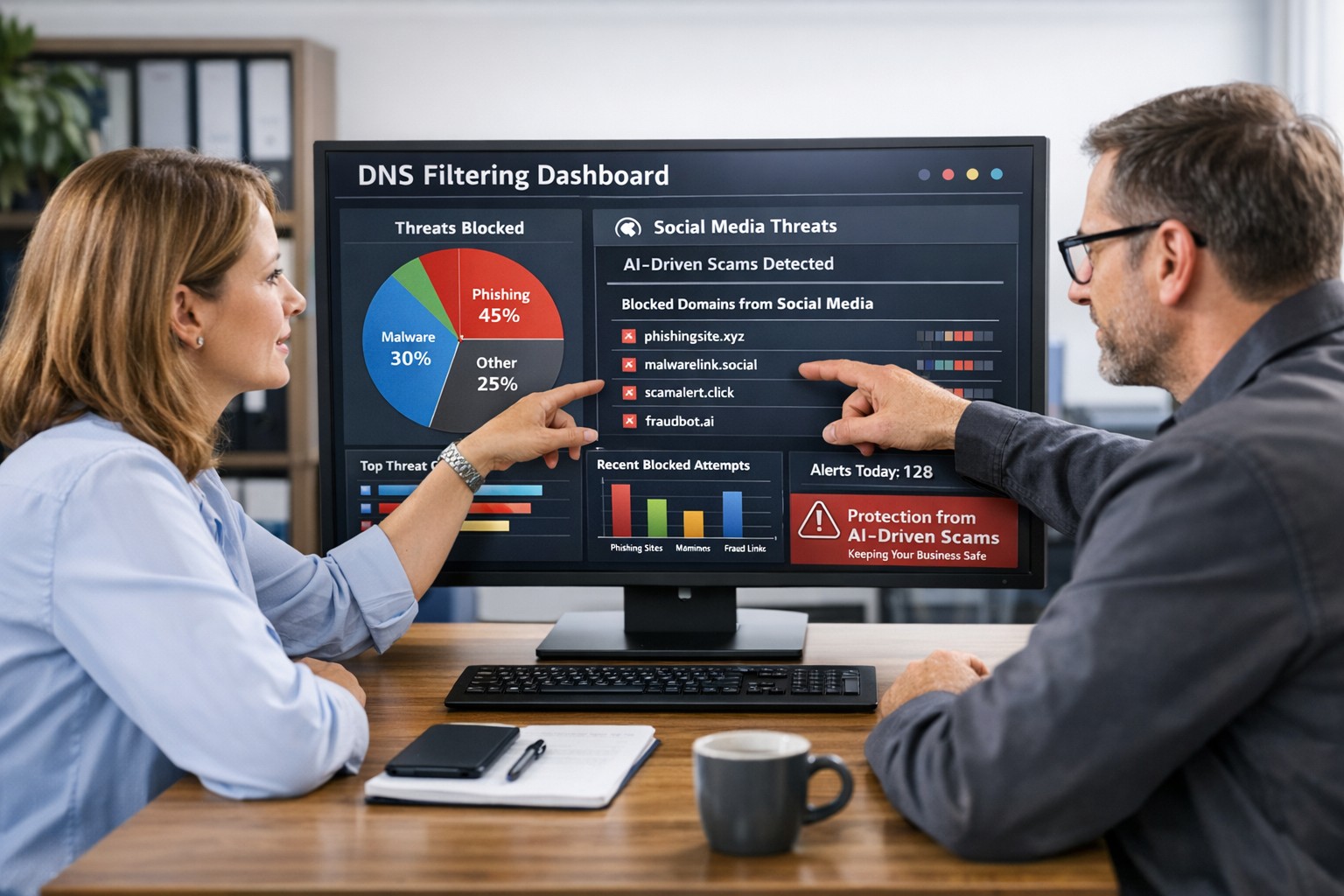
DNS filtering helps small business owners block AI powered social media scams before employees can reach malicious websites
AI tools now let scammers quickly generate deepfake videos, realistic ads, and convincing phishing messages that target small and mid‑sized businesses on social media. These attacks trick employees into clicking malicious links that steal logins, install ransomware, or divert payments, and incident rates and losses are climbing. DNS filtering offers your business a practical, affordable way to block dangerous sites at the network level before a bad click turns into downtime.
Why AI-Driven Social Media Threats Matter for SMBs
AI deepfakes and fake ads can impersonate your brand or suppliers and lead to look‑alike scam sites.
AI-enhanced phishing leverages details from your website and social media to sound like real customers, partners, or executives.
Web‑based phishing and spoofing attempts are rising sharply year over year, driven by generative AI.
What DNS Filtering Does for Your Business
DNS filtering checks where your employees’ devices are trying to connect and blocks known or suspected malicious domains. For SMBs, this:
Prevents access to phishing pages and fake login screens linked from social media or email.
Reduces malware and ransomware risk by blocking communication with malicious servers.
Gives you visibility into risky browsing and helps enforce acceptable‑use policies.
Action Steps for Business Owners and IT
Document where and how your team uses social media for sales, support, and marketing.
Roll out DNS filtering to office networks, remote workers, and any company‑managed laptops or phones.
Integrate DNS filtering logs with your security monitoring to quickly investigate suspicious activity.
Establish a clear process for verifying unusual requests (wire transfers, password resets, gift card purchases) received via social media or email.
Sample Customer Questions and Answers
“Is it safe to click promotions I see about your business on social media?” We recommend visiting our official website or verified profiles directly, because scammers can create fake ads that lead to malicious sites.
“How do you protect my data from online scams?” We use layered security including DNS filtering to block malicious websites, alongside secure payment providers and strong internal controls.
How Farmhouse Networking Helps SMBs
Farmhouse Networking works with you to understand your business, social media use, and risk tolerance, then designs and manages a DNS filtering solution that fits your size and budget. We deploy, configure, and monitor the service, fine‑tune policies over time, and provide clear reports so you always know how your network is being protected. This is included at no additional cost to all our monthly managed IT services clients.
Call to Action: Email support@farmhousenetworking.com for more information about how Farmhouse Networking can help improve your business and defend against AI‑driven social media threats.
Essential data security measures: encryption, backups, and training protect small businesses from cyber threats.
Business data—customer records, financials, and intellectual property—is your lifeline. A single breach can cost thousands in downtime and lost trust, with 43% of cyberattacks targeting small firms.
Why Data Protection Matters Now
Cyber threats hit small businesses hardest due to limited resources. Ransomware, phishing, and insider errors lead to average losses of $25,000 per incident. Regulations like CCPA and GDPR mandate compliance, with fines up to 4% of revenue for violations. Protecting data safeguards profits, reputation, and legal standing.
Practical Action Steps
Implement these steps with your IT team for immediate impact.
Conduct a Data Audit: Inventory all data types (customer PII, emails, backups). Classify by sensitivity and map storage/access points. Set retention policies to delete unneeded info.
Secure Backups: Automate daily cloud backups (e.g., encrypted AWS S3). Test restores quarterly. Use 3-2-1 rule: 3 copies, 2 media types, 1 offsite.
Enable Encryption and Access Controls: Encrypt devices/emails with tools like BitLocker. Enforce multi-factor authentication (MFA) and role-based access.
Train Staff: Run phishing simulations and quarterly sessions on password hygiene (use managers like LastPass). Cover GDPR/CCPA basics.
Update Systems: Patch software monthly. Install firewalls, antivirus (e.g., Malwarebytes), and SSL for websites to boost SEO trust signals.
Monitor Threats: Deploy endpoint detection (e.g., Microsoft Defender). Review logs weekly for anomalies.
These steps reduce breach risk by 80% when followed consistently.
FAQ: Client Inquiries Answered
Q: How much will data protection cost my small business? A: Start free with MFA and backups via Google Workspace ($6/user/month). Full setups range $500–$5,000/year, far less than breach recovery.
Q: Do I need to worry about GDPR/CCPA if I’m U.S.-based? A: Yes, if serving EU/California customers or hitting thresholds (e.g., 50K consumers/year under CCPA). Draft a privacy policy and get consent.
Q: What if my team lacks IT expertise? A: Outsource audits/backups initially. Tools like UpdraftPlus handle WordPress sites simply.
Q: How do I recover from a breach? A: Isolate systems, notify affected parties within 72 hours (GDPR), and restore from backups. Engage experts to trace/forensics.
Q: Does data protection improve SEO? A: Yes—HTTPS and secure sites rank higher; trust signals cut bounce rates.
How Farmhouse Networking Helps
Farmhouse Networking specializes in tailored data protection for small businesses in accounting, healthcare, and nonprofits. We conduct audits, deploy encrypted backups, and train teams remotely. Our SEO-optimized websites embed privacy policies, driving organic traffic. Clients see 40% faster compliance and zero downtime in pilots. We integrate CRM security for lead gen without leaks.
Essential small business information security fundamentals: encrypt data, enable MFA, train employees, and backup regularly.
NIST is the National Institute of Standards and Technology. It acts as the defacto baseline that all other security and compliance organizations use to construct their standards. Reading their publications is like reading any other government document – extremely long and not interesting. Farmhouse Networking recently became aware of one such document called NISTIR 7621 aka Small Business Information Security: The Fundamentals. We took the time to distill out the main points here:
The Fundamentals aka Best Practices
Identify: Who has access to the network, who has access to the data, and what do they have access to. This includes background checking employees during the hiring process, taking an inventory of data to see who needs access to what, requiring that each user have their own login, and company policy creation.
Protect: Protection starts with separating data into shares then giving access only to those who really need it. It also includes protecting hardware with uninterruptible power supplies (UPS) and protecting software with regular updates. Protecting the network includes setting up a proper firewall, separate wireless for guest access, and VPN only access for remote users. Web filtering, SPAM filtering, file encryption, proper disposal of old equipment, and employee training are also mentioned.
Detect: Having a centrally managed antivirus software on each workstation is a must. This includes the ability to look back in time via log files or monitoring system to find the root of the security breach.
Respond: Have a disaster recovery plan and security incident response plan in place.
Recover: Need full backups of all important business data, invest in cyber insurance, and regularly access your technology to find timely improvements.
If your company does not meet these fundamentals, then contact us for assistance.
And God will generously provide all you need. Then you will always have everything you need and plenty left over to share with others. As the Scriptures say, “They share freely and give generously to the poor. Their good deeds will be remembered forever.” For God is the one who provides seed for the farmer and then bread to eat. In the same way, he will provide and increase your resources and then produce a great harvest of generosity in you. - 2 Corinthians 9:8-10
We use cookies to ensure that we give you the best experience on our website. If you continue to use this site we will assume that you are happy with it.