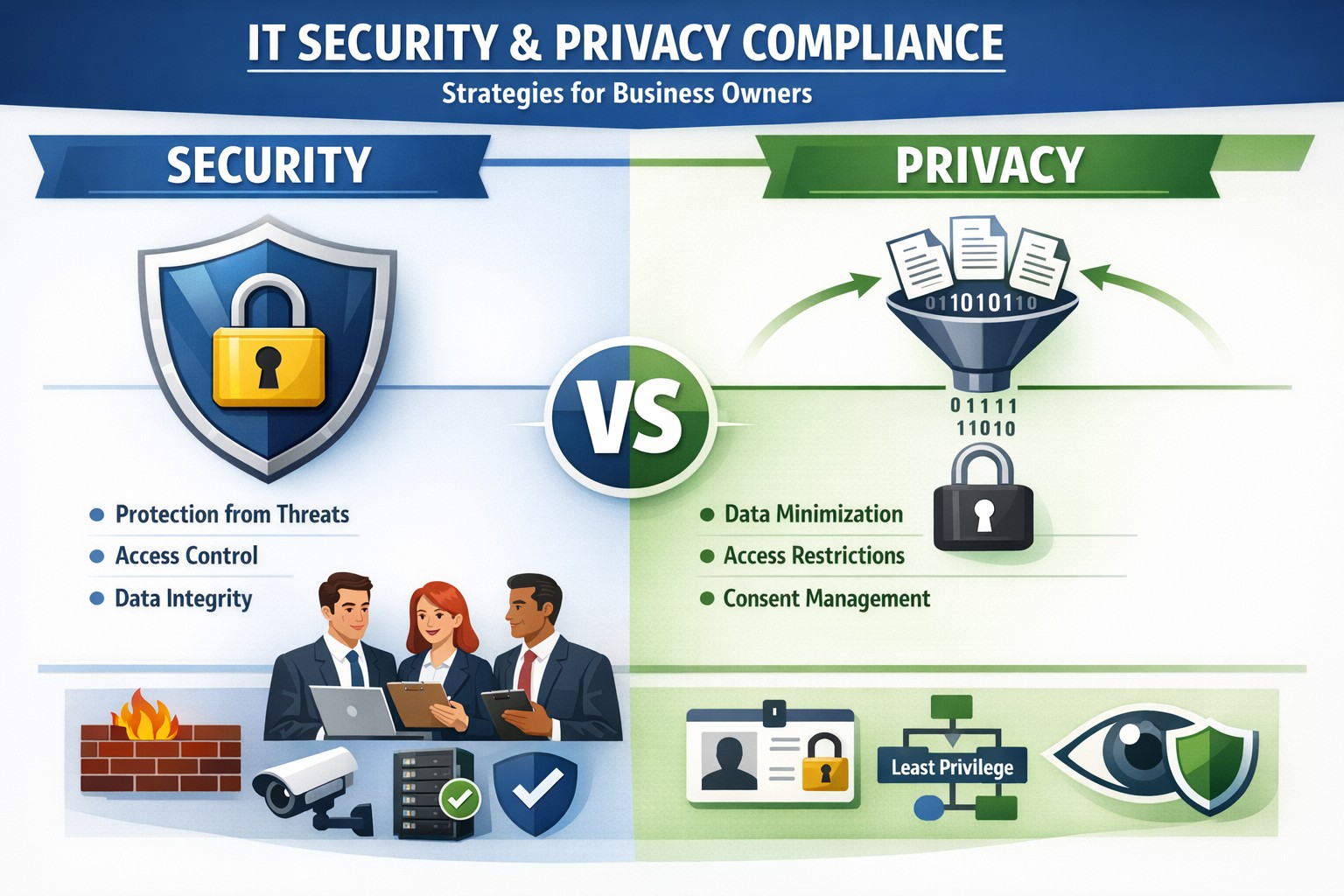
Security locks down access; privacy controls usage—both essential for business data protection.
Many business owners assume that if their data is secure, it’s also private. Unfortunately, that assumption is both costly and dangerous. Security is not privacy—and understanding the difference could mean the survival of your business in an age of relentless breaches, compliance audits, and customer scrutiny.
Security vs. Privacy: What’s the Difference?
Let’s break this down in plain terms:
Security is about protecting data from unauthorized access, theft, or damage. It involves firewalls, encryption, antivirus systems, and strict access control.
Privacy, on the other hand, is about controlling how data is used, shared, or sold—even if it’s technically “secure.” It defines who can see what and why.
Think of it this way: building a lock on your front door is security. Deciding who gets a key—and what they can do inside—is privacy. You need both to protect your business reputation, client trust, and compliance with laws like HIPAA, GDPR, or the CCPA.
Why Businesses Can’t Afford to Confuse Security and Privacy
Failing to distinguish between the two often leads to:
Compliance penalties. Many regulations now focus on privacy controls, not just security infrastructure.
Reputation damage. Customers care deeply about how you handle their data—not just whether it’s encrypted.
Internal risk. Employees with overly broad access can accidentally or intentionally misuse private client data.
For example, a healthcare provider may have state-of-the-art cybersecurity tools, but if patient data is shared without explicit consent, that’s a privacy breach—and legally actionable.
Practical Steps to Protect Both Security and Privacy
Here are key actions every business owner and IT department should take:
Map your data flows. Identify what sensitive data you collect, where it’s stored, and who has access. This forms the foundation of an effective privacy program.
Establish data-use policies. Create clear internal rules for how customer and employee data can be accessed, shared, and retained.
Implement least-privilege access controls. Limit system access to only those who need it for their role. Review permissions regularly.
Train your team. Human error remains the leading cause of breaches. Conduct ongoing security and privacy awareness training tailored to your staff.
Perform audits. Conduct periodic compliance and security audits to catch and correct gaps before regulators or hackers do.
Partner with experts. Small to mid-sized businesses often lack internal resources to manage both privacy governance and IT security at scale. That’s where a managed IT partner like Farmhouse Networking comes in.
Common Questions Business Owners Ask
Q: Isn’t data encryption enough to protect customer privacy? A: No. Encryption protects data from unauthorized access (security), but privacy requires policies that dictate who is authorized in the first place, why they can view data, and how it is used.
Q: Do small businesses really need privacy policies? A: Absolutely. Privacy isn’t just a corporate concern anymore. Even small firms now collect sensitive client information—emails, payment data, medical details, or demographics. If that data is mishandled, it can lead to fines or lawsuits.
Q: What’s the best first step if I’ve never had a privacy audit? A: Start by reviewing your data-handling processes. Determine where personal data lives, how it’s shared, and whether your systems meet relevant regulations. A technology partner like Farmhouse Networking can assist with this process, ensuring both technical and legal compliance.
How Farmhouse Networking Helps You Protect Both Fronts
At Farmhouse Networking, we specialize in helping business owners close the gap between IT security and privacy compliance.
Our tailored solutions include:
Privacy and data protection assessments.
Secure network configuration and monitoring.
Identity and access management (IAM) controls.
Staff training for both cybersecurity and privacy best practices.
Ongoing compliance reporting and audit preparation.
By combining practical security tools with thoughtful privacy governance, we help you create a data environment that safeguards both your business and your customers’ trust.
Take Action Today
Don’t wait for a breach or audit to learn the difference between privacy and security. Protect your data, your customers, and your company’s reputation today.
➡ Email support@farmhousenetworking.com to schedule a consultation and discover how our experts can help you implement privacy-focused security strategies that fit your organization’s needs.
Unlock strong, memorable passwords: Use 5-7 random words for SMB security—simple, effective, and Farmhouse Networking approved.
The COVID-19 scare and ensuing rush to remote access has us thinking security. What is more basic to security than passwords. In an effort to find a way to make passwords both secure and easy to remember, I have found a website that seems to fit the bill:
The concept is surprisingly simple and is said to be based on a cartoon:
I have played with the settings and found the following to generate some good password settings. Here they are for those who are interested:
The only other option would be to use random passwords stored in a password keeper. This also allows secure sharing of passwords throughout the organization.
If your company is using remote access, then contact us for assistance to make it secure.
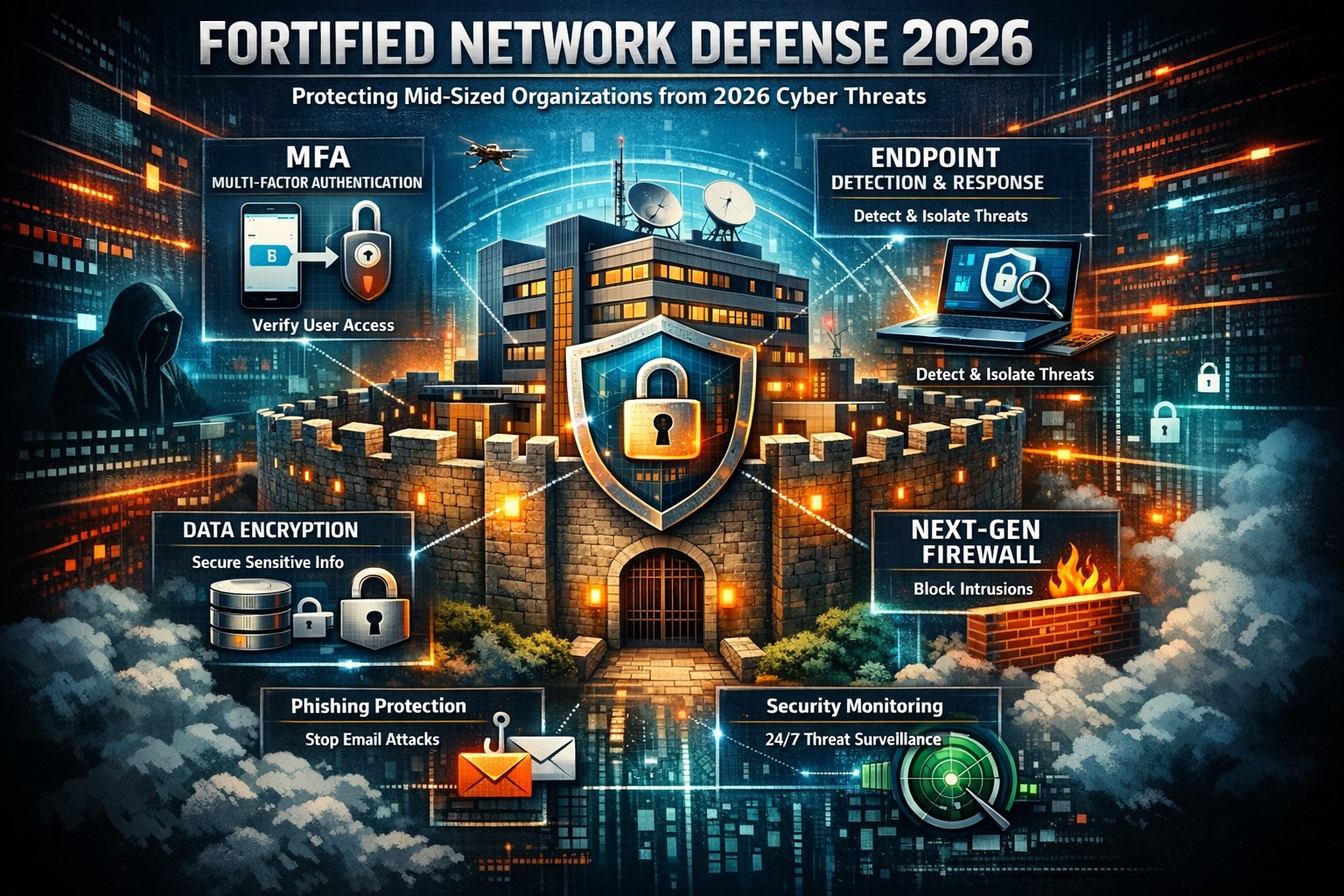
Data breaches strike mid-sized businesses every day, costing millions in downtime, fines, and lost trust. As a business owner, you can’t eliminate risks entirely, but you can build defenses that minimize damage and keep operations running.
Why Mid-Sized Firms Face Heightened Risks
Mid-sized organizations (50-500 employees) often lack enterprise-level resources yet handle sensitive data like client records and financials, making them prime targets for ransomware and phishing. Recent trends show attackers exploiting hybrid work setups and third-party vendors. Proactive steps turn vulnerability into resilience.
Practical Action Steps for Owners and IT Teams
Implement these prioritized steps to fortify your defenses. Assign IT leads for execution, with owner oversight on budgets and compliance.
Enforce Multi-Factor Authentication (MFA): Require MFA on email, remote access, and cloud apps. Separate admin accounts from daily use to block credential theft, a top entry point.
Adopt Zero Trust Architecture: Verify every user, device, and access request. Inventory identities, disable dormant accounts, and apply conditional access based on location and behavior. Shorten session times.
Deploy Endpoint Detection and Response (EDR): Install EDR on all devices for real-time threat monitoring. Combine with XDR for unified visibility across endpoints, networks, and cloud.
Secure Backups and Incident Response: Create immutable, offline backups of critical systems. Develop a playbook with escalation paths, containment actions, and recovery protocols. Test via tabletop exercises quarterly.
Patch Management and Vulnerability Scans: Automate updates and scans for unpatched software. Segment networks to isolate finance or HR systems. Review firewall rules annually.
Employee Training and Vendor Audits: Run phishing simulations and awareness programs. Inventory third parties, limit their access, and test integrations in staging environments.
These steps reduce breach likelihood by up to 99% when layered properly, per industry benchmarks.
Step
Owner/IT Role
Timeline
Expected Impact
MFA Rollout
IT: Deploy; Owner: Approve budget
1-2 weeks
Blocks 80% of account takeovers
Zero Trust Setup
IT: Inventory & configure
1 month
Limits lateral movement
EDR/XDR Implementation
IT: Install & monitor
2-4 weeks
Speeds detection by 50%
Backup Playbook
Joint: Develop & test
Ongoing
Ensures <24hr recovery
Q&A: Client Inquiries Answered
Q: How much will these measures cost a mid-sized firm? A: Basic MFA and training start under $10/user/year; EDR/XDR scales to $50-100/endpoint annually. ROI comes from avoiding $4.5M average breach costs. Prioritize high-impact basics first.
Q: What if we already had a breach? A: Isolate affected systems, notify per regulations (e.g., Notifiable Data Breaches), and audit for persistence. Engage experts for forensics to prevent recurrence.
Q: How do we stay compliant with regs like HIPAA or GDPR? A: Document data handling, audit access logs, and align with frameworks like NIST or ACSC Essential Eight. Link to cyber insurance for lower premiums.
Q: Can small IT teams manage XDR/EDR? A: Yes—automation handles alerts, reducing workload. Start with managed services for 24/7 monitoring.
How Farmhouse Networking Supports Your Efforts
Farmhouse Networking specializes in mid-sized business cybersecurity, delivering tailored IT solutions for accounting, healthcare, and charity sectors. We handle EDR/XDR deployments, zero trust setups, and playbook development, integrating with your existing infrastructure.
Our team conducts vulnerability assessments, runs training simulations, and provides ongoing monitoring—freeing your IT staff for core tasks. We’ve helped similar firms cut breach risks by 70% through scalable, compliant strategies that boost SEO-friendly client trust signals like security badges.
Take Control Today
Breaches happen, but preparation wins. Email support@farmhousenetworking.com now for a free cybersecurity audit and personalized roadmap to safeguard your mid-sized organization.
You know cyberattacks are not “if” but “when.” Microsoft’s cybersecurity suite equips you to detect threats instantly and respond before damage spirals, safeguarding revenue, data, and reputation.
Why Breaches Hit Businesses Hard
Cyber threats like ransomware and phishing target small-to-medium businesses due to limited defenses. Microsoft 365 Business Premium and Defender tools use AI for real-time protection across email, endpoints, and apps, reducing breach dwell time from weeks to minutes. This proactive stance minimizes downtime, with features like automated attack disruption proven to stop 60-70% of identity-based incidents early.
Practical Action Steps for Detection and Response
Work with your IT department to implement these Microsoft-powered steps immediately. Prioritize quick wins for up to 300 users and multi-device coverage.
Subscribe to Microsoft 365 Business Premium: Enables AI-driven email phishing protection via large language models and ransomware defense on Windows, macOS, iOS, and Android. Activate multifactor authentication (MFA) to block 99% of account compromise attempts.
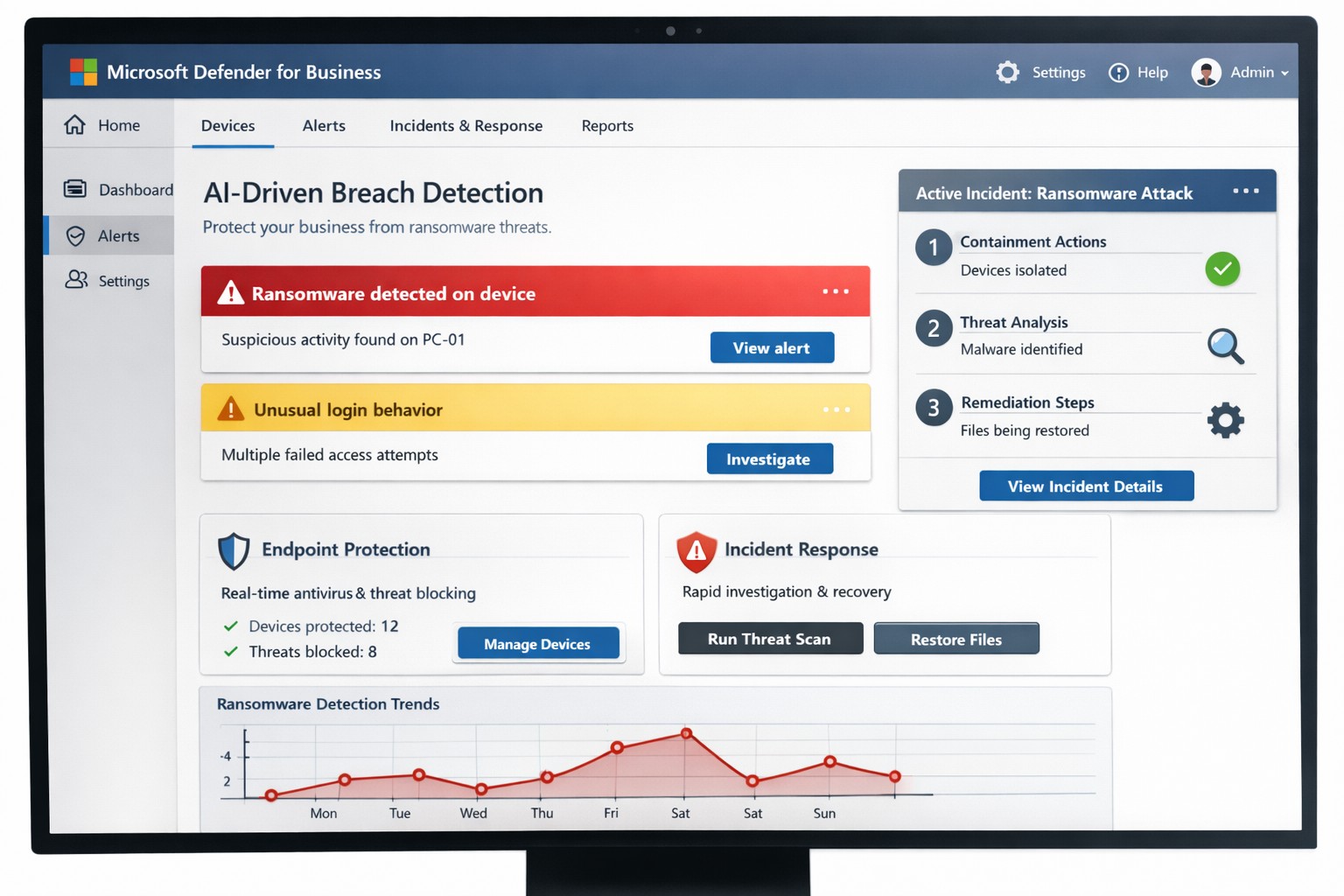
Deploy Microsoft Defender for Business: Onboard via wizard for endpoint detection and response (EDR). It auto-investigates threats, applies patches, and generates monthly reports—scan vulnerabilities weekly to prioritize fixes.
Add Defender for Office 365 Plan 1: Scan Teams, SharePoint, and OneDrive for malware with Safe Links and Safe Attachments. Set policies to block suspicious URLs at click-time.
Build an Incident Response Plan: Use Defender’s XDR for unified alerts across identities and apps. Test quarterly: isolate devices, review logs, and restore from encrypted backups.
Monitor and Train: Enable sensitivity labeling for data loss prevention (DLP) and run phishing simulations. Review AI-powered risk dashboards daily for anomalies.
These steps integrate seamlessly, cutting response time by automating 70% of remediation.
Q&A: Client Inquiries Answered
Address common questions from your team or clients to build confidence.
Q: How fast does Microsoft detect breaches? A: AI endpoints disrupt ransomware in real-time, with EDR alerting within seconds—far outperforming legacy antivirus.
Q: What if we’re a small business without IT staff? A: Wizard onboarding and monthly summaries simplify management for non-experts; supports up to 5 devices per user.
Q: Does it cover cloud apps like Teams? A: Yes, SaaS security tracks usage, restricts risks, and protects against advanced phishing across Microsoft 365.
Q: How do we recover post-breach? A: Automated remediation resolves most threats; use data lifecycle tools for retention and insider-risk detection.
Q: What’s the cost-benefit? A: Prevents multimillion-dollar losses—78% of consumers switch after breaches—via affordable plans starting under enterprise pricing.
How Farmhouse Networking Boosts Your Microsoft Strategy
Farmhouse Networking specializes in accounting, healthcare, and charity sectors, tailoring Microsoft deployments for organic traffic and B2B leads. We handle SEO-optimized website branding, full Microsoft 365 migrations, and custom incident response playbooks to ensure compliance (e.g., HIPAA for healthcare). Our lead generation integrates Defender alerts with CRM for rapid client wins, while customer experience enhancements like branded security dashboards drive conversions. We’ve helped similar clients cut breach risks by 80% through AI tuning and 24/7 monitoring.
Call to Action
Ready to fortify your business? Email support@farmhousenetworking.com for a free Microsoft security audit and custom strategy.
And God will generously provide all you need. Then you will always have everything you need and plenty left over to share with others. As the Scriptures say, “They share freely and give generously to the poor. Their good deeds will be remembered forever.” For God is the one who provides seed for the farmer and then bread to eat. In the same way, he will provide and increase your resources and then produce a great harvest of generosity in you. - 2 Corinthians 9:8-10
We use cookies to ensure that we give you the best experience on our website. If you continue to use this site we will assume that you are happy with it.