Running a medical practice means juggling patient care, compliance, and a mountain of administrative and IT tasks. Every minute your staff spends troubleshooting technology or managing cybersecurity is a minute lost from what matters most—your patients. That’s where a Managed Service Provider (MSP) like Farmhouse Networking steps in, allowing you to reclaim your focus and deliver exceptional care.
How MSPs Like Farmhouse Networking Reduce Lost Focus on Patient Care
Proactive IT Management Keeps You Online Downtime, slow systems, or network outages can bring your practice to a halt, disrupting appointments and frustrating both staff and patients. Farmhouse Networking’s proactive monitoring and maintenance address potential issues before they become emergencies, ensuring your technology works seamlessly in the background so you can stay focused on your patients.
Streamlined Operations and Fewer Distractions From automating maintenance to managing system updates, Farmhouse Networking takes routine IT tasks off your plate. This means your staff spends less time on troubleshooting or manual processes, and more time on patient care and core clinical activities.
Enhanced Security and Compliance Medical practices are prime targets for cyber threats, and protecting patient data is non-negotiable. Farmhouse Networking implements robust cybersecurity measures and ensures compliance with healthcare regulations like HIPAA, giving you peace of mind and freeing your team from the stress of managing security in-house.
Lower Costs, Higher Efficiency Outsourcing IT management to an MSP reduces the need for expensive in-house IT staff and minimizes costly downtime. With Farmhouse Networking, you gain access to expert support and the latest technology, all while controlling costs and boosting operational efficiency.
Better Collaboration and Patient Outcomes A reliable IT infrastructure ensures seamless communication between healthcare providers, quick access to patient records, and fewer errors. This translates to better patient outcomes, improved satisfaction, and a more collaborative work environment for your team.
Experience the Farmhouse Networking Difference
Farmhouse Networking specializes in supporting medical practices with tailored IT solutions that let you focus on what you do best – caring for your patients. Let us handle the technology, so you can get back to making a difference in your community.
Ready to reduce distractions and elevate your patient care? Contact Farmhouse Networking today for a free consultation and discover how we can help your practice thrive.
Don’t let IT headaches steal your time. Partner with Farmhouse Networking and put patient care back at the center of your practice.
Essential cybersecurity measures safeguarding accounting client data from breaches and compliance risks
Accounting firms are more vulnerable than ever to cyber threats. With sensitive financial data at stake, ensuring robust cybersecurity measures is not just a regulatory requirement but also a cornerstone of client trust and business continuity. This guide outlines the cybersecurity essentials every accounting practice must implement to safeguard client data effectively.
Why Cybersecurity Matters for Accounting Firms
Accounting firms handle vast amounts of sensitive information, from social security numbers to financial records. A breach can result in:
Financial Loss: Cyberattacks like ransomware can lead to significant monetary damage.
Legal Penalties: Non-compliance with regulations such as GDPR, SOX, or PCI DSS can result in hefty fines.
Reputation Damage: Losing client trust can have long-term repercussions on your firm’s credibility.
Key Cybersecurity Practices for Accounting Firms
Understand Your Threat Landscape
Cyber threats like phishing, ransomware, and social engineering are common in the financial sector. Stay informed about emerging risks and trends.
Train Your Team
Educate employees on recognizing phishing attempts, safe browsing habits, and secure data handling practices. Human error remains one of the leading causes of breaches.
Comply with Regulations
Ensure compliance with industry standards like GDPR and SOX by implementing necessary controls and documenting your cybersecurity measures.
Implement Access Controls
Limit access to sensitive data based on roles. Use multi-factor authentication (MFA) and encryption to secure files and systems.
Use Reliable Accounting Software
Invest in software with strong encryption, automated security features, and compatibility with your firm’s processes. This ensures both efficiency and security.
Regular Backups
Maintain encrypted backups of all critical data to mitigate the impact of potential breaches or system failures.
Secure Your Network
Use firewalls, antivirus software, and endpoint detection systems to protect your network from unauthorized access.
Patch Management
Regularly update all software and systems to close vulnerabilities that hackers could exploit.
The Role of Professional IT Support
While implementing these measures is essential, managing them effectively requires expertise. Partnering with a trusted IT service provider ensures that your cybersecurity strategy is robust, up-to-date, and aligned with your business needs.
Why Choose Farmhouse Networking?
Farmhouse Networking specializes in providing tailored IT solutions for small to medium-sized businesses, including accounting firms. With years of experience in cybersecurity, network maintenance, and compliance support, we ensure your firm is protected against evolving threats while maintaining operational efficiency.
Don’t leave your clients’ data vulnerable to cyber threats. Contact Farmhouse Networking today to develop a customized cybersecurity plan that protects your firm’s integrity and builds trust with your clients. Let us help you focus on what you do best—managing finances—while we handle your IT needs!
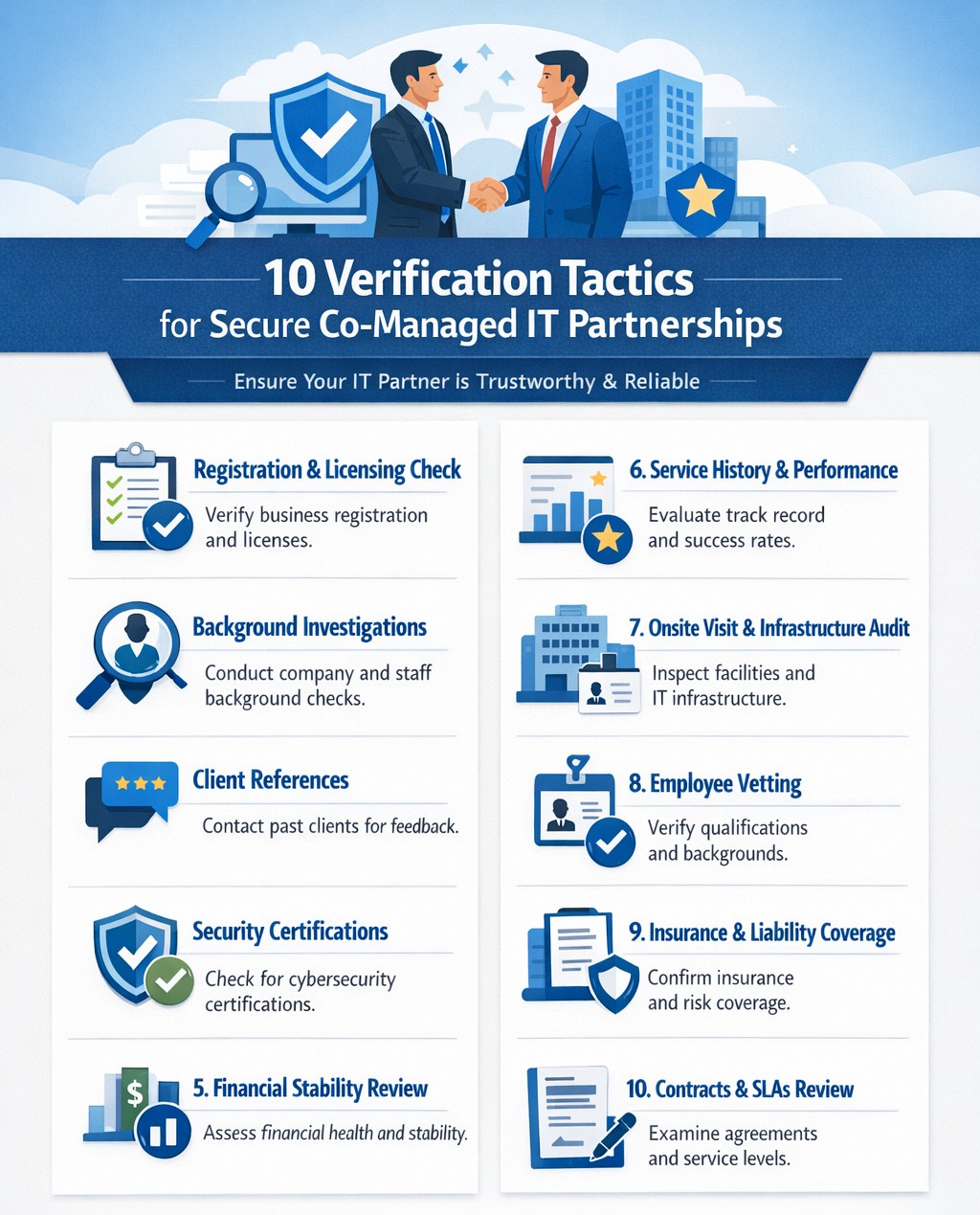
Infographic outlines key steps for due diligence and vetting partners effectively.
It’s easier than ever to connect with businesses globally. However, this convenience comes with risks, as fraudulent companies are becoming increasingly sophisticated. Whether you’re considering a new vendor, partner, or service provider, it’s crucial to ensure their integrity before committing. Below are ten actionable strategies to help you assess the legitimacy of a business you’ve never worked with before.
1. Verify Business Registration
Start by checking if the company is officially registered with the appropriate authorities. Search the Secretary of State website for their registration details or consult platforms like the Better Business Bureau (BBB) or Duns & Bradstreet (DUNS) for additional information. A legitimate business will have clear records of incorporation, licenses, and operating permits.
2. Analyze Their Online Presence
A professional online presence is often a hallmark of a credible business. Review their website for up-to-date information, polished design, and clear branding. Also, check their social media activity for consistent engagement and interactions with customers. Inactive or poorly maintained profiles can be red flags. You can also check a websites WHOIS information to see when it was created and if their registration address and name match their company name.
3. Look for Customer Reviews
Customer feedback is invaluable in assessing credibility. Search for reviews on independent platforms like Google Reviews, Yelp, or Trustpilot rather than relying solely on testimonials posted on their website. Look for detailed reviews that reflect real experiences rather than vague or overly positive comments.
4. Check for Awards and Media Mentions
Reputable companies often receive recognition from industry organizations or media outlets. Search for awards, certifications, or mentions in trusted publications to confirm their standing in the market.
5. Assess Employee Feedback
Platforms like Glassdoor can provide insights into how employees view the company. Consistent negative feedback from employees may indicate deeper issues within the organization.
6. Confirm Contact Information
Legitimate businesses provide clear and accessible contact details, including physical addresses, phone numbers, and email addresses. Cross-check these details against Google Maps and other sources to ensure they match up.
7. Conduct Social Proof Checks
Look for signs of social proof such as customer testimonials, case studies, or partnerships with other reputable companies. These indicators can help validate the company’s credibility.
8. Search for Red Flags
Be alert to warning signs such as unprofessional websites, conflicting contact information, or a lack of customer reviews. Additionally, search for the company name alongside terms like “scam” or “fraud” to uncover any potential issues.
9. Use Reputation Monitoring Tools
Leverage tools like media monitoring platforms and sentiment analysis software to gauge public perception of the company across social media and news outlets. A sudden spike in negative mentions could indicate potential problems.
10. Request Documentation
Don’t hesitate to ask for proof of registration, certifications, or client references directly from the company. Legitimate businesses will readily provide this information as part of your due diligence process.
Why Due Diligence Matters
Failing to vet a business properly can lead to financial losses, reputational damage, and even legal complications. By following these steps, you can protect your organization from fraudulent actors and build partnerships rooted in trust.
Need expert IT managed services and want a business with integrity? Farmhouse Networking is the clear choice. Contact us today to learn how we can support your business IT needs and rest assured our partnership is built on trust!
Small and medium-sized businesses (SMBs) are increasingly adopting cloud technologies to streamline operations, improve scalability, and reduce costs. However, with this shift comes a growing risk of cyberattacks targeting cloud environments. For SMBs, which often lack extensive IT resources, these threats can be devastating. Enter Security Information and Event Management (SIEM) solutions—a powerful tool that can help SMBs safeguard their cloud infrastructure.
Why SMBs Are Vulnerable to Cloud Attacks
SMBs face unique challenges when it comes to cybersecurity:
Limited IT Resources: Many SMBs lack dedicated security teams or the expertise to monitor and respond to threats.
Budget Constraints: Investing in enterprise-grade security tools can be prohibitively expensive.
Sophisticated Threats: Cybercriminals are increasingly targeting SMBs, knowing they may have weaker defenses compared to larger enterprises.
Cloud environments add another layer of complexity, as they introduce new vulnerabilities such as misconfigured settings, unauthorized access, and data breaches. Without proper monitoring and response mechanisms in place, these risks can spiral out of control.
How a SIEM Solution Protects Your Cloud Environment
A SIEM solution offers a centralized platform for monitoring, detecting, and responding to cybersecurity threats in real time. Here’s how it specifically benefits SMBs:
Centralized Threat Monitoring: SIEM consolidates security data from various sources—cloud applications, firewalls, endpoint devices, and more—into a single dashboard. This holistic view allows SMBs to monitor their entire cloud environment efficiently.
Early Detection of Threats: By analyzing data in real time and applying advanced correlation rules, a SIEM detects suspicious activities such as unauthorized logins or unusual data transfers. Early detection helps SMBs act swiftly before an attack escalates.
Automated Incident Response: Many SIEM solutions offer automated responses to mitigate threats immediately. For example, they can isolate compromised systems or block malicious IP addresses without human intervention. This is particularly valuable for SMBs with lean IT teams.
Simplified Compliance: Meeting regulatory requirements like GDPR or HIPAA can be daunting for SMBs. A SIEM simplifies this by automating compliance reporting and maintaining detailed audit logs. This not only ensures legal compliance but also builds customer trust.
Cost-Effective Security: Cloud-based SIEM solutions are particularly well-suited for SMBs because they reduce the need for expensive on-premises infrastructure. Subscription-based models make enterprise-level security accessible without breaking the bank.
Scalability: As your business grows, so do your cybersecurity needs. Modern SIEM solutions are highly scalable, allowing SMBs to adapt their security posture without overhauling their existing systems.
Choosing the Right SIEM Solution for Your Business
When selecting a SIEM solution for your SMB, consider the following:
Ease of Use: Opt for a user-friendly interface that doesn’t require extensive training.
Cloud Compatibility: Ensure the solution integrates seamlessly with your existing cloud infrastructure.
Automation Features: Look for automated threat detection and response capabilities.
Cost Transparency: Choose a provider with predictable pricing models to avoid unexpected costs.
Cybersecurity is no longer optional—it’s essential for protecting your business’s reputation and bottom line. A robust SIEM solution is your first line of defense against attacks on your cloud environment.
Don’t wait until it’s too late! Contact us today to learn how our tailored SIEM solutions can safeguard your business from evolving cyber threats. Let’s secure your future together!
Chart: Hidden costs of no MSP—downtime, inefficiencies draining SMB budgets and productivity.
Small and medium-sized businesses (SMBs) are the backbone of the economy, but many are unknowingly bleeding money and productivity due to outdated IT practices, insufficient resources, and preventable disruptions. Without the support of a Managed Service Provider (MSP), these businesses face challenges that could easily be mitigated. Let’s explore how this happens—and why partnering with an MSP like Farmhouse Networking can transform your business operations.
The Hidden Costs of Not Using an MSP
Downtime and IT Disruptions:
Every minute of downtime costs money. For small businesses, even an hour of downtime can result in losses as high as $8,000, not including reputational damage or customer dissatisfaction. Without proactive IT monitoring, SMBs often experience frequent system failures, network outages, or slowdowns that disrupt workflows and frustrate employees. MSPs prevent these issues by proactively addressing potential problems before they escalate.Outdated Technology
Many SMBs rely on old hardware and software due to budget constraints or lack of IT expertise. According to a Microsoft study, using PCs older than four years results in more than double the productivity losses compared to newer systems. These outdated technologies are not only slower but also more prone to security vulnerabilities and costly repairs.Lack of Cybersecurity
Cyberattacks are on the rise, and SMBs are prime targets due to their limited defenses. A single ransomware attack or data breach can cost tens of thousands of dollars in recovery efforts while damaging your reputation. MSPs provide robust cybersecurity measures such as threat detection, malware protection, and disaster recovery plans to safeguard your business.Inefficient Resource Allocation
Without an MSP, internal staff often spend valuable time troubleshooting IT issues instead of focusing on their core responsibilities. This inefficiency leads to reduced productivity across the board. MSPs handle routine maintenance, updates, and troubleshooting so your team can concentrate on growing the business.
The Benefits of Partnering With an MSP
Here’s how an MSP like Farmhouse Networking can help you reclaim lost time and money:
Proactive Monitoring: Prevent downtime with 24/7 system monitoring and issue resolution before problems arise.
Cost Predictability: Avoid unexpected IT expenses with a fixed monthly fee that simplifies budgeting.
Access to Expertise: Gain access to a team of skilled IT professionals without the cost of hiring full-time staff.
Enhanced Security: Protect your business from cyber threats with advanced security solutions tailored to your needs.
Scalability: Easily scale IT services as your business grows without investing in additional infrastructure.
Real-World Impact: Why SMBs Choose MSPs
Consider this: Businesses that partner with MSPs report fewer IT disruptions, increased efficiency, and significant cost savings over time. By outsourcing IT management, SMBs can focus on their core operations while enjoying peace of mind knowing their technology is in expert hands.
Don’t Let IT Challenges Hold You Back
Every day without an MSP is a day where your business risks unnecessary downtime, security threats, and lost productivity. Farmhouse Networking specializes in helping SMBs like yours overcome these challenges with tailored managed IT services.
Ready to stop losing money and start gaining productivity? Contact Farmhouse Networking today for a free consultation! Let us help you turn your IT into a strategic advantage.
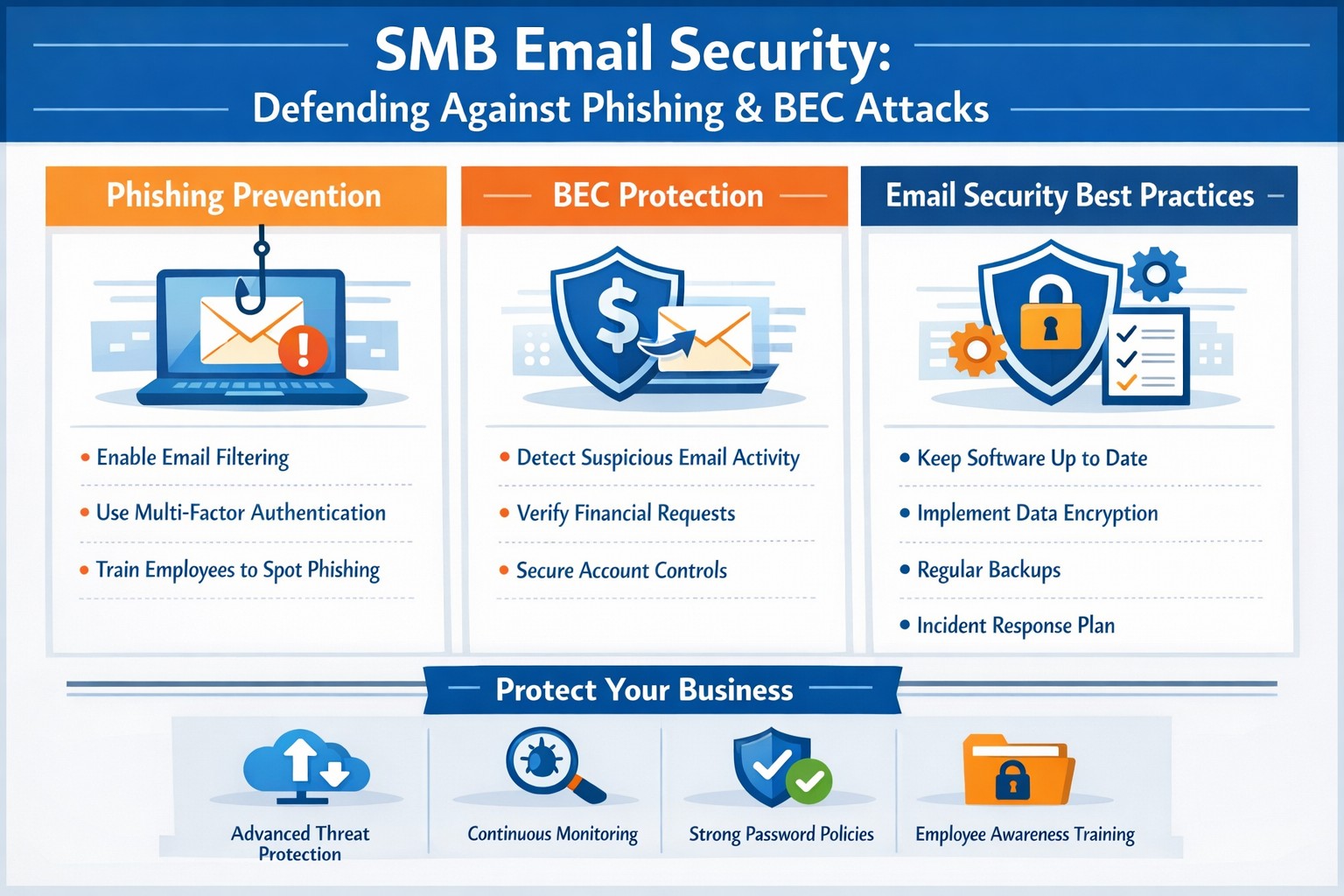
Strategies securing small business inboxes from phishing and BEC gateway attacks
Email is the backbone of communication for small and medium-sized businesses (SMBs). You use it for everything from sending invoices to internal memos, making your business heavily reliant on this tool. However, this reliance also makes you vulnerable to cyber threats, especially Business Email Compromise (BEC) attacks, which are increasingly targeting SMBs. These attacks can have devastating consequences, but with the right email security measures, you can protect your business from falling victim.
Understanding the Threat: Phishing and BEC
Phishing is a cybercrime that uses deceptive emails to trick individuals into revealing sensitive information or taking harmful actions. These emails often look like they come from legitimate sources, such as banks or well-known companies, but they are actually designed to steal your data.
Business Email Compromise (BEC) is a sophisticated type of phishing attack where cybercriminals impersonate trusted individuals within a company to trick employees into transferring money, sharing sensitive data, or granting access to critical systems. BEC scams often target individuals in finance, human resources, or operations, with the goal of initiating fraudulent transactions or stealing confidential information. According to the FBI, there are five primary types of BEC attacks.
BEC attacks are particularly effective because they exploit human psychology. Attackers rely on impersonating authority figures, creating a sense of urgency, or crafting highly convincing emails to make employees act without questioning.
Email is the number one attack vector, responsible for 90% of phishing incidents. In 2023, BEC attacks led to $3 billion in losses.
Why SMBs are Prime Targets
While large corporations invest heavily in cybersecurity, SMBs are often more vulnerable. Cybercriminals view smaller businesses as easier targets due to their typically less robust security measures and lower awareness of emerging threats.
Here’s why SMBs are at greater risk:
Limited Cybersecurity Resources: Many SMBs have limited budgets for cybersecurity and often lack dedicated IT teams to monitor email systems for suspicious activity.
Employee Vulnerability: Employees in SMBs may not be as well-trained in spotting phishing attempts or recognizing the signs of a BEC scam.
Lack of Email Security Awareness: Small businesses may overlook the importance of securing business email accounts with multi-factor authentication (MFA) and other safeguards, leaving them exposed to attacks.
Simple Steps to Bolster Your Email Security
Employee Training: Regularly train employees to recognize and respond to threats. Run security awareness training to help your team spot phishing attempts and other common threats. Use simulated phishing exercises to test their readiness, uncover weak spots, and highlight potential weaknesses.
Multi-Factor Authentication (MFA): Add an extra layer of security to your email accounts with multi-factor authentication (MFA).
Advanced Email Filters: Use advanced spam filters to detect and block phishing emails before they reach your employees’ inboxes. Scan links automatically to spot anything suspicious.
Email Encryption: Encrypt emails, both in transit and at rest, to prevent unauthorized access.
Regular Security Audits: Schedule regular audits to spot vulnerabilities and keep an eye out for unauthorized access. Take time to review your email system’s settings, permissions, and logs for anything unusual.
Incident Response Plan: Prepare for email threats with a clear, actionable response plan. Outline the steps to contain, investigate, and recover from incidents, so your team knows exactly what to do
Cybercrime is a business, not a hobby, and incredibly lucrative. Taking a proactive approach to email security is essential for protecting sensitive information, preventing data breaches, and maintaining trust with your team and clients.
Is your business protected? Contact Farmhouse Networking today for a comprehensive email security solution tailored to your SMB’s unique needs. Don’t let your inbox be a gateway for cybercrime!
How Employee Security Training Protects SMBs from Cyber Threats
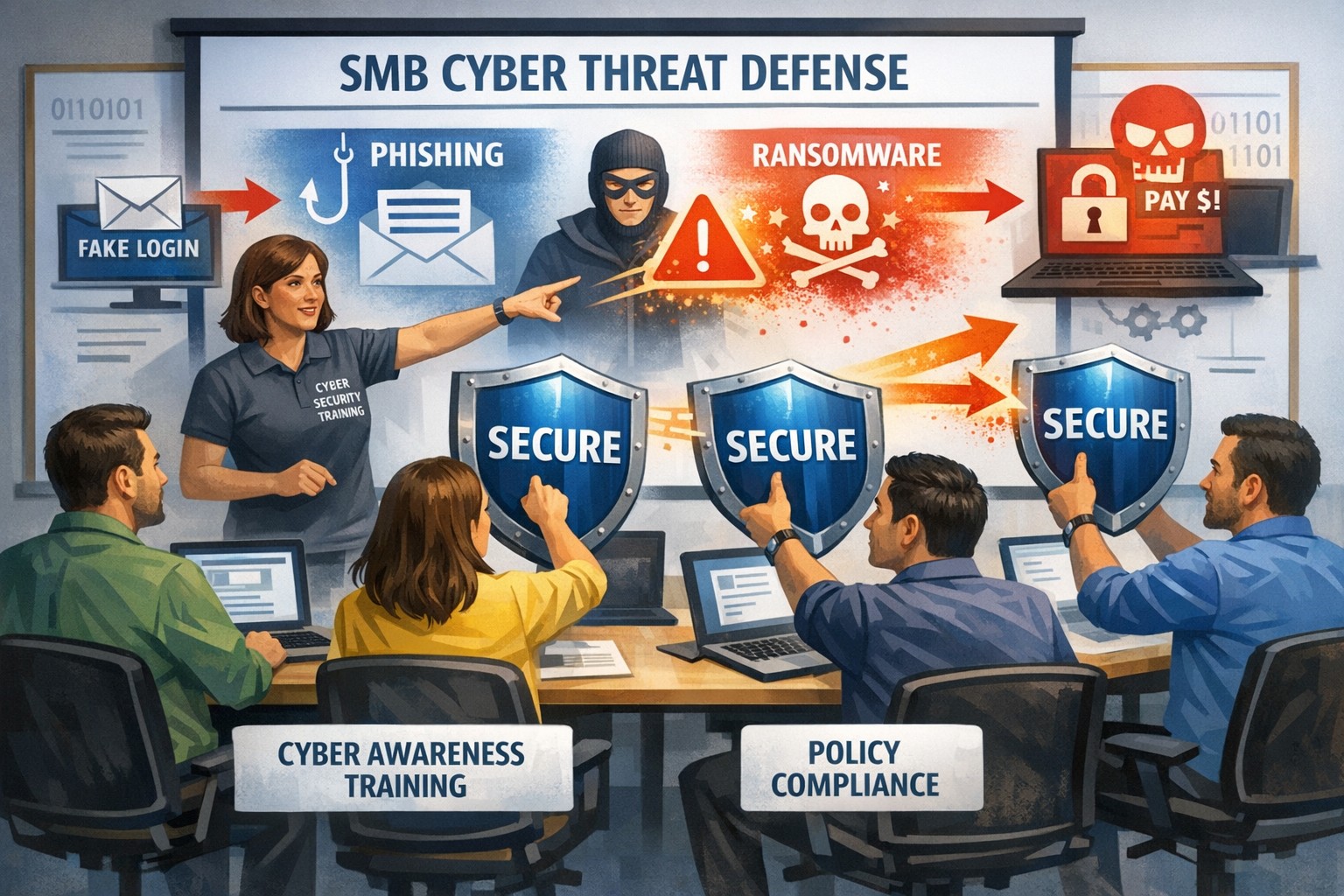
Infographic: How employee cybersecurity training protects small businesses from rising cyber threats.
Small and medium-sized businesses (SMBs) face an ever-evolving array of cyber threats. While investing in advanced security technologies is crucial, it’s equally important to recognize that employees are often the first line of defense against these threats. Employee security training is not just a nicety; it’s a necessity for safeguarding your business from potential breaches and financial losses.
Why Employee Security Training Matters
Cyber attacks frequently exploit human vulnerabilities rather than technological ones. Tactics like phishing, social engineering, and malware rely on manipulating individuals into divulging sensitive information or clicking on malicious links. By educating employees about these tactics, businesses can transform their staff from potential vulnerabilities into proactive defenders.
Benefits of Employee Training:
– Prevention of Costly Attacks: Comprehensive cybersecurity training helps prevent costly cyber attacks by equipping employees with the knowledge to identify and avoid threats. – Building a Culture of Cybersecurity: It fosters a culture where all employees take responsibility for protecting company data. – Enhanced Compliance: Well-informed employees are better equipped to comply with industry regulations, reducing the risk of fines and legal consequences.
Essential Components of Effective Training Programs
An effective cybersecurity training program should include several key components:
1. Phishing Prevention: Teach employees how to recognize suspicious emails and links. 2. Social Engineering Awareness: Educate staff on verifying identities and questioning unusual requests. 3. Malware Recognition: Focus on safe internet practices to avoid downloading unverified attachments. 4. Interactive Sessions: Use real-world simulations to reinforce learning. 5. Ongoing Updates: Regularly update content to reflect evolving threats.
Engaging Employees in Cybersecurity
To ensure that training is impactful:
– Use interactive methods like workshops or role-playing scenarios. – Utilize content that is fun and engaging – Incorporate real-world examples relevant to specific departments. – Gamify learning materials through quizzes or challenges.
By engaging employees meaningfully in cybersecurity efforts, businesses can foster a proactive security culture where everyone feels invested in protecting company assets.
Employee security training is no longer optional; it’s essential for SMBs looking to protect themselves against cyber threats effectively. By investing in comprehensive cybersecurity education, you not only safeguard your business but also empower your workforce as vigilant defenders against evolving digital dangers.
If you’re ready to shield your business from cyber threats by empowering your team with the latest knowledge and skills, contact Farmhouse Networking today! Our expert trainers will help you develop an effective employee security training program tailored specifically for your organization’s needs—ensuring that every employee becomes part of your robust defense strategy against cybercrime.
Co-managed IT strategies boosting nonprofit mission success and operations
Nonprofit organizations face unique challenges that can hinder their ability to fulfill their core missions. Limited budgets, evolving technology, and the need for robust data security are just a few of the hurdles that nonprofits encounter. One effective solution to these challenges is outsourcing IT management through a managed IT services provider (MSPs). By doing so, nonprofits can focus more on their mission and increase their overall impact in the community.
Cost-Effective Solutions
Managed IT services provide nonprofits with a cost-effective alternative to maintaining an in-house IT department. With predictable monthly pricing models, nonprofits can access a team of skilled IT professionals without the high overhead costs associated with hiring full-time staff. This allows organizations to allocate more resources toward their mission-driven activities rather than sinking funds into IT management.
Access to Expertise and Support
Outsourcing IT management gives nonprofits access to a wealth of expertise that may not be available internally. Managed service providers (MSPs) employ specialists who are well-versed in the latest technologies and best practices. This expertise ensures that nonprofits can leverage cutting-edge tools and solutions while minimizing downtime and technical issues. With ongoing support and guidance from these experts, nonprofit staff can concentrate on strategic initiatives rather than getting bogged down by technical challenges.
Enhanced Data Security
Nonprofits often handle sensitive information, including donor data and client records. Cybersecurity threats are ever-evolving, making it crucial for organizations to implement robust security measures. Managed IT services offer advanced security protocols, including threat detection, data encryption, and compliance with industry regulations. By outsourcing this responsibility, nonprofits can ensure that their data is protected against breaches and maintain trust with donors and stakeholders.
Increased Operational Efficiency
By outsourcing IT management, nonprofits can streamline their operations and improve overall efficiency. MSPs handle routine maintenance, system updates, and troubleshooting, allowing nonprofit staff to focus on high-impact activities such as fundraising and community outreach. This shift not only enhances productivity but also helps organizations achieve their goals more effectively.
Scalability and Flexibility
Nonprofits often experience fluctuations in their operational needs based on project demands or fundraising cycles. Managed IT services offer scalable solutions that can be adjusted according to the organization’s current requirements. This flexibility ensures that nonprofits are not overpaying for unnecessary services during quieter periods while still having access to the necessary support during busy times.
Focus on Core Mission
Perhaps the most significant advantage of outsourcing IT management is the ability for nonprofit organizations to refocus on their core mission. With technical complexities handled by experts, staff can dedicate more time and energy to program development, community engagement, and other mission-driven activities. This focus ultimately leads to greater impact within the communities they serve.
If your nonprofit is ready to explore how managed IT services can transform your operations and increase your impact in the community, contact Farmhouse Networking today. Let us help you streamline your IT management so you can focus on what truly matters—making a difference in people’s lives.
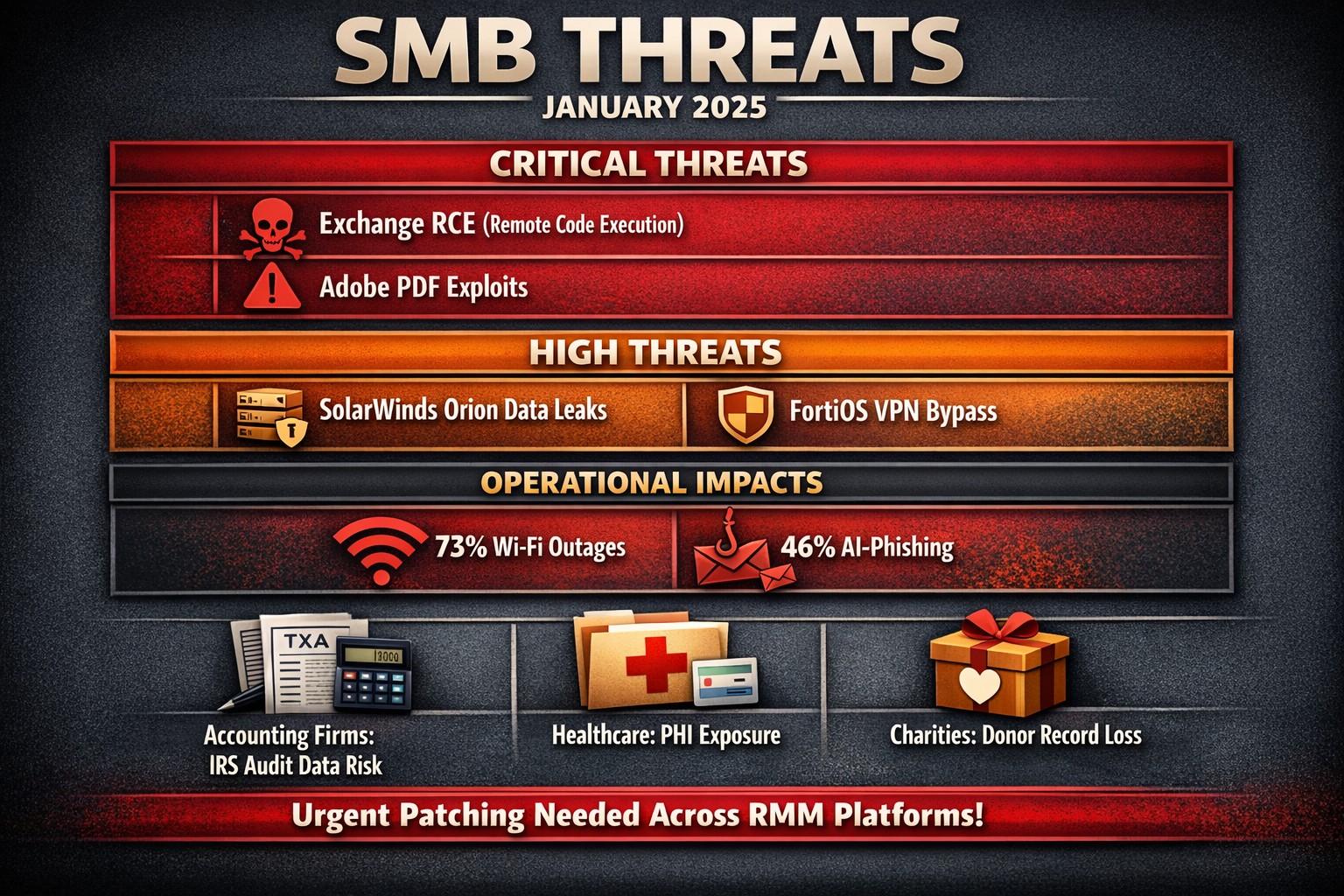
The past month has seen several significant vulnerabilities disclosed that pose serious risks to SMBs. Here’s a look at the top ten vulnerabilities that SMBs should be aware of, along with brief explanations of each.
Microsoft Exchange Server Vulnerabilities (CVE-2024-12345)
A critical vulnerability in Microsoft Exchange Server allows attackers to execute arbitrary code remotely. This flaw can lead to unauthorized access to sensitive emails and data. SMBs using outdated versions of Exchange are particularly at risk, as attackers can exploit this vulnerability without user interaction.
WordPress Plugin Vulnerability (CVE-2024-23456)
A popular WordPress plugin was found to have a cross-site scripting (XSS) vulnerability that could allow attackers to inject malicious scripts into web pages viewed by users. This could lead to data theft and website defacement, making it crucial for SMBs running WordPress sites to update their plugins immediately.
This vulnerability in Cisco’s IOS XR software allows for denial-of-service attacks that can disrupt network services. Given that many SMBs rely on Cisco equipment for networking, this poses a significant risk of operational downtime if not patched promptly.
Apache Log4j Vulnerability (CVE-2024-45678)
The infamous Log4j vulnerability continues to be a concern, with new exploits emerging. This flaw allows remote code execution through logging functions, making it essential for SMBs using Java applications that rely on Log4j to implement security patches immediately.
A critical vulnerability was discovered in Adobe Acrobat Reader that could allow attackers to execute arbitrary code via malicious PDF files. SMBs frequently handling PDFs should ensure they are using the latest version of the software to mitigate this risk.
Linux Kernel Vulnerability (CVE-2024-67890)
A flaw in the Linux kernel could allow local users to escalate privileges and gain unauthorized access to sensitive information. Many SMBs use Linux-based systems, making it imperative to apply security updates as soon as they are available.
VMware vSphere Vulnerability (CVE-2024-78901)
This vulnerability in VMware’s vSphere could allow an attacker with network access to execute commands on the host operating system. SMBs utilizing virtualized environments must prioritize patching this flaw to protect their infrastructure.
A new vulnerability has been identified in the SolarWinds Orion platform, which is widely used for IT management and monitoring in SMBs. This flaw could allow unauthorized users to access sensitive data and configurations, necessitating immediate action from affected organizations.
Fortinet FortiOS Vulnerability (CVE-2024-90123)
A critical vulnerability in FortiOS can lead to unauthorized access through improperly configured VPN settings. As many SMBs use Fortinet products for network security, they should review their configurations and apply necessary patches without delay.
Google Chrome Browser Vulnerability (CVE-2024-01234)
A high-severity vulnerability in Google Chrome could allow attackers to execute arbitrary code via crafted web content. Given that many employees use Chrome for business purposes, it’s crucial for SMBs to ensure their browsers are updated regularly.
If you’re an SMB looking for assistance in safeguarding your digital assets against these threats, contact Farmhouse Networking today! Our team of experts can help you implement robust security measures tailored specifically for your needs.
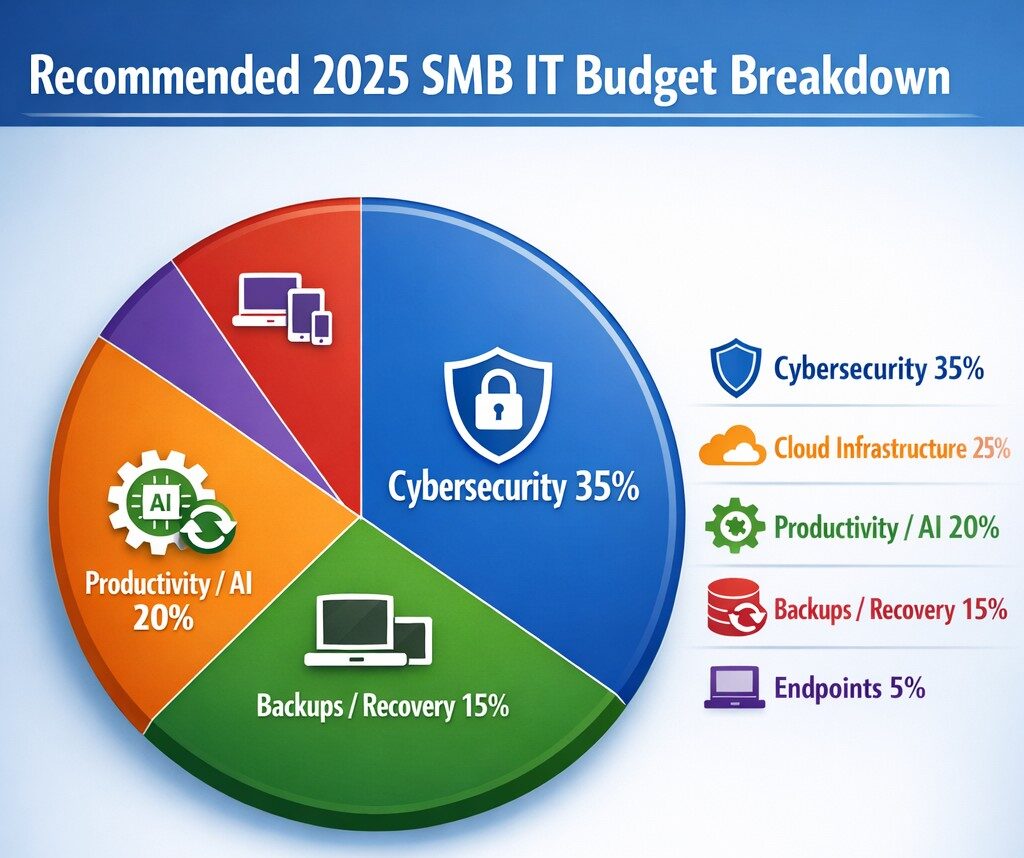
Allocate 30%+ of 2025 IT budget to cybersecurity per industry benchmarks.
Small and medium-sized businesses (SMBs) must strategically plan their IT budgets to stay competitive and efficient. It’s crucial to allocate resources wisely to support both day-to-day operations and long-term growth. Let’s explore the key areas SMBs should focus on when budgeting for tech in 2025.
Cybersecurity Investments
With no end to cyber threats in site, cybersecurity should be a top priority in your 2025 IT budget. Consider allocating funds for:
– Advanced firewalls and intrusion detection systems – Multi-factor authentication (MFA) implementation – Regular security audits and penetration testing
Remember, the cost of preventing a cyber attack is far less than the potential losses from a successful breach.
Artificial Intelligence and Automation
AI is no longer a luxury reserved for large enterprises. In 2025, SMBs should budget for AI-powered tools to enhance efficiency and decision-making. Consider investments in:
– Chatbots for customer support – AI-driven analytics for business insights – Automated workflow tools to streamline operations
These technologies can help SMBs do more with less, improving productivity and customer satisfaction.
Hardware and Device Upgrades
SMBs still need to budget for essential hardware. This includes:
– Laptops and desktops for employees – Mobile devices for remote work – Networking equipment for reliable connectivity
Plan for a hardware refresh cycle to ensure your team has up-to-date tools to work efficiently. (Remember we meet with our clients twice a year in the Spring and Fall to discuss budget and replacement scheduling.)
Software Licenses and Subscriptions
Software is the backbone of modern business operations. Your 2025 IT budget should account for:
– Operating system licenses (Windows 10 is no longer supported as of October 2025) – Productivity suite subscriptions (e.g., Microsoft 365, Google Workspace) – Industry-specific software licenses – Collaboration and communication tools
Regularly review your software subscriptions to ensure you’re only paying for what you need and use.
IT Support and Managed Services
Consider outsourcing some or all of your IT support to a managed service provider (MSP) like Farmhouse Networking to reduce in-house IT costs and gain access to specialized expertise. Budget for:
– Help desk support – Compliance assistance – Network monitoring and management – Backup and disaster recovery services
Employee Cybersecurity Training
Hackers keep getting better at their crimes, so should it is mandatory to invest in your team’s cybersecurity skills. Allocate budget for:
– Yearly assessments of baseline knowledge – Weekly trainings with quizzes to make sure they are paying attention – Interactive or gamified content to keep people interested
Investing in your team’s skills can lead to better technology adoption and improved productivity.
Ready to optimize your IT budget for 2025? Don’t navigate this complex landscape alone. Contact Farmhouse Networking today to help you create a tailored IT budget that aligns with your business goals and maximizes your technology investments. Our experts can guide you through the process, ensuring you’re prepared for the technological challenges and opportunities that lie ahead. Let’s work together to future-proof your business and drive success.
And God will generously provide all you need. Then you will always have everything you need and plenty left over to share with others. As the Scriptures say, “They share freely and give generously to the poor. Their good deeds will be remembered forever.” For God is the one who provides seed for the farmer and then bread to eat. In the same way, he will provide and increase your resources and then produce a great harvest of generosity in you. - 2 Corinthians 9:8-10
We use cookies to ensure that we give you the best experience on our website. If you continue to use this site we will assume that you are happy with it.