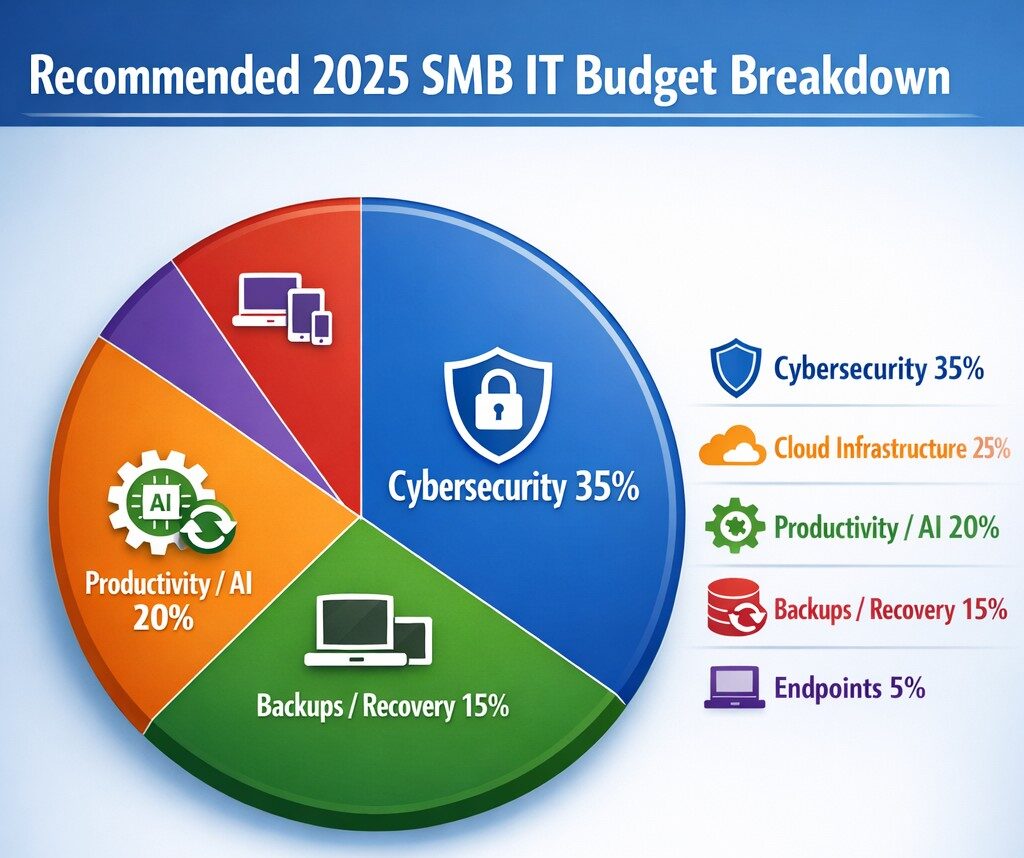
Allocate 30%+ of 2025 IT budget to cybersecurity per industry benchmarks.
Small and medium-sized businesses (SMBs) must strategically plan their IT budgets to stay competitive and efficient. It’s crucial to allocate resources wisely to support both day-to-day operations and long-term growth. Let’s explore the key areas SMBs should focus on when budgeting for tech in 2025.
Cybersecurity Investments
With no end to cyber threats in site, cybersecurity should be a top priority in your 2025 IT budget. Consider allocating funds for:
– Advanced firewalls and intrusion detection systems – Multi-factor authentication (MFA) implementation – Regular security audits and penetration testing
Remember, the cost of preventing a cyber attack is far less than the potential losses from a successful breach.
Artificial Intelligence and Automation
AI is no longer a luxury reserved for large enterprises. In 2025, SMBs should budget for AI-powered tools to enhance efficiency and decision-making. Consider investments in:
– Chatbots for customer support – AI-driven analytics for business insights – Automated workflow tools to streamline operations
These technologies can help SMBs do more with less, improving productivity and customer satisfaction.
Hardware and Device Upgrades
SMBs still need to budget for essential hardware. This includes:
– Laptops and desktops for employees – Mobile devices for remote work – Networking equipment for reliable connectivity
Plan for a hardware refresh cycle to ensure your team has up-to-date tools to work efficiently. (Remember we meet with our clients twice a year in the Spring and Fall to discuss budget and replacement scheduling.)
Software Licenses and Subscriptions
Software is the backbone of modern business operations. Your 2025 IT budget should account for:
– Operating system licenses (Windows 10 is no longer supported as of October 2025) – Productivity suite subscriptions (e.g., Microsoft 365, Google Workspace) – Industry-specific software licenses – Collaboration and communication tools
Regularly review your software subscriptions to ensure you’re only paying for what you need and use.
IT Support and Managed Services
Consider outsourcing some or all of your IT support to a managed service provider (MSP) like Farmhouse Networking to reduce in-house IT costs and gain access to specialized expertise. Budget for:
– Help desk support – Compliance assistance – Network monitoring and management – Backup and disaster recovery services
Employee Cybersecurity Training
Hackers keep getting better at their crimes, so should it is mandatory to invest in your team’s cybersecurity skills. Allocate budget for:
– Yearly assessments of baseline knowledge – Weekly trainings with quizzes to make sure they are paying attention – Interactive or gamified content to keep people interested
Investing in your team’s skills can lead to better technology adoption and improved productivity.
Ready to optimize your IT budget for 2025? Don’t navigate this complex landscape alone. Contact Farmhouse Networking today to help you create a tailored IT budget that aligns with your business goals and maximizes your technology investments. Our experts can guide you through the process, ensuring you’re prepared for the technological challenges and opportunities that lie ahead. Let’s work together to future-proof your business and drive success.
Resolve to strengthen cyber defenses in 2025 with zero trust and employee training.
Stepping into 2025, SMBs face an scary and complex cybersecurity field of battle. With hackers evolving cyber threats at a rapid pace, it’s crucial to make strengthening your digital defenses a top priority. Let’s explore some essential tips to boost your cybersecurity posture in the coming year.
Embrace a Zero Trust Mindset
Start the new year by adopting a Zero Trust approach to cybersecurity. This means verifying every user, device, and application attempting to access your network, regardless of their location. Implement Zero Trust Network Access protocols and use Application Allow/Deny lists to control which software can run on your systems.
Strengthen Your Network Defenses
Secure Your Wi-Fi: Ensure your Wi-Fi network is encrypted and properly configured. Use strong passwords and consider implementing network segmentation to isolate guest networks from your internal systems.
Implement Firewalls and Intrusion Prevention Systems: Deploy robust firewalls to filter incoming and outgoing traffic. Couple this with intrusion prevention systems that actively seek out and block known threats.
Protect Your Data
Encrypt Sensitive Information: Apply encryption to both data at rest and in transit. This includes emails, file transfers, and stored documents.
Implement Data Loss Prevention (DLP) Tools: Use DLP tools to track critical data and prevent unauthorized exfiltration attempts.
Enhance Authentication Measures
Multi-Factor Authentication (MFA): Implement MFA across all your systems, applications, and websites. This additional layer of security significantly reduces the risk of unauthorized access.
Use Password Managers: Encourage the use of password managers to generate and store complex, unique passwords for each account.
Educate Your Employees
Regular Security Awareness Training: Conduct ongoing cybersecurity training for all employees. Focus on recognizing phishing attempts, proper handling of sensitive data, and best practices for remote work.
Prepare for the Worst
Develop an Incident Response Plan: Create a comprehensive plan that outlines procedures for responding to various cybersecurity incidents. Regularly test and update this plan.
Implement Robust Backup Solutions: Establish a regular backup schedule for all critical data and systems. Store backups securely, preferably in multiple locations, including off-site.
Stay Updated and Vigilant
Keep Software and Systems Current: Regularly update all software, applications, and operating systems. Automate updates where possible and conduct periodic audits to ensure nothing is missed.
Implement Real-Time Monitoring: Deploy solutions that provide continuous, real-time monitoring of your network and systems. This allows for immediate detection and response to potential threats.
Secure Your Remote Workforce
With hybrid work models likely to persist, ensure your remote workers are equipped with secure tools:
– Provide Zero Trust VPN access for secure connections – Implement endpoint security measures even on employee’s own laptops – Educate on the risks of using public Wi-Fi
Address IoT Security
As the Internet of Things (IoT) expands, so do the associated risks. Inventory your IoT devices, regularly update their firmware, and implement network segmentation to isolate these devices.
Ready to make cybersecurity your New Year’s resolution? Contact Farmhouse Networking today. Our team of experts is ready to guide you through every step of enhancing your cybersecurity posture, ensuring that your business stays protected throughout 2025 and beyond. Let’s work together to create a robust, tailored cybersecurity strategy that meets your unique needs and keeps your business safe in the digital age.
TaaS delivers scalable cloud infrastructure for future-ready accounting firms.
The accounting industry is on the cusp of a technological revolution, with emerging trends set to reshape how firms operate and deliver value to their clients. As we look ahead to 2025 and beyond, it’s crucial for accounting practices to stay ahead of the curve and embrace these innovations. Let’s explore the key technologies that are poised to transform the accounting landscape and discuss how firms can prepare for this exciting future.
Artificial Intelligence and Machine Learning
Artificial Intelligence (AI) and Machine Learning (ML) are at the forefront of the accounting technology revolution. The AI in accounting market is expected to reach $4.791 billion by 2024, growing at an impressive compounded annual growth (CAGR) of 48.4%. This rapid growth is driven by AI’s ability to automate repetitive tasks, streamline workflows, and provide valuable insights.
Key applications of AI in accounting include:
Automated data entry and reconciliation
Intelligent fraud detection
Advanced financial forecasting
Natural language processing for document analysis
To prepare for this AI-driven future, firms should invest in AI-powered accounting software and prioritize training programs to help staff leverage these new tools effectively.
Cloud-Based Accounting Solutions
Cloud technology has already transformed the accounting industry, and its importance will only grow in the coming years. The global Cloud Accounting Software market is projected to reach $7567.54 million by 2028, expanding at a CAGR of 10.56%.
Benefits of cloud-based accounting include:
Real-time collaboration and data access
Enhanced data security and backup
Scalability and cost-efficiency
Seamless integration with other business systems
Accounting firms should consider migrating their operations to cloud-based platforms to improve efficiency and provide better service to clients.
Blockchain Technology
While often associated with cryptocurrencies, blockchain technology has far-reaching implications for the accounting industry. The accounting blockchain market is expected to reach $868 million by 2025.
Potential applications of blockchain in accounting:
Enhanced transaction transparency and security
Streamlined auditing processes
Improved record-keeping and data integrity
Simplified reconciliations
Firms should start exploring blockchain technology and its potential applications to stay ahead of this emerging trend.
Data Analytics and Forecasting Tools
As businesses generate more data than ever before, the ability to analyze and derive insights from this information is becoming crucial. Advanced data analytics tools are enabling accountants to provide more strategic advice to their clients.
Key areas where data analytics can add value:
Predictive financial modeling
Risk assessment and management
Performance benchmarking
Identifying cost-saving opportunities
Accounting practices should invest in robust data analytics tools and develop their team’s skills in data interpretation and visualization.
Cybersecurity and Data Protection
With the increasing digitization of financial data, cybersecurity has become a top priority for accounting firms. Protecting sensitive client information is not just a legal requirement but also a crucial aspect of maintaining trust and credibility.
Essential cybersecurity measures:
Implementing multi-factor authentication
Regular security audits and penetration testing
Employee training on cybersecurity best practices
Adoption of managed detection and response technologies
Firms must prioritize cybersecurity investments and stay updated on the latest threats and protection measures.
Robotic Process Automation (RPA)
RPA is set to revolutionize routine accounting tasks by automating repetitive processes. This technology can significantly improve efficiency and reduce errors in areas such as accounts payable, receivable, and financial close processes.
Benefits of RPA in accounting:
Increased accuracy in data entry and processing
Faster completion of routine tasks
Reduced operational costs
Improved compliance and audit trails
Accounting practices should identify processes that can be automated using RPA and implement these solutions to boost productivity.
The Evolving Role of Accountants
As technology automates many traditional accounting tasks, the role of accountants is evolving. Future-focused firms will need to shift their focus from number-crunching to providing high-value advisory services.
Skills for the future accountant:
Strategic financial planning
Data analysis and interpretation
Technology proficiency
Soft skills such as communication and problem-solving
Firms should invest in continuous learning and development programs to help their staff adapt to these changing roles.
Preparing for the Future
To future-proof your accounting practice, consider the following steps:
Conduct a technology audit to identify areas for improvement
Develop a digital transformation strategy aligned with your firm’s goals
Invest in staff training and development to build necessary skills
Stay informed about emerging technologies and industry trends
Collaborate with technology partners to implement new solutions
The accounting industry is on the brink of a technological revolution, and firms that embrace these emerging technologies will be well-positioned for success in the years to come.
Ready to navigate the complex world of accounting technology and future-proof your practice? Contact Farmhouse Networking today. Our expert team can help you assess your current technology stack, identify areas for improvement, and implement cutting-edge solutions tailored to your firm’s unique needs. Don’t let your practice fall behind – take the first step towards a technologically advanced future by reaching out to Farmhouse Networking now.
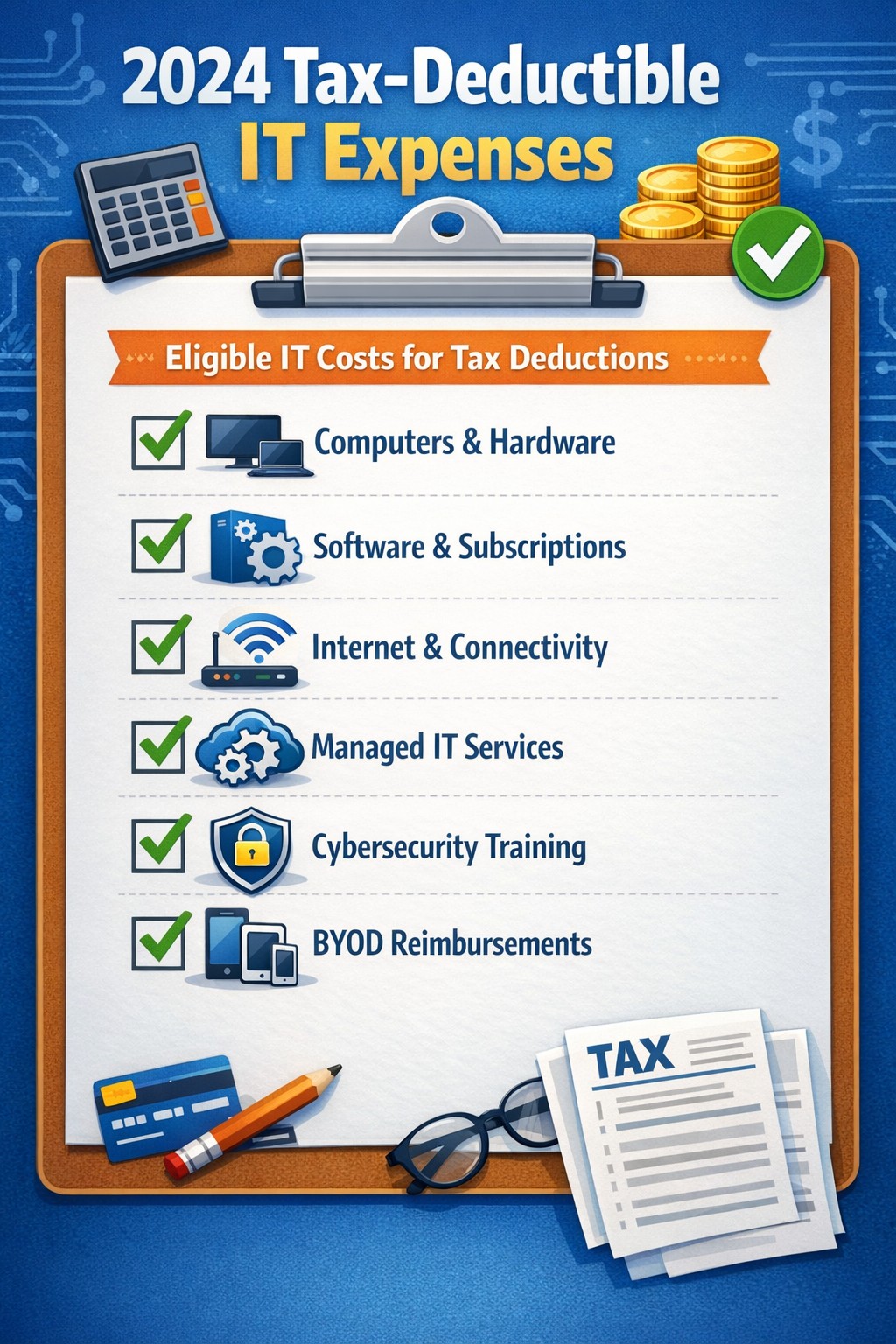
Claim Section 179, cloud subscriptions, cybersecurity as business tax deductions.
As we approach the end of the year, it’s crucial for businesses to understand the tax deductions available for their IT expenses. Maximizing these deductions can significantly reduce your tax burden and free up capital for further investment in your company’s technology infrastructure. Let’s explore the top tax-deductible IT expenses for 2024 that every business should be aware of.
Hardware and Equipment
Computers and Devices
Investing in new computers, tablets, or smartphones for your business can provide substantial tax benefits. The entire cost of these devices can be deducted from your taxable income. However, if the equipment is used partially for personal purposes, you may only be able to deduct a portion of the cost.
Office Equipment
Printers, scanners, and other office equipment are 100% tax-deductible in the year of purchase. This includes any IT-related furniture, such as ergonomic chairs or standing desks for your tech team.
Software and Services
Business Software
Software used for business purposes is eligible for tax deductions. This includes:
The deductible amount will depend on whether the software is purchased outright or subscribed to on a monthly basis.
Cloud Services
As more businesses move their operations to the cloud, it’s important to note that cloud service subscriptions are tax-deductible. This includes services like:
– Data storage – Backup solutions – Cloud-based productivity suites
Telecommunications
Internet Expenses
Internet services are crucial for most businesses today. You can deduct the full cost of your business internet connection[. If you work from home, you may be able to deduct a portion of your home internet expenses based on the percentage used for business purposes.
Phone Systems
All telecommunications fees within a commercial space can be deducted[1]. This includes:
– Business phone lines – VoIP systems – Cell phone contracts used for business
IT Services and Support
Managed IT Services
Fees paid for managed IT services, including network management, cybersecurity monitoring, and help desk support, are fully deductible as a business expense.
IT Consulting and Training
Any costs associated with IT consulting or training for your staff to use new technologies are tax-deductible. This can include workshops, online courses, or one-on-one training sessions.
Cybersecurity Measures
With the increasing importance of data protection, investments in cybersecurity are not only wise but also tax-deductible. This includes:
– Firewalls and antivirus software – Security audits – Employee cybersecurity training programs
Website Expenses
Development and Maintenance
Costs related to developing, hosting, and maintaining your business website are tax-deductible. This includes domain registration fees, hosting costs, and payments to web developers or designers.
E-commerce Solutions
If your business sells products online, the expenses for e-commerce platforms and payment processing systems are also deductible.
Home Office Technology
For those running businesses from home or with remote workers, the home office deduction can apply to technology expenses. You can deduct a portion of your home internet, personal computer use, and other tech equipment based on the percentage of your home used exclusively for business.
Ready to optimize your IT infrastructure while maximizing your tax benefits? Contact Farmhouse Networking today. Our expert team can help you implement cutting-edge IT solutions that not only boost your productivity but also provide substantial tax advantages. Don’t leave money on the table – let us help you navigate the complex world of IT expenses and tax deductions. Reach out now to schedule a consultation and start saving!
Cybersecurity Skills Through Innovative Funding Program
Innovative funding accelerates cybersecurity training for stronger team defenses.
Farmhouse Networking, a leading provider of managed IT services, today announced a groundbreaking initiative to enhance its cybersecurity capabilities by leveraging the Rogue Business Elevate program to fund comprehensive cybersecurity training for all employees through TryHackMe. Farmhouse Networking is taking proactive steps to fortify its clients’ defenses and cultivate a culture of cybersecurity awareness across all the organization it supports. By partnering with Rogue Business Elevate and TryHackMe, the company is demonstrating its commitment to staying ahead of potential security risks while investing in the professional development of its workforce.
Empowering Employees with Cutting-Edge Skills The TryHackMe platform offers an innovative, gamified approach to cybersecurity education, making the learning process both engaging and effective .Employees will have access to:
Interactive lessons that bridge theory and practice
Simulated network environments for hands-on experience
Real-world challenges based on actual cybersecurity scenarios
This comprehensive training program will equip Farmhouse Networking’s staff with the skills to identify, prevent, and respond to a wide range of cyber threats.
Investing in the Future of Cybersecurity “At Farmhouse Networking, we recognize that our employees are our first line of defense against cyber attacks for many businesses throughout Oregon,” said Scott G. Carr II, CEO of Farmhouse Networking. “By investing in their skills through this innovative funding program and partnering with TryHackMe, we’re not just enhancing our clients’ security posture; we’re also providing our team with valuable, career-advancing knowledge.” The initiative aligns with Farmhouse Networking’s long-term strategy to build a resilient and knowledgeable workforce capable of addressing the complex cybersecurity challenges faced by businesses today.
Community and Collaboration Beyond individual skill development, this program will foster a sense of community among Farmhouse Networking’s employees. TryHackMe’s platform encourages collaboration, allowing team members to connect with like-minded professionals, share knowledge, and learn from each other’s experiences. Farmhouse Networking’s innovative approach to employee development and cybersecurity preparedness sets a new standard in the industry. By leveraging the Rogue Business Elevate program to fund this initiative, the company is maximizing its investment in both its people and its technological defenses.
Cybersecurity isn’t just an option—it’s a necessity. At Farmhouse Networking, we’re not only enhancing our own security measures but we’re also ready to help you fortify your defenses. Don’t wait for a breach to happen. Take proactive steps to protect your business today. Contact Farmhouse Networking today for a free consultation. Let’s work together to create a robust security strategy that safeguards your business, your data, and your peace of mind.
Businesses of all sizes face unprecedented cybersecurity challenges. Blackpoint Cyber emerges as a leader in providing comprehensive, cutting-edge solutions to protect organizations from cyber threats. Let’s explore why Blackpoint Cyber stands out as the premier choice for business cybersecurity.
Comprehensive Ecosystem of Security Solutions
Blackpoint Cyber offers a fully managed, integrated ecosystem of services centered around their powerful nation-state-grade Managed Detection and Response (MDR) technology. This ecosystem is designed to keep businesses ahead of potential threats by proactively understanding the threat landscape and actively neutralizing adversaries before they can cause harm.
Managed Detection & Response (MDR)
At the core of Blackpoint’s offerings is their purpose-built MDR technology. This solution combines network oversite, malicious activity detection, and endpoint security to rapidly identify and neutralize hacker and virus activities in their earliest stages. By harnessing data around suspicious events, hacker tradecraft, and endpoint activity, Blackpoint’s MDR can stop advanced attacks faster than any other solution on the market.
Cloud Response
With the shift to hybrid and cloud environments, Blackpoint’s Cloud Response extends the power of their MDR service to these critical areas. Their 24/7 Security Operations Center (SOC) actively monitors cloud environments and provides fast responses to threats on platforms like Office 365.
LogIC
LogIC enhances the value of security logs and data collected from networks, turning them into real-time threat hunting and response capabilities. With push-button setup, LogIC allows for quick addition of log sources, generation of compliance reports, and automatic mapping against hundreds of compliance requirements.
Unmatched Threat Awareness and Response Times
Blackpoint Cyber’s proprietary security operations and incident response platform, SNAP-Defense, enables continuous monitoring and response to modern threats. Their SOC, established by former US government cybersecurity operators, leverages deep knowledge of hacker tradecraft to provide 24/7 unified detection and response services.
The company boasts impressive response times, with an average of 7 minutes for cloud incidents and an overall average of 27 minutes. This rapid response capability is crucial in minimizing potential damage from cyber attacks.
Tailored Solutions for Businesses of All Sizes
While Blackpoint Cyber’s technology is enterprise-grade, they specialize in bringing these advanced solutions to small and medium-sized businesses through partnerships with Managed Service Providers (MSPs) like Farmhouse Networking. This approach allows businesses of all sizes to benefit from top-tier cybersecurity protection.
Continuous Innovation and Growth
Blackpoint Cyber continues to invest in growth and innovation. With a recent $190 million investment round and the appointment of industry veteran Manoj Srivastava as Chief Technology and Product Officer, the company is poised for further advancements in their product strategy and technology.
Blackpoint Cyber’s suite of solutions offers businesses a robust, proactive approach to cybersecurity. Their technology, combined with human expertise, provides a level of protection that’s essential in today’s threat landscape.
Ready to elevate your business’s cybersecurity with Blackpoint Cyber’s cutting-edge solutions? Contact Farmhouse Networking today to manage your cyber security needs and implement these powerful tools. Don’t wait for a breach to happen – take proactive steps to protect your business now.
Enhanced DNS filtering protects networks from phishing, malware, and non-compliant content.
This is a quick note to all current and future customers, we have made a business decision to move from our old DNS filter / web filter software (called DNSFilter) to a new provider called DefensX.
Why Does This Even Matter?
We recently performed network inventory for all our Monthly Managed IT Services clients and found that many of them had an issue where the filtering software was in an error state and needed to be re-installed. This started our search for a more reliable partner. We found that DefensX provided all the needed functionality and gave our clients the added benefit of reports to see who is looking at what on the internet – something we think that business owners will find extremely valuable.
What Happens Now?
We are automatically removing the old software and deploying the new software to those who have already signed up for service. If you are Monthly Managed IT Services client and do not currently use our DNS filtering service, then reach out to get started at No Additional Cost!
This new service has many new categories to choose from as well, so if there are any sites being blocked or not blocked that you see in your new reports, then just let us know and we can quickly make those changes.
Don’t wait for a cyber attack to compromise your business. Take proactive steps to safeguard your network today! Contact Farmhouse Networking now to implement our advanced DNS filtering solution. Our experts will tailor a protection plan that fits your unique business needs.
Araknis delivers enterprise-grade performance and remote monitoring for business networks.
A reliable and robust network infrastructure is crucial for success. Araknis, a leading provider of networking solutions, offers a range of multi-gig VPN routers that are specifically designed to meet the diverse needs of modern businesses. Let’s explore why Araknis stands out as the top choice for business networks.
Unparalleled Performance
Araknis routers and switches are built to handle the demands of high-speed internet connections, supporting up to multi-gigabit 2.5Gbps throughput from your internet provider and up to 10Gbps throughout the network. This impressive capability ensures that your business network can handle large data transfers, video conferencing, and other bandwidth-intensive applications with ease.
Versatility and Flexibility
One of the key strengths of Araknis is its versatility. Whether you need a wireless solution, a wired setup, or a combination of both, Araknis has you covered. Their product line includes:
Wireless access points with built-in Wi-Fi 6 technology
Wired routers and switches for more traditional ethernet or modern fiber setups
PoE+ enabled ports to power all the phones, cameras, and other network devices
1U rack-mountable options for server rooms
This variety ensures that regardless of your business’s physical environment or networking requirements, there’s an Araknis network that fits perfectly.
Advanced Security Features
Araknis doesn’t compromise on protection. Their routers come with:
OpenVPN support: allowing for secure remote worker connections.
IPsec VPN support: allowing for secure office-to-office or office-to-cloud connection
Embedded firewall: Stateful Packet Inspection (SPI), Denial of Service (DoS) prevention, and WAN Request Blocking
VLAN routing: segment your network for added security
WiFi guest network: keep guest online and separated from business data
Cloud Management
Perhaps one of the most compelling reasons to choose Araknis is cloud management. This powerful management platform offers:
Faster setup and configuration
Robust remote management capabilities including printers and other network devices
Enhanced visibility and access to all network devices
Advanced troubleshooting tools
Real-time system health and diagnostic data
These features significantly reduce the need for on-site visits, saving time and resources while ensuring your network runs smoothly.
Future-Proof Investment
By choosing Araknis, businesses are making a future-proof investment. The routers, switches, and access points are designed to support the increasing internet speeds available today and are ready for the demands of tomorrow. This forward-thinking approach means your network infrastructure can grow and adapt as your business evolves.
Araknis routers offer a compelling combination of performance, versatility, security, and management capabilities that make them an excellent choice for business networks of all sizes. From small offices to medium enterprises, Araknis provides the reliable foundation needed to keep your business connected and productive.
Ready to elevate your business network with Araknis? Don’t wait to experience the difference. Contact Farmhouse Networking today to discuss how we can configure an Araknis-powered network tailored to your specific business needs. Let us help you build a network that drives your business forward.
Zero trust enables secure, high-performance networks across distributed business sites.
Multi-location companies face unique challenges when it comes to maintaining consistent and efficient network performance across all their sites. A robust and optimized network is crucial for seamless operations, effective communication, and maintaining a competitive edge. Let’s explore how businesses can optimize their network performance across multiple locations.
The Importance of Network Optimization
For multi-location businesses, network optimization is not just about speed—it’s about creating a cohesive, secure, and efficient digital environment that supports productivity and growth. A well-optimized network ensures:
Consistent performance across all locations
Improved collaboration and communication
Enhanced security and data protection
Increased operational efficiency
Better customer experience
Key Strategies for Network Optimization
Network Monitoring and Analysis: Implementing comprehensive network monitoring tools allows businesses to gain real-time insights into their network performance across all locations. This proactive approach helps identify potential issues before they impact operations.
Traffic Prioritization: Utilizing Quality of Service (QoS) protocols to prioritize critical business applications ensures that essential services receive the necessary bandwidth, regardless of location.
Load Balancing: Distributing network traffic evenly across multiple servers or network links prevents any single point from becoming overwhelmed, ensuring smooth operations across all sites. This also avoids single points of failure.
Network Segmentation: Dividing the network into smaller, manageable segments can significantly reduce congestion and improve overall performance, especially for businesses with multiple locations.
Regular Hardware and Software Updates: Keeping network infrastructure up-to-date across all locations is crucial for maintaining optimal performance and security.
Secure Remote Connections: Satellite offices will need to connect back to the main office for specific resources like authentication, computer policies, and industry specific applications. Making sure these remote connections remain online and secure is essential to make sure remote offices stay productive.
Implementing Network Optimization Strategies
To effectively optimize your multi-location network:
Conduct a comprehensive network audit across all locations to identify performance bottlenecks and security vulnerabilities.
Implement unified network monitoring tools to gain visibility into performance across all sites.
Standardize network infrastructure and policies across locations to ensure consistency and ease of management.
Utilize cloud-based solutions for improved accessibility and scalability across multiple sites.
Regularly review and update your network optimization strategy to adapt to changing business needs and technological advancements.
The Role of Managed IT Services in Network Optimization
A Managed IT services provider can be instrumental in implementing and maintaining these optimization strategies:
Centralized Management: They provide a single point of contact for all network-related issues across locations.
Customized Solutions: Tailoring optimization strategies to meet the specific needs of each business location.
Continuous Improvement: Regularly assessing and upgrading network performance based on the latest technologies and best practices.
Disaster Recovery and Business Continuity: Implementing robust backup and recovery solutions to ensure business continuity across all locations.
Optimizing network performance for multi-location businesses is a complex but crucial task. By leveraging the expertise of a Managed IT services provider, businesses can ensure that their network infrastructure is not just a utility, but a strategic asset that drives growth and innovation.
Ready to take your multi-location network performance to the next level? Contact Farmhouse Networking today to get started on your network optimization journey. Our team of experts is ready to help you create a seamless, efficient, and secure network environment across all your business locations.
Protecting patient data and ensuring the security of your medical practice’s IT infrastructure is more critical than ever. With cyber threats constantly evolving, implementing strong cybersecurity measures is not just a good practice—it’s essential for maintaining patient trust, complying with regulations, and safeguarding your practice’s reputation.
The Growing Threat to Healthcare
Healthcare organizations are prime targets for cybercriminals due to the valuable nature of patient data. In recent years, the healthcare industry has experienced a surge in cyberattacks, with data breaches affecting millions of patients and costing healthcare providers billions of dollars.
Essential Cybersecurity Measures:
To protect your medical practice from these threats, consider implementing the following cybersecurity essentials:
Firewalls: A robust firewall acts as the first line of defense against unauthorized access to your network. It monitors incoming and outgoing traffic, blocking potential threats before they can infiltrate your systems.
Antivirus Software: Comprehensive antivirus solutions are crucial for detecting and preventing malware, ransomware, and other malicious software that could compromise patient data. Modern antivirus programs use advanced techniques like machine learning to identify and neutralize emerging threats in real-time.
Data Encryption: Encrypting sensitive patient information, both at rest and in transit, ensures that even if data is intercepted, it remains unreadable and unusable to unauthorized parties. This is particularly important for maintaining HIPAA compliance.
Regular Software Updates: Keeping all systems and software up-to-date with the latest security patches is vital for addressing known vulnerabilities and protecting against new threats.
Employee Training: Your staff is often the first line of defense against cyberattacks. Regular cybersecurity training can help employees recognize phishing attempts, practice good password hygiene, and follow proper data handling procedures.
The Role of Managed IT Services
While these measures are essential, implementing and maintaining a comprehensive cybersecurity strategy can be challenging for many medical practices. This is where managed IT services come into play. Managed IT service providers, like Farmhouse Networking, offer expertise and resources to ensure your practice’s cybersecurity measures are robust, up-to-date, and compliant with industry regulations. Here’s how managed IT can protect your patient data:
24/7 Monitoring and Threat Detection: Continuous surveillance of your network to identify and respond to potential threats before they cause damage.
Automated Updates and Patch Management: Ensuring all systems and software are current with the latest security updates.
Data Backup and Disaster Recovery: Implementing comprehensive backup solutions and disaster recovery plans to safeguard patient data in case of a breach or system failure.
Compliance Management: Helping your practice stay compliant with HIPAA and other relevant regulations through regular audits and updates to security protocols.
Advanced Security Solutions: Implementing enterprise-grade security measures that might be out of reach for smaller practices managing IT in-house.
In an era where cyber threats are constantly evolving, partnering with a managed IT service provider is one of the most effective ways to ensure your medical practice’s cybersecurity stays ahead of the curve. Farmhouse Networking offers comprehensive IT solutions tailored specifically for healthcare providers, combining local expertise with cutting-edge technology to keep your patient data safe and your practice secure. Don’t wait for a breach to occur before taking action. Call us at (541) 761-9549 or visit our website at www.farmhousenetworking.com to schedule a consultation.
And God will generously provide all you need. Then you will always have everything you need and plenty left over to share with others. As the Scriptures say, “They share freely and give generously to the poor. Their good deeds will be remembered forever.” For God is the one who provides seed for the farmer and then bread to eat. In the same way, he will provide and increase your resources and then produce a great harvest of generosity in you. - 2 Corinthians 9:8-10
We use cookies to ensure that we give you the best experience on our website. If you continue to use this site we will assume that you are happy with it.