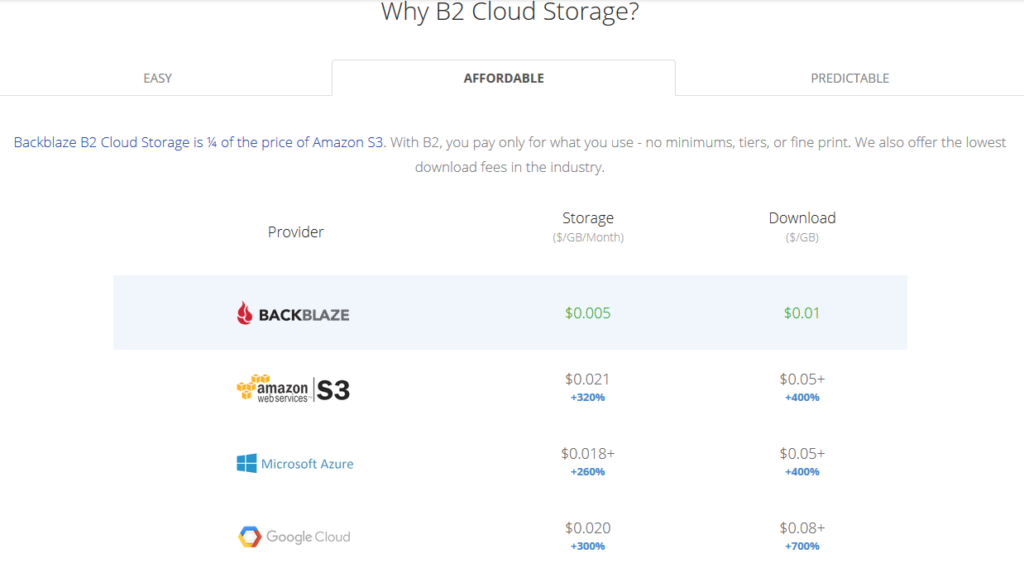
All someone has to do is look at the pricing model above to see why Backblaze is a no brainer for long term storage (not to mention the first 10GB of storage is free. With its recent inclusion as a destination for web server’s WHM backup, Farmhouse Networking has been recommending our hosting provider customers to make the switch from AWS Glacier. Here is the steps to make the switch:
Setup Backblaze Buckets
Login to Backblaze account
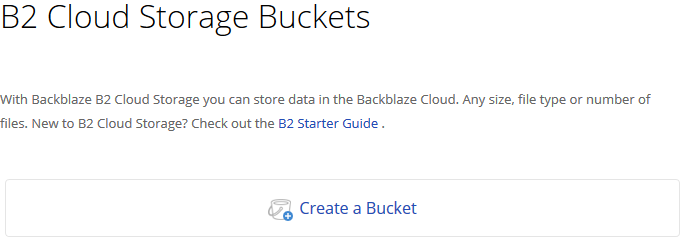
Click on the Create Bucket button in the B2 Cloud Storage Buckets section
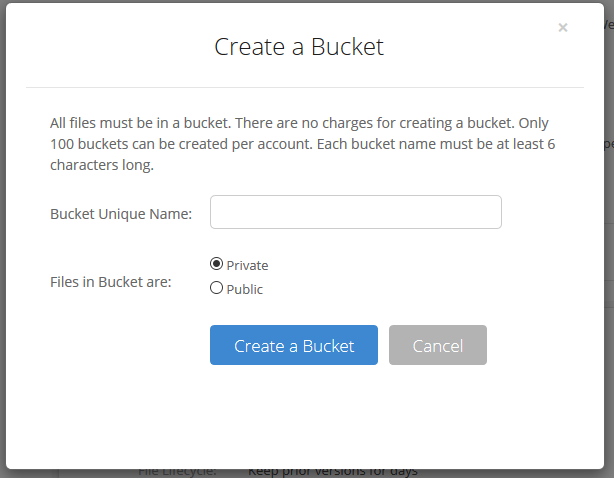
3. Give the Bucket a name and keep the bucket private for the backups. Click on the Create a Bucket button.
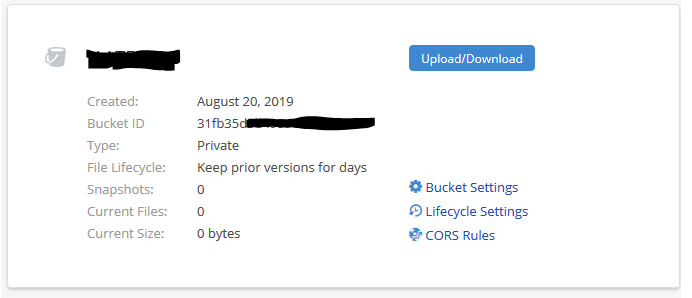
4. Copy down your Backblaze Bucket name and Backblaze Bucket ID
Setup Backblaze Application Key
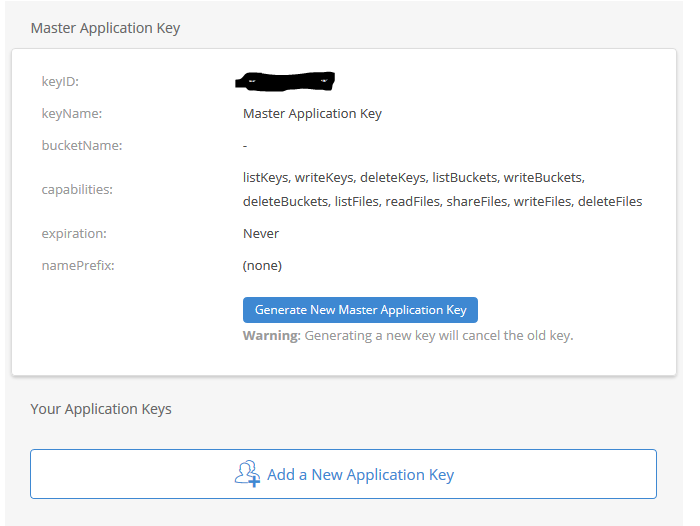
Click on the App Keys section
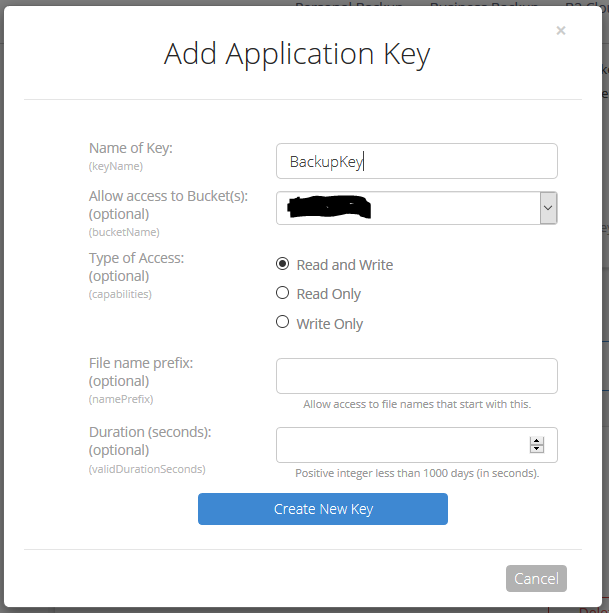
Click on Add a New Application Key
3. Give the Backblaze Application Key a name, chose the newly created bucket from the list and make sure to leave the Type of Access as “Read and Write”. Click the Create Key button.
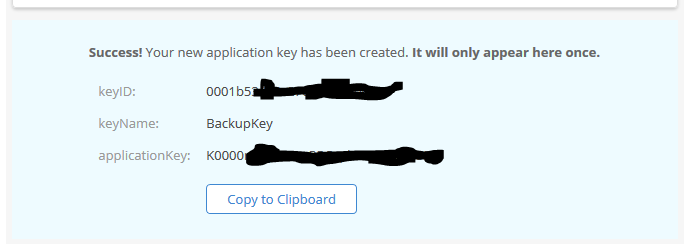
4. Make sure to copy down the Backblaze Application keyID and Backblaze Application applicationKey. This will be the only time they are both shown. If you lose the Backblaze Application applicationKey then you will have to delete the current one and create a new one.
Setup WHM Backup to Backblaze
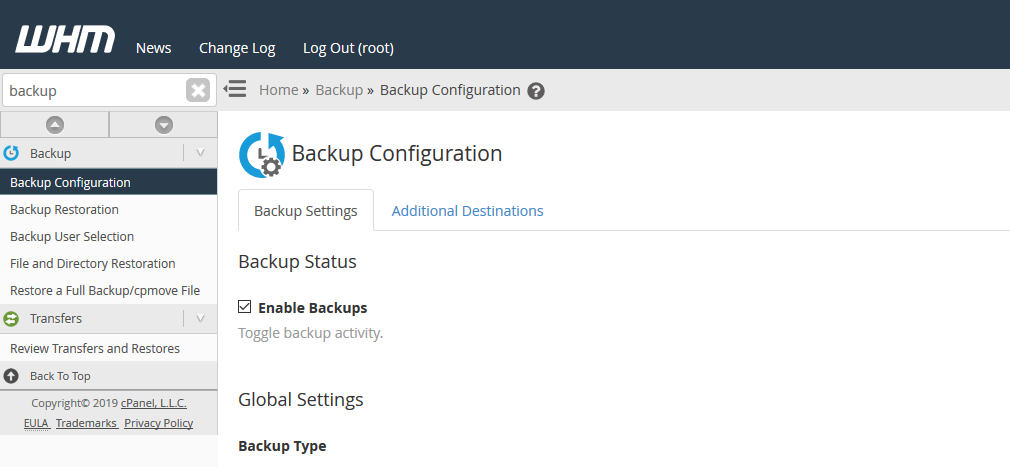
Connect to WHM as root user and choose Backup Configuration from the menu. The specific WHM backup settings are not discussed here, but feel free to contact us for advise on how to do so.
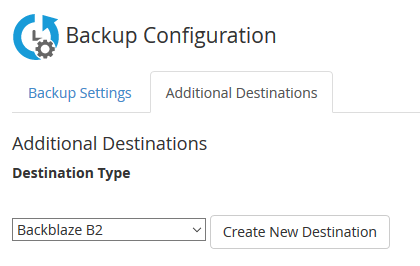
2. Click on Additional Destinations. Chose Backblaze B2 from the Destination Type and click on the Create New Destination button.
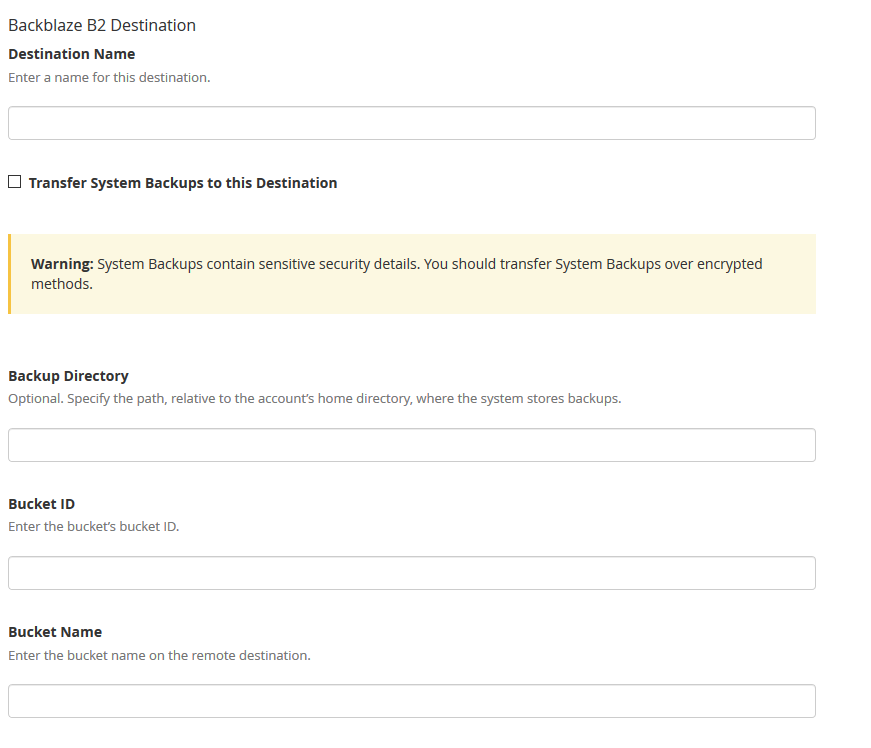
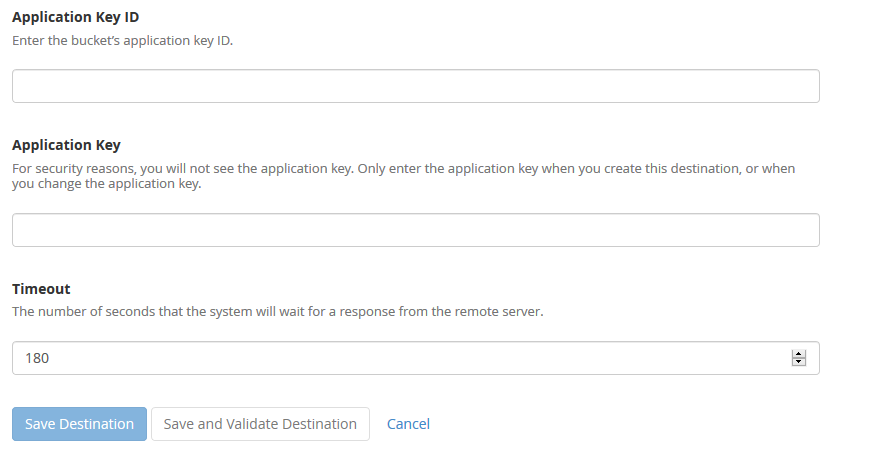
3. Enter in a backup name. Click on the “System Backups” if that is desired. Leave the Backup Directory blank. Enter in the Backblaze Bucket ID and Backblaze Bucket Name copied down earlier. Enter in the Backblaze Application Key ID and Backblaze Application Key. Click on the Save and Validate Destination button.
Make sure to disable your old AWS Glacier backup destination. All backups on Glacier should be set to auto delete according to a lifecycle, but if not then wait 120 days from creation to remove them to avoid any penalties. Speaking of lifecycles, it is a good idea to change the lifecycle settings on the Backblaze bucket to auto delete after a determined number of days since they do charge for total storage utilized.
If your company is would like to discuss the layers of security you have in place, then contact us for assistance.
A single ransomware infection can freeze a church’s donations, records, and operations
Got a call a couple weeks ago from a local church:
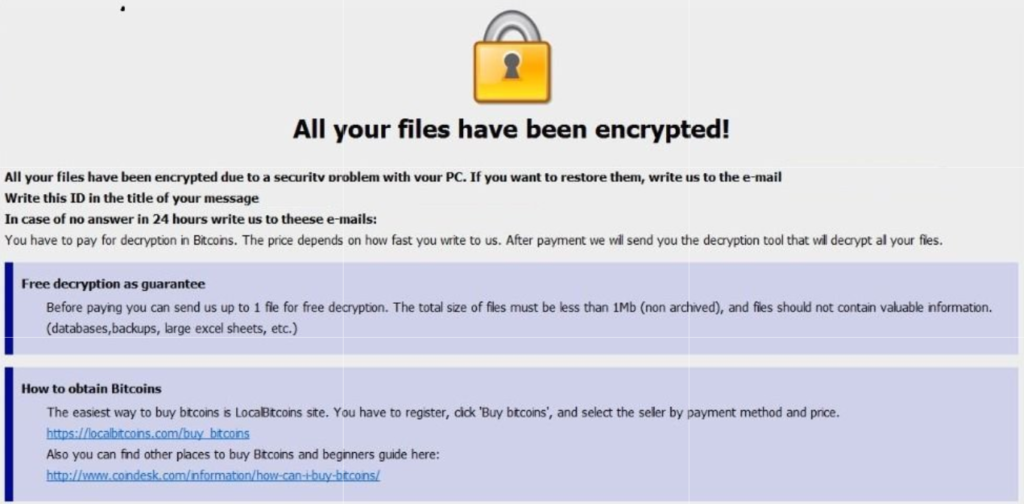
“we came in and open the computer and we have ransomware on there. We can’t even get to any of our stuff. It’s telling us to email somebody and so that they can free up the computer.”
How does this happen?
Generally these things happen because people click on things they shouldn’t. Whether in an attachment in email from someone they don’t recognize, a link in social media that sounds too good to pass up, or an advertisement for something they can’t live without. Once the user gives permission for something to open or run on their computer the game is over and the hacker wins.
What to do when it happen?
Stop using the computer.
Leave the computer alone! Do not carry out any further commands, including commands to Save data.
Do not close any of the computer’s windows or programs. Leave the computer alone.
Leave everything plugged in and do not turn off the computer or peripheral devices.
If possible, physically disconnect the computer from networks to which it is attached.
Call us immediately. Write down any unusual behavior of the computer (screen messages, unexpected disk access, unusual responses to commands) and the time when they were first noticed.
Write down any changes in hardware, software, or usage that preceded the malfunction.
Do not attempt to remove a suspected virus! Let the professionals do the dirty work.
How to prevent this from happening?
Layers of protection is the simple answer. A good antivirus installed to stop the bad programs from running, DNS filtering to keep users off of bad sites / advertisements, a good backup of all data to recover when this does happen, and most important of all EDUCATION – teaching users what safe internet usage looks like and having policies in effect to train them can mitigate 60-70% of infections.
If your company is would like to discuss the layers of security you have in place, then contact us for assistance.
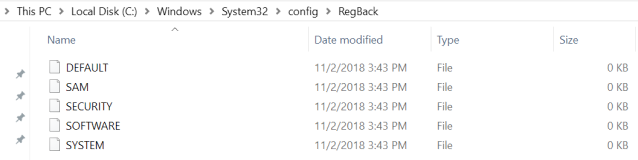
In a new Windows 10 Support article, dated June 28th, Microsoft comes clean that they will no longer be backing up the registry file with its built in backup feature. “This change is by design, and is intended to help reduce the overall disk footprint size of Windows.” They instead recommend that System Restore be enabled and used to recover in case of registry corruption (which by the way uses disk space too).
Ending Registry Backup
The Windows Registry is a hierarchical database that stores low-level settings for Windows 10 and installed applications that rely on it. The kernel, device drivers, services, Security Accounts Manager, and user interface configuration are all in the registry. If the registry is lost then system settings, drivers, user interface tweaks, and many programs will all need to be fixed or re-installed from scratch.
If your company is using the built in Windows Backup feature, then contact us for assistance moving to a system that provides complete backup of your systems.
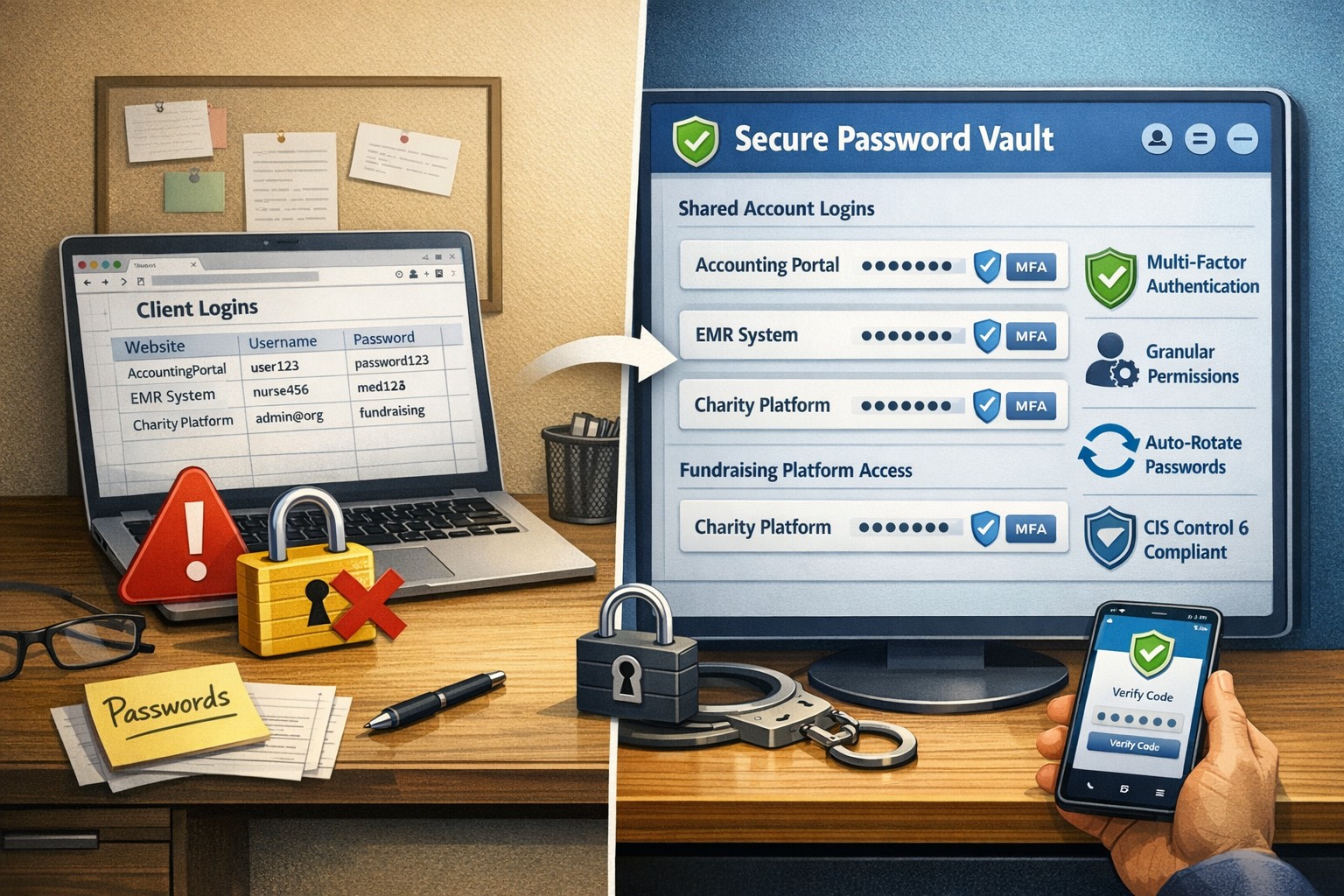
Farmhouse Networking has had a long standing policy that we do not keep a record of client passwords (except when needed for device administration). That is about to change, but before we talk about our new password policy let’s talk password storage:
Common Password Storage
Here are some popular places where many businesses store their passwords that make them very vulnerable to being stolen.
Passwords written on paper (that are not under lock and key):
On your desk under your keyboard (or taped underneath)
Under your stapler or desk decorations
On sticky notes stuck to your monitor or desk
On a scrap of paper on your desk or in a drawer
In a notebook or address book
In a old-fashioned Rolodex file
Paper printouts or photocopies of your passwords
Anyone with access to your office could easily find and steal passwords stored like this.
Passwords stored in your computer (without using encryption):
Remembered in your web browser
A document called “Passwords” that you’ve created anywhere on your computer, perhaps using Microsoft Word or Excel
A document with any other name on your computer (including the password as the name)
Email drafts that you’ve created (but not sent) containing password information
Anyone with access to your computer could easily find and steal passwords stored like this, including both a person with physical access to it as well as a virus or hacker gaining access via the internet, or scamming you into granting them access, even once.
Passwords stored in your smartphone or tablet (without using encryption):
Electronic “Notes” containing password information
Other documents or emails similar to the ones listed in computer storage above
Anyone with access to your device could easily find and steal passwords stored like this.
Passwords sent via regular (insecure) email:
Emails that you have sent to yourself containing password information
Emails that you have sent to anyone else containing password information
Any information that you send using regular (unencrypted) email puts that information at risk of being stolen. Email is neither private nor secure. Sending an email is like mailing a postcard, and hackers and thieves can easily read the contents. You should never send passwords (or any other confidential or sensitive data) via regular email.
Secure Password Storage
Now for the discussion of Farmhouse Networking’s new password policy. We are partnering with a company to provide a storage of passwords and other client documentation with military grade encryption. This partnership also allows us to address the dangers that common password storage present by offering our clients this same encrypted password storage service. Here are some of the benefits of this service:
Unlimited users
Unlimited passwords
Each user has a personal password vault
Shared company password vault
Security groups to manage access
Auditing & reporting (Compliance)
Secure password sharing
1-Click Login Tool (for all major browsers)
Mobile Device Access
Only $15 per month (Compared to Lastpass Business at $4 per user per month)
If your company is using common password storage of any kind do yourself a security favor and contact us to upgrade to secure password storage.
With the recent addition of VoIP phone service and internet phone service for current phone system owners, we here at Farmhouse Networking have decided to “eat our own dog food” as the saying goes by changing our phone number over to use the new VoIP phone system ourselves. So here is what to expect:
Phone System Features:
Texting: Those of you who are used to texting in for quick responses will no longer be able to do so. I will still have a cellphone and be able to answer calls from the field via the phone systems Ring Group feature, but I will changing the phone number for my cell phone.
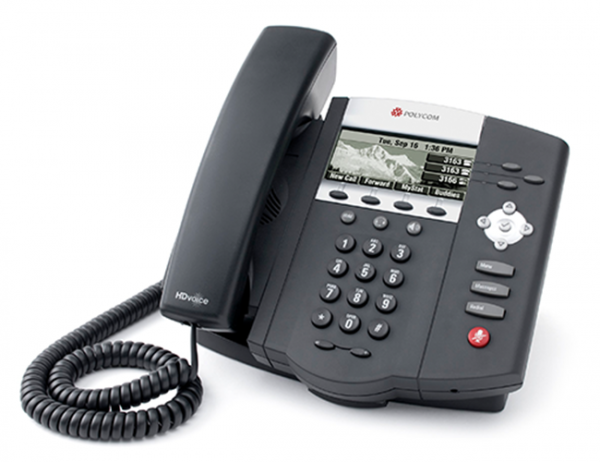
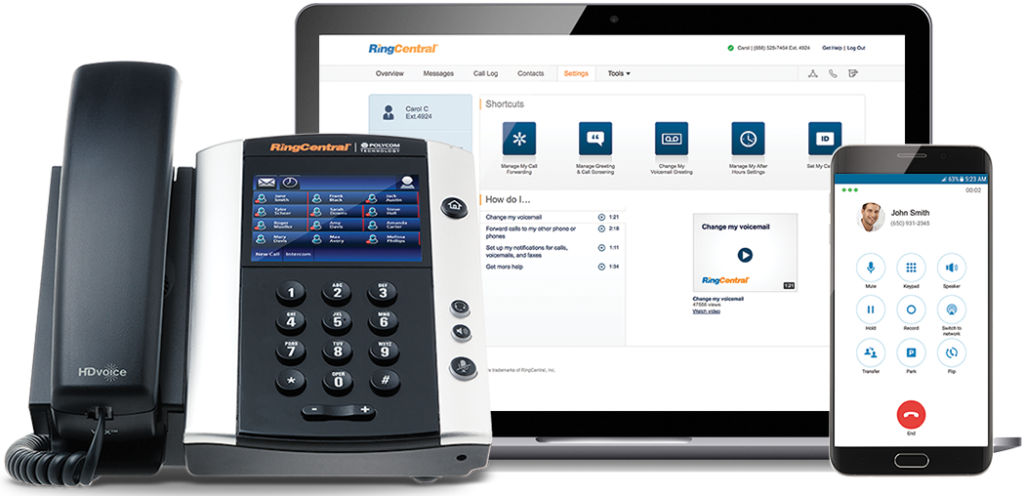
Desk Phone: When in the office, we will be answering our Polycom VVX310 desk phone which has HD Voice for clearer call quality.
Messages: Any time a message is left on our new system, the phone system Voice to Text feature will transcribe the message automatically then send an email into our ticketing system with a copy of the audio also attached. This then becomes a ticket – this feature will increase responsiveness and accuracy in handling your requests.
Holidays, Nights, & Weekends: The phone system has been setup to recognize specified national holidays, birthdays, and special occasions. It also has Time Frame setup with business hours between 9am and 5pm on all weekdays. When outside these business hours or on holidays the phone system will be answered by our Auto Attendant system. This will give the option to leave a voicemail to create a ticket or agree to after hours rates to start an emergency call. Please see our Terms & Conditions for more information.
Thanks for always looking to Farmhouse Networking to serve your company’s IT needs.
If your company is looking to upgrade your current phone system feature set or reduce overall costs of phone service, then contact us for assistance.
As small businesses change and grow, the ability to quickly scale up — or down — becomes a necessity. Adding new employees, for example, requires the company to adapt its phone system to accommodate the need for more lines.
That is harder to accomplish using traditional on-premise telephony systems due to higher setup and maintenance costs, the need for hardware on-site and reliance on IT support. A cloud-based phone system, on the other hand, would enable small businesses to manage communication services in a less costly, more streamlined and agile manner.
Benefits of a Cloud-Based Phone System
1. Fully-Integrated Communications System
Business tools that operate in the cloud are easy to deploy, enabling employees to stay connected whether they are in the office or on the go. In this way, the cloud provides a consistent business presence and helps to increase productivity with seamless access to CRM tools, email, instant messaging, voice and videoconferencing.
2. Control Over Modes of Communication
A cloud-operated system puts businesses in the driver’s seat, allowing them to pick and choose what features they need, with access to turn them on or off easily. Also, cloud solutions give employees anytime, anywhere access via a smartphone, desk phone or softphone to all their calling features.
3. Top Line Business Features
A cloud-based phone system would give small businesses access to the types of network applications that one would typically find at larger corporations. These include features such as a Virtual Assistant, Auto Attendant, Never Miss a Call or Call Center solutions.
4. Mobility and Ease of Use
Today’s workplace is increasingly mobile, and small businesses especially need to be able to operate from multiple locations. With a cloud-based system, small business employees have access to features that allow them to log in from anywhere so that they can be reached while on the go, giving customer-facing and revenue-producing employees greater control over their productivity.
5. Time Management and Efficiency
Web-based customer portals enable IT staff to manage their system more efficiently. With insight into the installation, service configuration, trouble tickets, training, billing and call analytics, this full access to a customer’s system and account allows them to spend fewer resources on project management and focus more on work that adds to the bottom line.
6. Flexibility to Scale Up (and Down)
As a business grows, so does the need to hire new employees, open new offices and onboard new customers. This requires a communications system that can scale up — or down — as the need arises. With a cloud-based phone system, businesses can add as many extensions as they need to accommodate heightened call volume, or, if necessary, simply call in to deactivate these extra extensions. Unlike traditional systems, businesses only pay for the extensions they need for as long as they need them.
7. Business Continuity
Working with a phone system “in the cloud” allows businesses to remain connected to their customers no matter the environment. A cloud-based communications system is likely to be unaffected by outside factors such as severe weather or other issues that may keep employees from getting to the office.
8. Improved Customer Service
With the Virtual Receptionist (VR) or Auto Attendant feature, businesses can easily direct calls to various departments and even create greetings unique to a given department. For example, a business could set up a holiday greeting in advance (via the administrative portal) and pre-set it to revert to the non-holiday greeting on a specified date. It could also add an on-hold message about special promotions or commonly asked questions.
9. New Service Features Added Easily
During busy seasons, some businesses will add premium calling features to increase call-taking efficiency and maximize staffing. Call Groups, for example, allow incoming calls to ring on multiple extensions. Call Queues provide a “dynamic waiting room” for callers that let businesses customize the on-hold experience and better manage call volume. Both help to decrease voicemails, missed calls and busy signals, enabling service to as many callers as possible.
10. Cost Savings
Cost savings are another benefit of cloud-based phone system. Moving telecommunications off of PBX platforms and to the cloud can be less expensive relative to monthly service rates versus that of a traditional system, helping to reduce costs and, ultimately, increase profitability.
If your company is looking to reap the benefits of moving to the cloud, then contact us for assistance.
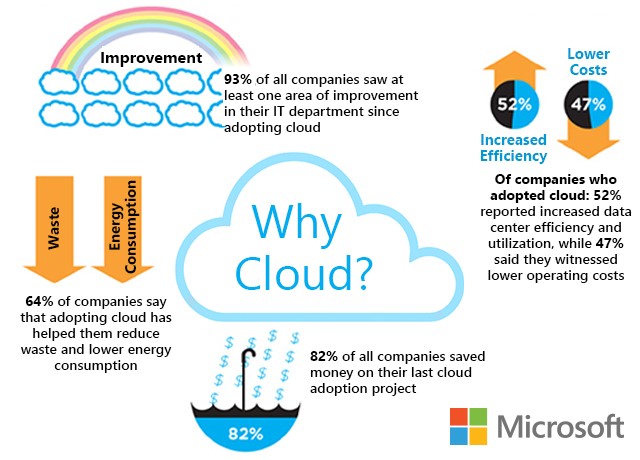
Cloud eliminates hardware costs, enables instant business scaling
Give your business freedom from hardware constraints with the agility and functionality of cloud computing.
Cloud requires no upfront costs, which makes it an operating expense rather than a capital expense. Your business will benefit from predictable monthly payments that cover software licenses, updates, support and daily backups. Cloud technologies provide greater flexibility as your business only pays for what it uses and can easily scale up and down to meet demand.
Moving to the cloud enables your business to no longer pay to power on-premises servers or to maintain the environment. This significantly reduces energy bills.
Finally, for those concerned with security, cloud data centers employ security measures far beyond what most SMBs can afford. Your company data is much safer in the cloud than on a server in their office.
Move your business to the cloud ahead of Office 2010 and Windows 7 End of Support!
If your company is looking to make the move to cloud, then contact us for assistance.
Cloud redundancy keeps phone systems operational during disasters
What happens to your phones when the power goes out, the internet is down, or the old copper lines are down from a natural disaster? Are your customers going to get a busy signal? How quickly will they call the competition?
Phone System Backup Plan
With a standard phone service there would be nothing to prevent the busy signal from happening. With phone service from Farmhouse Networking all calls have the ability to be automatically forwarded and routed to virtually any person, device, or location. Plus our platform includes connectivity to multiple carriers for redundancy purposes, so no single carrier issue will impact your business.
Disasters might not be under our control, but business can continue to happen even when they occur.
If your company is concerned about losing calls or looking to add the protection a cloud phone system provides, then contact us for assistance.
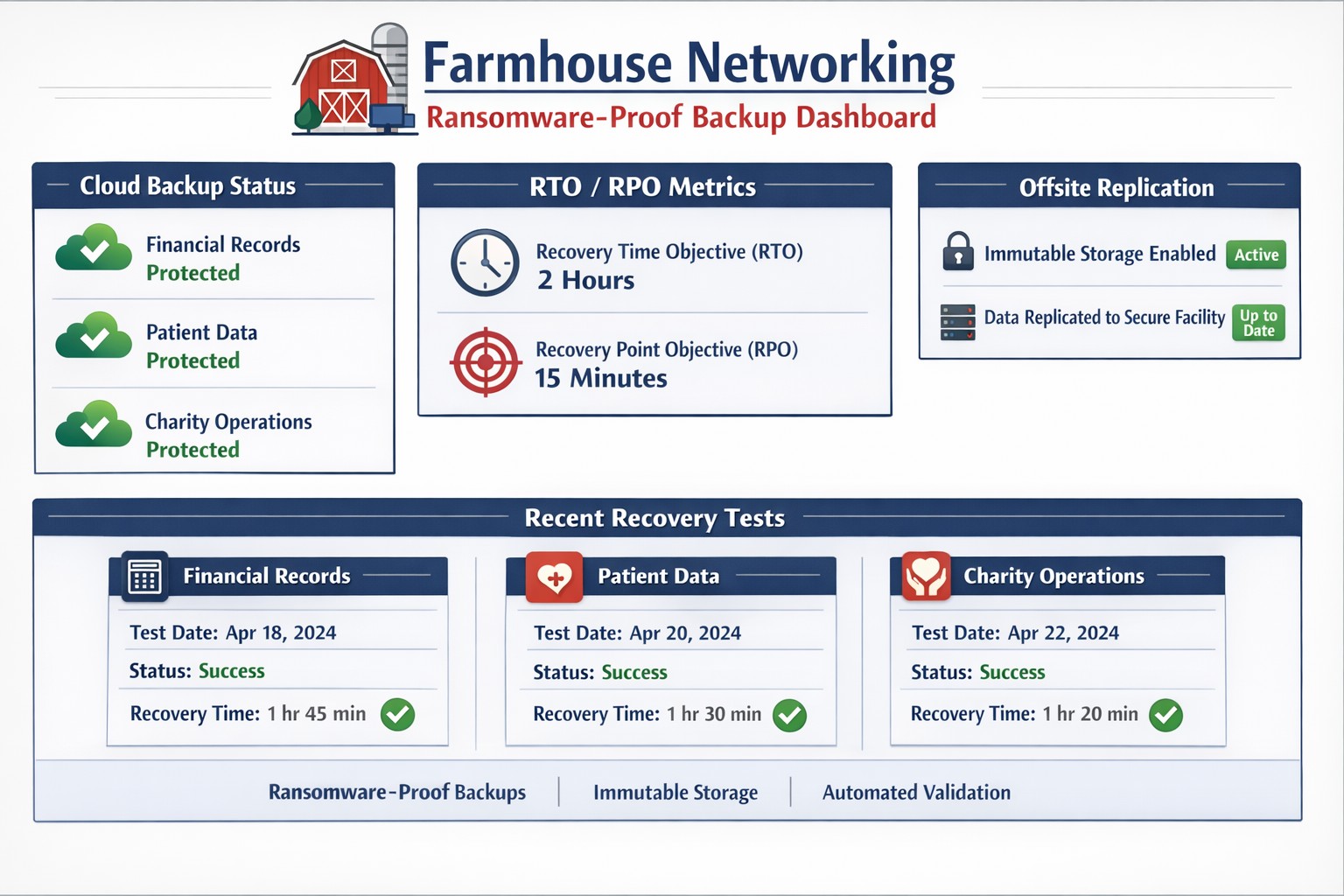
Automated cloud backups with tested recovery ensure business survives disasters
When it comes to security threats, it’s not “if” disaster will strike, it’s “when.” So, how will your organization respond? Do you have the proper infrastructure in place to thwart a potential data disaster and if disaster does strike, is your organization poised to recover quickly?
While 100% prevention of a data disaster is impossible, there are several ways you can position your organization to get your systems back up and running with as little disruptions to day-to-day operations as possible:
File Level Backup: A good file sync and share tool is more than just a way for your team to collaborate on the go, it’s a vital component to your organization’s security strategy. With file level backup, you can ensure that even in the event of a site wide disaster, your team can maintain anytime access to their critical files.
Backup and Disaster Recovery: Your last line of defense in a site wide disaster, backup and disaster recovery solutions allow you to recover at the systems level. An absolutely necessary piece of your organizational infrastructure, backup and disaster recovery delivers peace of mind that your systems will always be recoverable, even when disaster strikes.
Cloud-to-Cloud Backup: Cloud-to-cloud backup fills in the gaps left by some of the most commonly used SaaS applications, such as Office 365. Many of these cloud applications fall short in the way of cloud-retention and a good cloud-to-cloud backup solution can help you protect critical business data while providing enhanced features to maximize your user experience and more importantly, security.
It’s an unfortunate reality but our workforce can often times be our worst enemies, often creating vulnerabilities and leaving our systems open to hackers, viruses, data breaches and data loss. More often than not, we do this through completely harmless, everyday activities like opening compromised emails and links.
As a leader in your organization it’s your role to monitor your team and arm them with the knowledge of good security practices. Without implementing a company-wide security training program, you leave your systems vulnerable to a host of attacks.
Another crucial step in preventing system attacks, is to configure a firewall to monitor user activity and website visits throughout your organization. An Acceptable Use Policy is helpful in establishing what your organization will and will not allow from its employees.
Curious how we can help you establish a more secure company infrastructure?
And God will generously provide all you need. Then you will always have everything you need and plenty left over to share with others. As the Scriptures say, “They share freely and give generously to the poor. Their good deeds will be remembered forever.” For God is the one who provides seed for the farmer and then bread to eat. In the same way, he will provide and increase your resources and then produce a great harvest of generosity in you. - 2 Corinthians 9:8-10
We use cookies to ensure that we give you the best experience on our website. If you continue to use this site we will assume that you are happy with it.