Today we tell the story of a medical office’s journey to the cloud. This particular client was facing their server operating system reaching end of support (a HIPAA violation) in the near future. They had begun by looking at their electronic medical records software company’s online offering, which didn’t have all the functionality of their on-premises software and was very expensive (this is typical).
They next decided to look into moving their current on-premises software into the cloud and we were asked to help with the testing. We determined that it would be best to move the file portion of the server to SharePoint / OneDrive to increase their mobility and flexibility. We also determined that it would be best to move them away from on premises Active Directory into Azure Active Directory / Intune to allow authentication and security policies. Finally we began testing the on-premises software hosted on a server in Azure with a VPN connection to their office.
The SharePoint / OneDrive and Azure Active Directory portions went through with little issues. The server, however, was not as we had hoped. The Azure VPN connection was expensive due to it always being on and no way of turning it off outside of business hours. The performance of the SQL database that the on-premises software used was basically unusable. The other option would be to create virtual desktops on Azure for this purpose but the cost and functionality was not what the customer was hoping for.
This has lead them back to searching for an online EMR software that will meet all their requirements. This will be tough because most companies are good at some things, but not all things and compromises usually have to be made. Our hope is that this story is a lesson to other companies. The cloud may sound like the newest and best way to work, but the costs and functionality are often worse than expected.
If your company is going to use full disk encryption or has compliance requirements that you need consulting for, then contact us for assistance.
Had a local medial office want to move their current server into the cloud and because they are already an Office 365 customer, I chose to use Azure for their Virtual Machine. I helped them setup Azure to Araknis IPSec VPN to connect their headquarters to the hosted server. This tutorial will go into detail about the creation of this tunnel starting with the Microsoft Azure side first using Resource Manager. It will be using the following parameters:
VNet Name: TestNetwork
Address Space: 10.10.0.0/16
Subnets:
Primary: 10.10.10.0/24
GatewaySubnet: 10.10.0.0/24
Resource Group: TestResourceGroup
Location: West US
DNS Server: Azure Default
Gateway Name: TestVPNGateway
Public IP: TestVPNGatewayIP
VPN Type: Route-based
Connection Type: Site-to-site (IPsec)
Gateway Type: VPN
Local Network Gateway Name: TestSite
Local Subnet: 10.20.20.0/24
Connection Name: VPNtoTestSite
Configure an Azure VPN gateway
This part takes the longest, so it should be done first:
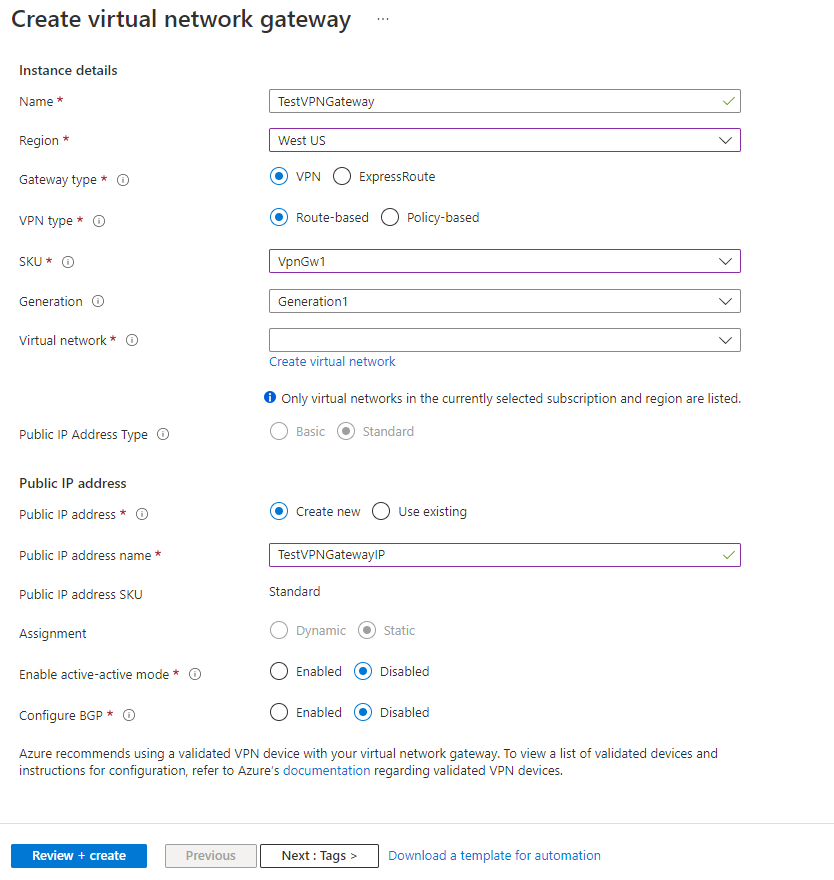
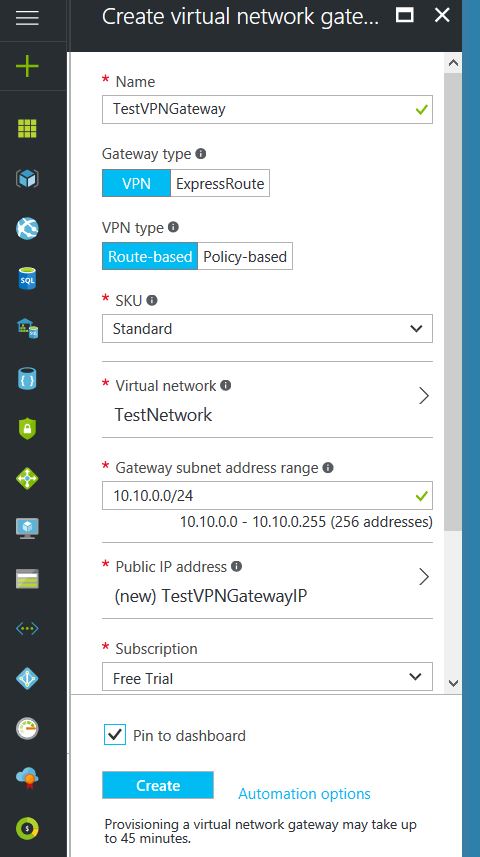
Click on the “+” icon at the top left hand side of the Resource Manager, then search for “Virtual Network Gateway” and click on the “Create” button.
Give the Virtual Network Gateway a name
Select matching Region to where Azure resources are located
Leave Gateway & VPN type the defaults
Choose a SKU <- These have changed since the article was created, so my “standard” now is WpnGw1 with Active / Active turned off (this is a good balance of performance and cost)
Choose or create a local network (not covered here, but must contain Gateway Subnet) that matches internal resources
Choose or create a Public IP Address
Leave the remaining values as their defaults and then click the “Create” button. (Please note the reminder that this takes 45 minutes to create!)
Configure an Azure Local Network Gateway
This is a reference to your on-premise network so that subnets can pass traffic:
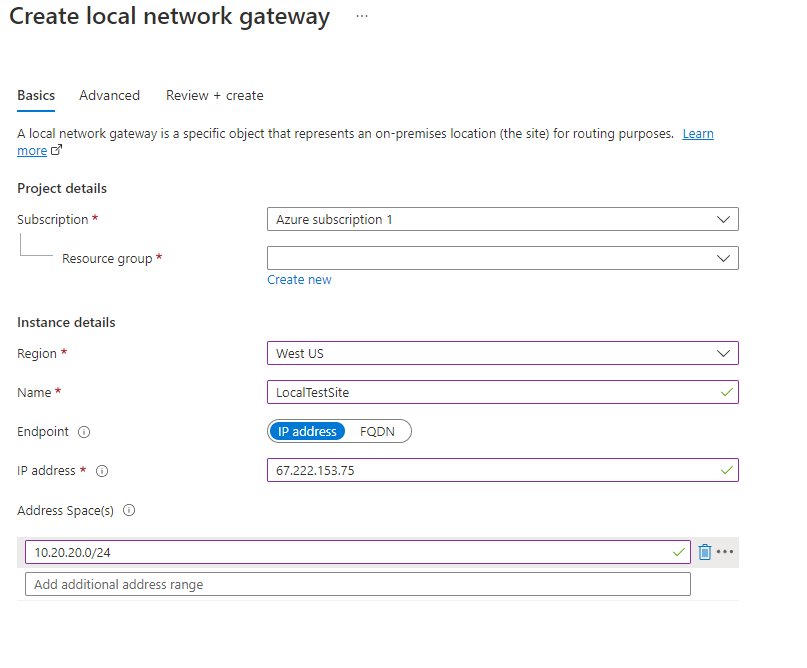
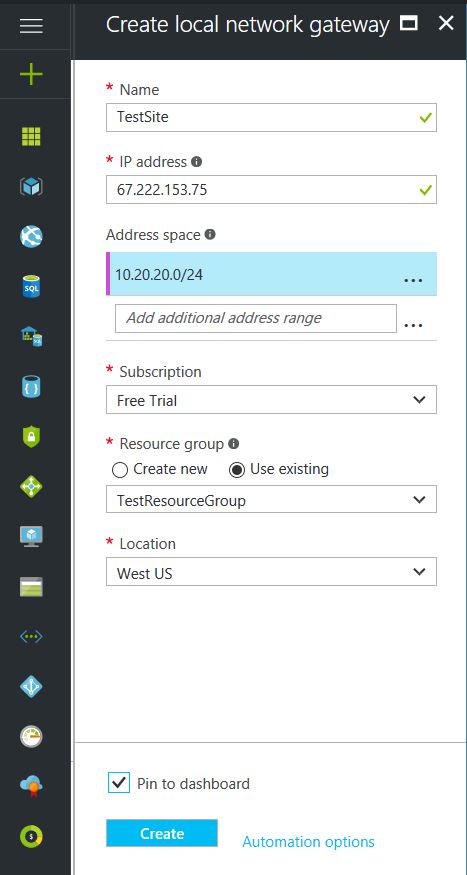
Click on the “+” icon at the top left hand side of the Resource Manager, then search for “Local Network Gateway” and click on the “Create” button.
Give the Local Network Gateway a name
Select matching Region to where Azure resources are located
Specify the external IP address of the local on-premise site
Specify the on-premise address space (subnet)
Leave the remaining values as their defaults and then click the “Create” button.
Configure an Azure VPN Connection
This will create the tunnel from Azure to the on-premise site:
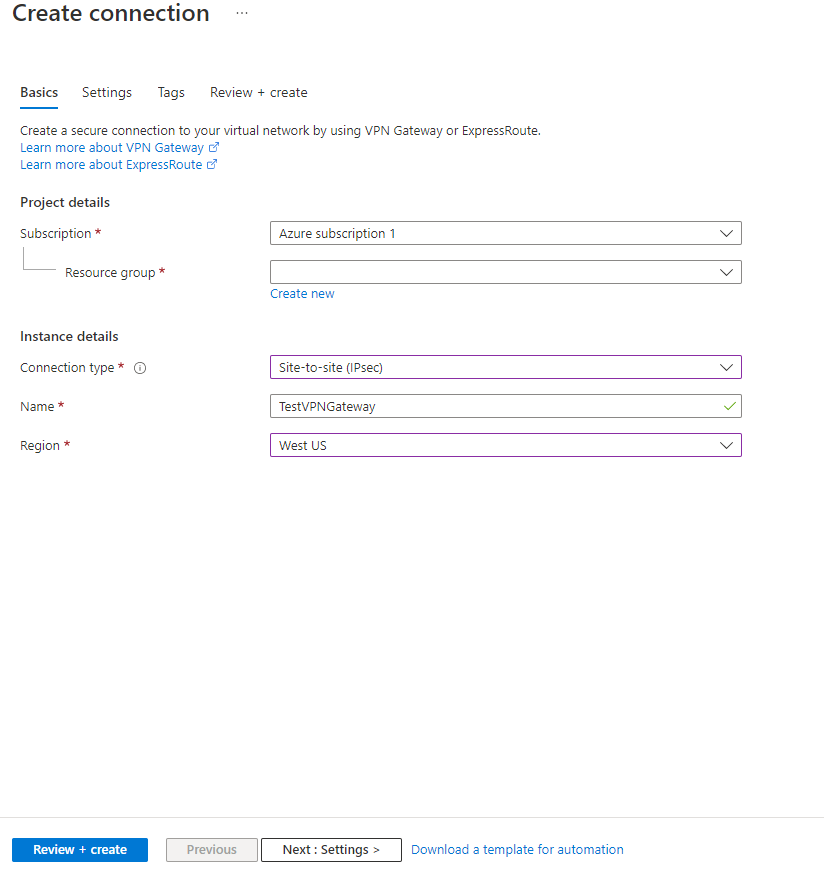
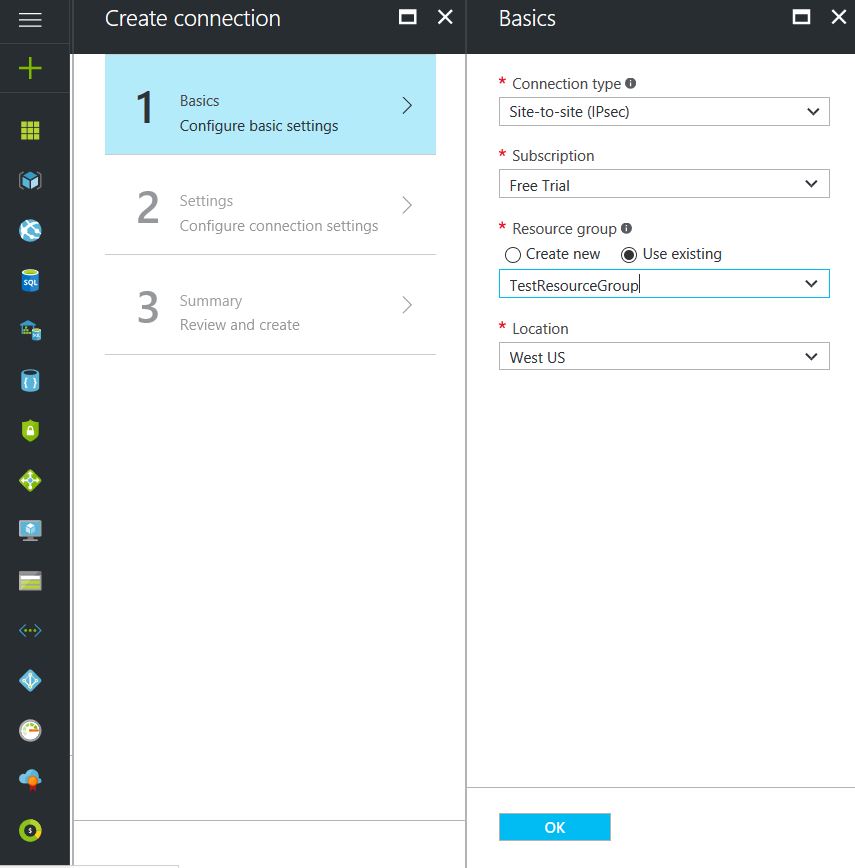
Click on the “+” icon at the top left hand side of the Resource Manager, then search for “Connection” and click on the “Create” button.
Choose “Site-to-site (IPSec)” as the connection type
Give the Connection a name
Select matching Region to where Azure resources are located
Leave the remaining values as their defaults and then click the “OK” button. On the summary screen click on the “OK” button to create the connection.
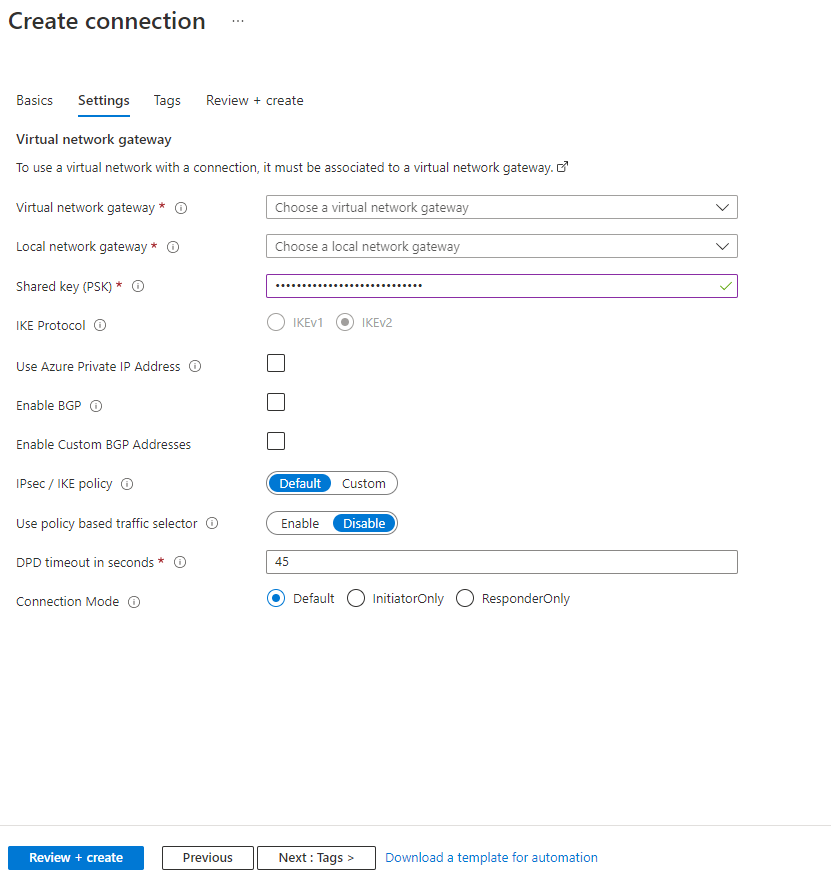
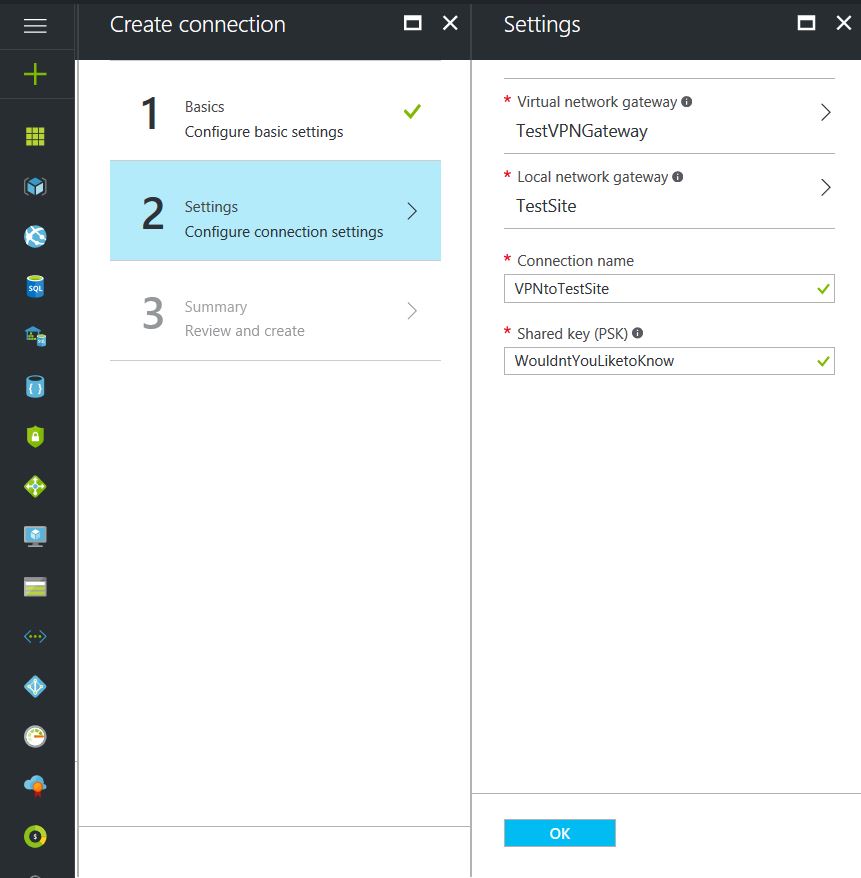
Choose the newly created Virtual Network Gateway
Choose the newly created Local Network Gateway
Specify a shared key
Leave the remaining values as their defaults and click the “Create” button.
This completes the setup of the Azure side of the VPN tunnel. Now to work on the Ubiquiti USG side.
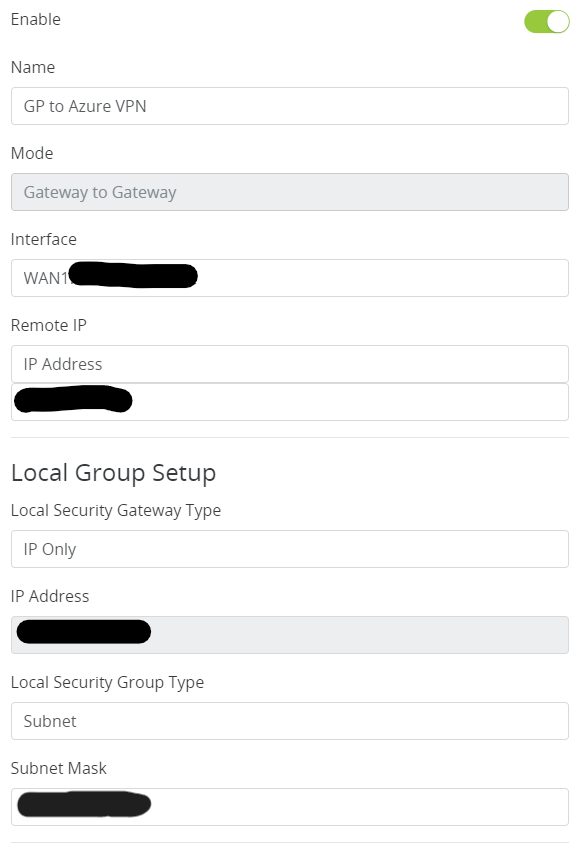
Configuring an Araknis IPSec VPN Network
Connect to Araknis router (need at least a 310 for this to work)
Click on Advanced > VPN
Scroll down to IPSec and click add new tunnel
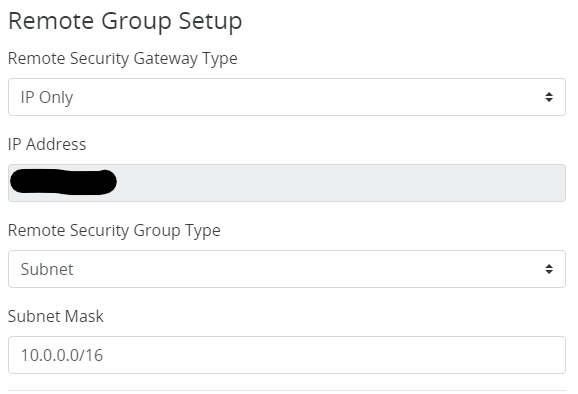
Fill in the Remote IP address of the Azure VPN Gateway
Fill in the Remote Subnet Mask
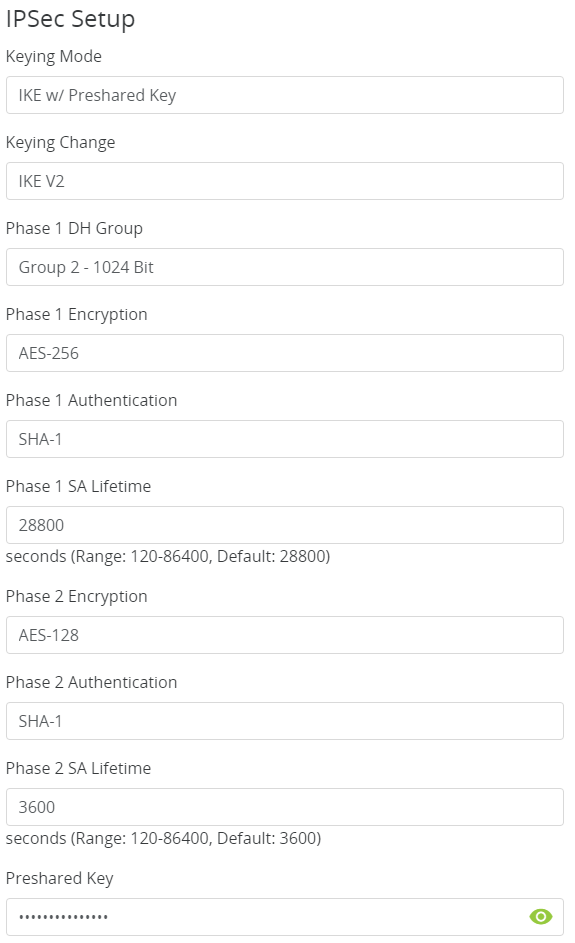
Make the following changes to IPSec Setup
That is all there is to it. If your company is currently using either Microsoft Azure or Araknis routers and would like a VPN created, then contact us for assistance.
Reliable retail routers powering WFH for B2B professionals
This blog post is more about the use of retail routers at the office than at home, just to make that clear from the beginning. We would also recommend non-retail routers at home, but that is not feasible for everyone.
What is a retail router?
This is a phrase I am coining to describe any router that is generally available from your local retailers like Staples, Walmart, etc or delivered as part of the internet service from your local provider. They include brand names like ASUS, D-Link, Linksys, and Netgear. They range in price from $30 for the extreme low end to $450 for a gaming router. These routers are built for home and small office networks that have very few users or devices connected at any given time. They may include some features that sound “business-like” such as Virtual Private Network (VPN), Stateful Packet Inspection (SPI), VLAN, and Quality of Service (QoS) – remember though that these are also only able to support a minimum number of users and devices connected at any given time. If you try to use a retail router to run your business network then you will find that performance will be severely degraded and these features will not work as advertised.
There is also the issue of security. These routers are rarely if ever updated even when new vulnerabilities are found. This makes them ineligible for PCI or HIPAA compliance situations.
Is there a non-retail router?
So what to do about this situation? Time to call your trusted IT services provider who will be able to get you a non-retail router, but that begs the question – what is a non-retail router?
These routers are built by network professionals who design the hardware to perform under the pressures of the office environment and to handle the work from home remote workload. These routers include brands like Cisco, Juniper, Ubiquiti, and Araknis. They range in price from $150 for an office of up to 5 people to $10,000 for a high traffic company with hundreds of users. These routers handle VPN, SPI, VLAN, QoS, and many other services all at once with ease. Security is baked into these routers with the best ones having the ability to be managed from the cloud. They provide consistent access to all connected users and devices at all times. Your trusted IT services provider will work with you to “right size” the router to your business needs.
If your company is going to have full time work from home employees and is concerned about their ability to perform, then contact us for assistance.
In the past couple days there have been press release that show a large number of vulnerabilities in all Cisco Small Business routers and 79 models of the Netgear router line-up. Here are the articles:
The Cisco models are primarily used in small businesses, but the Netgear models include many that are used by home users – this could present a security risk for anyone who is still working from home. Cisco has released patches for the vulnerabilities and the Netgear vulnerabilities remained unpatched.
If your company is still using a “small business” or home based router, then contact us for assistance in checking for updates or replacing them with an business grade router with automatic updates. We also provide network security auditing for both office and home work environments.
In this unprecedented time that we are currently experiencing, you have had to set your team up to work remotely, often without thinking about how they might actually get work done, let alone security of all things. Our employee checklist and no-cost cybersecurity training course will provide your team with the tools they need to ensure that they are safe and productive – right out of the gate. These free resources are part of our initiative to keep our community safe and working during this time of crisis, without the additional disruption and financial impact of a breach.
Don’t let a change in circumstance allow for a change in cybersecurity standards.
Secure WFH prevents data breaches from personal devices
According to the executive order made by Oregon State Governor, Kate Brown: “On Friday night, I frankly directed them to stay home. And now I am ordering them to stay home.”
The following guidelines are in effect for businesses:
It closes and prohibits shopping at specific categories of retail businesses, for which close personal contact is difficult to avoid, such as arcades, barber shops, hair salons, gyms and fitness studios, skating rinks, theaters, and yoga studios.
It requires businesses not closed by the order to implement social distancing policies in order to remain open, and requires workplaces to implement teleworking and work-at-home options when possible. They must also elect a representative who will be in charge of monitoring social distancing.
What FHN is doing?
FREE Remote Access – Just a re-iteration that all our monthly managed services clients will have remote access to their systems at no additional cost. If you are not a managed client then we can set you up with secure remote access to your data or network depending on need. Please call sooner rather than later as we have to take care of our managed clients first and there may be a wait at this point.
On-site support continues – At this time there is no restrictions on service industries who perform on-site visits to complete work, so Farmhouse Networking will continue to do so for the foreseeable future. We will be taking precautions such as protective masks, gloves, or perhaps more extreme measures (hazmat suit) to insure the safety of our staff and clients. We ask that clients keep these visits to emergency needs and planned projects until these social distancing rules are lifted.
Stocking up on essentials – We have been closely monitoring our distribution channels and several of them have been stating that non-essential items would take up to one month to receive. As a courtesy to our clients and to better service them in times of emergency IT needs, we will be stocking up on computer and network parts that are most often needed.
What should clients do?
Remote workers – Send unneeded on-site staff home to work remotely. With remote access capabilities, video conferencing, and VoIP phones – there is no reason to keep them in harms way. We are experts in these technologies and can get you up and running on them quickly.
Maintain infrastructure – For remote workers to be able to get access to their computers there needs to be a solid foundation at the business location.
Workstations, servers, and network equipment should be on battery backups to keep them from going offline unnecessarily due to power fluctuations – triggering a need to go into the office.
Is part of your network over 6 years old? Now may be the time to replace the network equipment to avoid downtime and unneeded office visits in the future.
Now more than ever backups are needed in case anything should go wrong. Recovery times are bound to be increased as the lock down on businesses increases.
Don’t forget to leave the A/C on especially if you have a server closet, they work better in cooler temperatures.
Planning – With a possible slowdown in business now is the time to take stock of your company, to get used to this new normal, and make plans for the long term implications of this craziness on our businesses.
If your company needs any help weathering the COVID-19 storm, then contact us for assistance.
In reviewing compliance documentation, we found it necessary to talk about Virtual Private Network (VPN) technology for both privacy and secure remote access. A VPN is a connection to a private network over the internet through an encrypted tunnel – think smuggling information across a secret passageway between two places.
Why use VPN?
Privacy: There has been a huge buzz lately about using VPN technology to help mask you browsing habits from the likes of the NSA or Google. VPN services offer connections that regularly change your external IP address so that a profile (marketing or otherwise) is harder to build. It also makes hacking of your information harder when these services providers offer anti-virus and anti-spam filtering as part of the VPN service.
What are the trade-offs? These VPN service providers will now be the sole owner of your browsing habits – they can sell targeted profiles to marketing companies – so read those terms of service. There will also be a performance hit to your internet speed, so if you are working from a slow network already this may not be an option. Then there is the added cost of an extra $5 to $15 per month for these services on top of your internet bill each month.
Secure Remote Access: This was the original intent of VPN technology and where it really shines. Either from remote workers using coffee shop wifi or remote offices connecting to the main office, VPN tunnels are used to securely access data, servers, and other network resources. This technology is required by all major compliance agencies so that all data transmitted is encrypted during transport. In the past servers would open ports to the internet to allow access, but it was found that this practice allowed hackers the same opportunity to gain access. With VPN tunnels there is another layer of protection from unexpected access. There is also the benefit that no outside provider gets access to your browsing habits.
What are the trade-offs? This will require a router at the main office that is business grade and capable of handling the traffic. It will then require setup of remote workers laptops or remote offices with similar business grade routers.
If your company is concerned about privacy on the internet or secure remote access, then contact us for assistance.
Essential small business information security fundamentals: encrypt data, enable MFA, train employees, and backup regularly.
NIST is the National Institute of Standards and Technology. It acts as the defacto baseline that all other security and compliance organizations use to construct their standards. Reading their publications is like reading any other government document – extremely long and not interesting. Farmhouse Networking recently became aware of one such document called NISTIR 7621 aka Small Business Information Security: The Fundamentals. We took the time to distill out the main points here:
The Fundamentals aka Best Practices
Identify: Who has access to the network, who has access to the data, and what do they have access to. This includes background checking employees during the hiring process, taking an inventory of data to see who needs access to what, requiring that each user have their own login, and company policy creation.
Protect: Protection starts with separating data into shares then giving access only to those who really need it. It also includes protecting hardware with uninterruptible power supplies (UPS) and protecting software with regular updates. Protecting the network includes setting up a proper firewall, separate wireless for guest access, and VPN only access for remote users. Web filtering, SPAM filtering, file encryption, proper disposal of old equipment, and employee training are also mentioned.
Detect: Having a centrally managed antivirus software on each workstation is a must. This includes the ability to look back in time via log files or monitoring system to find the root of the security breach.
Respond: Have a disaster recovery plan and security incident response plan in place.
Recover: Need full backups of all important business data, invest in cyber insurance, and regularly access your technology to find timely improvements.
If your company does not meet these fundamentals, then contact us for assistance.
Cloud eliminates hardware costs, enables instant business scaling
Give your business freedom from hardware constraints with the agility and functionality of cloud computing.
Cloud requires no upfront costs, which makes it an operating expense rather than a capital expense. Your business will benefit from predictable monthly payments that cover software licenses, updates, support and daily backups. Cloud technologies provide greater flexibility as your business only pays for what it uses and can easily scale up and down to meet demand.
Moving to the cloud enables your business to no longer pay to power on-premises servers or to maintain the environment. This significantly reduces energy bills.
Finally, for those concerned with security, cloud data centers employ security measures far beyond what most SMBs can afford. Your company data is much safer in the cloud than on a server in their office.
Move your business to the cloud ahead of Office 2010 and Windows 7 End of Support!
If your company is looking to make the move to cloud, then contact us for assistance.
Stop asking “Is the internet down again?” with proactive network monitoring and root-cause analysis.
If it seems like this is a typical question in your office then there is hope. The concept of internet failover has been around for years. With the advent of 4G LTE cellular networks internet failover is now within reach of the small business. If the main internet connection goes down then the 4G LTE cellular network will kick in automatically to keep your business flowing. When the main internet connection comes back online it will automatically switch back to restore full speed access.
How We Fix the Internet
Business Class Router: The Datto Networking Appliance has all the specs of true business class router including all the usual services (DHCP, DNS, VLAN, DMZ, Access Rules, etc). It also has all the features that you need to secure and expand your business with seven layer deep packet inspection, intrusion detection, traffic shaping (VoIP), client VPN, site-to-site VPN, and cloud management.
Connectivity: This router has all the connectivity you could ever need. It has 4 Gigabit LAN ports to help physically segment the network. It has the latest and most redundant wireless connectivity available. It has a fully integrated multi-band 4G LTE wireless cellular modem to keep you connected when wired internet fails.
Peace of Mind: Leave the connectivity worries to us. Our expert team will be monitoring and maintaining the Datto Networking Appliance at all times via the cloud management console and integrated alerting. We will know the internet is down before you do and will take the steps needed to get your ISP to fix things.
If your company’s internet is constantly going down, then contact us for assistance.
And God will generously provide all you need. Then you will always have everything you need and plenty left over to share with others. As the Scriptures say, “They share freely and give generously to the poor. Their good deeds will be remembered forever.” For God is the one who provides seed for the farmer and then bread to eat. In the same way, he will provide and increase your resources and then produce a great harvest of generosity in you. - 2 Corinthians 9:8-10
We use cookies to ensure that we give you the best experience on our website. If you continue to use this site we will assume that you are happy with it.