Key digital skills for remote workers: AI-assisted productivity, cybersecurity basics, and data analytics to future-proof your mid-sized team.
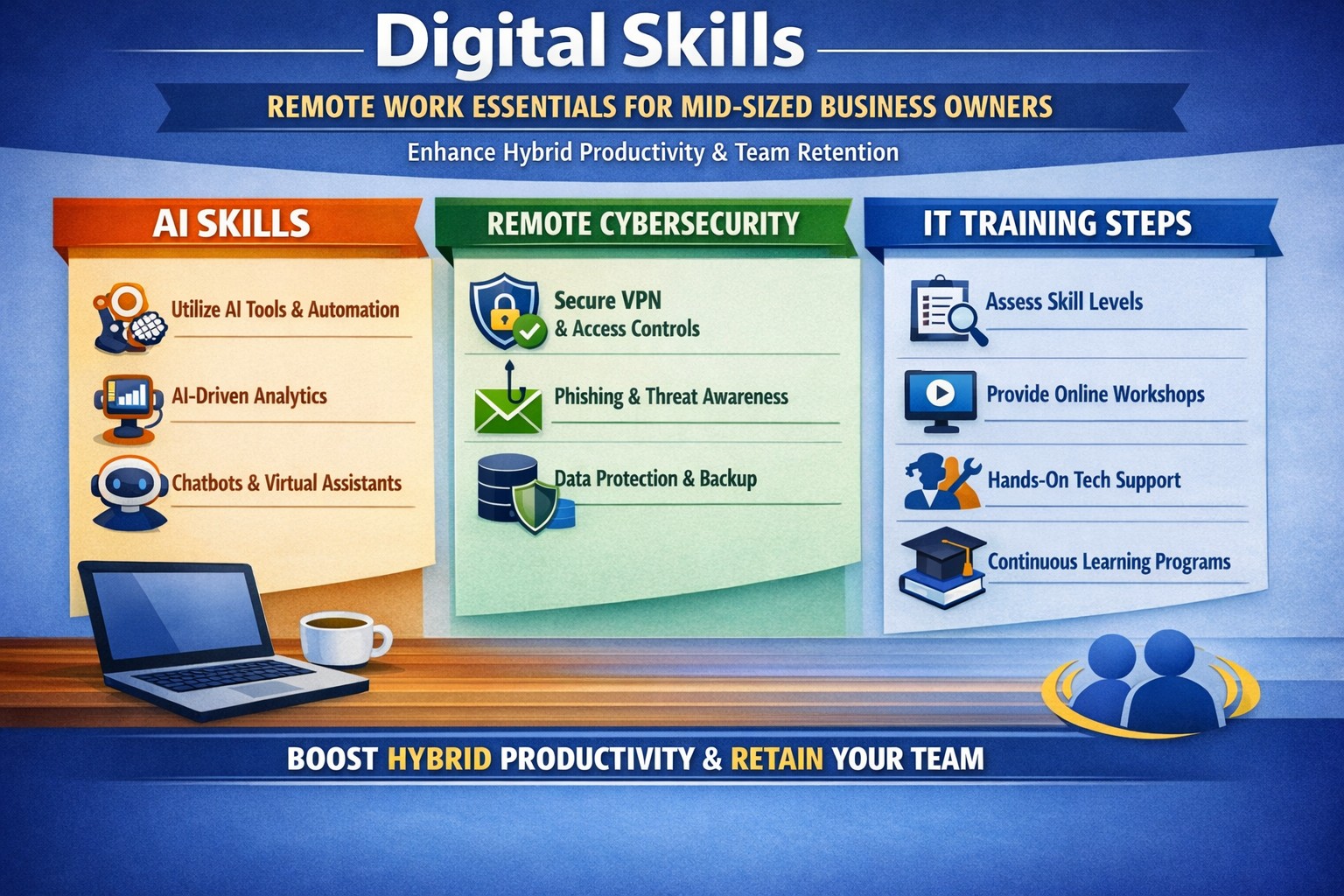
Mid-sized business owners face a pivotal choice: adapt to remote work demands or risk losing top talent to competitors. With hybrid models now standard and AI reshaping workflows, equipping your team with essential digital skills isn’t optional—it’s a competitive edge that drives productivity and retention.
Why Digital Skills Matter Now
Remote work has evolved beyond basic video calls. 92% of job postings demand digital proficiency, with mid-sized firms seeing 2.5x revenue growth from tech-savvy teams. Leaders must prioritize skills like AI-assisted productivity and cybersecurity to support distributed operations, reducing downtime and boosting outcomes over hours logged.
Key Digital Skills for Remote Success
Focus on these seven high-impact skills to future-proof your workforce:
AI-Assisted Productivity: Leverage tools for task automation and analysis—daily AI use hit 26% last year, doubling output for proficient users.
Cognitive Flexibility and Adaptability: Shift seamlessly between tools and priorities in dynamic remote setups.
Strong Digital Communication: Master Slack, Microsoft Teams, and asynchronous updates to bridge time zones.
Tech Literacy and Troubleshooting: Handle basic IT fixes independently to minimize disruptions.
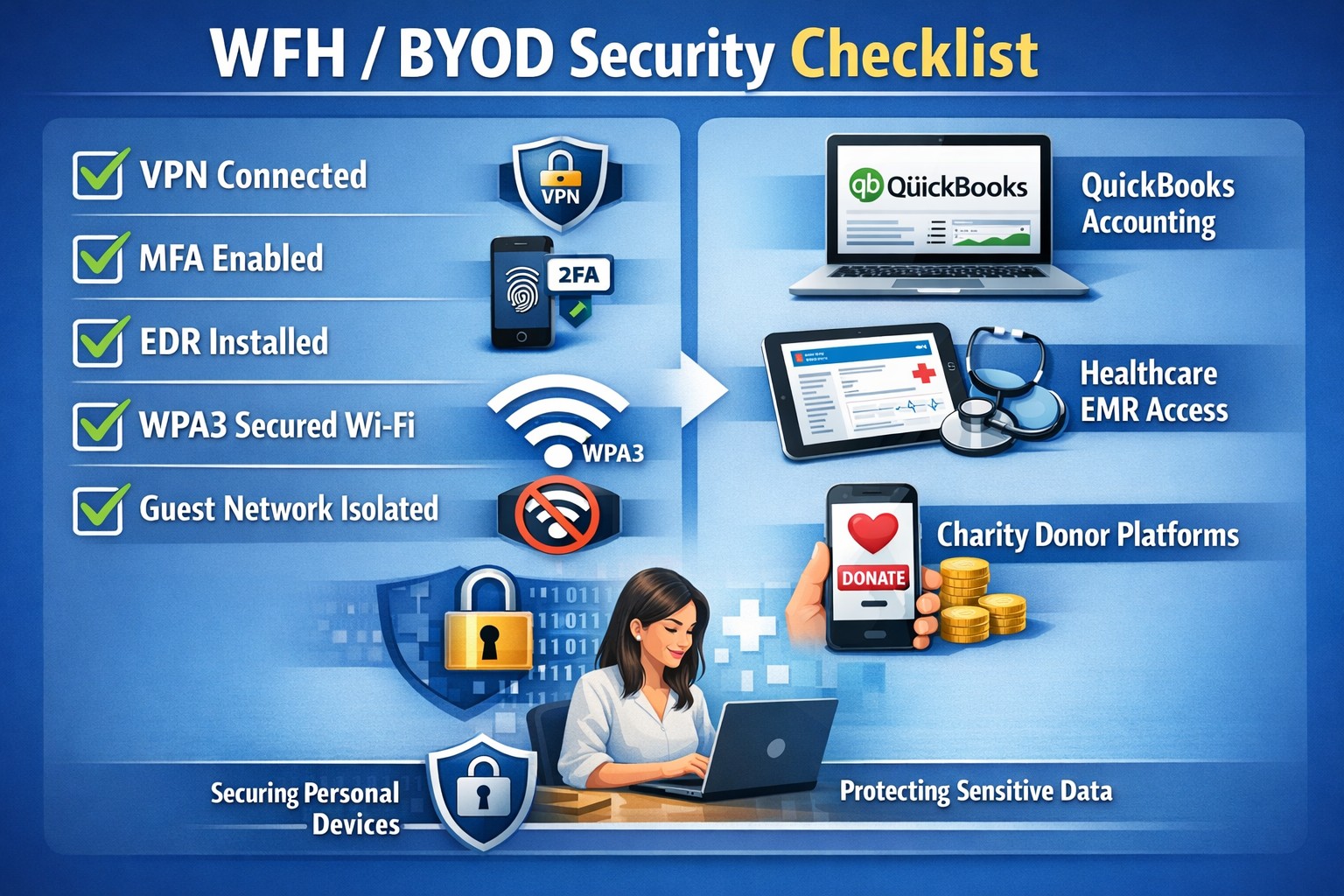
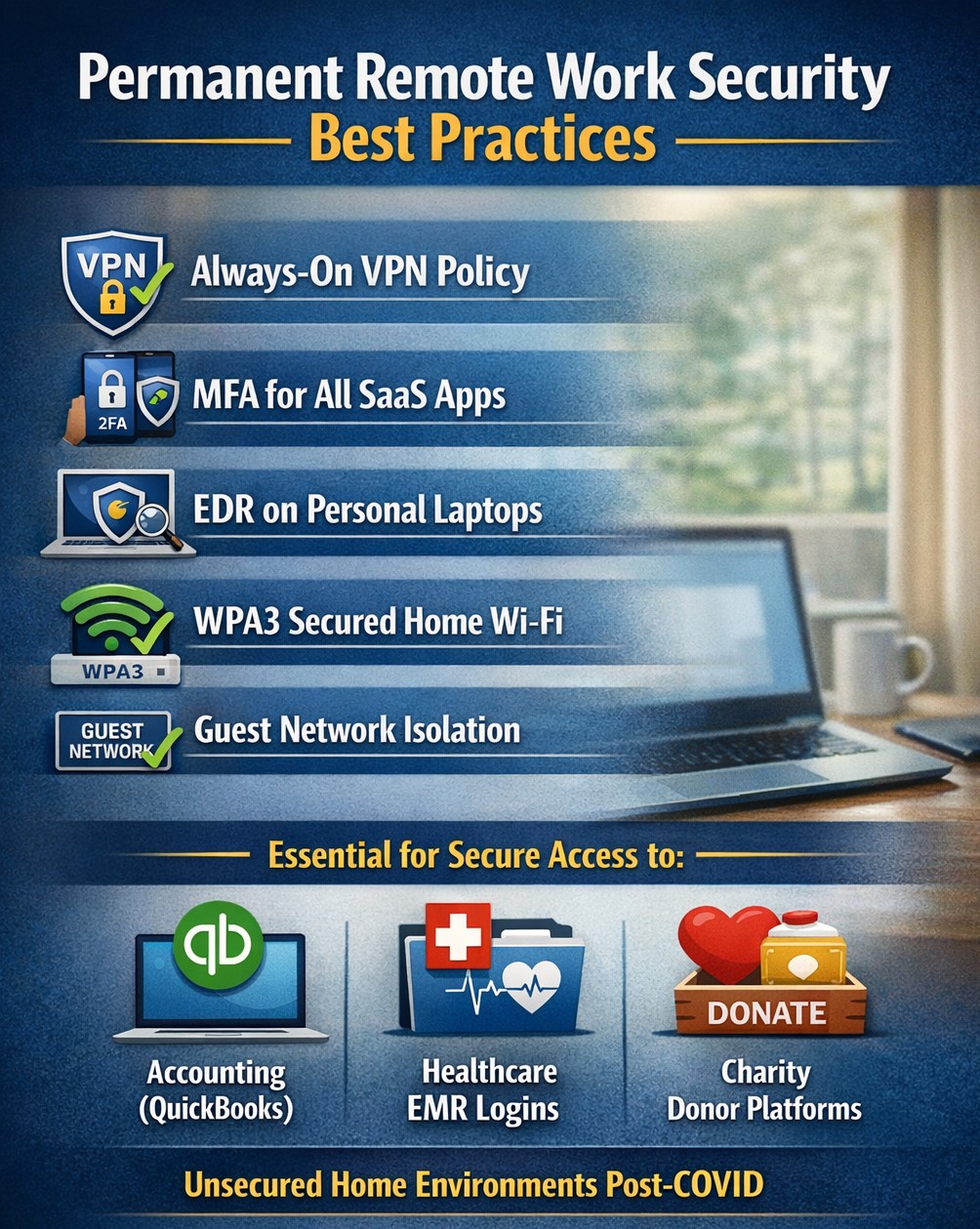
Cybersecurity Basics: Implement MFA and zero-trust models to protect distributed data.
Data Analytics: Use tools like Google Analytics or Power BI for real-time insights.
Digital Project Management: Coordinate via Asana or Monday.com for virtual team alignment.
These skills address remote challenges like collaboration gaps and productivity tracking.
Practical Action Steps
Business owners and IT departments should execute these steps systematically.
Assess Current Gaps: Survey your team on proficiency in the seven skills above; use free tools like LinkedIn Learning audits (1-2 weeks).
Build a Training Roadmap: Enroll in microlearning platforms (e.g., 15-min daily sessions on Coursera or freeCodeCamp) and allocate 4-6 hours weekly per employee.
Deploy Secure Infrastructure: IT to roll out VPNs, endpoint protection, and cloud access (e.g., Splashtop for remote desktops); test with a pilot group in 30 days.
Integrate AI Tools: Pilot enterprise AI like Microsoft Copilot or Zapier for automation; track ROI via output metrics quarterly.
Foster Continuous Upskilling: Launch internal “skill shares” via Zoom and tie bonuses to certifications (e.g., Google Data Analytics).
Monitor and Iterate: Use dashboards for skill adoption KPIs; adjust based on quarterly reviews.
These steps minimize risks like breaches (up 30% in hybrid setups) while accelerating hybrid efficiency.
Q&A: Client Inquiries Addressed
Q: How long until we see ROI from upskilling? A: Firms report 3x profitability within 6-12 months via reduced IT tickets and higher output.
Q: What if our team resists new tools? A: Start with voluntary pilots and gamified training; data shows 2.3x retention in adaptive programs.
Q: How do we secure remote access without slowing workflows? A: Adopt zero-trust with MFA—cutting threats while maintaining speed.
Q: Which skills yield the highest salaries for remote hires? A: AI/ML and cybersecurity top lists, with 20-50% premiums for mid-sized firms.
Q: Can we train in-house or need external help? A: In-house works for basics, but experts accelerate deployment for complex setups.
How Farmhouse Networking Accelerates Your Remote Transition
Farmhouse Networking specializes in mid-sized businesses across accounting, healthcare, and nonprofits, delivering tailored IT strategies for seamless remote adoption. We handle infrastructure audits, deploy secure cloud ecosystems, and integrate AI tools—slashing setup time by 50% versus DIY efforts. Our upskilling workshops certify teams in cybersecurity and project management, ensuring compliance (e.g., HIPAA for healthcare) and 99.9% uptime.
Call to Action
Ready to equip your team with digital skills? Email support@farmhousenetworking.com today for a free remote readiness assessment and custom roadmap.
Consumer routers = compliance nightmares for business networks
Even though we recently sent out another email newsletter about this topic, we have to keep raising this issue as the work from home remains a regular occurrence. A German think tank analyzed 127 popular home routers with the majority having at least one flaw (D-Link, Netgear, ASUS, Linksys, TP-Link and Zyxel were affected by 53 critical-rated vulnerabilities each). The biggest problem is that most (91%) are built on top of an old version of Linux operating system and their makers rarely publish updates.
There are several solutions that we can discuss to secure your work from home networks, so contact us for assistance.
In the past couple days there have been press release that show a large number of vulnerabilities in all Cisco Small Business routers and 79 models of the Netgear router line-up. Here are the articles:
The Cisco models are primarily used in small businesses, but the Netgear models include many that are used by home users – this could present a security risk for anyone who is still working from home. Cisco has released patches for the vulnerabilities and the Netgear vulnerabilities remained unpatched.
If your company is still using a “small business” or home based router, then contact us for assistance in checking for updates or replacing them with an business grade router with automatic updates. We also provide network security auditing for both office and home work environments.
In this unprecedented time that we are currently experiencing, you have had to set your team up to work remotely, often without thinking about how they might actually get work done, let alone security of all things. Our employee checklist and no-cost cybersecurity training course will provide your team with the tools they need to ensure that they are safe and productive – right out of the gate. These free resources are part of our initiative to keep our community safe and working during this time of crisis, without the additional disruption and financial impact of a breach.
Don’t let a change in circumstance allow for a change in cybersecurity standards.
Unlock strong, memorable passwords: Use 5-7 random words for SMB security—simple, effective, and Farmhouse Networking approved.
The COVID-19 scare and ensuing rush to remote access has us thinking security. What is more basic to security than passwords. In an effort to find a way to make passwords both secure and easy to remember, I have found a website that seems to fit the bill:
The concept is surprisingly simple and is said to be based on a cartoon:
I have played with the settings and found the following to generate some good password settings. Here they are for those who are interested:
The only other option would be to use random passwords stored in a password keeper. This also allows secure sharing of passwords throughout the organization.
If your company is using remote access, then contact us for assistance to make it secure.
Secure WFH prevents data breaches from personal devices
According to the executive order made by Oregon State Governor, Kate Brown: “On Friday night, I frankly directed them to stay home. And now I am ordering them to stay home.”
The following guidelines are in effect for businesses:
It closes and prohibits shopping at specific categories of retail businesses, for which close personal contact is difficult to avoid, such as arcades, barber shops, hair salons, gyms and fitness studios, skating rinks, theaters, and yoga studios.
It requires businesses not closed by the order to implement social distancing policies in order to remain open, and requires workplaces to implement teleworking and work-at-home options when possible. They must also elect a representative who will be in charge of monitoring social distancing.
What FHN is doing?
FREE Remote Access – Just a re-iteration that all our monthly managed services clients will have remote access to their systems at no additional cost. If you are not a managed client then we can set you up with secure remote access to your data or network depending on need. Please call sooner rather than later as we have to take care of our managed clients first and there may be a wait at this point.
On-site support continues – At this time there is no restrictions on service industries who perform on-site visits to complete work, so Farmhouse Networking will continue to do so for the foreseeable future. We will be taking precautions such as protective masks, gloves, or perhaps more extreme measures (hazmat suit) to insure the safety of our staff and clients. We ask that clients keep these visits to emergency needs and planned projects until these social distancing rules are lifted.
Stocking up on essentials – We have been closely monitoring our distribution channels and several of them have been stating that non-essential items would take up to one month to receive. As a courtesy to our clients and to better service them in times of emergency IT needs, we will be stocking up on computer and network parts that are most often needed.
What should clients do?
Remote workers – Send unneeded on-site staff home to work remotely. With remote access capabilities, video conferencing, and VoIP phones – there is no reason to keep them in harms way. We are experts in these technologies and can get you up and running on them quickly.
Maintain infrastructure – For remote workers to be able to get access to their computers there needs to be a solid foundation at the business location.
Workstations, servers, and network equipment should be on battery backups to keep them from going offline unnecessarily due to power fluctuations – triggering a need to go into the office.
Is part of your network over 6 years old? Now may be the time to replace the network equipment to avoid downtime and unneeded office visits in the future.
Now more than ever backups are needed in case anything should go wrong. Recovery times are bound to be increased as the lock down on businesses increases.
Don’t forget to leave the A/C on especially if you have a server closet, they work better in cooler temperatures.
Planning – With a possible slowdown in business now is the time to take stock of your company, to get used to this new normal, and make plans for the long term implications of this craziness on our businesses.
If your company needs any help weathering the COVID-19 storm, then contact us for assistance.
24/7 cyber defense protects small business critical data
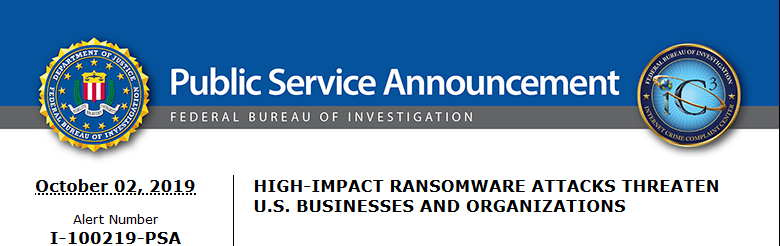
A recent briefing from the FBI’s Internet Internet Crime Complaint Center (IC3) detailed current best practices and industry standards for cyber defense. Here is a summation:
Cyber Defense Best Practices
Backups – Regularly back up data and verify its integrity. Backups are critical in ransomware; if you are infected, backups may be the only way to recover your critical data.
Training – Employees should be made aware of the threat of ransomware, how it is delivered, and trained on information security principles and techniques.
Patching – All endpoints should be patched as vulnerabilities are discovered. This can be made easier through a centralized patch management system.
Antivirus – Ensure anti-virus and anti-malware solutions are set to automatically update and that regular scans are conducted. Centrally managed is even better.
File Permissions – If a user only needs to read specific files, they should not have write-access to those files, directories, or shares. Configure access controls with least privilege in mind.
Macros – Disable macro scripts from Office files transmitted via email.
Program Execution Restrictions – Implement software restriction policies or other controls to prevent the execution of programs in common ransomware locations, such as temporary folders supporting popular internet browsers, and compression/decompression programs.
Remote Desktop Protocol – Employ best practices for use of RDP, including use of VPN, auditing your network for systems using RDP, closing unused RDP ports, applying two-factor authentication wherever possible, and logging RDP login attempts.
Software Whitelisting – Implement application whitelisting. Only allow systems to execute programs known and permitted by security policy. This one takes careful planning.
Virtualization – Use virtualized environments to execute operating system environments or specific programs. No physical access to servers makes hacking harder.
Network Segmentation – Implement physical and logical separation of networks and data for different organizational units. Keep guest traffic out of your business network.
No Saved Passwords – Require users to type information or enter a password when their system communicates with a website. Better yet use a password management tool.
If your company is going to use full disk encryption or has compliance requirements that you need consulting for, then contact us for assistance.
This article came from the need of another local tech company to forward an Exacqvision Web Portal to something other than port 80, as it was already in use. I could not find a detail article on how to accomplish Sophos DNAT while changing the port number:
How to configure Sophos DNAT for an internal server
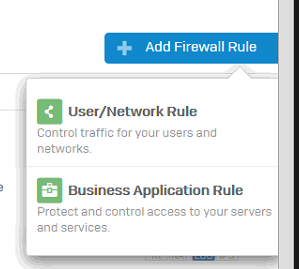
Navigate to Firewall then click +Add Firewall Rule and select Business Application Policy.
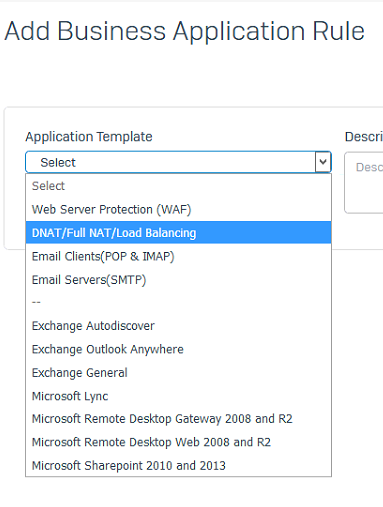
Select Application Template and choose DNAT/Full NAT/Load Balancing.
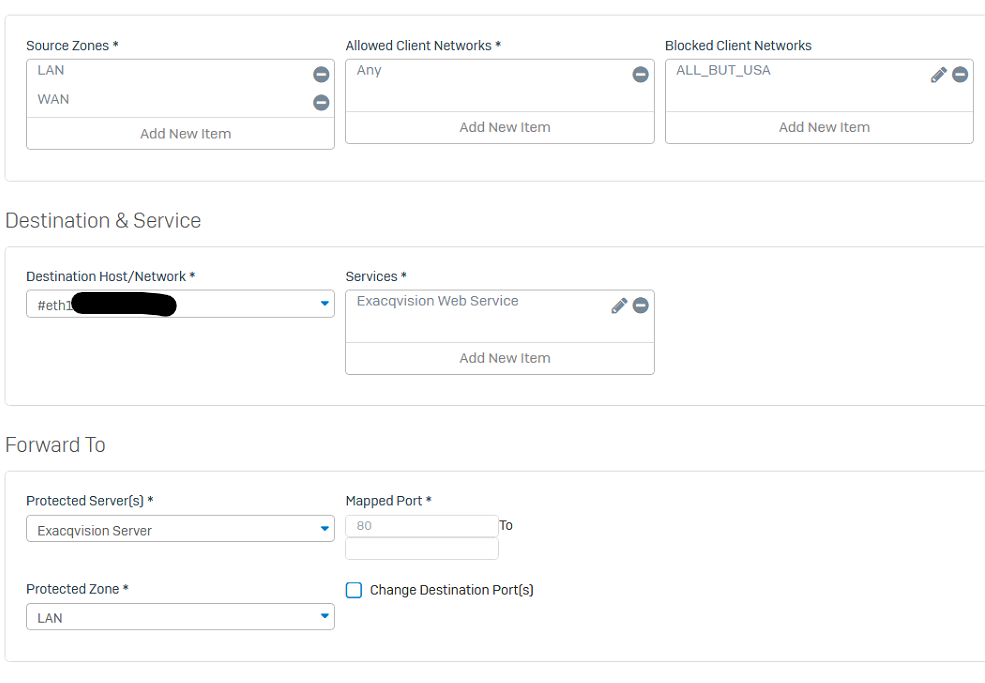
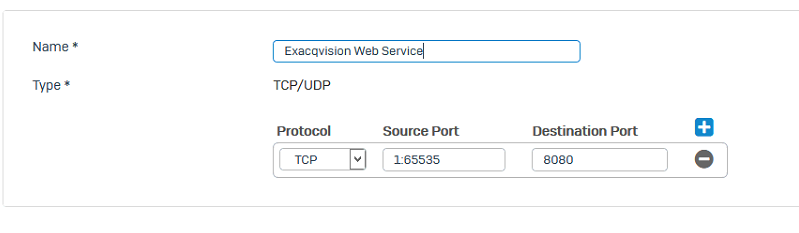
Fill out the settings as shown below:
Rule Name
Source Zones: WAN (and LAN if needed)
Allowed Client Networks: Any
Destination Host/Network: WAN Interface (#eth0-? whichever one you use)
Services: Either select the service you already created or create a new one for the external port to be used as below
Protected Servers: Select an existing or create a host entry for the internal server.
Protected Zone: Select the Zone in which the host resides (LAN or DMZ).
Change Destination Port(s): Check this then change the port to the internal port.
Click Save to save the configuration.
If your company is using a Sophos router and is unsure of how to configure it, then contact us for assistance in making the best use of your router.
In reviewing compliance documentation, we found it necessary to talk about Virtual Private Network (VPN) technology for both privacy and secure remote access. A VPN is a connection to a private network over the internet through an encrypted tunnel – think smuggling information across a secret passageway between two places.
Why use VPN?
Privacy: There has been a huge buzz lately about using VPN technology to help mask you browsing habits from the likes of the NSA or Google. VPN services offer connections that regularly change your external IP address so that a profile (marketing or otherwise) is harder to build. It also makes hacking of your information harder when these services providers offer anti-virus and anti-spam filtering as part of the VPN service.
What are the trade-offs? These VPN service providers will now be the sole owner of your browsing habits – they can sell targeted profiles to marketing companies – so read those terms of service. There will also be a performance hit to your internet speed, so if you are working from a slow network already this may not be an option. Then there is the added cost of an extra $5 to $15 per month for these services on top of your internet bill each month.
Secure Remote Access: This was the original intent of VPN technology and where it really shines. Either from remote workers using coffee shop wifi or remote offices connecting to the main office, VPN tunnels are used to securely access data, servers, and other network resources. This technology is required by all major compliance agencies so that all data transmitted is encrypted during transport. In the past servers would open ports to the internet to allow access, but it was found that this practice allowed hackers the same opportunity to gain access. With VPN tunnels there is another layer of protection from unexpected access. There is also the benefit that no outside provider gets access to your browsing habits.
What are the trade-offs? This will require a router at the main office that is business grade and capable of handling the traffic. It will then require setup of remote workers laptops or remote offices with similar business grade routers.
If your company is concerned about privacy on the internet or secure remote access, then contact us for assistance.
Essential small business information security fundamentals: encrypt data, enable MFA, train employees, and backup regularly.
NIST is the National Institute of Standards and Technology. It acts as the defacto baseline that all other security and compliance organizations use to construct their standards. Reading their publications is like reading any other government document – extremely long and not interesting. Farmhouse Networking recently became aware of one such document called NISTIR 7621 aka Small Business Information Security: The Fundamentals. We took the time to distill out the main points here:
The Fundamentals aka Best Practices
Identify: Who has access to the network, who has access to the data, and what do they have access to. This includes background checking employees during the hiring process, taking an inventory of data to see who needs access to what, requiring that each user have their own login, and company policy creation.
Protect: Protection starts with separating data into shares then giving access only to those who really need it. It also includes protecting hardware with uninterruptible power supplies (UPS) and protecting software with regular updates. Protecting the network includes setting up a proper firewall, separate wireless for guest access, and VPN only access for remote users. Web filtering, SPAM filtering, file encryption, proper disposal of old equipment, and employee training are also mentioned.
Detect: Having a centrally managed antivirus software on each workstation is a must. This includes the ability to look back in time via log files or monitoring system to find the root of the security breach.
Respond: Have a disaster recovery plan and security incident response plan in place.
Recover: Need full backups of all important business data, invest in cyber insurance, and regularly access your technology to find timely improvements.
If your company does not meet these fundamentals, then contact us for assistance.
And God will generously provide all you need. Then you will always have everything you need and plenty left over to share with others. As the Scriptures say, “They share freely and give generously to the poor. Their good deeds will be remembered forever.” For God is the one who provides seed for the farmer and then bread to eat. In the same way, he will provide and increase your resources and then produce a great harvest of generosity in you. - 2 Corinthians 9:8-10
We use cookies to ensure that we give you the best experience on our website. If you continue to use this site we will assume that you are happy with it.