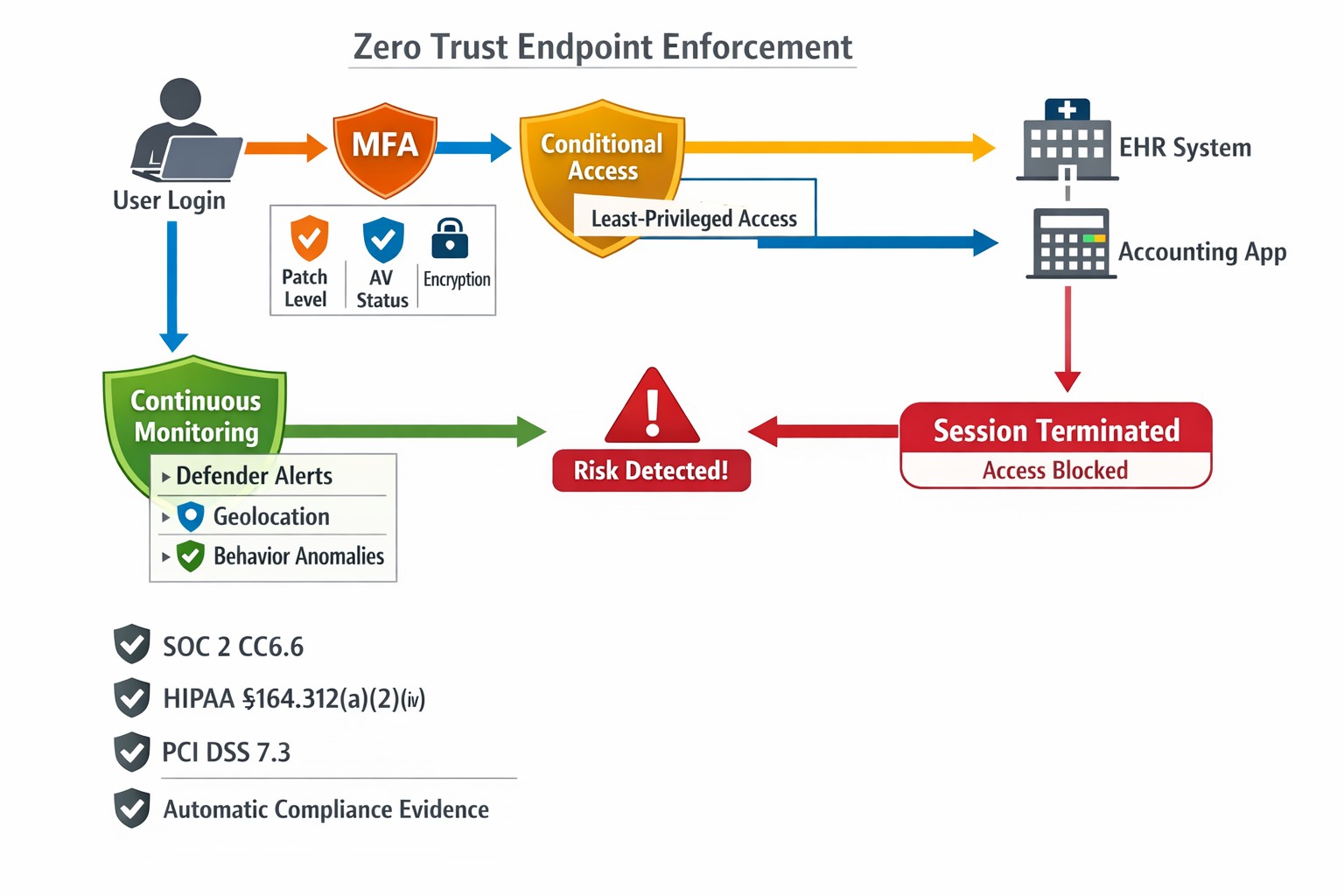
This is the sixth in a series about the concept of Zero Trust, which means in the IT sense that you trust nothing and always verify everything surrounding and connected to your network. Today’s discussion will be on endpoint security.
Endpoint Security
Endpoint security is a fancy term used to describe how the computers on the network are protected. This used to be done by antivirus but due to the complexity of the attacks hackers are using to compromise networks these days, the definition has expanded greatly. This now includes things like Enhanced Detection & Response software, Security Operations Centers, DNS Filtering, employee train and more. Here are some questions that you should be asking yourself:
Are your endpoints protected by antivirus or enhanced detection & response?
Is website traffic being monitored? Restricted?
Are your employees being trained in cyber security?
Are computer logs being monitored for malicious activity?
Would unusual or suspicious activity on a computer be noticed? Alerted on?
Do you have security permissions set on all file shares?
Do you have least privileged access configured on those shares?
Do you keep track of what software is installed on all workstations?
Do you block access to unauthorized software?
Are files encrypted on servers and workstations?
Are your mobile devices managed? Can you wipe them remotely?
Are USB ports blocking removeable storage devices?
Are endpoints set to automatically log-out?
If your company is going to use full disk encryption or has compliance requirements that you need consulting for, then contact us for assistance.
Farmhouse Networking delivers zero trust network access replacing VPNs for secure remote work in Grants Pass Oregon businesses.
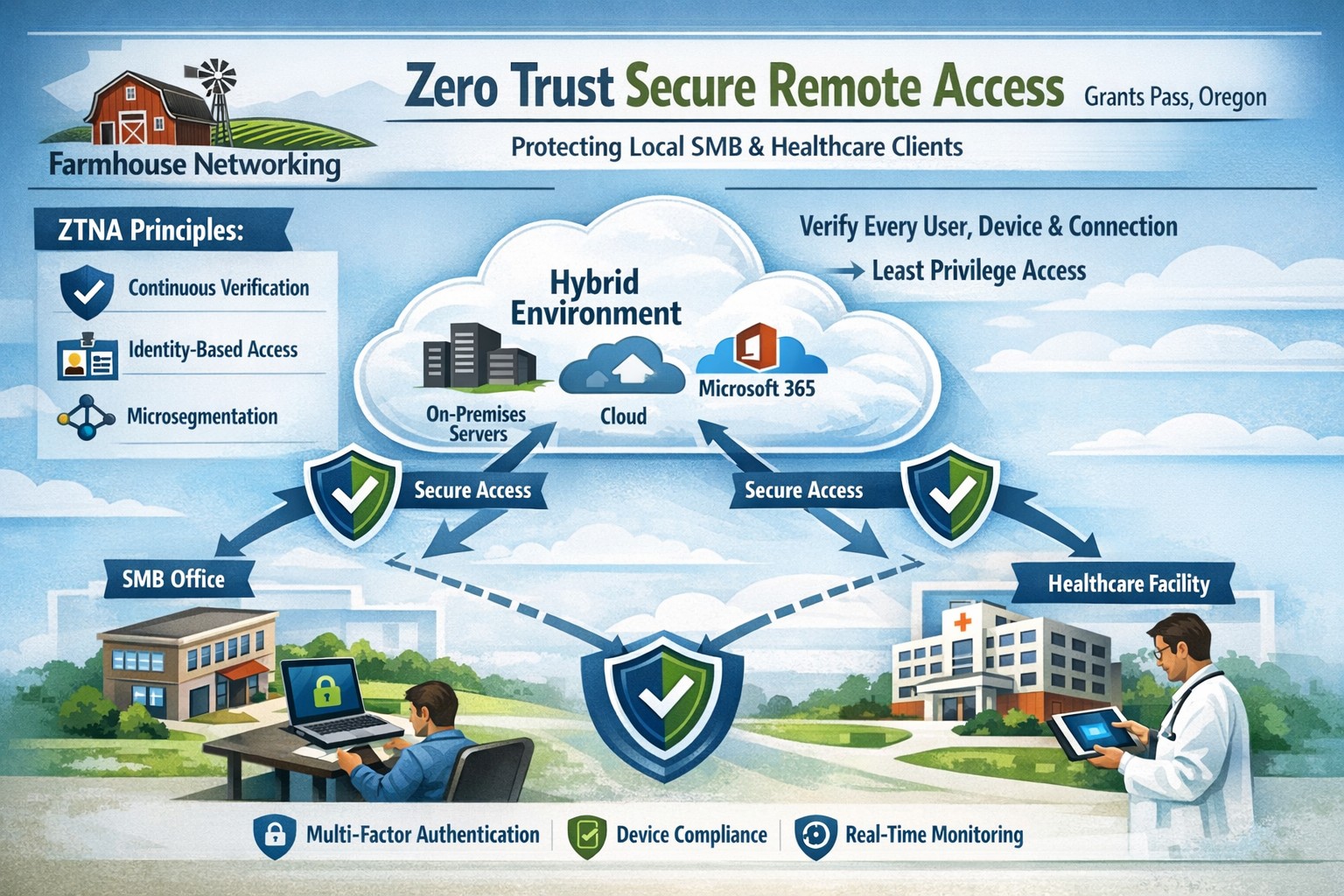
This is the fourth in a series about the concept of Zero Trust, which means in the IT sense that you trust nothing and always verify everything surrounding and connected to your network. Today’s discussion will be on secure remote access.
Secure Remote Access
Secure Remote Access is the ability to connect to company resources from anywhere in a manner that does not compromise security. This can be done by several means including remote access software, Virtual Private Network (VPN), or File Sync & Share (FSS). Here are some questions that you should be asking yourself:
Does anyone in your organization work from home or remotely?
How are they remotely connecting to the office?
Are you able to revoke access to the office if they leave the company?
If that connection is a modern VPN, what type of security does it use?
Is your VPN based on passwords or certificates?
Does the VPN log usage statistics?
If that connection is a remote access software, what type of security does it use?
Does the software limit who has access to which resource?
Does the software log who is logging in and for how long?
If that connection is via FSS, what type of security does it use?
Does your FSS have file versioning, backups, and ransomware protection?
Does the FSS limit who has access to which resource?
Do you use 2FA as part of your remote access?
Take time to think about these questions and decide where changes can be made to better protect your IT investments, or contact us to do the thinking for you.
Farmhouse Networking secures vendor access with zero trust verification for Grants Pass businesses, protecting against supply chain threats.
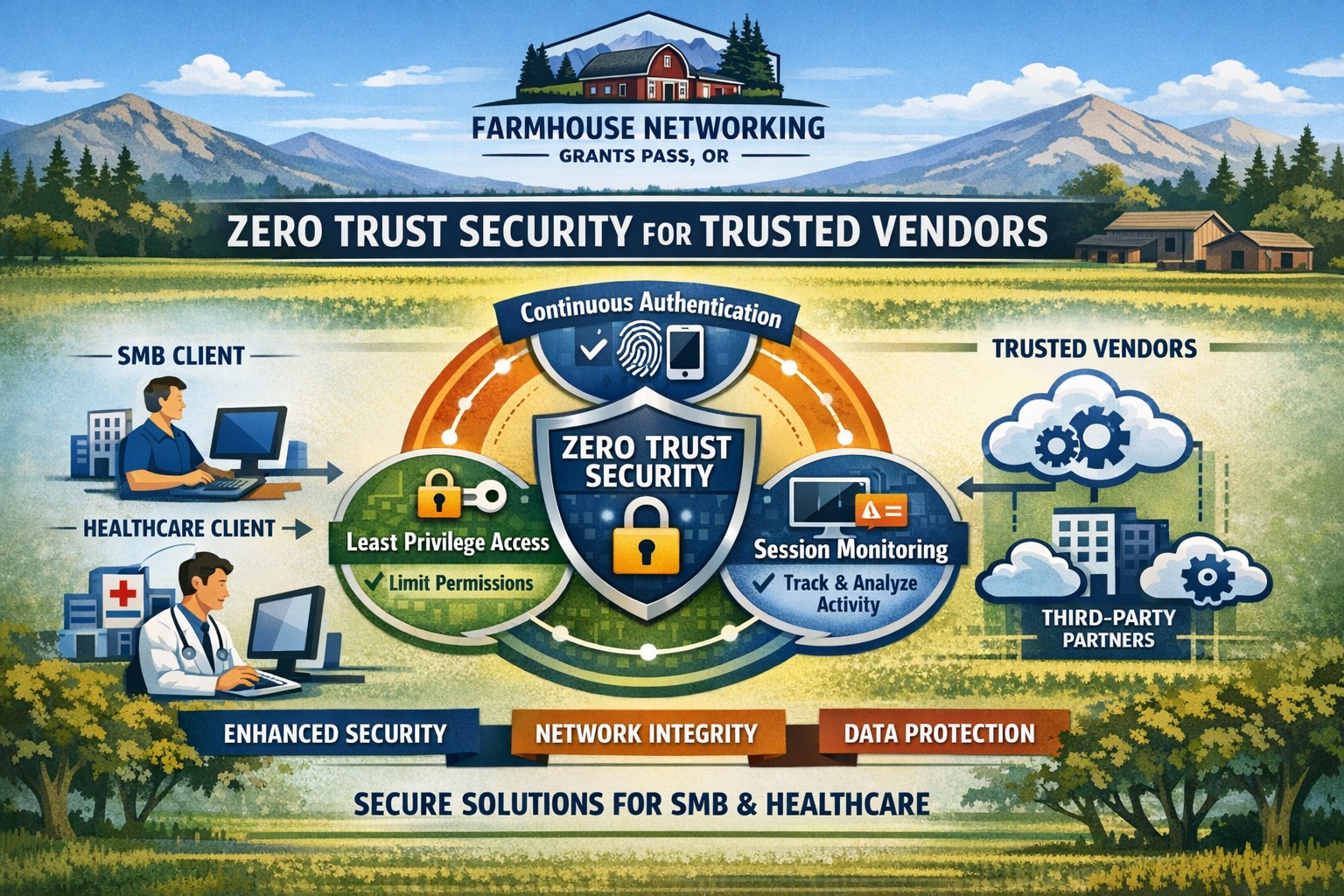
This is the second in a series about the concept of Zero Trust, which means in the IT sense that you trust nothing and always verify everything surrounding and connected to your network. Today’s discussion will be on the vendors you purchase network equipment from.
Trusted Vendors
Trusted vendors are those who supply workstations, servers, routers, switches, power protection, software, and anything else connected to your network. Here are some questions that you should be asking yourself:
Do you know who makes your network equipment, servers, computers, and software?
Do you know the way to contact their support and have current account access information?
Do you have current warranties / support contracts on hardware and software?
Is the hardware able to perform at the level needed?
Are you purchasing software from those who meets industry standards?
If a subscription, how much are you paying and are you on the correct plan for your needs?
When is the last time you upgraded your software and hardware?
Have you budgeted for the next upgrade?
Take time to think about these questions and decide where changes can be made to better protect your IT investments, or contact us to do the thinking for you.
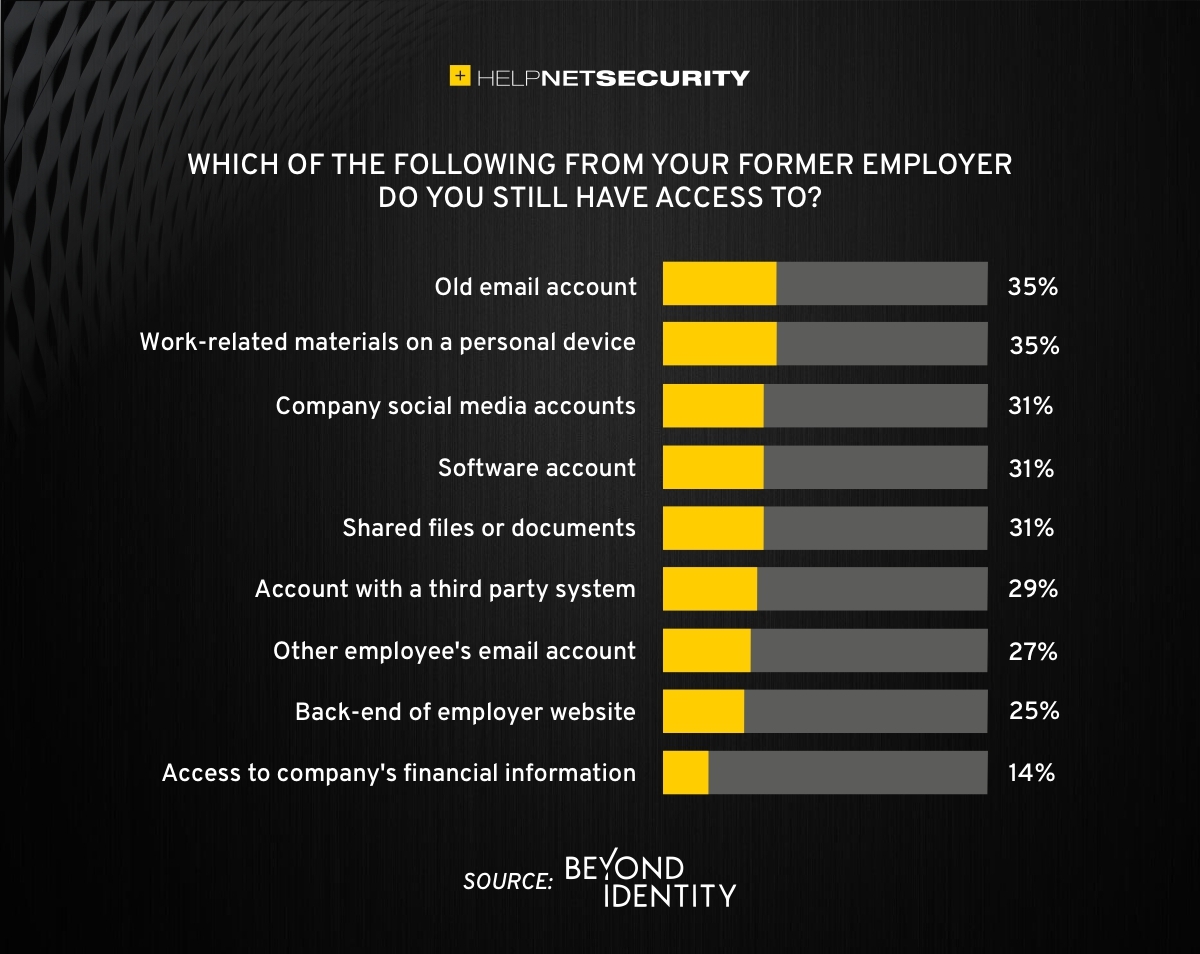
83% of employees continue accessing old employer’s accounts
Farmhouse Networking Grants Pass implements robust employee offboarding to revoke access and secure networks for Oregon businesses.
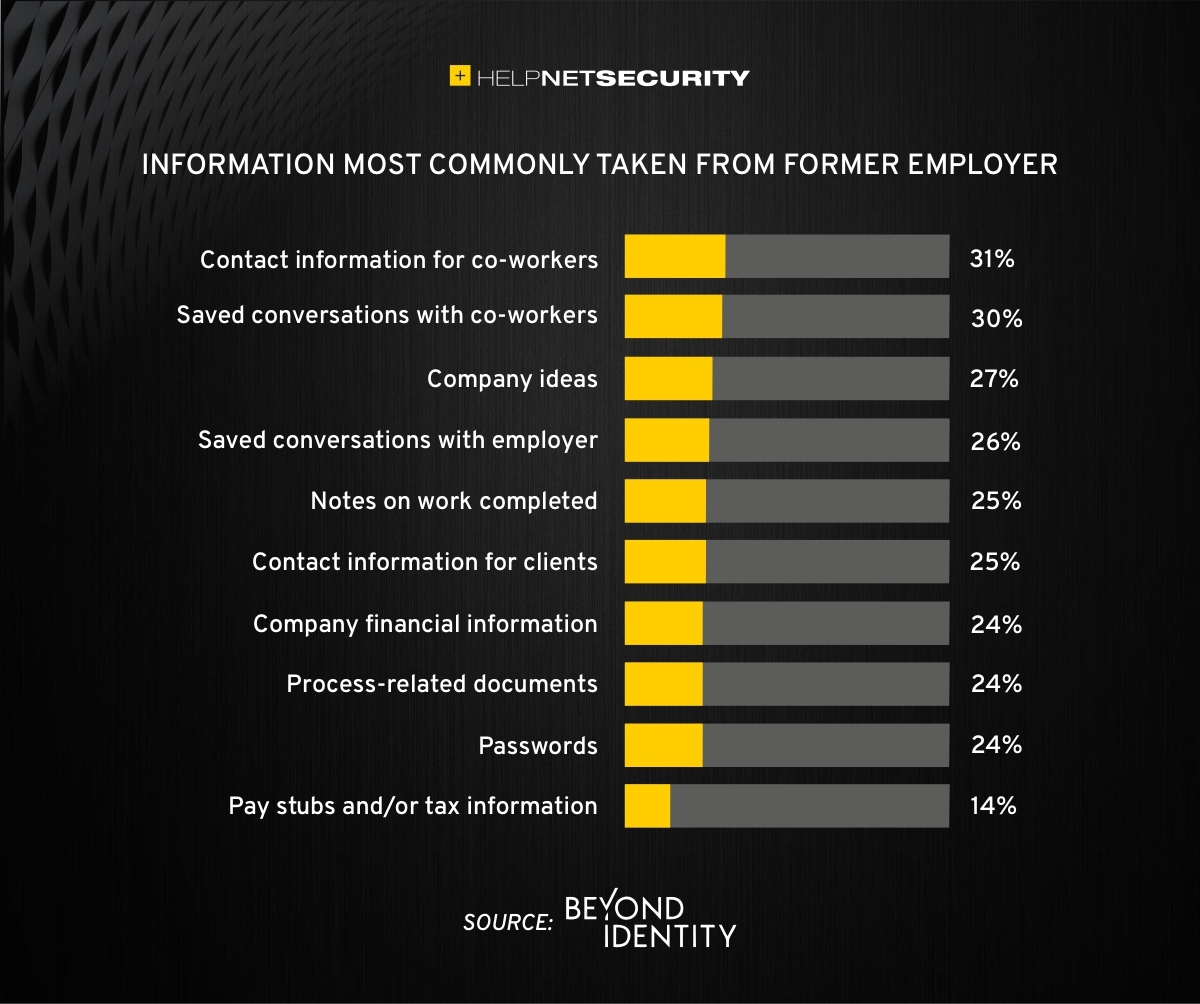
A study was performed by Beyond Identity throughout the US, UK, and Ireland which found that 83% of employees admitted to maintaining continued access to accounts from a previous employer. Also a shocking 56% admitted to using this access to harm their former employer.
The study also states that a professional and details offboarding process can prevent unauthorized access by former employees by eliminating their passwords and other insecure authentication methods. Strangely enough this also creates a sense of goodwill in the company that helps to lessen the motivation for employees to attempt this kind of malicious access. This kind of process is vital considering the current employment market and high turn over rates at almost all companies.
If your company does not have a detailed and documented offboarding process, thencontact usfor assistance.
Single secure vault eliminates password sprawl across business apps
Whether you are buying something from an online store, reading your email in the browser, checking your account balances, or uploading photos / videos to social media, most websites require an individual username and password when accessing their services. This raises various problems.
What’s with ALL the Passwords?
Using the same password for all the websites you access is a bad idea and horribly insecure. If we run a quick check on the “Dark Web” for your email address, it would likely show that hackers already know the one password you have been using forever. So the only other option is multiple passwords, which can easily go beyond the limits of our feeble human brains to keep track of OR people start creating a list that is typically typed up and saved on the computer – if a hacker gets into the computer then all the passwords are theirs too. So then the option is to find a secure way of storing and backing up these passwords, not to mention trying to make them easy to use.
Rangle Them Passwords!
That is the job of Password Management done by a small piece of software known as a password manager. It takes the complexity down to remembering the one password to open the software, then it tracks the rest from there. The good ones have the ability to generate passwords for you, store them in connection with the website you are visiting, auto-filling the password fields on the websites when you visit them again, and backup your passwords to the cloud – all with strong security and encryption to keep the hackers out of your business.
If your company is still typing passwords into a list, or worse have a paper list, then contact us for assistance migrating to a password manager.
Reliable retail routers powering WFH for B2B professionals
This blog post is more about the use of retail routers at the office than at home, just to make that clear from the beginning. We would also recommend non-retail routers at home, but that is not feasible for everyone.
What is a retail router?
This is a phrase I am coining to describe any router that is generally available from your local retailers like Staples, Walmart, etc or delivered as part of the internet service from your local provider. They include brand names like ASUS, D-Link, Linksys, and Netgear. They range in price from $30 for the extreme low end to $450 for a gaming router. These routers are built for home and small office networks that have very few users or devices connected at any given time. They may include some features that sound “business-like” such as Virtual Private Network (VPN), Stateful Packet Inspection (SPI), VLAN, and Quality of Service (QoS) – remember though that these are also only able to support a minimum number of users and devices connected at any given time. If you try to use a retail router to run your business network then you will find that performance will be severely degraded and these features will not work as advertised.
There is also the issue of security. These routers are rarely if ever updated even when new vulnerabilities are found. This makes them ineligible for PCI or HIPAA compliance situations.
Is there a non-retail router?
So what to do about this situation? Time to call your trusted IT services provider who will be able to get you a non-retail router, but that begs the question – what is a non-retail router?
These routers are built by network professionals who design the hardware to perform under the pressures of the office environment and to handle the work from home remote workload. These routers include brands like Cisco, Juniper, Ubiquiti, and Araknis. They range in price from $150 for an office of up to 5 people to $10,000 for a high traffic company with hundreds of users. These routers handle VPN, SPI, VLAN, QoS, and many other services all at once with ease. Security is baked into these routers with the best ones having the ability to be managed from the cloud. They provide consistent access to all connected users and devices at all times. Your trusted IT services provider will work with you to “right size” the router to your business needs.
If your company is going to have full time work from home employees and is concerned about their ability to perform, then contact us for assistance.
The Federal Trade Commission (FTC) has agreed with Zoom to settle their allegations that it “engaged in a series of deceptive and unfair practices that undermined the security of its users.”
Settlement Conditions
The conditions put forth by the settlement The FTC complaint said that:
Since at least 2016, the company misled users by touting that it offered “end-to-end, 256-bit encryption” to secure users’ communications, when in fact it provided a lower level of security, i.e., it encrypted communications but stored the encryption keys on its servers
The company misled users by saying that recorded meetings that were stored on the company’s cloud storage were encrypted immediately after the meeting ended, which was untrue in some cases
In July 2018, the company compromised the security of some users when it secretly installed a hidden web server on Macs that helped with frictionless installation of the Zoom application
The settlement does not oblige Zoom to admit fault or pay a fine, but obligates it to:
Refrain from misrepresenting privacy and security practices, including about how it collects, uses, maintains, or discloses personal information; its security features; and the extent to which users can control the privacy or security of their personal information
Implement a comprehensive information security program and obtain biennial assessments of its security program by an independent third party and notify the FTC if it experiences a data breach
Implement a vulnerability management program
Assess and document on an annual basis any potential internal and external security risks and develop ways to safeguard against such risks Deploy safeguards such as MFA to protect against unauthorized access to its network; institute data deletion controls; and take steps to prevent the use of known compromised user credentials
Review any software updates for security flaws and ensure the updates will not hamper third-party security features
Quoted from https://www.helpnetsecurity.com/2020/11/10/ftc-zoom/
If your company is going to use video conferencing to assist with work from home or to remotely connect with clients, then contact us for assistance.
Step-by-step BYOD policy checklist for small businesses – protect data and cut costs with our proven guide.
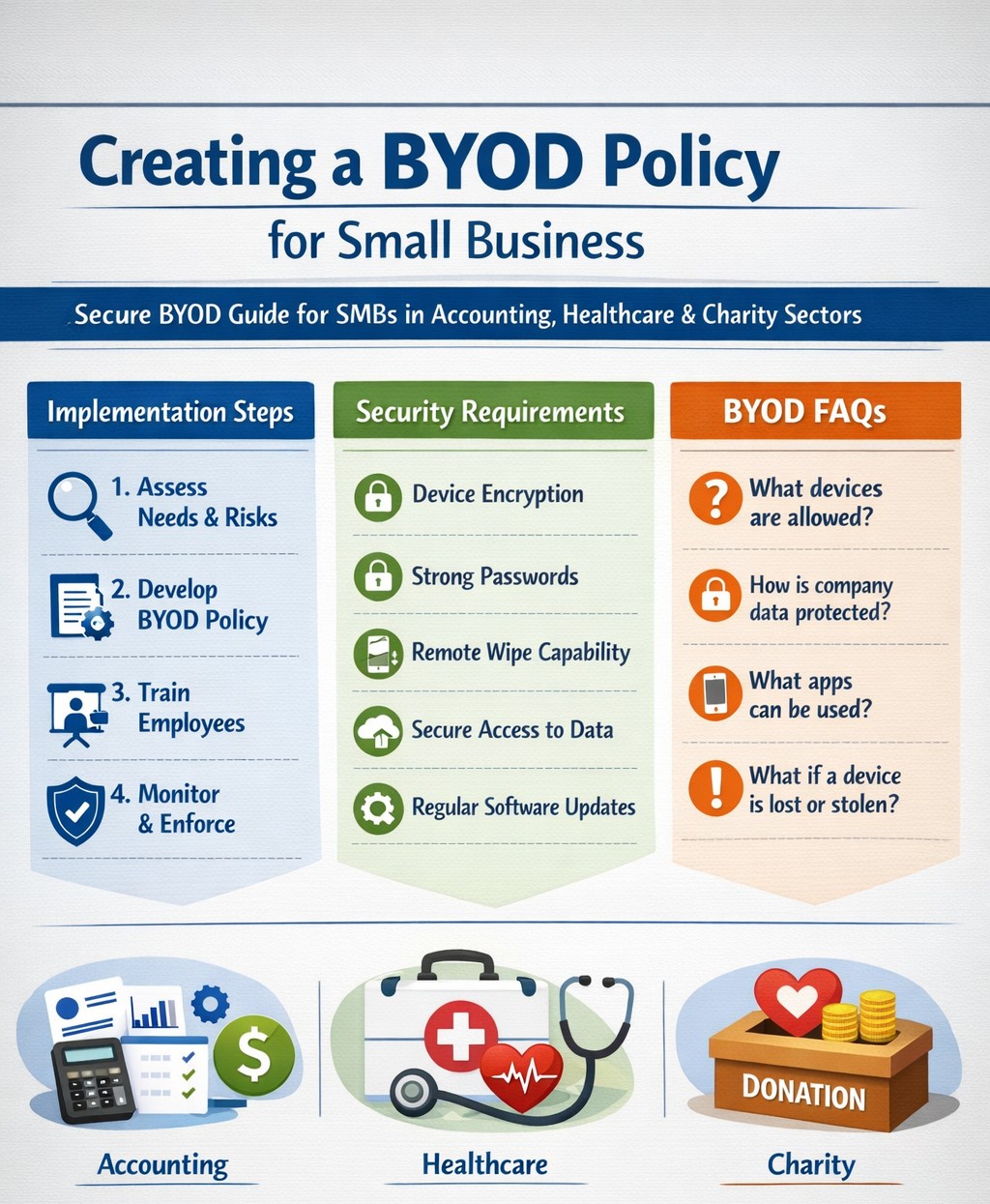
Allowing employees to use personal devices for work—known as Bring Your Own Device (BYOD)—can cut hardware costs by up to 50% and boost productivity, but it exposes your data to risks like breaches if unmanaged. This guide provides actionable steps to craft a secure BYOD policy tailored for your operations.
Why BYOD Matters for Your Business
BYOD lets employees work flexibly on familiar devices, ideal for small teams in accounting, healthcare, or nonprofits where agility drives growth. Without a policy, however, you risk data leaks, compliance violations (e.g., HIPAA for healthcare), and lost productivity from IT issues. A strong policy balances these by defining rules upfront.
Key Components of Your BYOD Policy
Include these essentials to protect your business:
Data Separation: Use Mobile Device Management (MDM) to isolate work apps from personal data.
Acceptable Use: Limit work access to business hours unless approved; ban risky sites or app syncing.
Onboarding/Offboarding: Detail enrollment (e.g., MDM install) and exit processes (remote wipe of company data only).
Privacy and Liability: Clarify monitoring rights, employee data protection, and who covers repairs.
Step-by-Step Implementation Guide
Follow these practical actions with your IT team or provider:
Assess Needs: Audit current devices and risks; define goals like cost savings or remote access. Involve legal for compliance.
Draft Policy: Write in plain language (1-2 pages); include templates for consent forms. Get employee/legal buy-in.
Choose Tools: Select MDM like Microsoft Intune or Jamf (under $10/user/month for small biz); enable remote wipe and app controls.
Train Staff: Host 30-minute sessions on setup, phishing, and policy rules; provide FAQs and setup guides.
Pilot Test: Roll out to 5-10 users for 2 weeks; gather feedback on issues like battery drain.
Launch and Monitor: Enforce via automated alerts; review quarterly for updates (e.g., new OS threats).
Offboard Securely: Automate access revocation on employee exit; test wipes.
Step
Owner
Timeline
Tools Needed
Assess Needs
Business Owner
1 week
Risk checklist
Draft Policy
IT/Owner
1-2 weeks
Word template
Pilot Test
IT Team
2 weeks
MDM trial
Review
All
Quarterly
Audit logs
FAQs: Client Questions Answered
Q: Does BYOD work for regulated industries like accounting or healthcare? A: Yes, with MDM for data isolation and compliance features (e.g., audit logs for HIPAA/SOX). Avoid full wipes; use containerization.
Q: What if an employee loses their device? A: Policy requires immediate IT report; MDM enables remote lock/wipe of company data only, preserving personal files.
Q: How much does MDM cost for 10 users? A: $5-15/user/month; free tiers exist for basics, scaling with features like geofencing.
Q: Can I monitor personal apps? A: No—focus on company data only to respect privacy laws; disclose monitoring in policy.
Q: What about support for personal devices? A: Limit to work apps; charge for hardware fixes or outsource to MSPs.
How Farmhouse Networking Helps
Farmhouse Networking specializes in BYOD setups for accounting, healthcare, and charity sectors, handling policy drafting, MDM deployment, and training to drive secure organic growth. We integrate SEO-optimized client portals and lead-gen tools, ensuring compliance while converting visitors to B2B clients. Our custom strategies cut implementation time by 40% via automated audits.
Call to Action
Ready to secure your BYOD policy and scale efficiently? Email support@farmhousenetworking.com today for a free policy audit and personalized strategy.
429% credential exposure surge demands passwordless authentication now
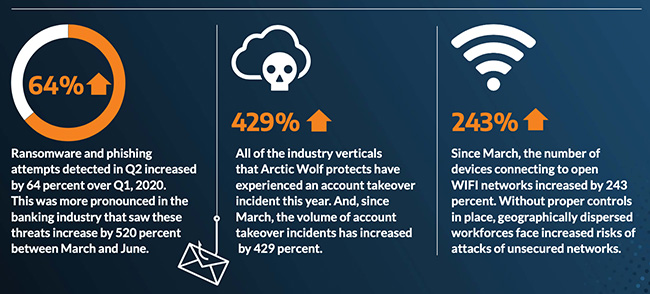
A company named Arctic Wolf, a leader in enterprise security operation centers, published a report that states that the number of corporate credentials with plaintext passwords on the dark web has increased by 429% since March.
There are also startling statistics on the increase in email phishing attempts and the use of unsecure public wireless connections. These numbers are like due to the Work From Home employees using their own insecure computers and cyber criminals trying to take advantage of the trend. It appears that security measures that are used in the office need to be extended to the Work From Home network as well.
If your company is currently or is going to have Work From Home users, then contact us for assistance.
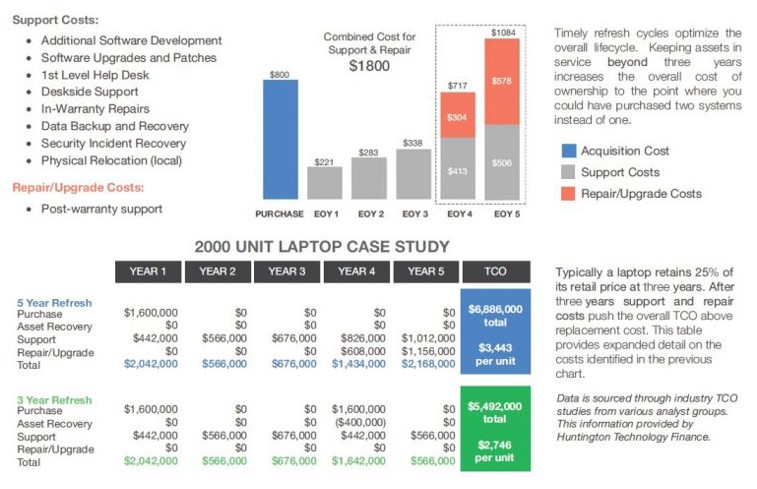
Farmhouse Networking continues to make strides in providing our customers with the best, most cost effective, and environmentally friendly computing experience possible. Part of that process is what has come to be known as Lifecycle Management. Each piece of hardware has an expected amount of time in which it is cost effective to use and support it. Once this time frame has been exceeded the cost of supporting the device becomes greater than the cost as shown in the following graph:
Turn retired IT assets into profit through strategic lifecycle management
FHN Lifecycle Management
So the question remains what to do with the old computers when the time comes to replace them. Previously here in Grants Pass, OR we could support a local charity by taking them to Southern Oregon Aspire to have the computers dismantled and hard drives shredded. Now that their doors are closed we are stuck with dropping them off at the local dump, but what if you could make money while being responsible with the environment?
Farmhouse Networking is now partnering with a company called Arcoa, who do just that. Here is what they do in their R2 rated responsible recycling facility:
“We help you recover value from retired electronic equipment through responsible methods of reuse and recycling. Resale offers the best potential for value recovery, but the fast pace of innovations in technology and short product life cycles can limit equipment’s potential for reuse. From there, the best option may be to recycle the items in an environmentally friendly manner. We’ve built a robust de-manufacturing process to offer additional options for asset value recovery by disassembling equipment for commodity grade materials, which can be diverted from landfills and be used to create new materials.”
Hard drives will be electronically wiped, magnetically degaussed, or shredded based on need. The rest of the parts will be dismantled and sold with part of the profit returning to your company to help offset the cost of buying new computers. What could be better than making money on the buy?
If your company is heading towards a hardware refresh, then make the environmentally sound choice by contacting us for assistance.
And God will generously provide all you need. Then you will always have everything you need and plenty left over to share with others. As the Scriptures say, “They share freely and give generously to the poor. Their good deeds will be remembered forever.” For God is the one who provides seed for the farmer and then bread to eat. In the same way, he will provide and increase your resources and then produce a great harvest of generosity in you. - 2 Corinthians 9:8-10
We use cookies to ensure that we give you the best experience on our website. If you continue to use this site we will assume that you are happy with it.