Layered backup solutions preventing data loss disasters for accounting practices
As the owner of an accounting practice, your clients trust you with their most sensitive financial data. But with great responsibility comes significant risk – data loss can devastate your operations, damage your reputation, and even threaten your firm’s survival. Understanding the causes of data loss and how to mitigate those risks is key to keeping your business secure and resilient.
The Leading Causes of Data Loss in Accounting Firms
Accounting practices face unique data risks due to the volume and sensitivity of the information they handle. The most common causes include:
Human Error: Mistakes like accidental file deletion, overwriting data, or sending sensitive information to the wrong recipient are the top cause of data loss, accounting for up to 88% of incidents. Even well-trained staff can make errors, especially under tight deadlines or with manual data entry.
Cybersecurity Breaches: Accounting firms are prime targets for hackers due to the financial data they store. Cyberattacks can lead to data theft, ransomware lockouts, and costly breaches that expose client information and trigger compliance headaches.
Hardware or Software Failure: Servers, hard drives, and other devices can fail unexpectedly, causing sudden data loss if backups aren’t in place.
Natural Disasters: Fires, floods, or power outages can physically destroy data storage systems, leading to permanent loss unless offsite or cloud backups exist.
Poor Data Management: Outdated or poorly designed systems increase the risk of accidental loss, corruption, or unauthorized access.
The consequences of data loss extend beyond immediate disruption. Accounting firms may face regulatory fines, expensive lawsuits, and – perhaps most damaging – loss of client trust and reputation.
How to Mitigate Data Loss Risks
Partnering with a trusted MSP like Farmhouse Networking provides a multi-layered approach to data protection, tailored to the unique needs of accounting practices:
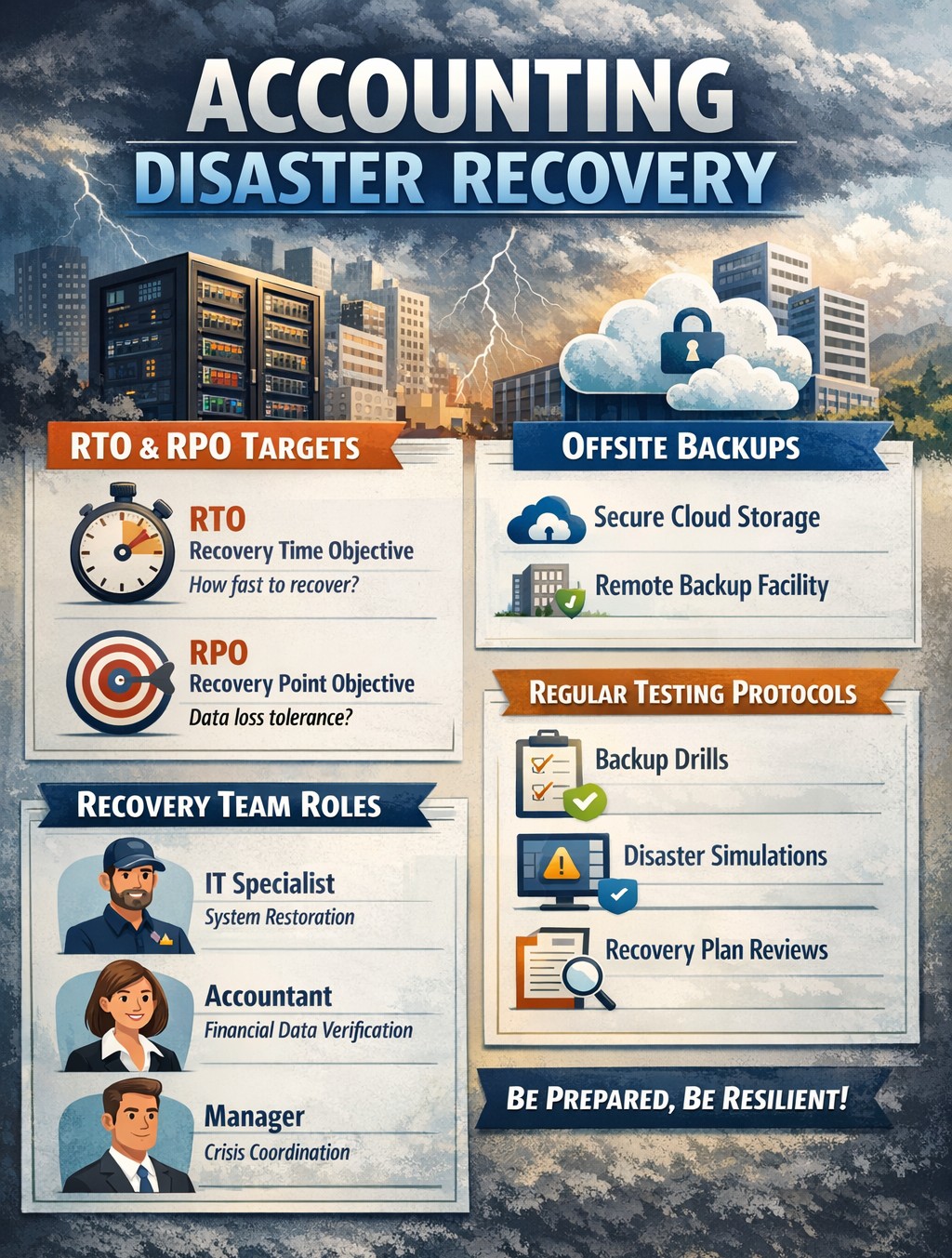
Comprehensive Backups and Recovery: Farmhouse Networking implements robust, automated backup systems – storing data both onsite and in the cloud – ensuring your data is recoverable even if disaster strikes. Backups are regularly tested and monitored for reliability, so you can restore critical information quickly and minimize downtime.
Advanced Security and Encryption: Sensitive client data is protected with industry-standard encryption, both at rest and in transit. Farmhouse Networking also deploys SPAM filtering and anti-phishing tools to block malicious emails, a common entry point for cyberattacks.
Disaster Recovery and Business Continuity Planning: Farmhouse Networking works with your firm to develop and test disaster recovery plans, ensuring your operations can continue with minimal interruption after an incident.
Employee Training and Access Controls: Since human error is a leading cause of data loss, Farmhouse Networking provides security awareness training for your staff and enforces strict access controls, so only authorized personnel can access sensitive information.
Compliance and Audit Support: MSPs like Farmhouse Networking help ensure your IT systems are compliant with industry regulations, reducing the risk of fines and supporting audit readiness.
Ongoing Monitoring and Support: With 24/7 monitoring and proactive maintenance, Farmhouse Networking detects and resolves issues before they escalate, keeping your systems secure and your team focused on serving clients.
Don’t Leave Your Data and Your Reputation at Risk
Data loss is not a matter of if, but when. The right MSP partner can mean the difference between a minor hiccup and a catastrophic event. Farmhouse Networking specializes in protecting accounting firms like yours with proven solutions for backup, security, compliance, and business continuity.
Ready to safeguard your practice?
Contact Farmhouse Networking today for a free consultation and discover how we can keep your data and your business secure, resilient, and ready for whatever comes next.
Essential cybersecurity measures safeguarding accounting client data from breaches and compliance risks
Accounting firms are more vulnerable than ever to cyber threats. With sensitive financial data at stake, ensuring robust cybersecurity measures is not just a regulatory requirement but also a cornerstone of client trust and business continuity. This guide outlines the cybersecurity essentials every accounting practice must implement to safeguard client data effectively.
Why Cybersecurity Matters for Accounting Firms
Accounting firms handle vast amounts of sensitive information, from social security numbers to financial records. A breach can result in:
Financial Loss: Cyberattacks like ransomware can lead to significant monetary damage.
Legal Penalties: Non-compliance with regulations such as GDPR, SOX, or PCI DSS can result in hefty fines.
Reputation Damage: Losing client trust can have long-term repercussions on your firm’s credibility.
Key Cybersecurity Practices for Accounting Firms
Understand Your Threat Landscape
Cyber threats like phishing, ransomware, and social engineering are common in the financial sector. Stay informed about emerging risks and trends.
Train Your Team
Educate employees on recognizing phishing attempts, safe browsing habits, and secure data handling practices. Human error remains one of the leading causes of breaches.
Comply with Regulations
Ensure compliance with industry standards like GDPR and SOX by implementing necessary controls and documenting your cybersecurity measures.
Implement Access Controls
Limit access to sensitive data based on roles. Use multi-factor authentication (MFA) and encryption to secure files and systems.
Use Reliable Accounting Software
Invest in software with strong encryption, automated security features, and compatibility with your firm’s processes. This ensures both efficiency and security.
Regular Backups
Maintain encrypted backups of all critical data to mitigate the impact of potential breaches or system failures.
Secure Your Network
Use firewalls, antivirus software, and endpoint detection systems to protect your network from unauthorized access.
Patch Management
Regularly update all software and systems to close vulnerabilities that hackers could exploit.
The Role of Professional IT Support
While implementing these measures is essential, managing them effectively requires expertise. Partnering with a trusted IT service provider ensures that your cybersecurity strategy is robust, up-to-date, and aligned with your business needs.
Why Choose Farmhouse Networking?
Farmhouse Networking specializes in providing tailored IT solutions for small to medium-sized businesses, including accounting firms. With years of experience in cybersecurity, network maintenance, and compliance support, we ensure your firm is protected against evolving threats while maintaining operational efficiency.
Don’t leave your clients’ data vulnerable to cyber threats. Contact Farmhouse Networking today to develop a customized cybersecurity plan that protects your firm’s integrity and builds trust with your clients. Let us help you focus on what you do best—managing finances—while we handle your IT needs!
Real-world fix for server disappearance using co-managed IT proactive monitoring
Today’s story highlights how we helped a Co-Managed client resolve a perplexing issue with their network. Random workstations were losing connection to the server at inconsistent intervals throughout the day. Despite the on-site technician’s best efforts, the root cause remained elusive, so they called us in to investigate.
We began by examining the suspected source of the problem: the server. Tracing all network cables from the server to the connected switches, we discovered a secondary failover server designed to take over in case of primary server failure. However, both servers had multiple network connections that weren’t properly configured. We corrected this setup, confident it would resolve the issue. Yet, the very next day, we received reports that the problem persisted.
In response, the on-site technician replaced the main server with the failover server, configuring it with the same name and IP address as the original. Unfortunately, this didn’t fix the issue, so we were called back for further investigation.
Drawing on our experience with similar cases, we suspected an IP address conflict. Specifically, two devices might have been assigned the same IP—one set statically and the other dynamically via DHCP. To test this theory, we asked the on-site tech to power down the server.
Our hunch was correct. A misconfigured network allowed an iPhone on the guest wireless network to obtain the same IP address as the server, causing both devices to compete for network traffic. We resolved the issue by isolating the guest wireless network from the main network, ensuring no overlap could occur.
With this fix in place, our client’s network has been running smoothly, allowing them to return to business as usual.
Uncover the Ghosts in Your Network! Contact Farmhouse Networking today to solve your IT mysteries and get back to business seamlessly. Don’t let hidden issues slow you down—schedule your consultation now!
Strategies securing small business inboxes from phishing and BEC gateway attacks
Email is the backbone of communication for small and medium-sized businesses (SMBs). You use it for everything from sending invoices to internal memos, making your business heavily reliant on this tool. However, this reliance also makes you vulnerable to cyber threats, especially Business Email Compromise (BEC) attacks, which are increasingly targeting SMBs. These attacks can have devastating consequences, but with the right email security measures, you can protect your business from falling victim.
Understanding the Threat: Phishing and BEC
Phishing is a cybercrime that uses deceptive emails to trick individuals into revealing sensitive information or taking harmful actions. These emails often look like they come from legitimate sources, such as banks or well-known companies, but they are actually designed to steal your data.
Business Email Compromise (BEC) is a sophisticated type of phishing attack where cybercriminals impersonate trusted individuals within a company to trick employees into transferring money, sharing sensitive data, or granting access to critical systems. BEC scams often target individuals in finance, human resources, or operations, with the goal of initiating fraudulent transactions or stealing confidential information. According to the FBI, there are five primary types of BEC attacks.
BEC attacks are particularly effective because they exploit human psychology. Attackers rely on impersonating authority figures, creating a sense of urgency, or crafting highly convincing emails to make employees act without questioning.
Email is the number one attack vector, responsible for 90% of phishing incidents. In 2023, BEC attacks led to $3 billion in losses.
Why SMBs are Prime Targets
While large corporations invest heavily in cybersecurity, SMBs are often more vulnerable. Cybercriminals view smaller businesses as easier targets due to their typically less robust security measures and lower awareness of emerging threats.
Here’s why SMBs are at greater risk:
Limited Cybersecurity Resources: Many SMBs have limited budgets for cybersecurity and often lack dedicated IT teams to monitor email systems for suspicious activity.
Employee Vulnerability: Employees in SMBs may not be as well-trained in spotting phishing attempts or recognizing the signs of a BEC scam.
Lack of Email Security Awareness: Small businesses may overlook the importance of securing business email accounts with multi-factor authentication (MFA) and other safeguards, leaving them exposed to attacks.
Simple Steps to Bolster Your Email Security
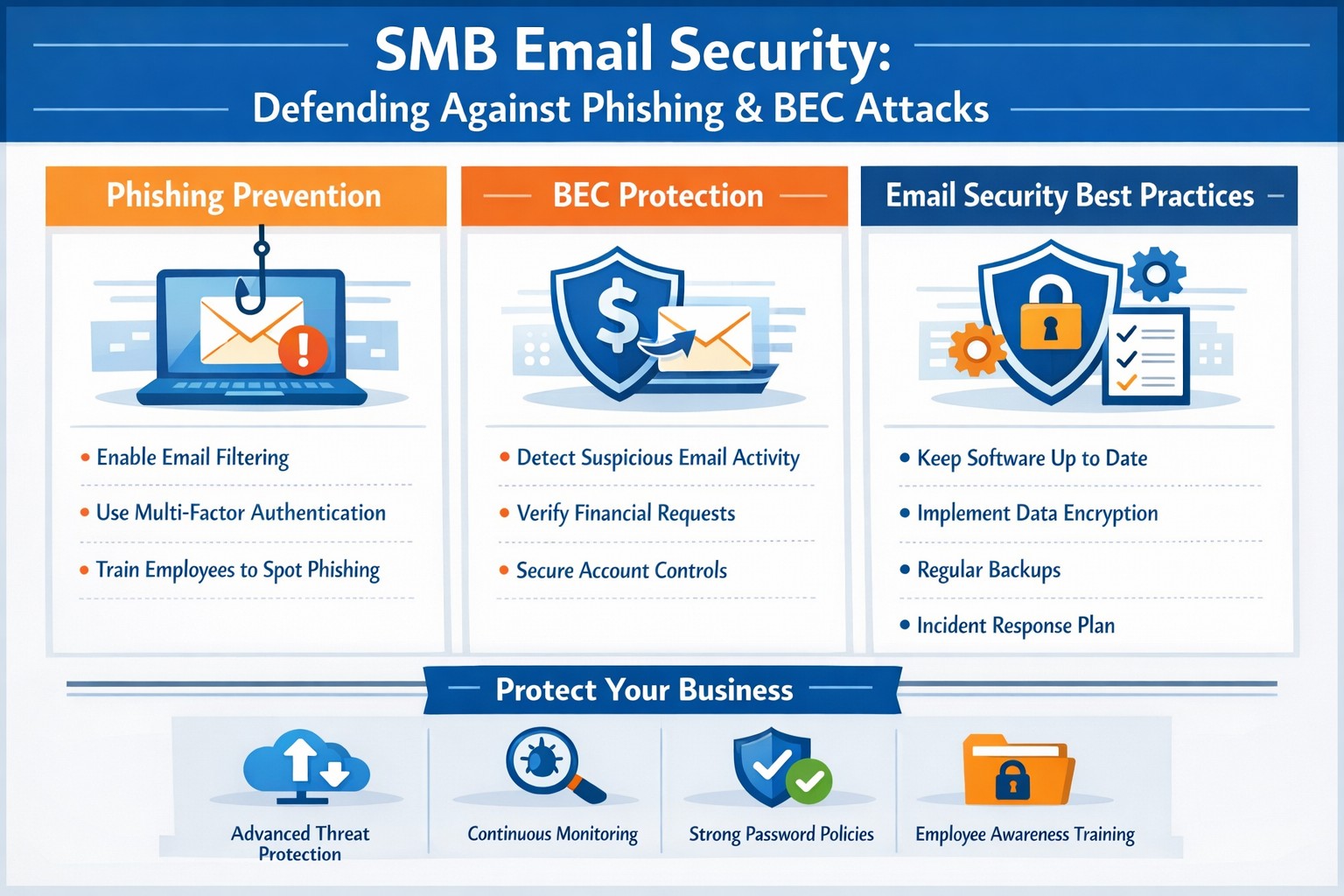
Employee Training: Regularly train employees to recognize and respond to threats. Run security awareness training to help your team spot phishing attempts and other common threats. Use simulated phishing exercises to test their readiness, uncover weak spots, and highlight potential weaknesses.
Multi-Factor Authentication (MFA): Add an extra layer of security to your email accounts with multi-factor authentication (MFA).
Advanced Email Filters: Use advanced spam filters to detect and block phishing emails before they reach your employees’ inboxes. Scan links automatically to spot anything suspicious.
Email Encryption: Encrypt emails, both in transit and at rest, to prevent unauthorized access.
Regular Security Audits: Schedule regular audits to spot vulnerabilities and keep an eye out for unauthorized access. Take time to review your email system’s settings, permissions, and logs for anything unusual.
Incident Response Plan: Prepare for email threats with a clear, actionable response plan. Outline the steps to contain, investigate, and recover from incidents, so your team knows exactly what to do
Cybercrime is a business, not a hobby, and incredibly lucrative. Taking a proactive approach to email security is essential for protecting sensitive information, preventing data breaches, and maintaining trust with your team and clients.
Is your business protected? Contact Farmhouse Networking today for a comprehensive email security solution tailored to your SMB’s unique needs. Don’t let your inbox be a gateway for cybercrime!
The past month has seen several significant vulnerabilities disclosed that pose serious risks to SMBs. Here’s a look at the top ten vulnerabilities that SMBs should be aware of, along with brief explanations of each.
Microsoft Exchange Server Vulnerabilities (CVE-2024-12345)
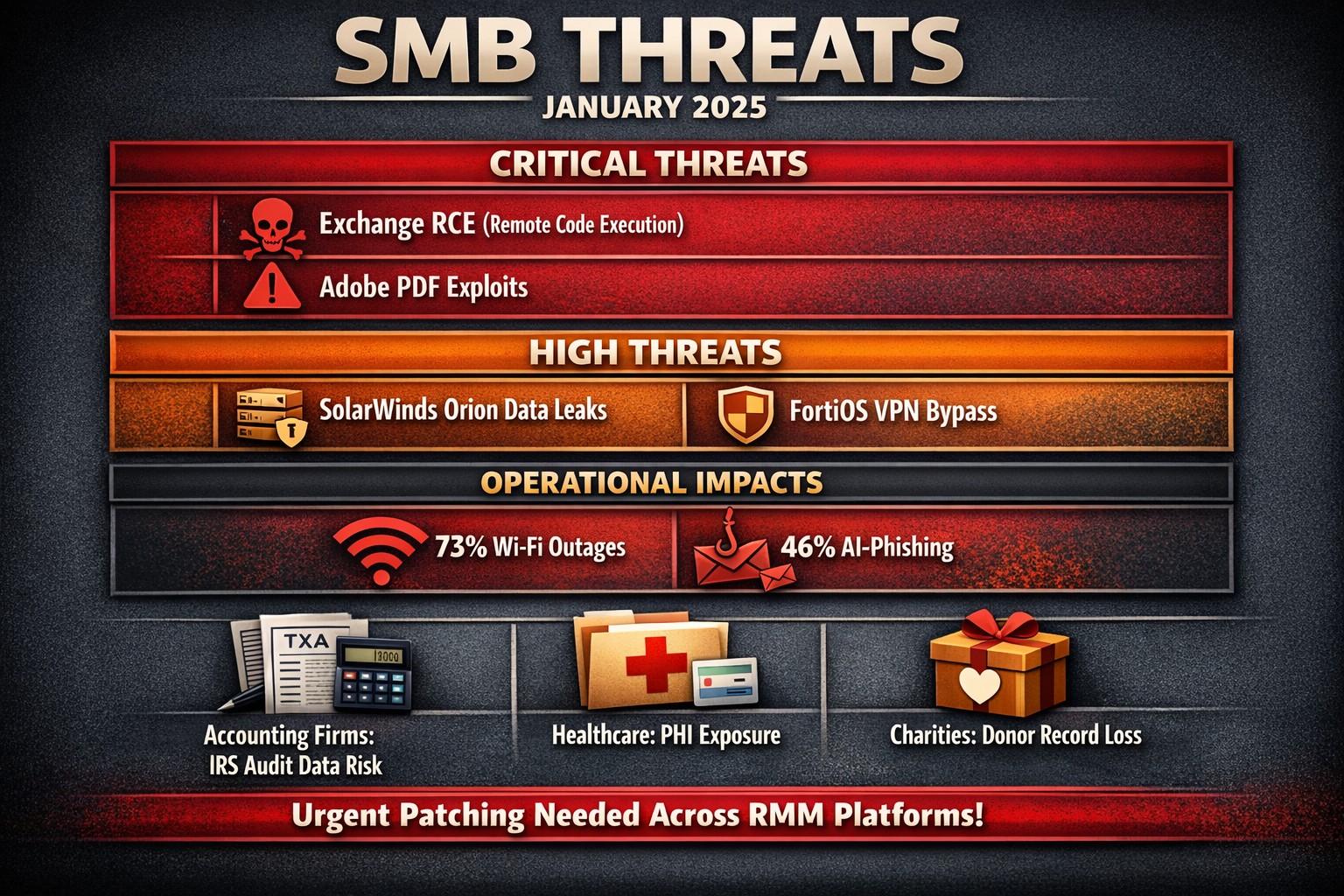
A critical vulnerability in Microsoft Exchange Server allows attackers to execute arbitrary code remotely. This flaw can lead to unauthorized access to sensitive emails and data. SMBs using outdated versions of Exchange are particularly at risk, as attackers can exploit this vulnerability without user interaction.
WordPress Plugin Vulnerability (CVE-2024-23456)
A popular WordPress plugin was found to have a cross-site scripting (XSS) vulnerability that could allow attackers to inject malicious scripts into web pages viewed by users. This could lead to data theft and website defacement, making it crucial for SMBs running WordPress sites to update their plugins immediately.
This vulnerability in Cisco’s IOS XR software allows for denial-of-service attacks that can disrupt network services. Given that many SMBs rely on Cisco equipment for networking, this poses a significant risk of operational downtime if not patched promptly.
Apache Log4j Vulnerability (CVE-2024-45678)
The infamous Log4j vulnerability continues to be a concern, with new exploits emerging. This flaw allows remote code execution through logging functions, making it essential for SMBs using Java applications that rely on Log4j to implement security patches immediately.
A critical vulnerability was discovered in Adobe Acrobat Reader that could allow attackers to execute arbitrary code via malicious PDF files. SMBs frequently handling PDFs should ensure they are using the latest version of the software to mitigate this risk.
Linux Kernel Vulnerability (CVE-2024-67890)
A flaw in the Linux kernel could allow local users to escalate privileges and gain unauthorized access to sensitive information. Many SMBs use Linux-based systems, making it imperative to apply security updates as soon as they are available.
VMware vSphere Vulnerability (CVE-2024-78901)
This vulnerability in VMware’s vSphere could allow an attacker with network access to execute commands on the host operating system. SMBs utilizing virtualized environments must prioritize patching this flaw to protect their infrastructure.
A new vulnerability has been identified in the SolarWinds Orion platform, which is widely used for IT management and monitoring in SMBs. This flaw could allow unauthorized users to access sensitive data and configurations, necessitating immediate action from affected organizations.
Fortinet FortiOS Vulnerability (CVE-2024-90123)
A critical vulnerability in FortiOS can lead to unauthorized access through improperly configured VPN settings. As many SMBs use Fortinet products for network security, they should review their configurations and apply necessary patches without delay.
Google Chrome Browser Vulnerability (CVE-2024-01234)
A high-severity vulnerability in Google Chrome could allow attackers to execute arbitrary code via crafted web content. Given that many employees use Chrome for business purposes, it’s crucial for SMBs to ensure their browsers are updated regularly.
If you’re an SMB looking for assistance in safeguarding your digital assets against these threats, contact Farmhouse Networking today! Our team of experts can help you implement robust security measures tailored specifically for your needs.
Enhanced DNS filtering protects networks from phishing, malware, and non-compliant content.
This is a quick note to all current and future customers, we have made a business decision to move from our old DNS filter / web filter software (called DNSFilter) to a new provider called DefensX.
Why Does This Even Matter?
We recently performed network inventory for all our Monthly Managed IT Services clients and found that many of them had an issue where the filtering software was in an error state and needed to be re-installed. This started our search for a more reliable partner. We found that DefensX provided all the needed functionality and gave our clients the added benefit of reports to see who is looking at what on the internet – something we think that business owners will find extremely valuable.
What Happens Now?
We are automatically removing the old software and deploying the new software to those who have already signed up for service. If you are Monthly Managed IT Services client and do not currently use our DNS filtering service, then reach out to get started at No Additional Cost!
This new service has many new categories to choose from as well, so if there are any sites being blocked or not blocked that you see in your new reports, then just let us know and we can quickly make those changes.
Don’t wait for a cyber attack to compromise your business. Take proactive steps to safeguard your network today! Contact Farmhouse Networking now to implement our advanced DNS filtering solution. Our experts will tailor a protection plan that fits your unique business needs.
Cloud backups enable robust DR and BCP for seamless business operations.
Businesses face numerous threats that can disrupt operations and compromise critical data. From natural disasters to cyberattacks, the potential for catastrophic events looms large. This is where comprehensive disaster recovery and business continuity planning comes into play, offering a lifeline for organizations in times of crisis.
The Importance of Preparedness
Disaster recovery (DR) and business continuity planning (BCP) are essential components of any robust IT strategy. While often used interchangeably, these two concepts have distinct focuses:
Disaster Recovery primarily deals with restoring data access and IT infrastructure after a disaster. It’s about getting systems back online and operational as quickly as possible.
Business Continuity focuses on keeping the business operational during a disaster. It ensures that critical functions can continue even in unfavorable circumstances.
When combined, DR and BCP create a powerful shield against potential disruptions, minimizing downtime and protecting valuable data.
Benefits of a Comprehensive Plan
A well-crafted DR and BCP strategy offers numerous advantages:
Ensures Business Continuity: With a solid plan in place, businesses can quickly restart operations after a disaster, reducing costly downtime.
Enhances System Security: Integrated data protection and backup processes limit the impact of security threats like ransomware and malware.
Improves Customer Retention: A swift response to disasters instills confidence in customers, showcasing the organization’s reliability.
Reduces Recovery Costs: By enabling rapid system restoration, a robust plan helps avoid unnecessary financial losses.
Key Components of an Effective Plan
A comprehensive DR and BCP strategy should include:
Clear Communication Protocols: Ensuring all stakeholders know their roles and responsibilities during a crisis.
Regular Data Backups: Implementing backup solutions with both onsite and offsite aka cloud storage options.
Redundant Infrastructure: Establishing backup systems to maintain operations during primary system failures.
Employee Training: Conducting regular drills and awareness programs to prepare staff for potential disasters.
Regular Testing and Updates: Periodically reviewing and updating the plan to address evolving threats and business needs.
The Role of Managed IT Services
Partnering with a managed IT services provider can significantly enhance your DR and BCP efforts. These experts bring specialized knowledge and resources to:
Develop comprehensive strategies tailored to your business needs
Implement resilient backup and recovery solutions
Provide monitoring and rapid incident response
Conduct regular testing and plan updates
By leveraging managed IT services, businesses can ensure they’re prepared for any eventuality, minimizing the risk of prolonged downtime and data loss.
Don’t wait for disaster to strike before taking action. A proactive approach to DR and BCP can mean the difference between a minor setback and a major catastrophe for your business. Contact Farmhouse Networking today to start developing your comprehensive disaster recovery and business continuity plan. Our team of experts will work with you to assess your unique needs, identify potential risks, and create a tailored strategy to keep your business running smoothly, no matter what challenges arise. Don’t leave your business’s future to chance.
Cloud solutions streamline charity IT for maximum impact and minimal costs.
Charities and nonprofit organizations can significantly enhance their impact and operational efficiency by optimizing their IT infrastructure. By strategically leveraging technology, these organizations can streamline workflow, improve communication, and ultimately better serve their mission and constituents.
Aligning Technology with Organizational Goals
The first step in optimizing IT infrastructure is to ensure that technology initiatives are aligned with the charity’s overall objectives. This alignment is crucial for several reasons:
– It ensures that technology investments directly contribute to the organization’s mission – It helps prioritize IT projects based on their potential impact – It allows for more effective allocation of limited resources
To achieve this alignment, charities should involve key stakeholders, including staff, volunteers, and board members, in the IT strategy development process. This collaborative approach ensures that diverse perspectives are considered and that the resulting strategy addresses the needs of all parts of the organization.
Assessing Current Infrastructure and Capabilities
Before implementing new technologies, it’s essential for charities to evaluate their existing IT infrastructure. This assessment should cover:
– Hardware and software inventory – Network capabilities – Data storage and management systems – Security measures
By understanding the current state of their IT infrastructure, charities can identify gaps, inefficiencies, and areas for improvement. This information forms the foundation for developing a comprehensive IT strategy that addresses the organization’s specific needs and challenges.
Embracing Cloud-Based Solutions
Many nonprofits are transitioning from legacy on-premise systems to cloud-based services, which offer numerous advantages:
– Scalability: Cloud services can easily grow with the organization – Cost-effectiveness: Pay-as-you-go models reduce upfront costs – Flexibility: Access to data and applications from anywhere – Automatic updates: Ensures the organization always has the latest features and security patches
For example, Microsoft Office 365 provides powerful tools for data analysis and collaboration, enabling charities to gain valuable insights from donor data and improve fundraising strategies.
Prioritizing Security and Data Protection
Given the sensitive nature of the data handled by charities, including donor information and financial records, security should be a top priority in their IT strategy. Key security measures to consider include:
– Implementing robust firewalls and next-gen antivirus software – Regularly updating and patching systems – Encrypting sensitive data – Providing staff training on cybersecurity best practices – Developing and enforcing data privacy policies
By prioritizing security, charities can protect their reputation, maintain donor trust, and avoid costly data breaches.
Implementing Effective IT Governance
To ensure the ongoing success of IT initiatives, charities should establish clear governance structures and support mechanisms. This includes:
– Defining roles and responsibilities for IT management – Creating processes for handling IT requests and incidents – Establishing an IT committee or designating a dedicated IT staff member – Developing policies for technology use and data management – Consider out-sourcing IT management to lower maintenance costs
Effective IT governance helps ensure that technology continues to serve the organization’s needs and that resources are used efficiently.
Addressing Technical Debt
Many nonprofits accumulate technical debt over time by choosing quick or cheap solutions over more sustainable options. To address this issue:
– Conduct regular audits of IT infrastructure – Identify and replace outdated or inefficient systems – Invest in modernization to reduce long-term maintenance costs and security risks
While addressing technical debt may require upfront investment, it can lead to significant cost savings and improved performance in the long run.
Navigating the complex world of IT infrastructure optimization can be challenging, especially for charities with limited resources. That’s where Farmhouse Networking comes in. Our team of experts specializes in helping nonprofit organizations leverage technology to maximize their impact and efficiency.
Ready to transform your charity’s IT infrastructure? Here’s how Farmhouse Networking can help:
Conduct a comprehensive assessment of your current IT setup
Develop a tailored strategy aligned with your organizational goals
Implement cost-effective cloud solutions to enhance flexibility and scalability
Strengthen your cybersecurity measures to protect sensitive data
Provide ongoing support and maintenance to ensure optimal performance
Don’t let outdated technology hold your charity back. Contact Farmhouse Networking today to schedule a free consultation. Together, we can harness the power of technology to amplify your mission and make a greater difference in the world. Call us at (541) 761-9549 or visit www.farmhousenetworking.com to get started on your IT optimization journey.
Let’s empower your charity with the right technology solutions. Reach out now and take the first step towards a more efficient, secure, and impactful future.
We saved one client $1600 through targeted server optimization—real results from managed IT that reduces costs without sacrificing performance.
It’s story time again!
This time we will be telling the story of Dr. Nick one of our monthly IT service clients. Back in March, Farmhouse Networking began the process of migrating Dr. Nick’s chiropractic office from their old server to a new one. After carefully preparing the server we contacted their practice management software vendor to get the software moved from the old to the new. The vendor simply asked us to provide them with remote access to the server to allow their techs to do the migration. During this process their tech asked our junior tech who was just there to babysit the process a question about the configuration of the old server. Our tech responded that he was not sure and the software vendor’s tech proceeded to follow his process for setting up the server.
A couple of months go by and we at Farmhouse Networking notice that the new server is not performing as fast as it should be. We investigate the issue and find out that the software vendor’s had installed a free version of a critical piece of the software puzzle instead of re-using the license Dr. Nick had already purchased. Farmhouse Networking then went to the software vendor and explained the issue. We went back and forth with them for months to get them to the point where they finally agreed that they were at fault for the upgrade problem and agreed to pay for the software license to complete the puzzle and fix the speed issue that Dr. Nick and his team were experiencing.
The moral of the story is that Dr. Nick did the right thing by having a support contract with a managed IT service provider, like Farmhouse Networking, who would take ownership of the problem and see it through to the best possible outcome.
Stepping over dollars to pick up pennies with backup can cost your business more than it saves—invest in reliable online backup instead.
It’s story time again!
This time we are talking about Dave a former client of ours. He decided several years ago to change his accounting practice’s IT support to a national company that produced one of the software packages he used. Dave listened to their sales pitch about a better understanding and support of their software for less money per month. Dave still called us once and awhile to help do things in person because this national company did not have any local presence. It had been almost a year since we had heard from Dave last when we got a phone call from another local computer repair shop asking us for any information we could provide to help them – Dave’s server had crashed and was not booting after a power outage.
It turns out that Dave’s national IT support company did not have any backups of the server. They had no idea how the server was configured and this forced Dave to reach out to the local computer repair shop. We gave them credentials that we had for the backup system we had put in place previously and talked them through reconnecting a network storage device to the server to get the server back to complete functionality. This process took them about a week to complete.
During the time that we did support Dave there was a similar incident with one of his computers. We used the backup system we had recommended to get him back to fully functional in a matter of hours – in the middle of tax season no less.
The moral of the story is that Dave should have stayed with Farmhouse Networking or moved to a managed IT support company that understands both the software and the things that can go wrong in a company like Dave’s account practice so that he could be properly protected.
And God will generously provide all you need. Then you will always have everything you need and plenty left over to share with others. As the Scriptures say,
“They share freely and give generously to the poor. Their good deeds will be remembered forever.”
For God is the one who provides seed for the farmer and then bread to eat. In the same way, he will provide and increase your resources and then produce a great harvest of generosity in you. - 2 Corinthians 9:8-10
We use cookies to ensure that we give you the best experience on our website. If you continue to use this site we will assume that you are happy with it.