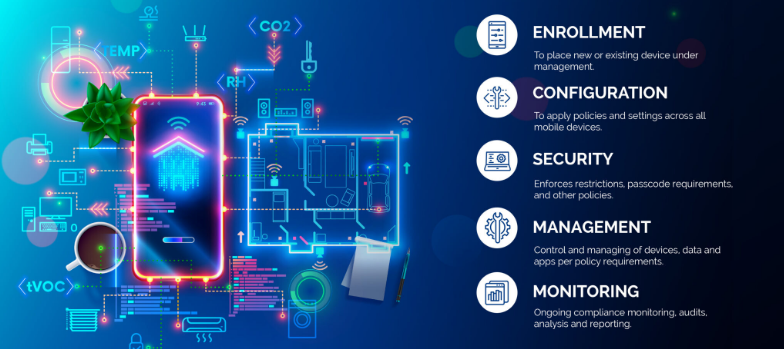
MDM centralizes BYOD security, remote wipe, and app control for enterprise protection.
Mobile devices, like smart phones and tablets, have become integral to business operations. However, with the convenience of mobility comes the challenge of securing sensitive corporate data. This is where Mobile Device Management (MDM) steps in as a crucial strategy for businesses of all sizes.
Understanding Mobile Device Management
Mobile Device Management refers to the administration and oversight of mobile devices like smartphones, tablets, and laptops that connect to your company’s network. The primary goal is to enable employees to conduct business from convenient devices while maintaining robust data security.
Key Strategies for Secure Mobile Device Management
Implement Comprehensive Policies: Developing clear and enforceable mobile device policies is the foundation of effective MDM. These policies should cover:
Acceptable use guidelines
Password requirements
App installation restrictions
Data access protocols
Utilize Encryption: Encryption is a powerful tool in your MDM arsenal. By encrypting data both in transit and at rest, you significantly reduce the risk of unauthorized access if a device is lost or stolen.
Enable Remote Wiping Capabilities: In the event of device loss or theft, the ability to remotely wipe corporate data is invaluable. This feature ensures that sensitive information doesn’t fall into the wrong hands.
Implement App Management: Control which apps can be installed on devices and manage app updates centrally. This helps prevent security vulnerabilities and ensures all devices have the latest, most secure versions of approved apps.
Regular Security Updates: Ensure all devices receive timely security updates and patches. This helps protect against newly discovered vulnerabilities and threats.
The Role of a Managed IT Services Provider
Implementing and maintaining an effective MDM strategy can be complex and time-consuming. This is where a Managed IT Services Provider (MSP) can be invaluable. An MSP can:
Assess your specific MDM needs
Implement the right MDM solution for your business
Manage device enrollment and configuration
Monitor devices for security threats
Provide ongoing support and maintenance
By partnering with an MSP, you can ensure your MDM strategy is robust, up-to-date, and aligned with your business needs.
Benefits of Effective Mobile Device Management
When implemented correctly, MDM offers numerous benefits:
Enhanced data security
Improved employee productivity
Reduced IT administration overhead
Better compliance with data protection regulations
Simplified device lifecycle management
Mobile Device Management is no longer a luxury—it’s a necessity for businesses operating in our mobile-first world. By implementing strong MDM strategies and partnering with a trusted Managed IT Services Provider, you can harness the power of mobile technology while keeping your business data secure.
Ready to take control of your mobile device security? Contact Farmhouse Networking today to get started with a comprehensive Mobile Device Management solution tailored to your business needs. Don’t wait for a security breach to happen—secure your mobile future now.
Implement zero trust to safeguard mobile workforce from cyber threats anywhere
Remote work and mobile devices have become the norm, so ensuring the security of your workforce and sensitive data is paramount. Traditional security measures based on perimeter defense are no longer sufficient to protect against the sophisticated cyber threats that target mobile devices and exploit vulnerabilities in the network. This is where the concept of zero trust comes into play. Zero trust is a security framework that challenges the notion of “trust but verify” and instead adopts a “never trust, always verify” approach. By implementing a zero trust model, organizations can establish a security infrastructure that provides continuous authentication, authorization, and monitoring to safeguard their mobile workforce and sensitive data.
Understanding the Concept of Zero Trust
The concept of zero trust is rooted in the recognition that a one-time authentication and authorization process is not enough to ensure security in today’s dynamic threat landscape. Changes in user behavior, location, and other factors should radically impact access decisions. Zero trust takes a proactive approach to security by enforcing minimal access to resources, requiring continuous security monitoring, risk-based access control, and real-time authentication and authorization based on up-to-date information. Unlike traditional security models that rely on perimeter defense and trust users and devices within the network, zero trust challenges the idea of inherent trust and verifies the authenticity and integrity of every user and device, regardless of their location or network connection.
The Evolution of Zero Trust
The concept of zero trust has evolved over time in response to the increasing risks and challenges posed by mobile devices and remote work. The rapid adoption of mobile devices and the proliferation of internet-connected devices have expanded the attack surface, making traditional perimeter-based security measures inadequate.
Key Security Technologies for Mobile Devices
To enhance the security of mobile devices and implement zero trust, organizations should leverage key security technologies designed specifically for the mobile environment. These technologies include:
Enterprise Mobility Management (EMM): EMM ensures that mobile devices have the necessary policies and configurations in place, including mobile device management for security settings and configurations, as well as remote user access policy implementation. EMM provides a foundation for enforcing security controls and managing mobile devices within the organization.
Mobile Application Vetting (MAV): MAV ensures that applications comply with enterprise policies and do not contain known exploitable vulnerabilities. By vetting applications, organizations can reduce the risk of malicious applications compromising the security of mobile devices and accessing sensitive data.
Mobile Application Management (MAM): MAM focuses on ensuring compliance in deployed applications. It enables organizations to enforce security policies and manage the lifecycle of mobile applications, including app distribution, updates, and revocation. MAM helps organizations maintain control over the applications used by their mobile workforce.
Mobile Threat Defense (MTD): MTD solutions detect and mitigate threats from suspicious user behavior, network activity, and malicious attacks. These solutions leverage advanced analytics and threat intelligence to identify and respond to potential security threats in real time, providing an additional layer of protection for mobile devices.
Secure Containers: Secure containers provide isolation techniques to prevent organizational and personal data from commingling. By creating separate containers for different types of data, organizations can ensure that sensitive information remains secure, even if the device itself is compromised.
The Role of Intelligent Authentication
Intelligent authentication, powered by advanced rule sets and artificial intelligence, can significantly enhance the security of mobile devices in a zero trust environment. By combining biometrics with user behavior analysis, intelligent authentication systems can provide adaptive authentication that adapts to each user interaction, ensuring precise security measures. Integration between EMM, mobile threat defense, and existing logging, monitoring, diagnostic, and mitigation systems further enhances security capabilities.
Developing a Mobile Zero Trust Strategy
Implementing zero trust in the mobile environment requires a tailored approach that aligns with an organization’s specific goals, risks, and infrastructure. Businesses should develop their strategies based on a comprehensive assessment of the risks they face, with granular policies to mitigate those risks. The granularity of continuous authentication should be carefully determined to strike the right balance between security and usability. It’s important to note that technology is only one part of the solution; organizations must also review their mobile use policies and ensure that processes and human factors align with zero trust principles
With an intelligent authentication approach and a tailored mobile zero trust strategy, organizations can safeguard their mobile workforce and data from advanced cyber threats. Farmhouse Networking can make this a reality for your organization.
MDM dashboard with Android iOS device inventory compliance policies and security controls.
In today’s digital age, mobile devices have become an integral part of our lives, both personally and professionally. With the increasing reliance on smartphones and tablets, businesses, especially small and medium-sized enterprises (SMBs), need to prioritize mobile device security. One effective solution for enhancing Android and iPhone security is Mobile Device Management (MDM). In this article, we will explore the benefits of MDM for SMBs, its role in enhancing Android and iPhone security, and how businesses can implement MDM to safeguard their sensitive data.
1. Understanding the Importance of Android and iPhone Security
Android and iPhone, being the most widely used mobile operating systems globally, have become a prime target for cybercriminals. With its open-source nature and extensive app ecosystem, Android devices are susceptible to various security threats, such as malware, data breaches, and unauthorized access. With its user-friendliness and built-in trust, iPhone users are easily tricked into downloading and installing malware which leads to data breaches and unauthorized access. SMBs, in particular, need to be proactive in securing their Android and iPhone devices to protect sensitive customer information, intellectual property, and maintain regulatory compliance.
2. Introducing Mobile Device Management (MDM)
Mobile Device Management (MDM) is a comprehensive solution that enables businesses to centrally manage and secure their fleet of mobile devices, including Android and iPhone smartphones and tablets. MDM provides IT administrators with granular control over device settings, app distribution, security policies, and data management. By implementing MDM, SMBs can streamline device management, enhance data security, and ensure compliance with industry regulations.
2.1 Benefits of MDM for SMBs
Centralized Device Management: MDM allows businesses to manage multiple Android devices from a single console, simplifying device provisioning, configuration, and updates.
Enhanced Security: MDM enables IT administrators to enforce security policies, such as password requirements, encryption, and remote wipe capabilities, ensuring that lost or stolen devices do not compromise sensitive data.
App Distribution and Management: With MDM, businesses can distribute and manage apps on Android devices, ensuring that only authorized and secure applications are installed.
Secure Content and Data Management: MDM provides secure containers or workspaces on Android devices, segregating business data from personal information and enabling seamless data synchronization.
Compliance and Reporting: MDM offers robust reporting capabilities, allowing businesses to monitor device usage, enforce compliance regulations, and generate audit trails.
3. Implementing MDM for Android and iPhone Security
Implementing MDM for Android and iPhone security involves a series of steps to ensure a seamless deployment and effective device management. Let’s explore the key considerations and best practices for SMBs looking to implement MDM.
3.1 Assessing Business Needs and Objectives
Before implementing MDM, SMBs should assess their business needs and objectives. This includes identifying the number of devices to be managed, understanding the security requirements, and evaluating the compatibility with existing IT infrastructure.
3.2 Choosing the Right MDM Solution
There are numerous MDM solutions available in the market, each with its own set of features and capabilities. SMBs should carefully evaluate different MDM vendors, considering factors such as scalability, ease of use, security features, integration capabilities, and cost-effectiveness.
3.3 Defining Security Policies and Configuration
Once the MDM solution is selected, SMBs need to define security policies and configurations. This includes setting password requirements, enabling device encryption, configuring firewall settings, and defining app installation permissions. The policies should align with industry best practices and compliance regulations.
3.4 Device Enrollment and Onboarding
After defining security policies, SMBs can proceed with device enrollment and onboarding. This involves registering Android devices with the MDM system, configuring device settings, and installing necessary security profiles and certificates.
3.5 Monitoring and Maintenance
MDM is an ongoing process that requires continuous monitoring and maintenance. SMBs should regularly review security policies, update device configurations, patch vulnerabilities, and conduct security audits to ensure the effectiveness of the MDM solution.
4. Android vs. iPhone: MDM Considerations
While Android devices are more susceptible to security threats due to their open nature, it is essential to consider the unique security challenges posed by iOS devices, such as iPhones and iPads. Although iOS has built-in security features, SMBs should evaluate MDM solutions that offer comprehensive support for both Android and iOS devices to ensure consistent security across their mobile fleet.
5. The Future of MDM and Android Security
As technology evolves, the landscape of mobile device security continues to change. The future of MDM and Android security holds promising advancements, including:
Machine Learning and AI: MDM solutions can leverage machine learning and AI algorithms to detect and prevent emerging security threats proactively.
IoT Integration: With the rise of the Internet of Things (IoT), MDM will encompass managing and securing a broader range of devices, including wearables and smart home devices.
Biometric Authentication: MDM solutions will increasingly utilize biometric authentication, such as fingerprint and facial recognition, for secure device access.
Containerization and Virtualization: MDM will further enhance data security by implementing advanced containerization and virtualization techniques, isolating business data from personal information.
If your SMB is seeking to enhance Android and iPhone security by leveraging the benefits of MDM, contact us for professional assistance and guidance tailored to your specific needs.
2FA dashboard displaying account protection compliance metrics and phishing defenses.
Businesses are face an increasing number of cyber threats. To protect sensitive data and prevent hackers from gaining access, implementing stronger security measures is crucial. One such measure is 2-factor authentication (2FA). Let’s look at the importance and security benefits of 2FA for businesses.
Enhanced Account Security:
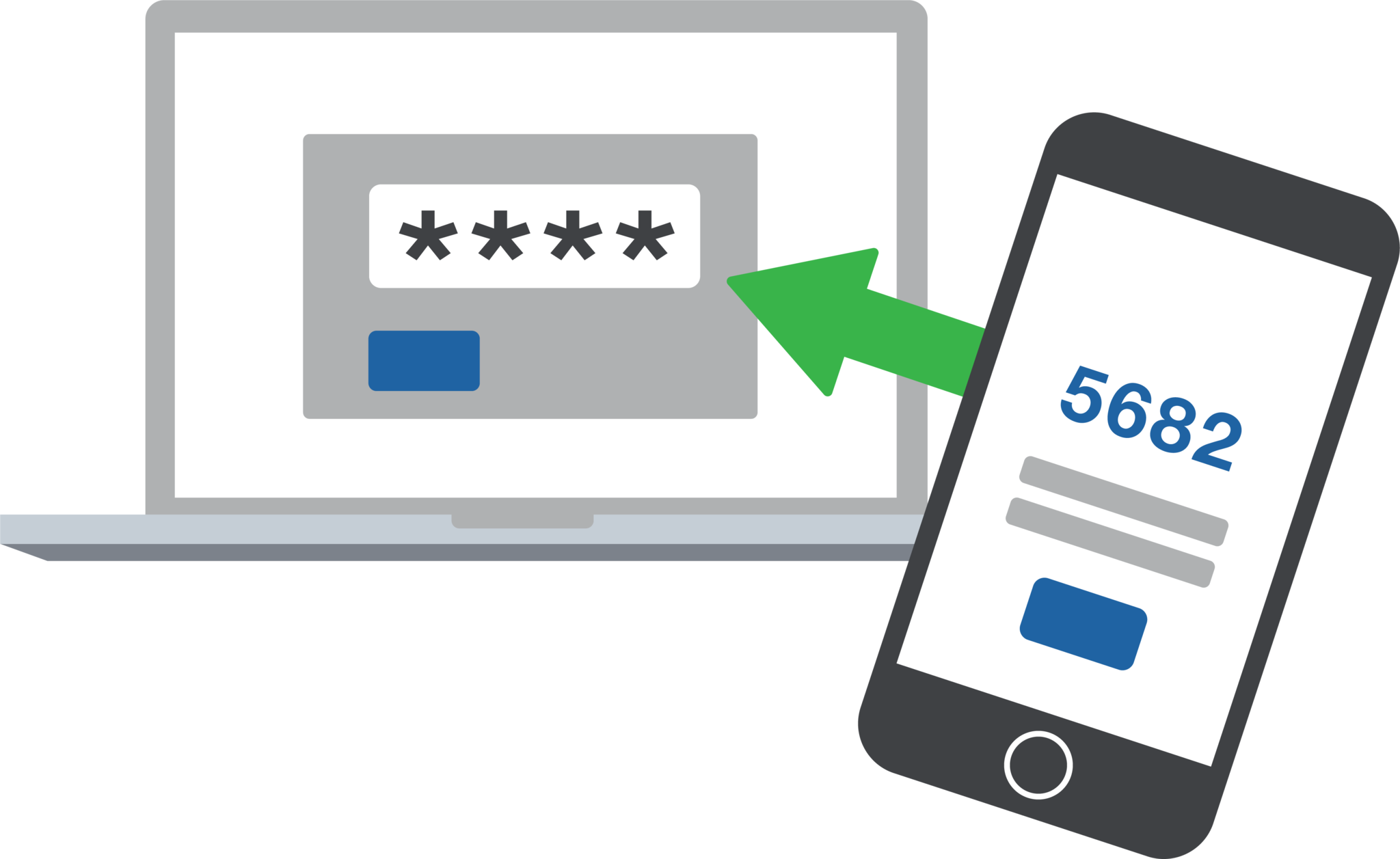
2FA adds an extra layer of security to the traditional username and password login process. By requiring users to provide a second form of authentication, such as a unique code sent to their mobile device, it significantly reduces the risk of hackers from gaining access. Even if a hacker manages to obtain a user’s password, they would still need the second factor to gain access.
Mitigation of Password-related Risks:
Passwords are often the weakest link in security systems. Many users tend to reuse passwords across multiple accounts or choose weak and easily guessable ones or re-use the same password while incrementally changing a digit or two. With 2FA, even if a password is compromised, the additional authentication factor acts as a safeguard, making it significantly harder for attackers to gain access.
Protection Against Phishing Attacks:
Phishing attacks, where attackers trick users into revealing their login credentials, are a common threat to businesses. 2FA provides an additional layer of defense against such attacks. Even if a user unknowingly falls victim to a phishing attempt and enters their credentials on a fake website, the second authentication factor would prevent the attacker from accessing the account.
Compliance with Industry Regulations:
Many industries, such as finance, healthcare, government contractors, and e-commerce, are subject to strict data protection regulations. Implementing 2FA helps businesses meet compliance requirements and avoid potential penalties. It demonstrates a commitment to safeguarding sensitive customer information and builds trust with clients.
Cost-Effective Security Measure:
Implementing 2FA does not require significant financial investment. Many 2FA solutions are readily available and can be easily integrated into existing systems. Considering the potential financial and brand reputation damage caused by a security breach, the cost of implementing 2FA is minimal compared to the benefits it provides.
In an era where cyber threats are constantly evolving, businesses must prioritize security measures to protect their valuable data. 2-factor authentication offers a simple yet effective way to do so.
If your company is interested in implementing 2FA across the entire organization, then contact us for assistance.
RingCentral VoIP app within Teams interface with call messaging and video features.
We have decided to make a business change that includes no longer directly selling phone services, but instead we are moving our clients to RingCentral. They are the industry leaders in this type of service and their rates are very competitive. One of their killer features is the Teams integration
RingCentral for Teams – Embedded App
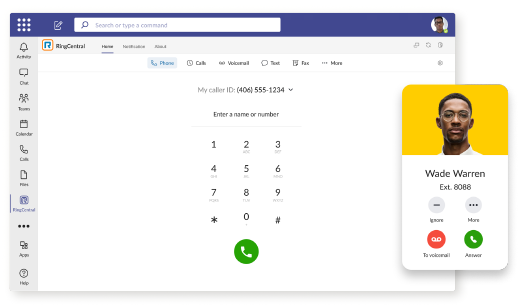
RingCentral for Teams embedded app enables calling from the Teams app to both internal extensions and external numbers. It’s the simplest way to supercharge the phone experience for both end users and IT admins without having to deploy a new app to end users. Most importantly, there’s no need for an added Microsoft calling or E5 license to capture this value. This solution is ideal for organizations that want to:
leverage RingCentral’s superior telephony while maximizing the value of their Teams investment
avoid the added cost of Microsoft’s calling license
With the RingCentral for Teams embedded app, users access an icon presented in Microsoft Teams. They can then place and receive calls, access voicemails and voicemail transcriptions, and send or receive an SMS or fax. These tools fill critical gaps in Microsoft Teams, transforming it from messaging and video meeting tool to a communications powerhouse. This approach is also a money saver, as it doesn’t require the added cost of a Teams Phone or E5 license.
If your company is currently using Microsoft Teams for communications and want to add the incredible functionality that RingCentral brings, then contact us for assistance.
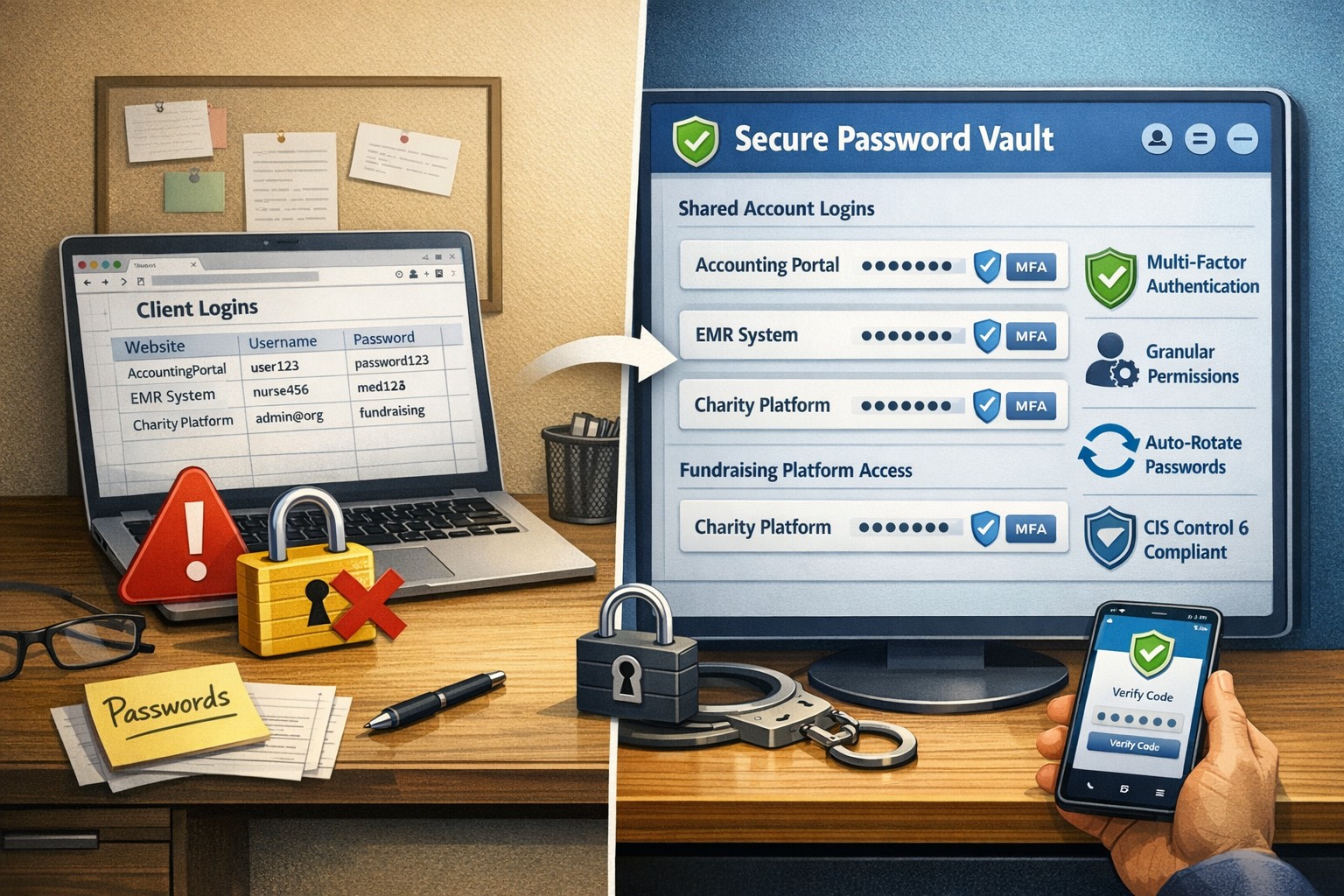
Single secure vault eliminates password sprawl across business apps
Whether you are buying something from an online store, reading your email in the browser, checking your account balances, or uploading photos / videos to social media, most websites require an individual username and password when accessing their services. This raises various problems.
What’s with ALL the Passwords?
Using the same password for all the websites you access is a bad idea and horribly insecure. If we run a quick check on the “Dark Web” for your email address, it would likely show that hackers already know the one password you have been using forever. So the only other option is multiple passwords, which can easily go beyond the limits of our feeble human brains to keep track of OR people start creating a list that is typically typed up and saved on the computer – if a hacker gets into the computer then all the passwords are theirs too. So then the option is to find a secure way of storing and backing up these passwords, not to mention trying to make them easy to use.
Rangle Them Passwords!
That is the job of Password Management done by a small piece of software known as a password manager. It takes the complexity down to remembering the one password to open the software, then it tracks the rest from there. The good ones have the ability to generate passwords for you, store them in connection with the website you are visiting, auto-filling the password fields on the websites when you visit them again, and backup your passwords to the cloud – all with strong security and encryption to keep the hackers out of your business.
If your company is still typing passwords into a list, or worse have a paper list, then contact us for assistance migrating to a password manager.
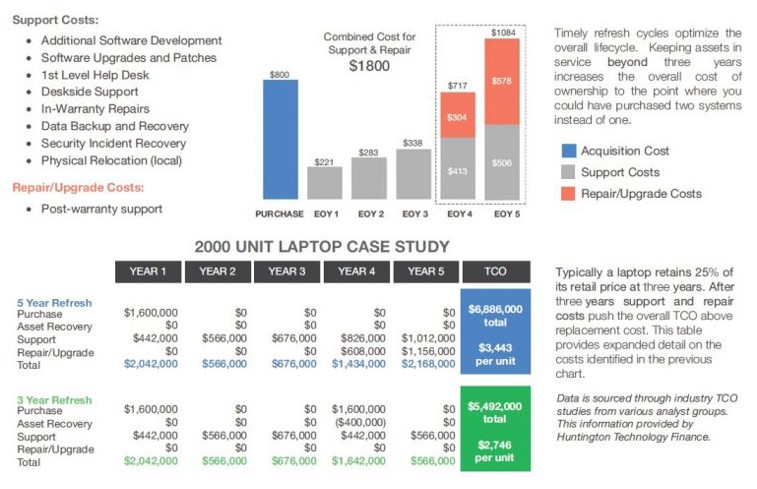
Farmhouse Networking continues to make strides in providing our customers with the best, most cost effective, and environmentally friendly computing experience possible. Part of that process is what has come to be known as Lifecycle Management. Each piece of hardware has an expected amount of time in which it is cost effective to use and support it. Once this time frame has been exceeded the cost of supporting the device becomes greater than the cost as shown in the following graph:
Turn retired IT assets into profit through strategic lifecycle management
FHN Lifecycle Management
So the question remains what to do with the old computers when the time comes to replace them. Previously here in Grants Pass, OR we could support a local charity by taking them to Southern Oregon Aspire to have the computers dismantled and hard drives shredded. Now that their doors are closed we are stuck with dropping them off at the local dump, but what if you could make money while being responsible with the environment?
Farmhouse Networking is now partnering with a company called Arcoa, who do just that. Here is what they do in their R2 rated responsible recycling facility:
“We help you recover value from retired electronic equipment through responsible methods of reuse and recycling. Resale offers the best potential for value recovery, but the fast pace of innovations in technology and short product life cycles can limit equipment’s potential for reuse. From there, the best option may be to recycle the items in an environmentally friendly manner. We’ve built a robust de-manufacturing process to offer additional options for asset value recovery by disassembling equipment for commodity grade materials, which can be diverted from landfills and be used to create new materials.”
Hard drives will be electronically wiped, magnetically degaussed, or shredded based on need. The rest of the parts will be dismantled and sold with part of the profit returning to your company to help offset the cost of buying new computers. What could be better than making money on the buy?
If your company is heading towards a hardware refresh, then make the environmentally sound choice by contacting us for assistance.
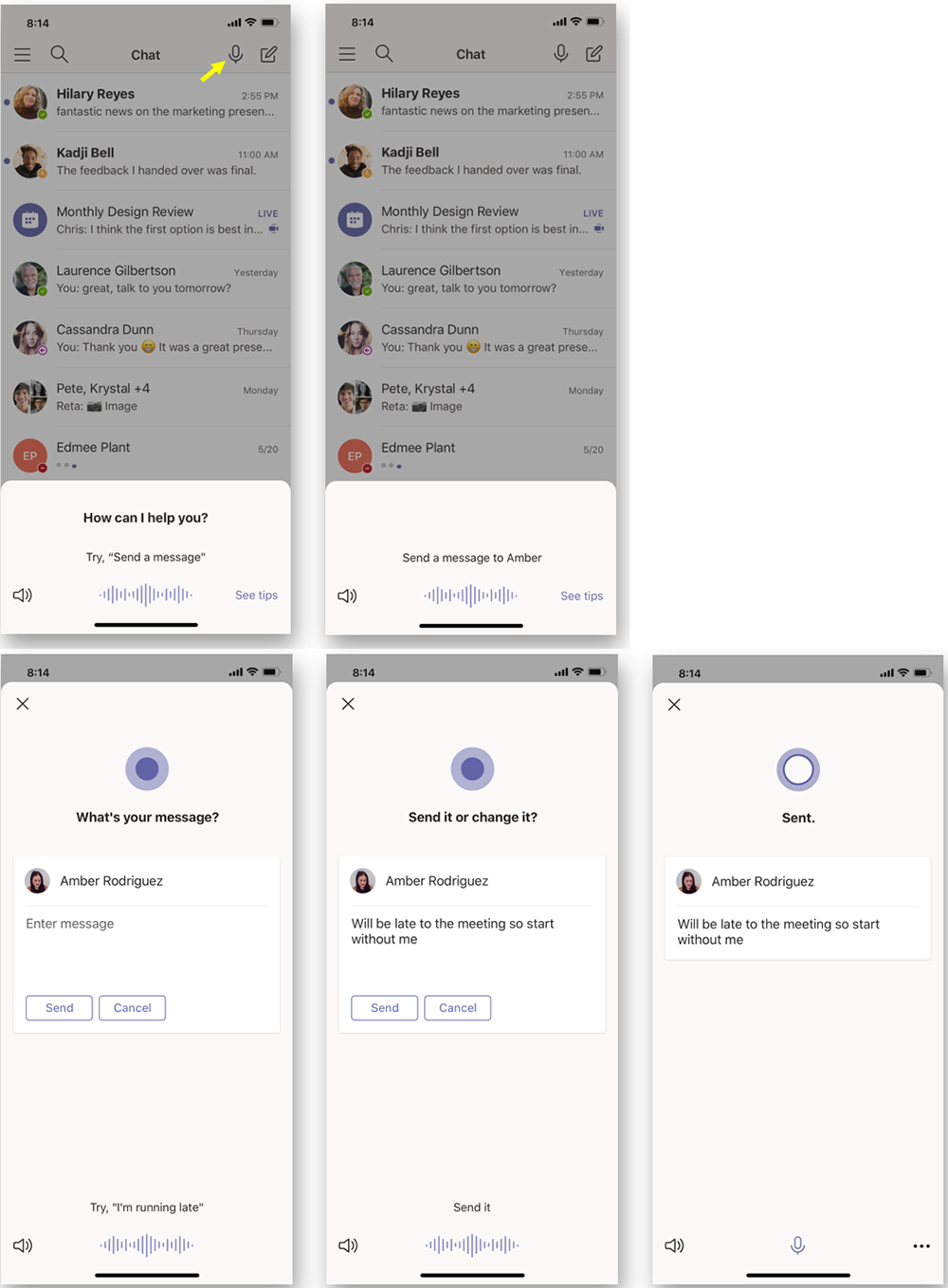
According to the Microsoft Office 365 development roadmap, an exciting new feature is coming to Microsoft Teams:
“Cortana is coming to the Teams mobile app, using AI and the Microsoft Graph to provide voice assistance in Teams. To stay connected to your team even when you have your hands full, click the microphone button on the top right and ask Cortana to make a call, join a meeting, send chat messages, share files, and more. These voice assistance experiences are delivered using Cortana enterprise-grade services that meet Microsoft 365 privacy, security and compliance commitments. Cortana will be available in the Teams mobile app on iOS and Android in the coming weeks for Microsoft 365 Enterprise users in the U.S. in English.”
Voice profiles transform generic transcripts into actionable intelligence
If your company is looking to collaborate with your office effectively, then contact us for assistance.
Farmhouse Networking has had a long standing policy that we do not keep a record of client passwords (except when needed for device administration). That is about to change, but before we talk about our new password policy let’s talk password storage:
Common Password Storage
Here are some popular places where many businesses store their passwords that make them very vulnerable to being stolen.
Passwords written on paper (that are not under lock and key):
On your desk under your keyboard (or taped underneath)
Under your stapler or desk decorations
On sticky notes stuck to your monitor or desk
On a scrap of paper on your desk or in a drawer
In a notebook or address book
In a old-fashioned Rolodex file
Paper printouts or photocopies of your passwords
Anyone with access to your office could easily find and steal passwords stored like this.
Passwords stored in your computer (without using encryption):
Remembered in your web browser
A document called “Passwords” that you’ve created anywhere on your computer, perhaps using Microsoft Word or Excel
A document with any other name on your computer (including the password as the name)
Email drafts that you’ve created (but not sent) containing password information
Anyone with access to your computer could easily find and steal passwords stored like this, including both a person with physical access to it as well as a virus or hacker gaining access via the internet, or scamming you into granting them access, even once.
Passwords stored in your smartphone or tablet (without using encryption):
Electronic “Notes” containing password information
Other documents or emails similar to the ones listed in computer storage above
Anyone with access to your device could easily find and steal passwords stored like this.
Passwords sent via regular (insecure) email:
Emails that you have sent to yourself containing password information
Emails that you have sent to anyone else containing password information
Any information that you send using regular (unencrypted) email puts that information at risk of being stolen. Email is neither private nor secure. Sending an email is like mailing a postcard, and hackers and thieves can easily read the contents. You should never send passwords (or any other confidential or sensitive data) via regular email.
Secure Password Storage
Now for the discussion of Farmhouse Networking’s new password policy. We are partnering with a company to provide a storage of passwords and other client documentation with military grade encryption. This partnership also allows us to address the dangers that common password storage present by offering our clients this same encrypted password storage service. Here are some of the benefits of this service:
Unlimited users
Unlimited passwords
Each user has a personal password vault
Shared company password vault
Security groups to manage access
Auditing & reporting (Compliance)
Secure password sharing
1-Click Login Tool (for all major browsers)
Mobile Device Access
Only $15 per month (Compared to Lastpass Business at $4 per user per month)
If your company is using common password storage of any kind do yourself a security favor and contact us to upgrade to secure password storage.
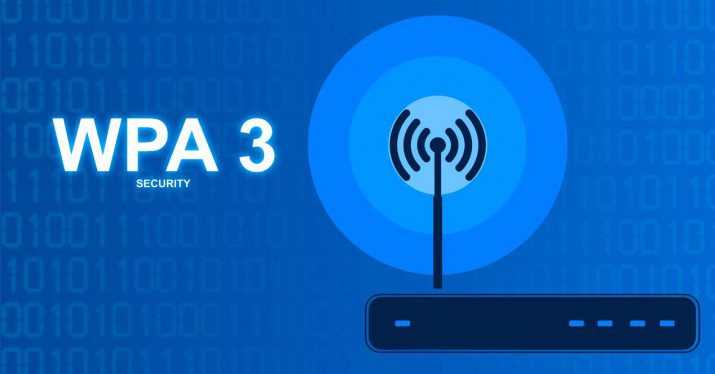
Strange to think that the current wireless security protocol has been in use for over a decade, but with the release of WPA3 certification today the Wi-Fi Alliance has made some serious strides towards a more secure wireless security standard.
Security Improvements
Offline Password Guessing – Attackers will now only get one guess per offline packet instead of unlimited. This will force them to interact with the wireless device directly which will make their attacks easier to detect and easier to shut them out.
Forward Secrecy – Even if the attacker is able to record a data stream and crack the current password, they will not be able to read the recorded data – only new data flowing over the network.
192-bit Encryption: – Enterprise users and tech savvy small businesses will be able to take advantage of deeper encryption for more secure connections
Wi-Fi Easy Connect – Simple to use, secure way for home users to connect their devices by scanning a QR code instead of entering a complex password.
This new security protocol mixed with the latest 802.11ax (that could bring 10 Gigabit speeds to wireless) will make 2019 a banner year for wireless technology.
If your company is interested better wireless security or faster wireless speeds, then contact us for assistance.
And God will generously provide all you need. Then you will always have everything you need and plenty left over to share with others. As the Scriptures say,
“They share freely and give generously to the poor. Their good deeds will be remembered forever.”
For God is the one who provides seed for the farmer and then bread to eat. In the same way, he will provide and increase your resources and then produce a great harvest of generosity in you. - 2 Corinthians 9:8-10
We use cookies to ensure that we give you the best experience on our website. If you continue to use this site we will assume that you are happy with it.