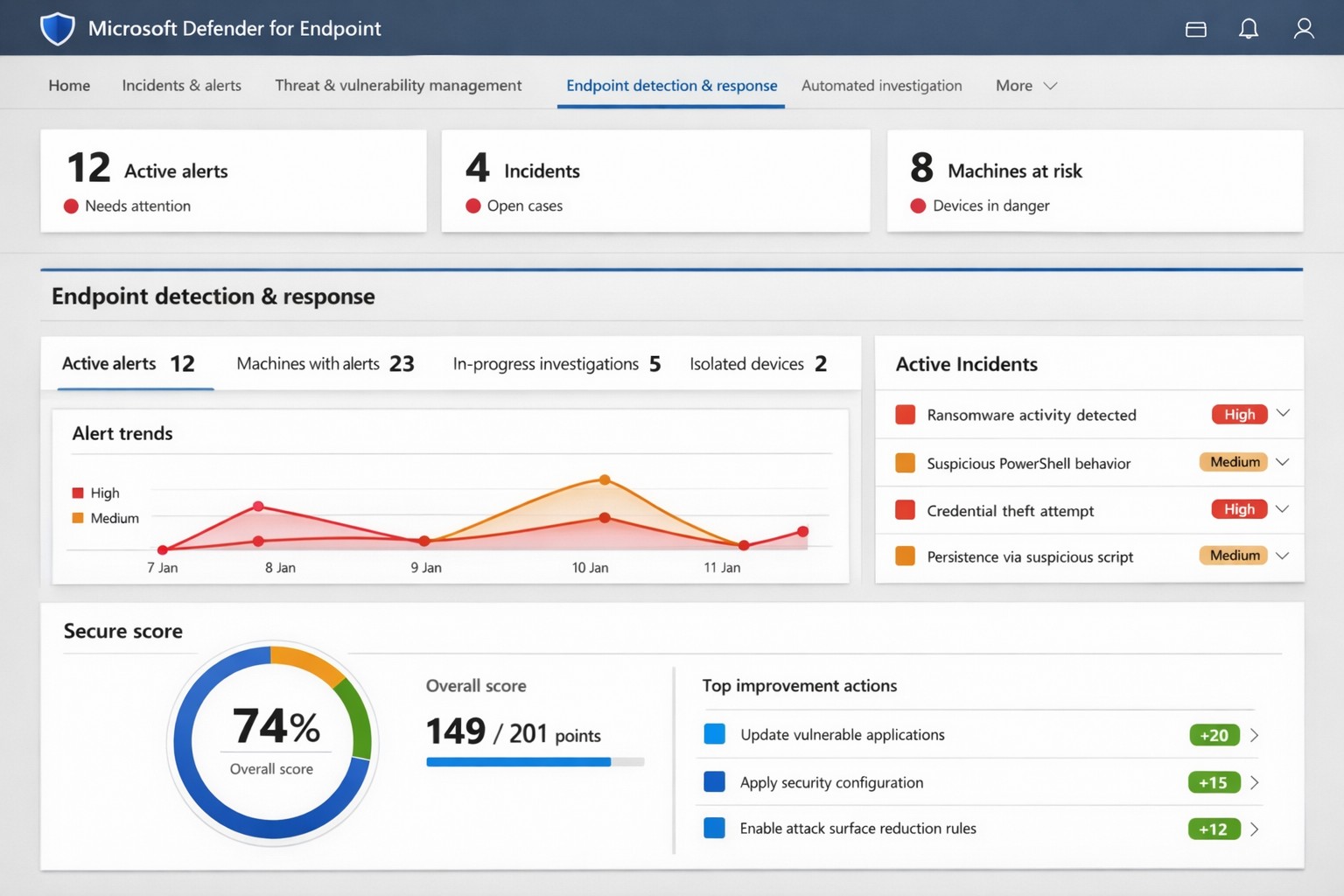
Microsoft Defender for Endpoint (ATP) portal: Monitor advanced threats, EDR alerts, and secure score to safeguard your business devices.
Cyber threats like ransomware and data breaches can cripple operations, costing millions in downtime and recovery. Microsoft Defender for Endpoint—previously known as Microsoft Defender Advanced Threat Protection (ATP)—delivers enterprise-grade endpoint security to detect, investigate, and stop these attacks before they escalate.
What is Microsoft Defender for Endpoint?
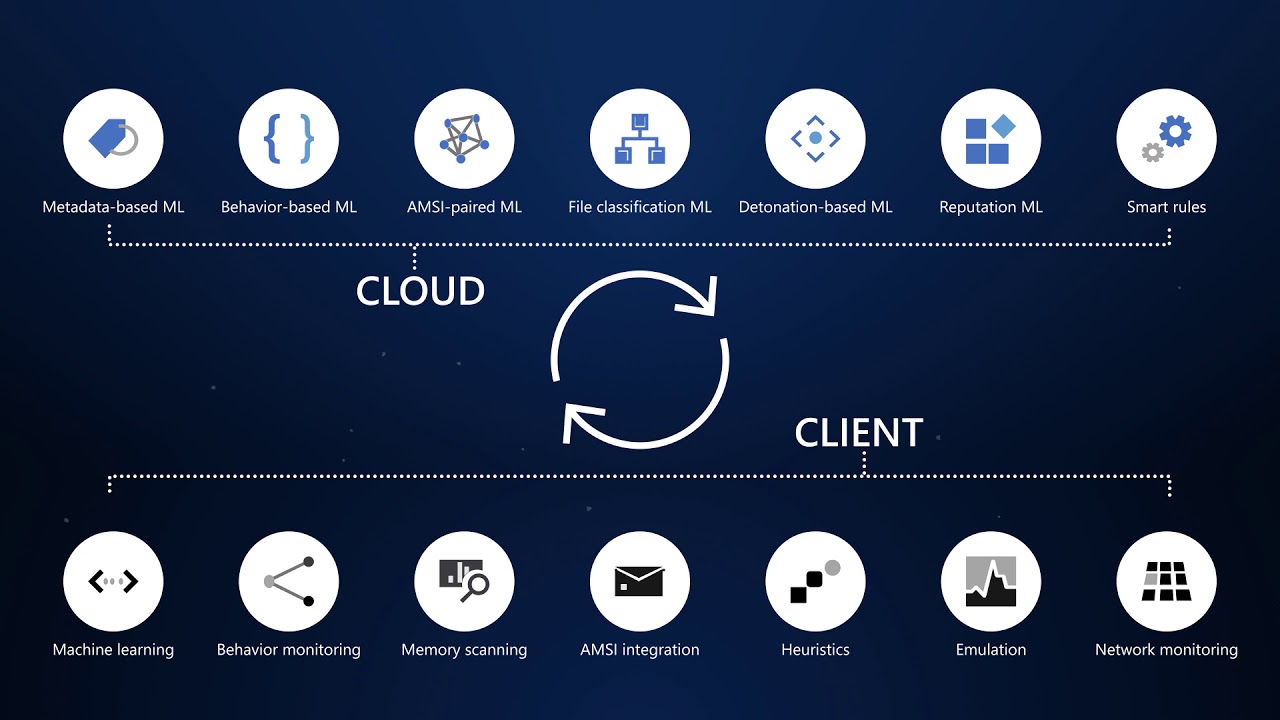
This cloud-native platform safeguards devices like laptops, servers, and mobiles from advanced threats using AI-driven analytics, behavioral monitoring, and automated response. Key capabilities include next-generation antivirus, endpoint detection and response (EDR), threat and vulnerability management, attack surface reduction, and automated investigations that group alerts into incidents for faster triage.
It integrates seamlessly with Microsoft 365, offering Plan 1 (basic protection, network controls) and Plan 2 (full EDR, vulnerability management, sandboxing). Businesses gain a “secure score” to benchmark and improve security posture.
Practical Action Steps for Implementation
Follow these steps with your IT team to deploy effectively:
Assess Eligibility and License: Confirm Microsoft 365 E3/E5 or standalone Defender licensing via the Microsoft 365 admin center. Start a 30-day trial if needed.
Onboard Devices: Use Microsoft Endpoint Manager or Group Policy to enable onboarding scripts for Windows, macOS, Linux, iOS, and Android. Prioritize high-value assets like executive laptops.
Configure Policies: Set attack surface reduction rules, enable cloud-delivered protection, and deploy controlled folder access to block ransomware. Test in audit mode first.
Monitor and Respond: Review the Defender portal daily for incidents. Use automated remediation to isolate devices and run live response commands like file quarantine.
Train Staff and Review Secure Score: Conduct phishing simulations and user training. Aim for a secure score above 80% by addressing recommendations.
Expect initial setup in 1-2 weeks for 50 devices, with ongoing management under 1 hour daily post-configuration.
FAQ: Client Inquiries Answered
How does Defender differ from basic antivirus? Unlike traditional AV, it provides EDR for post-breach hunting, cloud analytics for zero-day threats, and cross-device incident correlation—reducing detection time from 200+ days to hours.
What about performance impact? Minimal; sensors use hardware acceleration and run lightweight scans. Enterprises report <1% CPU overhead.
Is it suitable for small businesses without IT staff? Yes, Defender for Business offers simplified P1/P2 features with guided setup. It scales from 5 to 50,000 endpoints.
How secure is data in Defender? Microsoft isolates customer data by tenant, with no use for training AI. Compliance includes GDPR, HIPAA.
What if we use non-Windows devices? Full support for macOS, Linux, mobile; unified console prevents silos.
How Farmhouse Networking Can Help
Farmhouse Networking specializes in B2B cybersecurity for accounting, healthcare, and nonprofits—industries handling sensitive data under strict compliance like HIPAA and PCI-DSS. We conduct cloud security assessments to baseline your posture, implement Defender onboarding, customize policies for your endpoints, and integrate with existing Microsoft stacks for automated threat hunting.
Our team handles vulnerability prioritization, staff training, and 24/7 monitoring, freeing you to focus on growth. Clients see 40% faster threat response and improved secure scores within months.
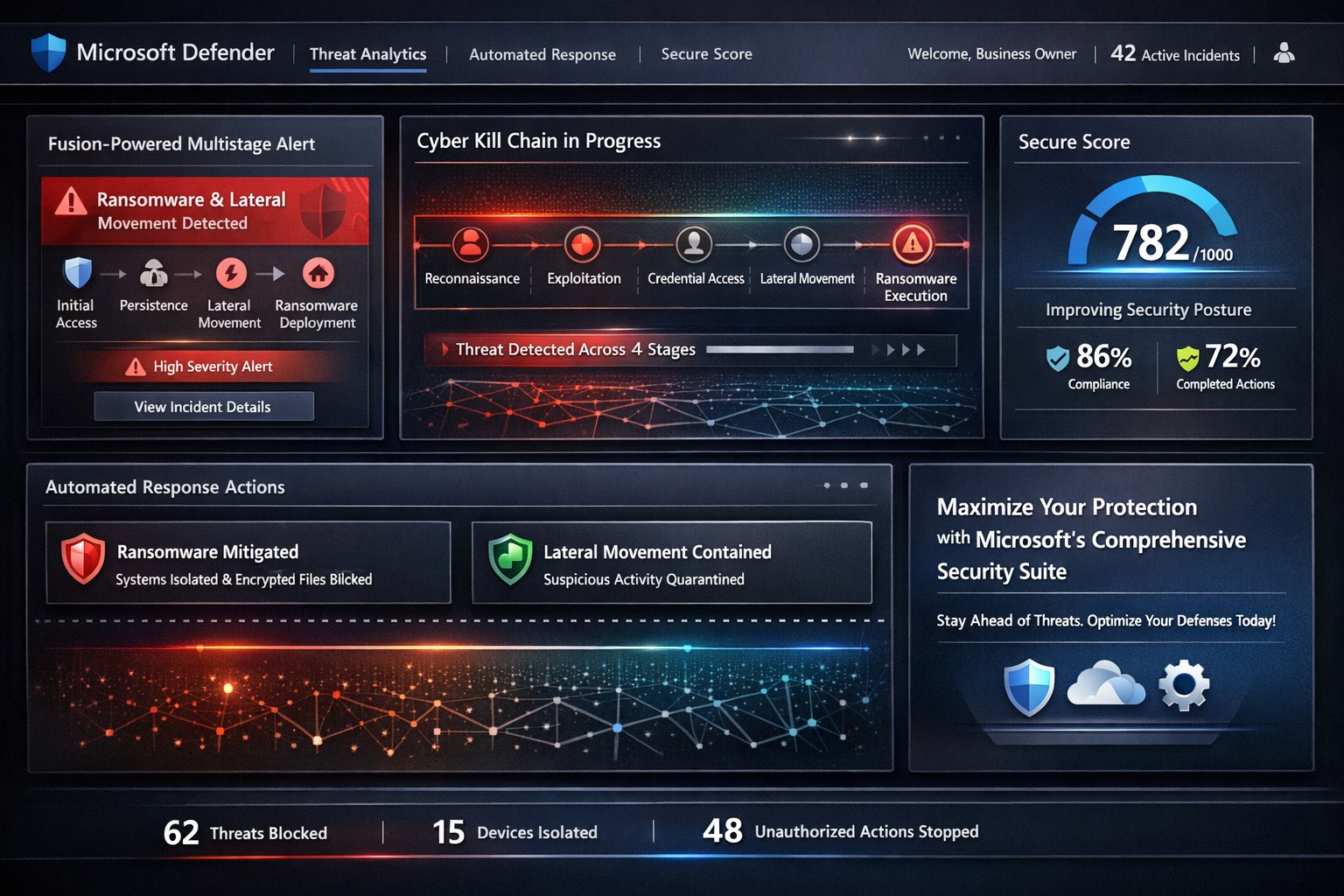
Visualize multistage attack detection with Microsoft security suite—stop threats from reconnaissance to exfiltration using Sentinel and Defender XDR.
Cyber threats evolve rapidly, targeting businesses at every stage of the attack chain—from reconnaissance to exfiltration. Microsoft’s integrated security solutions, like Sentinel and Defender, empower business owners to detect and neutralize these threats proactively, safeguarding operations and revenue.
Understanding the Cyber Kill Chain
The cyber kill chain framework outlines eight stages: reconnaissance, weaponization, delivery, exploitation, installation, command and control (C2), actions on objectives, and monetization. Microsoft’s tools map directly to these, using AI-driven correlation to spot multistage attacks that single-point defenses miss.
Microsoft Sentinel’s Fusion engine exemplifies this by analyzing anomalous behaviors across stages, generating high-fidelity incidents from low-volume alerts—like ransomware execution following suspicious sign-ins. Defender XDR unifies endpoints, identity, email, and cloud signals for end-to-end visibility.
Practical Action Steps for Implementation
Business owners and IT teams can deploy these solutions methodically to maximize detection.
Assess Current Posture: Log into the Microsoft 365 Defender portal (security.microsoft.com). Review Secure Score for Devices to identify unprotected systems and prioritize fixes, such as enabling multifactor authentication (MFA).
Enable Fusion in Sentinel: In Azure Sentinel, activate the Advanced Multistage Attack Detection rule—it’s enabled by default but requires data connectors for Microsoft Entra ID, Office 365, and endpoints. Ingest logs from these sources to detect scenarios like mass file deletion post-suspicious sign-in.
Configure Defender Policies: Set Strict preset policies for Safe Attachments, Safe Links, and anti-phishing in Email & Collaboration > Threat Policies. Test with advanced hunting queries to proactively scan for breaches.
Monitor and Respond: Use the unified dashboard for prioritized incidents. Automate investigations in Defender XDR to triage alerts, focusing IT efforts on high-severity threats like lateral movement or data exfiltration.
Test and Iterate: Run tabletop exercises simulating kill chain stages. Leverage Threat Analytics for tailored briefings on risks specific to your infrastructure, such as exposed servers vulnerable to ransomware.
These steps typically yield results within weeks, reducing alert fatigue and dwell time.
FAQ: Client Inquiries Answered
Q: How does Microsoft detect threats across all kill chain stages? A: Fusion in Sentinel correlates alerts from reconnaissance (suspicious sign-ins) to exfiltration (mass file downloads), covering compute abuse, credential theft, ransomware, and more via ML algorithms.
Q: Is this suitable for small businesses without a full SOC? A: Yes—preset policies and automated response in Defender XDR minimize manual effort. Secure Score provides actionable recommendations without deep expertise.
Q: What about integration with existing tools like firewalls? A: Sentinel ingests data from Palo Alto, Cisco, and Fortinet, enhancing detections like beaconing post-sign-in or anomalous traffic after WMI execution.
Q: How much does it cost, and what’s the ROI? A: Pricing scales with data ingestion; starts low for Microsoft 365 E5 users. ROI comes from stopping breaches early—e.g., preventing ransomware via stage-specific alerts.
Q: Can it handle cloud-specific threats? A: Attack Path Analysis in Security Exposure Management identifies exploitable paths to critical assets, validating exposures in storage, APIs, and AI agents.
How Farmhouse Networking Elevates Your Security
Farmhouse Networking specializes in deploying Microsoft security stacks for accounting, healthcare, and charity sectors—industries facing strict compliance like HIPAA and PCI-DSS. We handle initial assessments, custom Fusion rule tuning beyond defaults, and ongoing optimization to align with your kill chain risks.
Our team integrates Sentinel with your endpoints and cloud environments, trains IT staff on Defender workflows, and monitors via managed detection services. Clients see 40-60% faster threat response, driving organic traffic to secure operations that convert partners and donors confidently.
Call to Action
Ready to fortify your business against multistage attacks? Email support@farmhousenetworking.com for a free threat posture audit and personalized Microsoft security roadmap.
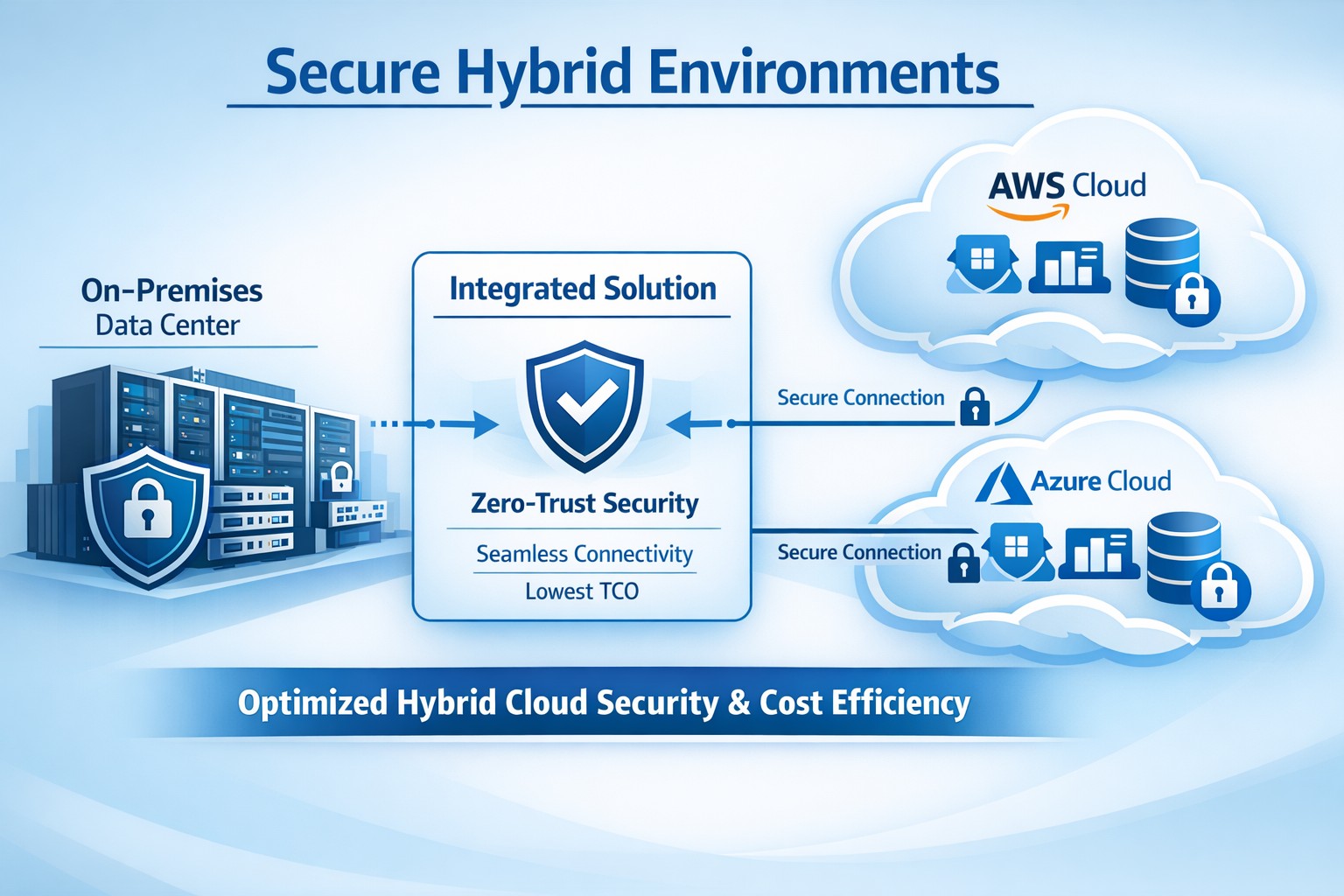
Integrated platform connecting on-prem and cloud for secure hybrid environments, minimizing TCO through automation and zero-trust security.
You’re dealing with rising IT costs while demanding ironclad security in hybrid setups—on-prem servers alongside AWS, Azure, or Google Cloud. Integrated solutions like IBM Hybrid Cloud Mesh or Cisco Secure Workload deliver secure hybrid environments at the lowest total cost of ownership (TCO) by automating connectivity, enforcing zero-trust security, and optimizing resources without vendor lock-in.
Why Integrated Solutions Cut TCO
Hybrid environments blend on-premises and cloud resources for flexibility, but silos breed inefficiency—manual configs spike ops costs by 30-70%, per industry benchmarks. Integrated platforms streamline this with application-centric networking: they auto-provision secure links based on app needs, slashing setup from days to minutes and avoiding over-provisioning.
Zero-trust models and end-to-end encryption are baked in, reducing third-party tool spends and compliance overhead. Real-world cases show 30% TCO drops via dynamic scaling and cross-cloud mobility, freeing budget for growth.
Action Steps for Implementation
Follow these steps with your IT team to deploy a secure hybrid setup minimizing TCO.
Assess Current Infrastructure: Inventory workloads, map on-prem/cloud dependencies, and calculate baseline TCO (hardware, labor, cloud bills). Use tools like AWS TCO Calculator for benchmarks—target 20-40% savings.
Select Integrated Platform: Choose solutions like Cisco Secure Workload for microsegmentation or IBM Hybrid Cloud Mesh for intent-driven connectivity. Prioritize plug-and-play integration to cut custom dev by 50%.
Pilot and Automate Connectivity: Deploy in a sandbox: define app policies, enable zero-trust, and automate provisioning. Monitor for 2-4 weeks, optimizing resource use to eliminate idle cloud spend.
Scale Securely with Monitoring: Roll out firm-wide, integrating DevOps/CloudOps workflows. Set alerts for anomalies; audit quarterly to maintain <5% over-provisioning.
Measure and Iterate: Track KPIs—provisioning time, downtime, TCO reduction. Adjust via platform dashboards for ongoing 15-30% savings.
FAQs from Business Owners
Q: What’s the real TCO impact? A: Integrated solutions reduce TCO 30-50% by automating ops, cutting manual errors, and enabling cost-optimized cloud choices without lock-in.
Q: How secure is hybrid without complexity? A: Zero-trust enforcement, workload visibility, and policy-based microsegmentation protect across environments, minimizing breach risks and extra security tools.
Q: Will this work for my industry (accounting/healthcare/charity)? A: Yes—compliance-ready for HIPAA/SOX, scalable for variable charity workloads, and cost-sensitive for accounting firms handling sensitive data.
Q: Migration downtime? A: Minimal—platforms support agentless deployment and phased rollout, with 70% faster configs than legacy setups.
Farmhouse Networking specializes in tailored hybrid environments for accounting, healthcare, and charity sectors, driving organic traffic and B2B leads via SEO-optimized strategies. We handle full implementation: infrastructure audits, platform selection (e.g., Cisco/IBM integrations), secure automation, and 24/7 monitoring.
Our clients see 25-40% TCO cuts plus enhanced security postures, with custom branding and lead-gen funnels converting visitors to long-term partners. We optimize for keywords like “secure hybrid environments lowest TCO” to boost your site’s rankings.
Microsoft Defender Secure Score dashboard—key to evaluating and activating built-in remote work security features for your business.
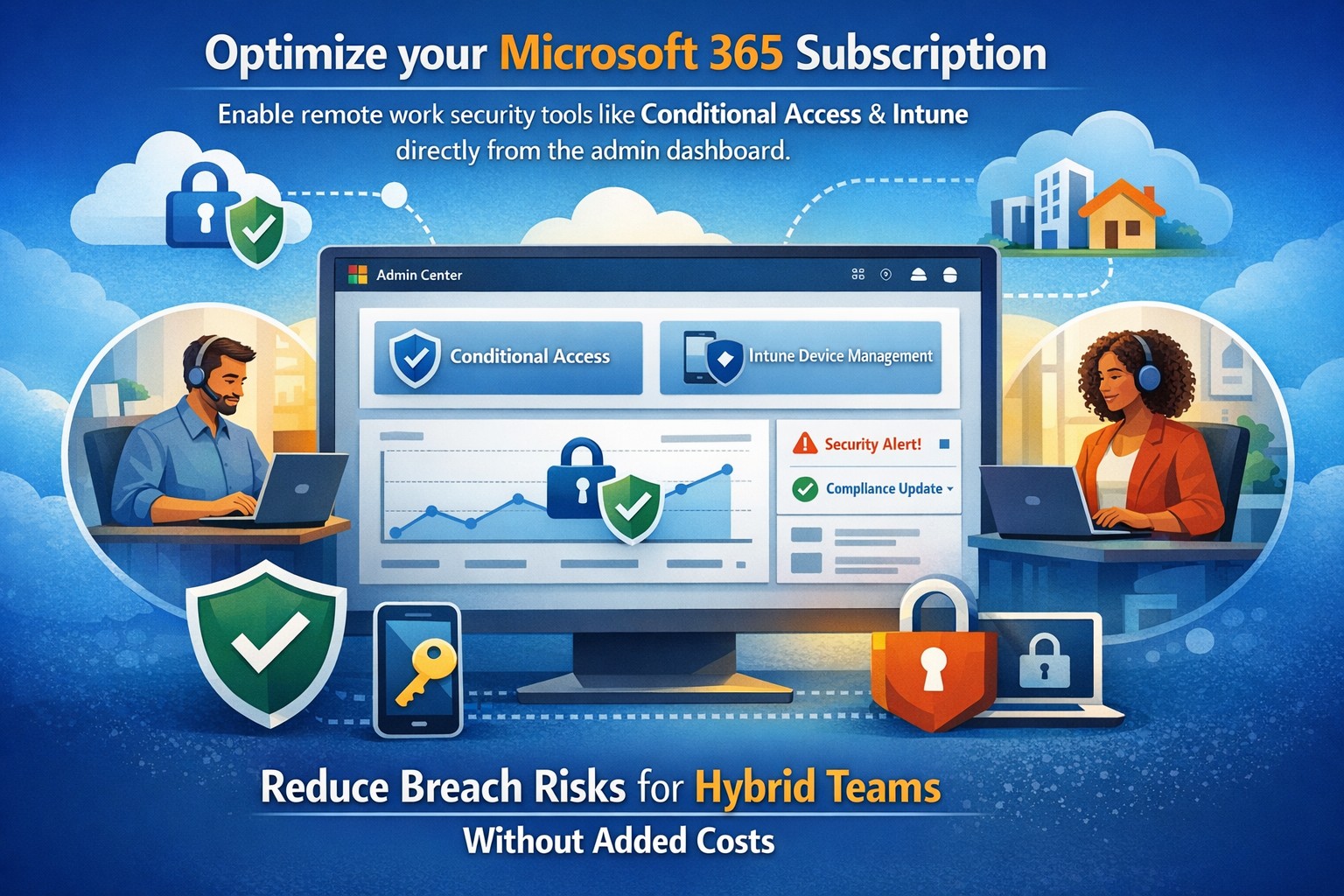
You’re likely paying for Microsoft 365 subscriptions but underutilizing their built-in security arsenal. With cyber threats targeting remote setups—phishing up 30% year-over-year per recent Microsoft telemetry—it’s critical to activate these features now to protect data, cut breach risks, and avoid costly add-ons.
Key Microsoft Security Features
Microsoft 365 packs robust remote work protections like Multi-Factor Authentication (MFA), Conditional Access, Microsoft Intune for device management, and Defender suite tools. MFA blocks 99.9% of automated attacks, while Conditional Access enforces policies based on location, device health, or risk signals. Intune enables endpoint detection and response (EDR), remote wipes, and compliance checks, ensuring laptops on home Wi-Fi stay secure without VPN overkill.
These tools integrate seamlessly across E3/E5 plans, with 2026 updates adding AI-driven Copilot security agents and expanded Intune Remote Help.
Practical Action Steps
Work with your IT team to implement these prioritized steps, achievable in 1-2 weeks for most SMBs.
Enable MFA Everywhere: In Azure AD, turn on Security Defaults or Conditional Access policies requiring MFA for all users, prioritizing admins. Use Microsoft Authenticator app over SMS.
Set Up Conditional Access: Block logins from risky locations/devices; require compliant endpoints. Go to Azure AD > Security > Conditional Access > New policy.
Enroll Devices in Intune: Automate BitLocker encryption, OS updates, and EDR via Microsoft Defender. Test remote wipe on a pilot group first.
Activate Defender Protections: Enable Safe Links/Attachments in Defender for Office 365, plus XDR for cross-app threat detection. Review Secure Score dashboard weekly.
Audit and Train: Run Microsoft Secure Score to baseline posture, then deploy awareness training via Attack Simulator.
Step
Owner
Time Estimate
Impact
MFA Enablement
IT Admin
1 day
Blocks 99.9% credential attacks
Intune Enrollment
IT + Owners
3-5 days
Secures remote endpoints
Defender Activation
IT Admin
2 days
AI threat response
FAQs for Business Owners
How much does this cost if we have Microsoft 365? Most features are included in E3/E5 plans—no extras needed. Check licensing in admin center; upgrades like Defender P2 cost ~$5/user/month if required.
What if our team resists MFA? Start with risk-based policies (e.g., MFA only on unusual logins) for low friction, then phase to full enforcement. Training reduces pushback by 40%.
Can we secure non-Windows devices? Yes, Intune supports macOS, iOS, Android for MAM policies and compliance.
How do we measure success? Track Secure Score improvements (aim for 80%+), reduced alerts in Defender portal, and zero MFA-blocked breaches.
Is VPN still required? Not always—Conditional Access + Intune often suffices for cloud apps, minimizing latency.
How Farmhouse Networking Helps
Farmhouse Networking specializes in Microsoft 365 optimizations for accounting, healthcare, and charity sectors, where compliance (HIPAA, PCI) is non-negotiable. We audit your tenant, implement these steps via remote sessions, and provide ongoing monitoring—delivering 25% risk reduction in 30 days without downtime. Our SEO-driven websites and lead-gen strategies have boosted organic traffic 3x for similar clients.
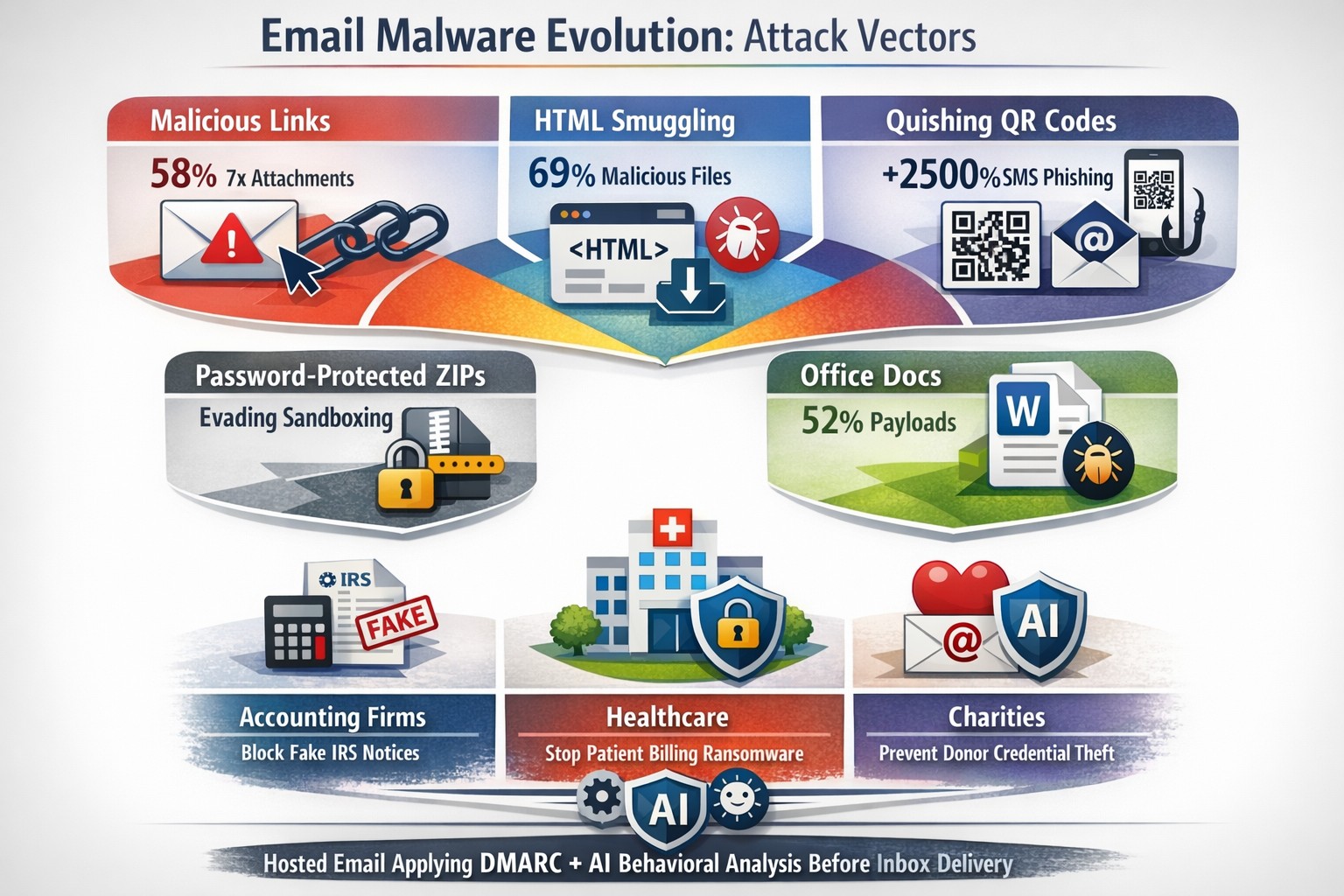
Read a recent study on the origins of malicious software aka malware. Here are the highlights:
Current Malware Statistics
29% – Malware is previously unknown to security vendors due to the continued efforts of malware creators to hide the software or make it undetectable.
88% – Malware is delivered to people’s inboxes and some of it bypassing normal SPAM filters.
8.8 Days – Time before regular antivirus vendors have discovered the malware and added it to their lists for detection.
$50 – The cost of a pre-fabricated malware kit that can be bought currently on the dark web.
“The most common type of malicious attachments were: documents (Word – 31%), archive files (ZIP & RAR – 28%), spreadsheets (Excel – 19%) and executable files (EXE – 17%).”
What can be done?
A multi-tiered approach to security remains the best solution:
Moving from traditional antivirus to Enhanced Detection & Response (EDR) software to go beyond lists of know infections to behavior tracking of software
Moving from traditional SPAM filters to Email Advanced Threat Protection which scans each email and opens each attachment to see if there is any malicious activity cause by them
Moving from traditional router to a business class firewall with Intrusion Prevention System to monitor traffic for suspicious activity
Employee training is also key to keep your staff aware of immerging trends and threats
If your company is looking to enhance your network security posture, then contact us for assistance.
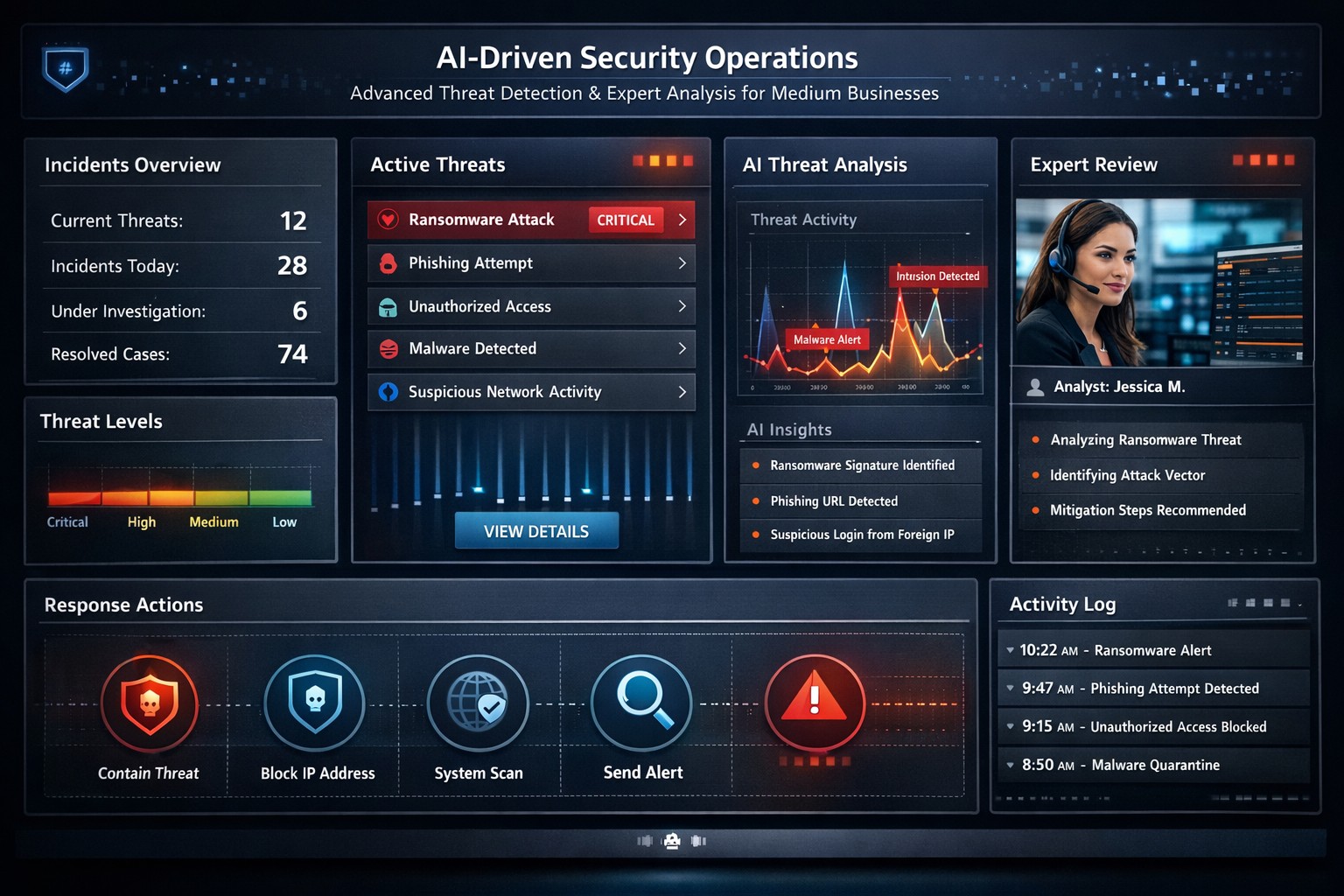
Visualizing faster threat detection: Data-driven cybersecurity with human oversight protects medium business systems from attacks.
You’re juggling growth, operations, and rising cyber threats that could halt everything overnight. A data-driven, human-guided security approach empowers you to detect and respond to attacks quicker and more accurately – reducing downtime and protecting your bottom line.
Why This Approach Wins for Medium Businesses
Traditional cybersecurity relies on static rules, often missing sophisticated threats amid complex networks from remote work and cloud tools. Data-driven strategies analyze real-time logs, user behavior, and threat intelligence with AI, spotting anomalies humans might overlook. Human oversight ensures context-aware decisions, blending machine speed with expert judgment for precision. This hybrid model cuts response times from days to minutes, vital for medium businesses lacking massive security teams.
Practical Action Steps
Implement these steps with your IT department to build this defense:
Audit Data Sources: Identify critical logs from networks, endpoints, and apps; prioritize user behavior and external threat feeds for comprehensive visibility.
Deploy Analytics Tools: Integrate AI platforms like SIEM systems with machine learning for anomaly detection; start with open-source options or scalable SaaS for cost efficiency.
Enable Automated Alerts: Set up real-time monitoring with automated responses for low-risk issues, reserving human review for high-severity events.
Train Your Team: Conduct quarterly simulations blending data insights with human decision-making; focus on root-cause analysis from past incidents.
Test and Iterate: Run monthly penetration tests, using data to rank risks and measure improvements in detection accuracy.
These steps scale affordably, leveraging existing infrastructure without overhauling your setup.
Common Questions Answered
How does this differ from basic antivirus? Antivirus scans for known signatures; data-driven security uses behavioral analytics to catch zero-day threats, with humans validating alerts for accuracy.
What’s the ROI for a medium business? Expect 50-70% faster incident response, slashing breach costs (average $4.5M per IBM data) and boosting compliance, freeing IT for growth initiatives.
How much does implementation cost? Initial setup ranges $50K-$150K for mid-tier tools and training, with ROI in 6-12 months via prevented losses; cloud options minimize upfront spend.
Can we handle this in-house? Yes for basics, but partnering accelerates expertise; human-guided layers prevent AI false positives that overwhelm small teams.
What about regulatory compliance? Automated reporting from data tools simplifies GDPR, HIPAA, or CCPA audits, proving proactive measures with auditable logs.
How Farmhouse Networking Supports You
At Farmhouse Networking, we specialize in tailored strategies for accounting, healthcare, and charity sectors—industries facing strict compliance and high-stakes data risks. Our team deploys data-driven platforms integrated with human-guided SOC services, handling audits, tool setup, and 24/7 monitoring. We’ve helped similar medium businesses cut threat response by 60%, enhancing SEO-friendly client trust signals like security badges. From branding secure websites to lead-gen funnels that highlight your defenses, we drive organic traffic and B2B conversions.
Ready to fortify your systems? Email support@farmhousenetworking.com for a free risk assessment and custom roadmap. Act now—secure your edge
Every day, BP manages the difficult business of finding, producing, marketing, and moving energy around the globe. Core to success is the modernization and digitization of the business, while being able to defend a vast digital perimeter against cyberattacks. This video shows how BP is migrating its work environment to Microsoft 365 Enterprise E5 to take advantage of a platform approach.
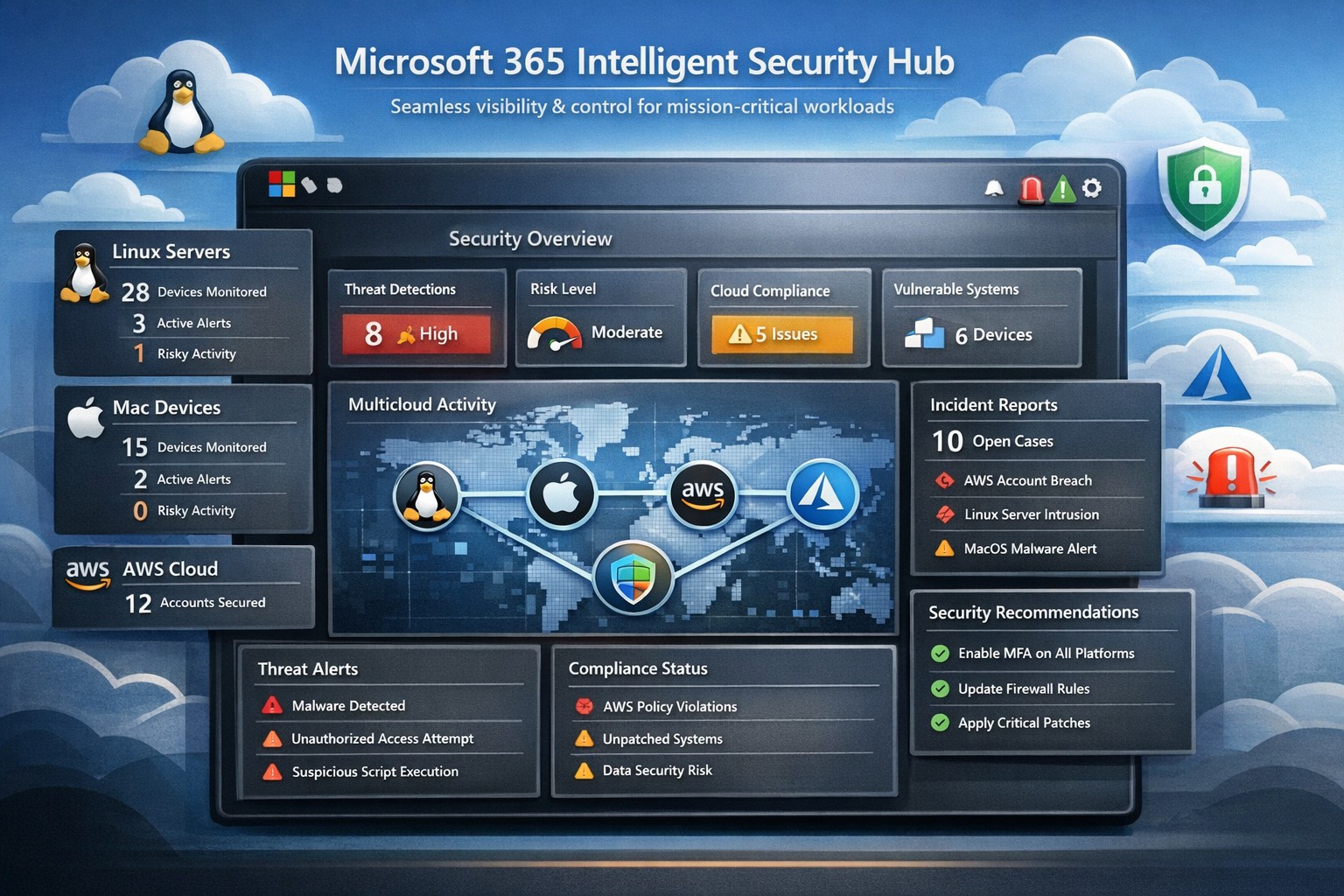
Unified Microsoft 365 security hub managing threats across Linux, Mac, and AWS platforms for business workloads.
Managing security across diverse platforms like Windows, Linux, Mac, AWS, and beyond can feel overwhelming—yet Microsoft 365’s intelligent security hub, powered by tools like Microsoft Defender for Cloud Apps, delivers seamless protection for mission-critical workloads. This unified approach goes far beyond Microsoft ecosystems, providing visibility, threat detection, and governance exactly where your operations demand it.
Core Features of Microsoft 365 Security Hub
Microsoft 365 integrates Microsoft Defender, Purview, and Sentinel into a central hub for multicloud security, supporting Linux, Mac, AWS, and more through connectors and agents. Key capabilities include anomaly detection via machine learning, data loss prevention (DLP), conditional access, and real-time threat response across hybrid environments. Business Premium plans enhance this with endpoint protection for diverse devices and Safe Links/Attachments for Teams, SharePoint, and OneDrive.
Practical Action Steps for Implementation
Follow these steps with your IT team to deploy Microsoft 365’s security hub effectively:
Verify Licensing and Access: Ensure Microsoft 365 Business Premium licenses for users; access via Microsoft Defender Portal > Cloud Apps (requires Security Administrator role).
Enable Core Protections: Turn on MFA via security defaults or Conditional Access; activate preset policies for anti-phishing, anti-malware, and admin account protection.
Connect Apps and Devices: In Defender Portal, go to Settings > Cloud Apps > App Connectors to link AWS, Office 365, etc.; onboard devices with Intune or Defender for Business agents for Mac/Linux.
Configure Policies and Discovery: Create session policies, DLP for sensitive data, and cloud discovery reports using firewall logs or Defender for Endpoint integration.
Monitor and Maintain: Review Secure Score dashboard weekly; set alerts for anomalies and conduct regular audits.
These steps typically take 1-4 weeks, starting with a pilot group.
FAQs: Client Inquiries Answered
Does it really support non-Microsoft platforms like AWS and Linux? Yes, Defender for Cloud Apps uses API connectors for AWS visibility, agents for Linux/Mac endpoints, and multicloud posture management without agent overhead on some resources.
How does it handle multi-cloud workloads? It provides unified threat protection, anomaly detection, and IAM inheritance across Azure, AWS, GCP via Defender for Cloud, integrating with existing tools like Sentinel for SIEM.
What’s the cost impact for small businesses? Included in Business Premium (~$22/user/month); scales with users, no extra for basic multicloud connectors—focus on high-value workloads first.
How secure is data in transit across platforms? Encryption via Purview, Safe Links for URLs, and session controls block risky actions; complies with standards like GDPR through DLP policies.
How Farmhouse Networking Boosts Your Security Efforts
Farmhouse Networking specializes in Microsoft 365 deployments for accounting, healthcare, and charity sectors, handling setup, policy customization, and ongoing optimization to drive secure organic growth. We integrate your multicloud environments (e.g., AWS with M365), train IT teams, and monitor via Lighthouse for MSP-grade efficiency—reducing breach risks while enhancing client trust and conversions.
When The Walsh Group—one of the largest construction contractors in the United States—moved to the cloud, it realized it needed better ways to manage who accesses its systems. The company set up identity as the control plane—with Microsoft Azure Active Directory at the center and a zero-trust security stance to better protect access to all its resources. Now, The Walsh Group CIO says the company leads the industry in securing access to its hybrid environment, giving it a competitive advantage. Read the article for more.
Single secure vault eliminates password sprawl across business apps
Whether you are buying something from an online store, reading your email in the browser, checking your account balances, or uploading photos / videos to social media, most websites require an individual username and password when accessing their services. This raises various problems.
What’s with ALL the Passwords?
Using the same password for all the websites you access is a bad idea and horribly insecure. If we run a quick check on the “Dark Web” for your email address, it would likely show that hackers already know the one password you have been using forever. So the only other option is multiple passwords, which can easily go beyond the limits of our feeble human brains to keep track of OR people start creating a list that is typically typed up and saved on the computer – if a hacker gets into the computer then all the passwords are theirs too. So then the option is to find a secure way of storing and backing up these passwords, not to mention trying to make them easy to use.
Rangle Them Passwords!
That is the job of Password Management done by a small piece of software known as a password manager. It takes the complexity down to remembering the one password to open the software, then it tracks the rest from there. The good ones have the ability to generate passwords for you, store them in connection with the website you are visiting, auto-filling the password fields on the websites when you visit them again, and backup your passwords to the cloud – all with strong security and encryption to keep the hackers out of your business.
If your company is still typing passwords into a list, or worse have a paper list, then contact us for assistance migrating to a password manager.
And God will generously provide all you need. Then you will always have everything you need and plenty left over to share with others. As the Scriptures say,
“They share freely and give generously to the poor. Their good deeds will be remembered forever.”
For God is the one who provides seed for the farmer and then bread to eat. In the same way, he will provide and increase your resources and then produce a great harvest of generosity in you. - 2 Corinthians 9:8-10
We use cookies to ensure that we give you the best experience on our website. If you continue to use this site we will assume that you are happy with it.