Unlocking Deeper Client Value: How Data Analytics and Farmhouse Networking Transform Accounting Firms
Farmhouse Networking data analytics drives client insights and firm growth
Accounting firms are under pressure to go beyond tax preparation and bookkeeping. Clients now expect actionable insights and forward-thinking advisory services. Enter data analytics—the game-changer that empowers accountants to deliver strategic value, not just numbers. But to leverage these tools effectively, you need a trusted partner who understands both technology and the unique needs of accounting firms. That’s where Farmhouse Networking stands out.
Farmhouse Networking: Your Edge in Data-Driven Advisory
While many Managed Service Providers (MSPs) offer IT support, Farmhouse Networking specializes in integrating advanced data analytics solutions tailored for the accounting sector. Unlike generic MSPs, Farmhouse Networking brings:
Industry-Specific Expertise: Deep knowledge of accounting workflows and compliance requirements ensures seamless integration of analytics tools with platforms like QuickBooks and Xero.
Security and Compliance Focus: Robust data governance and security protocols safeguard sensitive financial information, reducing compliance risk.
Scalable Solutions: As your firm grows, Farmhouse Networking ensures your analytics infrastructure evolves with you, supporting everything from small practices to large CPA firms.
Practical Steps Farmhouse Networking Implements for Accounting Firms
Assessment and Customization: Farmhouse Networking starts with a thorough assessment of your current systems and client needs, recommending the best-fit analytics tools.
Seamless Integration: They handle integration with your existing accounting software, ensuring data flows securely and efficiently between platforms like QuickBooks and Xero.
Automation and Reporting: By automating data collection and report generation, Farmhouse Networking frees your team from manual tasks, enabling faster, more accurate insights for your clients.
AI-Powered Insights: Leveraging AI and machine learning, they help you identify trends, forecast cash flow, and uncover client opportunities that drive advisory conversations.
Training and Ongoing Support: Farmhouse Networking provides training for your staff and ongoing technical support, so your team can confidently use analytics tools to deliver value-added services.
Ready to Elevate Your Firm’s Advisory Services?
Don’t let your firm fall behind in the data-driven era. Email us today to discover how Farmhouse Networking can empower your accounting practice with cutting-edge analytics—transforming client relationships and unlocking new revenue streams. Take the first step toward smarter, more strategic advisory services.
How MSP Automation Transforms Manual Workflows for Business Owners
MSP automation eliminates manual tasks and boosts operational efficiency
Are you still relying on manual processes and inefficient workflows to run your business? If so, you’re not alone—but you may be leaving significant productivity and profitability on the table. Modern Managed Service Providers (MSPs) are helping business owners like you automate routine tasks, integrate essential applications, and streamline operations like never before. Here’s how MSP-driven automation can revolutionize your daily operations and set your business up for scalable success.
The Problem: Manual Workflows Are Costing You Time and Money
Manual data entry, repetitive administrative tasks, and disconnected systems can bog down even the most dedicated teams. These inefficiencies lead to:
Wasted time: Employees spend hours on tasks that could be automated.
Increased errors: Manual processes are prone to mistakes, leading to costly corrections.
Slower growth: When staff are overwhelmed with routine tasks, there’s little bandwidth left for innovation and strategic initiatives.
Seamless Integration of Essential Business Applications
Many businesses use a patchwork of tools for CRM, accounting, project management, and more. When these systems don’t communicate, data silos form, leading to confusion and inefficiency.
MSPs help you:
Integrate your tech stack: Connect CRM, email, project management, and other tools so data flows smoothly between them.
Eliminate manual data entry: Employees no longer need to copy information from one system to another, reducing errors and saving time.
Gain unified visibility: Centralized dashboards provide real-time insights into performance, helping you make informed decisions quickly.
Streamlined Workflows for Maximum Productivity
With automation and integration in place, MSPs help you:
Simplify complex processes: Workflows are automated and streamlined, reducing manual intervention and freeing up your team.
Reduce errors and delays: Automation minimizes human error and ensures tasks are completed on time.
Improve employee satisfaction: Staff can focus on meaningful work, leading to higher morale and better retention.
The Results: More Time, Fewer Errors, and a Stronger Bottom Line
Businesses that embrace MSP-driven automation see:
40%+ improvement in process efficiency
75% reduction in manual errors
ROI within six months
These gains translate into faster growth, happier clients, and a more resilient business.
Ready to Transform Your Business?
Don’t let manual processes hold your business back. Farmhouse Networking specializes in helping business owners automate routine tasks, integrate essential applications, and streamline workflows—so you can focus on what you do best.
Contact Farmhouse Networking today to discover how MSP automation can boost your productivity and accuracy—and set your business on the path to lasting success.
How an MSP Can Bring Predictability to Your Business Technology Budget
MSP transforming unpredictable IT spending into stable monthly budgeting for business financial planning
Unpredictable IT expenses can feel like a never-ending rollercoaster for business owners. One month, everything runs smoothly; the next, you’re hit with an unexpected server crash, cybersecurity scares, or a costly software upgrade. These surprises not only disrupt your operations but also wreak havoc on your budget and long-term planning. There’s a better way: partnering with a Managed Service Provider (MSP) like Farmhouse Networking.
Why Are IT Costs So Unpredictable?
Traditional, in-house IT management often relies on a “break-fix” approach—waiting for something to go wrong before addressing it. This reactive model leads to:
Emergency repair bills
Unplanned hardware replacements
Downtime that impacts productivity and revenue
High costs for hiring and training IT staff
Constantly shifting technology needs and compliance requirements
How an MSP Brings Cost Control and Predictability
An MSP transforms your IT from a source of stress into a strategic asset. Here’s how:
Fixed Monthly Pricing With an MSP, you pay a predictable monthly fee for comprehensive IT support. No more surprise bills—just one flat rate that covers monitoring, maintenance, support, and security. This makes budgeting straightforward and allows you to allocate resources with confidence.
Reduced Operational and Staffing Costs Outsourcing IT means you don’t need a large in-house team or to worry about ongoing training and certifications. MSPs leverage economies of scale, providing expert support and access to the latest technology at a fraction of the cost of building it yourself.
Proactive Maintenance and Security Instead of waiting for things to break, MSPs monitor your systems 24/7, apply updates, and address vulnerabilities before they become expensive problems. This proactive approach drastically reduces downtime and the risk of costly cyber incidents.
Scalable Solutions As your business grows or changes, an MSP can quickly scale services up or down. You only pay for what you need, when you need it—no wasted resources or surprise expenses.
Streamlined Infrastructure MSPs optimize your IT environment, eliminating redundant software, consolidating hardware, and managing licenses efficiently. This not only cuts costs but also maximizes the value of your technology investments.
The Bottom Line: Peace of Mind and Predictable Growth
With a trusted MSP like Farmhouse Networking, you gain:
Consistent, predictable IT expenses
Reduced risk of expensive downtime and security breaches
Access to a team of experts and the latest technology
Freedom to focus on growing your business, not fighting IT fires
Ready to Take Control of Your IT Costs?
Stop letting unpredictable IT expenses hold your business back. Contact Farmhouse Networking today to discover how our managed IT services can bring stability, security, and savings to your technology budget. Let’s turn your IT from a wild card into a strategic advantage—reach out now for a free consultation!
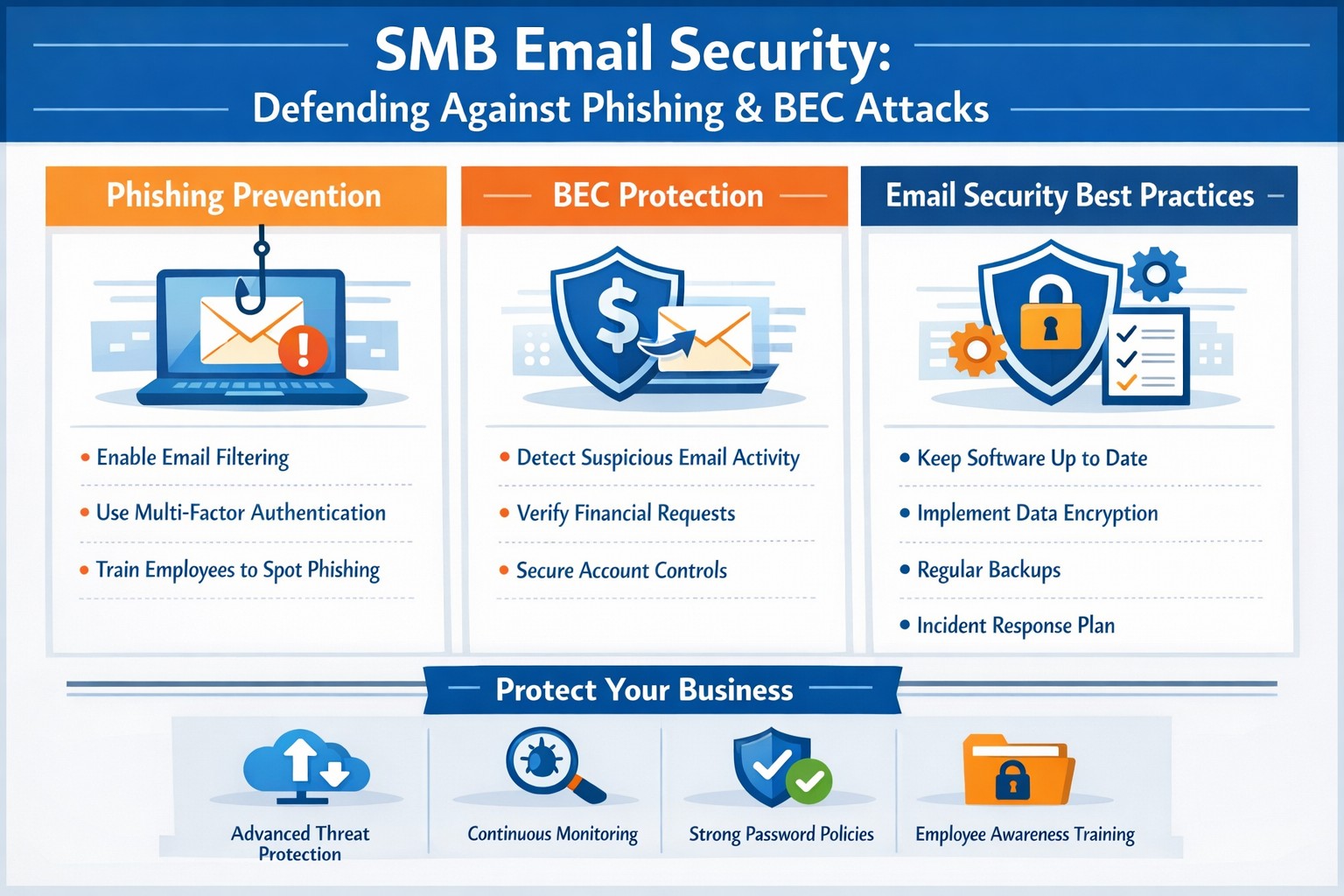
Strategies securing small business inboxes from phishing and BEC gateway attacks
Email is the backbone of communication for small and medium-sized businesses (SMBs). You use it for everything from sending invoices to internal memos, making your business heavily reliant on this tool. However, this reliance also makes you vulnerable to cyber threats, especially Business Email Compromise (BEC) attacks, which are increasingly targeting SMBs. These attacks can have devastating consequences, but with the right email security measures, you can protect your business from falling victim.
Understanding the Threat: Phishing and BEC
Phishing is a cybercrime that uses deceptive emails to trick individuals into revealing sensitive information or taking harmful actions. These emails often look like they come from legitimate sources, such as banks or well-known companies, but they are actually designed to steal your data.
Business Email Compromise (BEC) is a sophisticated type of phishing attack where cybercriminals impersonate trusted individuals within a company to trick employees into transferring money, sharing sensitive data, or granting access to critical systems. BEC scams often target individuals in finance, human resources, or operations, with the goal of initiating fraudulent transactions or stealing confidential information. According to the FBI, there are five primary types of BEC attacks.
BEC attacks are particularly effective because they exploit human psychology. Attackers rely on impersonating authority figures, creating a sense of urgency, or crafting highly convincing emails to make employees act without questioning.
Email is the number one attack vector, responsible for 90% of phishing incidents. In 2023, BEC attacks led to $3 billion in losses.
Why SMBs are Prime Targets
While large corporations invest heavily in cybersecurity, SMBs are often more vulnerable. Cybercriminals view smaller businesses as easier targets due to their typically less robust security measures and lower awareness of emerging threats.
Here’s why SMBs are at greater risk:
Limited Cybersecurity Resources: Many SMBs have limited budgets for cybersecurity and often lack dedicated IT teams to monitor email systems for suspicious activity.
Employee Vulnerability: Employees in SMBs may not be as well-trained in spotting phishing attempts or recognizing the signs of a BEC scam.
Lack of Email Security Awareness: Small businesses may overlook the importance of securing business email accounts with multi-factor authentication (MFA) and other safeguards, leaving them exposed to attacks.
Simple Steps to Bolster Your Email Security
Employee Training: Regularly train employees to recognize and respond to threats. Run security awareness training to help your team spot phishing attempts and other common threats. Use simulated phishing exercises to test their readiness, uncover weak spots, and highlight potential weaknesses.
Multi-Factor Authentication (MFA): Add an extra layer of security to your email accounts with multi-factor authentication (MFA).
Advanced Email Filters: Use advanced spam filters to detect and block phishing emails before they reach your employees’ inboxes. Scan links automatically to spot anything suspicious.
Email Encryption: Encrypt emails, both in transit and at rest, to prevent unauthorized access.
Regular Security Audits: Schedule regular audits to spot vulnerabilities and keep an eye out for unauthorized access. Take time to review your email system’s settings, permissions, and logs for anything unusual.
Incident Response Plan: Prepare for email threats with a clear, actionable response plan. Outline the steps to contain, investigate, and recover from incidents, so your team knows exactly what to do
Cybercrime is a business, not a hobby, and incredibly lucrative. Taking a proactive approach to email security is essential for protecting sensitive information, preventing data breaches, and maintaining trust with your team and clients.
Is your business protected? Contact Farmhouse Networking today for a comprehensive email security solution tailored to your SMB’s unique needs. Don’t let your inbox be a gateway for cybercrime!
TaaS delivers scalable cloud infrastructure for future-ready accounting firms.
The accounting industry is on the cusp of a technological revolution, with emerging trends set to reshape how firms operate and deliver value to their clients. As we look ahead to 2025 and beyond, it’s crucial for accounting practices to stay ahead of the curve and embrace these innovations. Let’s explore the key technologies that are poised to transform the accounting landscape and discuss how firms can prepare for this exciting future.
Artificial Intelligence and Machine Learning
Artificial Intelligence (AI) and Machine Learning (ML) are at the forefront of the accounting technology revolution. The AI in accounting market is expected to reach $4.791 billion by 2024, growing at an impressive compounded annual growth (CAGR) of 48.4%. This rapid growth is driven by AI’s ability to automate repetitive tasks, streamline workflows, and provide valuable insights.
Key applications of AI in accounting include:
Automated data entry and reconciliation
Intelligent fraud detection
Advanced financial forecasting
Natural language processing for document analysis
To prepare for this AI-driven future, firms should invest in AI-powered accounting software and prioritize training programs to help staff leverage these new tools effectively.
Cloud-Based Accounting Solutions
Cloud technology has already transformed the accounting industry, and its importance will only grow in the coming years. The global Cloud Accounting Software market is projected to reach $7567.54 million by 2028, expanding at a CAGR of 10.56%.
Benefits of cloud-based accounting include:
Real-time collaboration and data access
Enhanced data security and backup
Scalability and cost-efficiency
Seamless integration with other business systems
Accounting firms should consider migrating their operations to cloud-based platforms to improve efficiency and provide better service to clients.
Blockchain Technology
While often associated with cryptocurrencies, blockchain technology has far-reaching implications for the accounting industry. The accounting blockchain market is expected to reach $868 million by 2025.
Potential applications of blockchain in accounting:
Enhanced transaction transparency and security
Streamlined auditing processes
Improved record-keeping and data integrity
Simplified reconciliations
Firms should start exploring blockchain technology and its potential applications to stay ahead of this emerging trend.
Data Analytics and Forecasting Tools
As businesses generate more data than ever before, the ability to analyze and derive insights from this information is becoming crucial. Advanced data analytics tools are enabling accountants to provide more strategic advice to their clients.
Key areas where data analytics can add value:
Predictive financial modeling
Risk assessment and management
Performance benchmarking
Identifying cost-saving opportunities
Accounting practices should invest in robust data analytics tools and develop their team’s skills in data interpretation and visualization.
Cybersecurity and Data Protection
With the increasing digitization of financial data, cybersecurity has become a top priority for accounting firms. Protecting sensitive client information is not just a legal requirement but also a crucial aspect of maintaining trust and credibility.
Essential cybersecurity measures:
Implementing multi-factor authentication
Regular security audits and penetration testing
Employee training on cybersecurity best practices
Adoption of managed detection and response technologies
Firms must prioritize cybersecurity investments and stay updated on the latest threats and protection measures.
Robotic Process Automation (RPA)
RPA is set to revolutionize routine accounting tasks by automating repetitive processes. This technology can significantly improve efficiency and reduce errors in areas such as accounts payable, receivable, and financial close processes.
Benefits of RPA in accounting:
Increased accuracy in data entry and processing
Faster completion of routine tasks
Reduced operational costs
Improved compliance and audit trails
Accounting practices should identify processes that can be automated using RPA and implement these solutions to boost productivity.
The Evolving Role of Accountants
As technology automates many traditional accounting tasks, the role of accountants is evolving. Future-focused firms will need to shift their focus from number-crunching to providing high-value advisory services.
Skills for the future accountant:
Strategic financial planning
Data analysis and interpretation
Technology proficiency
Soft skills such as communication and problem-solving
Firms should invest in continuous learning and development programs to help their staff adapt to these changing roles.
Preparing for the Future
To future-proof your accounting practice, consider the following steps:
Conduct a technology audit to identify areas for improvement
Develop a digital transformation strategy aligned with your firm’s goals
Invest in staff training and development to build necessary skills
Stay informed about emerging technologies and industry trends
Collaborate with technology partners to implement new solutions
The accounting industry is on the brink of a technological revolution, and firms that embrace these emerging technologies will be well-positioned for success in the years to come.
Ready to navigate the complex world of accounting technology and future-proof your practice? Contact Farmhouse Networking today. Our expert team can help you assess your current technology stack, identify areas for improvement, and implement cutting-edge solutions tailored to your firm’s unique needs. Don’t let your practice fall behind – take the first step towards a technologically advanced future by reaching out to Farmhouse Networking now.
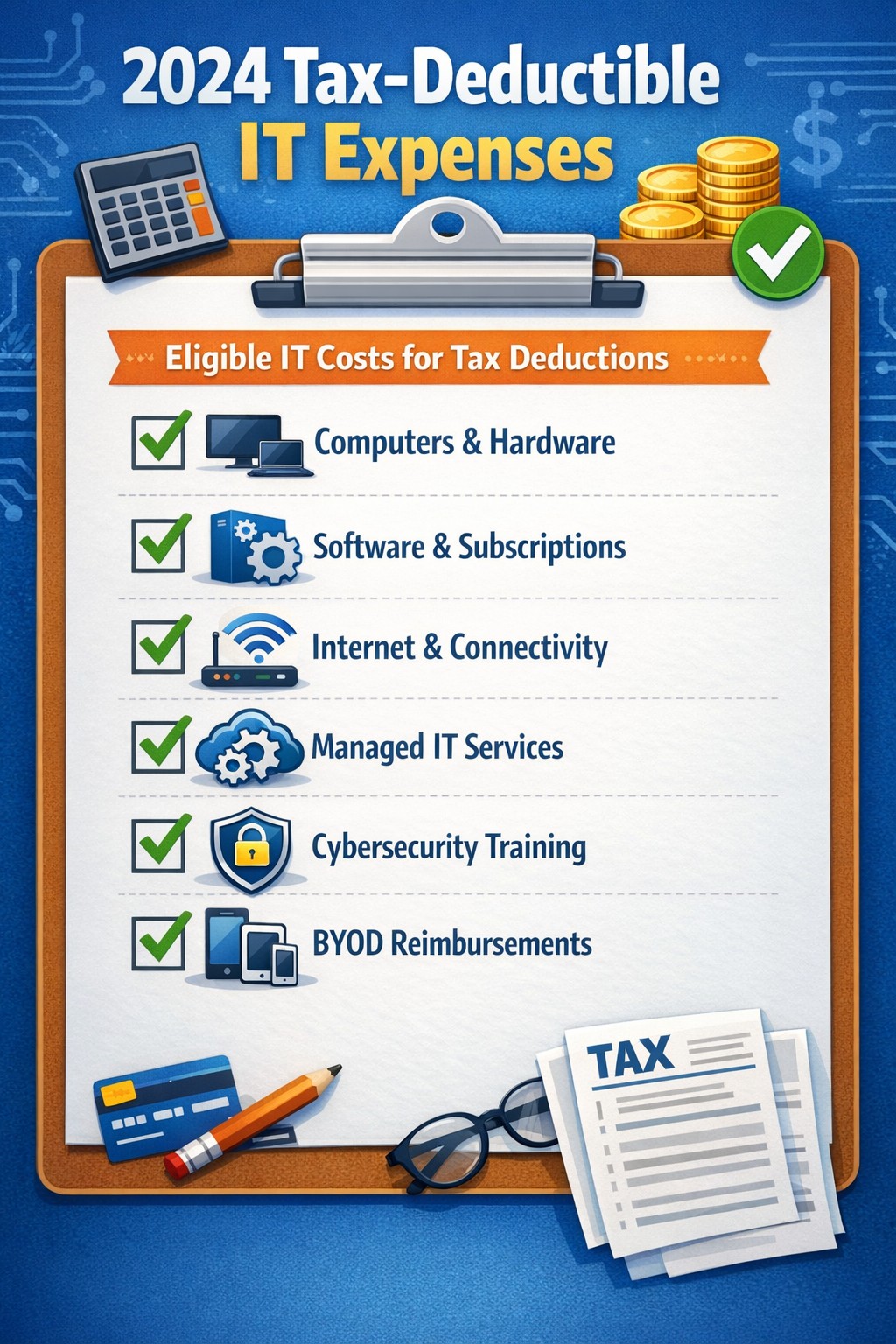
Claim Section 179, cloud subscriptions, cybersecurity as business tax deductions.
As we approach the end of the year, it’s crucial for businesses to understand the tax deductions available for their IT expenses. Maximizing these deductions can significantly reduce your tax burden and free up capital for further investment in your company’s technology infrastructure. Let’s explore the top tax-deductible IT expenses for 2024 that every business should be aware of.
Hardware and Equipment
Computers and Devices
Investing in new computers, tablets, or smartphones for your business can provide substantial tax benefits. The entire cost of these devices can be deducted from your taxable income. However, if the equipment is used partially for personal purposes, you may only be able to deduct a portion of the cost.
Office Equipment
Printers, scanners, and other office equipment are 100% tax-deductible in the year of purchase. This includes any IT-related furniture, such as ergonomic chairs or standing desks for your tech team.
Software and Services
Business Software
Software used for business purposes is eligible for tax deductions. This includes:
The deductible amount will depend on whether the software is purchased outright or subscribed to on a monthly basis.
Cloud Services
As more businesses move their operations to the cloud, it’s important to note that cloud service subscriptions are tax-deductible. This includes services like:
– Data storage – Backup solutions – Cloud-based productivity suites
Telecommunications
Internet Expenses
Internet services are crucial for most businesses today. You can deduct the full cost of your business internet connection[. If you work from home, you may be able to deduct a portion of your home internet expenses based on the percentage used for business purposes.
Phone Systems
All telecommunications fees within a commercial space can be deducted[1]. This includes:
– Business phone lines – VoIP systems – Cell phone contracts used for business
IT Services and Support
Managed IT Services
Fees paid for managed IT services, including network management, cybersecurity monitoring, and help desk support, are fully deductible as a business expense.
IT Consulting and Training
Any costs associated with IT consulting or training for your staff to use new technologies are tax-deductible. This can include workshops, online courses, or one-on-one training sessions.
Cybersecurity Measures
With the increasing importance of data protection, investments in cybersecurity are not only wise but also tax-deductible. This includes:
– Firewalls and antivirus software – Security audits – Employee cybersecurity training programs
Website Expenses
Development and Maintenance
Costs related to developing, hosting, and maintaining your business website are tax-deductible. This includes domain registration fees, hosting costs, and payments to web developers or designers.
E-commerce Solutions
If your business sells products online, the expenses for e-commerce platforms and payment processing systems are also deductible.
Home Office Technology
For those running businesses from home or with remote workers, the home office deduction can apply to technology expenses. You can deduct a portion of your home internet, personal computer use, and other tech equipment based on the percentage of your home used exclusively for business.
Ready to optimize your IT infrastructure while maximizing your tax benefits? Contact Farmhouse Networking today. Our expert team can help you implement cutting-edge IT solutions that not only boost your productivity but also provide substantial tax advantages. Don’t leave money on the table – let us help you navigate the complex world of IT expenses and tax deductions. Reach out now to schedule a consultation and start saving!
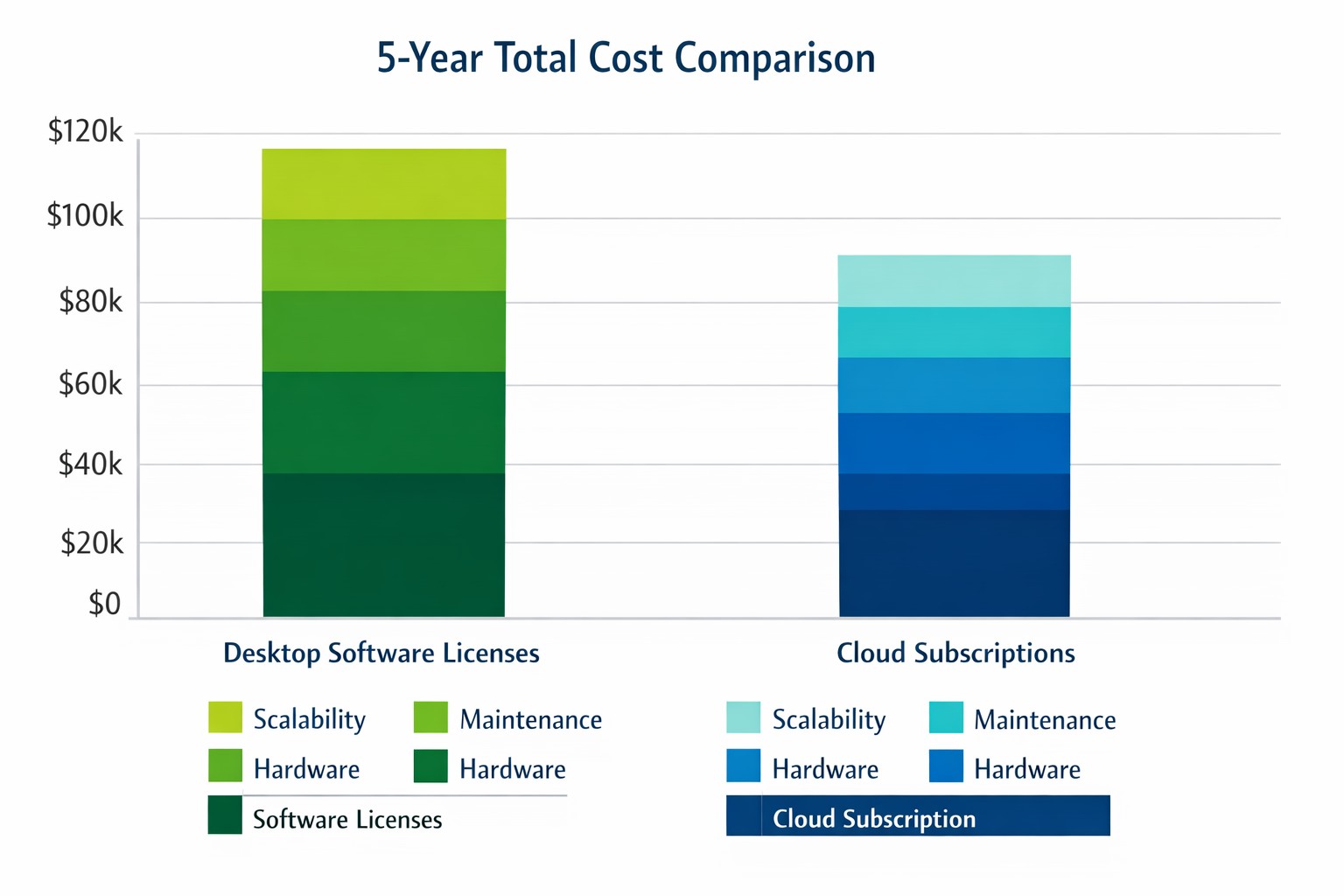
Cloud subscriptions often beat desktop software on long-term TCO and scalability.
Choosing the right productivity software for your company is a critical decision that can impact your bottom line and operational efficiency. The debate between traditional desktop software and cloud-based subscription models is particularly relevant when considering Microsoft Office, a staple in most business environments. Let’s examine the cost implications and benefits of both options to help you make an informed decision for your organization.
Microsoft Office 2024: One-Time Purchase for Business
Microsoft Office 2024 offers a perpetual license option that may appeal to businesses looking to have a single capital expenditure (CAPEX) and value ownership of a product.
Office Home & Business 2024
Price: $249.99 per license
Includes: Word, Excel, PowerPoint, OneNote, and Outlook
End of Life: 5 years from date of publication (October 1st, 2024)
This option provides access to core Office applications without the need for annual renewals. However, it’s important to note that this version lacks some features available in the subscription-based Microsoft 365, such as advanced collaboration tools and continuous updates.
Microsoft 365: Subscription Model for Businesses
Microsoft 365 offers a subscription-based model with more frequent updates and additional features tailored for business needs. This is an option that may appeal to businesses looking to have a gradual operating expenditure (OPEX).
Microsoft 365 Business Standard
Price: $12.50 per user/month (annual commitment)
Includes: All features of Business Basic plus desktop versions of Office apps
Microsoft 365 Business Premium
Price: $22.00 per user/month (annual commitment)
Includes: All features of Business Standard plus advanced security and device management
The subscription model provides more flexibility, allowing users to access Office apps on multiple devices and platforms. It also includes additional services like advanced threat protection and device management tools.
Cost Comparison for Businesses
To illustrate the cost implications, let’s consider a small business with 10 employees over a five-year period:
Office Home & Business 2024: $2,499.90 (10 licenses at $249.99 each)
Microsoft 365 Business Standard: $7,500 (10 users for 5 years at $12.50/user/month)
While the one-time purchase appears more economical initially, it’s crucial to consider the added value of the subscription model, including:
Regular feature updates and security patches
Cloud storage and collaboration tools
Multi-device access
Advanced security features
Scalability as your business grows
Factors to Consider for Business Owners
When making your decision, consider the following:
Growth projections: If you anticipate hiring more employees, the subscription model offers easier scalability.
Collaboration needs: Cloud-based solutions provide better tools for team collaboration and remote work.
IT resources: Subscription models often require less in-house IT management.
Cash flow: While subscriptions are more expensive long-term, they require less upfront investment.
Feature requirements: Evaluate if your business needs the advanced features offered in Microsoft 365.
Making the Right Choice for Your Business
The best option depends on your specific business needs:
If your company requires the latest features, values cloud integration, and needs robust collaboration tools, Microsoft 365 might be the better choice.
If you prefer a one-time purchase, have limited need for updates or cloud services, and have a stable workforce size, Office 2024 could be more cost effective.
Call to Action
Navigating the complexities of software licensing and cloud services can be challenging for business owners. At Farmhouse Networking, we specialize in helping businesses optimize their IT infrastructure and software solutions. Whether you’re considering a switch to cloud-based services or looking to streamline your current setup, our experts can guide you through the process. Contact Farmhouse Networking today to discuss your options and find the best solution for your business needs. Let us help you configure your network for maximum efficiency and cost-effectiveness, ensuring that your software choices align with your business goals and budget.
Windows 10 end of life preparation: audit compatibility, plan Windows 11 upgrades, and partner with managed IT before support ends October 14, 2025.
As the end of support for Windows 10 approaches in about a year on October 14, 2025, it’s crucial for businesses to start preparing for the transition. This article will guide you through the essential steps to ensure a smooth and secure move to the next phase of your computing experience.
Understanding Windows 10 End of Life
Windows 10 End of Life (EOL) marks the point when Microsoft will cease providing updates, security patches, and technical support for the operating system. This event is significant because it leaves users vulnerable to security risks, compatibility issues with newer software and hardware, and non-compliant with standards like HIPAA, PCI, and CMMC.
Key Steps to Prepare
Assess Your Current Setup: Before making any changes, take stock of your current system:
Identify all devices running Windows 10
Check hardware specifications to make sure old computers are compatible
List essential software and applications
Evaluate Upgrade Options: Consider these alternatives:
Upgrading to Windows 11 for free (if your hardware supports it)
Purchasing new devices with the latest operating system to replace older ones
Plan for Software Compatibility: Ensure your critical applications will work post-transition:
Check compatibility with newer operating systems
Contact software vendors for upgrade options
Consider alternative software solutions if needed
Train Your Team: If you’re managing a business environment:
Educate employees about the upcoming changes
Provide training on new systems or procedures
Establish a support system for the transition period
Set a Timeline: Create a realistic schedule for your transition:
Set milestones for each phase of the preparation
Allow ample time for testing and troubleshooting
Plan for potential downtime during the switch
Financial Considerations: Budgeting for the transition is crucial:
Allocate funds for new hardware if needed
Account for potential software upgrade costs
Consider the long-term cost benefits of modernizing your IT infrastructure
Security Implications: Understand the risks of running an unsupported OS:
Increased vulnerability to malware and cyber attacks
Potential compliance issues for regulated industries
Lack of technical support for critical issues
Remember, a well-planned transition not only safeguards your system but also opens up opportunities for improved performance and productivity. Take the first step now: conduct an inventory of your Windows 10 devices and begin researching upgrade paths. Your future self will thank you for your foresight and preparation.
Don’t wait until the last minute to prepare for Windows 10 End of Life. Start your transition plan today to ensure a secure and efficient computing environment for the future. Let Farmhouse Networking do the heavy lifting by assessing your needs, exploring your options, and taking proactive steps to protect your digital assets.
We saved one client $1600 through targeted server optimization—real results from managed IT that reduces costs without sacrificing performance.
It’s story time again!
This time we will be telling the story of Dr. Nick one of our monthly IT service clients. Back in March, Farmhouse Networking began the process of migrating Dr. Nick’s chiropractic office from their old server to a new one. After carefully preparing the server we contacted their practice management software vendor to get the software moved from the old to the new. The vendor simply asked us to provide them with remote access to the server to allow their techs to do the migration. During this process their tech asked our junior tech who was just there to babysit the process a question about the configuration of the old server. Our tech responded that he was not sure and the software vendor’s tech proceeded to follow his process for setting up the server.
A couple of months go by and we at Farmhouse Networking notice that the new server is not performing as fast as it should be. We investigate the issue and find out that the software vendor’s had installed a free version of a critical piece of the software puzzle instead of re-using the license Dr. Nick had already purchased. Farmhouse Networking then went to the software vendor and explained the issue. We went back and forth with them for months to get them to the point where they finally agreed that they were at fault for the upgrade problem and agreed to pay for the software license to complete the puzzle and fix the speed issue that Dr. Nick and his team were experiencing.
The moral of the story is that Dr. Nick did the right thing by having a support contract with a managed IT service provider, like Farmhouse Networking, who would take ownership of the problem and see it through to the best possible outcome.
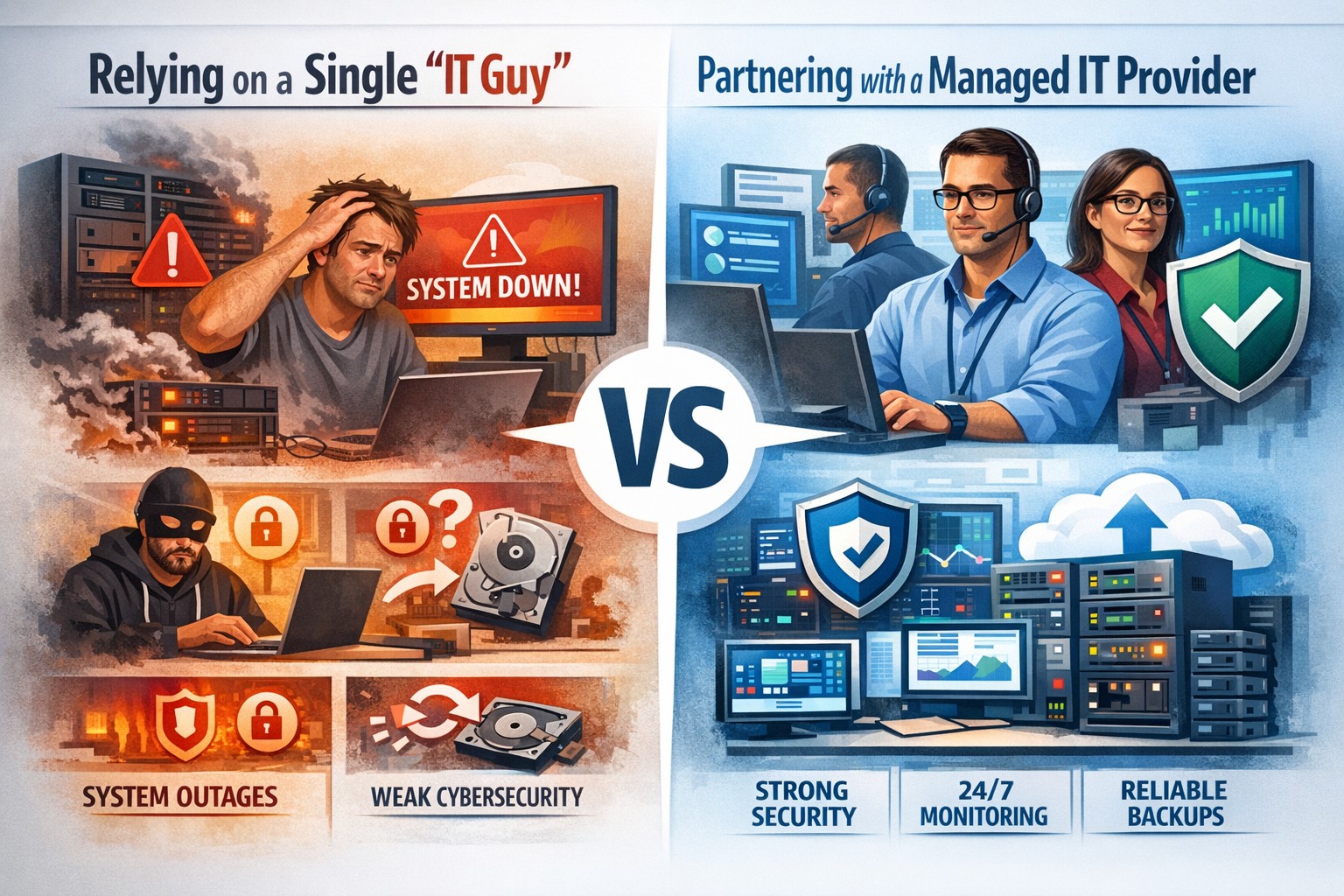
Relying on one IT guy can expose your small business to downtime, data loss, and security vulnerabilities—managed IT services offer stronger protection.
The role of Information Technology (IT) in business success cannot be overstated. IT systems and infrastructure form the backbone of modern businesses, facilitating communication, data management, and efficient workflow. From managing customer databases to ensuring network security, IT plays a crucial role in driving productivity and competitiveness. However, many businesses make the mistake of relying on a single IT guy to handle all their technological needs. In this article, I will discuss the risks associated with this approach and the importance of adopting a team-based approach to IT support.
The risks of relying on a single IT guy
Lack of expertise and knowledge
When you rely on a single IT guy, you are limited to their individual skills and expertise. While they may be knowledgeable in certain areas, they may not possess the breadth of knowledge required to handle all aspects of your business’s IT infrastructure. IT is a vast field that encompasses various domains such as network administration, cybersecurity, software development, and hardware maintenance. By relying on a single guy, you risk missing out on specialized expertise that could greatly benefit your business.
Limited availability and support
Another significant risk of relying on a single IT guy is limited availability and support. IT issues can arise at any time, and if your IT guy is unavailable or overwhelmed with other responsibilities, it can lead to significant downtime and disruptions in your business operations. With a single point of contact, you may have to wait for extended periods before your IT issues are resolved, resulting in decreased productivity and potential financial losses.
Single point of failure
Relying on a single IT guy also means that your business is vulnerable to a single point of failure. If your IT guy falls ill, takes a vacation, or leaves the company, you may be left without any IT support. Singular IT techs often don’t have the time or resources to properly document procedures and critical passwords, so when they go this information is lost. This can be particularly problematic during critical times when you need immediate assistance. Having a backup plan or a team of IT professionals ensures that your business operations can continue uninterrupted, even if one person is unavailable.
The impact of downtime on business operations
Downtime can have severe consequences on your business operations. Every minute your systems are down translates to lost revenue, missed opportunities, and frustrated customers. According to a study conducted by Gartner, the average cost of IT downtime is $5,600 per minute. Imagine the financial implications if your IT guy is unavailable for an extended period. With a team-based approach to IT support, you can minimize downtime and ensure swift resolution of any issues, thereby safeguarding your business’s success.
The importance of a team approach to IT support
Adopting a team approach to IT support offers numerous benefits for your business. Firstly, it provides a diverse set of skills and expertise that can be leveraged to address various IT challenges effectively. Each team member brings their unique knowledge and experience, allowing for comprehensive and well-rounded support. Additionally, with a team, you have the advantage of increased availability and faster response times. By distributing responsibilities among team members, you can ensure that someone is always available to address your IT needs promptly.
The benefits of outsourcing IT support
Outsourcing IT support is a viable solution for businesses looking to avoid the risks associated with relying on a single IT guy. Outsourcing allows you to tap into a pool of talented professionals with specialized expertise in different IT domains. Moreover, outsourcing IT support can often be more cost-effective than hiring a full-time IT staff, especially for small and medium-sized businesses. By partnering with an external IT support provider, like Farmhouse Networking, you can access a wide range of services, including network monitoring, cybersecurity, data backup, and software maintenance, all while enjoying the benefits of a dedicated team.
Finding the right IT support provider
Finding the right IT support provider is crucial to ensuring a successful and secure IT infrastructure. When evaluating potential providers, consider their experience, track record, and the range of services they offer. Look for certifications and qualifications that demonstrate their expertise and commitment to quality. It is also essential to assess their responsiveness and availability to ensure that they can meet your business’s IT needs promptly. Ask them about their record keeping habits, make sure they document everything and keep your information secure with industry standard protocols. By conducting thorough research and seeking recommendations, you can find an IT support provider that aligns with your business goals and requirements.
By adopting a team-based approach to IT support or outsourcing your IT needs, you can mitigate these risks and ensure a successful and secure IT infrastructure. Don’t get stuck when your IT guy no longer responds; contact us to experience the comfort of having a team look after your business IT. With the right IT support provider, you can focus on growing your business while leaving your technological needs in capable hands.
And God will generously provide all you need. Then you will always have everything you need and plenty left over to share with others. As the Scriptures say,
“They share freely and give generously to the poor. Their good deeds will be remembered forever.”
For God is the one who provides seed for the farmer and then bread to eat. In the same way, he will provide and increase your resources and then produce a great harvest of generosity in you. - 2 Corinthians 9:8-10
We use cookies to ensure that we give you the best experience on our website. If you continue to use this site we will assume that you are happy with it.