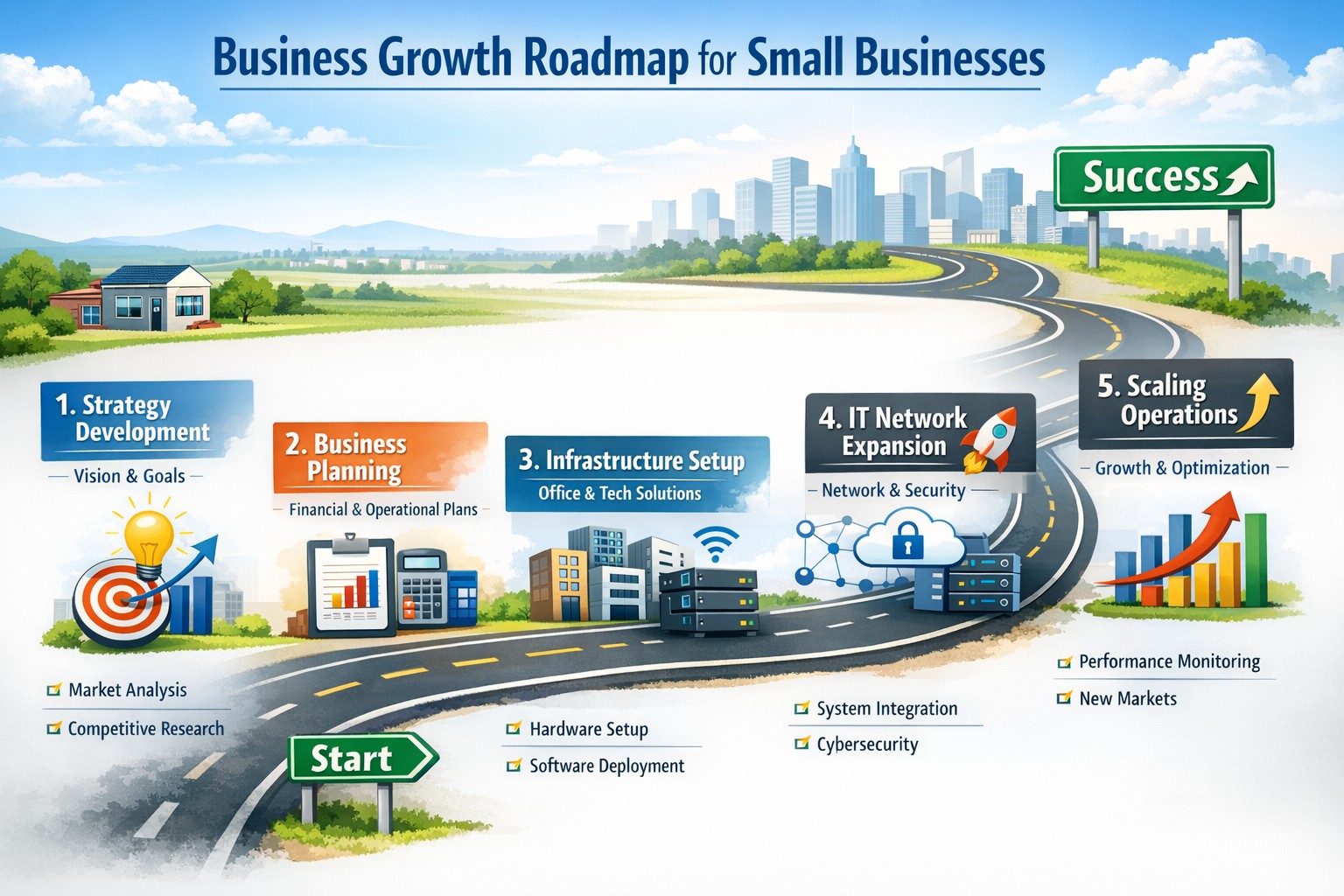
Strategic business growth planning: Scale operations with robust IT and networking support for sustainable expansion
Whether expanding office space or adding new locations, your business needs a strong, flexible IT setup to keep operations running smoothly. Here’s what every business owner should do.
Practical Steps:
Increase Computing Capacity: Upgrade systems so they can handle more customers, data, and applications without slowing down.
Secure Network Connections: Keep all offices and remote employees safely connected with secure networks.
Implement Collaboration Software: Choose tools that help your teams communicate and work together seamlessly, wherever they are.
Common Client Questions:
How do we keep data secure across multiple sites? Through encrypted connections and reliable security measures like firewalls, VPNs, and antivirus software.
Will adding more users slow down our systems? Proper upgrades and scalable solutions prevent slowdowns and keep efficiency high.
What collaboration tools work best? Simple, widely used platforms offer shared calendars, instant messaging, and file-sharing apps like Microsoft Office 365.
How Farmhouse Networking Can Help:
We help SMBs upgrade IT infrastructure affordably and efficiently, ensuring fast performance, strong security, and smooth collaboration no matter how fast you grow.
Ready to scale your business IT confidently? Email support@farmhousenetworking.com for a free consultation today.
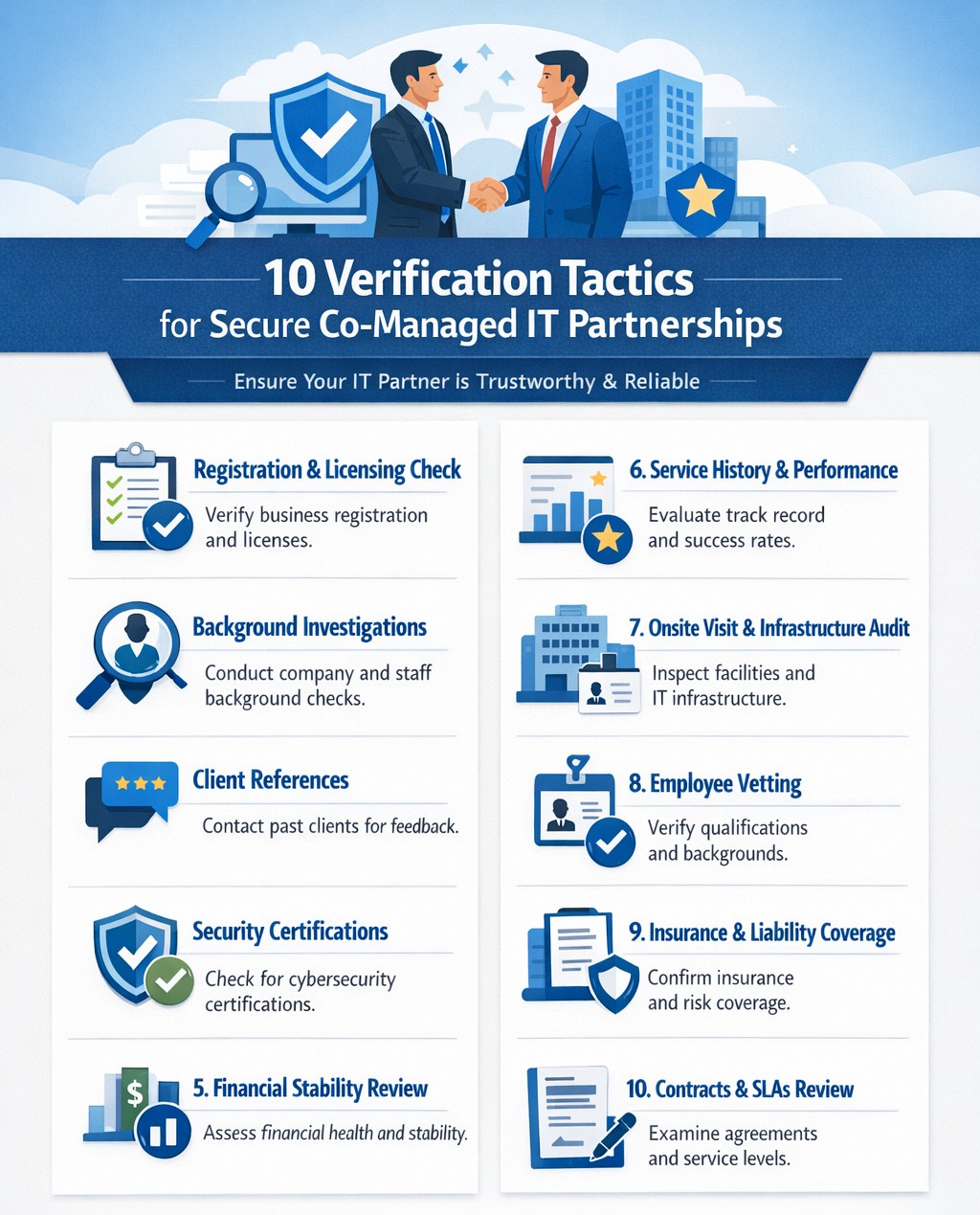
Infographic outlines key steps for due diligence and vetting partners effectively.
It’s easier than ever to connect with businesses globally. However, this convenience comes with risks, as fraudulent companies are becoming increasingly sophisticated. Whether you’re considering a new vendor, partner, or service provider, it’s crucial to ensure their integrity before committing. Below are ten actionable strategies to help you assess the legitimacy of a business you’ve never worked with before.
1. Verify Business Registration
Start by checking if the company is officially registered with the appropriate authorities. Search the Secretary of State website for their registration details or consult platforms like the Better Business Bureau (BBB) or Duns & Bradstreet (DUNS) for additional information. A legitimate business will have clear records of incorporation, licenses, and operating permits.
2. Analyze Their Online Presence
A professional online presence is often a hallmark of a credible business. Review their website for up-to-date information, polished design, and clear branding. Also, check their social media activity for consistent engagement and interactions with customers. Inactive or poorly maintained profiles can be red flags. You can also check a websites WHOIS information to see when it was created and if their registration address and name match their company name.
3. Look for Customer Reviews
Customer feedback is invaluable in assessing credibility. Search for reviews on independent platforms like Google Reviews, Yelp, or Trustpilot rather than relying solely on testimonials posted on their website. Look for detailed reviews that reflect real experiences rather than vague or overly positive comments.
4. Check for Awards and Media Mentions
Reputable companies often receive recognition from industry organizations or media outlets. Search for awards, certifications, or mentions in trusted publications to confirm their standing in the market.
5. Assess Employee Feedback
Platforms like Glassdoor can provide insights into how employees view the company. Consistent negative feedback from employees may indicate deeper issues within the organization.
6. Confirm Contact Information
Legitimate businesses provide clear and accessible contact details, including physical addresses, phone numbers, and email addresses. Cross-check these details against Google Maps and other sources to ensure they match up.
7. Conduct Social Proof Checks
Look for signs of social proof such as customer testimonials, case studies, or partnerships with other reputable companies. These indicators can help validate the company’s credibility.
8. Search for Red Flags
Be alert to warning signs such as unprofessional websites, conflicting contact information, or a lack of customer reviews. Additionally, search for the company name alongside terms like “scam” or “fraud” to uncover any potential issues.
9. Use Reputation Monitoring Tools
Leverage tools like media monitoring platforms and sentiment analysis software to gauge public perception of the company across social media and news outlets. A sudden spike in negative mentions could indicate potential problems.
10. Request Documentation
Don’t hesitate to ask for proof of registration, certifications, or client references directly from the company. Legitimate businesses will readily provide this information as part of your due diligence process.
Why Due Diligence Matters
Failing to vet a business properly can lead to financial losses, reputational damage, and even legal complications. By following these steps, you can protect your organization from fraudulent actors and build partnerships rooted in trust.
Need expert IT managed services and want a business with integrity? Farmhouse Networking is the clear choice. Contact us today to learn how we can support your business IT needs and rest assured our partnership is built on trust!
Resolve to strengthen cyber defenses in 2025 with zero trust and employee training.
Stepping into 2025, SMBs face an scary and complex cybersecurity field of battle. With hackers evolving cyber threats at a rapid pace, it’s crucial to make strengthening your digital defenses a top priority. Let’s explore some essential tips to boost your cybersecurity posture in the coming year.
Embrace a Zero Trust Mindset
Start the new year by adopting a Zero Trust approach to cybersecurity. This means verifying every user, device, and application attempting to access your network, regardless of their location. Implement Zero Trust Network Access protocols and use Application Allow/Deny lists to control which software can run on your systems.
Strengthen Your Network Defenses
Secure Your Wi-Fi: Ensure your Wi-Fi network is encrypted and properly configured. Use strong passwords and consider implementing network segmentation to isolate guest networks from your internal systems.
Implement Firewalls and Intrusion Prevention Systems: Deploy robust firewalls to filter incoming and outgoing traffic. Couple this with intrusion prevention systems that actively seek out and block known threats.
Protect Your Data
Encrypt Sensitive Information: Apply encryption to both data at rest and in transit. This includes emails, file transfers, and stored documents.
Implement Data Loss Prevention (DLP) Tools: Use DLP tools to track critical data and prevent unauthorized exfiltration attempts.
Enhance Authentication Measures
Multi-Factor Authentication (MFA): Implement MFA across all your systems, applications, and websites. This additional layer of security significantly reduces the risk of unauthorized access.
Use Password Managers: Encourage the use of password managers to generate and store complex, unique passwords for each account.
Educate Your Employees
Regular Security Awareness Training: Conduct ongoing cybersecurity training for all employees. Focus on recognizing phishing attempts, proper handling of sensitive data, and best practices for remote work.
Prepare for the Worst
Develop an Incident Response Plan: Create a comprehensive plan that outlines procedures for responding to various cybersecurity incidents. Regularly test and update this plan.
Implement Robust Backup Solutions: Establish a regular backup schedule for all critical data and systems. Store backups securely, preferably in multiple locations, including off-site.
Stay Updated and Vigilant
Keep Software and Systems Current: Regularly update all software, applications, and operating systems. Automate updates where possible and conduct periodic audits to ensure nothing is missed.
Implement Real-Time Monitoring: Deploy solutions that provide continuous, real-time monitoring of your network and systems. This allows for immediate detection and response to potential threats.
Secure Your Remote Workforce
With hybrid work models likely to persist, ensure your remote workers are equipped with secure tools:
– Provide Zero Trust VPN access for secure connections – Implement endpoint security measures even on employee’s own laptops – Educate on the risks of using public Wi-Fi
Address IoT Security
As the Internet of Things (IoT) expands, so do the associated risks. Inventory your IoT devices, regularly update their firmware, and implement network segmentation to isolate these devices.
Ready to make cybersecurity your New Year’s resolution? Contact Farmhouse Networking today. Our team of experts is ready to guide you through every step of enhancing your cybersecurity posture, ensuring that your business stays protected throughout 2025 and beyond. Let’s work together to create a robust, tailored cybersecurity strategy that meets your unique needs and keeps your business safe in the digital age.
Businesses of all sizes face unprecedented cybersecurity challenges. Blackpoint Cyber emerges as a leader in providing comprehensive, cutting-edge solutions to protect organizations from cyber threats. Let’s explore why Blackpoint Cyber stands out as the premier choice for business cybersecurity.
Comprehensive Ecosystem of Security Solutions
Blackpoint Cyber offers a fully managed, integrated ecosystem of services centered around their powerful nation-state-grade Managed Detection and Response (MDR) technology. This ecosystem is designed to keep businesses ahead of potential threats by proactively understanding the threat landscape and actively neutralizing adversaries before they can cause harm.
Managed Detection & Response (MDR)
At the core of Blackpoint’s offerings is their purpose-built MDR technology. This solution combines network oversite, malicious activity detection, and endpoint security to rapidly identify and neutralize hacker and virus activities in their earliest stages. By harnessing data around suspicious events, hacker tradecraft, and endpoint activity, Blackpoint’s MDR can stop advanced attacks faster than any other solution on the market.
Cloud Response
With the shift to hybrid and cloud environments, Blackpoint’s Cloud Response extends the power of their MDR service to these critical areas. Their 24/7 Security Operations Center (SOC) actively monitors cloud environments and provides fast responses to threats on platforms like Office 365.
LogIC
LogIC enhances the value of security logs and data collected from networks, turning them into real-time threat hunting and response capabilities. With push-button setup, LogIC allows for quick addition of log sources, generation of compliance reports, and automatic mapping against hundreds of compliance requirements.
Unmatched Threat Awareness and Response Times
Blackpoint Cyber’s proprietary security operations and incident response platform, SNAP-Defense, enables continuous monitoring and response to modern threats. Their SOC, established by former US government cybersecurity operators, leverages deep knowledge of hacker tradecraft to provide 24/7 unified detection and response services.
The company boasts impressive response times, with an average of 7 minutes for cloud incidents and an overall average of 27 minutes. This rapid response capability is crucial in minimizing potential damage from cyber attacks.
Tailored Solutions for Businesses of All Sizes
While Blackpoint Cyber’s technology is enterprise-grade, they specialize in bringing these advanced solutions to small and medium-sized businesses through partnerships with Managed Service Providers (MSPs) like Farmhouse Networking. This approach allows businesses of all sizes to benefit from top-tier cybersecurity protection.
Continuous Innovation and Growth
Blackpoint Cyber continues to invest in growth and innovation. With a recent $190 million investment round and the appointment of industry veteran Manoj Srivastava as Chief Technology and Product Officer, the company is poised for further advancements in their product strategy and technology.
Blackpoint Cyber’s suite of solutions offers businesses a robust, proactive approach to cybersecurity. Their technology, combined with human expertise, provides a level of protection that’s essential in today’s threat landscape.
Ready to elevate your business’s cybersecurity with Blackpoint Cyber’s cutting-edge solutions? Contact Farmhouse Networking today to manage your cyber security needs and implement these powerful tools. Don’t wait for a breach to happen – take proactive steps to protect your business now.
Enhanced DNS filtering protects networks from phishing, malware, and non-compliant content.
This is a quick note to all current and future customers, we have made a business decision to move from our old DNS filter / web filter software (called DNSFilter) to a new provider called DefensX.
Why Does This Even Matter?
We recently performed network inventory for all our Monthly Managed IT Services clients and found that many of them had an issue where the filtering software was in an error state and needed to be re-installed. This started our search for a more reliable partner. We found that DefensX provided all the needed functionality and gave our clients the added benefit of reports to see who is looking at what on the internet – something we think that business owners will find extremely valuable.
What Happens Now?
We are automatically removing the old software and deploying the new software to those who have already signed up for service. If you are Monthly Managed IT Services client and do not currently use our DNS filtering service, then reach out to get started at No Additional Cost!
This new service has many new categories to choose from as well, so if there are any sites being blocked or not blocked that you see in your new reports, then just let us know and we can quickly make those changes.
Don’t wait for a cyber attack to compromise your business. Take proactive steps to safeguard your network today! Contact Farmhouse Networking now to implement our advanced DNS filtering solution. Our experts will tailor a protection plan that fits your unique business needs.
Zero trust enables secure, high-performance networks across distributed business sites.
Multi-location companies face unique challenges when it comes to maintaining consistent and efficient network performance across all their sites. A robust and optimized network is crucial for seamless operations, effective communication, and maintaining a competitive edge. Let’s explore how businesses can optimize their network performance across multiple locations.
The Importance of Network Optimization
For multi-location businesses, network optimization is not just about speed—it’s about creating a cohesive, secure, and efficient digital environment that supports productivity and growth. A well-optimized network ensures:
Consistent performance across all locations
Improved collaboration and communication
Enhanced security and data protection
Increased operational efficiency
Better customer experience
Key Strategies for Network Optimization
Network Monitoring and Analysis: Implementing comprehensive network monitoring tools allows businesses to gain real-time insights into their network performance across all locations. This proactive approach helps identify potential issues before they impact operations.
Traffic Prioritization: Utilizing Quality of Service (QoS) protocols to prioritize critical business applications ensures that essential services receive the necessary bandwidth, regardless of location.
Load Balancing: Distributing network traffic evenly across multiple servers or network links prevents any single point from becoming overwhelmed, ensuring smooth operations across all sites. This also avoids single points of failure.
Network Segmentation: Dividing the network into smaller, manageable segments can significantly reduce congestion and improve overall performance, especially for businesses with multiple locations.
Regular Hardware and Software Updates: Keeping network infrastructure up-to-date across all locations is crucial for maintaining optimal performance and security.
Secure Remote Connections: Satellite offices will need to connect back to the main office for specific resources like authentication, computer policies, and industry specific applications. Making sure these remote connections remain online and secure is essential to make sure remote offices stay productive.
Implementing Network Optimization Strategies
To effectively optimize your multi-location network:
Conduct a comprehensive network audit across all locations to identify performance bottlenecks and security vulnerabilities.
Implement unified network monitoring tools to gain visibility into performance across all sites.
Standardize network infrastructure and policies across locations to ensure consistency and ease of management.
Utilize cloud-based solutions for improved accessibility and scalability across multiple sites.
Regularly review and update your network optimization strategy to adapt to changing business needs and technological advancements.
The Role of Managed IT Services in Network Optimization
A Managed IT services provider can be instrumental in implementing and maintaining these optimization strategies:
Centralized Management: They provide a single point of contact for all network-related issues across locations.
Customized Solutions: Tailoring optimization strategies to meet the specific needs of each business location.
Continuous Improvement: Regularly assessing and upgrading network performance based on the latest technologies and best practices.
Disaster Recovery and Business Continuity: Implementing robust backup and recovery solutions to ensure business continuity across all locations.
Optimizing network performance for multi-location businesses is a complex but crucial task. By leveraging the expertise of a Managed IT services provider, businesses can ensure that their network infrastructure is not just a utility, but a strategic asset that drives growth and innovation.
Ready to take your multi-location network performance to the next level? Contact Farmhouse Networking today to get started on your network optimization journey. Our team of experts is ready to help you create a seamless, efficient, and secure network environment across all your business locations.
Safeguarding your business data is paramount. Cyber threats are ever-evolving, and data breaches can have severe consequences. To fortify your business defenses, consider implementing the following security and encryption tools:
Operating System Encryption
Encryption is the process where normal data is transformed into something unreadable without the keys unlock it. Windows has encryption built in using BitLocker software in conjunction with modern hardware to keep data safe on physical hard drives. In case a computer is stolen or lost the data is unreadable (assuming the password protecting the computer is strong).
Virtual Private Network / Zero Trust Network Access
Whenever employees are remote or working from home they need to be able to connect to company resources without endangering company data. This is best done through Zero Trust Network Access (ZTNA) which is the next-gen replacement for the older virtual private network connection ZTNA assumes that all connections are threats unless proven otherwise and those who are connecting must have their computers tested to make sure they are safe. This approach also only allows users to connect to the resources that are specifically needed to function.
Antivirus / Extended Detection and Response
One key to staying cyber secure is to recognize and repel threats before they do any damage. Utilizing AI and automation extended detection and response (XDR) is the modern replacement for antivirus. It is able to detect behavior patterns that malicious software and hackers use when attacking your systems then automatically undue any changes they have made.
Email Encryption and SPAM Filtering
When sending sensitive data via email it is now the standard to send it via encrypted channels with each message also being encrypted. Most companies that provide encryption also provide SPAM filtering which keeps phishing, spoofing, and malicious emails from targeting employees. This is often the most effective means hackers use to gain a foot hold in networks.
Backups
There will inevitably be times when hackers are able to breach even the best defenses, so the only recourse at that time is to have good backups in multiple locations to recover once the attacker is repelled. Without good backups many companies have had to pay ransoms and hope for a response or go out of business.
Remember, data security is an ongoing process. Combine these tools with user education and strong password practices,. Stay vigilant, adapt to new threats, and invest wisely in protecting your digital assets and reputation. Call Farmhouse Networking to advise you on how to best secure your business.
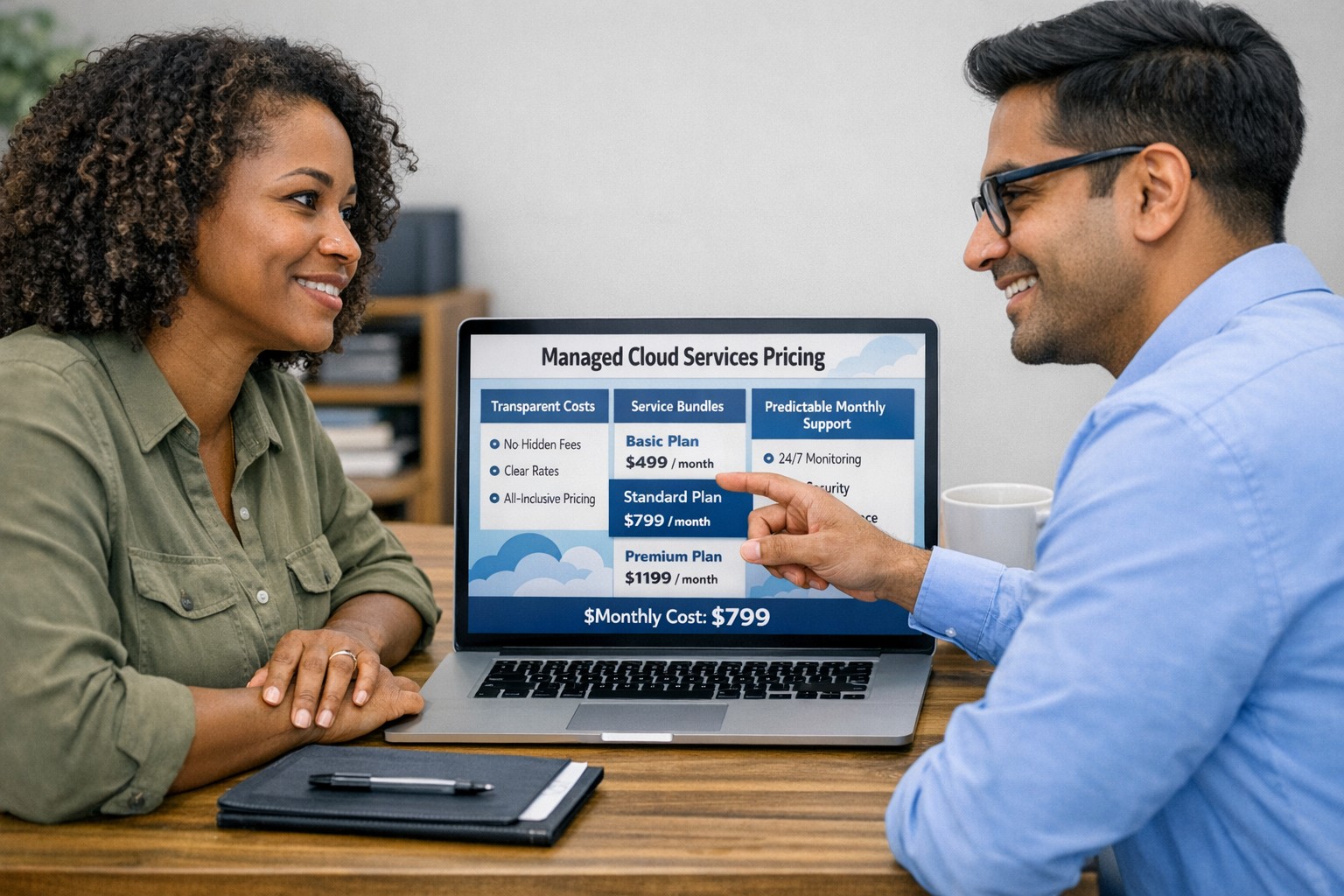
Managed cloud services pricing helps small businesses control IT costs with transparent, predictable monthly cloud support.
We have received numerous inquiries from potential customers regarding our pricing structure. Specifically, they want to know if we offer monthly contracts or if we charge an hourly rate. The answer is Yes.
Hourly Rate
For customers who require a one-time fix or need a project completed, we offer a service based on an hourly rate. Our rate for remote or on-site work that is not covered under a contract is $150 per hour. We bill in 15-minute increments and take pride in our efficiency. For clients with more than 2 service requests per month, we highly recommend signing up for a contract to save money and benefit from our expert oversight.
Monthly Contracts
There are three types of monthly contracts:
Remote Maintenance Contract
This is the package that most of our clients choose. It includes automated maintenance, cyber security protections, and unlimited remote support. Since most problems and questions can be handled remotely, this package offers real value.
Full Service Maintenance Contract
This package is for clients who want complete peace of mind. It includes all services, whether remote or at their offices. Additionally, it provides some additional benefits, such as top priority in our support queue.
Co-Managed IT Contract
This special package is designed for companies that already have a full-time IT employee or IT service companies in need of extra help. It provides them with the necessary automations and tools to make their jobs easier, allowing them to focus on what matters. This package also includes a discount on our remote and on-site services.
All contracts are based on a per-device model, taking into account the number of workstations, printers, servers, switches, etc. on the client’s network. We use this model because the other popular model, per user, is too vague and can easily hide excessive profit margins. Contracts can be month-to-month or a yearly commitment. The difference is that with a yearly commitment, you are protected from price increases for the entire year. We also offer many optional add-ons for our clients, such as Office 365, Employee Security Training, Penetration/Vulnerability Scanning, Mobile Device Management, Compliance, Secure Remote Access, and Security Operations Center.
Are you looking for reliable IT support that suits your business’s unique requirements? Look no further! Our flexible pricing options cater to businesses of all sizes. Whether you require one-time assistance or ongoing support, we have the right plan for you. Ready to take your business IT support to the next level? Contact us today to discuss your needs and find the perfect plan for your business.
Implement zero trust to safeguard mobile workforce from cyber threats anywhere
Remote work and mobile devices have become the norm, so ensuring the security of your workforce and sensitive data is paramount. Traditional security measures based on perimeter defense are no longer sufficient to protect against the sophisticated cyber threats that target mobile devices and exploit vulnerabilities in the network. This is where the concept of zero trust comes into play. Zero trust is a security framework that challenges the notion of “trust but verify” and instead adopts a “never trust, always verify” approach. By implementing a zero trust model, organizations can establish a security infrastructure that provides continuous authentication, authorization, and monitoring to safeguard their mobile workforce and sensitive data.
Understanding the Concept of Zero Trust
The concept of zero trust is rooted in the recognition that a one-time authentication and authorization process is not enough to ensure security in today’s dynamic threat landscape. Changes in user behavior, location, and other factors should radically impact access decisions. Zero trust takes a proactive approach to security by enforcing minimal access to resources, requiring continuous security monitoring, risk-based access control, and real-time authentication and authorization based on up-to-date information. Unlike traditional security models that rely on perimeter defense and trust users and devices within the network, zero trust challenges the idea of inherent trust and verifies the authenticity and integrity of every user and device, regardless of their location or network connection.
The Evolution of Zero Trust
The concept of zero trust has evolved over time in response to the increasing risks and challenges posed by mobile devices and remote work. The rapid adoption of mobile devices and the proliferation of internet-connected devices have expanded the attack surface, making traditional perimeter-based security measures inadequate.
Key Security Technologies for Mobile Devices
To enhance the security of mobile devices and implement zero trust, organizations should leverage key security technologies designed specifically for the mobile environment. These technologies include:
Enterprise Mobility Management (EMM): EMM ensures that mobile devices have the necessary policies and configurations in place, including mobile device management for security settings and configurations, as well as remote user access policy implementation. EMM provides a foundation for enforcing security controls and managing mobile devices within the organization.
Mobile Application Vetting (MAV): MAV ensures that applications comply with enterprise policies and do not contain known exploitable vulnerabilities. By vetting applications, organizations can reduce the risk of malicious applications compromising the security of mobile devices and accessing sensitive data.
Mobile Application Management (MAM): MAM focuses on ensuring compliance in deployed applications. It enables organizations to enforce security policies and manage the lifecycle of mobile applications, including app distribution, updates, and revocation. MAM helps organizations maintain control over the applications used by their mobile workforce.
Mobile Threat Defense (MTD): MTD solutions detect and mitigate threats from suspicious user behavior, network activity, and malicious attacks. These solutions leverage advanced analytics and threat intelligence to identify and respond to potential security threats in real time, providing an additional layer of protection for mobile devices.
Secure Containers: Secure containers provide isolation techniques to prevent organizational and personal data from commingling. By creating separate containers for different types of data, organizations can ensure that sensitive information remains secure, even if the device itself is compromised.
The Role of Intelligent Authentication
Intelligent authentication, powered by advanced rule sets and artificial intelligence, can significantly enhance the security of mobile devices in a zero trust environment. By combining biometrics with user behavior analysis, intelligent authentication systems can provide adaptive authentication that adapts to each user interaction, ensuring precise security measures. Integration between EMM, mobile threat defense, and existing logging, monitoring, diagnostic, and mitigation systems further enhances security capabilities.
Developing a Mobile Zero Trust Strategy
Implementing zero trust in the mobile environment requires a tailored approach that aligns with an organization’s specific goals, risks, and infrastructure. Businesses should develop their strategies based on a comprehensive assessment of the risks they face, with granular policies to mitigate those risks. The granularity of continuous authentication should be carefully determined to strike the right balance between security and usability. It’s important to note that technology is only one part of the solution; organizations must also review their mobile use policies and ensure that processes and human factors align with zero trust principles
With an intelligent authentication approach and a tailored mobile zero trust strategy, organizations can safeguard their mobile workforce and data from advanced cyber threats. Farmhouse Networking can make this a reality for your organization.
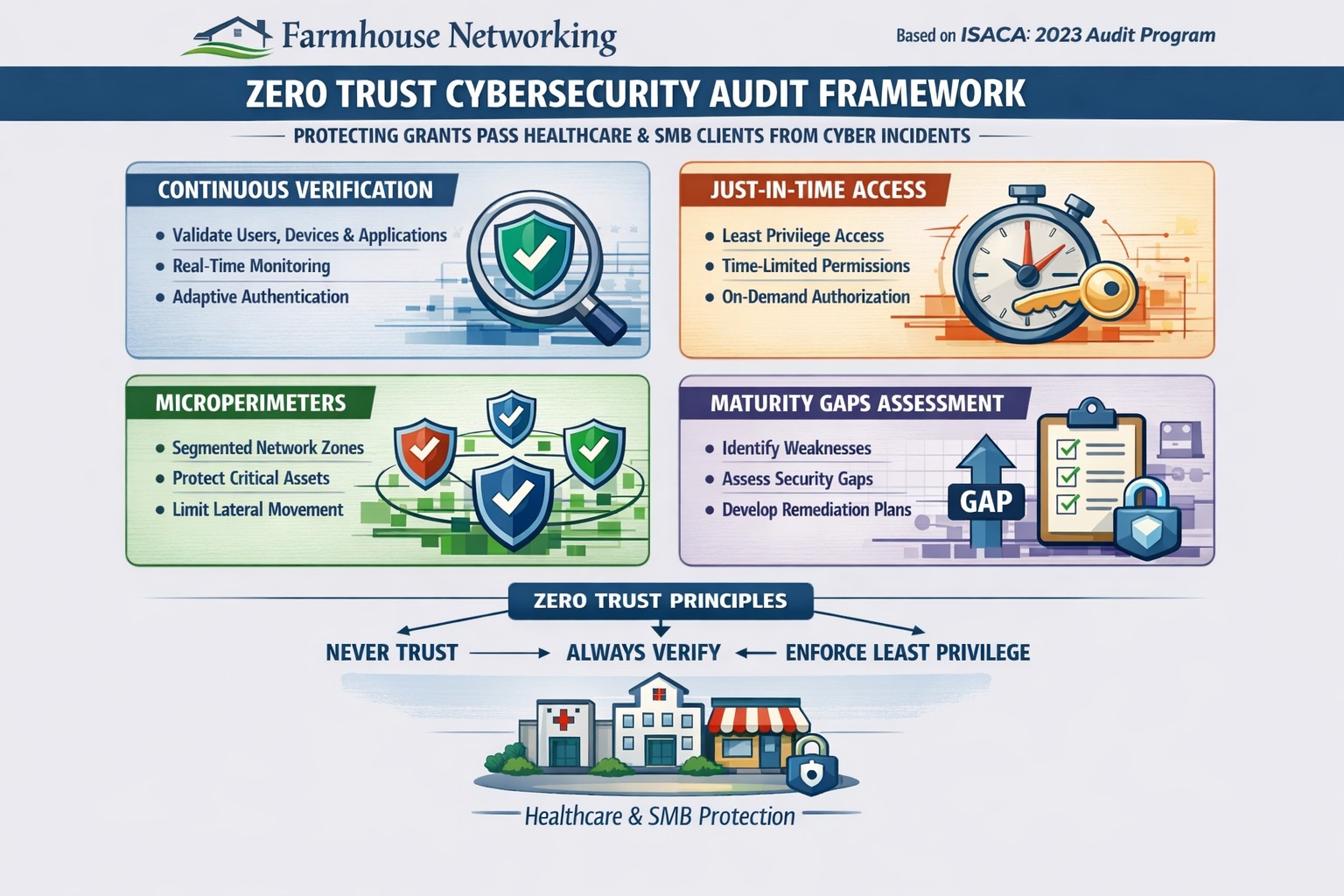
Farmhouse Networking 2023 zero trust audits verify continuous authentication and micro-segmentation for Oregon SMB cybersecurity compliance.
This is the tenth and finale in a series about the concept of Zero Trust, which means in the IT sense that you trust nothing and always verify everything surrounding and connected to your network. Today’s discussion will be on Cyber Security Audit.
Cyber Security Audit
Cyber Security Audit is a process where both internal and external systems are tested for their ability and susceptibility to being successfully attacked by hackers. This usually involves an inventory of current systems, research into known vulnerabilities, and testing of those found to see what information can be accessed. Once this process is complete a report is generated to detail both what is found and how those vulnerabilities can be addressed to protect the business’ most valuable commodity – information (intellectual property and client data). Here are some questions to ask:
Do you have an inventory of all assets in your organization? Is it up to date?
Have you tested your internal network for vulnerabilities?
Have you had a penetration test performed on your external network?
Do you know what compliance standards apply?
How do you document policies and procedures? Who oversees that?
If your company is wanting to have a free cyber security audit, then contact us for assistance.
And God will generously provide all you need. Then you will always have everything you need and plenty left over to share with others. As the Scriptures say,
“They share freely and give generously to the poor. Their good deeds will be remembered forever.”
For God is the one who provides seed for the farmer and then bread to eat. In the same way, he will provide and increase your resources and then produce a great harvest of generosity in you. - 2 Corinthians 9:8-10
We use cookies to ensure that we give you the best experience on our website. If you continue to use this site we will assume that you are happy with it.