Charities need to prioritize their cybersecurity measures. It’s no longer a matter of if, but when, a cyber attack will occur. This extensive guide outlines the essential steps charities can take to enhance their cybersecurity and protect their valuable data.
Understanding Cybersecurity Risks for Charities
Charities, like all organizations, are at risk of cyber attacks. These attacks can have severe consequences, including data leakage, financial loss, and damage to the charity’s reputation. Understanding these risks is the first step toward effective protection.
– The Reality of Cyber Threats:
Cyber threats are a reality for all organizations, including charities. With the rise of sophisticated cyber attacks, no organization can confidently say they will not be targeted. The aim is to make it as challenging as possible for cybercriminals to penetrate the charity’s defenses.
– The Importance of Cybersecurity in Charities:
The importance of cybersecurity in charities cannot be overstated. Charities hold sensitive data like donor information, employee details, and financial records. A cyber breach could lead to the loss or exposure of this data, damaging the trust of donors, employees, and beneficiaries.
Initial Cybersecurity Measures for Charities
Implementing initial cybersecurity measures can greatly reduce a charity’s vulnerability to attacks. These measures should focus on both end users and the charity’s IT infrastructure.
– Password Policies:
Establishing or revising a company password policy is a crucial first step. Passwords should be required on all devices employees use. They should be changed regularly, and employees should not be allowed to reuse old passwords. Furthermore, consider using multi-factor authentication (MFA) for an added layer of security.
– Cybersecurity Training
Training end users to be aware of various threats is a longer-term effort that can pay dividends. This includes being suspicious of emails requesting credential confirmation, checking website security before visiting, and ensuring sensitive information is transmitted securely.
– Limiting Access
Not all employees need access to all aspects of the charity’s operations. It’s essential to emphasize that limiting access is a critical part of protecting the charity against cyber attacks.
IT Infrastructure-Focused Measures
Charities also need to take measures focused on their IT infrastructure. These actions can further strengthen the charity’s defenses against cyber threats.
– Installing Protection
Installing additional protection, such as firewalls and antivirus software, can help shield the charity’s IT infrastructure against cyber attacks. Regularly updating and patching all software is also essential.
– Backing Up Files
Backing up files is another immediate action charities should take. This can be done offline, using external hard drives, or by backing up to the cloud. Furthermore, encrypting backups can provide an extra layer of security.
– Implementing Security Tools
Implementing security tools like browser management, DNS filtering, network monitoring, and endpoint protection can help detect and prevent cyber attacks.
External Resources for Cybersecurity Guidance
There are many external resources available to help charities improve their cybersecurity. These include government agencies, nonprofit organizations, and specific groups associated with nonprofit verticals.
– Government Agencies
Government agencies like the U.S. Department of Homeland Security Cybersecurity & Infrastructure Security Agency (CISA), the Federal Trade Commission, and the National Institute of Standards and Technology (NIST) offer resources on cybersecurity.
– Nonprofit Organizations
Nonprofit organizations like the Cyber Readiness Institute, Global Cyber Alliance, and the National Council of Nonprofits also offer resources to help charities improve their cybersecurity.
Following the NIST Cybersecurity Framework
The National Institute of Standards and Technology (NIST) has developed a five-part best practices framework to help firms focus resources for cybersecurity protection. These steps include identifying, protecting, detecting, responding, and recovering from cyber attacks. The NIST framework offers a systematic approach to managing cybersecurity risks. It includes identifying all equipment, software, and data used; protecting data with security software and regular backups; detecting unauthorized access; responding effectively to attacks; and recovering after an attack.
Implementing Advanced Cybersecurity Measures
Implementing advanced cybersecurity measures can provide an additional layer of protection for charities. These measures include identity and access management (IAM), securing networks, and moving to the cloud.
– Implementing IAM
Implementing IAM can streamline access for users internally and externally. Features like single sign-on (SSO), social sign-on, and multi-factor authentication (MFA) can make it easier for authorized users to access the charity’s websites and applications.
– Securing Networks
Securing networks business class equipment from trusted brands can boost a charity’s network security. This includes using wired and wireless networking hardware to create a functioning network and protecting against online threats.
– Moving to the Cloud
Moving to the cloud can provide charities with flexibility and resilience. Cloud-hosted systems allow for secure work from anywhere and can help charities bounce back faster after a cyber attack.
Preparing for Cyber Attack Recovery
Preparing for cyber attack recovery is crucial. When defenses fail, charities need the ability to bounce back quickly.
– Data Backup and Restoration
Data backup and restoration is a key part of cyber attack recovery. Charities should regularly back up their data to protect against data-loss disasters. If an attack occurs, they can restore their data and resume operations quickly.
– Developing a Continuity of Operations Plan
Developing a continuity of operations plan can ensure that a charity can continue to serve its community even when disaster strikes. This includes planning for how to keep business operations up and running and reporting the attack to law enforcement and other authorities.
Contact us today to explore how to best setup your cybersecurity efforts, ensuring protection and compliance in an ever-evolving cybersecurity landscape.
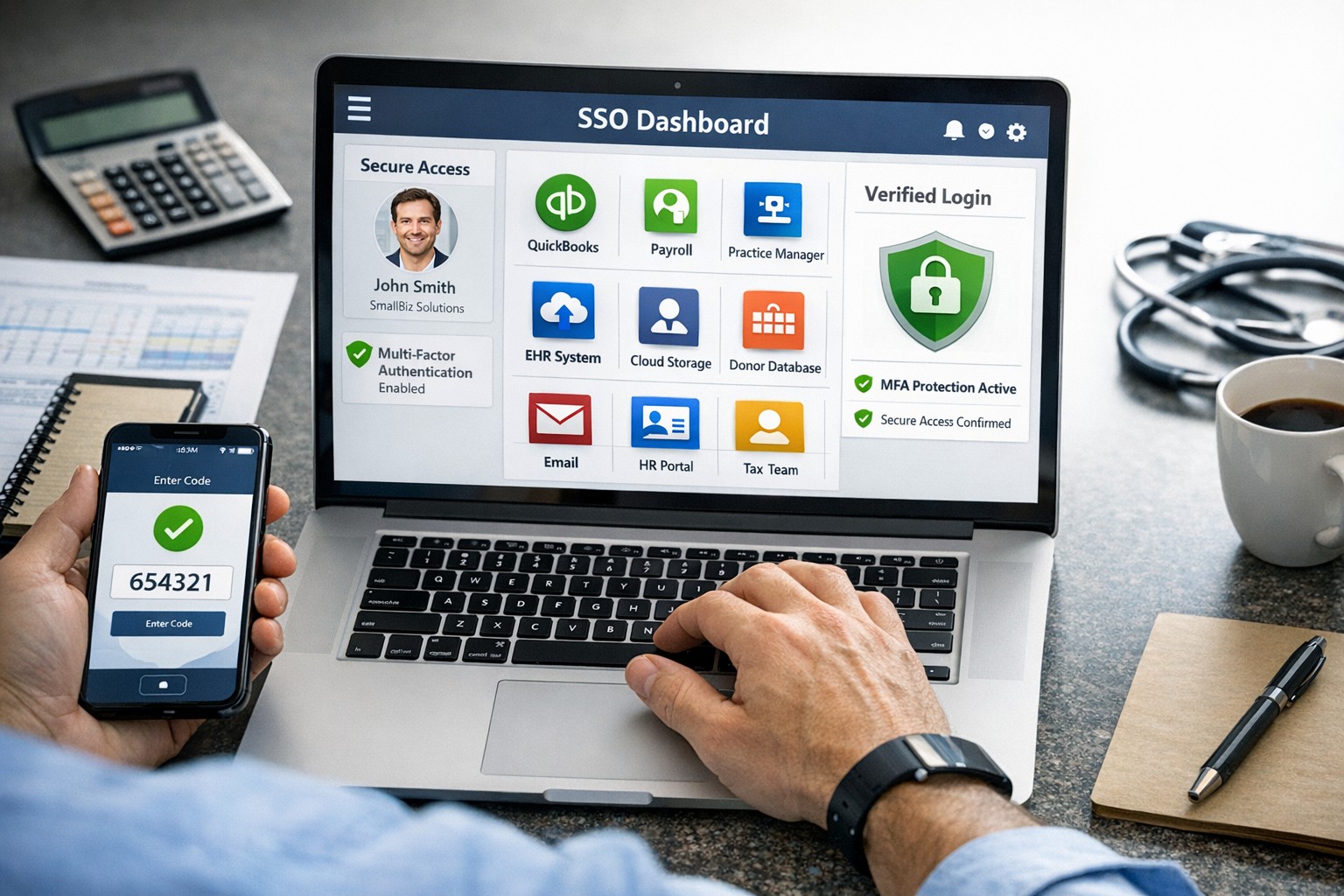
SSO for BYOD provides secure, convenient single sign-on access across apps on personal devices for small business teams.
Individuals and organizations rely heavily on various online platforms and services, the need for a secure and convenient way to access these resources is paramount. This is where SSO Single Sign-On comes into play. SSO Single Sign-On is a powerful authentication method that allows users to securely sign in to multiple applications and platforms using just one set of credentials. In this article, we will explore the benefits of SSO Single Sign-On, its implementation, and how it enhances security while streamlining the user experience.
Understanding SSO Single Sign-On
What is SSO Single Sign-On? SSO Single Sign-On is an authentication process that enables users to access multiple applications and platforms using a single set of login credentials. With SSO Single Sign-On, users only need to remember one username and password, eliminating the hassle of managing multiple credentials for different services. This not only saves time but also enhances convenience for users.
How does SSO Single Sign-On work? SSO Single Sign-On works by establishing a trust relationship between an identity provider (IdP) and the various service providers (SPs). When a user attempts to access a service, the IdP verifies the user’s identity and provides a token to the SP, which grants the user access without requiring additional authentication. This seamless process simplifies the login experience and eliminates the need for users to repeatedly enter their credentials.
Benefits of SSO Single Sign-On
Enhanced Security: One of the key advantages of SSO Single Sign-On is its ability to enhance security. By consolidating login credentials into a single set, users are less likely to resort to weak passwords or reuse passwords across multiple platforms. This reduces the risk of password-related security breaches. Additionally, SSO Single Sign-On allows for stronger authentication methods, such as two-factor authentication, further bolstering security without requiring multiple accounts.
Streamlined User Experience: With SSO Single Sign-On, users no longer have to remember and enter multiple sets of login credentials. This significantly reduces the login friction and streamlines the user experience. Users can seamlessly navigate between different applications and platforms without the need for repetitive logins. This convenience not only saves time but also improves productivity.
Centralized Access Management: SSO Single Sign-On provides organizations with centralized access management capabilities. Administrators can easily control user access to various applications and platforms from a centralized dashboard. This simplifies user provisioning and deprovisioning, ensuring that employees have timely access to the resources they need while maintaining security and compliance.
Cost and Time Savings: Implementing SSO Single Sign-On can lead to cost and time savings for organizations. By reducing the number of password-related support requests, IT teams can focus on more strategic initiatives. Additionally, the streamlined login experience reduces the time spent by employees on authentication, leading to increased productivity and efficiency.
Implementing SSO Single Sign-On
To implement SSO Single Sign-On, organizations need to follow a few key steps:
Evaluate SSO Solutions: Begin by evaluating various SSO solutions available in the market. Consider factors such as compatibility with existing systems, scalability, security features, and ease of integration.
Choose an Identity Provider: Select an identity provider that aligns with your organization’s requirements. The identity provider will be responsible for authenticating users and issuing tokens for accessing service providers. Office 365 and Google Workspace are usually the best, most prolific IdP sources to use.
Configure Service Providers: Configure the service providers that you want to integrate with SSO Single Sign-On. This involves establishing trust relationships between the identity provider and the service providers.
User Provisioning and Deprovisioning: Implement a user provisioning and deprovisioning process to ensure that users have the necessary access to the applications and platforms they require. This process should be integrated with the SSO Single Sign-On solution to maintain centralized access management.
Test and Monitor: Thoroughly test the SSO Single Sign-On implementation to ensure its functionality and security. Regularly monitor the system to identify and address any potential issues or vulnerabilities.
Best Practices for SSO Single Sign-On Implementation
When implementing SSO Single Sign-On, it is essential to follow best practices to maximize security and usability:
Strong Authentication: Implement strong authentication methods such as two-factor authentication or biometric authentication to enhance security.
Regular Auditing: Conduct regular audits of user access rights and permissions to ensure compliance and detect any unauthorized access.
User Education: Educate users about the benefits of SSO Single Sign-On and best practices for password management to promote secure behavior.
Continuous Monitoring: Implement a robust monitoring system to detect and respond to any suspicious activities or potential security threats.
Regular Updates: Keep the SSO Single Sign-On solution and all integrated applications up to date with the latest security patches and updates.
Remember, security should never be compromised, and SSO Single Sign-On provides a robust solution to protect user identities and streamline access to applications and platforms. Embrace the power of SSO Single Sign-On and enjoy the benefits of enhanced security and convenience.
And God will generously provide all you need. Then you will always have everything you need and plenty left over to share with others. As the Scriptures say,
“They share freely and give generously to the poor. Their good deeds will be remembered forever.”
For God is the one who provides seed for the farmer and then bread to eat. In the same way, he will provide and increase your resources and then produce a great harvest of generosity in you. - 2 Corinthians 9:8-10
We use cookies to ensure that we give you the best experience on our website. If you continue to use this site we will assume that you are happy with it.