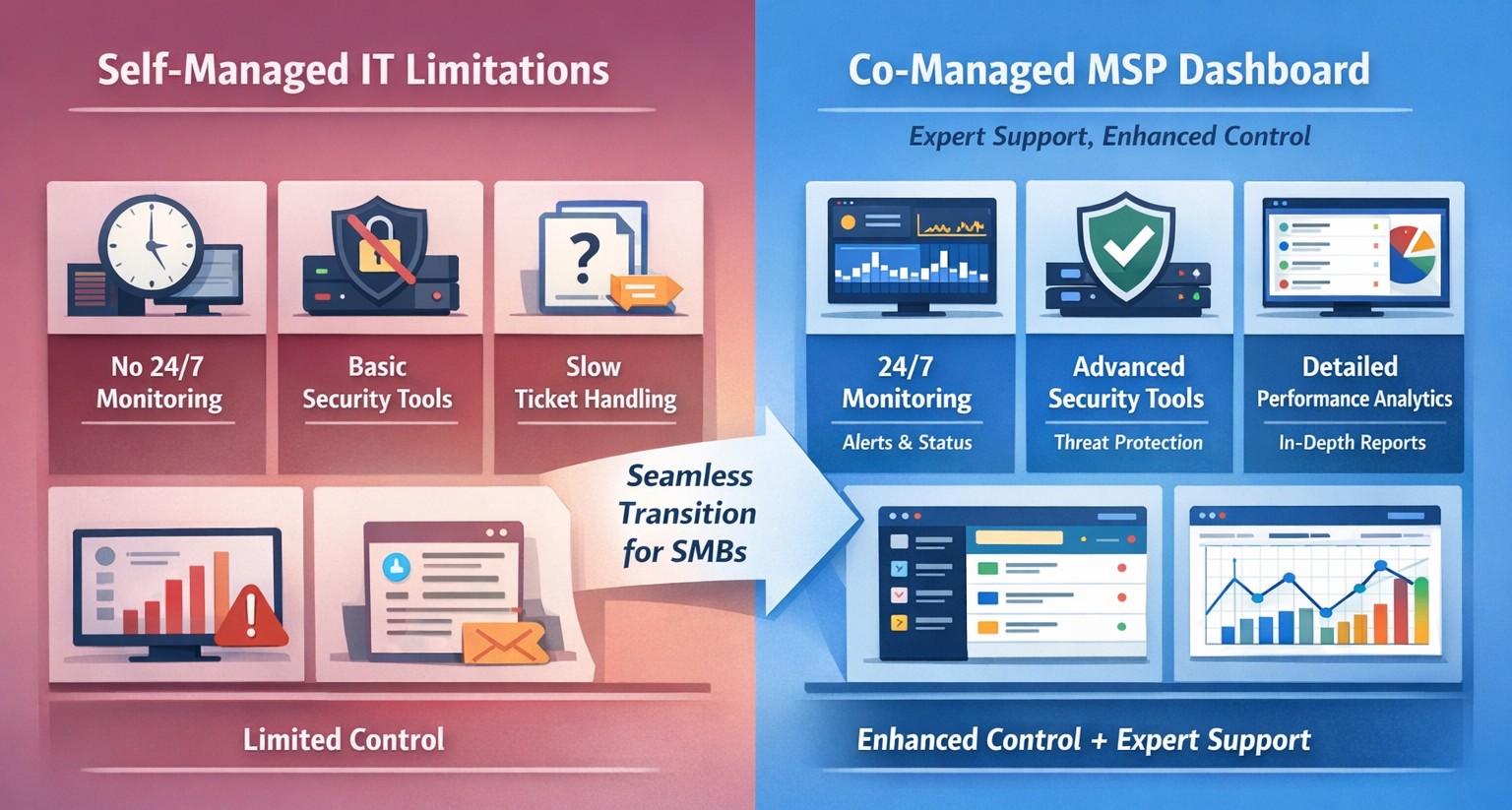
Co-managed IT dashboard with MSP monitoring supplementing internal team.
Managing IT can be a daunting task, especially for businesses that lack dedicated IT personnel or the expertise to handle today’s complex technology. In recent years, more and more organizations have recognized the benefits of outsourcing their IT management to Managed Service Providers (MSPs).
What is an MSP?
A Managed Service Provider, or MSP, is a company that offers a range of IT services to businesses. These services can include network monitoring, infrastructure management, data backup, cybersecurity, and more. By partnering with an MSP, businesses can offload their IT responsibilities to professionals with deep expertise and industry-best practices.
The Challenges of Self-Managed IT
Self-managing your IT can be a significant challenge. Here are some of the common pain points that organizations face:
Lack of Expertise: IT is a complex and ever-evolving field. Keeping up with the latest technologies, security threats, and best practices can be overwhelming, especially for businesses without dedicated IT staff.
Resource Constraints: Managing IT requires time, manpower, and financial resources. Small and medium-sized businesses often struggle to allocate these resources effectively, leading to inefficiencies, downtime, and security vulnerabilities.
Limited Scalability: Growing businesses often find it difficult to scale their IT infrastructure to meet increased demand. Self-managing your IT environment may require significant investments in hardware, software, and additional staff, which can strain budgets and hinder growth.
Cybersecurity Risks: Data breaches and cyber-attacks are on the rise. Without proper security measures in place, businesses face significant financial and reputational risks. Implementing and maintaining robust cybersecurity protocols can be challenging for organizations without the necessary expertise.
The Benefits of MSP-Managed IT
Switching to an MSP-managed IT environment offers several benefits:
Expertise and Support: MSPs have a team of experienced professionals who specialize in different aspects of IT management. They stay up-to-date with the latest industry trends and best practices, providing businesses with access to a breadth of knowledge and expertise.
Proactive Monitoring and Maintenance: MSPs utilize advanced tools and technologies to monitor your IT infrastructure 24/7. They identify potential issues before they become critical, minimizing downtime and ensuring smooth operations.
Scalability and Flexibility: MSPs provide scalable solutions tailored to your business needs. Whether you’re experiencing rapid growth or need to downsize, an MSP can quickly adapt your IT infrastructure to meet changing requirements without additional investments or resources.
Enhanced Security: MSPs employ robust security measures to protect your systems, networks, and data from cyber threats. They implement industry-standard security practices, conduct regular security audits, and ensure compliance with data protection regulations.
Cost Savings: By outsourcing IT management to an MSP, businesses can reduce the overhead costs associated with maintaining an in-house IT department. MSPs work on a subscription-based model, allowing organizations to pay for the services they need, when they need them.
Strategic Planning: MSPs can act as your virtual chief information officer providing project planning services that keep IT spend spread across the years to make the IT budget easier to manage.
Consider making the switch to an MSP today and unlock the benefits of professional IT management, contact us to get started.
This is the seventh in a series that document the Tier 3 / Co-Managed IT work we did to setup a wireless test bed for a Linux based scientific device. The testing environment included two different wireless network hardware types (Ubiquiti and Cisco). There was also a Synology device used for various purposes including hosting the Ubiquiti controller inside a Kubernetes container, providing certificate services, providing LDAP authentication, and providing RADIUS authentication. Each article will detail a separate piece of the project. This article shows the basic setup of Ubiquiti Controller for PSK and RADIUS authentication from wireless devices.
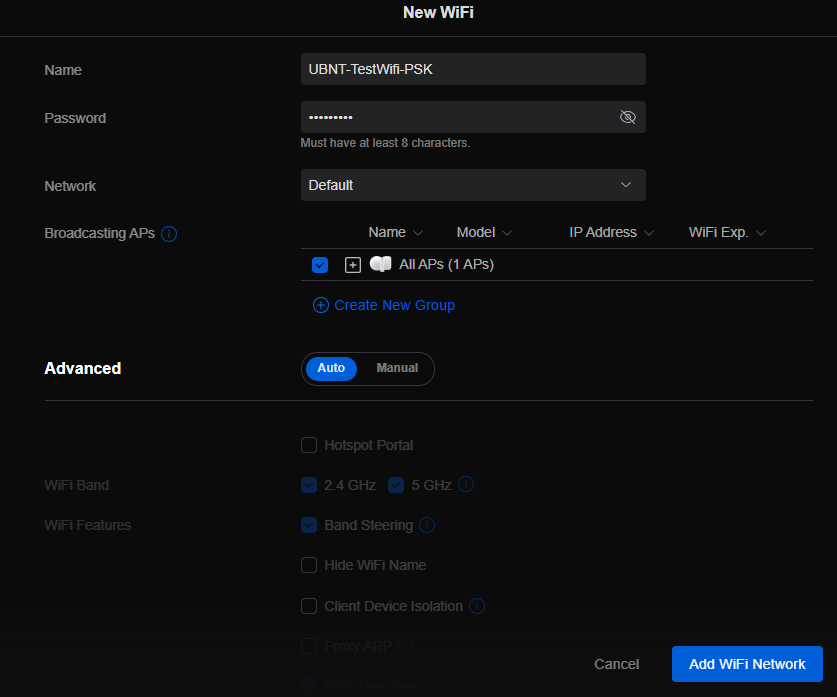
Setup Ubiquiti Wireless Network with PSK
Login to Ubiquiti controller previously created – Here
Click on Setting gear icon at bottom left
Make sure you are on Wifi tab and click Create New link
Set network BSSID
Create Password
Click Add Wifi Network button
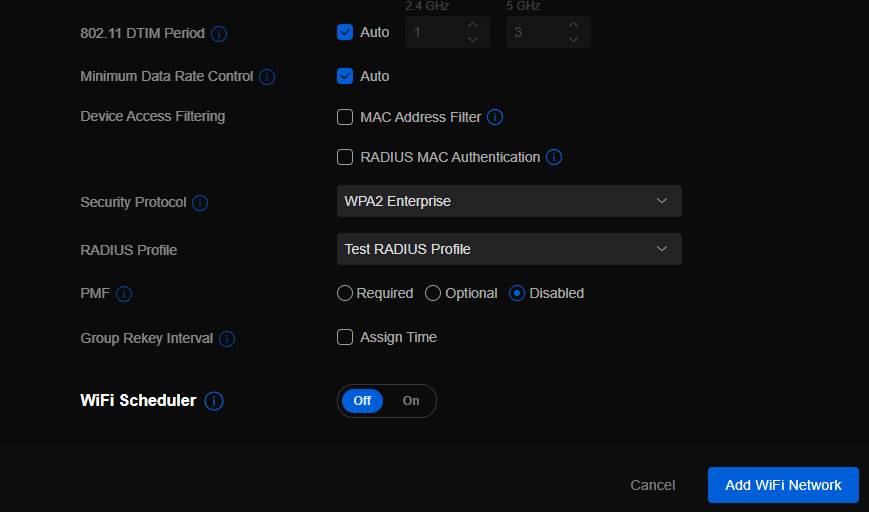
UniFi SSID advanced security settings with RADIUS profile and PPSK configuration.
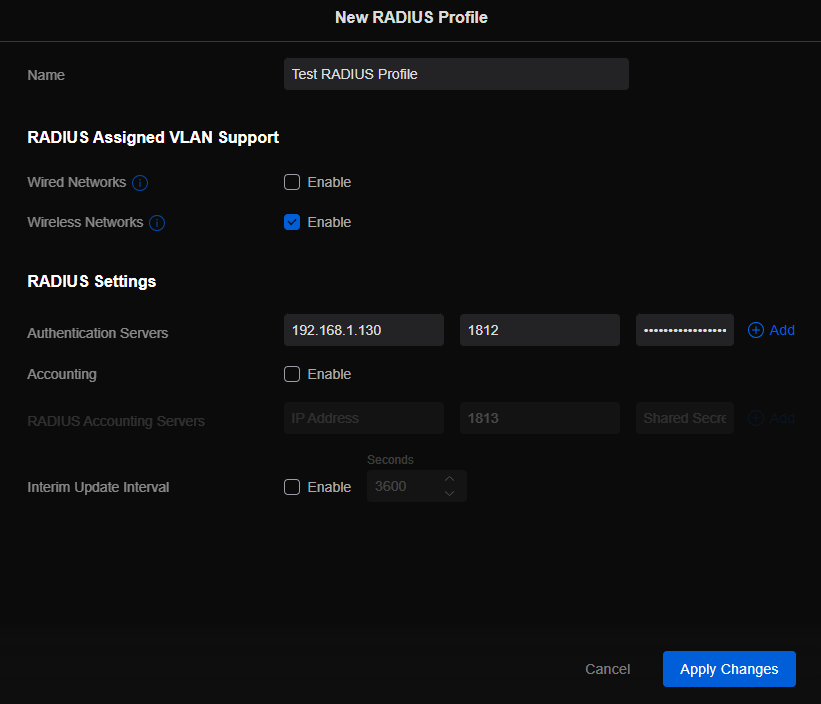
Setup Ubiquiti Wireless Network with RADIUS
Login to Ubiquiti controller previously created – Here
Click on Setting gear icon at bottom left
Click on Profiles
Click on Radius Tab
Click on Create New link
Give the Profile a name
Enter RADIUS server IP address as Authentication Server
Enter RADIUS shared secret
Click Add
Click Apply Changes
Click on Wifi Tab
Click on Create New link
Set network BSSID
Change Advanced to Manual
Set Security Protocol – WPA2 Enterprise
Select new RADIUS Profile
Click Add Wifi Network
If your company has highly customized setup requirements that you need consulting for, then contact us for assistance.
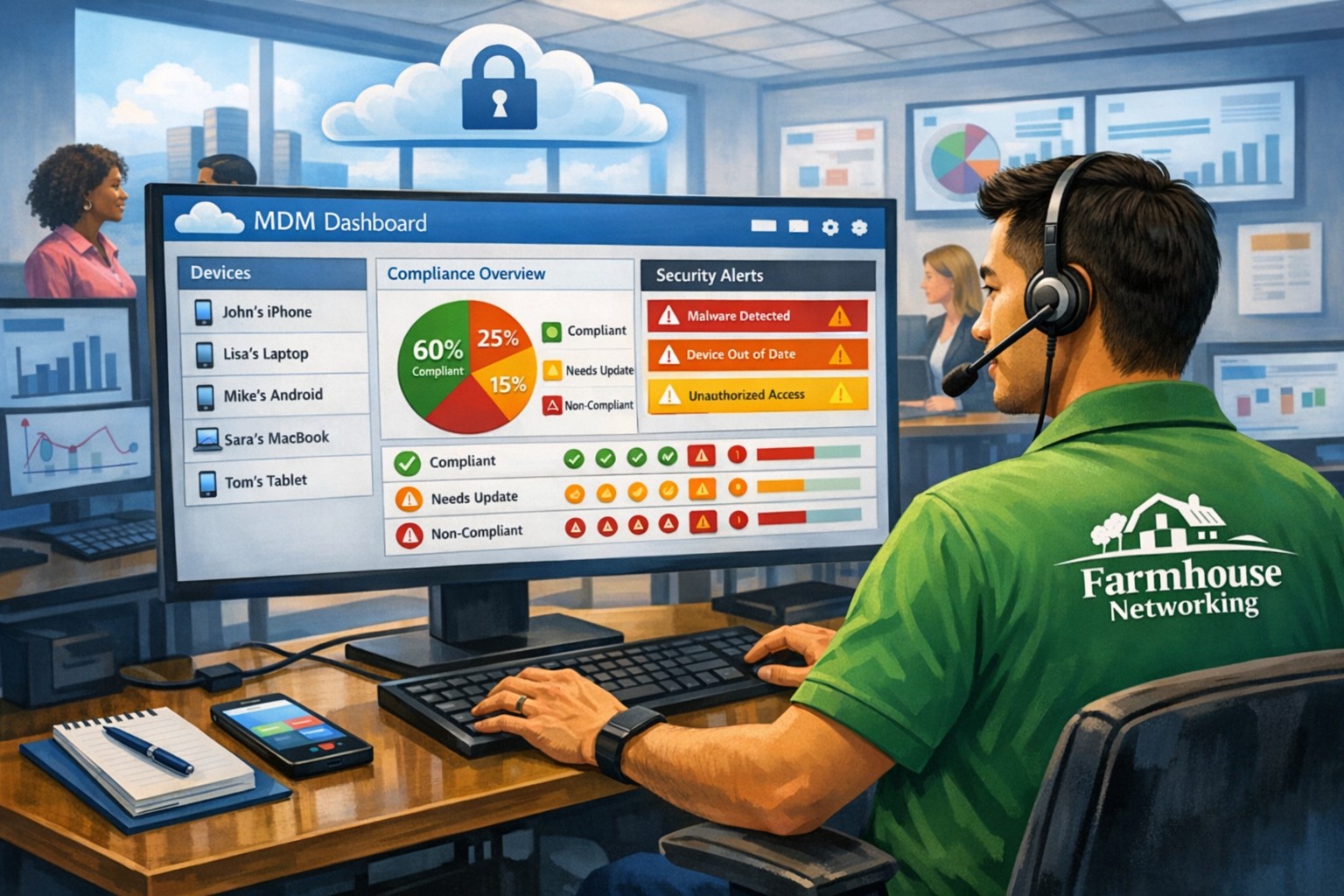
MDM dashboard with Android iOS device inventory compliance policies and security controls.
In today’s digital age, mobile devices have become an integral part of our lives, both personally and professionally. With the increasing reliance on smartphones and tablets, businesses, especially small and medium-sized enterprises (SMBs), need to prioritize mobile device security. One effective solution for enhancing Android and iPhone security is Mobile Device Management (MDM). In this article, we will explore the benefits of MDM for SMBs, its role in enhancing Android and iPhone security, and how businesses can implement MDM to safeguard their sensitive data.
1. Understanding the Importance of Android and iPhone Security
Android and iPhone, being the most widely used mobile operating systems globally, have become a prime target for cybercriminals. With its open-source nature and extensive app ecosystem, Android devices are susceptible to various security threats, such as malware, data breaches, and unauthorized access. With its user-friendliness and built-in trust, iPhone users are easily tricked into downloading and installing malware which leads to data breaches and unauthorized access. SMBs, in particular, need to be proactive in securing their Android and iPhone devices to protect sensitive customer information, intellectual property, and maintain regulatory compliance.
2. Introducing Mobile Device Management (MDM)
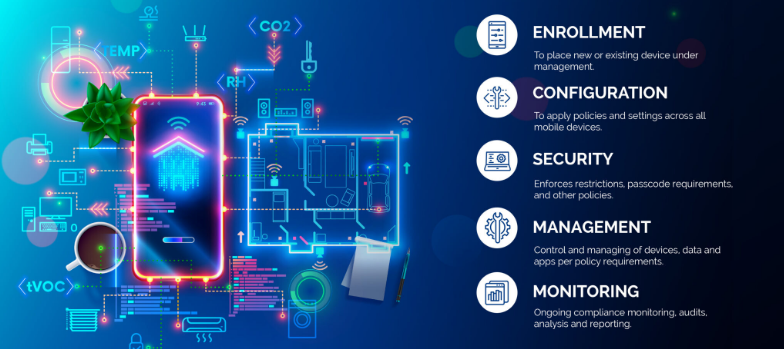
Mobile Device Management (MDM) is a comprehensive solution that enables businesses to centrally manage and secure their fleet of mobile devices, including Android and iPhone smartphones and tablets. MDM provides IT administrators with granular control over device settings, app distribution, security policies, and data management. By implementing MDM, SMBs can streamline device management, enhance data security, and ensure compliance with industry regulations.
2.1 Benefits of MDM for SMBs
Centralized Device Management: MDM allows businesses to manage multiple Android devices from a single console, simplifying device provisioning, configuration, and updates.
Enhanced Security: MDM enables IT administrators to enforce security policies, such as password requirements, encryption, and remote wipe capabilities, ensuring that lost or stolen devices do not compromise sensitive data.
App Distribution and Management: With MDM, businesses can distribute and manage apps on Android devices, ensuring that only authorized and secure applications are installed.
Secure Content and Data Management: MDM provides secure containers or workspaces on Android devices, segregating business data from personal information and enabling seamless data synchronization.
Compliance and Reporting: MDM offers robust reporting capabilities, allowing businesses to monitor device usage, enforce compliance regulations, and generate audit trails.
3. Implementing MDM for Android and iPhone Security
Implementing MDM for Android and iPhone security involves a series of steps to ensure a seamless deployment and effective device management. Let’s explore the key considerations and best practices for SMBs looking to implement MDM.
3.1 Assessing Business Needs and Objectives
Before implementing MDM, SMBs should assess their business needs and objectives. This includes identifying the number of devices to be managed, understanding the security requirements, and evaluating the compatibility with existing IT infrastructure.
3.2 Choosing the Right MDM Solution
There are numerous MDM solutions available in the market, each with its own set of features and capabilities. SMBs should carefully evaluate different MDM vendors, considering factors such as scalability, ease of use, security features, integration capabilities, and cost-effectiveness.
3.3 Defining Security Policies and Configuration
Once the MDM solution is selected, SMBs need to define security policies and configurations. This includes setting password requirements, enabling device encryption, configuring firewall settings, and defining app installation permissions. The policies should align with industry best practices and compliance regulations.
3.4 Device Enrollment and Onboarding
After defining security policies, SMBs can proceed with device enrollment and onboarding. This involves registering Android devices with the MDM system, configuring device settings, and installing necessary security profiles and certificates.
3.5 Monitoring and Maintenance
MDM is an ongoing process that requires continuous monitoring and maintenance. SMBs should regularly review security policies, update device configurations, patch vulnerabilities, and conduct security audits to ensure the effectiveness of the MDM solution.
4. Android vs. iPhone: MDM Considerations
While Android devices are more susceptible to security threats due to their open nature, it is essential to consider the unique security challenges posed by iOS devices, such as iPhones and iPads. Although iOS has built-in security features, SMBs should evaluate MDM solutions that offer comprehensive support for both Android and iOS devices to ensure consistent security across their mobile fleet.
5. The Future of MDM and Android Security
As technology evolves, the landscape of mobile device security continues to change. The future of MDM and Android security holds promising advancements, including:
Machine Learning and AI: MDM solutions can leverage machine learning and AI algorithms to detect and prevent emerging security threats proactively.
IoT Integration: With the rise of the Internet of Things (IoT), MDM will encompass managing and securing a broader range of devices, including wearables and smart home devices.
Biometric Authentication: MDM solutions will increasingly utilize biometric authentication, such as fingerprint and facial recognition, for secure device access.
Containerization and Virtualization: MDM will further enhance data security by implementing advanced containerization and virtualization techniques, isolating business data from personal information.
If your SMB is seeking to enhance Android and iPhone security by leveraging the benefits of MDM, contact us for professional assistance and guidance tailored to your specific needs.
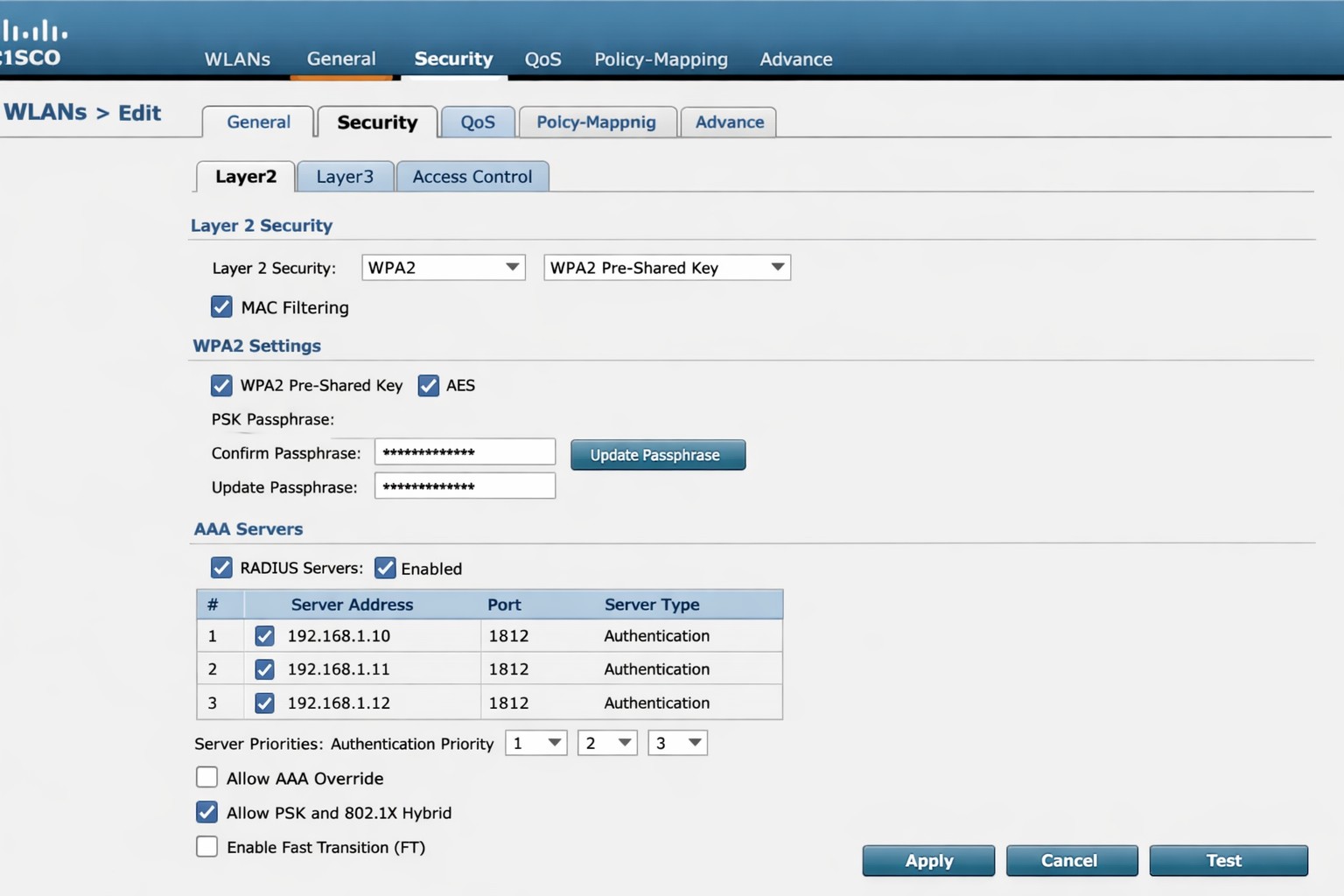
Cisco WLC WLAN configuration enabling PSK with RADIUS backend authentication.
This is the sixth in a series that document the Tier 3 / Co-Managed IT work we did to setup a wireless test bed for a Linux based scientific device. The testing environment included two different wireless network hardware types (Ubiquiti and Cisco). There was also a Synology device used for various purposes including hosting the Ubiquiti controller inside a Kubernetes container, providing certificate services, providing LDAP authentication, and providing RADIUS authentication. Each article will detail a separate piece of the project. This article shows the basic setup of Cisco Wireless Controller for PSK and RADIUS authentication from wireless devices.
Setup Cisco Wireless Network with PSK
Login to Cisco Wireless Controller
Click on WLANs tab at top
Click on GO next to Create New drop down
Create Profile Name & SSID
Click Apply
Click Enabled next to Status
Click Apply
Click on Security tab
Uncheck 802.1x
Check PSK
Enter Pre-Shared Key next to PSK format
Click Apply
Click Save Configuration at the top
Setup Cisco Wireless Network with RADIUS
Log into Cisco Wireless Controller
Click on Security tab at top
Click on Authentication under RADIUS on left hand side
Change both Acct Call Station ID Type to IP Address
Click Apply
Click on New
Add RADIUS server IP address
Add Shared Secret
Uncheck management
Click Apply
Click on WLANs tab at top
Edit WLAN 1
Click on Security tab
Click on AAA Servers tab
Change Server 1 to the one entered on RADIUS Authentication page
Click Apply
Click on Layer 2 tab
Change Authentication type to 802.11x
Click Apply
Click Save Configuration at the top
If your company has highly customized setup requirements that you need consulting for, then contact us for assistance.
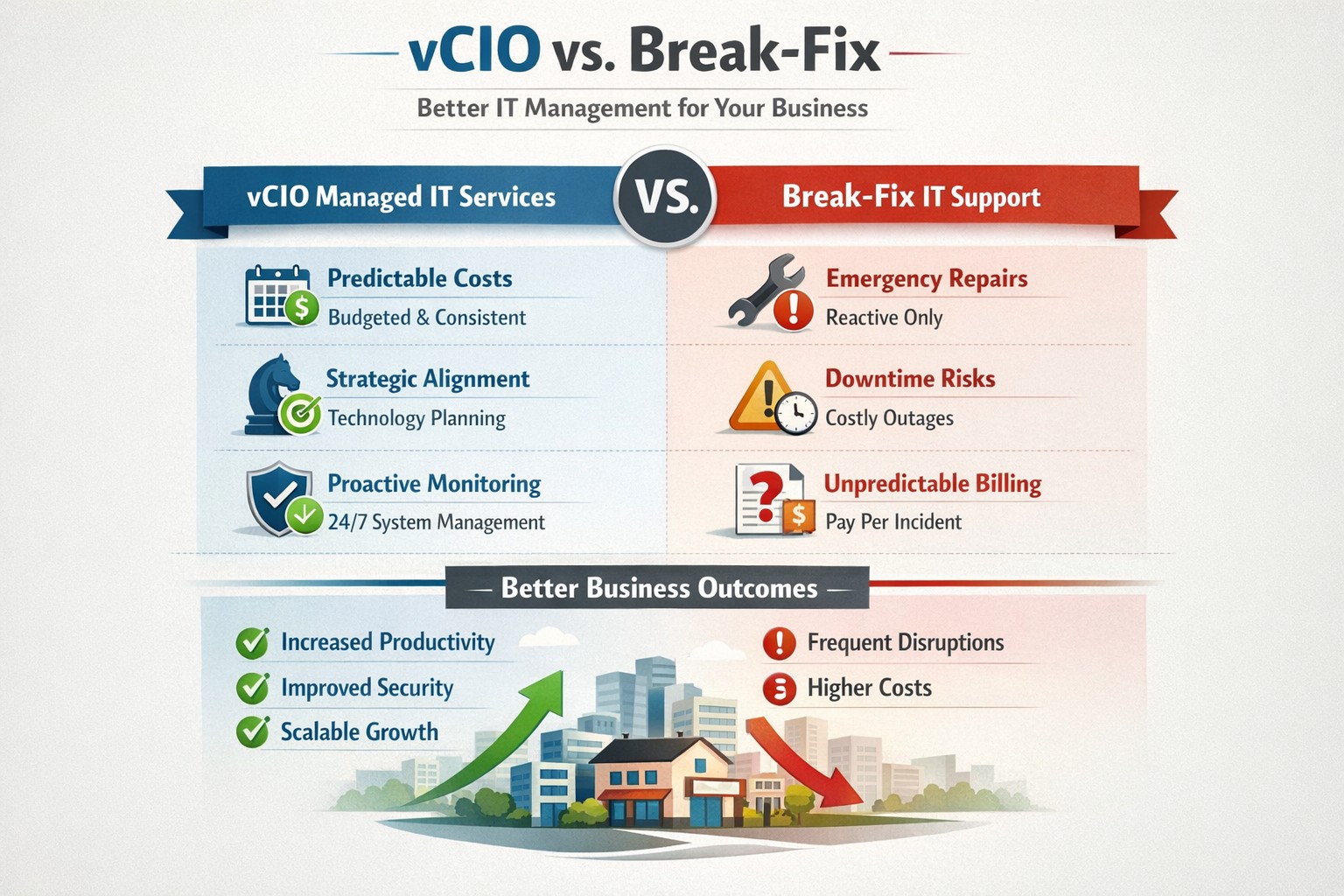
vCIO strategic services vs break-fix reactive IT model performance comparison.
In the ever-evolving world of IT support, two strategic approaches have emerged to address the needs of businesses – vCIO (Virtual CIO) services and break-fix services. Each of these approaches has its own merits and drawbacks, making it crucial for businesses to carefully consider which option best aligns with their goals and IT requirements. So, let’s dive into the comparison between vCIO services and break-fix services and find out which one takes the crown!
vCIO Services: Unleashing the Power of Proactive IT Management
The vCIO model offers businesses a cost-effective and strategic solution to IT management, delivering benefits far beyond simple problem-solving. Here’s a breakdown of what vCIO services bring to the table:
Strategic Technology Planning: A vCIO provides a long-term roadmap for your IT infrastructure, aligning it with your business objectives. They assess your current technology landscape, analyze potential risks, and develop a comprehensive IT strategy to ensure your technology infrastructure drives success.
Proactive IT Monitoring and Management: By constantly monitoring your systems, a vCIO can detect and address issues before they turn into full-blown disasters. They implement proactive measures, such as 24/7 system monitoring, patch management, and security audits to keep your IT environment optimized and secure.
IT Budgeting and Procurement: A vCIO helps you streamline your IT budget by aligning your investment with your business goals. They provide insights into cost-effective technology solutions, negotiate contracts with vendors, and manage IT procurement to help you make informed decisions while optimizing your spending.
Technology Vendor Management: Collaborating with multiple technology vendors can be time-consuming and complex. A vCIO acts as a single point of contact for all your technology vendors, managing relationships and ensuring smooth coordination between various stakeholders.
Break-Fix Services: The Traditional Firefighter Approach
Break-fix services have long been the go-to approach for businesses seeking IT support on an as-needed basis. Here’s a closer look at what break-fix services bring to the table:
Issue-Specific Support: Break-fix services are designed to address specific IT issues as and when they arise. This approach involves fixing problems after they occur, reacting to incidents rather than proactively managing your systems.
Limited Scope of Support: Break-fix services typically focus solely on resolving immediate technical issues. While they can provide quick fixes, they do not offer strategic planning or ongoing support to help prevent future issues or optimize your IT infrastructure.
Variable Costs: Break-fix service costs can be unpredictable, as you are billed per incident or hourly basis. This makes budgeting and financial planning more challenging, especially if you encounter frequent or recurring IT issues.
Less Focus on Prevention: With break-fix services, the emphasis is on remedying existing problems, leaving behind the potential for other underlying issues to remain undetected, ultimately leading to more costly and time-consuming problems down the line.
The Verdict: vCIO Takes the Throne!
While break-fix services may have their place in certain scenarios, vCIO services offer a more comprehensive approach to IT management, aligning your technology with your business goals and providing ongoing support. The proactive nature, strategic planning, and cost optimization provided by vCIO services make it the winning solution for businesses looking to stay ahead of the ever-changing technology landscape. So, without a doubt, the crown firmly sits on the head of vCIO services!
If your company is tired of just calling your IT service company when things are broken, then contact us for vCIO services.
Small and medium-sized businesses (SMBs) are the backbone of the economy, but they are often the primary targets for cyberattacks. In fact, according to recent reports, nearly half of all cyberattacks are aimed at SMBs. To protect themselves from these threats and ensure the security of their critical assets, SMBs should consider following the guidelines provided by the National Institute of Standards and Technology (NIST) in their Special Publication 800 series.
Comprehensive Cybersecurity Framework
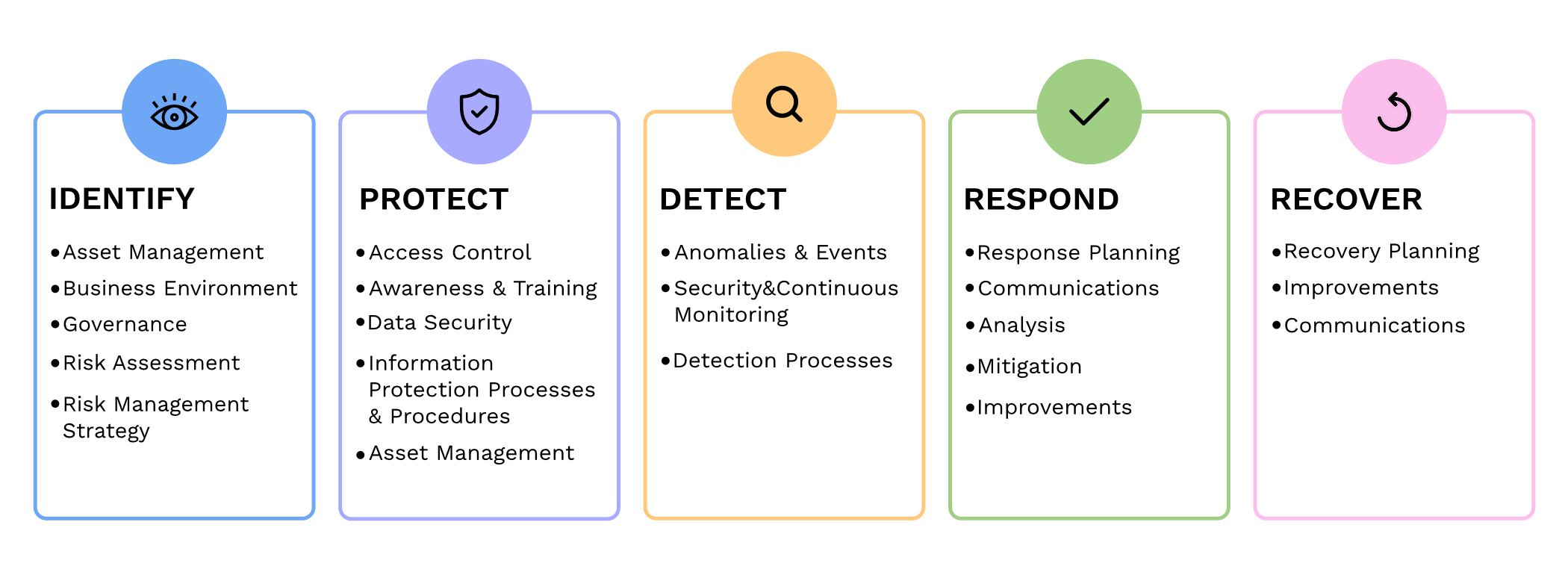
NIST 800 series provides a comprehensive framework that helps SMBs establish and maintain effective cybersecurity measures. By implementing the NIST guidelines, SMBs can enhance their cybersecurity posture and reduce the risk of potential data breaches, financial losses, and reputational damage.
Improved Risk Management
NIST 800 guidelines focus on risk management, helping SMBs identify and mitigate potential vulnerabilities and threats. Following the guidelines allows SMBs to proactively assess their cybersecurity risks and develop effective strategies to safeguard their sensitive data, intellectual property, and customer information.
Industry-Recognized Standards
NIST 800 series is widely recognized and adopted by both the public and private sectors. By adhering to these guidelines, SMBs demonstrate their commitment to meeting industry standards and best practices. This not only helps build trust with customers and partners but also increases their chances of securing lucrative business contracts and partnerships.
Cost-Effective Approach
Implementing NIST 800 guidelines can be a cost-effective approach for SMBs. These guidelines offer scalable solutions that can be tailored according to the organization’s size, budget, and specific requirements. SMBs can leverage the NIST framework to prioritize their cybersecurity investments, ensuring that they maximize their security efforts within their available resources.
In today’s digitally connected world, SMBs cannot afford to neglect cybersecurity. Following the NIST 800 guidelines provides SMBs with a comprehensive framework to enhance their cybersecurity posture, improve risk management, establish industry-recognized standards, and reduce costs, By working with a managed IT service provider to implementing these guidelines, SMBs can protect their assets, maintain their reputation, and thrive in an increasingly cyber-threatened landscape.
If your company is looking to implement stronger security through an standards based framework, then contact us for assistance.
Business password manager vault with shared folders, password strength indicators, and audit log activity.
Today’s cybersecurity threats are constantly evolving, so it’s crucial for businesses to protect their sensitive data. One of the simplest yet most effective ways to enhance your company’s security is by using a company-wide password manager. In this blog post, we will explore the top reasons why businesses should adopt password managers.
Simplify Password Management
With the average person having to remember dozens of passwords for various accounts, it’s no wonder that weak passwords and password reuse are prevalent. A password manager simplifies this process by securely storing all passwords in one encrypted location. Employees can then access their passwords with a single master password or use biometric authentication.
Generate Strong and Unique Passwords
One of the primary reasons for data breaches is weak passwords. Many people still rely on easily guessable passwords, such as “monkey” or “123456” or “password.” A password manager helps eliminate this risk by generating and storing strong, unique passwords for each account. (Most even have an auto-fill feature to work with internet browsers to make website login fast and secure.) This ensures that even if one account is compromised, the rest remain secure.
Enhance Security and Privacy
By using a company-wide password manager, businesses can significantly improve their security posture. These tools employ strong encryption algorithms to protect sensitive information from unauthorized access. Moreover, most password managers offer additional security features like two-factor authentication and secure password sharing, further enhancing your company’s security.
Boost Productivity and Efficiency
Lost or forgotten passwords can cause significant downtime and productivity loss for individuals and businesses. With a password manager, employees no longer need to waste time recovering or resetting passwords. They can easily retrieve their credentials whenever needed, freeing up valuable time to focus on their primary tasks.
Centralize Access Control
In a business setting, it’s crucial to have centralized control over employee access to various systems and accounts. A password manager allows administrators to manage user access and permissions, ensuring that the right people have access to the right resources. It also facilitates revoke access promptly when an employee leaves the organization, minimizing the risk of unauthorized access.
Simplify Onboarding and Offboarding
Managing employee onboarding and offboarding can be a complex process. A password manager streamlines this by providing a centralized platform for creating and distributing passwords. When an employee leaves, their access can be promptly revoked, eliminating any potential security vulnerabilities associated with ex-employee accounts.
If your company is looking to implement the ease and security of a password manager, then contact us for assistance.
This is the fifth in a series that documents the Tier 3 / Co-Managed IT work we did to setup a wireless test bed for a Linux based scientific device. The testing environment included two different wireless network hardware types (Ubiquiti and Cisco). There was also a Synology device used for various purposes including hosting the Ubiquiti controller inside a Kubernetes container, providing certificate services, providing LDAP authentication, and providing RADIUS authentication. Each article will detail a separate piece of the project. This article shows the setup Synology RADIUS server & certificates.
Setup RADIUS Server
Login to Synology
Open Package Center
Install RADIUS Server app
Open RADIUS Server package
Uncheck local users
Check LDAP users
Click Apply
Click on Clients on left hand side
Click on Add
Create Name
Create Shared Secret
Enter IP address of Cisco WLAN controller
Click on Add
Create Name
Create Shared Secret
Enter IP address of Ubiquiti Controller
Configure RADIUS Certificates
Open Control Panel
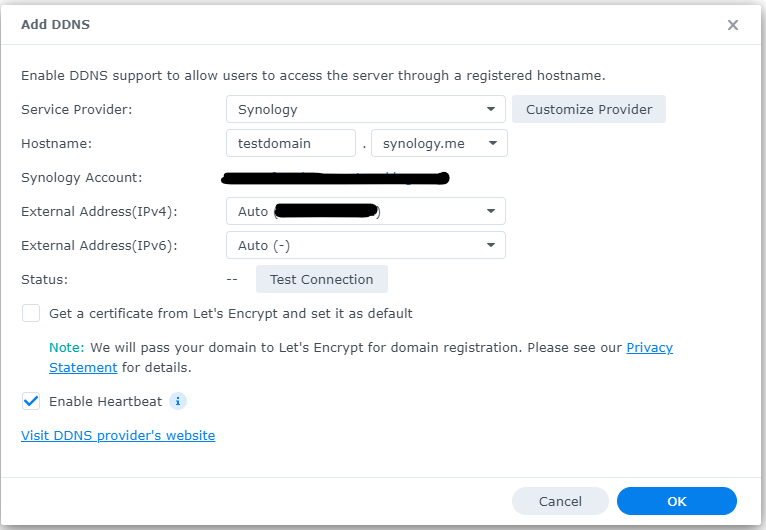
Click on External Access
Click on DDNS tab
Click Add
Choose Synology as service provider
Add hostname
Click Test Connection
Click OK
Click on Security on left hand side
Click on the Certificate tab
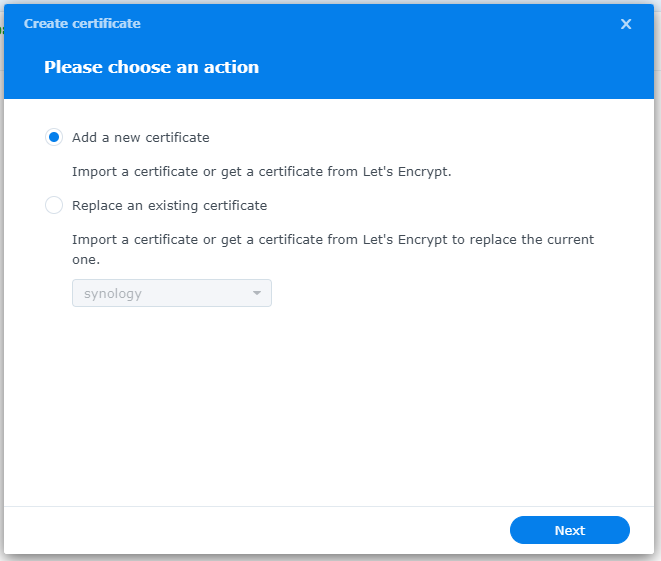
Click on Add
Add new certificate
Click Next
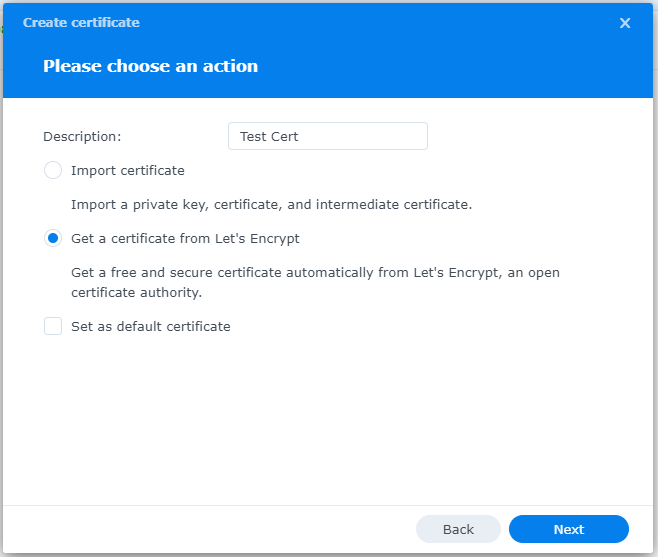
Create description
Get a certificate from Let’s Encrypt
Click Next
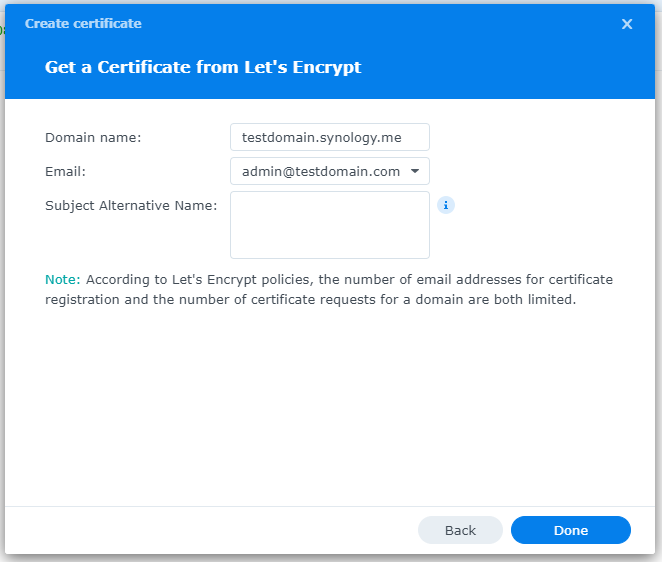
Add needed certificate information
Click Done
Click Settings button and choose appropriate RADIUS server certificate
If your company has highly customized setup requirements that you need consulting for, then contact us for assistance.
PwC study: MSP strategic users gain 43-point performance premium over cost-focused peers.
A report from PricewaterhouseCoopers based on a survey of over 2,000 business leaders and took it as confirmation of our recent blog post about Why SMBs Need Managed Service Providers (MSPs). Here are some takeaways from the article:
Takeaways:
“Companies that use MSPs for strategic advantage are 1.6 times and 2.4 times more likely to be faster to market as well as more innovative than those focused solely on cost savings, according to the report.”
“Organizations utilizing managed services at a mature level use them to respond more adroitly to changing conditions and potential threats.”
“Most business and IT leaders recognize the pace of innovation is occurring faster than their internal IT teams can absorb. There is always going to be some type of skills shortage. Those skill shortages are ones that MSPs are in the best position to fill.”
If your company is looking to outperform in the marketplace, then contact us to start a partnership.
MSP console managing SMB BYOD smartphones and laptops with centralized MDM and security policies.
Small and medium-sized businesses (SMBs) face numerous challenges when it comes to managing their IT. Limited resources (both human and money), lack of expertise, and the need to focus on core business operations often make it difficult for SMBs to understand and manage technology needs. This is where Managed Service Providers (MSPs) come in. In this blog article, we will explore the reasons why SMBs should consider partnering with MSPs to enhance their IT capabilities and drive business growth.
Cost-Effective IT Solutions:
One of the primary reasons why SMBs need MSPs is the cost-effectiveness they offer. By outsourcing their IT needs to MSPs, SMBs can avoid the high costs associated with hiring and training an in-house IT team. MSPs provide a range of services, including network monitoring, data backup and recovery, cybersecurity, and software updates, all at a predictable monthly cost. This allows SMBs to allocate their resources more efficiently and focus on their core business.
Access to Expertise and Advanced Technology:
MSPs are experts in providing IT services and have a team of highly skilled professionals with expertise in variety of technology. By partnering with MSPs, SMBs gain access to the depth of knowledge and experience from IT experts who can handle complex tasks and provide strategic guidance. Additionally, MSPs stay up-to-date with the latest technology trends and can recommend and implement solutions that can help SMBs stay competitive in the market and safe from hackers.
Proactive IT Support and Maintenance:
MSPs offer proactive IT support and maintenance, which is crucial for SMBs. They monitor networks, identify potential issues, and take preventive measures to avoid downtime and disruptions. MSPs also provide regular software updates, security patches, and system maintenance, ensuring that SMBs’ IT remains secure and up-to-date. This proactive approach helps SMBs minimize the risk of costly IT failures and ensures smooth business operations.
Enhanced Data Security:
Data breaches and cyberattacks pose a significant threat to SMBs. MSPs play a vital role in safeguarding SMBs’ sensitive data and protecting them from potential security breaches. They implement robust cybersecurity measures, such as firewalls, antivirus software, and encryption, to ensure data confidentiality and integrity. MSPs can also conduct regular security audits and vulnerability assessments to identify and address any potential weaknesses in the IT infrastructure.
Scalability and Flexibility:
As SMBs grow, their IT needs evolve. MSPs offer scalable solutions that can adapt to changing business requirements. Whether it’s adding new users, expanding storage capacity, or integrating new software, MSPs can quickly and efficiently accommodate these changes. This scalability and flexibility allow SMBs to focus on their growth without worrying about the limitations of their IT infrastructure.
If your company could use the cost-effective solutions, access to expertise, proactive support, enhanced data security, and scalability that come from using a MSP, then contact us for assistance.
And God will generously provide all you need. Then you will always have everything you need and plenty left over to share with others. As the Scriptures say,
“They share freely and give generously to the poor. Their good deeds will be remembered forever.”
For God is the one who provides seed for the farmer and then bread to eat. In the same way, he will provide and increase your resources and then produce a great harvest of generosity in you. - 2 Corinthians 9:8-10
We use cookies to ensure that we give you the best experience on our website. If you continue to use this site we will assume that you are happy with it.