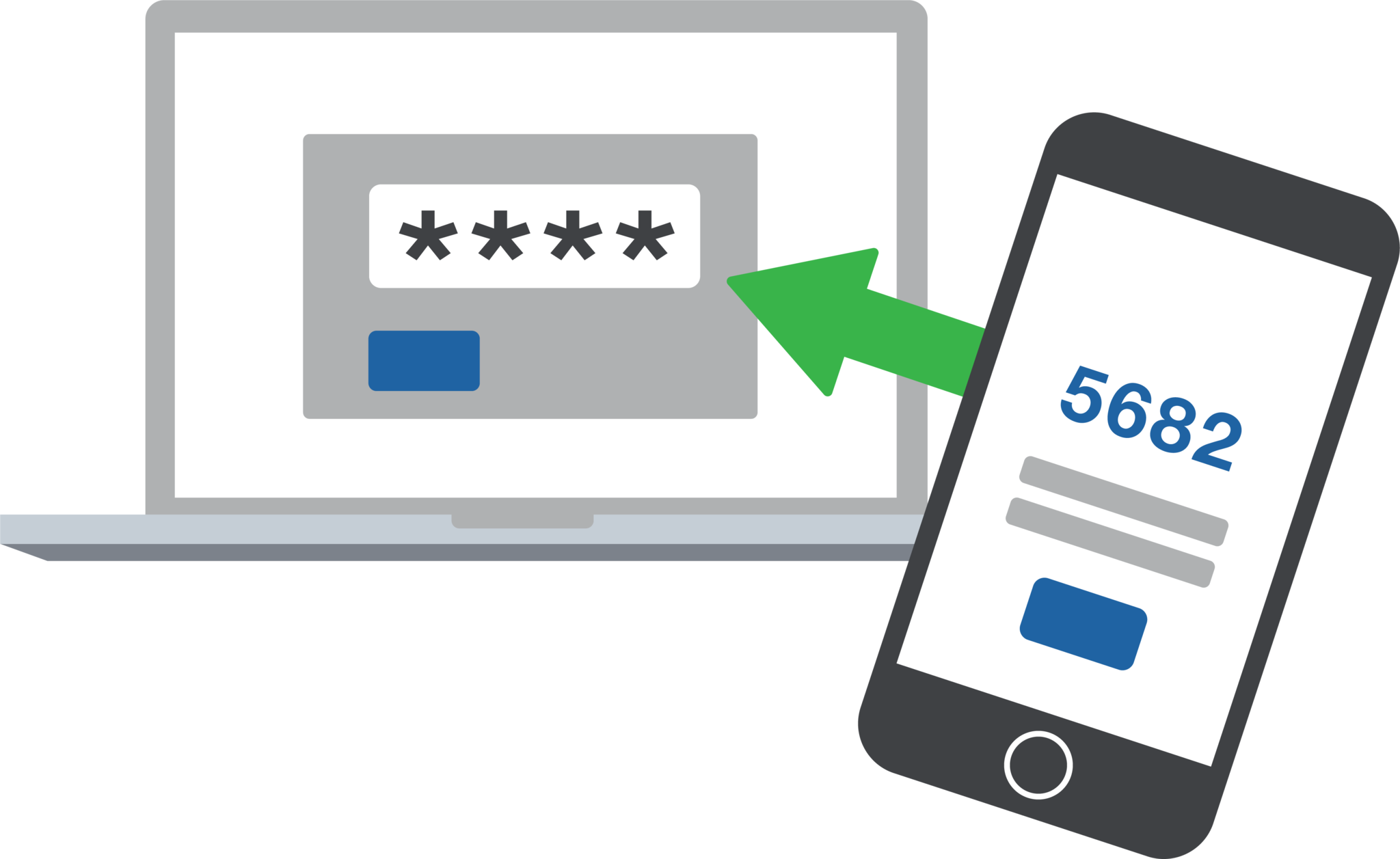
2FA dashboard displaying account protection compliance metrics and phishing defenses.
Businesses are face an increasing number of cyber threats. To protect sensitive data and prevent hackers from gaining access, implementing stronger security measures is crucial. One such measure is 2-factor authentication (2FA). Let’s look at the importance and security benefits of 2FA for businesses.
Enhanced Account Security:
2FA adds an extra layer of security to the traditional username and password login process. By requiring users to provide a second form of authentication, such as a unique code sent to their mobile device, it significantly reduces the risk of hackers from gaining access. Even if a hacker manages to obtain a user’s password, they would still need the second factor to gain access.
Mitigation of Password-related Risks:
Passwords are often the weakest link in security systems. Many users tend to reuse passwords across multiple accounts or choose weak and easily guessable ones or re-use the same password while incrementally changing a digit or two. With 2FA, even if a password is compromised, the additional authentication factor acts as a safeguard, making it significantly harder for attackers to gain access.
Protection Against Phishing Attacks:
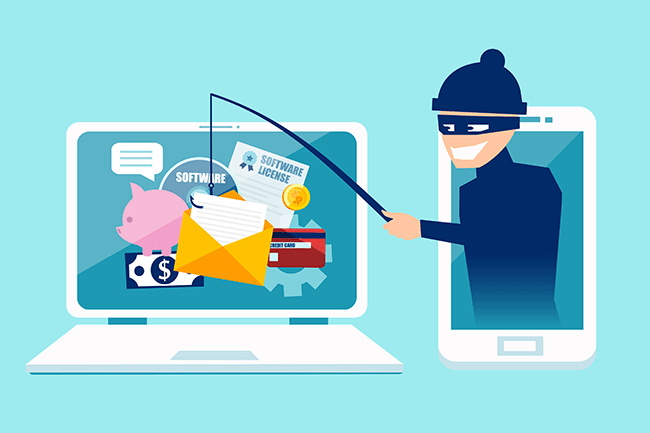
Phishing attacks, where attackers trick users into revealing their login credentials, are a common threat to businesses. 2FA provides an additional layer of defense against such attacks. Even if a user unknowingly falls victim to a phishing attempt and enters their credentials on a fake website, the second authentication factor would prevent the attacker from accessing the account.
Compliance with Industry Regulations:
Many industries, such as finance, healthcare, government contractors, and e-commerce, are subject to strict data protection regulations. Implementing 2FA helps businesses meet compliance requirements and avoid potential penalties. It demonstrates a commitment to safeguarding sensitive customer information and builds trust with clients.
Cost-Effective Security Measure:
Implementing 2FA does not require significant financial investment. Many 2FA solutions are readily available and can be easily integrated into existing systems. Considering the potential financial and brand reputation damage caused by a security breach, the cost of implementing 2FA is minimal compared to the benefits it provides.
In an era where cyber threats are constantly evolving, businesses must prioritize security measures to protect their valuable data. 2-factor authentication offers a simple yet effective way to do so.
If your company is interested in implementing 2FA across the entire organization, then contact us for assistance.
This is the forth in a series that documents the Tier 3 / Co-Managed IT work we did to setup a wireless test bed for a Linux based scientific device. The testing environment included two different wireless network hardware types (Ubiquiti and Cisco). There was also a Synology device used for various purposes including hosting the Ubiquiti controller inside a Kubernetes container, providing certificate services, providing LDAP authentication, and providing RADIUS authentication. Each article will detail a separate piece of the project. This article shows the setup Synology LDAP server & certificates.
Setup LDAP Server
Login to Synology
Open Package Center
Install LDAP Server app
Open LDAP Server package
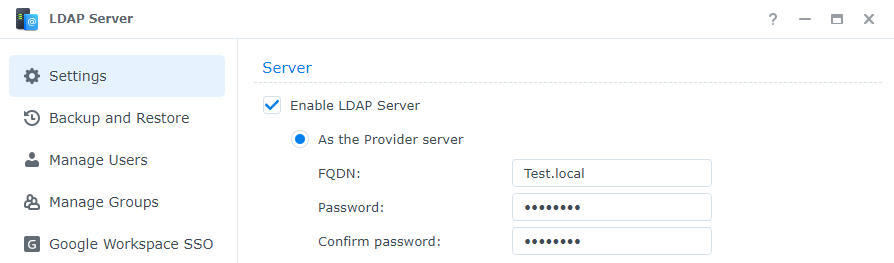
Enable LDAP Server
Create FQDN (something like Test.local)
Create password
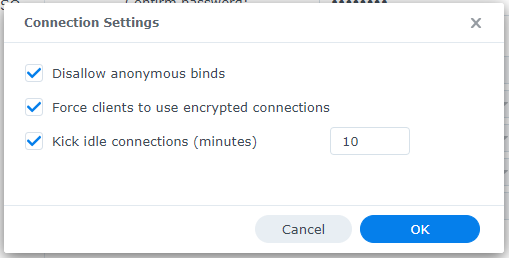
Change Connection Settings
Disallow anonymous binds
Force clients to use encrypted connections
Change timeout to 10 minutes
Click OK
Click Apply
Click on Manage Groups
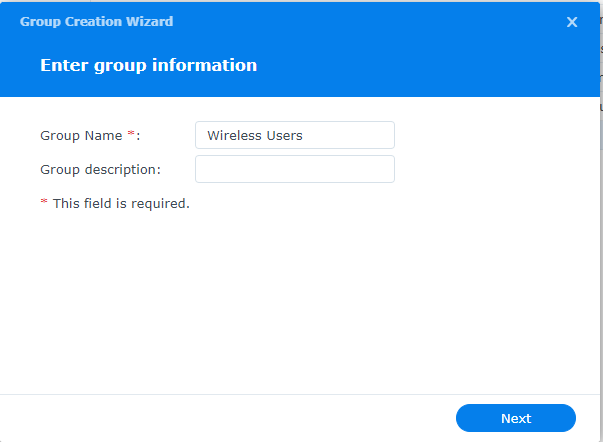
Click on Create
Give the Group a name
Click Next
Click Done
Click on Manage Users
Click on Create
Give the User a name
Add user email if appropriate
Create password
Click Next
Check mark next to new group previously created
Click Next x2
Click Done
Connect Synology to LDAP Server
Open Control Panel
Click on Domain / LDAP on left hand side
Click Join
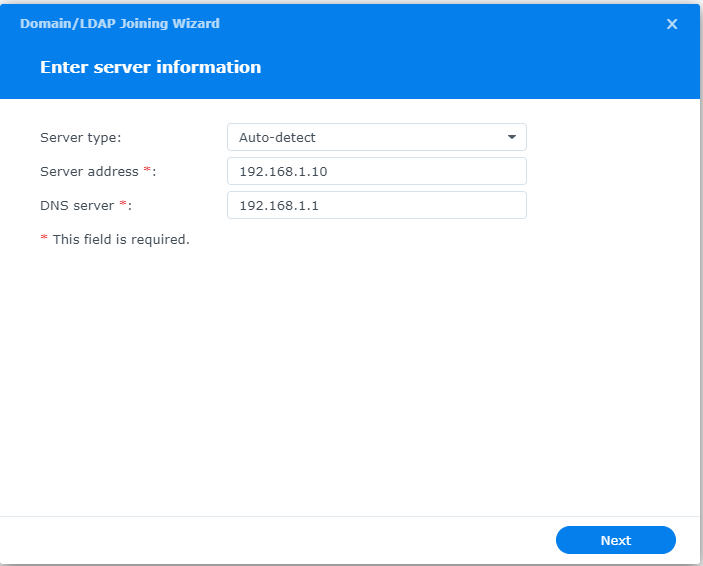
Enter IP address of Synology
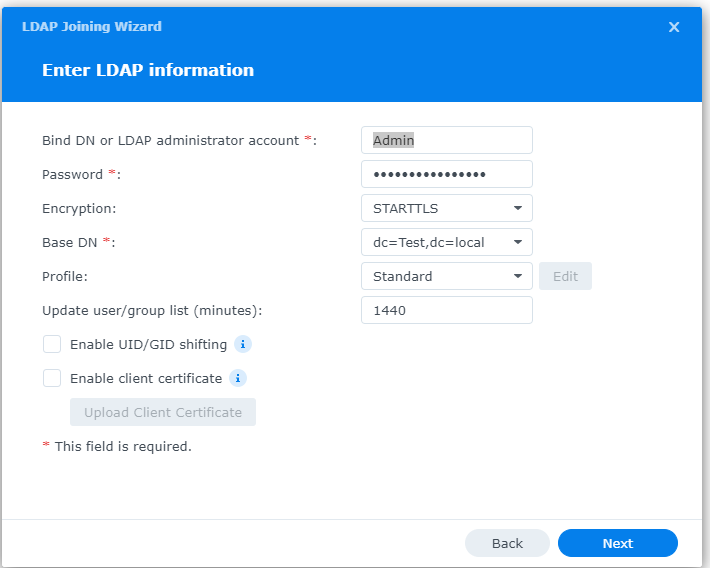
Enter Admin username / password
Choose STARTTLS encryption
Copy Base DN from LDAP Server app Settings tab
Click Next
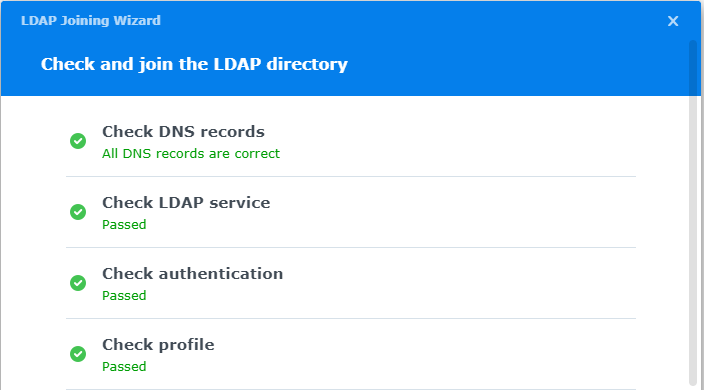
Connection parameters will be check (fix any issues)
Configure LDAP Certificates
Open Control Panel
Click on External Access
Click on DDNS tab
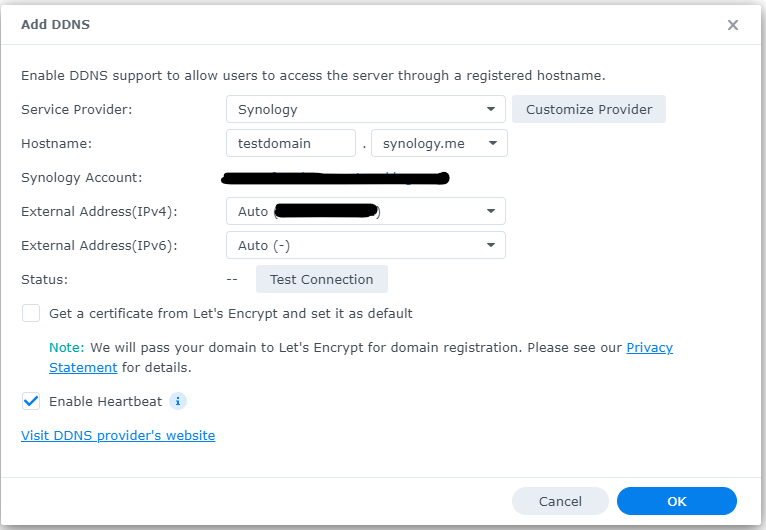
Click Add
Choose Synology as service provider
Add hostname
Click Test Connection
Click OK
Click on Security on left hand side
Click on the Certificate tab
Click on Add
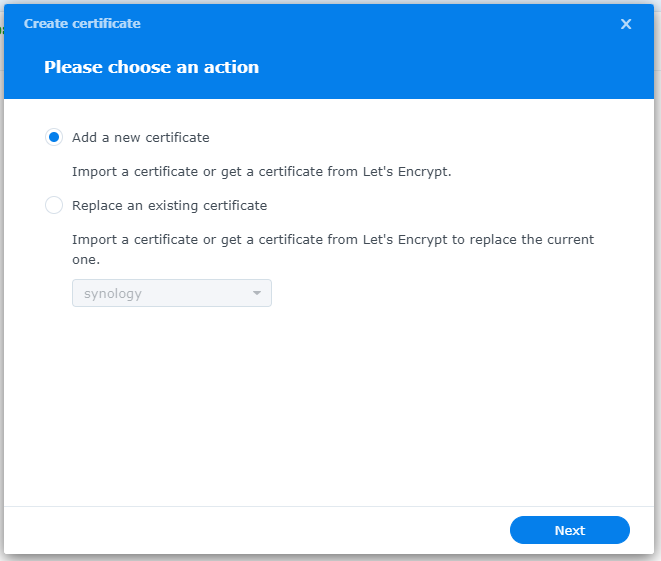
Add new certificate
Click Next
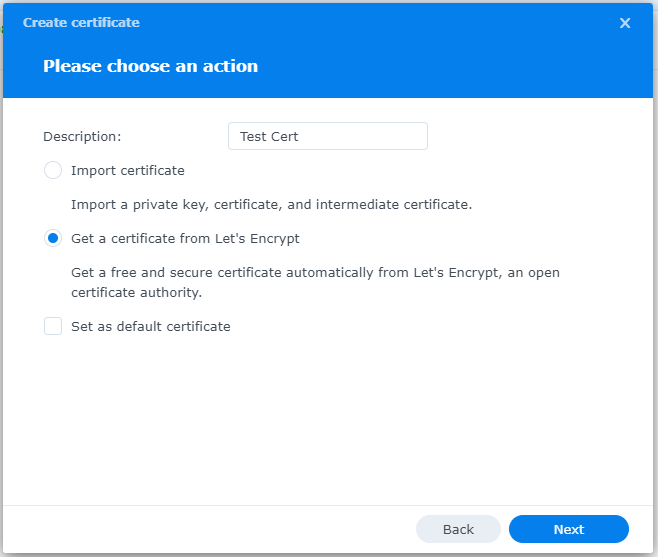
Create description
Get a certificate from Let’s Encrypt
Click Next
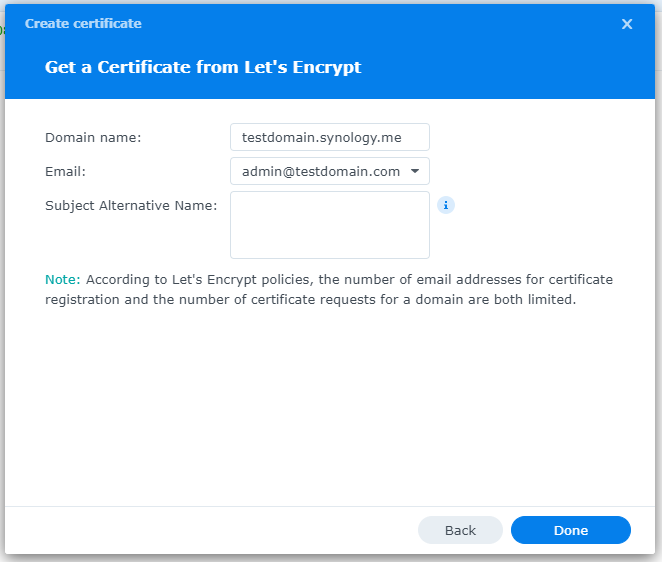
Add needed certificate information
Click Done
Click Settings button and choose appropriate LDAP server certificate
If your company has highly customized setup requirements that you need consulting for, then contact us for assistance.
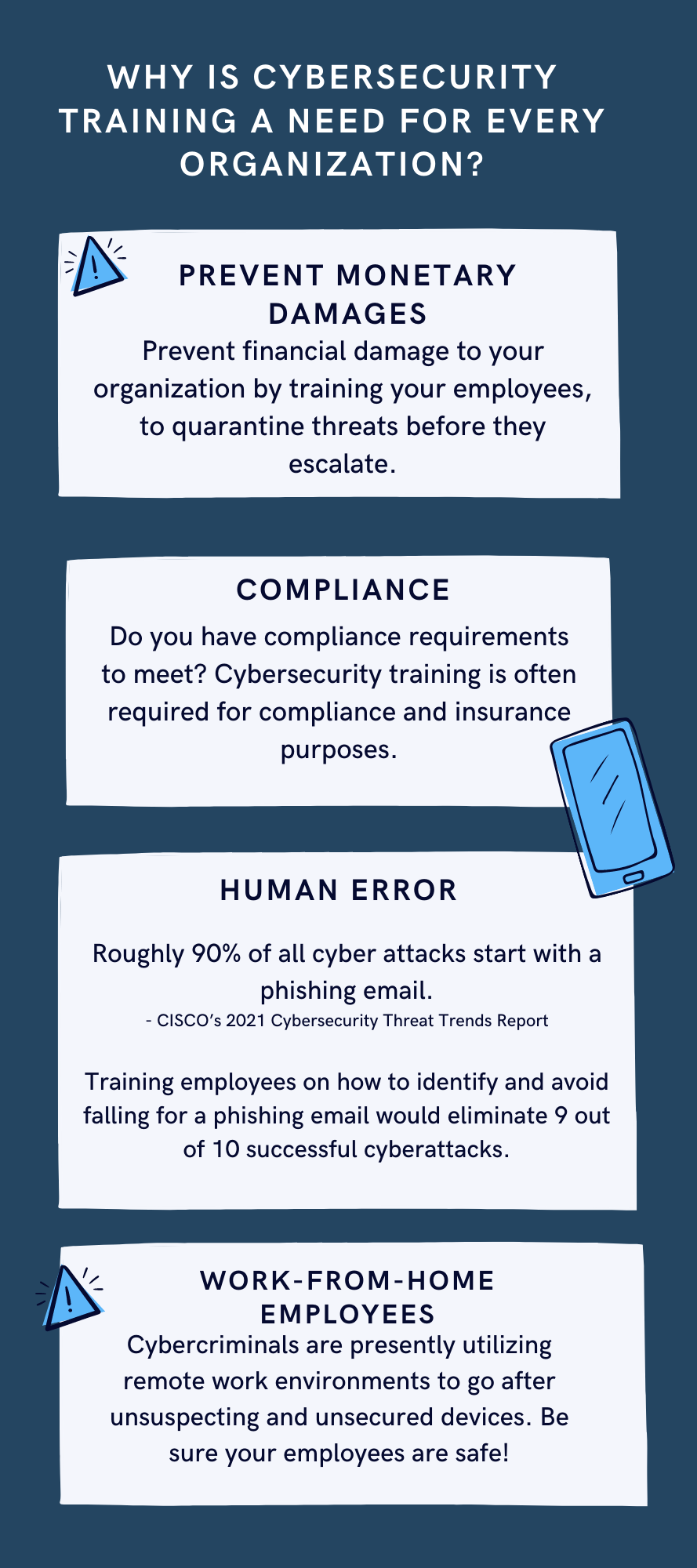
In today’s digital age, where technology has become an essential part of our lives, ensuring the security of our online information has become more crucial than ever before. With cyber threats and attacks on the rise, it is vital for individuals and organizations to invest in comprehensive cyber security training. In this blog article, we will explore the importance of cyber security training and why it should be a top priority for everyone.
Protecting Confidential Information
One of the main reasons why cyber security training is essential is to protect confidential information. In our increasingly connected world, we store sensitive data, such as financial information, personal details, and business data, online. Without proper training, individuals become vulnerable to malicious attacks, such as phishing scams, data breaches, and identity theft. Cyber security training equips individuals with the knowledge and skills necessary to identify and prevent such threats, ensuring the protection of confidential information.
Mitigating Financial Losses
Cyber attacks can have devastating financial consequences for individuals and organizations. The cost of recovering from a cyber attack, including restoring compromised systems, investigating the breach, and compensating affected parties, can be significant. By investing in cyber security training, individuals and organizations can minimize the risk of falling victim to cyber attacks, thereby avoiding potentially crippling financial losses.
Safeguarding Reputations
In today’s hyper-connected world, reputation is everything. A cyber attack not only compromises the security of your information but also tarnishes your reputation. News of a data breach or cyber attack can spread like wildfire, damaging the trust that customers, clients, and partners have in you. By taking proactive measures and investing in cyber security training, individuals and organizations can safeguard their reputations and maintain the trust of those they interact with.
Staying Ahead of Evolving Threats
Cyber threats are constantly evolving, with hackers employing new techniques and strategies to breach systems and access sensitive information. Cyber security training ensures that individuals and organizations stay up to date with the latest cyber security practices, emerging trends, and new vulnerabilities. By staying ahead of evolving threats, individuals can better defend themselves against attacks and organizations can maintain a robust cyber security posture.
Building a Culture of Cyber Awareness
Cyber security is not just the responsibility of IT professionals; it is everyone’s responsibility. By promoting cyber security training, organizations can build a culture of cyber awareness among their employees. Ensuring that employees are equipped with the necessary knowledge and skills to identify and report potential threats reduces the attack surface and strengthens the overall security posture of the organization.
Conclusion
In a world increasingly reliant on technology and interconnectedness, the importance of cyber security training cannot be overstated. From protecting confidential information to mitigating financial losses and safeguarding reputations, cyber security training is crucial for individuals and organizations alike. By investing in comprehensive training programs, we can enhance our ability to identify and prevent cyber threats, ultimately creating a safer digital environment for all.
If your company is one of the 47% of companies that plan to add or change their cybersecurity solution this year, then contact us for assistance.
Farmhouse Networking was recently approached by the Portland Tribune for comment on the hack of the DMV. We were quoted in their article published yesterday. Here is our full advice:
What to do post DMV hack?
The breach that effected the Oregon DMV was part of a larger hack of the software known as MOVEit. The exploit of the vulnerability in this software was used to gain access to over 3.5 million Oregonians information including:
Name
Home and mailing address
License or ID number
Last four digits of Social Security number
This information can be used by hackers and other darkweb criminals to assume the identity of those whose information has been compromised and perform identitiy theft activities like applying for credit cards or tax fraud. Anyone with an active Oregon ID card or driver’s license should begin monitoring their credit report and look for any suspicious activity. If suspicious activity is found they should immediately call the following to freeze their credit and take actions to reverse the damages done:
Equifax: equifax.com/personal/credit-report-services or 1-800-685-1111 Experian: experian.com/help or 1-888-397-3742 TransUnion: transunion.com/credit-help or 1-888-909-8872
If your company is concerned about the possibility of a similar breach, then contact us for assistance.
Mimecast KnowBe4 phishing simulation risk scoring employee training dashboard
As you know, we take cybersecurity and the protection of your accounts and data very seriously. That’s why we are always striving to provide you with tools and resources to help keep you and your employees safe from cybercrime.
The most common threat we are seeing is phishing messages delivering malware or stealing credentials. Even though your company might be protected with spam filtering, there are instances where these malicious messages could still appear in your employee’s inboxes. And it’s important we both arm them with as much education and resources as possible to understand and identify these phishes.
We have a new tool that we’d love to demonstrate for your or talk more about. It’s called Catch Phish, and it’s an email analysis and training tool. It connects right to your employee’s Outlook as a clickable application on every message. When clicked, the tool quickly, but safely, scans the important details of the message to find potential threats such as suspicious links or attachments, sender details, or message details such as threatening language or deactivation scares.
This tool is included in our cybersecurity training packages and can help provide the much needed cybersecurity education to all levels of staff.
Do you have 30 minutes to talk about reducing your risks with Catch Phish and our other cybersecurity awareness training tools, then contact us for assistance.
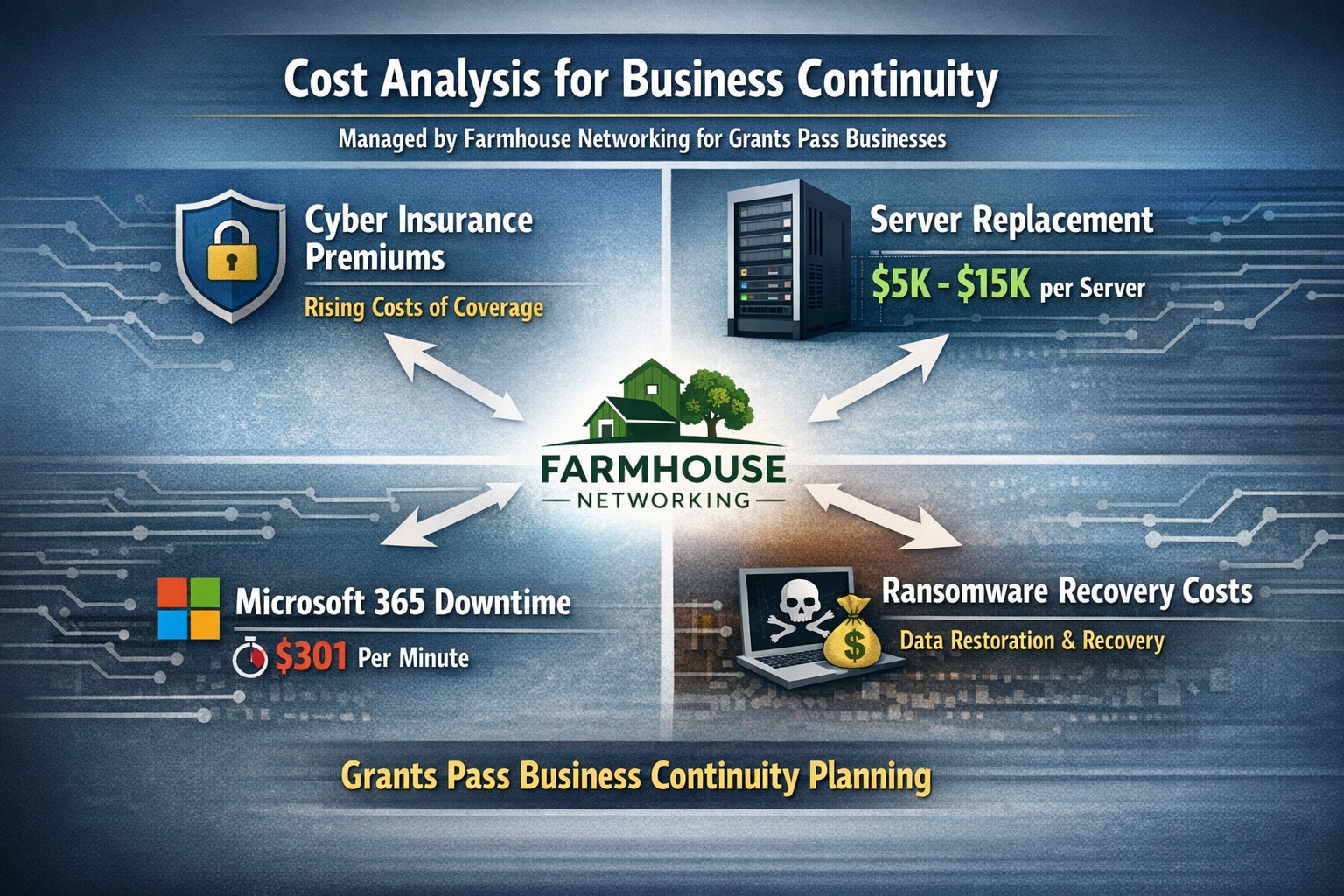
Farmhouse Networking calculates ransomware, server failure, and cyber insurance costs protecting Oregon SMB digital employees from downtime.
We were discussing the price customers paid for their monthly maintenance of computers and the comparison was brought up about insurance costs. As a business owner with employees, it is necessary these days to offer health insurance as part of their compensation package. If the company has vehicles that are used for business, then the government mandates that they be covered by minimum amounts of insurance. These costs are then built into the price the business owner then charges their clients for products or services.
Insurance Statistics:
According to Business.com, the average cost of health insurance for a single employee was $645 per month and $1,850 per month for a family.
According to NerdWallet.com, the average cost of car insurance was $179 per vehicle per month.
Questions:
So what about the “digital” employees of the company, aka the computers and network equipment that make business possible. How much are business owners paying to “insure” these assets? What are businesses willing to pay to make sure that their computers and network don’t have a sick day? Does the cost of insuring them include preventative care? Who does the business call in case of an accident or breakdown in the middle of the day? Does the cost of insuring include on-site service or transport to a service center?
If your company wants to keep their digital employees healthy and insure them from accidents, then contact us for assistance.
Every modern business has one thing in common – the internet.
Businesses are using computers, smart phones, tablets, etc. to connect to the internet for research, shopping, advertising, or any number of things. With a connection to the internet comes the need for routers, switches, wireless, and other network hardware to distribute internet connectivity across the company. There are malicious people on the internet that are setting traps and trying to break into companies which necessitate the use of tools like antivirus, internet filtering, spam filtering, and other protective measures. There are also people who work from their homes and need to have a way of tunneling safely into the network to use the resources there.
All of this has to be managed by someone in the company or you can contract with a managed IT service provider.
If your company needs help managing all the things connected to your internet, then contact us for assistance.
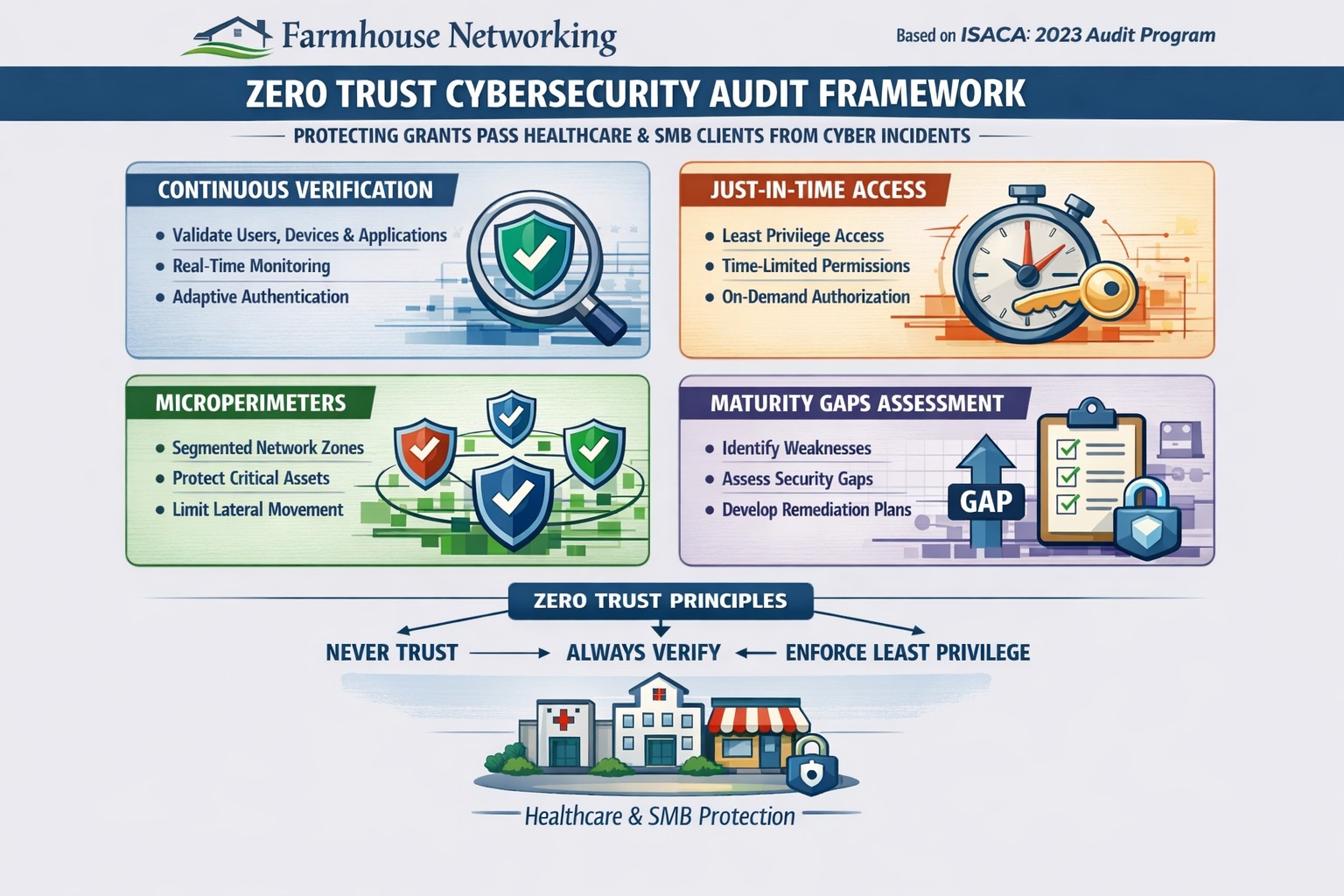
Farmhouse Networking 2023 zero trust audits verify continuous authentication and micro-segmentation for Oregon SMB cybersecurity compliance.
This is the tenth and finale in a series about the concept of Zero Trust, which means in the IT sense that you trust nothing and always verify everything surrounding and connected to your network. Today’s discussion will be on Cyber Security Audit.
Cyber Security Audit
Cyber Security Audit is a process where both internal and external systems are tested for their ability and susceptibility to being successfully attacked by hackers. This usually involves an inventory of current systems, research into known vulnerabilities, and testing of those found to see what information can be accessed. Once this process is complete a report is generated to detail both what is found and how those vulnerabilities can be addressed to protect the business’ most valuable commodity – information (intellectual property and client data). Here are some questions to ask:
Do you have an inventory of all assets in your organization? Is it up to date?
Have you tested your internal network for vulnerabilities?
Have you had a penetration test performed on your external network?
Do you know what compliance standards apply?
How do you document policies and procedures? Who oversees that?
If your company is wanting to have a free cyber security audit, then contact us for assistance.
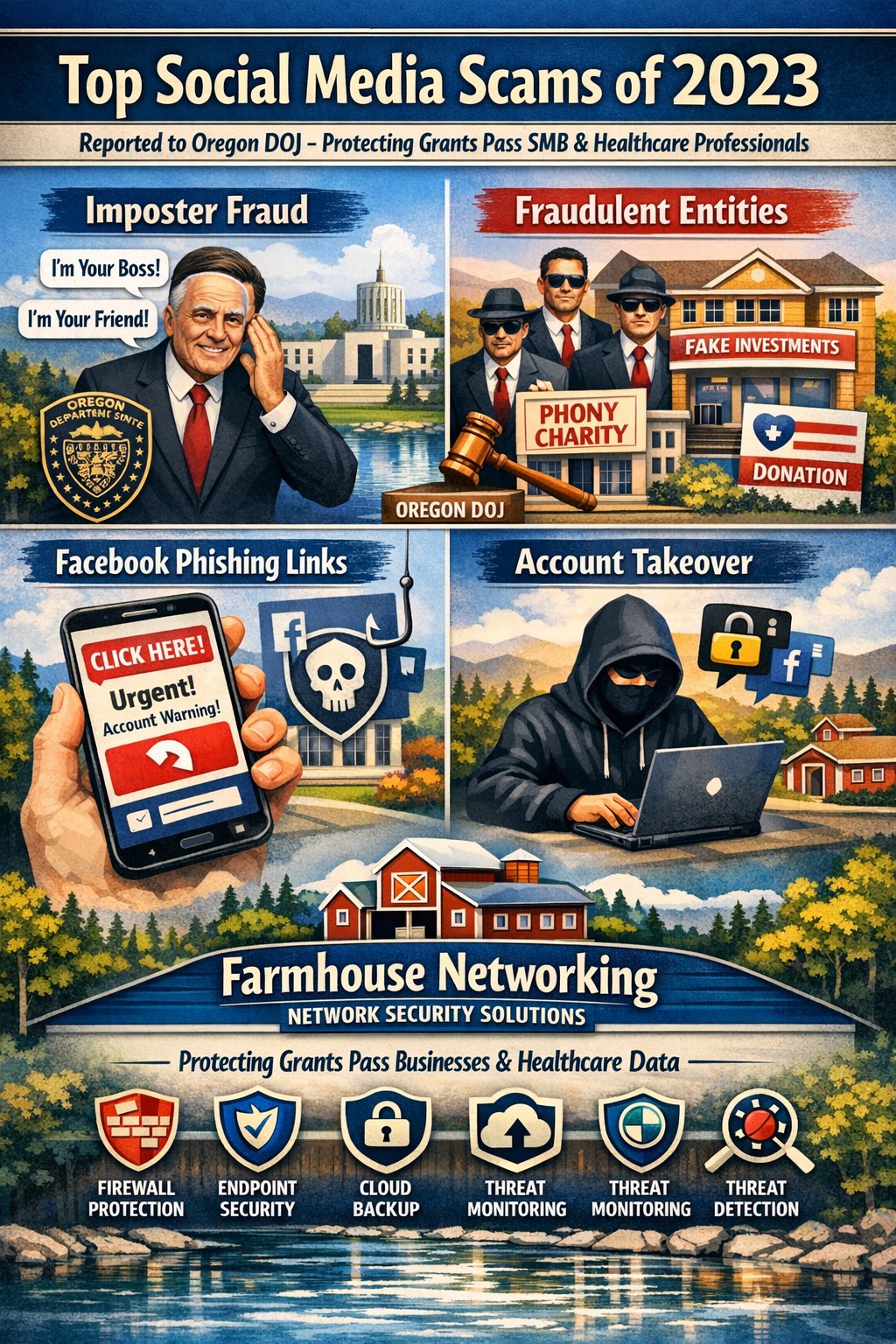
Farmhouse Networking protects Oregon businesses from 2023 Facebook imposter scams and Instagram phishing targeting SMB owners.
In today’s social media age, we are more interconnected than ever before. While this can be great for keeping up with loved ones and shedding light on current events, it also opens a new door for scammers. Last year, annual reported losses from social media scams hit $1.1 billion. Here are the five most common types and our recommendations for protecting yourself, and your business, from them:
Phishing Scams: Scammers attempt to trick you into revealing personal information by posing as a trustworthy source in an email or message. To avoid these scams, never click on links from unknown sources and always verify the sender’s identity.
Impersonation Scams: Scammers create fake profiles and impersonate others to deceive and scam others. To avoid these scams, check profiles for authenticity by verifying their information, friends, and photos.
Giveaway Scams: Scammers promise a prize or giveaway in exchange for personal information or a payment. To avoid these scams, never give out personal information, and only participate in giveaways from reputable sources.
Investment Scams: Scammers promise high returns on investments, but it is just a trick to steal your money. To avoid these scams, do thorough research before investing, be cautious of unrealistic returns, and don’t fall for pressure tactics.
Malware Scams: Scammers use social media to spread malicious software that can harm your device or steal personal information. To avoid these scams, don’t download anything from untrusted sources and keep your device’s security software up-to-date. Our goal at (Company Name) is to keep you safe while you’re scrolling. Speaking of social media, feel free to follow us @[handle] on Facebook and @[handle] on Instagram for more security tips and product updates.
Our goal at Farmhouse Networking is to keep you safe while you’re scrolling. Speaking of social media, feel free to follow us on LinkedIn for more security tips and product updates.
Farmhouse Networking’s zero trust security model prevents lateral movement
This is the ninth in a series about the concept of Zero Trust, which means in the IT sense that you trust nothing and always verify everything surrounding and connected to your network. Today’s discussion will be on Network Security.
Network Security
Network Security is having the proper hardware and configuration of that hardware in place to protect the business network. This configuration includes segmenting network traffic to keep specific types of traffic, like guest devices, separate from traffic of business devices. It also includes keeping outsiders out of the network and detecting when they have breached security measures. Here are some questions to ask:
Do you have a business class router / firewall?
Do you have business class switches and access points that support segmentation?
Is your network configured to segment business traffic from guest traffic?
Are devices like VoIP phones and network cameras on their own network?
Is geo-location blocking turned on for non-essential countries?
Is network traffic being analyzed for suspicious activity?
Do you filter internet traffic?
Can your network detect and respond to a breach?
If your company is wanting to lock down network security, then contact us for assistance.
And God will generously provide all you need. Then you will always have everything you need and plenty left over to share with others. As the Scriptures say, “They share freely and give generously to the poor. Their good deeds will be remembered forever.” For God is the one who provides seed for the farmer and then bread to eat. In the same way, he will provide and increase your resources and then produce a great harvest of generosity in you. - 2 Corinthians 9:8-10
We use cookies to ensure that we give you the best experience on our website. If you continue to use this site we will assume that you are happy with it.