A Practical Guide for Business Owners in Grants Pass
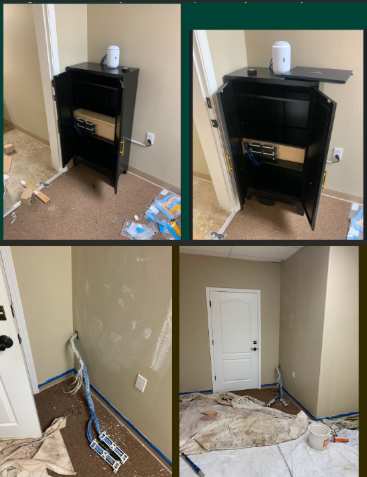
Before and after office network cabling remodel showing messy wires transformed into clean structured cabling installation in Grants Pass office space
A remodeled office is the perfect time to fix slow Wi‑Fi, random disconnects, and that tangle of mystery cables in the closet. Investing in office network cabling during construction gives your business faster speeds, fewer outages, and a cleaner, more professional workspace that is ready to grow with you.
Why Network Cabling Matters
Well‑planned cabling is the backbone of reliable internet, phones, and cloud apps your team uses every day.
Structured cabling (typically CAT6 or CAT6a) supports current needs and future upgrades like faster internet and new workstations without re‑opening walls.
For owners, this is about business continuity and productivity, not just “wires in the walls.”
Key Steps for You and Your IT Team
Use this checklist to keep your remodel on track and avoid expensive rework later.
Define business and growth needs
List how many employees, workstations, phones, printers, and Wi‑Fi access points you need now and in the next 3–5 years.
Note special areas like conference rooms, reception, and break rooms that need extra connectivity.
Review floor plans with IT before walls close
Have your IT provider mark data jack locations, wireless access point locations, and network closet placement on the architect’s plans.
Confirm there is proper power, ventilation, and space in the network closet for switches, patch panels, and future equipment.
Choose the right cabling standard
For most small and midsize offices, CAT6 or CAT6a structured cabling is recommended for performance and cost‑effectiveness.
Ensure all cabling, jacks, and patch panels are rated consistently (e.g., all CAT6) to avoid bottlenecks.
Plan clean cable pathways and labeling
Require cables to be run through ceilings/walls with proper supports, avoiding sharp bends and electrical interference.
Insist on clear labeling on both ends of every cable and a simple network map so future troubleshooting is fast and inexpensive.
Coordinate access and scheduling
Provide keys/access codes and confirm work windows so your cabling team can work efficiently without disrupting other trades or your staff.
Schedule final testing and certification of each cable run before you move in equipment and people.
Common Questions Owners Ask
Q: Why not just rely on Wi‑Fi instead of running cables? A: Wi‑Fi is great for mobility, but wired connections are faster, more secure, and more stable for desktops, VoIP phones, and servers. A hybrid approach (wired for fixed devices, Wi‑Fi for mobile) gives the best performance.
Q: Is CAT6 enough, or should we pay more for CAT6a or fiber? A: For most standard offices, CAT6 or CAT6a supports typical internet speeds and internal traffic very well. Fiber is usually reserved for backbone links between floors or high‑density areas where very high bandwidth is required.
Q: How much disruption will cabling cause during our remodel? A: If cabling is coordinated early with your contractor and scheduled while walls are open, most work happens before staff move in, greatly reducing disruption. Final terminations and testing can be done after painting and flooring.
Q: What should I ask for in documentation when the job is done? A: Request:
A simple diagram of the network closet and cabling layout.
Labeling that matches the diagram and wall jacks.
Test results showing each cable passed certification. This documentation saves hours of billable troubleshooting later.
How Farmhouse Networking Helps Business Owners
Farmhouse Networking specializes in turning remodel projects in Grants Pass and Southern Oregon into an opportunity to upgrade your IT foundation, not just “pull wire.”
Here is how the team can support you:
Consultative planning with owners
Translate your business goals (more staff, new phone system, better Wi‑Fi for clients) into a practical cabling and network design in plain English, not jargon.
Coordinate with your general contractor, electrician, and low‑voltage vendors so you are not stuck in the middle relaying technical details.
Professional structured cabling and cleanup
Design and install structured cabling, patch panels, and network racks that are neat, labeled, and ready for growth.
Fix legacy “spaghetti closets” by organizing existing cables, documenting the layout, and improving reliability.
End‑to‑end IT support after the remodel
Configure switches, firewalls, Wi‑Fi, and workstations so the new cabling actually delivers faster, more stable performance for your team.
Provide ongoing managed IT services to monitor your network, catch issues early, and support your staff.
Take the Next Step
If you are planning an office remodel—or just finished one and want to be sure your office network cabling was done right—this is the ideal moment to set your business up for years of smooth, reliable operations.
Email support@farmhousenetworking.com for more information about how Farmhouse Networking can help improve your business with smarter office network cabling and ongoing IT support.
Why SMBs Need Smart Network Infrastructure Management
Optimizing SMB network infrastructure for stronger, scalable business networks
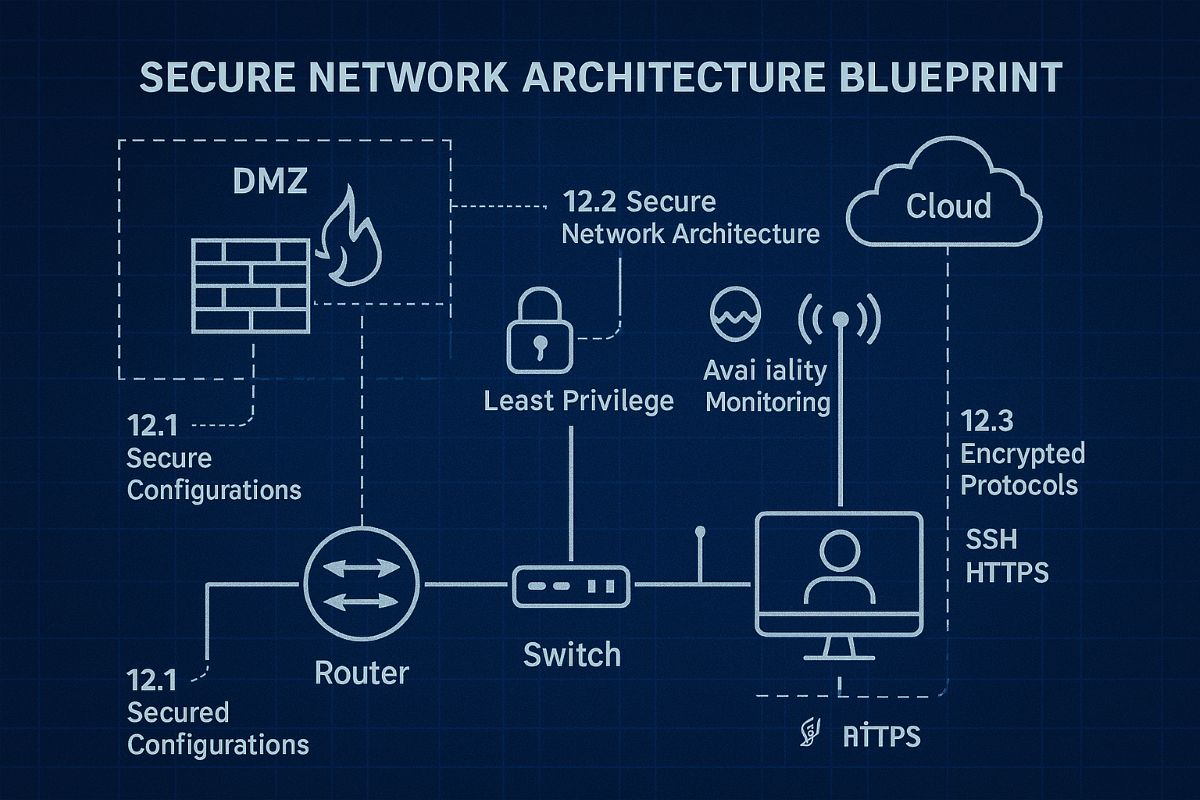
For small and midsize business owners, every minute of uptime counts. A slow or vulnerable network isn’t just frustrating—it costs productivity, damages customer trust, and drains revenue. Network Infrastructure Management, guided by CIS (Center for Internet Security) standards, is the key to keeping your technology reliable, secure, and scalable.
Practical Action Steps
Audit Your Current Network: Compare your systems to CIS-recommended controls to uncover risks.
Secure Data Flows: Implement firewalls, intrusion detection, and CIS baseline configurations.
Plan for Growth: Ensure your infrastructure supports cloud, remote work, and future expansion.
Continuous Monitoring: Use real-time alerts to prevent disruption before it happens.
Employee Awareness: Provide staff training on cybersecurity aligned with CIS best practices.
Client Q&A
“Do CIS standards apply to smaller companies?” – Absolutely; they’re designed to scale to all business sizes.
“Will I need to overhaul my whole network?” – Not necessarily. Often, a phased approach is more cost-effective.
“What if I already have an IT person?” – Farmhouse Networking’s role is to extend their expertise, not replace it.
How Farmhouse Networking Helps We align your systems with CIS benchmarks, secure your infrastructure, and monitor it constantly. That means less downtime, stronger client trust, and more bandwidth for business growth.
Call to Action Ready to protect your network and grow confidently? Email us today at support@farmhousenetworking.com to learn how Farmhouse Networking can keep your systems strong and compliant.
Key network monitoring tools every small business needs for optimal performance
As a business owner, you know reputation and customer trust are everything. But cybercriminals don’t discriminate by size—small and midsize businesses (SMBs) are increasingly the targets of ransomware and data theft. CIS Critical Security Control 13 gives you a practical way to stay ahead of attackers and protect your company’s future.
Practical Action Steps for SMBs:
Enable real-time network monitoring: Know immediately if your systems are under attack.
Centralize your logs: Aggregate data to detect issues before they escalate.
Set threshold-based alerts: Don’t wait until damage is visible to respond.
Review reports regularly: Make monitoring part of monthly executive/IT reviews.
Q&A for SMBs:
“Aren’t we too small for hackers to notice?” No—SMBs are now among the most targeted because criminals assume defenses are weak.
“Do I need an in-house IT team for this?” Not necessarily—outsourced experts can cost-effectively handle monitoring for you.
How Farmhouse Networking Helps: Farmhouse Networking provides SMBs with managed network monitoring, advanced alerts, and proactive defense strategies. We scale solutions to fit your size, budget, and growth goals.
Don’t leave your business exposed. Email Farmhouse Networking today and start building stronger defenses for lasting success.
Strategic business growth planning: Scale operations with robust IT and networking support for sustainable expansion
Whether expanding office space or adding new locations, your business needs a strong, flexible IT setup to keep operations running smoothly. Here’s what every business owner should do.
Practical Steps:
Increase Computing Capacity: Upgrade systems so they can handle more customers, data, and applications without slowing down.
Secure Network Connections: Keep all offices and remote employees safely connected with secure networks.
Implement Collaboration Software: Choose tools that help your teams communicate and work together seamlessly, wherever they are.
Common Client Questions:
How do we keep data secure across multiple sites? Through encrypted connections and reliable security measures like firewalls, VPNs, and antivirus software.
Will adding more users slow down our systems? Proper upgrades and scalable solutions prevent slowdowns and keep efficiency high.
What collaboration tools work best? Simple, widely used platforms offer shared calendars, instant messaging, and file-sharing apps like Microsoft Office 365.
How Farmhouse Networking Can Help:
We help SMBs upgrade IT infrastructure affordably and efficiently, ensuring fast performance, strong security, and smooth collaboration no matter how fast you grow.
Ready to scale your business IT confidently? Email support@farmhousenetworking.com for a free consultation today.
Defend your business WiFi from becoming a hacker target with robust wireless security measures against common threats
Reliable and secure internet access is critical, especially for satellite offices relying on connectivity to central locations. Recently, one of our healthcare clients was nearly shut down by their ISP after the Recording Industry Association of America (RIAA) reported illegal music downloads traced to their IP address. The source? An open guest wireless network left unprotected.
How the Incident Unfolded
The ISP alerted the client via email, having received a complaint from the RIAA alleging that copyrighted music was illegally copied and distributed through BitTorrent on their network. Farmhouse Networking’s investigation pinpointed the activity: at 2 a.m., someone exploited the guest WiFi, which lacked any password protection, to download files illegally.
Had the ISP shut down the internet, this satellite healthcare office would have faced canceled appointments and redirected patients, impacting not only their reputation but costing thousands in lost revenue.
Key Wireless Network Security Lessons for Healthcare Providers
This incident highlights crucial vulnerabilities common in healthcare and other sectors:
Never leave guest WiFi networks open. Any unsecured network is an open invitation to unauthorized use and legal risks.
Use strong encryption and passwords on all wireless networks, including guest access, to block unauthorized connections.
Implement DNS filtering to prevent illicit peer-to-peer activity and block access to unauthorized sites.
Separate guest traffic from internal business-critical networks to safeguard sensitive data and operations.
Regularly audit network access points and update security settings, including changing default passwords on routers and regularly changing the wireless passwords.
Steps Farmhouse Networking Took to Protect the Client’s Wireless Network
Working closely with the healthcare office, Farmhouse Networking:
Secured their wireless network with strong WPA3 encryption and complex passwords.
Added DNS filtering to the guest wireless network to prevent peer-to-peer and similar applications.
Advised on ongoing monitoring and best security practices to safeguard against future misuse.
Emphasized the importance of network segmentation to protect sensitive healthcare data.
Why Wireless Network Security Matters in Healthcare
Beyond avoiding ISP shutdowns and illegal activity accusations, securing wireless networks in healthcare is essential for compliance with regulations like HIPAA, protecting Electronic Protected Health Information (ePHI), and maintaining patient trust.
Protect Your Business WiFi Today
Don’t risk your healthcare practice’s internet access, reputation, or compliance by allowing unsecured wireless access. Contact Farmhouse Networking to perform a comprehensive wireless network security assessment tailored to your industry’s unique needs. Secure your internet, protect your patients, and keep your practice running smoothly.
Real-world fix for server disappearance using co-managed IT proactive monitoring
Today’s story highlights how we helped a Co-Managed client resolve a perplexing issue with their network. Random workstations were losing connection to the server at inconsistent intervals throughout the day. Despite the on-site technician’s best efforts, the root cause remained elusive, so they called us in to investigate.
We began by examining the suspected source of the problem: the server. Tracing all network cables from the server to the connected switches, we discovered a secondary failover server designed to take over in case of primary server failure. However, both servers had multiple network connections that weren’t properly configured. We corrected this setup, confident it would resolve the issue. Yet, the very next day, we received reports that the problem persisted.
In response, the on-site technician replaced the main server with the failover server, configuring it with the same name and IP address as the original. Unfortunately, this didn’t fix the issue, so we were called back for further investigation.
Drawing on our experience with similar cases, we suspected an IP address conflict. Specifically, two devices might have been assigned the same IP—one set statically and the other dynamically via DHCP. To test this theory, we asked the on-site tech to power down the server.
Our hunch was correct. A misconfigured network allowed an iPhone on the guest wireless network to obtain the same IP address as the server, causing both devices to compete for network traffic. We resolved the issue by isolating the guest wireless network from the main network, ensuring no overlap could occur.
With this fix in place, our client’s network has been running smoothly, allowing them to return to business as usual.
Uncover the Ghosts in Your Network! Contact Farmhouse Networking today to solve your IT mysteries and get back to business seamlessly. Don’t let hidden issues slow you down—schedule your consultation now!
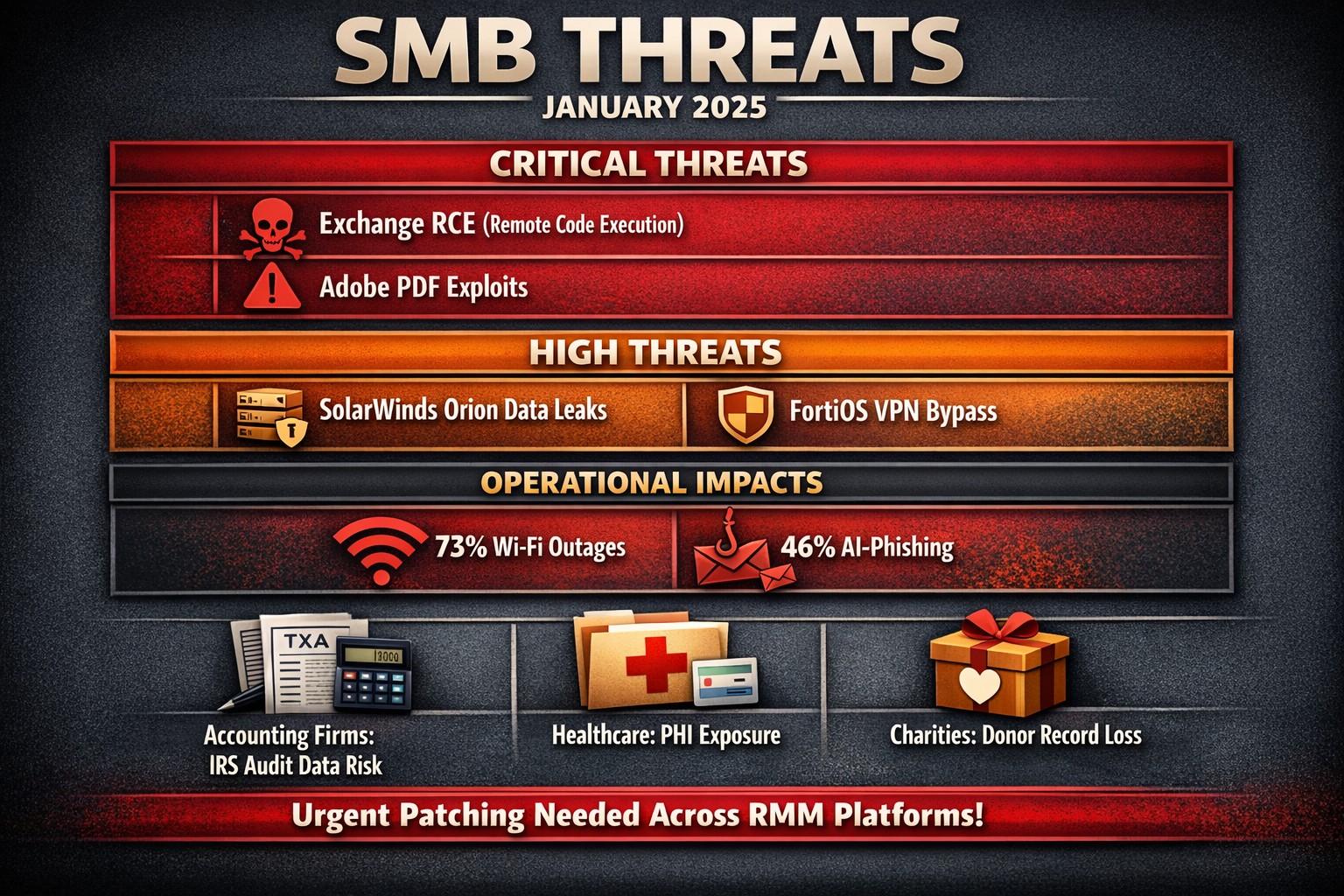
The past month has seen several significant vulnerabilities disclosed that pose serious risks to SMBs. Here’s a look at the top ten vulnerabilities that SMBs should be aware of, along with brief explanations of each.
Microsoft Exchange Server Vulnerabilities (CVE-2024-12345)
A critical vulnerability in Microsoft Exchange Server allows attackers to execute arbitrary code remotely. This flaw can lead to unauthorized access to sensitive emails and data. SMBs using outdated versions of Exchange are particularly at risk, as attackers can exploit this vulnerability without user interaction.
WordPress Plugin Vulnerability (CVE-2024-23456)
A popular WordPress plugin was found to have a cross-site scripting (XSS) vulnerability that could allow attackers to inject malicious scripts into web pages viewed by users. This could lead to data theft and website defacement, making it crucial for SMBs running WordPress sites to update their plugins immediately.
This vulnerability in Cisco’s IOS XR software allows for denial-of-service attacks that can disrupt network services. Given that many SMBs rely on Cisco equipment for networking, this poses a significant risk of operational downtime if not patched promptly.
Apache Log4j Vulnerability (CVE-2024-45678)
The infamous Log4j vulnerability continues to be a concern, with new exploits emerging. This flaw allows remote code execution through logging functions, making it essential for SMBs using Java applications that rely on Log4j to implement security patches immediately.
A critical vulnerability was discovered in Adobe Acrobat Reader that could allow attackers to execute arbitrary code via malicious PDF files. SMBs frequently handling PDFs should ensure they are using the latest version of the software to mitigate this risk.
Linux Kernel Vulnerability (CVE-2024-67890)
A flaw in the Linux kernel could allow local users to escalate privileges and gain unauthorized access to sensitive information. Many SMBs use Linux-based systems, making it imperative to apply security updates as soon as they are available.
VMware vSphere Vulnerability (CVE-2024-78901)
This vulnerability in VMware’s vSphere could allow an attacker with network access to execute commands on the host operating system. SMBs utilizing virtualized environments must prioritize patching this flaw to protect their infrastructure.
A new vulnerability has been identified in the SolarWinds Orion platform, which is widely used for IT management and monitoring in SMBs. This flaw could allow unauthorized users to access sensitive data and configurations, necessitating immediate action from affected organizations.
Fortinet FortiOS Vulnerability (CVE-2024-90123)
A critical vulnerability in FortiOS can lead to unauthorized access through improperly configured VPN settings. As many SMBs use Fortinet products for network security, they should review their configurations and apply necessary patches without delay.
Google Chrome Browser Vulnerability (CVE-2024-01234)
A high-severity vulnerability in Google Chrome could allow attackers to execute arbitrary code via crafted web content. Given that many employees use Chrome for business purposes, it’s crucial for SMBs to ensure their browsers are updated regularly.
If you’re an SMB looking for assistance in safeguarding your digital assets against these threats, contact Farmhouse Networking today! Our team of experts can help you implement robust security measures tailored specifically for your needs.
Resolve to strengthen cyber defenses in 2025 with zero trust and employee training.
Stepping into 2025, SMBs face an scary and complex cybersecurity field of battle. With hackers evolving cyber threats at a rapid pace, it’s crucial to make strengthening your digital defenses a top priority. Let’s explore some essential tips to boost your cybersecurity posture in the coming year.
Embrace a Zero Trust Mindset
Start the new year by adopting a Zero Trust approach to cybersecurity. This means verifying every user, device, and application attempting to access your network, regardless of their location. Implement Zero Trust Network Access protocols and use Application Allow/Deny lists to control which software can run on your systems.
Strengthen Your Network Defenses
Secure Your Wi-Fi: Ensure your Wi-Fi network is encrypted and properly configured. Use strong passwords and consider implementing network segmentation to isolate guest networks from your internal systems.
Implement Firewalls and Intrusion Prevention Systems: Deploy robust firewalls to filter incoming and outgoing traffic. Couple this with intrusion prevention systems that actively seek out and block known threats.
Protect Your Data
Encrypt Sensitive Information: Apply encryption to both data at rest and in transit. This includes emails, file transfers, and stored documents.
Implement Data Loss Prevention (DLP) Tools: Use DLP tools to track critical data and prevent unauthorized exfiltration attempts.
Enhance Authentication Measures
Multi-Factor Authentication (MFA): Implement MFA across all your systems, applications, and websites. This additional layer of security significantly reduces the risk of unauthorized access.
Use Password Managers: Encourage the use of password managers to generate and store complex, unique passwords for each account.
Educate Your Employees
Regular Security Awareness Training: Conduct ongoing cybersecurity training for all employees. Focus on recognizing phishing attempts, proper handling of sensitive data, and best practices for remote work.
Prepare for the Worst
Develop an Incident Response Plan: Create a comprehensive plan that outlines procedures for responding to various cybersecurity incidents. Regularly test and update this plan.
Implement Robust Backup Solutions: Establish a regular backup schedule for all critical data and systems. Store backups securely, preferably in multiple locations, including off-site.
Stay Updated and Vigilant
Keep Software and Systems Current: Regularly update all software, applications, and operating systems. Automate updates where possible and conduct periodic audits to ensure nothing is missed.
Implement Real-Time Monitoring: Deploy solutions that provide continuous, real-time monitoring of your network and systems. This allows for immediate detection and response to potential threats.
Secure Your Remote Workforce
With hybrid work models likely to persist, ensure your remote workers are equipped with secure tools:
– Provide Zero Trust VPN access for secure connections – Implement endpoint security measures even on employee’s own laptops – Educate on the risks of using public Wi-Fi
Address IoT Security
As the Internet of Things (IoT) expands, so do the associated risks. Inventory your IoT devices, regularly update their firmware, and implement network segmentation to isolate these devices.
Ready to make cybersecurity your New Year’s resolution? Contact Farmhouse Networking today. Our team of experts is ready to guide you through every step of enhancing your cybersecurity posture, ensuring that your business stays protected throughout 2025 and beyond. Let’s work together to create a robust, tailored cybersecurity strategy that meets your unique needs and keeps your business safe in the digital age.
Araknis delivers enterprise-grade performance and remote monitoring for business networks.
A reliable and robust network infrastructure is crucial for success. Araknis, a leading provider of networking solutions, offers a range of multi-gig VPN routers that are specifically designed to meet the diverse needs of modern businesses. Let’s explore why Araknis stands out as the top choice for business networks.
Unparalleled Performance
Araknis routers and switches are built to handle the demands of high-speed internet connections, supporting up to multi-gigabit 2.5Gbps throughput from your internet provider and up to 10Gbps throughout the network. This impressive capability ensures that your business network can handle large data transfers, video conferencing, and other bandwidth-intensive applications with ease.
Versatility and Flexibility
One of the key strengths of Araknis is its versatility. Whether you need a wireless solution, a wired setup, or a combination of both, Araknis has you covered. Their product line includes:
Wireless access points with built-in Wi-Fi 6 technology
Wired routers and switches for more traditional ethernet or modern fiber setups
PoE+ enabled ports to power all the phones, cameras, and other network devices
1U rack-mountable options for server rooms
This variety ensures that regardless of your business’s physical environment or networking requirements, there’s an Araknis network that fits perfectly.
Advanced Security Features
Araknis doesn’t compromise on protection. Their routers come with:
OpenVPN support: allowing for secure remote worker connections.
IPsec VPN support: allowing for secure office-to-office or office-to-cloud connection
Embedded firewall: Stateful Packet Inspection (SPI), Denial of Service (DoS) prevention, and WAN Request Blocking
VLAN routing: segment your network for added security
WiFi guest network: keep guest online and separated from business data
Cloud Management
Perhaps one of the most compelling reasons to choose Araknis is cloud management. This powerful management platform offers:
Faster setup and configuration
Robust remote management capabilities including printers and other network devices
Enhanced visibility and access to all network devices
Advanced troubleshooting tools
Real-time system health and diagnostic data
These features significantly reduce the need for on-site visits, saving time and resources while ensuring your network runs smoothly.
Future-Proof Investment
By choosing Araknis, businesses are making a future-proof investment. The routers, switches, and access points are designed to support the increasing internet speeds available today and are ready for the demands of tomorrow. This forward-thinking approach means your network infrastructure can grow and adapt as your business evolves.
Araknis routers offer a compelling combination of performance, versatility, security, and management capabilities that make them an excellent choice for business networks of all sizes. From small offices to medium enterprises, Araknis provides the reliable foundation needed to keep your business connected and productive.
Ready to elevate your business network with Araknis? Don’t wait to experience the difference. Contact Farmhouse Networking today to discuss how we can configure an Araknis-powered network tailored to your specific business needs. Let us help you build a network that drives your business forward.
Zero trust enables secure, high-performance networks across distributed business sites.
Multi-location companies face unique challenges when it comes to maintaining consistent and efficient network performance across all their sites. A robust and optimized network is crucial for seamless operations, effective communication, and maintaining a competitive edge. Let’s explore how businesses can optimize their network performance across multiple locations.
The Importance of Network Optimization
For multi-location businesses, network optimization is not just about speed—it’s about creating a cohesive, secure, and efficient digital environment that supports productivity and growth. A well-optimized network ensures:
Consistent performance across all locations
Improved collaboration and communication
Enhanced security and data protection
Increased operational efficiency
Better customer experience
Key Strategies for Network Optimization
Network Monitoring and Analysis: Implementing comprehensive network monitoring tools allows businesses to gain real-time insights into their network performance across all locations. This proactive approach helps identify potential issues before they impact operations.
Traffic Prioritization: Utilizing Quality of Service (QoS) protocols to prioritize critical business applications ensures that essential services receive the necessary bandwidth, regardless of location.
Load Balancing: Distributing network traffic evenly across multiple servers or network links prevents any single point from becoming overwhelmed, ensuring smooth operations across all sites. This also avoids single points of failure.
Network Segmentation: Dividing the network into smaller, manageable segments can significantly reduce congestion and improve overall performance, especially for businesses with multiple locations.
Regular Hardware and Software Updates: Keeping network infrastructure up-to-date across all locations is crucial for maintaining optimal performance and security.
Secure Remote Connections: Satellite offices will need to connect back to the main office for specific resources like authentication, computer policies, and industry specific applications. Making sure these remote connections remain online and secure is essential to make sure remote offices stay productive.
Implementing Network Optimization Strategies
To effectively optimize your multi-location network:
Conduct a comprehensive network audit across all locations to identify performance bottlenecks and security vulnerabilities.
Implement unified network monitoring tools to gain visibility into performance across all sites.
Standardize network infrastructure and policies across locations to ensure consistency and ease of management.
Utilize cloud-based solutions for improved accessibility and scalability across multiple sites.
Regularly review and update your network optimization strategy to adapt to changing business needs and technological advancements.
The Role of Managed IT Services in Network Optimization
A Managed IT services provider can be instrumental in implementing and maintaining these optimization strategies:
Centralized Management: They provide a single point of contact for all network-related issues across locations.
Customized Solutions: Tailoring optimization strategies to meet the specific needs of each business location.
Continuous Improvement: Regularly assessing and upgrading network performance based on the latest technologies and best practices.
Disaster Recovery and Business Continuity: Implementing robust backup and recovery solutions to ensure business continuity across all locations.
Optimizing network performance for multi-location businesses is a complex but crucial task. By leveraging the expertise of a Managed IT services provider, businesses can ensure that their network infrastructure is not just a utility, but a strategic asset that drives growth and innovation.
Ready to take your multi-location network performance to the next level? Contact Farmhouse Networking today to get started on your network optimization journey. Our team of experts is ready to help you create a seamless, efficient, and secure network environment across all your business locations.
And God will generously provide all you need. Then you will always have everything you need and plenty left over to share with others. As the Scriptures say,
“They share freely and give generously to the poor. Their good deeds will be remembered forever.”
For God is the one who provides seed for the farmer and then bread to eat. In the same way, he will provide and increase your resources and then produce a great harvest of generosity in you. - 2 Corinthians 9:8-10
We use cookies to ensure that we give you the best experience on our website. If you continue to use this site we will assume that you are happy with it.