As our business continues to focus on providing white labeled Tier 3 IT support services, RMM as a service, and co-managed IT services this blog will be highlighting tips for RMM automation. Here is a script that we came up with to handle a particular client that dumps tons of PDFs into a folder unsorted and wants individual folders created for each unique file name. We have tailored this script to be used not only at that client but for any folder on any Microsoft Windows computer that needs to be sorted in this manner. This script could easily be modified to sort other types of files.
Variables
Here are the variables we are using for this script:
$SourceFolder = This is the target folder to be sorted
Script Snippet
# Defines the folder that sorted data will go into
$TargetFolder = $SourceFolder + " Sorted"

#Defines how to match files with similar names, in this case we put files with the same name then a dash or underscore and other numbers or letters to be placed in the same folder
$MatchRegEx = "[-_]"


#Grabs only the PDF files in the folder being sorted (modify for other extension types or remove filter to sort all files)
Get-ChildItem -Path $SourceFolder -Filter *.pdf |
    ForEach-Object {
        #Creates folder name for child folders in sorted data
        $FileNameFolder = $_.Name -split $MatchRegEx
        $ChildPath = Join-Path -Path $FileNameFolder[0].Replace('.pdf','') -ChildPath $_.Name

        [System.IO.FileInfo]$Destination = Join-Path -Path $TargetFolder -ChildPath $ChildPath

        #Checks if folder exists and if not creates child folder
        if( -not ( Test-Path -Path $Destination.Directory.FullName -erroraction silentlycontinue) ){
            New-Item -ItemType Directory -Path $Destination.Directory.FullName
            }

        #Copies file into child folder
        Copy-Item -Path $_.FullName -Destination $Destination.FullName
        }
This script is non-destructive meaning that the files are copied and not moved. This script gives screen output of each new child folder created.
If your company is a MSP or wants to become one and automation just seems out of reach, then contact us to run your RMM for you.
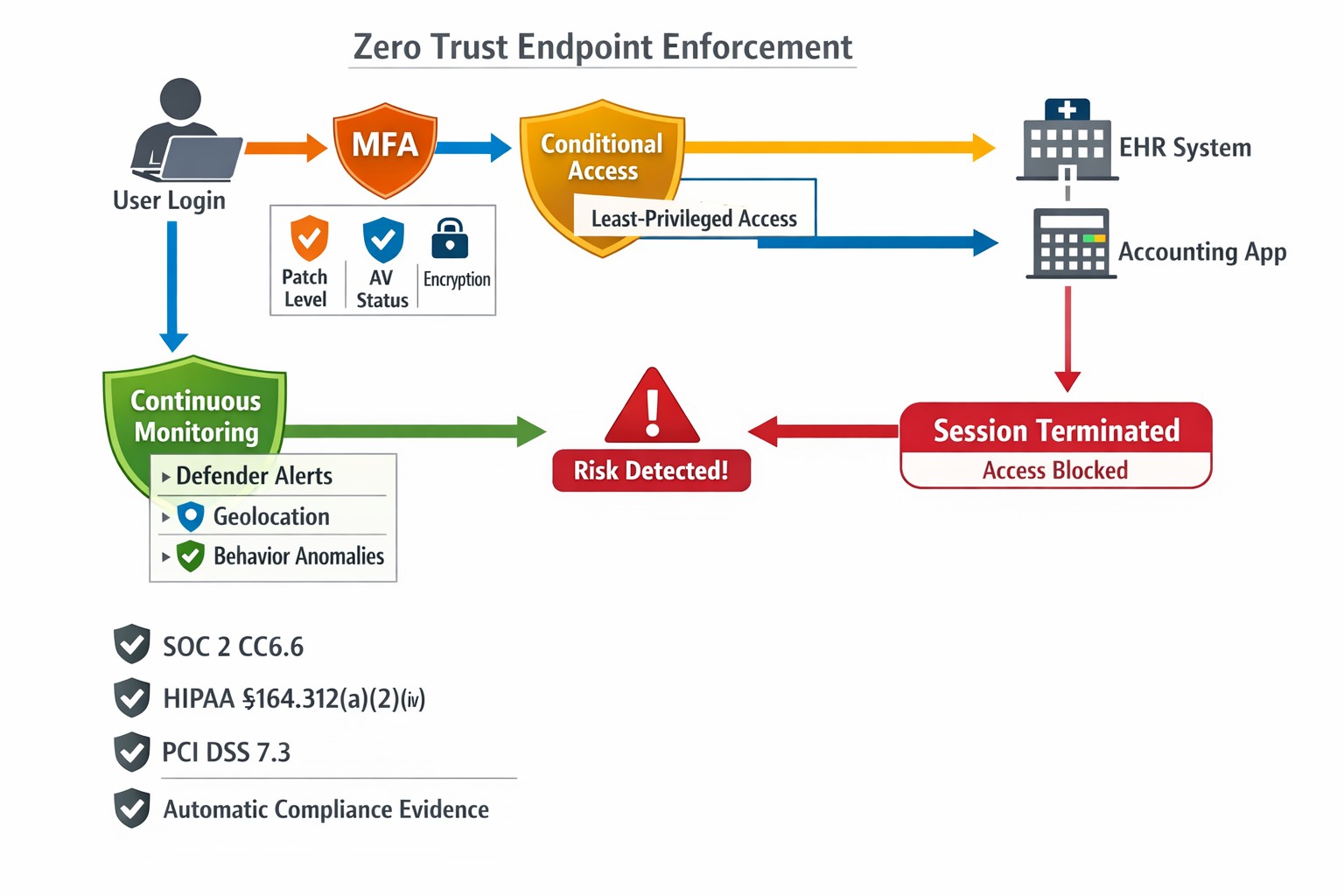
This is the sixth in a series about the concept of Zero Trust, which means in the IT sense that you trust nothing and always verify everything surrounding and connected to your network. Today’s discussion will be on endpoint security.
Endpoint Security
Endpoint security is a fancy term used to describe how the computers on the network are protected. This used to be done by antivirus but due to the complexity of the attacks hackers are using to compromise networks these days, the definition has expanded greatly. This now includes things like Enhanced Detection & Response software, Security Operations Centers, DNS Filtering, employee train and more. Here are some questions that you should be asking yourself:
Are your endpoints protected by antivirus or enhanced detection & response?
Is website traffic being monitored? Restricted?
Are your employees being trained in cyber security?
Are computer logs being monitored for malicious activity?
Would unusual or suspicious activity on a computer be noticed? Alerted on?
Do you have security permissions set on all file shares?
Do you have least privileged access configured on those shares?
Do you keep track of what software is installed on all workstations?
Do you block access to unauthorized software?
Are files encrypted on servers and workstations?
Are your mobile devices managed? Can you wipe them remotely?
Are USB ports blocking removeable storage devices?
Are endpoints set to automatically log-out?
If your company is going to use full disk encryption or has compliance requirements that you need consulting for, then contact us for assistance.
Farmhouse Networking deploys zero trust physical security for Grants Pass businesses, verifying every facility access request continuously.
This is the first in a series about the concept of Zero Trust, which means in the IT sense that you trust nothing and always verify everything surrounding and connected to your network. Today’s discussion will be on the physical security surrounding your network.
Physical Security
Physical security can include the locks on the doors, where things are placed, and how they are protected from the unpredictability of the environment. Here are some questions that you should be asking yourself:
Do you know where your network equipment is located?
Is the server / network in a separate area from where work is done?
Is this separate area behind a locked door?
Is the equipment in a locked rack or cabinet?
Is there a separate air conditioning zone for this area (servers like it cold)?
Is there a separate alarm zone for this equipment?
Who has the codes?
Is there a security camera watching this area (we don’t install these)?
How long is the recording for?
Who has access to the recordings?
Are computers located in areas where customers can physically touch them?
Are unused USB ports on the computer turned off or locked?
Are all systems protected by battery backup devices?
Are all systems off the floor in case of a flood?
Take time to think about these questions and decide where changes can be made to better protect your IT investments, or contact us to do the thinking for you.
Nobody wants to be hacked, breached, compromised, or whatever else they are calling it now. Here is a quick list of things to think about to keep your company safe:
Compromise Prevention
Keep track of your inventory, both software and hardware.
Make sure to properly dispose of these things (recycle or responsible destruction)
Scan your network for vulnerabilities
Patch or remediate everything you find
Manage your antivirus & keep it up-to-date
Keep your passwords complex & safely stored
Remove all users / accounts when no longer in use
Look at best practices to harden your computers / network to attacks
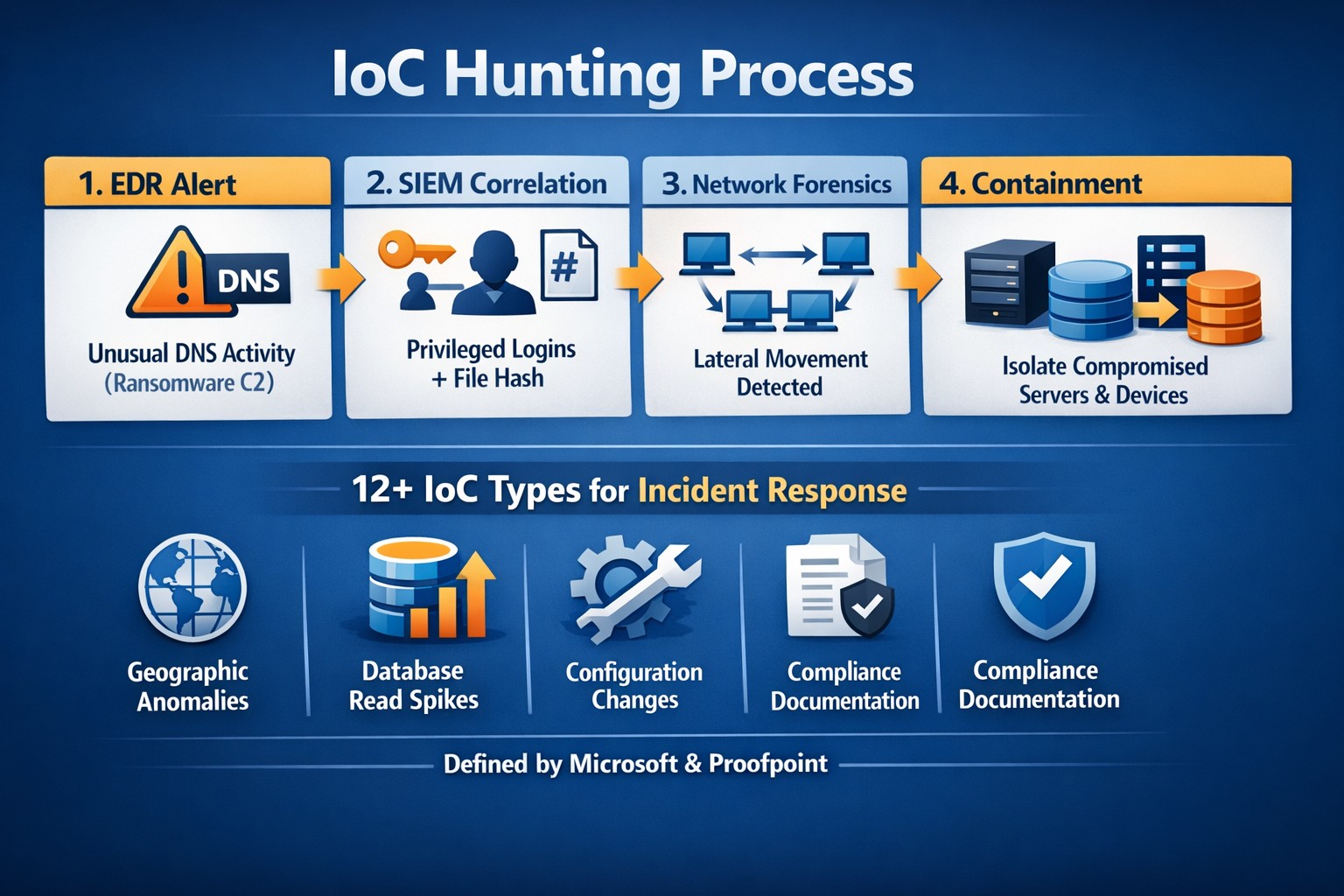
Monitor your network for strange activity (indicators of compromise)
If your company is concerned about security, then contact us to take care of it for you.
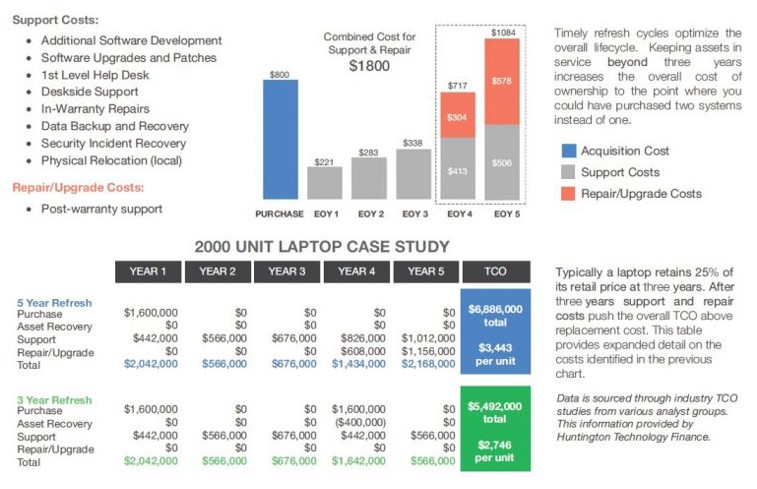
Farmhouse Networking continues to make strides in providing our customers with the best, most cost effective, and environmentally friendly computing experience possible. Part of that process is what has come to be known as Lifecycle Management. Each piece of hardware has an expected amount of time in which it is cost effective to use and support it. Once this time frame has been exceeded the cost of supporting the device becomes greater than the cost as shown in the following graph:
Turn retired IT assets into profit through strategic lifecycle management
FHN Lifecycle Management
So the question remains what to do with the old computers when the time comes to replace them. Previously here in Grants Pass, OR we could support a local charity by taking them to Southern Oregon Aspire to have the computers dismantled and hard drives shredded. Now that their doors are closed we are stuck with dropping them off at the local dump, but what if you could make money while being responsible with the environment?
Farmhouse Networking is now partnering with a company called Arcoa, who do just that. Here is what they do in their R2 rated responsible recycling facility:
“We help you recover value from retired electronic equipment through responsible methods of reuse and recycling. Resale offers the best potential for value recovery, but the fast pace of innovations in technology and short product life cycles can limit equipment’s potential for reuse. From there, the best option may be to recycle the items in an environmentally friendly manner. We’ve built a robust de-manufacturing process to offer additional options for asset value recovery by disassembling equipment for commodity grade materials, which can be diverted from landfills and be used to create new materials.”
Hard drives will be electronically wiped, magnetically degaussed, or shredded based on need. The rest of the parts will be dismantled and sold with part of the profit returning to your company to help offset the cost of buying new computers. What could be better than making money on the buy?
If your company is heading towards a hardware refresh, then make the environmentally sound choice by contacting us for assistance.
There has been information released by a security research firm called Eclypsium that there is a vulnerability dubbed Boothole in Unified Extensible Firmware Interface (UEFI) Secure Boot that would allow an attacker to completely take over a workstation, laptop, or server and be nearly undetectable. All hardware vendors will have to send out updates in the near future to patch the UEFI code to secure it against this “BootHole” vulnerability. Due to the difficulty in designing and testing these types of updates it will be some time before they are released. We will keep you posted as to the release of these updates as they become available.
If your company is concerned about security, then contact us for assistance.
In the past couple days there have been press release that show a large number of vulnerabilities in all Cisco Small Business routers and 79 models of the Netgear router line-up. Here are the articles:
The Cisco models are primarily used in small businesses, but the Netgear models include many that are used by home users – this could present a security risk for anyone who is still working from home. Cisco has released patches for the vulnerabilities and the Netgear vulnerabilities remained unpatched.
If your company is still using a “small business” or home based router, then contact us for assistance in checking for updates or replacing them with an business grade router with automatic updates. We also provide network security auditing for both office and home work environments.
As we work on finishing our 5th year in business, Farmhouse Networking continues to enhance its offering to our clients and improve the way we do business. Each one of these changes is carefully researched and painstakingly implemented to make sure that impact on end-user experience is minimally invasive. Here is a list of the major changes taking place now:
What Changes?
New Customer Documentation: We have been using a new document management system to securely store information about our clients networks, create standard operating procedures on how we specifically care for individual clients, and keep track of passwords for all the things that need securing. This will keep our staff and backup techs apprised of all our customers equipment and standard operating procedures so that things get done right.
New Maintenance Software: After much market research to improve our current system of auto-magically maintaining customers computers, we found something better. It took some negotiations with them but we got the price down to close to the same, so there will be no increase in price. Just better software to serve our customers with. We can now monitor more of the network and in a deeper way so that there is even less possibility of downtime due to computer issues.
New Employee: You read that right. Farmhouse Networking has officially contracted with our first employee. The work load has finally reached the point where occasional help from my family is just not enough. Peter deGreyt will start work on Monday, November 11th, 2019. He has previously worked for another local managed service provider and graduated from Southern Oregon University with a degree in business analytics. His first contact with many of you will likely be to input customer information into our new document management system.
If your company is interested in working with a company that takes IT seriously, then contact us for assistance.
Essential small business information security fundamentals: encrypt data, enable MFA, train employees, and backup regularly.
NIST is the National Institute of Standards and Technology. It acts as the defacto baseline that all other security and compliance organizations use to construct their standards. Reading their publications is like reading any other government document – extremely long and not interesting. Farmhouse Networking recently became aware of one such document called NISTIR 7621 aka Small Business Information Security: The Fundamentals. We took the time to distill out the main points here:
The Fundamentals aka Best Practices
Identify: Who has access to the network, who has access to the data, and what do they have access to. This includes background checking employees during the hiring process, taking an inventory of data to see who needs access to what, requiring that each user have their own login, and company policy creation.
Protect: Protection starts with separating data into shares then giving access only to those who really need it. It also includes protecting hardware with uninterruptible power supplies (UPS) and protecting software with regular updates. Protecting the network includes setting up a proper firewall, separate wireless for guest access, and VPN only access for remote users. Web filtering, SPAM filtering, file encryption, proper disposal of old equipment, and employee training are also mentioned.
Detect: Having a centrally managed antivirus software on each workstation is a must. This includes the ability to look back in time via log files or monitoring system to find the root of the security breach.
Respond: Have a disaster recovery plan and security incident response plan in place.
Recover: Need full backups of all important business data, invest in cyber insurance, and regularly access your technology to find timely improvements.
If your company does not meet these fundamentals, then contact us for assistance.
And God will generously provide all you need. Then you will always have everything you need and plenty left over to share with others. As the Scriptures say,
“They share freely and give generously to the poor. Their good deeds will be remembered forever.”
For God is the one who provides seed for the farmer and then bread to eat. In the same way, he will provide and increase your resources and then produce a great harvest of generosity in you. - 2 Corinthians 9:8-10
We use cookies to ensure that we give you the best experience on our website. If you continue to use this site we will assume that you are happy with it.