Farmhouse Networking’s zero trust security model prevents lateral movement
This is the ninth in a series about the concept of Zero Trust, which means in the IT sense that you trust nothing and always verify everything surrounding and connected to your network. Today’s discussion will be on Network Security.
Network Security
Network Security is having the proper hardware and configuration of that hardware in place to protect the business network. This configuration includes segmenting network traffic to keep specific types of traffic, like guest devices, separate from traffic of business devices. It also includes keeping outsiders out of the network and detecting when they have breached security measures. Here are some questions to ask:
Do you have a business class router / firewall?
Do you have business class switches and access points that support segmentation?
Is your network configured to segment business traffic from guest traffic?
Are devices like VoIP phones and network cameras on their own network?
Is geo-location blocking turned on for non-essential countries?
Is network traffic being analyzed for suspicious activity?
Do you filter internet traffic?
Can your network detect and respond to a breach?
If your company is wanting to lock down network security, then contact us for assistance.
Farmhouse Networking installs Wi-Fi 6E eliminating 2.4/5 GHz congestion for Grants Pass businesses using clean 6 GHz spectrum.
Wi-Fi technology is ingrained into our everyday lives WE COLLECTIVELY STREAM more movies and TV shows, play more online games, and make more video calls than ever before, and all this activity puts a serious strain on our Wi-Fi networks. Wi-Fi 6e has various features to improve the efficiency and data of your wireless network and reduce latency. the latest Wi-Fi 6e standards offers a range of benefits, including faster and more reliable access. So, what is Wi-Fi 6e and what are some of the benefits?
Wi-Fi 6e explained
Existing technologies operate on two frequencies 2.4 GHz and 5GHz which have become more congested over time; Wi-Fi 6e adds access to a third frequency, 6GHz. now wireless devices can also use the 6GHz band. And the 6GHz band opens up the opportunity for higher transfer speeds. On top of that, currently there are about four 160 MHz-wide channels with normal Wi-Fi this 6GHz band brings with it seven 160 MHz-wide channels, More available channels mean more available spectrum for Wi-Fi service “and less overlap between networks in crowded areas like apartment complexes or offices,”. with less overlap and congestion you are able to connect more devices with the same efficiency expectation. Additionally there have been security improvements with Wi-Fi 6E that puts the burden on the router, rather than you, to secure connections between your devices. WPA3 is mandatory for all Wi-Fi 6 certified devices, which provides the latest security and authentication protocols.
Summary of Benefits
Faster, more reliable connection
Transmits data faster with less interference.
You don’t have to compete with traffic from other devices or networks.
Security improvements making it more secure and harder to hack
Accommodates more connected devices
If your company is looking to upgrade the wireless coverage in your office, whole building, or entire business complex, then contact usto evaluate your WiFi needs.
This is the sixth in a series about the concept of Zero Trust, which means in the IT sense that you trust nothing and always verify everything surrounding and connected to your network. Today’s discussion will be on endpoint security.
Endpoint Security
Endpoint security is a fancy term used to describe how the computers on the network are protected. This used to be done by antivirus but due to the complexity of the attacks hackers are using to compromise networks these days, the definition has expanded greatly. This now includes things like Enhanced Detection & Response software, Security Operations Centers, DNS Filtering, employee train and more. Here are some questions that you should be asking yourself:
Are your endpoints protected by antivirus or enhanced detection & response?
Is website traffic being monitored? Restricted?
Are your employees being trained in cyber security?
Are computer logs being monitored for malicious activity?
Would unusual or suspicious activity on a computer be noticed? Alerted on?
Do you have security permissions set on all file shares?
Do you have least privileged access configured on those shares?
Do you keep track of what software is installed on all workstations?
Do you block access to unauthorized software?
Are files encrypted on servers and workstations?
Are your mobile devices managed? Can you wipe them remotely?
Are USB ports blocking removeable storage devices?
Are endpoints set to automatically log-out?
If your company is going to use full disk encryption or has compliance requirements that you need consulting for, then contact us for assistance.
Read a recent study on the origins of malicious software aka malware. Here are the highlights:
Current Malware Statistics
29% – Malware is previously unknown to security vendors due to the continued efforts of malware creators to hide the software or make it undetectable.
88% – Malware is delivered to people’s inboxes and some of it bypassing normal SPAM filters.
8.8 Days – Time before regular antivirus vendors have discovered the malware and added it to their lists for detection.
$50 – The cost of a pre-fabricated malware kit that can be bought currently on the dark web.
“The most common type of malicious attachments were: documents (Word – 31%), archive files (ZIP & RAR – 28%), spreadsheets (Excel – 19%) and executable files (EXE – 17%).”
What can be done?
A multi-tiered approach to security remains the best solution:
Moving from traditional antivirus to Enhanced Detection & Response (EDR) software to go beyond lists of know infections to behavior tracking of software
Moving from traditional SPAM filters to Email Advanced Threat Protection which scans each email and opens each attachment to see if there is any malicious activity cause by them
Moving from traditional router to a business class firewall with Intrusion Prevention System to monitor traffic for suspicious activity
Employee training is also key to keep your staff aware of immerging trends and threats
If your company is looking to enhance your network security posture, then contact us for assistance.
Reliable retail routers powering WFH for B2B professionals
This blog post is more about the use of retail routers at the office than at home, just to make that clear from the beginning. We would also recommend non-retail routers at home, but that is not feasible for everyone.
What is a retail router?
This is a phrase I am coining to describe any router that is generally available from your local retailers like Staples, Walmart, etc or delivered as part of the internet service from your local provider. They include brand names like ASUS, D-Link, Linksys, and Netgear. They range in price from $30 for the extreme low end to $450 for a gaming router. These routers are built for home and small office networks that have very few users or devices connected at any given time. They may include some features that sound “business-like” such as Virtual Private Network (VPN), Stateful Packet Inspection (SPI), VLAN, and Quality of Service (QoS) – remember though that these are also only able to support a minimum number of users and devices connected at any given time. If you try to use a retail router to run your business network then you will find that performance will be severely degraded and these features will not work as advertised.
There is also the issue of security. These routers are rarely if ever updated even when new vulnerabilities are found. This makes them ineligible for PCI or HIPAA compliance situations.
Is there a non-retail router?
So what to do about this situation? Time to call your trusted IT services provider who will be able to get you a non-retail router, but that begs the question – what is a non-retail router?
These routers are built by network professionals who design the hardware to perform under the pressures of the office environment and to handle the work from home remote workload. These routers include brands like Cisco, Juniper, Ubiquiti, and Araknis. They range in price from $150 for an office of up to 5 people to $10,000 for a high traffic company with hundreds of users. These routers handle VPN, SPI, VLAN, QoS, and many other services all at once with ease. Security is baked into these routers with the best ones having the ability to be managed from the cloud. They provide consistent access to all connected users and devices at all times. Your trusted IT services provider will work with you to “right size” the router to your business needs.
If your company is going to have full time work from home employees and is concerned about their ability to perform, then contact us for assistance.
Consumer routers = compliance nightmares for business networks
Even though we recently sent out another email newsletter about this topic, we have to keep raising this issue as the work from home remains a regular occurrence. A German think tank analyzed 127 popular home routers with the majority having at least one flaw (D-Link, Netgear, ASUS, Linksys, TP-Link and Zyxel were affected by 53 critical-rated vulnerabilities each). The biggest problem is that most (91%) are built on top of an old version of Linux operating system and their makers rarely publish updates.
There are several solutions that we can discuss to secure your work from home networks, so contact us for assistance.
In the past couple days there have been press release that show a large number of vulnerabilities in all Cisco Small Business routers and 79 models of the Netgear router line-up. Here are the articles:
The Cisco models are primarily used in small businesses, but the Netgear models include many that are used by home users – this could present a security risk for anyone who is still working from home. Cisco has released patches for the vulnerabilities and the Netgear vulnerabilities remained unpatched.
If your company is still using a “small business” or home based router, then contact us for assistance in checking for updates or replacing them with an business grade router with automatic updates. We also provide network security auditing for both office and home work environments.
In this unprecedented time that we are currently experiencing, you have had to set your team up to work remotely, often without thinking about how they might actually get work done, let alone security of all things. Our employee checklist and no-cost cybersecurity training course will provide your team with the tools they need to ensure that they are safe and productive – right out of the gate. These free resources are part of our initiative to keep our community safe and working during this time of crisis, without the additional disruption and financial impact of a breach.
Don’t let a change in circumstance allow for a change in cybersecurity standards.
A single ransomware infection can freeze a church’s donations, records, and operations
Got a call a couple weeks ago from a local church:
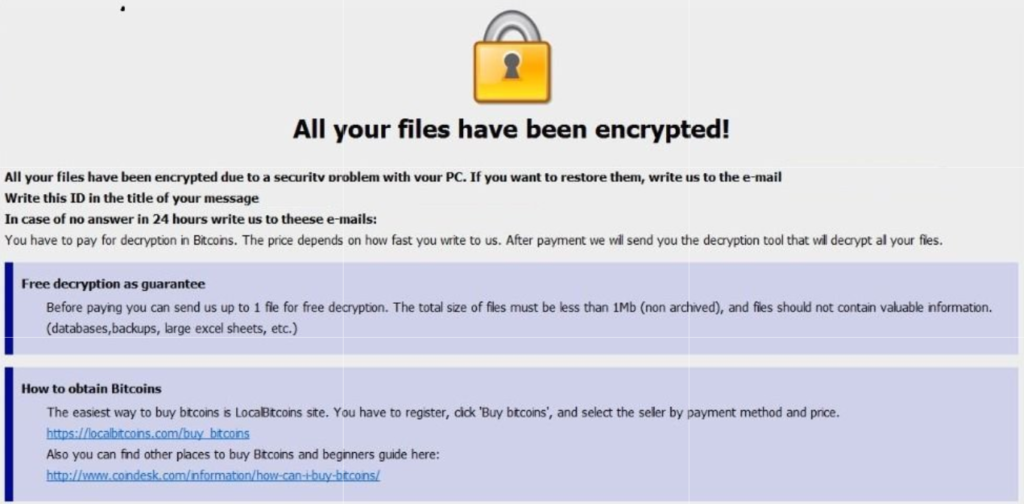
“we came in and open the computer and we have ransomware on there. We can’t even get to any of our stuff. It’s telling us to email somebody and so that they can free up the computer.”
How does this happen?
Generally these things happen because people click on things they shouldn’t. Whether in an attachment in email from someone they don’t recognize, a link in social media that sounds too good to pass up, or an advertisement for something they can’t live without. Once the user gives permission for something to open or run on their computer the game is over and the hacker wins.
What to do when it happen?
Stop using the computer.
Leave the computer alone! Do not carry out any further commands, including commands to Save data.
Do not close any of the computer’s windows or programs. Leave the computer alone.
Leave everything plugged in and do not turn off the computer or peripheral devices.
If possible, physically disconnect the computer from networks to which it is attached.
Call us immediately. Write down any unusual behavior of the computer (screen messages, unexpected disk access, unusual responses to commands) and the time when they were first noticed.
Write down any changes in hardware, software, or usage that preceded the malfunction.
Do not attempt to remove a suspected virus! Let the professionals do the dirty work.
How to prevent this from happening?
Layers of protection is the simple answer. A good antivirus installed to stop the bad programs from running, DNS filtering to keep users off of bad sites / advertisements, a good backup of all data to recover when this does happen, and most important of all EDUCATION – teaching users what safe internet usage looks like and having policies in effect to train them can mitigate 60-70% of infections.
If your company is would like to discuss the layers of security you have in place, then contact us for assistance.

This article came from the need of another local tech company to forward an Exacqvision Web Portal to something other than port 80, as it was already in use. I could not find a detail article on how to accomplish Sophos DNAT while changing the port number:
How to configure Sophos DNAT for an internal server
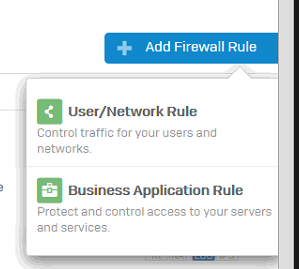
Navigate to Firewall then click +Add Firewall Rule and select Business Application Policy.
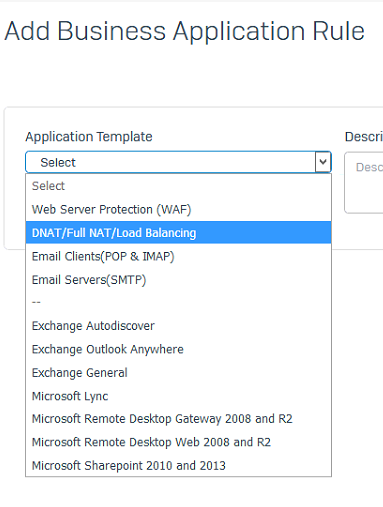
Select Application Template and choose DNAT/Full NAT/Load Balancing.
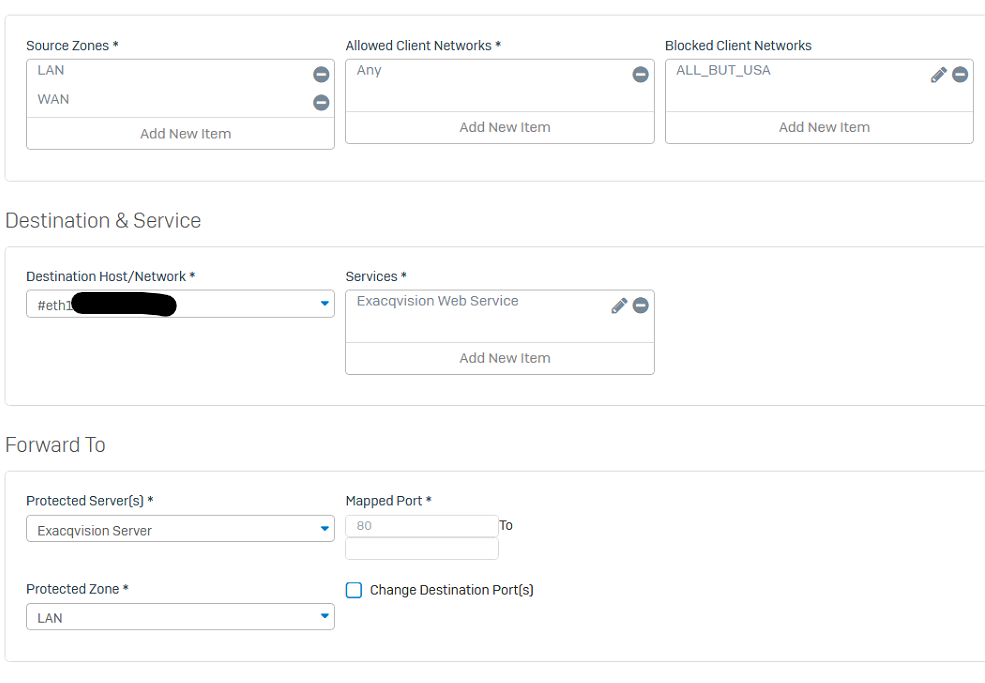
Fill out the settings as shown below:
Rule Name
Source Zones: WAN (and LAN if needed)
Allowed Client Networks: Any
Destination Host/Network: WAN Interface (#eth0-? whichever one you use)
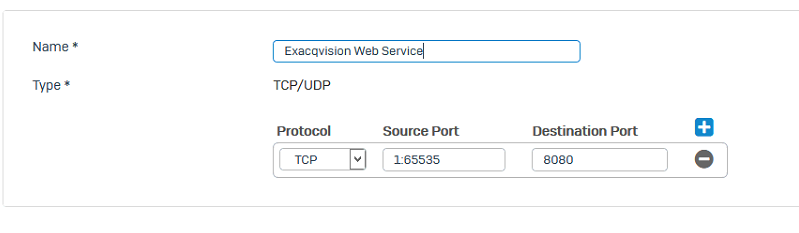
Services: Either select the service you already created or create a new one for the external port to be used as below
Protected Servers: Select an existing or create a host entry for the internal server.
Protected Zone: Select the Zone in which the host resides (LAN or DMZ).
Change Destination Port(s): Check this then change the port to the internal port.
Click Save to save the configuration.
If your company is using a Sophos router and is unsure of how to configure it, then contact us for assistance in making the best use of your router.
And God will generously provide all you need. Then you will always have everything you need and plenty left over to share with others. As the Scriptures say,
“They share freely and give generously to the poor. Their good deeds will be remembered forever.”
For God is the one who provides seed for the farmer and then bread to eat. In the same way, he will provide and increase your resources and then produce a great harvest of generosity in you. - 2 Corinthians 9:8-10
We use cookies to ensure that we give you the best experience on our website. If you continue to use this site we will assume that you are happy with it.