Strategies securing small business inboxes from phishing and BEC gateway attacks
Email is the backbone of communication for small and medium-sized businesses (SMBs). You use it for everything from sending invoices to internal memos, making your business heavily reliant on this tool. However, this reliance also makes you vulnerable to cyber threats, especially Business Email Compromise (BEC) attacks, which are increasingly targeting SMBs. These attacks can have devastating consequences, but with the right email security measures, you can protect your business from falling victim.
Understanding the Threat: Phishing and BEC
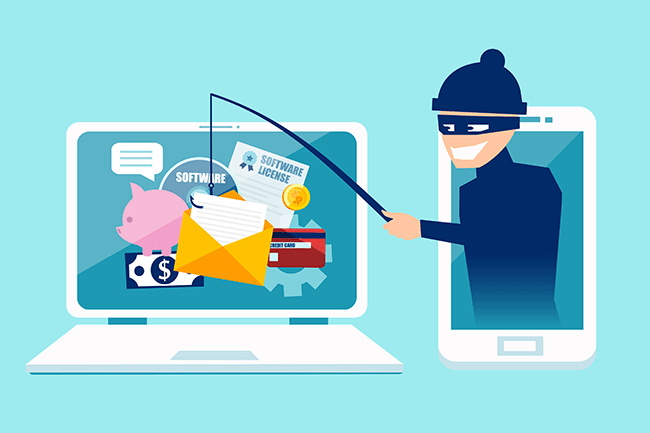
Phishing is a cybercrime that uses deceptive emails to trick individuals into revealing sensitive information or taking harmful actions. These emails often look like they come from legitimate sources, such as banks or well-known companies, but they are actually designed to steal your data.
Business Email Compromise (BEC) is a sophisticated type of phishing attack where cybercriminals impersonate trusted individuals within a company to trick employees into transferring money, sharing sensitive data, or granting access to critical systems. BEC scams often target individuals in finance, human resources, or operations, with the goal of initiating fraudulent transactions or stealing confidential information. According to the FBI, there are five primary types of BEC attacks.
BEC attacks are particularly effective because they exploit human psychology. Attackers rely on impersonating authority figures, creating a sense of urgency, or crafting highly convincing emails to make employees act without questioning.
Email is the number one attack vector, responsible for 90% of phishing incidents. In 2023, BEC attacks led to $3 billion in losses.
Why SMBs are Prime Targets
While large corporations invest heavily in cybersecurity, SMBs are often more vulnerable. Cybercriminals view smaller businesses as easier targets due to their typically less robust security measures and lower awareness of emerging threats.
Here’s why SMBs are at greater risk:
Limited Cybersecurity Resources: Many SMBs have limited budgets for cybersecurity and often lack dedicated IT teams to monitor email systems for suspicious activity.
Employee Vulnerability: Employees in SMBs may not be as well-trained in spotting phishing attempts or recognizing the signs of a BEC scam.
Lack of Email Security Awareness: Small businesses may overlook the importance of securing business email accounts with multi-factor authentication (MFA) and other safeguards, leaving them exposed to attacks.
Simple Steps to Bolster Your Email Security
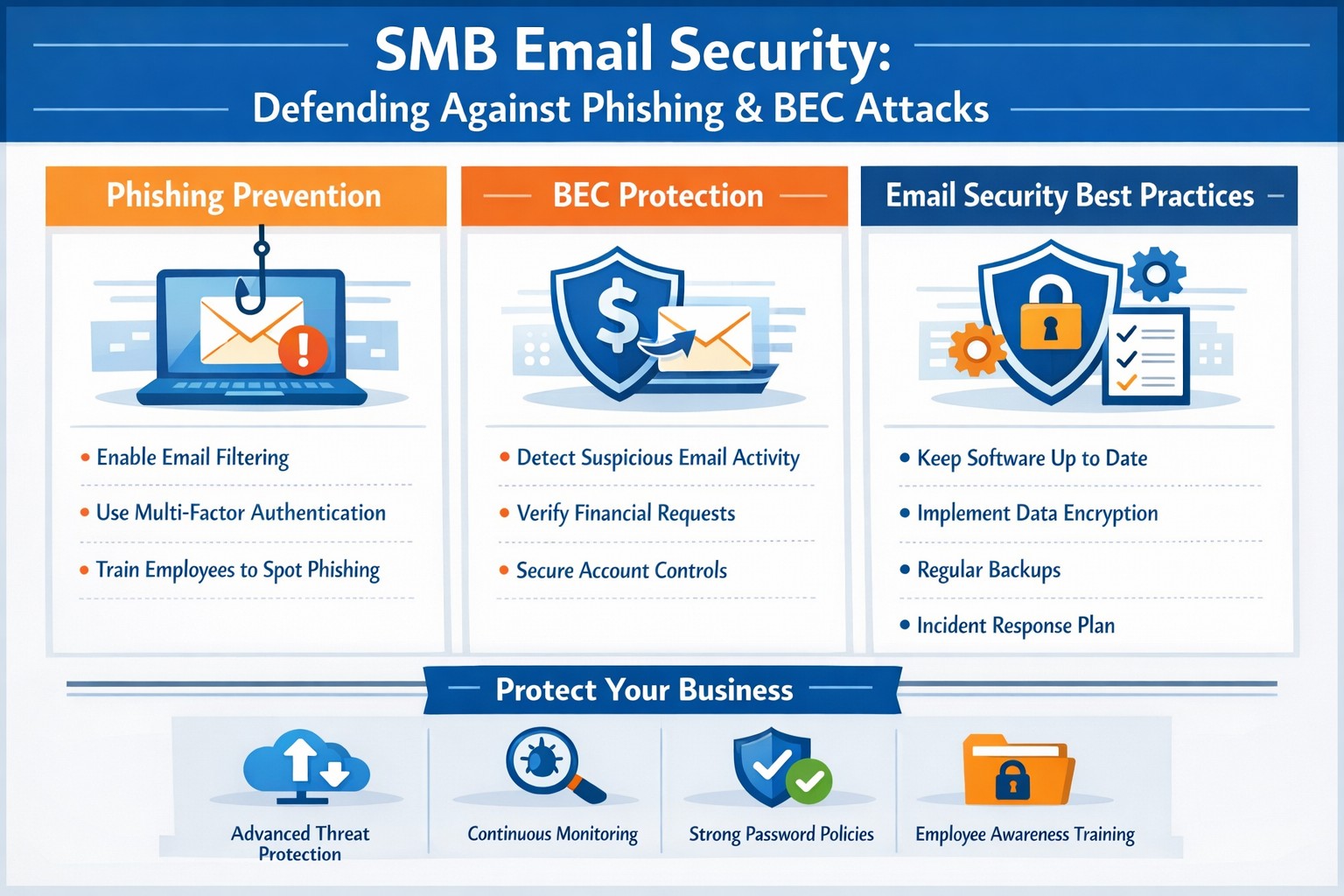
Employee Training: Regularly train employees to recognize and respond to threats. Run security awareness training to help your team spot phishing attempts and other common threats. Use simulated phishing exercises to test their readiness, uncover weak spots, and highlight potential weaknesses.
Multi-Factor Authentication (MFA): Add an extra layer of security to your email accounts with multi-factor authentication (MFA).
Advanced Email Filters: Use advanced spam filters to detect and block phishing emails before they reach your employees’ inboxes. Scan links automatically to spot anything suspicious.
Email Encryption: Encrypt emails, both in transit and at rest, to prevent unauthorized access.
Regular Security Audits: Schedule regular audits to spot vulnerabilities and keep an eye out for unauthorized access. Take time to review your email system’s settings, permissions, and logs for anything unusual.
Incident Response Plan: Prepare for email threats with a clear, actionable response plan. Outline the steps to contain, investigate, and recover from incidents, so your team knows exactly what to do
Cybercrime is a business, not a hobby, and incredibly lucrative. Taking a proactive approach to email security is essential for protecting sensitive information, preventing data breaches, and maintaining trust with your team and clients.
Is your business protected? Contact Farmhouse Networking today for a comprehensive email security solution tailored to your SMB’s unique needs. Don’t let your inbox be a gateway for cybercrime!
Safeguarding your business data is paramount. Cyber threats are ever-evolving, and data breaches can have severe consequences. To fortify your business defenses, consider implementing the following security and encryption tools:
Operating System Encryption
Encryption is the process where normal data is transformed into something unreadable without the keys unlock it. Windows has encryption built in using BitLocker software in conjunction with modern hardware to keep data safe on physical hard drives. In case a computer is stolen or lost the data is unreadable (assuming the password protecting the computer is strong).
Virtual Private Network / Zero Trust Network Access
Whenever employees are remote or working from home they need to be able to connect to company resources without endangering company data. This is best done through Zero Trust Network Access (ZTNA) which is the next-gen replacement for the older virtual private network connection ZTNA assumes that all connections are threats unless proven otherwise and those who are connecting must have their computers tested to make sure they are safe. This approach also only allows users to connect to the resources that are specifically needed to function.
Antivirus / Extended Detection and Response
One key to staying cyber secure is to recognize and repel threats before they do any damage. Utilizing AI and automation extended detection and response (XDR) is the modern replacement for antivirus. It is able to detect behavior patterns that malicious software and hackers use when attacking your systems then automatically undue any changes they have made.
Email Encryption and SPAM Filtering
When sending sensitive data via email it is now the standard to send it via encrypted channels with each message also being encrypted. Most companies that provide encryption also provide SPAM filtering which keeps phishing, spoofing, and malicious emails from targeting employees. This is often the most effective means hackers use to gain a foot hold in networks.
Backups
There will inevitably be times when hackers are able to breach even the best defenses, so the only recourse at that time is to have good backups in multiple locations to recover once the attacker is repelled. Without good backups many companies have had to pay ransoms and hope for a response or go out of business.
Remember, data security is an ongoing process. Combine these tools with user education and strong password practices,. Stay vigilant, adapt to new threats, and invest wisely in protecting your digital assets and reputation. Call Farmhouse Networking to advise you on how to best secure your business.
Dark web stolen passwords Russian Market BreachForums accounting healthcare charity credentials
The Dark Web is a part of the internet that requires special software to access. Often used by individuals who are looking to conceal their identities and activities, it has become the ideal environment for cybercriminals seeking to carry out illicit activities. They can move anonymously in this part of the internet often engaging in criminal activities such as the sale of stolen data, hacking tools, illegal drugs, counterfeit documents, and even illicit services.
Why Should You Be Aware of It?
While the Dark Web may seem distant and irrelevant to your everyday business operations, it poses serious risks that can have far-reaching consequences. Here’s why you need to be aware of it:
Stolen Data Trade: The Dark Web serves as a marketplace for cybercriminals to sell stolen data, including usernames, passwords, financial information, and sensitive business data. By purchasing this data, hackers can launch targeted attacks against organizations like yours, leading to data breaches, financial loss, and reputational damage.
Credential Stuffing and Account Takeovers: Cybercriminals often utilize compromised login credentials from data breaches to carry out credential stuffing attacks. By leveraging automated tools, they attempt to gain unauthorized access to your business accounts. Once inside, they can exploit your resources, compromise customer data, and cause significant disruption.
Sale of Exploit Kits and Malware: The Dark Web provides a platform for the sale of malicious software, exploit kits, and hacking tools. These tools can empower cybercriminals to launch sophisticated attacks against your business, including ransomware, phishing campaigns, and network infiltration.
Insider Threats and Employee Monitoring: Employees with malicious intent may leverage the Dark Web to collaborate with external criminals or sell sensitive company information. Awareness of the Dark Web can help you implement appropriate security measures to detect and mitigate insider threats.
Reputational Damage: In the event of a data breach or cyberattack, information about your business may end up on the Dark Web. This can severely damage your reputation, erode customer trust, and lead to potential legal and financial repercussions.
What Can You Do? To protect your business from the risks associated with the Dark Web, we recommend the following actions:
Strengthen Your Security: Implement robust cybersecurity measures, such as multi-factor authentication, strong password policies, regular software updates, and network monitoring. Conduct security awareness training for your employees to educate them about the dangers of the Dark Web and how to identify potential threats.
Dark Web Monitoring: Engage with Farmhouse Networking to incorporate Dark Web monitoring solutions. These services scan the Dark Web for mentions of your business’s critical information and alert you if any compromised data is discovered.
Incident Response Planning: Develop an incident response plan that includes protocols for handling potential Dark Web-related incidents. This plan should outline steps for containing, investigating, and recovering from a data breach or cyberattack.
Regular Vulnerability Assessments: Perform periodic vulnerability assessments and penetration testing to identify and address potential weaknesses in your network infrastructure and applications.
The Dark Web is a part of the internet that requires special software to access. Often used by individuals who are looking to conceal their identities and activities, it has become the ideal environment for cybercriminals seeking to carry out illicit activities. They can move anonymously in this part of the internet often engaging in criminal activities such as the sale of stolen data, hacking tools, illegal drugs, counterfeit documents, and even illicit services.
Why Should You Be Aware of It?
While the Dark Web may seem distant and irrelevant to your everyday business operations, it poses serious risks that can have far-reaching consequences. Here’s why you need to be aware of it:
Stolen Data Trade: The Dark Web serves as a marketplace for cybercriminals to sell stolen data, including usernames, passwords, financial information, and sensitive business data. By purchasing this data, hackers can launch targeted attacks against organizations like yours, leading to data breaches, financial loss, and reputational damage.
Credential Stuffing and Account Takeovers: Cybercriminals often utilize compromised login credentials from data breaches to carry out credential stuffing attacks. By leveraging automated tools, they attempt to gain unauthorized access to your business accounts. Once inside, they can exploit your resources, compromise customer data, and cause significant disruption.
Sale of Exploit Kits and Malware: The Dark Web provides a platform for the sale of malicious software, exploit kits, and hacking tools. These tools can empower cybercriminals to launch sophisticated attacks against your business, including ransomware, phishing campaigns, and network infiltration.
Insider Threats and Employee Monitoring: Employees with malicious intent may leverage the Dark Web to collaborate with external criminals or sell sensitive company information. Awareness of the Dark Web can help you implement appropriate security measures to detect and mitigate insider threats.
Reputational Damage: In the event of a data breach or cyberattack, information about your business may end up on the Dark Web. This can severely damage your reputation, erode customer trust, and lead to potential legal and financial repercussions.
What Can You Do? To protect your business from the risks associated with the Dark Web, we recommend the following actions:
Strengthen Your Security: Implement robust cybersecurity measures, such as multi-factor authentication, strong password policies, regular software updates, and network monitoring. Conduct security awareness training for your employees to educate them about the dangers of the Dark Web and how to identify potential threats.
Dark Web Monitoring: Engage with Farmhouse Networking to incorporate Dark Web monitoring solutions. These services scan the Dark Web for mentions of your business’s critical information and alert you if any compromised data is discovered.
Incident Response Planning: Develop an incident response plan that includes protocols for handling potential Dark Web-related incidents. This plan should outline steps for containing, investigating, and recovering from a data breach or cyberattack.
Regular Vulnerability Assessments: Perform periodic vulnerability assessments and penetration testing to identify and address potential weaknesses in your network infrastructure and applications.
Mimecast KnowBe4 phishing simulation risk scoring employee training dashboard
As you know, we take cybersecurity and the protection of your accounts and data very seriously. That’s why we are always striving to provide you with tools and resources to help keep you and your employees safe from cybercrime.
The most common threat we are seeing is phishing messages delivering malware or stealing credentials. Even though your company might be protected with spam filtering, there are instances where these malicious messages could still appear in your employee’s inboxes. And it’s important we both arm them with as much education and resources as possible to understand and identify these phishes.
We have a new tool that we’d love to demonstrate for your or talk more about. It’s called Catch Phish, and it’s an email analysis and training tool. It connects right to your employee’s Outlook as a clickable application on every message. When clicked, the tool quickly, but safely, scans the important details of the message to find potential threats such as suspicious links or attachments, sender details, or message details such as threatening language or deactivation scares.
This tool is included in our cybersecurity training packages and can help provide the much needed cybersecurity education to all levels of staff.
Do you have 30 minutes to talk about reducing your risks with Catch Phish and our other cybersecurity awareness training tools, then contact us for assistance.
Read a recent study on the origins of malicious software aka malware. Here are the highlights:
Current Malware Statistics
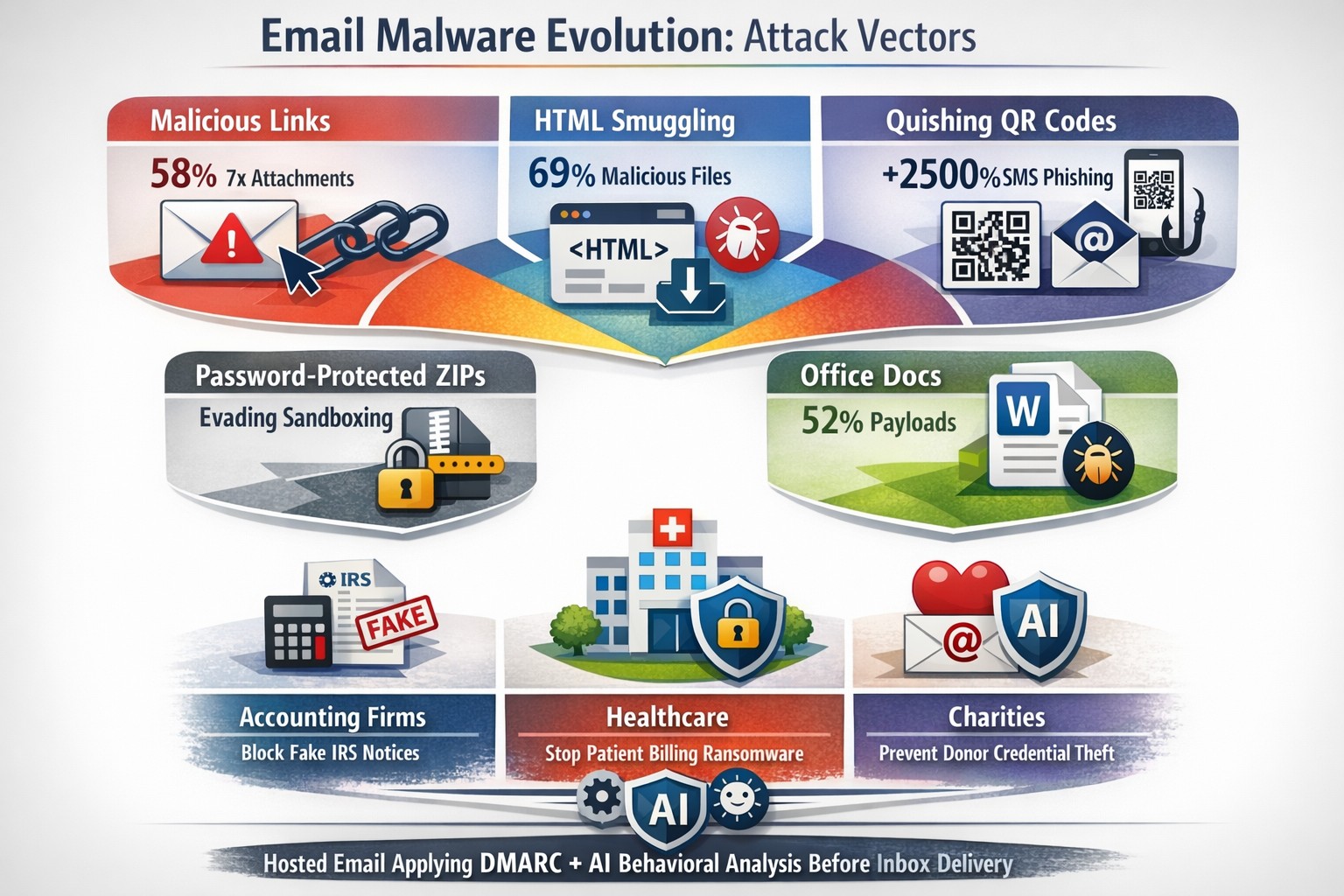
29% – Malware is previously unknown to security vendors due to the continued efforts of malware creators to hide the software or make it undetectable.
88% – Malware is delivered to people’s inboxes and some of it bypassing normal SPAM filters.
8.8 Days – Time before regular antivirus vendors have discovered the malware and added it to their lists for detection.
$50 – The cost of a pre-fabricated malware kit that can be bought currently on the dark web.
“The most common type of malicious attachments were: documents (Word – 31%), archive files (ZIP & RAR – 28%), spreadsheets (Excel – 19%) and executable files (EXE – 17%).”
What can be done?
A multi-tiered approach to security remains the best solution:
Moving from traditional antivirus to Enhanced Detection & Response (EDR) software to go beyond lists of know infections to behavior tracking of software
Moving from traditional SPAM filters to Email Advanced Threat Protection which scans each email and opens each attachment to see if there is any malicious activity cause by them
Moving from traditional router to a business class firewall with Intrusion Prevention System to monitor traffic for suspicious activity
Employee training is also key to keep your staff aware of immerging trends and threats
If your company is looking to enhance your network security posture, then contact us for assistance.
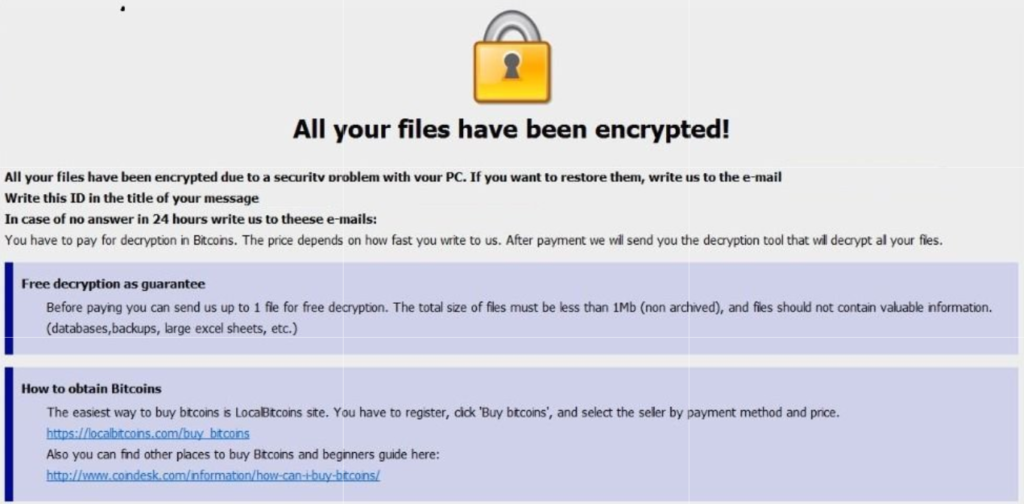
A single ransomware infection can freeze a church’s donations, records, and operations
Got a call a couple weeks ago from a local church:
“we came in and open the computer and we have ransomware on there. We can’t even get to any of our stuff. It’s telling us to email somebody and so that they can free up the computer.”
How does this happen?
Generally these things happen because people click on things they shouldn’t. Whether in an attachment in email from someone they don’t recognize, a link in social media that sounds too good to pass up, or an advertisement for something they can’t live without. Once the user gives permission for something to open or run on their computer the game is over and the hacker wins.
What to do when it happen?
Stop using the computer.
Leave the computer alone! Do not carry out any further commands, including commands to Save data.
Do not close any of the computer’s windows or programs. Leave the computer alone.
Leave everything plugged in and do not turn off the computer or peripheral devices.
If possible, physically disconnect the computer from networks to which it is attached.
Call us immediately. Write down any unusual behavior of the computer (screen messages, unexpected disk access, unusual responses to commands) and the time when they were first noticed.
Write down any changes in hardware, software, or usage that preceded the malfunction.
Do not attempt to remove a suspected virus! Let the professionals do the dirty work.
How to prevent this from happening?
Layers of protection is the simple answer. A good antivirus installed to stop the bad programs from running, DNS filtering to keep users off of bad sites / advertisements, a good backup of all data to recover when this does happen, and most important of all EDUCATION – teaching users what safe internet usage looks like and having policies in effect to train them can mitigate 60-70% of infections.
If your company is would like to discuss the layers of security you have in place, then contact us for assistance.
Zero-trust filtering stops explicit spam before employee exposure
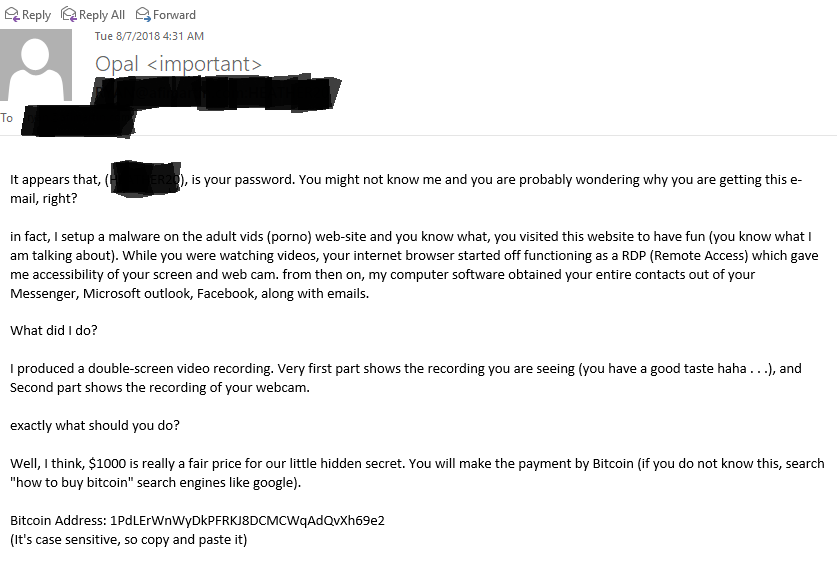
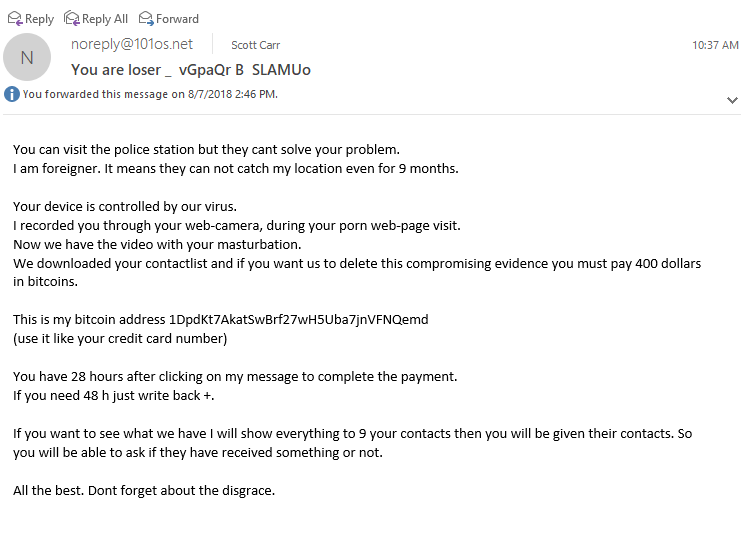
Here are a couple recent SPAM emails that were received by clients and myself. They are explicit in nature but they a good lesson about the scare tactics of SPAMMERS. The first message seems to be the better SPAM message as it has better English and is even tries to be humorous, while the second is more direct and extortionary. Time to dissect these messages.
SPAM Message #1
Password – This message starts by stating that it knows your password. How can this be? There have been several information breaches from the government, retailers, healthcare, etc over the past couple of years. The majority of these breaches are eventually posted online with emails and passwords – hence the reason Farmhouse Networking has started offering Dark Web scanning and advises passwords be changed often.
Remote Access – The SPAMMER then goes on to provide a detailed explanation of how they got into the computer. It sounds convincing but deeper analysis by someone who is in the IT Security industry would reveal that their explanation is flawed. To do what they proposed would take several different exploits of various portions of the computer and would likely take longer than video would be playing.
Contacts – For their “computer software” to get contacts from all these various sources would require that the password mentioned earlier in the email be the same for all these services. It is recommended by Farmhouse Networking that different passwords be used for each service so that if one is compromised then the rest are not in jeopardy. It might be asked how to keep track and the answer is a password keeping software like LastPass.
SPAM Message #2
Threats – The message starts immediately with the intimidating remarks and threats. It may be true that alerting the authorities will not bring any immediate assistance, but if we are all upstanding citizens then there is nothing to worry about their threats. It is always good to submit these messages to the authorities (FBI) for analysis so they can take these guys down over time. I do find it sad that this SPAMMER did not take the time to explain how they gained access to my computer.
Webcam – It is very possible that if your computer is infected properly that the hacker could gain access to your webcam, but again if we are upstanding citizens and don’t do anything inappropriate in front of our computers then there is nothing to worry about here.
Bitcoin – The demands continue with a sense of expediency in the matter giving only 28 hours before the big reveal. This particular SPAMMER either knows the value of the first SPAMMERS creativity in producing a video or are selling themselves short at the $400 ransom in Bitcoin. Finally, they even try to give a bit of legitimacy to their claim by stating that they can send the video to a partial list of contacts.
If your company is interested in Dark Web Scanning for on-going breach protection or worried about SPAM, then contact us for assistance.
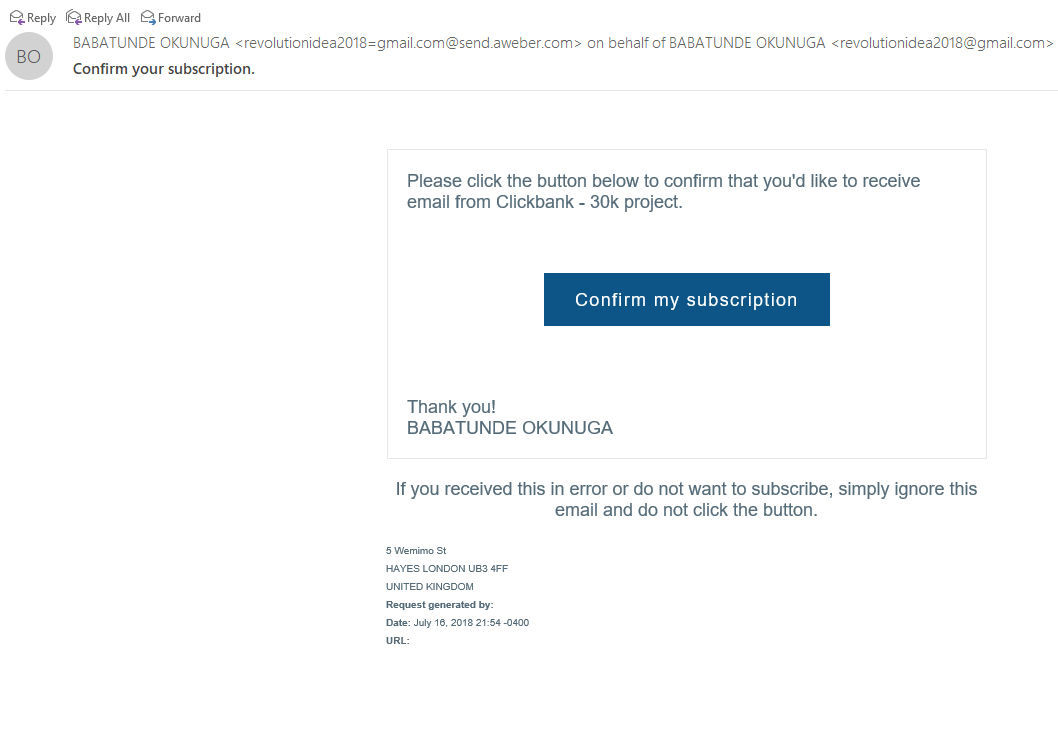
Thought that I would share a recently received new SPAM email variant that could easily be overlooked and possibly be a scammer looking to take your money. This one is strange to me and I wanted to share my insites.
Starting from the Top
Look closely at the From portion of the email:
This email is from a legitimate email marketing firm called AWeber. The SPAMMER is actually using a website designed to help bypass SPAM filtering to deliver mail. There is also the fact that the email is form someone that I don’t do business with. Always fight the urge to look at things that are not yours.
Stick to the Subject
Now to take a look at the Subject line of the email:
The email marketing firm this SPAM is sent from is required that you confirm someone who is joining your email campaign. Guess I would have to agree to be scammed by this person.
And now the rest…
The final thing that caught my eye was the title of the email campaign in the email:
The enticing title “Clickbank – 30k project” sounded interesting. By clicking on the button I would confirm my existence as a real person and would likely kick off a communication from someone who is likely an “African Prince” with a money making opportunity. Hope this little tutorial helps you detect other phishing attempts in the future.
If your company is having trouble with SPAM or phishing, then contact us for assistance.
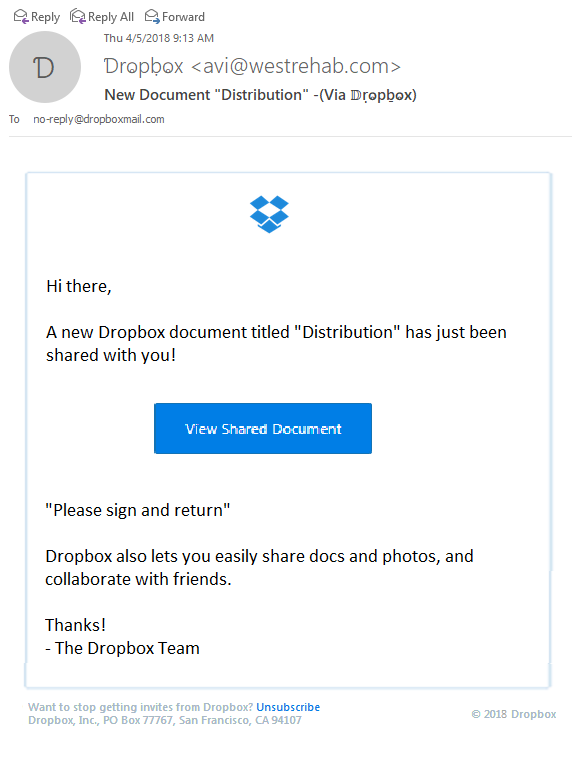
Thought that I would share a recently received new phishing email variant that could easily be overlooked and possibly cause damage to your network. The email appears to have come from Dropbox as a user sharing a folder with me, but a closer look shows many obvious signs that the email is a fake.
Starting from the Top
Look closely at the From portion of the email:
The lettering is actually another language where the font makes it look like English lettering. There is also the fact that the email is form someone that I don’t do business with. Always fight the urge to look at things that are not yours.
Stick to the Subject
Now to take a look at the Subject line of the email:
This has different lettering but it is again a different language used to look like English lettering.
And now the rest…
The final thing that caught my eye was the “button” in the middle of the email:
It actually looked fuzzy. It turns out the entire body of the email is a single image that is a link to their malicious site. Clicking anywhere in the body of the email would send you on your way to infection or account compromise. Hope this little tutorial helps you detect other phishing attempts in the future.
If your company is having trouble with SPAM or phishing, then contact us for assistance.
And God will generously provide all you need. Then you will always have everything you need and plenty left over to share with others. As the Scriptures say,
“They share freely and give generously to the poor. Their good deeds will be remembered forever.”
For God is the one who provides seed for the farmer and then bread to eat. In the same way, he will provide and increase your resources and then produce a great harvest of generosity in you. - 2 Corinthians 9:8-10
We use cookies to ensure that we give you the best experience on our website. If you continue to use this site we will assume that you are happy with it.