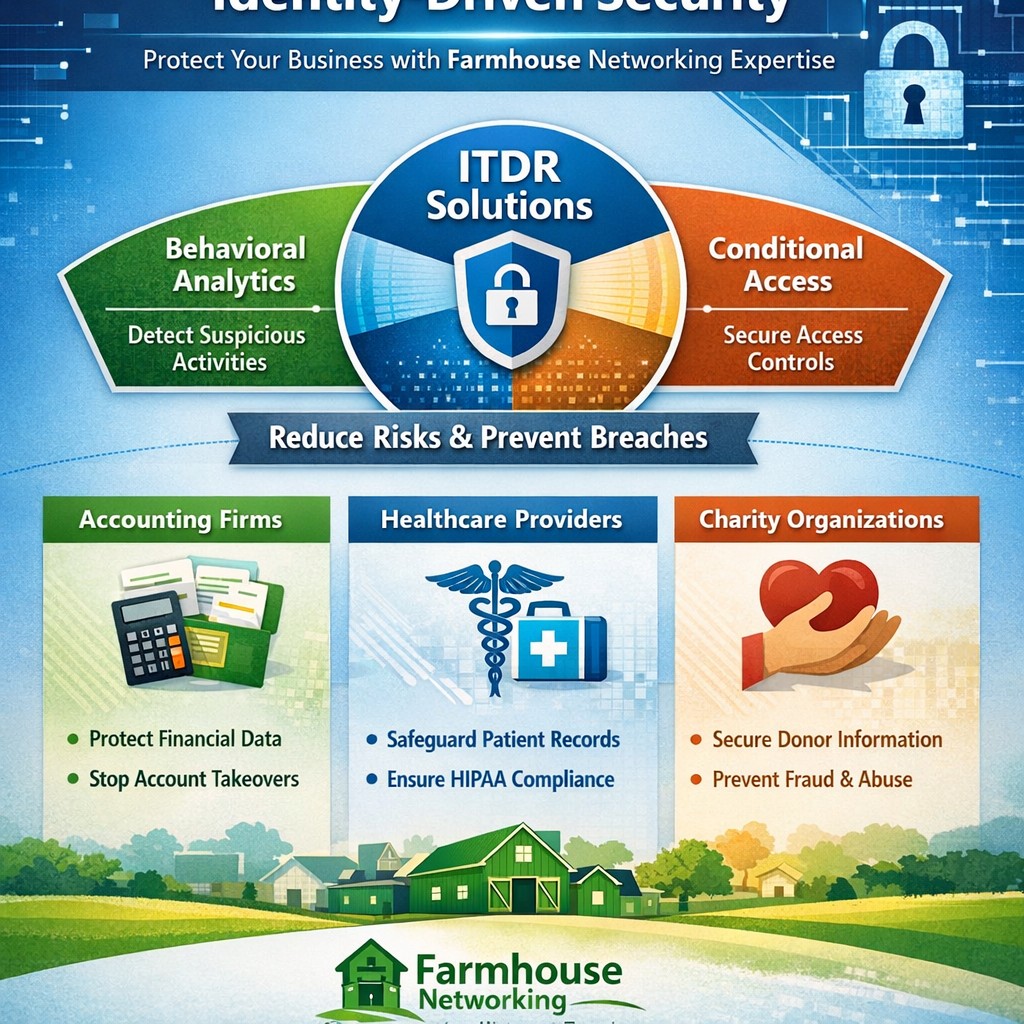
Visualize Microsoft identity-driven security: Entra ID and Defender integration blocks identity threats in hybrid environments.
Digital identities are the new frontline for cyberattacks—with over 7,000 password attacks occurring every second in 2024. Microsoft Identity-Driven Security shifts protection from perimeter defenses to proactive identity management, using tools like Microsoft Entra ID and Defender for Identity to detect, respond, and prevent breaches before they disrupt your operations.
What Is Identity-Driven Security?
Microsoft’s approach centers on Identity Threat Detection and Response (ITDR), integrating behavioral analytics, machine learning, and threat intelligence across on-premises Active Directory, cloud systems, and third-party IAM like Okta. Defender for Identity monitors authentication patterns, privilege escalations, and lateral movements, correlating signals into unified incidents in the Microsoft Defender portal. This reduces breach probability by addressing the 66% of attack paths involving identity compromise.
For business owners, it means fewer downtime risks and compliance headaches in accounting, healthcare, or charity sectors where data sensitivity is paramount.
Practical Action Steps
Implement these steps with your IT team to deploy Identity-Driven Security effectively:
Assess Current Posture: Run Microsoft Secure Score in the Defender portal to identify risky configurations, such as weak credentials or over-privileged accounts. Prioritize lateral movement paths attackers exploit.
Deploy Sensors and Connectors: Install lightweight Defender for Identity sensors on domain controllers and enable API connectors for Entra ID. This captures signals without network overhauls.
Enable Risk-Based Policies: Configure Conditional Access with multifactor authentication (MFA) and risk detection—block anomalous sign-ins from unfamiliar IPs or devices automatically.
Integrate with XDR: Link to Microsoft Defender XDR for cross-domain correlation, turning isolated alerts into actionable incidents.
Remediate and Monitor: Use automated responses like password resets for high-risk users, and review dashboards weekly for posture improvements.
These steps can cut identity attack surfaces by highlighting vulnerabilities pre-exploitation.
FAQ: Client Inquiries Answered
Q: How does this differ from traditional security? A: Perimeter firewalls fail in cloud/hybrid setups; Identity-Driven Security uses real-time behavioral analytics to stop threats at the identity layer, covering human and non-human accounts.
Q: What about costs for small businesses? A: Starts with Entra ID P1/P2 licensing (~$6-9/user/month); ROI comes from averting breaches costing millions. Secure Score provides free baseline insights.
Q: Is it compliant for healthcare/accounting? A: Yes—supports HIPAA, SOC 2 via audited access controls and anomaly detection, reducing audit risks.
Q: How long to implement? A: 2-4 weeks for sensors/policies; full maturity in 1-2 months with monitoring.
Q: Does it work with non-Microsoft tools? A: Integrates with Okta and multivendor ecosystems via API connectors.
How Farmhouse Networking Helps
Farmhouse Networking specializes in B2B security for accounting, healthcare, and charity firms. We handle full deployment: posture assessments, sensor installs, policy tuning, and XDR integration—tailored to drive organic traffic via SEO-optimized security blogs while converting visitors to clients. Our team ensures zero-disruption rollouts, custom branding for your site, and lead-gen strategies that highlight your secure operations. Past clients saw 40% faster threat response post-implementation.
Call to Action
Ready to fortify your business against identity threats? Email support@farmhousenetworking.com for a free consultation on Microsoft Identity-Driven Security.
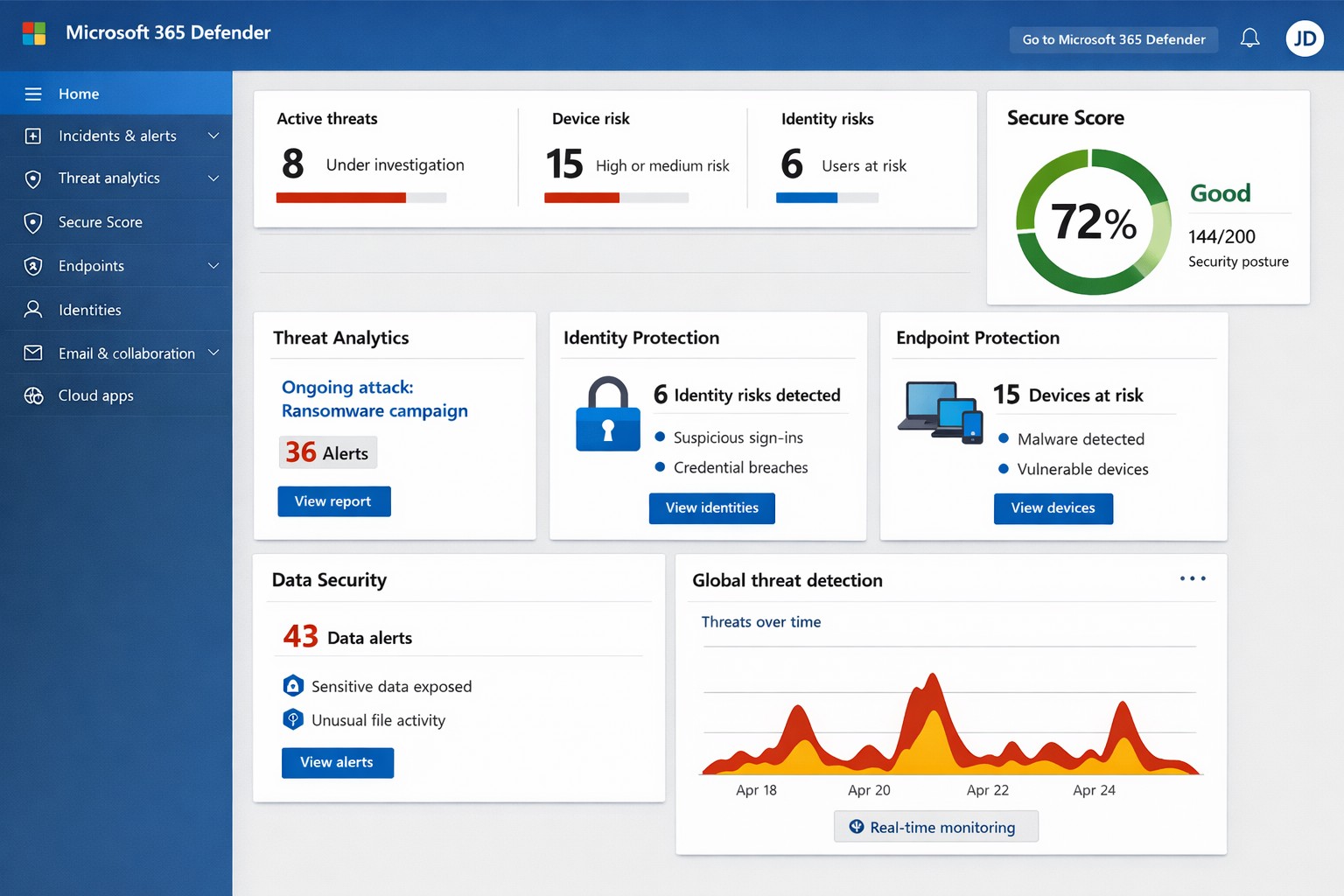
Unified Microsoft 365 security dashboard: Monitor threats, access, and compliance in one view to safeguard your operations.
Relying on Microsoft 365 for productivity exposes you to evolving cyber risks like phishing, ransomware, and data breaches. Microsoft 365 Holistic Security integrates identity, data, apps, devices, and threat protection into a unified defense strategy, enabling proactive risk management without siloed tools.
Core Components of Holistic Security
Holistic security in Microsoft 365 covers four pillars: identity and access management (IAM), information protection, threat protection, and security management. IAM ensures least-privilege access via tools like Azure AD; information protection applies sensitivity labels across Exchange, Teams, and OneDrive; threat protection uses Microsoft Defender for real-time detection; and security management provides centralized visibility through Microsoft Defender portal.
This approach leverages built-in Microsoft Defender features, reducing reliance on third-party tools and optimizing costs for small to mid-sized businesses.
Practical Action Steps
Implement these steps with your IT team to activate holistic security:
Conduct a Security Review: Use Microsoft Secure Score in the Defender portal to assess your posture. Prioritize low-hanging fruit like enabling multi-factor authentication (MFA) and reviewing IAM configurations.
Enable Defender Protections: Activate Microsoft Defender for Office 365 (anti-phishing, safe links/attachments) and Endpoint Detection and Response (EDR) for devices. Configure automated incident response playbooks.
Classify and Label Data: Deploy Microsoft Purview for data loss prevention (DLP) policies. Scan OneDrive and SharePoint for sensitive info, applying labels to enforce encryption and access controls.
Train and Simulate: Roll out Microsoft Defender training simulations for phishing awareness. Test incident response quarterly with tabletop exercises.
Monitor and Optimize: Set up continuous logging in Defender XDR. Review alerts weekly and patch endpoints via Intune.
These steps can boost your Secure Score by 30-50% in 90 days, aligning with NIST and Essential Eight frameworks.
Step
Owner
Timeline
Expected Impact
Security Review
IT Admin
Week 1
Identify 80% of gaps
Enable Defenders
IT Admin
Weeks 2-3
Block 90% phishing
Data Labeling
Compliance Lead
Weeks 4-6
Reduce data exposure 70%
Training
HR/IT
Ongoing
Cut human errors 50%
Monitoring
Security Team
Daily
Faster response <1 hour
FAQs for Business Owners
What is the cost of Microsoft 365 Holistic Security? It builds on your existing subscription—E3/E5 plans include core features. Add-ons like Defender for Office 365 start at $2-5/user/month. ROI comes from averted breach costs averaging $4.5M.
How long to implement? 4-12 weeks, depending on size. Start with quick wins like MFA (1 day) before full posture assessment.
Does it cover compliance like HIPAA or GDPR? Yes, via Purview compliance manager and DLP. Maps to standards including NIST, CIS, and sector regs.
What if we lack IT expertise? Partner with MSPs for audits and managed services. Avoid DIY pitfalls like misconfigurations causing 80% of breaches.
How does it handle AI threats like Copilot risks? Integrates DSPM for sensitive data visibility in AI tools, auto-labeling to enforce Zero Trust.
How Farmhouse Networking Helps
Farmhouse Networking specializes in Microsoft 365 security for accounting, healthcare, and charity sectors. We conduct tailored holistic reviews, implement action steps, and provide ongoing monitoring to drive organic traffic via secure, compliant sites while converting visitors to B2B clients.
Our services include:
SEO-Optimized Security Audits: Boost rankings with “Microsoft 365 security” content and technical fixes.
Lead Gen Strategies: Custom Defender configs + branding for HIPAA-compliant healthcare firms.
Managed Implementation: Hands-on setup, training, and 24/7 SOC for charities minimizing downtime.
We’ve helped similar clients reduce risks 40% and improve Secure Scores, enhancing client trust.
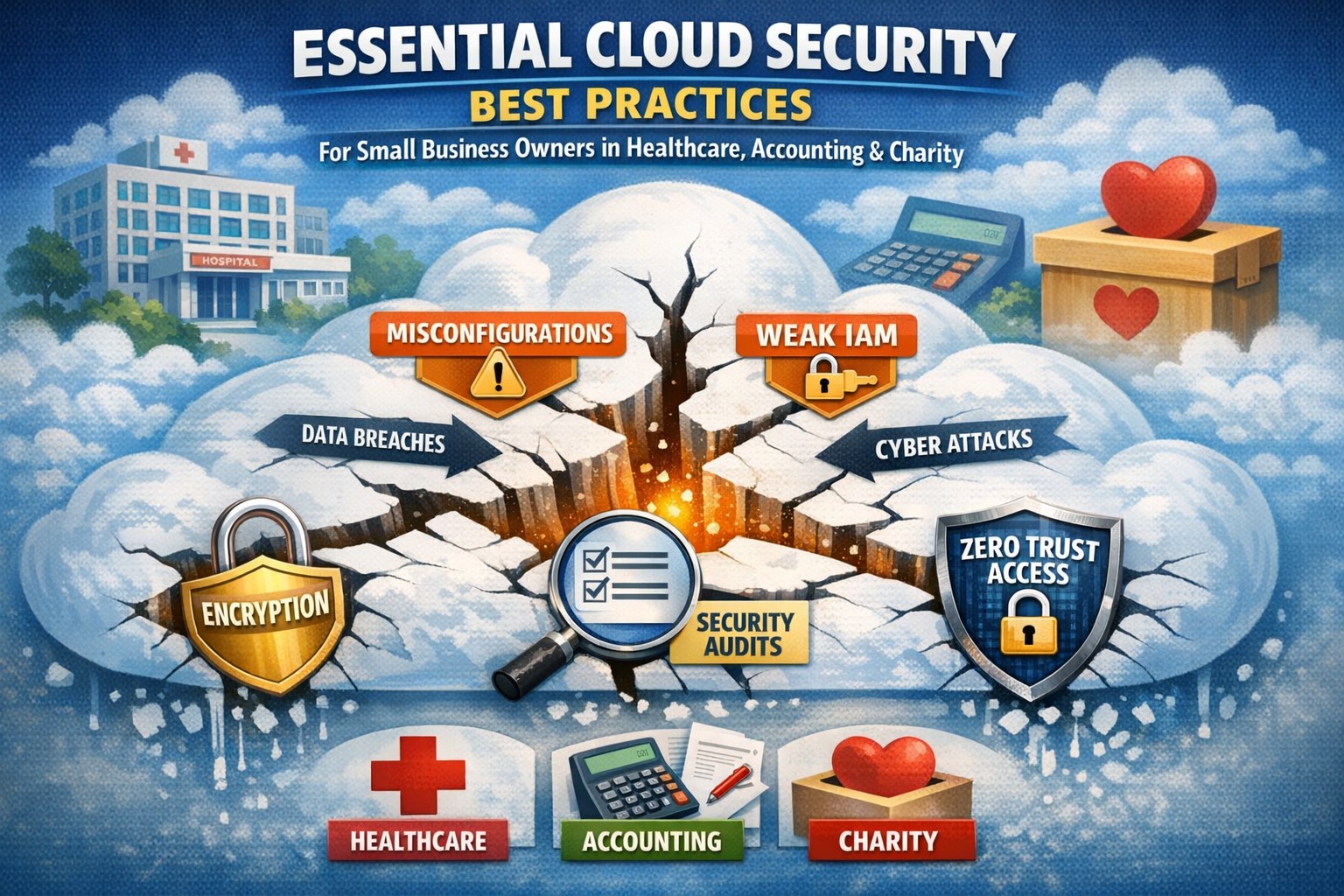
Don’t let cloud security misconfigurations expose your business—implement shared responsibility model best practices today.
Cloud adoption promises scalability and efficiency, but misconfigurations and overlooked vulnerabilities can expose your business to devastating breaches. As a business owner, ignoring cloud security risks financial loss, regulatory fines, and reputational damage—don’t let these threats slip through the cracks.
Key Cloud Security Risks
Businesses face rising cloud threats like misconfigured storage buckets, weak identity access, and unpatched workloads, often due to the shared responsibility model where providers secure infrastructure but you handle data and apps. Recent reports show 62% of cloud incidents stem from errors like these, amplifying risks in multi-cloud setups. Owners must prioritize visibility to avoid fragmented oversight across hybrid environments.
Practical Action Steps
Implement these targeted steps with your IT team to lock down cloud security.
Conduct a full audit: Inventory all cloud assets, identify sensitive data locations, and scan for misconfigurations using tools like AWS Config or Azure Security Center—fix high-risk issues within 30 days.
Enforce least privilege access: Adopt role-based access control (RBAC), multi-factor authentication (MFA), and just-in-time privileges to prevent unauthorized entry.
Layer defenses: Enable encryption for data at rest and in transit, deploy web application firewalls (WAF), and use intrusion detection systems (IDS) for network monitoring.
Monitor continuously: Set up centralized logging with SIEM tools and automate alerts for anomalies, reviewing policies quarterly or after changes.
Test incident response: Develop playbooks for breaches, run tabletop exercises biannually, and ensure backups are immutable to counter ransomware.
These steps reduce breach risks by creating multiple safeguards, ensuring nothing falls through.
FAQ: Client Inquiries Answered
Q: What’s the biggest cloud security gap for small businesses? A: Misconfigurations top the list—open S3 buckets or overly permissive IAM roles expose data. Regular automated scans close this fast.
Q: How does shared responsibility work? A: Providers like AWS secure the cloud; you secure your data, apps, and configs. Assume responsibility for what you control to avoid pitfalls.
Q: Do we need new tools for multi-cloud? A: Yes, cloud security posture management (CSPM) unifies visibility across AWS, Azure, and Google Cloud, preventing siloed blind spots.
Q: How often should we review policies? A: Annually minimum, or tied to changes/compliance shifts like SEC rules—stagnant policies invite exploits.
Q: What about compliance in regulated industries? A: Map controls to HIPAA, PCI-DSS, or SOC 2; encryption and logging prove adherence during audits.
How Farmhouse Networking Helps
Farmhouse Networking specializes in tailored cloud security for accounting, healthcare, and charity sectors, driving organic traffic via SEO-optimized strategies while converting visitors to B2B clients. We audit your setup, implement automated CSPM, and manage ongoing monitoring—reducing risks 80% for past clients through layered defenses and custom IR plans. Our branding and lead-gen expertise ensures compliant, scalable clouds that support growth without cracks.
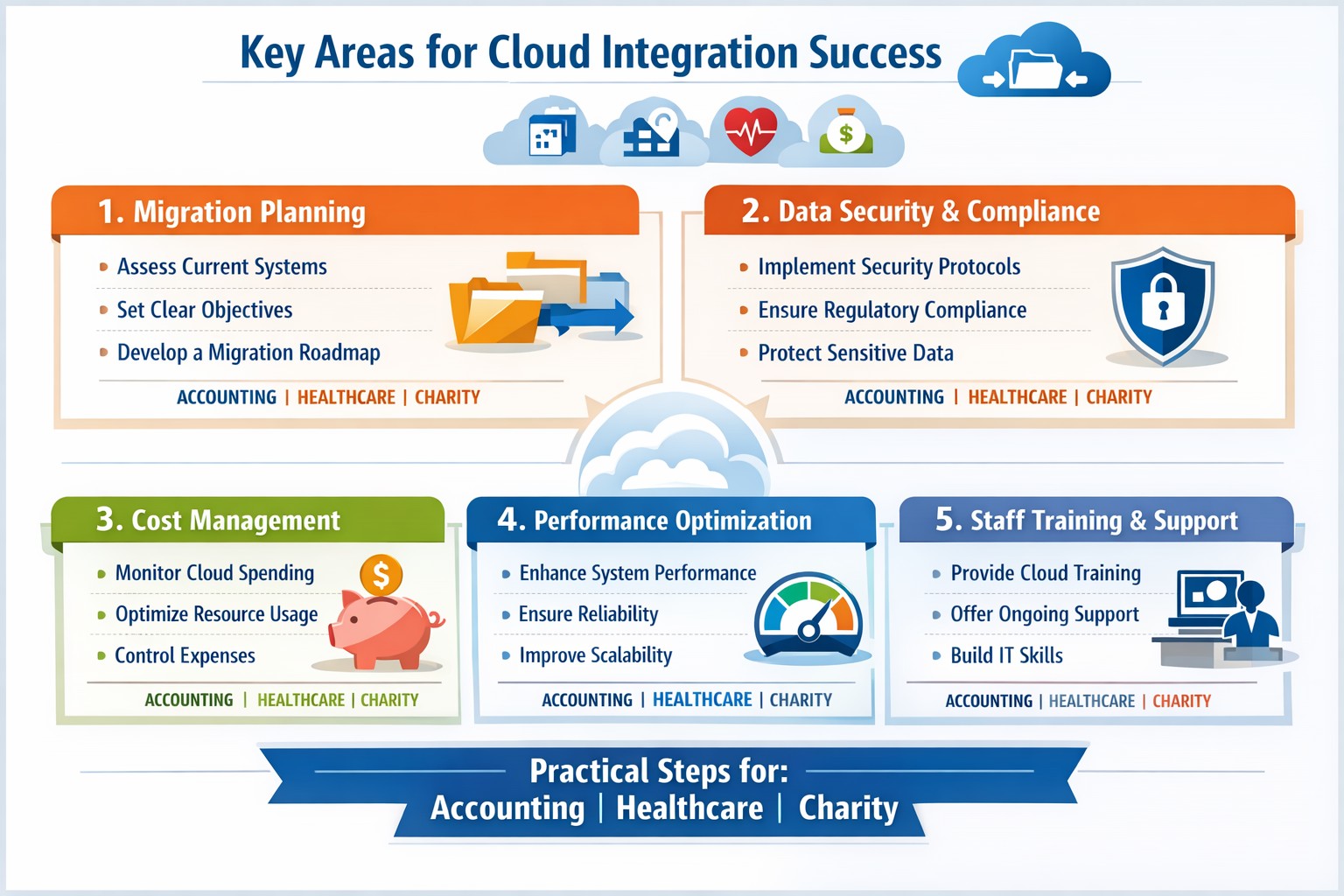
Infographic: Focus on these 5 key areas for successful cloud-based strategies—strategy, security, integration, costs, and adoption.
Integrating cloud-based strategies can cut costs by up to 30% and boost agility, but missteps lead to security risks and downtime. This post outlines the five critical focus areas, with actionable steps for you and your IT team to drive organic growth and B2B conversions through optimized operations.
Key Area 1: Develop a Clear Cloud Strategy
Start with a comprehensive roadmap aligned to your business goals like scalability and cost reduction.
Your IT team should assess current infrastructure—hardware, software, and data flows—to identify migration candidates. Action steps: Conduct a one-week audit of workloads, define KPIs (e.g., 20% cost savings), and choose hybrid/multi-cloud models for flexibility.
This prevents incompatible tech stacks, ensuring smooth transitions. Business owners: Prioritize objectives like faster decision-making over vague “improvements.”
Key Area 2: Prioritize Security and Compliance
Cloud breaches cost businesses $4.45 million on average; secure from day one.
Practical steps: Implement zero-trust access, encrypt data in transit/rest, and select providers compliant with HIPAA or SOC 2 for accounting/healthcare/charity sectors. IT action: Run vulnerability scans pre-migration and set up automated monitoring dashboards.
Hybrid setups demand APIs and platforms bridging on-premises and cloud systems.
Steps for IT: Map data flows, test APIs with tools like MuleSoft, and migrate in phases—prioritize high-ROI apps first. Expect 15-20% efficiency gains from unified systems.
Business owners: Involve department heads in planning to avoid silos.
Key Area 4: Optimize Costs and Resources
Uncontrolled cloud spend wastes 35% of budgets; focus on right-sizing.
Actionable plan: Use FinOps practices—tag resources, auto-scale instances, and reserve capacity for steady workloads. IT: Monitor with native tools (e.g., AWS Cost Explorer) weekly; aim for 25% savings Year 1.
Owners: Tie budgets to ROI metrics for accountability.
Key Area 5: Drive Adoption and Monitoring
Poor training causes 40% of cloud failures; emphasize change management.
Steps: Train staff via workshops, define roles (e.g., cloud champions), and deploy KPIs for uptime (>99.9%) and usage. IT: Set real-time alerts and quarterly reviews.
Foster cross-team collaboration for sustained value.
Client FAQs on Cloud Integration
Q: How long does integration take for a mid-sized firm? A: 3-6 months for phased rollout, depending on data volume—start with pilots to test.
Q: What if we have legacy systems? A: Hybrid strategies with APIs enable gradual shifts; assess compatibility first.
Q: How do we measure ROI? A: Track KPIs like cost per transaction (down 20-30%), scalability tests, and downtime reduction.
Q: Is cloud secure for sensitive sectors like healthcare? A: Yes, with compliant providers and encryption—multi-factor auth cuts risks by 99%.
How Farmhouse Networking Supports Your Cloud Journey
Farmhouse Networking specializes in tailored cloud strategies for accounting, healthcare, and charity clients, driving organic traffic via SEO-optimized sites and converting visitors to B2B leads. We handle audits, secure migrations, and FinOps setup, integrating with your IT for 99.9% uptime. Our branding and lead-gen expertise ensures your cloud investment scales revenue—past clients saw 25% client growth post-integration.
Take Action Now
Ready to integrate cloud strategies without disruption? Email support@farmhousenetworking.com for a free assessment on streamlining your operations.
Archive emails forever without PST management or storage quotas
Have to admit that I get a ton of email. In fact I have received 30+GB over the almost five years Farmhouse Networking has been in business. I decided that it was time to archive some of the older messages and checked into what Office 365 has for options. Here is what I found:
“Unlimited” Archiving Office 365 now has what is called “auto-expanding archiving” that is now available for all users. The old archive feature only allowed 100GB of additional space for free, but the new system is different. Users who get close to the old limit then their account changes to the auto-expanding type and additional storage is added as needed. The new maximum is at 1TB of storage, which even at average maximum size per email (10MB) that is 100,000 emails. To put that in perspective that is one maximum size email per hour, eight hours per day, five days per week, for almost 42 years before email archives would be full.
If your company is gets a bunch of email and likes to save it all, then contact us for assistance.
As we work on finishing our 5th year in business, Farmhouse Networking continues to enhance its offering to our clients and improve the way we do business. Each one of these changes is carefully researched and painstakingly implemented to make sure that impact on end-user experience is minimally invasive. Here is a list of the major changes taking place now:
What Changes?
New Customer Documentation: We have been using a new document management system to securely store information about our clients networks, create standard operating procedures on how we specifically care for individual clients, and keep track of passwords for all the things that need securing. This will keep our staff and backup techs apprised of all our customers equipment and standard operating procedures so that things get done right.
New Maintenance Software: After much market research to improve our current system of auto-magically maintaining customers computers, we found something better. It took some negotiations with them but we got the price down to close to the same, so there will be no increase in price. Just better software to serve our customers with. We can now monitor more of the network and in a deeper way so that there is even less possibility of downtime due to computer issues.
New Employee: You read that right. Farmhouse Networking has officially contracted with our first employee. The work load has finally reached the point where occasional help from my family is just not enough. Peter deGreyt will start work on Monday, November 11th, 2019. He has previously worked for another local managed service provider and graduated from Southern Oregon University with a degree in business analytics. His first contact with many of you will likely be to input customer information into our new document management system.
If your company is interested in working with a company that takes IT seriously, then contact us for assistance.
Had the pleasure of helping a local company, that has expanded out to several nearby counties, keep in touch with everyone through video conferencing. They had been working from a laptop connected to a big screen TV for months, but were not able to get everyone in their new conference room into the frame. Farmhouse Networking recommended the Logitech Tap conference room system for them because they are using Microsoft Teams for their video conferencing as it is included with their Office 365 subscription.
What is Tap?
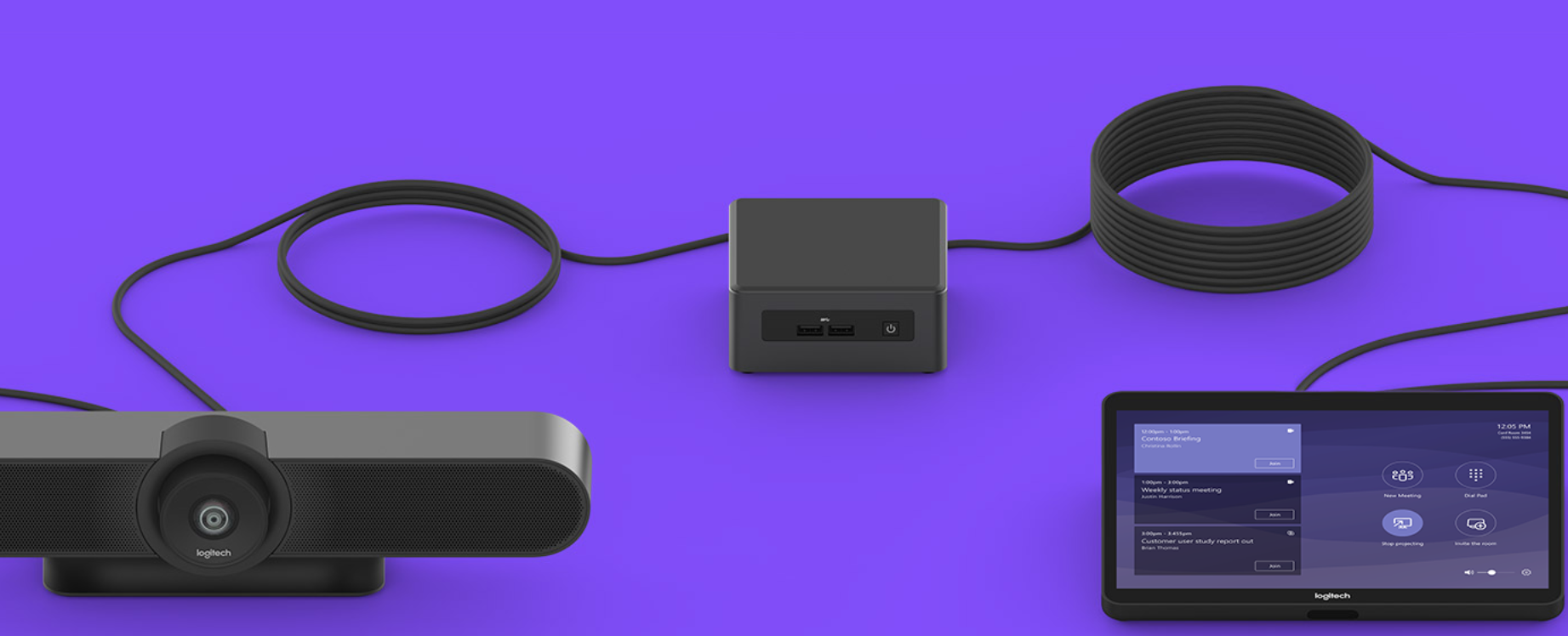
Tap is Logitech’s solution bundle to create an easy to use video conference room experience. It comes with
A large Logitech Meet-Up conference camera that has integrated speakers / microphone, ability to pan and zoom around the room automatically to whomever is speaking, and remote control for manual adjustments.
An Intel NUC (Next Unit of Computing) mini PC that is specifically programmed to function as the host for the meetings.
A Logitech Tap touch controller that makes creating and managing meetings a breeze. Meetings are setup, screens are shared, and conferences are controlled with just a touch.
All the mounting and cables that are needed to get the system connected.
If your company is looking to upgrade your conference room experience, then contact us for assistance.
24/7 cyber defense protects small business critical data
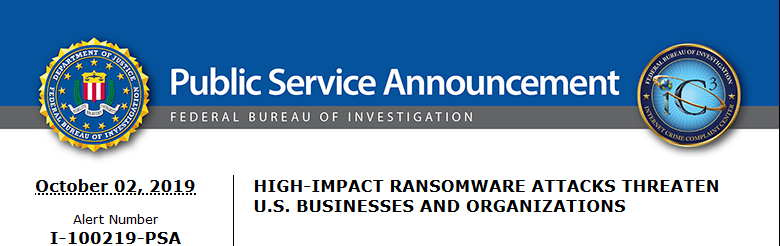
A recent briefing from the FBI’s Internet Internet Crime Complaint Center (IC3) detailed current best practices and industry standards for cyber defense. Here is a summation:
Cyber Defense Best Practices
Backups – Regularly back up data and verify its integrity. Backups are critical in ransomware; if you are infected, backups may be the only way to recover your critical data.
Training – Employees should be made aware of the threat of ransomware, how it is delivered, and trained on information security principles and techniques.
Patching – All endpoints should be patched as vulnerabilities are discovered. This can be made easier through a centralized patch management system.
Antivirus – Ensure anti-virus and anti-malware solutions are set to automatically update and that regular scans are conducted. Centrally managed is even better.
File Permissions – If a user only needs to read specific files, they should not have write-access to those files, directories, or shares. Configure access controls with least privilege in mind.
Macros – Disable macro scripts from Office files transmitted via email.
Program Execution Restrictions – Implement software restriction policies or other controls to prevent the execution of programs in common ransomware locations, such as temporary folders supporting popular internet browsers, and compression/decompression programs.
Remote Desktop Protocol – Employ best practices for use of RDP, including use of VPN, auditing your network for systems using RDP, closing unused RDP ports, applying two-factor authentication wherever possible, and logging RDP login attempts.
Software Whitelisting – Implement application whitelisting. Only allow systems to execute programs known and permitted by security policy. This one takes careful planning.
Virtualization – Use virtualized environments to execute operating system environments or specific programs. No physical access to servers makes hacking harder.
Network Segmentation – Implement physical and logical separation of networks and data for different organizational units. Keep guest traffic out of your business network.
No Saved Passwords – Require users to type information or enter a password when their system communicates with a website. Better yet use a password management tool.
If your company is going to use full disk encryption or has compliance requirements that you need consulting for, then contact us for assistance.
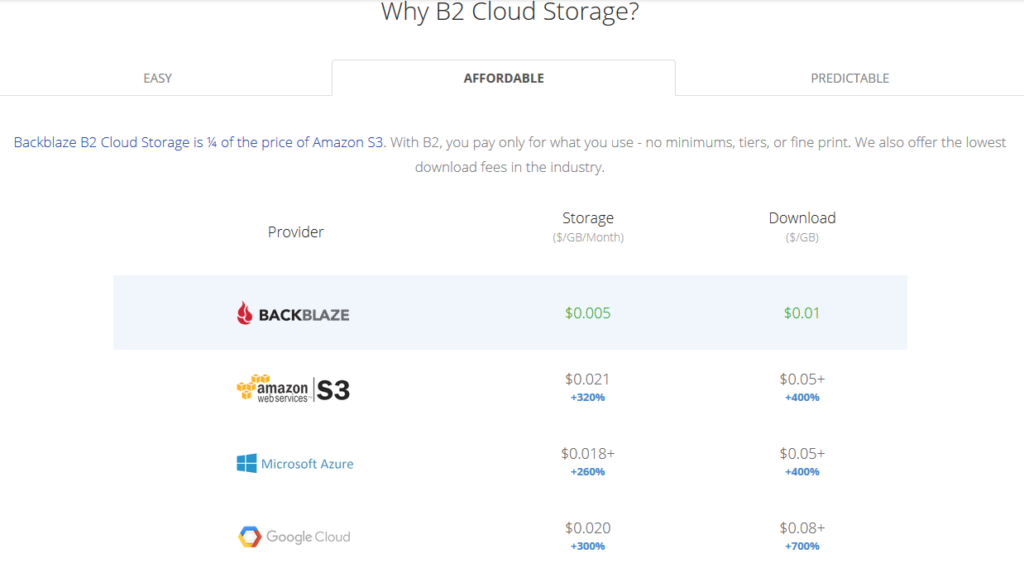
All someone has to do is look at the pricing model above to see why Backblaze is a no brainer for long term storage (not to mention the first 10GB of storage is free. With its recent inclusion as a destination for web server’s WHM backup, Farmhouse Networking has been recommending our hosting provider customers to make the switch from AWS Glacier. Here is the steps to make the switch:
Setup Backblaze Buckets
Login to Backblaze account
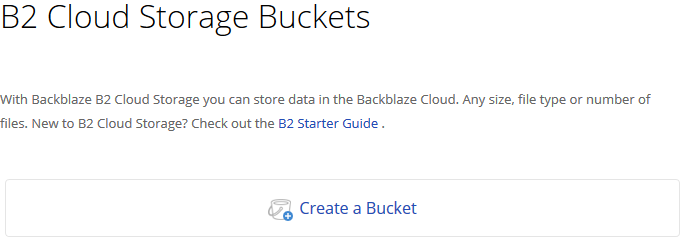
Click on the Create Bucket button in the B2 Cloud Storage Buckets section
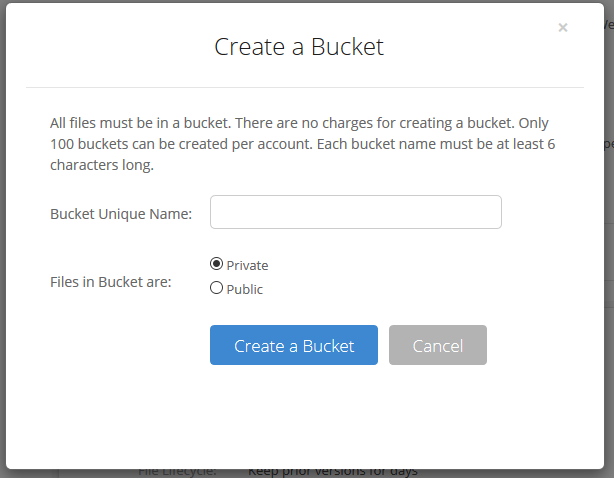
3. Give the Bucket a name and keep the bucket private for the backups. Click on the Create a Bucket button.
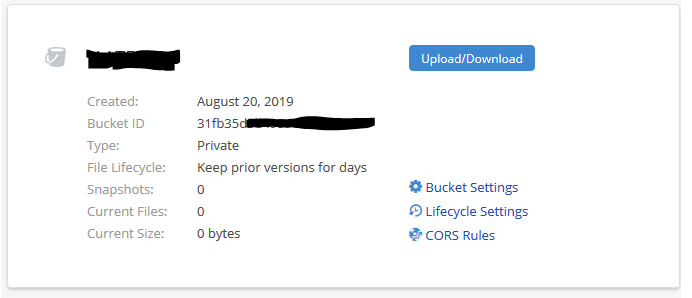
4. Copy down your Backblaze Bucket name and Backblaze Bucket ID
Setup Backblaze Application Key
Click on the App Keys section
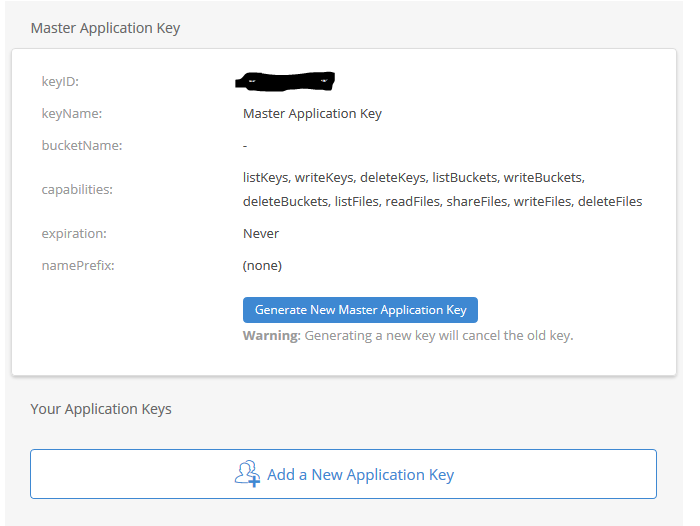
Click on Add a New Application Key
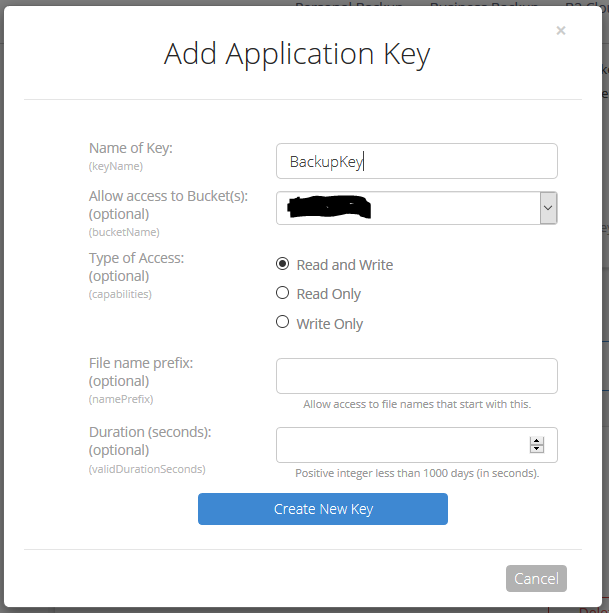
3. Give the Backblaze Application Key a name, chose the newly created bucket from the list and make sure to leave the Type of Access as “Read and Write”. Click the Create Key button.
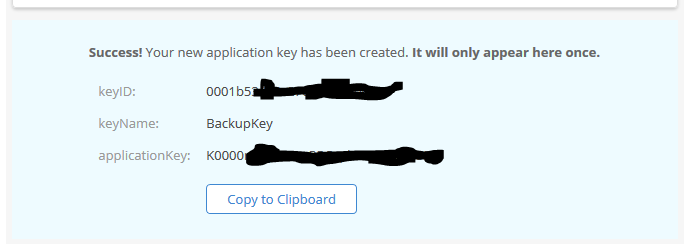
4. Make sure to copy down the Backblaze Application keyID and Backblaze Application applicationKey. This will be the only time they are both shown. If you lose the Backblaze Application applicationKey then you will have to delete the current one and create a new one.
Setup WHM Backup to Backblaze
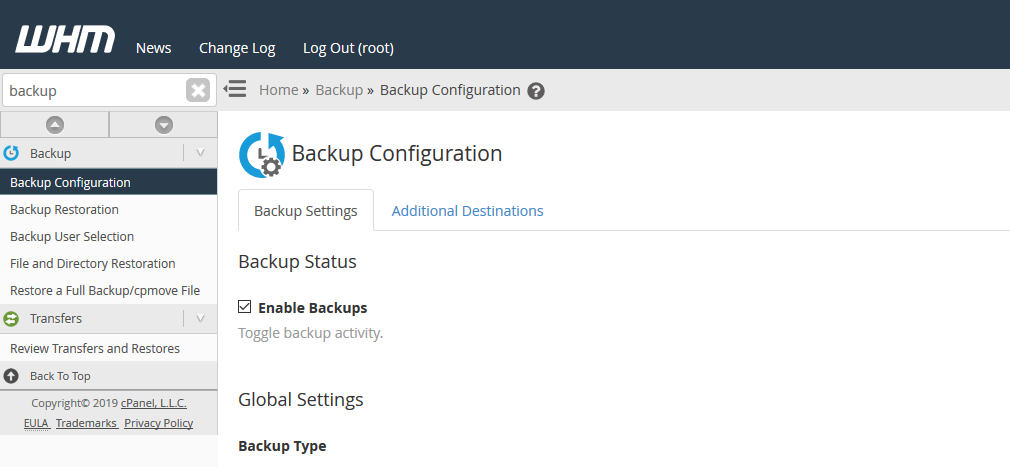
Connect to WHM as root user and choose Backup Configuration from the menu. The specific WHM backup settings are not discussed here, but feel free to contact us for advise on how to do so.
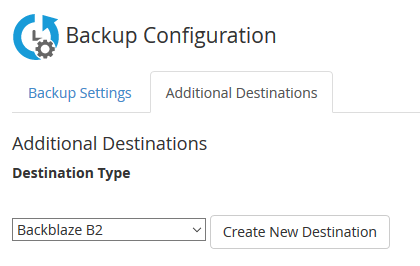
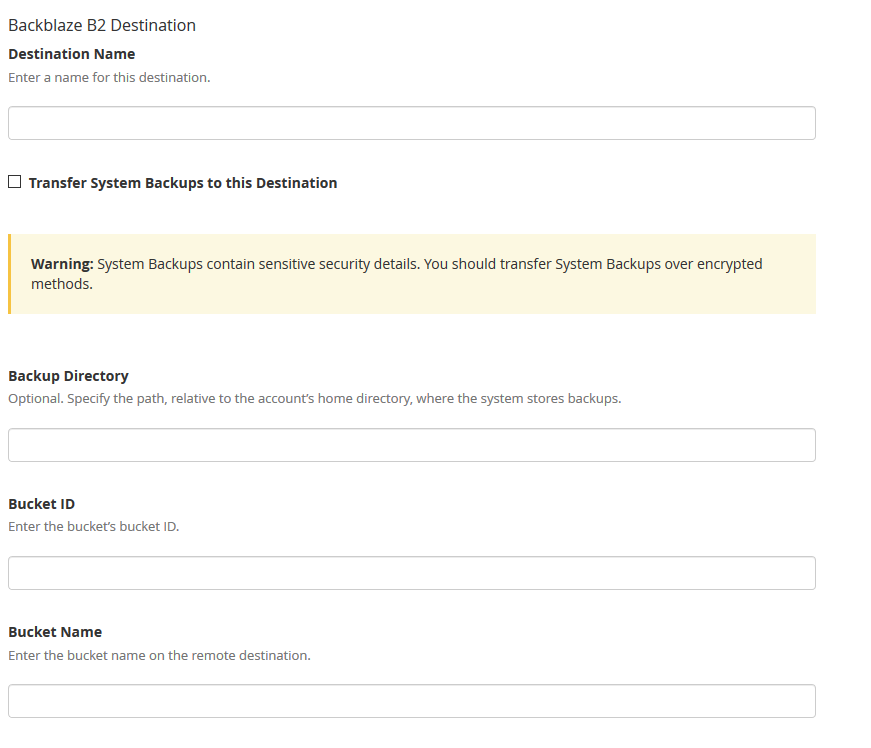
2. Click on Additional Destinations. Chose Backblaze B2 from the Destination Type and click on the Create New Destination button.
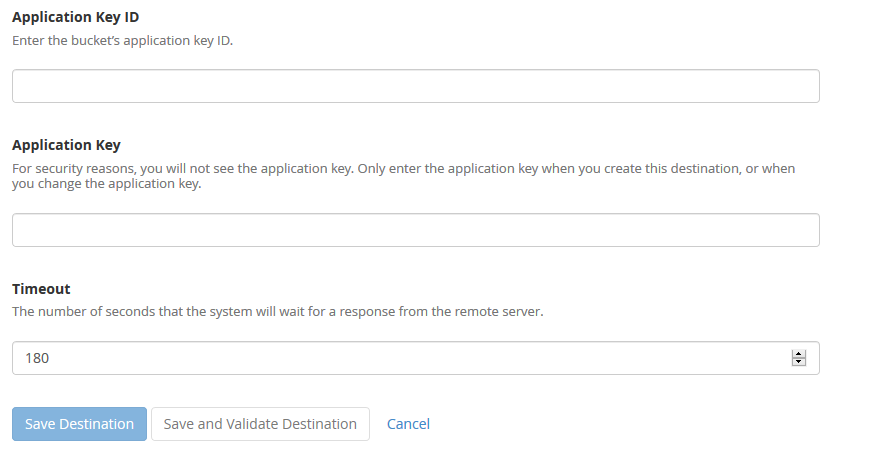
3. Enter in a backup name. Click on the “System Backups” if that is desired. Leave the Backup Directory blank. Enter in the Backblaze Bucket ID and Backblaze Bucket Name copied down earlier. Enter in the Backblaze Application Key ID and Backblaze Application Key. Click on the Save and Validate Destination button.
Make sure to disable your old AWS Glacier backup destination. All backups on Glacier should be set to auto delete according to a lifecycle, but if not then wait 120 days from creation to remove them to avoid any penalties. Speaking of lifecycles, it is a good idea to change the lifecycle settings on the Backblaze bucket to auto delete after a determined number of days since they do charge for total storage utilized.
If your company is would like to discuss the layers of security you have in place, then contact us for assistance.
A single ransomware infection can freeze a church’s donations, records, and operations
Got a call a couple weeks ago from a local church:
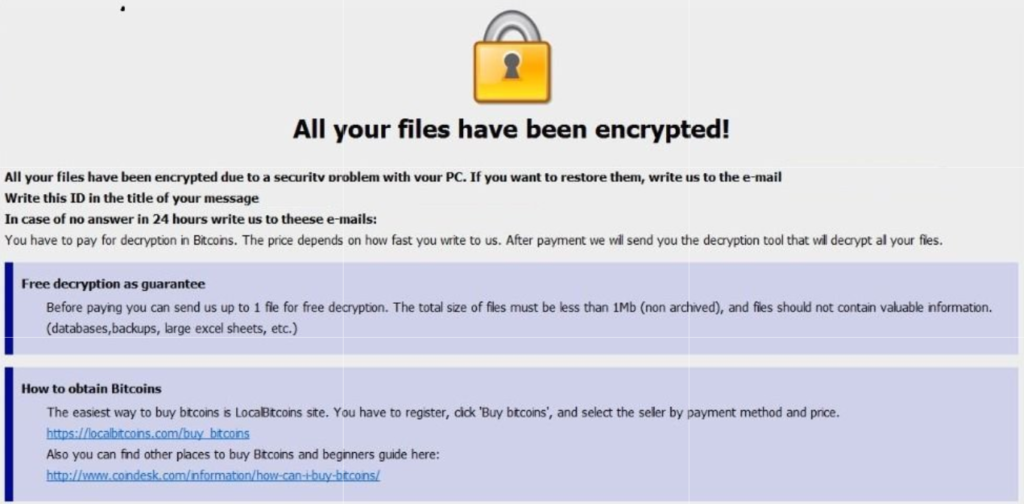
“we came in and open the computer and we have ransomware on there. We can’t even get to any of our stuff. It’s telling us to email somebody and so that they can free up the computer.”
How does this happen?
Generally these things happen because people click on things they shouldn’t. Whether in an attachment in email from someone they don’t recognize, a link in social media that sounds too good to pass up, or an advertisement for something they can’t live without. Once the user gives permission for something to open or run on their computer the game is over and the hacker wins.
What to do when it happen?
Stop using the computer.
Leave the computer alone! Do not carry out any further commands, including commands to Save data.
Do not close any of the computer’s windows or programs. Leave the computer alone.
Leave everything plugged in and do not turn off the computer or peripheral devices.
If possible, physically disconnect the computer from networks to which it is attached.
Call us immediately. Write down any unusual behavior of the computer (screen messages, unexpected disk access, unusual responses to commands) and the time when they were first noticed.
Write down any changes in hardware, software, or usage that preceded the malfunction.
Do not attempt to remove a suspected virus! Let the professionals do the dirty work.
How to prevent this from happening?
Layers of protection is the simple answer. A good antivirus installed to stop the bad programs from running, DNS filtering to keep users off of bad sites / advertisements, a good backup of all data to recover when this does happen, and most important of all EDUCATION – teaching users what safe internet usage looks like and having policies in effect to train them can mitigate 60-70% of infections.
If your company is would like to discuss the layers of security you have in place, then contact us for assistance.
And God will generously provide all you need. Then you will always have everything you need and plenty left over to share with others. As the Scriptures say,
“They share freely and give generously to the poor. Their good deeds will be remembered forever.”
For God is the one who provides seed for the farmer and then bread to eat. In the same way, he will provide and increase your resources and then produce a great harvest of generosity in you. - 2 Corinthians 9:8-10
We use cookies to ensure that we give you the best experience on our website. If you continue to use this site we will assume that you are happy with it.