Secure endpoints don’t guarantee cloud safety—address cloud-specific risks now
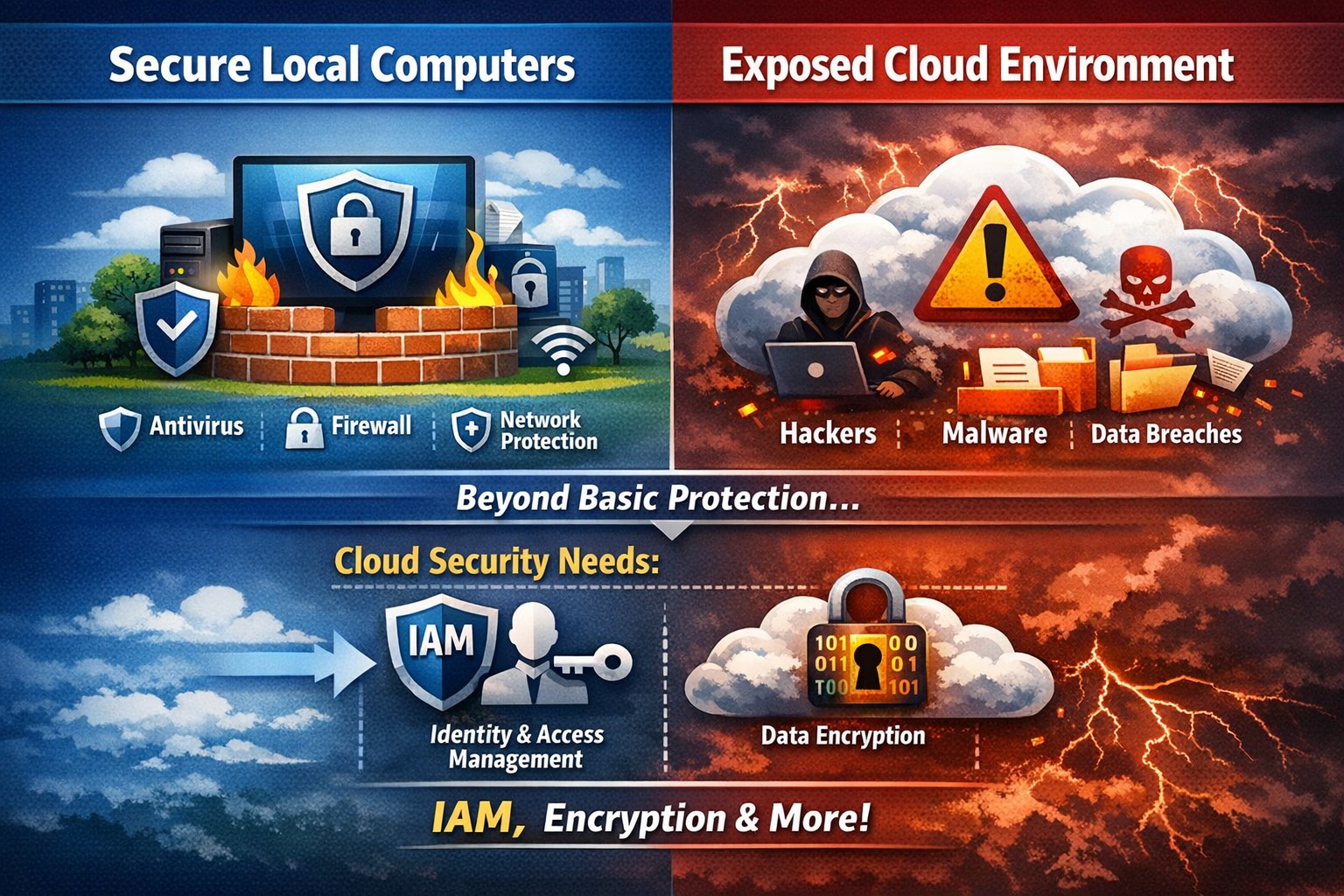
The ability to store and access data remotely in the cloud has revolutionized the way organizations operate, providing flexibility, scalability, and cost-efficiency. However, with this convenience comes the need for robust security measures to protect sensitive information from cyber threats. This article explores the importance of cloud security and provides strategies to safeguard your company’s data in the cloud.
Understanding Cloud Security
Cloud security encompasses a set of controls, processes, technologies, and policies designed to protect cloud-based systems, infrastructure, and data. It is one part of computer security and information security, aiming to safeguard businesses from financial, legal, and reputational repercussions of data breaches and loss.
Cloud security involves various strategies and best practices to ensure the confidentiality, integrity, and availability of cloud resources. It includes measures such as real-time monitoring, multi-factor authentication (MFA), identity and access management (IAM), cloud-to-cloud backup solutions, systematic off-boarding processes, and anti-phishing training.
Real-time Monitoring
Real-time monitoring is a crucial strategy to detect and respond to suspicious threats promptly. By implementing real-time monitoring tools, businesses can gain visibility into their employee activity and cloud systems to proactively identify any potential cyber attacks. This allows for immediate action to mitigate risks and minimize the impact of data breaches. According to IBM, the global average total cost of a data breach in 2023 was $4.45 million, highlighting the financial implications of inadequate security measures.
Multi-Factor Authentication (MFA)
Traditional username and password combinations are no longer sufficient to protect user accounts from hackers. MFA adds an extra layer of security by requiring users to provide multiple pieces of evidence to verify their identities. This could include a combination of something they know (password), something they have (a mobile device or security key), or something they are (biometric data like a fingerprint or facial recognition). By implementing MFA, businesses can significantly reduce the risk of account compromise attacks and prevent unauthorized access to cloud applications.
Identity and Access Management (IAM)
Identity and access management (IAM) is a critical component of cloud security. It involves assigning proper levels of authorization and access controls to ensure that employees only have access to the information and resources necessary for their roles. IAM not only prevents accidental data breaches but also protects businesses from external threats by limiting the potential attack surface. By implementing IAM solutions, organizations can enforce strict access controls, reduce the risk of unauthorized data access, and maintain data privacy.
Cloud-to-Cloud Backup Solutions
While cloud providers typically have robust data protection measures in place, businesses should not solely rely on them for data backup. Cloud-to-cloud backup solutions provide an additional layer of protection by replicating data from one cloud service to another. This helps mitigate the risk of data loss due to cloud provider mistakes or system failures. Organizations using software-as-a-service (SaaS) applications can benefit from cloud-to-cloud backup solutions, ensuring advanced data protection beyond the basic safeguards provided by the applications themselves.
Systematic Off-boarding Process
When employees leave a company, it is crucial to have a systematic off-boarding process in place to revoke their access rights immediately. According to a survey conducted by Cyberark, “88% of IT workers would take sensitive data with them or abscond with company passwords if they were fired.” Additionally, 50% of ex-employees can still access corporate apps. To prevent unauthorized access and protect sensitive data, organizations should ensure that departing employees’ access rights are promptly revoked. This includes revoking access to systems, data, cloud storage, intellectual property, and consumer information.
Offering Anti-Phishing Training
Phishing remains a prevalent threat in the cybersecurity landscape. Hackers often gain access to secure information by stealing employees’ login credentials or utilizing social engineering techniques. Offering anti-phishing training to employees can help raise awareness about these scams and prevent them from falling victim to phishing attacks. By educating employees on how to identify and report phishing attempts, organizations can safeguard their sensitive data without compromising productivity.
Strengthening Cloud Security Measures
While the above strategies are crucial for securing cloud operations, it is essential to adopt a comprehensive approach to cloud security. Here are additional best practices to strengthen your cloud security measures:
Enforce reliable passwords: Implement password policies that require complex, unique passwords and regular password updates. Encourage the use of password managers to reduce the risk of weak passwords.
Use encryption: Encrypting sensitive data helps protect it from unauthorized access. Implement encryption measures for data at rest and in transit.
Test security continuously: Regularly conduct vulnerability assessments and penetration testing to identify and address security weaknesses in your cloud infrastructure. This proactive approach ensures that potential vulnerabilities are discovered and remediated before they can be exploited.
Ensure local backup: In addition to cloud-to-cloud backup solutions, consider implementing local backups of critical data. This provides an extra layer of protection in case of cloud provider outages or data loss incidents.
Implement additional security measures: Explore additional security solutions such as intrusion detection systems (IDS), firewalls, and data loss prevention (DLP) tools to enhance your overall cloud security posture.
Avoid storage of sensitive data: Minimize the storage of sensitive data in the cloud. Identify and classify data based on its sensitivity and apply appropriate security controls accordingly. This reduces the risk of data breaches and ensures compliance with data protection regulations.
Why Is Cloud Security Important?
Cloud security is crucial for organizations migrating their sensitive data and applications to the cloud. By adopting secure cloud practices, businesses can protect highly sensitive data from hackers and ensure compliance with regulatory requirements. Here are a few reasons why cloud security is important:
Control Access
Cloud security enables organizations to monitor and regulate access to their data. By formulating policies and implementing access controls, businesses can prevent unauthorized users from accessing sensitive information. Cloud management tools provide visibility into user behavior and help maintain strong access controls.
Encrypting Sensitive Data
Encryption plays a vital role in securing data in the cloud. By encrypting data at rest and in transit, organizations can protect it from unauthorized access. Implementing encryption with strong access and control policies minimizes the impact of compromised keys and ensures data confidentiality.
Using Automation
Automation helps minimize human errors and misconfigurations in cloud environments. By automating routine tasks and configurations, organizations can ensure that their infrastructure is deployed and maintained correctly. Cloud automation tools streamline everyday configuration items and provisioning, reducing the risk of security vulnerabilities.
Extend Vulnerability Management Tools
Vulnerability management tools scan networks to identify potential threats or weaknesses that attackers can exploit. These tools help manage and mitigate attacks on the network by suggesting remedies and actions to reduce the prospect of network breaches. Regular scanning and remediation of vulnerabilities are essential to maintain a secure cloud environment.
Implementing Enhancements
Continuous improvement is crucial for maintaining cloud security. Organizations should continuously enhance their security measures throughout the entire lifecycle of their operations. As new threats emerge, businesses must adapt and implement necessary enhancements to safeguard against potential risks.
Deploying Multi-Factor Authentication (MFA)
Deploying MFA increases security and authentication for enterprise applications. Weak or reused passwords are a significant cause of data breaches. By implementing MFA, businesses can protect their cloud applications from unauthorized access attempts. Authorized personnel are granted access, minimizing the risk of data breaches.
Local businesses rely on Farmhouse Networking to simplify their cloud security management and enhance overall security posture. Click here to get started.
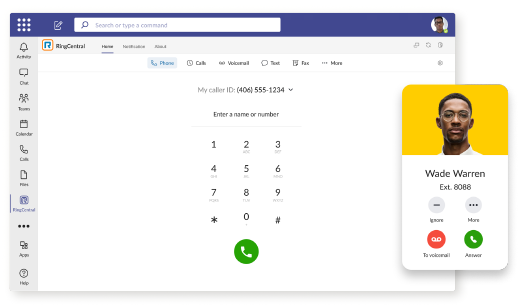
RingCentral VoIP app within Teams interface with call messaging and video features.
We have decided to make a business change that includes no longer directly selling phone services, but instead we are moving our clients to RingCentral. They are the industry leaders in this type of service and their rates are very competitive. One of their killer features is the Teams integration
RingCentral for Teams – Embedded App
RingCentral for Teams embedded app enables calling from the Teams app to both internal extensions and external numbers. It’s the simplest way to supercharge the phone experience for both end users and IT admins without having to deploy a new app to end users. Most importantly, there’s no need for an added Microsoft calling or E5 license to capture this value. This solution is ideal for organizations that want to:
leverage RingCentral’s superior telephony while maximizing the value of their Teams investment
avoid the added cost of Microsoft’s calling license
With the RingCentral for Teams embedded app, users access an icon presented in Microsoft Teams. They can then place and receive calls, access voicemails and voicemail transcriptions, and send or receive an SMS or fax. These tools fill critical gaps in Microsoft Teams, transforming it from messaging and video meeting tool to a communications powerhouse. This approach is also a money saver, as it doesn’t require the added cost of a Teams Phone or E5 license.
If your company is currently using Microsoft Teams for communications and want to add the incredible functionality that RingCentral brings, then contact us for assistance.
STIR/SHAKEN authentication prevents legitimate business calls from spam filters
Here is a quick tip for anyone doing advertising from their phone number, you can be marked as SPAM LIKELY or SPAM RISK by phone companies. Each phone carrier keeps a list of numbers they determine to be spam risks based on the history of the number. Unfortunately, there is no central database or service so far that manages this number designation.
What Causes the SPAM Designation?
In short, here are the most obvious reasons for designation:
Volume of Outbound Calls Per Day Per Number
Someone Flagged a call from your number in that carrier’s app as spam
Outbound Caller ID number is not set properly from your system and incomplete will probably be flagged as spam automatically
How to Get De-Listed
You can use the links or email addresses below to register legitimate numbers and also address any incorrect labeling or call blocking with other carriers:
With the recent addition of VoIP phone service and internet phone service for current phone system owners, we here at Farmhouse Networking have decided to “eat our own dog food” as the saying goes by changing our phone number over to use the new VoIP phone system ourselves. So here is what to expect:
Phone System Features:
Texting: Those of you who are used to texting in for quick responses will no longer be able to do so. I will still have a cellphone and be able to answer calls from the field via the phone systems Ring Group feature, but I will changing the phone number for my cell phone.
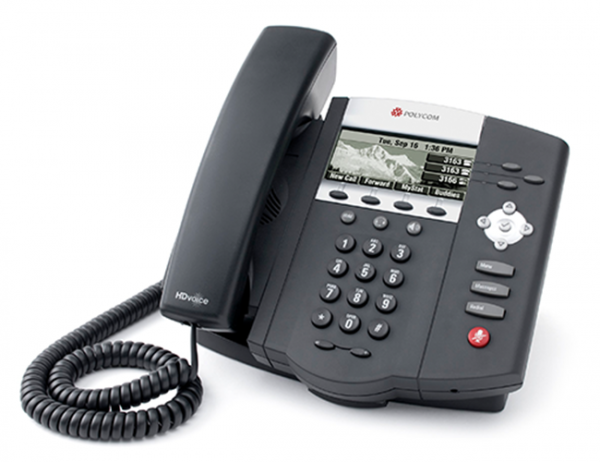
Desk Phone: When in the office, we will be answering our Polycom VVX310 desk phone which has HD Voice for clearer call quality.
Messages: Any time a message is left on our new system, the phone system Voice to Text feature will transcribe the message automatically then send an email into our ticketing system with a copy of the audio also attached. This then becomes a ticket – this feature will increase responsiveness and accuracy in handling your requests.
Holidays, Nights, & Weekends: The phone system has been setup to recognize specified national holidays, birthdays, and special occasions. It also has Time Frame setup with business hours between 9am and 5pm on all weekdays. When outside these business hours or on holidays the phone system will be answered by our Auto Attendant system. This will give the option to leave a voicemail to create a ticket or agree to after hours rates to start an emergency call. Please see our Terms & Conditions for more information.
Thanks for always looking to Farmhouse Networking to serve your company’s IT needs.
If your company is looking to upgrade your current phone system feature set or reduce overall costs of phone service, then contact us for assistance.
As small businesses change and grow, the ability to quickly scale up — or down — becomes a necessity. Adding new employees, for example, requires the company to adapt its phone system to accommodate the need for more lines.
That is harder to accomplish using traditional on-premise telephony systems due to higher setup and maintenance costs, the need for hardware on-site and reliance on IT support. A cloud-based phone system, on the other hand, would enable small businesses to manage communication services in a less costly, more streamlined and agile manner.
Benefits of a Cloud-Based Phone System
1. Fully-Integrated Communications System
Business tools that operate in the cloud are easy to deploy, enabling employees to stay connected whether they are in the office or on the go. In this way, the cloud provides a consistent business presence and helps to increase productivity with seamless access to CRM tools, email, instant messaging, voice and videoconferencing.
2. Control Over Modes of Communication
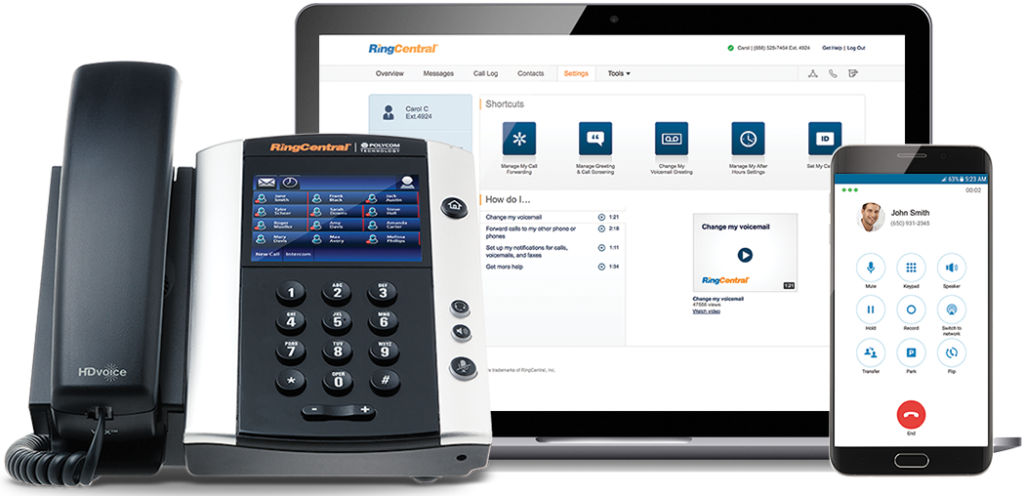
A cloud-operated system puts businesses in the driver’s seat, allowing them to pick and choose what features they need, with access to turn them on or off easily. Also, cloud solutions give employees anytime, anywhere access via a smartphone, desk phone or softphone to all their calling features.
3. Top Line Business Features
A cloud-based phone system would give small businesses access to the types of network applications that one would typically find at larger corporations. These include features such as a Virtual Assistant, Auto Attendant, Never Miss a Call or Call Center solutions.
4. Mobility and Ease of Use
Today’s workplace is increasingly mobile, and small businesses especially need to be able to operate from multiple locations. With a cloud-based system, small business employees have access to features that allow them to log in from anywhere so that they can be reached while on the go, giving customer-facing and revenue-producing employees greater control over their productivity.
5. Time Management and Efficiency
Web-based customer portals enable IT staff to manage their system more efficiently. With insight into the installation, service configuration, trouble tickets, training, billing and call analytics, this full access to a customer’s system and account allows them to spend fewer resources on project management and focus more on work that adds to the bottom line.
6. Flexibility to Scale Up (and Down)
As a business grows, so does the need to hire new employees, open new offices and onboard new customers. This requires a communications system that can scale up — or down — as the need arises. With a cloud-based phone system, businesses can add as many extensions as they need to accommodate heightened call volume, or, if necessary, simply call in to deactivate these extra extensions. Unlike traditional systems, businesses only pay for the extensions they need for as long as they need them.
7. Business Continuity
Working with a phone system “in the cloud” allows businesses to remain connected to their customers no matter the environment. A cloud-based communications system is likely to be unaffected by outside factors such as severe weather or other issues that may keep employees from getting to the office.
8. Improved Customer Service
With the Virtual Receptionist (VR) or Auto Attendant feature, businesses can easily direct calls to various departments and even create greetings unique to a given department. For example, a business could set up a holiday greeting in advance (via the administrative portal) and pre-set it to revert to the non-holiday greeting on a specified date. It could also add an on-hold message about special promotions or commonly asked questions.
9. New Service Features Added Easily
During busy seasons, some businesses will add premium calling features to increase call-taking efficiency and maximize staffing. Call Groups, for example, allow incoming calls to ring on multiple extensions. Call Queues provide a “dynamic waiting room” for callers that let businesses customize the on-hold experience and better manage call volume. Both help to decrease voicemails, missed calls and busy signals, enabling service to as many callers as possible.
10. Cost Savings
Cost savings are another benefit of cloud-based phone system. Moving telecommunications off of PBX platforms and to the cloud can be less expensive relative to monthly service rates versus that of a traditional system, helping to reduce costs and, ultimately, increase profitability.
If your company is looking to reap the benefits of moving to the cloud, then contact us for assistance.
Cloud redundancy keeps phone systems operational during disasters
What happens to your phones when the power goes out, the internet is down, or the old copper lines are down from a natural disaster? Are your customers going to get a busy signal? How quickly will they call the competition?
Phone System Backup Plan
With a standard phone service there would be nothing to prevent the busy signal from happening. With phone service from Farmhouse Networking all calls have the ability to be automatically forwarded and routed to virtually any person, device, or location. Plus our platform includes connectivity to multiple carriers for redundancy purposes, so no single carrier issue will impact your business.
Disasters might not be under our control, but business can continue to happen even when they occur.
If your company is concerned about losing calls or looking to add the protection a cloud phone system provides, then contact us for assistance.
And God will generously provide all you need. Then you will always have everything you need and plenty left over to share with others. As the Scriptures say,
“They share freely and give generously to the poor. Their good deeds will be remembered forever.”
For God is the one who provides seed for the farmer and then bread to eat. In the same way, he will provide and increase your resources and then produce a great harvest of generosity in you. - 2 Corinthians 9:8-10
We use cookies to ensure that we give you the best experience on our website. If you continue to use this site we will assume that you are happy with it.