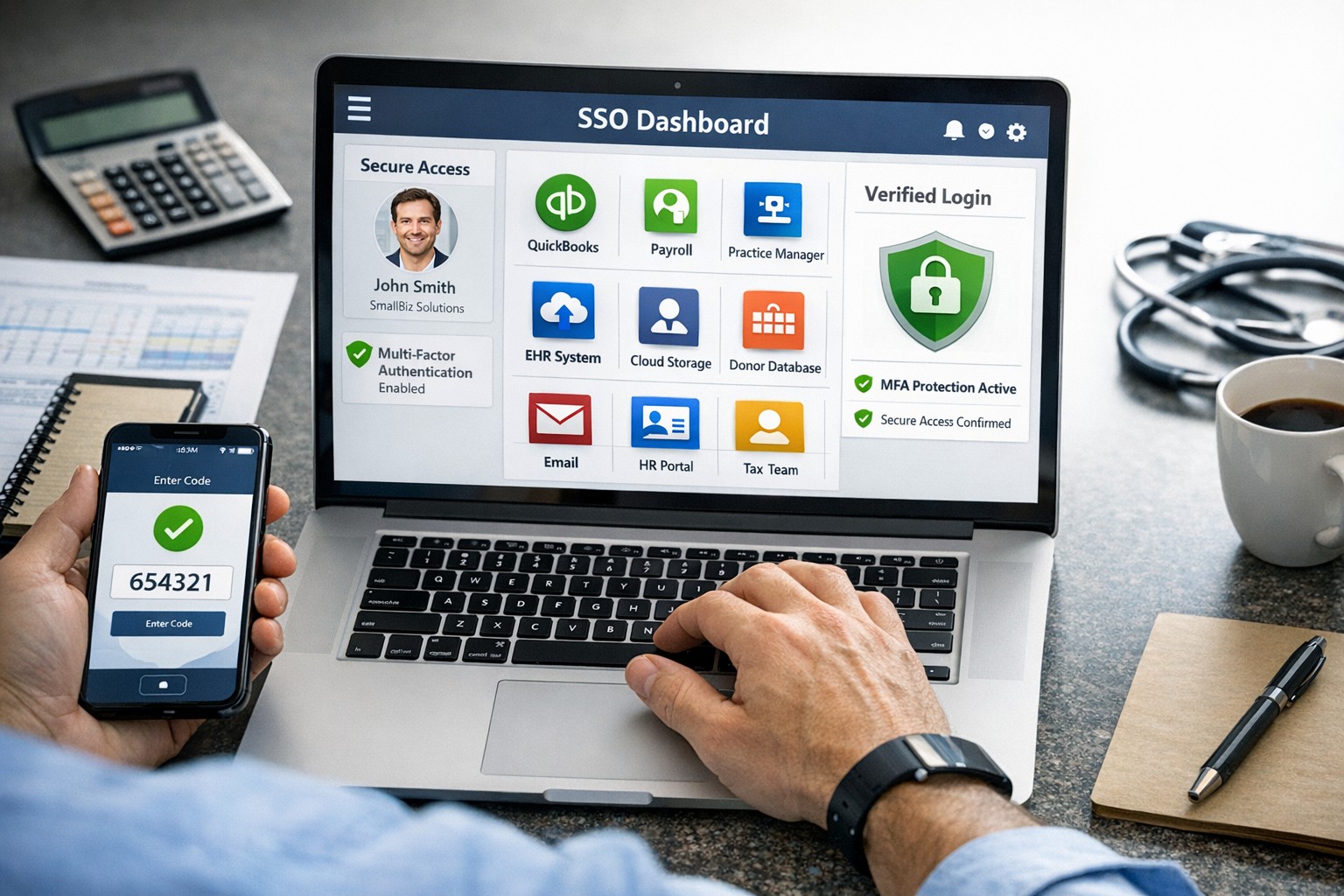
SSO for BYOD provides secure, convenient single sign-on access across apps on personal devices for small business teams.
Individuals and organizations rely heavily on various online platforms and services, the need for a secure and convenient way to access these resources is paramount. This is where SSO Single Sign-On comes into play. SSO Single Sign-On is a powerful authentication method that allows users to securely sign in to multiple applications and platforms using just one set of credentials. In this article, we will explore the benefits of SSO Single Sign-On, its implementation, and how it enhances security while streamlining the user experience.
Understanding SSO Single Sign-On
What is SSO Single Sign-On? SSO Single Sign-On is an authentication process that enables users to access multiple applications and platforms using a single set of login credentials. With SSO Single Sign-On, users only need to remember one username and password, eliminating the hassle of managing multiple credentials for different services. This not only saves time but also enhances convenience for users.
How does SSO Single Sign-On work? SSO Single Sign-On works by establishing a trust relationship between an identity provider (IdP) and the various service providers (SPs). When a user attempts to access a service, the IdP verifies the user’s identity and provides a token to the SP, which grants the user access without requiring additional authentication. This seamless process simplifies the login experience and eliminates the need for users to repeatedly enter their credentials.
Benefits of SSO Single Sign-On
Enhanced Security: One of the key advantages of SSO Single Sign-On is its ability to enhance security. By consolidating login credentials into a single set, users are less likely to resort to weak passwords or reuse passwords across multiple platforms. This reduces the risk of password-related security breaches. Additionally, SSO Single Sign-On allows for stronger authentication methods, such as two-factor authentication, further bolstering security without requiring multiple accounts.
Streamlined User Experience: With SSO Single Sign-On, users no longer have to remember and enter multiple sets of login credentials. This significantly reduces the login friction and streamlines the user experience. Users can seamlessly navigate between different applications and platforms without the need for repetitive logins. This convenience not only saves time but also improves productivity.
Centralized Access Management: SSO Single Sign-On provides organizations with centralized access management capabilities. Administrators can easily control user access to various applications and platforms from a centralized dashboard. This simplifies user provisioning and deprovisioning, ensuring that employees have timely access to the resources they need while maintaining security and compliance.
Cost and Time Savings: Implementing SSO Single Sign-On can lead to cost and time savings for organizations. By reducing the number of password-related support requests, IT teams can focus on more strategic initiatives. Additionally, the streamlined login experience reduces the time spent by employees on authentication, leading to increased productivity and efficiency.
Implementing SSO Single Sign-On
To implement SSO Single Sign-On, organizations need to follow a few key steps:
Evaluate SSO Solutions: Begin by evaluating various SSO solutions available in the market. Consider factors such as compatibility with existing systems, scalability, security features, and ease of integration.
Choose an Identity Provider: Select an identity provider that aligns with your organization’s requirements. The identity provider will be responsible for authenticating users and issuing tokens for accessing service providers. Office 365 and Google Workspace are usually the best, most prolific IdP sources to use.
Configure Service Providers: Configure the service providers that you want to integrate with SSO Single Sign-On. This involves establishing trust relationships between the identity provider and the service providers.
User Provisioning and Deprovisioning: Implement a user provisioning and deprovisioning process to ensure that users have the necessary access to the applications and platforms they require. This process should be integrated with the SSO Single Sign-On solution to maintain centralized access management.
Test and Monitor: Thoroughly test the SSO Single Sign-On implementation to ensure its functionality and security. Regularly monitor the system to identify and address any potential issues or vulnerabilities.
Best Practices for SSO Single Sign-On Implementation
When implementing SSO Single Sign-On, it is essential to follow best practices to maximize security and usability:
Strong Authentication: Implement strong authentication methods such as two-factor authentication or biometric authentication to enhance security.
Regular Auditing: Conduct regular audits of user access rights and permissions to ensure compliance and detect any unauthorized access.
User Education: Educate users about the benefits of SSO Single Sign-On and best practices for password management to promote secure behavior.
Continuous Monitoring: Implement a robust monitoring system to detect and respond to any suspicious activities or potential security threats.
Regular Updates: Keep the SSO Single Sign-On solution and all integrated applications up to date with the latest security patches and updates.
Remember, security should never be compromised, and SSO Single Sign-On provides a robust solution to protect user identities and streamline access to applications and platforms. Embrace the power of SSO Single Sign-On and enjoy the benefits of enhanced security and convenience.
Implement zero trust to safeguard mobile workforce from cyber threats anywhere
Remote work and mobile devices have become the norm, so ensuring the security of your workforce and sensitive data is paramount. Traditional security measures based on perimeter defense are no longer sufficient to protect against the sophisticated cyber threats that target mobile devices and exploit vulnerabilities in the network. This is where the concept of zero trust comes into play. Zero trust is a security framework that challenges the notion of “trust but verify” and instead adopts a “never trust, always verify” approach. By implementing a zero trust model, organizations can establish a security infrastructure that provides continuous authentication, authorization, and monitoring to safeguard their mobile workforce and sensitive data.
Understanding the Concept of Zero Trust
The concept of zero trust is rooted in the recognition that a one-time authentication and authorization process is not enough to ensure security in today’s dynamic threat landscape. Changes in user behavior, location, and other factors should radically impact access decisions. Zero trust takes a proactive approach to security by enforcing minimal access to resources, requiring continuous security monitoring, risk-based access control, and real-time authentication and authorization based on up-to-date information. Unlike traditional security models that rely on perimeter defense and trust users and devices within the network, zero trust challenges the idea of inherent trust and verifies the authenticity and integrity of every user and device, regardless of their location or network connection.
The Evolution of Zero Trust
The concept of zero trust has evolved over time in response to the increasing risks and challenges posed by mobile devices and remote work. The rapid adoption of mobile devices and the proliferation of internet-connected devices have expanded the attack surface, making traditional perimeter-based security measures inadequate.
Key Security Technologies for Mobile Devices
To enhance the security of mobile devices and implement zero trust, organizations should leverage key security technologies designed specifically for the mobile environment. These technologies include:
Enterprise Mobility Management (EMM): EMM ensures that mobile devices have the necessary policies and configurations in place, including mobile device management for security settings and configurations, as well as remote user access policy implementation. EMM provides a foundation for enforcing security controls and managing mobile devices within the organization.
Mobile Application Vetting (MAV): MAV ensures that applications comply with enterprise policies and do not contain known exploitable vulnerabilities. By vetting applications, organizations can reduce the risk of malicious applications compromising the security of mobile devices and accessing sensitive data.
Mobile Application Management (MAM): MAM focuses on ensuring compliance in deployed applications. It enables organizations to enforce security policies and manage the lifecycle of mobile applications, including app distribution, updates, and revocation. MAM helps organizations maintain control over the applications used by their mobile workforce.
Mobile Threat Defense (MTD): MTD solutions detect and mitigate threats from suspicious user behavior, network activity, and malicious attacks. These solutions leverage advanced analytics and threat intelligence to identify and respond to potential security threats in real time, providing an additional layer of protection for mobile devices.
Secure Containers: Secure containers provide isolation techniques to prevent organizational and personal data from commingling. By creating separate containers for different types of data, organizations can ensure that sensitive information remains secure, even if the device itself is compromised.
The Role of Intelligent Authentication
Intelligent authentication, powered by advanced rule sets and artificial intelligence, can significantly enhance the security of mobile devices in a zero trust environment. By combining biometrics with user behavior analysis, intelligent authentication systems can provide adaptive authentication that adapts to each user interaction, ensuring precise security measures. Integration between EMM, mobile threat defense, and existing logging, monitoring, diagnostic, and mitigation systems further enhances security capabilities.
Developing a Mobile Zero Trust Strategy
Implementing zero trust in the mobile environment requires a tailored approach that aligns with an organization’s specific goals, risks, and infrastructure. Businesses should develop their strategies based on a comprehensive assessment of the risks they face, with granular policies to mitigate those risks. The granularity of continuous authentication should be carefully determined to strike the right balance between security and usability. It’s important to note that technology is only one part of the solution; organizations must also review their mobile use policies and ensure that processes and human factors align with zero trust principles
With an intelligent authentication approach and a tailored mobile zero trust strategy, organizations can safeguard their mobile workforce and data from advanced cyber threats. Farmhouse Networking can make this a reality for your organization.
Cloud + BYOD = massive IT savings and unlimited scalability
Businesses, regardless of their size, need to stay agile, cost-efficient, and scalable to remain competitive. Cloud computing and online storage have revolutionized the way companies operate and handle data. By migrating your business operations to the cloud, you can leverage its numerous benefits to reduce costs, enhance scalability, and ultimately drive greater success. In this article, we’ll explore valuable strategies for harnessing the power of cloud computing and online storage to optimize your business operations.
Cost Reduction:
Cloud computing offers a cost-effective solution for businesses of all sizes. Here’s how you can leverage cloud technology to reduce costs:
Infrastructure cost reduction: By switching to cloud-based infrastructure, you eliminate the need for physical servers, hardware, and costly private data centers. This not only reduces upfront capital expenditure but also eliminates ongoing hardware maintenance / replacement costs.
Pay-as-you-go pricing model: Cloud service providers offer flexible pricing options, allowing you to pay for only the resources you consume. This eliminates the need for adding excess just-in-case capacity, resulting in significant cost savings. You can even turn off some services so you are not paying while you sleep.
Energy efficiency: Cloud computing minimizes energy consumption related to IT hardware. Cloud providers are equipped with highly efficient systems that optimize resource utilization, resulting in reduced energy costs for your business and smaller carbon footprint on the planet.
Scalability and Flexibility:
Cloud computing enables businesses to scale their operations seamlessly. Here’s how you can harness this scalability to grow fast and stay ahead:
Elasticity: Cloud-based systems can automatically scale resource capacity up or down in response to fluctuating demands. This scalability ensures that you can handle traffic spikes, seasonal variations, or sudden growth without any disruption.
Multi-region availability: Cloud platforms offer the ability to deploy your resources across multiple geographic regions. This redundancy guarantees uninterrupted service availability, even if a specific region experiences an outage or disruption.
On-demand resource provisioning: Cloud infrastructure allows you to quickly provision additional resources as your business expands. This eliminates the need for long wait times to procure and set up physical hardware.
Enhanced Collaboration and Accessibility:
Cloud-based storage and collaboration tools can revolutionize the way your team works. Here’s how to leverage the cloud for improved collaboration:
Centralized data management: Cloud storage solutions enables sharing of documents, pictures, videos, and other files. This eliminates the need for version control issues and multiple physically stored copies, leading to increased overall productivity.
Remote and mobile access: Cloud computing allows employees to access critical data and applications remotely, promoting flexible work arrangements and enhancing productivity. This accessibility ensures that your team remains connected and productive, regardless of physical location – think work from home without the need for VPN.
Real-time collaboration: Cloud-based tools facilitate real-time collaboration, allowing team members to work simultaneously on projects. This boosts efficiency, accelerates decision-making processes, and reduces time-to-market for products and services.
Don’t wait – adopt cloud technology in your business operations and stay ahead of the competition. Contact us today to learn more!
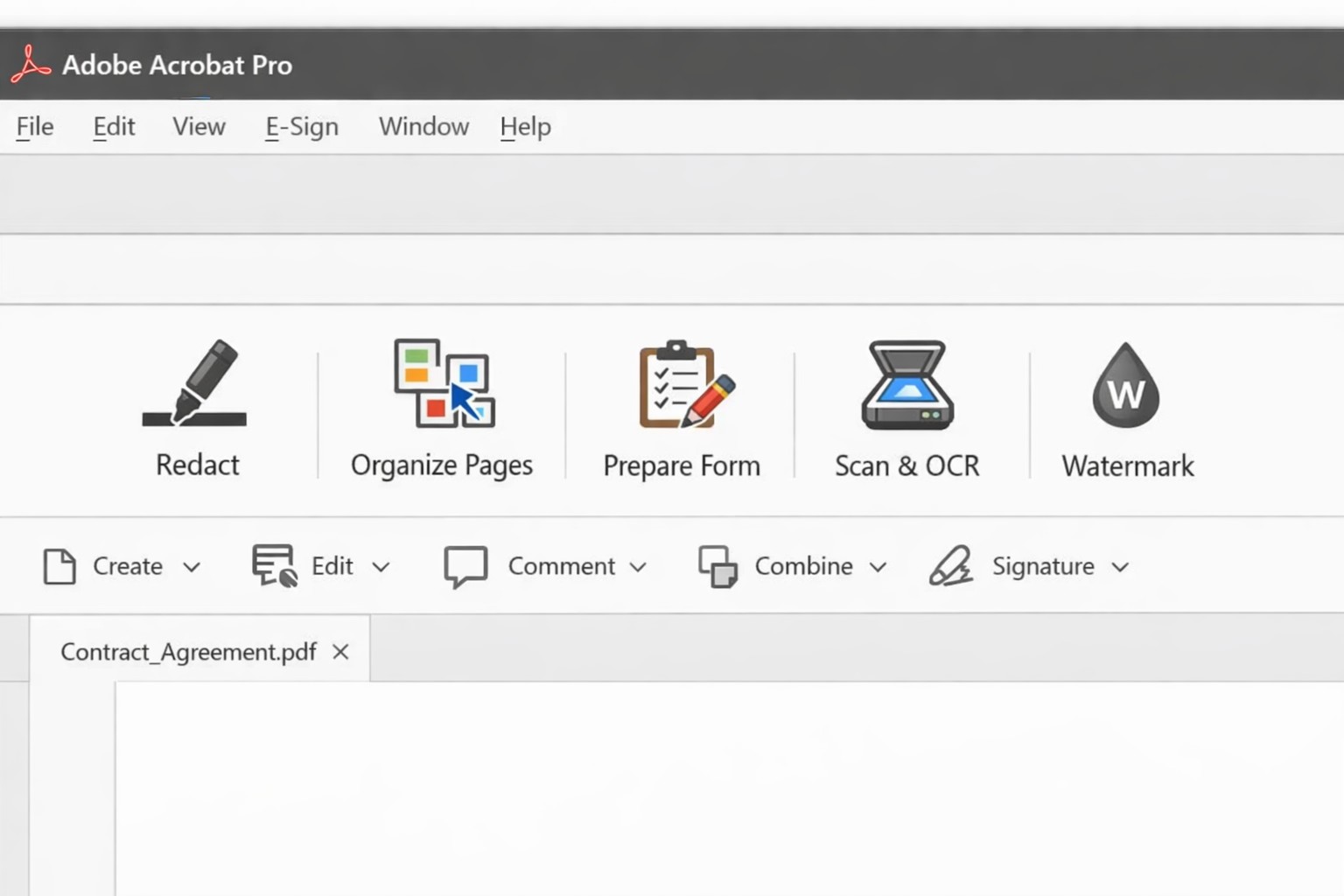
Acrobat Pro tools panel: redact combine edit OCR workflow actions.
Businesses are increasingly reliant on digital documents. From contracts to invoices, these important files need to be easily shared and accessible across different platforms and devices. This is where Adobe Acrobat comes in. Adobe Acrobat is a powerful tool that allows you to create, edit, and secure PDFs effectively. To help you make the most of this software, we have compiled a list of useful tips:
Create Interactive Forms
One of the key features of Adobe Acrobat is its ability to create interactive forms. Rather than wasting paper on printing out forms and having people fill them out manually, you can create digital forms that can be filled out electronically. This not only saves time and the planet but also reduces errors and allows you to collect data more efficiently.
Edit PDFs on the Go
With the Adobe Acrobat app, you can edit PDFs directly on your mobile device. This is incredibly useful for business owners who are constantly on the go and need to make quick edits to their documents. Whether it’s adding text, resizing images, or rearranging pages, you can do it all from the convenience of your phone or tablet.
Combine Multiple Files into a Single PDF
If you have multiple files that you want to combine into a single PDF, Adobe Acrobat makes it easy. You can simply drag and drop the files into Acrobat, rearrange them, and save them as a single PDF. This feature is ideal for business owners who often need to merge multiple documents into one proposal, contract, or report.
Protect your PDFs with Encryption
Security needs to be a top priority for businesses, especially when it comes to sensitive documents. Adobe Acrobat allows you to protect your PDFs by adding encryption. You can set passwords and permissions to ensure that only authorized individuals can access, print, or modify your files. This level of security is crucial for protecting confidential business and customer information.
Optimize PDFs for Web Viewing
PDFs can easily become large files, which can slow down loading times when viewing them online. Adobe Acrobat offers a feature called “Optimize for Web” that reduces the file size while preserving the document’s quality. This is particularly useful when sharing PDFs on your website or via email. When customers have to wait for things to load they are more likely to go somewhere else for what they are looking for.
Collaborate and Review Documents
Adobe Acrobat has collaboration features that allow multiple users to work on the same PDF simultaneously. You can easily share documents with colleagues, clients, or partners and track changes made by each. This streamlines the review and approval process, reducing the need for endless email threads and ensuring everyone is on the same page.
Automate Workflows with Adobe Sign
Adobe Sign, a component of Adobe Acrobat, enables you to send, sign, and track important documents online. It eliminates the need for paper-based signatures and accelerates the approval process. With Adobe Sign, you can automate workflows, whether it’s obtaining client signatures, approving contracts, or completing employee onboarding documents. This tool can streamline your business processes and save you a significant amount of time.
By familiarizing yourself with Adobe Acrobat, you can harness the full potential of this software and enhance your business’s productivity and efficiency. As an Adobe partner, Farmhouse Networking can help your company get the most out of its PDFs.
A Step-by-Step Guide for When the Internet Goes Out
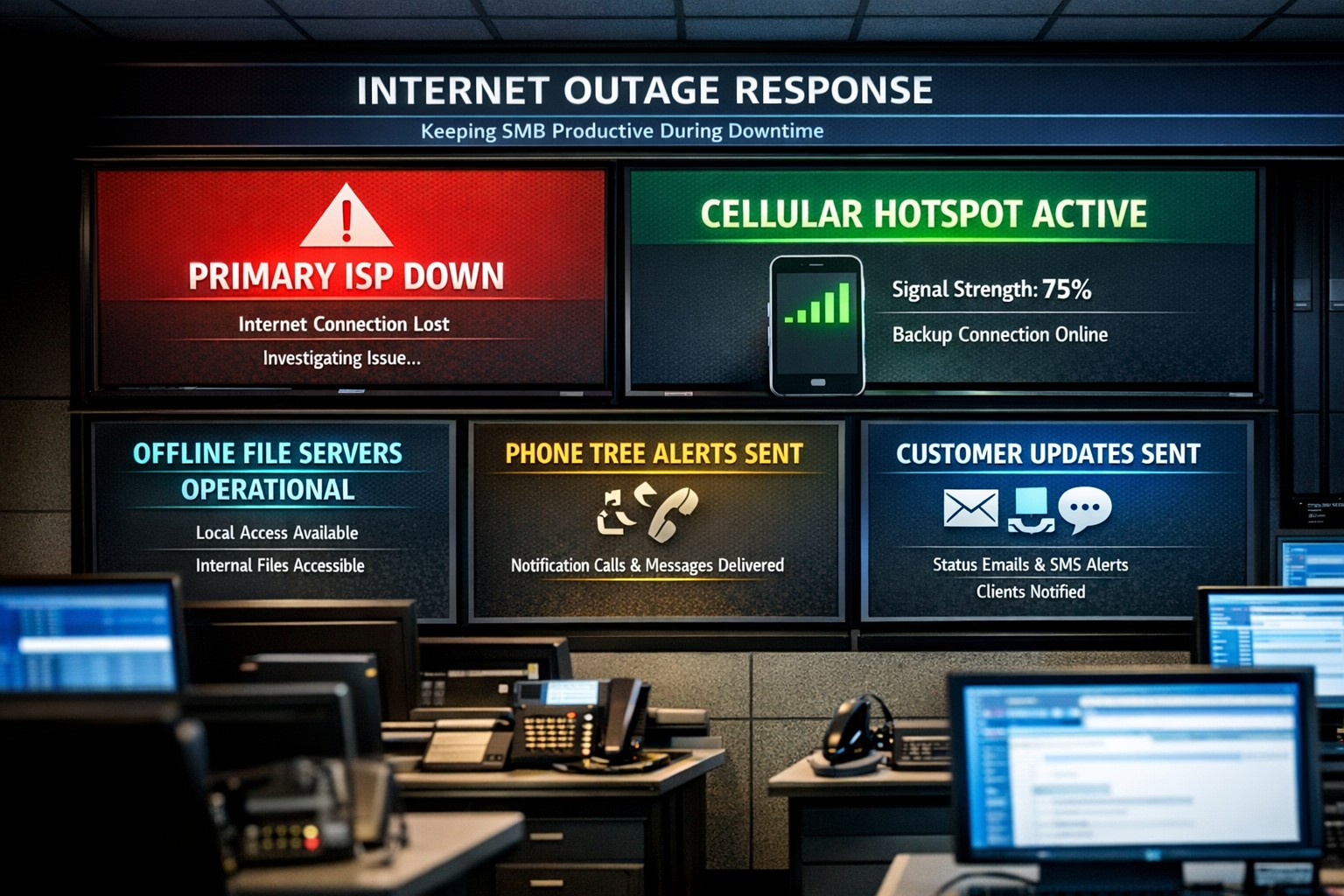
Offline operations dashboard with hotspot failover and local resource access.
Businesses heavily rely on internet access to stay connected and productive. However, what happens when the internet goes out? Whether it’s a temporary outage or a prolonged disruption, losing internet access can have a significant impact on businesses.
We will explore strategies and solutions for navigating the digital apocalypse and ensuring business continuity when the internet goes out. From setting up backup remote access options to implementing offline communication channels, this guide is a must-read for business owners looking to mitigate the impact of internet disruptions and keep their operations running smoothly.
Understanding the Impact
Before we delve into the strategies and solutions for navigating the digital apocalypse, it’s important to understand the potential impact of internet outages on your business. The consequences can be far-reaching and vary depending on the nature of your operations.
Productivity: Productivity can take a major hit when your employees are unable to access crucial online tools and resources. This can result in missed deadlines, delays in client deliverables, and a general slowdown in operations. It’s essential to assess which tasks are entirely dependent on internet connectivity and identify alternative methods to carry them out in the event of an outage.
Customer Satisfaction: If your business relies heavily on online customer interactions, such as e-commerce or customer support, a loss of internet connectivity can lead to frustrated customers, failed transactions, and a tarnished reputation. Having a plan in place to manage customer expectations during an outage is crucial.
Financial Impact: Depending on the duration and severity of the disruption, revenue loss can be substantial. To mitigate this risk, businesses should explore options for data backup, cloud services, and redundancy measures that ensure a seamless transition during an outage.
Preparing for Internet Outages
Backup Plan: One of the most effective ways to ensure business continuity during an internet outage is to have a comprehensive backup plan in place. This involves identifying critical systems and data that need to be accessible offline and regularly backing them up. By doing this, you can minimize the disruption caused by an extended outage and quickly get your business back up and running locally.
Redundancy: This might involve investing in multiple internet service providers (ISPs) or using alternative modes of connectivity, such as mobile hotspot devices or satellite internet. By diversifying your options, you can minimize the risk of a complete loss of internet connectivity. There are even routers that have multiple internet connections with automatic failover or cellular data backups.
Stay Connected
When the internet goes out, it is crucial to have a backup option that allows you to stay connected and continue basic business activities. Mobile hotspots and cellular data can be lifesavers in these situations. Investing in a reliable mobile hotspot device, which uses cellular data to create a Wi-Fi network, can ensure that you have access to the internet even if your primary connection fails. These devices are portable and easy to set up, making them convenient solutions for businesses of all sizes.
Before an outage occurs, it is essential to have a backup cellular plan in place. Assess your cellular service provider options and choose a plan that offers sufficient data, preferably with unlimited options. This will allow your team to continue accessing critical applications, emails, and other online resources without interruption. Furthermore, it is crucial to educate your employees on how to connect and utilize these backup solutions effectively. Inform them about the availability of mobile hotspots and ensure they understand how to use cellular data efficiently without exceeding the limits of the backup data plan.
By incorporating mobile hotspots and cellular data into your backup plans, you can maintain business productivity and minimize the disruption caused by internet outages.
Stabilize Communication
In times of internet outages, it becomes crucial to stabilize communication within your business. Without reliable internet access, VoIP phones and other forms of digital communication with clients and colleagues can become challenging. However, there are alternative solutions that can keep your business running smoothly.
VoIP Routing: Before an outage occurs, take the time to talk to your VoIP phone provider to explore options of how calls will be routed when the internet is out. There are often options that allow calls to be sent to an alternative number or cellphone app during an internet outage.
Mobile Devices: While the office internet may be out it does not necessarily mean that the cellular networks will be down at the same time. Before an internet outage occurs, make sure your team has important digital communication apps installed and that they are familiar with these tools. Provide training sessions or tutorials to ensure everyone is comfortable using them. Additionally, it is essential to have a backup option in case of technical difficulties with the primary tool.
Remote Work Policies
In the midst of a digital apocalypse, it is crucial for businesses to have well-established remote work policies and procedures in place. These policies ensure that employees can continue their work even without internet access, minimizing the impact on productivity. Remote work policies outline expectations for employees when working from home or other offline environments. They should include guidelines for communication, task management, and project deadlines. By establishing clear procedures, businesses can maintain a sense of normalcy and ensure that everyone knows how to navigate through the internet outage.
Additionally, remote work policies should address data security concerns. Employees should be educated on how to handle sensitive information and the appropriate measures to take when working outside the office. Regular training sessions can help reinforce these policies and keep employees up to date with best practices. By implementing remote work policies and procedures, businesses can effectively adapt to the challenges of a digital apocalypse.
Business Continuity Plan
When the internet goes out, having a comprehensive business continuity plan becomes paramount for businesses to minimize disruptions and maintain operations. A business continuity plan outlines the actions and strategies that need to be executed when faced with a digital apocalypse. This plan should include backup communication systems, such as phone lines or walkie-talkies, that can be utilized when the internet is unavailable. Additionally, offline storage and backup systems should be in place to ensure that critical data is available during an internet outage.
Creating a task force dedicated to business continuity can be invaluable during these times. This team can be responsible for implementing and executing the business continuity plan, regularly testing its effectiveness, and making necessary adjustments.
Optimizing remote work infrastructure is essential for seamlessly operating during an internet outage. Contact us today to get prepared before the digital apocalypse occurs.
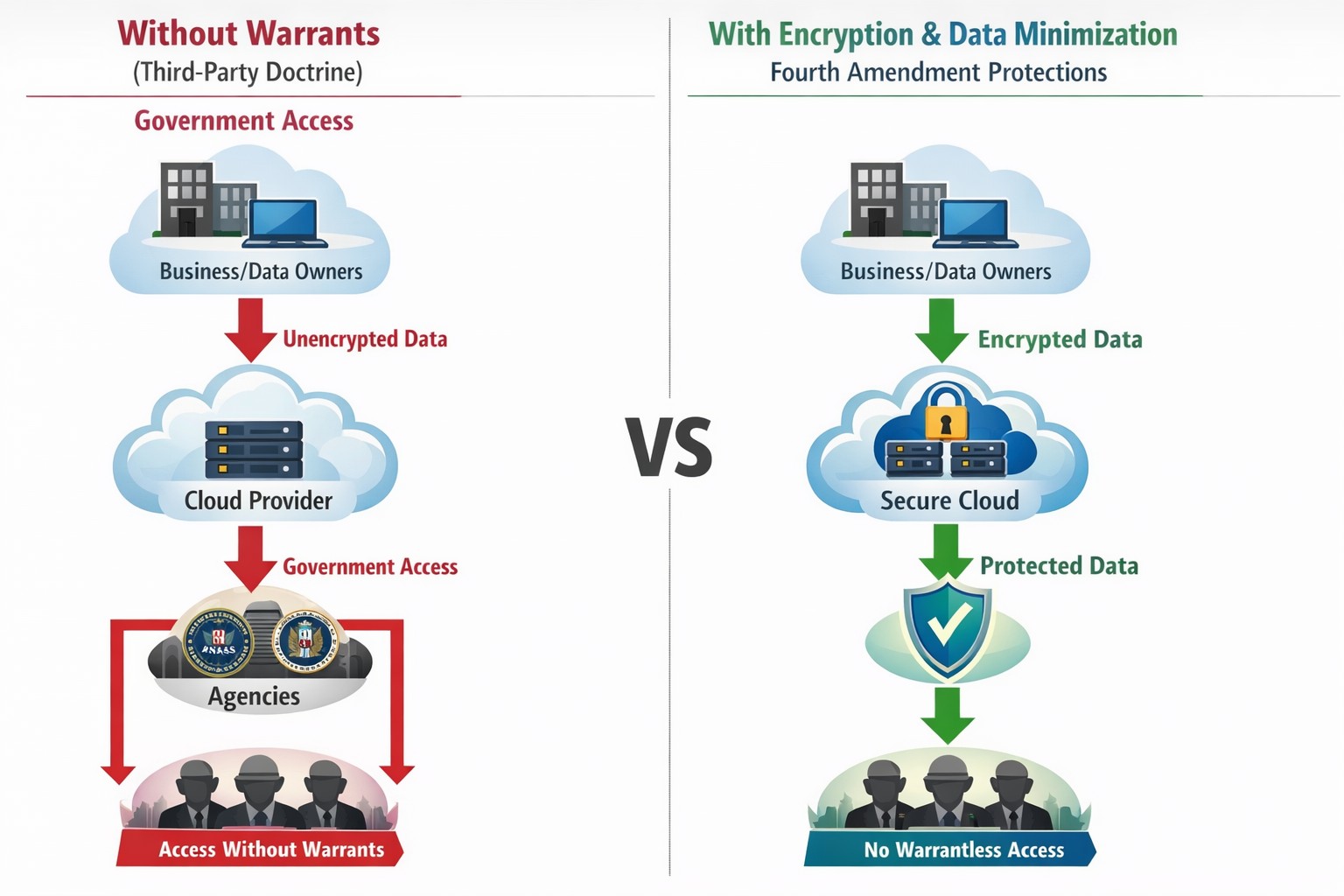
Third-party doctrine: No privacy expectation in cloud data shared with providers.
Businesses are increasingly relying on online platforms to store and process sensitive customer and business data. However, this convenience comes with the potential risk of compromising digital privacy. As a business owner, it is essential to be aware of the Third-Party Doctrine and its implications for safeguarding your company’s data.
What is the Third-Party Doctrine?
The Third-Party Doctrine is a legal principle that originated from court decisions in the United States. It states that there is no reasonable expectation of privacy for information voluntarily shared with third parties. In other words, when you share data with a third party, such as cloud software providers or social media platforms, you may lose control over the privacy of that data.
Implications for Businesses:
Businesses generate and store vast amounts of data that often get entrusted to third-party service providers. This data can include customer information, financial records, employee data, and proprietary business strategies. Understanding how the Third-Party Doctrine impacts your digital privacy is crucial for protecting sensitive company data.
Challenges Ahead:
While cloud software and third-party services offer significant benefits, they also pose potential threats to data privacy. The Third-Party Doctrine allows those service providers to re-sell information gathered to other companies who want to market to you or gain competitive advantage through research. Government authorities also have to access your data without a warrant through legal processes such as subpoenas, search warrants, or court orders. This raises concerns over the security and confidentiality of information stored in the cloud or with other service providers.
Protecting Business Data Privacy:
Given the potential risks, it is vital for business owners to prioritize digital privacy and take appropriate measures to protect sensitive data. Here are a few essential steps to consider:
Conduct a Privacy Audit: Assess the types of data your business collects and shares with third parties. Identify areas where privacy may be compromised and develop strategies to mitigate risks.
Choose Reliable Third-Party Service Providers: Before partnering with service providers, carefully review their privacy policies and practices. Look for industry-standard security measures, encryption protocols, and data protection commitments. Make sure that even they cannot look at your sensitive company data.
Implement Strong Security Measures: Safeguard your business data by leveraging encryption techniques, multi-factor authentication, and regular security updates. Regularly train employees on best practices for data protection, such as creating strong passwords and being aware of phishing attempts.
Limit Data Collection: Only collect data necessary for your business operations and refrain from collecting sensitive information that is unrelated to your business needs. Minimizing data collection can help reduce the amount of information at risk.
Understanding the Third-Party Doctrine and its implications for digital privacy is vital for protecting your business data in an evolving digital landscape. By implementing measures to safeguard data, carefully selecting third-party service providers, and educating employees on privacy best practices, business owners can mitigate the risks associated with the loss of privacy rights. Prioritizing digital privacy not only protects the interests of your business but also fosters trust among customers and stakeholders.
If your company is worried about your data privacy and security, then contact us for assistance.
Businesses face a growing number of cybersecurity threats. Cybercriminals are constantly evolving their tactics, making it imperative to prioritize their organization’s security. One crucial step in fortifying your business against potential breaches is conducting a comprehensive security risk assessment. Let’s look at the significance of security risk assessments and how they can shield your valuable data from falling into the hands of malicious actors on the dark web.
Understanding Security Risk Assessments:
A security risk assessment is an in-depth evaluation of your organization’s digital infrastructure, systems, and processes. It aims to identify vulnerabilities and potential threats that could compromise the confidentiality, integrity, and availability of your sensitive data. By analyzing your current security measures, a risk assessment helps you gauge your organization’s resilience to cyber threats, enabling you to implement targeted mitigation strategies.
Why Security Risk Assessments Matter:
Proactive Threat Identification: Hackers often exploit vulnerabilities that go unnoticed until it’s too late. A security risk assessment enables you to proactively identify and address potential weak points in your network, applications, and data storage. By uncovering vulnerabilities before cybercriminals do, you can take preventive measures to mitigate risks and prevent unauthorized access.
Compliance and Regulatory Requirements: Depending on your industry, you may be subject to various compliance regulations that mandate data protection measures. Conducting a security risk assessment ensures that your business aligns with these requirements, helping you avoid costly penalties and reputational damage.
Data Protection and Client Trust: Data breaches can have severe consequences, including financial loss, legal ramifications, and damage to your brand’s reputation. By investing in security risk assessments, you demonstrate your commitment to protecting your clients’ sensitive information, fostering trust and long-term relationships.
Dark Web Threat Mitigation: The dark web has become a thriving marketplace for stolen data, offering cybercriminals a platform to sell and exploit compromised information. By conducting regular security risk assessments, you can identify vulnerabilities that may expose your data to the dark web. This knowledge empowers you to implement robust security measures, reducing the likelihood of your data being discovered and abused in illicit activities.
Securing your organization’s digital assets is of paramount importance. By conducting regular security risk assessments, you gain crucial insights into potential threats and vulnerabilities, which allows you to implement targeted security measures.
Protect your data from ending up on the dark web with a proactive and comprehensive approach. We can help!
Dark web stolen passwords Russian Market BreachForums accounting healthcare charity credentials
The Dark Web is a part of the internet that requires special software to access. Often used by individuals who are looking to conceal their identities and activities, it has become the ideal environment for cybercriminals seeking to carry out illicit activities. They can move anonymously in this part of the internet often engaging in criminal activities such as the sale of stolen data, hacking tools, illegal drugs, counterfeit documents, and even illicit services.
Why Should You Be Aware of It?
While the Dark Web may seem distant and irrelevant to your everyday business operations, it poses serious risks that can have far-reaching consequences. Here’s why you need to be aware of it:
Stolen Data Trade: The Dark Web serves as a marketplace for cybercriminals to sell stolen data, including usernames, passwords, financial information, and sensitive business data. By purchasing this data, hackers can launch targeted attacks against organizations like yours, leading to data breaches, financial loss, and reputational damage.
Credential Stuffing and Account Takeovers: Cybercriminals often utilize compromised login credentials from data breaches to carry out credential stuffing attacks. By leveraging automated tools, they attempt to gain unauthorized access to your business accounts. Once inside, they can exploit your resources, compromise customer data, and cause significant disruption.
Sale of Exploit Kits and Malware: The Dark Web provides a platform for the sale of malicious software, exploit kits, and hacking tools. These tools can empower cybercriminals to launch sophisticated attacks against your business, including ransomware, phishing campaigns, and network infiltration.
Insider Threats and Employee Monitoring: Employees with malicious intent may leverage the Dark Web to collaborate with external criminals or sell sensitive company information. Awareness of the Dark Web can help you implement appropriate security measures to detect and mitigate insider threats.
Reputational Damage: In the event of a data breach or cyberattack, information about your business may end up on the Dark Web. This can severely damage your reputation, erode customer trust, and lead to potential legal and financial repercussions.
What Can You Do? To protect your business from the risks associated with the Dark Web, we recommend the following actions:
Strengthen Your Security: Implement robust cybersecurity measures, such as multi-factor authentication, strong password policies, regular software updates, and network monitoring. Conduct security awareness training for your employees to educate them about the dangers of the Dark Web and how to identify potential threats.
Dark Web Monitoring: Engage with Farmhouse Networking to incorporate Dark Web monitoring solutions. These services scan the Dark Web for mentions of your business’s critical information and alert you if any compromised data is discovered.
Incident Response Planning: Develop an incident response plan that includes protocols for handling potential Dark Web-related incidents. This plan should outline steps for containing, investigating, and recovering from a data breach or cyberattack.
Regular Vulnerability Assessments: Perform periodic vulnerability assessments and penetration testing to identify and address potential weaknesses in your network infrastructure and applications.
The Dark Web is a part of the internet that requires special software to access. Often used by individuals who are looking to conceal their identities and activities, it has become the ideal environment for cybercriminals seeking to carry out illicit activities. They can move anonymously in this part of the internet often engaging in criminal activities such as the sale of stolen data, hacking tools, illegal drugs, counterfeit documents, and even illicit services.
Why Should You Be Aware of It?
While the Dark Web may seem distant and irrelevant to your everyday business operations, it poses serious risks that can have far-reaching consequences. Here’s why you need to be aware of it:
Stolen Data Trade: The Dark Web serves as a marketplace for cybercriminals to sell stolen data, including usernames, passwords, financial information, and sensitive business data. By purchasing this data, hackers can launch targeted attacks against organizations like yours, leading to data breaches, financial loss, and reputational damage.
Credential Stuffing and Account Takeovers: Cybercriminals often utilize compromised login credentials from data breaches to carry out credential stuffing attacks. By leveraging automated tools, they attempt to gain unauthorized access to your business accounts. Once inside, they can exploit your resources, compromise customer data, and cause significant disruption.
Sale of Exploit Kits and Malware: The Dark Web provides a platform for the sale of malicious software, exploit kits, and hacking tools. These tools can empower cybercriminals to launch sophisticated attacks against your business, including ransomware, phishing campaigns, and network infiltration.
Insider Threats and Employee Monitoring: Employees with malicious intent may leverage the Dark Web to collaborate with external criminals or sell sensitive company information. Awareness of the Dark Web can help you implement appropriate security measures to detect and mitigate insider threats.
Reputational Damage: In the event of a data breach or cyberattack, information about your business may end up on the Dark Web. This can severely damage your reputation, erode customer trust, and lead to potential legal and financial repercussions.
What Can You Do? To protect your business from the risks associated with the Dark Web, we recommend the following actions:
Strengthen Your Security: Implement robust cybersecurity measures, such as multi-factor authentication, strong password policies, regular software updates, and network monitoring. Conduct security awareness training for your employees to educate them about the dangers of the Dark Web and how to identify potential threats.
Dark Web Monitoring: Engage with Farmhouse Networking to incorporate Dark Web monitoring solutions. These services scan the Dark Web for mentions of your business’s critical information and alert you if any compromised data is discovered.
Incident Response Planning: Develop an incident response plan that includes protocols for handling potential Dark Web-related incidents. This plan should outline steps for containing, investigating, and recovering from a data breach or cyberattack.
Regular Vulnerability Assessments: Perform periodic vulnerability assessments and penetration testing to identify and address potential weaknesses in your network infrastructure and applications.
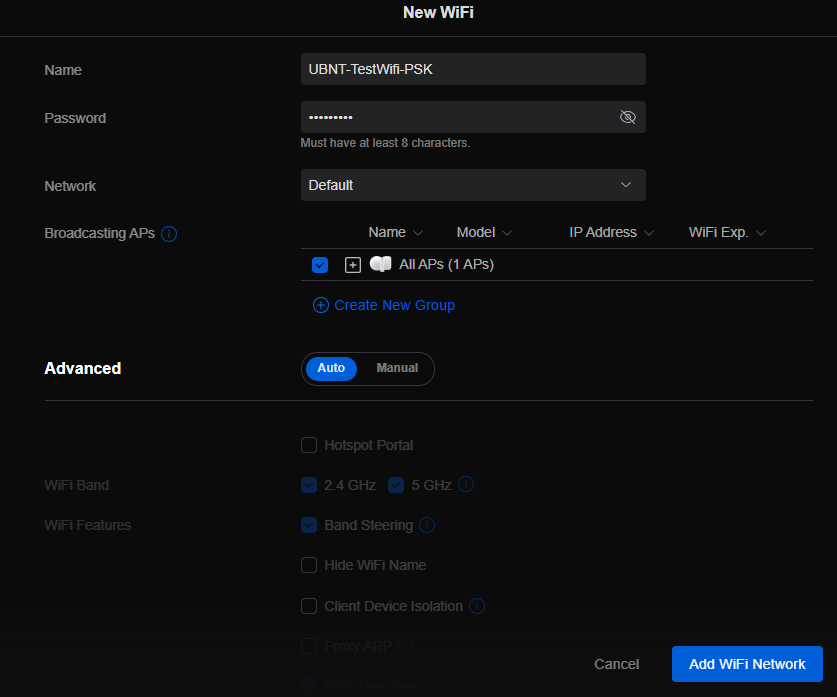
This is the seventh in a series that document the Tier 3 / Co-Managed IT work we did to setup a wireless test bed for a Linux based scientific device. The testing environment included two different wireless network hardware types (Ubiquiti and Cisco). There was also a Synology device used for various purposes including hosting the Ubiquiti controller inside a Kubernetes container, providing certificate services, providing LDAP authentication, and providing RADIUS authentication. Each article will detail a separate piece of the project. This article shows the basic setup of Ubiquiti Controller for PSK and RADIUS authentication from wireless devices.
Setup Ubiquiti Wireless Network with PSK
Login to Ubiquiti controller previously created – Here
Click on Setting gear icon at bottom left
Make sure you are on Wifi tab and click Create New link
Set network BSSID
Create Password
Click Add Wifi Network button
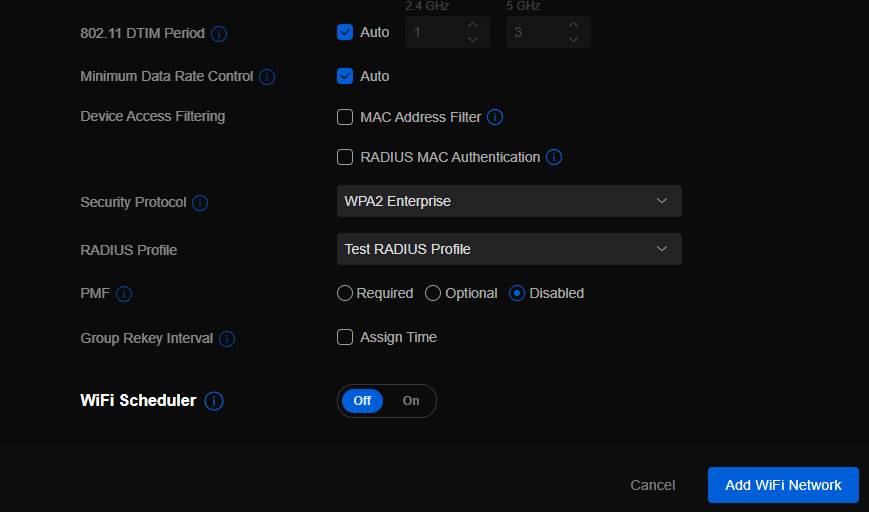
UniFi SSID advanced security settings with RADIUS profile and PPSK configuration.
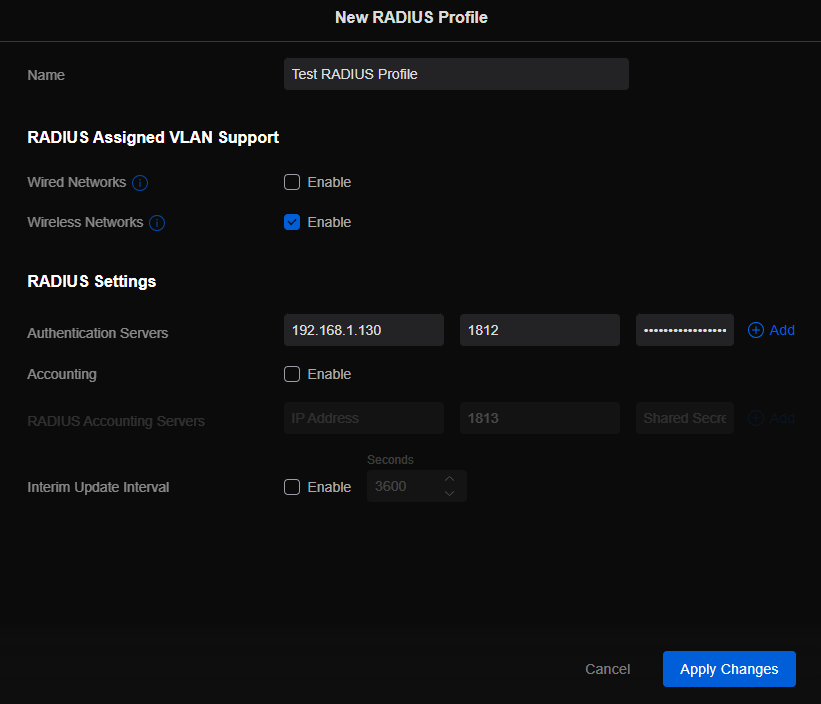
Setup Ubiquiti Wireless Network with RADIUS
Login to Ubiquiti controller previously created – Here
Click on Setting gear icon at bottom left
Click on Profiles
Click on Radius Tab
Click on Create New link
Give the Profile a name
Enter RADIUS server IP address as Authentication Server
Enter RADIUS shared secret
Click Add
Click Apply Changes
Click on Wifi Tab
Click on Create New link
Set network BSSID
Change Advanced to Manual
Set Security Protocol – WPA2 Enterprise
Select new RADIUS Profile
Click Add Wifi Network
If your company has highly customized setup requirements that you need consulting for, then contact us for assistance.
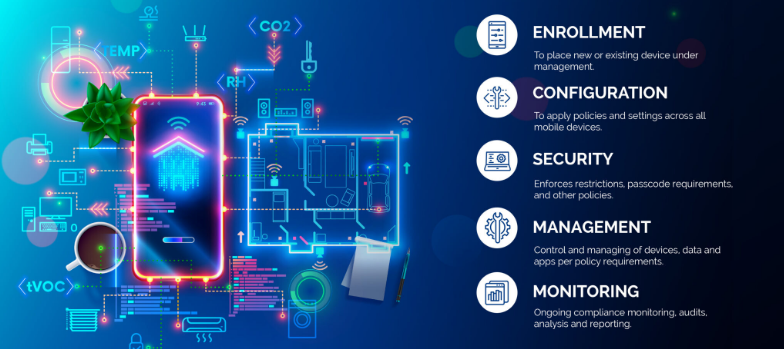
MDM dashboard with Android iOS device inventory compliance policies and security controls.
In today’s digital age, mobile devices have become an integral part of our lives, both personally and professionally. With the increasing reliance on smartphones and tablets, businesses, especially small and medium-sized enterprises (SMBs), need to prioritize mobile device security. One effective solution for enhancing Android and iPhone security is Mobile Device Management (MDM). In this article, we will explore the benefits of MDM for SMBs, its role in enhancing Android and iPhone security, and how businesses can implement MDM to safeguard their sensitive data.
1. Understanding the Importance of Android and iPhone Security
Android and iPhone, being the most widely used mobile operating systems globally, have become a prime target for cybercriminals. With its open-source nature and extensive app ecosystem, Android devices are susceptible to various security threats, such as malware, data breaches, and unauthorized access. With its user-friendliness and built-in trust, iPhone users are easily tricked into downloading and installing malware which leads to data breaches and unauthorized access. SMBs, in particular, need to be proactive in securing their Android and iPhone devices to protect sensitive customer information, intellectual property, and maintain regulatory compliance.
2. Introducing Mobile Device Management (MDM)
Mobile Device Management (MDM) is a comprehensive solution that enables businesses to centrally manage and secure their fleet of mobile devices, including Android and iPhone smartphones and tablets. MDM provides IT administrators with granular control over device settings, app distribution, security policies, and data management. By implementing MDM, SMBs can streamline device management, enhance data security, and ensure compliance with industry regulations.
2.1 Benefits of MDM for SMBs
Centralized Device Management: MDM allows businesses to manage multiple Android devices from a single console, simplifying device provisioning, configuration, and updates.
Enhanced Security: MDM enables IT administrators to enforce security policies, such as password requirements, encryption, and remote wipe capabilities, ensuring that lost or stolen devices do not compromise sensitive data.
App Distribution and Management: With MDM, businesses can distribute and manage apps on Android devices, ensuring that only authorized and secure applications are installed.
Secure Content and Data Management: MDM provides secure containers or workspaces on Android devices, segregating business data from personal information and enabling seamless data synchronization.
Compliance and Reporting: MDM offers robust reporting capabilities, allowing businesses to monitor device usage, enforce compliance regulations, and generate audit trails.
3. Implementing MDM for Android and iPhone Security
Implementing MDM for Android and iPhone security involves a series of steps to ensure a seamless deployment and effective device management. Let’s explore the key considerations and best practices for SMBs looking to implement MDM.
3.1 Assessing Business Needs and Objectives
Before implementing MDM, SMBs should assess their business needs and objectives. This includes identifying the number of devices to be managed, understanding the security requirements, and evaluating the compatibility with existing IT infrastructure.
3.2 Choosing the Right MDM Solution
There are numerous MDM solutions available in the market, each with its own set of features and capabilities. SMBs should carefully evaluate different MDM vendors, considering factors such as scalability, ease of use, security features, integration capabilities, and cost-effectiveness.
3.3 Defining Security Policies and Configuration
Once the MDM solution is selected, SMBs need to define security policies and configurations. This includes setting password requirements, enabling device encryption, configuring firewall settings, and defining app installation permissions. The policies should align with industry best practices and compliance regulations.
3.4 Device Enrollment and Onboarding
After defining security policies, SMBs can proceed with device enrollment and onboarding. This involves registering Android devices with the MDM system, configuring device settings, and installing necessary security profiles and certificates.
3.5 Monitoring and Maintenance
MDM is an ongoing process that requires continuous monitoring and maintenance. SMBs should regularly review security policies, update device configurations, patch vulnerabilities, and conduct security audits to ensure the effectiveness of the MDM solution.
4. Android vs. iPhone: MDM Considerations
While Android devices are more susceptible to security threats due to their open nature, it is essential to consider the unique security challenges posed by iOS devices, such as iPhones and iPads. Although iOS has built-in security features, SMBs should evaluate MDM solutions that offer comprehensive support for both Android and iOS devices to ensure consistent security across their mobile fleet.
5. The Future of MDM and Android Security
As technology evolves, the landscape of mobile device security continues to change. The future of MDM and Android security holds promising advancements, including:
Machine Learning and AI: MDM solutions can leverage machine learning and AI algorithms to detect and prevent emerging security threats proactively.
IoT Integration: With the rise of the Internet of Things (IoT), MDM will encompass managing and securing a broader range of devices, including wearables and smart home devices.
Biometric Authentication: MDM solutions will increasingly utilize biometric authentication, such as fingerprint and facial recognition, for secure device access.
Containerization and Virtualization: MDM will further enhance data security by implementing advanced containerization and virtualization techniques, isolating business data from personal information.
If your SMB is seeking to enhance Android and iPhone security by leveraging the benefits of MDM, contact us for professional assistance and guidance tailored to your specific needs.
And God will generously provide all you need. Then you will always have everything you need and plenty left over to share with others. As the Scriptures say,
“They share freely and give generously to the poor. Their good deeds will be remembered forever.”
For God is the one who provides seed for the farmer and then bread to eat. In the same way, he will provide and increase your resources and then produce a great harvest of generosity in you. - 2 Corinthians 9:8-10
We use cookies to ensure that we give you the best experience on our website. If you continue to use this site we will assume that you are happy with it.