PwC study: MSP strategic users gain 43-point performance premium over cost-focused peers.
A report from PricewaterhouseCoopers based on a survey of over 2,000 business leaders and took it as confirmation of our recent blog post about Why SMBs Need Managed Service Providers (MSPs). Here are some takeaways from the article:
Takeaways:
“Companies that use MSPs for strategic advantage are 1.6 times and 2.4 times more likely to be faster to market as well as more innovative than those focused solely on cost savings, according to the report.”
“Organizations utilizing managed services at a mature level use them to respond more adroitly to changing conditions and potential threats.”
“Most business and IT leaders recognize the pace of innovation is occurring faster than their internal IT teams can absorb. There is always going to be some type of skills shortage. Those skill shortages are ones that MSPs are in the best position to fill.”
If your company is looking to outperform in the marketplace, then contact us to start a partnership.
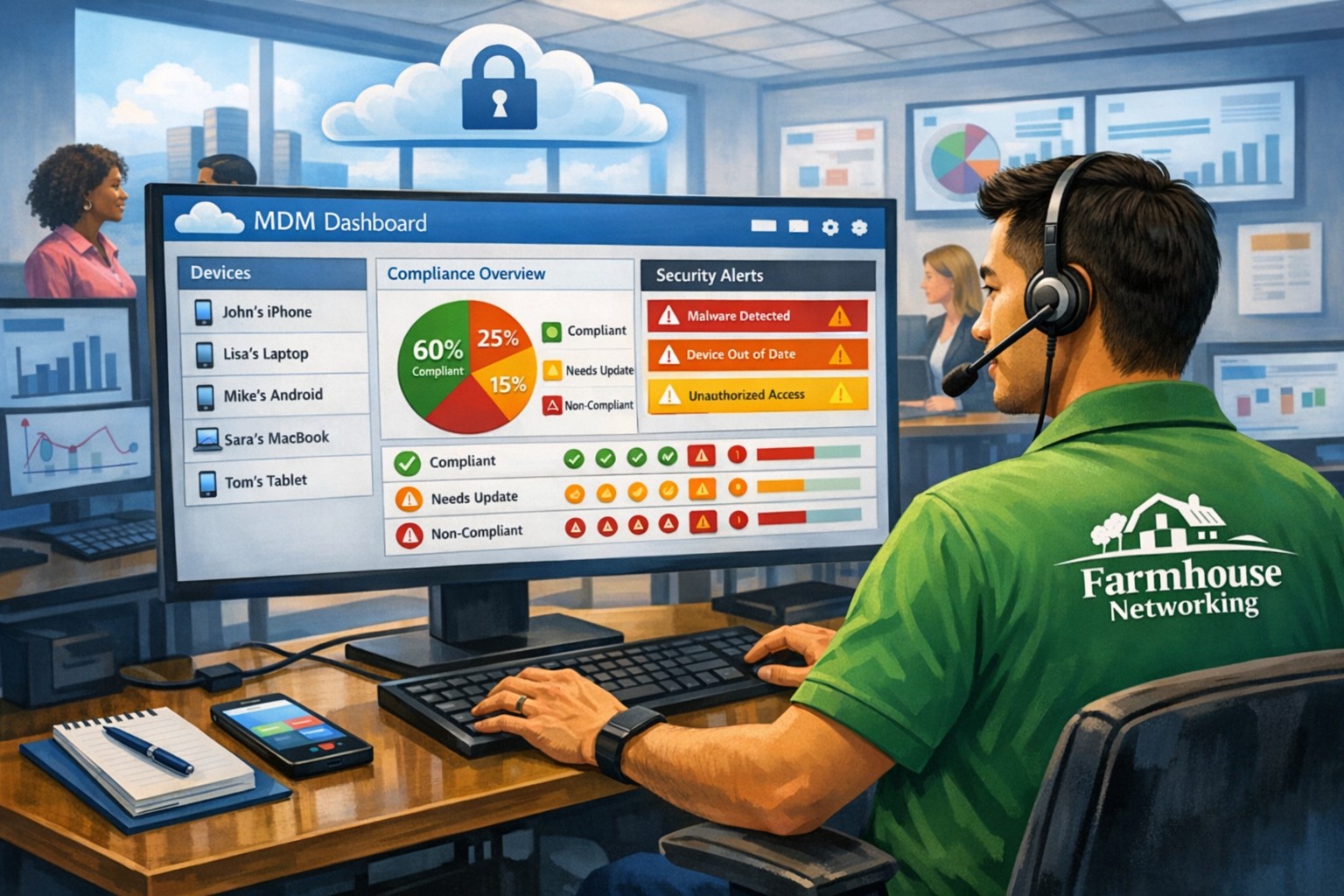
MSP console managing SMB BYOD smartphones and laptops with centralized MDM and security policies.
Small and medium-sized businesses (SMBs) face numerous challenges when it comes to managing their IT. Limited resources (both human and money), lack of expertise, and the need to focus on core business operations often make it difficult for SMBs to understand and manage technology needs. This is where Managed Service Providers (MSPs) come in. In this blog article, we will explore the reasons why SMBs should consider partnering with MSPs to enhance their IT capabilities and drive business growth.
Cost-Effective IT Solutions:
One of the primary reasons why SMBs need MSPs is the cost-effectiveness they offer. By outsourcing their IT needs to MSPs, SMBs can avoid the high costs associated with hiring and training an in-house IT team. MSPs provide a range of services, including network monitoring, data backup and recovery, cybersecurity, and software updates, all at a predictable monthly cost. This allows SMBs to allocate their resources more efficiently and focus on their core business.
Access to Expertise and Advanced Technology:
MSPs are experts in providing IT services and have a team of highly skilled professionals with expertise in variety of technology. By partnering with MSPs, SMBs gain access to the depth of knowledge and experience from IT experts who can handle complex tasks and provide strategic guidance. Additionally, MSPs stay up-to-date with the latest technology trends and can recommend and implement solutions that can help SMBs stay competitive in the market and safe from hackers.
Proactive IT Support and Maintenance:
MSPs offer proactive IT support and maintenance, which is crucial for SMBs. They monitor networks, identify potential issues, and take preventive measures to avoid downtime and disruptions. MSPs also provide regular software updates, security patches, and system maintenance, ensuring that SMBs’ IT remains secure and up-to-date. This proactive approach helps SMBs minimize the risk of costly IT failures and ensures smooth business operations.
Enhanced Data Security:
Data breaches and cyberattacks pose a significant threat to SMBs. MSPs play a vital role in safeguarding SMBs’ sensitive data and protecting them from potential security breaches. They implement robust cybersecurity measures, such as firewalls, antivirus software, and encryption, to ensure data confidentiality and integrity. MSPs can also conduct regular security audits and vulnerability assessments to identify and address any potential weaknesses in the IT infrastructure.
Scalability and Flexibility:
As SMBs grow, their IT needs evolve. MSPs offer scalable solutions that can adapt to changing business requirements. Whether it’s adding new users, expanding storage capacity, or integrating new software, MSPs can quickly and efficiently accommodate these changes. This scalability and flexibility allow SMBs to focus on their growth without worrying about the limitations of their IT infrastructure.
If your company could use the cost-effective solutions, access to expertise, proactive support, enhanced data security, and scalability that come from using a MSP, then contact us for assistance.
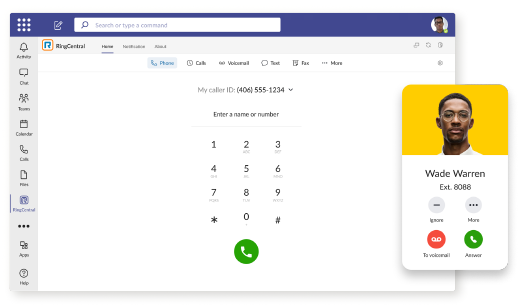
RingCentral VoIP app within Teams interface with call messaging and video features.
We have decided to make a business change that includes no longer directly selling phone services, but instead we are moving our clients to RingCentral. They are the industry leaders in this type of service and their rates are very competitive. One of their killer features is the Teams integration
RingCentral for Teams – Embedded App
RingCentral for Teams embedded app enables calling from the Teams app to both internal extensions and external numbers. It’s the simplest way to supercharge the phone experience for both end users and IT admins without having to deploy a new app to end users. Most importantly, there’s no need for an added Microsoft calling or E5 license to capture this value. This solution is ideal for organizations that want to:
leverage RingCentral’s superior telephony while maximizing the value of their Teams investment
avoid the added cost of Microsoft’s calling license
With the RingCentral for Teams embedded app, users access an icon presented in Microsoft Teams. They can then place and receive calls, access voicemails and voicemail transcriptions, and send or receive an SMS or fax. These tools fill critical gaps in Microsoft Teams, transforming it from messaging and video meeting tool to a communications powerhouse. This approach is also a money saver, as it doesn’t require the added cost of a Teams Phone or E5 license.
If your company is currently using Microsoft Teams for communications and want to add the incredible functionality that RingCentral brings, then contact us for assistance.
83% of employees continue accessing old employer’s accounts
Farmhouse Networking Grants Pass implements robust employee offboarding to revoke access and secure networks for Oregon businesses.
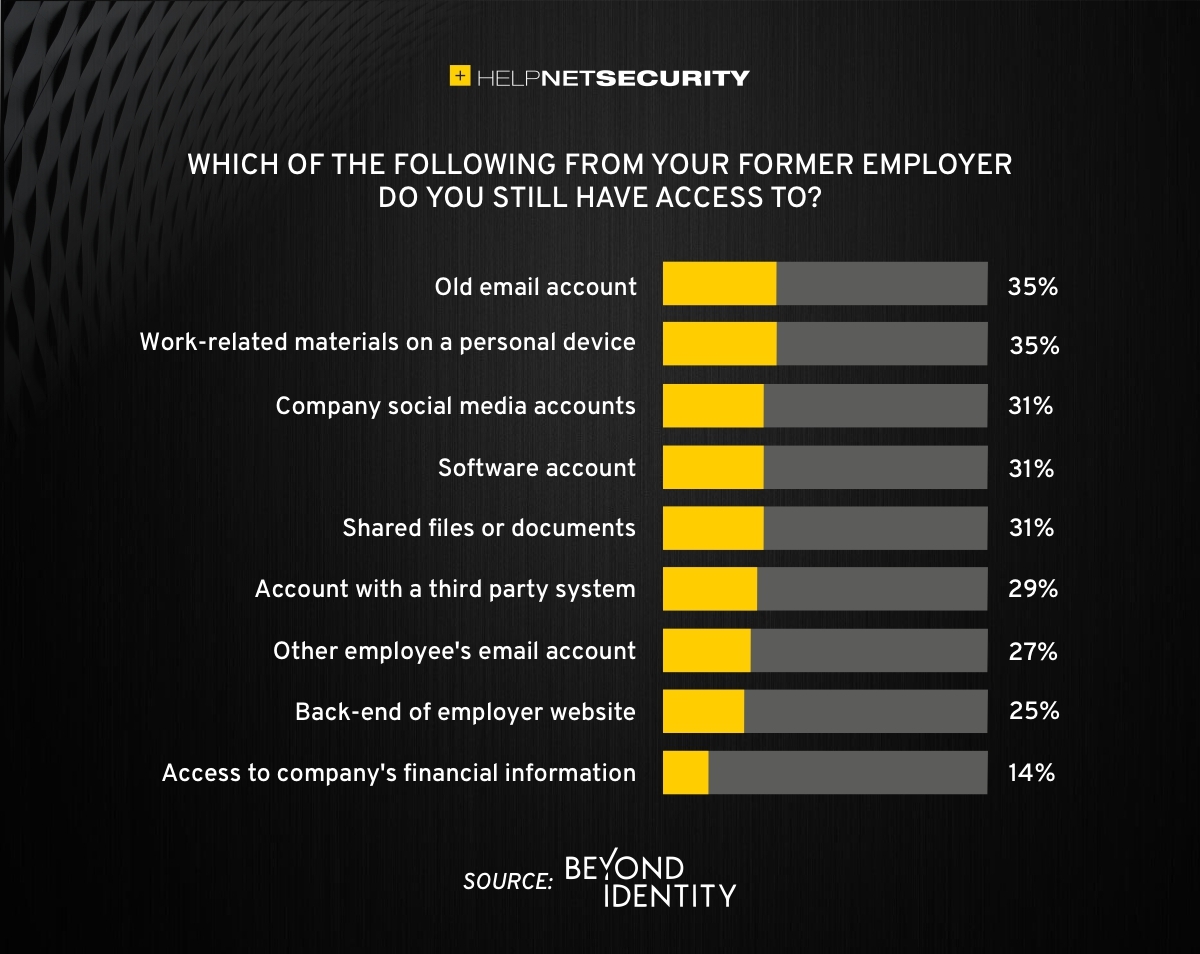
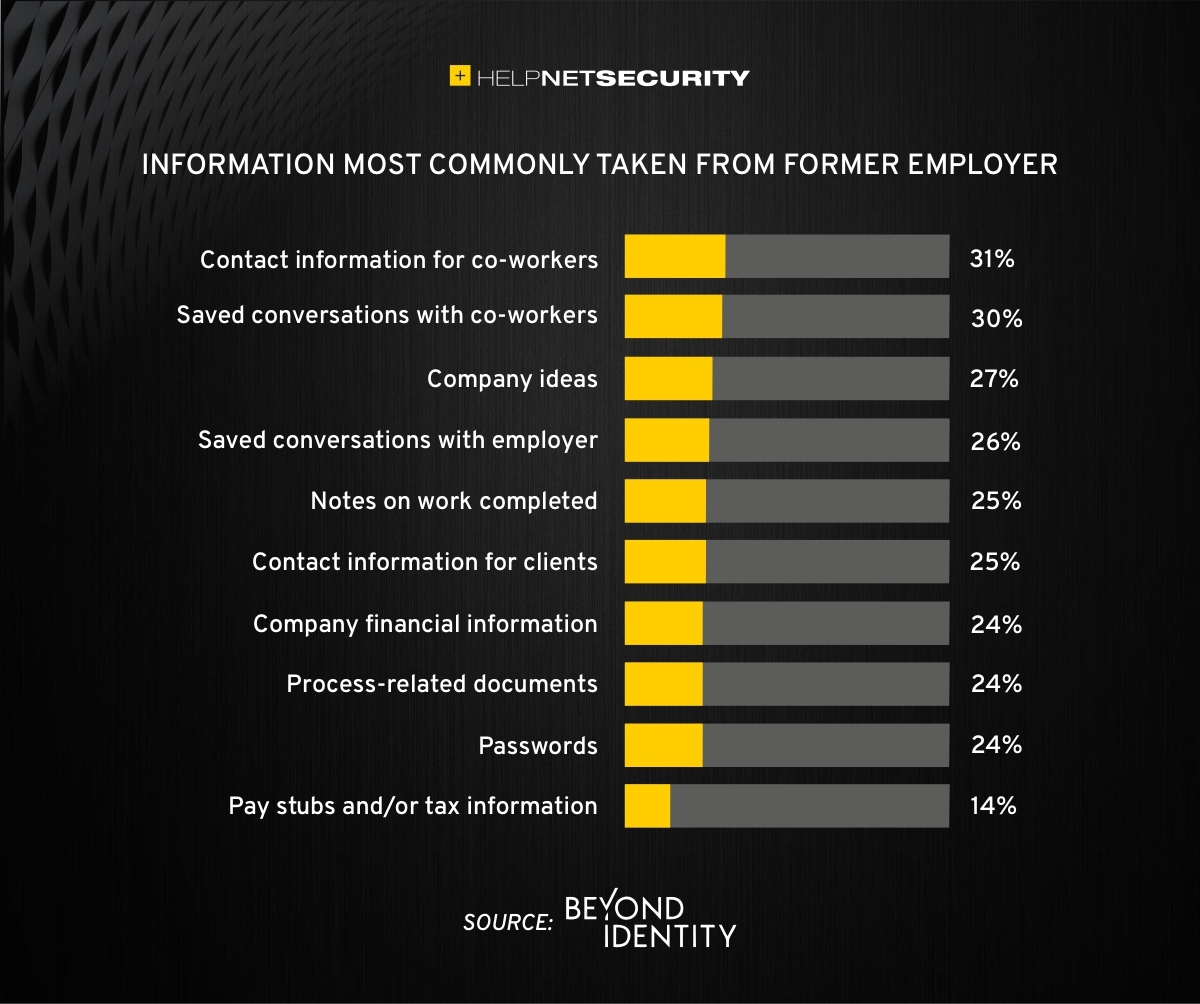
A study was performed by Beyond Identity throughout the US, UK, and Ireland which found that 83% of employees admitted to maintaining continued access to accounts from a previous employer. Also a shocking 56% admitted to using this access to harm their former employer.
The study also states that a professional and details offboarding process can prevent unauthorized access by former employees by eliminating their passwords and other insecure authentication methods. Strangely enough this also creates a sense of goodwill in the company that helps to lessen the motivation for employees to attempt this kind of malicious access. This kind of process is vital considering the current employment market and high turn over rates at almost all companies.
If your company does not have a detailed and documented offboarding process, thencontact usfor assistance.
STIR/SHAKEN authentication prevents legitimate business calls from spam filters
Here is a quick tip for anyone doing advertising from their phone number, you can be marked as SPAM LIKELY or SPAM RISK by phone companies. Each phone carrier keeps a list of numbers they determine to be spam risks based on the history of the number. Unfortunately, there is no central database or service so far that manages this number designation.
What Causes the SPAM Designation?
In short, here are the most obvious reasons for designation:
Volume of Outbound Calls Per Day Per Number
Someone Flagged a call from your number in that carrier’s app as spam
Outbound Caller ID number is not set properly from your system and incomplete will probably be flagged as spam automatically
How to Get De-Listed
You can use the links or email addresses below to register legitimate numbers and also address any incorrect labeling or call blocking with other carriers:
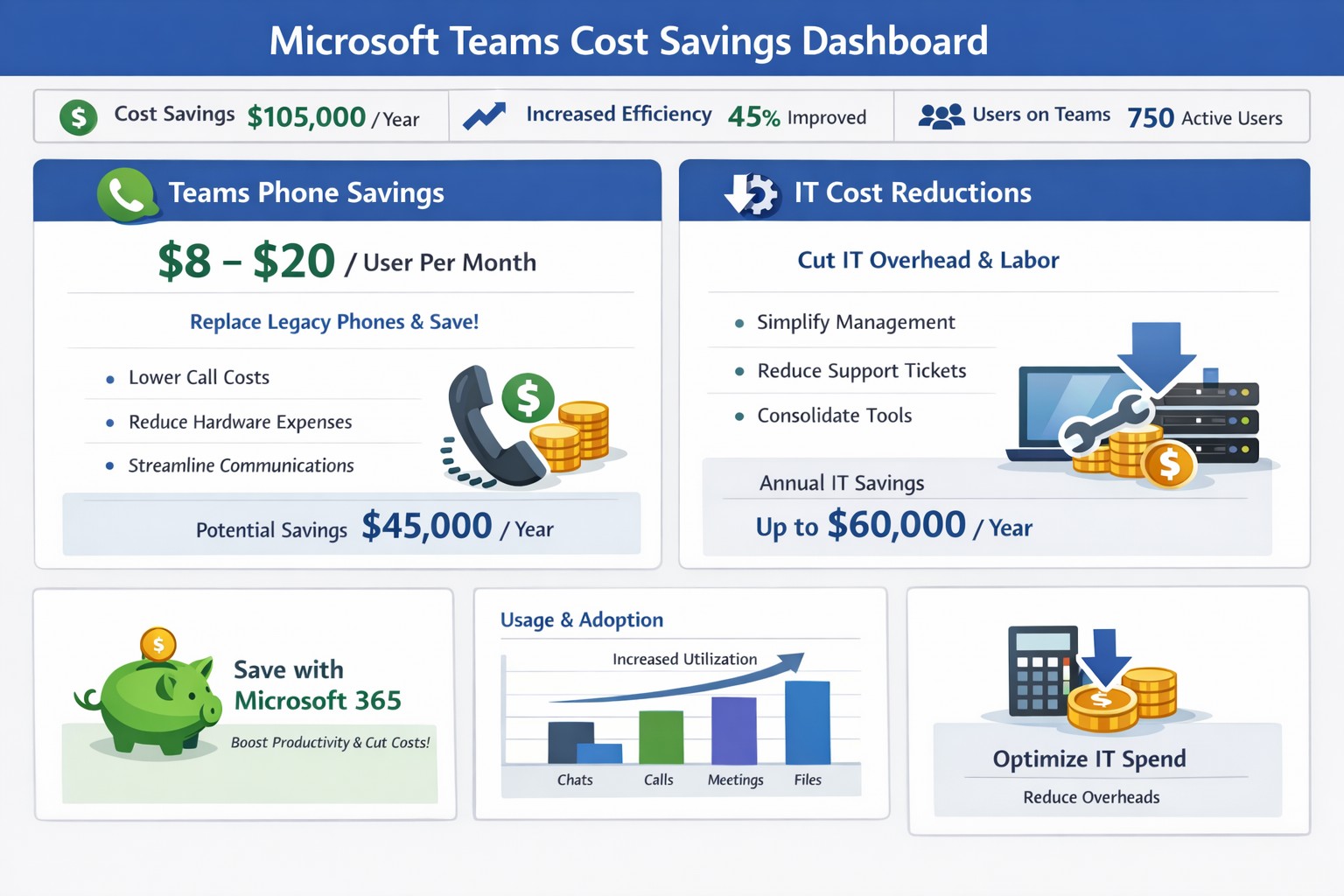
Graph illustrating 50% cost savings via Microsoft Teams telephony migration and license audits for business owners.
You’re always looking for ways to streamline operations without sacrificing productivity. Microsoft Teams offers powerful tools to reduce expenses on communication, collaboration, and IT infrastructure—often delivering savings of 50% or more on telephony alone by replacing legacy systems.
Key Cost-Saving Opportunities
Microsoft Teams, included in most Microsoft 365 subscriptions, consolidates features like chat, video calls, file sharing, and telephony into one platform. Businesses can eliminate redundant tools such as Zoom, Slack, or separate phone systems, avoiding multiple licenses that cost thousands monthly. It also cuts travel expenses through high-quality video meetings for up to 1,000 participants and reduces hardware needs by leveraging cloud storage via OneDrive and SharePoint.
Studies like Forrester’s Total Economic Impact report highlight up to 832% ROI through time savings on meetings, co-authoring, and unified communications.
Practical Action Steps
Follow these steps with your IT department to implement savings:
Audit Current Subscriptions: Review Microsoft 365 licenses to confirm Teams access (standard in E3/E5 plans). Deprovision unused tools like standalone video or project management apps.
Optimize Calling Plans: Switch to Teams Phone System ($8-20/user/month). Eliminate traditional lines, taxes, and hardware—potentially halving phone bills. IT: Assign licenses via admin center and port numbers.
Enable Collaboration Features: Activate co-authoring in Word/Excel/PowerPoint within Teams channels. Train staff to reduce email chains and version control issues, saving hours per project.
Migrate File Storage: Move to Teams-integrated SharePoint/OneDrive (1TB/user). Shut down on-premises servers, cutting hardware, backups, and maintenance costs.
Monitor Usage Analytics: Use Teams admin center reports to identify underused features. Right-size licenses (e.g., Essentials at $4/user/month for small teams).
IT teams can complete setup in 1-2 weeks; expect 20-50% IT spend reduction.
FAQ: Client Inquiries Answered
How much can we really save? Expect 50% on telephony by ditching lines/hardware, plus broader savings from tool consolidation (e.g., $thousands/month for mid-sized firms).
Is Teams secure for our data? Yes—end-to-end encryption for meetings/chats/files, with compliance tools for industries like accounting/healthcare.
What if we have hybrid/remote workers? Teams supports seamless hybrid with background blur, recording, and Outlook integration—no extra costs.
Do we need new hardware? No; use existing PCs with webcam/mic. Teams Phones replace desk phones via softphones or certified devices.
How do we train staff? Free Microsoft Learn modules; rollout via channels takes 1-2 days.
How Farmhouse Networking Helps
Farmhouse Networking specializes in Microsoft 365 optimizations for accounting, healthcare, and charity sectors. We conduct free audits to identify Teams savings, handle migrations (subscriptions, telephony ports, training), and implement SEO-friendly sites to attract B2B clients via content like this. Our custom strategies boost organic traffic 30-50% while ensuring compliance and seamless customer experiences.
Call to Action
Ready to save with Microsoft Teams? Email support@farmhousenetworking.com for a no-obligation audit and personalized strategy.
The Federal Trade Commission (FTC) has agreed with Zoom to settle their allegations that it “engaged in a series of deceptive and unfair practices that undermined the security of its users.”
Settlement Conditions
The conditions put forth by the settlement The FTC complaint said that:
Since at least 2016, the company misled users by touting that it offered “end-to-end, 256-bit encryption” to secure users’ communications, when in fact it provided a lower level of security, i.e., it encrypted communications but stored the encryption keys on its servers
The company misled users by saying that recorded meetings that were stored on the company’s cloud storage were encrypted immediately after the meeting ended, which was untrue in some cases
In July 2018, the company compromised the security of some users when it secretly installed a hidden web server on Macs that helped with frictionless installation of the Zoom application
The settlement does not oblige Zoom to admit fault or pay a fine, but obligates it to:
Refrain from misrepresenting privacy and security practices, including about how it collects, uses, maintains, or discloses personal information; its security features; and the extent to which users can control the privacy or security of their personal information
Implement a comprehensive information security program and obtain biennial assessments of its security program by an independent third party and notify the FTC if it experiences a data breach
Implement a vulnerability management program
Assess and document on an annual basis any potential internal and external security risks and develop ways to safeguard against such risks Deploy safeguards such as MFA to protect against unauthorized access to its network; institute data deletion controls; and take steps to prevent the use of known compromised user credentials
Review any software updates for security flaws and ensure the updates will not hamper third-party security features
Quoted from https://www.helpnetsecurity.com/2020/11/10/ftc-zoom/
If your company is going to use video conferencing to assist with work from home or to remotely connect with clients, then contact us for assistance.
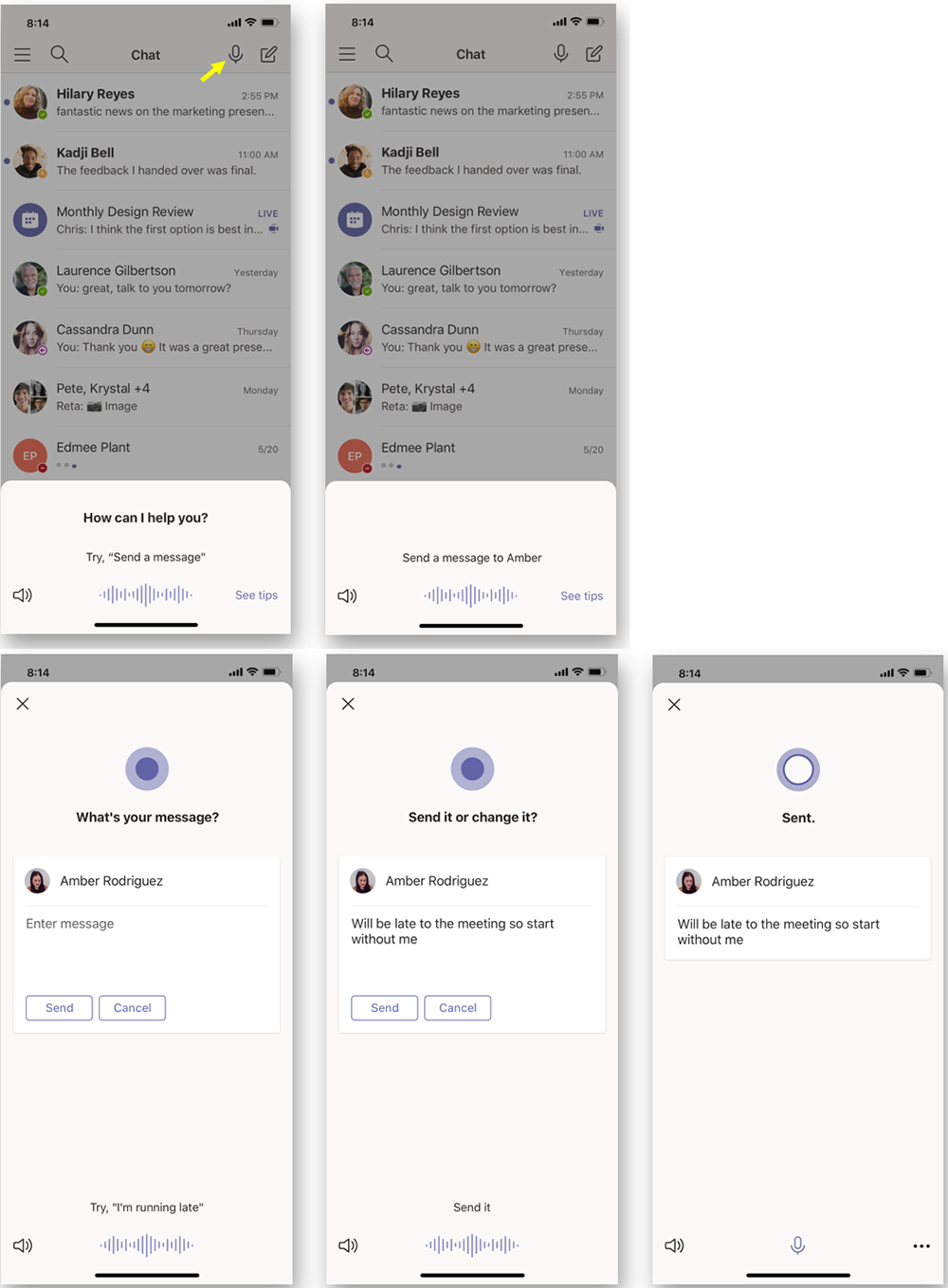
According to the Microsoft Office 365 development roadmap, an exciting new feature is coming to Microsoft Teams:
“Cortana is coming to the Teams mobile app, using AI and the Microsoft Graph to provide voice assistance in Teams. To stay connected to your team even when you have your hands full, click the microphone button on the top right and ask Cortana to make a call, join a meeting, send chat messages, share files, and more. These voice assistance experiences are delivered using Cortana enterprise-grade services that meet Microsoft 365 privacy, security and compliance commitments. Cortana will be available in the Teams mobile app on iOS and Android in the coming weeks for Microsoft 365 Enterprise users in the U.S. in English.”
Voice profiles transform generic transcripts into actionable intelligence
If your company is looking to collaborate with your office effectively, then contact us for assistance.
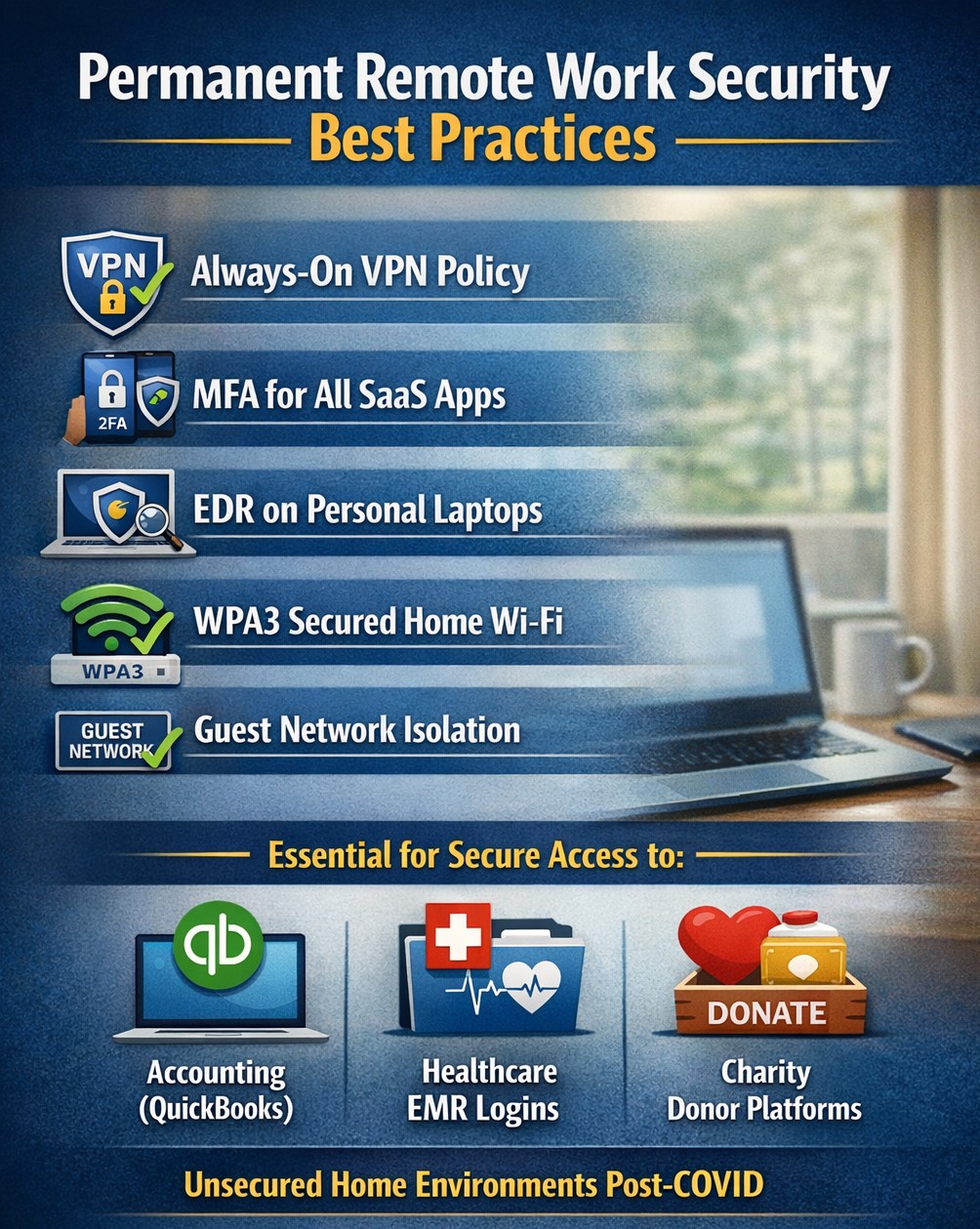
Secure WFH prevents data breaches from personal devices
According to the executive order made by Oregon State Governor, Kate Brown: “On Friday night, I frankly directed them to stay home. And now I am ordering them to stay home.”
The following guidelines are in effect for businesses:
It closes and prohibits shopping at specific categories of retail businesses, for which close personal contact is difficult to avoid, such as arcades, barber shops, hair salons, gyms and fitness studios, skating rinks, theaters, and yoga studios.
It requires businesses not closed by the order to implement social distancing policies in order to remain open, and requires workplaces to implement teleworking and work-at-home options when possible. They must also elect a representative who will be in charge of monitoring social distancing.
What FHN is doing?
FREE Remote Access – Just a re-iteration that all our monthly managed services clients will have remote access to their systems at no additional cost. If you are not a managed client then we can set you up with secure remote access to your data or network depending on need. Please call sooner rather than later as we have to take care of our managed clients first and there may be a wait at this point.
On-site support continues – At this time there is no restrictions on service industries who perform on-site visits to complete work, so Farmhouse Networking will continue to do so for the foreseeable future. We will be taking precautions such as protective masks, gloves, or perhaps more extreme measures (hazmat suit) to insure the safety of our staff and clients. We ask that clients keep these visits to emergency needs and planned projects until these social distancing rules are lifted.
Stocking up on essentials – We have been closely monitoring our distribution channels and several of them have been stating that non-essential items would take up to one month to receive. As a courtesy to our clients and to better service them in times of emergency IT needs, we will be stocking up on computer and network parts that are most often needed.
What should clients do?
Remote workers – Send unneeded on-site staff home to work remotely. With remote access capabilities, video conferencing, and VoIP phones – there is no reason to keep them in harms way. We are experts in these technologies and can get you up and running on them quickly.
Maintain infrastructure – For remote workers to be able to get access to their computers there needs to be a solid foundation at the business location.
Workstations, servers, and network equipment should be on battery backups to keep them from going offline unnecessarily due to power fluctuations – triggering a need to go into the office.
Is part of your network over 6 years old? Now may be the time to replace the network equipment to avoid downtime and unneeded office visits in the future.
Now more than ever backups are needed in case anything should go wrong. Recovery times are bound to be increased as the lock down on businesses increases.
Don’t forget to leave the A/C on especially if you have a server closet, they work better in cooler temperatures.
Planning – With a possible slowdown in business now is the time to take stock of your company, to get used to this new normal, and make plans for the long term implications of this craziness on our businesses.
If your company needs any help weathering the COVID-19 storm, then contact us for assistance.
Local VoIP expertise eliminates traditional phone system costs
When it comes to phone service there is not much difference between providers. They all bring dial tone to your business and route calls to their destination. They all provide the same set of features that users have come to know and use.
What Makes Farmhouse Networking Different
No Introductory Rates: Most local providers will offer an attractive introductory rate to get your business. The only bad part is after one years time you are automatically changed to the regular price which is often $10-$20 more per line.
No Installation Costs: As we are a growing provider of phone services, anyone signing up for phone service with us this year will have no installation costs.
No Bogus Taxes or Fees: We have looked at phone bills from the major local providers and each of them has some bogus tax or fee added to the phone bill. (The only valid ones are Telecommunications Relay Service, Telephone Assistance Program, the Telecommunications Devices Access Program, E911 (VoIP), FCC Regulatory Fee (VoIP), FUSF (VoIP), and P.U.C. Fee – in case you were wondering)
Phone Costs: Unlike computers, there is no reason why you need to buy brand new phones. There are vendor programs that sell re-conditioned phones at much lower costs and they work just as good as the new ones. There is also leasing options available to help ease the pain of purchasing phones too.
Our Prices: We are not out to gouge our clients or nickel / dime them to death as you have already read. The only question now is how much do we charge? For the standard user, the cost of a phone line is only $29.95 per month. The cost of a standard fax line is only $22.50 per month.
Extra Features: We have several features that most of the other providers just don’t. A customer portal that clients can use to chat with fellow employees, check voicemails, track expenses, and make other account changes. A mobile app that can be used to turn your smart phone into an extension of your desk phone and more. Also failover to another phone number – if the power or internet is out you can have your calls routed to any other phone.
If your company uses phones for business, then contact us to see the true difference.
And God will generously provide all you need. Then you will always have everything you need and plenty left over to share with others. As the Scriptures say,
“They share freely and give generously to the poor. Their good deeds will be remembered forever.”
For God is the one who provides seed for the farmer and then bread to eat. In the same way, he will provide and increase your resources and then produce a great harvest of generosity in you. - 2 Corinthians 9:8-10
We use cookies to ensure that we give you the best experience on our website. If you continue to use this site we will assume that you are happy with it.