This is the third in a series about the concept of Zero Trust, which means in the IT sense that you trust nothing and always verify everything surrounding and connected to your network. Today’s discussion will be on the backup of important data.
Backup
Backup is a way of creating multiple copies of your important data and the systems that house them. This has become a necessity thanks to acts of God (unforeseen physical disasters), acts of employees (accidental or purposeful destruction of data), and acts of malicious hackers (ransomware or malware). Here are some questions that you should be asking yourself:
What data or systems are being backed up?
How often are these backups being performed?
Are your backups protected from natural disasters (offsite and redundant)?
How long are backups being stored?
Once expired are they securely removed?
What is the process for recovering files, emails, workstations, servers, applications, databases?
Have you tested your recovery process lately?
Do you know how long it will take to recover?
How will business continue until systems are restored?
How will you merge new information into recovered data once restored?
How often do you test your recovery process?
Is the recovery test process automated?
Take time to think about these questions and decide where changes can be made to better protect your IT investments, or contact us to do the thinking for you.
This is the second in a series about the concept of Zero Trust, which means in the IT sense that you trust nothing and always verify everything surrounding and connected to your network. Today’s discussion will be on the vendors you purchase network equipment from.
Trusted Vendors
Trusted vendors are those who supply workstations, servers, routers, switches, power protection, software, and anything else connected to your network. Here are some questions that you should be asking yourself:
Do you know who makes your network equipment, servers, computers, and software?
Do you know the way to contact their support and have current account access information?
Do you have current warranties / support contracts on hardware and software?
Is the hardware able to perform at the level needed?
Are you purchasing software from those who meets industry standards?
If a subscription, how much are you paying and are you on the correct plan for your needs?
When is the last time you upgraded your software and hardware?
Have you budgeted for the next upgrade?
Take time to think about these questions and decide where changes can be made to better protect your IT investments, or contact us to do the thinking for you.
This is the first in a series about the concept of Zero Trust, which means in the IT sense that you trust nothing and always verify everything surrounding and connected to your network. Today’s discussion will be on the physical security surrounding your network.
Physical Security
Physical security can include the locks on the doors, where things are placed, and how they are protected from the unpredictability of the environment. Here are some questions that you should be asking yourself:
Do you know where your network equipment is located?
Is the server / network in a separate area from where work is done?
Is this separate area behind a locked door?
Is the equipment in a locked rack or cabinet?
Is there a separate air conditioning zone for this area (servers like it cold)?
Is there a separate alarm zone for this equipment?
Who has the codes?
Is there a security camera watching this area (we don’t install these)?
How long is the recording for?
Who has access to the recordings?
Are computers located in areas where customers can physically touch them?
Are unused USB ports on the computer turned off or locked?
Are all systems protected by battery backup devices?
Are all systems off the floor in case of a flood?
Take time to think about these questions and decide where changes can be made to better protect your IT investments, or contact us to do the thinking for you.
We caught wind of two separate actions the US has taken against Cyber Threats from Russia over the weekend:
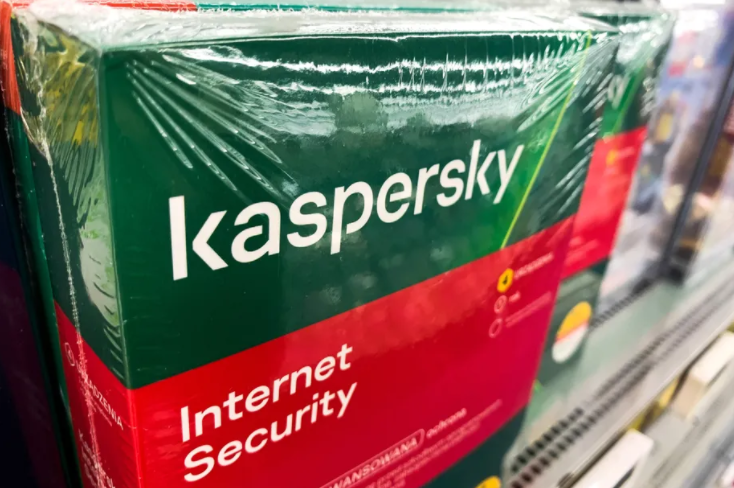
Kaspersky
The first is news that the US Federal Communications Commission has added Russian cybersecurity company Kaspersky Lab to its list of entities that pose an “unacceptable risk to US national security,” according to a report from Bloomberg. This company has been banned from use by government agencies since 2017 when a bill was signed due to the companies ties to the Kremlin.
Russian Hackers
The second article was a press release from the FBI stating that:
“The Department of Justice unsealed two indictments today charging four defendants, all Russian nationals who worked for the Russian government, with attempting, supporting and conducting computer intrusions that together, in two separate conspiracies, targeted the global energy sector between 2012 and 2018. In total, these hacking campaigns targeted thousands of computers, at hundreds of companies and organizations, in approximately 135 countries.”
This hacking activity should be another wake-up call to American businesses to harden their defenses and remain vigilant against cyber security threats. These people are nationally sponsored criminals and we must protect ourselves.
If your company is currently using Kaspersky or any other Russian based vendors, then it is time to carefully consider whether to continue being connected with them and contact us for assistance migrating to a trusted source.
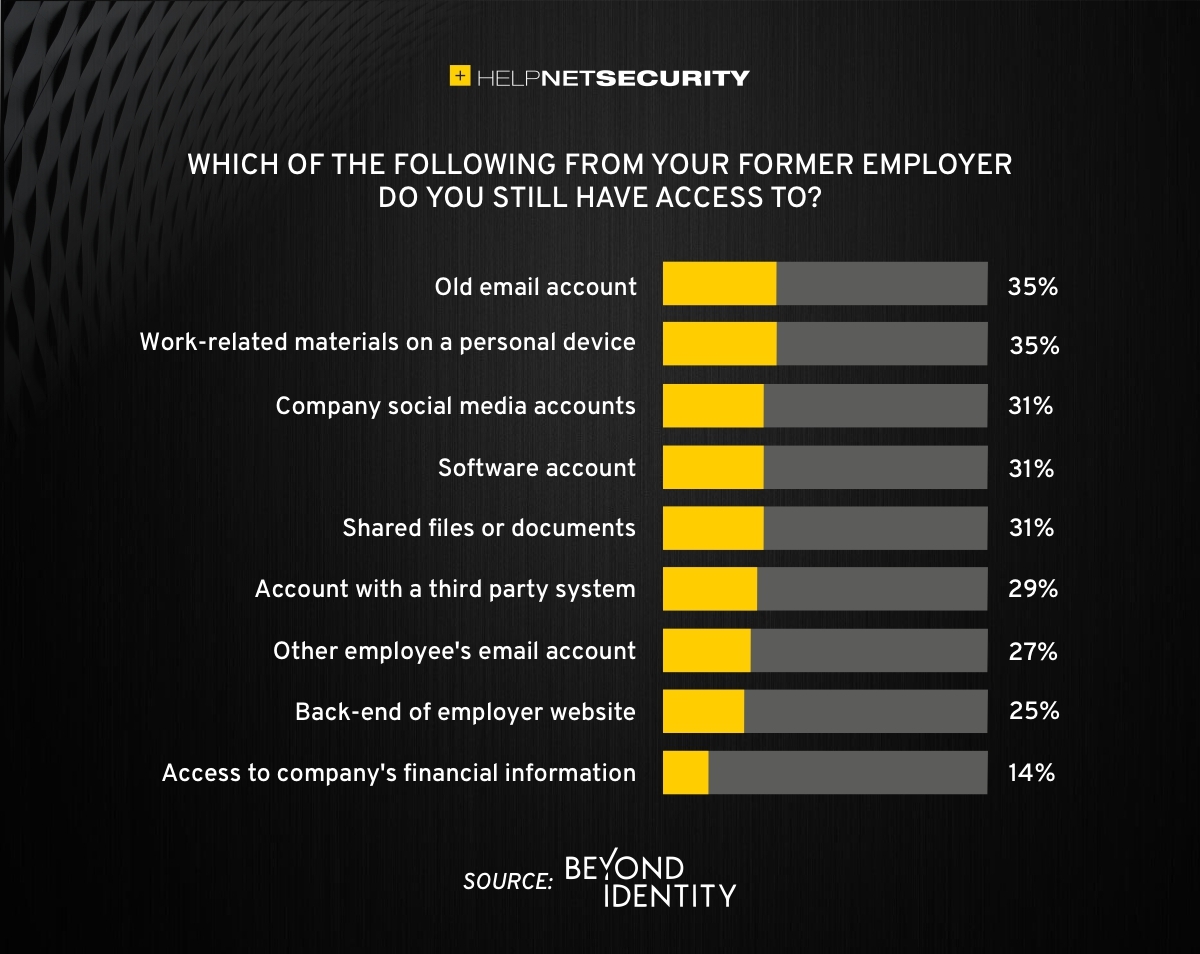
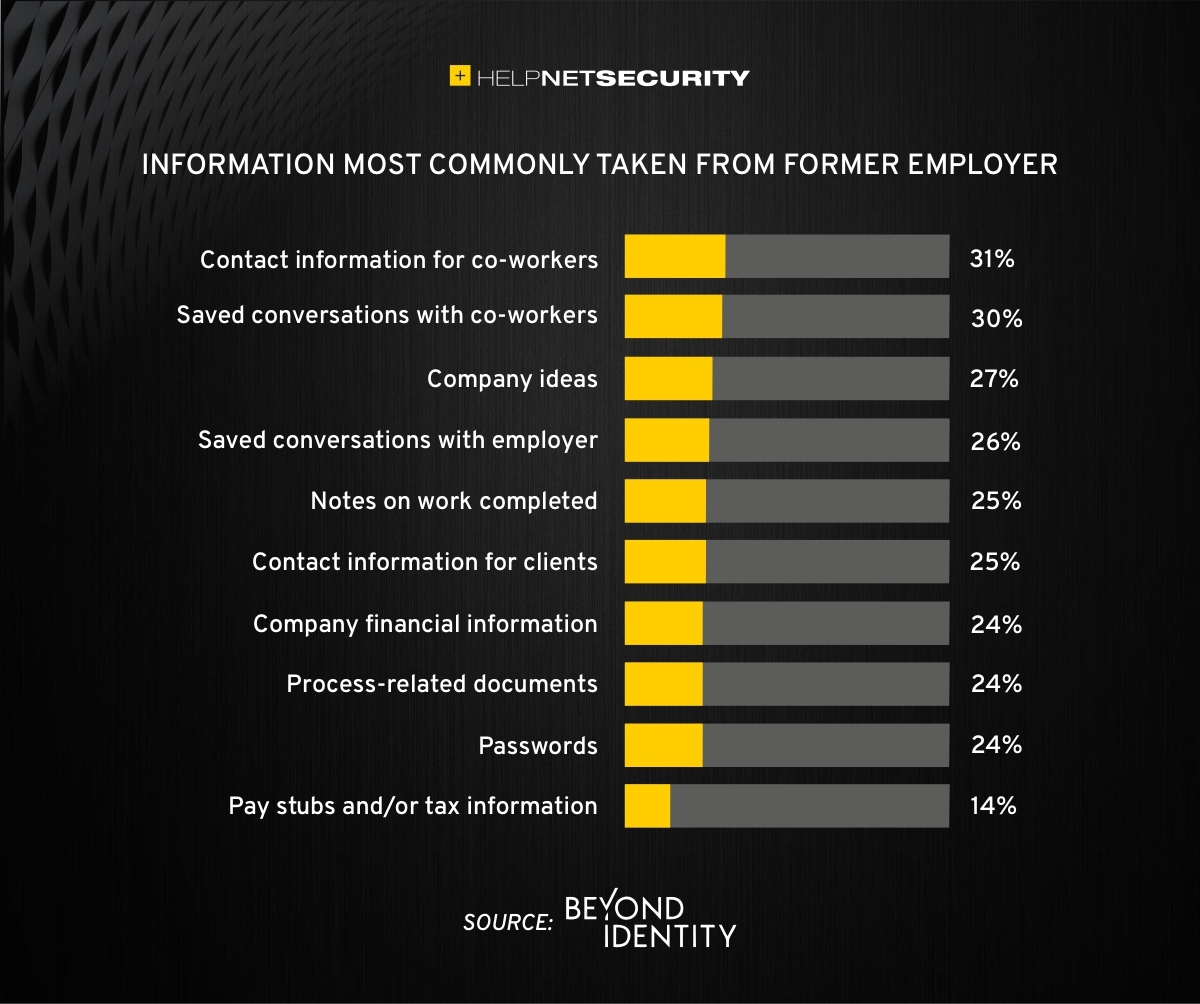
83% of employees continue accessing old employer’s accounts
A study was performed by Beyond Identity throughout the US, UK, and Ireland which found that 83% of employees admitted to maintaining continued access to accounts from a previous employer. Also a shocking 56% admitted to using this access to harm their former employer.
The study also states that a professional and details offboarding process can prevent unauthorized access by former employees by eliminating their passwords and other insecure authentication methods. Strangely enough this also creates a sense of goodwill in the company that helps to lessen the motivation for employees to attempt this kind of malicious access. This kind of process is vital considering the current employment market and high turn over rates at almost all companies.
If your company does not have a detailed and documented offboarding process, thencontact usfor assistance.
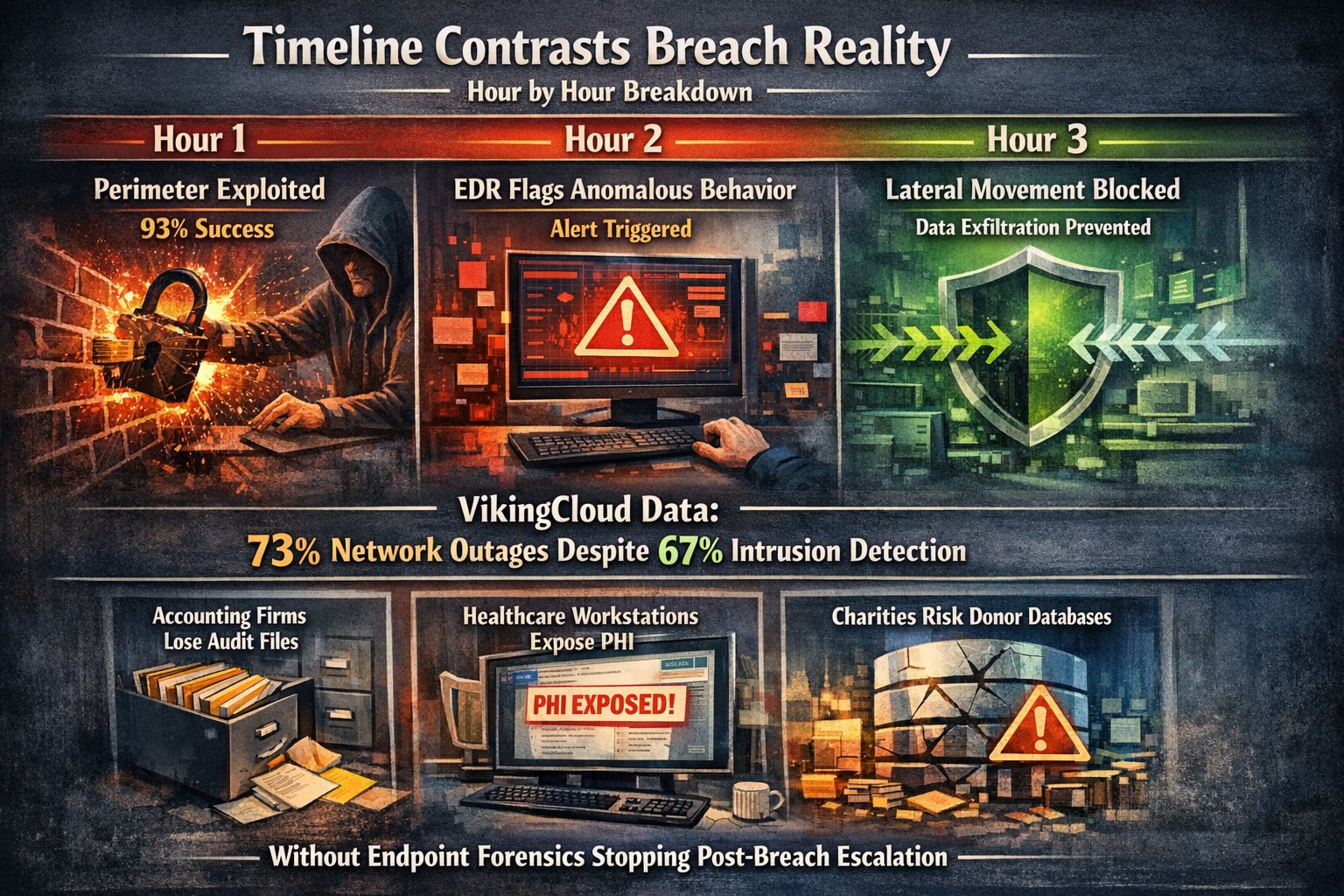
Security researchers performed penetration testing on the networks of 45 various mid-sized companies and found that in real life scenarios 93% of those networks were able to be compromised to the point of business disruption. Here are the details:
The Target
The 45 companies were polled to determine what would be an unacceptable business interruption. They decided that the following met that criteria:
Disruption of production processes
Disruption of service delivery processes
Compromise of the digital identity of top management
Theft of funds
Theft of sensitive information
Fraud against users
These became the target for the penetration testers.
The Process
In order for the penetration tester to achieve their target, they followed the following process:
Breach the network perimeter – This was done by the use of compromised passwords found on the Dark Web and know vulnerabilities on devices that were directly connected to the internet
Obtain maximum privileges – In 100% of the networks, once an attacker was inside the network
Gaining access to key systems – With maximum privileges, the testers are able to gain access to other areas of the network including databases, executives computers, and production servers
Develop attacks on target systems – Once key systems are compromised the testers then figured out how to create the unacceptable business interruption. Although they could have created these interruptions, they only gathered proof that they could to present the data to the companies.
How to Defend
There are a couple main ways to defend against these kinds of attacks:
Security Controls / Segmentation – Creating least privileged access to key systems and segmenting the network will keep hackers from traversing the network once inside
Enhanced Network Monitoring – Modern cyber security tools watch activity and traffic on the network to find indicators of compromise. They pool this information into an attack history that can be used to remediate and further protect.
Your company is not as safe as you think, so contact us for free initial cybersecurity evaluation and risk report. .
Here is a quick bit of Powershell that helped me to track down a “shared calendar” in a Co-Managed IT / Tier3 client’s Office 365 tenant. After looking in Shared Mailboxes and Resources for the calendar with no luck, we tried to get into the Exchange Management Console (EMC). The loading circle of death went on for an eternity, so switched to good old Powershell. Found the commands as follows after connecting to Exchange Online in Powershell:
If your company is looking for local management of your Office 365 tenant or need advanced support for your IT team, then contact us to find out how much you can save with us.
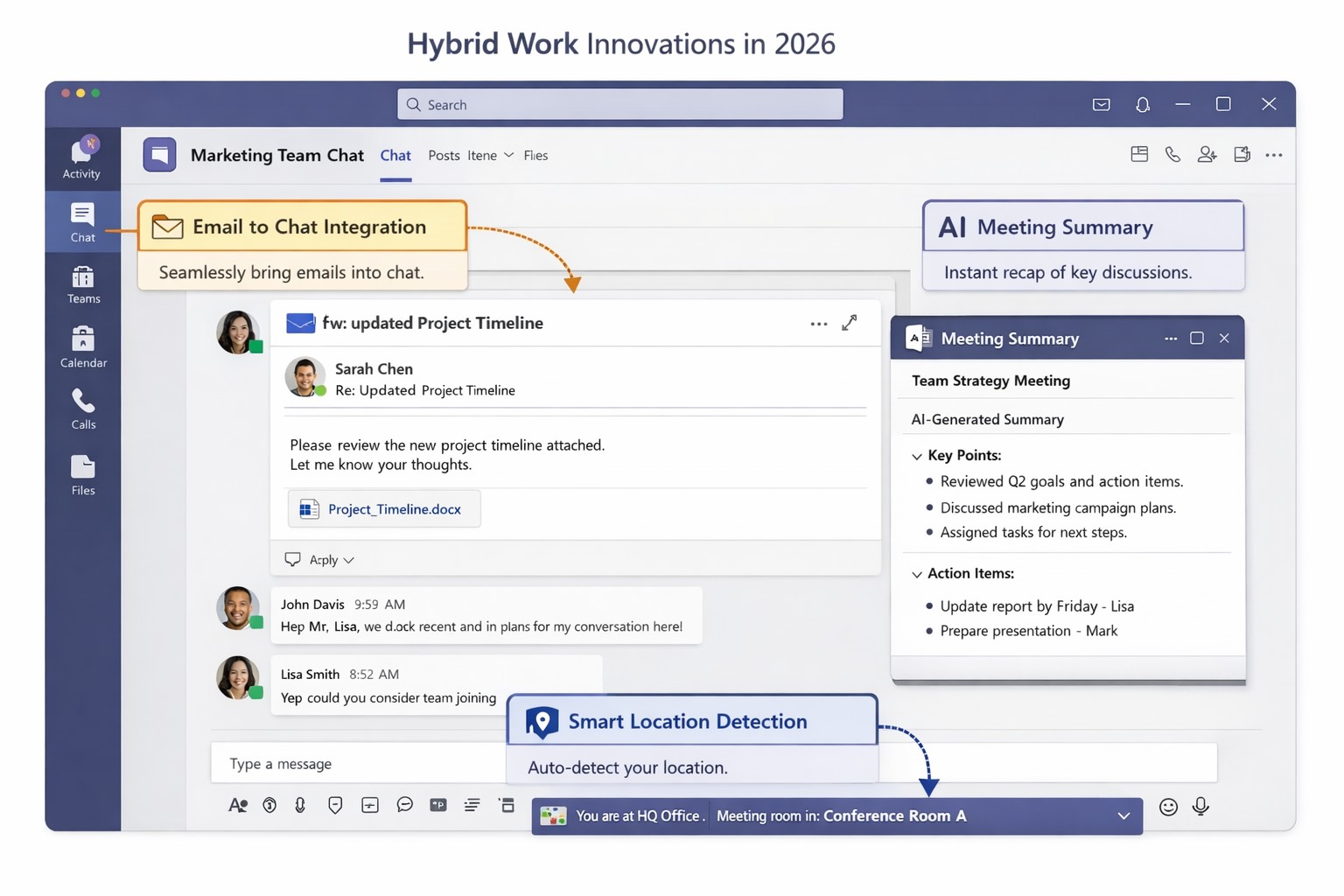
Key Microsoft Teams innovations designed for hybrid work environments, including AI-powered tools and seamless integrations
You’re likely grappling with fragmented communication, productivity dips, and tool silos that hinder growth. Microsoft Teams’ latest 2026 innovations—AI summaries, email-to-chat integration, and smart location detection—bridge these gaps, creating a unified hub for internal and external collaboration.
Key Innovations for Hybrid Efficiency
Teams now supports email-to-chat, allowing seamless communication with vendors and clients who use email instead of Teams, solving tool fragmentation in hybrid setups. AI-powered summaries condense mixed internal-external threads, ensuring alignment without full attendance, while granular guest access and compliance alerts enhance security.
Smart location detection auto-updates work status via office Wi-Fi, helping managers track hybrid presence accurately—crucial as Microsoft mandates three in-office days for its own teams starting 2026. These features integrate with Microsoft 365 for immersive tools like Loop and SharePoint, boosting workflow automation.
Practical Action Steps
Implement these steps with your IT department to leverage Teams for hybrid work:
Audit Current Setup: Review Teams usage via admin center analytics; identify silos (e.g., email-heavy vendor chats). Upgrade to latest Microsoft 365 E3/E5 licenses for full AI features—takes 1-2 hours.
Enable Core Features: In Teams admin center, activate email-to-chat policies and AI summaries under Meetings > Policies. Test Wi-Fi location detection on 10 pilot devices; configure granular guest roles for externals.
Train and Roll Out: Run company-wide training sessions (use built-in Teams training modules). Set governance rules for external access; monitor via compliance alerts. Aim for 80% adoption in 4 weeks.
Integrate and Optimize: Link with Outlook/Loop for unified hubs; use Together Mode for inclusive hybrid meetings. Quarterly reviews ensure ROI through productivity metrics.
These steps minimize disruption while maximizing hybrid productivity.
FAQ: Client Inquiries Answered
Q: How does email-to-chat benefit my business? A: It unifies communication—vendors email directly into Teams chats, streamlining hybrid coordination without new accounts.
Q: Is smart location tracking secure and privacy-compliant? A: Admins control it (default off); it uses Wi-Fi BSSIDs without GPS, with compliance notifications for breaches.
Q: Will these features work for small teams? A: Yes, scalable for SMBs; no extra hardware needed beyond standard devices.
Q: What’s the ROI timeline? A: Businesses report 20-30% collaboration gains in 1-3 months via reduced meeting times and faster decisions.
How Farmhouse Networking Helps
Farmhouse Networking specializes in Microsoft 365 optimizations for accounting, healthcare, and charity sectors. We handle full Teams deployments: custom audits, feature rollouts, compliance setups, and training tailored to B2B hybrid needs. Our SEO-driven websites and lead-gen strategies have boosted organic traffic 40%+ for clients, converting visitors to long-term partners. Let us manage IT complexities so you focus on growth.
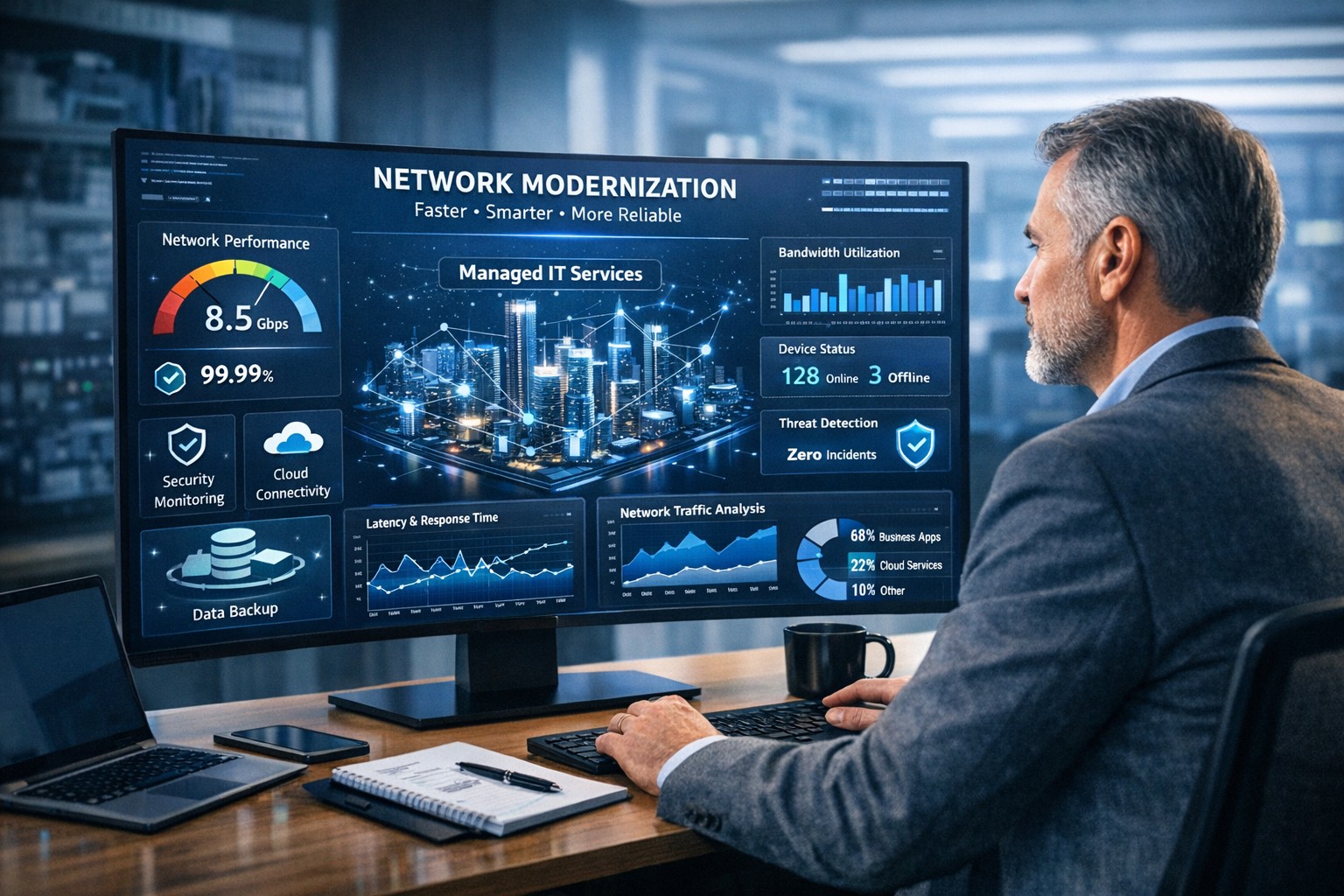
Farmhouse Networking helps businesses modernize their networks for faster performance, smarter automation, and secure connectivity.
The business world is moving at the speed of data. From cloud applications to video conferencing and smart devices, modern companies thrive on connectivity — and that means your network must be faster, more reliable, and intelligent enough to adapt. The days of “good enough” internet are gone. The next-generation network is faster, closer to your customers, and smarter in the way it predicts and manages performance.
Why “Faster, Closer, Smarter” Matters for Every Business Owner
A few years ago, network upgrades were viewed as an IT luxury. Today they’re a business necessity. Productivity, customer experience, and profit margins increasingly depend on how efficiently your systems communicate across multiple sites and cloud services.
Faster: Applications like video meetings, VoIP, and cloud storage demand low latency and high bandwidth. Slow connections mean lost opportunities.
Closer: Edge computing brings resources and data processing nearer to users, reducing lag and improving responsiveness for remote teams and mobile customers.
Smarter: Artificial intelligence (AI)–driven networks detect issues before they cause downtime, automatically direct traffic, and protect against cyber threats.
Business growth in 2020 and beyond will favor companies that embrace these technologies early — and that’s where proactive planning makes all the difference.
Action Steps for Business Owners and IT Teams
Modernizing your network doesn’t have to be complicated. Here are practical steps to future-proof your infrastructure:
Audit your current network. Identify bottlenecks, aging hardware, and underperforming Wi-Fi zones. Tools like traffic analyzers or managed network assessments can pinpoint areas for improvement.
Move critical workloads to the cloud wisely. Hybrid cloud environments balance flexibility and security — but only when configured with responsive bandwidth and monitored connections.
Invest in network automation and AI-based monitoring. Smart analytics help your IT team spot anomalies before employees notice performance issues.
Upgrade for speed and reliability. Fiber-optic connectivity, gigabit routers, and Wi-Fi 6 access points deliver measurable performance boosts.
Secure everything. With more connected devices comes more risk. Integrated firewalls, endpoint protection, and regular patch management are essential defenses.
Partner with a managed services provider (MSP). Outsourcing these functions ensures around-the-clock monitoring and proactive support so your internal staff can focus on core business priorities.
Common Client Questions — Answered
Q: “Is upgrading my network really worth the cost?” A: Absolutely. Slow or unreliable connectivity costs more in downtime and lost productivity than the upgrade itself. Modern networks reduce maintenance time, prevent outages, and improve customer satisfaction.
Q: “What about security? Doesn’t a smarter network mean more risk?” A: Actually, the opposite. With automated patching, real-time threat detection, and AI-powered monitoring, a smarter network significantly strengthens protection.
Q: “How do I know what network capacity I’ll need?” A: Your ideal bandwidth depends on your business applications, remote workers, and cloud services. A professional assessment from an MSP can provide accurate data and recommendations tailored to your growth goals.
How Farmhouse Networking Can Help
At Farmhouse Networking, we specialize in helping businesses modernize their IT infrastructure with practical, budget-conscious solutions. Whether you need a network assessment, faster connectivity, smart automation, or enhanced cybersecurity, our team brings years of expertise in network design, implementation, and ongoing support.
We work with local businesses to:
Audit existing network performance and identify inefficiencies.
Implement cloud and edge computing solutions.
Automate monitoring through intelligent network management tools.
Strengthen IT security to protect sensitive data and client trust.
Our mission is to make enterprise-grade technology accessible to your small or mid-sized business — keeping your network running faster, closer, and smarter than ever before.
Ready to Upgrade Your Network?
Don’t let outdated systems slow you down in 2020’s fast-moving digital economy. Future-proof your business with a smarter, more efficient network built for growth.
Email support@farmhousenetworking.com today to learn how Farmhouse Networking can help your business stay connected, secure, and competitive.
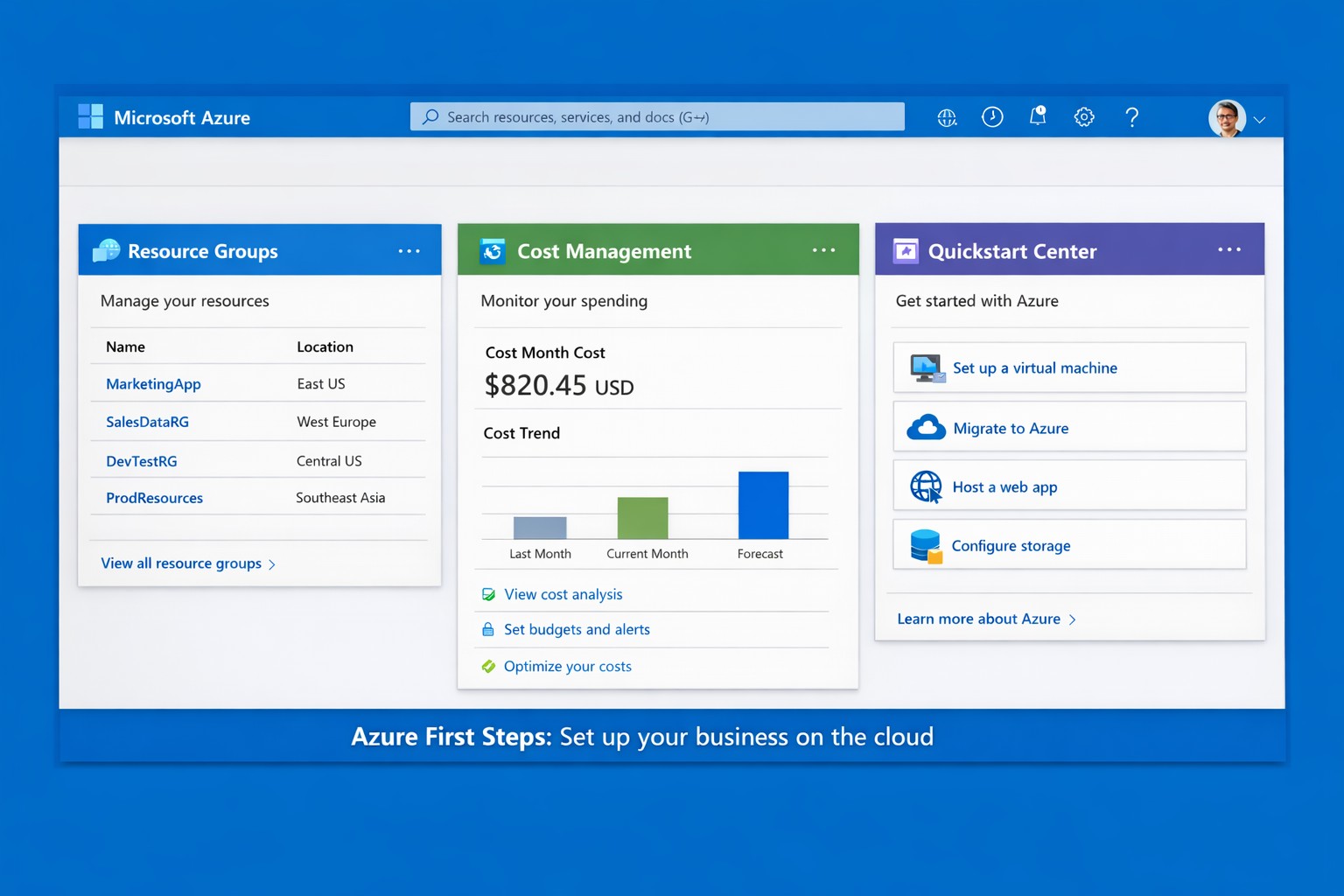
Launch your business on Microsoft Azure: Sign up, deploy resources, and monitor costs in minutes.
Migrating to Microsoft Azure can cut IT costs by up to 40% while scaling operations seamlessly—without the hassle of on-premises servers. This guide delivers practical steps tailored for you and your IT team to launch Azure quickly, addressing common concerns and showing how Farmhouse Networking streamlines the process.
Practical Action Steps
Follow these actionable steps to get your business on Azure. Designed for owners overseeing IT without deep technical dives.
Sign Up for a Free Azure Account: Visit azure.microsoft.com, select “Start Free,” and use your Microsoft account or create one. You’ll get $200 in credits for 30 days plus 12 months of popular free services like VMs and storage—no upfront charges if you monitor usage.
Access the Azure Portal and Customize Dashboard: Log in at portal.azure.com. Use the search bar for quick navigation, create Resource Groups to organize projects (e.g., “Marketing Apps”), and pin key metrics like costs to your dashboard for at-a-glance oversight.
Estimate Costs and Set Budgets: In the portal, go to Cost Management + Billing. Input your expected usage (e.g., VMs, storage) via the Pricing Calculator to forecast expenses. Set alerts for $50+ thresholds to avoid surprises—essential for business budgeting.
Deploy Your First Resource: Start with a simple Web App or VM. Search “App Service” > Create > Choose runtime (e.g., .NET), free tier, and region near Grants Pass, OR (West US 2). Deploy in minutes to test scalability.
Secure and Monitor Basics: Enable Multi-Factor Authentication (MFA) under Security settings. Use Azure Monitor for alerts on performance and Azure Advisor for free optimization tips like rightsizing resources.
These steps typically take 1-2 hours initially, scaling as your business grows.
Common Q&A for Business Owners
Q: Is Azure secure for sensitive business data? A: Yes—Azure meets standards like HIPAA, GDPR, and SOC 2 via built-in encryption, firewalls, and compliance tools. Your IT team can enforce policies automatically.
Q: How much will this cost my business? A: Free tier covers starters; paid scales pay-as-you-go (e.g., $0.01/hour for basic VM). Use the Azure Pricing Calculator and Cost Management to cap spends—many businesses save 30% vs. AWS.
Q: Do I need Azure-certified staff? A: Not immediately—use the Quickstart Center for guided checklists. For complex setups, partner with experts to avoid pitfalls.
Q: Can Azure handle growth for accounting/healthcare firms? A: Absolutely—auto-scaling VMs and App Services support spikes (e.g., tax season), with HIPAA-compliant storage for healthcare records.
How Farmhouse Networking Helps
Farmhouse Networking specializes in B2B cloud migrations for accounting, healthcare, and nonprofits—driving organic traffic via Azure-optimized sites and converting visitors to clients. We handle full setups: account config, custom resource groups, cost forecasting, secure deployments, and 24/7 monitoring. Our SEO-infused strategies (e.g., Azure-backed blogs) boost your visibility, while lead-gen tools turn portal analytics into qualified prospects. Skip the learning curve—our team deploys production-ready Azure in days, ensuring compliance and ROI from day one.
Call to Action
Ready to unlock Azure’s potential for your business? Email support@farmhousenetworking.com today for a free consultation on streamlining your first steps.
And God will generously provide all you need. Then you will always have everything you need and plenty left over to share with others. As the Scriptures say,
“They share freely and give generously to the poor. Their good deeds will be remembered forever.”
For God is the one who provides seed for the farmer and then bread to eat. In the same way, he will provide and increase your resources and then produce a great harvest of generosity in you. - 2 Corinthians 9:8-10
We use cookies to ensure that we give you the best experience on our website. If you continue to use this site we will assume that you are happy with it.