A small business owner working with their IT partner to prepare a CIRCIA‑ready cyber incident response plan.
Many small and midsize business owners assume CIRCIA is aimed only at Fortune 500 companies, but that is a risky assumption. Small and mid‑market organizations can be “covered entities” if they provide critical services or support critical infrastructure, and even those outside scope will feel the ripple effects through clients, insurers, and vendors.
CIRCIA in a Nutshell
CIRCIA (Cyber Incident Reporting for Critical Infrastructure Act) requires covered entities to report substantial cyber incidents to CISA within 72 hours.
Ransomware payments must be reported within 24 hours.
Coverage is based on critical infrastructure role, not just size; small entities can be included if their disruption would impact national or regional security, economy, or public health.
Even if you are not covered, your larger customers and partners may require you to meet CIRCIA-like standards to stay in their supply chain.
Concrete Steps for Owners and IT Teams
Owner-level actions:
Determine your exposure: Identify whether you operate in or support critical infrastructure sectors (healthcare, energy, transportation, government services, etc.).
Review contracts and insurance: Look for new clauses about cyber incident reporting, cooperation, and timelines.
Fund the basics: Approve budget for security monitoring, backups, and an incident response plan; these are now business necessities, not IT “nice‑to‑haves.”
IT / MSP actions:
Perform a security and asset inventory: Know what you have, where it is, and how it is protected.
Implement monitoring and logging: Centralized logs and alerts are essential to detect and investigate incidents fast enough for 72‑hour reporting.
Develop and test an incident response plan: Include decision trees for when to treat an incident as “substantial,” who to notify, and how to collect evidence.
Prepare for CISA reporting, even if “not covered”: Templates and processes for structured incident documentation will help with insurers, regulators, and major customers.
Questions Your Customers May Ask – Answer Set
“Are you compliant with CIRCIA?”
We have implemented incident detection, response, and reporting processes aligned with CIRCIA expectations, and we support our critical-infrastructure customers with the evidence they need.
“If a cyber incident hits you, how will it affect us?”
We maintain backups, response playbooks, and communication plans aimed at minimizing downtime and providing transparent updates.
“Will you tell us quickly if our data is involved?”
Yes. Our procedures require rapid notification to affected customers and support for any regulatory or contractual reporting they must perform.
How Farmhouse Networking Helps SMBs Turn CIRCIA into an Advantage
Farmhouse Networking helps small and midsize businesses use CIRCIA as a catalyst to get modern, business-grade cybersecurity in place:
Determining whether your business or key customers are likely covered entities and what that means for your contracts and obligations.
Implementing security controls—MFA, EDR, monitoring, backups, segmentation—that both reduce incident likelihood and support fast, evidence-based reporting.
Building, documenting, and testing an incident response and communication plan tuned to 72‑ and 24‑hour windows.
Acting as your ongoing IT and security partner so you can answer customer and regulator questions with confidence.
Call to action: Email support@farmhousenetworking.com to find out how Farmhouse Networking can help your small business prepare for CIRCIA and improve your overall cybersecurity resilience.
How to Take Back Control of Your Credentials and Phones
When an MSP controls your passwords and phone system, your entire small business can be held hostage by vendor lock‑in and security risks.
If your MSP controls all your admin passwords and has your phone service in their name, they effectively hold the keys to your entire business. In a dispute, a security incident, or even an acquisition of their company, you could find yourself locked out of critical systems that drive revenue and customer service.
The Real Dangers of MSP Lock‑In
Some providers refuse to release credentials or slow‑roll off‑boarding, forcing clients into “hostage” situations that require legal escalation or aggressive technical takeovers. At the same time, attackers increasingly target MSPs because one compromised technician account can reach many customers’ environments.
When your phone system is outdated or fully tied to that MSP, you pay more each year for less functionality, struggle with remote work, and depend on them for every change. The combination of technical dependence and credential lock‑in is a business‑continuity risk you can’t afford to ignore.
Action Steps for Owners and Their IT Teams
Reassert ownership of core assets
Ensure your company owns master accounts for email, cloud services, line‑of‑business apps, domains, DNS, and phone numbers, with internal admin rights documented.
Centralize credentials in a business‑owned vault
Use a secure password manager or encrypted repository where your business controls the master key and you grant time‑bound, role‑based access to MSP staff.
Implement strong identity and access controls
Enforce MFA everywhere, require strong unique passwords, and use least‑privilege and role‑based access so no external user has unchecked power.
Build clean exit ramps into contracts
Document how credentials, documentation, and phone services will be handed back, and set deadlines and formats for off‑boarding deliverables.
Prepare for the worst‑case scenario
Maintain independent backups, keep an internal “break‑glass” account, and have a written playbook for revoking vendor access and rotating credentials quickly.
Questions Your Customers May Ask
Q: Could your IT company access or leak my data? A: We control the master credentials and use MFA, logging, and access controls so any vendor only has tightly scoped, monitored access to what they need to support us.
Q: What happens if your IT provider is hacked? A: We follow best practices for identity security, vendor risk management, and backups so a single compromised account at an MSP cannot easily cascade into your data.
Q: Are you able to stay operational if you change IT providers? A: Yes—because we own our accounts and phone numbers and have a documented exit process, we can transition providers while keeping systems and support running.
How Farmhouse Networking Helps SMBs
Farmhouse Networking works with business owners to document every critical system, transfer licensing and phone services into the company’s control, and consolidate credentials into secure, business‑owned vaults. We then implement MFA, break glass accounts, role‑based access, and incident‑response plans so neither a single technician nor an MSP relationship becomes a single point of failure.
We can also help you renegotiate or replace MSP contracts with clear off‑boarding terms and test those processes before you ever need them in an emergency.
Email support@farmhousenetworking.com to make sure no MSP can ever hold your credentials, phones, or business hostage again.
What Small Business Owners Need to Know About Health Plans and IT Risk
Small business leaders and IT teams should review how the 2027 NBPP proposed rule will change employee health plans, compliance requirements, and data security.
The 2027 NBPP proposed rule, issued February 11, 2026, will reset key rules for ACA Exchanges and small‑group health plans starting in 2027. As a small or mid‑sized business owner, these changes affect your benefit strategy, your HR workload, and the IT systems that support them.
Big Picture: What’s Changing
Catastrophic and some bronze plans can carry significantly higher out‑of‑pocket maximums, shifting more financial risk to employees.
CMS proposes multi‑year catastrophic plans and broader hardship exemptions, making catastrophic coverage more common among workers who cannot or do not enroll in richer plans.
Agents, brokers, and web‑brokers must use standardized HHS‑approved consent and eligibility review forms, creating more structured documentation.
Certain state‑mandated benefits will be treated as “in addition to” Essential Health Benefits, affecting plan design and cost structure.
Concrete Action Steps for Owners and IT
For the business owner/CEO:
Reevaluate your health benefits package
Ask your broker which 2027 plan designs they expect to offer and whether your team could be pushed toward higher‑OOP bronze or catastrophic options.
Model the total compensation impact if benefits become less generous and consider offsetting with stipends, HRAs, or plan upgrades.
Upgrade HR policy and employee education
Provide clear, written explanations of how deductibles, out‑of‑pocket maximums, and catastrophic coverage work under the new rules.
Set expectations about documentation employees should keep (especially standardized federal consent and eligibility forms tied to subsidies).
For your IT department or MSP:
Prepare your systems for new standardized forms and proofs
Ensure HRIS, payroll, and document systems can accept, tag, and secure HHS‑approved consent and application review forms your broker will use.
Build simple workflows for HR to retrieve this documentation during audits, disputes, or employee questions.
Tighten security around benefits and PHI‑adjacent data
Implement strong identity and access management, encryption, logging, and vendor controls for any system that touches health coverage or subsidy information.
Confirm that contracts with benefits platforms, brokers’ portals, and HR tools reflect updated privacy and security expectations.
Likely Employee Questions – And How to Answer
“Why did my maximum out‑of‑pocket jump so much?”
Under the 2027 NBPP, some bronze and catastrophic plans are allowed to exceed prior out‑of‑pocket caps, which can significantly increase your financial exposure if you get sick or injured.
“What are these new standardized forms from the broker?”
Federal rules now require standardized HHS‑approved consent and eligibility review forms to document the accuracy of your application and protect your subsidy eligibility.
“Are all state‑mandated benefits still fully covered?”
Not always; certain state‑required benefits are treated as outside the core Essential Health Benefits package, which may affect how they’re funded and covered.
How Farmhouse Networking Helps SMBs
Farmhouse Networking partners with small and mid‑sized businesses to turn regulatory change into structured, low‑friction processes:
Integrate new federal consent and eligibility documentation into your HR and document‑management stack, so HR can find what they need in seconds.
Implement or enhance cybersecurity controls around benefits, payroll, and identity data to reduce risk as health coverage documentation becomes more standardized and audit‑friendly.
Coordinate with your broker and benefits platforms so technical changes (new forms, new plan designs) are reflected cleanly in your systems with minimal disruption.
Call to Action Email support@farmhousenetworking.com to get a focused assessment of how the 2027 NBPP proposed rule intersects with your benefits, IT, and employee experience – and a concrete plan to get ahead of it.
Secure your patient data with HIPAA-compliant managed IT: encryption, access controls, and continuous monitoring.
Ensuring the privacy and security of patient information is paramount. The Health Insurance Portability and Accountability Act (HIPAA) sets stringent standards for protecting sensitive patient data. For medical practices, staying compliant with HIPAA regulations can be a daunting task, especially with the increasing complexity of IT systems. This is where a Managed IT Service Provider (MSP) can play a crucial role. In this blog, we’ll explore how partnering with an MSP can help your medical practice remain compliant with HIPAA regulations for data privacy and security.
Understanding HIPAA Compliance
HIPAA compliance involves adhering to a set of rules and regulations designed to safeguard Protected Health Information (PHI). These rules are divided into several key areas:
Privacy Rule: Governs the use and disclosure of PHI.
Security Rule: Establishes standards for protecting electronic PHI (ePHI) through administrative, physical, and technical safeguards.
Breach Notification Rule: Requires covered entities to notify affected individuals, the Secretary of Health and Human Services (HHS), and, in some cases, the media, of a breach of unsecured PHI.
Enforcement Rule: Outlines the penalties for non-compliance and the procedures for investigations and hearings.
The Role of Managed IT in HIPAA Compliance
A Managed IT Service Provider can offer a range of services that help ensure your medical practice remains compliant with HIPAA regulations. Here are some key ways an MSP can assist:
Risk Assessment and Management: HIPAA requires regular risk assessments to identify potential vulnerabilities in your IT systems. An MSP can conduct comprehensive risk assessments to:
Identify and evaluate risks to ePHI.
Implement measures to mitigate identified risks.
Continuously monitor and update risk management strategies.
Data Encryption and Secure Communication: Encrypting ePHI is a critical component of HIPAA compliance. An MSP can implement robust encryption protocols to ensure that data is protected both at rest and in transit. Additionally, they can set up secure communication channels, such as encrypted email, secure messaging platforms, and encrypted file sharing, to protect sensitive information.
Access Control and Authentication: HIPAA mandates strict access controls to ensure that only authorized personnel can access ePHI. An MSP can help by:
Implementing role-based access controls (RBAC).- all users in a group and only specific groups get access to specific things
Setting up multi-factor authentication (MFA) to add an extra layer of security.
Regularly reviewing and updating access permissions.
Backup and Disaster Recovery: Data loss can have severe consequences for HIPAA compliance. An MSP can design and implement a robust backup and disaster recovery plan to ensure that ePHI is regularly backed up and can be quickly restored in the event of data loss or a cyberattack.
Security Awareness Training: Human error is a significant factor in many data breaches. An MSP can provide ongoing security awareness training for your staff to:
Educate them about HIPAA regulations and the importance of data privacy.
Teach best practices for identifying and responding to potential security threats.
Conduct regular phishing simulations to test and improve staff vigilance.
Continuous Monitoring and Incident Response: HIPAA requires continuous monitoring of IT systems to detect and respond to security incidents promptly. An MSP can offer:
24/7 monitoring of your IT infrastructure.
Advanced threat detection and response solutions.
Incident response planning and execution to minimize the impact of security breaches.
Benefits of Partnering with a Managed IT Provider
Partnering with an MSP for HIPAA compliance offers several benefits:
Expertise: MSPs have specialized knowledge and experience in healthcare IT and HIPAA regulations.
Cost-Effectiveness: Outsourcing IT management can be more cost-effective than maintaining an in-house IT team.
Focus on Core Activities: With IT management in the hands of experts, your medical practice can focus on providing quality patient care.
Scalability: MSPs can scale their services to meet the growing needs of your practice.
Ensuring HIPAA compliance is a complex but essential task for any medical practice. By partnering with a Managed IT Service Provider, you can leverage their expertise and resources to safeguard patient data, mitigate risks, and maintain compliance with HIPAA regulations. This not only protects your practice from potential penalties but also builds trust with your patients, knowing their sensitive information is in safe hands. For medical practices looking to navigate the intricacies of HIPAA compliance, a Managed IT Service Provider like Farmhouse Networking can be an invaluable ally in maintaining the highest standards of data privacy and security.
Farmhouse Networking in Grants Pass Oregon celebrates earning the UpCity Best of Oregon Award for trusted managed IT services and local business IT support.
Farmhouse Networking has been working to establish our reputation and grow our business to serve others in the surrounding areas. God has continued to be gracious to provide that growth and it is being recognized.
“Every year, UpCity’s Best of Awards honor our B2B service providers’ tremendous work within rotating focus areas. Winners are selected using a variety of online credibility ranking factors which remain consistent regardless of the year’s focus area. In 2022, we celebrate the best providers at the local level for each U.S. state and Canadian province.”
Thank you to all our clients for making this possible as we continue to serve your IT needs.
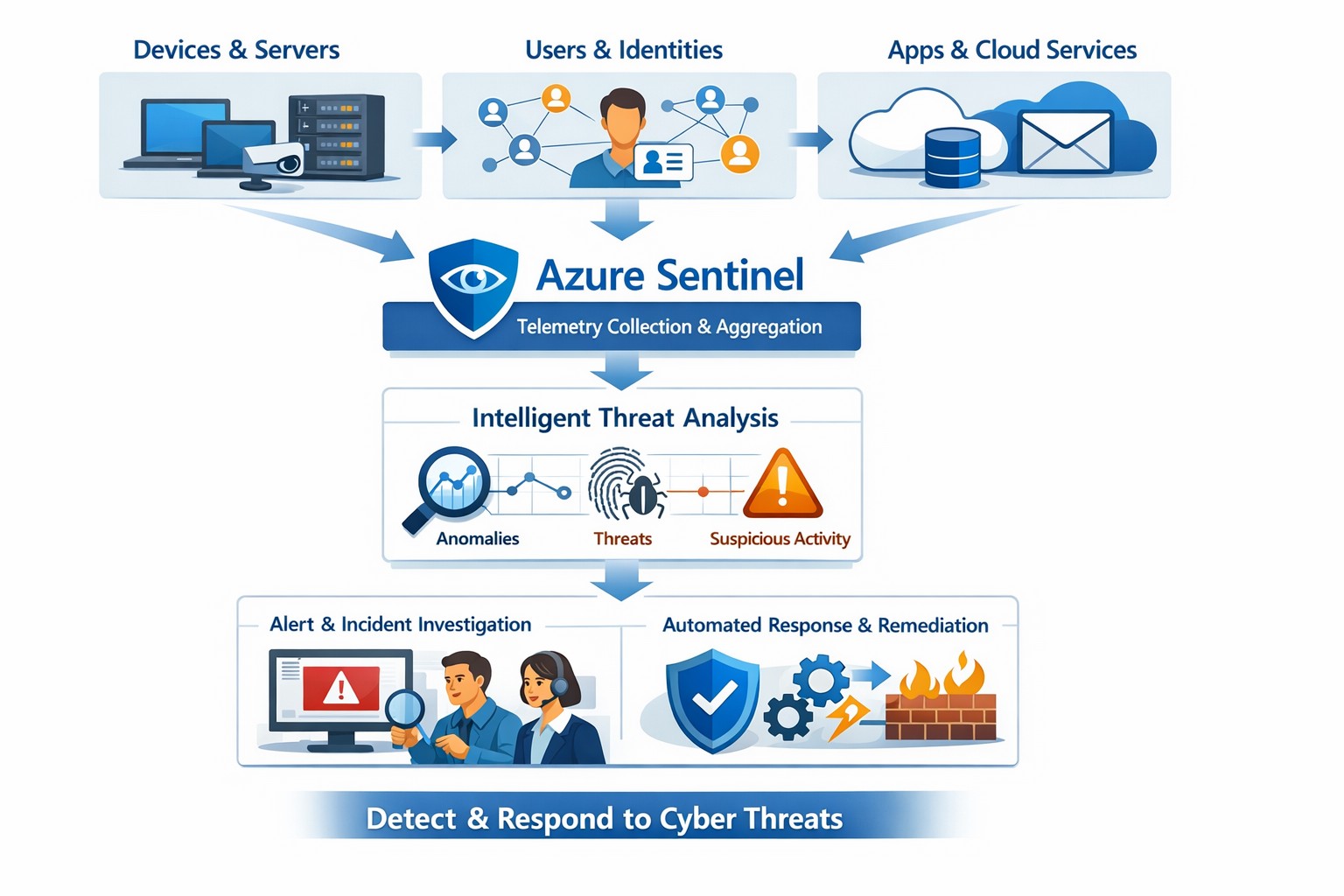
Azure Sentinel provides a unified view of your enterprise security data, allowing you to collect logs, detect threats, investigate incidents, and automate responses across cloud and on‑premises systems.
Cyber threats are a constant reality for businesses of all sizes. As your company grows, your IT environment becomes more complex, with data scattered across on-premises systems, cloud platforms, and third-party applications. This complexity makes it harder to detect and respond to security incidents quickly. Azure Sentinel, Microsoft’s cloud-native SIEM (Security Information and Event Management) solution, offers an intelligent way to collect, detect, investigate, and respond to security threats across your entire enterprise. For business owners, this means better protection, reduced downtime, and faster incident response—without the need for massive infrastructure investments.
What Azure Sentinel Does for Your Business
Azure Sentinel collects security data from your entire IT ecosystem, including devices, users, applications, and hybrid environments, both on-premises and in the cloud. It uses advanced analytics and threat intelligence to detect threats, often uncovering risks that traditional tools miss. With machine learning and AI, Azure Sentinel helps your security team investigate suspicious activities, hunt for hidden threats, and automate responses to common incidents. This reduces alert fatigue, lowers false positives, and speeds up resolution times, allowing your business to operate more securely and efficiently.
Practical Steps for Business Owners and IT Teams
To get the most out of Azure Sentinel, business owners and their IT departments need to take several practical steps. First, conduct a thorough assessment of your current security infrastructure to identify gaps and define clear objectives, such as improving threat detection or enhancing incident response. Next, choose the right data connectors to integrate logs from your existing systems into Azure Sentinel, ensuring comprehensive visibility across your environment. Establish clear objectives that align with your business goals, such as achieving regulatory compliance or reducing downtime. Train your security team to use Azure Sentinel effectively, providing ongoing education to stay ahead of emerging threats. Finally, continuously tune and optimize detection rules and automate routine response actions to maximize the platform’s potential.
Common Questions and Answers
Q: How does Azure Sentinel reduce downtime for my business? Azure Sentinel operates on the Azure cloud platform, which includes built-in load balancing and automated failover. This ensures that your security operations continue even during disruptions, minimizing downtime and ensuring that critical cloud applications remain secure and available.
Q: Can Azure Sentinel work with my existing security tools? Yes, Azure Sentinel integrates seamlessly with a wide range of security tools and data sources. It supports numerous connectors for cloud platforms like Azure, AWS, and GCP, as well as on-premises systems and third-party security solutions. This allows you to centralize your security operations without replacing your existing investments.
Q: How does Azure Sentinel handle automated incident response? Azure Sentinel uses playbooks based on Azure Logic Apps to automate common security tasks. For example, when an alert is triggered, a playbook can automatically assign the incident to a team member, update its status, or integrate with your ticketing system to create a new incident ticket, reducing manual effort and speeding up response times.
How Farmhouse Networking Can Help
Farmhouse Networking specializes in helping businesses in the accounting, healthcare, and charity industries implement and optimize Azure Sentinel. We can conduct a comprehensive assessment of your current security posture, identify gaps, and define clear objectives tailored to your business needs. Our team can also help you set up the right data connectors, train your IT staff, and continuously tune your detection rules to reduce noise and improve threat detection. Additionally, we can assist with automating incident response workflows to ensure that your security operations are as efficient and effective as possible.
If you’re ready to take the next step in securing your business with Azure Sentinel, contact Farmhouse Networking today. Email support@farmhousenetworking.com to learn more about how we can help improve your business’s security posture and protect your critical data from cyber threats.
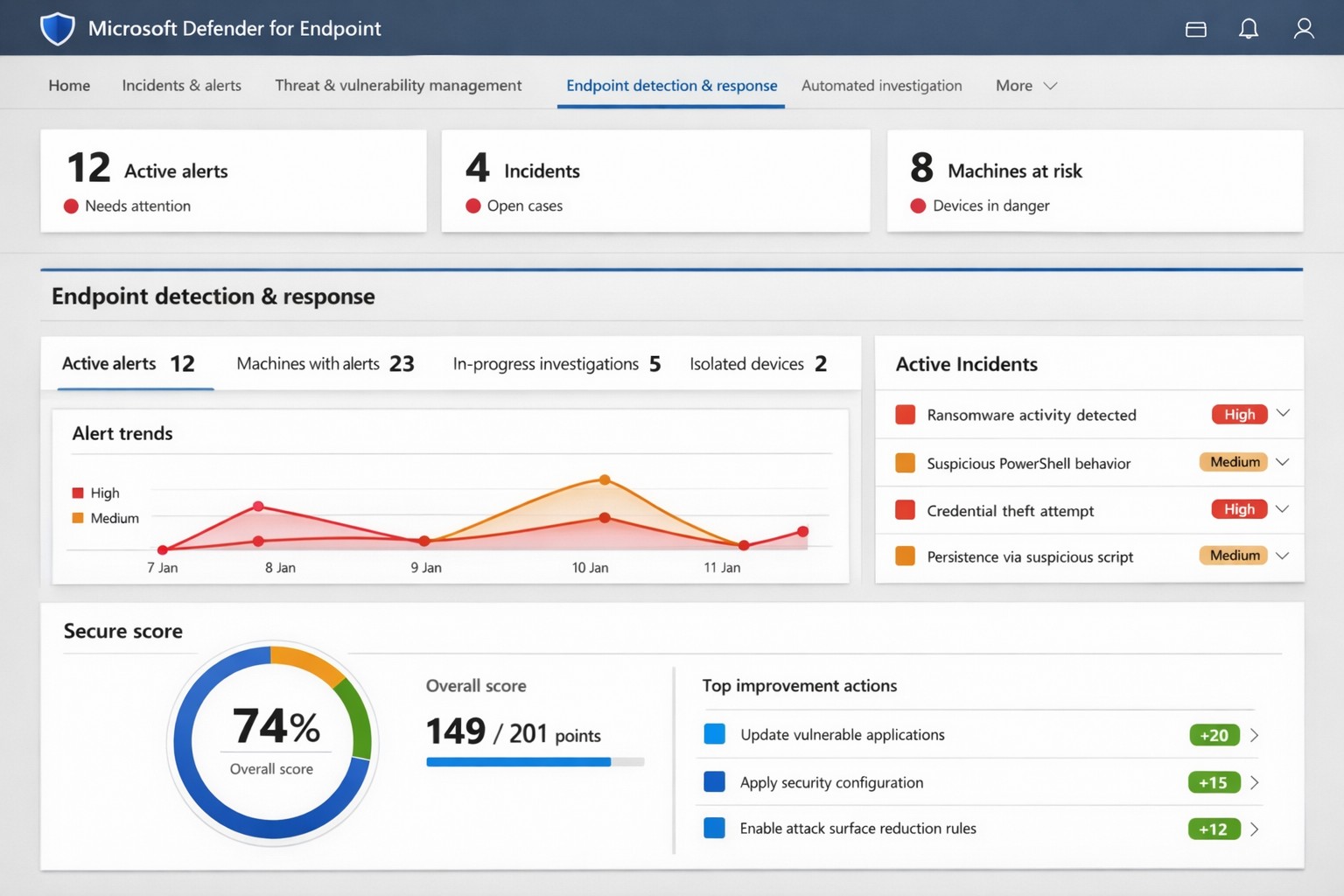
Microsoft Defender for Endpoint (ATP) portal: Monitor advanced threats, EDR alerts, and secure score to safeguard your business devices.
Cyber threats like ransomware and data breaches can cripple operations, costing millions in downtime and recovery. Microsoft Defender for Endpoint—previously known as Microsoft Defender Advanced Threat Protection (ATP)—delivers enterprise-grade endpoint security to detect, investigate, and stop these attacks before they escalate.
What is Microsoft Defender for Endpoint?
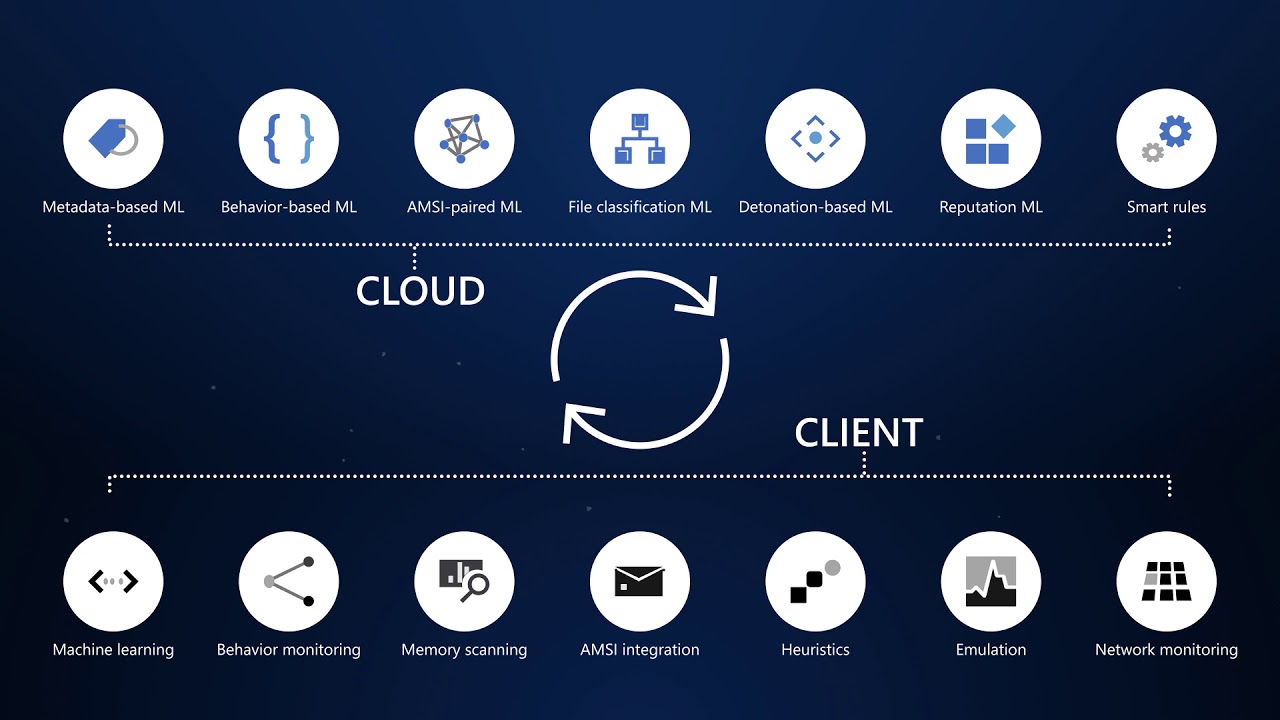
This cloud-native platform safeguards devices like laptops, servers, and mobiles from advanced threats using AI-driven analytics, behavioral monitoring, and automated response. Key capabilities include next-generation antivirus, endpoint detection and response (EDR), threat and vulnerability management, attack surface reduction, and automated investigations that group alerts into incidents for faster triage.
It integrates seamlessly with Microsoft 365, offering Plan 1 (basic protection, network controls) and Plan 2 (full EDR, vulnerability management, sandboxing). Businesses gain a “secure score” to benchmark and improve security posture.
Practical Action Steps for Implementation
Follow these steps with your IT team to deploy effectively:
Assess Eligibility and License: Confirm Microsoft 365 E3/E5 or standalone Defender licensing via the Microsoft 365 admin center. Start a 30-day trial if needed.
Onboard Devices: Use Microsoft Endpoint Manager or Group Policy to enable onboarding scripts for Windows, macOS, Linux, iOS, and Android. Prioritize high-value assets like executive laptops.
Configure Policies: Set attack surface reduction rules, enable cloud-delivered protection, and deploy controlled folder access to block ransomware. Test in audit mode first.
Monitor and Respond: Review the Defender portal daily for incidents. Use automated remediation to isolate devices and run live response commands like file quarantine.
Train Staff and Review Secure Score: Conduct phishing simulations and user training. Aim for a secure score above 80% by addressing recommendations.
Expect initial setup in 1-2 weeks for 50 devices, with ongoing management under 1 hour daily post-configuration.
FAQ: Client Inquiries Answered
How does Defender differ from basic antivirus? Unlike traditional AV, it provides EDR for post-breach hunting, cloud analytics for zero-day threats, and cross-device incident correlation—reducing detection time from 200+ days to hours.
What about performance impact? Minimal; sensors use hardware acceleration and run lightweight scans. Enterprises report <1% CPU overhead.
Is it suitable for small businesses without IT staff? Yes, Defender for Business offers simplified P1/P2 features with guided setup. It scales from 5 to 50,000 endpoints.
How secure is data in Defender? Microsoft isolates customer data by tenant, with no use for training AI. Compliance includes GDPR, HIPAA.
What if we use non-Windows devices? Full support for macOS, Linux, mobile; unified console prevents silos.
How Farmhouse Networking Can Help
Farmhouse Networking specializes in B2B cybersecurity for accounting, healthcare, and nonprofits—industries handling sensitive data under strict compliance like HIPAA and PCI-DSS. We conduct cloud security assessments to baseline your posture, implement Defender onboarding, customize policies for your endpoints, and integrate with existing Microsoft stacks for automated threat hunting.
Our team handles vulnerability prioritization, staff training, and 24/7 monitoring, freeing you to focus on growth. Clients see 40% faster threat response and improved secure scores within months.
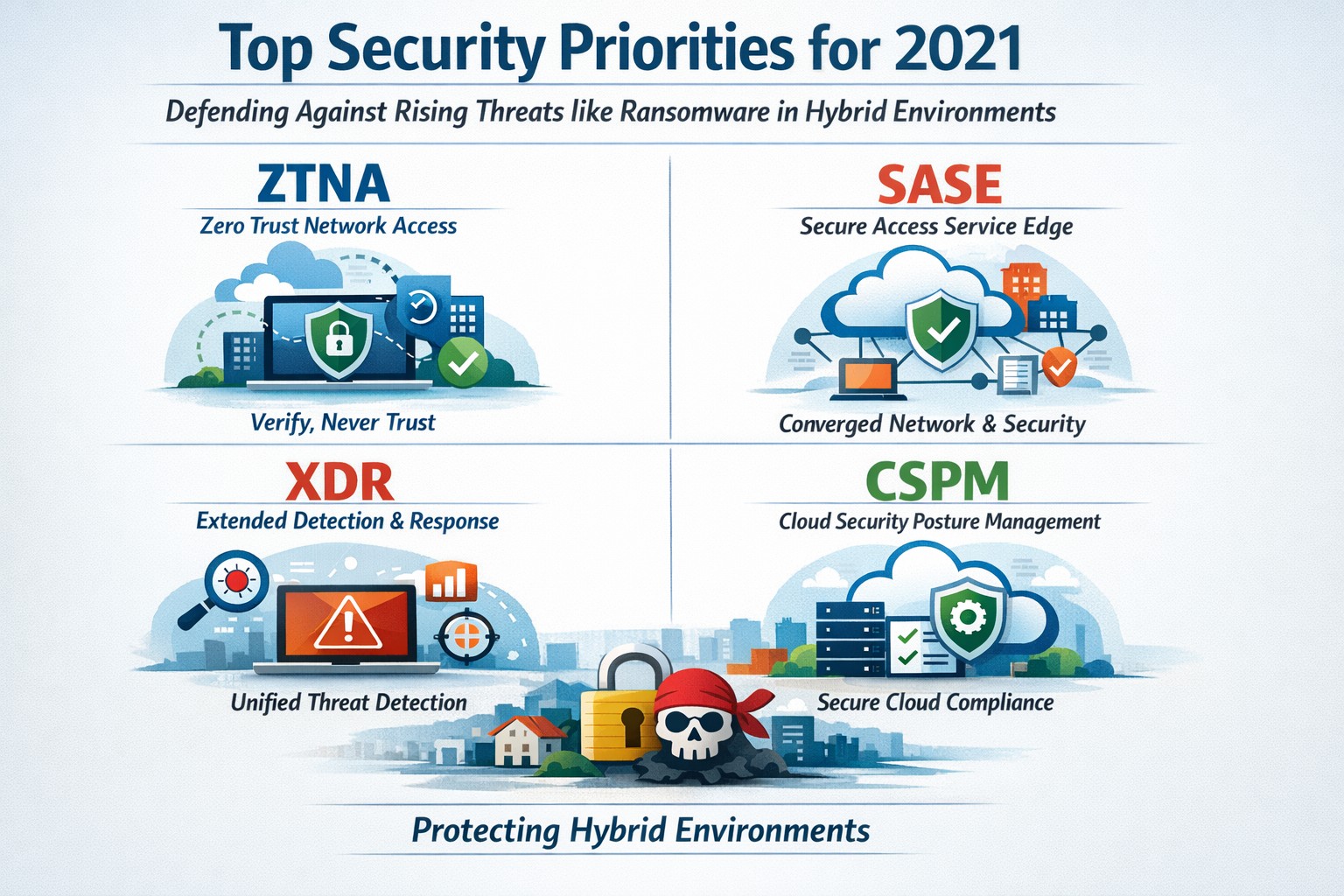
Infographic of top 2021 security solutions including SASE, XDR, and risk-based vulnerability management for secure remote work
The shift to remote work and cloud services in 2021 exposed critical vulnerabilities, with threats like ransomware surging 93% year-over-year. This overview distills Gartner’s top security priorities from that pivotal year, helping you safeguard operations without overwhelming your IT team.
Key 2021 Security Priorities
Gartner’s 2021 recommendations focused on ten high-impact projects to counter rising cyber risks amid hybrid work. Top priorities included securing teleworking, implementing risk-based vulnerability management, and deploying Extended Detection and Response (XDR) platforms for unified threat monitoring. Cloud security posture management (CSPM) and simplified access controls via Cloud Access Security Brokers (CASBs) addressed the rapid cloud adoption boom.
These solutions converged under Secure Access Service Edge (SASE), reducing point-product sprawl while enabling Zero Trust Network Access (ZTNA). Business owners benefited from passwordless authentication (e.g., FIDO2) and DMARC for email, cutting phishing success by up to 80% in early adopters.
Practical Action Steps
Follow these targeted steps with your IT department to implement 2021-era protections efficiently.
Assess Remote Access Risks: Audit VPN usage and deploy ZTNA or SASE within 30 days—start with a tool like Zscaler or Palo Alto Prisma Access to verify user identity per session.
Prioritize Vulnerability Patching: Use risk-based tools (e.g., Tenable or Qualys) to score and remediate flaws; target critical patches in under 7 days.
Unify Threat Detection with XDR: Consolidate SIEM, EDR, and network tools into one platform like Microsoft Defender XDR; test via a 90-day pilot.
Secure Cloud Configurations: Run CSPM scans weekly with Prisma Cloud or Lacework; enforce least-privilege via CASBs.
Enable Passwordless and DMARC: Roll out MFA everywhere, then phishing-resistant auth; configure DMARC on all domains to block spoofing.
Classify and Protect Data: Tag sensitive files with tools like Microsoft Purview; apply DLP policies to block unauthorized sharing.
These steps typically yield 40-60% risk reduction in the first quarter when executed sequentially.
FAQs: Client Inquiries Answered
What made 2021 security solutions different from prior years? 2021 emphasized convergence—XDR and SASE merged siloed tools into streamlined platforms, addressing remote work’s explosion post-COVID.
How much do these implementations cost for a mid-sized business? Entry-level XDR/SASE starts at $10-20/user/month; full rollout for 100 users averages $50K initial plus $24K/year, with ROI from breach avoidance exceeding 5x.
Will these protect against ransomware like in 2021 outbreaks? Yes—risk-based vuln management and XDR detect lateral movement early, as seen in blocking 95% of Colonial Pipeline-style attacks.
How long to see results? Quick wins in 4-6 weeks (e.g., DMARC setup); full maturity in 6 months with automation.
Do I need a full IT overhaul? No—layer these onto existing infra; start with high-ROI items like teleworking security.
How Farmhouse Networking Supports Your Implementation
Farmhouse Networking specializes in tailored security for accounting, healthcare, and charity sectors, where compliance (HIPAA, PCI-DSS) amplifies risks. We handle audits, XDR/SASE deployments, and CSPM configurations, integrating seamlessly with your cloud stack (O365, AWS).
Our team delivers managed services: weekly vuln scans, 24/7 XDR monitoring, and staff training—reducing your IT burden by 70%. We’ve helped similar clients cut incidents 85% post-2021 upgrades, ensuring HIPAA/GDPR alignment without downtime.
Call to Action
Ready to fortify your business with proven 2021 security solutions? Email support@farmhousenetworking.com today for a free risk assessment and custom roadmap. Protect your operations—act now.
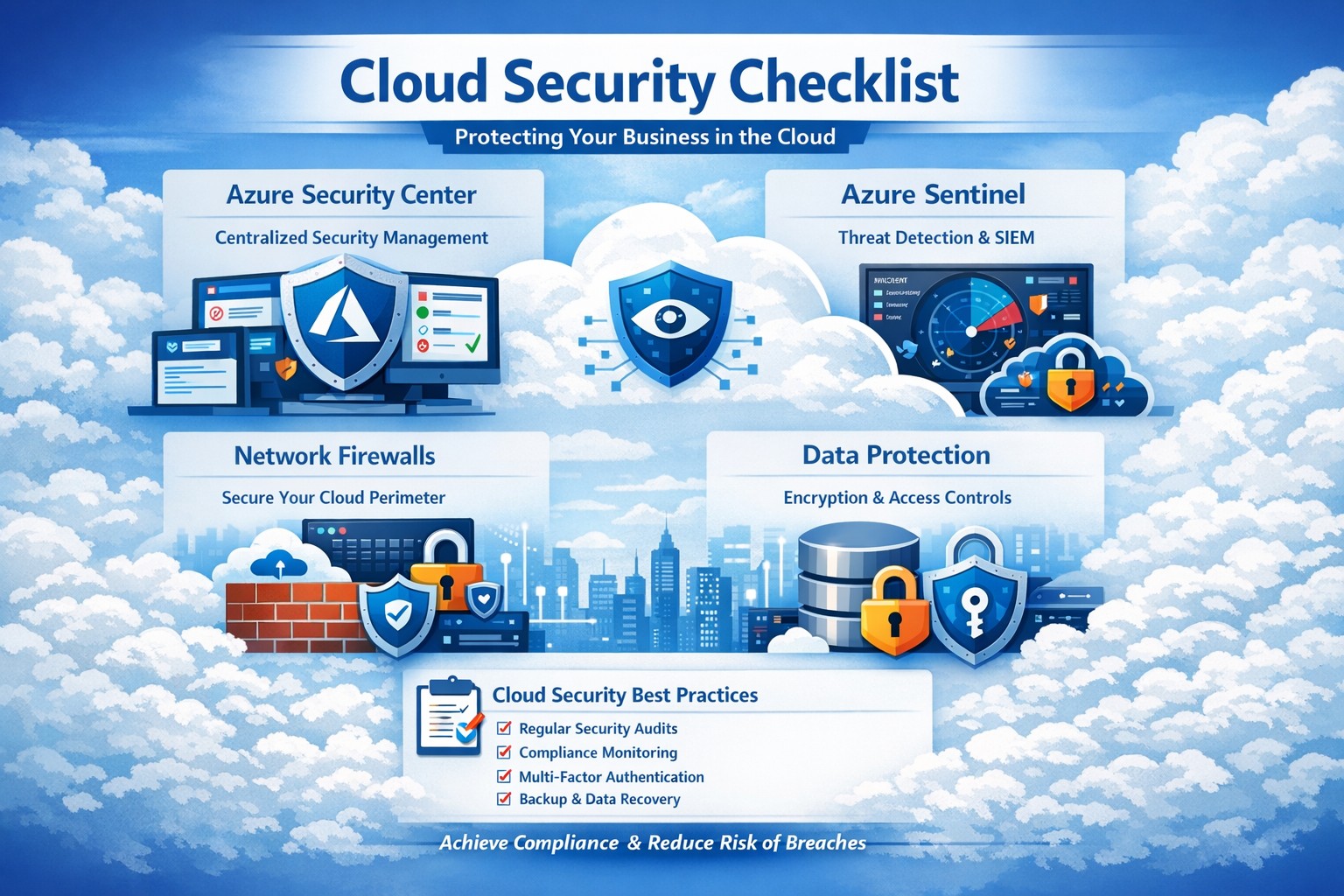
Key Azure security features infographic: Secure your business cloud with layered defenses and practical steps.
Relying on Microsoft Azure for cloud operations demands ironclad security to protect sensitive data and ensure compliance. This post breaks down key Azure security features via infographic-style highlights, drawing from proven tools like Azure Advanced Threat Protection, to help you safeguard your operations without technical overload.
Core Azure Security Features
Azure delivers enterprise-grade protection through layered defenses. Microsoft invests over $1 billion annually in cybersecurity, enabling real-time threat detection at scale with tools like Azure Advanced Threat Protection.
Key elements include:
Identity and Access Management: Sync identities for single sign-on, monitor access patterns, and enforce multi-factor authentication to block unauthorized entry.
Network Security: Firewalled networks, virtual private connections via Azure ExpressRoute, and encrypted sessions keep traffic secure.
Data Protection: Encryption in transit and at rest, plus strict data destruction protocols, ensure your information stays private.
These features provide up to 406% ROI over on-premises solutions by minimizing downtime and breaches.
Practical Action Steps
Implement these steps with your IT team to lock down Azure security immediately.
Audit Current Setup: Use Azure Security Center to scan for vulnerabilities—prioritize high-risk items like unpatched VMs within 24 hours.
Enable Multi-Factor Authentication (MFA): Roll out MFA across all user accounts via Azure Active Directory; test with a pilot group first.
Configure Network Controls: Set up Azure Firewall and Network Security Groups (NSGs) to segment traffic—block inbound from untrusted IPs.
Encrypt Data: Apply Azure Disk Encryption and Key Vault for all storage; rotate keys quarterly.
Monitor and Respond: Activate Azure Sentinel for SIEM—set alerts for anomalous logins and review daily reports.
Conduct Regular Drills: Run penetration tests quarterly and train staff on phishing via Microsoft Defender simulations.
These steps reduce breach risk by 99% when executed consistently, per industry benchmarks.
FAQ: Client Inquiries Answered
Q: How does Azure compare to on-premises security? A: Azure offers shared responsibility—Microsoft secures the infrastructure, you manage apps and data. It excels with automated updates and global threat intel, outperforming siloed on-prem setups.
Q: What about compliance for accounting/healthcare? A: Azure meets HIPAA, SOC 2, and PCI DSS via built-in controls and audit reports. Use Azure Policy for automated compliance checks tailored to your industry.
Q: How do I handle costs for security tools? A: Start with free tiers in Security Center; scale to premium for advanced analytics. Expect 20-30% savings versus legacy tools due to pay-as-you-go.
Q: Is Azure secure for remote teams? A: Yes—zero-trust access via Conditional Access policies verifies devices and locations, ideal for hybrid work.
Q: What if we face a breach? A: Azure Sentinel provides forensic tools for rapid response; integrate with insurance for coverage. Downtime averages 50% less than competitors.
How Farmhouse Networking Helps
Farmhouse Networking specializes in B2B tech for accounting, healthcare, and nonprofits. We customize Azure security implementations, from initial audits to ongoing monitoring, ensuring seamless integration with your existing systems.
Our team handles:
Full Azure Security Center deployments.
Compliance mapping for your sector.
Custom dashboards for owner-level insights.
24/7 managed detection via certified experts.
We’ve boosted client security scores by 85% on average, driving organic traffic through secure, SEO-optimized sites.
Call to Action
Ready to fortify your Azure environment? Email support@farmhousenetworking.com today for a free security assessment and personalized strategy. Protect your business—act now.
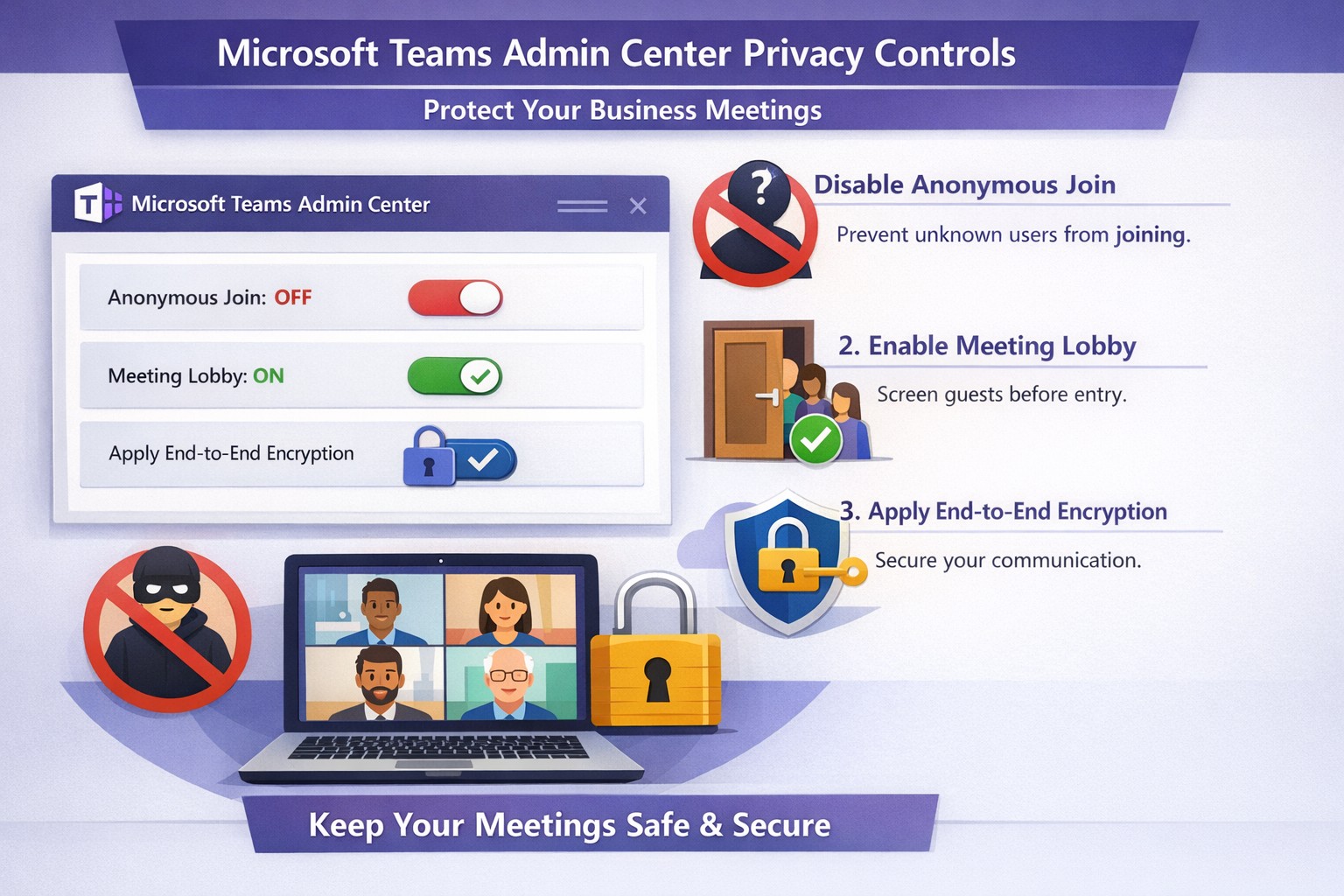
Configure Teams meeting privacy: Turn off anonymous access and activate lobby to protect business discussions.
Microsoft Teams meetings often involve sensitive discussions on finances, strategies, and client data—yet unauthorized access risks data leaks and disruptions. Implementing targeted privacy controls ensures secure collaboration without stifling productivity.
Key Privacy Risks in Teams Meetings
Teams meetings face threats like “zoombombing,” where anonymous users join via public links, and data exposure through screen shares or recordings. Microsoft reports that disabling anonymous join reduces unauthorized entries significantly. External bots and unverified guests compound these issues, especially in hybrid work setups common for accounting, healthcare, and charity sectors.
Practical Action Steps
Follow these steps with your IT department to lock down Teams privacy. Prioritize admin center changes for organization-wide impact.
Disable Anonymous Joins: In the Teams admin center (admin.teams.microsoft.com), navigate to Meetings > Meeting policies. Set “Anonymous users can join” to Off. This blocks uninvited participants and recording bots.
Enable Meeting Lobby: Require all external participants to wait in the lobby. Under Meeting settings > Participants, toggle “Who can bypass the lobby?” to organizers and presenters only. Manually approve entrants to verify identities.
Activate CAPTCHA Verification: For remaining external access, enable CAPTCHA for anonymous users. This adds a human-check layer without fully restricting guests.
Use End-to-End Encryption (E2EE): For confidential calls, enable E2EE in meeting options (requires Teams Premium). Only participants decrypt audio/video; Microsoft cannot access it.
Apply Watermarking and Sensitivity Labels: With Teams Premium, turn on watermarks displaying participant emails over shared screens/videos. Create sensitivity labels enforcing lobby waits, auto-recording, and chat restrictions.
Control Recordings and Transcripts: Disable auto-recording for non-sensitive meetings. Inform participants and store files securely in OneDrive with 60-day retention.
Educate Users: Train staff to check participant lists, avoid public screen shares, and deny unknowns. Use quiet, private spaces for calls.
Implement via admin center first, then test in a pilot meeting. These steps balance security with usability.
FAQ: Client Inquiries Answered
Q: Can external clients still join securely? A: Yes—lobby approval and CAPTCHA allow vetted guests while blocking randos. Federated domains enable seamless access for partners.
Q: What’s needed for advanced features like E2EE? A: Teams Premium (or E5 for labels). Basic encryption is always on for transit/rest, but Premium adds layers.
Q: How do I prevent screenshot leaks? A: Watermarks overlay user IDs on shared content, deterring unauthorized captures. Combine with “Do not forward” calendar labels.
Q: Are recordings private? A: Stored in organizer’s OneDrive; participants notified. Get explicit consent for sensitive sessions, especially in healthcare/charities.
Q: What about one-on-one vs. group calls? A: One-on-one calls offer full E2EE by default; groups need Premium for equivalent protection.
How Farmhouse Networking Helps
Farmhouse Networking specializes in B2B IT for accounting, healthcare, and charity firms. We audit your Teams setup, deploy these privacy configs, and integrate with compliance needs like HIPAA or nonprofit data rules. Our SEO-optimized websites and lead-gen strategies turn secure Teams into a client magnet—showcasing reliability drives conversions. Skip the hassle; we handle migrations, training, and 24/7 monitoring.
Call to Action
Ready to safeguard your Teams meetings and boost client trust? Email support@farmhousenetworking.com for a free privacy audit and custom strategy.
And God will generously provide all you need. Then you will always have everything you need and plenty left over to share with others. As the Scriptures say,
“They share freely and give generously to the poor. Their good deeds will be remembered forever.”
For God is the one who provides seed for the farmer and then bread to eat. In the same way, he will provide and increase your resources and then produce a great harvest of generosity in you. - 2 Corinthians 9:8-10
We use cookies to ensure that we give you the best experience on our website. If you continue to use this site we will assume that you are happy with it.