Araknis delivers enterprise-grade performance and remote monitoring for business networks.
A reliable and robust network infrastructure is crucial for success. Araknis, a leading provider of networking solutions, offers a range of multi-gig VPN routers that are specifically designed to meet the diverse needs of modern businesses. Let’s explore why Araknis stands out as the top choice for business networks.
Unparalleled Performance
Araknis routers and switches are built to handle the demands of high-speed internet connections, supporting up to multi-gigabit 2.5Gbps throughput from your internet provider and up to 10Gbps throughout the network. This impressive capability ensures that your business network can handle large data transfers, video conferencing, and other bandwidth-intensive applications with ease.
Versatility and Flexibility
One of the key strengths of Araknis is its versatility. Whether you need a wireless solution, a wired setup, or a combination of both, Araknis has you covered. Their product line includes:
Wireless access points with built-in Wi-Fi 6 technology
Wired routers and switches for more traditional ethernet or modern fiber setups
PoE+ enabled ports to power all the phones, cameras, and other network devices
1U rack-mountable options for server rooms
This variety ensures that regardless of your business’s physical environment or networking requirements, there’s an Araknis network that fits perfectly.
Advanced Security Features
Araknis doesn’t compromise on protection. Their routers come with:
OpenVPN support: allowing for secure remote worker connections.
IPsec VPN support: allowing for secure office-to-office or office-to-cloud connection
Embedded firewall: Stateful Packet Inspection (SPI), Denial of Service (DoS) prevention, and WAN Request Blocking
VLAN routing: segment your network for added security
WiFi guest network: keep guest online and separated from business data
Cloud Management
Perhaps one of the most compelling reasons to choose Araknis is cloud management. This powerful management platform offers:
Faster setup and configuration
Robust remote management capabilities including printers and other network devices
Enhanced visibility and access to all network devices
Advanced troubleshooting tools
Real-time system health and diagnostic data
These features significantly reduce the need for on-site visits, saving time and resources while ensuring your network runs smoothly.
Future-Proof Investment
By choosing Araknis, businesses are making a future-proof investment. The routers, switches, and access points are designed to support the increasing internet speeds available today and are ready for the demands of tomorrow. This forward-thinking approach means your network infrastructure can grow and adapt as your business evolves.
Araknis routers offer a compelling combination of performance, versatility, security, and management capabilities that make them an excellent choice for business networks of all sizes. From small offices to medium enterprises, Araknis provides the reliable foundation needed to keep your business connected and productive.
Ready to elevate your business network with Araknis? Don’t wait to experience the difference. Contact Farmhouse Networking today to discuss how we can configure an Araknis-powered network tailored to your specific business needs. Let us help you build a network that drives your business forward.
Safeguarding your business data is paramount. Cyber threats are ever-evolving, and data breaches can have severe consequences. To fortify your business defenses, consider implementing the following security and encryption tools:
Operating System Encryption
Encryption is the process where normal data is transformed into something unreadable without the keys unlock it. Windows has encryption built in using BitLocker software in conjunction with modern hardware to keep data safe on physical hard drives. In case a computer is stolen or lost the data is unreadable (assuming the password protecting the computer is strong).
Virtual Private Network / Zero Trust Network Access
Whenever employees are remote or working from home they need to be able to connect to company resources without endangering company data. This is best done through Zero Trust Network Access (ZTNA) which is the next-gen replacement for the older virtual private network connection ZTNA assumes that all connections are threats unless proven otherwise and those who are connecting must have their computers tested to make sure they are safe. This approach also only allows users to connect to the resources that are specifically needed to function.
Antivirus / Extended Detection and Response
One key to staying cyber secure is to recognize and repel threats before they do any damage. Utilizing AI and automation extended detection and response (XDR) is the modern replacement for antivirus. It is able to detect behavior patterns that malicious software and hackers use when attacking your systems then automatically undue any changes they have made.
Email Encryption and SPAM Filtering
When sending sensitive data via email it is now the standard to send it via encrypted channels with each message also being encrypted. Most companies that provide encryption also provide SPAM filtering which keeps phishing, spoofing, and malicious emails from targeting employees. This is often the most effective means hackers use to gain a foot hold in networks.
Backups
There will inevitably be times when hackers are able to breach even the best defenses, so the only recourse at that time is to have good backups in multiple locations to recover once the attacker is repelled. Without good backups many companies have had to pay ransoms and hope for a response or go out of business.
Remember, data security is an ongoing process. Combine these tools with user education and strong password practices,. Stay vigilant, adapt to new threats, and invest wisely in protecting your digital assets and reputation. Call Farmhouse Networking to advise you on how to best secure your business.
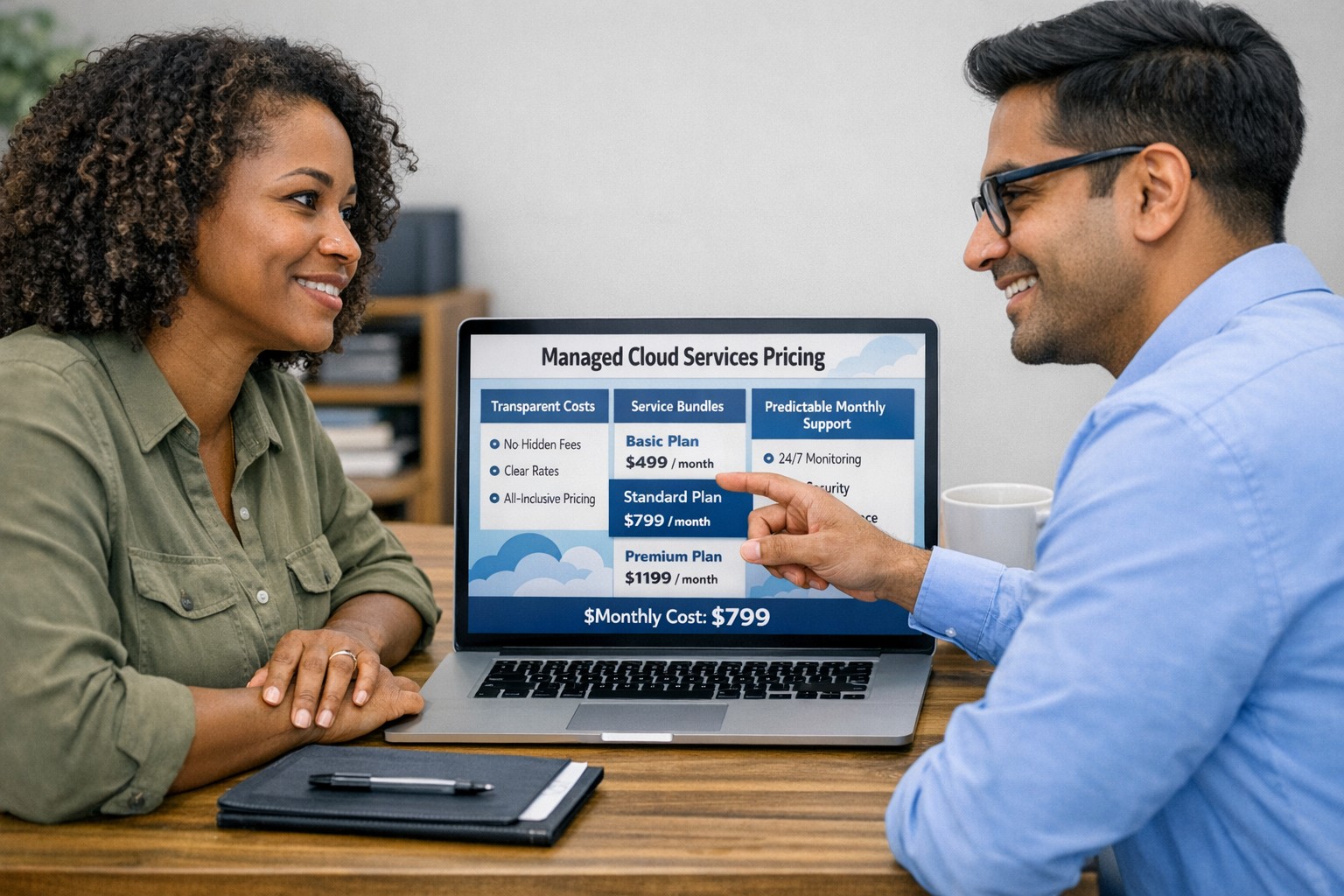
Managed cloud services pricing helps small businesses control IT costs with transparent, predictable monthly cloud support.
We have received numerous inquiries from potential customers regarding our pricing structure. Specifically, they want to know if we offer monthly contracts or if we charge an hourly rate. The answer is Yes.
Hourly Rate
For customers who require a one-time fix or need a project completed, we offer a service based on an hourly rate. Our rate for remote or on-site work that is not covered under a contract is $150 per hour. We bill in 15-minute increments and take pride in our efficiency. For clients with more than 2 service requests per month, we highly recommend signing up for a contract to save money and benefit from our expert oversight.
Monthly Contracts
There are three types of monthly contracts:
Remote Maintenance Contract
This is the package that most of our clients choose. It includes automated maintenance, cyber security protections, and unlimited remote support. Since most problems and questions can be handled remotely, this package offers real value.
Full Service Maintenance Contract
This package is for clients who want complete peace of mind. It includes all services, whether remote or at their offices. Additionally, it provides some additional benefits, such as top priority in our support queue.
Co-Managed IT Contract
This special package is designed for companies that already have a full-time IT employee or IT service companies in need of extra help. It provides them with the necessary automations and tools to make their jobs easier, allowing them to focus on what matters. This package also includes a discount on our remote and on-site services.
All contracts are based on a per-device model, taking into account the number of workstations, printers, servers, switches, etc. on the client’s network. We use this model because the other popular model, per user, is too vague and can easily hide excessive profit margins. Contracts can be month-to-month or a yearly commitment. The difference is that with a yearly commitment, you are protected from price increases for the entire year. We also offer many optional add-ons for our clients, such as Office 365, Employee Security Training, Penetration/Vulnerability Scanning, Mobile Device Management, Compliance, Secure Remote Access, and Security Operations Center.
Are you looking for reliable IT support that suits your business’s unique requirements? Look no further! Our flexible pricing options cater to businesses of all sizes. Whether you require one-time assistance or ongoing support, we have the right plan for you. Ready to take your business IT support to the next level? Contact us today to discuss your needs and find the perfect plan for your business.
Implement zero trust to safeguard mobile workforce from cyber threats anywhere
Remote work and mobile devices have become the norm, so ensuring the security of your workforce and sensitive data is paramount. Traditional security measures based on perimeter defense are no longer sufficient to protect against the sophisticated cyber threats that target mobile devices and exploit vulnerabilities in the network. This is where the concept of zero trust comes into play. Zero trust is a security framework that challenges the notion of “trust but verify” and instead adopts a “never trust, always verify” approach. By implementing a zero trust model, organizations can establish a security infrastructure that provides continuous authentication, authorization, and monitoring to safeguard their mobile workforce and sensitive data.
Understanding the Concept of Zero Trust
The concept of zero trust is rooted in the recognition that a one-time authentication and authorization process is not enough to ensure security in today’s dynamic threat landscape. Changes in user behavior, location, and other factors should radically impact access decisions. Zero trust takes a proactive approach to security by enforcing minimal access to resources, requiring continuous security monitoring, risk-based access control, and real-time authentication and authorization based on up-to-date information. Unlike traditional security models that rely on perimeter defense and trust users and devices within the network, zero trust challenges the idea of inherent trust and verifies the authenticity and integrity of every user and device, regardless of their location or network connection.
The Evolution of Zero Trust
The concept of zero trust has evolved over time in response to the increasing risks and challenges posed by mobile devices and remote work. The rapid adoption of mobile devices and the proliferation of internet-connected devices have expanded the attack surface, making traditional perimeter-based security measures inadequate.
Key Security Technologies for Mobile Devices
To enhance the security of mobile devices and implement zero trust, organizations should leverage key security technologies designed specifically for the mobile environment. These technologies include:
Enterprise Mobility Management (EMM): EMM ensures that mobile devices have the necessary policies and configurations in place, including mobile device management for security settings and configurations, as well as remote user access policy implementation. EMM provides a foundation for enforcing security controls and managing mobile devices within the organization.
Mobile Application Vetting (MAV): MAV ensures that applications comply with enterprise policies and do not contain known exploitable vulnerabilities. By vetting applications, organizations can reduce the risk of malicious applications compromising the security of mobile devices and accessing sensitive data.
Mobile Application Management (MAM): MAM focuses on ensuring compliance in deployed applications. It enables organizations to enforce security policies and manage the lifecycle of mobile applications, including app distribution, updates, and revocation. MAM helps organizations maintain control over the applications used by their mobile workforce.
Mobile Threat Defense (MTD): MTD solutions detect and mitigate threats from suspicious user behavior, network activity, and malicious attacks. These solutions leverage advanced analytics and threat intelligence to identify and respond to potential security threats in real time, providing an additional layer of protection for mobile devices.
Secure Containers: Secure containers provide isolation techniques to prevent organizational and personal data from commingling. By creating separate containers for different types of data, organizations can ensure that sensitive information remains secure, even if the device itself is compromised.
The Role of Intelligent Authentication
Intelligent authentication, powered by advanced rule sets and artificial intelligence, can significantly enhance the security of mobile devices in a zero trust environment. By combining biometrics with user behavior analysis, intelligent authentication systems can provide adaptive authentication that adapts to each user interaction, ensuring precise security measures. Integration between EMM, mobile threat defense, and existing logging, monitoring, diagnostic, and mitigation systems further enhances security capabilities.
Developing a Mobile Zero Trust Strategy
Implementing zero trust in the mobile environment requires a tailored approach that aligns with an organization’s specific goals, risks, and infrastructure. Businesses should develop their strategies based on a comprehensive assessment of the risks they face, with granular policies to mitigate those risks. The granularity of continuous authentication should be carefully determined to strike the right balance between security and usability. It’s important to note that technology is only one part of the solution; organizations must also review their mobile use policies and ensure that processes and human factors align with zero trust principles
With an intelligent authentication approach and a tailored mobile zero trust strategy, organizations can safeguard their mobile workforce and data from advanced cyber threats. Farmhouse Networking can make this a reality for your organization.
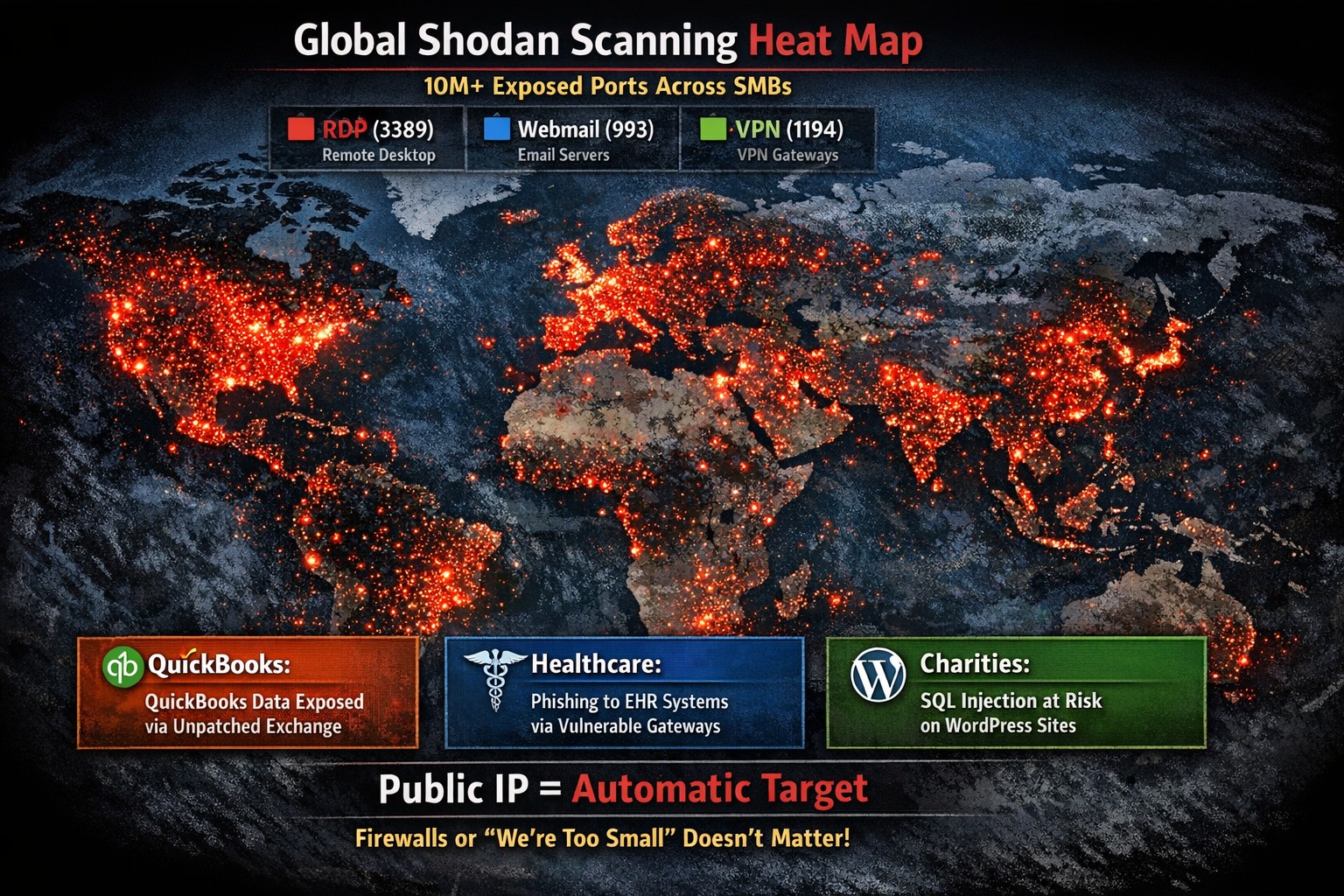
Every modern business has one thing in common – the internet.
Businesses are using computers, smart phones, tablets, etc. to connect to the internet for research, shopping, advertising, or any number of things. With a connection to the internet comes the need for routers, switches, wireless, and other network hardware to distribute internet connectivity across the company. There are malicious people on the internet that are setting traps and trying to break into companies which necessitate the use of tools like antivirus, internet filtering, spam filtering, and other protective measures. There are also people who work from their homes and need to have a way of tunneling safely into the network to use the resources there.
All of this has to be managed by someone in the company or you can contract with a managed IT service provider.
If your company needs help managing all the things connected to your internet, then contact us for assistance.
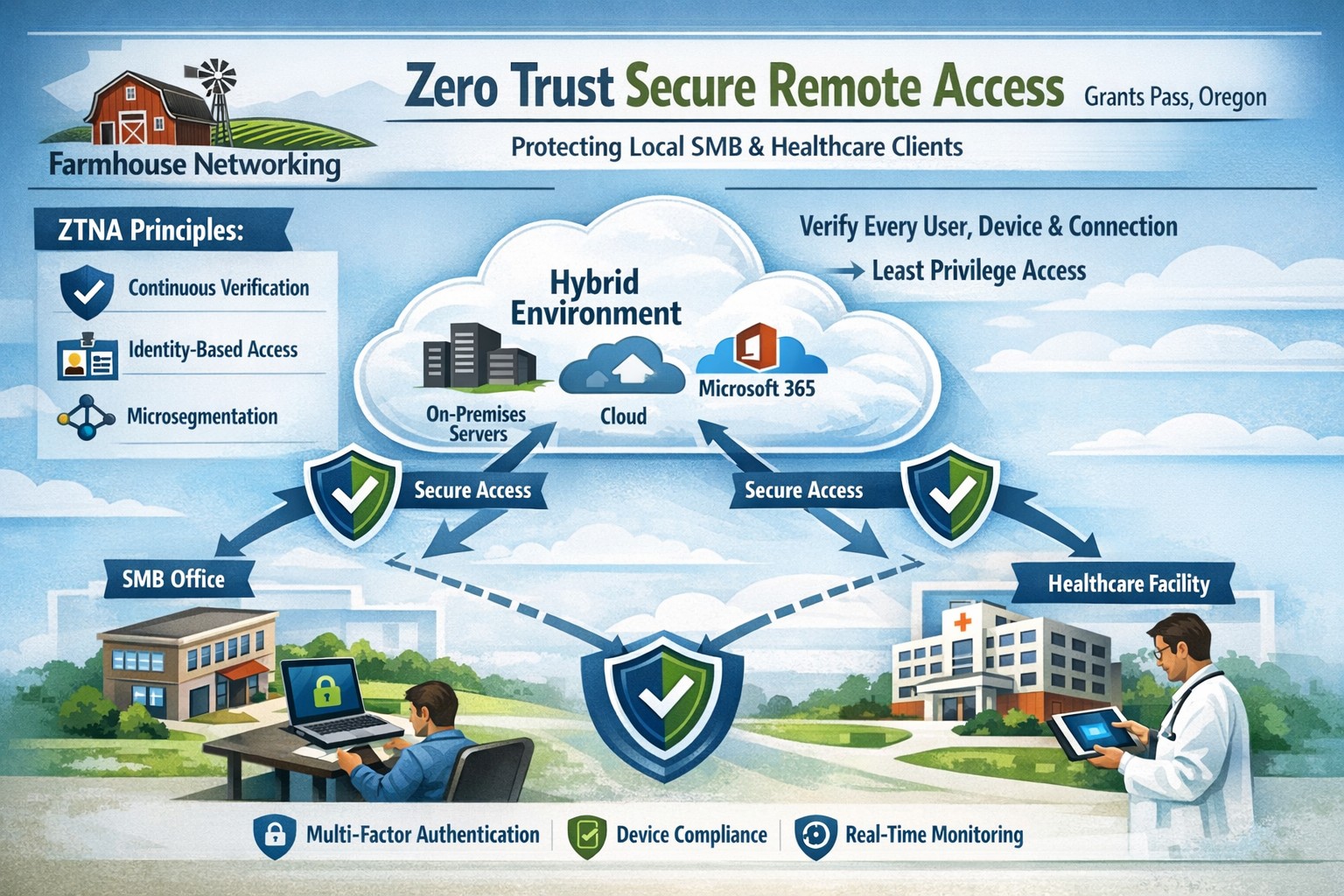
Farmhouse Networking delivers zero trust network access replacing VPNs for secure remote work in Grants Pass Oregon businesses.
This is the fourth in a series about the concept of Zero Trust, which means in the IT sense that you trust nothing and always verify everything surrounding and connected to your network. Today’s discussion will be on secure remote access.
Secure Remote Access
Secure Remote Access is the ability to connect to company resources from anywhere in a manner that does not compromise security. This can be done by several means including remote access software, Virtual Private Network (VPN), or File Sync & Share (FSS). Here are some questions that you should be asking yourself:
Does anyone in your organization work from home or remotely?
How are they remotely connecting to the office?
Are you able to revoke access to the office if they leave the company?
If that connection is a modern VPN, what type of security does it use?
Is your VPN based on passwords or certificates?
Does the VPN log usage statistics?
If that connection is a remote access software, what type of security does it use?
Does the software limit who has access to which resource?
Does the software log who is logging in and for how long?
If that connection is via FSS, what type of security does it use?
Does your FSS have file versioning, backups, and ransomware protection?
Does the FSS limit who has access to which resource?
Do you use 2FA as part of your remote access?
Take time to think about these questions and decide where changes can be made to better protect your IT investments, or contact us to do the thinking for you.
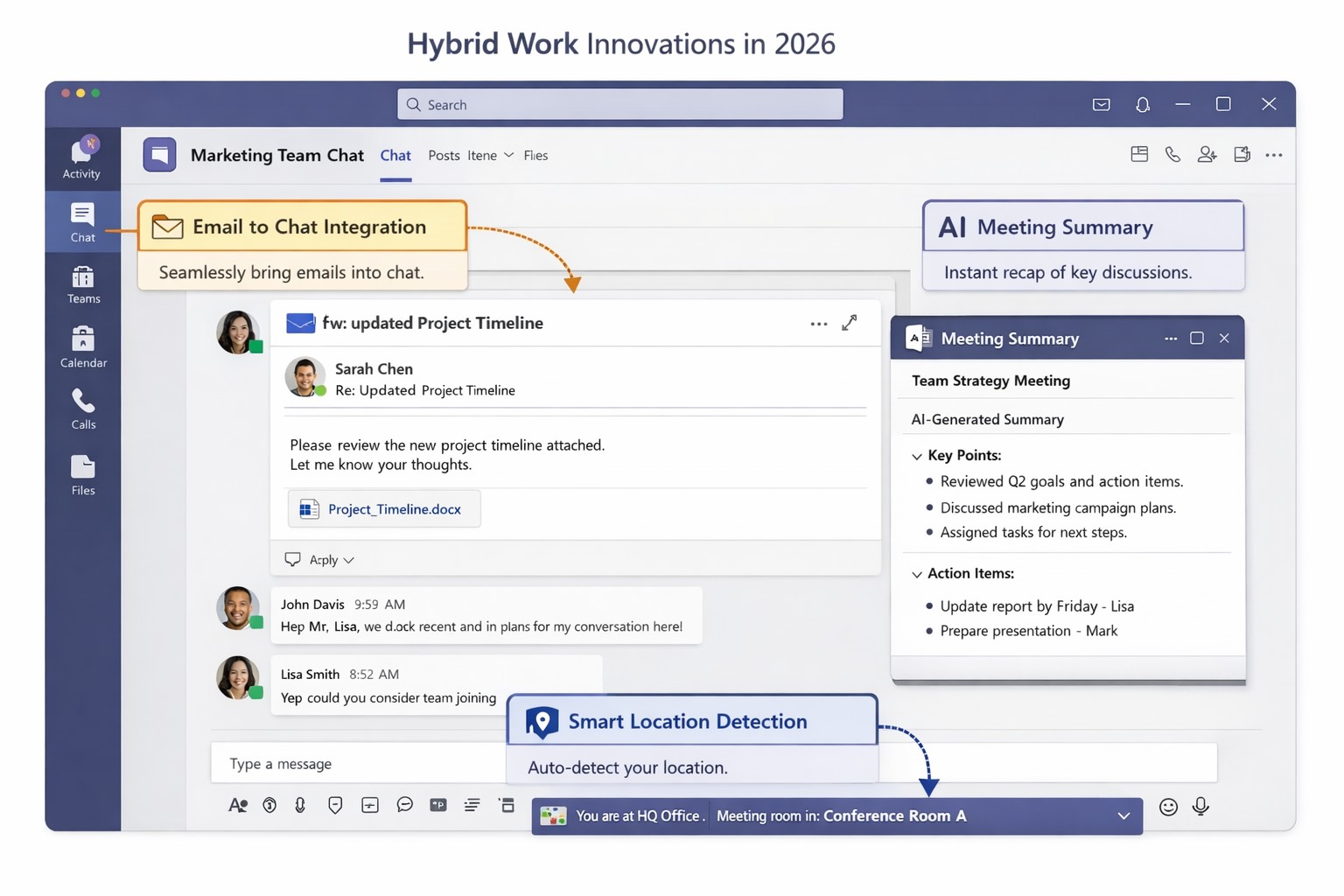
Key Microsoft Teams innovations designed for hybrid work environments, including AI-powered tools and seamless integrations
You’re likely grappling with fragmented communication, productivity dips, and tool silos that hinder growth. Microsoft Teams’ latest 2026 innovations—AI summaries, email-to-chat integration, and smart location detection—bridge these gaps, creating a unified hub for internal and external collaboration.
Key Innovations for Hybrid Efficiency
Teams now supports email-to-chat, allowing seamless communication with vendors and clients who use email instead of Teams, solving tool fragmentation in hybrid setups. AI-powered summaries condense mixed internal-external threads, ensuring alignment without full attendance, while granular guest access and compliance alerts enhance security.
Smart location detection auto-updates work status via office Wi-Fi, helping managers track hybrid presence accurately—crucial as Microsoft mandates three in-office days for its own teams starting 2026. These features integrate with Microsoft 365 for immersive tools like Loop and SharePoint, boosting workflow automation.
Practical Action Steps
Implement these steps with your IT department to leverage Teams for hybrid work:
Audit Current Setup: Review Teams usage via admin center analytics; identify silos (e.g., email-heavy vendor chats). Upgrade to latest Microsoft 365 E3/E5 licenses for full AI features—takes 1-2 hours.
Enable Core Features: In Teams admin center, activate email-to-chat policies and AI summaries under Meetings > Policies. Test Wi-Fi location detection on 10 pilot devices; configure granular guest roles for externals.
Train and Roll Out: Run company-wide training sessions (use built-in Teams training modules). Set governance rules for external access; monitor via compliance alerts. Aim for 80% adoption in 4 weeks.
Integrate and Optimize: Link with Outlook/Loop for unified hubs; use Together Mode for inclusive hybrid meetings. Quarterly reviews ensure ROI through productivity metrics.
These steps minimize disruption while maximizing hybrid productivity.
FAQ: Client Inquiries Answered
Q: How does email-to-chat benefit my business? A: It unifies communication—vendors email directly into Teams chats, streamlining hybrid coordination without new accounts.
Q: Is smart location tracking secure and privacy-compliant? A: Admins control it (default off); it uses Wi-Fi BSSIDs without GPS, with compliance notifications for breaches.
Q: Will these features work for small teams? A: Yes, scalable for SMBs; no extra hardware needed beyond standard devices.
Q: What’s the ROI timeline? A: Businesses report 20-30% collaboration gains in 1-3 months via reduced meeting times and faster decisions.
How Farmhouse Networking Helps
Farmhouse Networking specializes in Microsoft 365 optimizations for accounting, healthcare, and charity sectors. We handle full Teams deployments: custom audits, feature rollouts, compliance setups, and training tailored to B2B hybrid needs. Our SEO-driven websites and lead-gen strategies have boosted organic traffic 40%+ for clients, converting visitors to long-term partners. Let us manage IT complexities so you focus on growth.
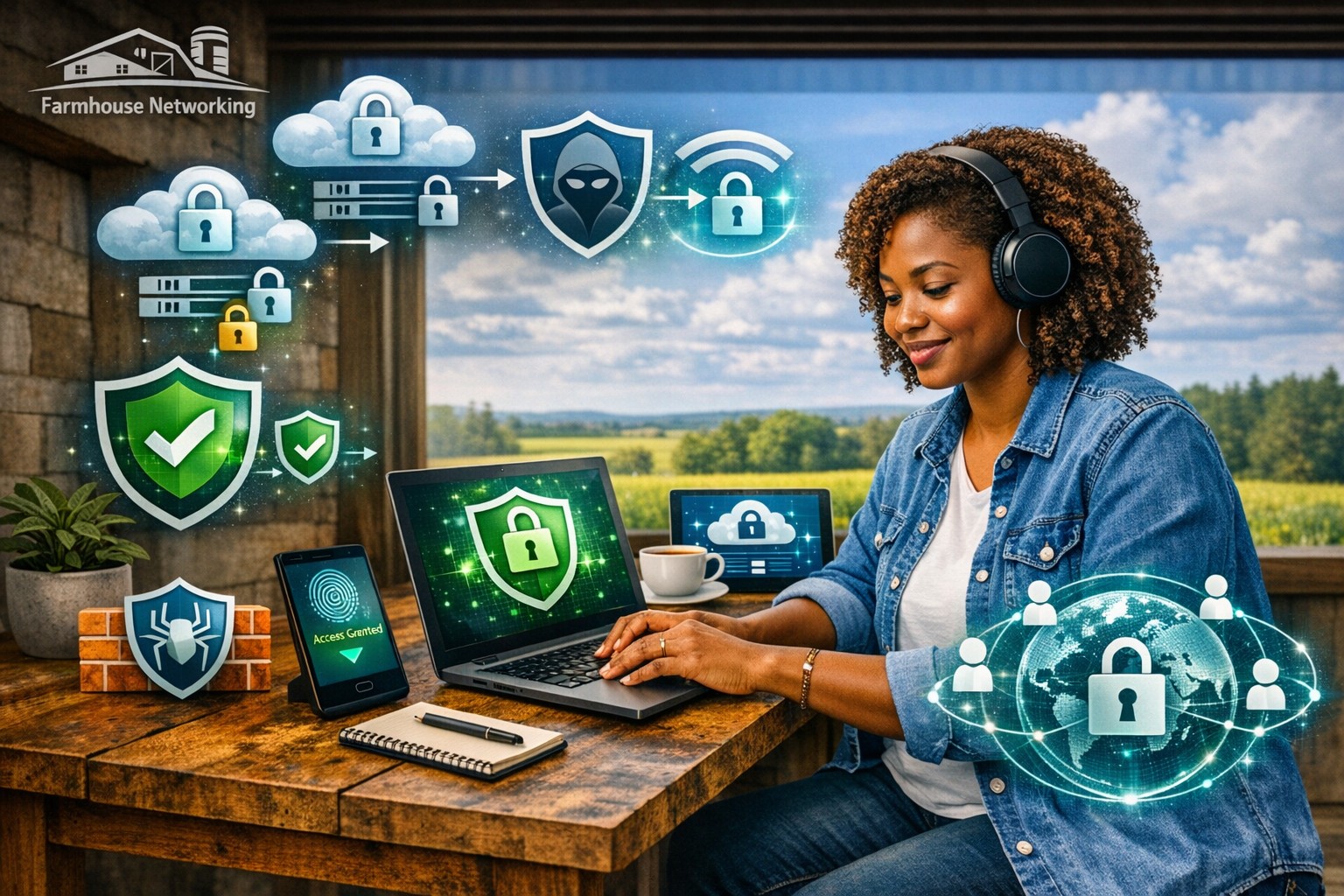
Protect your remote workforce with managed cybersecurity solutions from Farmhouse Networking.
Remote work isn’t a trend anymore—it’s the new normal. As business owners embrace flexibility for their teams, the question isn’t whether remote work is here to stay, but how to keep it secure. Every remote connection, off-site login, and cloud app increases your organization’s exposure to cyber threats. Yet with a strategic approach and the right IT partner, you can maintain both productivity and peace of mind.
Let’s explore practical steps to safeguard your remote workforce and keep your company’s data protected—no matter where your employees log in from.
Step 1: Strengthen Endpoint Security
Your employees’ laptops, tablets, and smartphones are the front lines of your cybersecurity defense.
Implement device management policies: Require company-issued or managed devices only, using mobile device management (MDM) tools to enforce security settings and lock or wipe lost devices.
Apply regular updates: Patch management ensures operating systems and applications stay current against known vulnerabilities.
Use advanced antivirus and EDR: Endpoint Detection and Response (EDR) continually monitors and analyzes device activity, identifying suspicious behavior early.
Strong endpoint protection helps you prevent compromised devices from becoming entry points into your network.
Step 2: Establish Secure Remote Access
Allowing remote access shouldn’t mean leaving your digital doors wide open.
Deploy a VPN (Virtual Private Network): Encrypt employee connections to your office network and cloud services.
Shift to Zero Trust Network Access (ZTNA): Adopt a “never trust, always verify” model that authenticates users and devices each time they connect.
Use multi-factor authentication (MFA): Combine passwords with a second factor, like a mobile app code or biometric scan, to block unauthorized access.
These technologies work together to create secure pathways for remote workers without slowing them down.
Step 3: Protect Your Cloud and Collaboration Tools
Cloud storage and file-sharing apps make remote work seamless—but they’re also favorite targets for cybercriminals.
Limit access privileges: Give users only the data and systems access they need for their jobs.
Monitor suspicious activity: Use automated alerts for unauthorized downloads, logins from unfamiliar locations, or mass file deletions.
Encrypt cloud data: Apply encryption at rest (while stored) and in transit (while shared).
By managing permissions and encryption settings properly, you ensure your remote team collaborates safely.
Step 4: Train Your Employees to Recognize Threats
Technology can’t protect your business alone—your people are your first defense.
Phishing simulation tests: Help employees identify deceptive emails before they click.
Ongoing security awareness training: Regular, engaging sessions keep cybersecurity top of mind.
Clear incident reporting process: Make sure staff know exactly how to report suspicious emails or activity.
Even the strongest firewall can’t fix a careless click. Empowered employees dramatically lower your exposure to ransomware and data breaches.
Step 5: Backups and Business Continuity
When (not if) something goes wrong, recovery speed determines your resilience.
Automated, off-site backups: Back up critical company data daily to secure cloud storage or a managed backup solution.
Test your recovery protocols: Periodic testing ensures recovery procedures actually work when needed.
Create a disaster recovery plan: Define roles, responsibilities, and communication plans for emergencies.
Regular backups not only protect your business from cyberattacks but also from system failures, accidental deletion, or natural disasters.
Common Questions from Business Owners
Q: How can I ensure my remote workers’ home networks are secure? A: Require strong, unique Wi-Fi passwords and WPA3 encryption. Encourage employees to separate personal and work devices on different Wi-Fi networks where possible.
Q: Aren’t remote security tools expensive? A: Not necessarily. Many solutions scale by user count, making them affordable for small to medium-sized businesses. Cloud-based management and outsourced IT services can reduce operational overhead.
Q: What’s the biggest cybersecurity risk for remote businesses? A: Human error remains number one—especially phishing attacks and weak passwords. That’s why employee training and MFA are critical foundations of your remote work security strategy.
How Farmhouse Networking Helps Strengthen Remote Security
At Farmhouse Networking, we help businesses across Oregon and beyond embrace remote work securely. Our team provides managed IT services, network monitoring, cybersecurity management, and employee training tailored to your business goals.
Here’s how we can help you stay secure while working remotely:
Comprehensive network and endpoint protection designed to prevent unauthorized access.
24/7 monitoring and response to detect threats in real time.
Cloud security audits to ensure collaboration tools meet compliance and security standards.
Custom remote work security plans aligned with your IT budget and risk profile.
We work closely with your internal IT staff or serve as your outsourced department—helping you focus on running your business, not worrying about cyber risks.
Take the Next Step Toward Secure Remote Work
Remote work can be safe, scalable, and sustainable—with the right security foundation. Whether you’re building your first remote team or managing a hybrid workforce, Farmhouse Networking has the expertise to protect your people, devices, and data.
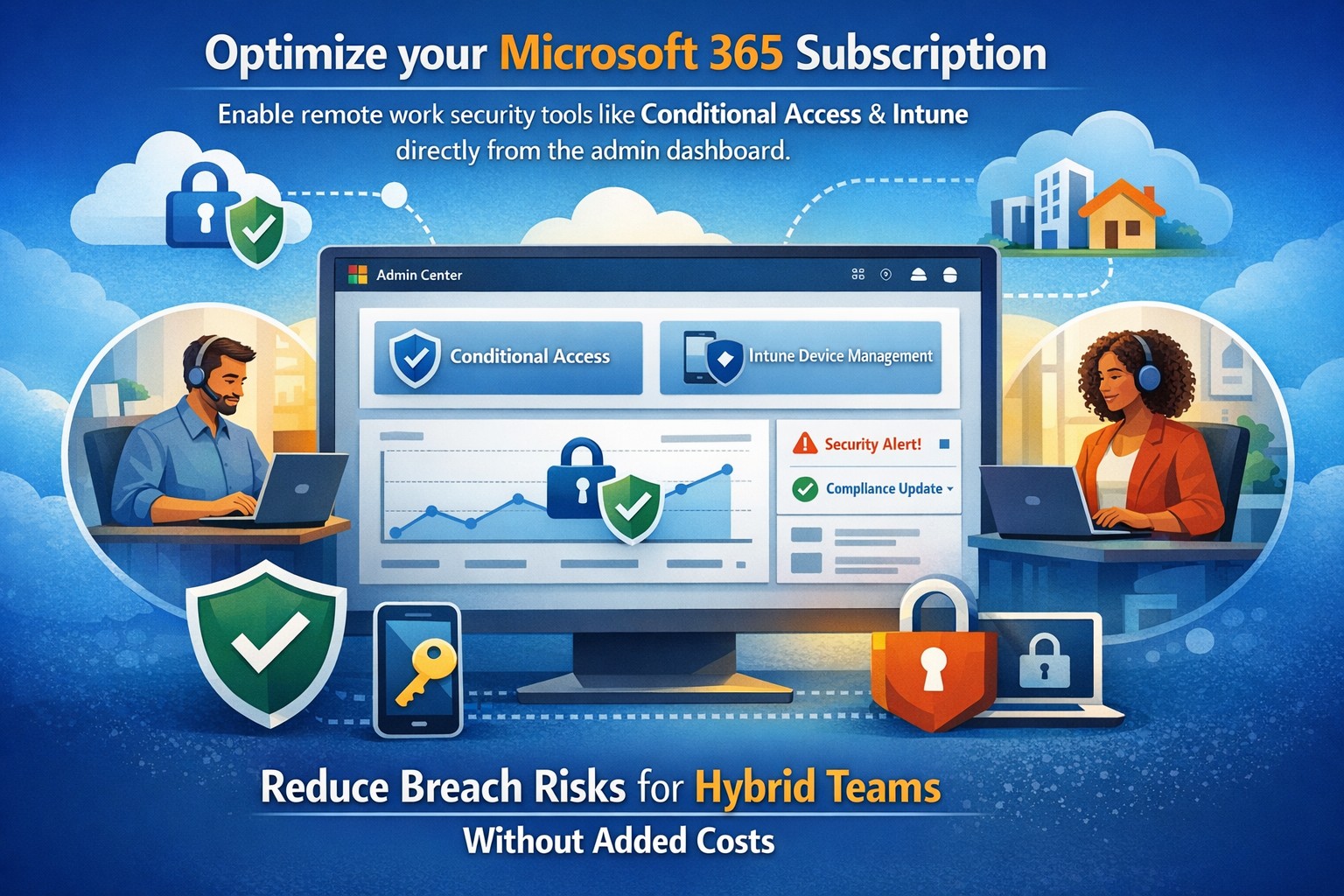
Microsoft Defender Secure Score dashboard—key to evaluating and activating built-in remote work security features for your business.
You’re likely paying for Microsoft 365 subscriptions but underutilizing their built-in security arsenal. With cyber threats targeting remote setups—phishing up 30% year-over-year per recent Microsoft telemetry—it’s critical to activate these features now to protect data, cut breach risks, and avoid costly add-ons.
Key Microsoft Security Features
Microsoft 365 packs robust remote work protections like Multi-Factor Authentication (MFA), Conditional Access, Microsoft Intune for device management, and Defender suite tools. MFA blocks 99.9% of automated attacks, while Conditional Access enforces policies based on location, device health, or risk signals. Intune enables endpoint detection and response (EDR), remote wipes, and compliance checks, ensuring laptops on home Wi-Fi stay secure without VPN overkill.
These tools integrate seamlessly across E3/E5 plans, with 2026 updates adding AI-driven Copilot security agents and expanded Intune Remote Help.
Practical Action Steps
Work with your IT team to implement these prioritized steps, achievable in 1-2 weeks for most SMBs.
Enable MFA Everywhere: In Azure AD, turn on Security Defaults or Conditional Access policies requiring MFA for all users, prioritizing admins. Use Microsoft Authenticator app over SMS.
Set Up Conditional Access: Block logins from risky locations/devices; require compliant endpoints. Go to Azure AD > Security > Conditional Access > New policy.
Enroll Devices in Intune: Automate BitLocker encryption, OS updates, and EDR via Microsoft Defender. Test remote wipe on a pilot group first.
Activate Defender Protections: Enable Safe Links/Attachments in Defender for Office 365, plus XDR for cross-app threat detection. Review Secure Score dashboard weekly.
Audit and Train: Run Microsoft Secure Score to baseline posture, then deploy awareness training via Attack Simulator.
Step
Owner
Time Estimate
Impact
MFA Enablement
IT Admin
1 day
Blocks 99.9% credential attacks
Intune Enrollment
IT + Owners
3-5 days
Secures remote endpoints
Defender Activation
IT Admin
2 days
AI threat response
FAQs for Business Owners
How much does this cost if we have Microsoft 365? Most features are included in E3/E5 plans—no extras needed. Check licensing in admin center; upgrades like Defender P2 cost ~$5/user/month if required.
What if our team resists MFA? Start with risk-based policies (e.g., MFA only on unusual logins) for low friction, then phase to full enforcement. Training reduces pushback by 40%.
Can we secure non-Windows devices? Yes, Intune supports macOS, iOS, Android for MAM policies and compliance.
How do we measure success? Track Secure Score improvements (aim for 80%+), reduced alerts in Defender portal, and zero MFA-blocked breaches.
Is VPN still required? Not always—Conditional Access + Intune often suffices for cloud apps, minimizing latency.
How Farmhouse Networking Helps
Farmhouse Networking specializes in Microsoft 365 optimizations for accounting, healthcare, and charity sectors, where compliance (HIPAA, PCI) is non-negotiable. We audit your tenant, implement these steps via remote sessions, and provide ongoing monitoring—delivering 25% risk reduction in 30 days without downtime. Our SEO-driven websites and lead-gen strategies have boosted organic traffic 3x for similar clients.
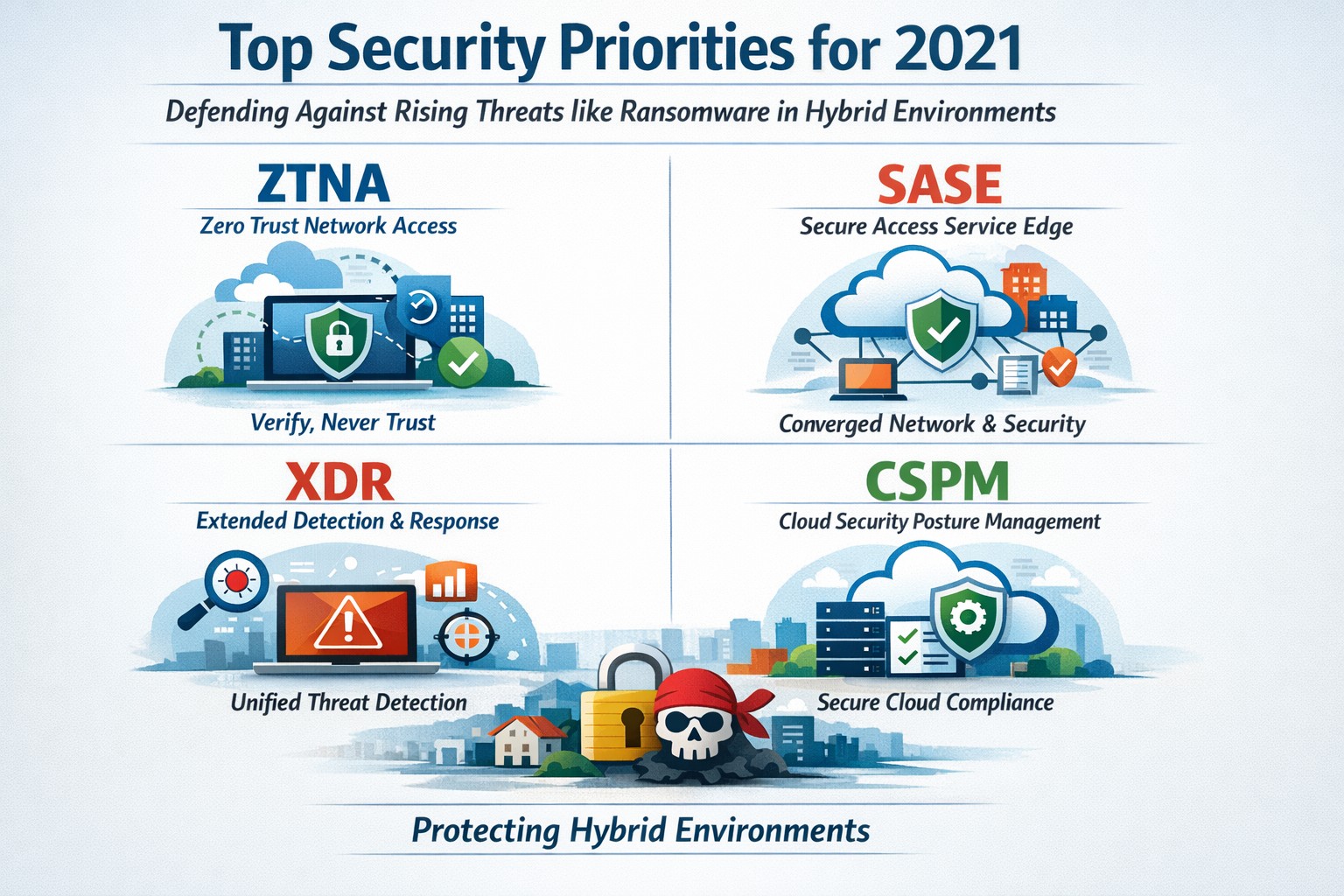
Infographic of top 2021 security solutions including SASE, XDR, and risk-based vulnerability management for secure remote work
The shift to remote work and cloud services in 2021 exposed critical vulnerabilities, with threats like ransomware surging 93% year-over-year. This overview distills Gartner’s top security priorities from that pivotal year, helping you safeguard operations without overwhelming your IT team.
Key 2021 Security Priorities
Gartner’s 2021 recommendations focused on ten high-impact projects to counter rising cyber risks amid hybrid work. Top priorities included securing teleworking, implementing risk-based vulnerability management, and deploying Extended Detection and Response (XDR) platforms for unified threat monitoring. Cloud security posture management (CSPM) and simplified access controls via Cloud Access Security Brokers (CASBs) addressed the rapid cloud adoption boom.
These solutions converged under Secure Access Service Edge (SASE), reducing point-product sprawl while enabling Zero Trust Network Access (ZTNA). Business owners benefited from passwordless authentication (e.g., FIDO2) and DMARC for email, cutting phishing success by up to 80% in early adopters.
Practical Action Steps
Follow these targeted steps with your IT department to implement 2021-era protections efficiently.
Assess Remote Access Risks: Audit VPN usage and deploy ZTNA or SASE within 30 days—start with a tool like Zscaler or Palo Alto Prisma Access to verify user identity per session.
Prioritize Vulnerability Patching: Use risk-based tools (e.g., Tenable or Qualys) to score and remediate flaws; target critical patches in under 7 days.
Unify Threat Detection with XDR: Consolidate SIEM, EDR, and network tools into one platform like Microsoft Defender XDR; test via a 90-day pilot.
Secure Cloud Configurations: Run CSPM scans weekly with Prisma Cloud or Lacework; enforce least-privilege via CASBs.
Enable Passwordless and DMARC: Roll out MFA everywhere, then phishing-resistant auth; configure DMARC on all domains to block spoofing.
Classify and Protect Data: Tag sensitive files with tools like Microsoft Purview; apply DLP policies to block unauthorized sharing.
These steps typically yield 40-60% risk reduction in the first quarter when executed sequentially.
FAQs: Client Inquiries Answered
What made 2021 security solutions different from prior years? 2021 emphasized convergence—XDR and SASE merged siloed tools into streamlined platforms, addressing remote work’s explosion post-COVID.
How much do these implementations cost for a mid-sized business? Entry-level XDR/SASE starts at $10-20/user/month; full rollout for 100 users averages $50K initial plus $24K/year, with ROI from breach avoidance exceeding 5x.
Will these protect against ransomware like in 2021 outbreaks? Yes—risk-based vuln management and XDR detect lateral movement early, as seen in blocking 95% of Colonial Pipeline-style attacks.
How long to see results? Quick wins in 4-6 weeks (e.g., DMARC setup); full maturity in 6 months with automation.
Do I need a full IT overhaul? No—layer these onto existing infra; start with high-ROI items like teleworking security.
How Farmhouse Networking Supports Your Implementation
Farmhouse Networking specializes in tailored security for accounting, healthcare, and charity sectors, where compliance (HIPAA, PCI-DSS) amplifies risks. We handle audits, XDR/SASE deployments, and CSPM configurations, integrating seamlessly with your cloud stack (O365, AWS).
Our team delivers managed services: weekly vuln scans, 24/7 XDR monitoring, and staff training—reducing your IT burden by 70%. We’ve helped similar clients cut incidents 85% post-2021 upgrades, ensuring HIPAA/GDPR alignment without downtime.
Call to Action
Ready to fortify your business with proven 2021 security solutions? Email support@farmhousenetworking.com today for a free risk assessment and custom roadmap. Protect your operations—act now.
And God will generously provide all you need. Then you will always have everything you need and plenty left over to share with others. As the Scriptures say,
“They share freely and give generously to the poor. Their good deeds will be remembered forever.”
For God is the one who provides seed for the farmer and then bread to eat. In the same way, he will provide and increase your resources and then produce a great harvest of generosity in you. - 2 Corinthians 9:8-10
We use cookies to ensure that we give you the best experience on our website. If you continue to use this site we will assume that you are happy with it.