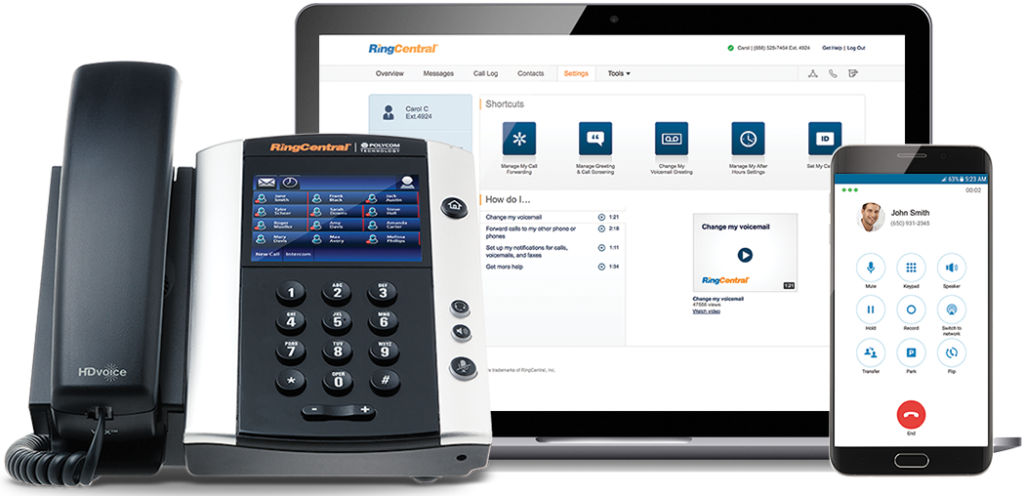
AI-powered RingCentral solutions enhancing SMB VoIP productivity and customer interactions
Small and medium-sized businesses (SMBs) face numerous challenges in maintaining efficient communication systems. The integration of Artificial Intelligence (AI) into business communications has emerged as a game-changer, offering solutions that enhance productivity, improve customer experiences, and drive revenue growth. RingCentral, a leader in AI-powered cloud communications, is at the forefront of this transformation. Here’s how RingCentral’s innovative AI solutions are revolutionizing SMB communications.
Enhancing Employee Efficiency with Real-Time Notes
RingCentral’s AI Notes feature automatically captures key points from meetings and calls in real-time. This allows sales teams to focus on client interactions while ensuring that all details are documented accurately for future reference. Customer service teams can also benefit by instantly logging customer queries and solutions, improving service quality over time.
Smarter SMS Interactions
RingCentral’s SMS enhancements provide businesses with tools to streamline text messaging interactions. Features like muting notifications during meetings and organizing SMS threads help keep conversations organized and distraction-free. Additionally, integrating SMS APIs can automate processes such as appointment confirmations and real-time updates, significantly reducing costs while speeding up customer response times.
Intelligent Virtual Assistants for Superior Self-Service
Small businesses can leverage intelligent virtual assistants (IVAs) to offer superior self-service options through digital and voice interactions. These IVAs automate tasks like answering frequent questions or providing basic support information without human intervention.
Unlocking Insights with Conversation Intelligence
RingSense AI provides conversation intelligence that unlocks valuable insights from every customer interaction across calls, emails, contact centers, and video meetings. This empowers sales teams with actionable intelligence for revenue optimization by analyzing trends in customer interactions and seamlessly integrating with CRMs.
Simplifying Event Management with AI-Powered Events
RingCentral Events simplifies end-to-end event management using AI capabilities such as Q&A categorization and auto-generated summaries for social media clips. This helps marketing teams manage virtual or hybrid events more efficiently.
If you’re interested in transforming your SMB’s communication landscape using RingCentral’s cutting-edge AI solutions, contact Farmhouse Networking, a trusted RingCentral Partner today! Our team will guide you through the process of implementing these innovative tools tailored specifically to your business needs.
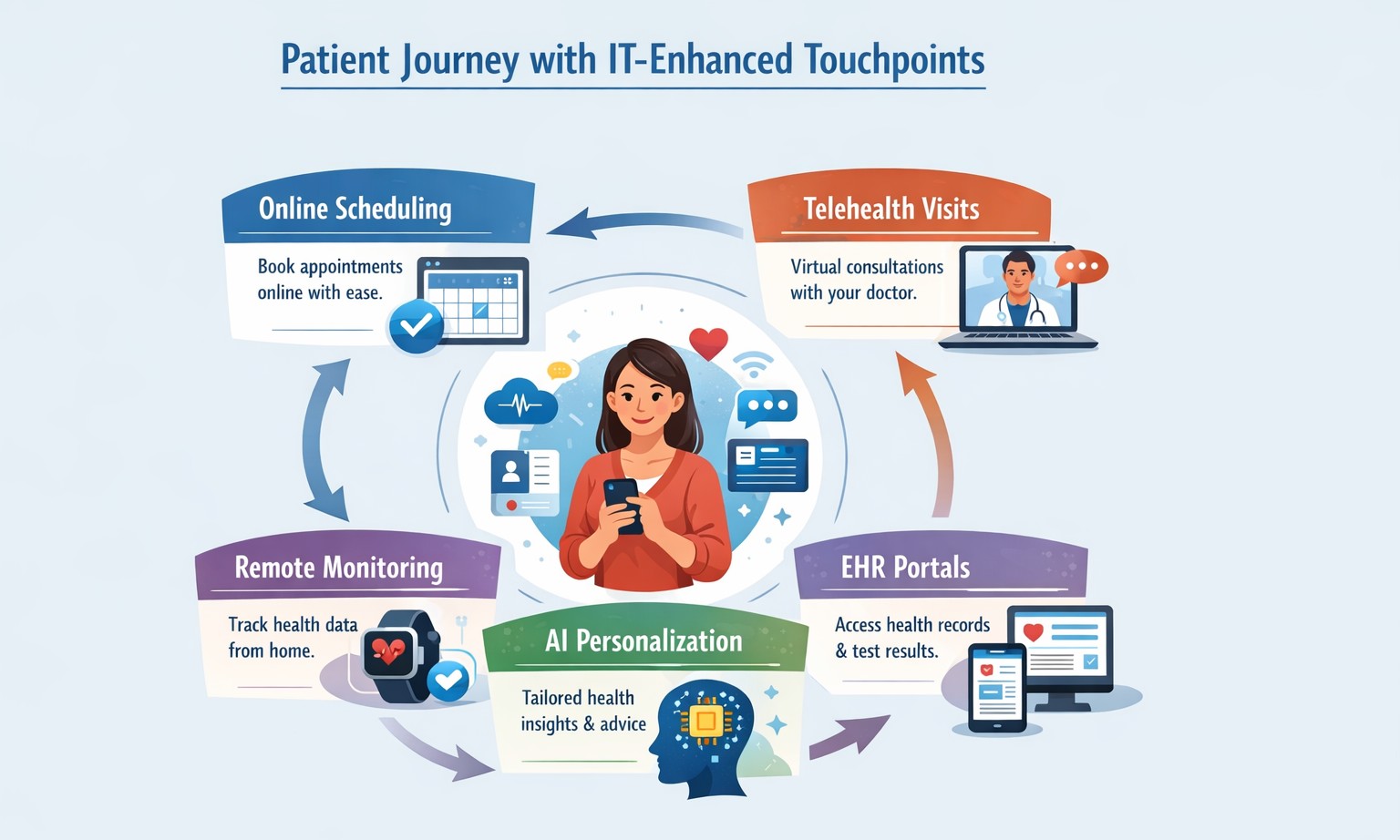
Healthcare IT transforms patient journeys with seamless digital access and personalization.
Healthcare providers are increasingly turning to technology to enhance patient care and streamline operations. IT solutions play a crucial role in this transformation, offering innovative tools that significantly improve patient experience. Let’s explore how these IT solutions are revolutionizing healthcare delivery.
Online Scheduling: Convenience at Your Fingertips
One of the most impactful IT solutions in healthcare is online scheduling. This feature allows patients to book appointments at their convenience, without the need for phone calls or long wait times.
Benefits of online scheduling: – Reduces scheduling errors and double bookings – Increases practice efficiency – Offers patients 24/7 access to appointment booking – Aligns with patient preferences (67% of Americans prefer online scheduling)
By implementing online scheduling, healthcare providers can streamline their operations while meeting the evolving expectations of their patients.
Patient Portals: Empowering Patients
Patient portals have become an essential tool in modern healthcare, serving as a secure digital gateway for patients to access their health information and communicate with providers.
Key features of patient portals: – Access to medical records and test results – Secure messaging with healthcare providers – Prescription refill requests – Bill payment options
These portals not only improve communication but also foster a sense of collaboration between patients and providers, leading to increased trust and engagement in healthcare activities.
Digital Check-In Systems: Streamlining the Patient Journey
Digital check-in systems are transforming the traditional patient intake process, offering numerous benefits for both patients and healthcare providers.
Advantages of digital check-in: – Reduced wait times – Improved data accuracy – Enhanced patient privacy – Increased operational efficiency
By allowing patients to complete pre-visit forms and verify insurance information online, digital check-in systems significantly reduce administrative burdens and improve the overall patient experience.
The Impact on Patient Experience
The integration of these IT solutions has a profound effect on patient satisfaction and healthcare delivery:
Improved Accessibility: Patients can manage their healthcare needs around the clock, enhancing convenience and reducing barriers to care.
Enhanced Communication: Digital tools facilitate better communication between patients and providers, leading to improved care coordination and patient outcomes.
Increased Efficiency: Automated processes reduce wait times and administrative tasks, allowing healthcare staff to focus more on patient care.
Data Accuracy: Digital systems ensure that patient information is up-to-date and easily accessible, reducing errors and improving care quality.
Patient Empowerment: Access to health information and self-service tools encourages patients to take a more active role in their healthcare.
Embracing the Future of Healthcare
As the healthcare landscape continues to evolve, the adoption of IT solutions becomes increasingly crucial for providers looking to enhance patient experience and operational efficiency. These technologies not only meet the expectations of tech-savvy patients but also contribute to better health outcomes and increased patient satisfaction.
Are you ready to transform your healthcare practice with cutting-edge IT solutions? Contact Farmhouse Networking today to learn how we can help you implement these patient-centric technologies and take your practice to the next level. Let us partner with you to create a seamless, efficient, and patient-friendly healthcare experience that sets your practice apart.
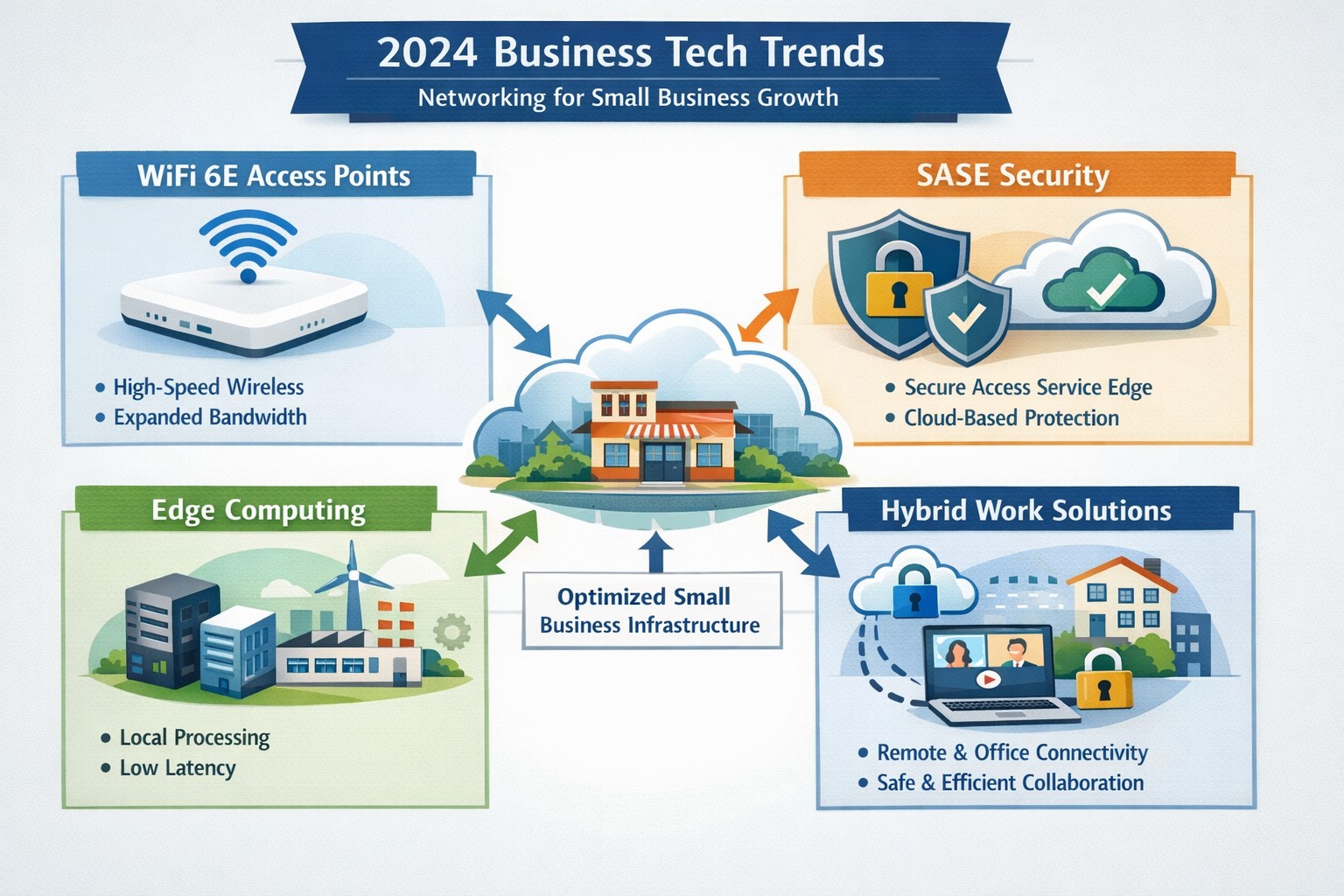
2024 networking trends like WiFi 6E and zero trust architecture prepare small businesses for hybrid work and cybersecurity demands.
As we enter 2024, the U.S. Chamber of Commerce reports that 64% of business owners believe their businesses are in good health, showing confidence in navigating the future. Technology has emerged as a key driver of success, enabling businesses to thrive in uncertain times. Farmhouse Networking has identified four essential technology trends that will empower businesses in 2024, propelling them towards growth and success.
1. Harnessing the Power of Artificial Intelligence
Artificial intelligence (AI) has moved beyond the realm of technology discussions and is now at the forefront of business success. Businesses utilizing AI credit it for increased success, as it offers game changing assistance in various areas of operations. AI tools can automate tasks, saving time and resources for businesses.
AI for Operational Efficiency
Businesses can leverage AI to automate expense management, correlate data from multiple sources to create meaningful reports, create sales presentations that address customer needs, and tackle tasks that were previously time-consuming. By harnessing AI, manufactures can optimize inventory, align staffing with peak hours, and identify opportunities for targeted promotions. Although implementing AI may require an initial investment, the positive impact it can have on businesses in 2024 is promising.
AI for Enhanced Customer Experiences
Customer experience plays a pivotal role in business success, with 34% of business leaders recognizing the pivotal role of technology in delivering exceptional experiences. Upgrading systems to ditch outdated tech and manual methods is a priority for many businesses in 2024. Chatbots, for instance, are invaluable for front-line customer service agents, providing round-the-clock support. Automated assistants and Unified Communications tools enhance customer interactions and employee productivity. These digital processes not only enhance retention and satisfaction but also create opportunities for cross-selling and upselling efforts.
2. Delivering Exceptional Digital Customer Experiences
Businesses understand the importance of delivering exceptional digital customer experiences in 2024. Upgrading systems and embracing efficient digital processes will be key to achieving this goal.
Upgrading Systems for Efficiency
Outdated technology and manual methods hinder efficiency. Businesses are expected to upgrade their systems by adopting AI, automating repetitive tasks, and migrating to the cloud. These solutions make information easily accessible, guide customers interactions, and improve employee productivity.
Embracing Cloud-based Solutions
A robust technology infrastructure is crucial for businesses to keep up with competition and exceed customer expectations. Automation software can save time and cut down on expenses by managing data and completing routine tasks. Mobile technology ensures network connectivity anywhere, anytime, allowing for collaboration on the go. Cloud based systems enables efficient management of IT costs plus offer flexibility and scalability, especially for businesses, as the workforce continues to move away from traditional office setups.
3. The Backbone of Business Operations: Fast and Reliable Connectivity
Fast and reliable connectivity is the backbone of efficient operations, seamless communication, and scalable expansion. Businesses across different sectors can benefit from investing in connectivity solutions.
Optimizing Inventory and Collaboration
Manufactures can leverage fast and reliable a to optimize inventory management. By having real-time visibility into inventory levels, manufactures can prevent stockouts and ensure they have the right products available when customers need them. Accountants can collaborate effectively without being limited by physical office spaces. Cloud connectivity allows them to access customer files, share updates, and communicate with team members regardless of their location.
Enhancing Healthcare Services
Connectivity plays a vital role in enhancing healthcare services. From telemedicine to remote patient monitoring, healthcare providers can offer more accessible and efficient care. Fast and reliable connectivity enables seamless communication between healthcare professionals and patients, facilitates the sharing of medical records, and supports the use of emerging technologies like artificial intelligence and Internet of Things (IoT) devices.
Safeguarding Customer and Company Devices
Investments in network connectivity not only benefit customers but also help safeguard customer and company devices. By adopting a complete network connectivity solution that includes reliable internet, network security measures, and disaster recovery solutions, businesses can protect sensitive data and ensure the smooth operation of their technology infrastructure.
4. Embracing the Future: Expanding Technology Spending
In 2024, CEOs are planning to expand their technology spending to stay competitive and meet evolving customer expectations. However, to fully leverage the benefits of technological investments, businesses need to partner with reputable companies that can provide robust network infrastructure.
Strengthening Technological Investments with Robust Networks
Businesses should partner with companies like Farmhouse Networking to reinforce their critical technological investments. Robust networks ensure reliable network connectivity, data security, and seamless integration of technology solutions. By partnering with trusted providers, businesses can enhance their technology infrastructure and drive growth.
Weathering Uncertainties with Tech Transformation
By staying ahead of technology trends, business owners can not only weather uncertainties but also emerge stronger and more resilient. Embracing the power of artificial intelligence, delivering exceptional digital customer experiences, building a strong technology infrastructure, and investing in fast and reliable network connectivity will position businesses for success in 2024 and beyond.
Embracing these tech trends and partnering with trusted providers will enable businesses to thrive in an ever-evolving business landscape.
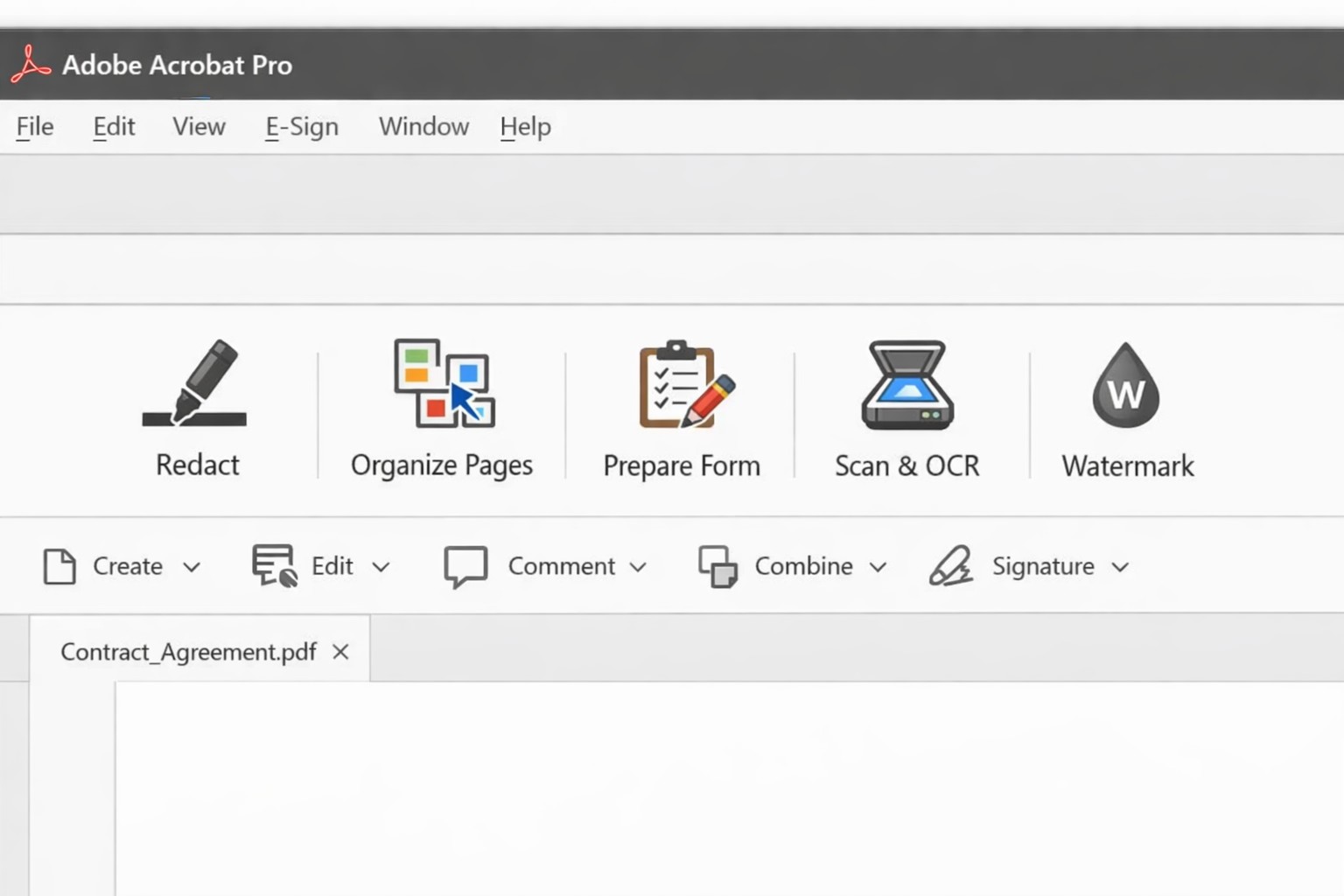
Acrobat Pro tools panel: redact combine edit OCR workflow actions.
Businesses are increasingly reliant on digital documents. From contracts to invoices, these important files need to be easily shared and accessible across different platforms and devices. This is where Adobe Acrobat comes in. Adobe Acrobat is a powerful tool that allows you to create, edit, and secure PDFs effectively. To help you make the most of this software, we have compiled a list of useful tips:
Create Interactive Forms
One of the key features of Adobe Acrobat is its ability to create interactive forms. Rather than wasting paper on printing out forms and having people fill them out manually, you can create digital forms that can be filled out electronically. This not only saves time and the planet but also reduces errors and allows you to collect data more efficiently.
Edit PDFs on the Go
With the Adobe Acrobat app, you can edit PDFs directly on your mobile device. This is incredibly useful for business owners who are constantly on the go and need to make quick edits to their documents. Whether it’s adding text, resizing images, or rearranging pages, you can do it all from the convenience of your phone or tablet.
Combine Multiple Files into a Single PDF
If you have multiple files that you want to combine into a single PDF, Adobe Acrobat makes it easy. You can simply drag and drop the files into Acrobat, rearrange them, and save them as a single PDF. This feature is ideal for business owners who often need to merge multiple documents into one proposal, contract, or report.
Protect your PDFs with Encryption
Security needs to be a top priority for businesses, especially when it comes to sensitive documents. Adobe Acrobat allows you to protect your PDFs by adding encryption. You can set passwords and permissions to ensure that only authorized individuals can access, print, or modify your files. This level of security is crucial for protecting confidential business and customer information.
Optimize PDFs for Web Viewing
PDFs can easily become large files, which can slow down loading times when viewing them online. Adobe Acrobat offers a feature called “Optimize for Web” that reduces the file size while preserving the document’s quality. This is particularly useful when sharing PDFs on your website or via email. When customers have to wait for things to load they are more likely to go somewhere else for what they are looking for.
Collaborate and Review Documents
Adobe Acrobat has collaboration features that allow multiple users to work on the same PDF simultaneously. You can easily share documents with colleagues, clients, or partners and track changes made by each. This streamlines the review and approval process, reducing the need for endless email threads and ensuring everyone is on the same page.
Automate Workflows with Adobe Sign
Adobe Sign, a component of Adobe Acrobat, enables you to send, sign, and track important documents online. It eliminates the need for paper-based signatures and accelerates the approval process. With Adobe Sign, you can automate workflows, whether it’s obtaining client signatures, approving contracts, or completing employee onboarding documents. This tool can streamline your business processes and save you a significant amount of time.
By familiarizing yourself with Adobe Acrobat, you can harness the full potential of this software and enhance your business’s productivity and efficiency. As an Adobe partner, Farmhouse Networking can help your company get the most out of its PDFs.
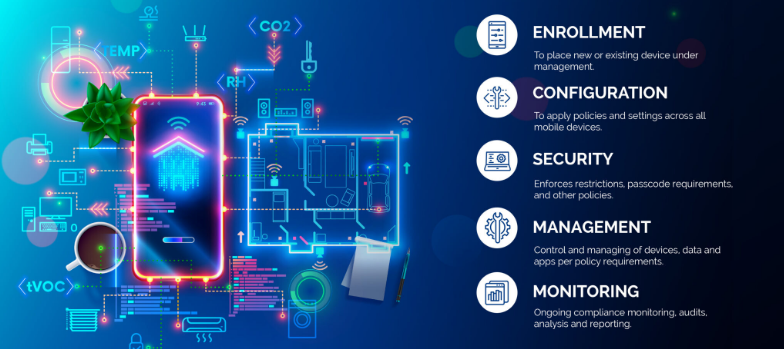
MDM dashboard with Android iOS device inventory compliance policies and security controls.
In today’s digital age, mobile devices have become an integral part of our lives, both personally and professionally. With the increasing reliance on smartphones and tablets, businesses, especially small and medium-sized enterprises (SMBs), need to prioritize mobile device security. One effective solution for enhancing Android and iPhone security is Mobile Device Management (MDM). In this article, we will explore the benefits of MDM for SMBs, its role in enhancing Android and iPhone security, and how businesses can implement MDM to safeguard their sensitive data.
1. Understanding the Importance of Android and iPhone Security
Android and iPhone, being the most widely used mobile operating systems globally, have become a prime target for cybercriminals. With its open-source nature and extensive app ecosystem, Android devices are susceptible to various security threats, such as malware, data breaches, and unauthorized access. With its user-friendliness and built-in trust, iPhone users are easily tricked into downloading and installing malware which leads to data breaches and unauthorized access. SMBs, in particular, need to be proactive in securing their Android and iPhone devices to protect sensitive customer information, intellectual property, and maintain regulatory compliance.
2. Introducing Mobile Device Management (MDM)
Mobile Device Management (MDM) is a comprehensive solution that enables businesses to centrally manage and secure their fleet of mobile devices, including Android and iPhone smartphones and tablets. MDM provides IT administrators with granular control over device settings, app distribution, security policies, and data management. By implementing MDM, SMBs can streamline device management, enhance data security, and ensure compliance with industry regulations.
2.1 Benefits of MDM for SMBs
Centralized Device Management: MDM allows businesses to manage multiple Android devices from a single console, simplifying device provisioning, configuration, and updates.
Enhanced Security: MDM enables IT administrators to enforce security policies, such as password requirements, encryption, and remote wipe capabilities, ensuring that lost or stolen devices do not compromise sensitive data.
App Distribution and Management: With MDM, businesses can distribute and manage apps on Android devices, ensuring that only authorized and secure applications are installed.
Secure Content and Data Management: MDM provides secure containers or workspaces on Android devices, segregating business data from personal information and enabling seamless data synchronization.
Compliance and Reporting: MDM offers robust reporting capabilities, allowing businesses to monitor device usage, enforce compliance regulations, and generate audit trails.
3. Implementing MDM for Android and iPhone Security
Implementing MDM for Android and iPhone security involves a series of steps to ensure a seamless deployment and effective device management. Let’s explore the key considerations and best practices for SMBs looking to implement MDM.
3.1 Assessing Business Needs and Objectives
Before implementing MDM, SMBs should assess their business needs and objectives. This includes identifying the number of devices to be managed, understanding the security requirements, and evaluating the compatibility with existing IT infrastructure.
3.2 Choosing the Right MDM Solution
There are numerous MDM solutions available in the market, each with its own set of features and capabilities. SMBs should carefully evaluate different MDM vendors, considering factors such as scalability, ease of use, security features, integration capabilities, and cost-effectiveness.
3.3 Defining Security Policies and Configuration
Once the MDM solution is selected, SMBs need to define security policies and configurations. This includes setting password requirements, enabling device encryption, configuring firewall settings, and defining app installation permissions. The policies should align with industry best practices and compliance regulations.
3.4 Device Enrollment and Onboarding
After defining security policies, SMBs can proceed with device enrollment and onboarding. This involves registering Android devices with the MDM system, configuring device settings, and installing necessary security profiles and certificates.
3.5 Monitoring and Maintenance
MDM is an ongoing process that requires continuous monitoring and maintenance. SMBs should regularly review security policies, update device configurations, patch vulnerabilities, and conduct security audits to ensure the effectiveness of the MDM solution.
4. Android vs. iPhone: MDM Considerations
While Android devices are more susceptible to security threats due to their open nature, it is essential to consider the unique security challenges posed by iOS devices, such as iPhones and iPads. Although iOS has built-in security features, SMBs should evaluate MDM solutions that offer comprehensive support for both Android and iOS devices to ensure consistent security across their mobile fleet.
5. The Future of MDM and Android Security
As technology evolves, the landscape of mobile device security continues to change. The future of MDM and Android security holds promising advancements, including:
Machine Learning and AI: MDM solutions can leverage machine learning and AI algorithms to detect and prevent emerging security threats proactively.
IoT Integration: With the rise of the Internet of Things (IoT), MDM will encompass managing and securing a broader range of devices, including wearables and smart home devices.
Biometric Authentication: MDM solutions will increasingly utilize biometric authentication, such as fingerprint and facial recognition, for secure device access.
Containerization and Virtualization: MDM will further enhance data security by implementing advanced containerization and virtualization techniques, isolating business data from personal information.
If your SMB is seeking to enhance Android and iPhone security by leveraging the benefits of MDM, contact us for professional assistance and guidance tailored to your specific needs.
2FA dashboard displaying account protection compliance metrics and phishing defenses.
Businesses are face an increasing number of cyber threats. To protect sensitive data and prevent hackers from gaining access, implementing stronger security measures is crucial. One such measure is 2-factor authentication (2FA). Let’s look at the importance and security benefits of 2FA for businesses.
Enhanced Account Security:
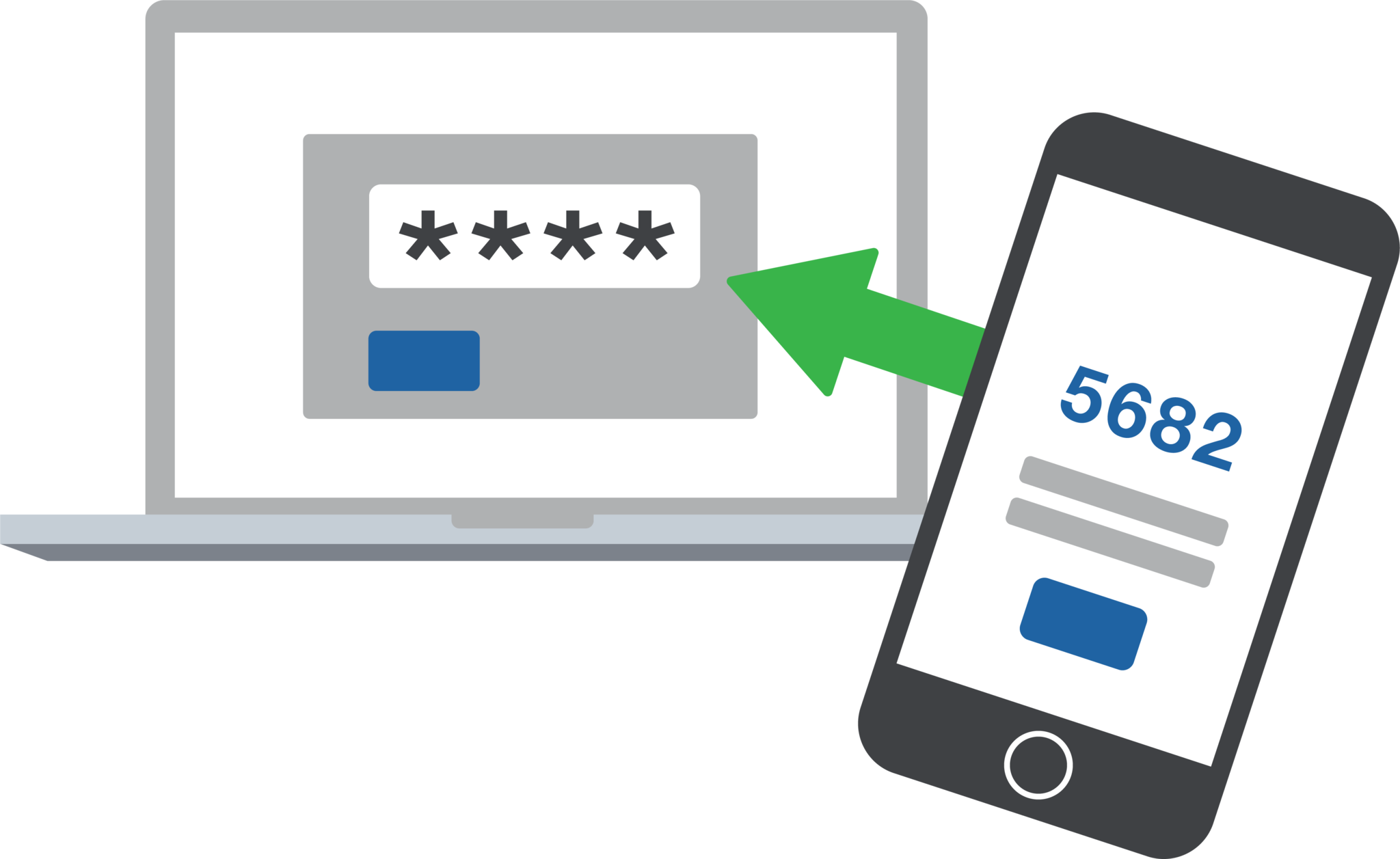
2FA adds an extra layer of security to the traditional username and password login process. By requiring users to provide a second form of authentication, such as a unique code sent to their mobile device, it significantly reduces the risk of hackers from gaining access. Even if a hacker manages to obtain a user’s password, they would still need the second factor to gain access.
Mitigation of Password-related Risks:
Passwords are often the weakest link in security systems. Many users tend to reuse passwords across multiple accounts or choose weak and easily guessable ones or re-use the same password while incrementally changing a digit or two. With 2FA, even if a password is compromised, the additional authentication factor acts as a safeguard, making it significantly harder for attackers to gain access.
Protection Against Phishing Attacks:
Phishing attacks, where attackers trick users into revealing their login credentials, are a common threat to businesses. 2FA provides an additional layer of defense against such attacks. Even if a user unknowingly falls victim to a phishing attempt and enters their credentials on a fake website, the second authentication factor would prevent the attacker from accessing the account.
Compliance with Industry Regulations:
Many industries, such as finance, healthcare, government contractors, and e-commerce, are subject to strict data protection regulations. Implementing 2FA helps businesses meet compliance requirements and avoid potential penalties. It demonstrates a commitment to safeguarding sensitive customer information and builds trust with clients.
Cost-Effective Security Measure:
Implementing 2FA does not require significant financial investment. Many 2FA solutions are readily available and can be easily integrated into existing systems. Considering the potential financial and brand reputation damage caused by a security breach, the cost of implementing 2FA is minimal compared to the benefits it provides.
In an era where cyber threats are constantly evolving, businesses must prioritize security measures to protect their valuable data. 2-factor authentication offers a simple yet effective way to do so.
If your company is interested in implementing 2FA across the entire organization, then contact us for assistance.
Farmhouse Networking installs Wi-Fi 6E eliminating 2.4/5 GHz congestion for Grants Pass businesses using clean 6 GHz spectrum.
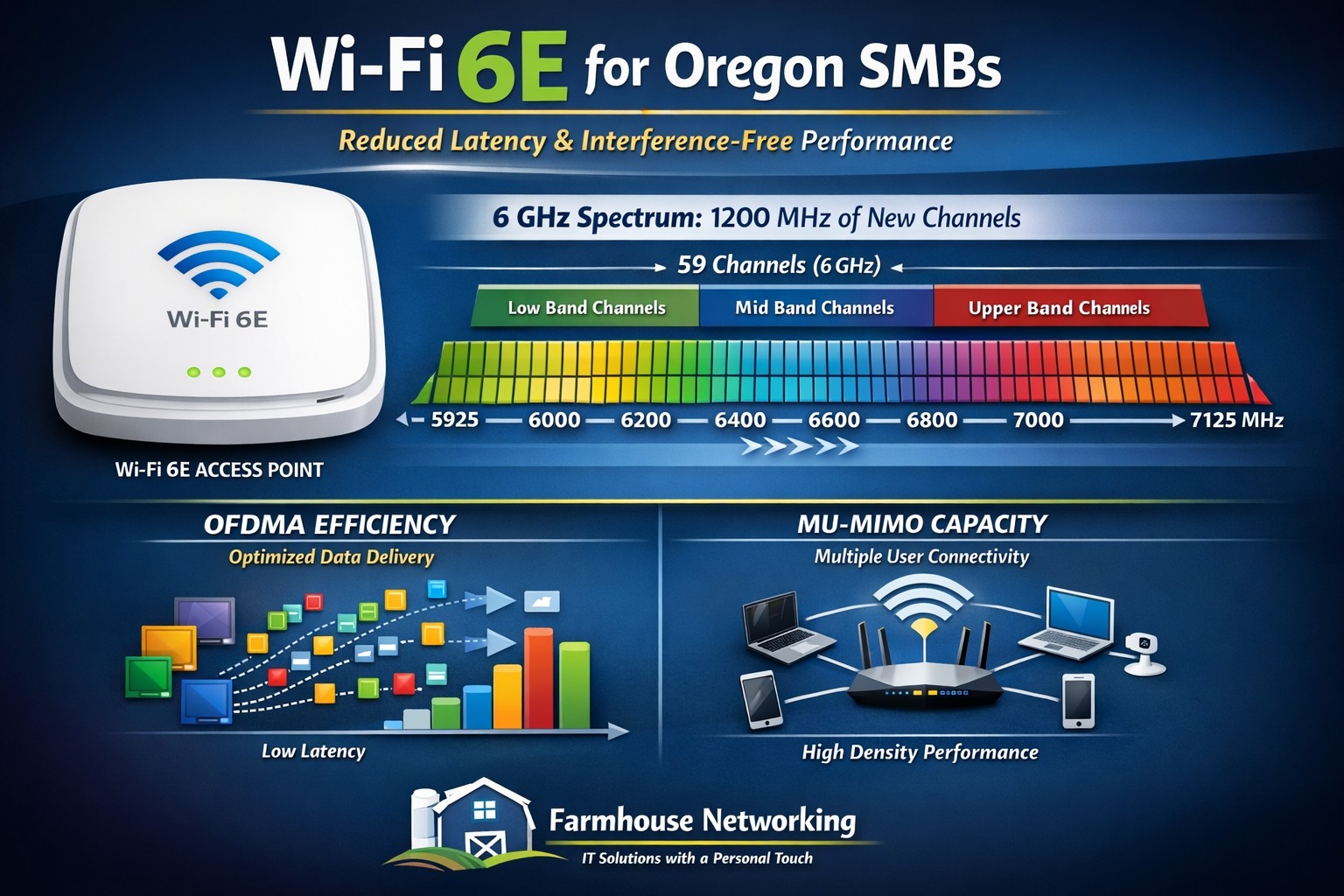
Wi-Fi technology is ingrained into our everyday lives WE COLLECTIVELY STREAM more movies and TV shows, play more online games, and make more video calls than ever before, and all this activity puts a serious strain on our Wi-Fi networks. Wi-Fi 6e has various features to improve the efficiency and data of your wireless network and reduce latency. the latest Wi-Fi 6e standards offers a range of benefits, including faster and more reliable access. So, what is Wi-Fi 6e and what are some of the benefits?
Wi-Fi 6e explained
Existing technologies operate on two frequencies 2.4 GHz and 5GHz which have become more congested over time; Wi-Fi 6e adds access to a third frequency, 6GHz. now wireless devices can also use the 6GHz band. And the 6GHz band opens up the opportunity for higher transfer speeds. On top of that, currently there are about four 160 MHz-wide channels with normal Wi-Fi this 6GHz band brings with it seven 160 MHz-wide channels, More available channels mean more available spectrum for Wi-Fi service “and less overlap between networks in crowded areas like apartment complexes or offices,”. with less overlap and congestion you are able to connect more devices with the same efficiency expectation. Additionally there have been security improvements with Wi-Fi 6E that puts the burden on the router, rather than you, to secure connections between your devices. WPA3 is mandatory for all Wi-Fi 6 certified devices, which provides the latest security and authentication protocols.
Summary of Benefits
Faster, more reliable connection
Transmits data faster with less interference.
You don’t have to compete with traffic from other devices or networks.
Security improvements making it more secure and harder to hack
Accommodates more connected devices
If your company is looking to upgrade the wireless coverage in your office, whole building, or entire business complex, then contact usto evaluate your WiFi needs.
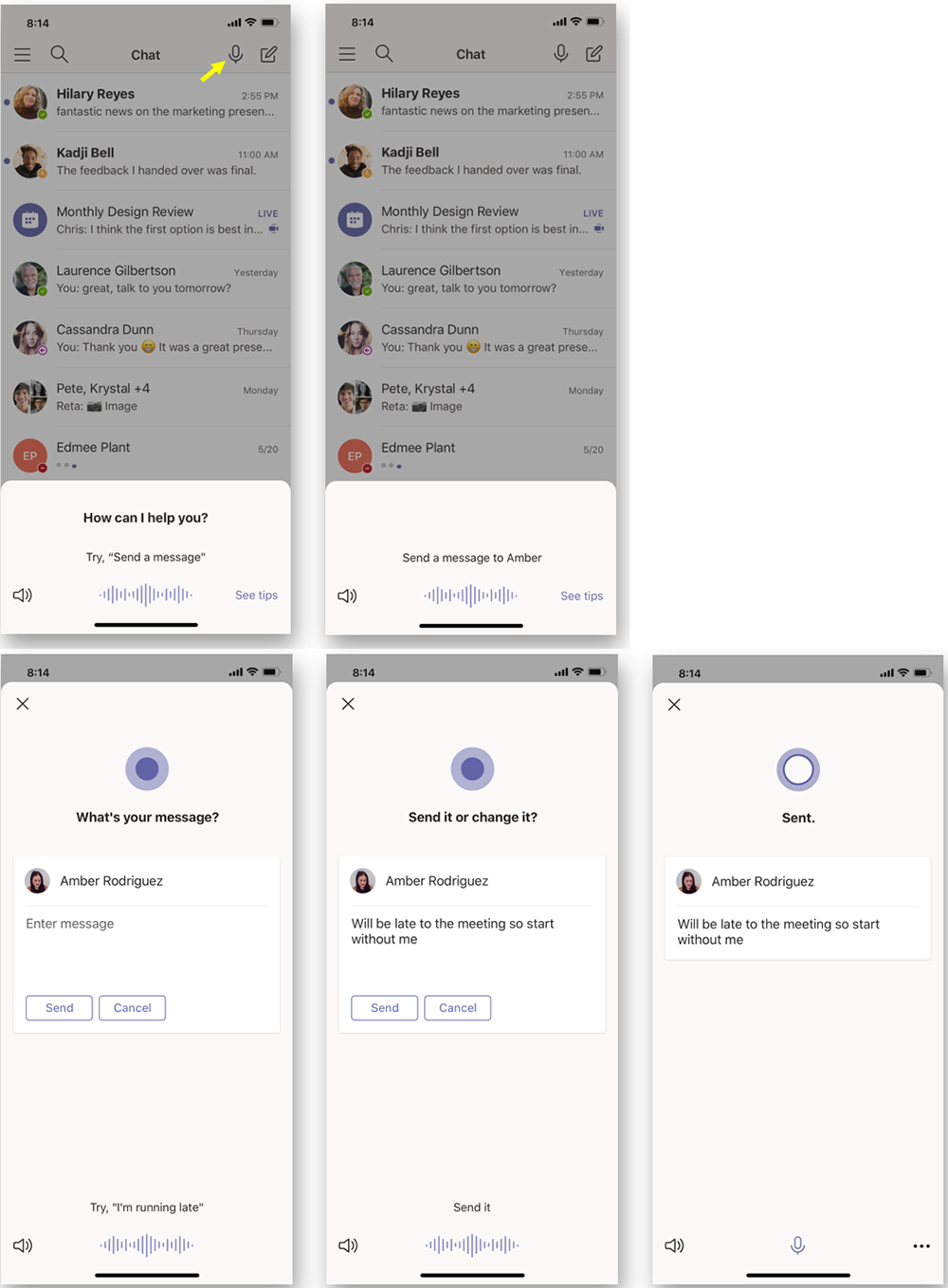
According to the Microsoft Office 365 development roadmap, an exciting new feature is coming to Microsoft Teams:
“Cortana is coming to the Teams mobile app, using AI and the Microsoft Graph to provide voice assistance in Teams. To stay connected to your team even when you have your hands full, click the microphone button on the top right and ask Cortana to make a call, join a meeting, send chat messages, share files, and more. These voice assistance experiences are delivered using Cortana enterprise-grade services that meet Microsoft 365 privacy, security and compliance commitments. Cortana will be available in the Teams mobile app on iOS and Android in the coming weeks for Microsoft 365 Enterprise users in the U.S. in English.”
Voice profiles transform generic transcripts into actionable intelligence
If your company is looking to collaborate with your office effectively, then contact us for assistance.
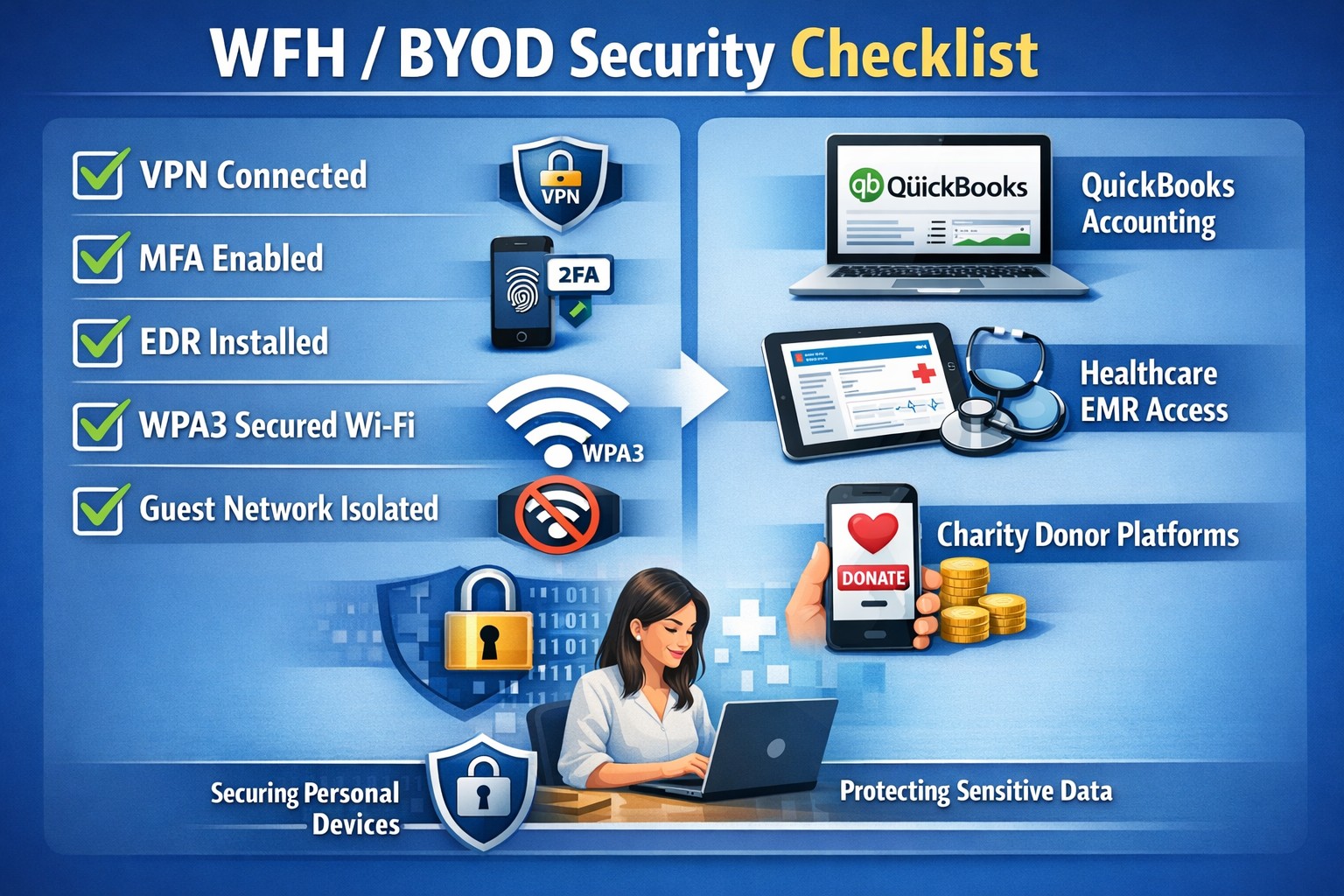
In this unprecedented time that we are currently experiencing, you have had to set your team up to work remotely, often without thinking about how they might actually get work done, let alone security of all things. Our employee checklist and no-cost cybersecurity training course will provide your team with the tools they need to ensure that they are safe and productive – right out of the gate. These free resources are part of our initiative to keep our community safe and working during this time of crisis, without the additional disruption and financial impact of a breach.
Don’t let a change in circumstance allow for a change in cybersecurity standards.
As small businesses change and grow, the ability to quickly scale up — or down — becomes a necessity. Adding new employees, for example, requires the company to adapt its phone system to accommodate the need for more lines.
That is harder to accomplish using traditional on-premise telephony systems due to higher setup and maintenance costs, the need for hardware on-site and reliance on IT support. A cloud-based phone system, on the other hand, would enable small businesses to manage communication services in a less costly, more streamlined and agile manner.
Benefits of a Cloud-Based Phone System
1. Fully-Integrated Communications System
Business tools that operate in the cloud are easy to deploy, enabling employees to stay connected whether they are in the office or on the go. In this way, the cloud provides a consistent business presence and helps to increase productivity with seamless access to CRM tools, email, instant messaging, voice and videoconferencing.
2. Control Over Modes of Communication
A cloud-operated system puts businesses in the driver’s seat, allowing them to pick and choose what features they need, with access to turn them on or off easily. Also, cloud solutions give employees anytime, anywhere access via a smartphone, desk phone or softphone to all their calling features.
3. Top Line Business Features
A cloud-based phone system would give small businesses access to the types of network applications that one would typically find at larger corporations. These include features such as a Virtual Assistant, Auto Attendant, Never Miss a Call or Call Center solutions.
4. Mobility and Ease of Use
Today’s workplace is increasingly mobile, and small businesses especially need to be able to operate from multiple locations. With a cloud-based system, small business employees have access to features that allow them to log in from anywhere so that they can be reached while on the go, giving customer-facing and revenue-producing employees greater control over their productivity.
5. Time Management and Efficiency
Web-based customer portals enable IT staff to manage their system more efficiently. With insight into the installation, service configuration, trouble tickets, training, billing and call analytics, this full access to a customer’s system and account allows them to spend fewer resources on project management and focus more on work that adds to the bottom line.
6. Flexibility to Scale Up (and Down)
As a business grows, so does the need to hire new employees, open new offices and onboard new customers. This requires a communications system that can scale up — or down — as the need arises. With a cloud-based phone system, businesses can add as many extensions as they need to accommodate heightened call volume, or, if necessary, simply call in to deactivate these extra extensions. Unlike traditional systems, businesses only pay for the extensions they need for as long as they need them.
7. Business Continuity
Working with a phone system “in the cloud” allows businesses to remain connected to their customers no matter the environment. A cloud-based communications system is likely to be unaffected by outside factors such as severe weather or other issues that may keep employees from getting to the office.
8. Improved Customer Service
With the Virtual Receptionist (VR) or Auto Attendant feature, businesses can easily direct calls to various departments and even create greetings unique to a given department. For example, a business could set up a holiday greeting in advance (via the administrative portal) and pre-set it to revert to the non-holiday greeting on a specified date. It could also add an on-hold message about special promotions or commonly asked questions.
9. New Service Features Added Easily
During busy seasons, some businesses will add premium calling features to increase call-taking efficiency and maximize staffing. Call Groups, for example, allow incoming calls to ring on multiple extensions. Call Queues provide a “dynamic waiting room” for callers that let businesses customize the on-hold experience and better manage call volume. Both help to decrease voicemails, missed calls and busy signals, enabling service to as many callers as possible.
10. Cost Savings
Cost savings are another benefit of cloud-based phone system. Moving telecommunications off of PBX platforms and to the cloud can be less expensive relative to monthly service rates versus that of a traditional system, helping to reduce costs and, ultimately, increase profitability.
If your company is looking to reap the benefits of moving to the cloud, then contact us for assistance.
And God will generously provide all you need. Then you will always have everything you need and plenty left over to share with others. As the Scriptures say,
“They share freely and give generously to the poor. Their good deeds will be remembered forever.”
For God is the one who provides seed for the farmer and then bread to eat. In the same way, he will provide and increase your resources and then produce a great harvest of generosity in you. - 2 Corinthians 9:8-10
We use cookies to ensure that we give you the best experience on our website. If you continue to use this site we will assume that you are happy with it.