Essential cybersecurity measures safeguarding accounting client data from breaches and compliance risks
Accounting firms are more vulnerable than ever to cyber threats. With sensitive financial data at stake, ensuring robust cybersecurity measures is not just a regulatory requirement but also a cornerstone of client trust and business continuity. This guide outlines the cybersecurity essentials every accounting practice must implement to safeguard client data effectively.
Why Cybersecurity Matters for Accounting Firms
Accounting firms handle vast amounts of sensitive information, from social security numbers to financial records. A breach can result in:
Financial Loss: Cyberattacks like ransomware can lead to significant monetary damage.
Legal Penalties: Non-compliance with regulations such as GDPR, SOX, or PCI DSS can result in hefty fines.
Reputation Damage: Losing client trust can have long-term repercussions on your firm’s credibility.
Key Cybersecurity Practices for Accounting Firms
Understand Your Threat Landscape
Cyber threats like phishing, ransomware, and social engineering are common in the financial sector. Stay informed about emerging risks and trends.
Train Your Team
Educate employees on recognizing phishing attempts, safe browsing habits, and secure data handling practices. Human error remains one of the leading causes of breaches.
Comply with Regulations
Ensure compliance with industry standards like GDPR and SOX by implementing necessary controls and documenting your cybersecurity measures.
Implement Access Controls
Limit access to sensitive data based on roles. Use multi-factor authentication (MFA) and encryption to secure files and systems.
Use Reliable Accounting Software
Invest in software with strong encryption, automated security features, and compatibility with your firm’s processes. This ensures both efficiency and security.
Regular Backups
Maintain encrypted backups of all critical data to mitigate the impact of potential breaches or system failures.
Secure Your Network
Use firewalls, antivirus software, and endpoint detection systems to protect your network from unauthorized access.
Patch Management
Regularly update all software and systems to close vulnerabilities that hackers could exploit.
The Role of Professional IT Support
While implementing these measures is essential, managing them effectively requires expertise. Partnering with a trusted IT service provider ensures that your cybersecurity strategy is robust, up-to-date, and aligned with your business needs.
Why Choose Farmhouse Networking?
Farmhouse Networking specializes in providing tailored IT solutions for small to medium-sized businesses, including accounting firms. With years of experience in cybersecurity, network maintenance, and compliance support, we ensure your firm is protected against evolving threats while maintaining operational efficiency.
Don’t leave your clients’ data vulnerable to cyber threats. Contact Farmhouse Networking today to develop a customized cybersecurity plan that protects your firm’s integrity and builds trust with your clients. Let us help you focus on what you do best—managing finances—while we handle your IT needs!
CrowdStrike Falcon update triggers massive IT outage across cloud services
The recent CrowdStrike IT outage on July 19, 2024, caused by a defective update for Windows, serves as a stark reminder of the importance of managing IT infrastructure and proactive measures to prevent system downtime. While no system is entirely immune to outages, there are several strategies businesses can implement to minimize the risk and impact of such incidents.
Key Strategies to Prevent IT Outages
Improve Continuous Integration / Continuous Deployment (CI/CD) Practices: One of the most effective ways to prevent outages caused by software updates is to enhance CI/CD practices. This approach involves:
Automating the testing and deployment process
Implementing rigorous quality assurance checks
Using staging environments to test updates before full deployment
Gradually rolling out updates to detect issues early
By improving CI/CD practices, businesses can catch potential issues before they affect the entire network, reducing the likelihood of widespread outages.
Implement Comprehensive Load / Failure Testing: Regular load testing is crucial to ensure that systems can handle typical use cases and determine their potential in high use scenarios. A game plan should also be put in place for when systems fail to map out the road to recovery. This involves:
Simulating various levels of user activity
Identifying performance bottlenecks
Optimizing system architecture and configuration
Preparing for crisis scenarios, such as partial resource failures
Practice response to system failures before they become reality
Load / failure testing helps businesses understand their system’s limitations and address potential issues before they lead to outages.
Ensure Proper Scalability: As businesses grow, their IT infrastructure must be able to scale accordingly. This includes:
Designing systems with future growth in mind
Utilizing cloud technologies for flexible resource allocation
Regularly reviewing and updating system architecture
Implementing efficient systems that can handle increased business
Proper scalability ensures that systems can continue to function effectively as demand increases, reducing the risk of outages due to overload.
Enable Automatic Updates with Caution: While automatic updates can help keep systems secure and up-to-date, they should be implemented carefully. Best practices include:
Testing updates in a controlled environment before widespread deployment
Staggering updates across different system components
Having a rollback plan in case of issues
Monitoring systems closely after updates are applied
Automatic updates can help prevent security vulnerabilities, but they must be managed carefully to avoid introducing new issues.
Implement Comprehensive Monitoring: A robust monitoring system is essential for detecting and addressing potential issues before they escalate into outages. This includes:
Using a centralized monitoring platform for all IT infrastructure
Outsourcing it management is resources are not available
Setting up alerts for unusual system behavior or performance metrics
Implementing predictive analytics to identify potential issues early
Regularly reviewing and updating monitoring parameters
Comprehensive monitoring allows businesses to take a proactive approach to system management, reducing the risk of unexpected outages.
Conduct Regular Employee Training: Human error is a common cause of IT outages. Regular employee training can help mitigate this risk. Training should cover:
Best practices for system usage
Recognizing and reporting potential security threats
Proper procedures for applying updates and patches
Emergency response protocols in case of system issues
Well-trained employees are less likely to make mistakes that could lead to outages and are better equipped to respond effectively when issues do occur.
Don’t let IT outages disrupt your business. Take action now to protect your company’s technology infrastructure. Call Farmhouse Networking today at (541) 761-9549 to schedule a comprehensive IT assessment and learn how our expert team can implement strategies to prevent costly downtime. Secure your business’s future with proactive IT management.
Streamline client maintenance via RMM automation and AI at Farmhouse Networking
Farmhouse Networking (FHN) is constantly looking for ways to enhance the services that we offer to our clients. Automation and artificial intelligence (AI) are two technologies that have emerged to streamline this process.
FHN uses automation to manage tasks that are typically performed manually, such as system configuration, software installation, and server maintenance. By automating these tasks, FHN can prevent human error and ensure that their clients’ systems remain up to date and secure.
In addition, FHN uses AI to monitor clients’ systems for potential issues, such as hardware failure, security breaches, or performance issues. AI-powered systems can analyze data to detect patterns or anomalies that may indicate a problem, allowing FHN to act quickly based on this laser focused data to prevent downtime or data loss.
Contact us today to learn how Farmhouse Networking can future-proof your network with our innovative maintenance solutions.
Modern accounting firm using managed IT services to keep tax software and client data online during busy season
Tax season is when every minute of billable time matters, and even a one-hour outage can cost thousands in lost work, delayed returns, and stressed staff. As a firm owner, the right IT strategy is the difference between a smooth March and a “fire drill” every week.
Why Downtime Is So Costly During Tax Season
Accounting teams regularly work 60+ hour weeks during peak busy season, so any outage hits during extended hours, not just 9–5.
Firms that move from reactive to proactive IT strategies have been able to cut downtime by 60–80%, protecting both billable hours and client trust.
Technology advances have already helped 69% of firms reduce time spent on admin tasks, which means you’re increasingly dependent on always-available systems.
In practice, that means tax software, QuickBooks, email, client portals, and e-file systems must stay fast and available—even at 9 PM on a Saturday in March.
Practical Actions You and Your IT Team Should Take
As the owner, your job is to set expectations, fund the right solutions, and make sure your IT partner or internal team executes before tax season hits.
1. Define Acceptable Downtime and Recovery Targets
Set Recovery Time Objective (RTO) for critical apps (e.g., “tax software back online within 30 minutes”).
Set Recovery Point Objective (RPO) for data (e.g., “no more than 15 minutes of work lost if something fails”).
Require your IT provider to document how their backup and disaster recovery design actually meets those targets.
2. Harden and Modernize Your Infrastructure
Move key workloads (tax apps, file shares, QuickBooks, portals) to scalable cloud or private hosting so performance doesn’t collapse under peak load.
Decommission old servers and unused software that increase failure risk and maintenance overhead.
Implement redundant systems for critical functions—at minimum, dual internet connections from different providers.
3. Automate the “Failure-Prone” Tasks
Enable automated patch management so security and stability updates happen after hours, not manually in the middle of busy season.
Automate data backup verification so someone doesn’t have to remember to check if last night’s backups actually completed.
Use automation for repetitive workflows like recurring invoice generation and batch processing of returns during off-hours.
4. Lock Down Cybersecurity Without Slowing Staff
Enforce multi-factor authentication (MFA) on all remote access, portals, and email accounts that touch client financial data.
Standardize access control (no shared logins, immediate offboarding for departed staff, clear least-privilege rules).
Maintain a written information security plan aligned with IRS Publication 4557 and FTC Safeguards expectations.
5. Demand 24/7 Support and Clear Escalation
Make 24/7 support a non-negotiable during tax season so issues at night or weekends are addressed immediately.
Require defined SLAs (response and resolution times) for any outage that touches tax apps, QuickBooks, or client-facing portals.
Ask your IT provider to test an incident response plan at least annually, including simulated ransomware or major vendor outages (like the July 2024 CrowdStrike event that disrupted 8.5 million devices).
6. Train Your Team to Avoid Preventable Incidents
Run short, focused phishing and security awareness training for staff before busy season.
Provide simple playbooks for “what to do if X happens” (ransomware popup, strange login alert, application freeze).
Make it clear that reporting a problem early is rewarded, not punished—this reduces hidden incidents that later explode into full outages.
Common Client Questions (and Strong Answers You Can Give)
You can turn solid IT preparation into a client trust advantage by proactively answering these questions.
Q1: “What happens to my data if your system goes down during tax season?” A: Our systems are backed up frequently with both onsite and cloud-based, immutable backups, and we have defined recovery objectives so we can restore access quickly even in a worst-case scenario.
Q2: “How do you protect my financial data from hackers?” A: We use multi-factor authentication, strict access controls, encryption, and continuously updated security tools aligned with IRS and FTC guidelines to safeguard your information.
Q3: “Will a cyberattack or outage delay my return filing?” A: We’ve engineered redundancy and disaster recovery around our tax applications, with clear recovery time targets and 24/7 IT monitoring, so even if something happens, we can recover quickly without missing filing deadlines.
Q4: “Can I still access my documents if your office is closed?” A: Yes, our cloud-based portals and systems are designed for secure remote access, allowing us and you to access documents from anywhere as long as there is internet connectivity.
How Farmhouse Networking Helps Accountants Minimize Downtime
Farmhouse Networking specializes in managed IT services for fast-growing accounting and finance firms, with a focus on performance, uptime, and client experience. As a business owner, you get a partner that understands both the technical and regulatory pressures of tax season.
Here’s how Farmhouse Networking can support the action steps above:
Proactive managed IT and cloud services: We design and manage scalable infrastructure and cloud solutions built specifically to handle tax-season peak loads for accounting firms.
Business continuity and disaster recovery: We implement and test backup strategies (including immutable and cloud backups), document RTO/RPO, and prepare runbooks so your team knows exactly what happens when something fails.
Security and compliance alignment: We deploy MFA, patch management, endpoint protection, and network hardening that align with IRS and FTC expectations, helping you protect client data and avoid regulatory headaches.
24/7 monitoring and support: We provide round-the-clock monitoring and responsive support, so your late-night tax work is covered and small issues don’t become revenue-killing outages.
Strategic technology roadmap: We help you decommission legacy systems, plan upgrades, and “future-proof” your practice so each year’s tax season gets easier, not harder.
Take the Next Step Before the Next Busy Season
If you wait until March to “fix IT,” you’re already too late. The easiest way to protect your firm’s revenue, reputation, and sanity is to partner with an IT team that lives and breathes accounting workflows and tax-season realities.
Email support@farmhousenetworking.com for more information about how Farmhouse Networking can help improve your business, minimize downtime next tax season, and give you and your team the confidence to focus on client work instead of fighting technology.
Neglected IT infrastructure quickly turns into costly downtime and data loss, but proactive managed IT services help businesses stay online and protected.
Has your business ever experienced a technology crisis that could have been easily prevented? Learn from the cautionary tale of a non-managed client who recently faced a major setback due to neglected IT infrastructure. This compelling story underscores the importance of proactive IT management and the need for robust backup solutions.
The Story: A Cautionary Tale
Neglected IT Infrastructure: After 5 years of radio silence, a panicked non-managed client reached out to us when their aging computer, hosting their crucial order processing system, malfunctioned.
DIY Mishap: Attempting to fix the issue themselves, the client inadvertently worsened the situation by installing the wrong part, leading to a cascade of problems.
Costly Consequences: The subsequent visit to a local repair shop and improper part replacement led to the corruption of critical files, including the Windows Operating System and the database containing vital client data.
Backup Oversight: The client’s failure to maintain updated database backups exacerbated the crisis, with the only available backup being approximately 5 years old.
The Solution: Managed IT Services
Proactive Maintenance: With managed IT services, critical components like the aged computer would have been promptly replaced before catastrophic failure, averting the entire crisis.
Remote Support: Swift remote intervention by a managed IT provider would have prevented the corruption of the operating system and database, substantially reducing the overall cost of the incident.
Comprehensive Backup Strategy: Every business should prioritize regular, imaged-based backups to safeguard their crucial data, ensuring seamless restoration in the event of a disaster.
Expert Guidance: Embracing managed IT services equips businesses with expert recommendations and proactive measures to avoid potentially devastating technology pitfalls.
Take the Right Step for Your Business!
Don’t let your business fall victim to preventable IT disasters. Embrace the proactive protection and expert guidance offered by a managed IT service provider to ensure uninterrupted business operations.
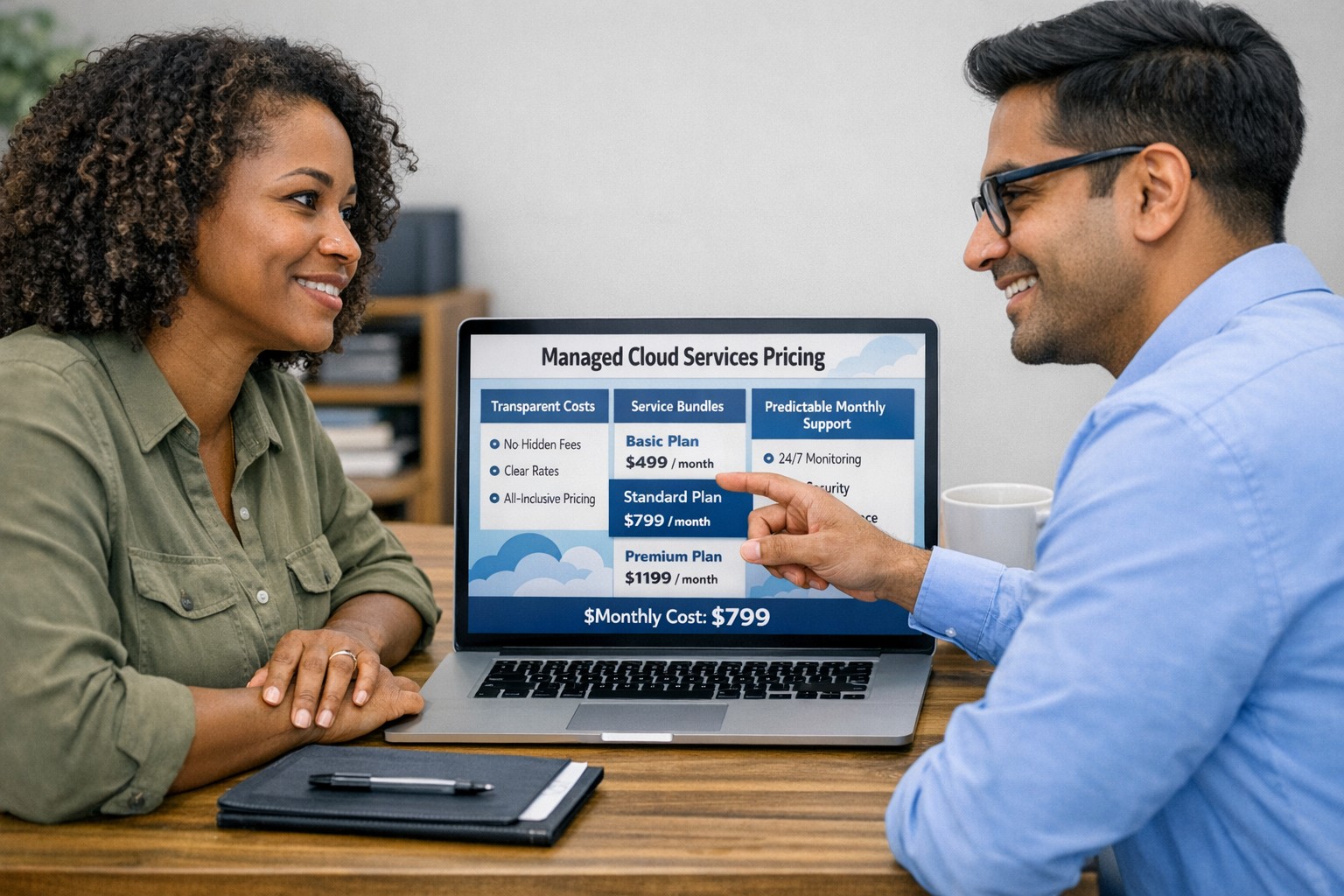
Managed cloud services pricing helps small businesses control IT costs with transparent, predictable monthly cloud support.
We have received numerous inquiries from potential customers regarding our pricing structure. Specifically, they want to know if we offer monthly contracts or if we charge an hourly rate. The answer is Yes.
Hourly Rate
For customers who require a one-time fix or need a project completed, we offer a service based on an hourly rate. Our rate for remote or on-site work that is not covered under a contract is $150 per hour. We bill in 15-minute increments and take pride in our efficiency. For clients with more than 2 service requests per month, we highly recommend signing up for a contract to save money and benefit from our expert oversight.
Monthly Contracts
There are three types of monthly contracts:
Remote Maintenance Contract
This is the package that most of our clients choose. It includes automated maintenance, cyber security protections, and unlimited remote support. Since most problems and questions can be handled remotely, this package offers real value.
Full Service Maintenance Contract
This package is for clients who want complete peace of mind. It includes all services, whether remote or at their offices. Additionally, it provides some additional benefits, such as top priority in our support queue.
Co-Managed IT Contract
This special package is designed for companies that already have a full-time IT employee or IT service companies in need of extra help. It provides them with the necessary automations and tools to make their jobs easier, allowing them to focus on what matters. This package also includes a discount on our remote and on-site services.
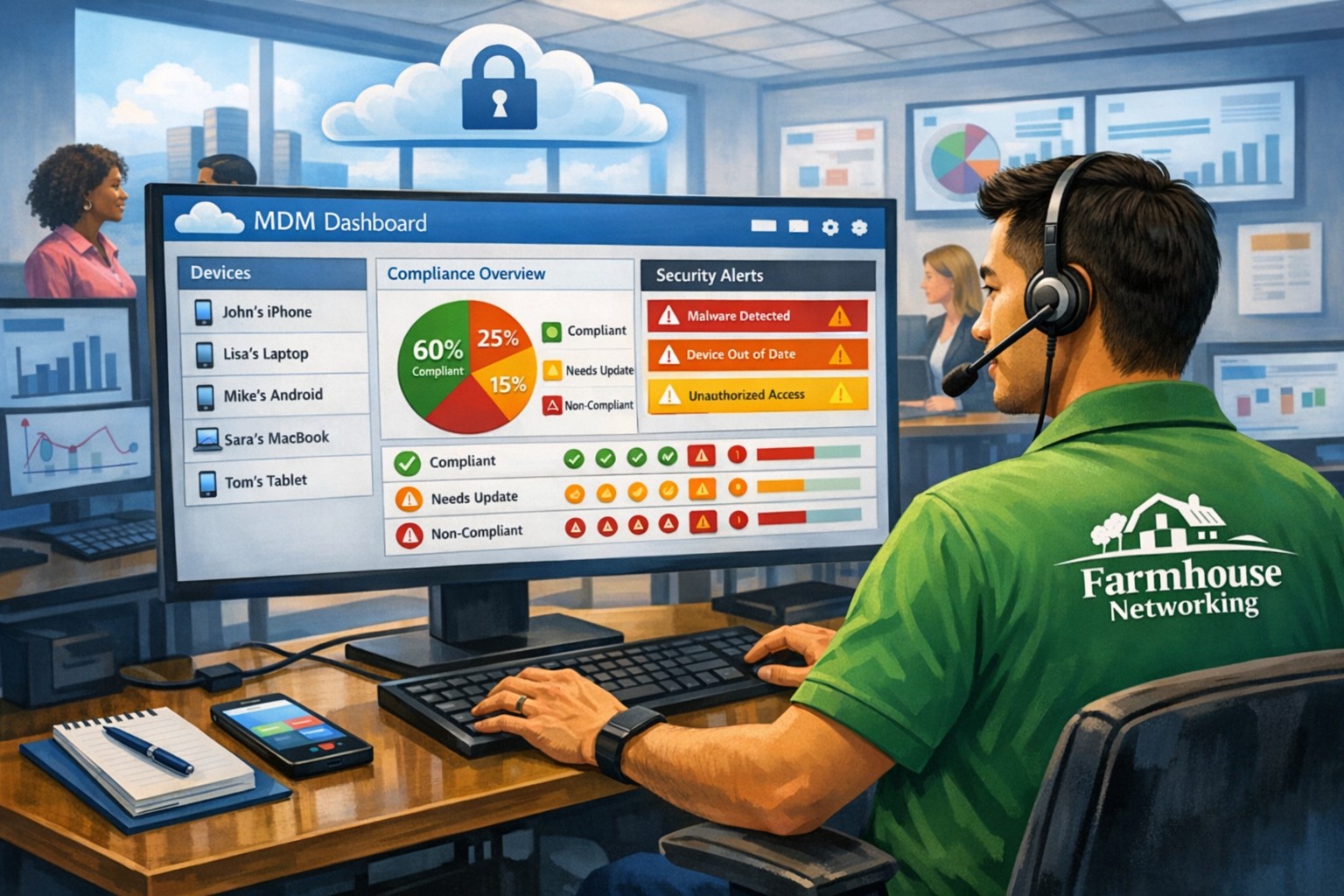
All contracts are based on a per-device model, taking into account the number of workstations, printers, servers, switches, etc. on the client’s network. We use this model because the other popular model, per user, is too vague and can easily hide excessive profit margins. Contracts can be month-to-month or a yearly commitment. The difference is that with a yearly commitment, you are protected from price increases for the entire year. We also offer many optional add-ons for our clients, such as Office 365, Employee Security Training, Penetration/Vulnerability Scanning, Mobile Device Management, Compliance, Secure Remote Access, and Security Operations Center.
Are you looking for reliable IT support that suits your business’s unique requirements? Look no further! Our flexible pricing options cater to businesses of all sizes. Whether you require one-time assistance or ongoing support, we have the right plan for you. Ready to take your business IT support to the next level? Contact us today to discuss your needs and find the perfect plan for your business.
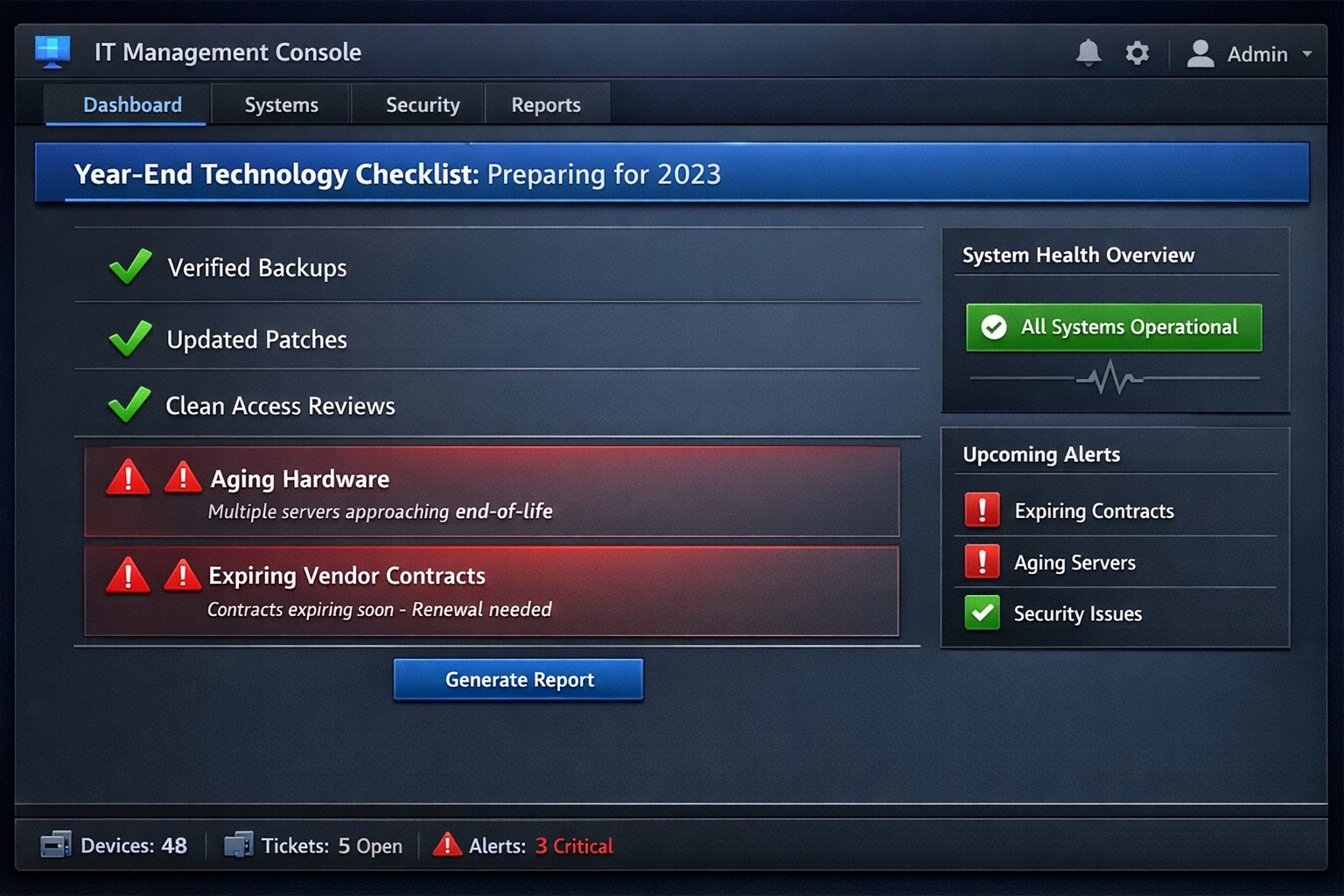
Year-end technology audit dashboard with critical tasks and compliance status.
As the year comes to a close, we at Farmhouse Networking want to ensure that your business technology is in optimal shape for a successful transition into the new year. We’ve put together a checklist to help you wrap up the year on a technologically high note. Some of these items we will work on together, and others will be the responsibility of your team.
Items we will work on together:
Asset Inventory: We have recently conducted a thorough review of your technology assets, including hardware, software, and networking equipment. We updated your inventory list to account for any additions or retirements of assets throughout the year. You should be receiving an invite to our new system called Narmada which gives you constant access to our replacement recommendations.
Password Security: Prompt your team to implement multi-factor authentication for critical systems and applications. This will help to enhance password security. This is not something that should be put off till later. Get it setup on every site possible. It can be made easier with a password manager.
Software Updates: We ensure that standard software applications, operating systems, and antivirus programs are up to date with the latest patches and updates. If you have industry specific software it would be a good time to check with them on the status of your support contract and if there are needed updates.
Data Backups: Verify that your data backup systems are functioning correctly. Test the restoration process to confirm that your business can recover essential data in the event of a disaster. If you don’t have backups in place now is the time to get this critical technology in place.
Security Assessment: Conduct a Security Risk Assessment to identify and address potential vulnerabilities. Ensure that your cybersecurity measures are up to date to protect against evolving threats. Many companies don’t realize that current compliance standards require this.
Employee Training: Provide cybersecurity training to employees to reinforce best practices and raise awareness about potential threats. This should be mandated by your team’s management.
Items you should work on with your team:
Subscription Reviews: Review and audit all software and service subscriptions to ensure they align with your business needs. Cancel any unnecessary subscriptions to optimize costs.
Budget Review: Evaluate your technology budget for the year and identify any areas where adjustments may be needed for the upcoming year.
Technology Roadmap: Develop or update your technology roadmap for the coming year, aligning it with your business goals and objectives.
Compliance Check: Ensure that your technology practices comply with industry regulations and standards applicable to your business.
Communication Plan: Communicate any upcoming changes or upgrades to your team to ensure a smooth transition without disruptions.
Policies & Procedures: Review current documentation to make sure that it includes all needed items like disaster recovery, incident response, computer use, BYOD, and AI usage.
Once you have determined some of your goals and budget, we should meet to discuss the implementation plan for any changes. We will be contacting you in February to setup our next Semi-Annual Business Review (SABR) meetings to discuss this years plan.
If you have any questions or need assistance with any of these items, please don’t hesitate to reach out to our support team. We’re here to help you navigate the year-end process and ensure a seamless start to the new year.
MSP console managing SMB BYOD smartphones and laptops with centralized MDM and security policies.
Small and medium-sized businesses (SMBs) face numerous challenges when it comes to managing their IT. Limited resources (both human and money), lack of expertise, and the need to focus on core business operations often make it difficult for SMBs to understand and manage technology needs. This is where Managed Service Providers (MSPs) come in. In this blog article, we will explore the reasons why SMBs should consider partnering with MSPs to enhance their IT capabilities and drive business growth.
Cost-Effective IT Solutions:
One of the primary reasons why SMBs need MSPs is the cost-effectiveness they offer. By outsourcing their IT needs to MSPs, SMBs can avoid the high costs associated with hiring and training an in-house IT team. MSPs provide a range of services, including network monitoring, data backup and recovery, cybersecurity, and software updates, all at a predictable monthly cost. This allows SMBs to allocate their resources more efficiently and focus on their core business.
Access to Expertise and Advanced Technology:
MSPs are experts in providing IT services and have a team of highly skilled professionals with expertise in variety of technology. By partnering with MSPs, SMBs gain access to the depth of knowledge and experience from IT experts who can handle complex tasks and provide strategic guidance. Additionally, MSPs stay up-to-date with the latest technology trends and can recommend and implement solutions that can help SMBs stay competitive in the market and safe from hackers.
Proactive IT Support and Maintenance:
MSPs offer proactive IT support and maintenance, which is crucial for SMBs. They monitor networks, identify potential issues, and take preventive measures to avoid downtime and disruptions. MSPs also provide regular software updates, security patches, and system maintenance, ensuring that SMBs’ IT remains secure and up-to-date. This proactive approach helps SMBs minimize the risk of costly IT failures and ensures smooth business operations.
Enhanced Data Security:
Data breaches and cyberattacks pose a significant threat to SMBs. MSPs play a vital role in safeguarding SMBs’ sensitive data and protecting them from potential security breaches. They implement robust cybersecurity measures, such as firewalls, antivirus software, and encryption, to ensure data confidentiality and integrity. MSPs can also conduct regular security audits and vulnerability assessments to identify and address any potential weaknesses in the IT infrastructure.
Scalability and Flexibility:
As SMBs grow, their IT needs evolve. MSPs offer scalable solutions that can adapt to changing business requirements. Whether it’s adding new users, expanding storage capacity, or integrating new software, MSPs can quickly and efficiently accommodate these changes. This scalability and flexibility allow SMBs to focus on their growth without worrying about the limitations of their IT infrastructure.
If your company could use the cost-effective solutions, access to expertise, proactive support, enhanced data security, and scalability that come from using a MSP, then contact us for assistance.
This is the seventh in a series about the concept of Zero Trust, which means in the IT sense that you trust nothing and always verify everything surrounding and connected to your network. Today’s discussion will be on software patching.
Software Patching
Software patching is a neccesity because no person who writes code is perfect and hackers are actively looking for these mistakes. The hackers find the mistakes and then develop ways of using these to exploit the software, computer, or whatever else they can gain access to. The only way to combat both the mistakes and the exploits is to discover them before the hackers do and patch the hole in the software. This patch can however lead to unforseen consequences to the software, so a plan for testing and deployment of patches is needed to avoid unexpected downtime to businesses.Here are some questions to ask:
Do you know all of the hardware and software on your network?
Do you check for hardware, operating system, and other software regularly?
How do you check for updates, patches, or upgrades to software?
How do you install these patches? Is it automated?
Are these patches tested before installation?
What happens if a patch causes problems?
Do you have a log of all installed updates?
Are any systems or software on your network no longer supported for updates?
If your company is going to use full disk encryption or has compliance requirements that you need consulting for, then contact us for assistance.
And God will generously provide all you need. Then you will always have everything you need and plenty left over to share with others. As the Scriptures say,
“They share freely and give generously to the poor. Their good deeds will be remembered forever.”
For God is the one who provides seed for the farmer and then bread to eat. In the same way, he will provide and increase your resources and then produce a great harvest of generosity in you. - 2 Corinthians 9:8-10
We use cookies to ensure that we give you the best experience on our website. If you continue to use this site we will assume that you are happy with it.