Don’t let cloud security misconfigurations expose your business—implement shared responsibility model best practices today.
Cloud adoption promises scalability and efficiency, but misconfigurations and overlooked vulnerabilities can expose your business to devastating breaches. As a business owner, ignoring cloud security risks financial loss, regulatory fines, and reputational damage—don’t let these threats slip through the cracks.
Key Cloud Security Risks
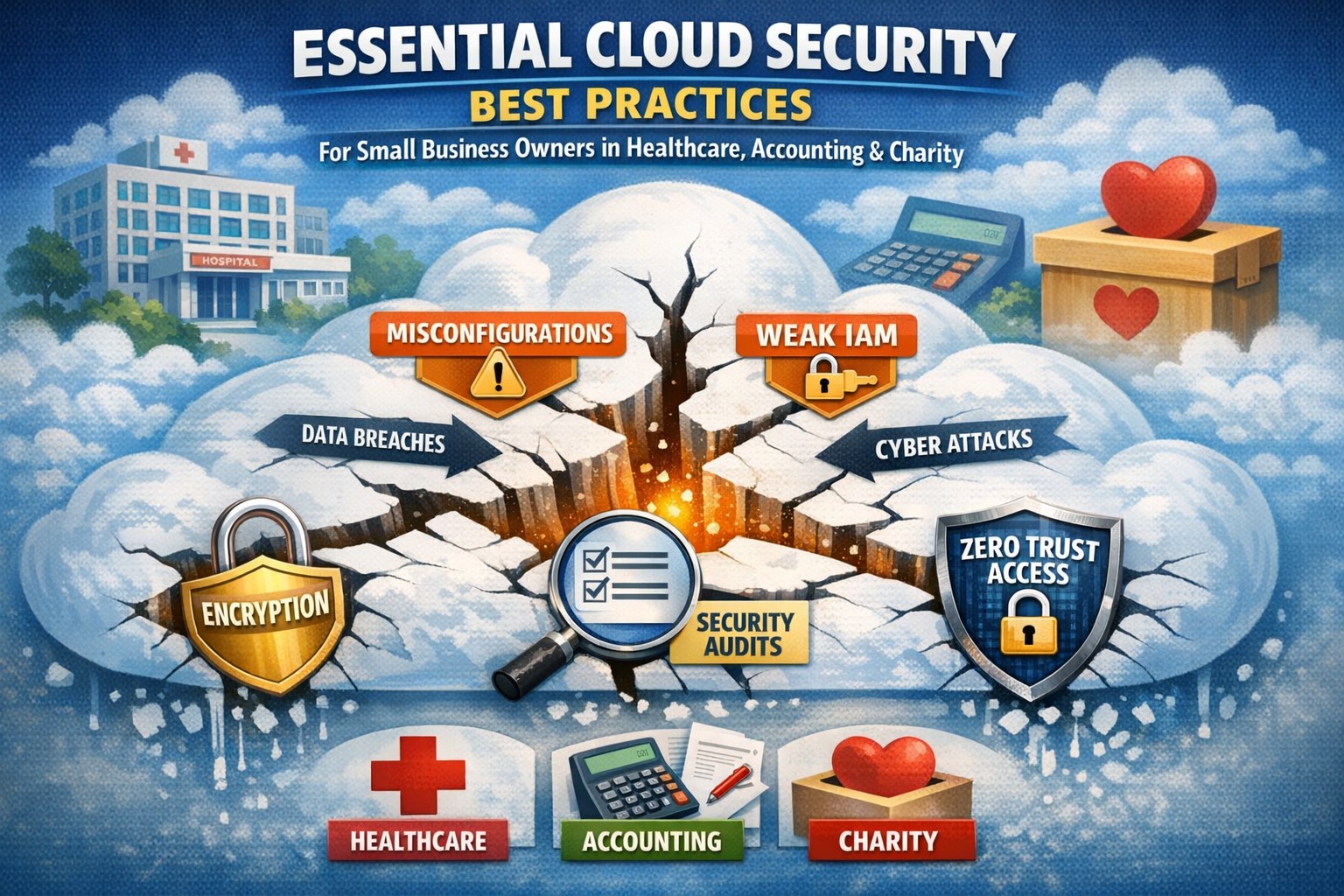
Businesses face rising cloud threats like misconfigured storage buckets, weak identity access, and unpatched workloads, often due to the shared responsibility model where providers secure infrastructure but you handle data and apps. Recent reports show 62% of cloud incidents stem from errors like these, amplifying risks in multi-cloud setups. Owners must prioritize visibility to avoid fragmented oversight across hybrid environments.
Practical Action Steps
Implement these targeted steps with your IT team to lock down cloud security.
Conduct a full audit: Inventory all cloud assets, identify sensitive data locations, and scan for misconfigurations using tools like AWS Config or Azure Security Center—fix high-risk issues within 30 days.
Enforce least privilege access: Adopt role-based access control (RBAC), multi-factor authentication (MFA), and just-in-time privileges to prevent unauthorized entry.
Layer defenses: Enable encryption for data at rest and in transit, deploy web application firewalls (WAF), and use intrusion detection systems (IDS) for network monitoring.
Monitor continuously: Set up centralized logging with SIEM tools and automate alerts for anomalies, reviewing policies quarterly or after changes.
Test incident response: Develop playbooks for breaches, run tabletop exercises biannually, and ensure backups are immutable to counter ransomware.
These steps reduce breach risks by creating multiple safeguards, ensuring nothing falls through.
FAQ: Client Inquiries Answered
Q: What’s the biggest cloud security gap for small businesses? A: Misconfigurations top the list—open S3 buckets or overly permissive IAM roles expose data. Regular automated scans close this fast.
Q: How does shared responsibility work? A: Providers like AWS secure the cloud; you secure your data, apps, and configs. Assume responsibility for what you control to avoid pitfalls.
Q: Do we need new tools for multi-cloud? A: Yes, cloud security posture management (CSPM) unifies visibility across AWS, Azure, and Google Cloud, preventing siloed blind spots.
Q: How often should we review policies? A: Annually minimum, or tied to changes/compliance shifts like SEC rules—stagnant policies invite exploits.
Q: What about compliance in regulated industries? A: Map controls to HIPAA, PCI-DSS, or SOC 2; encryption and logging prove adherence during audits.
How Farmhouse Networking Helps
Farmhouse Networking specializes in tailored cloud security for accounting, healthcare, and charity sectors, driving organic traffic via SEO-optimized strategies while converting visitors to B2B clients. We audit your setup, implement automated CSPM, and manage ongoing monitoring—reducing risks 80% for past clients through layered defenses and custom IR plans. Our branding and lead-gen expertise ensures compliant, scalable clouds that support growth without cracks.
Key steps to recover from a business hack—contain, eradicate, communicate, and prevent future attacks.
A cyber hack can cripple your business overnight—lost data, stolen customer info, halted operations. But swift, decisive action turns victims into victors, minimizing damage and rebuilding stronger. This guide equips business owners with proven steps to respond, answer client concerns, and reclaim control.
Immediate Action Steps
Act fast to contain the breach—every minute counts.
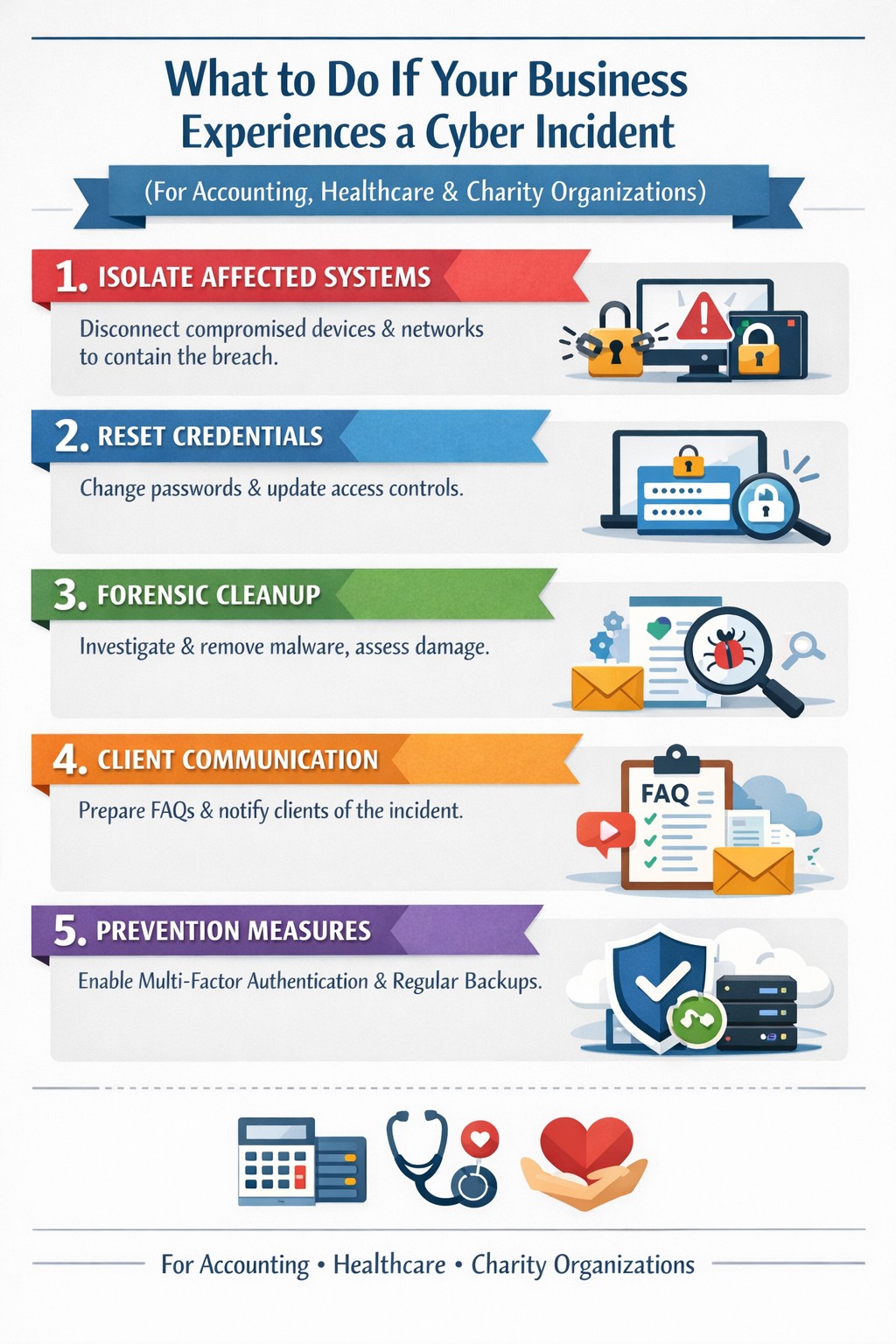
Isolate affected systems: Disconnect hacked devices, servers, or networks from the internet to halt spread. Power down if ransomware suspected; switch to backups.
Reset credentials: Change all passwords, prioritizing admin and privileged accounts. Enable multi-factor authentication (MFA) everywhere.
Scan and assess: Run antivirus/malware scans on all systems. Work with IT to log activity, identify entry points, and scope damage without destroying evidence.
Alert key parties: Notify your web host, insurer, and authorities (e.g., FBI via IC3.gov if data breached). Check legal obligations like state notification laws.
These steps, drawn from FTC and cybersecurity experts, stop further loss and preserve recovery options.
Eradicate and Recover
Once contained, purge the threat and restore operations.
Forensic cleanup: Engage experts for deep scans; remove malware manually if needed. Restore from clean, offline backups—test them first.
Patch vulnerabilities: Update all software, firmware, and OS. Block malicious IPs and revoke compromised accounts.
Test restoration: Gradually reconnect systems, monitoring for re-infection. Prioritize revenue-critical apps like CRM or e-commerce.
Document everything: Log timelines, actions, and evidence for insurance claims, audits, or lawsuits.
Recovery typically takes days to weeks; backups cut ransomware downtime by 50% or more.
Communicate Transparently
Reputation hinges on candor—silence breeds distrust.
Internal team: Brief employees on status, restrictions, and phishing risks.
Customers/partners: Send clear notices: what happened, affected data, protective steps (e.g., credit monitoring), and your fixes. Use FTC templates.
Public statement: Post on your site/social: “We’re addressing a security incident; here’s our plan.” Offer support lines.
Transparency retains 70% more clients post-breach versus cover-ups.
Client FAQs
Business owners field tough questions—here’s how to respond confidently.
Q: How did this happen? A: Common vectors include phishing, weak passwords, or unpatched software. Our audit revealed [specific gap, e.g., outdated plugin]; we’ve sealed it.
Q: Is my data safe? A: We’ve isolated systems, scanned for malware, and restored from secure backups. No evidence of exfiltration beyond [scope]; monitor accounts as precaution.
Q: What are you doing to prevent recurrence? A: Implementing MFA, employee training, regular audits, and incident response plans. We’ll share a security update soon.
Q: Should I worry about identity theft? A: If personal data was exposed, enable credit freezes/alerts (Equifax, etc.) and fraud monitoring. We’re covering [offer, e.g., 1-year service] for affected parties.
Q: How long until normal? A: Containment: hours; full recovery: 1-2 weeks. Business-critical functions resume via backups today.
These answers rebuild trust, per expert post-breach playbooks.
Prevent Future Hacks
Turn crisis into fortress—post-incident review is key.
Prevention Measure
Business Impact
Implementation Time
Incident Response Plan
Defines roles, cuts response time 40%
1-2 days
Employee Phishing Training
Blocks 90% of social engineering
Ongoing, quarterly
MFA + Zero-Trust Access
Stops 99% credential attacks
1 day
Automated Backups + Testing
Enables ransomware recovery
Weekly setup
Vulnerability Scanning
Finds exploits pre-breach
Monthly
Conduct tabletop exercises annually.
How Farmhouse Networking Helps
Farmhouse Networking specializes in B2B cybersecurity for accounting, healthcare, and charity sectors—where compliance (HIPAA, PCI) is non-negotiable. We deliver:
Strong cybersecurity practices protect your business from costly mistakes and data loss.
Your focus is growth, customers, and operations—not fending off invisible cyber threats. Yet common cybersecurity mistakes expose 43% of small businesses to attacks annually, often leading to data loss, fines, or closure. This guide reveals the top pitfalls and gives you a clear action plan to safeguard your company.
Mistake #1: Weak Passwords and No Multi-Factor Authentication
Many owners reuse simple passwords like “password123” across accounts, making breaches easy. Hackers crack these in seconds, accessing emails, banking, and client data.
Action Steps:
Enforce 12+ character passwords with numbers, symbols, and letters via a manager like LastPass.
Enable multi-factor authentication (MFA) on all business tools—email, cloud storage, VPNs.
IT Task: Audit passwords quarterly; train staff via a 15-minute workshop.
Mistake #2: Skipping Employee Training
Phishing emails trick 90% of targets because staff click suspicious links without thinking. Untrained teams become your weakest link.
Action Steps:
Run monthly phishing simulations using free tools like Google’s Phishing Quiz.
Create a one-page policy: “Verify sender, hover before clicking, report suspicious emails.”
IT Task: Schedule 30-minute quarterly trainings; track completion rates.
Mistake #3: Unpatched Software and Outdated Systems
Running old Windows or unupdated apps leaves known vulnerabilities open—attackers exploit these daily.
Action Steps:
Enable auto-updates for all software, browsers, and OS.
Use a patch management tool like Ninite for bulk updates.
IT Task: Scan monthly with free tools like Nessus Essentials; prioritize critical patches.
Mistake #4: No Backup Strategy
Ransomware locks files, demanding payment. Without backups, you’re forced to pay or lose everything.
IT Task: Automate daily backups to encrypted cloud like Backblaze.
Mistake #5: Ignoring Network Security
Open Wi-Fi or misconfigured firewalls let intruders roam freely, stealing data unnoticed.
Action Steps:
Switch to WPA3-encrypted Wi-Fi; segment guest networks.
Install a next-gen firewall (e.g., pfSense free version).
IT Task: Run network scans with Wireshark; block unused ports.
Mistake #6: Storing Unnecessary Data
Keeping old client files invites bigger breach impacts under laws like GDPR or CCPA.
Action Steps:
Inventory data: Delete anything over 2 years old unless required.
Use tools like Eraser for secure deletion.
IT Task: Implement retention policies in your CRM.
Mistake #7: No Incident Response Plan
When breached, panic delays response—average downtime costs $9K/minute.
Action Steps:
Draft a 1-page plan: Who to call, steps to isolate, notify authorities.
Test with a tabletop exercise yearly.
IT Task: Assign roles; store contacts securely.
Mistake
Risk Level
Quick Fix Priority
Weak Passwords
High
Immediate
No Training
High
1 Week
Unpatched Software
High
Ongoing
No Backups
Critical
1 Day
Poor Network Security
Medium
2 Weeks
Excess Data
Medium
1 Month
No Response Plan
High
1 Week
Q&A: Client Questions Answered
Q: How much does cybersecurity cost for a small business? A: Basic protections (MFA, training, backups) cost under $50/month. Advanced managed services start at $100/user—far less than a breach’s $25K average small business cost.
Q: What if I’m not tech-savvy? A: Start with free checklists from CISA.gov. Focus on people/processes over tools—80% of breaches are preventable without fancy tech.
Q: How do I know if we’re already compromised? A: Check for slow networks, unknown logins, or odd emails. Run free scans with Malwarebytes; monitor with Google Alerts for your domain.
Q: Ransomware hit—now what? A: Isolate devices, restore from backups, notify clients/law enforcement. Never pay— it funds more crime.
How Farmhouse Networking Helps
Farmhouse Networking specializes in cybersecurity for accounting, healthcare, and charity sectors. We conduct vulnerability audits, deploy automated protections, and train your team—reducing risk by 95% for clients. Our managed IT includes 24/7 monitoring, compliance setup (HIPAA/SOC2), and custom strategies that scale with your growth. No jargon, just results.
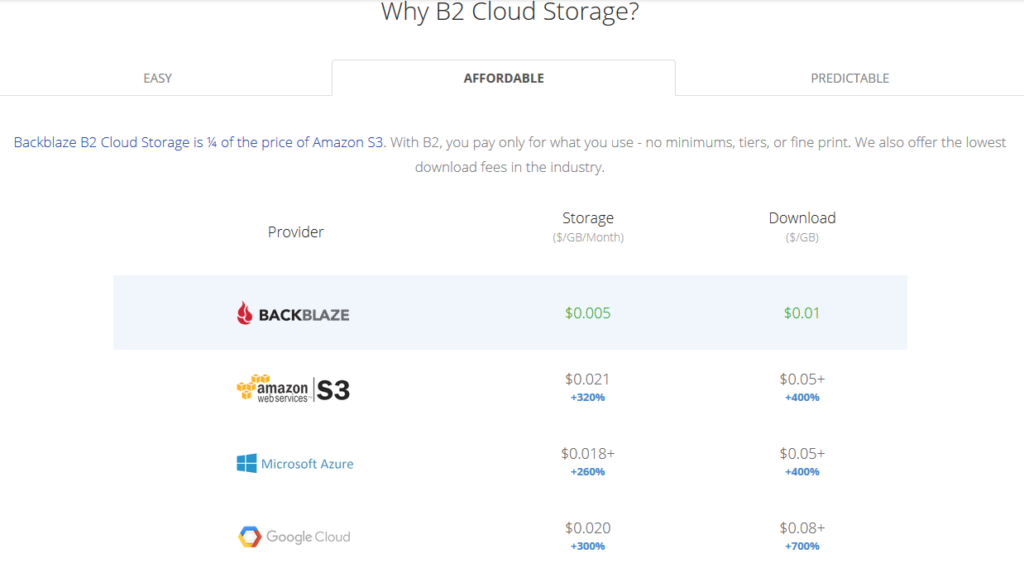
All someone has to do is look at the pricing model above to see why Backblaze is a no brainer for long term storage (not to mention the first 10GB of storage is free. With its recent inclusion as a destination for web server’s WHM backup, Farmhouse Networking has been recommending our hosting provider customers to make the switch from AWS Glacier. Here is the steps to make the switch:
Setup Backblaze Buckets
Login to Backblaze account
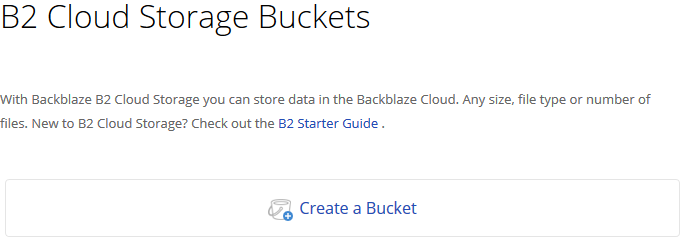
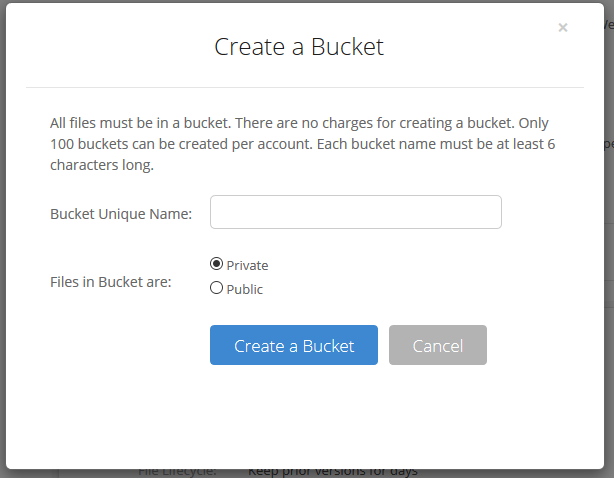
Click on the Create Bucket button in the B2 Cloud Storage Buckets section
3. Give the Bucket a name and keep the bucket private for the backups. Click on the Create a Bucket button.
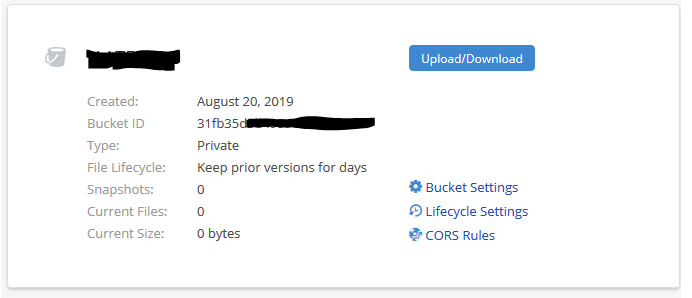
4. Copy down your Backblaze Bucket name and Backblaze Bucket ID
Setup Backblaze Application Key
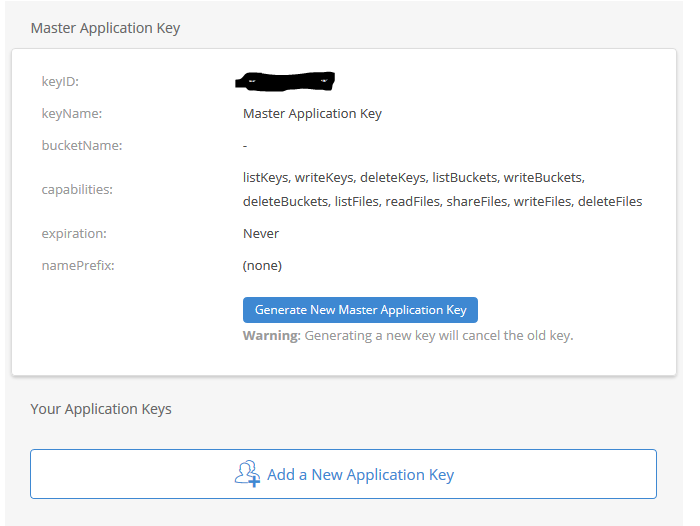
Click on the App Keys section
Click on Add a New Application Key
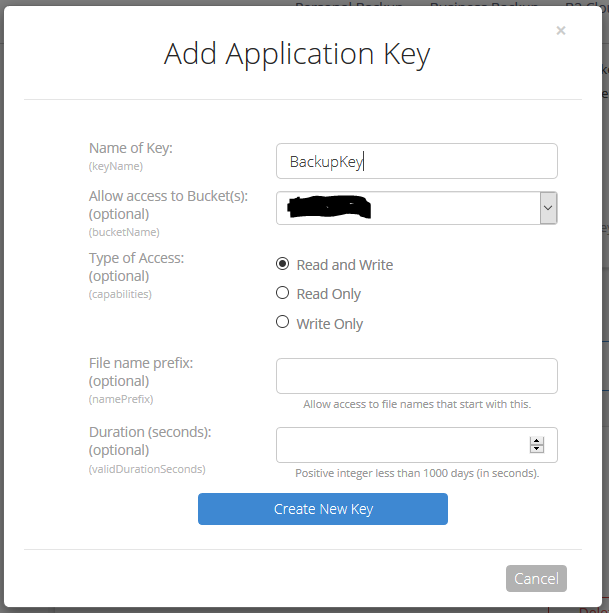
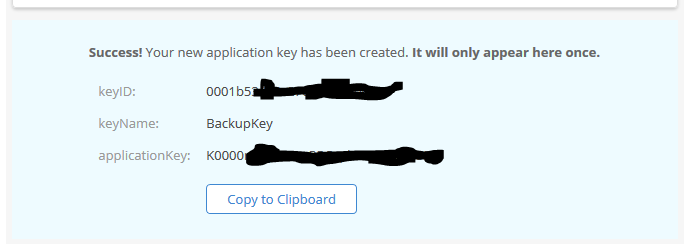
3. Give the Backblaze Application Key a name, chose the newly created bucket from the list and make sure to leave the Type of Access as “Read and Write”. Click the Create Key button.
4. Make sure to copy down the Backblaze Application keyID and Backblaze Application applicationKey. This will be the only time they are both shown. If you lose the Backblaze Application applicationKey then you will have to delete the current one and create a new one.
Setup WHM Backup to Backblaze
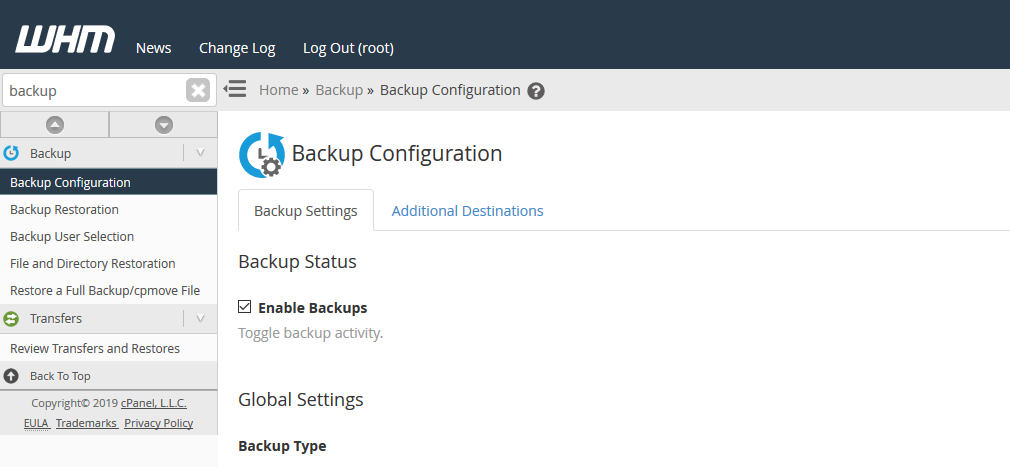
Connect to WHM as root user and choose Backup Configuration from the menu. The specific WHM backup settings are not discussed here, but feel free to contact us for advise on how to do so.
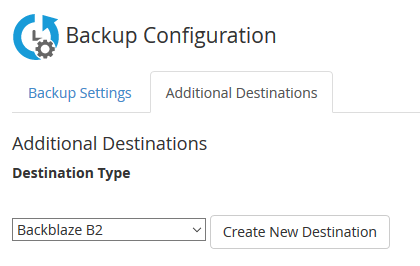
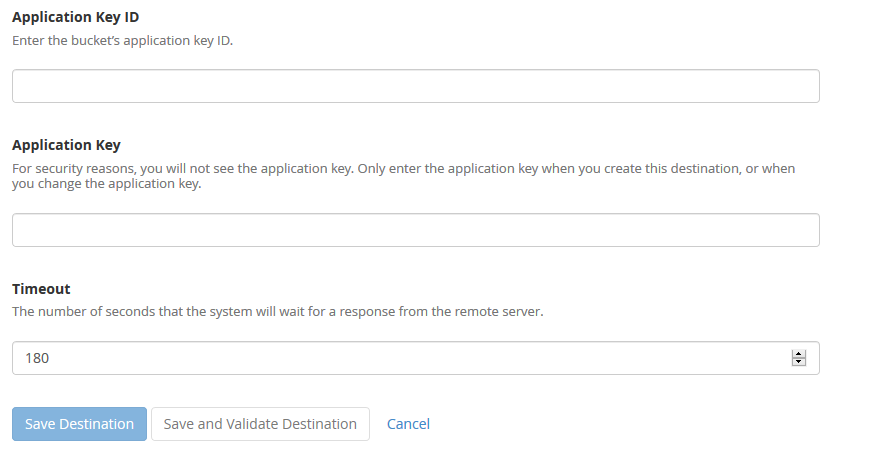
2. Click on Additional Destinations. Chose Backblaze B2 from the Destination Type and click on the Create New Destination button.
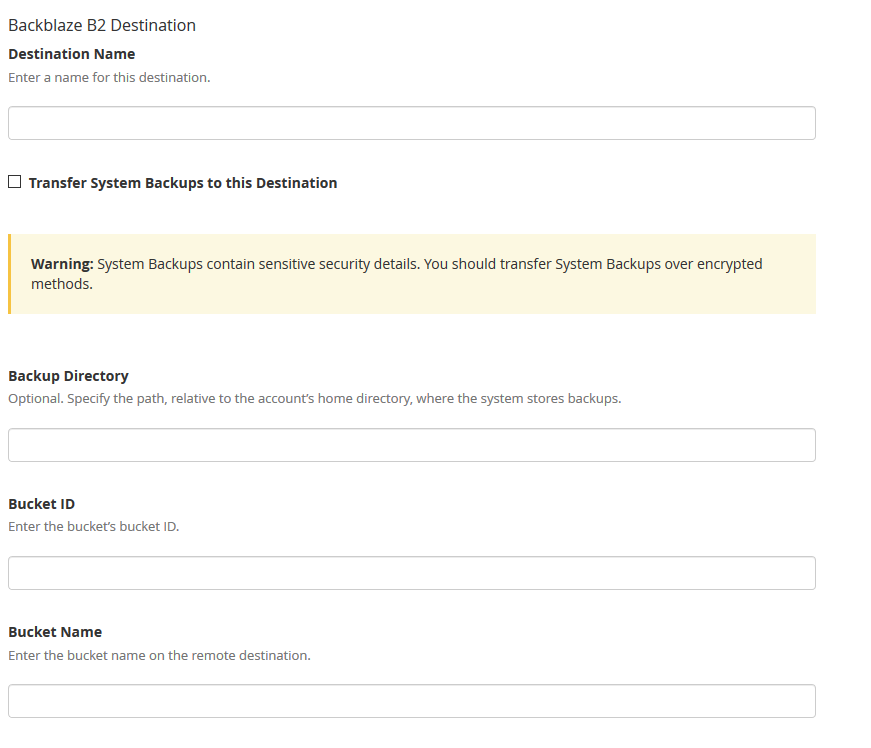
3. Enter in a backup name. Click on the “System Backups” if that is desired. Leave the Backup Directory blank. Enter in the Backblaze Bucket ID and Backblaze Bucket Name copied down earlier. Enter in the Backblaze Application Key ID and Backblaze Application Key. Click on the Save and Validate Destination button.
Make sure to disable your old AWS Glacier backup destination. All backups on Glacier should be set to auto delete according to a lifecycle, but if not then wait 120 days from creation to remove them to avoid any penalties. Speaking of lifecycles, it is a good idea to change the lifecycle settings on the Backblaze bucket to auto delete after a determined number of days since they do charge for total storage utilized.
If your company is would like to discuss the layers of security you have in place, then contact us for assistance.
Essential small business information security fundamentals: encrypt data, enable MFA, train employees, and backup regularly.
NIST is the National Institute of Standards and Technology. It acts as the defacto baseline that all other security and compliance organizations use to construct their standards. Reading their publications is like reading any other government document – extremely long and not interesting. Farmhouse Networking recently became aware of one such document called NISTIR 7621 aka Small Business Information Security: The Fundamentals. We took the time to distill out the main points here:
The Fundamentals aka Best Practices
Identify: Who has access to the network, who has access to the data, and what do they have access to. This includes background checking employees during the hiring process, taking an inventory of data to see who needs access to what, requiring that each user have their own login, and company policy creation.
Protect: Protection starts with separating data into shares then giving access only to those who really need it. It also includes protecting hardware with uninterruptible power supplies (UPS) and protecting software with regular updates. Protecting the network includes setting up a proper firewall, separate wireless for guest access, and VPN only access for remote users. Web filtering, SPAM filtering, file encryption, proper disposal of old equipment, and employee training are also mentioned.
Detect: Having a centrally managed antivirus software on each workstation is a must. This includes the ability to look back in time via log files or monitoring system to find the root of the security breach.
Respond: Have a disaster recovery plan and security incident response plan in place.
Recover: Need full backups of all important business data, invest in cyber insurance, and regularly access your technology to find timely improvements.
If your company does not meet these fundamentals, then contact us for assistance.
It’s an unfortunate reality but our workforce can often times be our worst enemies, often creating vulnerabilities and leaving our systems open to hackers, viruses, data breaches and data loss. More often than not, we do this through completely harmless, everyday activities like opening compromised emails and links.
As a leader in your organization it’s your role to monitor your team and arm them with the knowledge of good security practices. Without implementing a company-wide security training program, you leave your systems vulnerable to a host of attacks.
Another crucial step in preventing system attacks, is to configure a firewall to monitor user activity and website visits throughout your organization. An Acceptable Use Policy is helpful in establishing what your organization will and will not allow from its employees.
Curious how we can help you establish a more secure company infrastructure?
It seems lately that the power company in the area has not been able to offer consistent service power to the city. This has left many businesses down without the technology they need to operate properly. These power outages cause data loss and damage computer components.
My own unexpected outage
Once upon a time, about two weeks ago, the unexpected happened at our offices. A semi-truck carrying a large backhoe on a trailer drove between two buildings in the area. The landlord had wired power between buildings and the truck driver did not lower the arm of the backhoe low enough. Sure enough the wire was snagged by the backhoe’s arm and pulled from the building. Needless to say the power was out to that part of the building until the landlord took care of the matter.
What can be done?
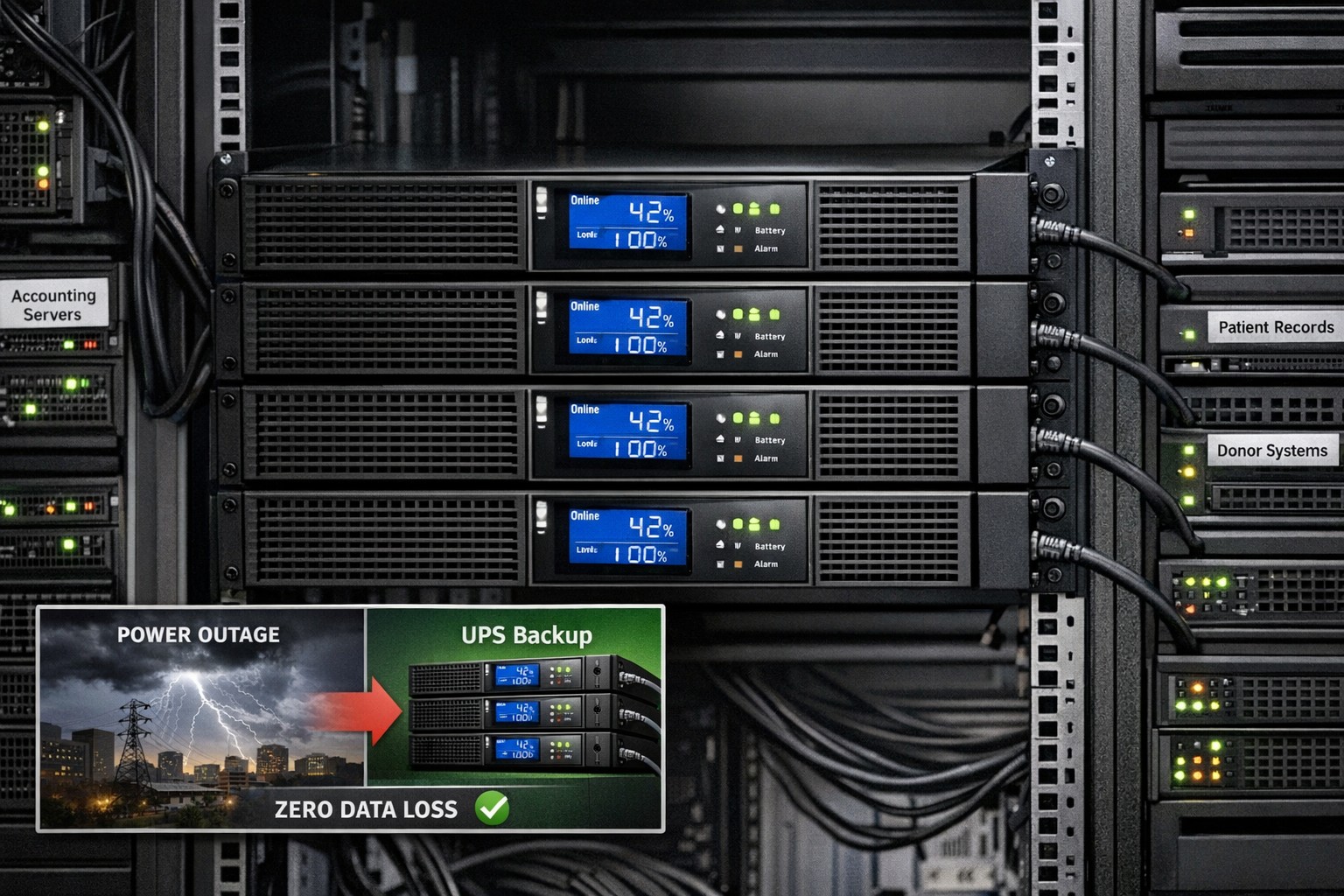
Farmhouse Networking recommends that all business workstations, servers, and networking equipment be protected by an uninterruptible power source aka UPS or battery backup. When the power goes out the right size battery backup will keeps things running for about 15-30 minutes to allow the last touches to be added to whatever was being worked on and things to be shutdown gracefully.
Did you know that malware accounts for 20% of all security incidents?
And that’s just one threat! Your data, no matter how proactive you are from a security standpoint, is constantly vulnerable to a multitude of security threats, the list of which is constantly growing. From ransomware, worms and phishing attacks to human error, your data needs to have a multi-layer defense in place to not only prevent downtime but recover quickly in the event that disaster strikes.
The following are just a few staggering facts about just how vulnerable our systems are to attacks and outages:
• According to Microsoft, the potential cost of cyber-crime to the global community is a $500 billion, and a data breach will cost the average company about $3.8 million!1 • A whopping 1 in 131 emails contain malware2 • 230,000 new malware samples are produced every day, and that number is projected to continue growing3 • It will take the average business about 197 days to detect a breach on their network4
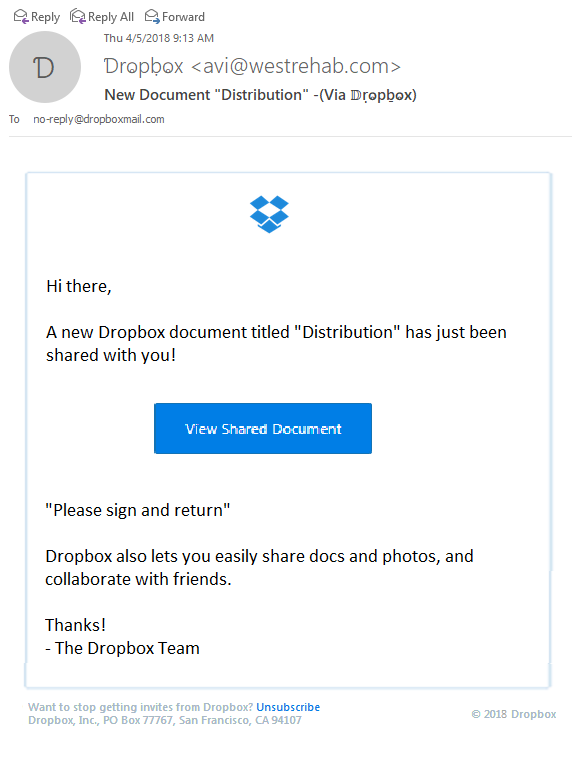
Thought that I would share a recently received new phishing email variant that could easily be overlooked and possibly cause damage to your network. The email appears to have come from Dropbox as a user sharing a folder with me, but a closer look shows many obvious signs that the email is a fake.
Starting from the Top
Look closely at the From portion of the email:
The lettering is actually another language where the font makes it look like English lettering. There is also the fact that the email is form someone that I don’t do business with. Always fight the urge to look at things that are not yours.
Stick to the Subject
Now to take a look at the Subject line of the email:
This has different lettering but it is again a different language used to look like English lettering.
And now the rest…
The final thing that caught my eye was the “button” in the middle of the email:
It actually looked fuzzy. It turns out the entire body of the email is a single image that is a link to their malicious site. Clicking anywhere in the body of the email would send you on your way to infection or account compromise. Hope this little tutorial helps you detect other phishing attempts in the future.
If your company is having trouble with SPAM or phishing, then contact us for assistance.
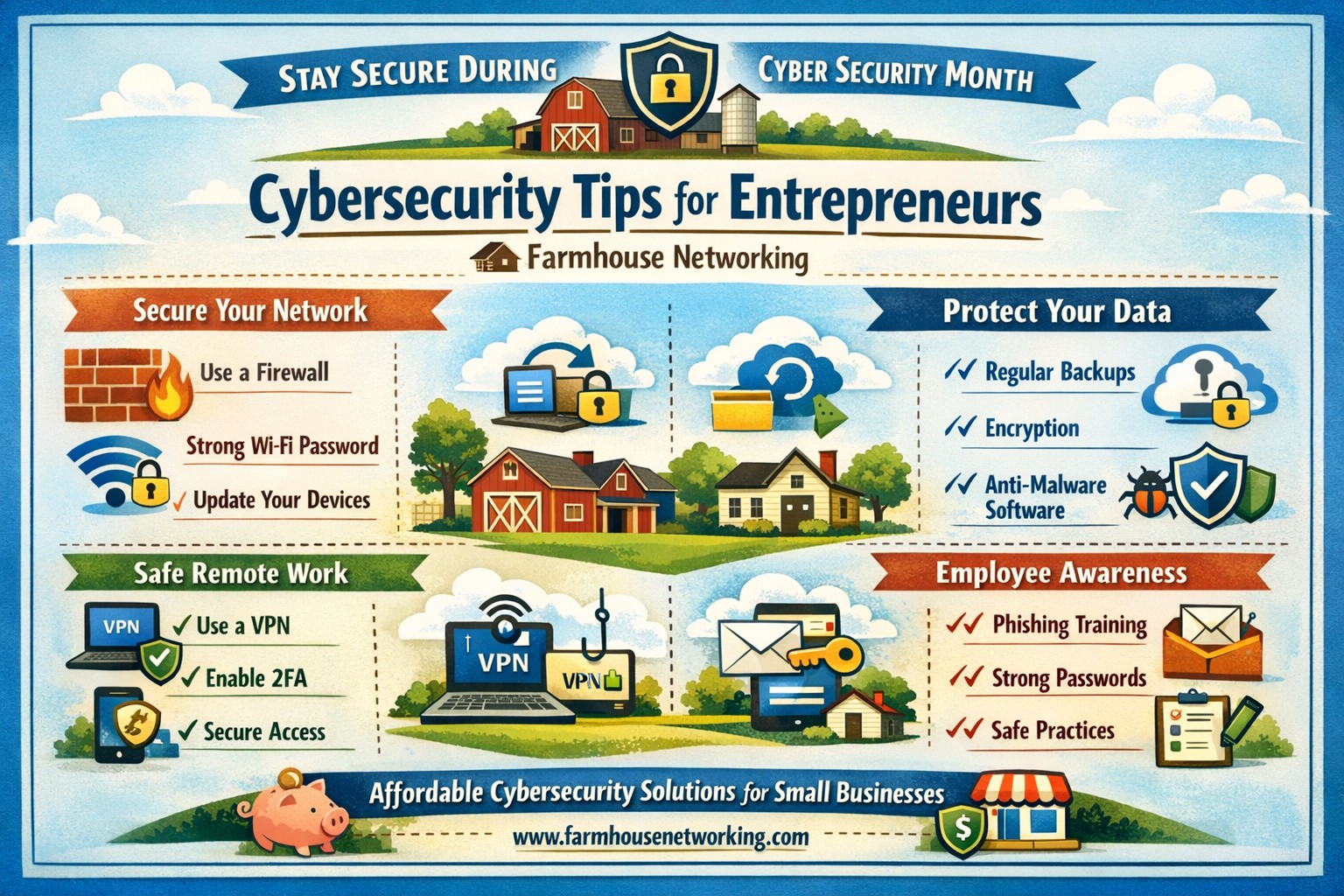
Entrepreneurs face the same cybersecurity challenges and threats that larger businesses face but with limited resources, capacity, and personnel. Cybersecurity is especially important for entrepreneurs because they have the unique opportunity to integrate cybersecurity practices at the onset of their investments and business development.
DID YOU KNOW?
Approximately 77 percent of small firms believe their company is safe from a cyber attack, even though 83 percent of those firms do not have a written security policy in place.
Unlike larger firms that can absorb the cost of a cyber attack, the consequences can be catastrophic for smaller ventures and entrepreneurs.
SIMPLE TIPS
Use and regularly update anti-virus software and anti-spyware on all computers. Automate patch deployments to protect against vulnerabilities. (Our monthly maintenance takse care of this.)
Secure your Internet connection by using a firewall, password protecting your Wi-Fi network, and changing default passwords for your wireless network and router. (Most businesses who buy a router from a local office supply store don’t take the time to change the default password and don’t know these devices are rarely updated by vendors.)
Establish security policies and practices (e.g., using encryption technology) to protect sensitive data, including customer information and intellectual property.
Use strong passwords and change them regularly. (Minimum recommended password length is 10 characters with upper and lower letters, numbers and symbols. Changing passwords should be monthly or quarterly if possible.)
Protect all pages on your public-facing websites, not just the sign-up and checkout pages.
Invest in data loss prevention software and use encryption technology to protect data that is transmitted over the Internet.If your company is concerned about cybersecurity and wants to take the needed steps to protect yourselves, then contact us for assistance.
And God will generously provide all you need. Then you will always have everything you need and plenty left over to share with others. As the Scriptures say,
“They share freely and give generously to the poor. Their good deeds will be remembered forever.”
For God is the one who provides seed for the farmer and then bread to eat. In the same way, he will provide and increase your resources and then produce a great harvest of generosity in you. - 2 Corinthians 9:8-10
We use cookies to ensure that we give you the best experience on our website. If you continue to use this site we will assume that you are happy with it.