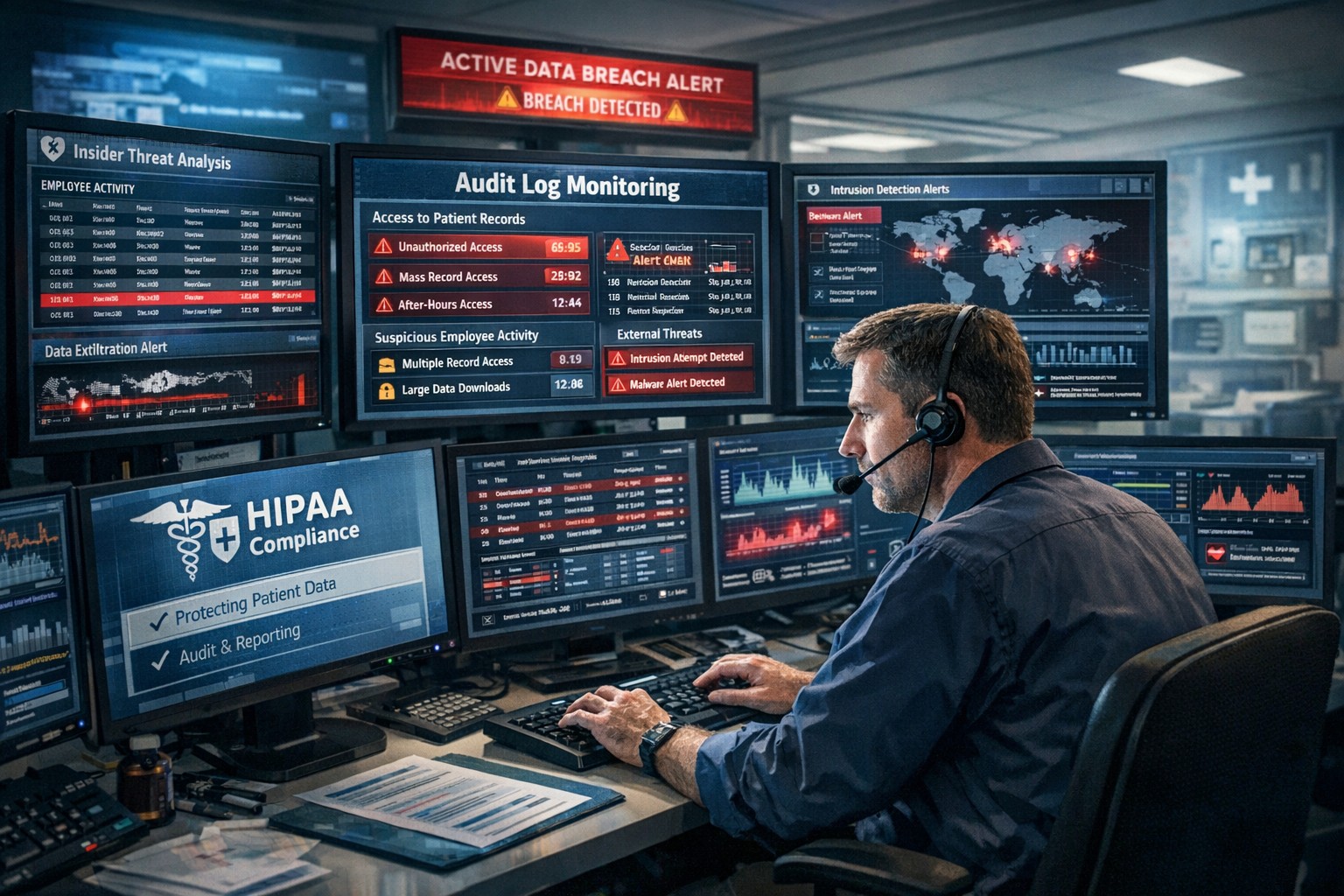
Key network monitoring tools every small business needs for optimal performance
As a business owner, you know reputation and customer trust are everything. But cybercriminals don’t discriminate by size—small and midsize businesses (SMBs) are increasingly the targets of ransomware and data theft. CIS Critical Security Control 13 gives you a practical way to stay ahead of attackers and protect your company’s future.
Practical Action Steps for SMBs:
Enable real-time network monitoring: Know immediately if your systems are under attack.
Centralize your logs: Aggregate data to detect issues before they escalate.
Set threshold-based alerts: Don’t wait until damage is visible to respond.
Review reports regularly: Make monitoring part of monthly executive/IT reviews.
Q&A for SMBs:
“Aren’t we too small for hackers to notice?” No—SMBs are now among the most targeted because criminals assume defenses are weak.
“Do I need an in-house IT team for this?” Not necessarily—outsourced experts can cost-effectively handle monitoring for you.
How Farmhouse Networking Helps: Farmhouse Networking provides SMBs with managed network monitoring, advanced alerts, and proactive defense strategies. We scale solutions to fit your size, budget, and growth goals.
Don’t leave your business exposed. Email Farmhouse Networking today and start building stronger defenses for lasting success.
Businesses of all sizes face unprecedented cybersecurity challenges. Blackpoint Cyber emerges as a leader in providing comprehensive, cutting-edge solutions to protect organizations from cyber threats. Let’s explore why Blackpoint Cyber stands out as the premier choice for business cybersecurity.
Comprehensive Ecosystem of Security Solutions
Blackpoint Cyber offers a fully managed, integrated ecosystem of services centered around their powerful nation-state-grade Managed Detection and Response (MDR) technology. This ecosystem is designed to keep businesses ahead of potential threats by proactively understanding the threat landscape and actively neutralizing adversaries before they can cause harm.
Managed Detection & Response (MDR)
At the core of Blackpoint’s offerings is their purpose-built MDR technology. This solution combines network oversite, malicious activity detection, and endpoint security to rapidly identify and neutralize hacker and virus activities in their earliest stages. By harnessing data around suspicious events, hacker tradecraft, and endpoint activity, Blackpoint’s MDR can stop advanced attacks faster than any other solution on the market.
Cloud Response
With the shift to hybrid and cloud environments, Blackpoint’s Cloud Response extends the power of their MDR service to these critical areas. Their 24/7 Security Operations Center (SOC) actively monitors cloud environments and provides fast responses to threats on platforms like Office 365.
LogIC
LogIC enhances the value of security logs and data collected from networks, turning them into real-time threat hunting and response capabilities. With push-button setup, LogIC allows for quick addition of log sources, generation of compliance reports, and automatic mapping against hundreds of compliance requirements.
Unmatched Threat Awareness and Response Times
Blackpoint Cyber’s proprietary security operations and incident response platform, SNAP-Defense, enables continuous monitoring and response to modern threats. Their SOC, established by former US government cybersecurity operators, leverages deep knowledge of hacker tradecraft to provide 24/7 unified detection and response services.
The company boasts impressive response times, with an average of 7 minutes for cloud incidents and an overall average of 27 minutes. This rapid response capability is crucial in minimizing potential damage from cyber attacks.
Tailored Solutions for Businesses of All Sizes
While Blackpoint Cyber’s technology is enterprise-grade, they specialize in bringing these advanced solutions to small and medium-sized businesses through partnerships with Managed Service Providers (MSPs) like Farmhouse Networking. This approach allows businesses of all sizes to benefit from top-tier cybersecurity protection.
Continuous Innovation and Growth
Blackpoint Cyber continues to invest in growth and innovation. With a recent $190 million investment round and the appointment of industry veteran Manoj Srivastava as Chief Technology and Product Officer, the company is poised for further advancements in their product strategy and technology.
Blackpoint Cyber’s suite of solutions offers businesses a robust, proactive approach to cybersecurity. Their technology, combined with human expertise, provides a level of protection that’s essential in today’s threat landscape.
Ready to elevate your business’s cybersecurity with Blackpoint Cyber’s cutting-edge solutions? Contact Farmhouse Networking today to manage your cyber security needs and implement these powerful tools. Don’t wait for a breach to happen – take proactive steps to protect your business now.
As our business continues to grow our focus is on providing white labeled Tier 3 IT support services, RMM as a service, and co-managed IT services. This blog will be highlighting tips for using Powershell to get an Export List of AD Users Last Login was more than 90 Days Ago.
Research
You need to find out what the Organizational Unit (OU) path that you are trying to get the count from. The following command will list all OUs in the domain.
Get-ADOrganizationalUnit -Filter 'Name -like "*"' | Format-Table Name, DistinguishedName -A
If you want the entire organization then you will need the top level information which looks like DC=[DomainName],DC=local
Variables
$SearchOU = This is the full DistinguishedName from the above output.
The script will take several seconds to run based on the number of users in the OU being searched. The output is saved to the local c:\support directory and you can modify this script to include the FTP upload based on our previous article – https://www.farmhousenetworking.com/rmm/automation/rmm-automation-export-log-files-to-ftp/ The script can also be easily modified to change the number of days since last login.
If your company is a MSP or wants to become one and automation just seems out of reach, then contact usto run your RMM for you.
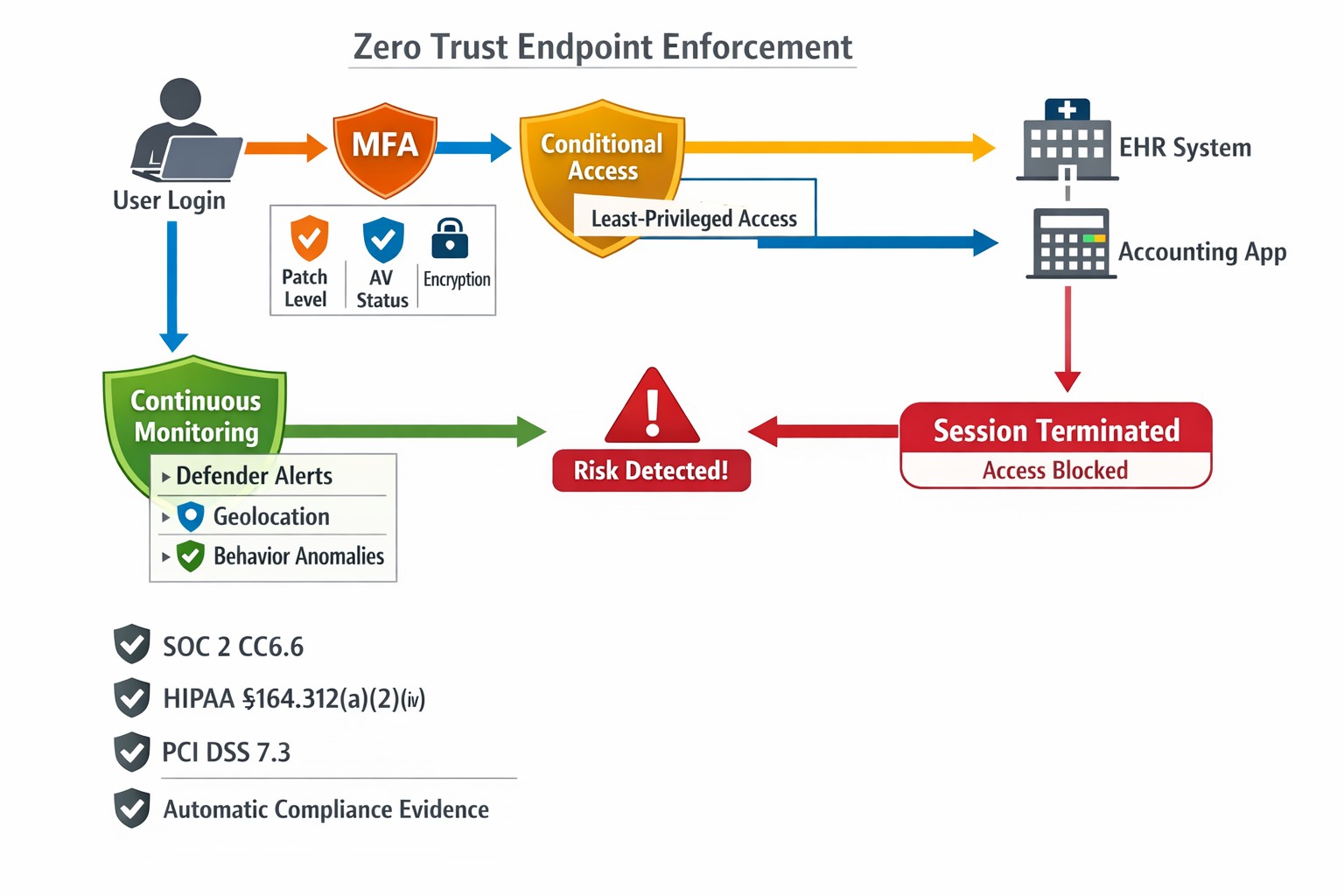
This is the sixth in a series about the concept of Zero Trust, which means in the IT sense that you trust nothing and always verify everything surrounding and connected to your network. Today’s discussion will be on endpoint security.
Endpoint Security
Endpoint security is a fancy term used to describe how the computers on the network are protected. This used to be done by antivirus but due to the complexity of the attacks hackers are using to compromise networks these days, the definition has expanded greatly. This now includes things like Enhanced Detection & Response software, Security Operations Centers, DNS Filtering, employee train and more. Here are some questions that you should be asking yourself:
Are your endpoints protected by antivirus or enhanced detection & response?
Is website traffic being monitored? Restricted?
Are your employees being trained in cyber security?
Are computer logs being monitored for malicious activity?
Would unusual or suspicious activity on a computer be noticed? Alerted on?
Do you have security permissions set on all file shares?
Do you have least privileged access configured on those shares?
Do you keep track of what software is installed on all workstations?
Do you block access to unauthorized software?
Are files encrypted on servers and workstations?
Are your mobile devices managed? Can you wipe them remotely?
Are USB ports blocking removeable storage devices?
Are endpoints set to automatically log-out?
If your company is going to use full disk encryption or has compliance requirements that you need consulting for, then contact us for assistance.
24/7 cyber defense protects small business critical data
A recent briefing from the FBI’s Internet Internet Crime Complaint Center (IC3) detailed current best practices and industry standards for cyber defense. Here is a summation:
Cyber Defense Best Practices
Backups – Regularly back up data and verify its integrity. Backups are critical in ransomware; if you are infected, backups may be the only way to recover your critical data.
Training – Employees should be made aware of the threat of ransomware, how it is delivered, and trained on information security principles and techniques.
Patching – All endpoints should be patched as vulnerabilities are discovered. This can be made easier through a centralized patch management system.
Antivirus – Ensure anti-virus and anti-malware solutions are set to automatically update and that regular scans are conducted. Centrally managed is even better.
File Permissions – If a user only needs to read specific files, they should not have write-access to those files, directories, or shares. Configure access controls with least privilege in mind.
Macros – Disable macro scripts from Office files transmitted via email.
Program Execution Restrictions – Implement software restriction policies or other controls to prevent the execution of programs in common ransomware locations, such as temporary folders supporting popular internet browsers, and compression/decompression programs.
Remote Desktop Protocol – Employ best practices for use of RDP, including use of VPN, auditing your network for systems using RDP, closing unused RDP ports, applying two-factor authentication wherever possible, and logging RDP login attempts.
Software Whitelisting – Implement application whitelisting. Only allow systems to execute programs known and permitted by security policy. This one takes careful planning.
Virtualization – Use virtualized environments to execute operating system environments or specific programs. No physical access to servers makes hacking harder.
Network Segmentation – Implement physical and logical separation of networks and data for different organizational units. Keep guest traffic out of your business network.
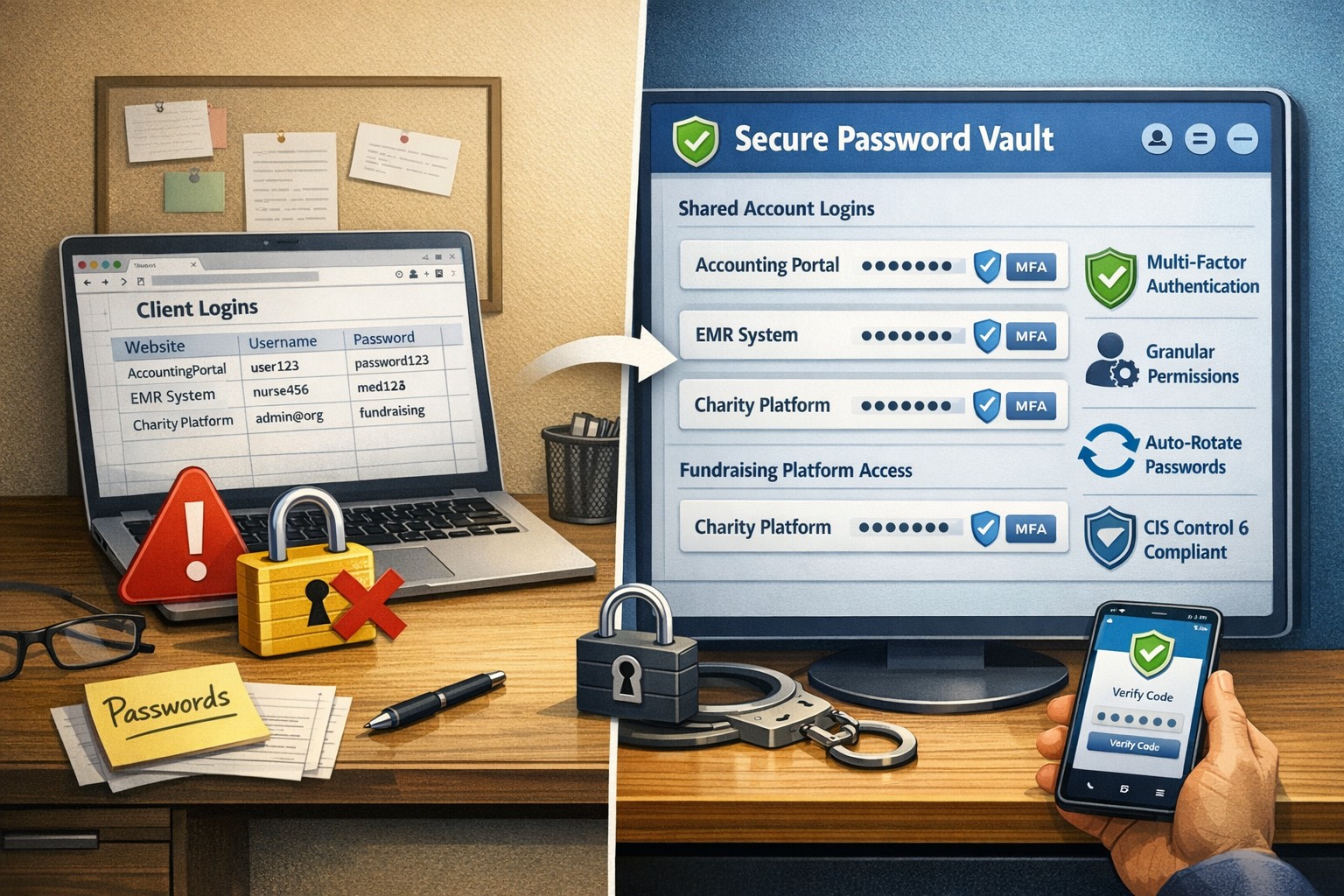
No Saved Passwords – Require users to type information or enter a password when their system communicates with a website. Better yet use a password management tool.
If your company is going to use full disk encryption or has compliance requirements that you need consulting for, then contact us for assistance.
Farmhouse Networking has had a long standing policy that we do not keep a record of client passwords (except when needed for device administration). That is about to change, but before we talk about our new password policy let’s talk password storage:
Common Password Storage
Here are some popular places where many businesses store their passwords that make them very vulnerable to being stolen.
Passwords written on paper (that are not under lock and key):
On your desk under your keyboard (or taped underneath)
Under your stapler or desk decorations
On sticky notes stuck to your monitor or desk
On a scrap of paper on your desk or in a drawer
In a notebook or address book
In a old-fashioned Rolodex file
Paper printouts or photocopies of your passwords
Anyone with access to your office could easily find and steal passwords stored like this.
Passwords stored in your computer (without using encryption):
Remembered in your web browser
A document called “Passwords” that you’ve created anywhere on your computer, perhaps using Microsoft Word or Excel
A document with any other name on your computer (including the password as the name)
Email drafts that you’ve created (but not sent) containing password information
Anyone with access to your computer could easily find and steal passwords stored like this, including both a person with physical access to it as well as a virus or hacker gaining access via the internet, or scamming you into granting them access, even once.
Passwords stored in your smartphone or tablet (without using encryption):
Electronic “Notes” containing password information
Other documents or emails similar to the ones listed in computer storage above
Anyone with access to your device could easily find and steal passwords stored like this.
Passwords sent via regular (insecure) email:
Emails that you have sent to yourself containing password information
Emails that you have sent to anyone else containing password information
Any information that you send using regular (unencrypted) email puts that information at risk of being stolen. Email is neither private nor secure. Sending an email is like mailing a postcard, and hackers and thieves can easily read the contents. You should never send passwords (or any other confidential or sensitive data) via regular email.
Secure Password Storage
Now for the discussion of Farmhouse Networking’s new password policy. We are partnering with a company to provide a storage of passwords and other client documentation with military grade encryption. This partnership also allows us to address the dangers that common password storage present by offering our clients this same encrypted password storage service. Here are some of the benefits of this service:
Unlimited users
Unlimited passwords
Each user has a personal password vault
Shared company password vault
Security groups to manage access
Auditing & reporting (Compliance)
Secure password sharing
1-Click Login Tool (for all major browsers)
Mobile Device Access
Only $15 per month (Compared to Lastpass Business at $4 per user per month)
If your company is using common password storage of any kind do yourself a security favor and contact us to upgrade to secure password storage.
Very weird occurrence the other day, checked the post office box and found a letter regarding my son’s protected health information (PHI) had been improperly accessed in an Asante employee breach that started in 2014. Shortly there after upon returning home, found an email from Yahoo stating that they had been hacked back in 2014 and had just now finished their investigation which could have effected my wife’s personal email. Seems a strange coincidence that both firms had this happen two years ago and it took both firms two years to notice / do the investigation piece to rectify the situation. Here are some quotes from their responses:
Asante Employee Breach
“While Asante cannot provide details regarding the outcome of this internal investigation, we can assure you that we applied our employment policies and processes appropriately. A final audit of the employee’s actions showed that the employee inappropriately accessed records from August 18, 2014 to July 21, 2016 that may have included your child’s name, date of birth, medical records number, medications, diagnosis, and lab results… To date, we have no evidence that any patient information has been misused, nor do we have any reason to believe that the information will be misused. However, as a precaution, we wanted to notify you regarding this incident and assure you that we take it very seriously.”
Yahoo Hack
“A copy of certain user account information was stolen from our systems in late 2014 by what we believe is a state-sponsored actor… The stolen user account information may have included names, email addresses, telephone numbers, dates of birth, hashed passwords (the vast majority with bcrypt) and, in some cases, encrypted or unencrypted security questions and answers.”
So these two things were not related but it is scary to think that it took two years to notice this activity. Even if Asante believes that the employee didn’t do anything malicious with the information, it shows that their information access policies and audit logging on them is severely lacking. They need to step up their game and possibly adopt some behavioral based analysis of the audit logs for inappropriate access like this in the future.
As for Yahoo, why are some of the security questions unencrypted while others were and were the passwords just hashed? If a state-sponsored actor had unsalted password hashes for two years before being detected then the likelihood of them being able to crack the passwords is extremely high. They also state that they are working closely with law enforcement on this one, but what is law enforcement going to do against another government’s hacking crew (aka state-sponsored actor)?
If your company is unsure of its information security posture or needs an evaluation of audit logging / reporting, then contact us for assistance.
Big thanks go out to the folks at SANS Institute for this write-up on Detecting Security Incidents Using Windows Workstation Event Logs that gave the guidance for this article on Windows Event Logs Intrusion Detection. These are the basics of creating Custom Views in Event Viewer on Microsoft Windows 2012, but the actual monitoring for these events should be done by more complex log parsing software that is beyond the scope of this article. Here are the basic steps towards finding these events:
Create Windows Event Logs Intrusion Detection Custom View
Open Event Viewer
Right click on Custom Views then choose “Create Custom View…”
Make sure to select all event levels and all Windows Logs
Add the following event id numbers into the space provided:
Click OK. Give the Custom View a name then Click OK again.
Right click on the newly created Custom View and select “Attach Task To This Custom View…”
Work through the wizard based interface and select the desired task. Email is a nice one but is depreciated and will require the setup of an SMTP Relay unless there is an onsite Exchange server or dedicated email setup for this purpose with your email provider.
These are just the basics the article from SANS goes into greater depth on how to configure event log monitoring software to parse these for you. Better yet contact us to setup remote monitoring and maintenance to do the heavy lifting for you.
Recently going through the HIPAA compliance standards and dealing with “accidentally” deleted items on a file share has lead to a need for a standard file server audit logging policy that can be deployed to all servers via Group Policy Object (GPO). Here is the summation of my research:
File Server Audit Logging Policy GPO
1. Create a GPO and name it File Server Audit Policy
2. Set the following settings to enable advanced features and disable shutdown:
[Computer Configuration\Windows Settings\Security Settings\Local Policies\Security Options\]
Audit: Force audit policy subcategory settings (Windows Vista or later) to override audit policy category settings – Enabled
Audit: Shut down system immediately if unable to log security audits – Disabled
3. Move down the tree structure to the following and edit these various auditing settings:
[Configuration\Windows Settings\Security Settings\Advanced Audit Policy Configuration\Audit Policies\]
Account Logon: Credential Validation – Success and Failure
Account Management: Computer Account Management – Success
Account Management: Other Account Management Events – Success and Failure
Account Management: Security Group Management – Success and Failure
Account Management: User Account Management – Success and Failure
Detailed Tracking: Process Creation – Success
Logon-Logoff: Logoff – Success
Logon-Logoff: Logon – Success and Failure
Logon-Logoff: Special Logon – Success
Object Access: File System – Success
Policy Change: Audit Policy Change – Success and Failure
Policy Change: Authentication Policy Change – Success
Privilege Use: Sensitive Privilege Use – Success and Failure
System: IPsec Driver – Success and Failure
System: Security State Change – Success and Failure
System: Security System Extension – Success and Failure
System: System Integrity – Success and Failure
5. Open the Properties of the shared folder needing Auditing, click on Security tab and then on the Advanced button
6. Click on the Auditing tab, if there is UAC prompt then click Continue and then click on the Add button
7. Click on Select Principal, search for the Everyone security group and then click on the OK button
8. Change the Type to All, click on Show advanced permissions, check the boxes next to “Delete subfolders and files” and “Delete” and then click on the OK button
9. Put a check next to “Replace all child object auditing with inheritable auditing from this object then click on the OK button
If your company is using a Windows Server for network file access and need help getting the File Server Audit Logging setup property for HIPAA compliance, then contact us for assistance.
And God will generously provide all you need. Then you will always have everything you need and plenty left over to share with others. As the Scriptures say,
“They share freely and give generously to the poor. Their good deeds will be remembered forever.”
For God is the one who provides seed for the farmer and then bread to eat. In the same way, he will provide and increase your resources and then produce a great harvest of generosity in you. - 2 Corinthians 9:8-10
We use cookies to ensure that we give you the best experience on our website. If you continue to use this site we will assume that you are happy with it.