TaaS delivers scalable cloud infrastructure for future-ready accounting firms.
The accounting industry is on the cusp of a technological revolution, with emerging trends set to reshape how firms operate and deliver value to their clients. As we look ahead to 2025 and beyond, it’s crucial for accounting practices to stay ahead of the curve and embrace these innovations. Let’s explore the key technologies that are poised to transform the accounting landscape and discuss how firms can prepare for this exciting future.
Artificial Intelligence and Machine Learning
Artificial Intelligence (AI) and Machine Learning (ML) are at the forefront of the accounting technology revolution. The AI in accounting market is expected to reach $4.791 billion by 2024, growing at an impressive compounded annual growth (CAGR) of 48.4%. This rapid growth is driven by AI’s ability to automate repetitive tasks, streamline workflows, and provide valuable insights.
Key applications of AI in accounting include:
Automated data entry and reconciliation
Intelligent fraud detection
Advanced financial forecasting
Natural language processing for document analysis
To prepare for this AI-driven future, firms should invest in AI-powered accounting software and prioritize training programs to help staff leverage these new tools effectively.
Cloud-Based Accounting Solutions
Cloud technology has already transformed the accounting industry, and its importance will only grow in the coming years. The global Cloud Accounting Software market is projected to reach $7567.54 million by 2028, expanding at a CAGR of 10.56%.
Benefits of cloud-based accounting include:
Real-time collaboration and data access
Enhanced data security and backup
Scalability and cost-efficiency
Seamless integration with other business systems
Accounting firms should consider migrating their operations to cloud-based platforms to improve efficiency and provide better service to clients.
Blockchain Technology
While often associated with cryptocurrencies, blockchain technology has far-reaching implications for the accounting industry. The accounting blockchain market is expected to reach $868 million by 2025.
Potential applications of blockchain in accounting:
Enhanced transaction transparency and security
Streamlined auditing processes
Improved record-keeping and data integrity
Simplified reconciliations
Firms should start exploring blockchain technology and its potential applications to stay ahead of this emerging trend.
Data Analytics and Forecasting Tools
As businesses generate more data than ever before, the ability to analyze and derive insights from this information is becoming crucial. Advanced data analytics tools are enabling accountants to provide more strategic advice to their clients.
Key areas where data analytics can add value:
Predictive financial modeling
Risk assessment and management
Performance benchmarking
Identifying cost-saving opportunities
Accounting practices should invest in robust data analytics tools and develop their team’s skills in data interpretation and visualization.
Cybersecurity and Data Protection
With the increasing digitization of financial data, cybersecurity has become a top priority for accounting firms. Protecting sensitive client information is not just a legal requirement but also a crucial aspect of maintaining trust and credibility.
Essential cybersecurity measures:
Implementing multi-factor authentication
Regular security audits and penetration testing
Employee training on cybersecurity best practices
Adoption of managed detection and response technologies
Firms must prioritize cybersecurity investments and stay updated on the latest threats and protection measures.
Robotic Process Automation (RPA)
RPA is set to revolutionize routine accounting tasks by automating repetitive processes. This technology can significantly improve efficiency and reduce errors in areas such as accounts payable, receivable, and financial close processes.
Benefits of RPA in accounting:
Increased accuracy in data entry and processing
Faster completion of routine tasks
Reduced operational costs
Improved compliance and audit trails
Accounting practices should identify processes that can be automated using RPA and implement these solutions to boost productivity.
The Evolving Role of Accountants
As technology automates many traditional accounting tasks, the role of accountants is evolving. Future-focused firms will need to shift their focus from number-crunching to providing high-value advisory services.
Skills for the future accountant:
Strategic financial planning
Data analysis and interpretation
Technology proficiency
Soft skills such as communication and problem-solving
Firms should invest in continuous learning and development programs to help their staff adapt to these changing roles.
Preparing for the Future
To future-proof your accounting practice, consider the following steps:
Conduct a technology audit to identify areas for improvement
Develop a digital transformation strategy aligned with your firm’s goals
Invest in staff training and development to build necessary skills
Stay informed about emerging technologies and industry trends
Collaborate with technology partners to implement new solutions
The accounting industry is on the brink of a technological revolution, and firms that embrace these emerging technologies will be well-positioned for success in the years to come.
Ready to navigate the complex world of accounting technology and future-proof your practice? Contact Farmhouse Networking today. Our expert team can help you assess your current technology stack, identify areas for improvement, and implement cutting-edge solutions tailored to your firm’s unique needs. Don’t let your practice fall behind – take the first step towards a technologically advanced future by reaching out to Farmhouse Networking now.
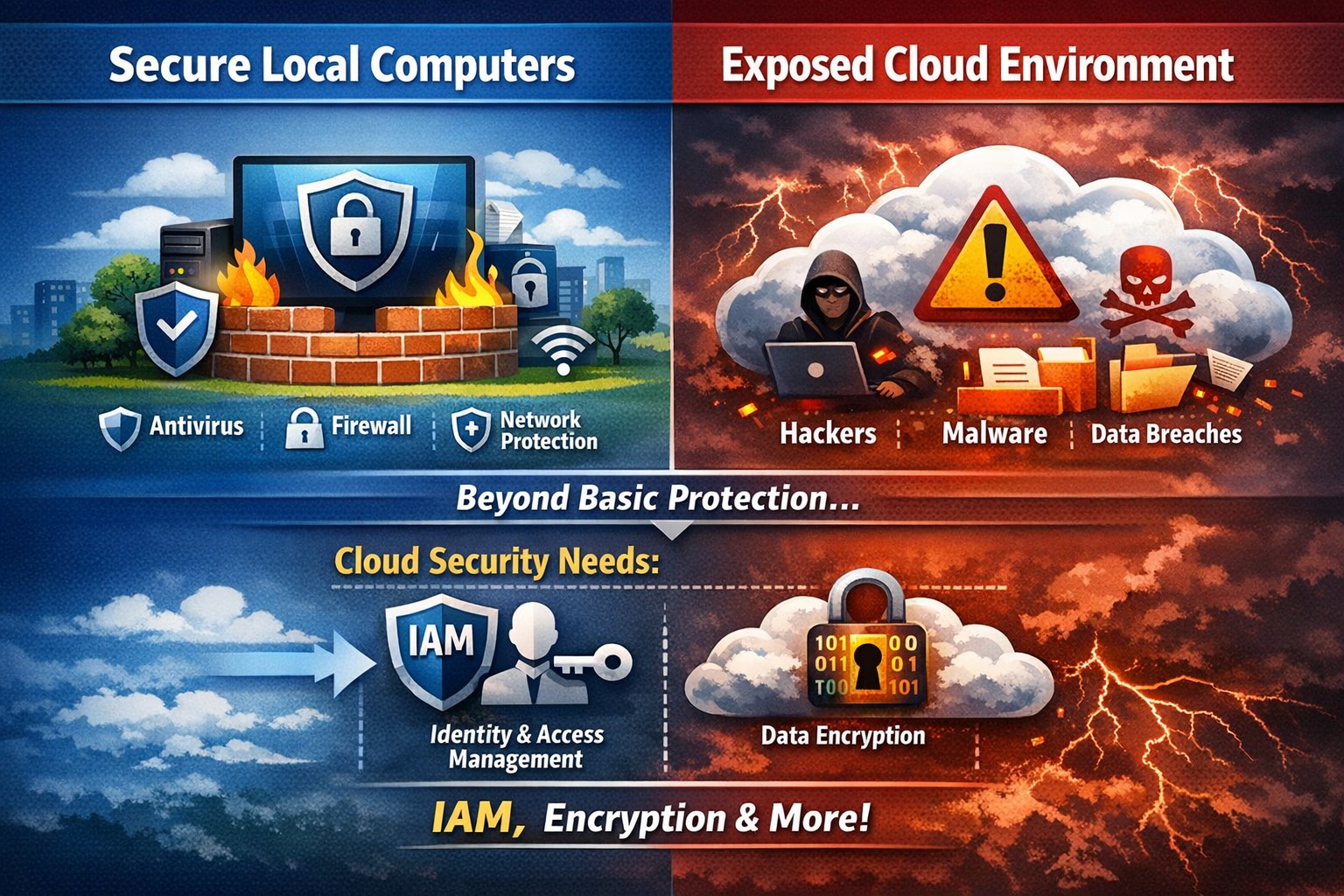
Secure endpoints don’t guarantee cloud safety—address cloud-specific risks now
The ability to store and access data remotely in the cloud has revolutionized the way organizations operate, providing flexibility, scalability, and cost-efficiency. However, with this convenience comes the need for robust security measures to protect sensitive information from cyber threats. This article explores the importance of cloud security and provides strategies to safeguard your company’s data in the cloud.
Understanding Cloud Security
Cloud security encompasses a set of controls, processes, technologies, and policies designed to protect cloud-based systems, infrastructure, and data. It is one part of computer security and information security, aiming to safeguard businesses from financial, legal, and reputational repercussions of data breaches and loss.
Cloud security involves various strategies and best practices to ensure the confidentiality, integrity, and availability of cloud resources. It includes measures such as real-time monitoring, multi-factor authentication (MFA), identity and access management (IAM), cloud-to-cloud backup solutions, systematic off-boarding processes, and anti-phishing training.
Real-time Monitoring
Real-time monitoring is a crucial strategy to detect and respond to suspicious threats promptly. By implementing real-time monitoring tools, businesses can gain visibility into their employee activity and cloud systems to proactively identify any potential cyber attacks. This allows for immediate action to mitigate risks and minimize the impact of data breaches. According to IBM, the global average total cost of a data breach in 2023 was $4.45 million, highlighting the financial implications of inadequate security measures.
Multi-Factor Authentication (MFA)
Traditional username and password combinations are no longer sufficient to protect user accounts from hackers. MFA adds an extra layer of security by requiring users to provide multiple pieces of evidence to verify their identities. This could include a combination of something they know (password), something they have (a mobile device or security key), or something they are (biometric data like a fingerprint or facial recognition). By implementing MFA, businesses can significantly reduce the risk of account compromise attacks and prevent unauthorized access to cloud applications.
Identity and Access Management (IAM)
Identity and access management (IAM) is a critical component of cloud security. It involves assigning proper levels of authorization and access controls to ensure that employees only have access to the information and resources necessary for their roles. IAM not only prevents accidental data breaches but also protects businesses from external threats by limiting the potential attack surface. By implementing IAM solutions, organizations can enforce strict access controls, reduce the risk of unauthorized data access, and maintain data privacy.
Cloud-to-Cloud Backup Solutions
While cloud providers typically have robust data protection measures in place, businesses should not solely rely on them for data backup. Cloud-to-cloud backup solutions provide an additional layer of protection by replicating data from one cloud service to another. This helps mitigate the risk of data loss due to cloud provider mistakes or system failures. Organizations using software-as-a-service (SaaS) applications can benefit from cloud-to-cloud backup solutions, ensuring advanced data protection beyond the basic safeguards provided by the applications themselves.
Systematic Off-boarding Process
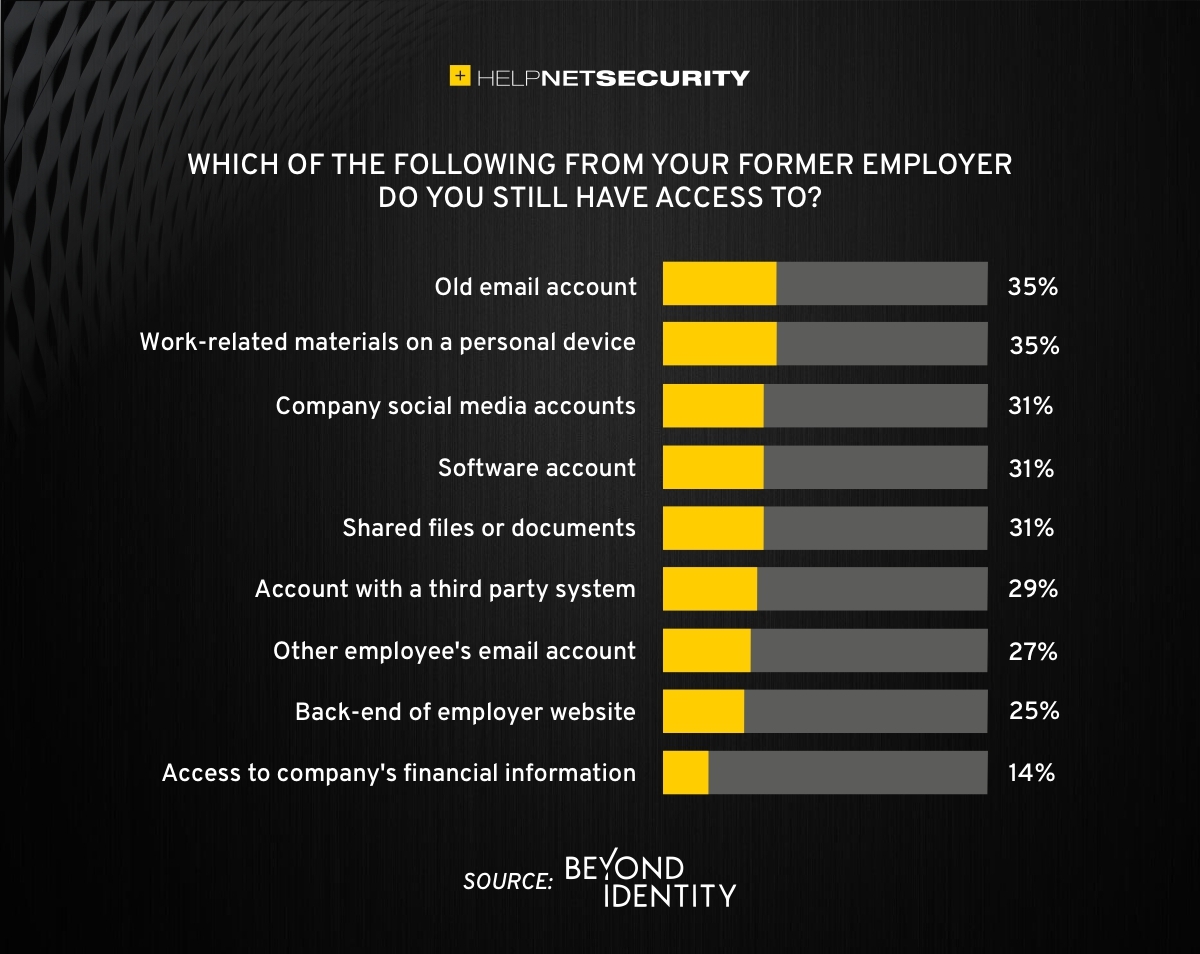
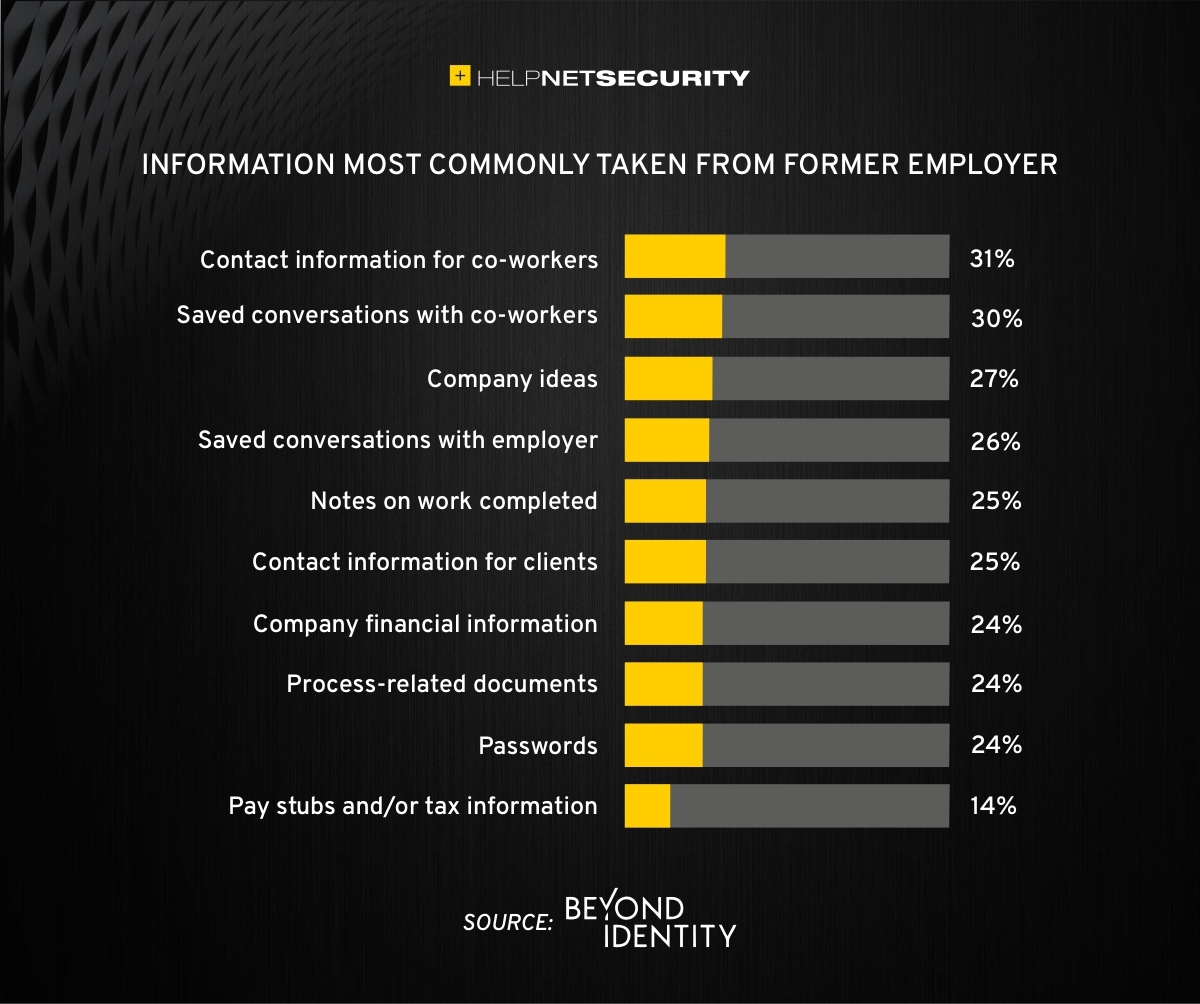
When employees leave a company, it is crucial to have a systematic off-boarding process in place to revoke their access rights immediately. According to a survey conducted by Cyberark, “88% of IT workers would take sensitive data with them or abscond with company passwords if they were fired.” Additionally, 50% of ex-employees can still access corporate apps. To prevent unauthorized access and protect sensitive data, organizations should ensure that departing employees’ access rights are promptly revoked. This includes revoking access to systems, data, cloud storage, intellectual property, and consumer information.
Offering Anti-Phishing Training
Phishing remains a prevalent threat in the cybersecurity landscape. Hackers often gain access to secure information by stealing employees’ login credentials or utilizing social engineering techniques. Offering anti-phishing training to employees can help raise awareness about these scams and prevent them from falling victim to phishing attacks. By educating employees on how to identify and report phishing attempts, organizations can safeguard their sensitive data without compromising productivity.
Strengthening Cloud Security Measures
While the above strategies are crucial for securing cloud operations, it is essential to adopt a comprehensive approach to cloud security. Here are additional best practices to strengthen your cloud security measures:
Enforce reliable passwords: Implement password policies that require complex, unique passwords and regular password updates. Encourage the use of password managers to reduce the risk of weak passwords.
Use encryption: Encrypting sensitive data helps protect it from unauthorized access. Implement encryption measures for data at rest and in transit.
Test security continuously: Regularly conduct vulnerability assessments and penetration testing to identify and address security weaknesses in your cloud infrastructure. This proactive approach ensures that potential vulnerabilities are discovered and remediated before they can be exploited.
Ensure local backup: In addition to cloud-to-cloud backup solutions, consider implementing local backups of critical data. This provides an extra layer of protection in case of cloud provider outages or data loss incidents.
Implement additional security measures: Explore additional security solutions such as intrusion detection systems (IDS), firewalls, and data loss prevention (DLP) tools to enhance your overall cloud security posture.
Avoid storage of sensitive data: Minimize the storage of sensitive data in the cloud. Identify and classify data based on its sensitivity and apply appropriate security controls accordingly. This reduces the risk of data breaches and ensures compliance with data protection regulations.
Why Is Cloud Security Important?
Cloud security is crucial for organizations migrating their sensitive data and applications to the cloud. By adopting secure cloud practices, businesses can protect highly sensitive data from hackers and ensure compliance with regulatory requirements. Here are a few reasons why cloud security is important:
Control Access
Cloud security enables organizations to monitor and regulate access to their data. By formulating policies and implementing access controls, businesses can prevent unauthorized users from accessing sensitive information. Cloud management tools provide visibility into user behavior and help maintain strong access controls.
Encrypting Sensitive Data
Encryption plays a vital role in securing data in the cloud. By encrypting data at rest and in transit, organizations can protect it from unauthorized access. Implementing encryption with strong access and control policies minimizes the impact of compromised keys and ensures data confidentiality.
Using Automation
Automation helps minimize human errors and misconfigurations in cloud environments. By automating routine tasks and configurations, organizations can ensure that their infrastructure is deployed and maintained correctly. Cloud automation tools streamline everyday configuration items and provisioning, reducing the risk of security vulnerabilities.
Extend Vulnerability Management Tools
Vulnerability management tools scan networks to identify potential threats or weaknesses that attackers can exploit. These tools help manage and mitigate attacks on the network by suggesting remedies and actions to reduce the prospect of network breaches. Regular scanning and remediation of vulnerabilities are essential to maintain a secure cloud environment.
Implementing Enhancements
Continuous improvement is crucial for maintaining cloud security. Organizations should continuously enhance their security measures throughout the entire lifecycle of their operations. As new threats emerge, businesses must adapt and implement necessary enhancements to safeguard against potential risks.
Deploying Multi-Factor Authentication (MFA)
Deploying MFA increases security and authentication for enterprise applications. Weak or reused passwords are a significant cause of data breaches. By implementing MFA, businesses can protect their cloud applications from unauthorized access attempts. Authorized personnel are granted access, minimizing the risk of data breaches.
Local businesses rely on Farmhouse Networking to simplify their cloud security management and enhance overall security posture. Click here to get started.
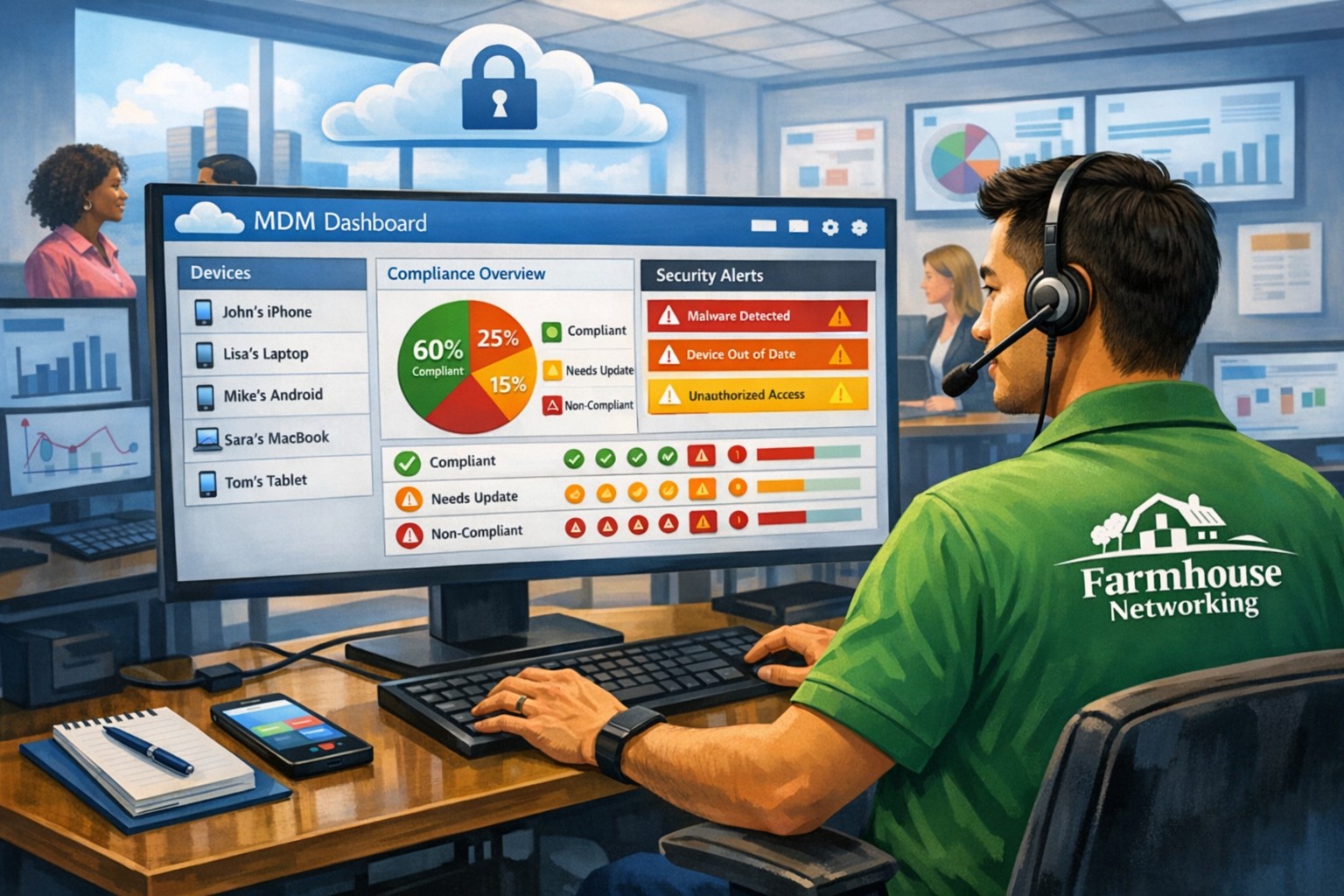
MSP console managing SMB BYOD smartphones and laptops with centralized MDM and security policies.
Small and medium-sized businesses (SMBs) face numerous challenges when it comes to managing their IT. Limited resources (both human and money), lack of expertise, and the need to focus on core business operations often make it difficult for SMBs to understand and manage technology needs. This is where Managed Service Providers (MSPs) come in. In this blog article, we will explore the reasons why SMBs should consider partnering with MSPs to enhance their IT capabilities and drive business growth.
Cost-Effective IT Solutions:
One of the primary reasons why SMBs need MSPs is the cost-effectiveness they offer. By outsourcing their IT needs to MSPs, SMBs can avoid the high costs associated with hiring and training an in-house IT team. MSPs provide a range of services, including network monitoring, data backup and recovery, cybersecurity, and software updates, all at a predictable monthly cost. This allows SMBs to allocate their resources more efficiently and focus on their core business.
Access to Expertise and Advanced Technology:
MSPs are experts in providing IT services and have a team of highly skilled professionals with expertise in variety of technology. By partnering with MSPs, SMBs gain access to the depth of knowledge and experience from IT experts who can handle complex tasks and provide strategic guidance. Additionally, MSPs stay up-to-date with the latest technology trends and can recommend and implement solutions that can help SMBs stay competitive in the market and safe from hackers.
Proactive IT Support and Maintenance:
MSPs offer proactive IT support and maintenance, which is crucial for SMBs. They monitor networks, identify potential issues, and take preventive measures to avoid downtime and disruptions. MSPs also provide regular software updates, security patches, and system maintenance, ensuring that SMBs’ IT remains secure and up-to-date. This proactive approach helps SMBs minimize the risk of costly IT failures and ensures smooth business operations.
Enhanced Data Security:
Data breaches and cyberattacks pose a significant threat to SMBs. MSPs play a vital role in safeguarding SMBs’ sensitive data and protecting them from potential security breaches. They implement robust cybersecurity measures, such as firewalls, antivirus software, and encryption, to ensure data confidentiality and integrity. MSPs can also conduct regular security audits and vulnerability assessments to identify and address any potential weaknesses in the IT infrastructure.
Scalability and Flexibility:
As SMBs grow, their IT needs evolve. MSPs offer scalable solutions that can adapt to changing business requirements. Whether it’s adding new users, expanding storage capacity, or integrating new software, MSPs can quickly and efficiently accommodate these changes. This scalability and flexibility allow SMBs to focus on their growth without worrying about the limitations of their IT infrastructure.
If your company could use the cost-effective solutions, access to expertise, proactive support, enhanced data security, and scalability that come from using a MSP, then contact us for assistance.
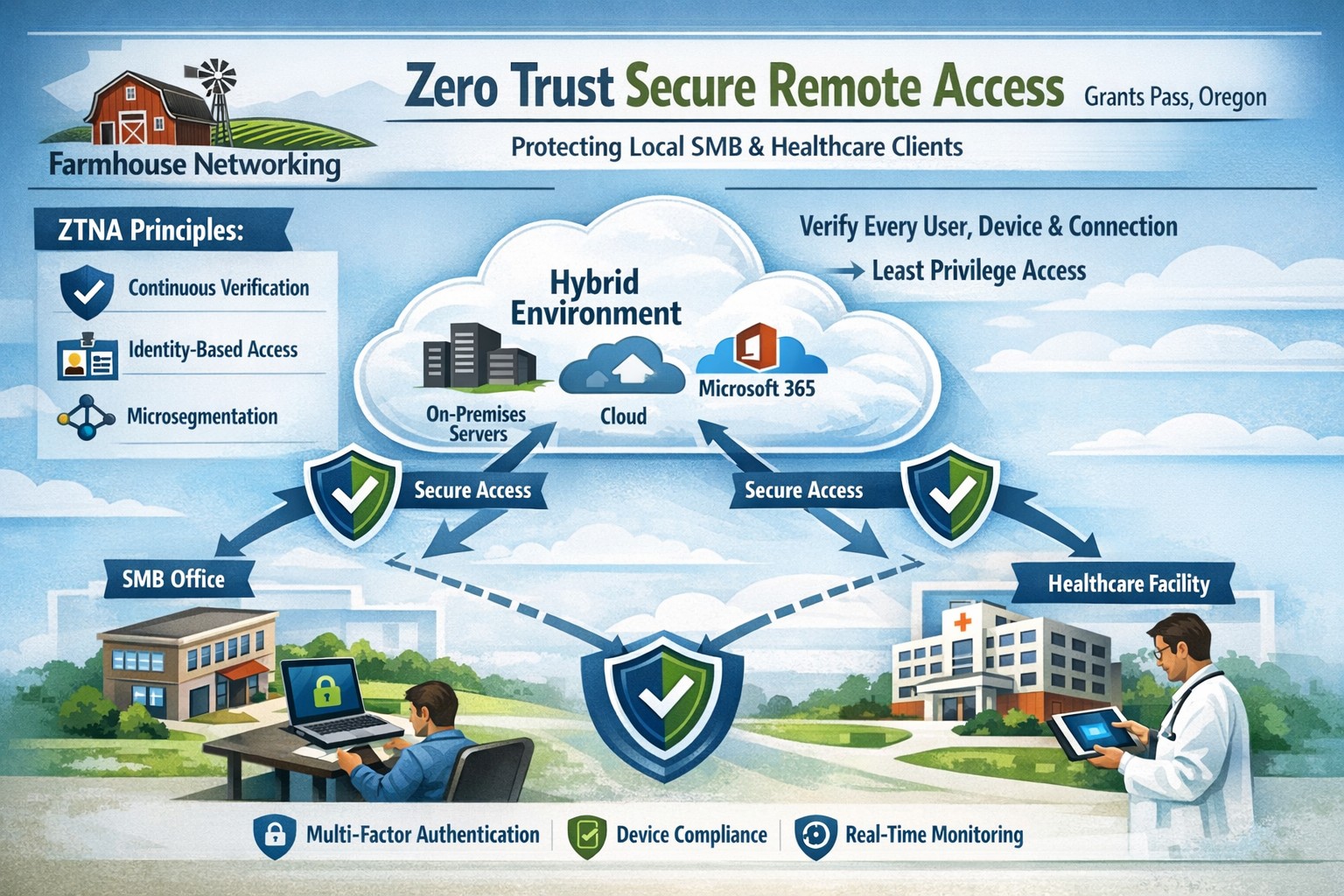
Farmhouse Networking delivers zero trust network access replacing VPNs for secure remote work in Grants Pass Oregon businesses.
This is the fourth in a series about the concept of Zero Trust, which means in the IT sense that you trust nothing and always verify everything surrounding and connected to your network. Today’s discussion will be on secure remote access.
Secure Remote Access
Secure Remote Access is the ability to connect to company resources from anywhere in a manner that does not compromise security. This can be done by several means including remote access software, Virtual Private Network (VPN), or File Sync & Share (FSS). Here are some questions that you should be asking yourself:
Does anyone in your organization work from home or remotely?
How are they remotely connecting to the office?
Are you able to revoke access to the office if they leave the company?
If that connection is a modern VPN, what type of security does it use?
Is your VPN based on passwords or certificates?
Does the VPN log usage statistics?
If that connection is a remote access software, what type of security does it use?
Does the software limit who has access to which resource?
Does the software log who is logging in and for how long?
If that connection is via FSS, what type of security does it use?
Does your FSS have file versioning, backups, and ransomware protection?
Does the FSS limit who has access to which resource?
Do you use 2FA as part of your remote access?
Take time to think about these questions and decide where changes can be made to better protect your IT investments, or contact us to do the thinking for you.
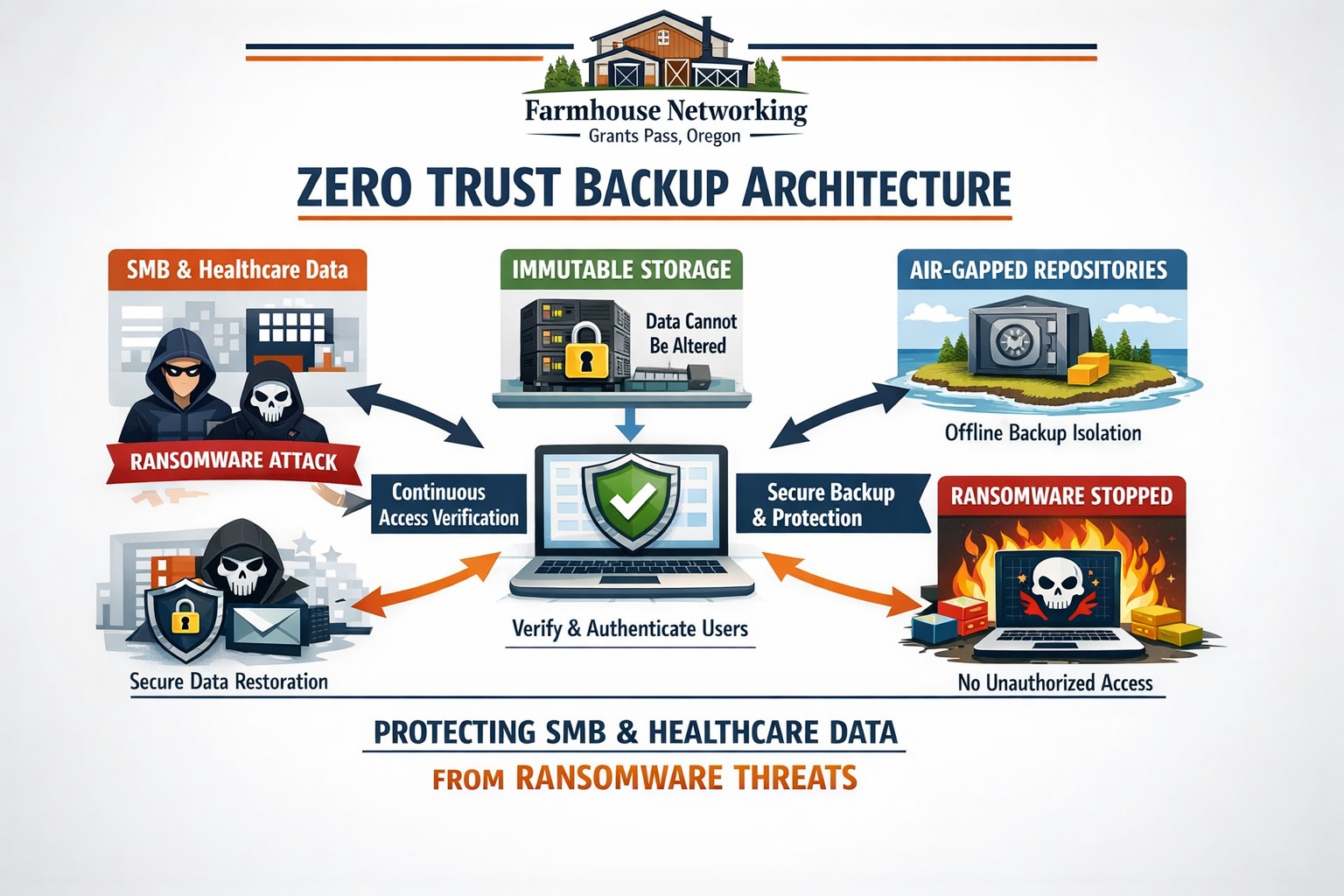
Farmhouse Networking secures Oregon business backups with zero trust immutability preventing ransomware encryption and deletion.
This is the third in a series about the concept of Zero Trust, which means in the IT sense that you trust nothing and always verify everything surrounding and connected to your network. Today’s discussion will be on the backup of important data.
Backup
Backup is a way of creating multiple copies of your important data and the systems that house them. This has become a necessity thanks to acts of God (unforeseen physical disasters), acts of employees (accidental or purposeful destruction of data), and acts of malicious hackers (ransomware or malware). Here are some questions that you should be asking yourself:
What data or systems are being backed up?
How often are these backups being performed?
Are your backups protected from natural disasters (offsite and redundant)?
How long are backups being stored?
Once expired are they securely removed?
What is the process for recovering files, emails, workstations, servers, applications, databases?
Have you tested your recovery process lately?
Do you know how long it will take to recover?
How will business continue until systems are restored?
How will you merge new information into recovered data once restored?
How often do you test your recovery process?
Is the recovery test process automated?
Take time to think about these questions and decide where changes can be made to better protect your IT investments, or contact us to do the thinking for you.
83% of employees continue accessing old employer’s accounts
Farmhouse Networking Grants Pass implements robust employee offboarding to revoke access and secure networks for Oregon businesses.
A study was performed by Beyond Identity throughout the US, UK, and Ireland which found that 83% of employees admitted to maintaining continued access to accounts from a previous employer. Also a shocking 56% admitted to using this access to harm their former employer.
The study also states that a professional and details offboarding process can prevent unauthorized access by former employees by eliminating their passwords and other insecure authentication methods. Strangely enough this also creates a sense of goodwill in the company that helps to lessen the motivation for employees to attempt this kind of malicious access. This kind of process is vital considering the current employment market and high turn over rates at almost all companies.
If your company does not have a detailed and documented offboarding process, thencontact usfor assistance.
Cloud eliminates hardware costs, enables instant business scaling
Give your business freedom from hardware constraints with the agility and functionality of cloud computing.
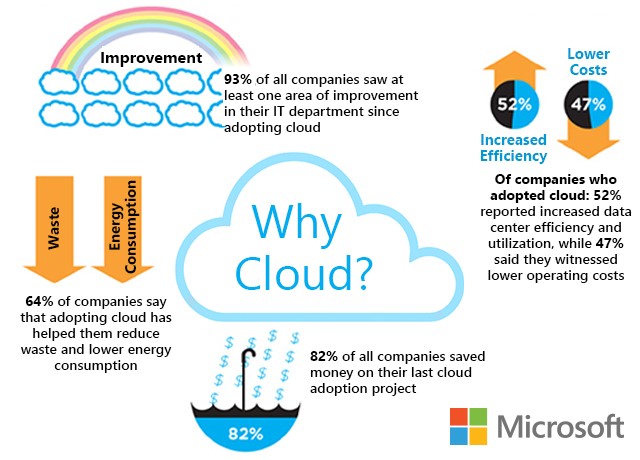
Cloud requires no upfront costs, which makes it an operating expense rather than a capital expense. Your business will benefit from predictable monthly payments that cover software licenses, updates, support and daily backups. Cloud technologies provide greater flexibility as your business only pays for what it uses and can easily scale up and down to meet demand.
Moving to the cloud enables your business to no longer pay to power on-premises servers or to maintain the environment. This significantly reduces energy bills.
Finally, for those concerned with security, cloud data centers employ security measures far beyond what most SMBs can afford. Your company data is much safer in the cloud than on a server in their office.
Move your business to the cloud ahead of Office 2010 and Windows 7 End of Support!
If your company is looking to make the move to cloud, then contact us for assistance.
There is a huge debate raging about which company to use for file sync and share for businesses with many turning to Dropbox to make efficient mobile workforces possible. The only problem with this is the costs don’t scale well. As OneDrive for Business becomes more mature it becomes a real contender for this space especially when integrated with Windows Explorer. Here is how to make this happen for the “Sharepoint Online” shared storage space for an organization:
Configure Sharepoint Online and OneDrive for Business
Sign in to Office 365 using your credentials at the Portal Login. Make sure that you click to select the Keep me signed in check box.
Switch to the SharePoint Online site by clicking on the Sites tile.
Open a document library in Explorer View – we need to do this to obtain the URL for the library.
From your Team Site, select your Document Library.
In the Ribbon, click the Library tab.
In the Connect & Export group, click Open with Explorer.
Click on Allow if an Internet Explorer Security warning pops up.
Explorer should now Launch with your chosen Library
Right-click and Copy the URL from the Explorer window address bar.
Right-click on the My Computer icon and choose to Map Network Drive.
Click the Connect to a Web site that you can store your documents and pictures link, and then click Next two times.
Paste the site URL, click Next, and then follow the instructions in the wizard. For example, https://companyname.sharepoint.com/Shared Documents
This location will now be added as a Network Location in Windows Explorer
There is still one piece missing from this puzzle which is easily changing folder permissions from Windows Explorer. To do so it is still needed to login to the portal as follows:
From your Team Site, select your Document Library.
Select the Folder and click on the Share button.
In the Share window, click Invite People.
In the dialog box, enter the names of the people or groups that you want to give access.
As you add names, you can specify the permission level that you want the new users to have.
You can also include a personal message
When you finish, click Share.
Those are the basics for using Sharepoint Online’s OneDrive for Business to function like Dropbox for Business. If you need any help with this setup contact us and one of our Office 365 Sharepoint Online experts will help.
And God will generously provide all you need. Then you will always have everything you need and plenty left over to share with others. As the Scriptures say,
“They share freely and give generously to the poor. Their good deeds will be remembered forever.”
For God is the one who provides seed for the farmer and then bread to eat. In the same way, he will provide and increase your resources and then produce a great harvest of generosity in you. - 2 Corinthians 9:8-10
We use cookies to ensure that we give you the best experience on our website. If you continue to use this site we will assume that you are happy with it.