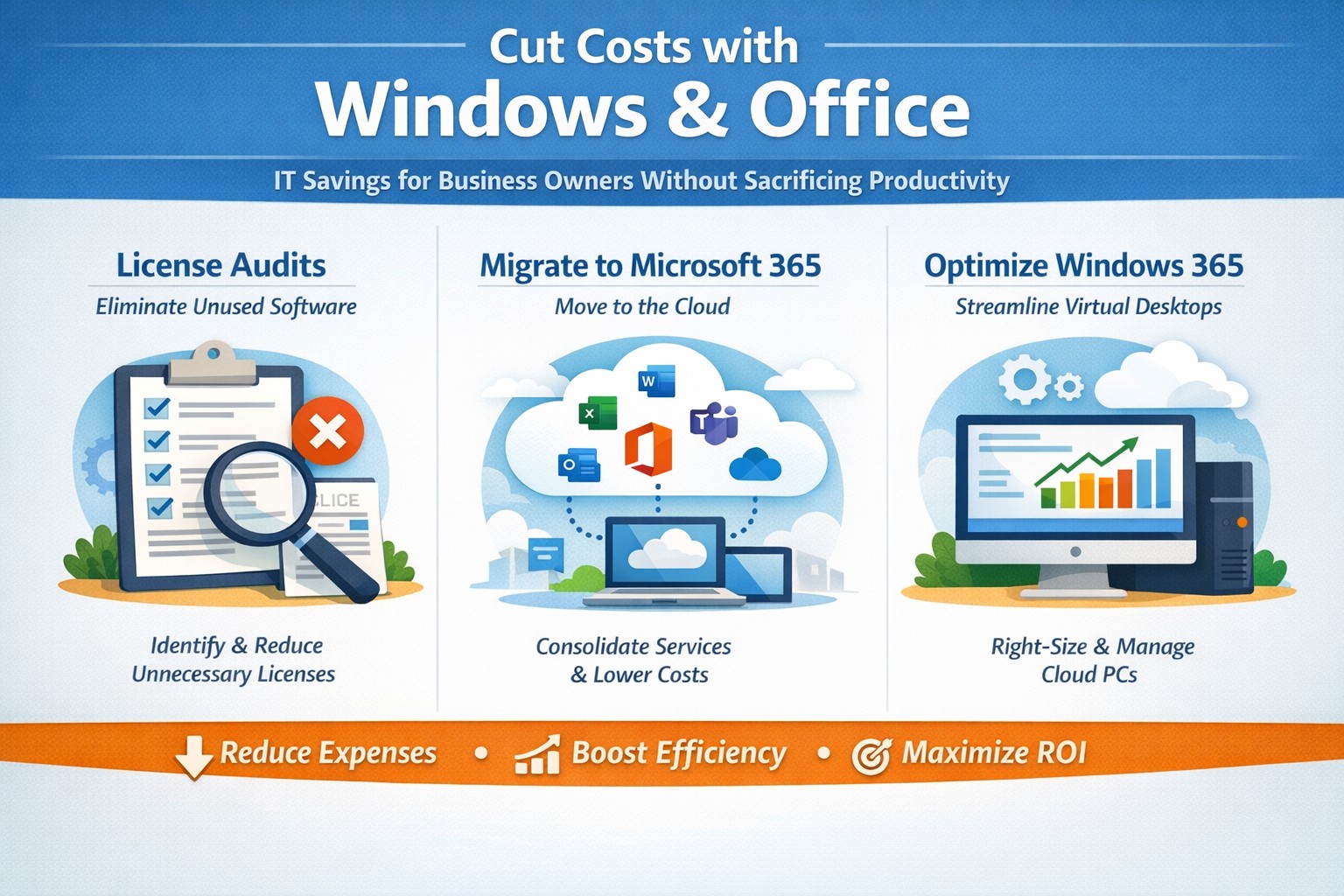
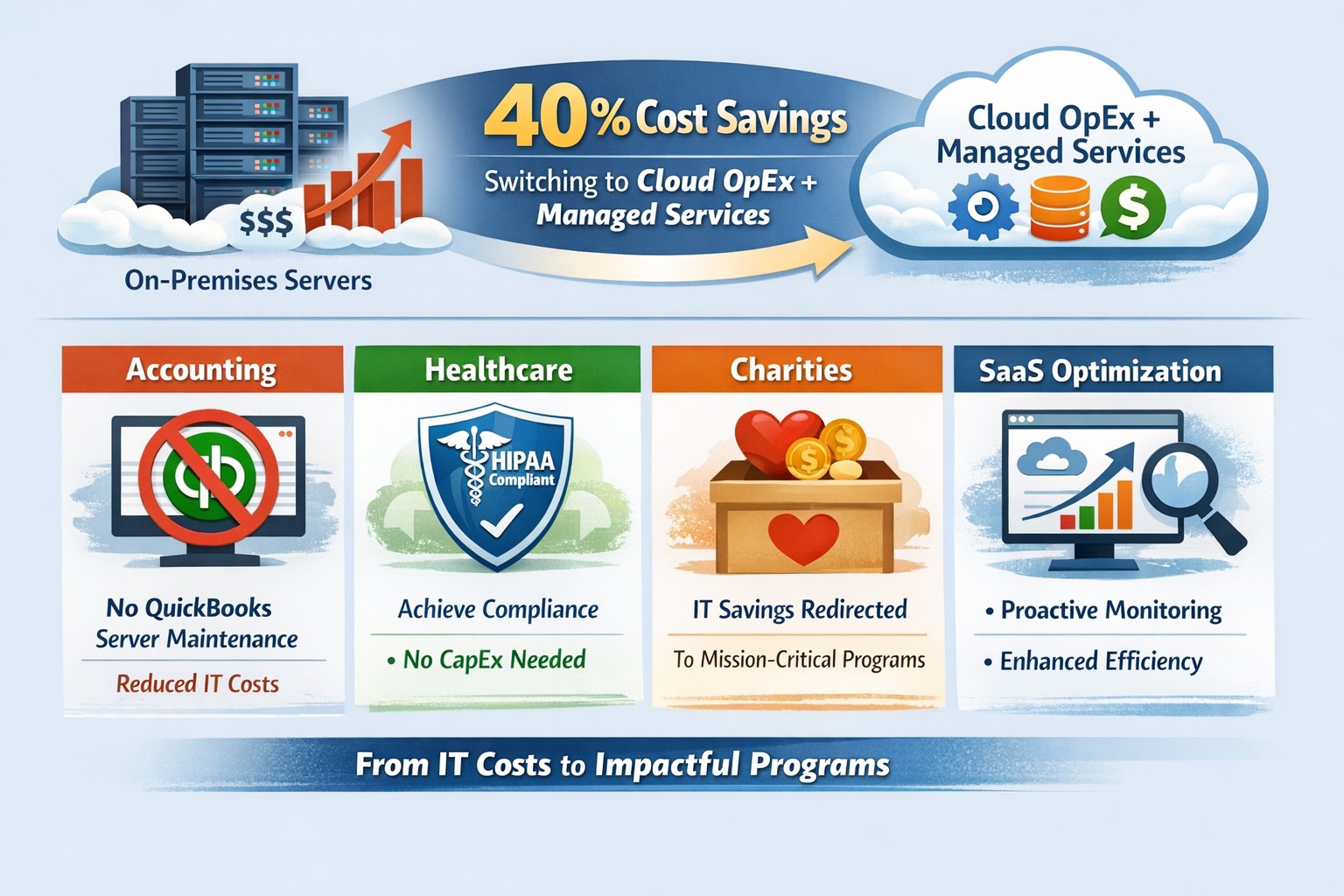
Visual guide: Slash IT expenses 30-50% using Windows 365 Cloud PCs and Microsoft 365 subscriptions—perfect for accounting, healthcare, and charity sectors
Rising operational expenses challenge every business owner. Switching to optimized Windows and Microsoft 365 setups can cut software and IT costs by up to 50% through subscriptions and cloud efficiency, targeting accounting, healthcare, and charity sectors with scalable tools.
Practical Action Steps
Business owners and IT teams can implement these steps to reduce costs immediately.
Audit Current Licenses: Review perpetual licenses for Windows and Office; compare against Microsoft 365 per-user subscriptions starting at $6/month, eliminating upfront hardware investments.
Migrate to Microsoft 365: Shift to cloud-based plans for automatic updates, remote access, and pay-per-active-user models—ideal for fluctuating staff in charities or seasonal healthcare billing.
Optimize Windows Deployment: Use Windows 365 Cloud PCs for virtual desktops, rightsizing resources to avoid overprovisioning; shut down unused instances overnight to save 30-40% on compute costs.
Enable Hybrid Work Features: Leverage built-in Teams and OneDrive to downsize office space, cutting utilities and infrastructure by supporting remote accounting audits or charity fundraisers.
Consolidate Tools: Replace third-party antivirus and email security with Microsoft Defender and Exchange Online Protection, streamlining to one predictable bill.
IT departments should pilot with 10 users, monitor via Microsoft Cost Management tools, then scale enterprise-wide.
FAQs for Business Owners
How much can we save switching from perpetual Office licenses? Subscriptions replace $400+ one-time buys with $72/user/year, plus no server maintenance—many SMBs report 20-70% IT savings reinvested in growth.
Is Microsoft 365 secure for healthcare or charity data? Yes, it meets HIPAA and nonprofit compliance with enterprise-grade encryption, zero-trust access, and automatic threat detection, reducing breach-related costs.
What about Windows 365 for non-technical staff? Cloud PCs deliver full desktops via browser, auto-scaling for accountants during tax season or charity events, with admin controls to minimize support tickets.
Can we avoid vendor lock-in? Flexible plans allow easy scaling or export; start with Business Premium for integrated Windows/Office at low entry cost.
How do we handle legacy apps? Windows 365 supports app streaming and compatibility modes, ensuring smooth transitions without rework.
How Farmhouse Networking Helps
Farmhouse Networking specializes in B2B IT for accounting firms streamlining client invoicing, healthcare practices managing patient records, and charities maximizing donor outreach. We conduct free cost audits to identify savings, then deploy customized Microsoft migrations—handling licensing, training, and 24/7 monitoring.
Our team optimizes Windows 365 for peak loads (e.g., year-end accounting) and integrates Office for seamless collaboration, often achieving 40%+ reductions in first year. With expertise in SEO-driven websites and lead-gen strategies, we also boost your online presence to attract clients while cutting internal costs.
Call to Action
Ready to reduce Windows and Office costs? Email support@farmhousenetworking.com for a no-obligation audit and personalized strategy to improve your business today.
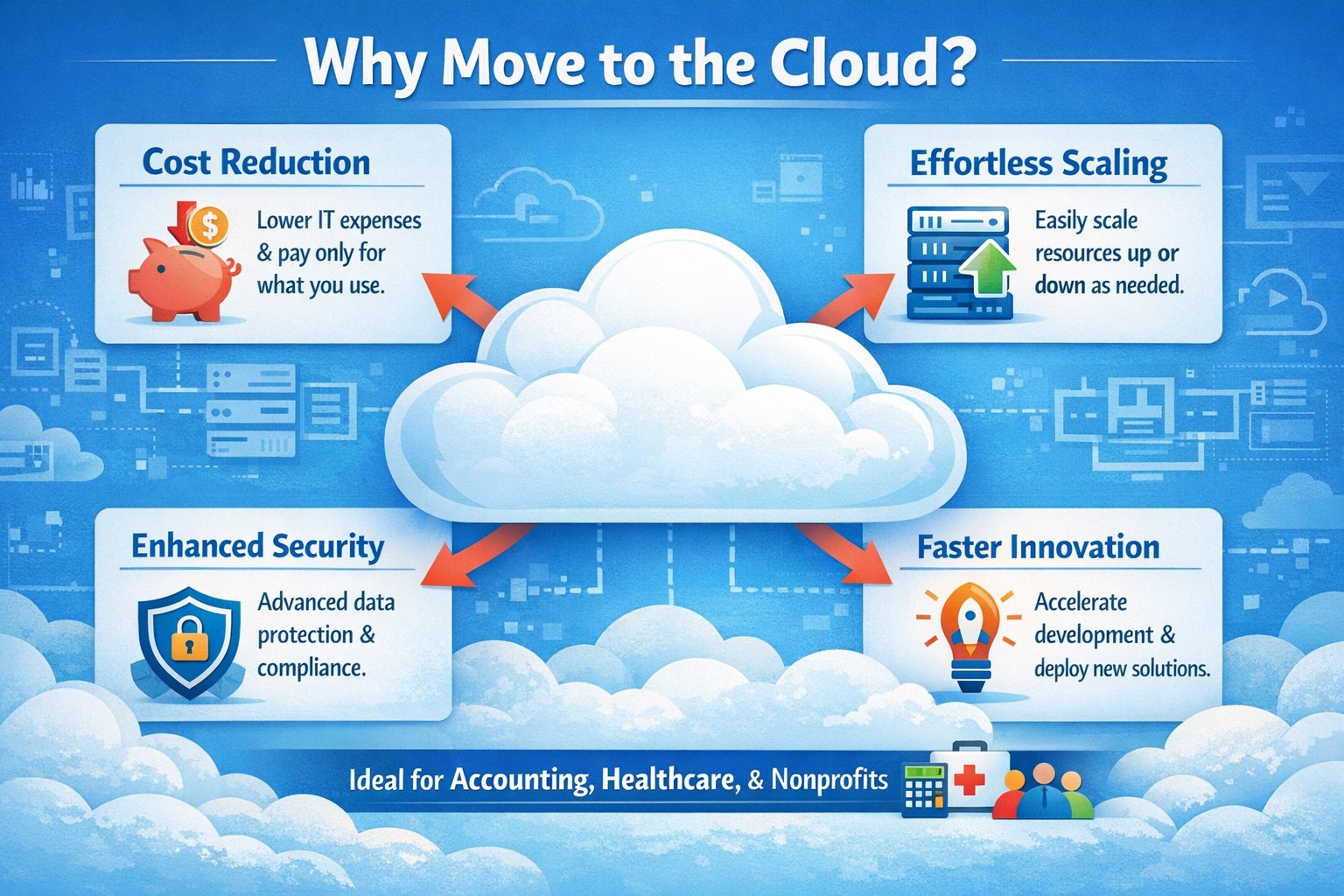
Business owner reviewing 4 reasons to move to cloud migration on laptop for cost savings and scalability
You’re constantly balancing growth ambitions with tight budgets and operational hurdles. Moving to the cloud isn’t just a tech upgrade—it’s a strategic pivot that cuts costs, boosts agility, and future-proofs your operations, as seen in widespread adoption by organizations prioritizing speed and innovation.
Reason 1: Slash IT Costs Dramatically
Cloud eliminates hefty upfront hardware investments and ongoing maintenance, shifting to a pay-as-you-use model. Businesses save on data center overhead like electricity and staffing, with many reporting lower total IT spend post-migration. For accounting firms handling sensitive financials or healthcare providers managing patient records, this means predictable budgeting without overprovisioning servers.
Reason 2: Scale Effortlessly with Demand
Traditional servers lock you into fixed capacity, but cloud auto-scales resources instantly during peaks—like tax season for accountants or patient surges in healthcare. This flexibility supports remote teams and global reach without downtime, enhancing reliability through built-in failover. Charities scaling donation drives benefit too, handling traffic spikes cost-effectively.
Reason 3: Strengthen Security and Compliance
Modern clouds offer enterprise-grade security surpassing most on-premises setups, with automated updates, encryption, and compliance tools for HIPAA or nonprofit regulations. Providers manage patches and backups, reducing breach risks that plague outdated systems. Your IT team focuses on business logic, not constant vulnerability scans.
Reason 4: Accelerate Innovation and Collaboration
Cloud unlocks AI, analytics, and real-time collaboration tools, speeding product launches and remote work. Teams access data from anywhere, fostering efficiency without version control headaches. For B2B sectors like yours, this drives faster client service and competitive edges.
Practical Action Steps for Migration
Follow these steps to transition smoothly, involving your IT department:
Assess Inventory: Catalog apps, data, and dependencies; tag by cloud-fit (e.g., lift-and-shift email vs. refactor custom CRM).
Set Goals and Choose Provider: Align on cost savings or scalability; evaluate AWS, Azure, or Google Cloud for your industry (e.g., HIPAA-compliant for healthcare).
Build Landing Zone: Establish security baselines, networking, and policies before migration.
Migrate in Phases: Start with low-risk workloads; test hybrid setups to minimize disruption.
Train and Monitor: Roll out employee training; use dashboards for cost/performance tracking post-go-live.
FAQs: Client Inquiries Answered
How long does migration take? Phased approaches span weeks to months, depending on complexity—small businesses often complete in 4-8 weeks with planning.
What about data security during transition? Encrypt data in transit/rest; conduct risk audits and use provider tools for zero-downtime moves.
Will it disrupt operations? Minimal with pilots and weekends; hybrid models keep critical systems on-prem initially.
Is cloud cheaper long-term? Yes, for most—avoid CapEx, pay OpEx, and optimize via auto-scaling; ROI hits in 12-18 months.
Hybrid or full cloud? Hybrid suits regulated industries like healthcare for compliance; full cloud maximizes agility.
How Farmhouse Networking Supports Your Move
Farmhouse Networking specializes in tailored cloud migrations for accounting, healthcare, and charity clients. We handle assessments, secure setups, and optimizations—integrating SEO-driven websites with cloud backends for lead-gen boosts. Our team manages compliance (e.g., HIPAA), trains your staff, and monitors ROI, ensuring seamless B2B growth.
Switch to OpEx IT—slash costs without sacrificing reliability
Here are some quick tips to save money on IT expenses during these tough times.
Ways to cut IT expenses
Software Licensing: Take an inventory of all software licensing that is either auto-renewal or subscription based to determine if you actually need all the features that you are purchasing. There may be a license that is less expensive with less features that you can use instead. It is also good to regularly check for un-used licensing for users that are no longer with the company also. Let us do a full evaluation on your software licensing at no cost.
Paperless: By not printing you save the environment and save on money. Less toner and less paper equal more money in the reserves. It also saves on maintenance or replacement costs on those expensive large multi-function printer devices.
Phone Service: Take a look at the phone bill to see if your carrier has recently changed your pricing from the original discounted price to their standard pricing. Also consider how many lines you have and if they all need separate phone numbers. These kinds of service can often cost more money. It might be time to start shopping for a new vendor to get better rates and Farmhouse Networking is there to help with low rates and no setup charges.
Hardware Consolidation: Multiple servers and extra network equipment due to improper wiring can be an unseen extra expense on the electric bill and increase cooling costs in the office. Using virtual server technology or migrating to the cloud can help lessen the impact of servers in your office. Centralizing / consolidating servers and network equipment will decrease the overall cooling expenses for the building too.
Support Contracts: Are you paying for IT support on a monthly basis? Are you sure you are getting the best deal and only the services you need to keep business functioning? Let us take a look at your contract to see if there are any cuts that can be made to decrease support contract costs.
If your company is going through a tough time financially and looking to save money on IT expenses, then contact us for assistance.
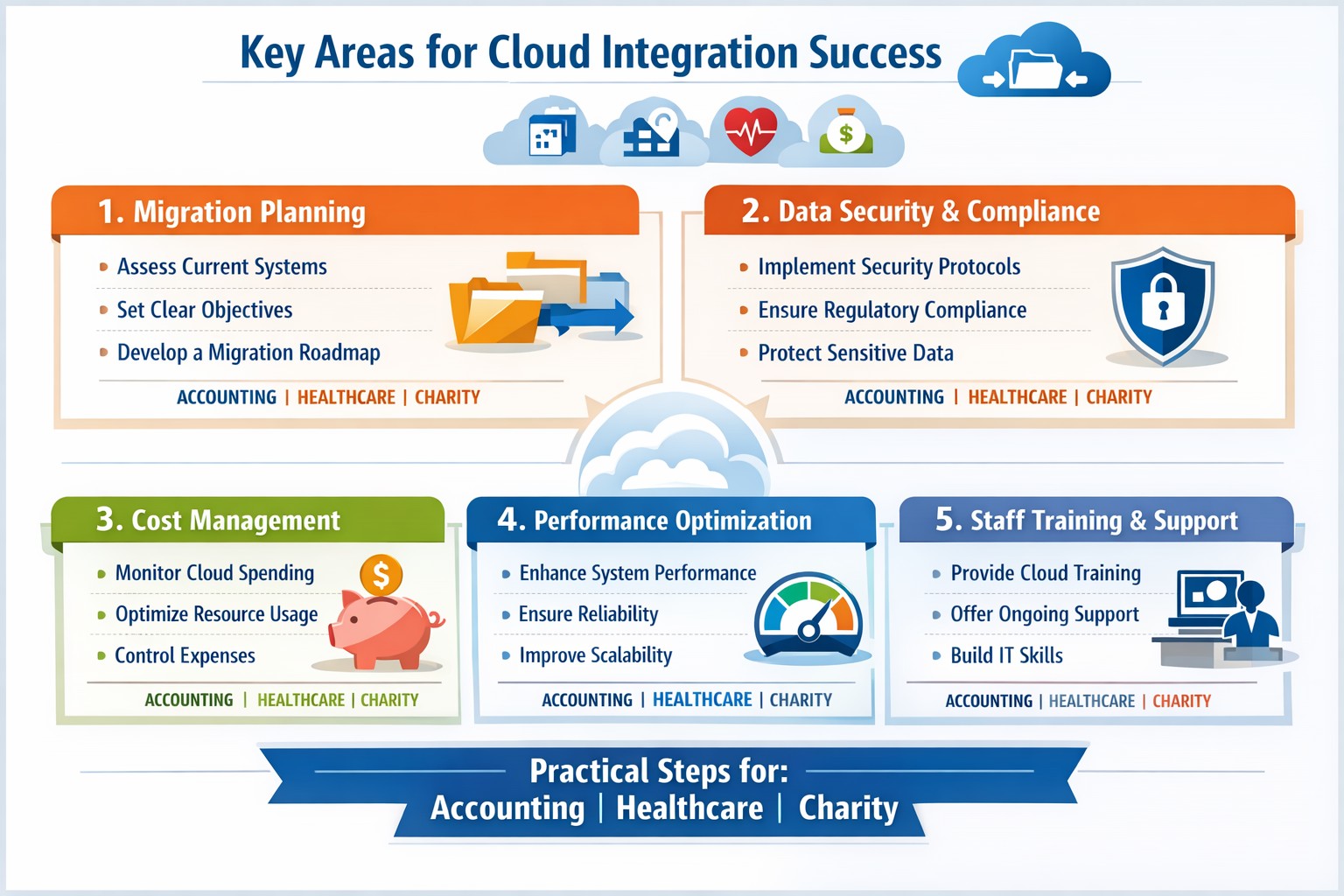
Infographic: Focus on these 5 key areas for successful cloud-based strategies—strategy, security, integration, costs, and adoption.
Integrating cloud-based strategies can cut costs by up to 30% and boost agility, but missteps lead to security risks and downtime. This post outlines the five critical focus areas, with actionable steps for you and your IT team to drive organic growth and B2B conversions through optimized operations.
Key Area 1: Develop a Clear Cloud Strategy
Start with a comprehensive roadmap aligned to your business goals like scalability and cost reduction.
Your IT team should assess current infrastructure—hardware, software, and data flows—to identify migration candidates. Action steps: Conduct a one-week audit of workloads, define KPIs (e.g., 20% cost savings), and choose hybrid/multi-cloud models for flexibility.
This prevents incompatible tech stacks, ensuring smooth transitions. Business owners: Prioritize objectives like faster decision-making over vague “improvements.”
Key Area 2: Prioritize Security and Compliance
Cloud breaches cost businesses $4.45 million on average; secure from day one.
Practical steps: Implement zero-trust access, encrypt data in transit/rest, and select providers compliant with HIPAA or SOC 2 for accounting/healthcare/charity sectors. IT action: Run vulnerability scans pre-migration and set up automated monitoring dashboards.
Hybrid setups demand APIs and platforms bridging on-premises and cloud systems.
Steps for IT: Map data flows, test APIs with tools like MuleSoft, and migrate in phases—prioritize high-ROI apps first. Expect 15-20% efficiency gains from unified systems.
Business owners: Involve department heads in planning to avoid silos.
Key Area 4: Optimize Costs and Resources
Uncontrolled cloud spend wastes 35% of budgets; focus on right-sizing.
Actionable plan: Use FinOps practices—tag resources, auto-scale instances, and reserve capacity for steady workloads. IT: Monitor with native tools (e.g., AWS Cost Explorer) weekly; aim for 25% savings Year 1.
Owners: Tie budgets to ROI metrics for accountability.
Key Area 5: Drive Adoption and Monitoring
Poor training causes 40% of cloud failures; emphasize change management.
Steps: Train staff via workshops, define roles (e.g., cloud champions), and deploy KPIs for uptime (>99.9%) and usage. IT: Set real-time alerts and quarterly reviews.
Foster cross-team collaboration for sustained value.
Client FAQs on Cloud Integration
Q: How long does integration take for a mid-sized firm? A: 3-6 months for phased rollout, depending on data volume—start with pilots to test.
Q: What if we have legacy systems? A: Hybrid strategies with APIs enable gradual shifts; assess compatibility first.
Q: How do we measure ROI? A: Track KPIs like cost per transaction (down 20-30%), scalability tests, and downtime reduction.
Q: Is cloud secure for sensitive sectors like healthcare? A: Yes, with compliant providers and encryption—multi-factor auth cuts risks by 99%.
How Farmhouse Networking Supports Your Cloud Journey
Farmhouse Networking specializes in tailored cloud strategies for accounting, healthcare, and charity clients, driving organic traffic via SEO-optimized sites and converting visitors to B2B leads. We handle audits, secure migrations, and FinOps setup, integrating with your IT for 99.9% uptime. Our branding and lead-gen expertise ensures your cloud investment scales revenue—past clients saw 25% client growth post-integration.
Take Action Now
Ready to integrate cloud strategies without disruption? Email support@farmhousenetworking.com for a free assessment on streamlining your operations.
Farmhouse Networking has been looking into expanding the ways that we serve our customers. After having a major global Voice-over-IP provider reached out to us, taking a long look at their product offering, and looking at the current phone bills of a few of our clients – we have decided to resell their internet-based telephone services. So what does that mean for you:
Business Class Phones.
Our customers will get the option to purchase or lease VoIP phones from the top manufactures. These include options for wireless phones and cordless headsets.
Limitless Features.
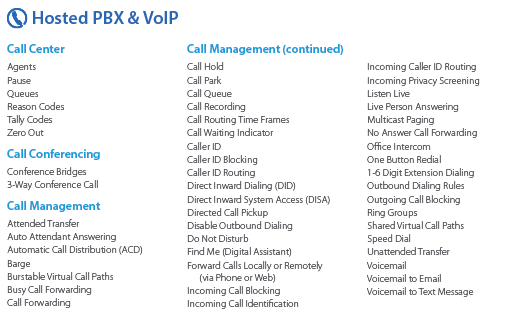
All the features that you have come to expect from quality telephone service are here in our new hosted system and we are also able to provide telephone service to your existing on-premise phone systems. There are also some other exciting features to keep business running like cellphone fail-over if the power ever goes out again.
Simple Pricing.
After reviewing several phone bills from the local internet and telephone providers, Farmhouse Networking has developed a simplified pricing structure with all the usual features a business needs. It is based on the number of phone lines with unlimited minutes within the United States.
Get Started Today.
All we need is a copy of your current phone bill to start seeing if we can save you a bunch of money too. Send one now!
Technology as a Service [TaaS] enables organizations to procure the latest hardware, software, and services, without the expense of a large, upfront purchase. With TaaS, it’s easy to configure and deploy an all-inclusive solution to meet all of your needs, for a single monthly payment.
Orders can be fulfilled from a wide variety of new or refurbished equipment, and can include cloud software, services, and tech support – all in one monthly invoice.
Realize lower total cost of ownership [TCO] with payments spread out over time, while still enjoying the latest technology to meet the business needs of today.
Once a contract is up, the equipment can be returned or purchased at a reduced rate. Or, you can simply extend the contract – in some cases, month-to-month.
WHY TAAS?
Simple–Experts help to make product selections.
Variety–Choose from a wide range of hardware, software and services
Flexible–Ability to choose short-term rentals provides maximum flexibility
BENEFITS:
Upgrade to newer, faster equipment at the end of the contract
Easier to budget expenses more effectively with a recurring monthly invoice
No up-front capital expenditures means lower TCO over time
More flexible financing options so you can tailor your payments
Easier to implement hardware initiatives as needed without waiting for funding
Reduce the risks associated with owning the technology
If your company is looking to upgrade to the latest technology or just doing a hardware refresh, then contact us for assistance.
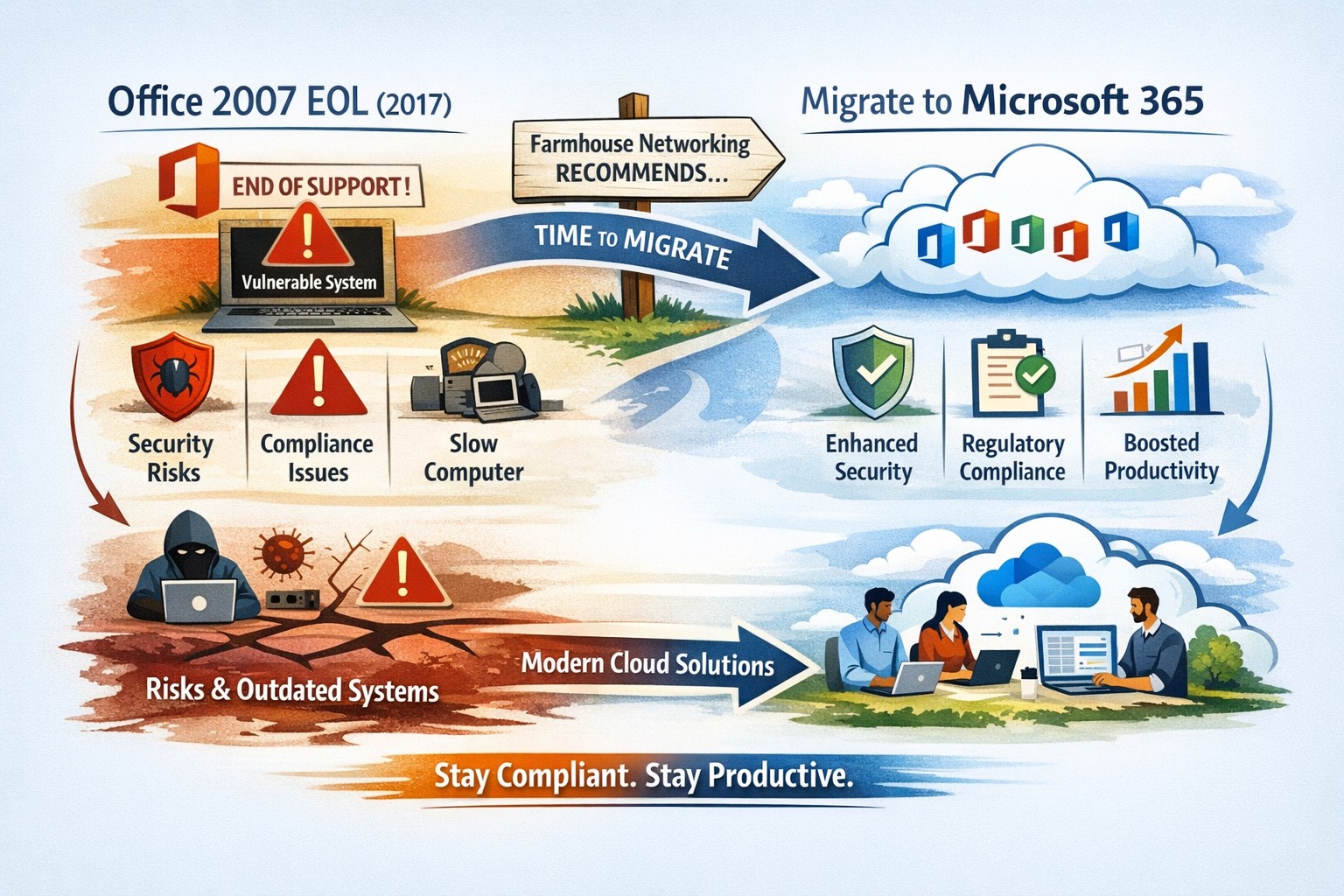
All good things must come to an end and all software will one day reach End-of-Life (EOL). Microsoft Office 2007 EOL is coming in October 2017 as per the Microsoft Support Lifecycle Site. This will mean that all patching and extended support for the product will end and anything new that goes wrong with the product is ignored by Microsoft. This allows malicious hackers to use these flaws to easily infect systems, encrypt data, exfiltrate data or basically have their way with your systems. Now is the time to consider updating your systems to Office 365 which includes the opportunity to use their fabulous new Exchange Online service along with many other useful cloud based services.
And God will generously provide all you need. Then you will always have everything you need and plenty left over to share with others. As the Scriptures say,
“They share freely and give generously to the poor. Their good deeds will be remembered forever.”
For God is the one who provides seed for the farmer and then bread to eat. In the same way, he will provide and increase your resources and then produce a great harvest of generosity in you. - 2 Corinthians 9:8-10
We use cookies to ensure that we give you the best experience on our website. If you continue to use this site we will assume that you are happy with it.