Today we tell the story of a medical office’s journey to the cloud. This particular client was facing their server operating system reaching end of support (a HIPAA violation) in the near future. They had begun by looking at their electronic medical records software company’s online offering, which didn’t have all the functionality of their on-premises software and was very expensive (this is typical).
They next decided to look into moving their current on-premises software into the cloud and we were asked to help with the testing. We determined that it would be best to move the file portion of the server to SharePoint / OneDrive to increase their mobility and flexibility. We also determined that it would be best to move them away from on premises Active Directory into Azure Active Directory / Intune to allow authentication and security policies. Finally we began testing the on-premises software hosted on a server in Azure with a VPN connection to their office.
The SharePoint / OneDrive and Azure Active Directory portions went through with little issues. The server, however, was not as we had hoped. The Azure VPN connection was expensive due to it always being on and no way of turning it off outside of business hours. The performance of the SQL database that the on-premises software used was basically unusable. The other option would be to create virtual desktops on Azure for this purpose but the cost and functionality was not what the customer was hoping for.
This has lead them back to searching for an online EMR software that will meet all their requirements. This will be tough because most companies are good at some things, but not all things and compromises usually have to be made. Our hope is that this story is a lesson to other companies. The cloud may sound like the newest and best way to work, but the costs and functionality are often worse than expected.
If your company is going to use full disk encryption or has compliance requirements that you need consulting for, then contact us for assistance.
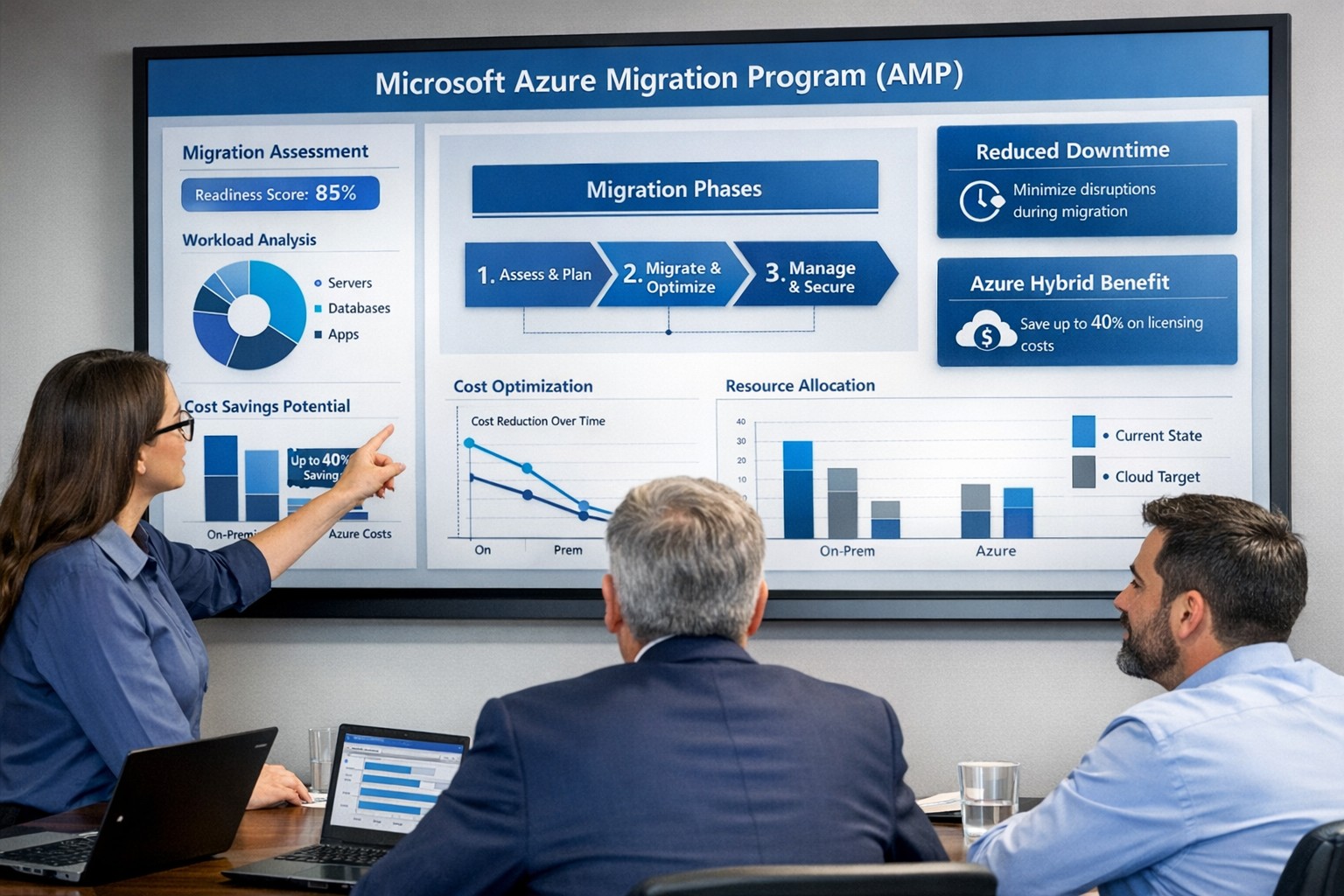
Visualize your Azure migration success with the Microsoft Azure Migration Program (AMP)—structured steps, cost savings, and expert guidance for seamless cloud adoption.
If you are considering moving servers, line‑of‑business apps, or databases into Microsoft Azure, the Azure Migration Program (often called AMP) is designed to reduce risk, speed up the project, and lower your total cost of migration. For a business owner, AMP means structured guidance from Microsoft and certified partners, funded assessments, and proven tools instead of “figure it out as we go.”
What Is the Azure Migration Program (AMP)?
Microsoft’s Azure Migration Program provides a guided, end‑to‑end approach to moving workloads into Azure, based on the Cloud Adoption Framework. It combines technical guidance, training, migration tools, and cost‑saving offers so your team is not reinventing the wheel.
Key elements include:
Curated, step‑by‑step guidance from Microsoft experts and specialized migration partners.
Free Azure migration tools such as Azure Migrate, Azure Site Recovery, and Database Migration Service.
Cost‑reduction offers like Azure Hybrid Benefit and extended security updates for legacy Windows Server and SQL Server.
Training and skill building for your IT staff so they can operate confidently in Azure after the move.
Practical Action Steps for You and Your IT Team
As the owner, your role is to set business priorities and ensure the migration stays aligned with revenue, risk, and customer impact, while IT handles the technical execution.
Step 1: Define business outcomes and constraints
Identify which systems are most critical (ERP, EMR, accounting, CRM) and what can tolerate downtime.
Set financial guardrails: target monthly cloud budget and acceptable payback period on the migration.
Step 2: Assess your current environment Your IT team, often with an AMP‑qualified partner, should:
Inventory servers, applications, databases, and dependencies (who talks to what, and when).
Use Azure Migrate to scan workloads and estimate right‑sized Azure resources and costs.
Group applications into logical waves (low‑risk first, mission‑critical later).
Decide per workload: rehost (“lift and shift”), refactor, or modernize.
Agree on success metrics: performance, availability, RPO/RTO, and cost per workload.
Step 4: Secure funding and enroll in AMP
Confirm AMP eligibility and available funding for assessments and implementation with a certified partner.
Use funded assessments to validate architecture, security, and migration approach before committing to a full rollout.
Step 5: Execute, optimize, then expand
Start with a pilot migration to prove performance, security, and cost assumptions.
Monitor usage with Azure Cost Management and tune sizing, auto‑scaling, and reserved instances.
Apply lessons from the pilot to subsequent waves to reduce timelines and surprises.
Common Client Questions (and Clear Answers)
Q1: Is Azure really more cost‑effective than keeping my servers on‑premises? A: For most organizations, especially those facing hardware refresh, licensing renewals, or colo costs, Azure can be more cost‑effective when workloads are right‑sized and governed. AMP helps you estimate costs with real data and use cost‑optimization tools like Azure Hybrid Benefit and Azure Cost Management from day one.
Q2: How will this impact uptime and my customers? A: The program is designed to minimize disruption using tools such as Azure Site Recovery and structured migration waves. With proper planning, most critical workload cutovers are scheduled during low‑usage windows and can be rolled back if required.
Q3: What about security and compliance? A: Azure includes built‑in security controls, encryption, identity management, and compliance certifications that often exceed what small and mid‑sized businesses maintain on‑premises. AMP engagements incorporate security and governance reviews so your new environment aligns with industry and regulatory requirements.
Q4: My internal IT team is stretched. Do they have to do everything? A: No—AMP is explicitly structured around collaboration between your team, Microsoft engineers, and certified partners. Your staff focuses on business knowledge and application nuances while the partner handles the heavy lifting and trains your team on new cloud operations.
Q5: We tried “cloud” before and it was painful. Why will this be different? A: Most failed migrations lacked a standardized framework, proper assessment, or cost governance. AMP enforces a proven methodology, tooling, and checkpoints, reducing the likelihood of budget overruns, downtime, or security gaps.
How Farmhouse Networking Helps You Succeed with AMP
Farmhouse Networking aligns your Azure migration with your business strategy, not just your server list. We help you translate goals like “reduce downtime,” “improve security posture,” or “support remote work” into a concrete cloud roadmap.
Here is how we typically engage:
Eligibility and strategy session – We review your environment, validate AMP eligibility, and map out a phased migration aligned with risk and cash‑flow tolerance.
AMP‑style assessment and planning – We perform an in‑depth inventory, dependency analysis, and sizing estimate using Azure’s migration tools, then deliver a prioritized migration plan and business‑level impact summary.
Hands‑on migration and modernization – We handle the technical execution: configuring Azure landing zones, security and networking, moving servers and databases, and modernizing apps where it makes financial sense.
Training and ongoing optimization – We coach your IT staff on Azure operations and put cost, security, and performance monitoring in place so you continue to see value after the cutover.
Take the Next Step
If you are ready to explore whether the Azure Migration Program is the right path for your business—and want a partner who understands both the technical and financial side of migration—Farmhouse Networking is ready to help. Email support@farmhousenetworking.com for more information about how Farmhouse Networking can help improve your business with a structured, low‑risk move to Azure.
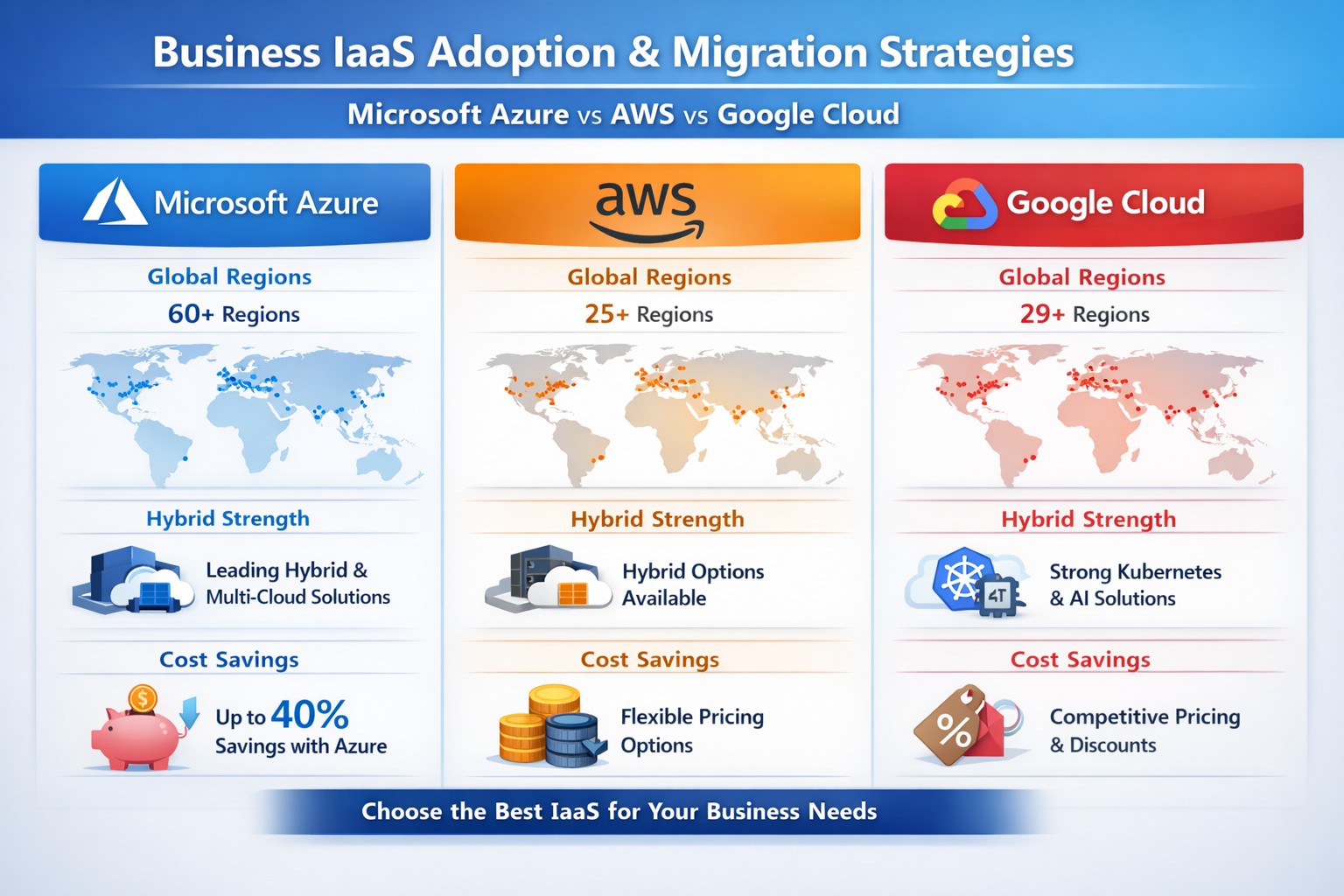
Azure IaaS leads with 60+ regions and hybrid tools, delivering superior ROI for business owners vs AWS EC2 and Google Compute.
Business owners seeking scalable, cost-effective infrastructure need proof before committing to cloud providers. Microsoft Azure IaaS delivers with superior hybrid integration, global reach exceeding 60 regions, and proven uptime SLAs up to 99.9%, outperforming AWS and Google Cloud in Microsoft-centric environments.
Azure IaaS vs. Competitors: Key Data Points
Azure leads in hybrid cloud capabilities, essential for businesses retaining on-premises systems. With Azure Arc and Azure Stack, manage multi-cloud and local resources seamlessly—unlike AWS’s less integrated hybrid tools or GCP’s limited options.
Metric
Azure IaaS
AWS EC2
Google Cloud Compute
Regions
60+
33
40+
Data Centers
300+
200+ est.
100+ est.
Hybrid Strength
Best (Azure Arc)
Moderate
Limited
Microsoft Integration
Native (Windows/SQL)
Limited
Minimal
Pricing Savings
Up to 72% reservations; Hybrid Benefit
Complex PAYG
Sustained discounts
Azure’s 20% market share trails AWS but dominates government, education, and enterprises using Microsoft tools, reducing migration friction and costs.
Practical Action Steps for Implementation
Assess Current Infrastructure: Inventory servers, apps, and data. Use Azure Migrate (free tool) to scan on-premises for compatibility—takes 1-2 days with IT team.
Pilot Migration: Provision Azure Virtual Machines in your nearest region. Start with non-critical workloads; leverage Azure Hybrid Benefit to apply existing licenses, cutting costs 40-72%.
Secure and Scale: Enable Microsoft Entra ID for IAM and Azure Sentinel for AI threat detection. Set auto-scaling policies to match demand, ensuring 99.9% SLA.
Monitor ROI: Track via Azure Cost Management. Expect 30-50% savings vs. on-premises within 6 months, per industry benchmarks.
Go Live: Phase full migration over 3-6 months, testing failover with Azure Site Recovery.
These steps minimize downtime, typically under 4 hours per phase.
FAQs: Client Inquiries Answered
Q: Is Azure IaaS cheaper than AWS for my business? A: Often yes for Microsoft users—transparent PAYG plus Hybrid Benefit yields up to 72% savings on VMs. AWS pricing is more complex; GCP suits AI but lacks hybrid depth.
Q: How does Azure handle data sovereignty? A: 60+ regions ensure compliance (GDPR, HIPAA). Store data locally, unlike GCP’s fewer options.
Q: What if we use non-Microsoft apps? A: Azure supports Linux workloads via Azure Kubernetes Service, matching AWS EKS but with better Windows synergy.
How Farmhouse Networking Accelerates Your Azure Success
Farmhouse Networking specializes in IaaS migrations for accounting, healthcare, and charity sectors. We conduct free Azure assessments, handle pilot setups, and optimize SEO-driven sites to attract B2B leads post-migration. Our team integrates Azure with your CRM/ERP, ensuring HIPAA-compliant security and 99.99% uptime. Clients see 40% faster deployments and 25% lower TCO.
Ready to leverage Azure’s data-backed advantages? Email support@farmhousenetworking.com for a no-obligation consultation to transform your infrastructure.
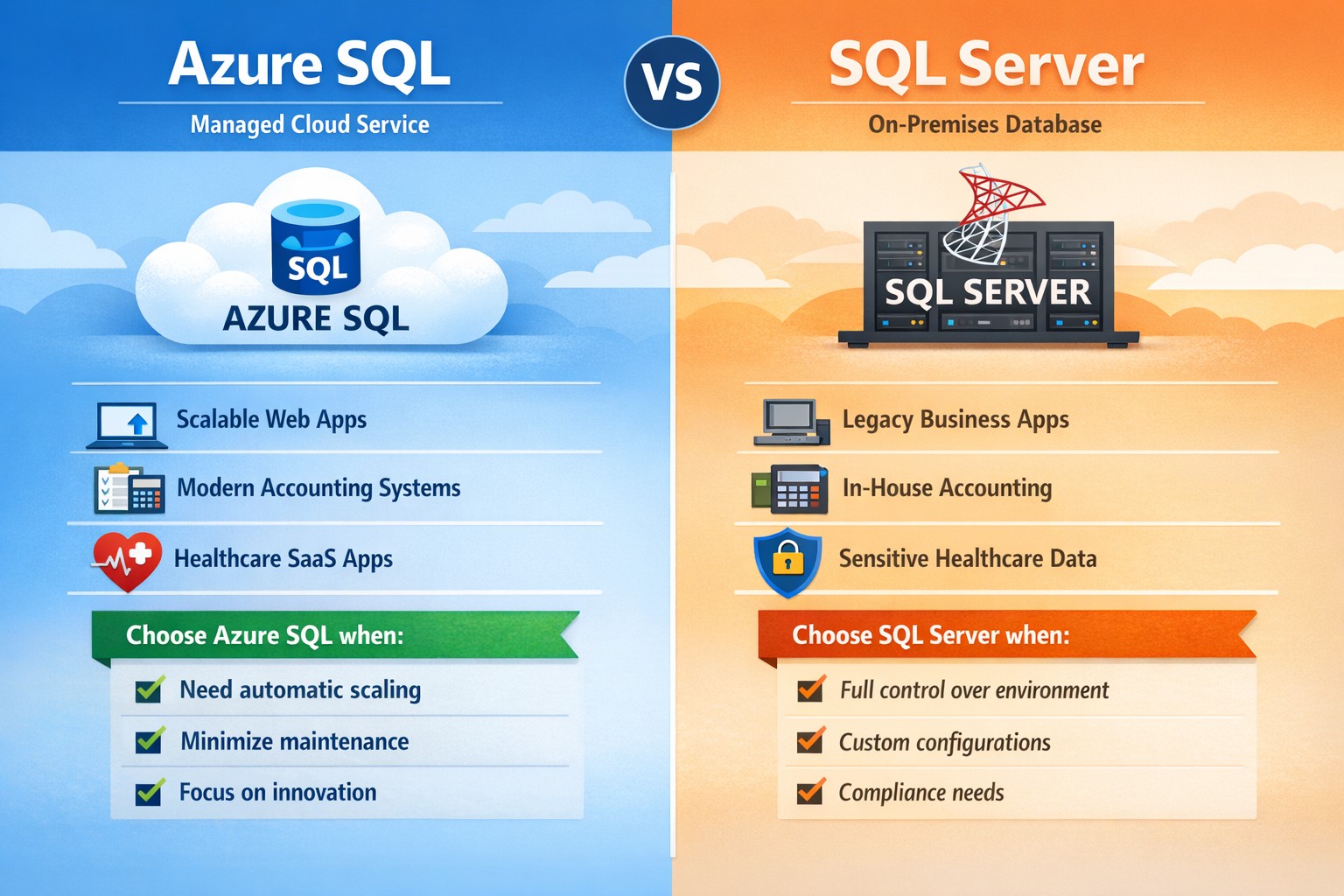
Azure SQL vs SQL Server: Which database platform fits your business? Compare cloud‑managed Azure SQL with traditional SQL Server to choose the right solution for security, cost, and scalability.
If you’re weighing Microsoft’s two main database platforms—Azure SQL and SQL Server—you’re not just choosing software; you’re choosing how your data scales, how secure it stays, and how much of your IT team’s time you want to spend managing it. Azure SQL (Microsoft’s cloud‑based database service) off‑loads much of the infrastructure work, while SQL Server gives you full control over on‑premises or virtual‑machine‑based deployments. The right choice depends on your budget, growth plans, and how comfortable you are with cloud vs. traditional infrastructure.
What’s the real difference?
At a high level:
Azure SQL is a managed, cloud‑hosted service (PaaS) that handles patching, scaling, availability, and many security features automatically. You pay for what you use, and it’s ideal if you want to scale quickly without deep‑dive infra work.
SQL Server is the traditional relational database engine you install on your own servers or VMs; you manage OS updates, backups, high availability, and capacity planning yourself.
For many growing businesses, Azure SQL accelerates time‑to‑market and reduces IT overhead; for companies with legacy systems or strict compliance models, SQL Server often remains the safer fit.
Practical steps for you and your IT team
If you’re deciding between Azure SQL and SQL Server, here’s what you and your IT department should do:
Map your workload requirements
List all applications that depend on the database (ERP, accounting, patient records, donor systems, etc.).
Decide whether you must keep data on‑premises (e.g., certain healthcare or finance regulations).
Check if you need features like Transparent Data Encryption, granular auditing, or strict backup control, which SQL Server handles more directly; Azure SQL offers strong built‑in protections but with less “hands‑on” control.
Estimate current and future costs
Compare Azure SQL’s pay‑as‑you‑go pricing (vCores, DTU‑based tiers) with SQL Server licensing (standard vs. enterprise) plus hardware and maintenance.
Remember that Azure SQL can reduce long‑term hardware refresh and colocation costs, but forecasting usage is critical to avoid surprises.
Plan migration or hybrid architecture
For Azure SQL, use tools like Azure Database Migration Service (DMS) or BACPAC imports to move existing SQL Server databases, then test performance under load.
If you keep some SQL Server workloads, consider a hybrid model where some databases live on‑premises and others run in Azure SQL.
Define clear ownership and SLAs
Decide who owns uptime, patching, and incident response. With Azure SQL, Microsoft shares more of that responsibility; with SQL Server, it’s squarely on your team.
FAQs your clients may ask
Q: “Is Azure SQL just ‘SQL Server in the cloud’?” Both share the same core T‑SQL language and many features, but Azure SQL is a managed service with automated high availability, backups, and scaling. Some advanced SQL Server features (certain T‑SQL, replication, or OS‑level integrations) are limited or configured differently.
Q: “Which is cheaper for a small business?” Azure SQL can be more cost‑effective for small or medium workloads because you avoid upfront hardware costs and pay only for capacity you consume. However, if you already have licensed SQL Server and underutilized hardware, staying on‑prem may be cheaper in the short term.
Q: “Which is better for healthcare or accounting firms?” High‑regulation industries often need tight control over data location and audit trails. Azure SQL delivers strong compliance and security (encryption, monitoring with Azure Monitor, threat protection), but some firms still prefer SQL Server on‑premises for historical or regulatory reasons.
Q: “Can we mix Azure SQL and SQL Server?” Yes. Many businesses use a hybrid approach: core financial or compliance‑sensitive databases on SQL Server, while newer web apps or analytics databases run in Azure SQL.
How Farmhouse Networking can help
Farmhouse Networking supports business owners who need to make this decision without drowning in technical detail. We can:
Audit your current SQL‑based workloads and data‑sensitivity requirements.
Model total cost and risk for Azure SQL vs. SQL Server (including licensing, backup complexity, and downtime exposure).
Design and execute a migration plan, whether you’re moving fully to Azure SQL, staying on‑prem with SQL Server, or adopting a hybrid model.
Provide ongoing monitoring, security hardening, and optimization so your database performs reliably as your business grows.
Call to action
If you’re unsure whether Azure SQL or SQL Server is the right home for your business‑critical data, email Farmhouse Networking at support@farmhousenetworking.com for a tailored consultation. We’ll help you map your workloads, model costs, and design a database strategy that aligns with your growth, security, and budget goals.
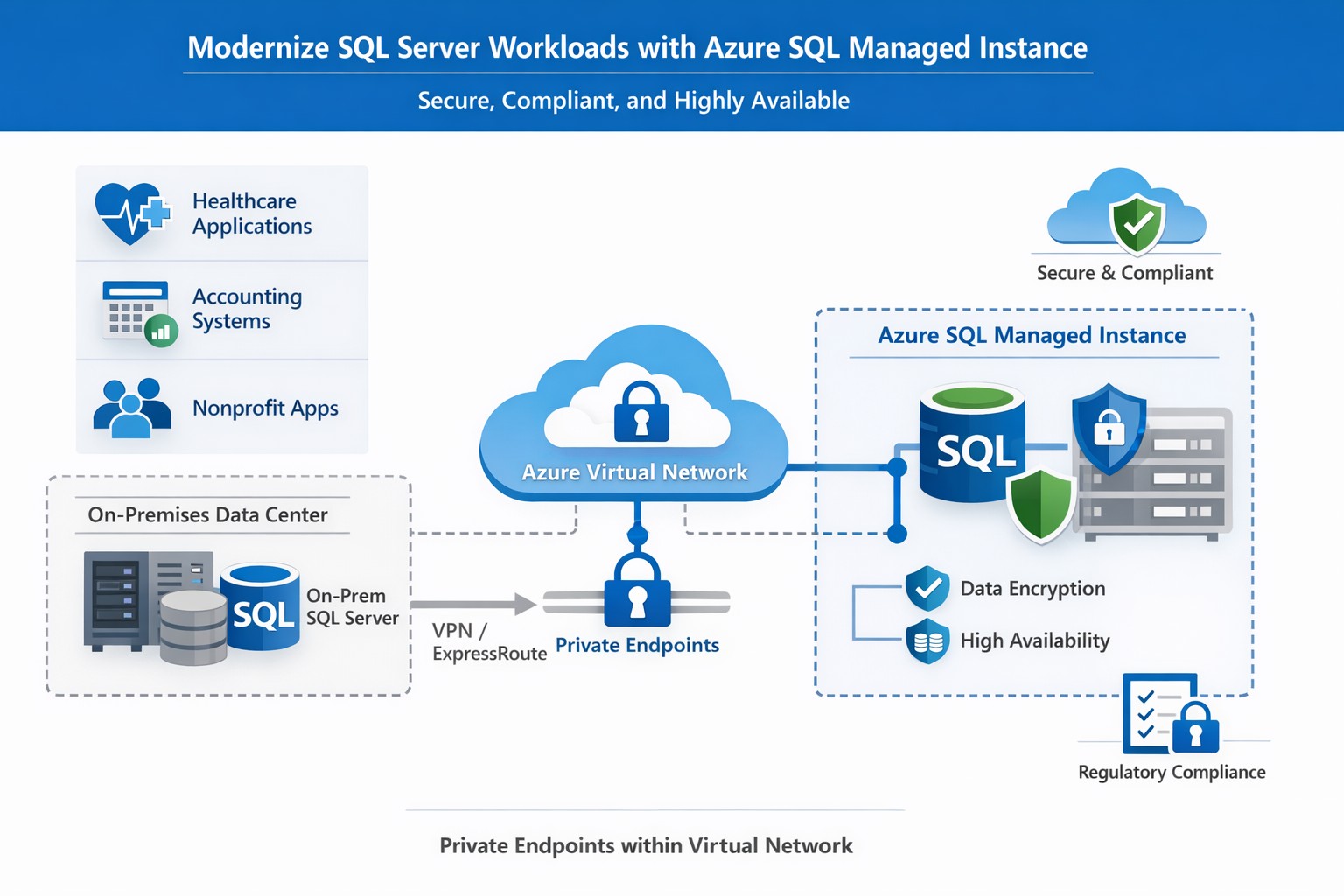
How Azure SQL Managed Instance integrates into your Azure environment, providing secure, managed SQL Server‑compatible databases for business‑critical workloads.
If you run a business that still relies on on‑premises SQL Server databases, “Azure SQL Database Managed Instance” might sound like just another cloud buzzword. In reality, it is one of the most powerful ways to modernize your data infrastructure without ripping and replacing your core applications. Azure SQL Managed Instance is a fully managed, cloud‑based SQL Server environment that gives you near‑complete compatibility with your existing SQL Server workloads, while off‑loading backups, patching, high‑availability setup, and security overhead to Microsoft.
For a business owner, this means lower operational risk, reduced IT labor, and a more predictable, scalable database platform that can grow as your customers, transactions, and data do.
What Azure SQL Managed Instance Really Is
Azure SQL Managed Instance is a Platform‑as‑a‑Service (PaaS) offering that sits between traditional on‑premises SQL Server and the more locked‑down Azure SQL Database. It runs on the latest stable version of the SQL Server Database Engine, with automatic patching and 99.99% built‑in high availability, while staying inside your own virtual network (VNet) for security and isolation.
Key things it gives you out‑of‑the‑box:
Near‑100% feature compatibility with SQL Server Enterprise Edition (including cross‑database queries, linked servers, SQL Server Agent, and many advanced security features).
Automated backups, point‑in‑time restore, and disaster‑recovery options backed by Azure’s global infrastructure.
Managed high availability and maintenance, so your team spends less time on patching and downtime coordination.
For a business owner, this translates to fewer “SQL Server emergencies,” lower total cost of ownership, and a smoother path to cloud‑based applications and analytics.
Why This Matters to Your Business
If your accounting, healthcare, or nonprofit systems depend on complex SQL Server features (multi‑tenant SaaS, reporting servers, integration services, or legacy apps), a simple lift‑and‑shift to Azure SQL Managed Instance is often the safest and most cost‑effective upgrade.
Benefits you can communicate internally:
Lower IT overhead: Microsoft handles engine and OS updates; your staff focuses on business‑specific reporting, compliance, and optimization.
Stronger security and compliance: Managed Instance supports Microsoft Entra ID, Transparent Data Encryption (TDE), Always Encrypted, auditing, and dynamic data‑masking—critical for healthcare and finance.
Better scalability and uptime: You can scale compute and storage without major re‑architecting, and rely on built‑in 99.99% availability for mission‑critical workloads.
Practical Steps for Your Business and IT Team
Here is a realistic, step‑by‑step path a business owner can ask their IT team (or a partner like Farmhouse Networking) to execute:
Inventory and prioritize databases
Document all SQL Server instances, databases, and applications that depend on them.
Identify which systems are mission‑critical (patient records, financial data, donor systems) and which can be migrated first.
Assess compatibility and readiness
Use Microsoft’s compatibility assessment tools and check which SQL Server features your workloads depend on (linked servers, SQL Agent jobs, cross‑database transactions, etc.).
Map databases to the two main service tiers:
General Purpose: typical web apps and reporting.
Business Critical: low‑latency, high‑availability needs (core transactional systems).
Design networking and security
Create a dedicated Azure Virtual Network (VNet) and subnet for SQL Managed Instances.
Configure private endpoints so databases are not exposed to the public internet.
Integrate with your existing identity provider (Microsoft Entra ID or on‑prem Active Directory via hybrid connectivity).
Plan and execute migration
For many on‑prem SQL Server workloads, use the Managed Instance link or Azure Database Migration Service to perform low‑downtime, near‑online migrations.
Start with a non‑production environment to validate performance, security, and connectivity.
Gradually shift production workloads once testing passes.
Establish monitoring and governance
Enable Azure Monitor, SQL‑level auditing, and alerts for latency, storage, and failover events.
Define backup retention, geo‑backup policies, and RPO/RTO targets for key workloads.
Train and document
Ensure your IT team knows how to use the Azure portal, SQL Server Management Studio (SSMS), and PowerShell/CLI for ongoing management.
Common Questions Business Owners Ask
Below are likely questions from your stakeholders, phrased in owner‑friendly language.
Q: Is this “just another cloud database,” or is it really the same SQL Server we already use? Azure SQL Managed Instance uses the same SQL Server Database Engine as on‑prem SQL Server, with near‑complete compatibility of enterprise features such as cross‑database queries, SQL Agent, and many security controls. In practice, many existing applications can be moved with minimal code changes.
Q: How does this improve security and compliance? Managed Instance runs inside your own virtual network, with private endpoints and deep integration with Azure security tools. It supports encryption‑at‑rest and‑in‑transit, auditing, and role‑based access, which simplifies HIPAA, financial, and nonprofit compliance requirements.
Q: What happens to backups and disaster recovery? Azure automatically manages backups, including long‑term retention and geo‑backups if you choose. You can restore to any point‑in‑time within your retention window, and failover to another region for disaster recovery.
Q: How much will this cost us monthly? Costs depend on compute (vCores), storage, and service tier (General Purpose vs. Business Critical). While you trade some licensing cost for Azure subscription fees, you often reduce spending on hardware, on‑prem licenses, and operational labor.
How Farmhouse Networking Can Help
Farmhouse Networking specializes in helping accountants, healthcare providers, and charities successfully migrate and manage Azure‑based data platforms without disrupting day‑to‑day operations. For Azure SQL Managed Instance, we can:
Assess your current SQL Server environment and identify which databases and apps are best suited for Managed Instance.
Design secure, compliant architectures that meet your industry’s regulatory needs (e.g., HIPAA‑aligned designs for clinics, FERPA‑friendly setups for nonprofits).
Plan and execute low‑downtime migrations using Microsoft’s recommended tools and best practices.
Train your internal IT team on monitoring, governance, and cost‑management so you retain control while reducing risk.
Your Next Step
If you’re ready to explore whether Azure SQL Managed Instance is the right fit for your business, reach out to Farmhouse Networking today. Email support@farmhousenetworking.com with a brief overview of your current database environment, and we’ll schedule a consultation to walk through your options, costs, and migration roadmap tailored to your accounting, healthcare, or nonprofit workload.
Kennametal has invested heavily in Microsoft cloud technologies as part of its digital transformation journey to reduce costs, increase productivity, and empower workers to deliver superior results for their customers. In this video, see how they utilize Microsoft Azure cloud platform and services to Microsoft Dynamics 365 business applications to Microsoft 365 productivity, security, and mobility tools. Kennametal believes that Microsoft resources will help the company fulfill its business promises.
Every day, BP manages the difficult business of finding, producing, marketing, and moving energy around the globe. Core to success is the modernization and digitization of the business, while being able to defend a vast digital perimeter against cyberattacks. This video shows how BP is migrating its work environment to Microsoft 365 Enterprise E5 to take advantage of a platform approach.
For the 2018 racing season, NASCAR imposed new regulations on competitors, including limiting the number of team members allowed on the track during races. For legendary race team Hendrick Motorsports, this meant that many of the race-day crew would now need to perform their critical duties remotely from the team headquarters in Concord, NC. Hendrick Motorsports adjusted to the new regulations with technology, by making Microsoft Teams their new hub for all race communications and decision making.
Microsoft 365 interface boosting productivity and scalability for business owners.
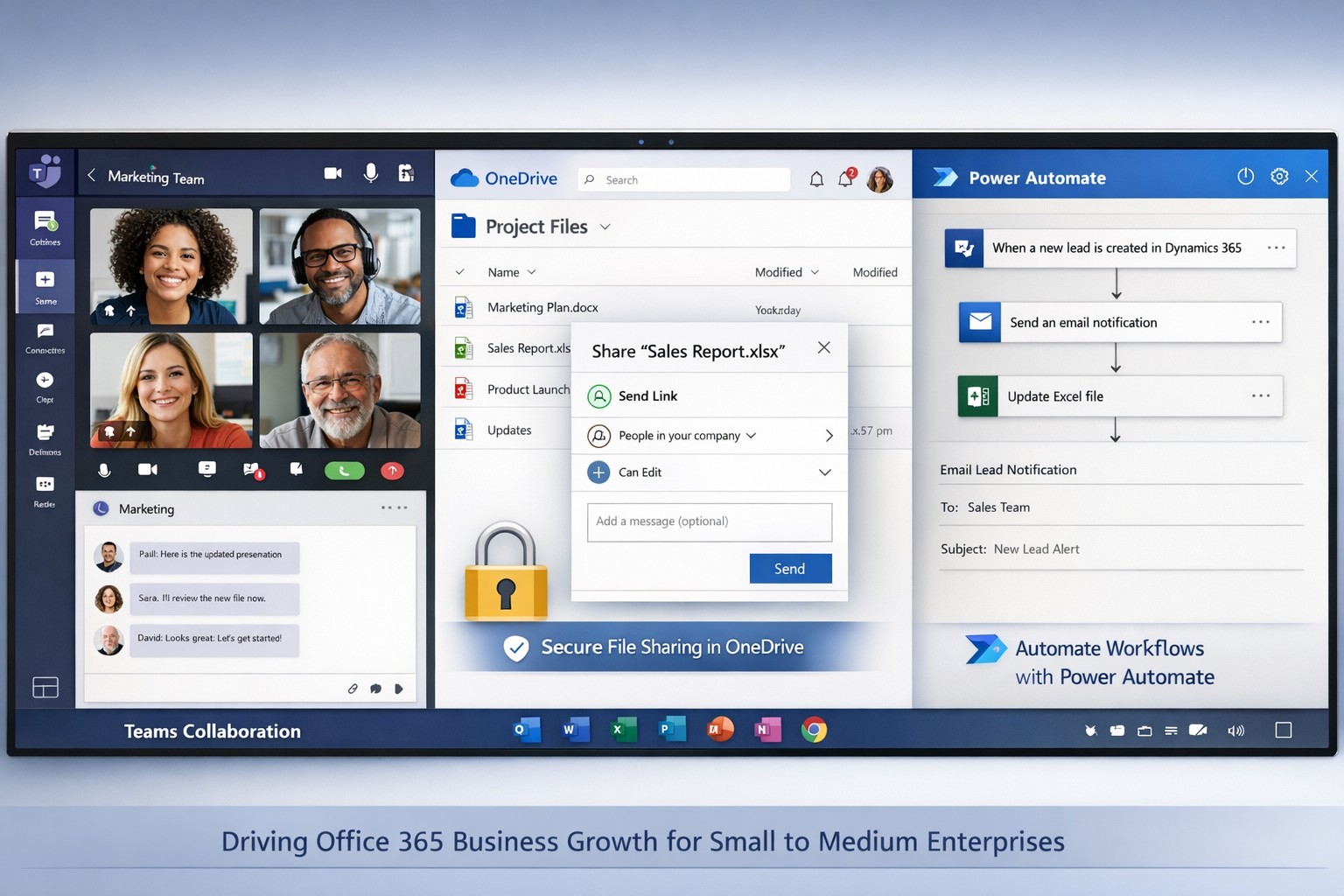
Office 365 has transformed the way businesses operate, offering a powerful suite of cloud-based tools designed to enhance productivity, collaboration, and security. For small and medium-sized enterprises, adopting Office 365 can lead to significant improvements in efficiency and scalability, allowing owners to focus on growth rather than day-to-day operational challenges. With options tailored for accounting, healthcare, and charitable organizations, Office 365 provides the flexibility needed to meet the unique demands of each industry.
Key Benefits for Business Growth
Seamless Collaboration: Tools like Microsoft Teams enable real-time communication and document sharing, reducing email clutter and speeding up project completion.
Enhanced Security: Advanced security features protect sensitive data, crucial for healthcare and financial sectors.
Scalability: Cloud-based applications allow businesses to easily adjust their software needs as they grow, without the need for costly hardware upgrades.
Automation: Integration with Power Automate streamlines repetitive tasks, freeing up time for strategic initiatives.
Practical Steps for Implementation
To fully leverage Office 365, business owners should collaborate with their IT departments to ensure a smooth transition. Here are the essential steps:
1. Assess Current Needs
Identify the specific challenges your team faces, such as inefficient communication or data management issues.
Determine which Office 365 plans best fit your requirements, focusing on features relevant to your industry.
2. Plan Migration
Develop a migration strategy that includes timelines and responsibilities.
Train staff on new tools to ensure they can utilize them effectively from day one.
3. Implement Security Measures
Set up security protocols using Microsoft’s security features, including multi-factor authentication and data loss prevention.
Regularly update passwords and security settings to maintain robust protection against cyber threats.
4. Integrate Automation
Utilize Power Automate to automate common workflows, such as expense approvals or patient data management.
Monitor automation performance to identify areas for improvement.
Frequently Asked Questions
Q: How does Office 365 improve productivity? A: Office 365 enhances productivity by providing real-time collaboration tools, automated workflows, and secure access to data from any device, which streamlines day-to-day operations.
Q: Can Office 365 scale with my business? A: Yes, Office 365 offers flexible licensing options that allow businesses to add or remove users as needed, making it easy to scale operations without significant overhead.
Q: What kind of support is available for implementation? A: Various providers offer implementation support, including training and ongoing technical assistance to ensure a smooth transition and maximize the benefits of Office 365.
How Farmhouse Networking Can Help
Farmhouse Networking specializes in helping businesses implement and optimize Office 365 solutions tailored to their specific needs. Our team provides comprehensive support, from initial assessment and migration planning to ongoing maintenance and security management. By partnering with us, business owners can ensure their Office 365 deployment is seamless and effective, allowing them to focus on growth and innovation.
For more information on how Farmhouse Networking can help improve your business operations through Office 365, contact us at support@farmhousenetworking.com. We are here to guide you every step of the way, ensuring your business thrives in today’s competitive landscape.
Leverage Microsoft collaboration tools like Teams to help customers work together efficiently and boost your business workflows.
You know collaboration drives growth—but scattered tools and poor communication waste time and opportunities. Microsoft technology, like Teams and Microsoft 365, enables your customers to work together effortlessly, boosting satisfaction and loyalty. This post outlines how to implement it effectively for your business.
Key Microsoft Collaboration Tools
Microsoft Teams serves as the central hub for meetings, chats, calls, and file sharing, integrating with Outlook and OneNote for streamlined workflows. Tools like Microsoft Loop offer flexible workspaces for co-creation, while Whiteboard supports real-time brainstorming across locations. These features allow customers to join as guests, co-author documents, and track projects without switching apps, enhancing productivity by up to 30% in team settings.
Practical Action Steps
Follow these steps with your IT department to deploy Microsoft collaboration tools targeting customer interactions.
Assess Needs: Audit current customer touchpoints—review emails, support tickets, and feedback to identify collaboration gaps, such as delayed responses or siloed data.
Select Licensing: Choose Microsoft 365 Business Premium for Teams, SharePoint, and Copilot AI features; start with a 1-month trial to test scalability.
Set Up Teams Channels: Create dedicated customer channels for projects, enabling guest access; configure permissions to limit sensitive data exposure.
Integrate Tools: Link Teams with OneDrive for secure file sharing and Power Automate for automated workflows, like instant notifications on customer updates.
Train Staff: Run 2-hour sessions on co-authoring in Word/Excel and meeting recaps; use Microsoft’s free resources for onboarding.
Test and Monitor: Pilot with 5 key customers, tracking metrics like response time (aim for <2 hours) via Teams analytics; adjust based on feedback.
These steps typically take 2-4 weeks, yielding faster customer resolutions and stronger relationships.
FAQ: Customer Inquiries Answered
How secure is customer data in Teams? Microsoft Teams uses end-to-end encryption and compliance with GDPR/HIPAA, with guest access controls to prevent unauthorized sharing.
Can customers join without a Microsoft account? Yes, external guests join via browser or app invite—no account needed—ideal for quick collaborations.
What if our team is remote or hybrid? Teams supports anywhere-access with AI recaps, transcripts, and intelligent speakers for up to 1,000 attendees.
How does this integrate with existing CRM? Seamless with Dynamics 365 or third-party apps via APIs, syncing customer data for unified views.
What’s the ROI for small businesses? Businesses report 20-50% productivity gains through reduced email overload and real-time co-editing.
How Farmhouse Networking Helps
Farmhouse Networking specializes in Microsoft 365 deployments for accounting, healthcare, and charity sectors, ensuring SEO-optimized client portals and lead-gen strategies. We handle audits, custom setups, training, and ongoing optimization—delivering 99.9% uptime and measurable traffic growth to your collaboration hubs. Our experts integrate Copilot for AI-driven insights, turning customer interactions into B2B opportunities.
Ready to unlock Microsoft-powered collaboration? Email support@farmhousenetworking.com for a free consultation on improving your business today.
And God will generously provide all you need. Then you will always have everything you need and plenty left over to share with others. As the Scriptures say,
“They share freely and give generously to the poor. Their good deeds will be remembered forever.”
For God is the one who provides seed for the farmer and then bread to eat. In the same way, he will provide and increase your resources and then produce a great harvest of generosity in you. - 2 Corinthians 9:8-10
We use cookies to ensure that we give you the best experience on our website. If you continue to use this site we will assume that you are happy with it.