Forrester TEI study highlights 478% ROI over three years with Azure IaaS, including 90% data center cost savings and rapid payback
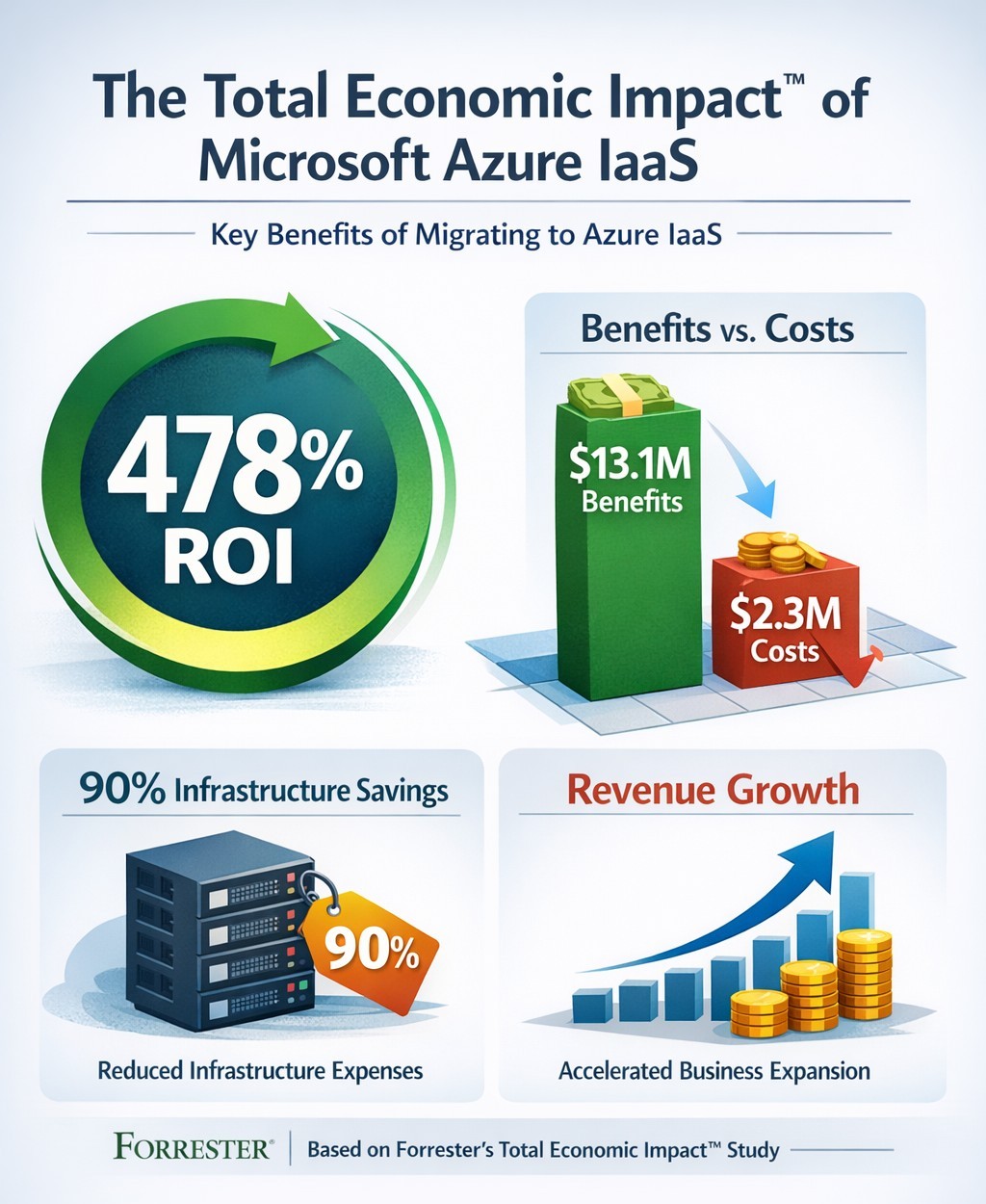
You’re constantly evaluating investments that deliver real ROI. Microsoft’s Azure Infrastructure as a Service (IaaS) promises massive cost savings and revenue growth, backed by Forrester’s Total Economic Impact™ study. This analysis of nine organizations shows a 478% ROI over three years, with $13.1 million in benefits versus $2.3 million in costs—payback in under three months.
Key Findings from Forrester TEI Study
The study models a composite organization with 20,000 employees and $4 billion revenue, mirroring mid-to-large enterprises. Core benefits include 90% reduction in on-premises infrastructure costs ($7.3 million avoided), plus IT labor savings totaling $10.3 million over three years. Revenue jumped via 83%-167% higher online B2C orders and 20%-27% larger order sizes, generating $2.8 million in net profit; new enterprise sales added $927,000.
Businesses cut data center footprints by migrating workloads—lift-and-shift for quick wins, refactoring for optimization. Global scalability handled traffic spikes, improving site performance in regions like China.
Practical Action Steps
Follow these steps with your IT team to replicate these gains:
Assess Current Infrastructure: Inventory on-premises servers, co-location costs, and workloads (e.g., SAP, dev/test). Calculate TCO using Azure Pricing Calculator—expect 90% data center savings.
Pilot Migration: Start with non-critical workloads like disaster recovery. Use Azure Migrate for discovery and lift-and-shift; test scalability during peaks.
Optimize and Scale: Refactor apps for Azure Virtual Machines. Implement auto-scaling and per-second billing to match demand, reducing waste.
Monitor Costs: Deploy Azure Cost Management for visibility; leverage reservations for 25%+ savings in Year 1.
Measure ROI: Track metrics quarterly—cost avoidance, revenue uplift, FTE repurposing (e.g., data center staff to business analysts).
FAQs: Client Inquiries Answered
What’s the typical ROI timeline? Payback under three months; full 478% ROI by Year 3 for the composite firm.
How much can we save on data centers? Up to 90% on infrastructure and labor by Year 3, avoiding $7.3 million.
Is Azure IaaS suitable for my industry? Yes—sporting goods, manufacturing, and multinationals saw gains in sales, dev/test, and global ops.
What are the upfront costs? Initial migration: $290,950 Year 1, rising to $454,609 by Year 3 with hires; total PV $2.3 million.
Any risks? Forrester risk-adjusted benefits 10% down, still netting $10.8 million.
How Farmhouse Networking Helps
Farmhouse Networking specializes in B2B cloud migrations for accounting, healthcare, and nonprofits. We handle full Azure IaaS assessments, migrations, and optimization—ensuring HIPAA/GDPR compliance for sensitive data. Our SEO-driven websites showcase client wins, like 83% order growth, to attract leads. We integrate branding, lead gen, and customer experience tools, turning Azure savings into growth.
Ready to cut costs and boost revenue? Email support@farmhousenetworking.com for a free TEI assessment tailored to your business.
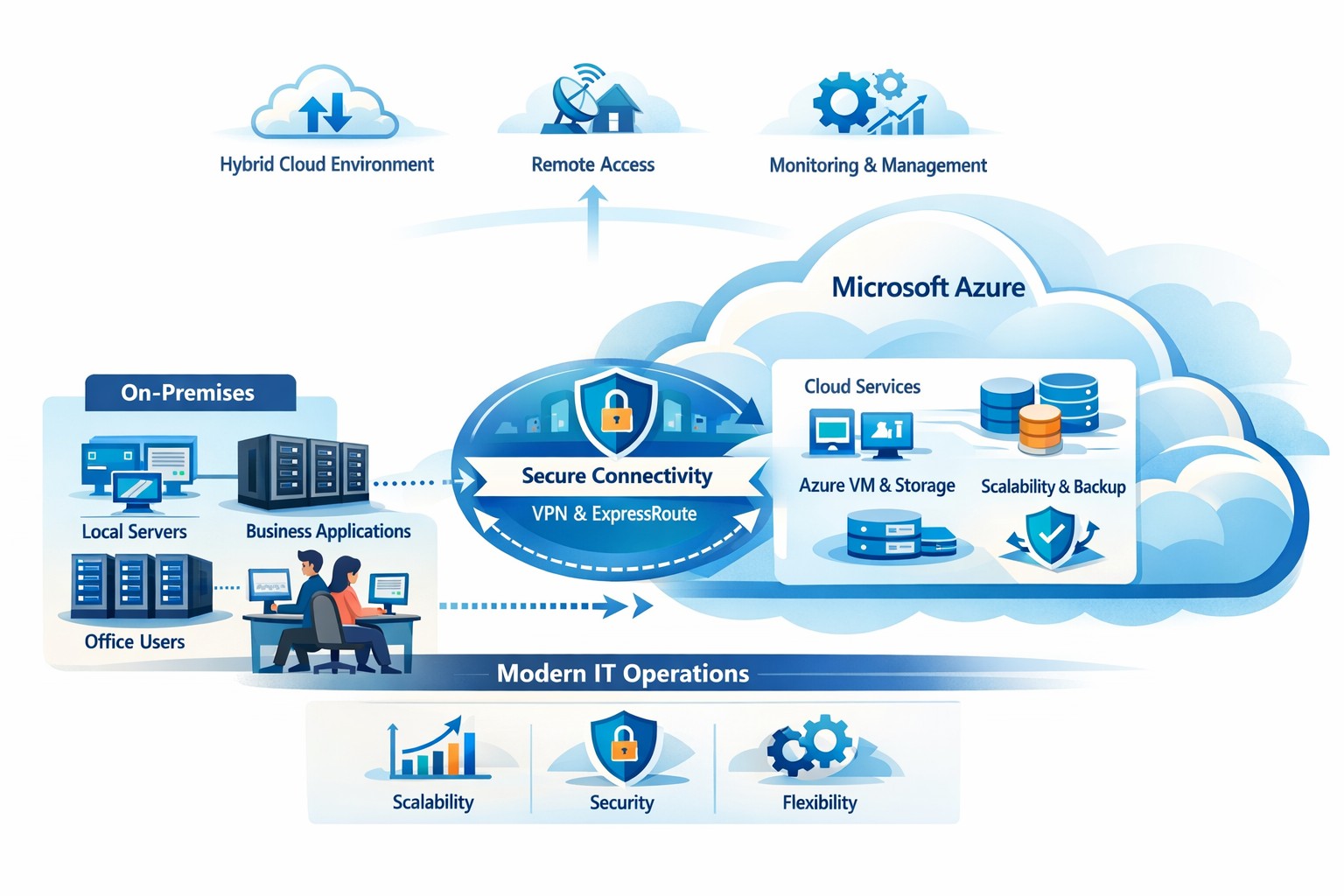
How your business can connect on‑premises servers and workloads to Microsoft Azure for scalable, secure, and compliant cloud computing
The cloud is no longer a “nice‑to‑have”—it’s the backbone of modern operations. Moving to Microsoft Azure gives you enterprise‑grade security, scalability, and cost control without the burden of managing your own data center. In this post, you’ll learn why the cloud matters, why Azure in particular is the right fit for many businesses, and—most importantly—how Farmhouse Networking can guide you through each step of the journey.
Why the cloud matters for your business
The cloud lets you turn capital‑heavy IT (servers, routers, on‑site backups) into a predictable operating expense. Instead of buying and maintaining hardware, you pay for what you use, when you use it. This model is especially powerful for companies with seasonal spikes, hybrid workforces, or plans to grow into new markets.
For business owners, the cloud means:
Lower upfront costs and easier budgeting.
Faster innovation and deployment of new tools or applications.
Built‑in disaster recovery and business continuity capabilities.
Azure, in particular, is trusted by 90% of Fortune 500 companies and offers a globally distributed, secure platform tightly integrated with familiar Microsoft tools like Microsoft 365, Entra ID, and Dynamics 365.
Why choose Microsoft Azure?
Azure stands out for three reasons relevant to owners and IT teams:
Security and compliance Azure provides enterprise‑level protection, identity management, and compliance certifications that small‑ and mid‑sized businesses can leverage without hiring a full‑time security team.
Scalability and flexibility You can scale compute, storage, and networking up or down in minutes—perfect for handling seasonal demand, new projects, or unexpected growth.
Seamless integration with Microsoft tools If your team already uses Microsoft 365, Teams, or Windows‑based applications, Azure simplifies integration and reduces complexity in permissions, patching, and remote access.
Practical steps for your business and IT team
Making the move to Azure doesn’t have to be disruptive. Here’s a realistic, phased roadmap:
Assess your current environment
Inventory servers, applications, and data.
Identify which workloads are good candidates for the cloud (e.g., file servers, backups, certain line‑of‑business apps). Farmhouse Networking can perform a free infrastructure assessment to help you classify and prioritize workloads.
Define your cloud strategy and goals
Decide what “success” looks like: better uptime, remote work support, cost savings, faster backups, etc.
Set a timeline (e.g., 6–18 months for a phased migration).
Start with low‑risk, high‑impact workloads
Migrate backups, archival storage, or non‑critical applications first.
Use Azure Backup and Azure Site Recovery to test disaster‑recovery scenarios without disrupting production.
Build identity and security foundations
Sync your on‑premises directories (or move entirely) to Microsoft Entra ID.
Implement multi‑factor authentication (MFA) and conditional access policies for remote users and admins. Farmhouse Networking can help design and deploy these policies with minimal friction for your team.
Train and support your internal team
Provide basic Azure operations training for your IT staff.
Set up monitoring dashboards so your team can track costs, performance, and security events.
Client questions and answers
Here are some typical questions business owners and clients might ask:
Q: Is the cloud really more secure than our own servers? A: When properly configured, Azure offers better security than most on‑premises environments, including advanced threat detection, encryption at rest and in transit, and continuous Microsoft‑led security updates. Azure also meets many industry‑specific compliance standards that can be difficult and expensive to maintain in‑house.
Q: Will migrating to Azure be expensive and disruptive? A: Migrations can be staged so core operations stay online. You shift from large capital investments to predictable monthly costs, and you often achieve savings by retiring aging hardware and consolidating tools. A phased approach, with Farmhouse Networking managing the planning and execution, keeps disruption low.
Q: What happens if we need to move back on‑premises someday? A: Azure supports hybrid scenarios, so you can keep some workloads on‑site and others in the cloud. Azure’s hybrid tools (such as Azure Stack, VPNs, and ExpressRoute) make it possible to move workloads back or between environments as business needs change.
How Farmhouse Networking can help
Farmhouse Networking acts as your strategic partner for cloud adoption, not just a vendor. We help you:
Conduct a current‑state assessment and build a tailored Azure roadmap aligned with your growth goals.
Manage the technical migration with minimal disruption to your team and clients.
Implement security, governance, and monitoring so you retain control while Azure does the heavy lifting.
By partnering with us, you get a clear, documented plan and ongoing support—so you can focus on running your business while your systems stay secure, available, and scalable.
Ready to explore Azure for your business?
If you’re wondering whether the cloud—and specifically Microsoft Azure—is the right fit for your organization, let’s start the conversation. Email us at support@farmhousenetworking.com to schedule a consultation, and we’ll walk through your current environment, your goals, and a practical next step toward a smarter, more resilient IT foundation.
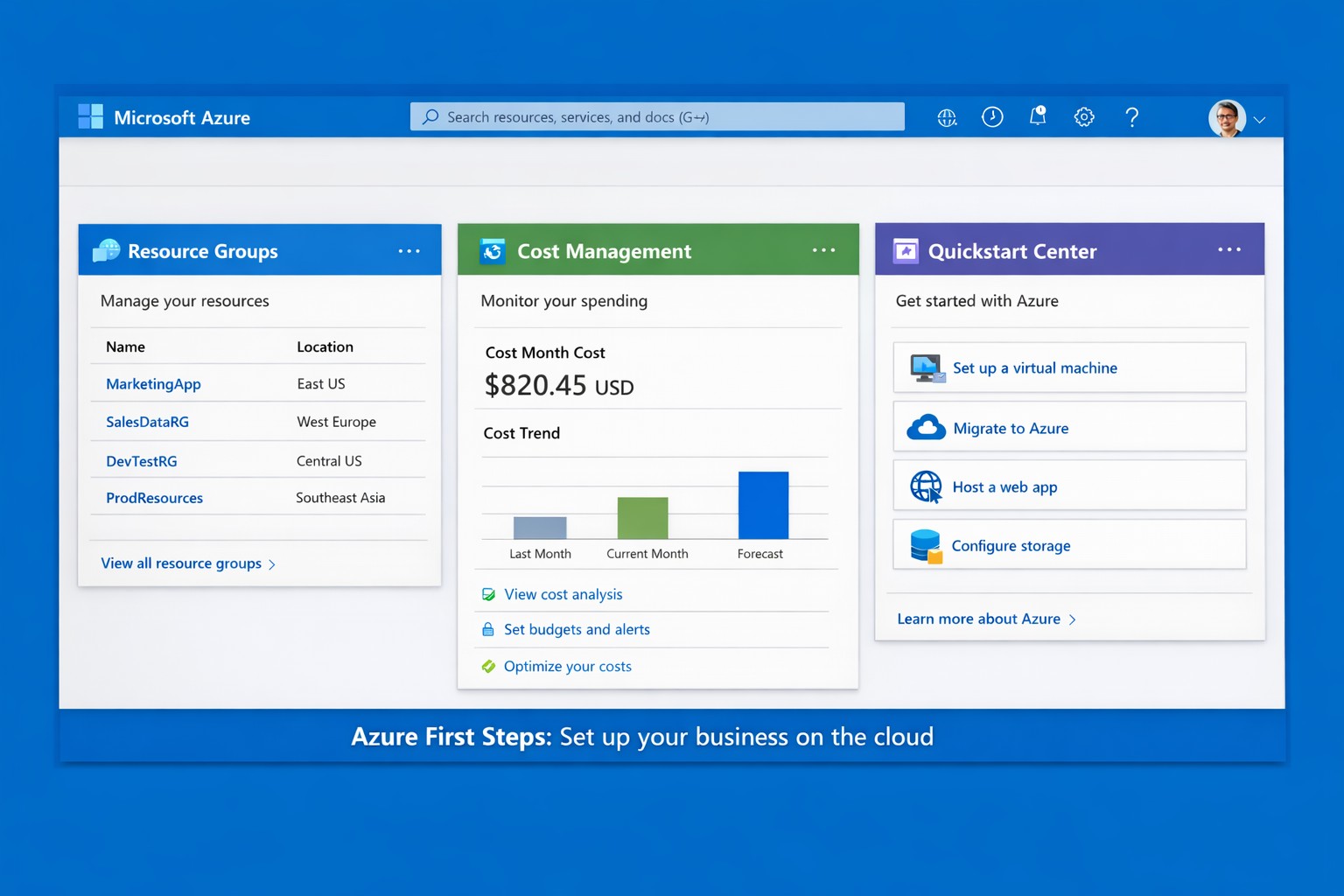
Launch your business on Microsoft Azure: Sign up, deploy resources, and monitor costs in minutes.
Migrating to Microsoft Azure can cut IT costs by up to 40% while scaling operations seamlessly—without the hassle of on-premises servers. This guide delivers practical steps tailored for you and your IT team to launch Azure quickly, addressing common concerns and showing how Farmhouse Networking streamlines the process.
Practical Action Steps
Follow these actionable steps to get your business on Azure. Designed for owners overseeing IT without deep technical dives.
Sign Up for a Free Azure Account: Visit azure.microsoft.com, select “Start Free,” and use your Microsoft account or create one. You’ll get $200 in credits for 30 days plus 12 months of popular free services like VMs and storage—no upfront charges if you monitor usage.
Access the Azure Portal and Customize Dashboard: Log in at portal.azure.com. Use the search bar for quick navigation, create Resource Groups to organize projects (e.g., “Marketing Apps”), and pin key metrics like costs to your dashboard for at-a-glance oversight.
Estimate Costs and Set Budgets: In the portal, go to Cost Management + Billing. Input your expected usage (e.g., VMs, storage) via the Pricing Calculator to forecast expenses. Set alerts for $50+ thresholds to avoid surprises—essential for business budgeting.
Deploy Your First Resource: Start with a simple Web App or VM. Search “App Service” > Create > Choose runtime (e.g., .NET), free tier, and region near Grants Pass, OR (West US 2). Deploy in minutes to test scalability.
Secure and Monitor Basics: Enable Multi-Factor Authentication (MFA) under Security settings. Use Azure Monitor for alerts on performance and Azure Advisor for free optimization tips like rightsizing resources.
These steps typically take 1-2 hours initially, scaling as your business grows.
Common Q&A for Business Owners
Q: Is Azure secure for sensitive business data? A: Yes—Azure meets standards like HIPAA, GDPR, and SOC 2 via built-in encryption, firewalls, and compliance tools. Your IT team can enforce policies automatically.
Q: How much will this cost my business? A: Free tier covers starters; paid scales pay-as-you-go (e.g., $0.01/hour for basic VM). Use the Azure Pricing Calculator and Cost Management to cap spends—many businesses save 30% vs. AWS.
Q: Do I need Azure-certified staff? A: Not immediately—use the Quickstart Center for guided checklists. For complex setups, partner with experts to avoid pitfalls.
Q: Can Azure handle growth for accounting/healthcare firms? A: Absolutely—auto-scaling VMs and App Services support spikes (e.g., tax season), with HIPAA-compliant storage for healthcare records.
How Farmhouse Networking Helps
Farmhouse Networking specializes in B2B cloud migrations for accounting, healthcare, and nonprofits—driving organic traffic via Azure-optimized sites and converting visitors to clients. We handle full setups: account config, custom resource groups, cost forecasting, secure deployments, and 24/7 monitoring. Our SEO-infused strategies (e.g., Azure-backed blogs) boost your visibility, while lead-gen tools turn portal analytics into qualified prospects. Skip the learning curve—our team deploys production-ready Azure in days, ensuring compliance and ROI from day one.
Call to Action
Ready to unlock Azure’s potential for your business? Email support@farmhousenetworking.com today for a free consultation on streamlining your first steps.
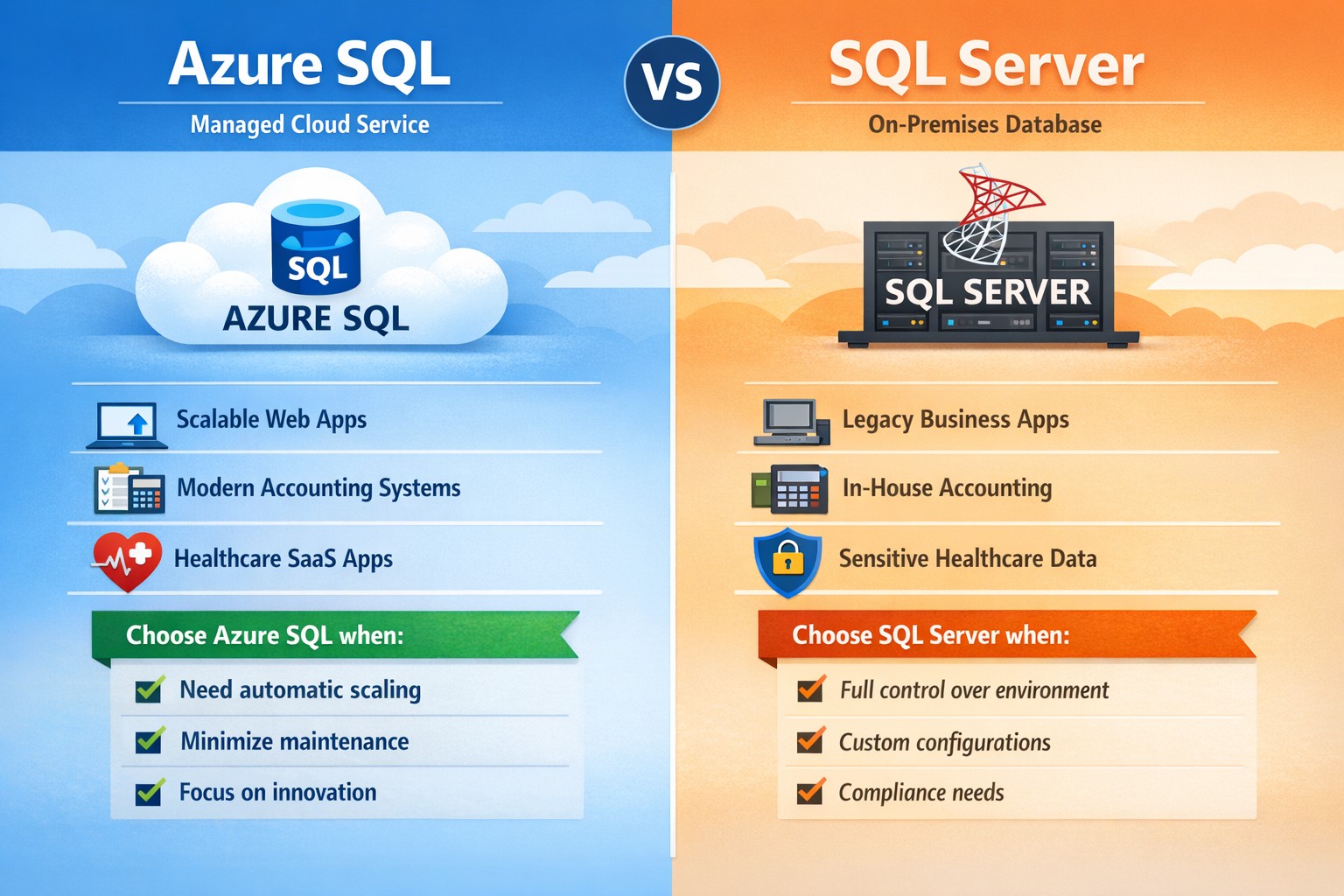
Azure SQL vs SQL Server: Which database platform fits your business? Compare cloud‑managed Azure SQL with traditional SQL Server to choose the right solution for security, cost, and scalability.
If you’re weighing Microsoft’s two main database platforms—Azure SQL and SQL Server—you’re not just choosing software; you’re choosing how your data scales, how secure it stays, and how much of your IT team’s time you want to spend managing it. Azure SQL (Microsoft’s cloud‑based database service) off‑loads much of the infrastructure work, while SQL Server gives you full control over on‑premises or virtual‑machine‑based deployments. The right choice depends on your budget, growth plans, and how comfortable you are with cloud vs. traditional infrastructure.
What’s the real difference?
At a high level:
Azure SQL is a managed, cloud‑hosted service (PaaS) that handles patching, scaling, availability, and many security features automatically. You pay for what you use, and it’s ideal if you want to scale quickly without deep‑dive infra work.
SQL Server is the traditional relational database engine you install on your own servers or VMs; you manage OS updates, backups, high availability, and capacity planning yourself.
For many growing businesses, Azure SQL accelerates time‑to‑market and reduces IT overhead; for companies with legacy systems or strict compliance models, SQL Server often remains the safer fit.
Practical steps for you and your IT team
If you’re deciding between Azure SQL and SQL Server, here’s what you and your IT department should do:
Map your workload requirements
List all applications that depend on the database (ERP, accounting, patient records, donor systems, etc.).
Decide whether you must keep data on‑premises (e.g., certain healthcare or finance regulations).
Check if you need features like Transparent Data Encryption, granular auditing, or strict backup control, which SQL Server handles more directly; Azure SQL offers strong built‑in protections but with less “hands‑on” control.
Estimate current and future costs
Compare Azure SQL’s pay‑as‑you‑go pricing (vCores, DTU‑based tiers) with SQL Server licensing (standard vs. enterprise) plus hardware and maintenance.
Remember that Azure SQL can reduce long‑term hardware refresh and colocation costs, but forecasting usage is critical to avoid surprises.
Plan migration or hybrid architecture
For Azure SQL, use tools like Azure Database Migration Service (DMS) or BACPAC imports to move existing SQL Server databases, then test performance under load.
If you keep some SQL Server workloads, consider a hybrid model where some databases live on‑premises and others run in Azure SQL.
Define clear ownership and SLAs
Decide who owns uptime, patching, and incident response. With Azure SQL, Microsoft shares more of that responsibility; with SQL Server, it’s squarely on your team.
FAQs your clients may ask
Q: “Is Azure SQL just ‘SQL Server in the cloud’?” Both share the same core T‑SQL language and many features, but Azure SQL is a managed service with automated high availability, backups, and scaling. Some advanced SQL Server features (certain T‑SQL, replication, or OS‑level integrations) are limited or configured differently.
Q: “Which is cheaper for a small business?” Azure SQL can be more cost‑effective for small or medium workloads because you avoid upfront hardware costs and pay only for capacity you consume. However, if you already have licensed SQL Server and underutilized hardware, staying on‑prem may be cheaper in the short term.
Q: “Which is better for healthcare or accounting firms?” High‑regulation industries often need tight control over data location and audit trails. Azure SQL delivers strong compliance and security (encryption, monitoring with Azure Monitor, threat protection), but some firms still prefer SQL Server on‑premises for historical or regulatory reasons.
Q: “Can we mix Azure SQL and SQL Server?” Yes. Many businesses use a hybrid approach: core financial or compliance‑sensitive databases on SQL Server, while newer web apps or analytics databases run in Azure SQL.
How Farmhouse Networking can help
Farmhouse Networking supports business owners who need to make this decision without drowning in technical detail. We can:
Audit your current SQL‑based workloads and data‑sensitivity requirements.
Model total cost and risk for Azure SQL vs. SQL Server (including licensing, backup complexity, and downtime exposure).
Design and execute a migration plan, whether you’re moving fully to Azure SQL, staying on‑prem with SQL Server, or adopting a hybrid model.
Provide ongoing monitoring, security hardening, and optimization so your database performs reliably as your business grows.
Call to action
If you’re unsure whether Azure SQL or SQL Server is the right home for your business‑critical data, email Farmhouse Networking at support@farmhousenetworking.com for a tailored consultation. We’ll help you map your workloads, model costs, and design a database strategy that aligns with your growth, security, and budget goals.
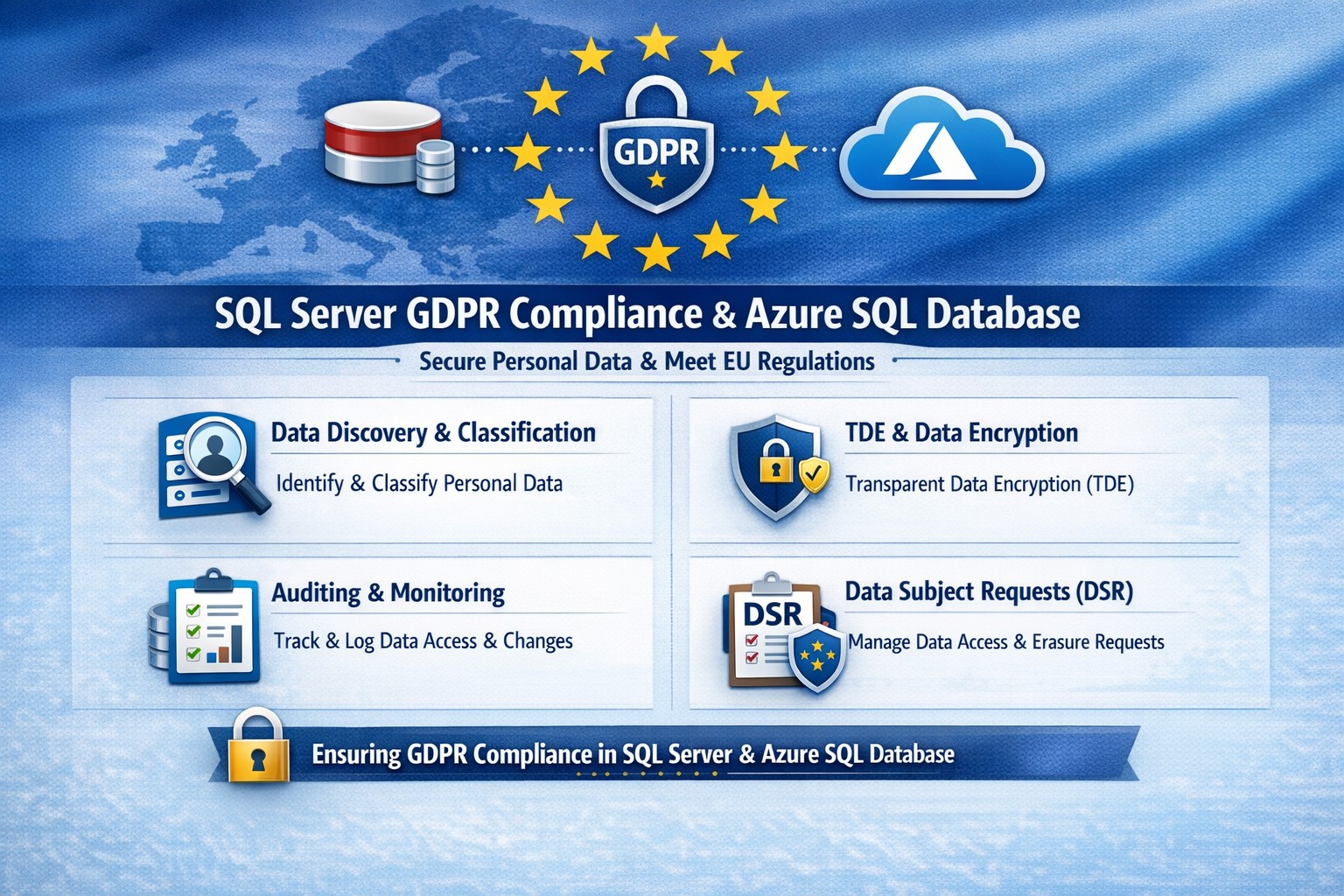
Essential GDPR compliance steps for SQL Server and Azure SQL Database: Classify data, encrypt, audit, and respond to requests.
Non-compliance with GDPR can cost millions in fines—up to 4% of global revenue. Microsoft SQL Server and Azure SQL Database offer built-in tools to secure personal data, but proper setup is essential for businesses handling EU customer info.
Why GDPR Matters for Your SQL Databases
GDPR mandates discovering personal data, controlling access, protecting it, and enabling reporting. SQL Server and Azure SQL Database support this via features like data discovery, encryption, and auditing, reducing compliance risks while maintaining performance.
Microsoft’s four-step framework aligns directly: discover data locations, govern access, strengthen protection, and record activities. This applies to on-premises SQL Server and cloud-based Azure SQL, making hybrid setups viable for growing businesses.
Practical Action Steps for Compliance
Follow these steps with your IT team to achieve GDPR readiness.
Discover Personal Data: Use SQL Server Data Discovery & Classification (right-click database > Tasks > Classify Data). Scan columns for PII like names, emails, or health info; label sensitivity (e.g., Confidential-GDPR).
Govern Access: Enable Azure AD authentication over SQL logins. Configure row-level security (RLS) and firewall rules to enforce least privilege. Limit IT staff to role-based access.
Strengthen Protection: Turn on Transparent Data Encryption (TDE), Always Encrypted for sensitive columns, and Dynamic Data Masking (DDM) to hide PII from non-privileged users. Encrypt backups with long-term retention policies.
Monitor and Report: Activate SQL Auditing and Advanced Threat Protection for logs on access, changes, and threats. Set email alerts for breaches. Handle Data Subject Requests (DSR) like “right to be forgotten” via built-in tools for discover, access, rectify, and delete.
Test quarterly: Simulate DSRs and review audit logs to ensure 72-hour breach notifications per GDPR Article 33.
FAQ: Client Questions Answered
Q: Does Azure SQL automatically make us GDPR compliant? A: No—features like auditing and encryption help, but you must configure them and conduct gap analysis. GDPR requires organizational processes beyond tech.
Q: How do we handle PII in backups or audit logs? A: Encrypt backups; purge PII from long-term storage on DSRs. Audit logs may capture PII—treat as scoped under GDPR, deleting on request unless legally retained.
Q: What’s the difference for SQL Server vs. Azure SQL? A: Both offer core tools (e.g., classification, TDE), but Azure adds managed services like auto-threat detection and easier scaling. Hybrid works via Azure Arc.
Q: How long to respond to data access requests? A: One month max; use SQL tools for quick exports. Non-compliance risks supervisory fines.
How Farmhouse Networking Helps
Farmhouse Networking specializes in B2B tech for accounting, healthcare, and nonprofits—industries heavy on regulated data. We audit your SQL Server/Azure SQL setups, implement classification/encryption, and automate DSR workflows to cut compliance time by 50%.
Our team handles gap analysis, custom policies, and ongoing monitoring, integrating with your CRM/ERP for seamless ops. We’ve helped similar clients avoid audits while boosting data-driven growth.
How Azure SQL Managed Instance integrates into your Azure environment, providing secure, managed SQL Server‑compatible databases for business‑critical workloads.
If you run a business that still relies on on‑premises SQL Server databases, “Azure SQL Database Managed Instance” might sound like just another cloud buzzword. In reality, it is one of the most powerful ways to modernize your data infrastructure without ripping and replacing your core applications. Azure SQL Managed Instance is a fully managed, cloud‑based SQL Server environment that gives you near‑complete compatibility with your existing SQL Server workloads, while off‑loading backups, patching, high‑availability setup, and security overhead to Microsoft.
For a business owner, this means lower operational risk, reduced IT labor, and a more predictable, scalable database platform that can grow as your customers, transactions, and data do.
What Azure SQL Managed Instance Really Is
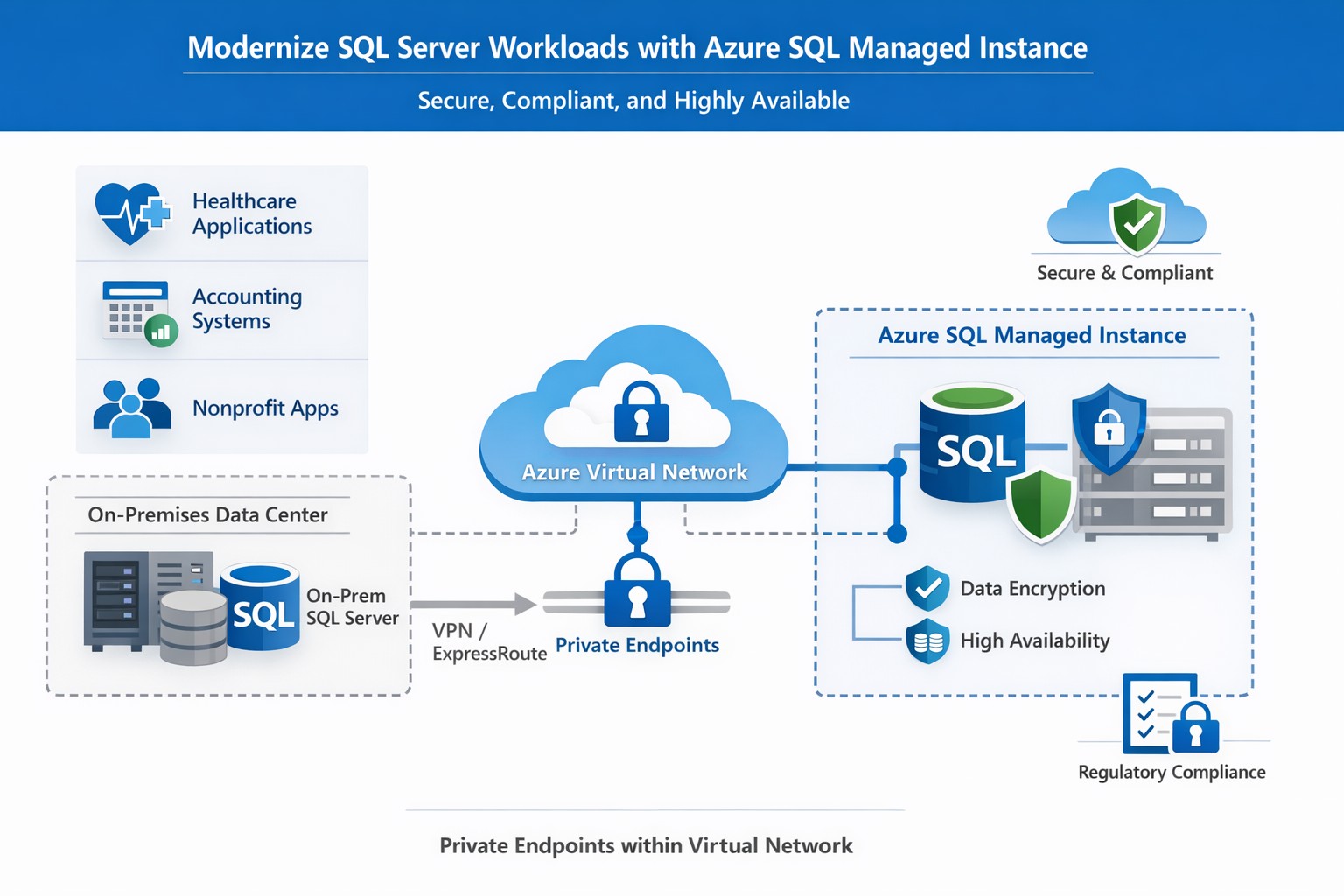
Azure SQL Managed Instance is a Platform‑as‑a‑Service (PaaS) offering that sits between traditional on‑premises SQL Server and the more locked‑down Azure SQL Database. It runs on the latest stable version of the SQL Server Database Engine, with automatic patching and 99.99% built‑in high availability, while staying inside your own virtual network (VNet) for security and isolation.
Key things it gives you out‑of‑the‑box:
Near‑100% feature compatibility with SQL Server Enterprise Edition (including cross‑database queries, linked servers, SQL Server Agent, and many advanced security features).
Automated backups, point‑in‑time restore, and disaster‑recovery options backed by Azure’s global infrastructure.
Managed high availability and maintenance, so your team spends less time on patching and downtime coordination.
For a business owner, this translates to fewer “SQL Server emergencies,” lower total cost of ownership, and a smoother path to cloud‑based applications and analytics.
Why This Matters to Your Business
If your accounting, healthcare, or nonprofit systems depend on complex SQL Server features (multi‑tenant SaaS, reporting servers, integration services, or legacy apps), a simple lift‑and‑shift to Azure SQL Managed Instance is often the safest and most cost‑effective upgrade.
Benefits you can communicate internally:
Lower IT overhead: Microsoft handles engine and OS updates; your staff focuses on business‑specific reporting, compliance, and optimization.
Stronger security and compliance: Managed Instance supports Microsoft Entra ID, Transparent Data Encryption (TDE), Always Encrypted, auditing, and dynamic data‑masking—critical for healthcare and finance.
Better scalability and uptime: You can scale compute and storage without major re‑architecting, and rely on built‑in 99.99% availability for mission‑critical workloads.
Practical Steps for Your Business and IT Team
Here is a realistic, step‑by‑step path a business owner can ask their IT team (or a partner like Farmhouse Networking) to execute:
Inventory and prioritize databases
Document all SQL Server instances, databases, and applications that depend on them.
Identify which systems are mission‑critical (patient records, financial data, donor systems) and which can be migrated first.
Assess compatibility and readiness
Use Microsoft’s compatibility assessment tools and check which SQL Server features your workloads depend on (linked servers, SQL Agent jobs, cross‑database transactions, etc.).
Map databases to the two main service tiers:
General Purpose: typical web apps and reporting.
Business Critical: low‑latency, high‑availability needs (core transactional systems).
Design networking and security
Create a dedicated Azure Virtual Network (VNet) and subnet for SQL Managed Instances.
Configure private endpoints so databases are not exposed to the public internet.
Integrate with your existing identity provider (Microsoft Entra ID or on‑prem Active Directory via hybrid connectivity).
Plan and execute migration
For many on‑prem SQL Server workloads, use the Managed Instance link or Azure Database Migration Service to perform low‑downtime, near‑online migrations.
Start with a non‑production environment to validate performance, security, and connectivity.
Gradually shift production workloads once testing passes.
Establish monitoring and governance
Enable Azure Monitor, SQL‑level auditing, and alerts for latency, storage, and failover events.
Define backup retention, geo‑backup policies, and RPO/RTO targets for key workloads.
Train and document
Ensure your IT team knows how to use the Azure portal, SQL Server Management Studio (SSMS), and PowerShell/CLI for ongoing management.
Common Questions Business Owners Ask
Below are likely questions from your stakeholders, phrased in owner‑friendly language.
Q: Is this “just another cloud database,” or is it really the same SQL Server we already use? Azure SQL Managed Instance uses the same SQL Server Database Engine as on‑prem SQL Server, with near‑complete compatibility of enterprise features such as cross‑database queries, SQL Agent, and many security controls. In practice, many existing applications can be moved with minimal code changes.
Q: How does this improve security and compliance? Managed Instance runs inside your own virtual network, with private endpoints and deep integration with Azure security tools. It supports encryption‑at‑rest and‑in‑transit, auditing, and role‑based access, which simplifies HIPAA, financial, and nonprofit compliance requirements.
Q: What happens to backups and disaster recovery? Azure automatically manages backups, including long‑term retention and geo‑backups if you choose. You can restore to any point‑in‑time within your retention window, and failover to another region for disaster recovery.
Q: How much will this cost us monthly? Costs depend on compute (vCores), storage, and service tier (General Purpose vs. Business Critical). While you trade some licensing cost for Azure subscription fees, you often reduce spending on hardware, on‑prem licenses, and operational labor.
How Farmhouse Networking Can Help
Farmhouse Networking specializes in helping accountants, healthcare providers, and charities successfully migrate and manage Azure‑based data platforms without disrupting day‑to‑day operations. For Azure SQL Managed Instance, we can:
Assess your current SQL Server environment and identify which databases and apps are best suited for Managed Instance.
Design secure, compliant architectures that meet your industry’s regulatory needs (e.g., HIPAA‑aligned designs for clinics, FERPA‑friendly setups for nonprofits).
Plan and execute low‑downtime migrations using Microsoft’s recommended tools and best practices.
Train your internal IT team on monitoring, governance, and cost‑management so you retain control while reducing risk.
Your Next Step
If you’re ready to explore whether Azure SQL Managed Instance is the right fit for your business, reach out to Farmhouse Networking today. Email support@farmhousenetworking.com with a brief overview of your current database environment, and we’ll schedule a consultation to walk through your options, costs, and migration roadmap tailored to your accounting, healthcare, or nonprofit workload.
What is the economic impact of switching from an on-premises SQL Server to Azure? Microsoft asked Forrester to find out. Four client interviews later, the results are in: See how you can save by switching to Azure!
Kennametal has invested heavily in Microsoft cloud technologies as part of its digital transformation journey to reduce costs, increase productivity, and empower workers to deliver superior results for their customers. In this video, see how they utilize Microsoft Azure cloud platform and services to Microsoft Dynamics 365 business applications to Microsoft 365 productivity, security, and mobility tools. Kennametal believes that Microsoft resources will help the company fulfill its business promises.
RapidDeploy creates its Cloud Aided Dispatch systems to help first responders act quickly to protect the public. There’s a lot at stake, and the company’s cloud-native platform must be secure against an array of serious cybersecurity threats. So, when RapidDeploy implemented a Security Information and Event Management (SIEM) system, it chose Microsoft Azure Sentinel, one of the world’s first cloud-native SIEMs. See the full story in the video below.
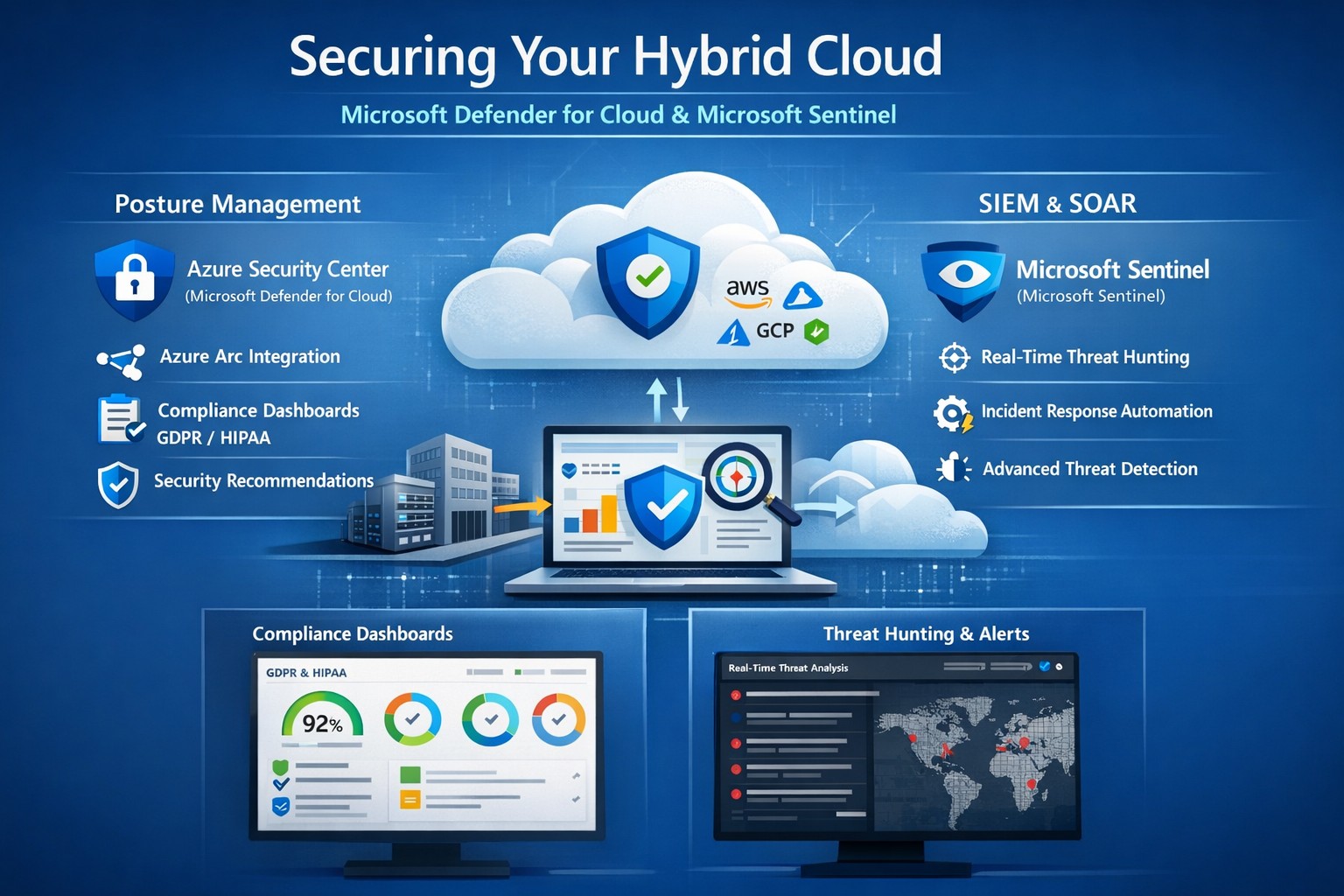
Unified hybrid cloud security: Monitor Secure Score and Sentinel alerts across on-premises and Azure resources.
Managing on-premises systems and cloud workloads, hybrid cloud security threats like ransomware and data breaches can disrupt operations and erode customer trust. Azure Security Center (now evolving into Microsoft Defender for Cloud) and Azure Sentinel (now Microsoft Sentinel) deliver unified protection across your hybrid environment, combining posture management with AI-driven threat detection.
Why Hybrid Cloud Security Matters Now
Hybrid setups amplify risks—on-prem servers lack cloud-scale monitoring, while Azure resources face misconfigurations. Security Center provides cloud security posture management (CSPM), tracking secure scores, compliance (e.g., GDPR, HIPAA), and just-in-time VM access. Sentinel acts as your SIEM/SOAR, ingesting Security Center alerts plus firewall logs, user data, and multi-cloud inputs (AWS, GCP) for proactive hunting and automated response.
This duo scales with your business: Security Center prevents threats at IaaS/PaaS layers (VMs, SQL, IoT); Sentinel correlates data enterprise-wide, cutting alert fatigue by 50% via AI. For accounting firms handling sensitive financials or healthcare providers under HIPAA, this means fewer breaches and faster recovery.
Practical Action Steps for Implementation
Work with your IT team to deploy these in phases for minimal disruption:
Enable Security Center: In Azure Portal, navigate to Defender for Cloud > Environment settings. Select your subscription, turn on plans for Hybrid + multicloud (servers, apps, databases). Onboard on-prem VMs via Azure Arc agents—install Log Analytics agent, assign policies.
Connect to Sentinel: Create a Sentinel workspace (Log Analytics resource). In Defender for Cloud, go to Integrations > Azure Sentinel > Connect. This streams alerts automatically. Add connectors for Office 365, firewalls, and endpoints.
Configure Posture and Detection: Review Secure Score dashboard; remediate top recommendations (e.g., enable MFA, update endpoints). In Sentinel, build analytics rules for anomalies (e.g., rare logins) and playbooks for auto-quarantine.
Test and Monitor: Simulate threats via Azure Attack Simulator. Set up workbooks for dashboards; review incidents weekly. Scale with automation—e.g., SOAR for ticket routing.
These steps take 1-2 days initially, yielding continuous monitoring without rip-and-replace.
Step
Owner
Time
Key Outcome
Enable Security Center
IT Admin
30 min
Secure Score baseline
Connect Sentinel
Security Lead
15 min
Unified alerts
Configure Rules
IT/Security
2-4 hrs
AI threat hunting
Test Response
Full Team
1 day
Incident playbook ready
FAQs: Client Questions Answered
How do Security Center and Sentinel differ? Security Center focuses on prevention and posture (e.g., misconfig fixes, EDR); Sentinel handles analytics, hunting, and orchestration across all sources. Use both: Security Center feeds Sentinel for holistic views.
Does this work for non-Azure hybrid setups? Yes—Arc agents extend coverage to on-prem, AWS/GCP via connectors. Sentinel ingests any log via APIs.
What about costs? Pay-per-ingest: Security Center ~$0.02/VM/day; Sentinel ~$2.60/GB ingested (free first 10GB/mo). Optimize with alert streaming.
Is setup complex for small IT teams? Minimal—Portal wizards guide you. Common pitfalls: data connector misconfigs (fix via docs); overcome with phased rollout.
How secure is data in transit? Encrypted end-to-end; complies with SOC 2, ISO 27001. Retention policies customizable.
How Farmhouse Networking Boosts Your Security
Farmhouse Networking specializes in B2B setups for accounting, healthcare, and nonprofits—industries facing strict compliance like SOX or HIPAA. We handle full implementation: Arc onboarding, custom Sentinel rules tuned to your workloads, and 24/7 SOC monitoring via our managed services. Our clients see 40% faster threat response and Azure cost optimizations, freeing you to focus on growth. We’ve secured 50+ hybrid environments, integrating Sentinel with your existing tools seamlessly.
Call to Action
Ready to lock down your hybrid cloud? Email support@farmhousenetworking.com for a free security posture assessment and personalized roadmap.
And God will generously provide all you need. Then you will always have everything you need and plenty left over to share with others. As the Scriptures say,
“They share freely and give generously to the poor. Their good deeds will be remembered forever.”
For God is the one who provides seed for the farmer and then bread to eat. In the same way, he will provide and increase your resources and then produce a great harvest of generosity in you. - 2 Corinthians 9:8-10
We use cookies to ensure that we give you the best experience on our website. If you continue to use this site we will assume that you are happy with it.