Stabilize SMB IT costs and eliminate downtime risks with proactive management
Surprise technology bills, emergency repairs, and the high expense of an in-house IT team create a constant strain on business budgets. For owners aiming to grow while staying in control of expenses, these unpredictable costs aren’t just an annoyance—they can derail plans, erode trust, and limit your business’s ability to invest in what really matters.
Why In-House IT Costs So Much
Maintaining your own IT staff is far more expensive than it first appears:
Salaries and Benefits: A modest in-house IT team for a 40-employee business can run upwards of $192,600 per year—about $402 per user per month. This includes wages for technicians, managers, and benefits that typically add 31% or more to the base salary.
Recruitment and Training: The average cost-per-hire for IT roles is about $4,700, not counting the 8 to 26 weeks of ramp-up time. Added to this are regular education costs needed to keep skills up to date in a rapidly changing tech landscape.
Overhead: Beyond staff, you’re paying for hardware, software licenses (ranging from $500–$18,000 monthly), space, insurance, PTO, and infrastructure.
Turnover: IT has one of the highest turnover rates in any industry. Every time someone leaves, you lose critical knowledge and must bear the cost of recruitment, onboarding, and lost productivity—sometimes as much as 200% of annual salary for that position.
Why Unpredictable IT Costs Threaten Your Business
Budget Surprises: Emergency fixes, one-time service charges, and unclear contracts can cause your monthly expenses to swing wildly, making it impossible to forecast cash flow or plan for the year ahead.
Productivity Losses: Downtime due to system failures not only costs thousands in lost business per hour but also damages your reputation and relationships.
Reactive Spending: Fixing problems as they arise is always more expensive than proactively maintaining equipment or systems. Without a predictable monthly IT plan, you’re forced to “rob Peter to pay Paul” when something inevitably breaks.
Take Action: Steps to Regain Control
Conduct an IT Audit: Know exactly what you’re spending, where, and why.
Distinguish Must-Haves: Separate essential services from legacy software or non-critical expenses.
Move to a Managed IT Model: Managed IT services typically cost just $125–$220 per user per month, offering budgeting clarity and reducing surprises.
Schedule Reviews: Revisit IT budgets quarterly and adjust for business changes early.
Consolidate Vendors: Limit the number of external suppliers so that responsibility is clear, and costs are contained.
How Farmhouse Networking Can Help
Farmhouse Networking partners with you to:
Uncover Hidden Savings: Our audits often find areas to cut unnecessary costs.
Flat-Rate Managed IT: We offer comprehensive support—including monitoring, proactive maintenance, cybersecurity, and strategy sessions—for one predictable monthly fee.
Quarterly Reviews and Strategic Planning: Stay ahead of risks and keep your IT spend aligned with your business goals.
Hands-Off Vendor Management: Eliminate redundant contracts and ensure every dollar spent delivers real value.
Ready to End Unpredictable IT Spending?
Take charge of your IT budget and redirect savings to initiatives that drive your business forward. Contact Farmhouse Networking to schedule your complimentary IT cost assessment.
How MSP Automation Transforms Manual Workflows for Business Owners
MSP automation eliminates manual tasks and boosts operational efficiency
Are you still relying on manual processes and inefficient workflows to run your business? If so, you’re not alone—but you may be leaving significant productivity and profitability on the table. Modern Managed Service Providers (MSPs) are helping business owners like you automate routine tasks, integrate essential applications, and streamline operations like never before. Here’s how MSP-driven automation can revolutionize your daily operations and set your business up for scalable success.
The Problem: Manual Workflows Are Costing You Time and Money
Manual data entry, repetitive administrative tasks, and disconnected systems can bog down even the most dedicated teams. These inefficiencies lead to:
Wasted time: Employees spend hours on tasks that could be automated.
Increased errors: Manual processes are prone to mistakes, leading to costly corrections.
Slower growth: When staff are overwhelmed with routine tasks, there’s little bandwidth left for innovation and strategic initiatives.
Seamless Integration of Essential Business Applications
Many businesses use a patchwork of tools for CRM, accounting, project management, and more. When these systems don’t communicate, data silos form, leading to confusion and inefficiency.
MSPs help you:
Integrate your tech stack: Connect CRM, email, project management, and other tools so data flows smoothly between them.
Eliminate manual data entry: Employees no longer need to copy information from one system to another, reducing errors and saving time.
Gain unified visibility: Centralized dashboards provide real-time insights into performance, helping you make informed decisions quickly.
Streamlined Workflows for Maximum Productivity
With automation and integration in place, MSPs help you:
Simplify complex processes: Workflows are automated and streamlined, reducing manual intervention and freeing up your team.
Reduce errors and delays: Automation minimizes human error and ensures tasks are completed on time.
Improve employee satisfaction: Staff can focus on meaningful work, leading to higher morale and better retention.
The Results: More Time, Fewer Errors, and a Stronger Bottom Line
Businesses that embrace MSP-driven automation see:
40%+ improvement in process efficiency
75% reduction in manual errors
ROI within six months
These gains translate into faster growth, happier clients, and a more resilient business.
Ready to Transform Your Business?
Don’t let manual processes hold your business back. Farmhouse Networking specializes in helping business owners automate routine tasks, integrate essential applications, and streamline workflows—so you can focus on what you do best.
Contact Farmhouse Networking today to discover how MSP automation can boost your productivity and accuracy—and set your business on the path to lasting success.
How an MSP Can Bring Predictability to Your Business Technology Budget
MSP transforming unpredictable IT spending into stable monthly budgeting for business financial planning
Unpredictable IT expenses can feel like a never-ending rollercoaster for business owners. One month, everything runs smoothly; the next, you’re hit with an unexpected server crash, cybersecurity scares, or a costly software upgrade. These surprises not only disrupt your operations but also wreak havoc on your budget and long-term planning. There’s a better way: partnering with a Managed Service Provider (MSP) like Farmhouse Networking.
Why Are IT Costs So Unpredictable?
Traditional, in-house IT management often relies on a “break-fix” approach—waiting for something to go wrong before addressing it. This reactive model leads to:
Emergency repair bills
Unplanned hardware replacements
Downtime that impacts productivity and revenue
High costs for hiring and training IT staff
Constantly shifting technology needs and compliance requirements
How an MSP Brings Cost Control and Predictability
An MSP transforms your IT from a source of stress into a strategic asset. Here’s how:
Fixed Monthly Pricing With an MSP, you pay a predictable monthly fee for comprehensive IT support. No more surprise bills—just one flat rate that covers monitoring, maintenance, support, and security. This makes budgeting straightforward and allows you to allocate resources with confidence.
Reduced Operational and Staffing Costs Outsourcing IT means you don’t need a large in-house team or to worry about ongoing training and certifications. MSPs leverage economies of scale, providing expert support and access to the latest technology at a fraction of the cost of building it yourself.
Proactive Maintenance and Security Instead of waiting for things to break, MSPs monitor your systems 24/7, apply updates, and address vulnerabilities before they become expensive problems. This proactive approach drastically reduces downtime and the risk of costly cyber incidents.
Scalable Solutions As your business grows or changes, an MSP can quickly scale services up or down. You only pay for what you need, when you need it—no wasted resources or surprise expenses.
Streamlined Infrastructure MSPs optimize your IT environment, eliminating redundant software, consolidating hardware, and managing licenses efficiently. This not only cuts costs but also maximizes the value of your technology investments.
The Bottom Line: Peace of Mind and Predictable Growth
With a trusted MSP like Farmhouse Networking, you gain:
Consistent, predictable IT expenses
Reduced risk of expensive downtime and security breaches
Access to a team of experts and the latest technology
Freedom to focus on growing your business, not fighting IT fires
Ready to Take Control of Your IT Costs?
Stop letting unpredictable IT expenses hold your business back. Contact Farmhouse Networking today to discover how our managed IT services can bring stability, security, and savings to your technology budget. Let’s turn your IT from a wild card into a strategic advantage—reach out now for a free consultation!
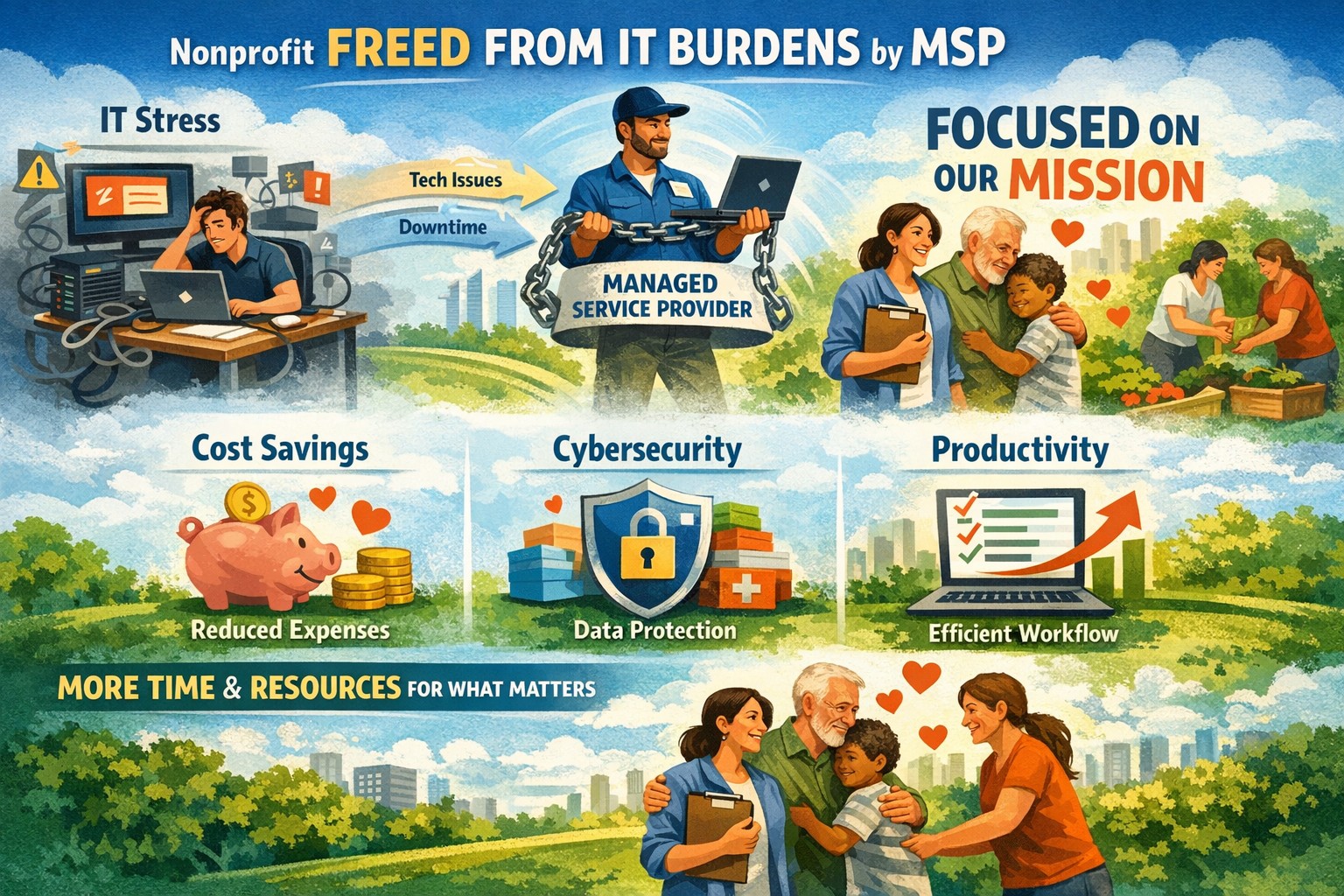
Infographic: Key benefits of managed IT for nonprofits—cost control, security, efficiency gains.
Nonprofits are driven by purpose, not profit. Every resource counts, and every minute spent on technical headaches is a minute taken from your mission. Technology is the backbone of effective service delivery, fundraising, and community engagement. But managing IT in-house can strain limited budgets and staff. That’s where managed IT services come in – a game-changer for nonprofits ready to maximize their impact.
The Unique IT Challenges Nonprofits Face
Nonprofits often grapple with:
Tight Budgets: Every dollar must be justified, making it tough to invest in robust IT infrastructure.
Limited Technical Expertise: Many organizations lack dedicated IT staff, leaving them vulnerable to inefficiencies and cyber threats.
Complex Compliance Requirements: Data protection laws can be daunting without specialized knowledge.
These challenges can hinder your mission, slow operations, and put sensitive data at risk.
How Managed IT Services Empower Nonprofits
1. Predictable, Cost-Effective IT Support
Managed IT services offer fixed monthly pricing, making budgeting simple and eliminating surprise expenses. Outsourcing IT is often more affordable than hiring and training in-house staff, and you only pay for what you need.
2. Enhanced Security and Compliance
Nonprofits handle sensitive donor and beneficiary information. Managed IT providers deliver comprehensive cybersecurity, continuous monitoring, and disaster recovery plans-protecting your data and ensuring compliance with regulations.
3. 24/7 Monitoring and Rapid Support
With around-the-clock monitoring, issues are identified and resolved before they disrupt your operations. Your staff can access expert help whenever needed, minimizing downtime and keeping your mission on track.
4. Access to Advanced Technology
Managed service providers equip nonprofits with the latest tools and cloud solutions, without the hefty upfront investment. This means improved collaboration, streamlined processes, and the ability to scale as your organization grows.
5. Focus on What Matters Most
By removing the burden of IT management, your team can devote more time and energy to fundraising, program development, and community outreach-leaving the tech headaches to the experts.
Real Results: Reliable IT, Predictable Costs, and Peace of Mind
Partnering with a nonprofit-focused managed IT provider means more than just technical support. You gain a strategic partner who understands your unique needs and culture. With a dedicated IT Business Manager, you’ll have a single point of contact who proactively plans, assesses, and evolves your IT strategy alongside your mission.
Don’t let technology challenges hold your organization back. Discover how managed IT services can help you save money, boost security, and focus on what truly matters-making a difference.
Contact Farmhouse Networking today to schedule a free consultation and see how our tailored IT solutions can empower your mission.
Elevate from MSP tech guru to true business partner driving growth and efficiency
Having a Managed Service Provider (MSP) has become crucial for businesses of all sizes. But not all MSPs are created equal. While many can handle your tech needs, the real value comes from an MSP that truly understands your business. Let’s explore how to distinguish between an MSP that’s merely tech-savvy and one that’s a genuine business partner.
They Speak Your Language, Not Just Tech Jargon
A tech-focused MSP will bombard you with technical terms and specifications. In contrast, a business-savvy MSP translates complex tech concepts into business outcomes. They discuss how technology solutions can drive growth, improve efficiency, and boost your bottom line.
They Ask the Right Questions
Business-centric MSPs will:
Inquire about your business model and competitive landscape
Show interest in your long-term goals and challenges
Seek to understand your industry-specific needs and regulations
They Offer Tailored Solutions, Not One-Size-Fits-All
An MSP that knows your business will:
Provide customized solutions addressing your unique challenges
Adapt their services as your business evolves
Demonstrate flexibility in their approach to meet your changing needs
They’re Proactive, Not Just Reactive
While a tech-focused MSP might wait for problems to arise, a business-oriented partner will:
Monitor your systems to spot potential issues before they escalate
Suggest improvements that align with your business objectives
Provide regular performance updates and strategic recommendations
They Understand Your Industry
A true business partner will:
Have experience in your specific market
Offer insights into industry-specific challenges and opportunities
Provide case studies or references from similar businesses in your sector
They Focus on User Experience
An MSP that prioritizes your business will:
Emphasize the importance of user satisfaction and productivity
Offer flexible support options tailored to your team’s preferences
Provide customized training to help your staff leverage technology effectively
They Align with Your Growth Plans
A business-savvy MSP will:
Discuss how their services can scale with your company
Help you plan for future technological needs as you expand
Offer insights into emerging tech trends relevant to your industry
The Bottom Line
Choosing an MSP that truly understands your business can be the difference between simply maintaining your IT infrastructure and leveraging technology to drive real business growth. Look for a partner who speaks your language, asks the right questions, and aligns their services with your unique business goals.
Ready to find an MSP that’s more than just a tech expert? Contact Farmhouse Networking today to discover how we can be your strategic IT partner, driving your business forward with tailored technology solutions.
Chart: Hidden costs of no MSP—downtime, inefficiencies draining SMB budgets and productivity.
Small and medium-sized businesses (SMBs) are the backbone of the economy, but many are unknowingly bleeding money and productivity due to outdated IT practices, insufficient resources, and preventable disruptions. Without the support of a Managed Service Provider (MSP), these businesses face challenges that could easily be mitigated. Let’s explore how this happens—and why partnering with an MSP like Farmhouse Networking can transform your business operations.
The Hidden Costs of Not Using an MSP
Downtime and IT Disruptions:
Every minute of downtime costs money. For small businesses, even an hour of downtime can result in losses as high as $8,000, not including reputational damage or customer dissatisfaction. Without proactive IT monitoring, SMBs often experience frequent system failures, network outages, or slowdowns that disrupt workflows and frustrate employees. MSPs prevent these issues by proactively addressing potential problems before they escalate.Outdated Technology
Many SMBs rely on old hardware and software due to budget constraints or lack of IT expertise. According to a Microsoft study, using PCs older than four years results in more than double the productivity losses compared to newer systems. These outdated technologies are not only slower but also more prone to security vulnerabilities and costly repairs.Lack of Cybersecurity
Cyberattacks are on the rise, and SMBs are prime targets due to their limited defenses. A single ransomware attack or data breach can cost tens of thousands of dollars in recovery efforts while damaging your reputation. MSPs provide robust cybersecurity measures such as threat detection, malware protection, and disaster recovery plans to safeguard your business.Inefficient Resource Allocation
Without an MSP, internal staff often spend valuable time troubleshooting IT issues instead of focusing on their core responsibilities. This inefficiency leads to reduced productivity across the board. MSPs handle routine maintenance, updates, and troubleshooting so your team can concentrate on growing the business.
The Benefits of Partnering With an MSP
Here’s how an MSP like Farmhouse Networking can help you reclaim lost time and money:
Proactive Monitoring: Prevent downtime with 24/7 system monitoring and issue resolution before problems arise.
Cost Predictability: Avoid unexpected IT expenses with a fixed monthly fee that simplifies budgeting.
Access to Expertise: Gain access to a team of skilled IT professionals without the cost of hiring full-time staff.
Enhanced Security: Protect your business from cyber threats with advanced security solutions tailored to your needs.
Scalability: Easily scale IT services as your business grows without investing in additional infrastructure.
Real-World Impact: Why SMBs Choose MSPs
Consider this: Businesses that partner with MSPs report fewer IT disruptions, increased efficiency, and significant cost savings over time. By outsourcing IT management, SMBs can focus on their core operations while enjoying peace of mind knowing their technology is in expert hands.
Don’t Let IT Challenges Hold You Back
Every day without an MSP is a day where your business risks unnecessary downtime, security threats, and lost productivity. Farmhouse Networking specializes in helping SMBs like yours overcome these challenges with tailored managed IT services.
Ready to stop losing money and start gaining productivity? Contact Farmhouse Networking today for a free consultation! Let us help you turn your IT into a strategic advantage.
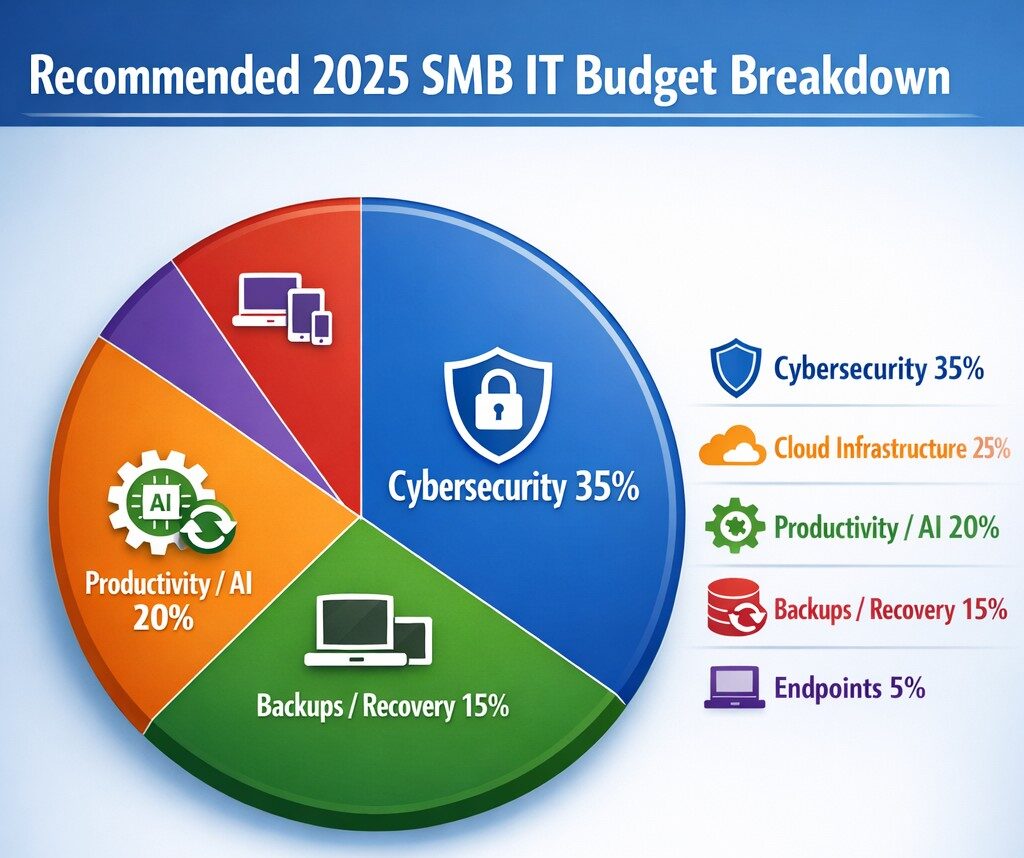
Allocate 30%+ of 2025 IT budget to cybersecurity per industry benchmarks.
Small and medium-sized businesses (SMBs) must strategically plan their IT budgets to stay competitive and efficient. It’s crucial to allocate resources wisely to support both day-to-day operations and long-term growth. Let’s explore the key areas SMBs should focus on when budgeting for tech in 2025.
Cybersecurity Investments
With no end to cyber threats in site, cybersecurity should be a top priority in your 2025 IT budget. Consider allocating funds for:
– Advanced firewalls and intrusion detection systems – Multi-factor authentication (MFA) implementation – Regular security audits and penetration testing
Remember, the cost of preventing a cyber attack is far less than the potential losses from a successful breach.
Artificial Intelligence and Automation
AI is no longer a luxury reserved for large enterprises. In 2025, SMBs should budget for AI-powered tools to enhance efficiency and decision-making. Consider investments in:
– Chatbots for customer support – AI-driven analytics for business insights – Automated workflow tools to streamline operations
These technologies can help SMBs do more with less, improving productivity and customer satisfaction.
Hardware and Device Upgrades
SMBs still need to budget for essential hardware. This includes:
– Laptops and desktops for employees – Mobile devices for remote work – Networking equipment for reliable connectivity
Plan for a hardware refresh cycle to ensure your team has up-to-date tools to work efficiently. (Remember we meet with our clients twice a year in the Spring and Fall to discuss budget and replacement scheduling.)
Software Licenses and Subscriptions
Software is the backbone of modern business operations. Your 2025 IT budget should account for:
– Operating system licenses (Windows 10 is no longer supported as of October 2025) – Productivity suite subscriptions (e.g., Microsoft 365, Google Workspace) – Industry-specific software licenses – Collaboration and communication tools
Regularly review your software subscriptions to ensure you’re only paying for what you need and use.
IT Support and Managed Services
Consider outsourcing some or all of your IT support to a managed service provider (MSP) like Farmhouse Networking to reduce in-house IT costs and gain access to specialized expertise. Budget for:
– Help desk support – Compliance assistance – Network monitoring and management – Backup and disaster recovery services
Employee Cybersecurity Training
Hackers keep getting better at their crimes, so should it is mandatory to invest in your team’s cybersecurity skills. Allocate budget for:
– Yearly assessments of baseline knowledge – Weekly trainings with quizzes to make sure they are paying attention – Interactive or gamified content to keep people interested
Investing in your team’s skills can lead to better technology adoption and improved productivity.
Ready to optimize your IT budget for 2025? Don’t navigate this complex landscape alone. Contact Farmhouse Networking today to help you create a tailored IT budget that aligns with your business goals and maximizes your technology investments. Our experts can guide you through the process, ensuring you’re prepared for the technological challenges and opportunities that lie ahead. Let’s work together to future-proof your business and drive success.
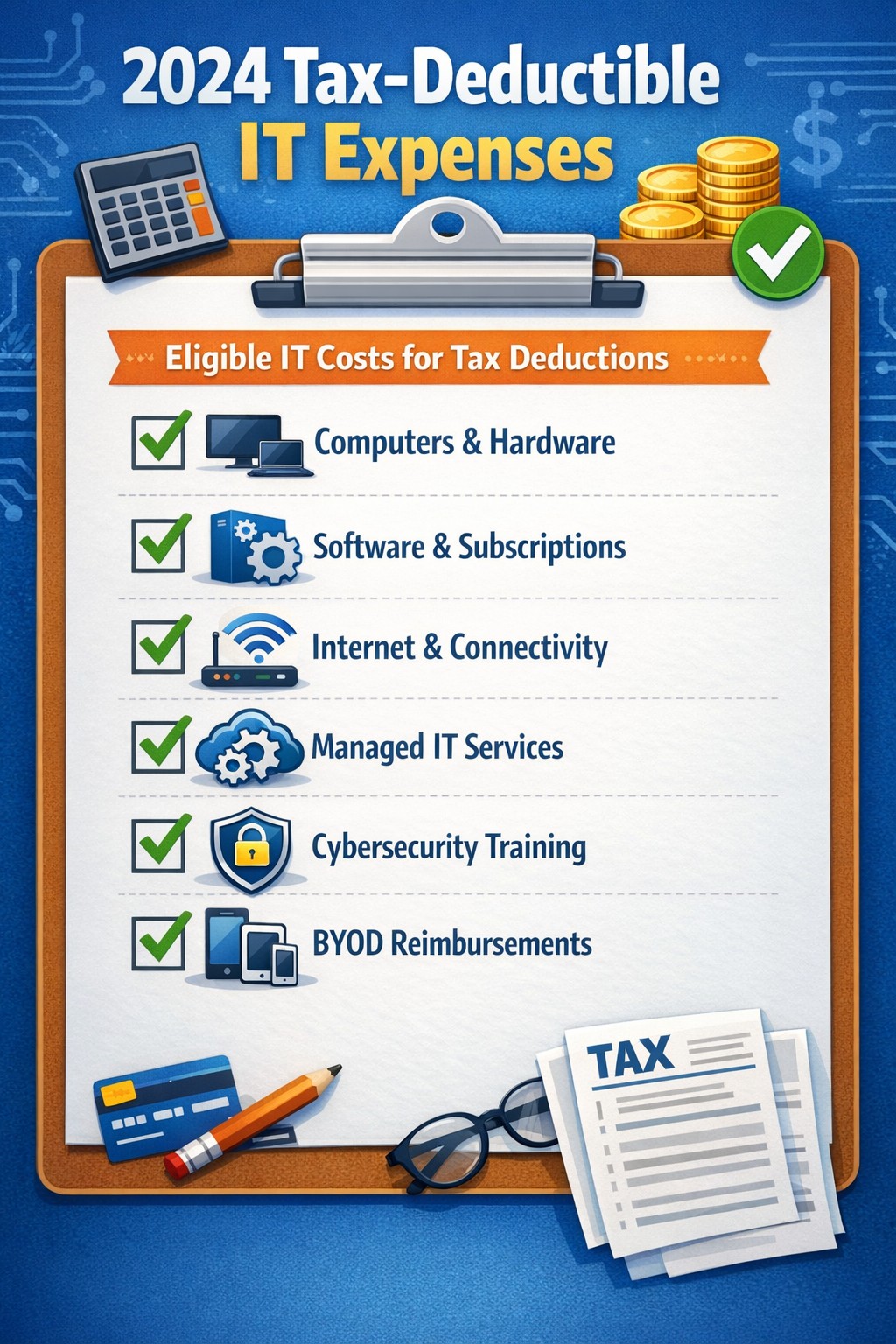
Claim Section 179, cloud subscriptions, cybersecurity as business tax deductions.
As we approach the end of the year, it’s crucial for businesses to understand the tax deductions available for their IT expenses. Maximizing these deductions can significantly reduce your tax burden and free up capital for further investment in your company’s technology infrastructure. Let’s explore the top tax-deductible IT expenses for 2024 that every business should be aware of.
Hardware and Equipment
Computers and Devices
Investing in new computers, tablets, or smartphones for your business can provide substantial tax benefits. The entire cost of these devices can be deducted from your taxable income. However, if the equipment is used partially for personal purposes, you may only be able to deduct a portion of the cost.
Office Equipment
Printers, scanners, and other office equipment are 100% tax-deductible in the year of purchase. This includes any IT-related furniture, such as ergonomic chairs or standing desks for your tech team.
Software and Services
Business Software
Software used for business purposes is eligible for tax deductions. This includes:
The deductible amount will depend on whether the software is purchased outright or subscribed to on a monthly basis.
Cloud Services
As more businesses move their operations to the cloud, it’s important to note that cloud service subscriptions are tax-deductible. This includes services like:
– Data storage – Backup solutions – Cloud-based productivity suites
Telecommunications
Internet Expenses
Internet services are crucial for most businesses today. You can deduct the full cost of your business internet connection[. If you work from home, you may be able to deduct a portion of your home internet expenses based on the percentage used for business purposes.
Phone Systems
All telecommunications fees within a commercial space can be deducted[1]. This includes:
– Business phone lines – VoIP systems – Cell phone contracts used for business
IT Services and Support
Managed IT Services
Fees paid for managed IT services, including network management, cybersecurity monitoring, and help desk support, are fully deductible as a business expense.
IT Consulting and Training
Any costs associated with IT consulting or training for your staff to use new technologies are tax-deductible. This can include workshops, online courses, or one-on-one training sessions.
Cybersecurity Measures
With the increasing importance of data protection, investments in cybersecurity are not only wise but also tax-deductible. This includes:
– Firewalls and antivirus software – Security audits – Employee cybersecurity training programs
Website Expenses
Development and Maintenance
Costs related to developing, hosting, and maintaining your business website are tax-deductible. This includes domain registration fees, hosting costs, and payments to web developers or designers.
E-commerce Solutions
If your business sells products online, the expenses for e-commerce platforms and payment processing systems are also deductible.
Home Office Technology
For those running businesses from home or with remote workers, the home office deduction can apply to technology expenses. You can deduct a portion of your home internet, personal computer use, and other tech equipment based on the percentage of your home used exclusively for business.
Ready to optimize your IT infrastructure while maximizing your tax benefits? Contact Farmhouse Networking today. Our expert team can help you implement cutting-edge IT solutions that not only boost your productivity but also provide substantial tax advantages. Don’t leave money on the table – let us help you navigate the complex world of IT expenses and tax deductions. Reach out now to schedule a consultation and start saving!
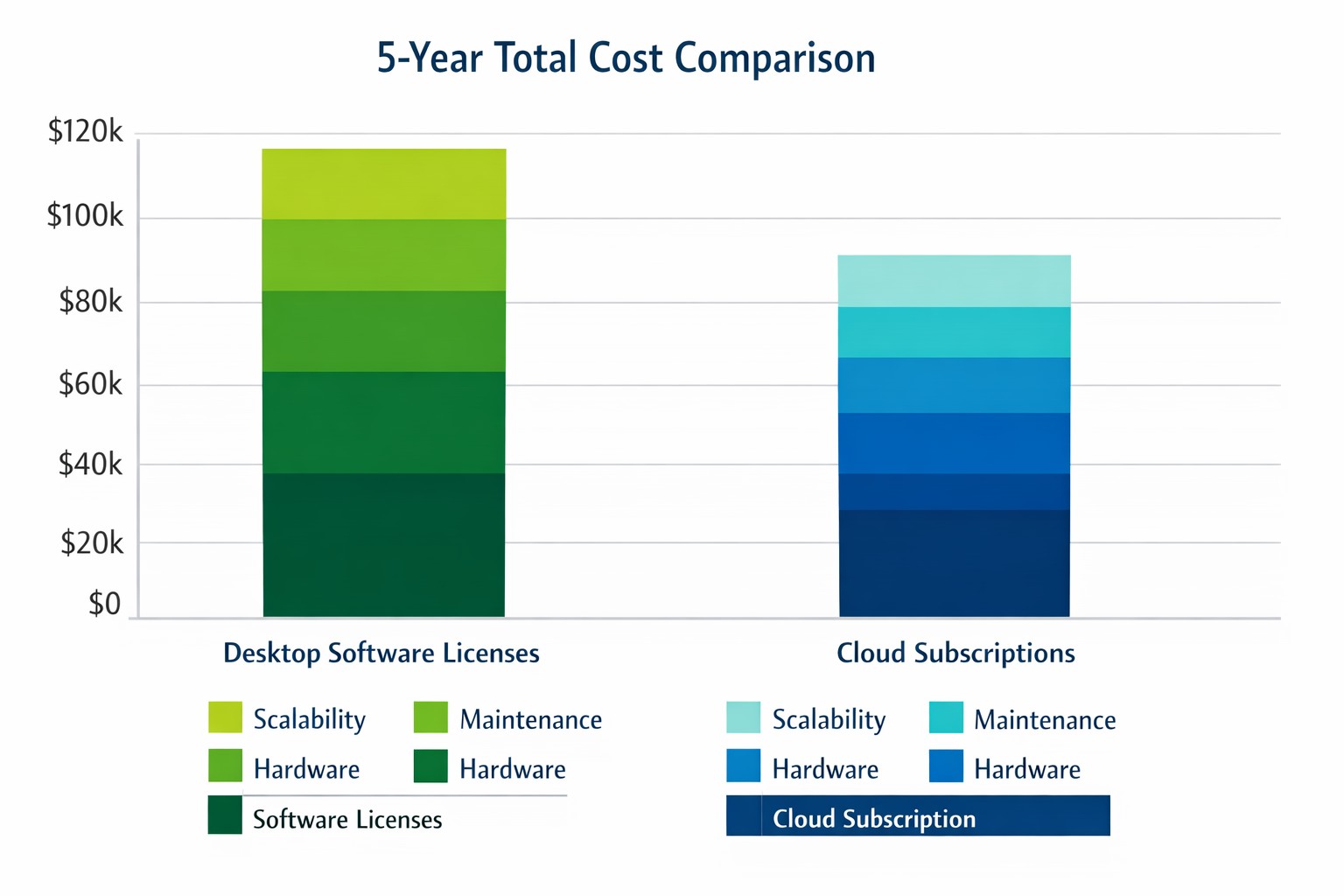
Cloud subscriptions often beat desktop software on long-term TCO and scalability.
Choosing the right productivity software for your company is a critical decision that can impact your bottom line and operational efficiency. The debate between traditional desktop software and cloud-based subscription models is particularly relevant when considering Microsoft Office, a staple in most business environments. Let’s examine the cost implications and benefits of both options to help you make an informed decision for your organization.
Microsoft Office 2024: One-Time Purchase for Business
Microsoft Office 2024 offers a perpetual license option that may appeal to businesses looking to have a single capital expenditure (CAPEX) and value ownership of a product.
Office Home & Business 2024
Price: $249.99 per license
Includes: Word, Excel, PowerPoint, OneNote, and Outlook
End of Life: 5 years from date of publication (October 1st, 2024)
This option provides access to core Office applications without the need for annual renewals. However, it’s important to note that this version lacks some features available in the subscription-based Microsoft 365, such as advanced collaboration tools and continuous updates.
Microsoft 365: Subscription Model for Businesses
Microsoft 365 offers a subscription-based model with more frequent updates and additional features tailored for business needs. This is an option that may appeal to businesses looking to have a gradual operating expenditure (OPEX).
Microsoft 365 Business Standard
Price: $12.50 per user/month (annual commitment)
Includes: All features of Business Basic plus desktop versions of Office apps
Microsoft 365 Business Premium
Price: $22.00 per user/month (annual commitment)
Includes: All features of Business Standard plus advanced security and device management
The subscription model provides more flexibility, allowing users to access Office apps on multiple devices and platforms. It also includes additional services like advanced threat protection and device management tools.
Cost Comparison for Businesses
To illustrate the cost implications, let’s consider a small business with 10 employees over a five-year period:
Office Home & Business 2024: $2,499.90 (10 licenses at $249.99 each)
Microsoft 365 Business Standard: $7,500 (10 users for 5 years at $12.50/user/month)
While the one-time purchase appears more economical initially, it’s crucial to consider the added value of the subscription model, including:
Regular feature updates and security patches
Cloud storage and collaboration tools
Multi-device access
Advanced security features
Scalability as your business grows
Factors to Consider for Business Owners
When making your decision, consider the following:
Growth projections: If you anticipate hiring more employees, the subscription model offers easier scalability.
Collaboration needs: Cloud-based solutions provide better tools for team collaboration and remote work.
IT resources: Subscription models often require less in-house IT management.
Cash flow: While subscriptions are more expensive long-term, they require less upfront investment.
Feature requirements: Evaluate if your business needs the advanced features offered in Microsoft 365.
Making the Right Choice for Your Business
The best option depends on your specific business needs:
If your company requires the latest features, values cloud integration, and needs robust collaboration tools, Microsoft 365 might be the better choice.
If you prefer a one-time purchase, have limited need for updates or cloud services, and have a stable workforce size, Office 2024 could be more cost effective.
Call to Action
Navigating the complexities of software licensing and cloud services can be challenging for business owners. At Farmhouse Networking, we specialize in helping businesses optimize their IT infrastructure and software solutions. Whether you’re considering a switch to cloud-based services or looking to streamline your current setup, our experts can guide you through the process. Contact Farmhouse Networking today to discuss your options and find the best solution for your business needs. Let us help you configure your network for maximum efficiency and cost-effectiveness, ensuring that your software choices align with your business goals and budget.
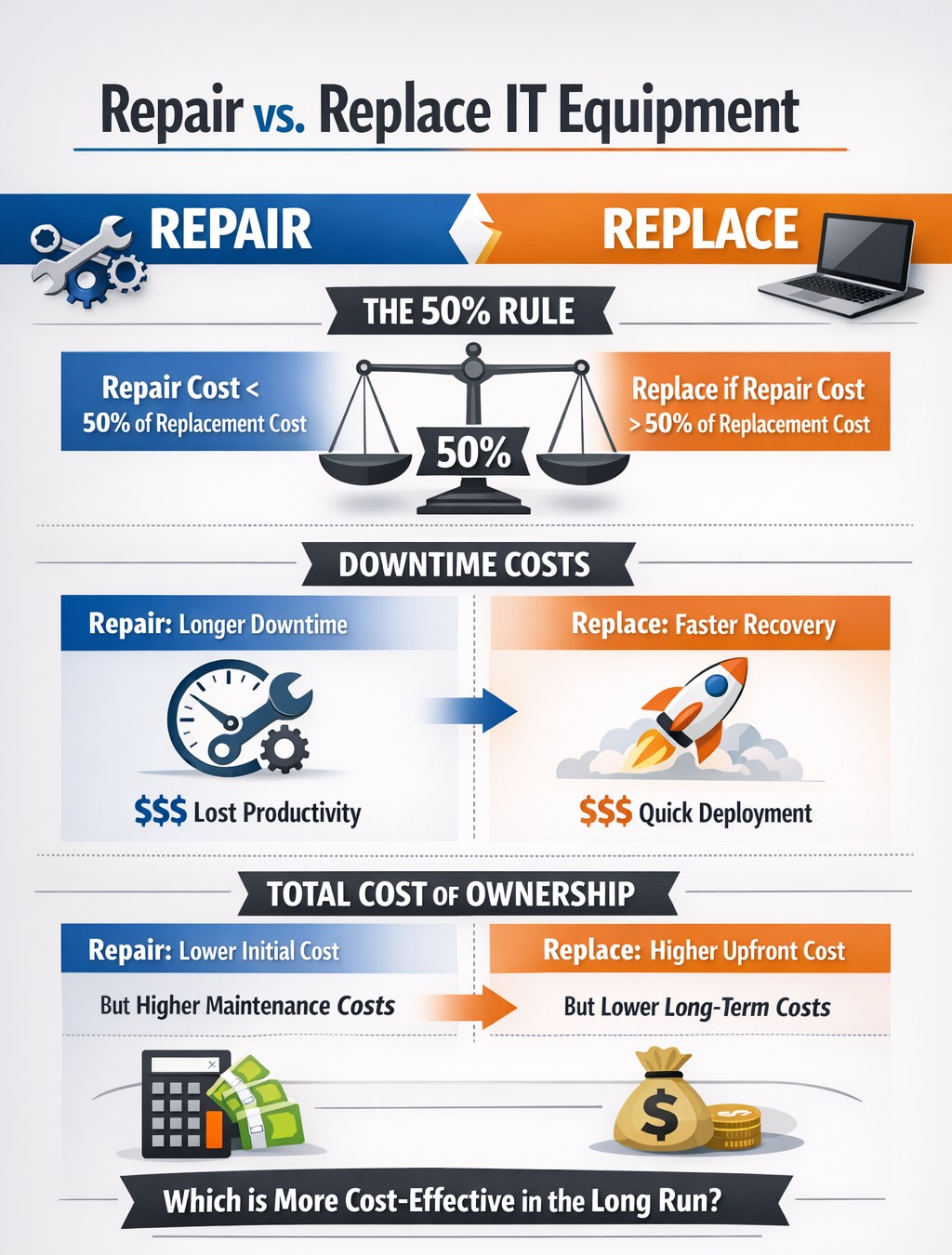
TCO chart reveals when repair beats replacement for network hardware.
With the end of the year approaching, we are continuing our Budget Talk series our newsletter. This time we are diving into the cost of repairing a computer verses the cost of replacing it. Here are the considerations
Why Repair a Computer?
For those who are looking to save money and extend the value of the assets they already have should consider either repairing or upgrading their current computers. There are some repairs or upgrades that are worth considering:
Network Adapter: This is usually simple and cheap to repair in the majority of desktops and some laptops.
Memory: This is a good way to breath new life and performance into a computer. Depending on the age of the memory technology this is another simple and cheap repair or upgrade on all systems.
Hard Drive: Especially for older computers still using the spinning disk type of hard drive, a repair or upgrade is worth the money for the easy boost in performance.
Laptop Keyboard: This item could go either way, the price from the manufacturer is sometimes high but the repair time is fairly low.
These will often allow computers to continue being used for an additional 1-2 years, but it is our experience that if internal components have started to fail then it is best to start budgeting for replacement.
Why Replace a Computer?
There are repairs and upgrades that are not worth the cost. These items should definitely make you consider replacement:
CPU: The main processor of the computer is usually not easily upgraded and every year they come out with significant improvements in them. If your CPU is more than 3 years old then there is enough of an increase in speed that replacement it best.
Motherboard: If the motherboard of the computer is failing, especially for computers that from major manufacturers, the cost of repair is usually too high (over half the cost of new computer). Best to replace the computer if not under warranty.
Laptop Screen: This item, especially if it is a touch screen, is absolutely not worth replacing. The cost of the part is usually around half the cost of the laptop and the labor involved can be prohibitive. If your screen is broken best to get a replacement.
Please remember that all new computers are able to be depreciated for up to four years based on industry standards and that repairs do not qualify.
Don’t wait until system failures disrupt your operations. Contact Farmhouse Networking now to schedule a comprehensive IT lifecycle assessment. Let’s work together to optimize your technology investments and keep your business running smoothly into the new year and beyond.
And God will generously provide all you need. Then you will always have everything you need and plenty left over to share with others. As the Scriptures say,
“They share freely and give generously to the poor. Their good deeds will be remembered forever.”
For God is the one who provides seed for the farmer and then bread to eat. In the same way, he will provide and increase your resources and then produce a great harvest of generosity in you. - 2 Corinthians 9:8-10
We use cookies to ensure that we give you the best experience on our website. If you continue to use this site we will assume that you are happy with it.