Secure your business with Microsoft Defender for Office 365: Advanced Threat Protection against phishing and malware.
One phishing email or malicious attachment can cripple operations, steal sensitive data, or halt revenue. Microsoft Defender for Office 365 (formerly Office 365 Advanced Threat Protection or ATP) delivers cloud-based defenses against zero-day malware, phishing, and spoofing in email, Teams, SharePoint, and OneDrive—essential for protecting your accounting, healthcare, or charity operations.
Core Features of Advanced Threat Protection
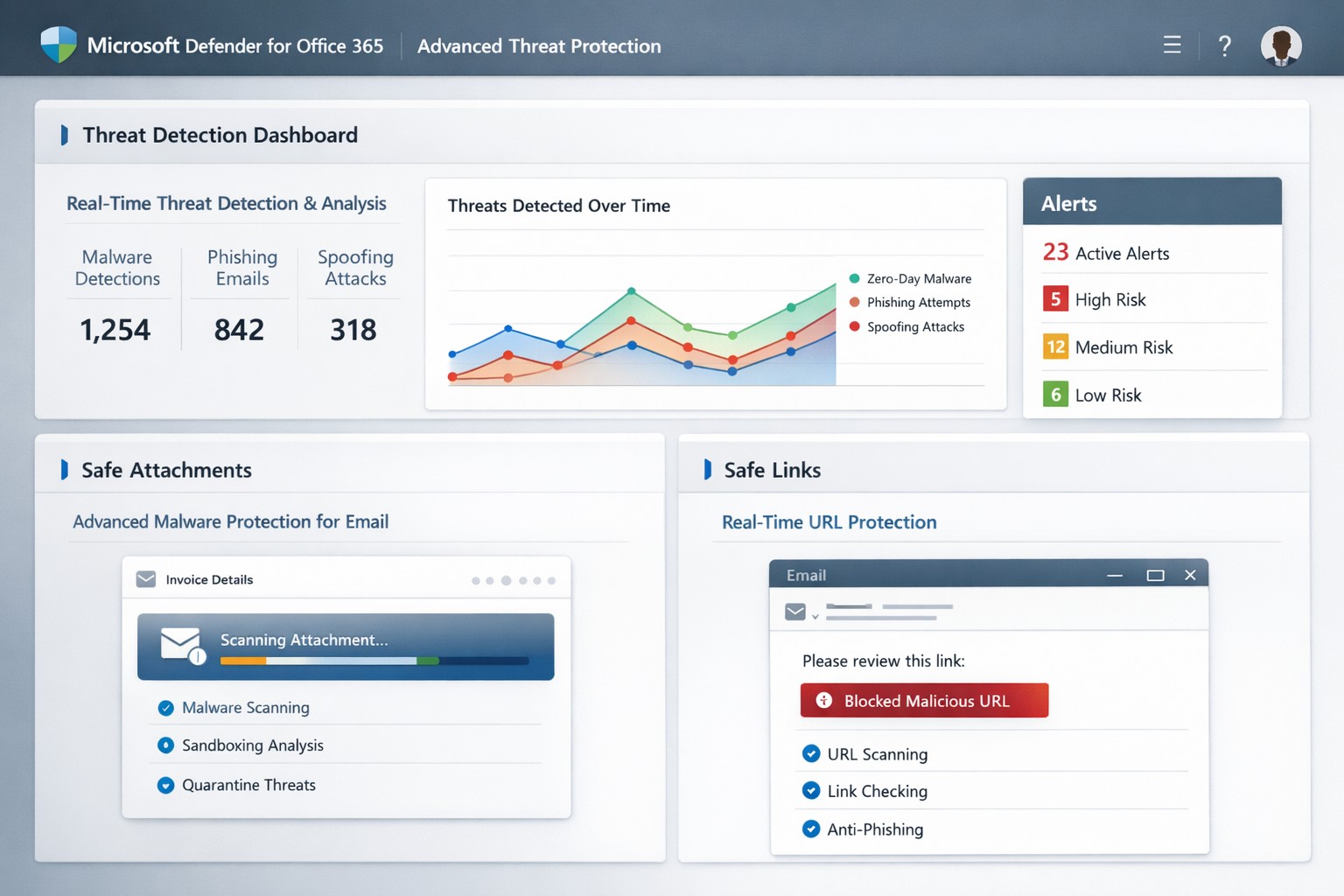
Defender for Office 365 scans attachments via Safe Attachments, detonating them in a sandbox to block malware before delivery. Safe Links rewrites and checks URLs in real-time, preventing phishing site access, while anti-spoofing intelligence flags impersonation attempts.
It integrates with Exchange Online Protection for layered defense, offering automated investigation tools to prioritize alerts and suggest remediations like quarantining threats. Reporting tracks blocked attacks, user click risks, and trends, helping refine policies organization-wide.
Practical Action Steps for Implementation
Business owners and IT teams can activate these protections quickly via the Microsoft 365 Defender portal (security.microsoft.com). Here’s a step-by-step guide:
Verify Licensing: Confirm Microsoft 365 Business Premium, E3/E5, or standalone Defender for Office 365 Plan 1/2. Upgrade if needed via admin.microsoft.com.
Access Policies: Log into the Microsoft Defender portal > Policies & rules > Threat policies. Enable Safe Attachments: Set to “Block” for high-risk or “Dynamic Delivery” to release clean files fast.
Configure Safe Links: Turn on URL rewriting and real-time scanning. Apply to all users/domains via “Automatically include the domains I own.”
Set Anti-Phishing Policies: Enable spoof intelligence and impersonation protection. Test with strict/block modes first.
Review & Train: Use Threat Explorer for alerts. Conduct staff training on recognizing warnings—ATP reports highlight repeat offenders.
Monitor Ongoing: Schedule weekly reviews; adjust policies based on attack data.
These steps take under an hour initially but scale automatically.
FAQs: Client Questions Answered
What threats does it stop? Primarily zero-day malware in attachments/URLs, phishing, spoofing, and malicious files in collaboration tools. It caught ransomware vectors in 2021 spam surges.
Is it included in my plan? Yes, in Business Premium or E5; otherwise, add via Microsoft. No extra hardware needed—fully cloud-based.
How effective is it post-delivery? Safe Links protects clicks after delivery; automated response quarantines threats across tenants.
Can it handle guest users in Teams? Yes, scans uploads/downloads in SharePoint, OneDrive, Teams for contractors/partners.
What if we have on-premises servers? Offloads protection to cloud; keep EOP/ATP on alongside legacy tools.
How Farmhouse Networking Boosts Your ATP Success
At Farmhouse Networking, we specialize in tailored Microsoft 365 security for accounting firms tracking client finances, healthcare providers safeguarding PHI, and charities protecting donor data. Our team audits your current setup, implements ATP policies optimized for your industry (e.g., HIPAA-compliant configs), and integrates with branding/SEO strategies to secure client portals.
We handle risk assessments, employee training via custom simulations, and ongoing monitoring—reducing alert fatigue by 50% for clients. Plus, our lead-gen expertise ensures secure sites convert visitors to B2B partnerships seamlessly.
Call to Action
Ready to fortify your business against advanced threats? Email support@farmhousenetworking.com for a free ATP assessment and custom strategy.
Farmhouse Networking helps businesses modernize their networks for faster performance, smarter automation, and secure connectivity.
The business world is moving at the speed of data. From cloud applications to video conferencing and smart devices, modern companies thrive on connectivity — and that means your network must be faster, more reliable, and intelligent enough to adapt. The days of “good enough” internet are gone. The next-generation network is faster, closer to your customers, and smarter in the way it predicts and manages performance.
Why “Faster, Closer, Smarter” Matters for Every Business Owner
A few years ago, network upgrades were viewed as an IT luxury. Today they’re a business necessity. Productivity, customer experience, and profit margins increasingly depend on how efficiently your systems communicate across multiple sites and cloud services.
Faster: Applications like video meetings, VoIP, and cloud storage demand low latency and high bandwidth. Slow connections mean lost opportunities.
Closer: Edge computing brings resources and data processing nearer to users, reducing lag and improving responsiveness for remote teams and mobile customers.
Smarter: Artificial intelligence (AI)–driven networks detect issues before they cause downtime, automatically direct traffic, and protect against cyber threats.
Business growth in 2020 and beyond will favor companies that embrace these technologies early — and that’s where proactive planning makes all the difference.
Action Steps for Business Owners and IT Teams
Modernizing your network doesn’t have to be complicated. Here are practical steps to future-proof your infrastructure:
Audit your current network. Identify bottlenecks, aging hardware, and underperforming Wi-Fi zones. Tools like traffic analyzers or managed network assessments can pinpoint areas for improvement.
Move critical workloads to the cloud wisely. Hybrid cloud environments balance flexibility and security — but only when configured with responsive bandwidth and monitored connections.
Invest in network automation and AI-based monitoring. Smart analytics help your IT team spot anomalies before employees notice performance issues.
Upgrade for speed and reliability. Fiber-optic connectivity, gigabit routers, and Wi-Fi 6 access points deliver measurable performance boosts.
Secure everything. With more connected devices comes more risk. Integrated firewalls, endpoint protection, and regular patch management are essential defenses.
Partner with a managed services provider (MSP). Outsourcing these functions ensures around-the-clock monitoring and proactive support so your internal staff can focus on core business priorities.
Common Client Questions — Answered
Q: “Is upgrading my network really worth the cost?” A: Absolutely. Slow or unreliable connectivity costs more in downtime and lost productivity than the upgrade itself. Modern networks reduce maintenance time, prevent outages, and improve customer satisfaction.
Q: “What about security? Doesn’t a smarter network mean more risk?” A: Actually, the opposite. With automated patching, real-time threat detection, and AI-powered monitoring, a smarter network significantly strengthens protection.
Q: “How do I know what network capacity I’ll need?” A: Your ideal bandwidth depends on your business applications, remote workers, and cloud services. A professional assessment from an MSP can provide accurate data and recommendations tailored to your growth goals.
How Farmhouse Networking Can Help
At Farmhouse Networking, we specialize in helping businesses modernize their IT infrastructure with practical, budget-conscious solutions. Whether you need a network assessment, faster connectivity, smart automation, or enhanced cybersecurity, our team brings years of expertise in network design, implementation, and ongoing support.
We work with local businesses to:
Audit existing network performance and identify inefficiencies.
Implement cloud and edge computing solutions.
Automate monitoring through intelligent network management tools.
Strengthen IT security to protect sensitive data and client trust.
Our mission is to make enterprise-grade technology accessible to your small or mid-sized business — keeping your network running faster, closer, and smarter than ever before.
Ready to Upgrade Your Network?
Don’t let outdated systems slow you down in 2020’s fast-moving digital economy. Future-proof your business with a smarter, more efficient network built for growth.
Email support@farmhousenetworking.com today to learn how Farmhouse Networking can help your business stay connected, secure, and competitive.
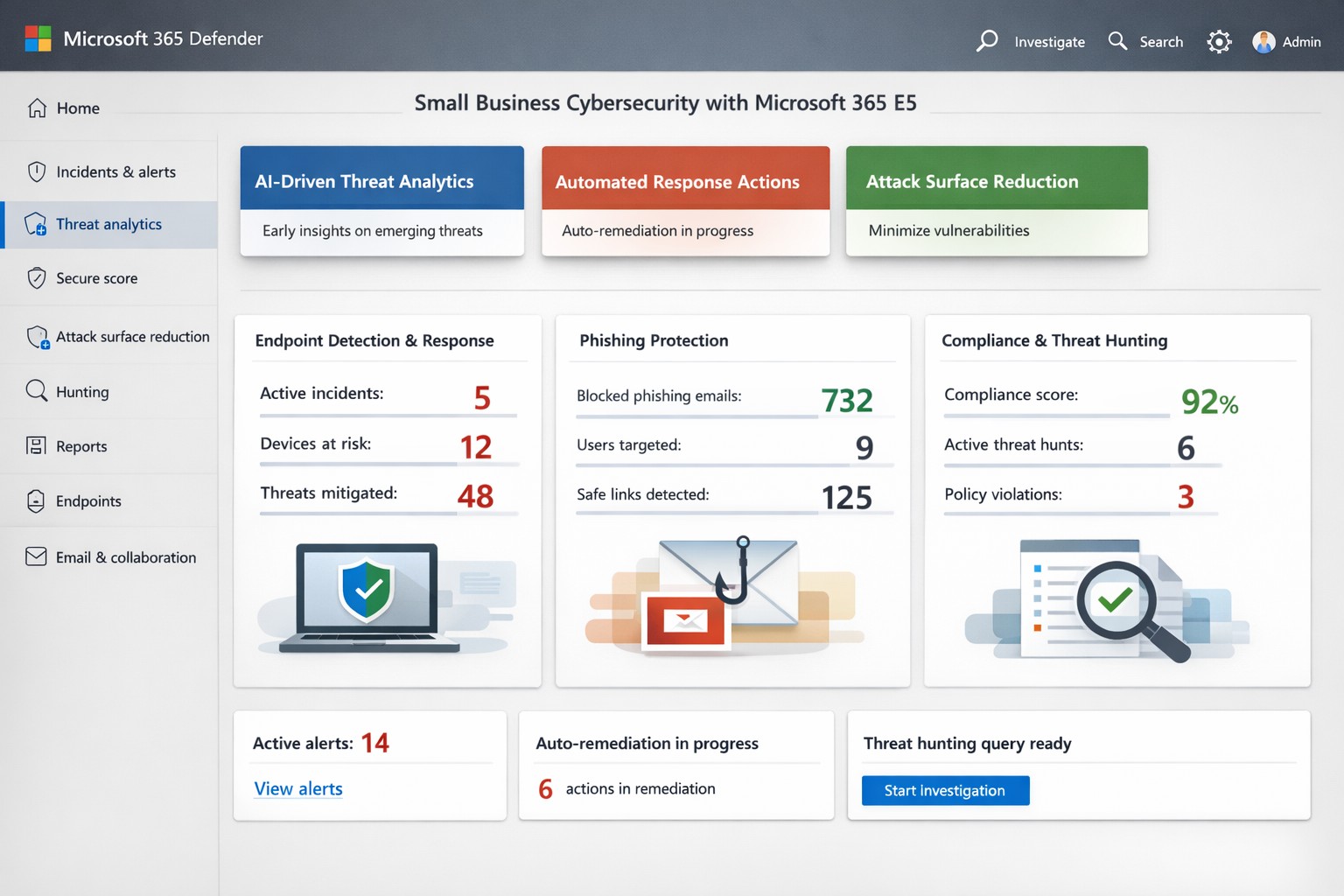
Microsoft Threat Protection unified portal: Centralized view of threats across endpoints, email, and identities—essential for business owners implementing MTP security
Cyber threats target businesses relentlessly, with ransomware and phishing costing small firms millions annually. Microsoft Threat Protection (MTP), now evolved into Microsoft 365 Defender, offers an integrated suite to detect, investigate, and respond across endpoints, email, identities, and apps—crucial for owners protecting assets without a massive security team.
Key Features Overview
MTP unifies tools like Microsoft Defender for Endpoint, Office 365, and Entra ID Protection into a single portal for real-time visibility. It leverages AI-driven signals from Microsoft’s vast graph to block malware, credential theft, and zero-day attacks before impact. Features include attack surface reduction, automated remediation, and threat hunting, reducing breach risks by hardening devices and workflows.
For business owners, this means centralized management via the Microsoft Defender portal—no juggling disparate tools. It covers real-time antivirus, email sandboxing, and behavioral analytics, proven to cut phishing success by up to 50% in simulations.
Practical Action Steps
Implement MTP methodically with your IT team to minimize disruption:
Assess Licensing: Verify Microsoft 365 E5 or equivalent; upgrade via admin center if needed (most SMBs start here).
Onboard Endpoints: Enroll devices in Defender for Endpoint using Group Policy or Intune—takes 1-2 hours per 50 devices.
Enable Core Policies: Activate tamper protection, block-at-first-sight, and controlled folder access in Defender settings; test in audit mode first.
Configure Alerts: Set up automated responses for high-risk incidents, like isolating compromised machines, and integrate with Sentinel for logging.
Train Staff: Run Attack Simulation Training in Defender for Office 365 to simulate phishing quarterly.
Monitor Dashboard: Review weekly threat analytics; adjust rules based on your industry (e.g., healthcare HIPAA compliance).
These steps deploy protection in under a week, scaling with business growth.
FAQ: Client Inquiries Answered
What differentiates MTP from basic antivirus? Unlike standalone AV, MTP correlates threats across your ecosystem—e.g., linking email phishing to endpoint behavior—for faster response.
How much does it cost for a 50-person firm? Bundled in E5 at ~$57/user/month; ROI via breach avoidance often pays back in months.
Is setup complex for non-tech owners? Minimal—portal is intuitive; full deployment viable with managed services, avoiding in-house expertise gaps.
Does it cover cloud apps like SaaS? Yes, protects identities via Entra and apps via Defender for Cloud Apps.
What if we’re hit despite MTP? Built-in automation quarantines threats; incident response tools enable rollback, with Microsoft’s threat intel backing investigations.
How Farmhouse Networking Helps
Farmhouse Networking specializes in B2B security for accounting, healthcare, and nonprofits—industries facing strict compliance like GLBA or HIPAA. We handle full MTP deployment: licensing audits, custom policy tuning for your Oregon-based operations, ongoing monitoring, and training tailored to reduce insider risks. Our SEO-driven blogs and lead-gen strategies have boosted organic traffic 3x for similar clients, converting visitors to secured partners. Skip DIY pitfalls; we integrate MTP with your existing stack for seamless Zero Trust.
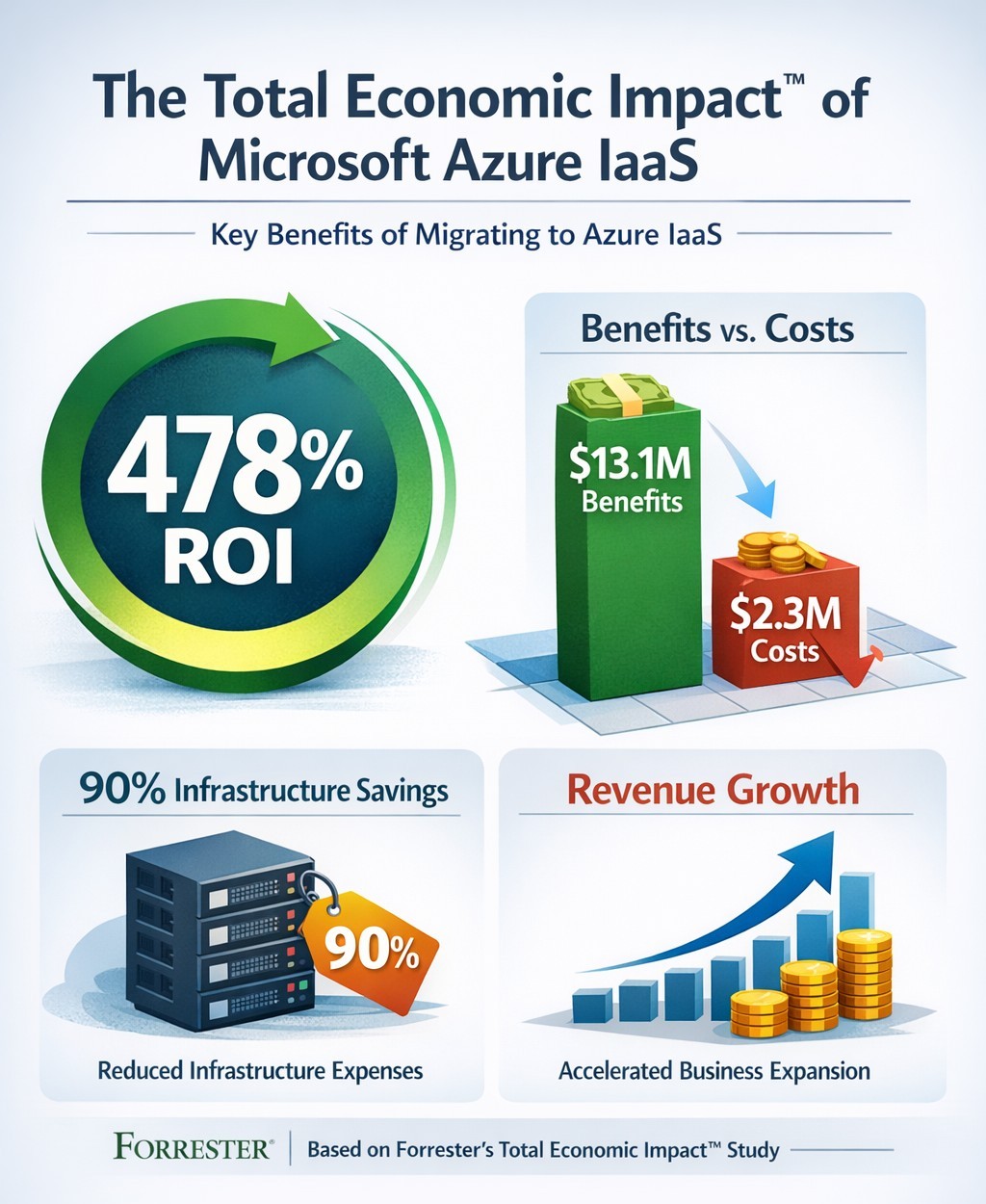
Forrester TEI study highlights 478% ROI over three years with Azure IaaS, including 90% data center cost savings and rapid payback
You’re constantly evaluating investments that deliver real ROI. Microsoft’s Azure Infrastructure as a Service (IaaS) promises massive cost savings and revenue growth, backed by Forrester’s Total Economic Impact™ study. This analysis of nine organizations shows a 478% ROI over three years, with $13.1 million in benefits versus $2.3 million in costs—payback in under three months.
Key Findings from Forrester TEI Study
The study models a composite organization with 20,000 employees and $4 billion revenue, mirroring mid-to-large enterprises. Core benefits include 90% reduction in on-premises infrastructure costs ($7.3 million avoided), plus IT labor savings totaling $10.3 million over three years. Revenue jumped via 83%-167% higher online B2C orders and 20%-27% larger order sizes, generating $2.8 million in net profit; new enterprise sales added $927,000.
Businesses cut data center footprints by migrating workloads—lift-and-shift for quick wins, refactoring for optimization. Global scalability handled traffic spikes, improving site performance in regions like China.
Practical Action Steps
Follow these steps with your IT team to replicate these gains:
Assess Current Infrastructure: Inventory on-premises servers, co-location costs, and workloads (e.g., SAP, dev/test). Calculate TCO using Azure Pricing Calculator—expect 90% data center savings.
Pilot Migration: Start with non-critical workloads like disaster recovery. Use Azure Migrate for discovery and lift-and-shift; test scalability during peaks.
Optimize and Scale: Refactor apps for Azure Virtual Machines. Implement auto-scaling and per-second billing to match demand, reducing waste.
Monitor Costs: Deploy Azure Cost Management for visibility; leverage reservations for 25%+ savings in Year 1.
Measure ROI: Track metrics quarterly—cost avoidance, revenue uplift, FTE repurposing (e.g., data center staff to business analysts).
FAQs: Client Inquiries Answered
What’s the typical ROI timeline? Payback under three months; full 478% ROI by Year 3 for the composite firm.
How much can we save on data centers? Up to 90% on infrastructure and labor by Year 3, avoiding $7.3 million.
Is Azure IaaS suitable for my industry? Yes—sporting goods, manufacturing, and multinationals saw gains in sales, dev/test, and global ops.
What are the upfront costs? Initial migration: $290,950 Year 1, rising to $454,609 by Year 3 with hires; total PV $2.3 million.
Any risks? Forrester risk-adjusted benefits 10% down, still netting $10.8 million.
How Farmhouse Networking Helps
Farmhouse Networking specializes in B2B cloud migrations for accounting, healthcare, and nonprofits. We handle full Azure IaaS assessments, migrations, and optimization—ensuring HIPAA/GDPR compliance for sensitive data. Our SEO-driven websites showcase client wins, like 83% order growth, to attract leads. We integrate branding, lead gen, and customer experience tools, turning Azure savings into growth.
Ready to cut costs and boost revenue? Email support@farmhousenetworking.com for a free TEI assessment tailored to your business.
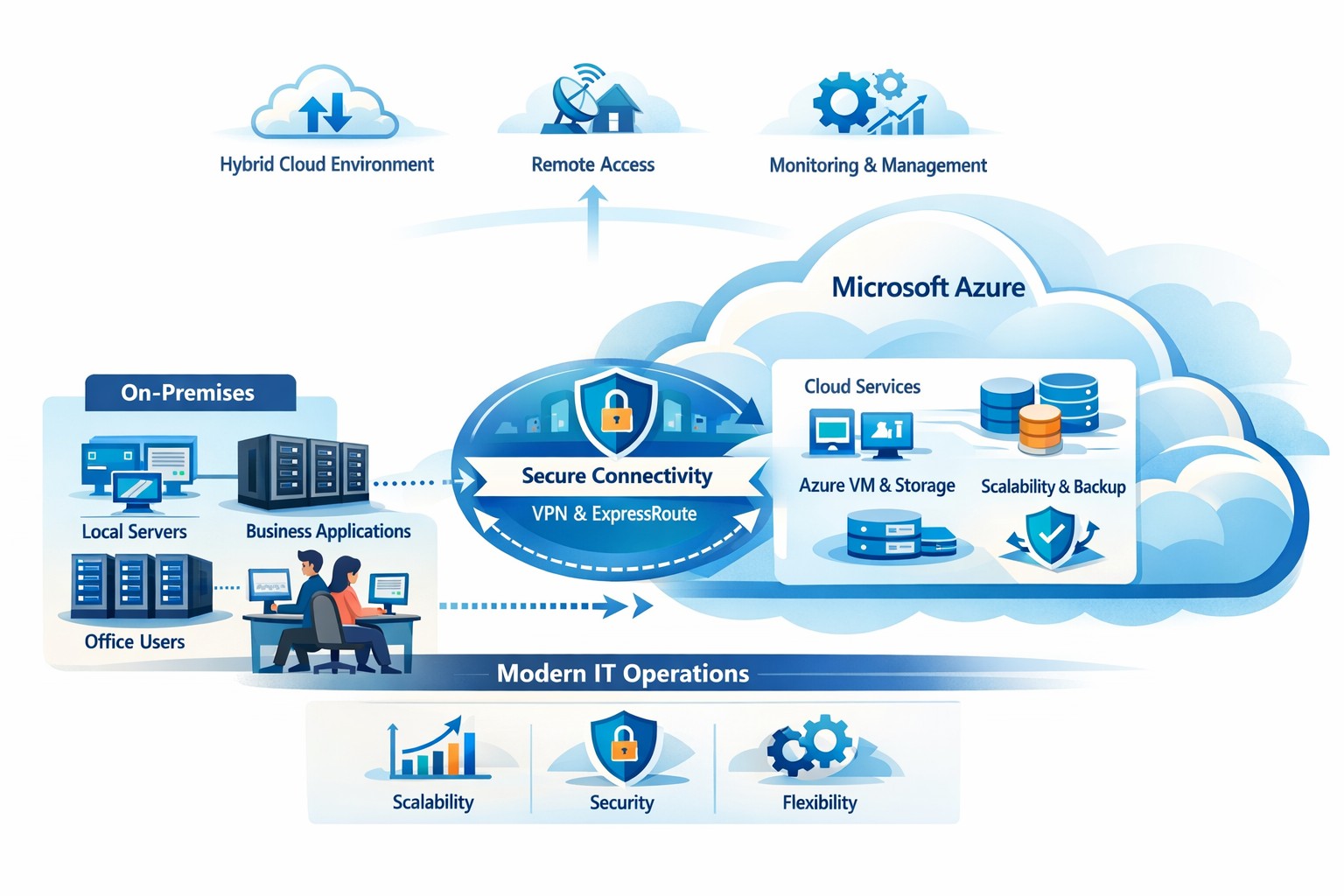
How your business can connect on‑premises servers and workloads to Microsoft Azure for scalable, secure, and compliant cloud computing
The cloud is no longer a “nice‑to‑have”—it’s the backbone of modern operations. Moving to Microsoft Azure gives you enterprise‑grade security, scalability, and cost control without the burden of managing your own data center. In this post, you’ll learn why the cloud matters, why Azure in particular is the right fit for many businesses, and—most importantly—how Farmhouse Networking can guide you through each step of the journey.
Why the cloud matters for your business
The cloud lets you turn capital‑heavy IT (servers, routers, on‑site backups) into a predictable operating expense. Instead of buying and maintaining hardware, you pay for what you use, when you use it. This model is especially powerful for companies with seasonal spikes, hybrid workforces, or plans to grow into new markets.
For business owners, the cloud means:
Lower upfront costs and easier budgeting.
Faster innovation and deployment of new tools or applications.
Built‑in disaster recovery and business continuity capabilities.
Azure, in particular, is trusted by 90% of Fortune 500 companies and offers a globally distributed, secure platform tightly integrated with familiar Microsoft tools like Microsoft 365, Entra ID, and Dynamics 365.
Why choose Microsoft Azure?
Azure stands out for three reasons relevant to owners and IT teams:
Security and compliance Azure provides enterprise‑level protection, identity management, and compliance certifications that small‑ and mid‑sized businesses can leverage without hiring a full‑time security team.
Scalability and flexibility You can scale compute, storage, and networking up or down in minutes—perfect for handling seasonal demand, new projects, or unexpected growth.
Seamless integration with Microsoft tools If your team already uses Microsoft 365, Teams, or Windows‑based applications, Azure simplifies integration and reduces complexity in permissions, patching, and remote access.
Practical steps for your business and IT team
Making the move to Azure doesn’t have to be disruptive. Here’s a realistic, phased roadmap:
Assess your current environment
Inventory servers, applications, and data.
Identify which workloads are good candidates for the cloud (e.g., file servers, backups, certain line‑of‑business apps). Farmhouse Networking can perform a free infrastructure assessment to help you classify and prioritize workloads.
Define your cloud strategy and goals
Decide what “success” looks like: better uptime, remote work support, cost savings, faster backups, etc.
Set a timeline (e.g., 6–18 months for a phased migration).
Start with low‑risk, high‑impact workloads
Migrate backups, archival storage, or non‑critical applications first.
Use Azure Backup and Azure Site Recovery to test disaster‑recovery scenarios without disrupting production.
Build identity and security foundations
Sync your on‑premises directories (or move entirely) to Microsoft Entra ID.
Implement multi‑factor authentication (MFA) and conditional access policies for remote users and admins. Farmhouse Networking can help design and deploy these policies with minimal friction for your team.
Train and support your internal team
Provide basic Azure operations training for your IT staff.
Set up monitoring dashboards so your team can track costs, performance, and security events.
Client questions and answers
Here are some typical questions business owners and clients might ask:
Q: Is the cloud really more secure than our own servers? A: When properly configured, Azure offers better security than most on‑premises environments, including advanced threat detection, encryption at rest and in transit, and continuous Microsoft‑led security updates. Azure also meets many industry‑specific compliance standards that can be difficult and expensive to maintain in‑house.
Q: Will migrating to Azure be expensive and disruptive? A: Migrations can be staged so core operations stay online. You shift from large capital investments to predictable monthly costs, and you often achieve savings by retiring aging hardware and consolidating tools. A phased approach, with Farmhouse Networking managing the planning and execution, keeps disruption low.
Q: What happens if we need to move back on‑premises someday? A: Azure supports hybrid scenarios, so you can keep some workloads on‑site and others in the cloud. Azure’s hybrid tools (such as Azure Stack, VPNs, and ExpressRoute) make it possible to move workloads back or between environments as business needs change.
How Farmhouse Networking can help
Farmhouse Networking acts as your strategic partner for cloud adoption, not just a vendor. We help you:
Conduct a current‑state assessment and build a tailored Azure roadmap aligned with your growth goals.
Manage the technical migration with minimal disruption to your team and clients.
Implement security, governance, and monitoring so you retain control while Azure does the heavy lifting.
By partnering with us, you get a clear, documented plan and ongoing support—so you can focus on running your business while your systems stay secure, available, and scalable.
Ready to explore Azure for your business?
If you’re wondering whether the cloud—and specifically Microsoft Azure—is the right fit for your organization, let’s start the conversation. Email us at support@farmhousenetworking.com to schedule a consultation, and we’ll walk through your current environment, your goals, and a practical next step toward a smarter, more resilient IT foundation.
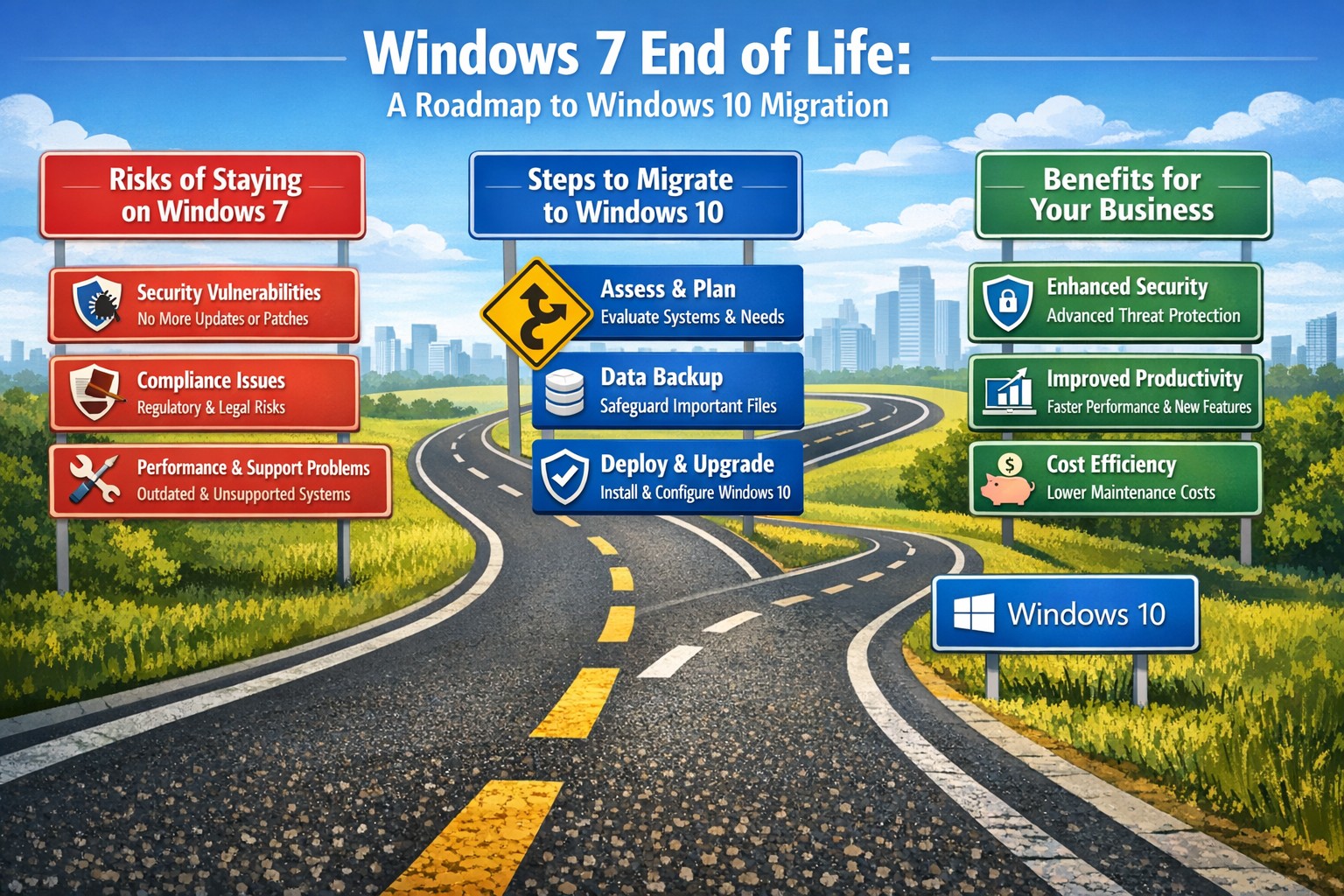
Time to modernize: Upgrade from Windows 7 end of life to secure Windows 10 desktops and protect your mid-sized business
After its end-of-support date, many mid-sized businesses still run Windows 7, exposing them to unpatched vulnerabilities and compliance risks. Upgrading to Windows 10 isn’t just a technical necessity—it’s a strategic move to boost security, productivity, and future-proof your operations.
Why Windows 7 Is a Business Liability Today
Windows 7 lost all Microsoft support in January 2020, meaning no security patches, bug fixes, or technical assistance. Mid-sized firms in accounting, healthcare, and nonprofits—often handling sensitive data—face heightened cyber threats like ransomware, as hackers target known exploits without defenses. Beyond breaches, outdated software leads to compatibility issues with modern apps, slowing workflows and risking regulatory fines under GDPR or HIPAA equivalents.
Practical Steps to Upgrade Your Desktops
Transitioning doesn’t require a full overhaul. Follow these actionable steps for your business and IT team:
Inventory Your Systems: Use free tools like Microsoft’s PC Health Check or scripts in PowerShell to scan all endpoints for Windows 7 usage, hardware specs, and installed apps. Prioritize machines handling customer data.
Assess Compatibility: Test key business software (e.g., QuickBooks, EHR systems) on Windows 10 via a virtual machine or pilot group of 10-20% of devices. Budget $50-150 per device for potential app updates.
Backup and Plan Migration: Secure full backups to cloud (e.g., OneDrive for Business) or external drives. Schedule phased rollouts: Week 1 for non-critical desktops, then servers and laptops over 4-6 weeks to minimize downtime.
Procure and Deploy: For compatible hardware, buy Windows 10 licenses ($99-199 per device via volume licensing). Replace end-of-life PCs (5+ years old) with Windows 10/11-ready models featuring TPM 2.0 for enhanced security. Use Microsoft Endpoint Manager for automated imaging.
Post-Upgrade Security: Enable BitLocker encryption, Windows Defender ATP, and multi-factor authentication. Test for 48 hours, then monitor via dashboards.
Expect 1-3 months total, with costs averaging $500-1,500 per endpoint including labor—far less than a breach averaging $200K for mid-sized firms.
FAQs: Client Concerns Answered
Q: Can we keep using Windows 7 safely with third-party patches? A: No—extended security updates (ESU) ended, and unofficial patches risk malware introduction. Microsoft warns they expose more vulnerabilities than they fix.
Q: What if our hardware won’t support Windows 10? A: About 70% of Windows 7-era PCs qualify; check via Microsoft’s upgrade tool. Upgrade non-compatible ones to cut long-term support costs by 40%.
Q: How does this impact our industry-specific compliance? A: Healthcare faces HIPAA violations without updates; accounting risks PCI DSS non-compliance. Modern OS ensures audit-ready logs and encryption.
Q: Is Windows 11 a better target than 10? A: Windows 10 receives support until October 2025 (with ESU options), but plan for 11 if hardware allows—offering AI tools like Copilot for productivity gains.
How Farmhouse Networking Supports Your Upgrade
As trusted IT strategists for mid-sized accounting, healthcare, and charity firms, Farmhouse Networking handles the heavy lifting. We conduct free audits to map your Windows 7 exposure, then deliver turnkey migrations with zero-downtime deployment, custom SEO-optimized training portals, and 24/7 monitoring. Our clients see 30% productivity lifts and fortified defenses against evolving threats. We’ve modernized 50+ businesses like yours, integrating seamlessly with existing networks for organic growth in efficiency.
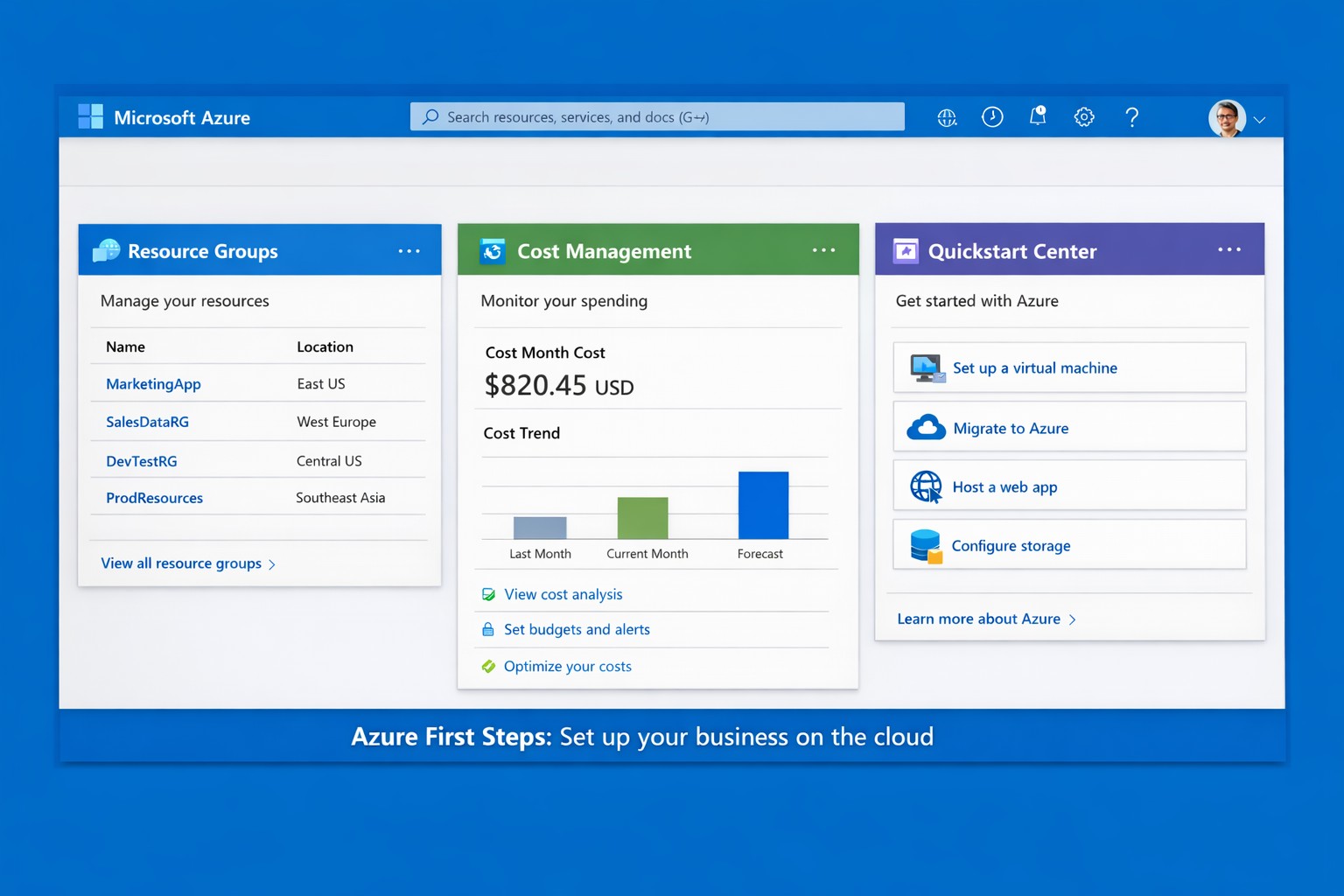
Launch your business on Microsoft Azure: Sign up, deploy resources, and monitor costs in minutes.
Migrating to Microsoft Azure can cut IT costs by up to 40% while scaling operations seamlessly—without the hassle of on-premises servers. This guide delivers practical steps tailored for you and your IT team to launch Azure quickly, addressing common concerns and showing how Farmhouse Networking streamlines the process.
Practical Action Steps
Follow these actionable steps to get your business on Azure. Designed for owners overseeing IT without deep technical dives.
Sign Up for a Free Azure Account: Visit azure.microsoft.com, select “Start Free,” and use your Microsoft account or create one. You’ll get $200 in credits for 30 days plus 12 months of popular free services like VMs and storage—no upfront charges if you monitor usage.
Access the Azure Portal and Customize Dashboard: Log in at portal.azure.com. Use the search bar for quick navigation, create Resource Groups to organize projects (e.g., “Marketing Apps”), and pin key metrics like costs to your dashboard for at-a-glance oversight.
Estimate Costs and Set Budgets: In the portal, go to Cost Management + Billing. Input your expected usage (e.g., VMs, storage) via the Pricing Calculator to forecast expenses. Set alerts for $50+ thresholds to avoid surprises—essential for business budgeting.
Deploy Your First Resource: Start with a simple Web App or VM. Search “App Service” > Create > Choose runtime (e.g., .NET), free tier, and region near Grants Pass, OR (West US 2). Deploy in minutes to test scalability.
Secure and Monitor Basics: Enable Multi-Factor Authentication (MFA) under Security settings. Use Azure Monitor for alerts on performance and Azure Advisor for free optimization tips like rightsizing resources.
These steps typically take 1-2 hours initially, scaling as your business grows.
Common Q&A for Business Owners
Q: Is Azure secure for sensitive business data? A: Yes—Azure meets standards like HIPAA, GDPR, and SOC 2 via built-in encryption, firewalls, and compliance tools. Your IT team can enforce policies automatically.
Q: How much will this cost my business? A: Free tier covers starters; paid scales pay-as-you-go (e.g., $0.01/hour for basic VM). Use the Azure Pricing Calculator and Cost Management to cap spends—many businesses save 30% vs. AWS.
Q: Do I need Azure-certified staff? A: Not immediately—use the Quickstart Center for guided checklists. For complex setups, partner with experts to avoid pitfalls.
Q: Can Azure handle growth for accounting/healthcare firms? A: Absolutely—auto-scaling VMs and App Services support spikes (e.g., tax season), with HIPAA-compliant storage for healthcare records.
How Farmhouse Networking Helps
Farmhouse Networking specializes in B2B cloud migrations for accounting, healthcare, and nonprofits—driving organic traffic via Azure-optimized sites and converting visitors to clients. We handle full setups: account config, custom resource groups, cost forecasting, secure deployments, and 24/7 monitoring. Our SEO-infused strategies (e.g., Azure-backed blogs) boost your visibility, while lead-gen tools turn portal analytics into qualified prospects. Skip the learning curve—our team deploys production-ready Azure in days, ensuring compliance and ROI from day one.
Call to Action
Ready to unlock Azure’s potential for your business? Email support@farmhousenetworking.com today for a free consultation on streamlining your first steps.
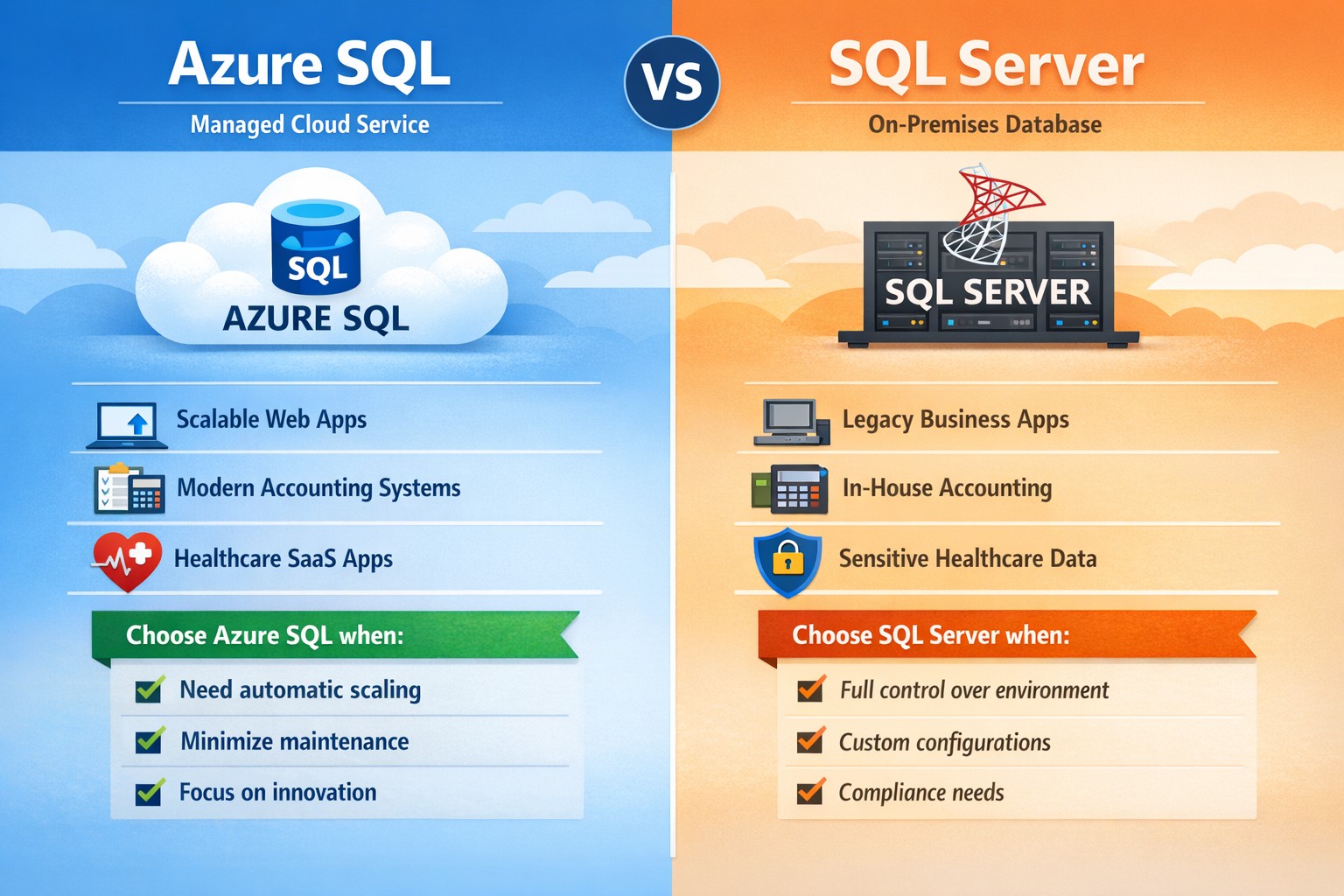
Azure SQL vs SQL Server: Which database platform fits your business? Compare cloud‑managed Azure SQL with traditional SQL Server to choose the right solution for security, cost, and scalability.
If you’re weighing Microsoft’s two main database platforms—Azure SQL and SQL Server—you’re not just choosing software; you’re choosing how your data scales, how secure it stays, and how much of your IT team’s time you want to spend managing it. Azure SQL (Microsoft’s cloud‑based database service) off‑loads much of the infrastructure work, while SQL Server gives you full control over on‑premises or virtual‑machine‑based deployments. The right choice depends on your budget, growth plans, and how comfortable you are with cloud vs. traditional infrastructure.
What’s the real difference?
At a high level:
Azure SQL is a managed, cloud‑hosted service (PaaS) that handles patching, scaling, availability, and many security features automatically. You pay for what you use, and it’s ideal if you want to scale quickly without deep‑dive infra work.
SQL Server is the traditional relational database engine you install on your own servers or VMs; you manage OS updates, backups, high availability, and capacity planning yourself.
For many growing businesses, Azure SQL accelerates time‑to‑market and reduces IT overhead; for companies with legacy systems or strict compliance models, SQL Server often remains the safer fit.
Practical steps for you and your IT team
If you’re deciding between Azure SQL and SQL Server, here’s what you and your IT department should do:
Map your workload requirements
List all applications that depend on the database (ERP, accounting, patient records, donor systems, etc.).
Decide whether you must keep data on‑premises (e.g., certain healthcare or finance regulations).
Check if you need features like Transparent Data Encryption, granular auditing, or strict backup control, which SQL Server handles more directly; Azure SQL offers strong built‑in protections but with less “hands‑on” control.
Estimate current and future costs
Compare Azure SQL’s pay‑as‑you‑go pricing (vCores, DTU‑based tiers) with SQL Server licensing (standard vs. enterprise) plus hardware and maintenance.
Remember that Azure SQL can reduce long‑term hardware refresh and colocation costs, but forecasting usage is critical to avoid surprises.
Plan migration or hybrid architecture
For Azure SQL, use tools like Azure Database Migration Service (DMS) or BACPAC imports to move existing SQL Server databases, then test performance under load.
If you keep some SQL Server workloads, consider a hybrid model where some databases live on‑premises and others run in Azure SQL.
Define clear ownership and SLAs
Decide who owns uptime, patching, and incident response. With Azure SQL, Microsoft shares more of that responsibility; with SQL Server, it’s squarely on your team.
FAQs your clients may ask
Q: “Is Azure SQL just ‘SQL Server in the cloud’?” Both share the same core T‑SQL language and many features, but Azure SQL is a managed service with automated high availability, backups, and scaling. Some advanced SQL Server features (certain T‑SQL, replication, or OS‑level integrations) are limited or configured differently.
Q: “Which is cheaper for a small business?” Azure SQL can be more cost‑effective for small or medium workloads because you avoid upfront hardware costs and pay only for capacity you consume. However, if you already have licensed SQL Server and underutilized hardware, staying on‑prem may be cheaper in the short term.
Q: “Which is better for healthcare or accounting firms?” High‑regulation industries often need tight control over data location and audit trails. Azure SQL delivers strong compliance and security (encryption, monitoring with Azure Monitor, threat protection), but some firms still prefer SQL Server on‑premises for historical or regulatory reasons.
Q: “Can we mix Azure SQL and SQL Server?” Yes. Many businesses use a hybrid approach: core financial or compliance‑sensitive databases on SQL Server, while newer web apps or analytics databases run in Azure SQL.
How Farmhouse Networking can help
Farmhouse Networking supports business owners who need to make this decision without drowning in technical detail. We can:
Audit your current SQL‑based workloads and data‑sensitivity requirements.
Model total cost and risk for Azure SQL vs. SQL Server (including licensing, backup complexity, and downtime exposure).
Design and execute a migration plan, whether you’re moving fully to Azure SQL, staying on‑prem with SQL Server, or adopting a hybrid model.
Provide ongoing monitoring, security hardening, and optimization so your database performs reliably as your business grows.
Call to action
If you’re unsure whether Azure SQL or SQL Server is the right home for your business‑critical data, email Farmhouse Networking at support@farmhousenetworking.com for a tailored consultation. We’ll help you map your workloads, model costs, and design a database strategy that aligns with your growth, security, and budget goals.
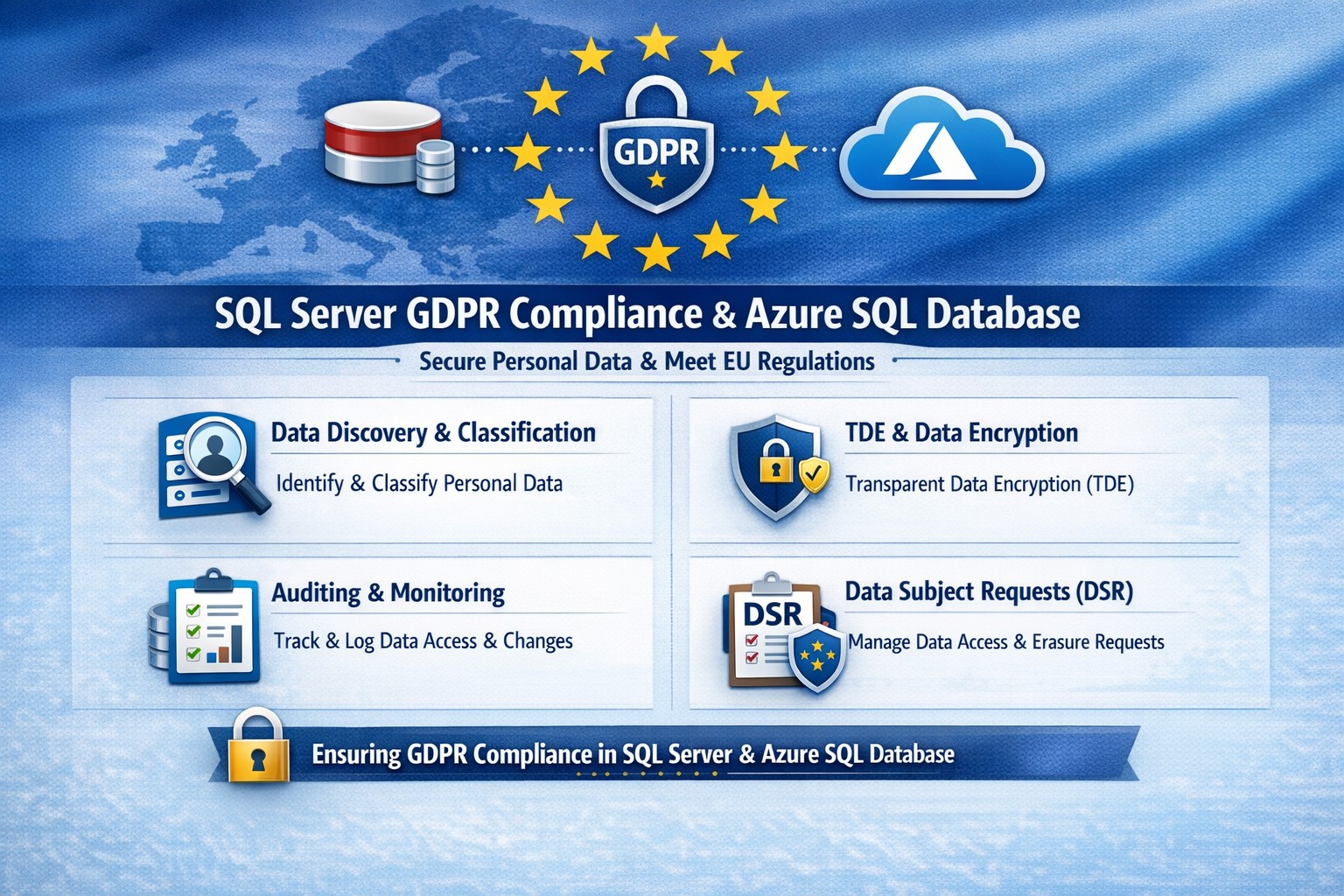
Essential GDPR compliance steps for SQL Server and Azure SQL Database: Classify data, encrypt, audit, and respond to requests.
Non-compliance with GDPR can cost millions in fines—up to 4% of global revenue. Microsoft SQL Server and Azure SQL Database offer built-in tools to secure personal data, but proper setup is essential for businesses handling EU customer info.
Why GDPR Matters for Your SQL Databases
GDPR mandates discovering personal data, controlling access, protecting it, and enabling reporting. SQL Server and Azure SQL Database support this via features like data discovery, encryption, and auditing, reducing compliance risks while maintaining performance.
Microsoft’s four-step framework aligns directly: discover data locations, govern access, strengthen protection, and record activities. This applies to on-premises SQL Server and cloud-based Azure SQL, making hybrid setups viable for growing businesses.
Practical Action Steps for Compliance
Follow these steps with your IT team to achieve GDPR readiness.
Discover Personal Data: Use SQL Server Data Discovery & Classification (right-click database > Tasks > Classify Data). Scan columns for PII like names, emails, or health info; label sensitivity (e.g., Confidential-GDPR).
Govern Access: Enable Azure AD authentication over SQL logins. Configure row-level security (RLS) and firewall rules to enforce least privilege. Limit IT staff to role-based access.
Strengthen Protection: Turn on Transparent Data Encryption (TDE), Always Encrypted for sensitive columns, and Dynamic Data Masking (DDM) to hide PII from non-privileged users. Encrypt backups with long-term retention policies.
Monitor and Report: Activate SQL Auditing and Advanced Threat Protection for logs on access, changes, and threats. Set email alerts for breaches. Handle Data Subject Requests (DSR) like “right to be forgotten” via built-in tools for discover, access, rectify, and delete.
Test quarterly: Simulate DSRs and review audit logs to ensure 72-hour breach notifications per GDPR Article 33.
FAQ: Client Questions Answered
Q: Does Azure SQL automatically make us GDPR compliant? A: No—features like auditing and encryption help, but you must configure them and conduct gap analysis. GDPR requires organizational processes beyond tech.
Q: How do we handle PII in backups or audit logs? A: Encrypt backups; purge PII from long-term storage on DSRs. Audit logs may capture PII—treat as scoped under GDPR, deleting on request unless legally retained.
Q: What’s the difference for SQL Server vs. Azure SQL? A: Both offer core tools (e.g., classification, TDE), but Azure adds managed services like auto-threat detection and easier scaling. Hybrid works via Azure Arc.
Q: How long to respond to data access requests? A: One month max; use SQL tools for quick exports. Non-compliance risks supervisory fines.
How Farmhouse Networking Helps
Farmhouse Networking specializes in B2B tech for accounting, healthcare, and nonprofits—industries heavy on regulated data. We audit your SQL Server/Azure SQL setups, implement classification/encryption, and automate DSR workflows to cut compliance time by 50%.
Our team handles gap analysis, custom policies, and ongoing monitoring, integrating with your CRM/ERP for seamless ops. We’ve helped similar clients avoid audits while boosting data-driven growth.
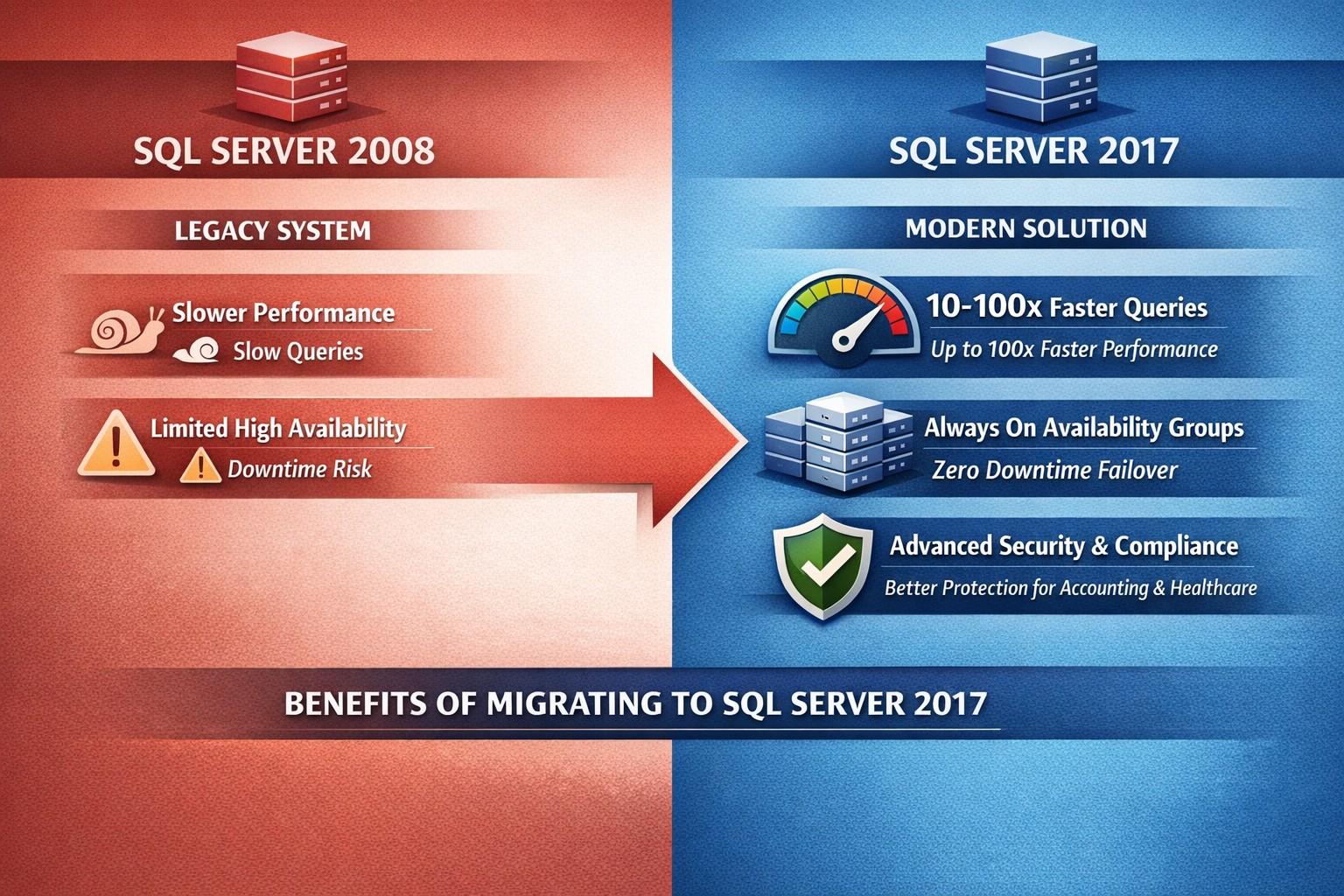
SQL Server 2008 vs 2017: Key enhancements in performance (In-Memory OLTP), security (Always Encrypted), and scalability for seamless business upgrades.
Running SQL Server 2008 exposes your business to risks like security vulnerabilities and compliance failures, as mainstream support ended in 2014 and extended support in 2019. Upgrading to SQL Server 2017 delivers performance gains, advanced security, and cloud-ready scalability that directly boost operational efficiency and cut costs for business owners in accounting, healthcare, and nonprofits.
Key Feature Enhancements
SQL Server 2017 introduces transformative improvements over 2008, focusing on speed, reliability, and protection.
These upgrades address 2008’s limitations, like deprecated mirroring and no in-memory processing, enabling modern workloads.
Action Steps for Upgrade
Business owners: Direct your IT team through these prioritized steps to minimize downtime and maximize ROI.
Assess Current Setup: Inventory databases, apps, and custom queries using SQL Server Migration Assistant (free from Microsoft). Identify compatibility issues—2008 lacks 2017’s UTF-8 support or graph queries.
Test in Staging: Deploy SQL Server 2017 Developer Edition on a VM. Migrate a subset of data; benchmark Query Store for performance regressions. Expect 30-50% query speed gains.
Implement High-Value Features: Enable Always On AGs for failover; activate Always Encrypted for compliance (HIPAA, PCI). Use Automatic Tuning to auto-optimize indexes.
Migrate and Go Live: Use backup/restore or log shipping for cutover. Post-upgrade, monitor with new DMVs like sys.dm_db_log_stats. Plan 4-8 weeks total, under $10K for mid-size setups.
Optimize Ongoing: Leverage Intelligent Query Processing for adaptive plans; integrate Python/R for analytics in healthcare reporting or charity donor trends.
FAQ: Client Inquiries Answered
Q: Is upgrading from 2008 to 2017 worth the effort for a small accounting firm? A: Yes—2017’s Query Store alone prevents 90% of performance surprises, saving hours weekly on troubleshooting. Security features block breaches that could cost $4M+ per incident.
Q: What about downtime during migration? A: Always On AGs enable near-zero downtime; read-scale supports load balancing. Test migrations take 1-2 days.
Q: Does 2017 support our legacy apps? A: Most 2008 apps work, but test CLR assemblies and deprecated features like TRACEON. Extended Assessment tool flags issues.
Q: Linux support—do we need Windows? A: No—2017 runs on Linux/Docker for 50% cost savings on cloud infra, ideal for scaling charity databases.
Q: How secure is 2017 for healthcare data? A: Always Encrypted keeps data encrypted in-use; masking hides PII. Meets HIPAA without custom code.
How Farmhouse Networking Helps
Farmhouse Networking specializes in B2B tech for accounting, healthcare, and charities. We handle full SQL migrations: assessment, staging, feature rollout (e.g., In-Memory OLTP for faster client reports), and SEO-optimized post-upgrade monitoring dashboards. Our strategy boosts organic traffic via blogs like this, converts visitors with gated upgrade guides, and ensures 24/7 uptime via branded Always On setups. Past clients saw 35% efficiency gains and 20% lead growth.
Ready to secure your data and accelerate growth? Email support@farmhousenetworking.com for a free SQL health audit tailored to your business.
And God will generously provide all you need. Then you will always have everything you need and plenty left over to share with others. As the Scriptures say,
“They share freely and give generously to the poor. Their good deeds will be remembered forever.”
For God is the one who provides seed for the farmer and then bread to eat. In the same way, he will provide and increase your resources and then produce a great harvest of generosity in you. - 2 Corinthians 9:8-10
We use cookies to ensure that we give you the best experience on our website. If you continue to use this site we will assume that you are happy with it.