Stabilize SMB IT costs and eliminate downtime risks with proactive management
Surprise technology bills, emergency repairs, and the high expense of an in-house IT team create a constant strain on business budgets. For owners aiming to grow while staying in control of expenses, these unpredictable costs aren’t just an annoyance—they can derail plans, erode trust, and limit your business’s ability to invest in what really matters.
Why In-House IT Costs So Much
Maintaining your own IT staff is far more expensive than it first appears:
Salaries and Benefits: A modest in-house IT team for a 40-employee business can run upwards of $192,600 per year—about $402 per user per month. This includes wages for technicians, managers, and benefits that typically add 31% or more to the base salary.
Recruitment and Training: The average cost-per-hire for IT roles is about $4,700, not counting the 8 to 26 weeks of ramp-up time. Added to this are regular education costs needed to keep skills up to date in a rapidly changing tech landscape.
Overhead: Beyond staff, you’re paying for hardware, software licenses (ranging from $500–$18,000 monthly), space, insurance, PTO, and infrastructure.
Turnover: IT has one of the highest turnover rates in any industry. Every time someone leaves, you lose critical knowledge and must bear the cost of recruitment, onboarding, and lost productivity—sometimes as much as 200% of annual salary for that position.
Why Unpredictable IT Costs Threaten Your Business
Budget Surprises: Emergency fixes, one-time service charges, and unclear contracts can cause your monthly expenses to swing wildly, making it impossible to forecast cash flow or plan for the year ahead.
Productivity Losses: Downtime due to system failures not only costs thousands in lost business per hour but also damages your reputation and relationships.
Reactive Spending: Fixing problems as they arise is always more expensive than proactively maintaining equipment or systems. Without a predictable monthly IT plan, you’re forced to “rob Peter to pay Paul” when something inevitably breaks.
Take Action: Steps to Regain Control
Conduct an IT Audit: Know exactly what you’re spending, where, and why.
Distinguish Must-Haves: Separate essential services from legacy software or non-critical expenses.
Move to a Managed IT Model: Managed IT services typically cost just $125–$220 per user per month, offering budgeting clarity and reducing surprises.
Schedule Reviews: Revisit IT budgets quarterly and adjust for business changes early.
Consolidate Vendors: Limit the number of external suppliers so that responsibility is clear, and costs are contained.
How Farmhouse Networking Can Help
Farmhouse Networking partners with you to:
Uncover Hidden Savings: Our audits often find areas to cut unnecessary costs.
Flat-Rate Managed IT: We offer comprehensive support—including monitoring, proactive maintenance, cybersecurity, and strategy sessions—for one predictable monthly fee.
Quarterly Reviews and Strategic Planning: Stay ahead of risks and keep your IT spend aligned with your business goals.
Hands-Off Vendor Management: Eliminate redundant contracts and ensure every dollar spent delivers real value.
Ready to End Unpredictable IT Spending?
Take charge of your IT budget and redirect savings to initiatives that drive your business forward. Contact Farmhouse Networking to schedule your complimentary IT cost assessment.
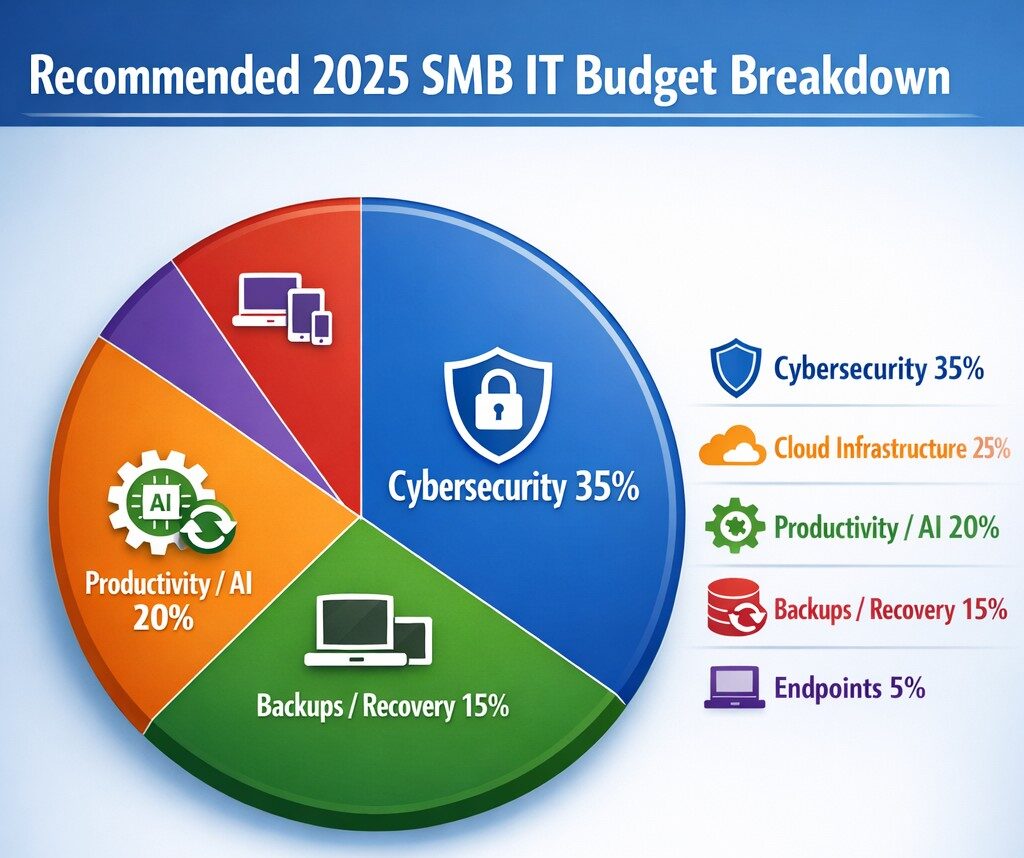
Allocate 30%+ of 2025 IT budget to cybersecurity per industry benchmarks.
Small and medium-sized businesses (SMBs) must strategically plan their IT budgets to stay competitive and efficient. It’s crucial to allocate resources wisely to support both day-to-day operations and long-term growth. Let’s explore the key areas SMBs should focus on when budgeting for tech in 2025.
Cybersecurity Investments
With no end to cyber threats in site, cybersecurity should be a top priority in your 2025 IT budget. Consider allocating funds for:
– Advanced firewalls and intrusion detection systems – Multi-factor authentication (MFA) implementation – Regular security audits and penetration testing
Remember, the cost of preventing a cyber attack is far less than the potential losses from a successful breach.
Artificial Intelligence and Automation
AI is no longer a luxury reserved for large enterprises. In 2025, SMBs should budget for AI-powered tools to enhance efficiency and decision-making. Consider investments in:
– Chatbots for customer support – AI-driven analytics for business insights – Automated workflow tools to streamline operations
These technologies can help SMBs do more with less, improving productivity and customer satisfaction.
Hardware and Device Upgrades
SMBs still need to budget for essential hardware. This includes:
– Laptops and desktops for employees – Mobile devices for remote work – Networking equipment for reliable connectivity
Plan for a hardware refresh cycle to ensure your team has up-to-date tools to work efficiently. (Remember we meet with our clients twice a year in the Spring and Fall to discuss budget and replacement scheduling.)
Software Licenses and Subscriptions
Software is the backbone of modern business operations. Your 2025 IT budget should account for:
– Operating system licenses (Windows 10 is no longer supported as of October 2025) – Productivity suite subscriptions (e.g., Microsoft 365, Google Workspace) – Industry-specific software licenses – Collaboration and communication tools
Regularly review your software subscriptions to ensure you’re only paying for what you need and use.
IT Support and Managed Services
Consider outsourcing some or all of your IT support to a managed service provider (MSP) like Farmhouse Networking to reduce in-house IT costs and gain access to specialized expertise. Budget for:
– Help desk support – Compliance assistance – Network monitoring and management – Backup and disaster recovery services
Employee Cybersecurity Training
Hackers keep getting better at their crimes, so should it is mandatory to invest in your team’s cybersecurity skills. Allocate budget for:
– Yearly assessments of baseline knowledge – Weekly trainings with quizzes to make sure they are paying attention – Interactive or gamified content to keep people interested
Investing in your team’s skills can lead to better technology adoption and improved productivity.
Ready to optimize your IT budget for 2025? Don’t navigate this complex landscape alone. Contact Farmhouse Networking today to help you create a tailored IT budget that aligns with your business goals and maximizes your technology investments. Our experts can guide you through the process, ensuring you’re prepared for the technological challenges and opportunities that lie ahead. Let’s work together to future-proof your business and drive success.
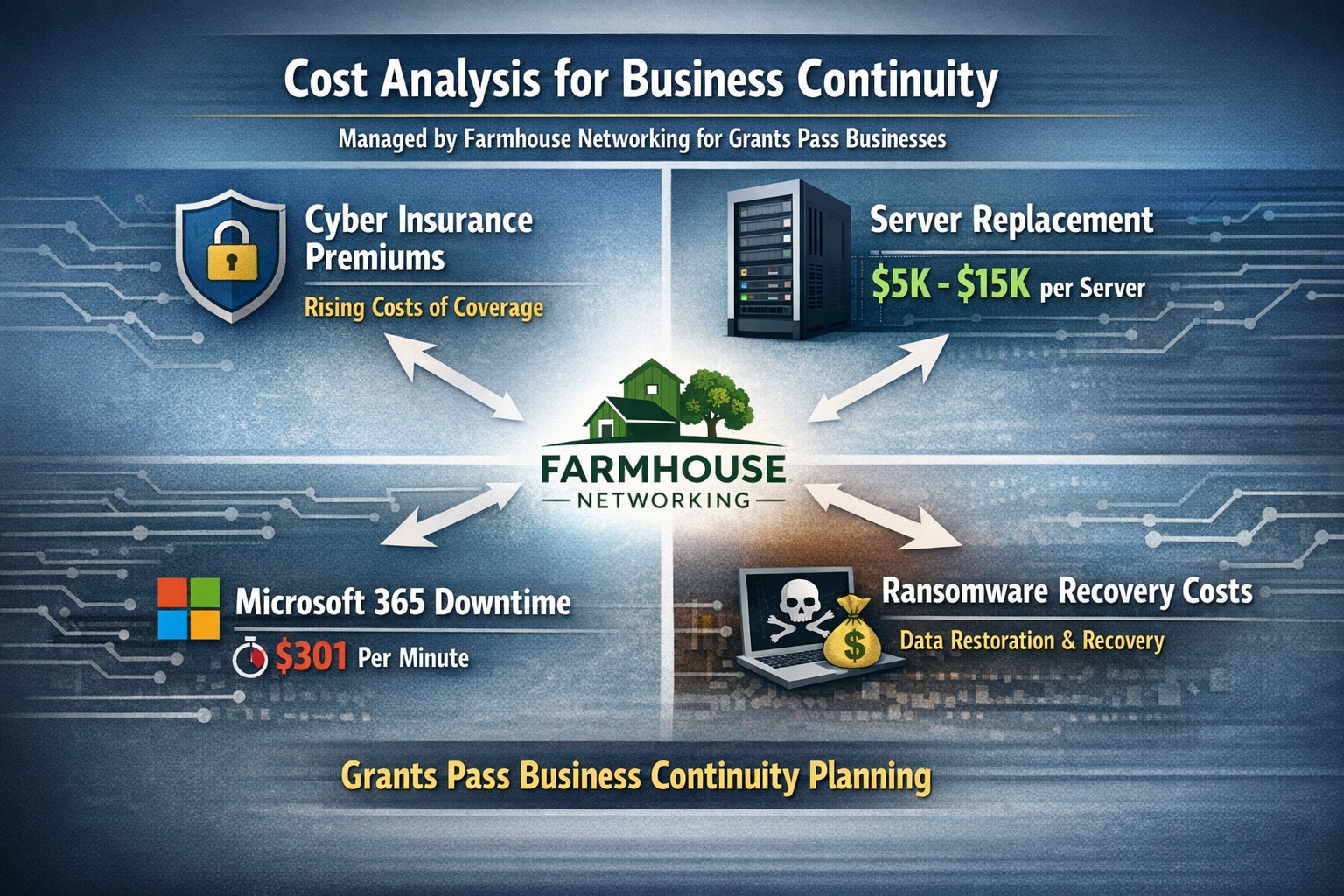
Farmhouse Networking calculates ransomware, server failure, and cyber insurance costs protecting Oregon SMB digital employees from downtime.
We were discussing the price customers paid for their monthly maintenance of computers and the comparison was brought up about insurance costs. As a business owner with employees, it is necessary these days to offer health insurance as part of their compensation package. If the company has vehicles that are used for business, then the government mandates that they be covered by minimum amounts of insurance. These costs are then built into the price the business owner then charges their clients for products or services.
Insurance Statistics:
According to Business.com, the average cost of health insurance for a single employee was $645 per month and $1,850 per month for a family.
According to NerdWallet.com, the average cost of car insurance was $179 per vehicle per month.
Questions:
So what about the “digital” employees of the company, aka the computers and network equipment that make business possible. How much are business owners paying to “insure” these assets? What are businesses willing to pay to make sure that their computers and network don’t have a sick day? Does the cost of insuring them include preventative care? Who does the business call in case of an accident or breakdown in the middle of the day? Does the cost of insuring include on-site service or transport to a service center?
If your company wants to keep their digital employees healthy and insure them from accidents, then contact us for assistance.
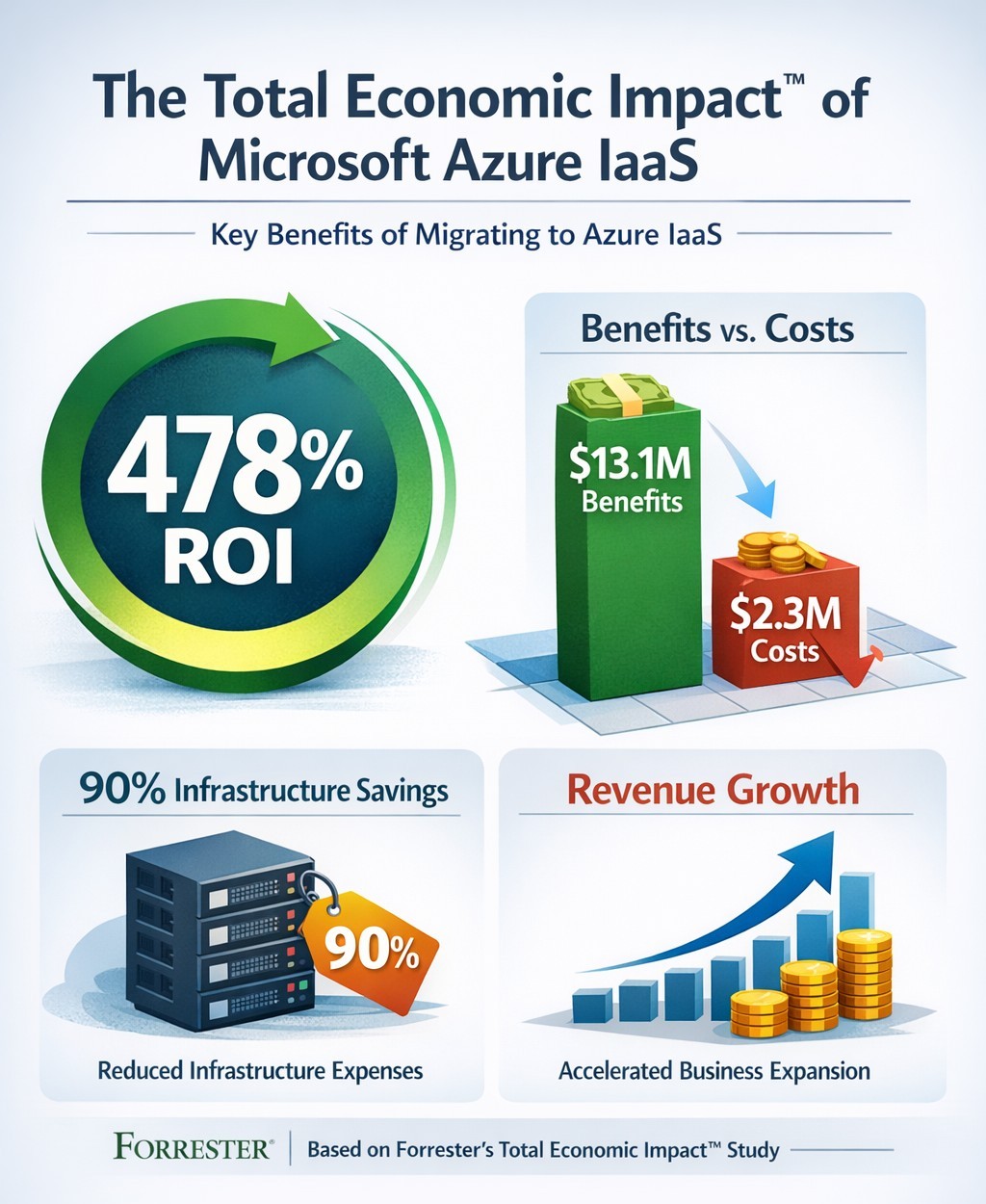
Forrester TEI study highlights 478% ROI over three years with Azure IaaS, including 90% data center cost savings and rapid payback
You’re constantly evaluating investments that deliver real ROI. Microsoft’s Azure Infrastructure as a Service (IaaS) promises massive cost savings and revenue growth, backed by Forrester’s Total Economic Impact™ study. This analysis of nine organizations shows a 478% ROI over three years, with $13.1 million in benefits versus $2.3 million in costs—payback in under three months.
Key Findings from Forrester TEI Study
The study models a composite organization with 20,000 employees and $4 billion revenue, mirroring mid-to-large enterprises. Core benefits include 90% reduction in on-premises infrastructure costs ($7.3 million avoided), plus IT labor savings totaling $10.3 million over three years. Revenue jumped via 83%-167% higher online B2C orders and 20%-27% larger order sizes, generating $2.8 million in net profit; new enterprise sales added $927,000.
Businesses cut data center footprints by migrating workloads—lift-and-shift for quick wins, refactoring for optimization. Global scalability handled traffic spikes, improving site performance in regions like China.
Practical Action Steps
Follow these steps with your IT team to replicate these gains:
Assess Current Infrastructure: Inventory on-premises servers, co-location costs, and workloads (e.g., SAP, dev/test). Calculate TCO using Azure Pricing Calculator—expect 90% data center savings.
Pilot Migration: Start with non-critical workloads like disaster recovery. Use Azure Migrate for discovery and lift-and-shift; test scalability during peaks.
Optimize and Scale: Refactor apps for Azure Virtual Machines. Implement auto-scaling and per-second billing to match demand, reducing waste.
Monitor Costs: Deploy Azure Cost Management for visibility; leverage reservations for 25%+ savings in Year 1.
Measure ROI: Track metrics quarterly—cost avoidance, revenue uplift, FTE repurposing (e.g., data center staff to business analysts).
FAQs: Client Inquiries Answered
What’s the typical ROI timeline? Payback under three months; full 478% ROI by Year 3 for the composite firm.
How much can we save on data centers? Up to 90% on infrastructure and labor by Year 3, avoiding $7.3 million.
Is Azure IaaS suitable for my industry? Yes—sporting goods, manufacturing, and multinationals saw gains in sales, dev/test, and global ops.
What are the upfront costs? Initial migration: $290,950 Year 1, rising to $454,609 by Year 3 with hires; total PV $2.3 million.
Any risks? Forrester risk-adjusted benefits 10% down, still netting $10.8 million.
How Farmhouse Networking Helps
Farmhouse Networking specializes in B2B cloud migrations for accounting, healthcare, and nonprofits. We handle full Azure IaaS assessments, migrations, and optimization—ensuring HIPAA/GDPR compliance for sensitive data. Our SEO-driven websites showcase client wins, like 83% order growth, to attract leads. We integrate branding, lead gen, and customer experience tools, turning Azure savings into growth.
Ready to cut costs and boost revenue? Email support@farmhousenetworking.com for a free TEI assessment tailored to your business.
What is the economic impact of switching from an on-premises SQL Server to Azure? Microsoft asked Forrester to find out. Four client interviews later, the results are in: See how you can save by switching to Azure!
Unlock 147% ROI with Windows 10 security: Slash third-party tool costs and malware downtime using built-in features like Windows Defender
Rising cyber threats and IT costs threaten your bottom line. Windows 10’s built-in security features deliver proven cost savings and operational benefits, potentially netting millions in avoided expenses over three years per Forrester’s analysis.
Key Cost Savings and Benefits
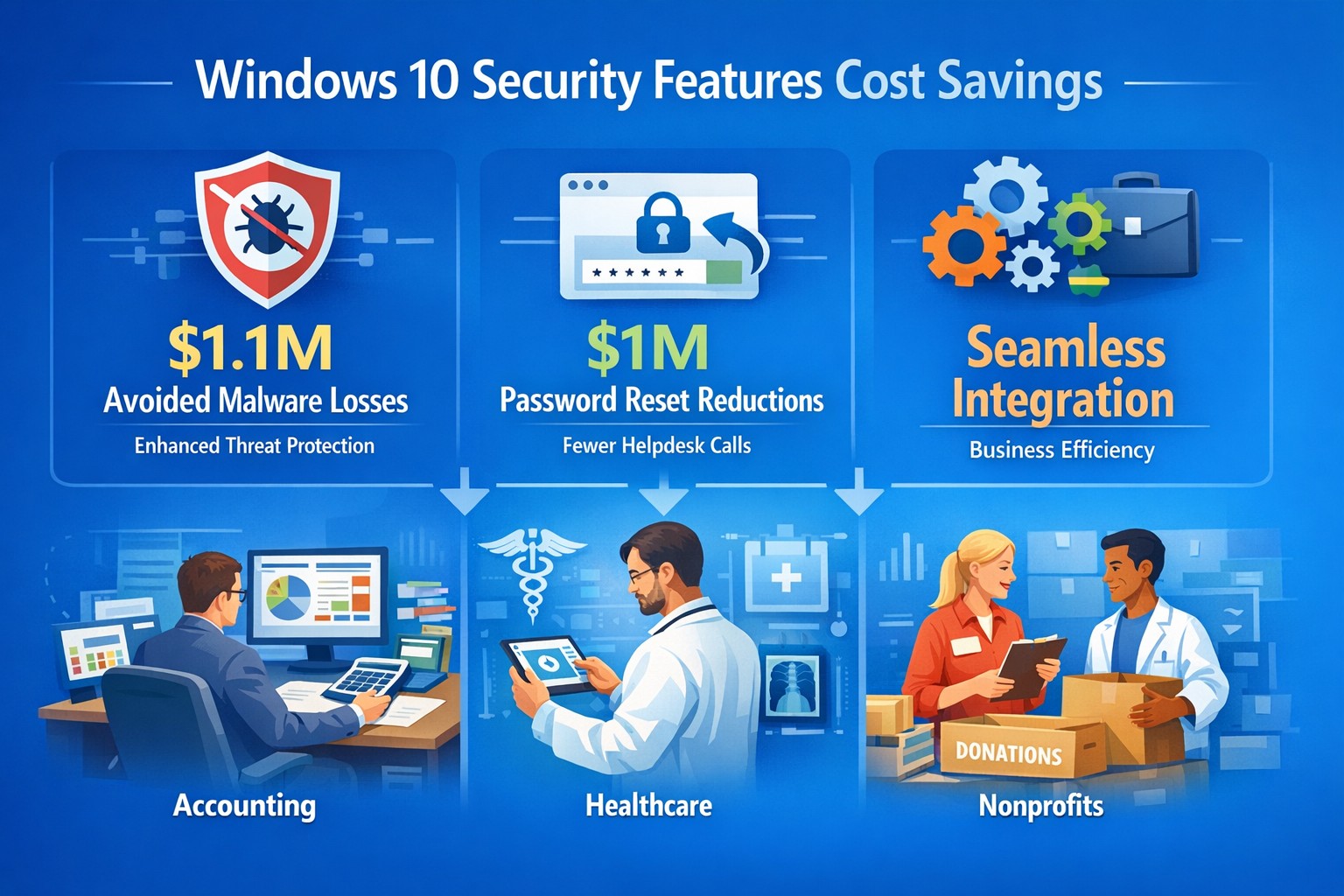
Windows 10 security eliminates needs for third-party tools like EDR, EPP, AV, and disk encryption, saving on licenses and management time. Businesses report $1.1 million in reduced productivity losses from fewer malware infections, thanks to faster detection and auto-remediation via Windows Defender ATP. Password resets drop dramatically with Windows Hello biometrics, cutting another $1.0 million in support costs.
Additional gains include improved device performance, cloud-based protection for remote teams, and easier OS-integrated maintenance—reducing IT burden without extra vendors. BitLocker and Credential Guard further minimize data breach risks, avoiding downtime from incidents like WannaCry, which spared updated Windows 10 systems.
Benefit
3-Year Savings (Composite Org.)
Key Features
Avoided Third-Party Costs
Significant (licenses + ops time)
Native Defender, BitLocker
Reduced Malware Impact
$1.1M
ATP auto-remediation
Fewer Password Resets
$1.0M
Windows Hello biometrics
Overall ROI
147% (Forrester TEI)
Integrated, low-resource security
Practical Action Steps
Business owners and IT teams can activate these savings quickly.
Audit Current Setup: Inventory endpoints for third-party security tools; calculate annual license and support costs.
Enable Core Features: Turn on Windows Defender ATP, BitLocker encryption, and Windows Hello in Group Policy (Settings > Update & Security > Windows Security).
Update and Test: Deploy latest Windows 10 updates via WSUS or Intune; pilot on 10% of devices to measure infection rates and reset tickets pre/post.
Train Staff: Run 30-minute sessions on biometrics and reporting suspicious activity to Defender dashboard.
Monitor ROI: Track metrics like MTTK (mean-time-to-know threats) and remediation time quarterly using built-in analytics.
These steps typically take 4-6 weeks, with immediate third-party savings.
FAQ: Client Inquiries Answered
Q: Is Windows 10 secure enough without add-ons? A: Yes—Forrester found it replaces multiple vendors effectively, reducing infections and resource strain. It’s cloud-integrated for mobile workforces.
Q: What about upgrade costs from older Windows? A: Implementation is low; license costs offset by $2.1M+ benefits. No major upfront hardware needs if on compatible PCs.
Q: How does it help compliance like GDPR? A: Defender Security Center provides audit-ready logs for apps, credentials, and files; BitLocker ensures data protection.
Q: Works for small businesses? A: Absolutely—scalable subscriptions match enterprise security without complexity or high costs.
How Farmhouse Networking Helps
Farmhouse Networking specializes in B2B IT for accounting, healthcare, and charity sectors. We handle audits, feature deployments, and custom Intune setups to maximize Windows 10 ROI—driving organic traffic via secure, compliant networks that convert visitors to clients. Our SEO-optimized strategies include branded sites emphasizing cost savings like these, plus lead gen via targeted content. We’ve helped similar firms cut security spend 30-50% while boosting uptime.
Call to Action
Ready to slash costs and fortify your business? Email support@farmhousenetworking.com for a free Windows 10 security audit and tailored implementation plan.
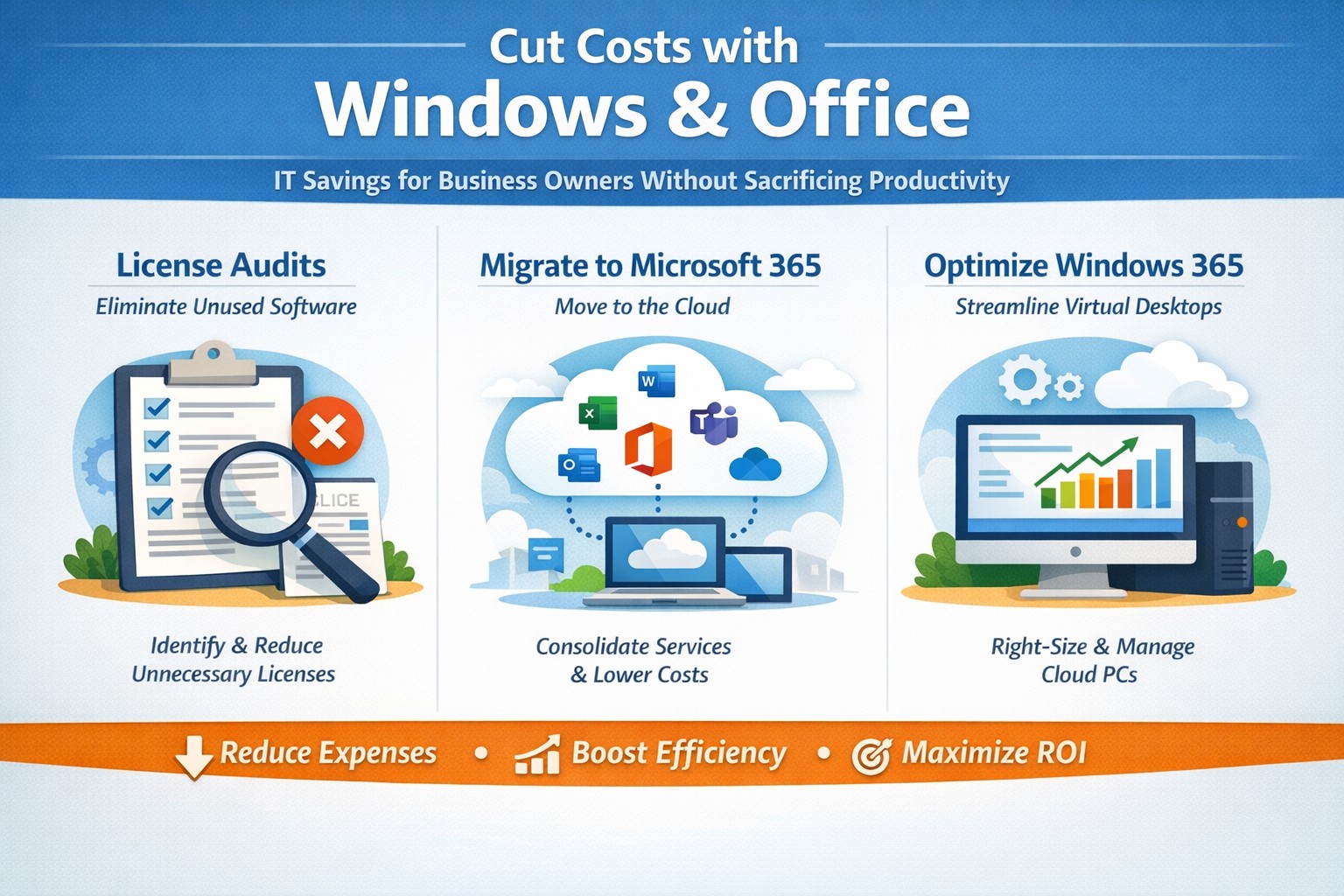
Visual guide: Slash IT expenses 30-50% using Windows 365 Cloud PCs and Microsoft 365 subscriptions—perfect for accounting, healthcare, and charity sectors
Rising operational expenses challenge every business owner. Switching to optimized Windows and Microsoft 365 setups can cut software and IT costs by up to 50% through subscriptions and cloud efficiency, targeting accounting, healthcare, and charity sectors with scalable tools.
Practical Action Steps
Business owners and IT teams can implement these steps to reduce costs immediately.
Audit Current Licenses: Review perpetual licenses for Windows and Office; compare against Microsoft 365 per-user subscriptions starting at $6/month, eliminating upfront hardware investments.
Migrate to Microsoft 365: Shift to cloud-based plans for automatic updates, remote access, and pay-per-active-user models—ideal for fluctuating staff in charities or seasonal healthcare billing.
Optimize Windows Deployment: Use Windows 365 Cloud PCs for virtual desktops, rightsizing resources to avoid overprovisioning; shut down unused instances overnight to save 30-40% on compute costs.
Enable Hybrid Work Features: Leverage built-in Teams and OneDrive to downsize office space, cutting utilities and infrastructure by supporting remote accounting audits or charity fundraisers.
Consolidate Tools: Replace third-party antivirus and email security with Microsoft Defender and Exchange Online Protection, streamlining to one predictable bill.
IT departments should pilot with 10 users, monitor via Microsoft Cost Management tools, then scale enterprise-wide.
FAQs for Business Owners
How much can we save switching from perpetual Office licenses? Subscriptions replace $400+ one-time buys with $72/user/year, plus no server maintenance—many SMBs report 20-70% IT savings reinvested in growth.
Is Microsoft 365 secure for healthcare or charity data? Yes, it meets HIPAA and nonprofit compliance with enterprise-grade encryption, zero-trust access, and automatic threat detection, reducing breach-related costs.
What about Windows 365 for non-technical staff? Cloud PCs deliver full desktops via browser, auto-scaling for accountants during tax season or charity events, with admin controls to minimize support tickets.
Can we avoid vendor lock-in? Flexible plans allow easy scaling or export; start with Business Premium for integrated Windows/Office at low entry cost.
How do we handle legacy apps? Windows 365 supports app streaming and compatibility modes, ensuring smooth transitions without rework.
How Farmhouse Networking Helps
Farmhouse Networking specializes in B2B IT for accounting firms streamlining client invoicing, healthcare practices managing patient records, and charities maximizing donor outreach. We conduct free cost audits to identify savings, then deploy customized Microsoft migrations—handling licensing, training, and 24/7 monitoring.
Our team optimizes Windows 365 for peak loads (e.g., year-end accounting) and integrates Office for seamless collaboration, often achieving 40%+ reductions in first year. With expertise in SEO-driven websites and lead-gen strategies, we also boost your online presence to attract clients while cutting internal costs.
Call to Action
Ready to reduce Windows and Office costs? Email support@farmhousenetworking.com for a no-obligation audit and personalized strategy to improve your business today.
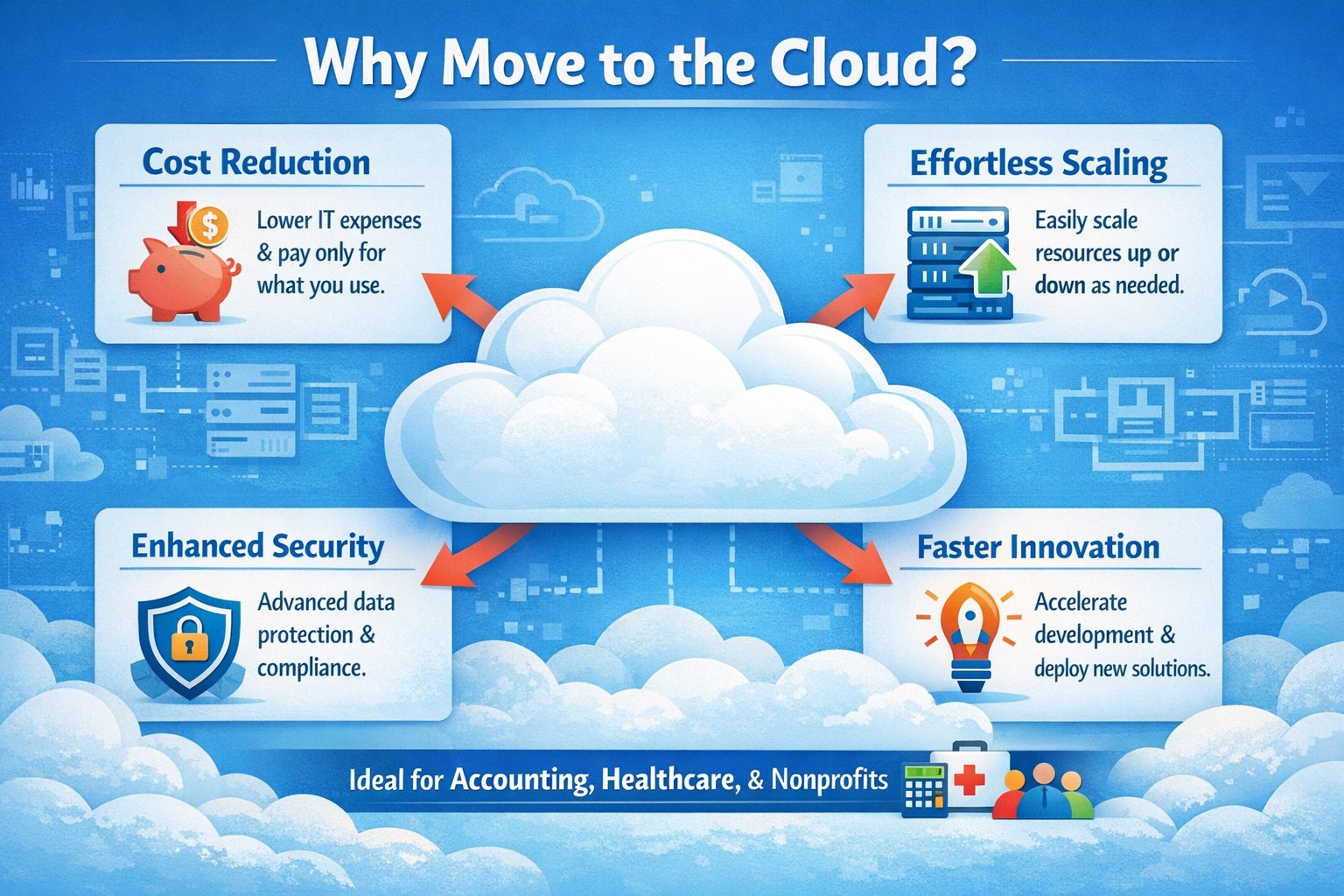
Business owner reviewing 4 reasons to move to cloud migration on laptop for cost savings and scalability
You’re constantly balancing growth ambitions with tight budgets and operational hurdles. Moving to the cloud isn’t just a tech upgrade—it’s a strategic pivot that cuts costs, boosts agility, and future-proofs your operations, as seen in widespread adoption by organizations prioritizing speed and innovation.
Reason 1: Slash IT Costs Dramatically
Cloud eliminates hefty upfront hardware investments and ongoing maintenance, shifting to a pay-as-you-use model. Businesses save on data center overhead like electricity and staffing, with many reporting lower total IT spend post-migration. For accounting firms handling sensitive financials or healthcare providers managing patient records, this means predictable budgeting without overprovisioning servers.
Reason 2: Scale Effortlessly with Demand
Traditional servers lock you into fixed capacity, but cloud auto-scales resources instantly during peaks—like tax season for accountants or patient surges in healthcare. This flexibility supports remote teams and global reach without downtime, enhancing reliability through built-in failover. Charities scaling donation drives benefit too, handling traffic spikes cost-effectively.
Reason 3: Strengthen Security and Compliance
Modern clouds offer enterprise-grade security surpassing most on-premises setups, with automated updates, encryption, and compliance tools for HIPAA or nonprofit regulations. Providers manage patches and backups, reducing breach risks that plague outdated systems. Your IT team focuses on business logic, not constant vulnerability scans.
Reason 4: Accelerate Innovation and Collaboration
Cloud unlocks AI, analytics, and real-time collaboration tools, speeding product launches and remote work. Teams access data from anywhere, fostering efficiency without version control headaches. For B2B sectors like yours, this drives faster client service and competitive edges.
Practical Action Steps for Migration
Follow these steps to transition smoothly, involving your IT department:
Assess Inventory: Catalog apps, data, and dependencies; tag by cloud-fit (e.g., lift-and-shift email vs. refactor custom CRM).
Set Goals and Choose Provider: Align on cost savings or scalability; evaluate AWS, Azure, or Google Cloud for your industry (e.g., HIPAA-compliant for healthcare).
Build Landing Zone: Establish security baselines, networking, and policies before migration.
Migrate in Phases: Start with low-risk workloads; test hybrid setups to minimize disruption.
Train and Monitor: Roll out employee training; use dashboards for cost/performance tracking post-go-live.
FAQs: Client Inquiries Answered
How long does migration take? Phased approaches span weeks to months, depending on complexity—small businesses often complete in 4-8 weeks with planning.
What about data security during transition? Encrypt data in transit/rest; conduct risk audits and use provider tools for zero-downtime moves.
Will it disrupt operations? Minimal with pilots and weekends; hybrid models keep critical systems on-prem initially.
Is cloud cheaper long-term? Yes, for most—avoid CapEx, pay OpEx, and optimize via auto-scaling; ROI hits in 12-18 months.
Hybrid or full cloud? Hybrid suits regulated industries like healthcare for compliance; full cloud maximizes agility.
How Farmhouse Networking Supports Your Move
Farmhouse Networking specializes in tailored cloud migrations for accounting, healthcare, and charity clients. We handle assessments, secure setups, and optimizations—integrating SEO-driven websites with cloud backends for lead-gen boosts. Our team manages compliance (e.g., HIPAA), trains your staff, and monitors ROI, ensuring seamless B2B growth.
Farmhouse Networking has been looking into expanding the ways that we serve our customers. After having a major global Voice-over-IP provider reached out to us, taking a long look at their product offering, and looking at the current phone bills of a few of our clients – we have decided to resell their internet-based telephone services. So what does that mean for you:
Business Class Phones.
Our customers will get the option to purchase or lease VoIP phones from the top manufactures. These include options for wireless phones and cordless headsets.
Limitless Features.
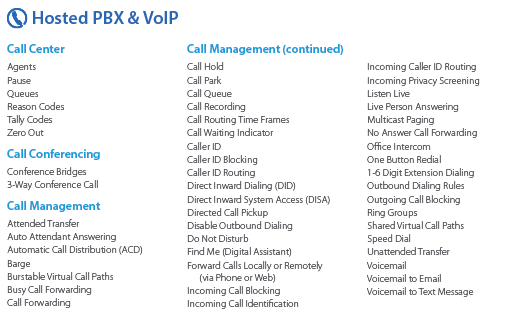
All the features that you have come to expect from quality telephone service are here in our new hosted system and we are also able to provide telephone service to your existing on-premise phone systems. There are also some other exciting features to keep business running like cellphone fail-over if the power ever goes out again.
Simple Pricing.
After reviewing several phone bills from the local internet and telephone providers, Farmhouse Networking has developed a simplified pricing structure with all the usual features a business needs. It is based on the number of phone lines with unlimited minutes within the United States.
Get Started Today.
All we need is a copy of your current phone bill to start seeing if we can save you a bunch of money too. Send one now!
And God will generously provide all you need. Then you will always have everything you need and plenty left over to share with others. As the Scriptures say,
“They share freely and give generously to the poor. Their good deeds will be remembered forever.”
For God is the one who provides seed for the farmer and then bread to eat. In the same way, he will provide and increase your resources and then produce a great harvest of generosity in you. - 2 Corinthians 9:8-10
We use cookies to ensure that we give you the best experience on our website. If you continue to use this site we will assume that you are happy with it.