Small business owners can use clear reporting and documentation systems to navigate 2026 charitable giving rules and maximize tax‑deductible donations.
If your business donates to local nonprofits, schools, or community projects, the 2026 charitable giving rules change how much of that generosity you can deduct. The mechanics are more complex, but with the right systems you can still give strategically and get the full benefit available.
What Changed for Small Businesses in 2026
Your corporation can now deduct charitable contributions only to the extent they exceed 1% of taxable income, and total deductible contributions are still capped at 10% of taxable income, with excess potentially carried forward up to five years.
As an individual owner, your personal deductions are subject to a 0.5% AGI floor, though cash gifts to qualifying public charities remain deductible up to 60% of AGI.
A new, permanent charitable deduction for non‑itemizers lets individuals deduct up to $1,000 (single) or $2,000 (joint) for qualifying gifts starting in 2026.
All of this sits on top of existing substantiation rules: written acknowledgments for gifts of $250 or more and additional requirements for non‑cash contributions.
Action Steps for Owners and IT Teams
For the business owner:
Revisit your giving strategy:
Identify how much you typically give each year and whether it clears the new 1% floor and stays within the 10% cap for corporate deductions.
Coordinate with your tax advisor:
Decide whether to increase or bunch certain donations into specific years so you actually realize the deductions you expect.
Clarify business vs. personal giving:
Separate corporate contributions from personal donations so both you and your company can plan around the new floors and limits.
For your IT or technical team:
Build a clear digital trail:
Implement structured storage for donation receipts and acknowledgments, linked to accounting entries and accessible for your CPA during tax season.
Standardize data and approvals:
Use simple forms or workflows where staff record donation details—amount, date, charity, purpose, and whether any benefits were received—before payments go out.
Security and retention:
Protect donor‑related and financial data with proper access controls and keep records long enough to support the five‑year carryforward window for excess contributions.
Questions Your Customers or Community Partners May Ask
“Is my company’s sponsorship of your event still tax‑deductible?”
It may be treated as a charitable contribution or as advertising/marketing depending on the benefits received; in either case, new floors and caps can affect the deduction.
“Does it still help me tax‑wise if I give small amounts?”
Smaller gifts may not exceed the new floors by themselves, which is why many taxpayers will see more benefit from fewer, larger, or more concentrated gifts.
“Why do you need to send such detailed receipts?”
The IRS requires specific elements in acknowledgments for gifts of $250 or more and for non‑cash donations, so detailed receipts protect both you and your donors.
How Farmhouse Networking Supports SMBs
Farmhouse Networking helps small and mid‑sized businesses turn charitable giving from an ad‑hoc expense into a well‑tracked, well‑documented, and strategically planned process. We integrate your accounting tools with secure document management, create simple digital forms for recording donations, and set up dashboards so you can see where you stand relative to the 1% floor and 10% cap.
We also support customer‑facing communication—website content, FAQs, and email updates—so your community partners understand that you are still committed to giving, and how the 2026 rules affect them.
Email support@farmhousenetworking.com to find out how Farmhouse Networking can help your business modernize its systems and make smarter, more strategic charitable giving decisions under the new 2026 regulations.
Stabilize SMB IT costs and eliminate downtime risks with proactive management
Surprise technology bills, emergency repairs, and the high expense of an in-house IT team create a constant strain on business budgets. For owners aiming to grow while staying in control of expenses, these unpredictable costs aren’t just an annoyance—they can derail plans, erode trust, and limit your business’s ability to invest in what really matters.
Why In-House IT Costs So Much
Maintaining your own IT staff is far more expensive than it first appears:
Salaries and Benefits: A modest in-house IT team for a 40-employee business can run upwards of $192,600 per year—about $402 per user per month. This includes wages for technicians, managers, and benefits that typically add 31% or more to the base salary.
Recruitment and Training: The average cost-per-hire for IT roles is about $4,700, not counting the 8 to 26 weeks of ramp-up time. Added to this are regular education costs needed to keep skills up to date in a rapidly changing tech landscape.
Overhead: Beyond staff, you’re paying for hardware, software licenses (ranging from $500–$18,000 monthly), space, insurance, PTO, and infrastructure.
Turnover: IT has one of the highest turnover rates in any industry. Every time someone leaves, you lose critical knowledge and must bear the cost of recruitment, onboarding, and lost productivity—sometimes as much as 200% of annual salary for that position.
Why Unpredictable IT Costs Threaten Your Business
Budget Surprises: Emergency fixes, one-time service charges, and unclear contracts can cause your monthly expenses to swing wildly, making it impossible to forecast cash flow or plan for the year ahead.
Productivity Losses: Downtime due to system failures not only costs thousands in lost business per hour but also damages your reputation and relationships.
Reactive Spending: Fixing problems as they arise is always more expensive than proactively maintaining equipment or systems. Without a predictable monthly IT plan, you’re forced to “rob Peter to pay Paul” when something inevitably breaks.
Take Action: Steps to Regain Control
Conduct an IT Audit: Know exactly what you’re spending, where, and why.
Distinguish Must-Haves: Separate essential services from legacy software or non-critical expenses.
Move to a Managed IT Model: Managed IT services typically cost just $125–$220 per user per month, offering budgeting clarity and reducing surprises.
Schedule Reviews: Revisit IT budgets quarterly and adjust for business changes early.
Consolidate Vendors: Limit the number of external suppliers so that responsibility is clear, and costs are contained.
How Farmhouse Networking Can Help
Farmhouse Networking partners with you to:
Uncover Hidden Savings: Our audits often find areas to cut unnecessary costs.
Flat-Rate Managed IT: We offer comprehensive support—including monitoring, proactive maintenance, cybersecurity, and strategy sessions—for one predictable monthly fee.
Quarterly Reviews and Strategic Planning: Stay ahead of risks and keep your IT spend aligned with your business goals.
Hands-Off Vendor Management: Eliminate redundant contracts and ensure every dollar spent delivers real value.
Ready to End Unpredictable IT Spending?
Take charge of your IT budget and redirect savings to initiatives that drive your business forward. Contact Farmhouse Networking to schedule your complimentary IT cost assessment.
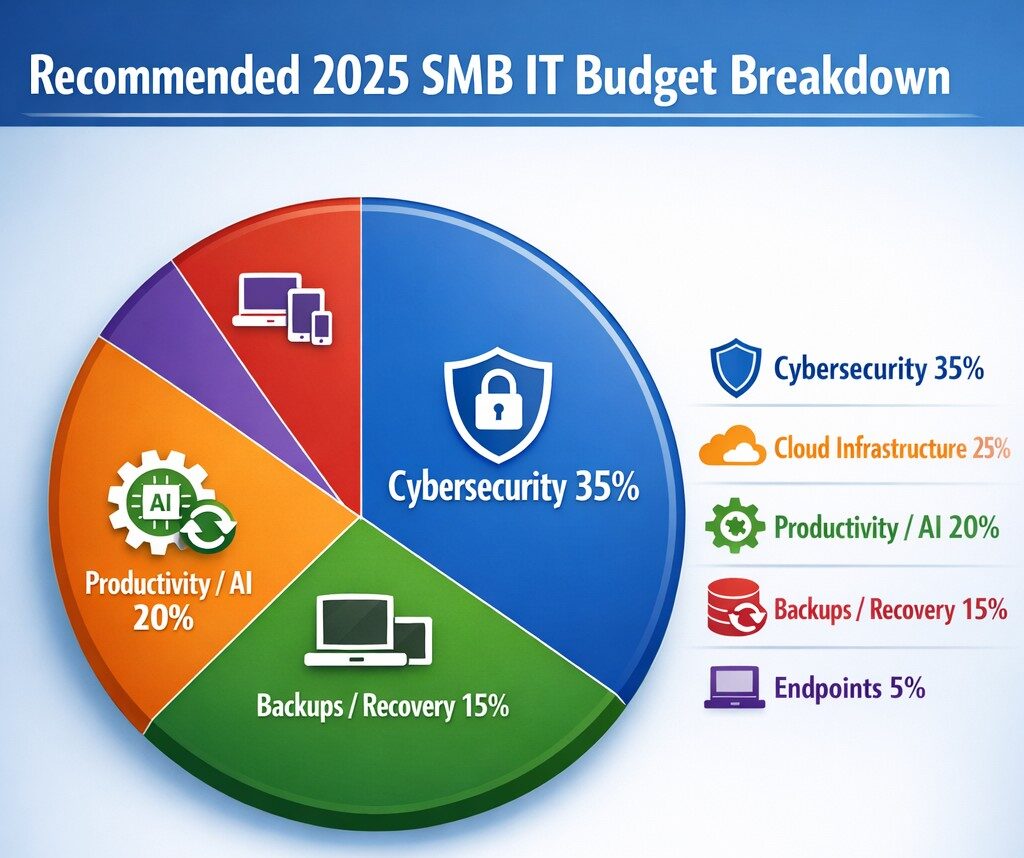
Allocate 30%+ of 2025 IT budget to cybersecurity per industry benchmarks.
Small and medium-sized businesses (SMBs) must strategically plan their IT budgets to stay competitive and efficient. It’s crucial to allocate resources wisely to support both day-to-day operations and long-term growth. Let’s explore the key areas SMBs should focus on when budgeting for tech in 2025.
Cybersecurity Investments
With no end to cyber threats in site, cybersecurity should be a top priority in your 2025 IT budget. Consider allocating funds for:
– Advanced firewalls and intrusion detection systems – Multi-factor authentication (MFA) implementation – Regular security audits and penetration testing
Remember, the cost of preventing a cyber attack is far less than the potential losses from a successful breach.
Artificial Intelligence and Automation
AI is no longer a luxury reserved for large enterprises. In 2025, SMBs should budget for AI-powered tools to enhance efficiency and decision-making. Consider investments in:
– Chatbots for customer support – AI-driven analytics for business insights – Automated workflow tools to streamline operations
These technologies can help SMBs do more with less, improving productivity and customer satisfaction.
Hardware and Device Upgrades
SMBs still need to budget for essential hardware. This includes:
– Laptops and desktops for employees – Mobile devices for remote work – Networking equipment for reliable connectivity
Plan for a hardware refresh cycle to ensure your team has up-to-date tools to work efficiently. (Remember we meet with our clients twice a year in the Spring and Fall to discuss budget and replacement scheduling.)
Software Licenses and Subscriptions
Software is the backbone of modern business operations. Your 2025 IT budget should account for:
– Operating system licenses (Windows 10 is no longer supported as of October 2025) – Productivity suite subscriptions (e.g., Microsoft 365, Google Workspace) – Industry-specific software licenses – Collaboration and communication tools
Regularly review your software subscriptions to ensure you’re only paying for what you need and use.
IT Support and Managed Services
Consider outsourcing some or all of your IT support to a managed service provider (MSP) like Farmhouse Networking to reduce in-house IT costs and gain access to specialized expertise. Budget for:
– Help desk support – Compliance assistance – Network monitoring and management – Backup and disaster recovery services
Employee Cybersecurity Training
Hackers keep getting better at their crimes, so should it is mandatory to invest in your team’s cybersecurity skills. Allocate budget for:
– Yearly assessments of baseline knowledge – Weekly trainings with quizzes to make sure they are paying attention – Interactive or gamified content to keep people interested
Investing in your team’s skills can lead to better technology adoption and improved productivity.
Ready to optimize your IT budget for 2025? Don’t navigate this complex landscape alone. Contact Farmhouse Networking today to help you create a tailored IT budget that aligns with your business goals and maximizes your technology investments. Our experts can guide you through the process, ensuring you’re prepared for the technological challenges and opportunities that lie ahead. Let’s work together to future-proof your business and drive success.
Regular IT budget discussions prevent cost overruns and align spending with business goals
Technology plays a crucial role in the success of businesses across all industries. From small startups to large corporations, having a well-planned and properly allocated IT budget is essential. In this article, we will explore the significance of IT budgeting and how it can drive success in your business.
Why IT Budgeting Matters
IT budgeting is more than just crunching numbers and allocating funds. It is a strategic process that helps you align your IT goals with your overall business objectives. By creating a well-defined IT budget, you can effectively plan and allocate resources to support your business operations and drive growth. Here are some key reasons why IT budgeting matters:Financial Planning and Control: Creating an IT budget allows you to have a clear understanding of your financial resources and how they will be utilized. It helps you identify the costs associated with your IT infrastructure, software licenses, hardware upgrades, and maintenance. With a well-planned budget, you can effectively manage your IT expenses, monitor costs, and make informed financial decisions.
Goal Setting and Performance Evaluation: An IT budget provides a roadmap for your business by setting realistic goals and targets. It allows you to define measurable objectives and track your progress towards achieving them. By regularly evaluating your actual expenses against the budgeted amounts, you can identify areas for improvement, make necessary adjustments, and ensure that your IT initiatives align with your business goals.
Resource Allocation and Prioritization: With a well-defined IT budget, you can allocate resources effectively and prioritize projects based on their strategic importance. It helps you identify areas where you need to invest more resources and areas where you can optimize costs. By aligning your IT budget with your business priorities, you can ensure that your resources are utilized efficiently and that your IT initiatives deliver maximum value.
Risk Management and Contingency Planning: IT budgeting allows you to anticipate potential risks and plan for contingencies. By conducting thorough risk assessments and scenario planning, you can identify potential threats to your IT infrastructure and develop strategies to mitigate them. This proactive approach helps you minimize downtime, ensure business continuity, and safeguard your critical data and systems.
Key Elements of an Effective IT Budget
Creating an effective IT budget requires careful consideration of various factors. Here are some key elements to consider when developing your IT budget:Understand Your Business Objectives: Before diving into the budgeting process, it is essential to have a clear understanding of your business objectives. Identify the key IT initiatives that will support your business goals and prioritize them accordingly. This will help you allocate resources effectively and ensure that your IT budget is aligned with your overall business strategy.
Assess Your Current IT Infrastructure: Conduct a comprehensive assessment of your existing IT infrastructure, including hardware, software, and network infrastructure. Identify any outdated or underutilized assets that may need to be replaced or retired. This will help you optimize your IT spending and ensure that your budget reflects the actual needs of your business.
Consider Future Growth and Scalability: When creating an IT budget, it is important to consider future growth and scalability. Anticipate the technology needs of your business in the coming years and allocate resources accordingly. This will help you avoid costly upgrades or replacements down the line and ensure that your IT infrastructure can support your business expansion.
Factor in Maintenance and Support Costs: In addition to the initial investment in hardware and software, it is crucial to factor in ongoing maintenance and support costs. Consider the costs associated with software licenses, equipment maintenance, and technical support. By including these expenses in your budget, you can ensure that you have the necessary resources to keep your IT infrastructure running smoothly.
Stay Up-to-Date with Industry Trends: The technology landscape is constantly evolving, and it is important to stay up-to-date with the latest industry trends. Consider emerging technologies that may impact your business operations and evaluate their potential benefits and costs. By incorporating innovative solutions into your IT budget, you can future-proof your business and stay ahead of the competition.
Involve Key Stakeholders: When developing your IT budget, it is crucial to involve key stakeholders from across your organization. Engage with department heads, IT managers, and finance professionals to gather insights and perspectives. This collaborative approach will help you gain buy-in for your budget, ensure that it meets the needs of different departments, and foster a sense of ownership and accountability.
The Impact of IT Budgeting on Business Operations
A well-planned and properly executed IT budget can have a significant impact on your business operations. Let’s explore some key areas where IT budgeting can drive success:Improved Cost Management: By creating an IT budget, you can effectively manage your IT expenses and optimize costs. It helps you identify areas where you can reduce spending, negotiate better contracts with vendors, and eliminate unnecessary expenses. This improved cost management allows you to free up resources for strategic investments and drive business growth.
Enhanced Decision-Making: An IT budget provides you with the necessary data and insights to make informed decisions. By tracking your actual expenses against the budgeted amounts, you can identify areas of overspending or underutilization. This information enables you to make timely adjustments, reallocate resources, and prioritize projects based on their impact on your business objectives.
Increased Operational Efficiency: By aligning your IT budget with your business objectives, you can streamline your operations and improve efficiency. It enables you to identify areas where you can automate processes, implement new technologies, and eliminate bottlenecks. This increased operational efficiency not only reduces costs but also enhances productivity and customer satisfaction.
Mitigated Risks and Improved Security: IT budgeting plays a crucial role in mitigating risks and ensuring the security of your IT infrastructure. By allocating resources for cybersecurity measures, backup and recovery systems, and disaster preparedness, you can minimize the impact of potential threats. This proactive approach helps you safeguard your critical data, protect your systems from cyber-attacks, and ensure business continuity.
Enhanced Employee Productivity: A well-planned IT budget can also enhance employee productivity and satisfaction. By investing in modern tools and technologies, you can provide your employees with the necessary resources to perform their jobs efficiently. This improved productivity not only drives business results but also fosters a positive work environment and helps attract and retain top talent.
Contact Farmhouse Networking to develop a complimentary, comprehensive IT budget and reap the benefits it can bring to your business.
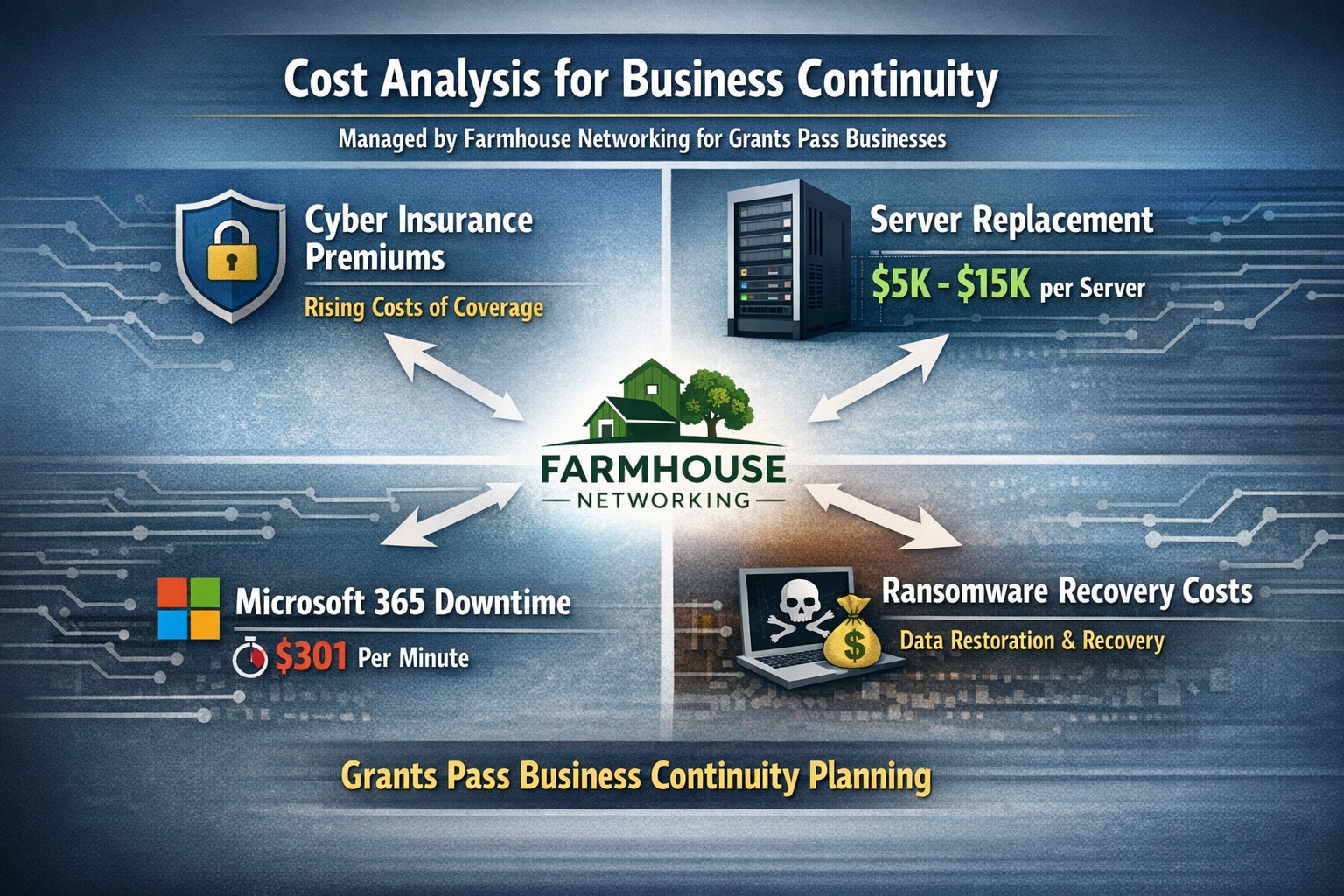
Farmhouse Networking calculates ransomware, server failure, and cyber insurance costs protecting Oregon SMB digital employees from downtime.
We were discussing the price customers paid for their monthly maintenance of computers and the comparison was brought up about insurance costs. As a business owner with employees, it is necessary these days to offer health insurance as part of their compensation package. If the company has vehicles that are used for business, then the government mandates that they be covered by minimum amounts of insurance. These costs are then built into the price the business owner then charges their clients for products or services.
Insurance Statistics:
According to Business.com, the average cost of health insurance for a single employee was $645 per month and $1,850 per month for a family.
According to NerdWallet.com, the average cost of car insurance was $179 per vehicle per month.
Questions:
So what about the “digital” employees of the company, aka the computers and network equipment that make business possible. How much are business owners paying to “insure” these assets? What are businesses willing to pay to make sure that their computers and network don’t have a sick day? Does the cost of insuring them include preventative care? Who does the business call in case of an accident or breakdown in the middle of the day? Does the cost of insuring include on-site service or transport to a service center?
If your company wants to keep their digital employees healthy and insure them from accidents, then contact us for assistance.
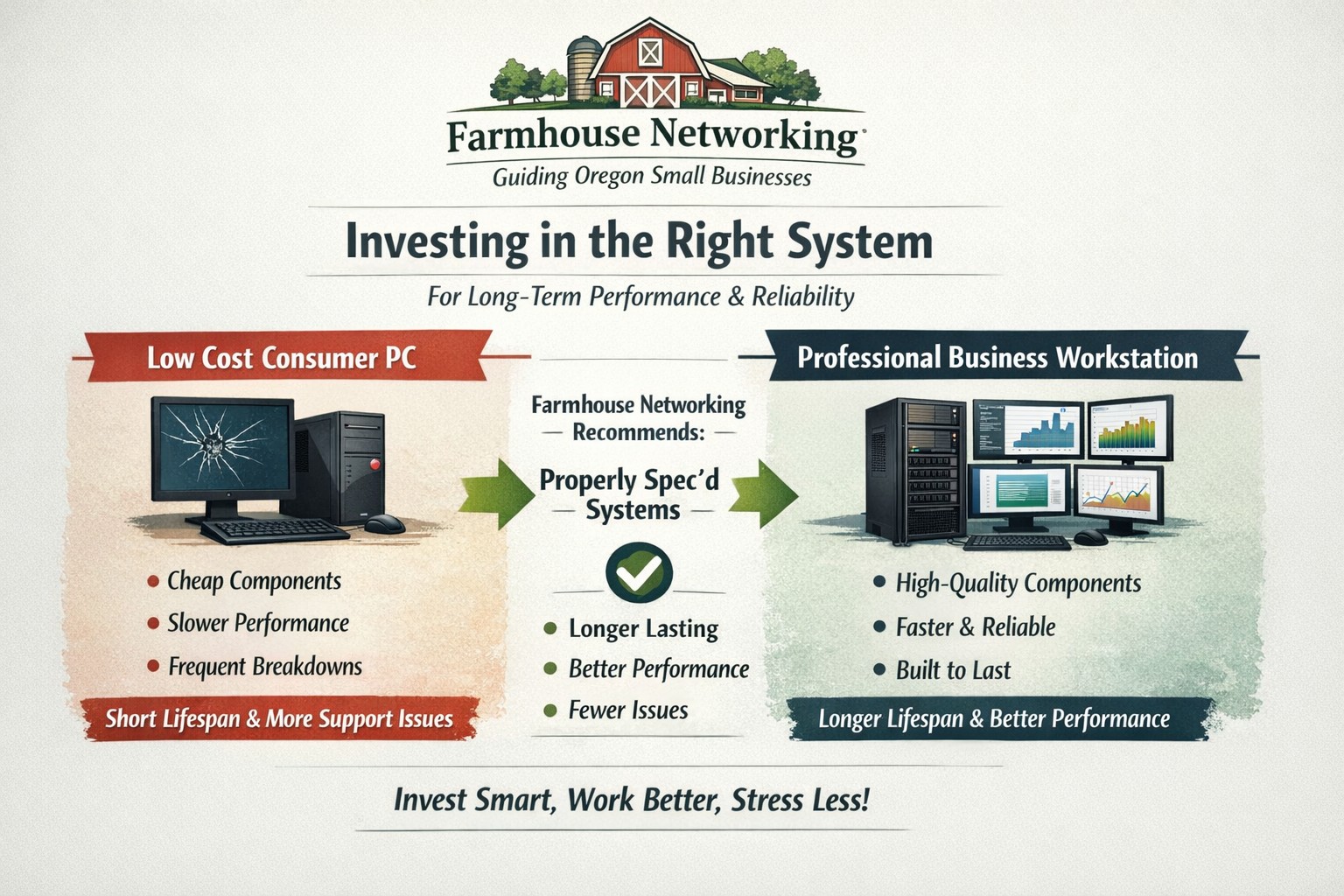
Farmhouse Networking helps small businesses choose new computers where price reflects long term reliability, performance, and lower total cost of ownership.
Based on some recent experiences and plenty of past experiences, we thought it would be good to help customers make good choices when shopping for new computers. The easiest and best way is to trust us to do the research and know your company’s computing needs enough to provide you with the best computer for the best price. However there are some that like the thrill of the hunt and want to find the best “deal” themselves. They try to save money via sales that we honestly cannot compete with on price. This newsletter is meant to help guide them to the best options for solid performance and longevity in their investment.
Shopping Guide
Big Box Stores (Staples, Walmart, Costco, Best Buy, etc.): Seeing the local adds, these retailers are often at the top of the list for many people when shopping for a computer. They offer the convenience of being able to physically touch the computer being purchased and not having to wait for the computer to be shipped from some other part of the country. The downside is that these retailers are selling a commodity product for the smallest cost possible to maximize their profits. This means they are willing to have computers made from the least expensive parts and lowest build quality. They also find ways of scrimping on important features and masking this deficiency with flashy claims on features or partnerships with celebrity endorsements. Don’t be fooled these are disposable computers that will not stand up to the demands of a business environment.
Online Discount Sellers (eBay, Amazon, Google. Overstock, etc.): Bargain hunters are getting savvier with online tools and searches for the products they want. This type of “retailer” works much like the big box store, but you have to trust the pictures you see online and wait for the product to arrive from across the country or globe. These online stores are often just marketplaces where smaller retailers post their products to gain greater visibility then they could on their own. They are also notorious for selling what appear to be quality computers that have been “refurbished” in-house. These refurbished computers are usually years old and are a Frankenstein monster of spare used parts from their shop. Much like buying a car from a used car lot, you get all the troubles of someone else’s computer with all the reliability of a computer that is past its prime held together with old parts.
What to look for in a new computer
Business Class: This is important because manufactures who have this distinction on their products take the time to make a quality computer with mid-range parts. These computers will have all the needed features and typically last much longer then the disposable computers from other stores. If you go directly to the manufacturers website, they will typically have a section labeled Business that you can look through the models they have given this distinction.
Processors: This is the capacity of the computer to crunch through data. There are two main companies that make these chips, Intel and AMD. Intel is what I recommend for the majority of business users (except for those who only do light office work). They currently are using a system of Generations and i-series distinctions. The Generations help determine the age of the processor with the latest being 12th-generation processors, so if you are looking at a computer with a 9th-generation processor it is likely 3 years old out of the box. The i-series consists of i3, i5, i7, and i9 which is a measure of the raw computing power that the processor contains. Our recommendation for businesses are i5 for general office work and i7 if you are a power user who does many things at once.
Memory: This is the short-term memory capacity of the computer, so the more you have the more you can accomplish at once. These chips also have designations of DDR technology and PC-speed rating. The DDR technology has slowly changed over time and they are now shipping DDR5 chips for top of the line gaming computers, but for typical office computers the DDR4 technology will be the best performance per dollar. As for the PC-speed rating, it will somewhat match the DDR number with the latest in the PC5-38400 range, but again the PC4 with the highest number possible next to it will be sufficient. General office work can be accomplished with 8GB of RAM, but 16GB is becoming the new norm. Those who want more performance will need to go to 32GB or higher.
Hard Drive: This is the long-term memory storage of the computer. There have been massive improvements in technology on these in the past few years and performance has jumped substantially. This is one of the ways that big box stores save money the most, they sell an old fashioned hard drive in a new computer and performance suffers greatly. The newest technology is called NVMe and any new computer should contain this kind of hard drive to see the best performance. If cost is prohibitive, then at least get the previous technology of an SSD installed in the computer.
Everything Else: The rest is mostly personal taste. If you want wireless, then get one with wireless in it with the latest being WiFi6 and some include Bluetooth connections too. If you want a large screen, touchscreen, fingerprint scanner, lightweight, certain specific ports for your devices, or whatever other features – these will be the finishing touches that help shape your final choice.
If your company is going to looking to buys new computer, then contact us to save yourself the time and money of getting a computer or worse the wrong computer.
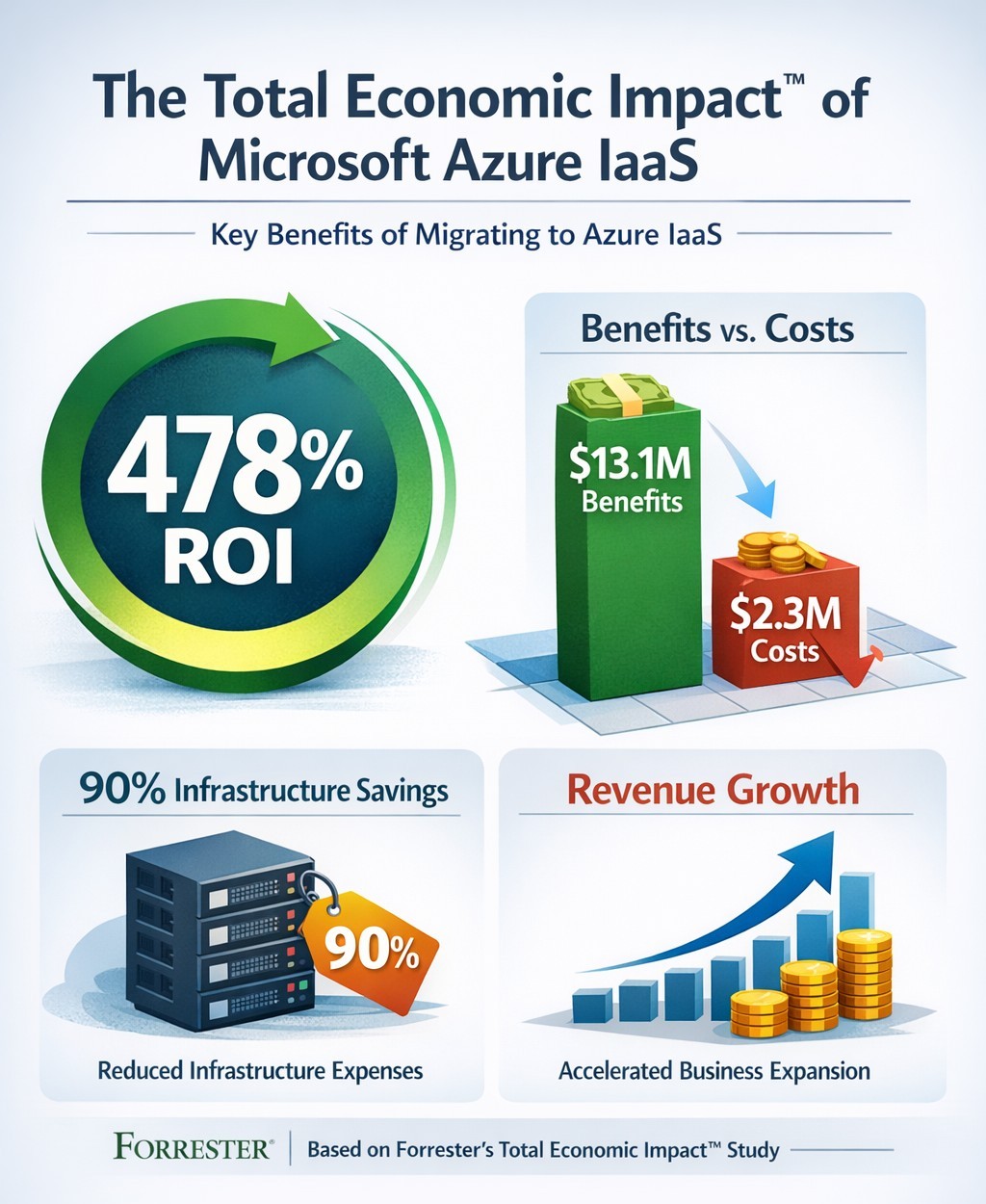
Forrester TEI study highlights 478% ROI over three years with Azure IaaS, including 90% data center cost savings and rapid payback
You’re constantly evaluating investments that deliver real ROI. Microsoft’s Azure Infrastructure as a Service (IaaS) promises massive cost savings and revenue growth, backed by Forrester’s Total Economic Impact™ study. This analysis of nine organizations shows a 478% ROI over three years, with $13.1 million in benefits versus $2.3 million in costs—payback in under three months.
Key Findings from Forrester TEI Study
The study models a composite organization with 20,000 employees and $4 billion revenue, mirroring mid-to-large enterprises. Core benefits include 90% reduction in on-premises infrastructure costs ($7.3 million avoided), plus IT labor savings totaling $10.3 million over three years. Revenue jumped via 83%-167% higher online B2C orders and 20%-27% larger order sizes, generating $2.8 million in net profit; new enterprise sales added $927,000.
Businesses cut data center footprints by migrating workloads—lift-and-shift for quick wins, refactoring for optimization. Global scalability handled traffic spikes, improving site performance in regions like China.
Practical Action Steps
Follow these steps with your IT team to replicate these gains:
Assess Current Infrastructure: Inventory on-premises servers, co-location costs, and workloads (e.g., SAP, dev/test). Calculate TCO using Azure Pricing Calculator—expect 90% data center savings.
Pilot Migration: Start with non-critical workloads like disaster recovery. Use Azure Migrate for discovery and lift-and-shift; test scalability during peaks.
Optimize and Scale: Refactor apps for Azure Virtual Machines. Implement auto-scaling and per-second billing to match demand, reducing waste.
Monitor Costs: Deploy Azure Cost Management for visibility; leverage reservations for 25%+ savings in Year 1.
Measure ROI: Track metrics quarterly—cost avoidance, revenue uplift, FTE repurposing (e.g., data center staff to business analysts).
FAQs: Client Inquiries Answered
What’s the typical ROI timeline? Payback under three months; full 478% ROI by Year 3 for the composite firm.
How much can we save on data centers? Up to 90% on infrastructure and labor by Year 3, avoiding $7.3 million.
Is Azure IaaS suitable for my industry? Yes—sporting goods, manufacturing, and multinationals saw gains in sales, dev/test, and global ops.
What are the upfront costs? Initial migration: $290,950 Year 1, rising to $454,609 by Year 3 with hires; total PV $2.3 million.
Any risks? Forrester risk-adjusted benefits 10% down, still netting $10.8 million.
How Farmhouse Networking Helps
Farmhouse Networking specializes in B2B cloud migrations for accounting, healthcare, and nonprofits. We handle full Azure IaaS assessments, migrations, and optimization—ensuring HIPAA/GDPR compliance for sensitive data. Our SEO-driven websites showcase client wins, like 83% order growth, to attract leads. We integrate branding, lead gen, and customer experience tools, turning Azure savings into growth.
Ready to cut costs and boost revenue? Email support@farmhousenetworking.com for a free TEI assessment tailored to your business.
What is the economic impact of switching from an on-premises SQL Server to Azure? Microsoft asked Forrester to find out. Four client interviews later, the results are in: See how you can save by switching to Azure!
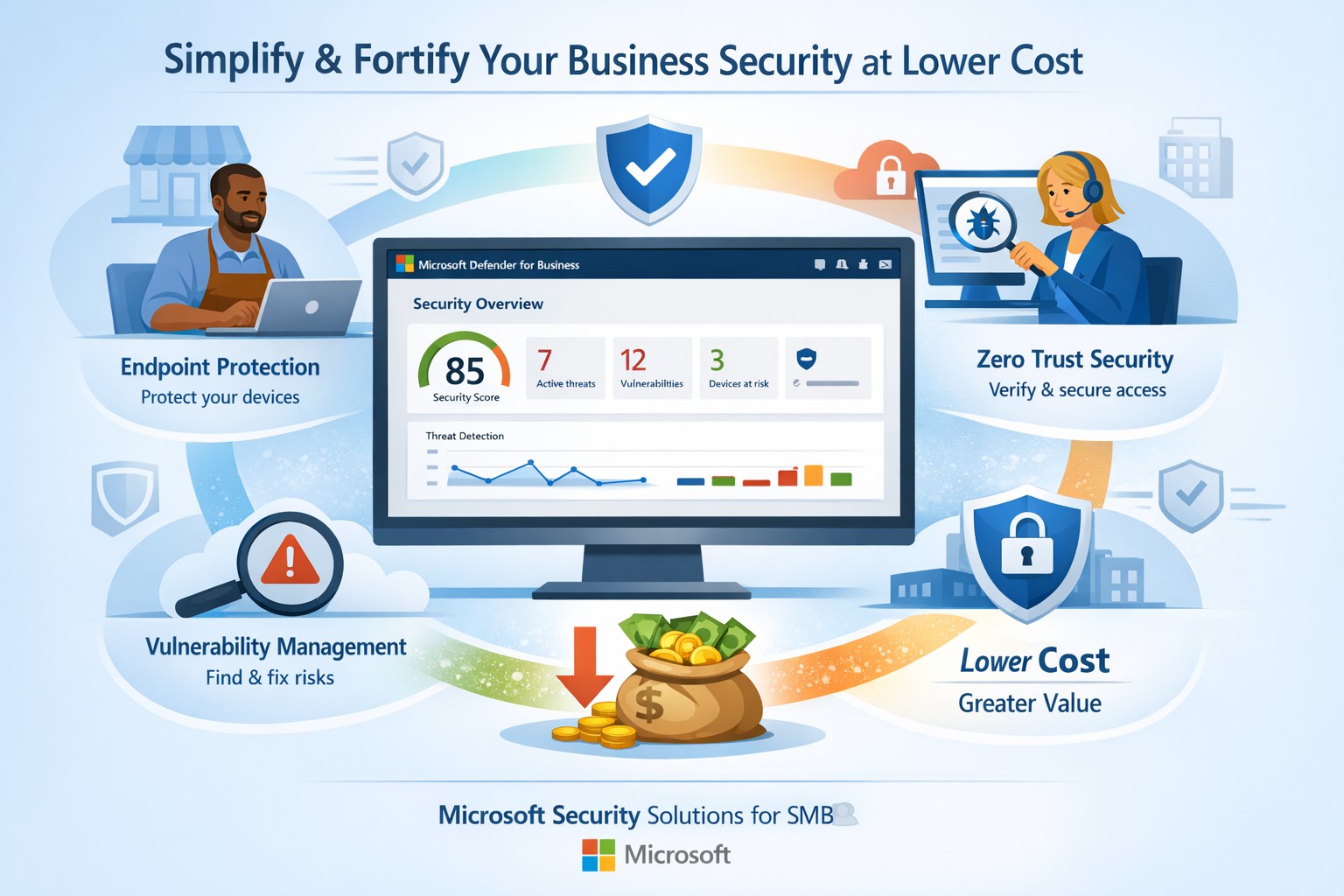
Fortify your SMB with Microsoft Defender for Business—enterprise-grade security at affordable prices via Microsoft 365.
Business owners face rising cyber threats but shrinking budgets for protection. Microsoft security solutions deliver enterprise-grade defenses at small-business prices, simplifying operations while fortifying your operations.
Why Microsoft Security Fits SMBs
Microsoft Defender for Business targets companies up to 300 employees, offering AI-driven endpoint protection across Windows, macOS, iOS, and Android. It includes next-gen antivirus, vulnerability management, and automated attack disruption—often bundled in Microsoft 365 Business Premium for cost efficiency. Combined with Purview suites, you get data loss prevention, insider risk detection, and compliance tools, reducing total ownership costs by consolidating vendors. This unified approach cuts complexity, with wizard-based onboarding and monthly reports that save IT time.
Action Steps for Implementation
Follow these steps with your IT team to deploy Microsoft security effectively:
Assess Current Risks: Use Microsoft Secure Score (free in Defender portal) to scan endpoints, identities, and apps for vulnerabilities—prioritize high-risk fixes first.
Select the Right Bundle: Start with Microsoft 365 Business Premium for Defender XDR, adding Defender for Business if needed (up to 5 devices/user). Enable multi-factor authentication via Entra ID Plan 1.
Onboard Devices: Run the wizard in the Microsoft Defender portal to deploy agents; test on a pilot group of 10-20 devices before full rollout.
Configure Policies: Set up Zero Trust basics—verify every access request, enable phishing simulations monthly, and automate data classification with Purview.
Monitor and Review: Schedule quarterly audits using built-in reports; integrate threat hunting for proactive response.
These steps typically take 2-4 weeks, yielding immediate ROI through reduced breach risks.
FAQs on Microsoft Security
How much does it cost compared to competitors? Microsoft bundles start under $10/user/month via Business Premium, far below standalone EDR tools (often $15-30/user). Consolidation avoids multi-vendor fees.
Is it scalable for growing businesses? Yes, Defender scales seamlessly to 300+ users with add-ons like server protection; no rip-and-replace needed.
What about training my team? Built-in simulations and reports require minimal training; AI automates 70%+ of responses, freeing staff.
Does it cover cloud apps and email? Fully—Defender includes SaaS security, phishing protection, and XDR across email, endpoints, and identities.
How secure is it against ransomware? AI-powered EDR disrupts attacks in real-time, with auto-remediation recovering systems quickly.
How Farmhouse Networking Assists
Farmhouse Networking specializes in Microsoft security deployments for accounting, healthcare, and charity sectors. We handle assessments, configurations, and ongoing managed detection—ensuring compliance (e.g., HIPAA for healthcare) without in-house expertise. Our team optimizes your setup for maximum ROI, conducts penetration tests, and provides 24/7 monitoring via Microsoft tools. Clients see 30-50% cost savings through streamlined licensing and automation. We’ve helped similar B2B firms fortify defenses while boosting productivity.
Ready to secure your business affordably? Email support@farmhousenetworking.com for a free security audit and custom Microsoft strategy.
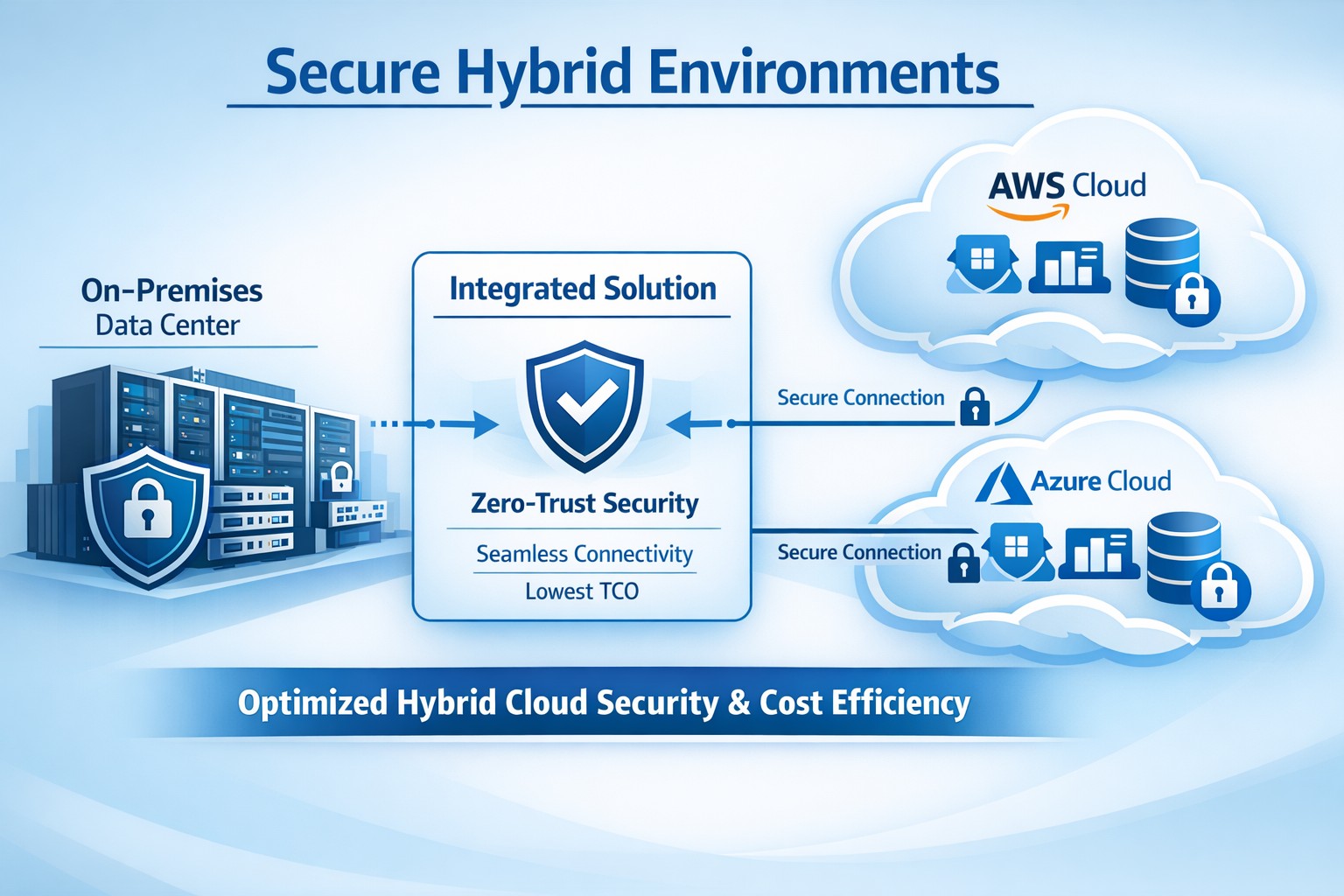
Integrated platform connecting on-prem and cloud for secure hybrid environments, minimizing TCO through automation and zero-trust security.
You’re dealing with rising IT costs while demanding ironclad security in hybrid setups—on-prem servers alongside AWS, Azure, or Google Cloud. Integrated solutions like IBM Hybrid Cloud Mesh or Cisco Secure Workload deliver secure hybrid environments at the lowest total cost of ownership (TCO) by automating connectivity, enforcing zero-trust security, and optimizing resources without vendor lock-in.
Why Integrated Solutions Cut TCO
Hybrid environments blend on-premises and cloud resources for flexibility, but silos breed inefficiency—manual configs spike ops costs by 30-70%, per industry benchmarks. Integrated platforms streamline this with application-centric networking: they auto-provision secure links based on app needs, slashing setup from days to minutes and avoiding over-provisioning.
Zero-trust models and end-to-end encryption are baked in, reducing third-party tool spends and compliance overhead. Real-world cases show 30% TCO drops via dynamic scaling and cross-cloud mobility, freeing budget for growth.
Action Steps for Implementation
Follow these steps with your IT team to deploy a secure hybrid setup minimizing TCO.
Assess Current Infrastructure: Inventory workloads, map on-prem/cloud dependencies, and calculate baseline TCO (hardware, labor, cloud bills). Use tools like AWS TCO Calculator for benchmarks—target 20-40% savings.
Select Integrated Platform: Choose solutions like Cisco Secure Workload for microsegmentation or IBM Hybrid Cloud Mesh for intent-driven connectivity. Prioritize plug-and-play integration to cut custom dev by 50%.
Pilot and Automate Connectivity: Deploy in a sandbox: define app policies, enable zero-trust, and automate provisioning. Monitor for 2-4 weeks, optimizing resource use to eliminate idle cloud spend.
Scale Securely with Monitoring: Roll out firm-wide, integrating DevOps/CloudOps workflows. Set alerts for anomalies; audit quarterly to maintain <5% over-provisioning.
Measure and Iterate: Track KPIs—provisioning time, downtime, TCO reduction. Adjust via platform dashboards for ongoing 15-30% savings.
FAQs from Business Owners
Q: What’s the real TCO impact? A: Integrated solutions reduce TCO 30-50% by automating ops, cutting manual errors, and enabling cost-optimized cloud choices without lock-in.
Q: How secure is hybrid without complexity? A: Zero-trust enforcement, workload visibility, and policy-based microsegmentation protect across environments, minimizing breach risks and extra security tools.
Q: Will this work for my industry (accounting/healthcare/charity)? A: Yes—compliance-ready for HIPAA/SOX, scalable for variable charity workloads, and cost-sensitive for accounting firms handling sensitive data.
Q: Migration downtime? A: Minimal—platforms support agentless deployment and phased rollout, with 70% faster configs than legacy setups.
Farmhouse Networking specializes in tailored hybrid environments for accounting, healthcare, and charity sectors, driving organic traffic and B2B leads via SEO-optimized strategies. We handle full implementation: infrastructure audits, platform selection (e.g., Cisco/IBM integrations), secure automation, and 24/7 monitoring.
Our clients see 25-40% TCO cuts plus enhanced security postures, with custom branding and lead-gen funnels converting visitors to long-term partners. We optimize for keywords like “secure hybrid environments lowest TCO” to boost your site’s rankings.
And God will generously provide all you need. Then you will always have everything you need and plenty left over to share with others. As the Scriptures say,
“They share freely and give generously to the poor. Their good deeds will be remembered forever.”
For God is the one who provides seed for the farmer and then bread to eat. In the same way, he will provide and increase your resources and then produce a great harvest of generosity in you. - 2 Corinthians 9:8-10
We use cookies to ensure that we give you the best experience on our website. If you continue to use this site we will assume that you are happy with it.