Streamlining Your Company’s Technology Infrastructure
Hyperconvergence consolidates servers, storage, and networking into scalable HCI infrastructure, streamlining small business IT operations.
Modern businesses rely heavily on their IT infrastructure to operate efficiently and effectively. As companies grow, they often accumulate a hodgepodge of hardware and software systems that were never designed to work together. This lack of integration can lead to inefficiencies, increased costs, and a lack of agility in responding to changing business needs. To address these challenges, many businesses are turning to IT consolidation as a solution.
Understanding IT Consolidation
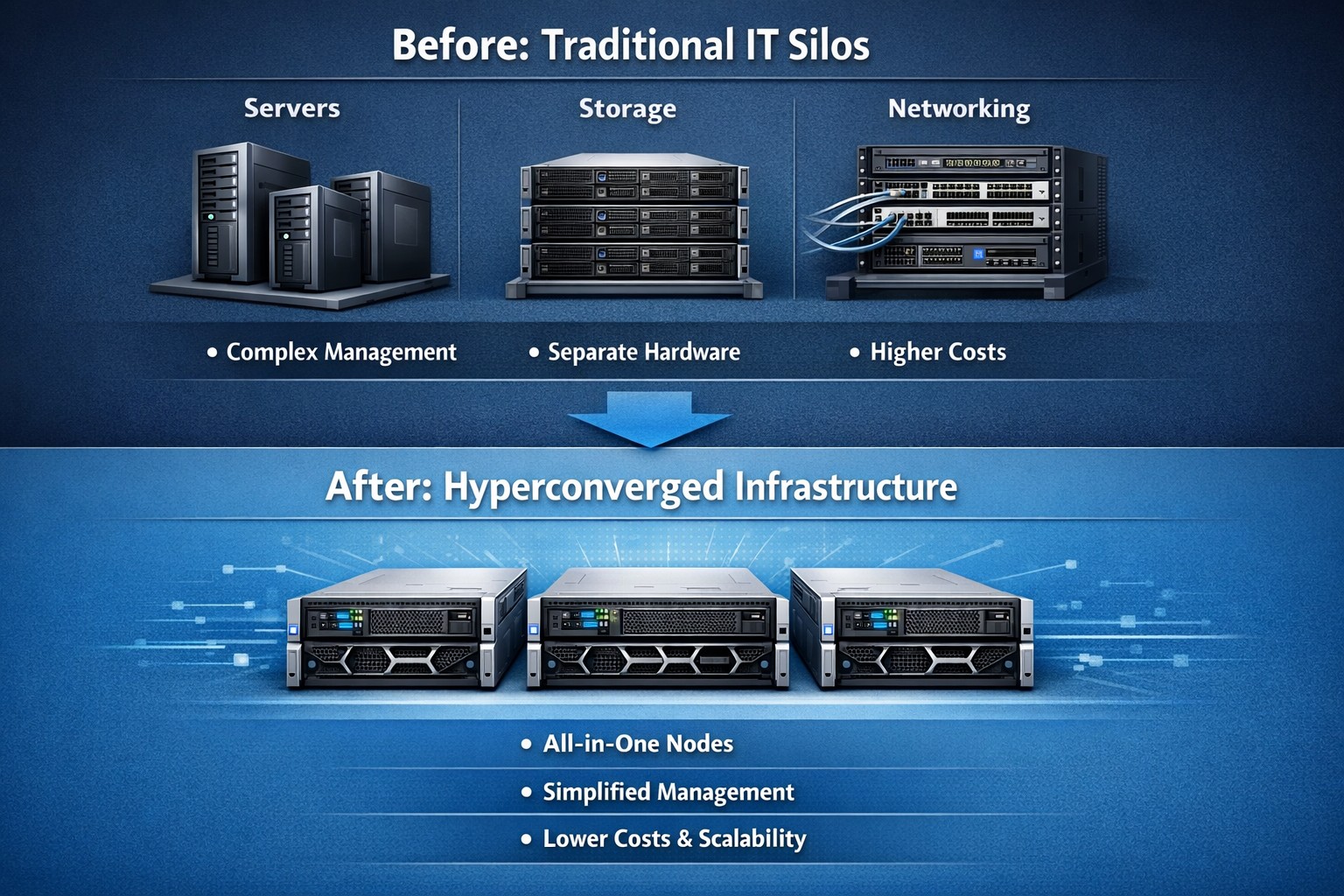
IT consolidation refers to the process of streamlining and centralizing a company’s technology infrastructure by combining multiple hardware and software systems into a cohesive and integrated environment. This consolidation can be done in various ways, such as merging separate hardware systems into a single platform or migrating to a hyperconverged infrastructure.
What is Hyperconvergence? Hyperconvergence is an emerging technology trend that combines storage, computing, and networking resources into a single, integrated system. It eliminates the need for separate hardware components and simplifies management. This approach offers several advantages, including increased efficiency, cost savings, improved business agility, and enhanced ability to support it.
The Benefits of IT Consolidation
Consolidating your technology infrastructure offers numerous benefits to businesses of all sizes. Let’s explore some of the key advantages:
Increased Efficiency: When businesses have multiple vendors for various technology services, resolving issues becomes a time-consuming and disjointed process. With consolidation, businesses can rely on a single managed service provider (MSP) who understands their entire system and can provide comprehensive support. This streamlines troubleshooting and reduces downtime, ultimately improving overall operational efficiency.
Cost Savings: Consolidating your technology with a single provider can also lead to significant cost savings. With a holistic view of your technology infrastructure, an MSP can identify redundancies, eliminate unnecessary services, and recommend more cost-effective solutions. Additionally, by bundling services under a single monthly fee, businesses can simplify their billing process and gain better visibility into their technology expenses.
Improved Business Agility: IT consolidation enables businesses to respond quickly to changing market conditions by simplifying processes and reducing the complexity of their technology environment. With a consolidated infrastructure, businesses can easily scale their operations, adopt new technologies, and implement changes without disruption.
Enhanced Support and Expertise: Working with an MSP for IT consolidation provides businesses with a supportive partner who understands their unique needs and goals. Unlike individual vendors who focus on selling their specific services, an MSP takes a holistic approach to ensure that all technology components work together seamlessly. They offer expert guidance, make better purchasing decisions, and provide ongoing support to optimize performance and security.
Implementing IT Consolidation
Implementing an IT consolidation strategy requires careful planning and execution. Here is a three-step process to guide you:
Step 1: Assess Your Technology Landscape: Before embarking on IT consolidation, it’s essential to assess your current technology landscape. Conduct a thorough audit of your hardware and software systems, identifying any gaps or redundancies. Consider your business needs and goals, as well as feedback from your employees and clients. This assessment will serve as a foundation for identifying areas where consolidation can bring the most significant benefits.
Step 2: Explore Hyperconvergence Solutions: As mentioned earlier, hyperconvergence is an increasingly popular approach to IT consolidation. Research and explore hyperconverged infrastructure solutions that align with your business requirements. Look for platforms that offer seamless integration of storage, computing, and networking resources while providing scalability, performance, and ease of management.
Step 3: Execute a Phased Consolidation Plan: To minimize disruption and ensure a smooth transition, it’s recommended to execute the consolidation plan in phases. Start by implementing the selected hyperconverged infrastructure platform alongside your existing systems. This allows for gradual adoption, training, and adjustment to the new technology. Once the new platform is fully integrated and employees are familiar with its features, you can begin eliminating redundant systems and optimizing your technology environment.
Let Farmhouse Networking evaluate your technology landscape, explore appropriate solutions, and execute a phased consolidation plan to streamline your company’s technology infrastructure and propel your business forward.
Regular IT budget discussions prevent cost overruns and align spending with business goals
Technology plays a crucial role in the success of businesses across all industries. From small startups to large corporations, having a well-planned and properly allocated IT budget is essential. In this article, we will explore the significance of IT budgeting and how it can drive success in your business.
Why IT Budgeting Matters
IT budgeting is more than just crunching numbers and allocating funds. It is a strategic process that helps you align your IT goals with your overall business objectives. By creating a well-defined IT budget, you can effectively plan and allocate resources to support your business operations and drive growth. Here are some key reasons why IT budgeting matters:Financial Planning and Control: Creating an IT budget allows you to have a clear understanding of your financial resources and how they will be utilized. It helps you identify the costs associated with your IT infrastructure, software licenses, hardware upgrades, and maintenance. With a well-planned budget, you can effectively manage your IT expenses, monitor costs, and make informed financial decisions.
Goal Setting and Performance Evaluation: An IT budget provides a roadmap for your business by setting realistic goals and targets. It allows you to define measurable objectives and track your progress towards achieving them. By regularly evaluating your actual expenses against the budgeted amounts, you can identify areas for improvement, make necessary adjustments, and ensure that your IT initiatives align with your business goals.
Resource Allocation and Prioritization: With a well-defined IT budget, you can allocate resources effectively and prioritize projects based on their strategic importance. It helps you identify areas where you need to invest more resources and areas where you can optimize costs. By aligning your IT budget with your business priorities, you can ensure that your resources are utilized efficiently and that your IT initiatives deliver maximum value.
Risk Management and Contingency Planning: IT budgeting allows you to anticipate potential risks and plan for contingencies. By conducting thorough risk assessments and scenario planning, you can identify potential threats to your IT infrastructure and develop strategies to mitigate them. This proactive approach helps you minimize downtime, ensure business continuity, and safeguard your critical data and systems.
Key Elements of an Effective IT Budget
Creating an effective IT budget requires careful consideration of various factors. Here are some key elements to consider when developing your IT budget:Understand Your Business Objectives: Before diving into the budgeting process, it is essential to have a clear understanding of your business objectives. Identify the key IT initiatives that will support your business goals and prioritize them accordingly. This will help you allocate resources effectively and ensure that your IT budget is aligned with your overall business strategy.
Assess Your Current IT Infrastructure: Conduct a comprehensive assessment of your existing IT infrastructure, including hardware, software, and network infrastructure. Identify any outdated or underutilized assets that may need to be replaced or retired. This will help you optimize your IT spending and ensure that your budget reflects the actual needs of your business.
Consider Future Growth and Scalability: When creating an IT budget, it is important to consider future growth and scalability. Anticipate the technology needs of your business in the coming years and allocate resources accordingly. This will help you avoid costly upgrades or replacements down the line and ensure that your IT infrastructure can support your business expansion.
Factor in Maintenance and Support Costs: In addition to the initial investment in hardware and software, it is crucial to factor in ongoing maintenance and support costs. Consider the costs associated with software licenses, equipment maintenance, and technical support. By including these expenses in your budget, you can ensure that you have the necessary resources to keep your IT infrastructure running smoothly.
Stay Up-to-Date with Industry Trends: The technology landscape is constantly evolving, and it is important to stay up-to-date with the latest industry trends. Consider emerging technologies that may impact your business operations and evaluate their potential benefits and costs. By incorporating innovative solutions into your IT budget, you can future-proof your business and stay ahead of the competition.
Involve Key Stakeholders: When developing your IT budget, it is crucial to involve key stakeholders from across your organization. Engage with department heads, IT managers, and finance professionals to gather insights and perspectives. This collaborative approach will help you gain buy-in for your budget, ensure that it meets the needs of different departments, and foster a sense of ownership and accountability.
The Impact of IT Budgeting on Business Operations
A well-planned and properly executed IT budget can have a significant impact on your business operations. Let’s explore some key areas where IT budgeting can drive success:Improved Cost Management: By creating an IT budget, you can effectively manage your IT expenses and optimize costs. It helps you identify areas where you can reduce spending, negotiate better contracts with vendors, and eliminate unnecessary expenses. This improved cost management allows you to free up resources for strategic investments and drive business growth.
Enhanced Decision-Making: An IT budget provides you with the necessary data and insights to make informed decisions. By tracking your actual expenses against the budgeted amounts, you can identify areas of overspending or underutilization. This information enables you to make timely adjustments, reallocate resources, and prioritize projects based on their impact on your business objectives.
Increased Operational Efficiency: By aligning your IT budget with your business objectives, you can streamline your operations and improve efficiency. It enables you to identify areas where you can automate processes, implement new technologies, and eliminate bottlenecks. This increased operational efficiency not only reduces costs but also enhances productivity and customer satisfaction.
Mitigated Risks and Improved Security: IT budgeting plays a crucial role in mitigating risks and ensuring the security of your IT infrastructure. By allocating resources for cybersecurity measures, backup and recovery systems, and disaster preparedness, you can minimize the impact of potential threats. This proactive approach helps you safeguard your critical data, protect your systems from cyber-attacks, and ensure business continuity.
Enhanced Employee Productivity: A well-planned IT budget can also enhance employee productivity and satisfaction. By investing in modern tools and technologies, you can provide your employees with the necessary resources to perform their jobs efficiently. This improved productivity not only drives business results but also fosters a positive work environment and helps attract and retain top talent.
Contact Farmhouse Networking to develop a complimentary, comprehensive IT budget and reap the benefits it can bring to your business.
Microsoft 365 Copilot delivers AI-powered productivity across Word, Excel, Teams, and Outlook for small business efficiency.
Microsoft has recently unveiled a groundbreaking addition to its suite of Microsoft 365 apps and services – the AI-powered Copilot. This innovative tool is designed to assist users in generating documents, emails, presentations, and more, revolutionizing the way people work and interact with technology.
The Evolution of Copilot
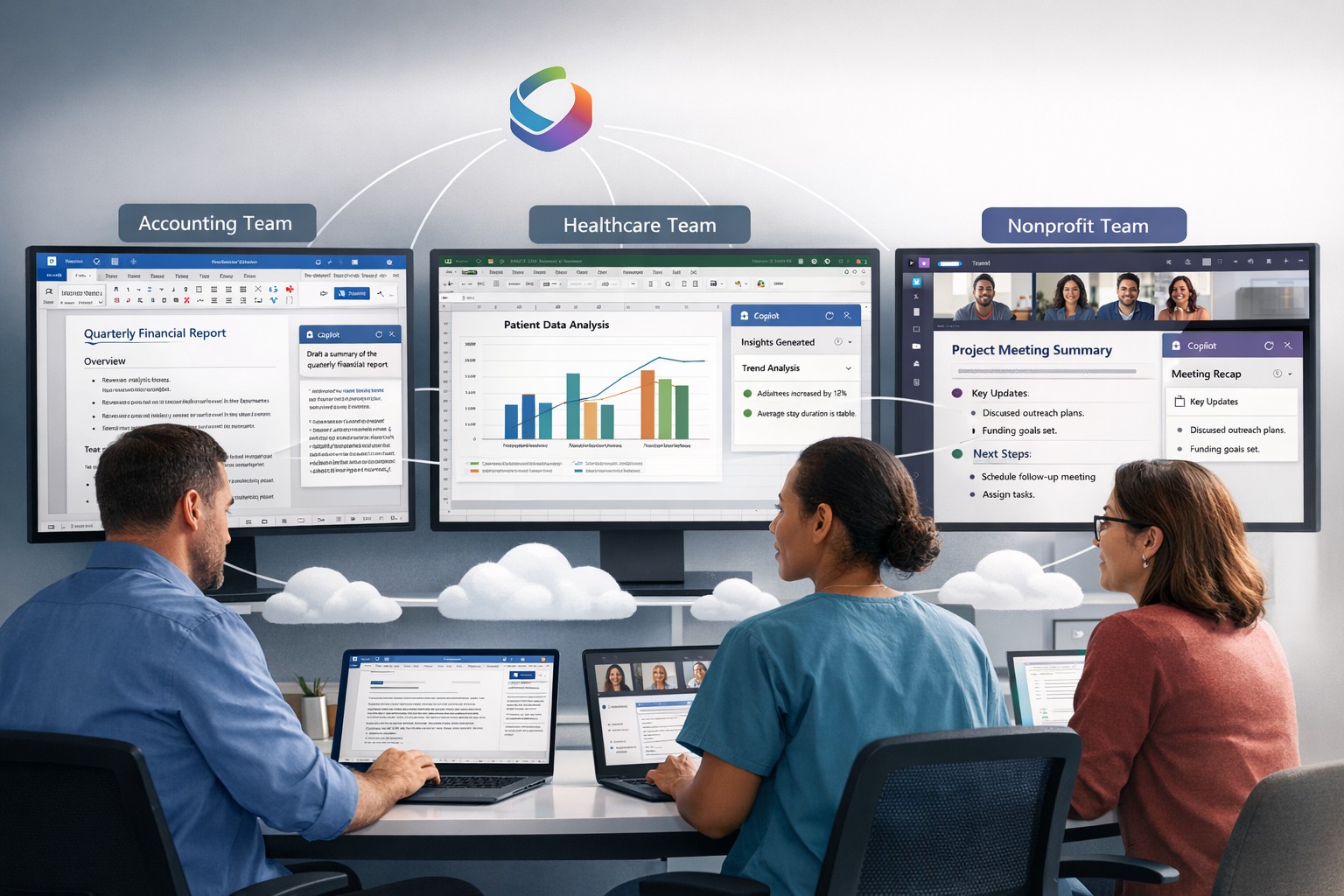
Copilot, powered by GPT-4 from OpenAI, functions as an AI assistant embedded within Microsoft 365 apps such as Word, Excel, PowerPoint, Outlook, and Teams. It takes on the role of a chatbot, appearing in the sidebar, and can be summoned by users to perform a wide range of tasks. Whether it’s generating text in documents, creating presentations based on Word files, or providing assistance with Excel features like PivotTables, Copilot is there to lend a helping hand.
Streamlining Workflows
One of the key advantages of Copilot is its ability to enhance productivity and streamline workflows. For instance, users can leverage Copilot’s capabilities to prepare for meetings by providing information on related projects, organizational changes, and updates on co-workers who may have returned from vacation. In Word, Copilot can draft documents based on other files, allowing users to freely edit and adapt the AI-generated text. Similarly, Copilot can instantly create SWOT analyses or PivotTables in Excel based on data, making complex tasks easier and more efficient. In Microsoft Teams, Copilot can even transcribe meetings and summarize action items, ensuring that no important information is missed.
The Power of Copilot in Outlook
Copilot also extends its functionality to Outlook, helping users save time and improve email management. It can summarize email threads, create draft responses, and even adapt the tone and length of an email based on user preferences. By automating these tasks, Copilot allows users to focus on more strategic and meaningful work, increasing overall productivity.
The Role of AI Ethics
While Copilot offers significant benefits, Microsoft acknowledges that it may not always be perfect. Jared Spataro, head of Microsoft 365, emphasizes that Copilot might occasionally provide suggestions that are not entirely accurate. However, he also highlights the value of these imperfect suggestions, as they can still provide users with a head start and spark creative ideas.
To address concerns around the accuracy and ethical implications of AI, Microsoft emphasizes transparency and user control. They make it clear how the system makes decisions, provide links to sources, and prompt users to review and fact-check content based on their subject-matter expertise. Microsoft is committed to learning and improving Copilot based on user feedback and scaling the AI tool responsibly.
Copilot’s Integration and Pricing
Microsoft announced yesterday that it would be allowing all customers to purchase Copilot integration for Office 365 as long as you have one of the compatible licenses. The cost is $360 per user per year which equates to $30 per month – highly competitive with other AI services that will not directly integrate with Office 365 apps.
Considerations for Enterprises
While the potential value of Copilot in saving time and improving productivity is significant, organizations must also address potential risks. One concern is the potential for Copilot to provide inaccurate information, leading to what is known as “hallucinations.” Users should exercise caution and verify outputs from Copilot, supplementing its suggestions with human review and fact-checking.
Another critical consideration is data protection. Copilot’s ability to access a wide range of corporate data raises concerns about information oversharing and exposure of sensitive files. Organizations must ensure that proper data governance is in place, including robust permissions and access controls. Securing unstructured data and addressing potential data leaks are essential steps in mitigating risks associated with the deployment of Copilot.
Deployment and Adoption
While Copilot holds great promise, the deployment and adoption process for businesses will likely be gradual and cautious. Microsoft acknowledges the typical enterprise cycle times for adoption and ramp-up. The company expects a gradual growth in the adoption of Copilot, with around one-third of Microsoft 365 customers in the US expected to invest in Copilot within the first year. Businesses that choose to deploy Copilot are estimated to provide licenses to around 40% of their employees during this period.
Real-World Use Cases
During the early access program, several businesses, including Chevron, Goodyear, and General Motors, participated in trials of Copilot. These companies have already started reaping the benefits of the AI tool. Dentsu, a marketing firm, reported that the most common use case for Copilot was information summarization, particularly for Teams calls. Employees found value in Copilot’s ability to quickly pull information from various sources, saving time and improving efficiency.
The feedback from businesses involved in the early access program has been overwhelmingly positive, with employees experiencing increased productivity and more time for higher-level tasks. Different roles within organizations have found value in Copilot for various tasks, such as analysis in Excel or document drafting in Word. The versatility of Copilot makes it a valuable tool for a wide range of job functions and industries.
Microsoft’s AI-powered Copilot is set to revolutionize the way users interact with Microsoft 365 apps, providing enhanced productivity and streamlining workflows. As a trusted Microsoft Partner, Farmhouse Networking, can guide your company into adopting this game changing technology.
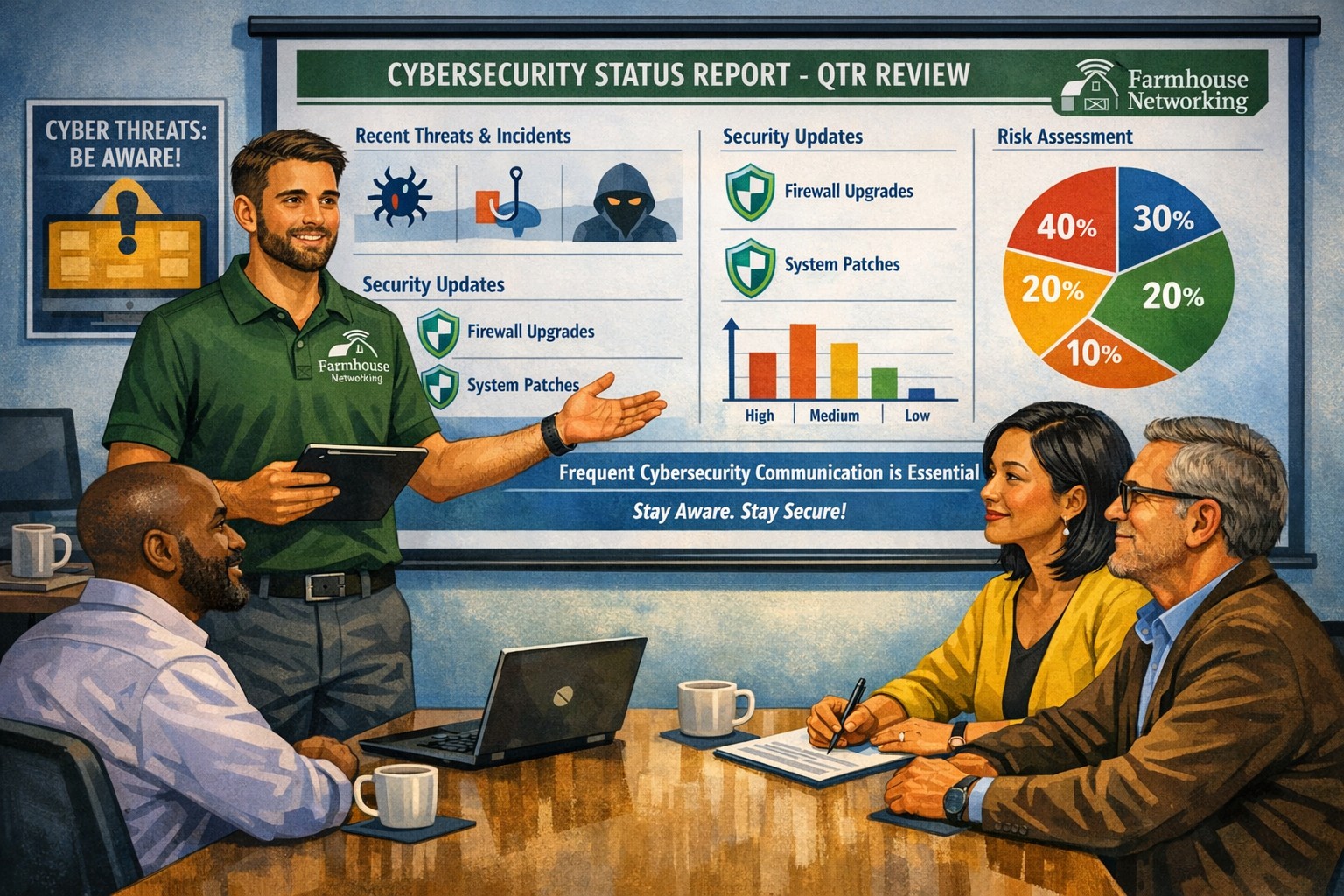
Business meeting between IT provider and client discussing cybersecurity threats and protection strategies
Cyber threats continue to evolve and become increasingly sophisticated, so the importance of robust cybersecurity measures cannot be overstated. Cybersecurity is a critical aspect of any company’s IT infrastructure, as it safeguards company / client data and ensures uninterrupted operations. However, one aspect that often gets overlooked is the proactive communication from IT providers about cybersecurity. This blog article aims to remind IT professionals and decision-makers of the significance of regular discussions with their IT providers regarding cybersecurity, and the potential risks they could be exposed to by neglecting this crucial dialogue.
Importance of Regular Cybersecurity Discussions:
Cybercriminals are continuously developing new attack vectors and exploring vulnerabilities in software, networks, and devices. Cybersecurity is not a one-time fix; it requires ongoing monitoring, updating, and adaptations to counter new threats.
Unfortunately, many organizations assume that by employing an IT provider to manage their systems, they are automatically protected against cyber threats. However, this assumption can lead to complacency, leaving vulnerabilities unaddressed. Regular conversations with your IT provider regarding cybersecurity ensure that your organization is consistently assessing and improving its defense against threats.
Addressing Emerging Threats:
Cybercriminals are constantly adapting their tactics, making it essential for IT providers to stay ahead by implementing proactive security measures. By engaging in frequent discussions, your IT provider can inform you about emerging threats and share strategies to mitigate risk. These discussions should cover topics such as:
Vulnerability Scanning / Penetration Testing: Testing your IT infrastructure to find the weak points is crucial to minimizing the available attack surface for a hacker and decreasing the impact of a breach. Reviewing these findings with your IT provider quarterly is vital to keeping your network safe.
Threat Detection: Standard antivirus software is no longer good enough to stop hackers. Talking with your IT provider about advanced threat detection software to make sure that both local and cloud resources are sufficiently protected from all kinds of attacks.
Patch Management: Ensuring that all software and systems are up-to-date with the latest security patches is crucial. Regular communication will allow your IT provider to inform you about critical patches or upgrades and discuss their implementation to keep your systems secure.
Employee Training: Cybersecurity is a collective effort, and employees play a vital role in maintaining a strong defense. Regular discussions about employee training will ensure that everyone in the organization is aware of best practices, such as identifying phishing emails or avoiding suspicious websites.
Data Backup and Recovery: Regular conversations with your IT company can help you establish and review comprehensive data backup and recovery strategies, minimizing the impact of potential cybersecurity incidents.
Incident Response Planning: In the unfortunate event of a cybersecurity incident, having a well-defined incident response plan is crucial. Meet with your IT provider at least annually to ensure that your plan is up to date, reflecting any changes in your IT infrastructure or evolving threat landscape.
When it comes to cybersecurity, communication is key. If your IT provider has not talked to you recently about cybersecurity, then it is time to call Farmhouse Networking. We are huge on communication and meet regularly with our clients to discuss 42 different IT related categories.
Project management software centralizes tasks, resources, and timelines to boost small business efficiency and team coordination.
Business owners need to ensure that company projects are completed on time, within budget, and meet both the company’s and clients’ expectations. Managing projects can be a complex task, but we now have project management software to help streamline the process. Here are some of the key benefits that project management software can provide to business owners:
Enhanced Efficiency and Productivity
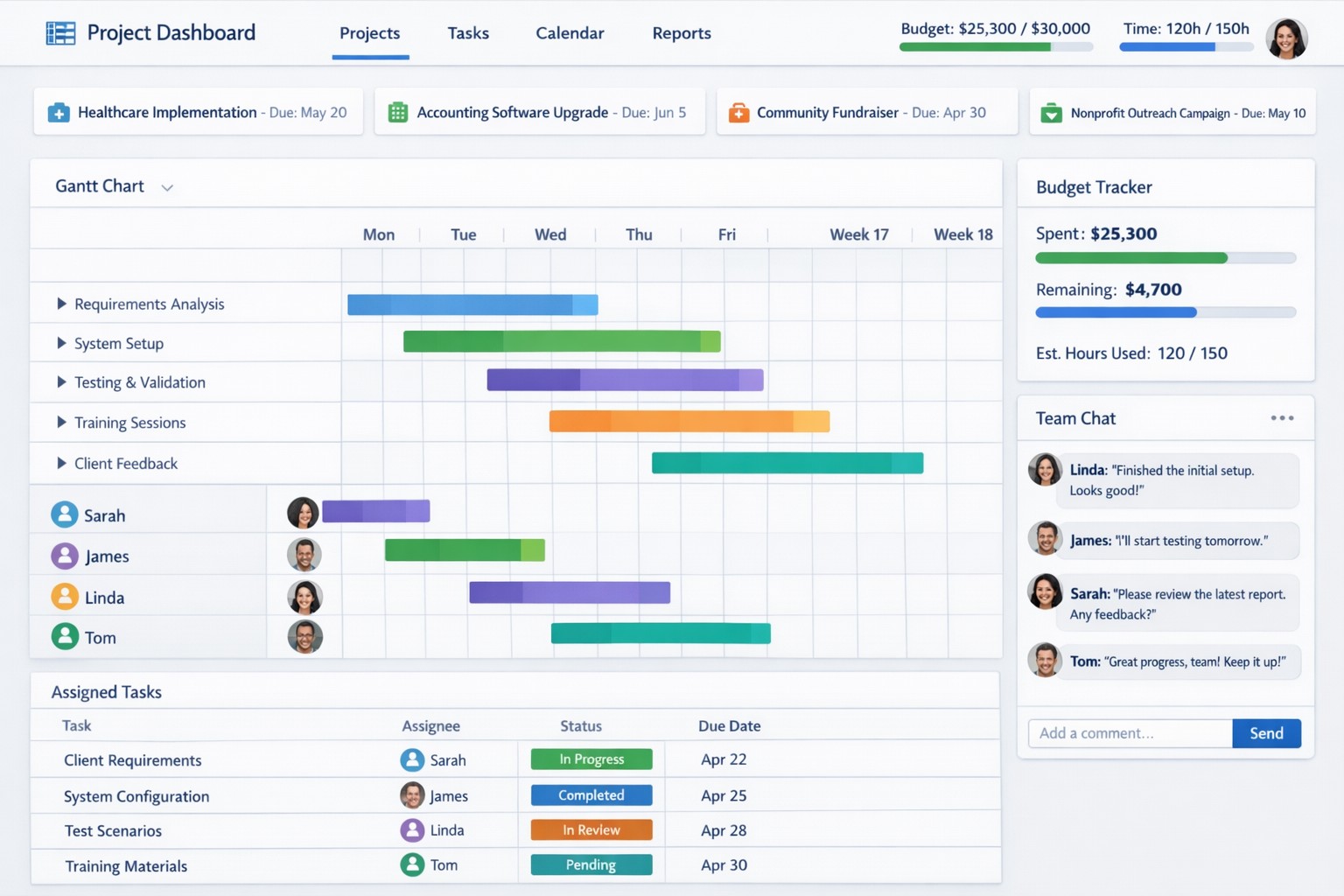
The most significant benefits of project management software is the enhanced efficiency and productivity it brings to businesses. With all project-related tasks, timelines, and resources centralized in one platform, team members can easily collaborate, track progress, and stay updated on the project’s status. This eliminates the need for lengthy email chains, spreadsheets, and physical documents, ultimately saving time and promoting productivity.
Improved Communication and Collaboration
Communication is the key to successful project management, and project management software facilitates effective communication and collaboration among team members. It enables real-time communication, file sharing, and discussion forums, ensuring that everyone is on the same page and can collaborate seamlessly. Additionally, centralized project information reduces miscommunication and the risk of important details being overlooked. Imagine any employee being able to answer the phone and let a client know what the latest status on the project is.
Effective Resource Allocation
Project management software provides a bird’s eye view of available resources and their allocation, enabling business owners to make informed decisions regarding resource utilization. Through this tool, business owners can ensure that resources are optimally distributed, preventing bottlenecks and maximizing productivity. Some even utilize AI to help optimize distribution of tasks based on rules.
Accurate Budgeting and Cost Control
Project management software allows you to set budget limits, track expenses, and monitor costs in real-time. This helps business owners identify any budget overruns or cost variances early on, allowing for timely adjustments and effective cost control. By having accurate budgeting and comprehensive financial insights, business owners can make informed decisions to keep projects financially on track.
Transparent Project Monitoring and Reporting
Project management software provides business owners with clear visibility into project progress, milestones, and potential roadblocks. It enables real-time monitoring of tasks, timelines, and deadlines, ensuring that projects stay on schedule. Moreover, these platforms generate automated reports that provide comprehensive insights on project performance and allow business owners to identify areas for improvement. This transparency and reporting capability are invaluable for making data-driven decisions and ensuring projects are delivered successfully.
Scalability and Flexibility
As businesses grow, so do their project requirements. Project management software offers scalability and flexibility to adapt to evolving business needs. Whether you’re handling small projects or large-scale initiatives, these tools can accommodate different project sizes and complexities. Additionally, customization options allow business owners to tailor the software’s features and functionalities to meet specific requirements, providing a personalized project management experience.
Don’t let inefficiencies hinder your business growth. Embrace project management software and experience the difference it can make. Get started now and see the positive impact it has on your projects and your bottom line!
Cloud + BYOD = massive IT savings and unlimited scalability
Businesses, regardless of their size, need to stay agile, cost-efficient, and scalable to remain competitive. Cloud computing and online storage have revolutionized the way companies operate and handle data. By migrating your business operations to the cloud, you can leverage its numerous benefits to reduce costs, enhance scalability, and ultimately drive greater success. In this article, we’ll explore valuable strategies for harnessing the power of cloud computing and online storage to optimize your business operations.
Cost Reduction:
Cloud computing offers a cost-effective solution for businesses of all sizes. Here’s how you can leverage cloud technology to reduce costs:
Infrastructure cost reduction: By switching to cloud-based infrastructure, you eliminate the need for physical servers, hardware, and costly private data centers. This not only reduces upfront capital expenditure but also eliminates ongoing hardware maintenance / replacement costs.
Pay-as-you-go pricing model: Cloud service providers offer flexible pricing options, allowing you to pay for only the resources you consume. This eliminates the need for adding excess just-in-case capacity, resulting in significant cost savings. You can even turn off some services so you are not paying while you sleep.
Energy efficiency: Cloud computing minimizes energy consumption related to IT hardware. Cloud providers are equipped with highly efficient systems that optimize resource utilization, resulting in reduced energy costs for your business and smaller carbon footprint on the planet.
Scalability and Flexibility:
Cloud computing enables businesses to scale their operations seamlessly. Here’s how you can harness this scalability to grow fast and stay ahead:
Elasticity: Cloud-based systems can automatically scale resource capacity up or down in response to fluctuating demands. This scalability ensures that you can handle traffic spikes, seasonal variations, or sudden growth without any disruption.
Multi-region availability: Cloud platforms offer the ability to deploy your resources across multiple geographic regions. This redundancy guarantees uninterrupted service availability, even if a specific region experiences an outage or disruption.
On-demand resource provisioning: Cloud infrastructure allows you to quickly provision additional resources as your business expands. This eliminates the need for long wait times to procure and set up physical hardware.
Enhanced Collaboration and Accessibility:
Cloud-based storage and collaboration tools can revolutionize the way your team works. Here’s how to leverage the cloud for improved collaboration:
Centralized data management: Cloud storage solutions enables sharing of documents, pictures, videos, and other files. This eliminates the need for version control issues and multiple physically stored copies, leading to increased overall productivity.
Remote and mobile access: Cloud computing allows employees to access critical data and applications remotely, promoting flexible work arrangements and enhancing productivity. This accessibility ensures that your team remains connected and productive, regardless of physical location – think work from home without the need for VPN.
Real-time collaboration: Cloud-based tools facilitate real-time collaboration, allowing team members to work simultaneously on projects. This boosts efficiency, accelerates decision-making processes, and reduces time-to-market for products and services.
Don’t wait – adopt cloud technology in your business operations and stay ahead of the competition. Contact us today to learn more!
And God will generously provide all you need. Then you will always have everything you need and plenty left over to share with others. As the Scriptures say,
“They share freely and give generously to the poor. Their good deeds will be remembered forever.”
For God is the one who provides seed for the farmer and then bread to eat. In the same way, he will provide and increase your resources and then produce a great harvest of generosity in you. - 2 Corinthians 9:8-10
We use cookies to ensure that we give you the best experience on our website. If you continue to use this site we will assume that you are happy with it.