Dark web stolen passwords Russian Market BreachForums accounting healthcare charity credentials
The Dark Web is a part of the internet that requires special software to access. Often used by individuals who are looking to conceal their identities and activities, it has become the ideal environment for cybercriminals seeking to carry out illicit activities. They can move anonymously in this part of the internet often engaging in criminal activities such as the sale of stolen data, hacking tools, illegal drugs, counterfeit documents, and even illicit services.
Why Should You Be Aware of It?
While the Dark Web may seem distant and irrelevant to your everyday business operations, it poses serious risks that can have far-reaching consequences. Here’s why you need to be aware of it:
Stolen Data Trade: The Dark Web serves as a marketplace for cybercriminals to sell stolen data, including usernames, passwords, financial information, and sensitive business data. By purchasing this data, hackers can launch targeted attacks against organizations like yours, leading to data breaches, financial loss, and reputational damage.
Credential Stuffing and Account Takeovers: Cybercriminals often utilize compromised login credentials from data breaches to carry out credential stuffing attacks. By leveraging automated tools, they attempt to gain unauthorized access to your business accounts. Once inside, they can exploit your resources, compromise customer data, and cause significant disruption.
Sale of Exploit Kits and Malware: The Dark Web provides a platform for the sale of malicious software, exploit kits, and hacking tools. These tools can empower cybercriminals to launch sophisticated attacks against your business, including ransomware, phishing campaigns, and network infiltration.
Insider Threats and Employee Monitoring: Employees with malicious intent may leverage the Dark Web to collaborate with external criminals or sell sensitive company information. Awareness of the Dark Web can help you implement appropriate security measures to detect and mitigate insider threats.
Reputational Damage: In the event of a data breach or cyberattack, information about your business may end up on the Dark Web. This can severely damage your reputation, erode customer trust, and lead to potential legal and financial repercussions.
What Can You Do? To protect your business from the risks associated with the Dark Web, we recommend the following actions:
Strengthen Your Security: Implement robust cybersecurity measures, such as multi-factor authentication, strong password policies, regular software updates, and network monitoring. Conduct security awareness training for your employees to educate them about the dangers of the Dark Web and how to identify potential threats.
Dark Web Monitoring: Engage with Farmhouse Networking to incorporate Dark Web monitoring solutions. These services scan the Dark Web for mentions of your business’s critical information and alert you if any compromised data is discovered.
Incident Response Planning: Develop an incident response plan that includes protocols for handling potential Dark Web-related incidents. This plan should outline steps for containing, investigating, and recovering from a data breach or cyberattack.
Regular Vulnerability Assessments: Perform periodic vulnerability assessments and penetration testing to identify and address potential weaknesses in your network infrastructure and applications.
The Dark Web is a part of the internet that requires special software to access. Often used by individuals who are looking to conceal their identities and activities, it has become the ideal environment for cybercriminals seeking to carry out illicit activities. They can move anonymously in this part of the internet often engaging in criminal activities such as the sale of stolen data, hacking tools, illegal drugs, counterfeit documents, and even illicit services.
Why Should You Be Aware of It?
While the Dark Web may seem distant and irrelevant to your everyday business operations, it poses serious risks that can have far-reaching consequences. Here’s why you need to be aware of it:
Stolen Data Trade: The Dark Web serves as a marketplace for cybercriminals to sell stolen data, including usernames, passwords, financial information, and sensitive business data. By purchasing this data, hackers can launch targeted attacks against organizations like yours, leading to data breaches, financial loss, and reputational damage.
Credential Stuffing and Account Takeovers: Cybercriminals often utilize compromised login credentials from data breaches to carry out credential stuffing attacks. By leveraging automated tools, they attempt to gain unauthorized access to your business accounts. Once inside, they can exploit your resources, compromise customer data, and cause significant disruption.
Sale of Exploit Kits and Malware: The Dark Web provides a platform for the sale of malicious software, exploit kits, and hacking tools. These tools can empower cybercriminals to launch sophisticated attacks against your business, including ransomware, phishing campaigns, and network infiltration.
Insider Threats and Employee Monitoring: Employees with malicious intent may leverage the Dark Web to collaborate with external criminals or sell sensitive company information. Awareness of the Dark Web can help you implement appropriate security measures to detect and mitigate insider threats.
Reputational Damage: In the event of a data breach or cyberattack, information about your business may end up on the Dark Web. This can severely damage your reputation, erode customer trust, and lead to potential legal and financial repercussions.
What Can You Do? To protect your business from the risks associated with the Dark Web, we recommend the following actions:
Strengthen Your Security: Implement robust cybersecurity measures, such as multi-factor authentication, strong password policies, regular software updates, and network monitoring. Conduct security awareness training for your employees to educate them about the dangers of the Dark Web and how to identify potential threats.
Dark Web Monitoring: Engage with Farmhouse Networking to incorporate Dark Web monitoring solutions. These services scan the Dark Web for mentions of your business’s critical information and alert you if any compromised data is discovered.
Incident Response Planning: Develop an incident response plan that includes protocols for handling potential Dark Web-related incidents. This plan should outline steps for containing, investigating, and recovering from a data breach or cyberattack.
Regular Vulnerability Assessments: Perform periodic vulnerability assessments and penetration testing to identify and address potential weaknesses in your network infrastructure and applications.
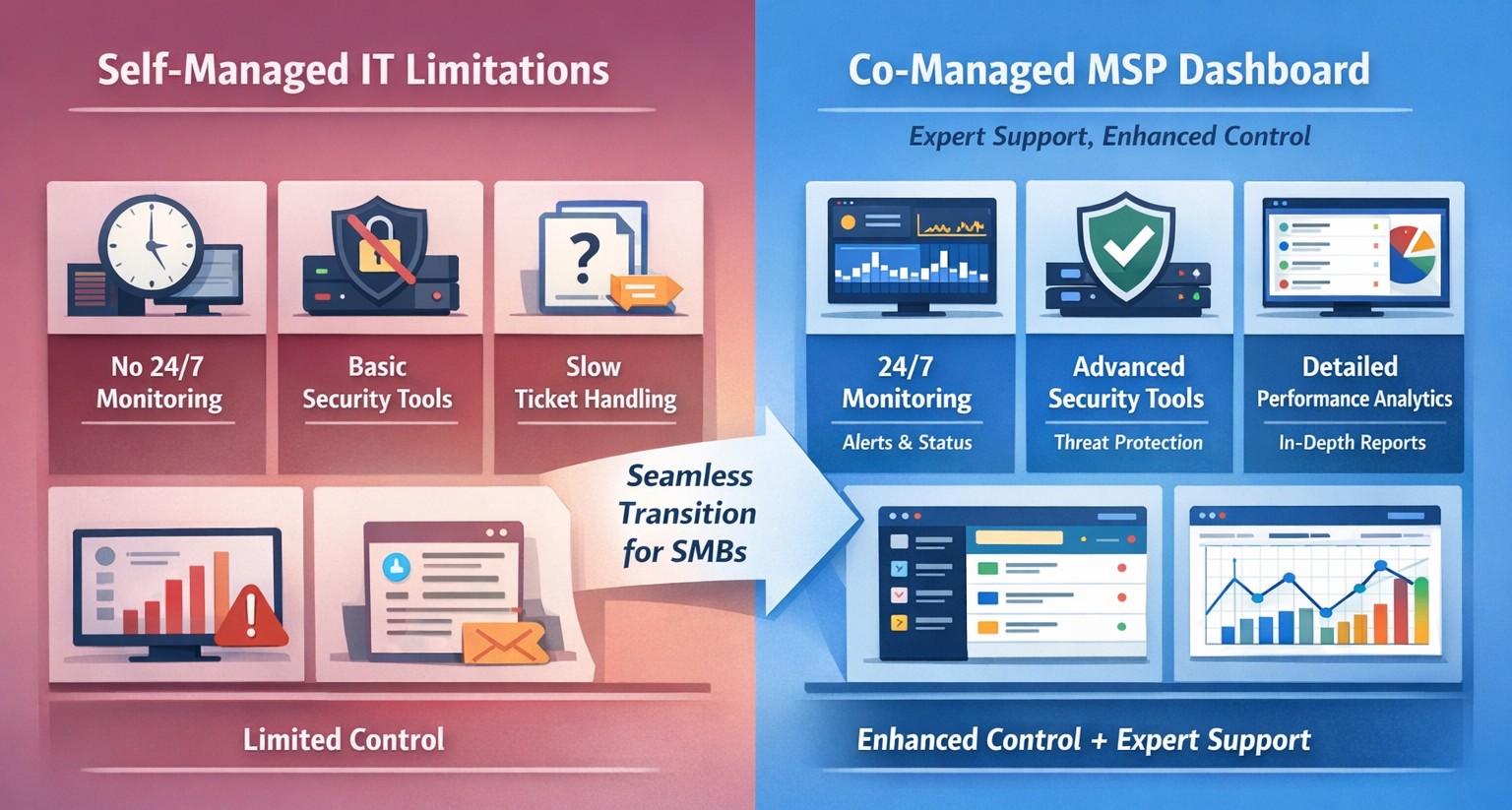
Co-managed IT dashboard with MSP monitoring supplementing internal team.
Managing IT can be a daunting task, especially for businesses that lack dedicated IT personnel or the expertise to handle today’s complex technology. In recent years, more and more organizations have recognized the benefits of outsourcing their IT management to Managed Service Providers (MSPs).
What is an MSP?
A Managed Service Provider, or MSP, is a company that offers a range of IT services to businesses. These services can include network monitoring, infrastructure management, data backup, cybersecurity, and more. By partnering with an MSP, businesses can offload their IT responsibilities to professionals with deep expertise and industry-best practices.
The Challenges of Self-Managed IT
Self-managing your IT can be a significant challenge. Here are some of the common pain points that organizations face:
Lack of Expertise: IT is a complex and ever-evolving field. Keeping up with the latest technologies, security threats, and best practices can be overwhelming, especially for businesses without dedicated IT staff.
Resource Constraints: Managing IT requires time, manpower, and financial resources. Small and medium-sized businesses often struggle to allocate these resources effectively, leading to inefficiencies, downtime, and security vulnerabilities.
Limited Scalability: Growing businesses often find it difficult to scale their IT infrastructure to meet increased demand. Self-managing your IT environment may require significant investments in hardware, software, and additional staff, which can strain budgets and hinder growth.
Cybersecurity Risks: Data breaches and cyber-attacks are on the rise. Without proper security measures in place, businesses face significant financial and reputational risks. Implementing and maintaining robust cybersecurity protocols can be challenging for organizations without the necessary expertise.
The Benefits of MSP-Managed IT
Switching to an MSP-managed IT environment offers several benefits:
Expertise and Support: MSPs have a team of experienced professionals who specialize in different aspects of IT management. They stay up-to-date with the latest industry trends and best practices, providing businesses with access to a breadth of knowledge and expertise.
Proactive Monitoring and Maintenance: MSPs utilize advanced tools and technologies to monitor your IT infrastructure 24/7. They identify potential issues before they become critical, minimizing downtime and ensuring smooth operations.
Scalability and Flexibility: MSPs provide scalable solutions tailored to your business needs. Whether you’re experiencing rapid growth or need to downsize, an MSP can quickly adapt your IT infrastructure to meet changing requirements without additional investments or resources.
Enhanced Security: MSPs employ robust security measures to protect your systems, networks, and data from cyber threats. They implement industry-standard security practices, conduct regular security audits, and ensure compliance with data protection regulations.
Cost Savings: By outsourcing IT management to an MSP, businesses can reduce the overhead costs associated with maintaining an in-house IT department. MSPs work on a subscription-based model, allowing organizations to pay for the services they need, when they need them.
Strategic Planning: MSPs can act as your virtual chief information officer providing project planning services that keep IT spend spread across the years to make the IT budget easier to manage.
Consider making the switch to an MSP today and unlock the benefits of professional IT management, contact us to get started.
This is the seventh in a series that document the Tier 3 / Co-Managed IT work we did to setup a wireless test bed for a Linux based scientific device. The testing environment included two different wireless network hardware types (Ubiquiti and Cisco). There was also a Synology device used for various purposes including hosting the Ubiquiti controller inside a Kubernetes container, providing certificate services, providing LDAP authentication, and providing RADIUS authentication. Each article will detail a separate piece of the project. This article shows the basic setup of Ubiquiti Controller for PSK and RADIUS authentication from wireless devices.
Setup Ubiquiti Wireless Network with PSK
Login to Ubiquiti controller previously created – Here
Click on Setting gear icon at bottom left
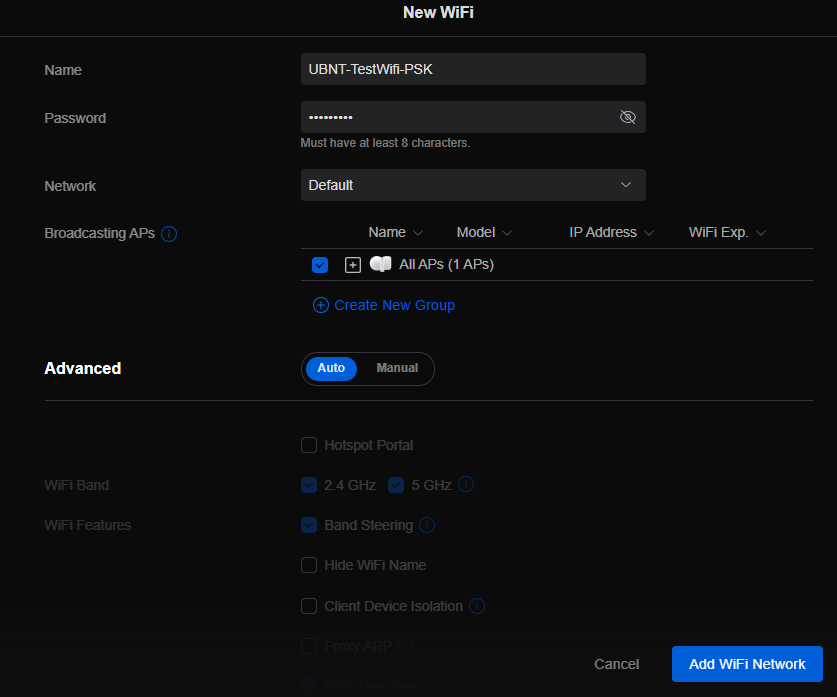
Make sure you are on Wifi tab and click Create New link
Set network BSSID
Create Password
Click Add Wifi Network button
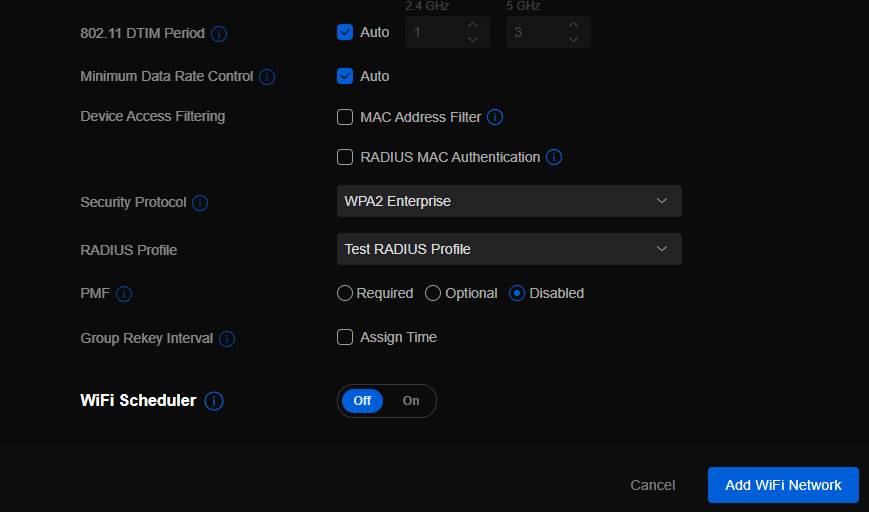
UniFi SSID advanced security settings with RADIUS profile and PPSK configuration.
Setup Ubiquiti Wireless Network with RADIUS
Login to Ubiquiti controller previously created – Here
Click on Setting gear icon at bottom left
Click on Profiles
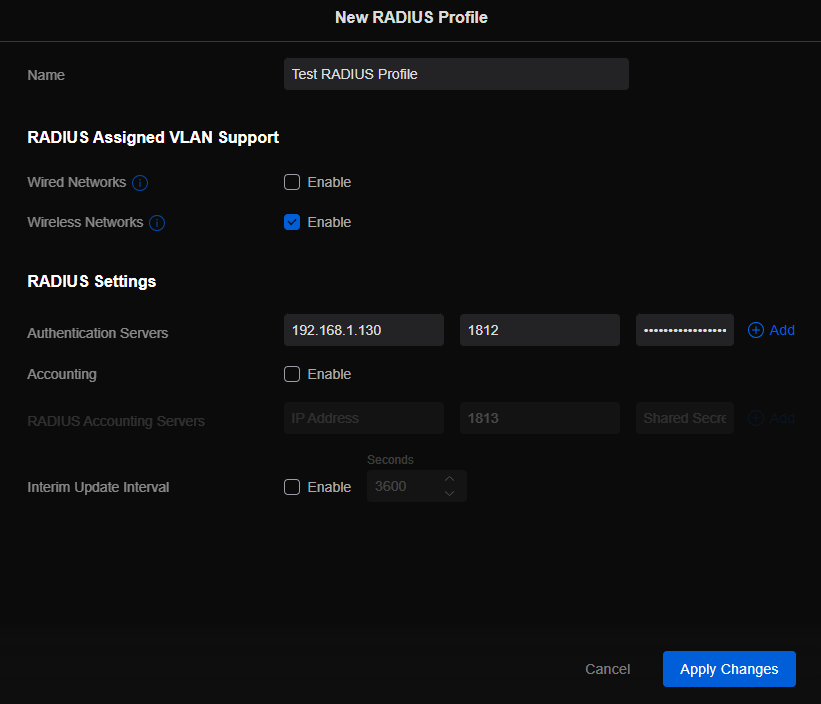
Click on Radius Tab
Click on Create New link
Give the Profile a name
Enter RADIUS server IP address as Authentication Server
Enter RADIUS shared secret
Click Add
Click Apply Changes
Click on Wifi Tab
Click on Create New link
Set network BSSID
Change Advanced to Manual
Set Security Protocol – WPA2 Enterprise
Select new RADIUS Profile
Click Add Wifi Network
If your company has highly customized setup requirements that you need consulting for, then contact us for assistance.
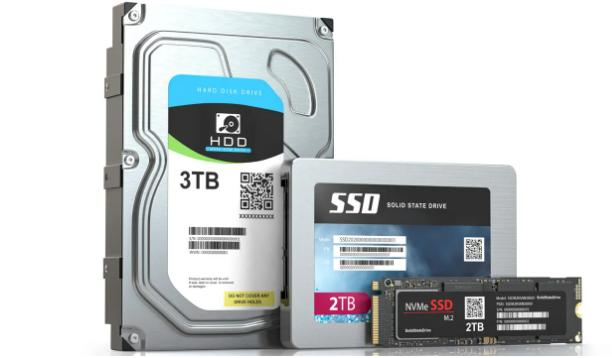
SSD vs HDD speed reliability power comparison chart.
In the world of technology, advancements are constantly being made to enhance the user experience. One such innovation that has revolutionized the storage industry is the solid-state drive (SSD). For years, there has been a debate between skeptics and proponents of SSDs, with the former questioning the true benefits of upgrading from traditional hard disk drives (HDDs). However, empirical evidence has time and again proven that SSDs offer a significant performance boost in various aspects. In this article, we will explore the reasons why upgrading from HDDs to SSDs is worth it, shedding light on the remarkable advantages that SSDs bring to the table.
The Need for Speed
Faster Boot Times and Program Launches
One of the most noticeable benefits of upgrading to an SSD is the drastic reduction in boot times and program launches. Unlike HDDs, SSDs have no moving parts, which means they can access data much faster. When you power on your computer, an SSD can quickly retrieve the necessary files and get your system up and running in a matter of seconds. Similarly, launching resource-intensive programs becomes a breeze with an SSD. Tasks that used to take minutes can now be completed in a matter of seconds, saving you valuable time and increasing efficiency.
Improved File Transfer Speeds
Gone are the days of waiting for files to transfer at a snail’s pace. SSDs excel in delivering lightning-fast file transfer speeds. Whether you’re copying large multimedia files, transferring documents to the server, or backing up your data, an SSD will significantly reduce the time it takes to complete these tasks. With read and write speeds that can be several times faster than traditional HDDs, SSDs provide a seamless and efficient experience when it comes to managing your files.
Enhanced System Responsiveness
A Smoother User Interface
Upgrading to an SSD can transform your overall computing experience by providing a smoother and more responsive user interface. With faster data access times, an SSD ensures that your operating system (OS) responds promptly to your commands. Opening applications, navigating through menus, and multitasking become much more fluid, allowing you to work seamlessly without any frustrating lag or delays. This newfound responsiveness can make a significant difference, especially for professionals who rely on their computers for demanding tasks.
Reduced System Downtime
Slow and unresponsive systems can be a major hindrance to productivity. With an HDD, you may have experienced frequent freezes, crashes, and system slowdowns. SSDs, on the other hand, mitigate these issues by providing a stable and reliable platform for your computing needs. The absence of moving parts in an SSD means that there is less chance of mechanical failure, resulting in improved system stability and reduced downtime. Whether you’re a student, professional, or casual user, upgrading to an SSD can help you avoid frustrating delays and keep your workflow uninterrupted.
Power Efficiency and Durability
Energy-Saving Benefits
In addition to the performance advantages, SSDs also offer notable energy-saving benefits. Unlike HDDs, which require spinning disks and moving parts, SSDs operate using flash memory technology. This means that SSDs consume significantly less power, resulting in improved battery life for laptops and reduced electricity costs for desktop computers. If you’re constantly on the go or looking for ways to reduce your carbon footprint, upgrading to an SSD can be a wise choice.
Enhanced Durability
Another compelling reason to make the switch to SSDs is their enhanced durability. Traditional HDDs are susceptible to damage from physical impacts, as they rely on spinning disks and delicate read/write heads. In contrast, SSDs are built with solid-state components, making them more resistant to shock and vibration. This durability factor makes SSDs ideal for portable devices, such as laptops, where they can withstand the rigors of daily use and transportation without compromising data integrity.
If your company is looking for a boost in performance without replacing all your computers, then contact us for assistance.
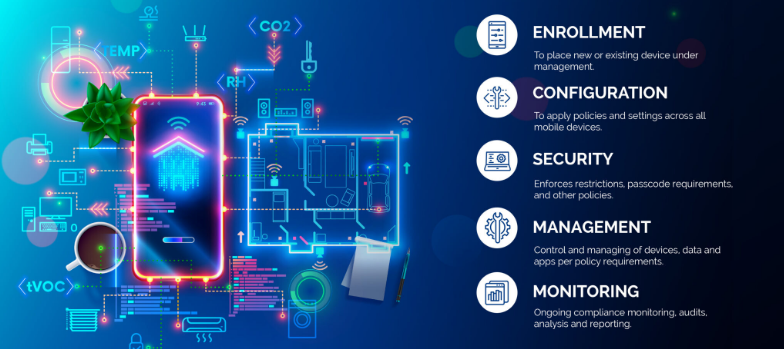
MDM dashboard with Android iOS device inventory compliance policies and security controls.
In today’s digital age, mobile devices have become an integral part of our lives, both personally and professionally. With the increasing reliance on smartphones and tablets, businesses, especially small and medium-sized enterprises (SMBs), need to prioritize mobile device security. One effective solution for enhancing Android and iPhone security is Mobile Device Management (MDM). In this article, we will explore the benefits of MDM for SMBs, its role in enhancing Android and iPhone security, and how businesses can implement MDM to safeguard their sensitive data.
1. Understanding the Importance of Android and iPhone Security
Android and iPhone, being the most widely used mobile operating systems globally, have become a prime target for cybercriminals. With its open-source nature and extensive app ecosystem, Android devices are susceptible to various security threats, such as malware, data breaches, and unauthorized access. With its user-friendliness and built-in trust, iPhone users are easily tricked into downloading and installing malware which leads to data breaches and unauthorized access. SMBs, in particular, need to be proactive in securing their Android and iPhone devices to protect sensitive customer information, intellectual property, and maintain regulatory compliance.
2. Introducing Mobile Device Management (MDM)
Mobile Device Management (MDM) is a comprehensive solution that enables businesses to centrally manage and secure their fleet of mobile devices, including Android and iPhone smartphones and tablets. MDM provides IT administrators with granular control over device settings, app distribution, security policies, and data management. By implementing MDM, SMBs can streamline device management, enhance data security, and ensure compliance with industry regulations.
2.1 Benefits of MDM for SMBs
Centralized Device Management: MDM allows businesses to manage multiple Android devices from a single console, simplifying device provisioning, configuration, and updates.
Enhanced Security: MDM enables IT administrators to enforce security policies, such as password requirements, encryption, and remote wipe capabilities, ensuring that lost or stolen devices do not compromise sensitive data.
App Distribution and Management: With MDM, businesses can distribute and manage apps on Android devices, ensuring that only authorized and secure applications are installed.
Secure Content and Data Management: MDM provides secure containers or workspaces on Android devices, segregating business data from personal information and enabling seamless data synchronization.
Compliance and Reporting: MDM offers robust reporting capabilities, allowing businesses to monitor device usage, enforce compliance regulations, and generate audit trails.
3. Implementing MDM for Android and iPhone Security
Implementing MDM for Android and iPhone security involves a series of steps to ensure a seamless deployment and effective device management. Let’s explore the key considerations and best practices for SMBs looking to implement MDM.
3.1 Assessing Business Needs and Objectives
Before implementing MDM, SMBs should assess their business needs and objectives. This includes identifying the number of devices to be managed, understanding the security requirements, and evaluating the compatibility with existing IT infrastructure.
3.2 Choosing the Right MDM Solution
There are numerous MDM solutions available in the market, each with its own set of features and capabilities. SMBs should carefully evaluate different MDM vendors, considering factors such as scalability, ease of use, security features, integration capabilities, and cost-effectiveness.
3.3 Defining Security Policies and Configuration
Once the MDM solution is selected, SMBs need to define security policies and configurations. This includes setting password requirements, enabling device encryption, configuring firewall settings, and defining app installation permissions. The policies should align with industry best practices and compliance regulations.
3.4 Device Enrollment and Onboarding
After defining security policies, SMBs can proceed with device enrollment and onboarding. This involves registering Android devices with the MDM system, configuring device settings, and installing necessary security profiles and certificates.
3.5 Monitoring and Maintenance
MDM is an ongoing process that requires continuous monitoring and maintenance. SMBs should regularly review security policies, update device configurations, patch vulnerabilities, and conduct security audits to ensure the effectiveness of the MDM solution.
4. Android vs. iPhone: MDM Considerations
While Android devices are more susceptible to security threats due to their open nature, it is essential to consider the unique security challenges posed by iOS devices, such as iPhones and iPads. Although iOS has built-in security features, SMBs should evaluate MDM solutions that offer comprehensive support for both Android and iOS devices to ensure consistent security across their mobile fleet.
5. The Future of MDM and Android Security
As technology evolves, the landscape of mobile device security continues to change. The future of MDM and Android security holds promising advancements, including:
Machine Learning and AI: MDM solutions can leverage machine learning and AI algorithms to detect and prevent emerging security threats proactively.
IoT Integration: With the rise of the Internet of Things (IoT), MDM will encompass managing and securing a broader range of devices, including wearables and smart home devices.
Biometric Authentication: MDM solutions will increasingly utilize biometric authentication, such as fingerprint and facial recognition, for secure device access.
Containerization and Virtualization: MDM will further enhance data security by implementing advanced containerization and virtualization techniques, isolating business data from personal information.
If your SMB is seeking to enhance Android and iPhone security by leveraging the benefits of MDM, contact us for professional assistance and guidance tailored to your specific needs.
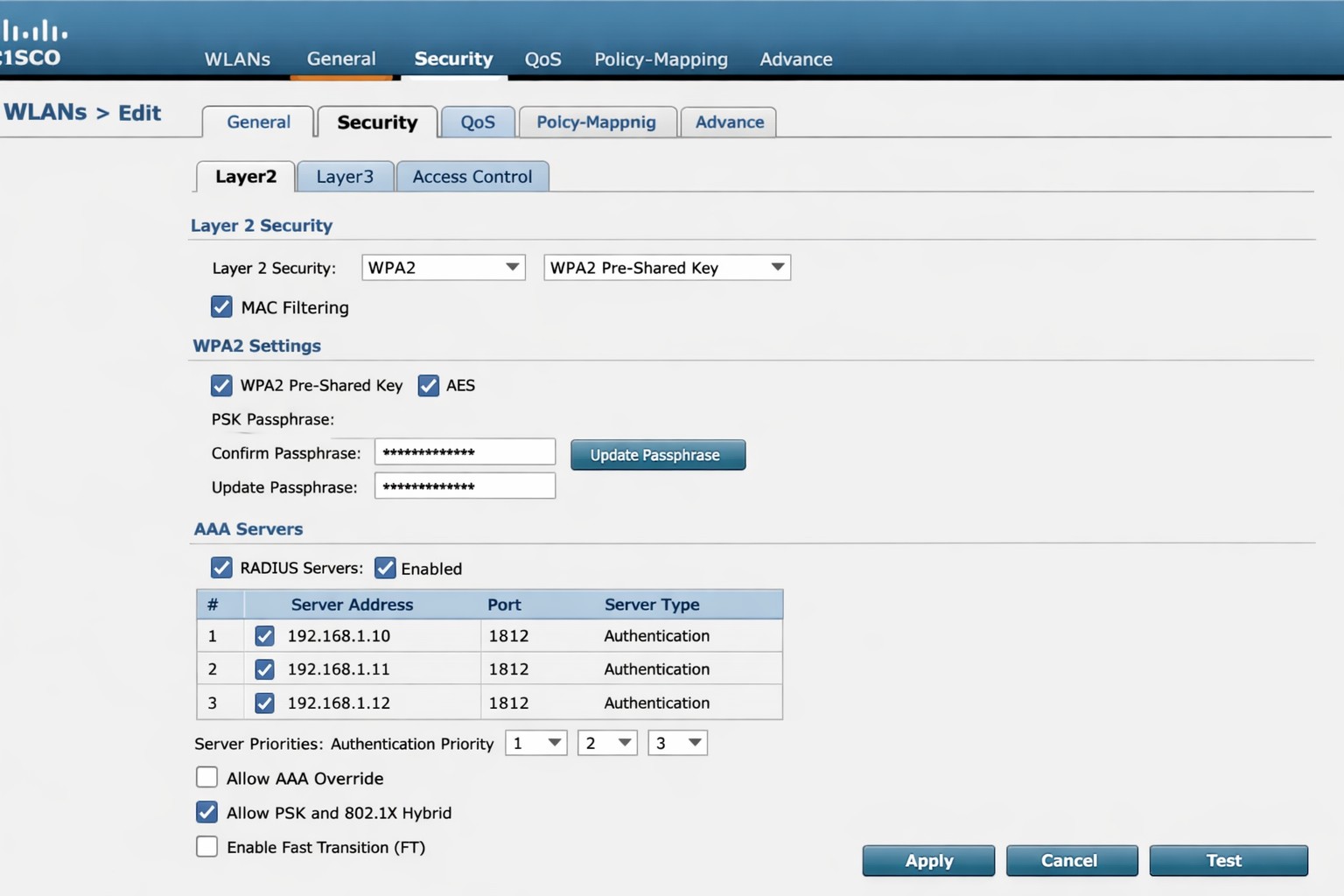
Cisco WLC WLAN configuration enabling PSK with RADIUS backend authentication.
This is the sixth in a series that document the Tier 3 / Co-Managed IT work we did to setup a wireless test bed for a Linux based scientific device. The testing environment included two different wireless network hardware types (Ubiquiti and Cisco). There was also a Synology device used for various purposes including hosting the Ubiquiti controller inside a Kubernetes container, providing certificate services, providing LDAP authentication, and providing RADIUS authentication. Each article will detail a separate piece of the project. This article shows the basic setup of Cisco Wireless Controller for PSK and RADIUS authentication from wireless devices.
Setup Cisco Wireless Network with PSK
Login to Cisco Wireless Controller
Click on WLANs tab at top
Click on GO next to Create New drop down
Create Profile Name & SSID
Click Apply
Click Enabled next to Status
Click Apply
Click on Security tab
Uncheck 802.1x
Check PSK
Enter Pre-Shared Key next to PSK format
Click Apply
Click Save Configuration at the top
Setup Cisco Wireless Network with RADIUS
Log into Cisco Wireless Controller
Click on Security tab at top
Click on Authentication under RADIUS on left hand side
Change both Acct Call Station ID Type to IP Address
Click Apply
Click on New
Add RADIUS server IP address
Add Shared Secret
Uncheck management
Click Apply
Click on WLANs tab at top
Edit WLAN 1
Click on Security tab
Click on AAA Servers tab
Change Server 1 to the one entered on RADIUS Authentication page
Click Apply
Click on Layer 2 tab
Change Authentication type to 802.11x
Click Apply
Click Save Configuration at the top
If your company has highly customized setup requirements that you need consulting for, then contact us for assistance.
And God will generously provide all you need. Then you will always have everything you need and plenty left over to share with others. As the Scriptures say,
“They share freely and give generously to the poor. Their good deeds will be remembered forever.”
For God is the one who provides seed for the farmer and then bread to eat. In the same way, he will provide and increase your resources and then produce a great harvest of generosity in you. - 2 Corinthians 9:8-10
We use cookies to ensure that we give you the best experience on our website. If you continue to use this site we will assume that you are happy with it.