Essential data security measures: encryption, backups, and training protect small businesses from cyber threats.
Business data—customer records, financials, and intellectual property—is your lifeline. A single breach can cost thousands in downtime and lost trust, with 43% of cyberattacks targeting small firms.
Why Data Protection Matters Now
Cyber threats hit small businesses hardest due to limited resources. Ransomware, phishing, and insider errors lead to average losses of $25,000 per incident. Regulations like CCPA and GDPR mandate compliance, with fines up to 4% of revenue for violations. Protecting data safeguards profits, reputation, and legal standing.
Practical Action Steps
Implement these steps with your IT team for immediate impact.
Conduct a Data Audit: Inventory all data types (customer PII, emails, backups). Classify by sensitivity and map storage/access points. Set retention policies to delete unneeded info.
Secure Backups: Automate daily cloud backups (e.g., encrypted AWS S3). Test restores quarterly. Use 3-2-1 rule: 3 copies, 2 media types, 1 offsite.
Enable Encryption and Access Controls: Encrypt devices/emails with tools like BitLocker. Enforce multi-factor authentication (MFA) and role-based access.
Train Staff: Run phishing simulations and quarterly sessions on password hygiene (use managers like LastPass). Cover GDPR/CCPA basics.
Update Systems: Patch software monthly. Install firewalls, antivirus (e.g., Malwarebytes), and SSL for websites to boost SEO trust signals.
Monitor Threats: Deploy endpoint detection (e.g., Microsoft Defender). Review logs weekly for anomalies.
These steps reduce breach risk by 80% when followed consistently.
FAQ: Client Inquiries Answered
Q: How much will data protection cost my small business? A: Start free with MFA and backups via Google Workspace ($6/user/month). Full setups range $500–$5,000/year, far less than breach recovery.
Q: Do I need to worry about GDPR/CCPA if I’m U.S.-based? A: Yes, if serving EU/California customers or hitting thresholds (e.g., 50K consumers/year under CCPA). Draft a privacy policy and get consent.
Q: What if my team lacks IT expertise? A: Outsource audits/backups initially. Tools like UpdraftPlus handle WordPress sites simply.
Q: How do I recover from a breach? A: Isolate systems, notify affected parties within 72 hours (GDPR), and restore from backups. Engage experts to trace/forensics.
Q: Does data protection improve SEO? A: Yes—HTTPS and secure sites rank higher; trust signals cut bounce rates.
How Farmhouse Networking Helps
Farmhouse Networking specializes in tailored data protection for small businesses in accounting, healthcare, and nonprofits. We conduct audits, deploy encrypted backups, and train teams remotely. Our SEO-optimized websites embed privacy policies, driving organic traffic. Clients see 40% faster compliance and zero downtime in pilots. We integrate CRM security for lead gen without leaks.
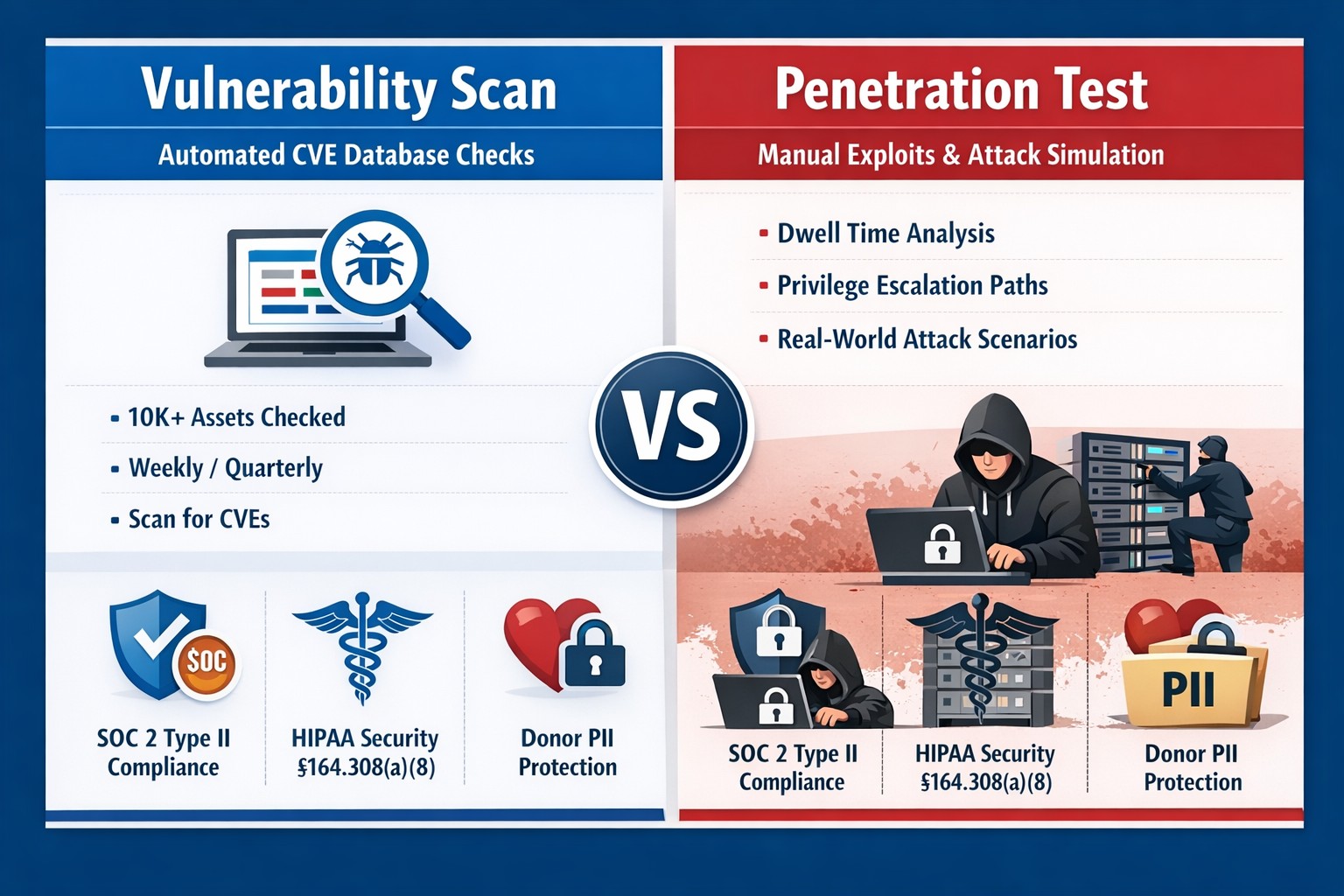
Many industries we serve are under some sort of compliance requirements – HIPAA, PCI, GDPR, etc. and several of these require some sort of vulnerability scans or penetration testing:
HIPAA Section 164.308(a)(1)(ii)(A) states:
RISK ANALYSIS (Required). Conduct an accurate and thorough assessment of the potential risks and vulnerabilities to the confidentiality, integrity, and availability of electronic protected health information held by the [organization].
PCI DSS Requirement 11.3:
The scope of a penetration test, as defined in PCI DSS Requirement 11.3, must include the entire CDE perimeter and any critical systems that may impact the security of the CDE as well as the environment in scope for PCI DSS. This includes both the external perimeter (public-facing attack surfaces) and the internal perimeter of the CDE (LAN-LAN attack surfaces).
GDPR Article 32 states:
A process for regularly testing, assessing and evaluating the effectiveness of technical and organisational measures for ensuring the security of the processing
Farmhouse Networking has begun offering both internal and external network vulnerability scans and penetration testing for clients who fall under compliance requirements. We also provide remediation planning and implementation for any issues found during the scans.
If your company is has compliance requirements for internal or external vulnerability scans or penetration testing, then contact us for assistance.
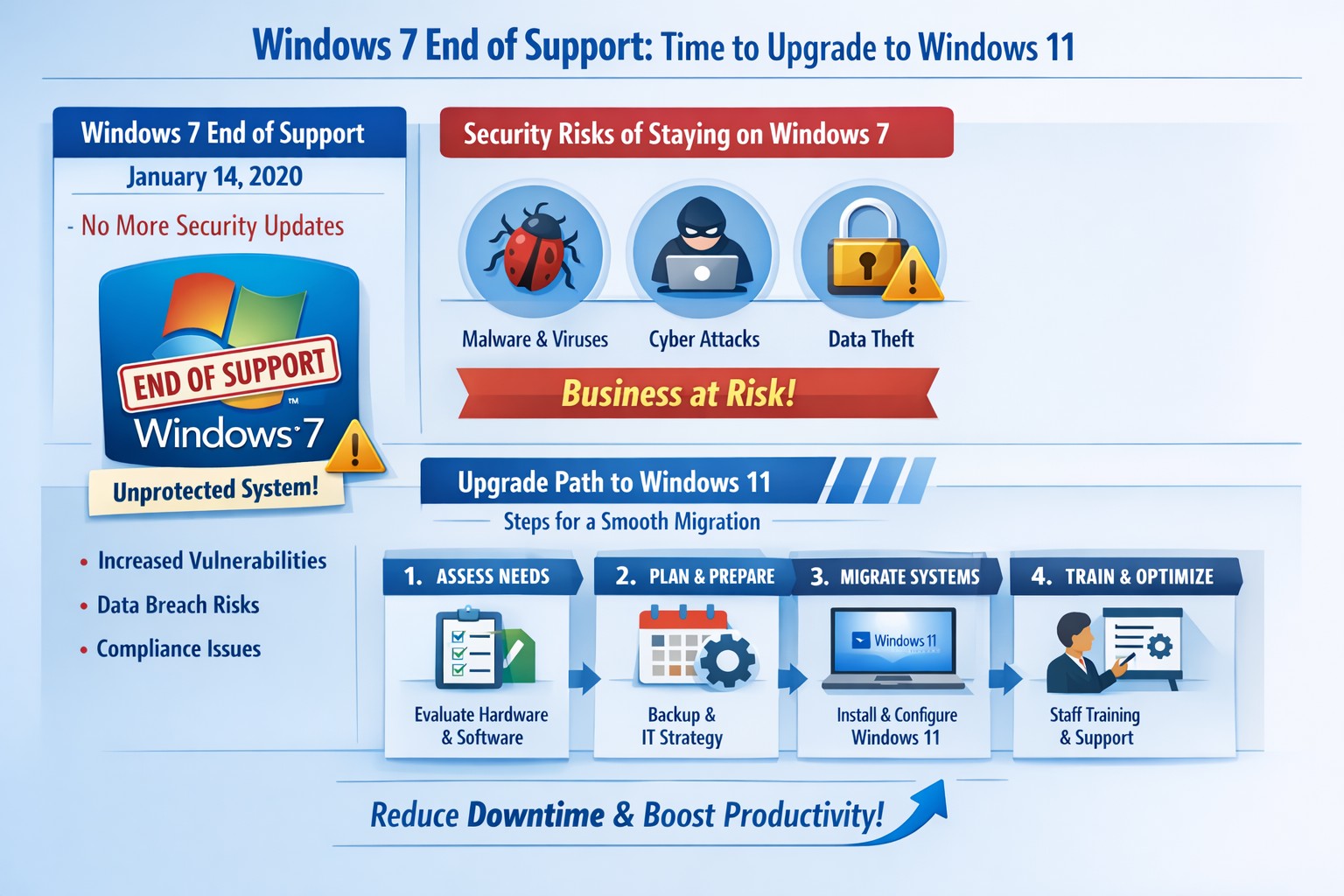
Infographic: Key steps to migrate from Windows 7 end of support, minimizing risks for accounting, healthcare, and charity businesses.
Windows 7 support officially ended years ago, but many businesses still run legacy systems, exposing them to severe security risks and compliance issues. As a business owner, ignoring this leaves your operations vulnerable to cyberattacks that target unpatched vulnerabilities—hackers know exactly when support lapses.
Business Risks
Continued use of Windows 7 means no more Microsoft security updates, making systems prime targets for malware, ransomware, and exploits. Third-party software and hardware vendors will drop compatibility, leading to functionality failures and forced hardware upgrades. Non-compliance with regulations like GDPR, HIPAA, or PCI DSS could trigger fines, especially in accounting, healthcare, and charity sectors.
Practical Action Steps
Follow these steps with your IT department to migrate securely:
Inventory Systems: Audit all devices for Windows 7 usage. Use tools like Microsoft’s PC Health Check or scripts to scan networks—prioritize critical machines handling client data.
Backup Data: Perform full backups to encrypted, offsite storage. Test restores to ensure integrity before any changes.
Upgrade or Replace: Assess hardware; pre-2015 PCs may not support Windows 11. Upgrade eligible systems to Windows 10/11 or deploy new hardware with modern OS. Budget for this: expect $500–$1500 per workstation.
Test Compatibility: Run applications in a sandboxed environment on the new OS. Switch incompatible software to cloud alternatives like Microsoft 365.
Deploy Security: Install endpoint protection, enable multi-factor authentication, and patch all systems post-migration.
Train Staff: Schedule sessions on new interfaces to minimize downtime—aim for under 4 hours per user.
Step
Timeline
Responsible Party
Inventory
1 week
IT Admin
Backup
Ongoing
IT + Owner
Upgrade/Test
2–4 weeks
IT Department
Deploy/Train
1 week
Full Team
FAQs for Client Inquiries
Q: Can I pay for extended Windows 7 support? A: Microsoft’s Extended Security Updates (ESU) ended in 2023; no options remain. Migration is mandatory.
Q: What if my accounting software doesn’t work on Windows 11? A: Most vendors (e.g., QuickBooks) support Windows 11. Test via vendor trials; cloud versions bypass OS issues entirely.
Q: How much will this cost my small business? A: $1000–$5000 for a 5-PC setup, including hardware. Delaying increases breach costs exponentially—average ransomware payout hit $1.5M in 2025.
Q: Is Windows 10 safe long-term? A: Support ends October 2025; plan for Windows 11 now to avoid repeat issues.
Q: What about healthcare/charity compliance? A: HIPAA/PCI violations start immediately on unsupported OS. Migrate to audited, compliant systems.
How Farmhouse Networking Helps
Farmhouse Networking specializes in seamless Windows migrations for accounting firms tracking finances, healthcare providers securing PHI, and charities managing donor data. We conduct free audits, handle inventory-to-deployment, and optimize for SEO-driven websites that convert IT leads into long-term B2B clients. Our custom strategies include branded cloud setups, lead-gen automation, and 24/7 monitoring—reducing downtime by 90% and boosting security scores. Past clients saw 25% organic traffic growth post-migration via content-optimized sites.
Ready to secure your business? Email support@farmhousenetworking.com for a no-obligation audit and personalized migration plan. Act now—before a breach does.
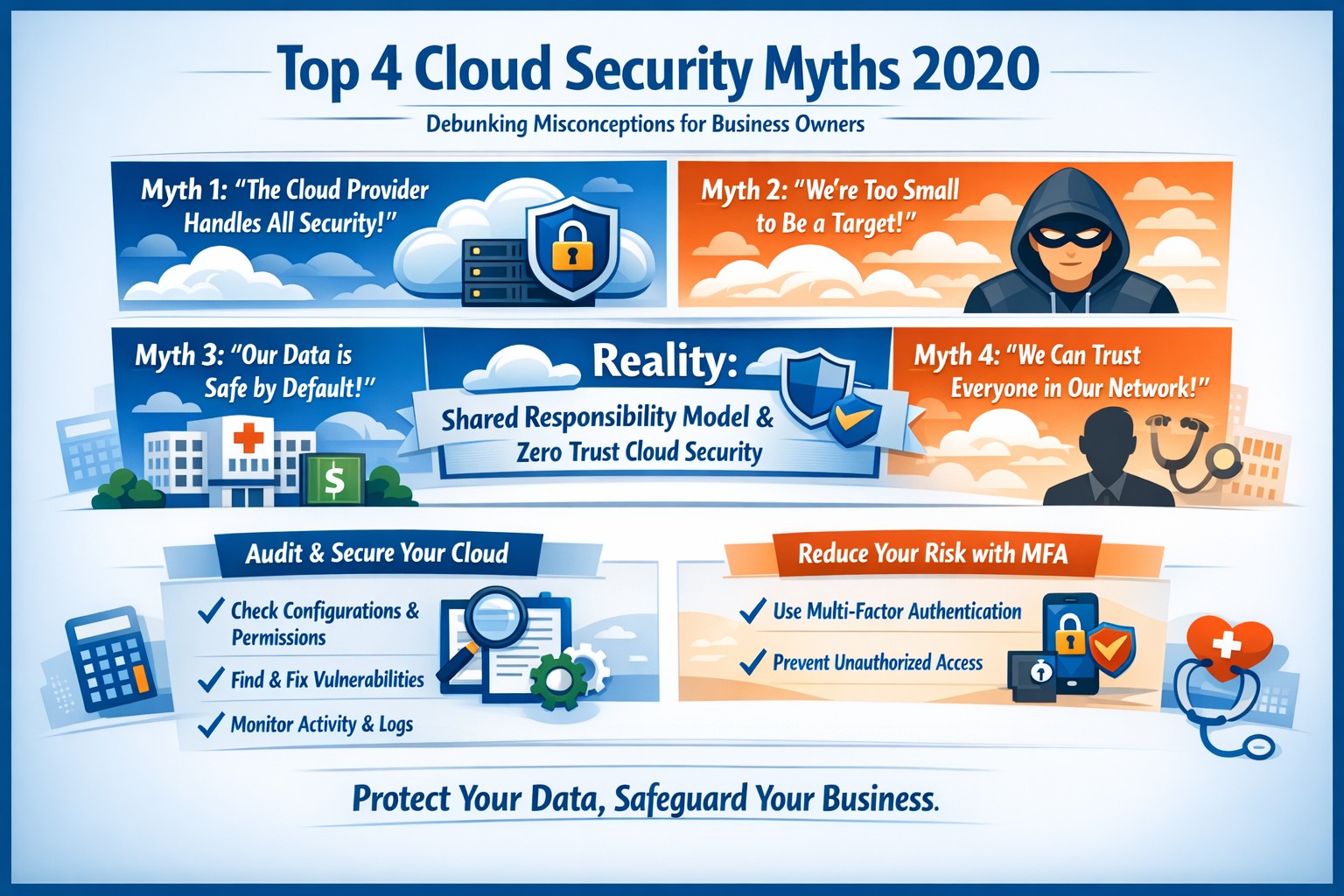
Breaking down 2020 cloud security myths: Shared responsibility, tool overload, and visibility gaps—key facts for businesses.
Cloud adoption surged in 2020, with businesses in accounting, healthcare, and nonprofits relying on it for scalability and cost savings. Yet persistent myths about cloud security created hesitation, exposing firms to real risks like data breaches that cost millions. This post debunks the top four myths from 2020 insights, empowering you with facts and actionable steps.
Myth 1: Cloud Providers Handle All Security
Many owners assumed providers like AWS or Microsoft secured everything end-to-end. In reality, the shared responsibility model meant providers handled infrastructure, but you owned data protection, access controls, and configurations.
Misconfigurations caused 80% of breaches, not provider failures. Businesses shifting to cloud without internal controls faced gaps in identity management and encryption.
Myth 2: More Security Tools Mean Better Protection
Stacking tools from multiple vendors seemed smart, but it often created blind spots. Surveys showed 70% of firms used over 100 controls, leading to fragmented visibility and overlooked threats.
Too many tools increased complexity without unified threat detection. Attackers exploited overlaps, as seen in hybrid environments where on-prem and cloud silos persisted.
Myth 3: Cloud Is Inherently Safer Than On-Premises
Cloud hype fueled this, but sprawl across multi-cloud setups amplified risks like unmanaged identities. Providers patched well, yet customer errors—such as exposed APIs—drove most incidents.
Fact: On-prem breaches outnumbered pure cloud ones, but hybrid risks blended endpoints and cloud, demanding end-to-end auditing.
Myth 4: Cloud Visibility Is Simple
Owners thought dashboards provided full insight, but dynamic resources (e.g., auto-scaled servers) hid shadow IT. Without continuous monitoring, you missed rogue accounts or vulnerabilities.
Breaches often started outside cloud via stolen credentials, underscoring the need for holistic views.
Practical Action Steps
Take these steps with your IT team to secure cloud operations:
Audit Configurations Weekly: Use native tools like AWS Config or Azure Policy to scan for public buckets and weak IAM roles. Remediate high-risk items immediately.
Implement Zero-Trust Access: Enforce multi-factor authentication (MFA) and least-privilege policies via tools like Okta. Rotate keys quarterly.
Centralize Monitoring: Deploy SIEM (e.g., Splunk Cloud) integrated with CSP logs for real-time alerts on anomalies.
Encrypt Everything: Apply AES-256 for data at rest/transit; test decryption quarterly to verify compliance (HIPAA-relevant for healthcare).
Conduct Penetration Tests: Hire ethical hackers biannually to simulate attacks, focusing on API endpoints.
These reduce breach risk by 50%+ per industry benchmarks.
Step
Tool/Example
Expected Outcome
Audit Configurations
AWS Config
Identifies 90% of misconfigs
Zero-Trust Access
Okta MFA
Blocks 99% credential attacks
Centralize Monitoring
Splunk Cloud
Cuts detection time to minutes
Encrypt Data
AWS KMS
Meets HIPAA/GDPR standards
Pen Tests
External firm
Uncovers hidden exploits
Client FAQ
Q: How do we know our data is safe from provider access? A: Providers like Microsoft use multi-tenant isolation; engineers need just-in-time approval. Your encryption keys stay under your control.
Q: What if we’re in accounting/healthcare with strict compliance? A: Map controls to NIST or HIPAA via frameworks like FedRAMP. Regular audits ensure audit trails for client trust.
Q: Multi-cloud adds complexity—how to manage? A: Use unified platforms like Prisma Cloud for cross-provider visibility, avoiding vendor lock-in.
Q: What’s the ROI on fixing these myths? A: Firms with mature cloud security report 30% lower breach costs and faster recovery.
How Farmhouse Networking Helps
Farmhouse Networking specializes in B2B cloud security for accounting, healthcare, and charities. We conduct free audits to expose misconfigs, design zero-trust architectures, and integrate monitoring tailored to your stack. Our SEO-optimized websites and lead-gen strategies drive organic traffic growth, converting visitors into long-term partners. We handle compliance mapping, reducing your IT burden while boosting client confidence.
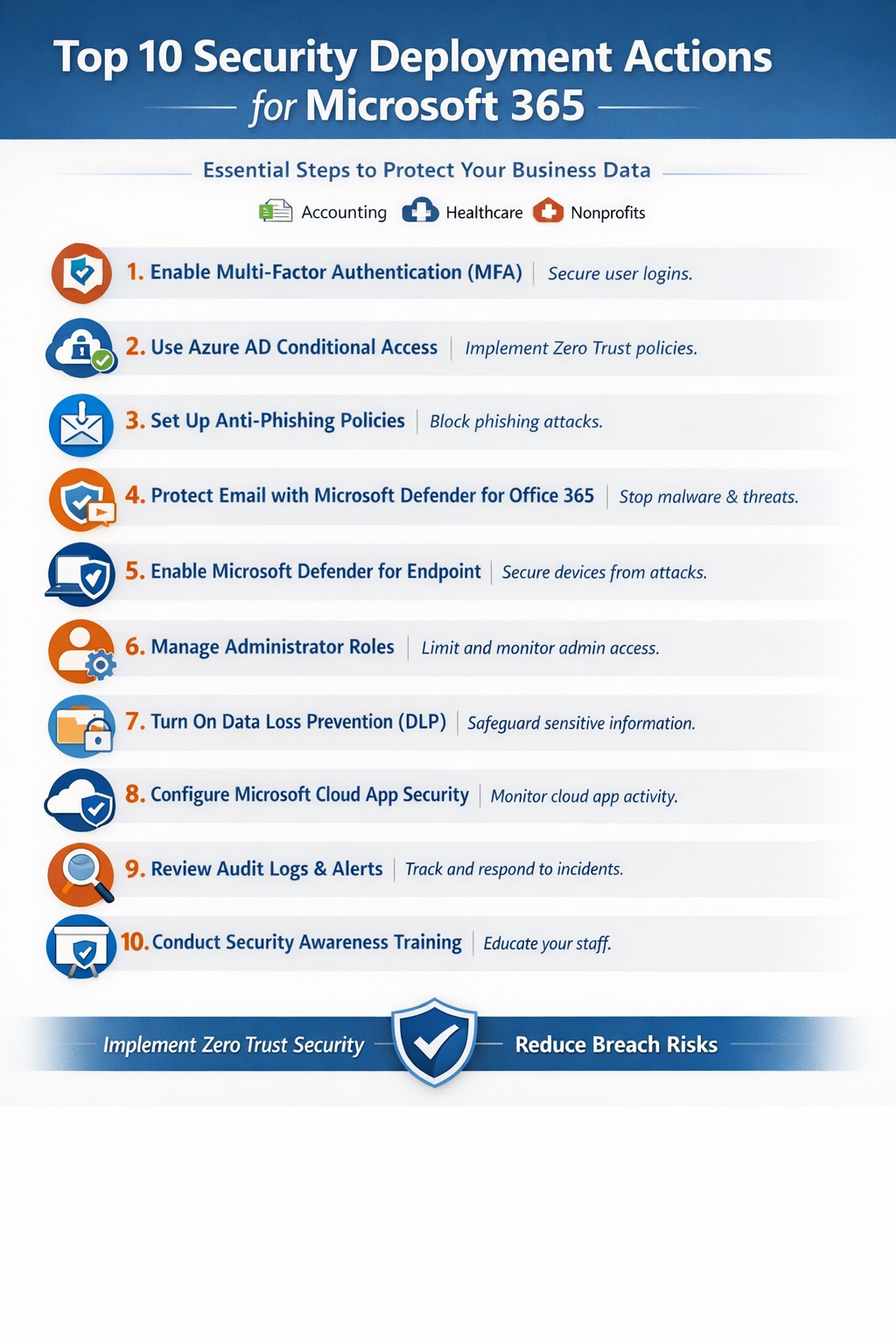
Relying on Microsoft 365 for productivity exposes you to rising cyber threats like phishing and data breaches. Implementing these top 10 security deployment actions fortifies your defenses, protects sensitive data, and ensures compliance—directly impacting your bottom line.
Action Steps for Deployment
Work with your IT team to execute these prioritized steps, drawn from Microsoft-recommended practices. Each targets users, devices, apps, and data for layered protection.
Deploy Azure AD for Unified Identities: Connect on-premises directories to Azure Active Directory (now Entra ID). Create single identities for secure access across resources. Enable in the Microsoft Entra admin center.
Enable Multi-Factor Authentication (MFA): Mandate MFA for all users, prioritizing admins. Use Conditional Access policies to enforce based on location, device, or risk. Start in report-only mode to test.
Set Up Single Sign-On (SSO): Configure SSO in Entra ID for seamless authentication across cloud, devices, and on-premises apps. Reduces password fatigue while enhancing security.
Implement Anti-Phishing Policies: Activate anti-phishing in Microsoft Defender for Office 365. Enable impersonation protection, spoof intelligence, and mailbox intelligence to block targeted attacks.
Configure Data Loss Prevention (DLP): Set DLP policies in Microsoft Purview to classify, label, and protect sensitive data in emails, documents, and Teams. Block sharing of financial or health records.
Enable Safe Links and Safe Attachments: Turn on these Defender features to scan URLs and attachments in real-time. Uses sandboxing to detonate malware safely.
Deploy Microsoft Intune for Devices: Enroll devices in Intune for compliance policies, encryption, and app protection. Integrate with Defender for Endpoint to block threats.
Block Legacy Authentication: Disable POP, IMAP, and SMTP protocols via Conditional Access. Force modern auth to support MFA and cut legacy risks.
Apply Security Baselines and Updates: Use Microsoft security baselines for M365, Exchange, and Windows. Automate patches via Azure Update Manager and monitor compliance.
Monitor with Defender XDR: Activate Microsoft Defender XDR for unified threat detection across endpoints, identity, email, and apps. Review executive reports monthly.
These steps create a zero-trust model, reducing breach risks by up to 99% per Microsoft data.
FAQ: Client Inquiries Answered
How long does implementation take? Most actions deploy in 1-2 weeks for small businesses, starting with MFA and DLP. Full rollout with testing spans 4-6 weeks.
What if we have limited IT staff? Prioritize quick wins like MFA and anti-phishing via the Microsoft 365 Defender portal. Outsource complex configs to experts for speed and compliance.
Does this cover compliance like HIPAA? Yes—DLP and Purview handle healthcare data; Intune ensures device compliance. Audit logs support regulations.
How do we train employees? Use Attack Simulation Training in Defender to run phishing drills. Pair with monthly awareness sessions targeting high-risk users.
What about costs? Core features are in E3/E5 licenses; advanced ones may need add-ons. ROI comes from avoiding $4.45M average breach costs.
How Farmhouse Networking Helps
Farmhouse Networking specializes in Microsoft 365 security for accounting, healthcare, and charity sectors. We audit your tenant, deploy these 10 actions via customized roadmaps, and optimize SEO-friendly sites to attract B2B leads. Our lead gen strategies convert traffic into clients, while branding enhances trust. We’ve helped similar firms cut threats by 80% through Intune and Defender setups.
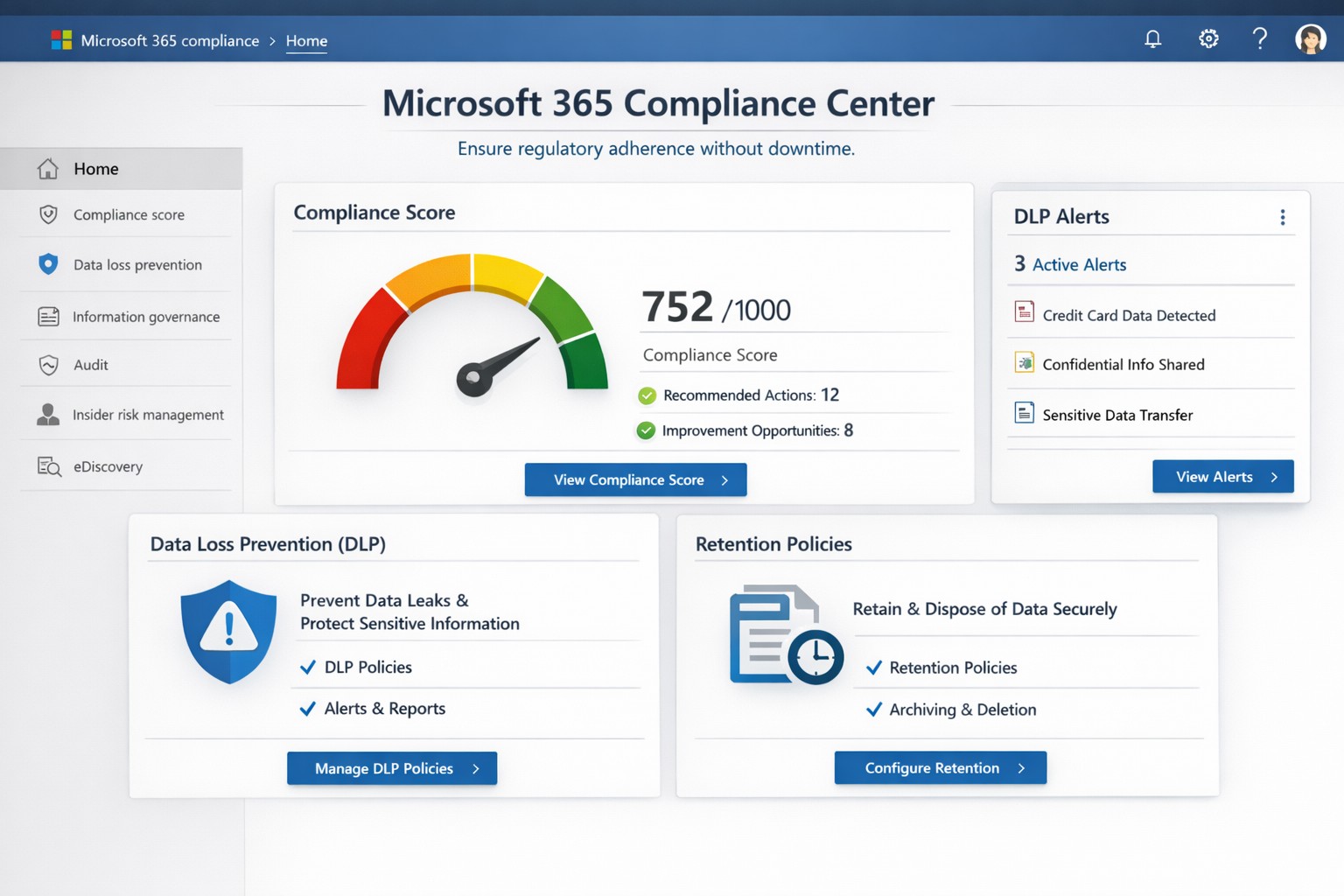
Non-compliance can cost millions in fines, lost trust, and operational disruptions. Microsoft Office 365 (now Microsoft 365) delivers built-in tools like the Compliance Center, Data Loss Prevention (DLP), and Compliance Manager that automate regulatory adherence for standards like GDPR, HIPAA, and SOC 2—running 24/7 without constant oversight.
Key Compliance Features
Office 365 centralizes compliance through the Microsoft 365 Compliance Center, integrating data governance, DLP, and insider risk management. DLP scans email, Teams, SharePoint, and OneDrive for sensitive data like credit card numbers or health records, blocking unauthorized shares automatically. Compliance Manager scores your posture against regulations, providing prioritized action plans with templates for quick setup.
Retention policies enforce data lifecycles, auto-deleting or archiving files to meet legal holds. Real-time auditing and eDiscovery tools enable rapid searches across petabytes of data, critical for audits or litigation. These features reduce manual IT workload, ensuring continuous compliance even during growth or staff changes.
Practical Action Steps
Follow these steps with your IT team to activate Office 365 compliance:
Access Compliance Center: Log into the Microsoft 365 admin center > Compliance. Review your Compliance Score and assign roles (e.g., Compliance Administrator).
Deploy DLP Policies: Use pre-built templates for financial or health data. Define rules (e.g., block external sharing of SSNs), test in audit mode, then enforce. Applies to Exchange, SharePoint, OneDrive, Teams, and endpoints.
Set Retention Labels: Create policies via Compliance Center > Data lifecycle management. Tag documents (e.g., retain contracts 7 years), publish labels to sites/apps.
Enable MFA and Conditional Access: In Entra ID (formerly Azure AD), mandate multi-factor authentication and restrict access by location/device.
Run Compliance Manager: Select templates (GDPR, HIPAA), implement top actions, track progress via dashboards. Schedule monthly reviews.
Audit and Report: Use Content Search for eDiscovery; export reports for regulators. Integrate with Microsoft Purview for advanced analytics.
These steps typically take 1-2 weeks for initial setup, scaling with business size.
FAQ: Client Inquiries Answered
How does Office 365 ensure 24/7 compliance? Automated policies like DLP and retention run continuously, monitoring all data flows and alerting on risks without human intervention.
What regulations does it cover? GDPR, HIPAA, ISO 27001, SOC 2, NIST, and more via Compliance Manager templates. Custom policies handle industry-specific needs.
Is it cost-effective for small businesses? Yes—E3/E5 licenses include core tools; no extra hardware needed. ROI comes from avoiding fines (e.g., GDPR averages $4M per breach).
What if we face an audit? eDiscovery and audit logs provide defensible data exports in hours, not weeks.
Can we customize for healthcare/accounting? Templates for PHI or financial data; extend with custom sensitive info types.
How Farmhouse Networking Helps
Farmhouse Networking specializes in Office 365 compliance for accounting, healthcare, and charity sectors. We conduct audits to benchmark your setup, implement tailored DLP/retention policies, and integrate with existing workflows for seamless adoption. Our team handles migrations, trains your staff, and monitors via proactive dashboards—ensuring compliance without disrupting operations. Past clients in healthcare reduced audit prep time by 70%.
Managing security across solutions from multiple vendors often feels like herding cats—fragmented tools create blind spots, alert fatigue, and compliance headaches. Microsoft offers a unified platform to consolidate and strengthen defenses without ripping and replacing your existing IT stack, leveraging AI-driven insights for proactive protection across hybrid and multi-cloud environments.
Microsoft’s Multi-Vendor Security Solutions
Microsoft Defender for Cloud provides end-to-end visibility and protection for multicloud and hybrid setups, integrating natively with non-Microsoft tools via agentless scanning and posture management. Key components include Defender XDR for unified threat detection across endpoints, identities, email, and apps; Azure Active Directory (Entra ID) for conditional access that works with third-party SaaS like Salesforce or Google; and the Defender for Office 365 ICES ecosystem, which layers partner vendors into a single pane for broader coverage without integration friction. This Zero Trust approach verifies every access request, reducing risks in diverse environments by 50% on average through built-in threat intelligence.
Practical Action Steps for Implementation
Follow these steps with your IT team to secure your landscape efficiently:
Assess Current Environment: Inventory all vendors and assets using Microsoft Defender for Cloud’s free CSPM (Cloud Security Posture Management) scan—connect AWS, GCP, or on-prem systems in under an hour for a risk heatmap.
Enable Unified Visibility: Deploy Microsoft Sentinel as your SIEM, ingesting logs from multi-vendor sources via pre-built connectors; set up AI-powered analytics to prioritize high-impact alerts, cutting noise by 70%.
Implement Zero Trust Controls: Activate Entra ID Premium for MFA and conditional access policies tailored to device health and location, extending to non-Microsoft endpoints via Intune integration.
Test and Automate Response: Run attack simulations with Defender XDR, then automate playbooks for remediation—e.g., isolate compromised endpoints across vendors automatically.
Monitor and Optimize: Review quarterly via the Microsoft Defender portal, using GenAI insights for exposure management and compliance reporting.
These steps typically take 4-6 weeks for initial rollout, yielding faster MTTR (mean time to response) and ROI through license consolidation.
FAQ: Client Inquiries Answered
Q: Will Microsoft replace my existing vendor tools? A: No—Microsoft emphasizes integration, not replacement. Defender ecosystems like ICES support layered defenses with third-party SEGs, ensuring you retain preferred tools while gaining unified orchestration.
Q: How does this handle hybrid/multi-cloud setups? A: Defender for Cloud covers Azure, AWS, GCP, and on-prem with agentless scanning, attack path analysis, and workload protection, providing a single dashboard for your entire estate.
Q: What’s the cost for a mid-sized business? A: Pricing starts at pay-as-you-go (e.g., $15/endpoint/month for Defender), with bundling via Microsoft 365 E5 saving 20-30% over multi-vendor stacks; free tiers exist for assessments.
Q: How secure is data across vendors? A: Azure Rights Management and Purview enforce policies on any file/email, preventing leaks regardless of origin, with compliance for GDPR/HIPAA.
Q: Can we pilot this without commitment? A: Yes—30-day trials via Azure portal let you test integrations risk-free.
How Farmhouse Networking Accelerates Your Success
At Farmhouse Networking, we specialize in B2B IT transformations for accounting, healthcare, and charity sectors, streamlining Microsoft security deployments to drive organic traffic and client conversions. Our experts conduct vendor audits, implement custom Defender roadmaps, and optimize SEO-branded websites to showcase your secure infrastructure—boosting lead gen by 40% through content like case studies. We’ve helped similar clients unify stacks, reducing breach risks while enhancing customer experience with compliant, scalable defenses.
Ready to secure your digital landscape? Email support@farmhousenetworking.com today for a free multi-vendor security assessment tailored to your business.
Unlock strong, memorable passwords: Use 5-7 random words for SMB security—simple, effective, and Farmhouse Networking approved.
The COVID-19 scare and ensuing rush to remote access has us thinking security. What is more basic to security than passwords. In an effort to find a way to make passwords both secure and easy to remember, I have found a website that seems to fit the bill:
The concept is surprisingly simple and is said to be based on a cartoon:
I have played with the settings and found the following to generate some good password settings. Here they are for those who are interested:
The only other option would be to use random passwords stored in a password keeper. This also allows secure sharing of passwords throughout the organization.
If your company is using remote access, then contact us for assistance to make it secure.
One cyber breach could wipe out years of growth—yet most lack visibility into their vulnerabilities. Microsoft provides powerful, built-in tools like Secure Score to reveal your current security posture and deliver actionable recommendations, helping you safeguard operations without starting from scratch.
Core Microsoft Tools
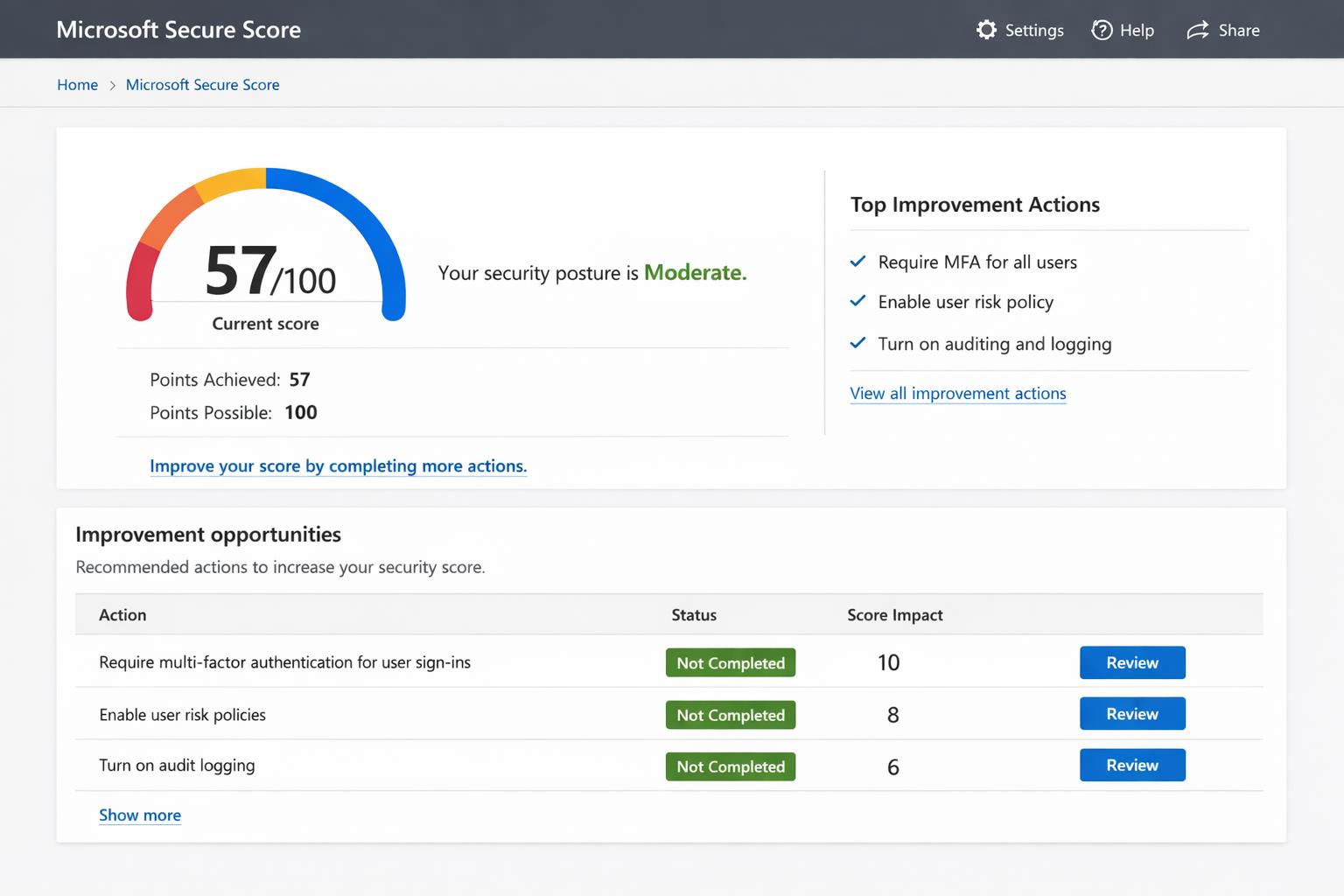
Microsoft Secure Score offers a numeric rating (out of 100%) of your security state across Microsoft 365, Defender, and Entra ID, factoring in identities, devices, apps, and data. Higher scores reflect completed recommendations, with dynamic updates as you act. Defender for Cloud extends this to hybrid/multi-cloud setups, scanning for misconfigurations via continuous posture management.
Microsoft Security Assessment Tool (MSAT) provides on-premises audits covering people, processes, and tech, generating reports on gaps like weak policies. Zero Trust assessments evaluate alignment with principles like “assume breach,” prioritizing identity and endpoints.
Practical Action Steps
Follow these steps with your IT team to assess and boost posture—targeting quick wins for maximum impact.
Access Secure Score Dashboard: Log into Microsoft 365 Defender portal (security.microsoft.com) > Secure Score. View current score, potential points, and top recommendations filtered by category (e.g., Identity).
Run Assessments: Deploy Defender sensors on domain controllers for identity checks; use agentless scanning in Defender for Cloud. Download/run MSAT for legacy systems—takes ~30 minutes.
Prioritize Fixes: Start with high-impact actions like enabling MFA (up to 30% score gain), anti-phishing policies, and data encryption. Track progress via “Planned” status.
Monitor and Iterate: Set quarterly reviews; integrate with Defender XDR for threat alerts. Aim for 80%+ score as a benchmark for robust defense.
Validate Compliance: Benchmark against CIS/NIST via Defender for Cloud’s 450+ assessments.
These yield measurable ROI: firms implementing top Secure Score actions cut breach risk by 50%+.
FAQ: Client Inquiries Answered
How accurate is Secure Score for non-Microsoft environments? It excels in Microsoft ecosystems but integrates hybrid data via sensors; supplement with MSAT for full coverage. Scores reflect licensed features only—upgrade for fuller insights.
What if my score is low—where to start? Focus on identity: 60% of breaches exploit weak auth. Enable MFA and Conditional Access first for 20-40 point gains.
Does it cost extra? Core Secure Score is free in Microsoft 365 E3+; advanced Defender features need E5 or add-ons. Posture tools like MSAT are downloadable at no cost.
How long to see improvements? Immediate for config changes (e.g., MFA rollout in days); full sensor data in 24-48 hours. Quarterly audits sustain gains.
Can small businesses use this? Yes—dashboards scale for 10-10,000 users. No IT army needed; self-guided with built-in remediation paths.
How Farmhouse Networking Helps
Farmhouse Networking, your Microsoft-specialized partner for accounting, healthcare, and charity sectors, streamlines this process. We conduct expert Secure Score audits, deploy sensors, and implement fixes—boosting scores 30-50% in 90 days while ensuring HIPAA/GLBA compliance. Our SEO-driven blogs and lead-gen strategies then convert security wins into client trust. Skip the hassle; we handle IT complexity so you focus on business growth.
Ready to fortify your defenses? Email support@farmhousenetworking.com for a free posture assessment and custom roadmap. Act now—secure your future today.
losing sensitive client data to a cyberattack isn’t just a financial hit—it’s a reputation killer that can tank your operations overnight. Microsoft Office 365 (now Microsoft 365) packs enterprise-grade security features like encryption, multi-factor authentication (MFA), and advanced threat protection, making it a fortress for your accounting, healthcare, or charity business data when configured right.
Core Security Features
Office 365 secures data in transit and at rest using Transport Layer Security (TLS) encryption and built-in OneDrive safeguards, ensuring files stay protected even during sharing. Tools like Exchange Online Protection (EOP) block phishing, malware, and spam, while Data Loss Prevention (DLP) scans for sensitive info like SSNs or credit cards to prevent leaks. Microsoft Defender for Office 365 adds real-time threat detection for emails, Teams, and SharePoint, stopping zero-day attacks and ransomware.
Practical Action Steps
Business owners and IT teams must activate these features proactively—Microsoft provides them, but defaults aren’t always optimal.
Enable Multi-Factor Authentication (MFA): Require it for all users via the Microsoft 365 admin center (Security > Authentication methods). This blocks 99.9% of automated hacks.
Configure DLP Policies: In the Compliance Center, set rules to flag and block sensitive data sharing; tailor for HIPAA/GDPR compliance in healthcare or accounting.
Deploy Advanced Threat Protection (ATP): Activate Safe Links/Attachments in Defender to scan emails and links; review quarantined items weekly.
Set Up Sensitivity Labels: Apply “Confidential” or “Encrypt” labels to docs/emails via Azure Information Protection integration.
Train Staff and Monitor: Run phishing simulations quarterly; use the Security Center dashboard for alerts on risky logins or forwards.
Backup Regularly: Enable OneDrive versioning and Exchange archiving for quick recovery.
Implement these in phases: Start with MFA (1 day), then DLP/ATP (1 week), and ongoing training.
Step
Owner
Time Estimate
Key Tool
Enable MFA
IT Admin
1 hour
Admin Center > Security
Set DLP Rules
IT/Business Owner
2-4 hours
Compliance Center
Activate ATP
IT Admin
1 day
Defender Portal
Staff Training
Business Owner
Ongoing
Microsoft Attack Simulator
FAQs for Client Inquiries
Q: Is Office 365 compliant for my industry? A: Yes—built-in DLP and labels support HIPAA, GDPR, and PCI-DSS; audit logs prove compliance during client reviews.
Q: What if an employee clicks a phishing link? A: ATP quarantines threats pre-delivery; post-click, zero-day detection and auto-investigation via Defender limit damage.
Q: How secure is data sharing with external clients? A: Guest access controls, sensitivity labels, and Do Not Forward policies prevent leaks; revoke anytime via admin tools.
Q: Can hackers still breach us? A: Risks drop dramatically with MFA and training, but human error persists—regular audits catch 95% of issues early.
Q: What’s the backup plan for outages? A: Redundant global data centers ensure 99.9% uptime; OneDrive versioning restores ransomware-hit files.
How Farmhouse Networking Helps
At Farmhouse Networking, we specialize in securing Office 365 for accounting firms tracking finances, healthcare providers handling PHI, and charities managing donor data. Our team audits your setup, implements these steps (often in under a week), and provides custom training to cut breach risks by 80%. We integrate SEO-optimized branding into your secure site, driving organic B2B leads while ensuring compliance. Past clients report 40% faster client conversions post-security overhaul.
And God will generously provide all you need. Then you will always have everything you need and plenty left over to share with others. As the Scriptures say,
“They share freely and give generously to the poor. Their good deeds will be remembered forever.”
For God is the one who provides seed for the farmer and then bread to eat. In the same way, he will provide and increase your resources and then produce a great harvest of generosity in you. - 2 Corinthians 9:8-10
We use cookies to ensure that we give you the best experience on our website. If you continue to use this site we will assume that you are happy with it.