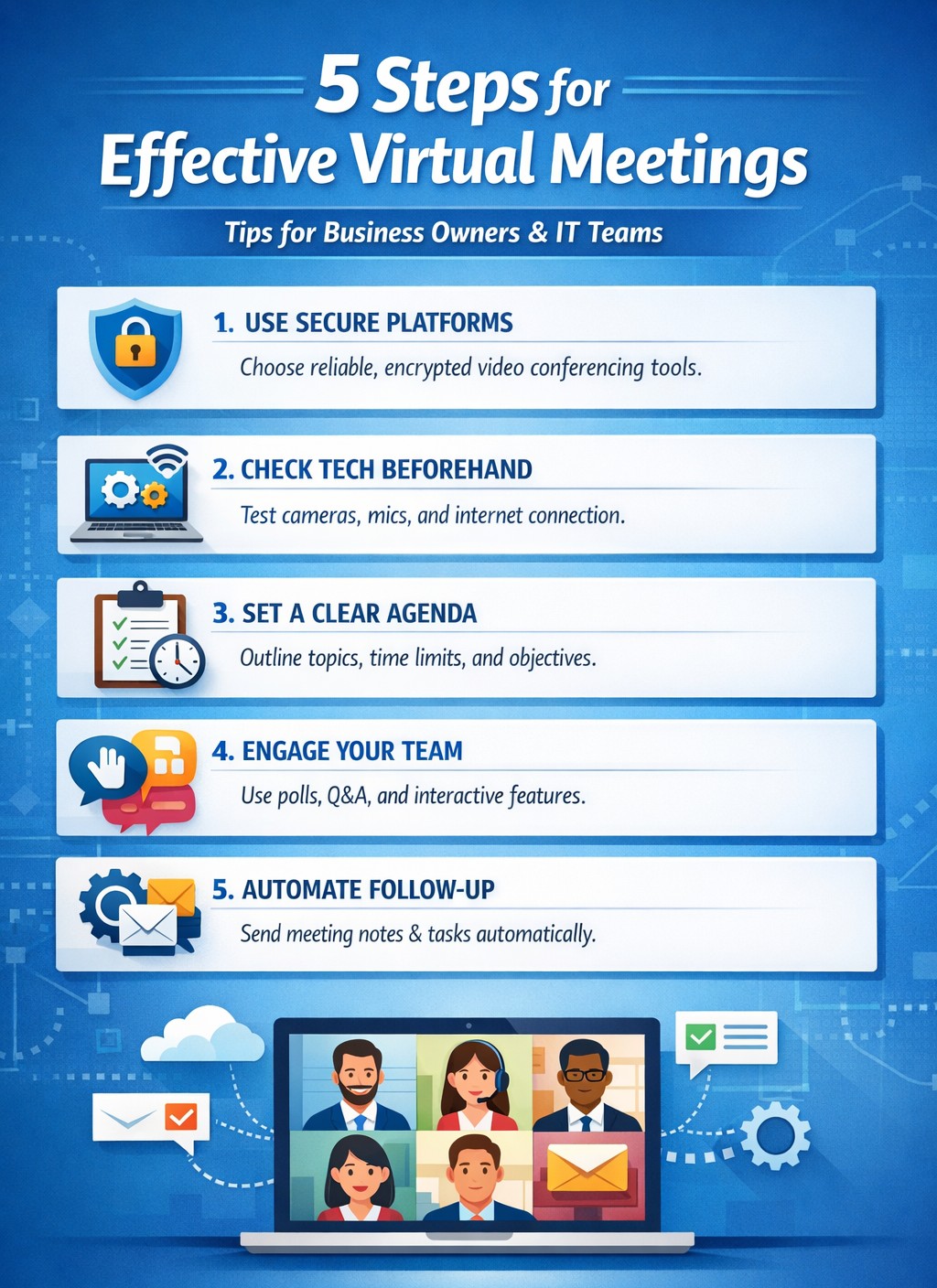
IT-backed strategies for business owners: standardize platforms and automate follow-ups for productive remote team meetings.
Wasted virtual meetings cost small businesses thousands in lost productivity annually. As a business owner managing remote teams, you need IT-backed strategies that deliver results fast. This post reveals five practical, tech-focused steps—tailored for you and your IT department—to transform chaotic calls into high-impact sessions that drive growth.
Standardize Your Meeting Platform
Choose one secure, scalable platform like Microsoft Teams or Zoom Enterprise to eliminate tool-switching chaos. IT teams should evaluate bandwidth needs, enable end-to-end encryption, and integrate with calendars/CRMs for seamless scheduling.
Business owners: Mandate platform use in your remote work policy.
IT steps: Deploy single sign-on (SSO), test integrations with tools like Slack or Google Workspace, and set up auto-updates to prevent vulnerabilities. This cuts setup time by 40% and boosts attendance reliability.
Pre-Meeting Tech Checks and Training
Technical glitches derail 30% of virtual meetings. Require all participants—including yourself—to test audio, video, and internet 15 minutes prior using platform diagnostics.
Business owners: Schedule mandatory quarterly training sessions.
IT steps: Roll out a “tech readiness checklist” via email automation, monitor network performance with tools like Wireshark, and provide on-call support during peak hours. Result: Fewer dropouts, higher engagement.
Create Structured Agendas with Role Assignments
Vague agendas lead to rambling; detailed ones keep teams focused. Share agendas 24 hours ahead via the platform, assigning roles like facilitator, note-taker, and timekeeper.
Business owners: Approve agendas before distribution to align with goals.
IT steps: Use platform features for polls, timers, and shared docs; integrate with project tools like Asana for real-time action item tracking. This ensures decisions stick post-meeting.
Enforce Engagement Tools and Moderation
Remote teams disengage twice as fast without visuals. Activate cameras, use polls/reactions, and designate an IT-trained moderator to manage chat and mute distractions.
Business owners: Set ground rules like “cameras on for key discussions.”
IT steps: Configure breakout rooms for sub-teams, enable AI transcription for recaps, and monitor for security breaches. Keeps meetings interactive and inclusive.
Post-Meeting Follow-Up Automation
Meetings fail without accountability. Send automated recaps with action items, recordings, and feedback surveys within 30 minutes.
Business owners: Review metrics like completion rates weekly.
IT steps: Automate via platform APIs (e.g., Zapier integrations), archive securely, and analyze attendance data for trends. Drives 25% better follow-through.
Common Questions from Business Owners
Q: How do we secure meetings against hacks? A: IT should enable waiting rooms, passcodes, and regular firmware updates; avoid free tiers prone to breaches.
Q: What if team internet varies by location? A: IT assesses remote setups, recommends VPNs or QoS routing, and offers audio-only fallbacks.
Q: How to measure meeting ROI? A: Track via platform analytics: engagement scores, task completion rates, and time saved.
How Farmhouse Networking Helps
Farmhouse Networking specializes in IT infrastructure for remote teams in accounting, healthcare, and nonprofits. We audit your setup, deploy secure platforms, train staff, and monitor 24/7—ensuring zero downtime. Our clients see 35% productivity gains from optimized virtual collaboration.
Call to Action
Ready to supercharge your virtual meetings? Email support@farmhousenetworking.com for a free IT assessment tailored to your business.
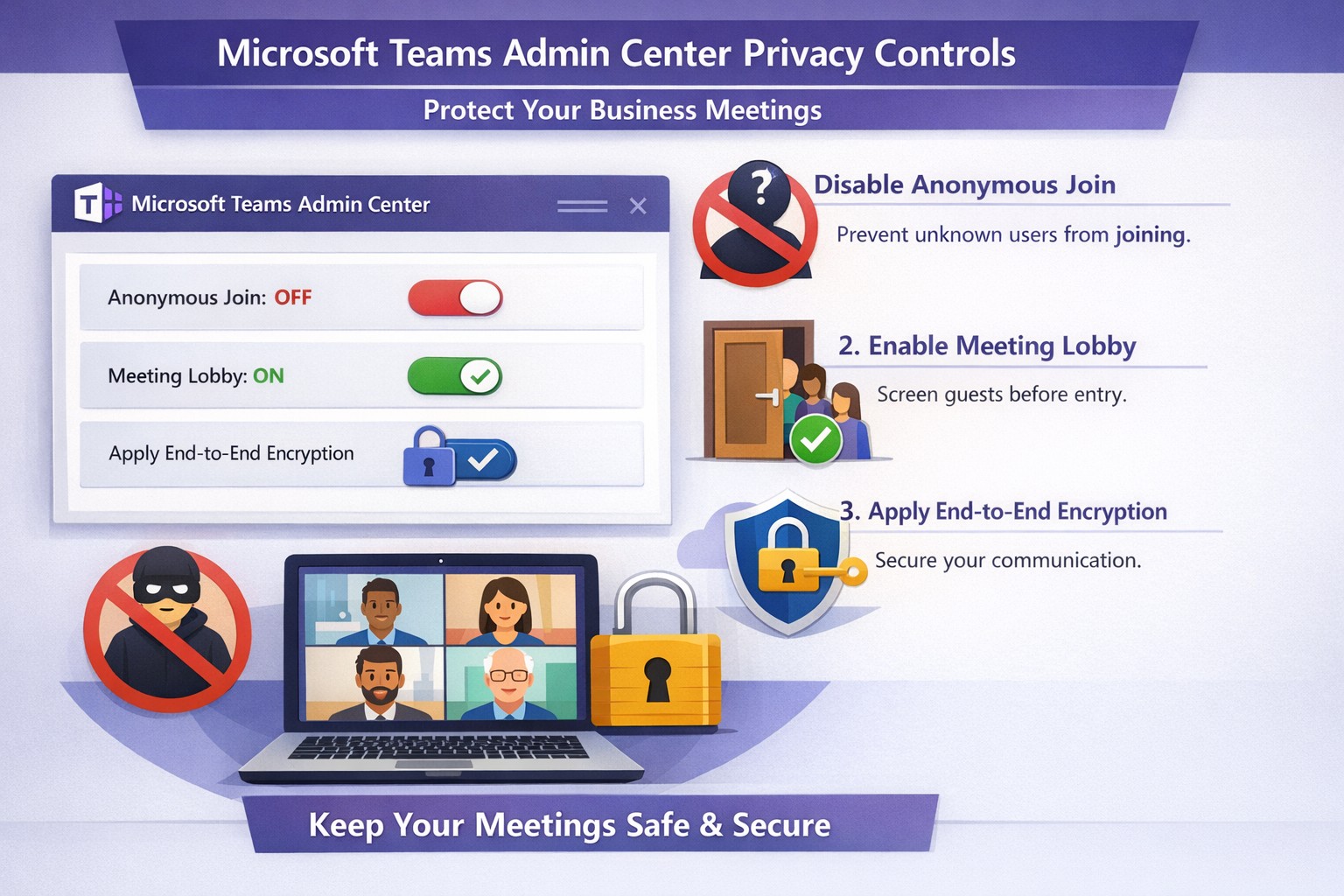
Configure Teams meeting privacy: Turn off anonymous access and activate lobby to protect business discussions.
Microsoft Teams meetings often involve sensitive discussions on finances, strategies, and client data—yet unauthorized access risks data leaks and disruptions. Implementing targeted privacy controls ensures secure collaboration without stifling productivity.
Key Privacy Risks in Teams Meetings
Teams meetings face threats like “zoombombing,” where anonymous users join via public links, and data exposure through screen shares or recordings. Microsoft reports that disabling anonymous join reduces unauthorized entries significantly. External bots and unverified guests compound these issues, especially in hybrid work setups common for accounting, healthcare, and charity sectors.
Practical Action Steps
Follow these steps with your IT department to lock down Teams privacy. Prioritize admin center changes for organization-wide impact.
Disable Anonymous Joins: In the Teams admin center (admin.teams.microsoft.com), navigate to Meetings > Meeting policies. Set “Anonymous users can join” to Off. This blocks uninvited participants and recording bots.
Enable Meeting Lobby: Require all external participants to wait in the lobby. Under Meeting settings > Participants, toggle “Who can bypass the lobby?” to organizers and presenters only. Manually approve entrants to verify identities.
Activate CAPTCHA Verification: For remaining external access, enable CAPTCHA for anonymous users. This adds a human-check layer without fully restricting guests.
Use End-to-End Encryption (E2EE): For confidential calls, enable E2EE in meeting options (requires Teams Premium). Only participants decrypt audio/video; Microsoft cannot access it.
Apply Watermarking and Sensitivity Labels: With Teams Premium, turn on watermarks displaying participant emails over shared screens/videos. Create sensitivity labels enforcing lobby waits, auto-recording, and chat restrictions.
Control Recordings and Transcripts: Disable auto-recording for non-sensitive meetings. Inform participants and store files securely in OneDrive with 60-day retention.
Educate Users: Train staff to check participant lists, avoid public screen shares, and deny unknowns. Use quiet, private spaces for calls.
Implement via admin center first, then test in a pilot meeting. These steps balance security with usability.
FAQ: Client Inquiries Answered
Q: Can external clients still join securely? A: Yes—lobby approval and CAPTCHA allow vetted guests while blocking randos. Federated domains enable seamless access for partners.
Q: What’s needed for advanced features like E2EE? A: Teams Premium (or E5 for labels). Basic encryption is always on for transit/rest, but Premium adds layers.
Q: How do I prevent screenshot leaks? A: Watermarks overlay user IDs on shared content, deterring unauthorized captures. Combine with “Do not forward” calendar labels.
Q: Are recordings private? A: Stored in organizer’s OneDrive; participants notified. Get explicit consent for sensitive sessions, especially in healthcare/charities.
Q: What about one-on-one vs. group calls? A: One-on-one calls offer full E2EE by default; groups need Premium for equivalent protection.
How Farmhouse Networking Helps
Farmhouse Networking specializes in B2B IT for accounting, healthcare, and charity firms. We audit your Teams setup, deploy these privacy configs, and integrate with compliance needs like HIPAA or nonprofit data rules. Our SEO-optimized websites and lead-gen strategies turn secure Teams into a client magnet—showcasing reliability drives conversions. Skip the hassle; we handle migrations, training, and 24/7 monitoring.
Call to Action
Ready to safeguard your Teams meetings and boost client trust? Email support@farmhousenetworking.com for a free privacy audit and custom strategy.
Secure your business discussions: Step-by-step private channels in Microsoft Teams.
Protecting sensitive discussions—like HR strategies, client deals, or financial plans—is critical in Microsoft Teams. Private channels let you segment conversations within a team, ensuring only invited members access chats, files, and tabs, boosting security without creating separate teams.
Step-by-Step Setup Guide
Follow these practical actions to create and manage private channels. Team owners or permitted members handle creation; involve your IT department for policy checks and permissions.
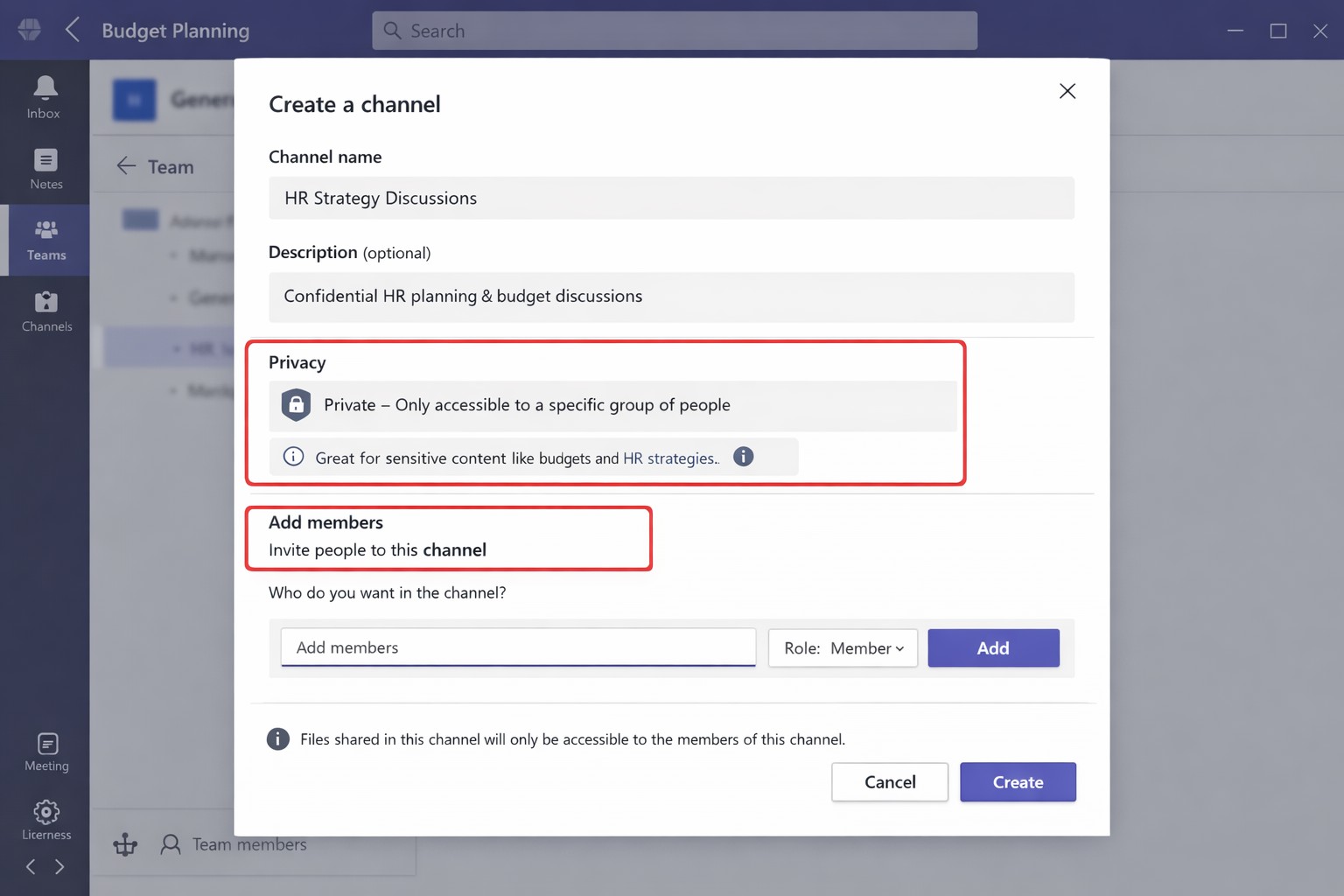
Open Microsoft Teams and navigate to the target team.
Click the three dots (…) next to the team name, then select Manage team > Channels tab.
Click Add channel, enter a name (e.g., “Q1-Budget-Confidential”) and optional description.
Under Privacy, choose Private—this restricts access to added members only.
Click Add members to invite up to 250 people; set roles (owner/member) via Manage channel > Members tab.
Post-setup, use the channel for posts, file shares, and apps. Limit: 30 private channels per team lifetime; admins can restrict via Teams policies.
To delete or edit: Go to Manage channel > Settings for permissions, or remove via Members tab. IT should verify SharePoint site creation (auto-generated per channel) for compliance.
FAQs for Client Inquiries
Q: Who can create private channels? A: Team owners/members by default (guests cannot); admins control via policies in Teams admin center.
Q: What’s the difference from standard channels? A: Standard channels are visible to all team members; private ones require explicit invites, isolating content and files.
Q: Can I add external users? A: No, private channels are internal-only; use shared channels for guests/external collaborators.
Q: Do private channels impact storage or costs? A: Each gets a dedicated SharePoint site, counting toward limits; no extra licensing needed for core features.
Q: How do I audit access? A: Review Members tab; use Microsoft Purview for activity logs if enabled.
How Farmhouse Networking Helps
Farmhouse Networking specializes in tailored Microsoft 365 setups for accounting, healthcare, and charity sectors. We audit your Teams environment, implement governance policies (e.g., naming conventions, approval workflows), and train your team/IT on private channels to ensure HIPAA/GDPR compliance and seamless adoption.
Our SEO-optimized websites and lead-gen strategies drive organic traffic, converting visitors into B2B clients. We handle branding, custom integrations, and ongoing support to maximize ROI.
Ready to secure your Teams? Email support@farmhousenetworking.com for a free consultation on private channels and business growth.
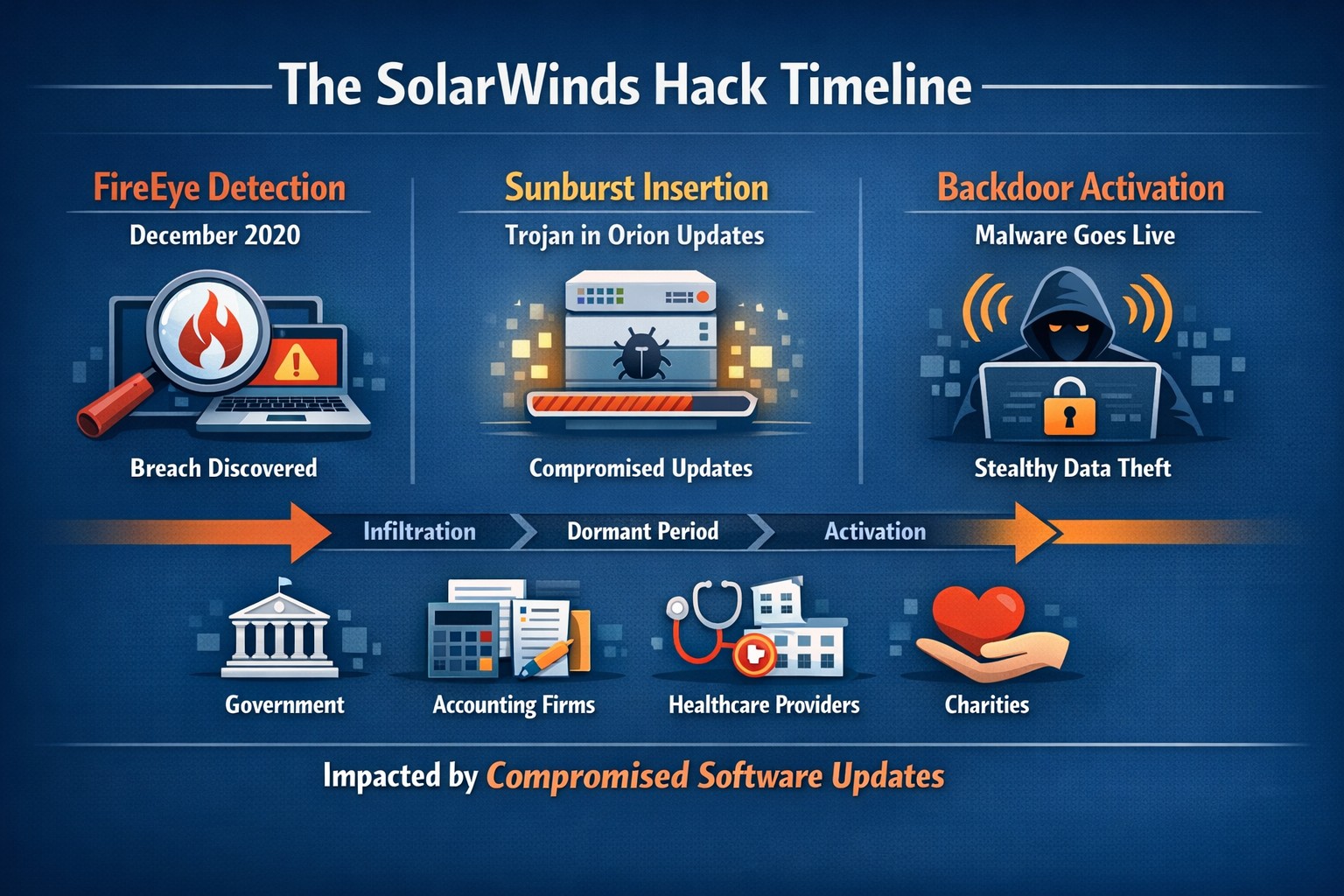
Timeline of the stealthy SolarWinds supply chain breach
We feel the need to make a full disclosure about the recent news of a hack of Solarwinds since we use the Solarwinds Remote Monitoring and Maintenance platform to manage our monthly clients. Based on a cyber incident write-up by FireEye, an enterprise security research firm, Solarwinds had one of their software packages called Orion compromised by files included in update files. This attack has effected many large organizations including many governmental agencies and larger firms worldwide. The software under attack is used by these larger organizations to monitor the performance of their networks even across multiple locations. This software is completely different from the product that we use and we have been assured by Solarwinds that no compromise of the Remote Monitoring and Maintenance platform has occurred.
We continue business as usual including allowing users to use this platform for remote access to their business. We continue to add further automation into the system to better monitor and maintain your networks and computers.
If your company is going to use full disk encryption or has compliance requirements that you need consulting for, then contact us for assistance.
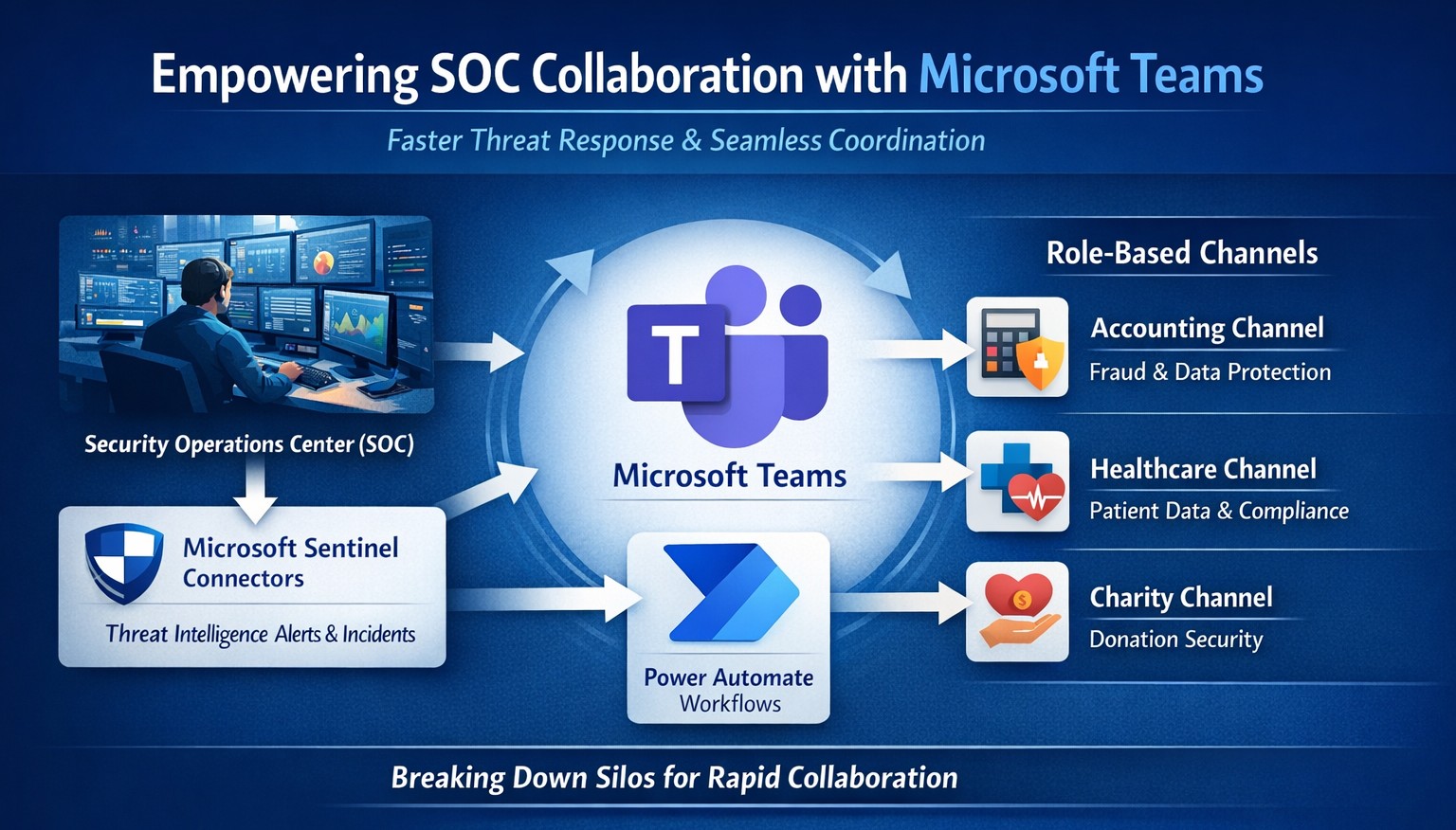
Seamless SOC-Teams coordination reduces incident response time—key steps visualized for business owners.
Security Operations Centers (SOC) must respond faster than ever, but silos between security teams and daily operations slow you down. Integrating SOC workflows with Microsoft Teams empowers real-time coordination, reducing response times by up to 50% and protecting your bottom line from breaches that cost small businesses millions annually.
Why SOC-Teams Integration Matters
Security Operations Centers monitor threats 24/7, but without seamless communication, alerts get lost in email chains or disjointed tools. Microsoft Teams acts as a unified hub, enabling SOC analysts to notify IT, executives, and even HR instantly during incidents. This cross-functional approach breaks down silos, as seen in best practices where unified platforms cut incident resolution time. For business owners, this means less downtime and stronger compliance in regulated industries like accounting and healthcare.
Practical Action Steps
Follow these targeted steps to empower your SOC with Teams integration. Involve your IT department early for smooth rollout.
Assess Current Setup: Audit your SOC tools (e.g., SIEM like Microsoft Sentinel) and Teams usage. Identify key channels for alerts, such as #soc-incidents or #threat-response.
Deploy Microsoft Sentinel Connector: In the Microsoft Sentinel portal, enable the Teams connector under Content Hub. This pipes SOC alerts directly into Teams channels with rich notifications including threat details and severity.
Configure Automation Workflows: Use Power Automate to create flows triggering Teams messages on high-priority alerts. For example, auto-post “Critical phishing detected—quarantine user X” with actionable buttons for IT to isolate systems.
Set Up Role-Based Channels: Create private Teams channels for SOC-IT coordination and executive summaries. Integrate bots for real-time querying, like “/threat status” pulling live SOC data.
Train and Test: Run tabletop exercises simulating ransomware. Train staff on responding via Teams, then measure metrics like mean-time-to-respond (MTTR) pre- and post-integration.
Monitor and Iterate: Use Teams analytics and SOC dashboards to track engagement. Adjust based on false positives or delays, ensuring continuous improvement.
These steps typically take 2-4 weeks, minimizing disruption while boosting efficiency.
FAQ: Client Inquiries Answered
Q: Is this integration secure for sensitive data? A: Yes—Teams uses enterprise-grade encryption and compliance with GDPR, HIPAA. SOC data shares only via authenticated channels, with audit logs for traceability.
Q: What if we lack an in-house SOC? A: Start with managed detection and response (MDR) services that integrate with Teams, scaling as your business grows without full-time hires.
Q: How much does it cost? A: Core features use existing Microsoft 365 E5 licenses (~$57/user/month). Sentinel adds $5-10/GB ingested data. ROI comes from averting breaches averaging $4.5M.
Q: Can it handle hybrid work? A: Absolutely—Teams supports mobile/desktop, ensuring remote SOC analysts coordinate with on-site IT seamlessly.
Q: What about non-Microsoft tools? A: Use APIs or third-party connectors (e.g., Splunk to Teams webhooks) for flexibility.
How Farmhouse Networking Helps
Farmhouse Networking specializes in tailored integrations for accounting, healthcare, and charity sectors, driving organic traffic and B2B leads through secure, SEO-optimized solutions. We handle full SOC-Teams setup, from Sentinel deployment to custom Power Automate flows, ensuring your IT team focuses on core ops. Our expertise includes vulnerability assessments, compliance audits, and branded websites that convert visitors into clients. Past projects reduced MTTR by 40% for similar businesses.
Call to Action
Ready to empower your SOC with Teams and safeguard your operations? Email support@farmhousenetworking.com today for a free consultation on streamlining your security.
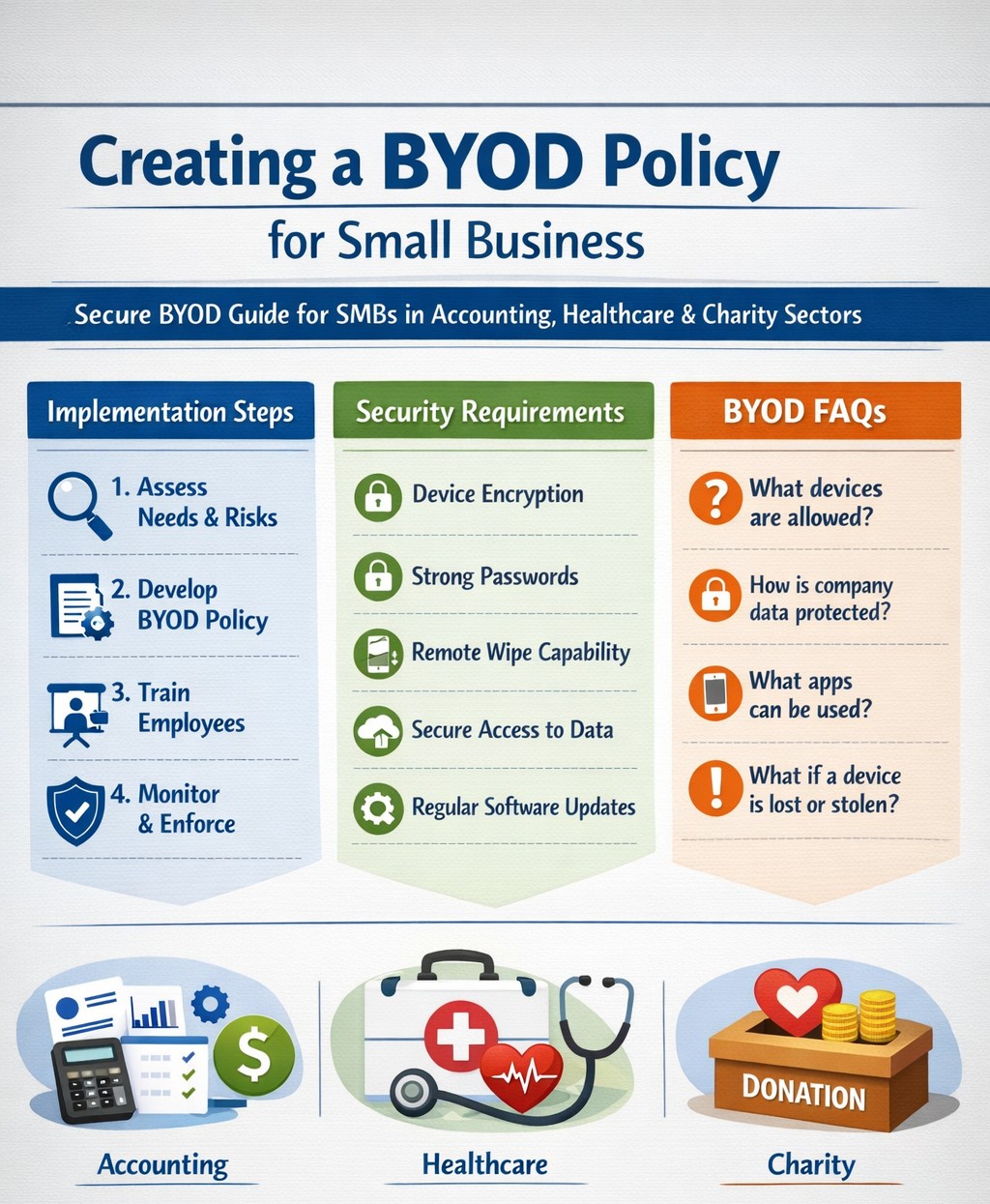
Step-by-step BYOD policy checklist for small businesses – protect data and cut costs with our proven guide.
Allowing employees to use personal devices for work—known as Bring Your Own Device (BYOD)—can cut hardware costs by up to 50% and boost productivity, but it exposes your data to risks like breaches if unmanaged. This guide provides actionable steps to craft a secure BYOD policy tailored for your operations.
Why BYOD Matters for Your Business
BYOD lets employees work flexibly on familiar devices, ideal for small teams in accounting, healthcare, or nonprofits where agility drives growth. Without a policy, however, you risk data leaks, compliance violations (e.g., HIPAA for healthcare), and lost productivity from IT issues. A strong policy balances these by defining rules upfront.
Key Components of Your BYOD Policy
Include these essentials to protect your business:
Data Separation: Use Mobile Device Management (MDM) to isolate work apps from personal data.
Acceptable Use: Limit work access to business hours unless approved; ban risky sites or app syncing.
Onboarding/Offboarding: Detail enrollment (e.g., MDM install) and exit processes (remote wipe of company data only).
Privacy and Liability: Clarify monitoring rights, employee data protection, and who covers repairs.
Step-by-Step Implementation Guide
Follow these practical actions with your IT team or provider:
Assess Needs: Audit current devices and risks; define goals like cost savings or remote access. Involve legal for compliance.
Draft Policy: Write in plain language (1-2 pages); include templates for consent forms. Get employee/legal buy-in.
Choose Tools: Select MDM like Microsoft Intune or Jamf (under $10/user/month for small biz); enable remote wipe and app controls.
Train Staff: Host 30-minute sessions on setup, phishing, and policy rules; provide FAQs and setup guides.
Pilot Test: Roll out to 5-10 users for 2 weeks; gather feedback on issues like battery drain.
Launch and Monitor: Enforce via automated alerts; review quarterly for updates (e.g., new OS threats).
Offboard Securely: Automate access revocation on employee exit; test wipes.
Step
Owner
Timeline
Tools Needed
Assess Needs
Business Owner
1 week
Risk checklist
Draft Policy
IT/Owner
1-2 weeks
Word template
Pilot Test
IT Team
2 weeks
MDM trial
Review
All
Quarterly
Audit logs
FAQs: Client Questions Answered
Q: Does BYOD work for regulated industries like accounting or healthcare? A: Yes, with MDM for data isolation and compliance features (e.g., audit logs for HIPAA/SOX). Avoid full wipes; use containerization.
Q: What if an employee loses their device? A: Policy requires immediate IT report; MDM enables remote lock/wipe of company data only, preserving personal files.
Q: How much does MDM cost for 10 users? A: $5-15/user/month; free tiers exist for basics, scaling with features like geofencing.
Q: Can I monitor personal apps? A: No—focus on company data only to respect privacy laws; disclose monitoring in policy.
Q: What about support for personal devices? A: Limit to work apps; charge for hardware fixes or outsource to MSPs.
How Farmhouse Networking Helps
Farmhouse Networking specializes in BYOD setups for accounting, healthcare, and charity sectors, handling policy drafting, MDM deployment, and training to drive secure organic growth. We integrate SEO-optimized client portals and lead-gen tools, ensuring compliance while converting visitors to B2B clients. Our custom strategies cut implementation time by 40% via automated audits.
Call to Action
Ready to secure your BYOD policy and scale efficiently? Email support@farmhousenetworking.com today for a free policy audit and personalized strategy.
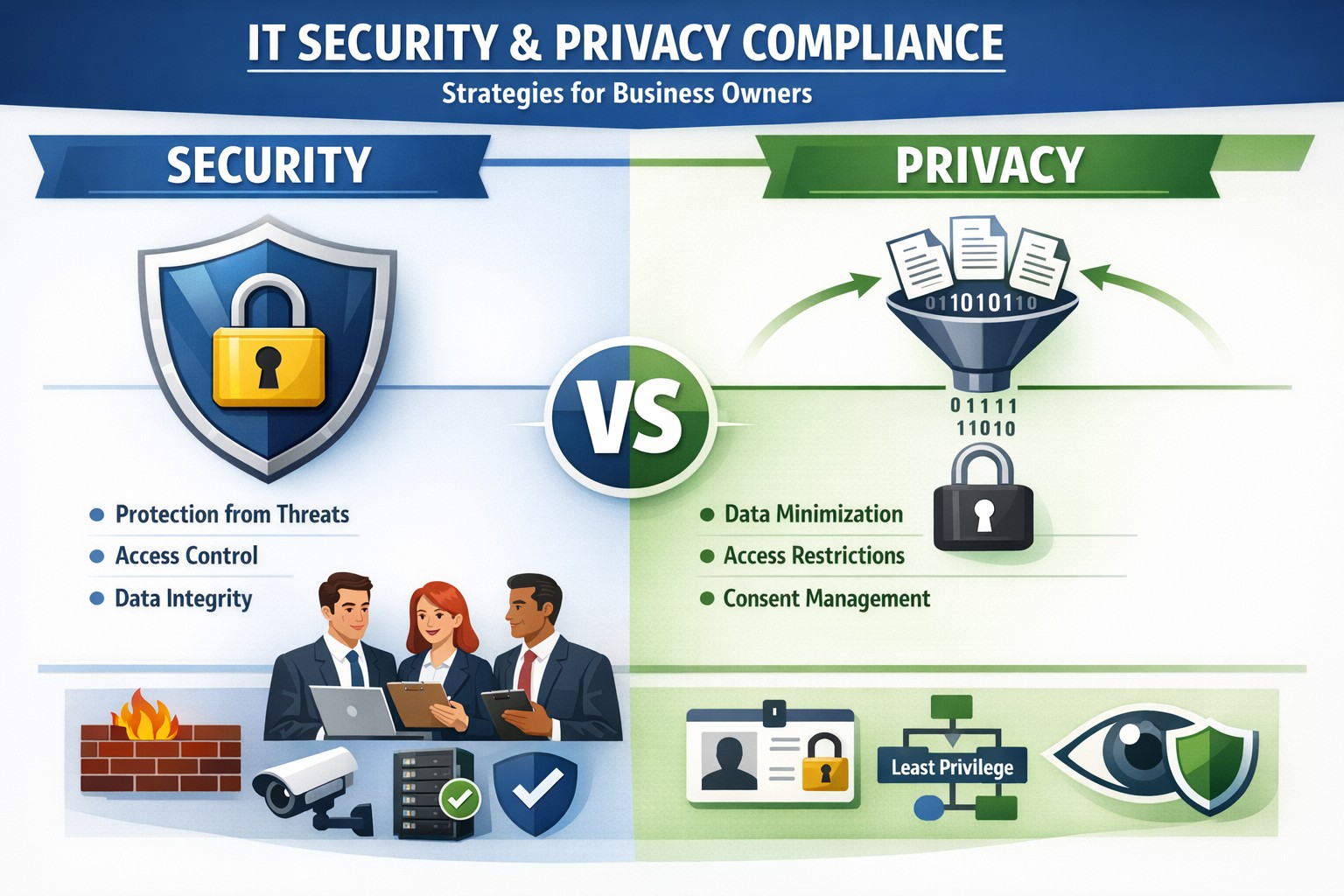
Security locks down access; privacy controls usage—both essential for business data protection.
Many business owners assume that if their data is secure, it’s also private. Unfortunately, that assumption is both costly and dangerous. Security is not privacy—and understanding the difference could mean the survival of your business in an age of relentless breaches, compliance audits, and customer scrutiny.
Security vs. Privacy: What’s the Difference?
Let’s break this down in plain terms:
Security is about protecting data from unauthorized access, theft, or damage. It involves firewalls, encryption, antivirus systems, and strict access control.
Privacy, on the other hand, is about controlling how data is used, shared, or sold—even if it’s technically “secure.” It defines who can see what and why.
Think of it this way: building a lock on your front door is security. Deciding who gets a key—and what they can do inside—is privacy. You need both to protect your business reputation, client trust, and compliance with laws like HIPAA, GDPR, or the CCPA.
Why Businesses Can’t Afford to Confuse Security and Privacy
Failing to distinguish between the two often leads to:
Compliance penalties. Many regulations now focus on privacy controls, not just security infrastructure.
Reputation damage. Customers care deeply about how you handle their data—not just whether it’s encrypted.
Internal risk. Employees with overly broad access can accidentally or intentionally misuse private client data.
For example, a healthcare provider may have state-of-the-art cybersecurity tools, but if patient data is shared without explicit consent, that’s a privacy breach—and legally actionable.
Practical Steps to Protect Both Security and Privacy
Here are key actions every business owner and IT department should take:
Map your data flows. Identify what sensitive data you collect, where it’s stored, and who has access. This forms the foundation of an effective privacy program.
Establish data-use policies. Create clear internal rules for how customer and employee data can be accessed, shared, and retained.
Implement least-privilege access controls. Limit system access to only those who need it for their role. Review permissions regularly.
Train your team. Human error remains the leading cause of breaches. Conduct ongoing security and privacy awareness training tailored to your staff.
Perform audits. Conduct periodic compliance and security audits to catch and correct gaps before regulators or hackers do.
Partner with experts. Small to mid-sized businesses often lack internal resources to manage both privacy governance and IT security at scale. That’s where a managed IT partner like Farmhouse Networking comes in.
Common Questions Business Owners Ask
Q: Isn’t data encryption enough to protect customer privacy? A: No. Encryption protects data from unauthorized access (security), but privacy requires policies that dictate who is authorized in the first place, why they can view data, and how it is used.
Q: Do small businesses really need privacy policies? A: Absolutely. Privacy isn’t just a corporate concern anymore. Even small firms now collect sensitive client information—emails, payment data, medical details, or demographics. If that data is mishandled, it can lead to fines or lawsuits.
Q: What’s the best first step if I’ve never had a privacy audit? A: Start by reviewing your data-handling processes. Determine where personal data lives, how it’s shared, and whether your systems meet relevant regulations. A technology partner like Farmhouse Networking can assist with this process, ensuring both technical and legal compliance.
How Farmhouse Networking Helps You Protect Both Fronts
At Farmhouse Networking, we specialize in helping business owners close the gap between IT security and privacy compliance.
Our tailored solutions include:
Privacy and data protection assessments.
Secure network configuration and monitoring.
Identity and access management (IAM) controls.
Staff training for both cybersecurity and privacy best practices.
Ongoing compliance reporting and audit preparation.
By combining practical security tools with thoughtful privacy governance, we help you create a data environment that safeguards both your business and your customers’ trust.
Take Action Today
Don’t wait for a breach or audit to learn the difference between privacy and security. Protect your data, your customers, and your company’s reputation today.
➡ Email support@farmhousenetworking.com to schedule a consultation and discover how our experts can help you implement privacy-focused security strategies that fit your organization’s needs.
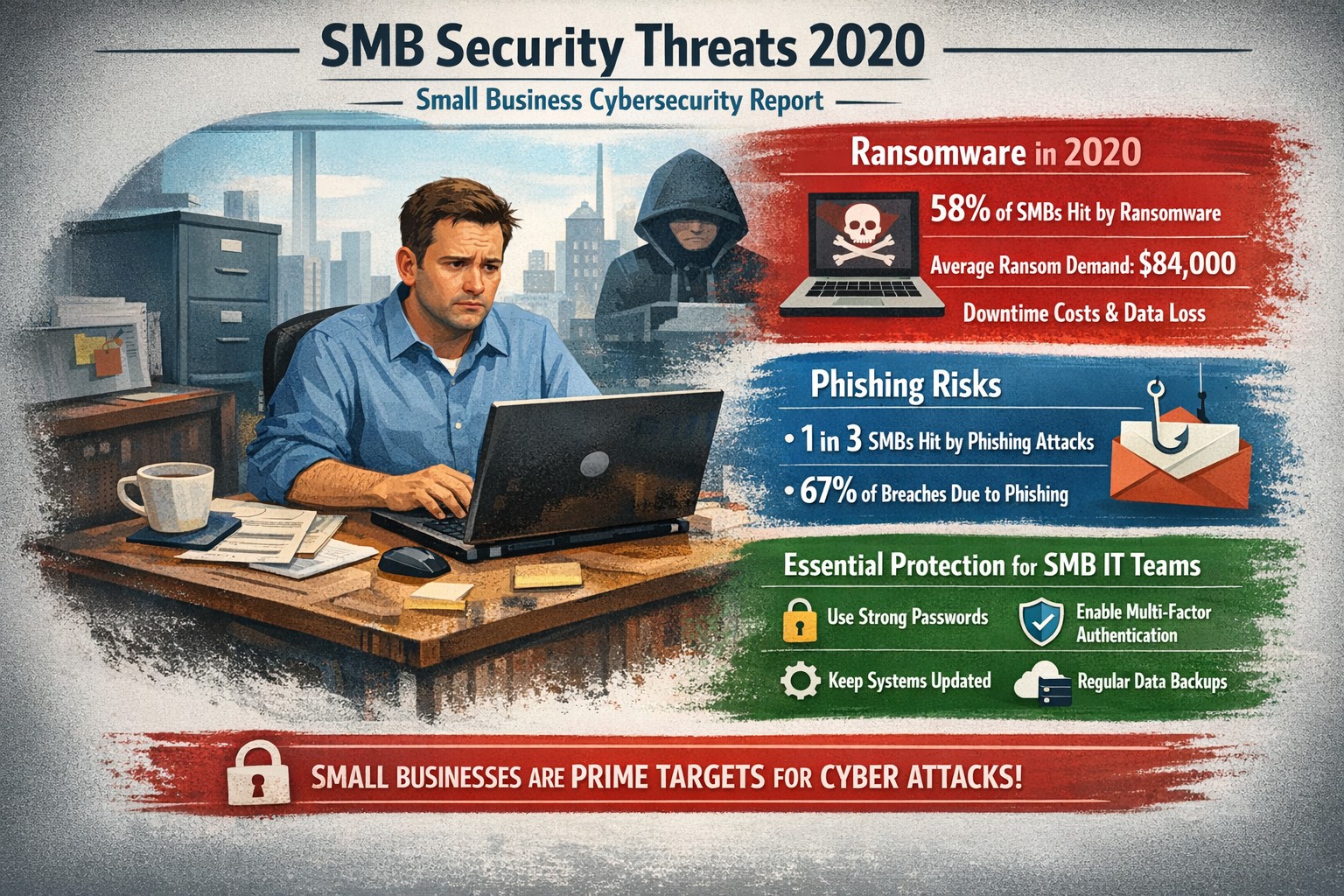
Visualizing SMB cybersecurity risks from 2020: Protect your small business from ransomware and breaches today.
You faced unprecedented cybersecurity threats amid the COVID-19 shift to remote work, with MSMEs targeted in over 40% of attacks and average losses exceeding $188,000 per incident. Cybercriminals exploited rushed digital transitions, making your operations a prime target. This post breaks down the 2020 landscape and arms you with actionable steps to safeguard your future.
Key Threats in 2020
Small and mid-size businesses (SMBs) saw ransomware hit one in five firms, phishing emails surge to three-year highs, and remote work vulnerabilities expose networks outside firewalls. Hiscox’s 2018-2020 reports showed 73% of SMBs as “novice” in preparedness, with IBM noting average breach costs at $320,000—devastating for limited budgets. Supply chain attacks via weaker SMB links amplified risks during lockdowns.
Practical Action Steps
Implement these prioritized steps with your IT team to build resilience:
Update and Patch Immediately: Scan all software weekly; apply updates to close vulnerabilities exploited in 43% of breaches.
Enforce Multi-Factor Authentication (MFA): Require MFA on all accounts, reducing unauthorized access by 99%—start with email and VPNs.
Secure Remote Access: Use VPNs for all remote connections; segment networks to limit breach spread, critical as work-from-home spiked risks.
Train Employees Monthly: Conduct phishing simulations; 2020 data showed small firms received higher malicious email rates.
Backup Data Regularly: Maintain offline backups tested quarterly; this contained ransomware damage for prepared SMBs.
Adopt Basic Tools: Deploy firewalls, antivirus, and endpoint detection—affordable for SMBs lacking full IT staff.
Track progress with a simple checklist, assigning owners and deadlines.
FAQ: Client Inquiries Answered
Q: Why were SMBs hit hardest in 2020? A: Limited resources left many without robust defenses; attackers viewed SMBs as easy entry to bigger supply chains.
Q: How much does a breach really cost my business? A: Beyond $188,000-$320,000 direct losses, add downtime, legal fees, and reputation damage—often forcing closures.
Q: Do I need expensive enterprise solutions? A: No—start with free tools like MFA and patches; scale to managed services for comprehensive coverage.
Q: What about compliance for my industry? A: Accounting/healthcare/charity sectors faced heightened scrutiny; align with NIST basics or HIPAA equivalents via policy reviews.
Q: How do I measure if we’re secure? A: Run annual self-assessments like ICC’s questionnaire; aim to exit “novice” status.
How Farmhouse Networking Helps
Farmhouse Networking specializes in tailored security for accounting, healthcare, and charity SMBs, driving organic traffic and B2B leads through secure, SEO-optimized sites. We handle implementation: deploying MFA/VPNs, running trainings, and monitoring 24/7 via managed services—reducing your breach risk without in-house IT overhead. Our strategies include vulnerability scans, compliance audits, and custom backups, proven to cut attack surfaces. Past clients saw 40% faster threat response, boosting client trust and conversions.
Call to Action
Ready to fortify your business against 2020-style threats? Email support@farmhousenetworking.com today for a free security assessment and custom plan.
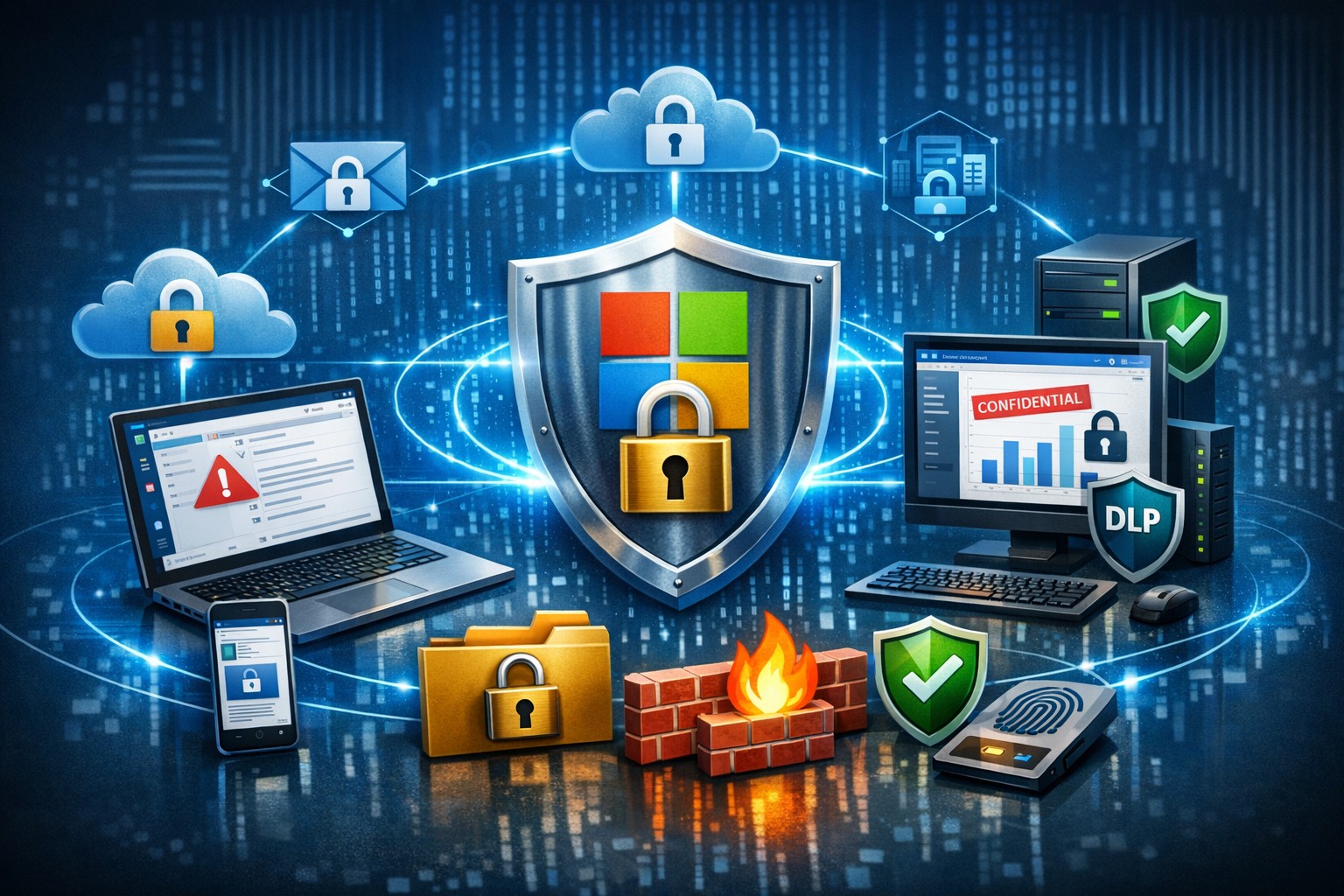
Microsoft 365 dashboard showing data protection across apps, devices, and endpoints—encrypt, prevent loss, stay compliant.
A single data breach can cost millions in losses, legal fees, and lost trust. Microsoft 365 provides robust, built-in tools to protect your company data across Exchange, Teams, OneDrive, SharePoint, and endpoints, ensuring security without disrupting productivity.
Key Microsoft 365 Protection Features
Microsoft 365 employs a defense-in-depth approach with encryption at rest and in transit using AES-256 standards, safeguarding data in cloud storage and during transfers. Data Loss Prevention (DLP) scans for sensitive info like financial data or PII across apps, blocking unauthorized shares in real-time. Additional layers include Microsoft Defender for phishing/malware defense, Azure AD for identity protection with MFA, and Purview for compliance labeling.
Practical Action Steps
Follow these steps with your IT team to implement protection quickly.
Enable Multi-Factor Authentication (MFA): In the Microsoft 365 admin center, go to Security > Authentication methods. Roll out to admins first, then all users—MFA blocks 99.9% of account compromises.
Configure DLP Policies: Navigate to Microsoft Purview > Data loss prevention. Create policies for sensitive data types (e.g., credit cards, health records) across Exchange, Teams, and OneDrive; test in audit mode before blocking.
Set Up Encryption and Labeling: Use Azure Information Protection to label files/emails as “Confidential.” Enable at-rest encryption (default) and transport rules for outbound emails.
Deploy Endpoint Protection: Integrate Microsoft Intune for device compliance—enforce policies like secure boot and BitLocker. Run Secure Score in the admin center to prioritize fixes.
Conduct Audits and Training: Review Unified Audit Logs weekly via Purview. Launch phishing simulations with Defender and train staff quarterly on recognizing threats.
Backup Critical Data: Supplement with retention policies, but add third-party backups for Teams/OneDrive as Microsoft retention isn’t full recovery.
These steps take 1-2 weeks for a small team and scale with business growth.
FAQ: Client Inquiries Answered
How does Microsoft 365 protect data on employee mobile devices? Intune manages apps/devices with conditional access, ensuring only compliant devices access data; it enforces encryption and remote wipe if lost.
Is DLP enough for healthcare/accounting compliance? Yes for HIPAA/GDPR basics via predefined templates, but customize policies and audit logs for audits; pair with insider risk tools in Purview.
What if we have hybrid/on-prem systems? Microsoft 365 integrates via Azure AD Connect for unified identity/security; extend DLP to on-prem Exchange with hybrid agents.
How much does advanced security cost? Core features are in E3/E5 plans; Defender/Advanced Threat Protection requires E5 or add-ons (~$5-12/user/month).
Can we recover deleted data? OneDrive/SharePoint offer 93-day retention; eDiscovery holds data longer. Full backups recommended beyond defaults.
How Farmhouse Networking Helps
Farmhouse Networking specializes in Microsoft 365 security for accounting, healthcare, and charity sectors, driving organic traffic via SEO-optimized blogs while converting visitors to B2B clients. We handle full implementation: assessing your Secure Score, deploying DLP/Intune, training staff, and optimizing branding/SEO for lead gen. Our custom strategies ensure compliance (e.g., HIPAA for healthcare), reduce breach risks by 80%+, and boost customer experience with zero-downtime setups. Past clients saw 40% traffic growth from secure, branded sites.
Ready to protect your data? Email support@farmhousenetworking.com for a free Microsoft 365 security audit and personalized strategy.
Strategic planning builds confidence in your company’s ability to recover from any data breach.
A data breach isn’t just an IT problem — it’s a leadership test. When sensitive information falls into the wrong hands or your systems go down, your organization’s credibility and resilience are on the line. The question every business owner should ask isn’t if a breach could happen, but how ready are we to recover when it does?
Cybersecurity confidence isn’t built overnight. It comes from preparation, policies, and partnerships designed to protect business operations long before a hacker strikes. Let’s look at the key actions every business leader needs to take to ensure their company can bounce back swiftly and securely.
Step 1: Create (and Test) a Data Breach Response Plan
A written incident response plan is the backbone of breach preparedness. It should clearly define:
Who leads the response effort — including IT, HR, legal, and communications.
Which systems are most critical to restore first.
How to notify affected clients, vendors, and regulatory authorities.
How often to review and test the plan (at least twice per year).
Running tabletop simulations helps ensure your team reacts calmly and effectively under pressure. Confidence grows through repetition — not theory.
Step 2: Back Up and Protect Mission‑Critical Data
Your business should maintain secure, versioned backups stored both onsite and in the cloud. Regularly verify that restorations actually work — many businesses discover backup failures only after a breach.
Use layered protections: encryption, multi‑factor authentication, and least‑privilege access. By separating sensitive client and financial data from general systems, you limit exposure and reduce recovery times.
Step 3: Build a Culture of Security Awareness
Technology alone can’t stop phishing or social‑engineering attacks. Train employees to identify suspicious links, unusual requests, and fake login screens. Encourage staff to report incidents without fear of reprisal — early detection is critical to limiting damage.
When every team member sees themselves as part of the security perimeter, recovery time drops significantly.
Step 4: Evaluate Cyber Insurance and Compliance
Cyber liability insurance can offset the financial impact of investigations, legal fees, and client notifications. Ensure your policy covers restoration costs and business interruption.
Also, verify compliance with industry regulations — for healthcare (HIPAA), financial services (GLBA), or nonprofits handling donor data. Knowing where you stand legally improves confidence during breach response and reporting.
Step 5: Partner With a Trusted IT Team
Most small and midsize businesses can’t maintain an internal 24/7 cybersecurity unit — and that’s okay. A proactive IT partner like Farmhouse Networking can monitor systems, detect intrusions, patch vulnerabilities, and guide you through post‑breach recovery.
Their experts specialize in risk assessments, compliance strategies, and disaster recovery planning tailored to your organization’s real‑world needs.
Questions Business Owners Often Ask
Q: How soon should I respond after a breach? A: Immediately. Containment during the first 24 to 48 hours is critical to prevent further compromise. Your IT team should isolate affected systems, preserve logs, and begin forensic analysis.
Q: Do I have to notify my clients? A: In most cases, yes. Many state privacy laws and industry regulations require prompt notification of affected parties. Transparency also helps rebuild trust.
Q: What if I don’t have a formal response plan yet? A: You’re not alone — many small businesses don’t. Start by working with a security expert to develop one that fits your scale and operations. Farmhouse Networking can help you create and test this plan efficiently.
Q: How can I measure my recovery readiness? A: Request a cybersecurity assessment. It benchmarks your preparedness across policies, technologies, and training — identifying gaps before they become major problems.
How Farmhouse Networking Helps Businesses Recover and Prepare
At Farmhouse Networking, we understand that a breach response is more than fixing systems — it’s about restoring confidence. Our data recovery and cybersecurity services include:
24/7 system monitoring and threat response.
Managed backups with rapid restoration testing.
Compliance assessments for regulated industries.
Employee training programs on cybersecurity awareness.
Customized breach recovery and incident response plans.
We turn uncertainty into preparedness, allowing you to focus on growth instead of risk.
Your Next Step
The cost of downtime and lost trust far outweighs the investment in prevention. Start by asking: If we were breached tomorrow, could we recover smoothly?
If that answer isn’t a confident “yes,” it’s time to act. Email support@farmhousenetworking.com to learn how Farmhouse Networking can strengthen your breach recovery plan and keep your business resilient and secure.
And God will generously provide all you need. Then you will always have everything you need and plenty left over to share with others. As the Scriptures say,
“They share freely and give generously to the poor. Their good deeds will be remembered forever.”
For God is the one who provides seed for the farmer and then bread to eat. In the same way, he will provide and increase your resources and then produce a great harvest of generosity in you. - 2 Corinthians 9:8-10
We use cookies to ensure that we give you the best experience on our website. If you continue to use this site we will assume that you are happy with it.