Microsoft Will Soon End Support for Windows 7. Now What?
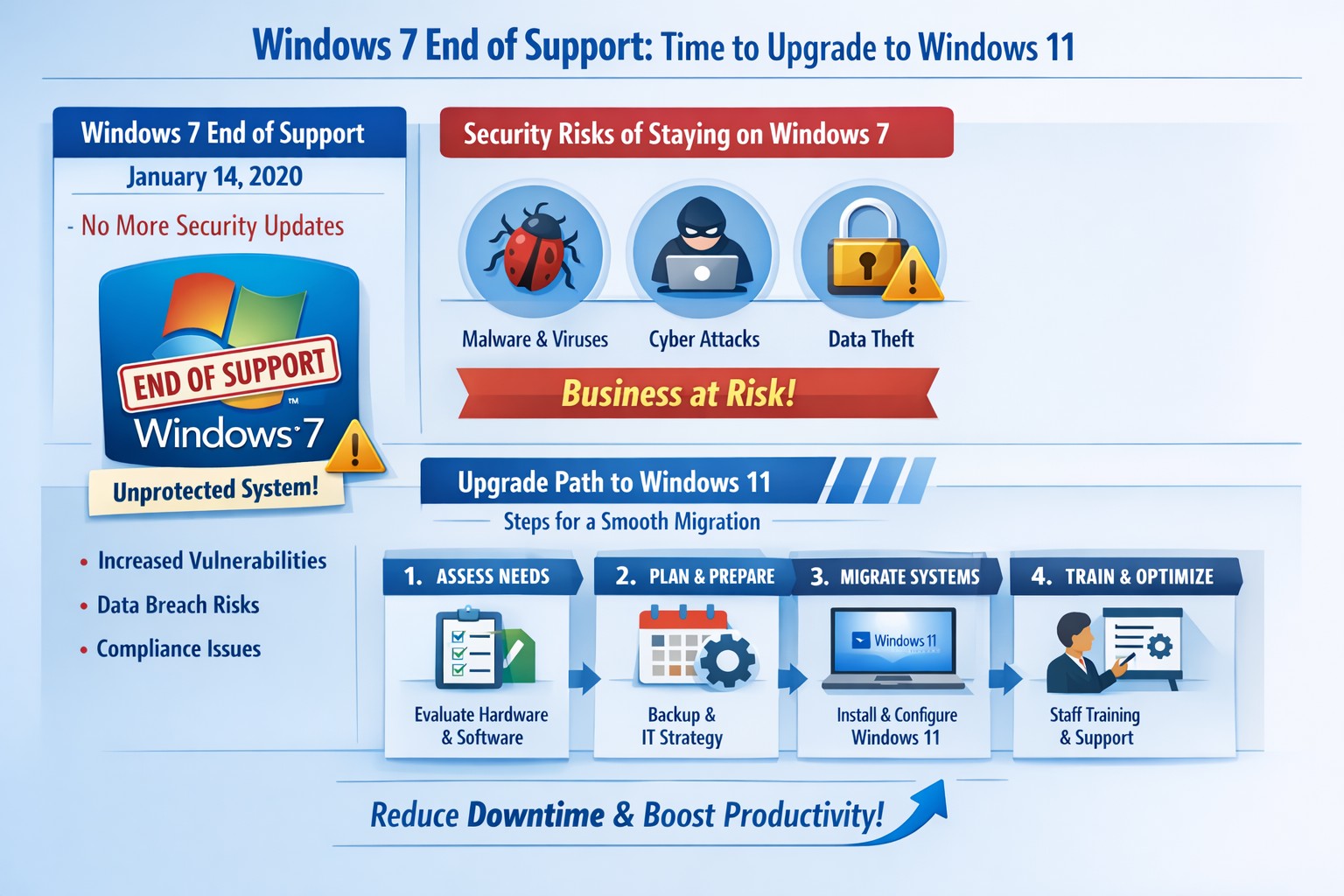
Infographic: Key steps to migrate from Windows 7 end of support, minimizing risks for accounting, healthcare, and charity businesses.
Windows 7 support officially ended years ago, but many businesses still run legacy systems, exposing them to severe security risks and compliance issues. As a business owner, ignoring this leaves your operations vulnerable to cyberattacks that target unpatched vulnerabilities—hackers know exactly when support lapses.
Business Risks
Continued use of Windows 7 means no more Microsoft security updates, making systems prime targets for malware, ransomware, and exploits. Third-party software and hardware vendors will drop compatibility, leading to functionality failures and forced hardware upgrades. Non-compliance with regulations like GDPR, HIPAA, or PCI DSS could trigger fines, especially in accounting, healthcare, and charity sectors.
Practical Action Steps
Follow these steps with your IT department to migrate securely:
Inventory Systems: Audit all devices for Windows 7 usage. Use tools like Microsoft’s PC Health Check or scripts to scan networks—prioritize critical machines handling client data.
Backup Data: Perform full backups to encrypted, offsite storage. Test restores to ensure integrity before any changes.
Upgrade or Replace: Assess hardware; pre-2015 PCs may not support Windows 11. Upgrade eligible systems to Windows 10/11 or deploy new hardware with modern OS. Budget for this: expect $500–$1500 per workstation.
Test Compatibility: Run applications in a sandboxed environment on the new OS. Switch incompatible software to cloud alternatives like Microsoft 365.
Deploy Security: Install endpoint protection, enable multi-factor authentication, and patch all systems post-migration.
Train Staff: Schedule sessions on new interfaces to minimize downtime—aim for under 4 hours per user.
Step
Timeline
Responsible Party
Inventory
1 week
IT Admin
Backup
Ongoing
IT + Owner
Upgrade/Test
2–4 weeks
IT Department
Deploy/Train
1 week
Full Team
FAQs for Client Inquiries
Q: Can I pay for extended Windows 7 support? A: Microsoft’s Extended Security Updates (ESU) ended in 2023; no options remain. Migration is mandatory.
Q: What if my accounting software doesn’t work on Windows 11? A: Most vendors (e.g., QuickBooks) support Windows 11. Test via vendor trials; cloud versions bypass OS issues entirely.
Q: How much will this cost my small business? A: $1000–$5000 for a 5-PC setup, including hardware. Delaying increases breach costs exponentially—average ransomware payout hit $1.5M in 2025.
Q: Is Windows 10 safe long-term? A: Support ends October 2025; plan for Windows 11 now to avoid repeat issues.
Q: What about healthcare/charity compliance? A: HIPAA/PCI violations start immediately on unsupported OS. Migrate to audited, compliant systems.
How Farmhouse Networking Helps
Farmhouse Networking specializes in seamless Windows migrations for accounting firms tracking finances, healthcare providers securing PHI, and charities managing donor data. We conduct free audits, handle inventory-to-deployment, and optimize for SEO-driven websites that convert IT leads into long-term B2B clients. Our custom strategies include branded cloud setups, lead-gen automation, and 24/7 monitoring—reducing downtime by 90% and boosting security scores. Past clients saw 25% organic traffic growth post-migration via content-optimized sites.
Ready to secure your business? Email support@farmhousenetworking.com for a no-obligation audit and personalized migration plan. Act now—before a breach does.
And God will generously provide all you need. Then you will always have everything you need and plenty left over to share with others. As the Scriptures say,
“They share freely and give generously to the poor. Their good deeds will be remembered forever.”
For God is the one who provides seed for the farmer and then bread to eat. In the same way, he will provide and increase your resources and then produce a great harvest of generosity in you. - 2 Corinthians 9:8-10
We use cookies to ensure that we give you the best experience on our website. If you continue to use this site we will assume that you are happy with it.